<?xml version="1.0" encoding="UTF-8"?>

<feed xmlns="http://www.w3.org/2005/Atom">
  <title>Kitty Giraudel</title>
  <subtitle>I’m Kitty Testing, a non-binary web developer based in Virginia, focused on accessibility and inclusivity.</subtitle>
  <link href="https://portfolio-kittygiraudel.vercel.app/rss/index.xml" rel="self" type="application/atom+xml" />
  <link href="https://portfolio-kittygiraudel.vercel.app" rel="alternate" type="text/html" />
  <author>
    <name>Kitty Giraudel</name>
  </author>
  <updated>2021-07-29T12:13:32Z</updated>
  <generator>11ty</generator>
  <id>https://portfolio-kittygiraudel.vercel.app/</id>
  
  
  <entry>
    <title>Resolving Webpack aliases in Node</title>
    <link href="https://portfolio-kittygiraudel.vercel.app/2021/06/04/resolving-webpack-aliases-in-node/" />
    <published>2021-06-04T00:00:00Z</published>
    <id>https://portfolio-kittygiraudel.vercel.app/2021/06/04/resolving-webpack-aliases-in-node/</id>
    
    <content type="html"><![CDATA[<p>Say you have a project bundled with Webpack. And to avoid playing the relative path game, you use <a href="https://webpack.js.org/configuration/resolve/">Webpack aliases</a> so you can import files from anywhere, always based on the root of your project. It might look something like this:</p>
<pre class="language-js"><code class="language-js"><span class="token keyword">import</span> myHelper <span class="token keyword">from</span> <span class="token string">'~/helpers/myHelper'</span></code></pre>
<div class="Info"><p>Sometimes, another prefix is used in place of <code>~/</code> such as <code>@</code> sign or something more fancy. We used a tilde because it kind of means “home” or “root”, so it felt nice.</p>
</div>
<p>In our case, we have some Node scripts we use in our continuous deployment pipelines, which need to import modules from the project. Things like helpers or constants. The problem is that these aliased paths only really work because Webpack processes them. When going through Node only, they don’t exist and the whole thing crashes.</p>
<pre><code>internal/modules/cjs/loader.js:883
  throw err;
  ^

Error: Cannot find module '~/helpers/myHelper'
Require stack:
</code></pre>
<p>I played with a few solutions until I stumbled upon the <a href="https://github.com/ilearnio/module-alias">module-alias</a> npm package, which essentially monkey-patches the Node resolution algorithm to make it understand whatever you like.</p>
<p>So at the top of our scripts (in the <code>bin</code> folder in our case), we add the following line:</p>
<pre class="language-js"><code class="language-js"><span class="token function">require</span><span class="token punctuation">(</span><span class="token string">'module-alias'</span><span class="token punctuation">)</span><span class="token punctuation">.</span><span class="token function">addAlias</span><span class="token punctuation">(</span><span class="token string">'~'</span><span class="token punctuation">,</span> __dirname <span class="token operator">+</span> <span class="token string">'/../src'</span><span class="token punctuation">)</span><br><br><span class="token keyword">const</span> myHelper <span class="token operator">=</span> <span class="token function">require</span><span class="token punctuation">(</span><span class="token string">'~/helpers/myHelper'</span><span class="token punctuation">)</span><span class="token punctuation">.</span>default</code></pre>
<p>Job done, now our Node scripts can safely import files from our applications despite them being riddled with aliased paths.</p>
<p>Well, almost. There is still the problem that if you application uses <code>import</code> and <code>export</code> instead of <code>require</code> (which is quite likely when using Webpack), our script might be able to find our application files, but it’s going to chalk in any import statement within them.</p>
<pre><code>import anotherHelper from '~/helpers/anotherHelper'
^^^^^^
SyntaxError: Cannot use import statement outside a module
</code></pre>
<p>To make our Node scripts understand and process <code>import</code> and <code>export</code> statements, we use the <a href="https://github.com/standard-things/esm#readme">esm</a> module loader. It’s pretty transparent too: instead of doing <code>node script.js</code> we do <code>node -r esm script.js</code>.</p>
<p>That’s about it. No more duplicating code within our Node scripts just because they cannot import files from the main application. ✨</p>
]]></content>
    
  </entry>
  
  
  <entry>
    <title>Slack Guidelines</title>
    <link href="https://portfolio-kittygiraudel.vercel.app/2021/04/24/slack-guidelines/" />
    <published>2021-04-24T00:00:00Z</published>
    <id>https://portfolio-kittygiraudel.vercel.app/2021/04/24/slack-guidelines/</id>
    
    <content type="html"><![CDATA[<style>
@media (min-width: 700px) {
  .SlackGuidelines__image { 
    float: right;
    margin-top: 0;
    margin-left: 1em;
    max-width: 325px;
    border: 1px solid rgb(0 0 0 / 0.1);
  }
}
</style>
<p>My coworker <a href="https://twitter.com/anitas3791">Anita Singh</a> and I have been working on some Slack guidelines for <a href="https://gorillas.io">Gorillas</a> in order to encourage mindful behaviour and being respectful of everyone’s time in written communication.</p>
<p>A lot of you seemed interested in us publishing them, so here they are. They are not a verbatim copy of our company guidelines since ours are quite Gorillas-specific, and they should be generic enough to be taken in most organizations.</p>
<ul>
<li><a href="#setting-up-your-profile">Setting up your profile</a></li>
<li><a href="#creating-channels">Creating channels</a>
<ul>
<li><a href="#public-or-private">Public or private</a></li>
</ul>
</li>
<li><a href="#writing-at-the-right-place">Writing at the right place</a></li>
<li><a href="#notifying-people">Notifying people</a></li>
<li><a href="#writing-content">Writing content</a></li>
<li><a href="#when-not-to-use-slack">When not to use Slack</a></li>
<li><a href="#personally-identifiable-information">Personally-identifiable information</a></li>
</ul>
<h2 id="setting-up-your-profile" tabindex="-1">Setting up your profile</h2>
<p>In many organizations, Slack is the primary communication tool, even supplanting email. And in this day and age of global pandemic and ever-growing remote working culture, Slack is often the only way we have to know the people we work with.</p>
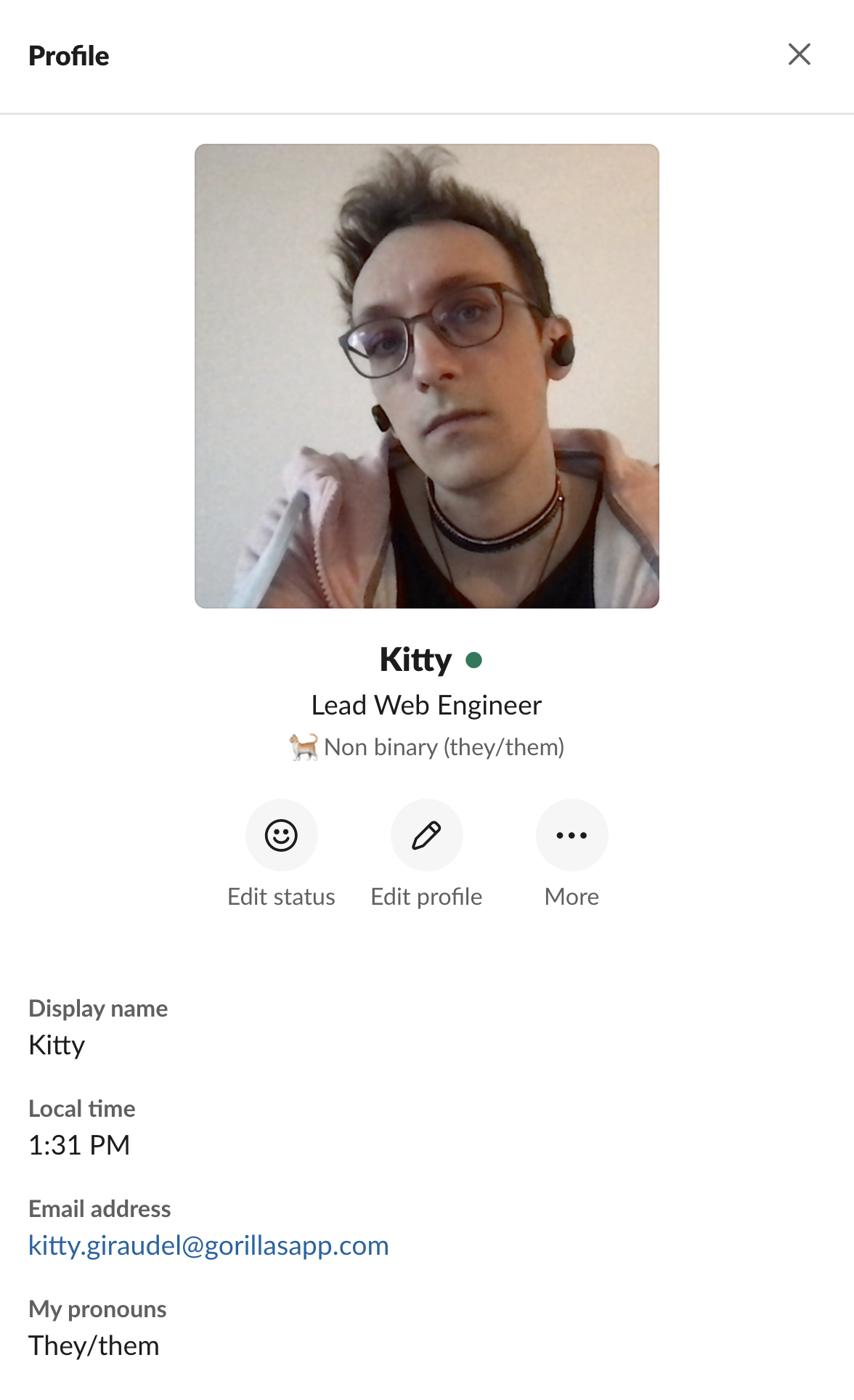
<img src="https://kittygiraudel.com/assets/images/slack-guidelines/profile.png" alt="Slack Profile of Kitty, showcasing their picture, their role and their pronouns." class="SlackGuidelines__image" />
<p>This is why it is important to fill your Slack profile.</p>
<ul>
<li>Name: Your full name, usually matching the company’s email address for convenience (e.g. Kitty Giraudel).</li>
<li>Display name: Your usual name or full name, used as Slack handle (e.g. Kitty).</li>
<li>Pronouns: <a class="Footnotes__ref" href="#pronouns-note" id="pronouns-ref" aria-describedby="footnotes-label" role="doc-noteref">Your pronouns</a> (e.g. they/them).</li>
<li>Profile photo: Anything that’s not the default Slack avatar, really.</li>
<li>Profession: Your role or team. In an organization with hundreds of thousands of people, it can be difficult to figure out who does what. Adding one’s profession to the profile really helps with perspective.</li>
</ul>
<div style="clear: both"></div>
<h2 id="creating-channels" tabindex="-1">Creating channels</h2>
<p>Slack has some <a href="https://slack.com/intl/en-de/help/articles/217626408-Create-guidelines-for-channel-names">official guidelines for creating channels</a>, which outline helpful suggestions around naming conventions and organization structure.</p>
<p>Before creating a channel however, ask yourself whether you need a new channel at all. While channels are cheap, they can also cause <em>Slack fatigue</em> where there are just too many of them, and keeping track of things becomes cumbersome. It can also lead to people constantly redirecting one another to a more appropriate channel, creating friction.</p>
<p>In tech organization, we tend to recommend avoid discipline-specific channels (such as #consumer-facing-ios, #consumer-facing-android, #consumer-facing-web…) and instead have one channel with all the relevant stakeholders. This encourages cross-discipline collaboration and lowers the risk of tribalism and discipline-centric attitude.</p>
<p>Once having created a new channel, set its description for sake of clarity, and open with an explanatory message about the purpose of the channel, and why/when people should use it.</p>
<div class="Info"><p>Unless there will be ongoing discussions about a unique topic, it might be preferable to use direct messages or group messages.</p>
</div>
<h3 id="public-or-private" tabindex="-1">Public or private</h3>
<p>Generally speaking, default to public when creating a channel. Private channels cannot be turned into public channels down the line, which means information within them will remain forever restricted—this should be intended for specific purposes only.</p>
<p>There certainly are cases where private channels should be used, such as discussing confidential topics (legal, leadership…), but most conversations should hopefully be quite open. This encourages transparency and reduces duplicated communication and information loss.</p>
<h2 id="writing-at-the-right-place" tabindex="-1">Writing at the right place</h2>
<p>Picking the right channel, especially where there are so many of them, can be tricky. It might be interesting to have a company-available document with some high-level overview of the Slack organization. For instance, every department or long-lasting team may have their own public channel for people to report issues or suggestions.</p>
<p>If there is a channel with stakeholders regarding a topic, it is best to post there so that everyone is in the loop and has access to the information. Reserve direct- or group-messaging when the conversation is short-lived and only pertains you and the person(s) you are messaging.</p>
<p>If you are posting something that will spark a discussion or replying to someone’s message, please start a thread or respond in a thread. This will minimize noise in channels and let people find content more easily.</p>
<h2 id="notifying-people" tabindex="-1">Notifying people</h2>
<p>As a rule of thumb, refrain from using <code>@channel</code>, unless absolutely required (like an urgent announcement for everyone). If getting people’s immediate attention is necessary, prefer using <code>@here</code> since it will only notify people currently online, which is often enough.</p>
<pre><code>❌ @channel Who can help me with setting up this tool for this afternoon?
✅ @here Who can help me with setting up this tool for this afternoon?
</code></pre>
<p>Even with <code>@here</code>, please be considerate and remember that it will notify everyone on the spot, which might disturb people, especially people with ADHD (Attention Deficit Hyperactivity Disorder).</p>
<pre><code>❌ @here I started drafting this document for us to keep track of things.
   Check it out when you have a chance.
✅ Hey team, I started drafting this document for us to keep track of things.
   Check it out when you have a chance.
</code></pre>
<p>Additionally, when referring to someone in a message, do not mention them unless they need to be aware of your message. (Thank you to <a href="https://twitter.com/peduarte/status/1384808764503740417?s=20">Pedro Duarte for the suggestion</a>!)</p>
<pre><code>❌ I discussed it with @Kitty and we think this is the proper way to go.
✅ I discussed it with Kitty and we think this is the proper way to go.
</code></pre>
<h2 id="writing-content" tabindex="-1">Writing content</h2>
<p>To help people figure out whether a conversation is relevant to them, it can be interesting to start messages (especially when long and requiring acknowledgement or action) with whom it is for, and what kind of urgency it is.</p>
<p>Similarly, the decision making process and important discussions happening over video calls should be summarized on Slack so everyone has access to the information.</p>
<h2 id="when-not-to-use-slack" tabindex="-1">When not to use Slack</h2>
<p>Slack is a fantastic tool and the way we work with one another. Yet, it shouldn’t be the tool for everything, especially considering the other services and softwares we use.</p>
<p>Here is a non-exhaustive list of things not to use Slack for:</p>
<ul>
<li>Requirement tracking: use the software management tool (e.g. Jira).</li>
<li>Documentation: use the documentation tool (e.g. Notion or Google Docs).</li>
<li>Very large text documents: use Google Docs (or similary).</li>
<li>Announcements that need to be persisted: use emails.</li>
<li>Complex and/or tabular information: use Google Sheets (or similar).</li>
</ul>
<h2 id="personally-identifiable-information" tabindex="-1">Personally-identifiable information</h2>
<p>Personally-identifiable information (PII for short) is any sort of information about people (such as customers) which can be used to identify an individual personally (such as a name, an address, a phone number…). Due to GDPR regulation and a general desire to respect people’s privacy, we should refrain from sharing people’s information on Slack. This includes both within messages and in screenshots as well.</p>
]]></content>
    
  </entry>
  
  
  <entry>
    <title>CSS Pie Timer Revisited</title>
    <link href="https://portfolio-kittygiraudel.vercel.app/2021/04/11/css-pie-timer-revisited/" />
    <published>2021-04-11T00:00:00Z</published>
    <id>https://portfolio-kittygiraudel.vercel.app/2021/04/11/css-pie-timer-revisited/</id>
    
    <content type="html"><![CDATA[<p>Almost 9 years ago, I wrote about making a <a href="https://css-tricks.com/css-pie-timer/">pure CSS pie timer on CSS-Tricks</a>. It’s something I struggled with and was very proud of solving at the time and I’m glad Chris let me write about it on his site.</p>
<p>For some reason, I was thinking about it the other day and was wondering how quickly I could recreate it almost a decade later, without reading the original article. Well, something like 10 minutes, and I managed to remove 3 HTML elements. 💪</p>
<p class="codepen" data-height="265" data-theme-id="light" data-default-tab="result" data-user="KittyGiraudel" data-slug-hash="GRrQgYE" style="height: 265px; box-sizing: border-box; display: flex; align-items: center; justify-content: center; border: 2px solid; margin: 1em 0; padding: 1em;" data-pen-title="Single element CSS pie timer">
  <span>See the Pen <a href="https://codepen.io/KittyGiraudel/pen/GRrQgYE">
  Single element CSS pie timer</a> by Kitty Giraudel (<a href="https://codepen.io/KittyGiraudel">@KittyGiraudel</a>)
  on <a href="https://codepen.io">CodePen</a>.</span>
</p>
<h2 id="html" tabindex="-1">HTML</h2>
<p>In my original approach, I needed a container and 3 child elements. In this version, I managed to sort it out with a single empty HTML element. I used a <code>&lt;div&gt;</code> here.</p>
<pre class="language-html"><code class="language-html"><span class="token tag"><span class="token tag"><span class="token punctuation">&lt;</span>div</span> <span class="token attr-name">class</span><span class="token attr-value"><span class="token punctuation attr-equals">=</span><span class="token punctuation">"</span>pie<span class="token punctuation">"</span></span><span class="token punctuation">></span></span><span class="token tag"><span class="token tag"><span class="token punctuation">&lt;/</span>div</span><span class="token punctuation">></span></span></code></pre>
<div class="Info"><p>If you intend to use this as a loading state of some sort, please remember that it doesn’t convey any meaning to assistive technologies as is and should be accompanied with actual text content that can be read. Also SVG might be a better choice for such animation.</p>
</div>
<h2 id="css" tabindex="-1">CSS</h2>
<p>Here is how I thought about making it work: we use 2 pseudo-elements. One will serve as a mask, and the other will be the rotating one.</p>
<ol>
<li>Start by laying both pseudo-elements on the left side of the container on top of each other, so that the one on top has the color of the background (e.g. white), and the colorful one lies hidden underneath.</li>
<li>Then, rotate the lower element so it begins appearing.</li>
<li>Once it has travelled 180 degrees, abruptly move the mask element on the other side to take its place and change its color to the fill color. For a brief instant, both element have the same color and same position.</li>
<li>For the 2nd half of the animation, the rotating element will keep moving, thus filling the other half of the circle.</li>
<li>Rince and repeat.</li>
</ol>
<p>Let’s start with our container.</p>
<pre class="language-css"><code class="language-css"><span class="token comment">/**<br> * 1. Size the pie as a 1em-wide disc, and use `font-size` to scale it<br> *    up or down. This is not the only way, and it could be sized manually <br> *    if deemed preferable.<br> * 2. Give a position context for the absolutely-positioned pseudo-<br> *    elements.<br> * 3. Give it a border so it can be visible despite being empty.<br> * 4. Originally used `color` to be able to use `currentcolor`, but<br> *    Safari doesn’t like `currentcolor` in an animation. 🤯<br> */</span><br><span class="token selector">.pie</span> <span class="token punctuation">{</span><br>  <span class="token property">font-size</span><span class="token punctuation">:</span> 500%<span class="token punctuation">;</span> <span class="token comment">/* 1 */</span><br>  <span class="token property">width</span><span class="token punctuation">:</span> 1em<span class="token punctuation">;</span> <span class="token comment">/* 1 */</span><br>  <span class="token property">height</span><span class="token punctuation">:</span> 1em<span class="token punctuation">;</span> <span class="token comment">/* 1 */</span><br>  <span class="token property">border-radius</span><span class="token punctuation">:</span> 50%<span class="token punctuation">;</span> <span class="token comment">/* 1 */</span><br>  <span class="token property">position</span><span class="token punctuation">:</span> relative<span class="token punctuation">;</span> <span class="token comment">/* 2 */</span><br>  <span class="token property">border</span><span class="token punctuation">:</span> 0.05em solid <span class="token function">var</span><span class="token punctuation">(</span>--color<span class="token punctuation">)</span><span class="token punctuation">;</span> <span class="token comment">/* 3 */</span><br>  <span class="token property">--color</span><span class="token punctuation">:</span> deeppink<span class="token punctuation">;</span> <span class="token comment">/* 4 */</span><br><span class="token punctuation">}</span></code></pre>
<p>Then, the base styles for our pseudo-elements:</p>
<pre class="language-css"><code class="language-css"><span class="token comment">/**<br> * 1. Shape both pseudo-elements as half-circles. Hiding overflow on<br> *    the container and skipping border-radius on the pseudo-elements<br> *    unfortunately produces glitchy results in Safari.<br> * 2. Place them both on the left side of the pie.<br> * 3. Make them spin from the center right point, not the middle.<br> */</span><br><span class="token selector">.pie::before,<br>.pie::after</span> <span class="token punctuation">{</span><br>  <span class="token property">content</span><span class="token punctuation">:</span> <span class="token string">''</span><span class="token punctuation">;</span><br>  <span class="token property">width</span><span class="token punctuation">:</span> 50%<span class="token punctuation">;</span> <span class="token comment">/* 1 */</span><br>  <span class="token property">height</span><span class="token punctuation">:</span> 100%<span class="token punctuation">;</span> <span class="token comment">/* 1 */</span><br>  <span class="token property">border-radius</span><span class="token punctuation">:</span> 0.5em 0 0 0.5em<span class="token punctuation">;</span> <span class="token comment">/* 1 */</span><br>  <span class="token property">position</span><span class="token punctuation">:</span> absolute<span class="token punctuation">;</span> <span class="token comment">/* 2 */</span><br>  <span class="token property">left</span><span class="token punctuation">:</span> 0<span class="token punctuation">;</span> <span class="token comment">/* 2 */</span><br>  <span class="token property">transform-origin</span><span class="token punctuation">:</span> center right<span class="token punctuation">;</span> <span class="token comment">/* 3 */</span><br><span class="token punctuation">}</span><br><br><span class="token comment">/**<br> * 1. Put the masking pseudo-element on top.<br> */</span><br><span class="token selector">.pie::before</span> <span class="token punctuation">{</span><br>  <span class="token property">z-index</span><span class="token punctuation">:</span> 1<span class="token punctuation">;</span> <span class="token comment">/* 1 */</span><br>  <span class="token property">background-color</span><span class="token punctuation">:</span> white<span class="token punctuation">;</span> <span class="token comment">/* 1 */</span><br><span class="token punctuation">}</span><br><br><span class="token comment">/**<br> * 1. Give the spinning pseudo-element the pie color.<br> */</span><br><span class="token selector">.pie::after</span> <span class="token punctuation">{</span><br>  <span class="token property">background-color</span><span class="token punctuation">:</span> <span class="token function">var</span><span class="token punctuation">(</span>--color<span class="token punctuation">)</span><span class="token punctuation">;</span> <span class="token comment">/* 1 */</span><br><span class="token punctuation">}</span></code></pre>
<p>Finally, the animations:</p>
<pre class="language-css"><code class="language-css"><span class="token comment">/**<br> * 1. Shared animation properties for both pseudo-elements.<br> */</span><br><span class="token selector">.pie::before,<br>.pie::after</span> <span class="token punctuation">{</span><br>  <span class="token property">animation-duration</span><span class="token punctuation">:</span> 3s<span class="token punctuation">;</span> <span class="token comment">/* 1 */</span><br>  <span class="token property">animation-iteration-count</span><span class="token punctuation">:</span> infinite<span class="token punctuation">;</span> <span class="token comment">/* 1 */</span><br><span class="token punctuation">}</span><br><br><span class="token comment">/**<br> * 1. We want the animation to have a single step halfway through.<br> */</span><br><span class="token selector">.pie::before</span> <span class="token punctuation">{</span><br>  <span class="token property">animation-name</span><span class="token punctuation">:</span> mask<span class="token punctuation">;</span><br>  <span class="token property">animation-timing-function</span><span class="token punctuation">:</span> <span class="token function">steps</span><span class="token punctuation">(</span>1<span class="token punctuation">)</span><span class="token punctuation">;</span> <span class="token comment">/* 1 */</span><br><span class="token punctuation">}</span><br><br><span class="token comment">/**<br> * 1. Make sure the rotationg is linear for the effort to work.<br> */</span><br><span class="token selector">.pie::after</span> <span class="token punctuation">{</span><br>  <span class="token property">animation-name</span><span class="token punctuation">:</span> rotate<span class="token punctuation">;</span><br>  <span class="token property">animation-timing-function</span><span class="token punctuation">:</span> linear<span class="token punctuation">;</span> <span class="token comment">/* 1 */</span><br><span class="token punctuation">}</span><br><br><span class="token atrule"><span class="token rule">@keyframes</span> mask</span> <span class="token punctuation">{</span><br>  <span class="token selector">50%,<br>  100%</span> <span class="token punctuation">{</span><br>    <span class="token property">background-color</span><span class="token punctuation">:</span> <span class="token function">var</span><span class="token punctuation">(</span>--color<span class="token punctuation">)</span><span class="token punctuation">;</span><br>    <span class="token property">transform</span><span class="token punctuation">:</span> <span class="token function">rotate</span><span class="token punctuation">(</span>0.5turn<span class="token punctuation">)</span><span class="token punctuation">;</span><br>  <span class="token punctuation">}</span><br><span class="token punctuation">}</span><br><br><span class="token atrule"><span class="token rule">@keyframes</span> rotate</span> <span class="token punctuation">{</span><br>  <span class="token selector">to</span> <span class="token punctuation">{</span><br>    <span class="token property">transform</span><span class="token punctuation">:</span> <span class="token function">rotate</span><span class="token punctuation">(</span>1turn<span class="token punctuation">)</span><span class="token punctuation">;</span><br>  <span class="token punctuation">}</span><br><span class="token punctuation">}</span></code></pre>
<h2 id="wrapping-up" tabindex="-1">Wrapping up</h2>
<p>That’s it! Definitely simpler than the original approach, with less HTML elements, less CSS, more flexibility and a cleaner output.</p>
]]></content>
    
  </entry>
  
  
  <entry>
    <title>Sass Guidelines improvements</title>
    <link href="https://portfolio-kittygiraudel.vercel.app/2021/04/06/sass-guidelines-improvements/" />
    <published>2021-04-06T00:00:00Z</published>
    <id>https://portfolio-kittygiraudel.vercel.app/2021/04/06/sass-guidelines-improvements/</id>
    
    <content type="html"><![CDATA[<p>I authored the very first version of <a href="https://sass-guidelin.es">Sass Guidelines</a> in the first week of 2015, inspired by Harry Robert’s <a href="https://cssguidelin.es/">CSS guidelines</a>. It went through 3 additional iterations: version 1.1 in April 2015, version 1.2 barely 6 months later in September 2015 and finally version 1.3 in Janvier 2017. Since then, not much, especially since I haven’t written a line of Sass since 2016.</p>
<p>For some reason, I recently came back to Sass Guidelines. Not to update the content, but to work on the site itself. It turns out I learnt a lot in the last few years and found many improvements worth doing. I thought it would be interesting to discuss them in this post. Here are the different topics we’ll go through:</p>
<ul>
<li><a href="#localisation">Localisation</a></li>
<li><a href="#search-engine-optimisation">Search engine optimisation</a></li>
<li><a href="#accessibility">Accessibility</a></li>
<li><a href="#performance">Performance</a></li>
<li><a href="#tooling">Tooling</a></li>
</ul>
<h2 id="localisation" tabindex="-1">Localisation</h2>
<p>I think what I like the most about Sass Guidelines as a project is how I got to collaborate with many people to have it translated in <strong>13 different languages</strong>. On that note, <a href="https://sass-guidelin.es/nl/">Sass Guidelines are now available in Dutch</a> thanks to <a href="https://github.com/noah-vdv">Noah van der Veer</a>!</p>
<div class="Info"><p>If you are interested in translating Sass Guidelines in a language that is currently not supported, please feel free to <a href="https://twitter.com/KittyGiraudel">get in touch on Twitter</a> so we can discuss feasibility! We are also looking for people to update the Polish version (from v1.2) and the Czech and Danish versions (from v1.1).</p>
</div>
<p>On any version but the English one, there is an English banner mentioning that this is a translation and therefore might not be 100% accurate. It says (for instance, for the German version):</p>
<blockquote>
<p>You are viewing the German translation from Moritz Kröger of the original Sass Guidelines from Kitty Giraudel.</p>
<p>This version is exclusively maintained by contributors without the review of the main author, therefore might not be completely authentic.</p>
</blockquote>
<p>I noticed that this disclaimer was not marked as English, which meant someone using a screen-reader wouldn’t switch to English when reading out this content. Not great! I added <code>lang=&quot;en&quot;</code> to this container and initiated the process to have this content translated since there is no reason it should be displayed in English at all.</p>
<h2 id="search-engine-optimisation" tabindex="-1">Search engine optimisation</h2>
<p>Something I learnt from working on the international site for Gorillas is that it can be interesting to <a href="https://developers.google.com/search/docs/advanced/crawling/localized-versions">list alternate versions</a> in the <code>&lt;head&gt;</code> of the document for search engines.</p>
<pre class="language-html"><code class="language-html"><span class="token tag"><span class="token tag"><span class="token punctuation">&lt;</span>link</span> <span class="token attr-name">rel</span><span class="token attr-value"><span class="token punctuation attr-equals">=</span><span class="token punctuation">"</span>alternate<span class="token punctuation">"</span></span> <span class="token attr-name">href</span><span class="token attr-value"><span class="token punctuation attr-equals">=</span><span class="token punctuation">"</span>https://sass-guidelin.es<span class="token punctuation">"</span></span> <span class="token attr-name">hreflang</span><span class="token attr-value"><span class="token punctuation attr-equals">=</span><span class="token punctuation">"</span>x-default<span class="token punctuation">"</span></span> <span class="token punctuation">/></span></span><br><span class="token tag"><span class="token tag"><span class="token punctuation">&lt;</span>link</span> <span class="token attr-name">rel</span><span class="token attr-value"><span class="token punctuation attr-equals">=</span><span class="token punctuation">"</span>alternate<span class="token punctuation">"</span></span> <span class="token attr-name">href</span><span class="token attr-value"><span class="token punctuation attr-equals">=</span><span class="token punctuation">"</span>https://sass-guidelin.es<span class="token punctuation">"</span></span> <span class="token attr-name">hreflang</span><span class="token attr-value"><span class="token punctuation attr-equals">=</span><span class="token punctuation">"</span>en<span class="token punctuation">"</span></span> <span class="token punctuation">/></span></span><br><span class="token tag"><span class="token tag"><span class="token punctuation">&lt;</span>link</span> <span class="token attr-name">rel</span><span class="token attr-value"><span class="token punctuation attr-equals">=</span><span class="token punctuation">"</span>alternate<span class="token punctuation">"</span></span> <span class="token attr-name">href</span><span class="token attr-value"><span class="token punctuation attr-equals">=</span><span class="token punctuation">"</span>https://sass-guidelin.es/cz<span class="token punctuation">"</span></span> <span class="token attr-name">hreflang</span><span class="token attr-value"><span class="token punctuation attr-equals">=</span><span class="token punctuation">"</span>cz<span class="token punctuation">"</span></span> <span class="token punctuation">/></span></span><br><span class="token tag"><span class="token tag"><span class="token punctuation">&lt;</span>link</span> <span class="token attr-name">rel</span><span class="token attr-value"><span class="token punctuation attr-equals">=</span><span class="token punctuation">"</span>alternate<span class="token punctuation">"</span></span> <span class="token attr-name">href</span><span class="token attr-value"><span class="token punctuation attr-equals">=</span><span class="token punctuation">"</span>https://sass-guidelin.es/da<span class="token punctuation">"</span></span> <span class="token attr-name">hreflang</span><span class="token attr-value"><span class="token punctuation attr-equals">=</span><span class="token punctuation">"</span>da<span class="token punctuation">"</span></span> <span class="token punctuation">/></span></span><br><span class="token tag"><span class="token tag"><span class="token punctuation">&lt;</span>link</span> <span class="token attr-name">rel</span><span class="token attr-value"><span class="token punctuation attr-equals">=</span><span class="token punctuation">"</span>alternate<span class="token punctuation">"</span></span> <span class="token attr-name">href</span><span class="token attr-value"><span class="token punctuation attr-equals">=</span><span class="token punctuation">"</span>https://sass-guidelin.es/de<span class="token punctuation">"</span></span> <span class="token attr-name">hreflang</span><span class="token attr-value"><span class="token punctuation attr-equals">=</span><span class="token punctuation">"</span>de<span class="token punctuation">"</span></span> <span class="token punctuation">/></span></span><br><span class="token tag"><span class="token tag"><span class="token punctuation">&lt;</span>link</span> <span class="token attr-name">rel</span><span class="token attr-value"><span class="token punctuation attr-equals">=</span><span class="token punctuation">"</span>alternate<span class="token punctuation">"</span></span> <span class="token attr-name">href</span><span class="token attr-value"><span class="token punctuation attr-equals">=</span><span class="token punctuation">"</span>https://sass-guidelin.es/el<span class="token punctuation">"</span></span> <span class="token attr-name">hreflang</span><span class="token attr-value"><span class="token punctuation attr-equals">=</span><span class="token punctuation">"</span>el<span class="token punctuation">"</span></span> <span class="token punctuation">/></span></span><br><span class="token tag"><span class="token tag"><span class="token punctuation">&lt;</span>link</span> <span class="token attr-name">rel</span><span class="token attr-value"><span class="token punctuation attr-equals">=</span><span class="token punctuation">"</span>alternate<span class="token punctuation">"</span></span> <span class="token attr-name">href</span><span class="token attr-value"><span class="token punctuation attr-equals">=</span><span class="token punctuation">"</span>https://sass-guidelin.es/es<span class="token punctuation">"</span></span> <span class="token attr-name">hreflang</span><span class="token attr-value"><span class="token punctuation attr-equals">=</span><span class="token punctuation">"</span>es<span class="token punctuation">"</span></span> <span class="token punctuation">/></span></span><br><span class="token tag"><span class="token tag"><span class="token punctuation">&lt;</span>link</span> <span class="token attr-name">rel</span><span class="token attr-value"><span class="token punctuation attr-equals">=</span><span class="token punctuation">"</span>alternate<span class="token punctuation">"</span></span> <span class="token attr-name">href</span><span class="token attr-value"><span class="token punctuation attr-equals">=</span><span class="token punctuation">"</span>https://sass-guidelin.es/fr<span class="token punctuation">"</span></span> <span class="token attr-name">hreflang</span><span class="token attr-value"><span class="token punctuation attr-equals">=</span><span class="token punctuation">"</span>fr<span class="token punctuation">"</span></span> <span class="token punctuation">/></span></span><br><span class="token tag"><span class="token tag"><span class="token punctuation">&lt;</span>link</span> <span class="token attr-name">rel</span><span class="token attr-value"><span class="token punctuation attr-equals">=</span><span class="token punctuation">"</span>alternate<span class="token punctuation">"</span></span> <span class="token attr-name">href</span><span class="token attr-value"><span class="token punctuation attr-equals">=</span><span class="token punctuation">"</span>https://sass-guidelin.es/it<span class="token punctuation">"</span></span> <span class="token attr-name">hreflang</span><span class="token attr-value"><span class="token punctuation attr-equals">=</span><span class="token punctuation">"</span>it<span class="token punctuation">"</span></span> <span class="token punctuation">/></span></span><br><span class="token tag"><span class="token tag"><span class="token punctuation">&lt;</span>link</span> <span class="token attr-name">rel</span><span class="token attr-value"><span class="token punctuation attr-equals">=</span><span class="token punctuation">"</span>alternate<span class="token punctuation">"</span></span> <span class="token attr-name">href</span><span class="token attr-value"><span class="token punctuation attr-equals">=</span><span class="token punctuation">"</span>https://sass-guidelin.es/ko<span class="token punctuation">"</span></span> <span class="token attr-name">hreflang</span><span class="token attr-value"><span class="token punctuation attr-equals">=</span><span class="token punctuation">"</span>ko<span class="token punctuation">"</span></span> <span class="token punctuation">/></span></span><br><span class="token tag"><span class="token tag"><span class="token punctuation">&lt;</span>link</span> <span class="token attr-name">rel</span><span class="token attr-value"><span class="token punctuation attr-equals">=</span><span class="token punctuation">"</span>alternate<span class="token punctuation">"</span></span> <span class="token attr-name">href</span><span class="token attr-value"><span class="token punctuation attr-equals">=</span><span class="token punctuation">"</span>https://sass-guidelin.es/nl<span class="token punctuation">"</span></span> <span class="token attr-name">hreflang</span><span class="token attr-value"><span class="token punctuation attr-equals">=</span><span class="token punctuation">"</span>nl<span class="token punctuation">"</span></span> <span class="token punctuation">/></span></span><br><span class="token tag"><span class="token tag"><span class="token punctuation">&lt;</span>link</span> <span class="token attr-name">rel</span><span class="token attr-value"><span class="token punctuation attr-equals">=</span><span class="token punctuation">"</span>alternate<span class="token punctuation">"</span></span> <span class="token attr-name">href</span><span class="token attr-value"><span class="token punctuation attr-equals">=</span><span class="token punctuation">"</span>https://sass-guidelin.es/pl<span class="token punctuation">"</span></span> <span class="token attr-name">hreflang</span><span class="token attr-value"><span class="token punctuation attr-equals">=</span><span class="token punctuation">"</span>pl<span class="token punctuation">"</span></span> <span class="token punctuation">/></span></span><br><span class="token tag"><span class="token tag"><span class="token punctuation">&lt;</span>link</span> <span class="token attr-name">rel</span><span class="token attr-value"><span class="token punctuation attr-equals">=</span><span class="token punctuation">"</span>alternate<span class="token punctuation">"</span></span> <span class="token attr-name">href</span><span class="token attr-value"><span class="token punctuation attr-equals">=</span><span class="token punctuation">"</span>https://sass-guidelin.es/pt<span class="token punctuation">"</span></span> <span class="token attr-name">hreflang</span><span class="token attr-value"><span class="token punctuation attr-equals">=</span><span class="token punctuation">"</span>pt<span class="token punctuation">"</span></span> <span class="token punctuation">/></span></span><br><span class="token tag"><span class="token tag"><span class="token punctuation">&lt;</span>link</span> <span class="token attr-name">rel</span><span class="token attr-value"><span class="token punctuation attr-equals">=</span><span class="token punctuation">"</span>alternate<span class="token punctuation">"</span></span> <span class="token attr-name">href</span><span class="token attr-value"><span class="token punctuation attr-equals">=</span><span class="token punctuation">"</span>https://sass-guidelin.es/ru<span class="token punctuation">"</span></span> <span class="token attr-name">hreflang</span><span class="token attr-value"><span class="token punctuation attr-equals">=</span><span class="token punctuation">"</span>ru<span class="token punctuation">"</span></span> <span class="token punctuation">/></span></span><br><span class="token tag"><span class="token tag"><span class="token punctuation">&lt;</span>link</span> <span class="token attr-name">rel</span><span class="token attr-value"><span class="token punctuation attr-equals">=</span><span class="token punctuation">"</span>alternate<span class="token punctuation">"</span></span> <span class="token attr-name">href</span><span class="token attr-value"><span class="token punctuation attr-equals">=</span><span class="token punctuation">"</span>https://sass-guidelin.es/zh<span class="token punctuation">"</span></span> <span class="token attr-name">hreflang</span><span class="token attr-value"><span class="token punctuation attr-equals">=</span><span class="token punctuation">"</span>zh<span class="token punctuation">"</span></span> <span class="token punctuation">/></span></span></code></pre>
<p>I therefore added a <a href="https://sass-guidelin.es/robots.txt">robots.txt</a> and a <a href="https://sass-guidelin.es/sitemap.xml">sitemap.xml</a> so search engines can properly browse and index the site and all its pages.</p>
<p>I’ve also fixed a lot of links yielding a 404 due to pages and sites having disappeared over the years. I don’t know how much this counts for SEO purposes, but that can’t hurt anyway, at least from the user experience standpoint.</p>
<h2 id="accessibility" tabindex="-1">Accessibility</h2>
<p>Having spent the last few years focusing on accessibility, I must say I was almost pleased finding accessibility issues on Sass Guidelines as it means I’ve learnt and gotten better.</p>
<h3 id="titles" tabindex="-1">Titles</h3>
<p>First of all, titles were a little all over the place.</p>
<ul>
<li>There were 20+ <code>&lt;h1&gt;</code> elements. I think this is a bit of a side-effect of the way the content lives in the codebase, every chapter being in its own Markdown file starting with a top-level title (e.g. <code># Title</code>).</li>
<li>The baseline describing the site right below the main title was a <code>&lt;h2&gt;</code> element despite not being a title at all.</li>
<li>There were some <code>&lt;h6&gt;</code> elements without the intermediary levels. This comes from the first version of the guidelines where we used that in some instances, when it shouldn’t have been titles at all.</li>
<li>The titles in the options panel were also off.</li>
</ul>
<p>This has been all fixed, and the document outline should be clean and consistent now.</p>
<h3 id="icons" tabindex="-1">Icons</h3>
<p>While icons were technically accessible to assistive technologies, I think (I must admit I cannot remember for sure) they caused double vocalisation of the content. I’ve also found an odd bug where they were incorrectly described.</p>
<p>Basically, they all had their own description (with <code>role=&quot;img&quot;</code> + <code>aria-labelledby=&quot;…&quot;</code>), but since they are all used within a link/button alongside additional content, the description ended up being read out twice—one for the icon, and one for the text.</p>
<p>Because they are never used on their own and are always displayed alongside textual content (whether visible or not), they can in fact be safely ignored (with <code>aria-hidden=&quot;true&quot;</code> + <code>focusable=&quot;false&quot;</code>).</p>
<h3 id="code-blocks" tabindex="-1">Code blocks</h3>
<p>For some reason, the <code>highlight</code> block implementation from Jekyll (the static-site generator Sass Guidelines is built on) uses the <code>&lt;figure&gt;</code> element for code blocks. That’s definitely a <a href="https://github.com/jekyll/jekyll/issues/4905">questionable choice</a>, so I moved all code blocks to Markdown fenced blocks (wrapped with triple backticks on both sides) so it no longer uses that HTML element.</p>
<h3 id="self-explanatory-links" tabindex="-1">Self-explanatory links</h3>
<p>At the bottom of the page, there is a recap of all the guidelines in the form of a few bullet-point lists. It’s a good way to have a digestible summary without having to go through all the content.</p>
<p>At the end of every item, there was an anchor link to go back to the relevant section of the document. Unfortunately, these links all had “↩” for content. That’s handy, but definitely not great for assistive technologies as we ended up with dozens of <a href="https://kittygiraudel.com/2020/12/04/a11y-advent-self-explanatory-links/">links indiscernable from one another</a> for having all the same content. Since there was no obvious fix without involving all translators, I decided to remove these links.</p>
<h2 id="performance" tabindex="-1">Performance</h2>
<p>For something as simple as Sass Guidelines, you’d think there are not many performance improvements that can be done. After all, it’s basically a very long HTML document. Still, I found quite a few cools things to do:</p>
<p>I removed the custom font entirely. We were using Roboto, and while it was responsibly loaded (asynchronously and only a subset, following the Filament Group’s recommendations), it also feels very unnecessary. The site doesn’t become suddenly better because of Roboto (or any font for that matter), so I decided to drop it entirely and use the default font stack instead.</p>
<p>Images also could use some love. First of all, I lazy-loaded them all with <code>loading=&quot;lazy&quot;</code>, which is pretty interesting to avoid downloading them as soon as the page loads and wait for them to be rendered instead. Secondly, I realised they were not served in optimised formats when available so I added WebP and AVIF support to significantly reduce their file size.</p>
<p>Not that it makes a huge difference performance-wise, but I removed CSS vendor prefixes. I was surprised to see that I used a lot of vendor prefixes like <code>-webkit-</code>, <code>-moz-</code> and <code>-ms-</code> throughout the stylesheet, which is definitely no longer necessary for most declarations.</p>
<p>Finally, I removed Google Analytics. Mostly because I couldn’t care less about the stats, and also because my Netlify plan includes analytics done on the server-side, so it’s better for everyone.</p>
<h2 id="tooling" tabindex="-1">Tooling</h2>
<p>Sass Guidelines is not a complex project, but there are still quite a lot going on all things considered. I didn’t feel like completely revamping it, but I did clean up a few things regarding tooling:</p>
<ul>
<li>I updated a lot of dependencies, both Node and Ruby (again, the site is built on Jekyll). Some dependencies hadn’t been updated in years. I also added Dependabot to no longer have to manage dependencies manually.</li>
<li>I removed nps (some sort of npm scripts on steroids) and went back to basic npm scripts. The simpler the better.</li>
<li>I was doing some convoluted stuff with storing SVG snippets in <code>&lt;meta&gt;</code> tags for runtime usage in JavaScript, and moved them to <code>&lt;template&gt;</code> as they should be.</li>
</ul>
<hr>
<p>I think that’s about it! I find it interesting coming back to a project like this after a few years. I put <em>a lot</em> of work into Sass Guidelines back then (without even considering the time spent authoring the content) and it’s genuinely rewarding looking back and see how far I’ve come. ✨</p>
]]></content>
    
  </entry>
  
  
  <entry>
    <title>An accessible toggle</title>
    <link href="https://portfolio-kittygiraudel.vercel.app/2021/04/05/an-accessible-toggle/" />
    <published>2021-04-05T00:00:00Z</published>
    <id>https://portfolio-kittygiraudel.vercel.app/2021/04/05/an-accessible-toggle/</id>
    
    <content type="html"><![CDATA[<p>Toggles (or sometimes “toggle switches”) are heavily used in modern interfaces. They tend to be relatively straightforward and can be thought as glorified checkboxes. Yet, they are often made inaccessible one way or another.</p>
<p>In this article, I will show a small HTML + CSS only implementation of an accessible toggle that you can basically copy in your own projects and tweak at your own convenience.</p>
<ul>
<li><a href="#markup">Markup</a></li>
<li><a href="#styling">Styling</a>
<ul>
<li><a href="#the-container">The container</a></li>
<li><a href="#the-toggle-and-handle">The toggle and handle</a></li>
<li><a href="#focused-styles">Focused styles</a></li>
<li><a href="#checked-state">Checked state</a></li>
<li><a href="#disabled-state">Disabled state</a></li>
<li><a href="#right-to-left-support">Right-to-left support</a></li>
<li><a href="#the-icons">The icons</a></li>
</ul>
</li>
<li><a href="#button-variant">Button variant</a></li>
<li><a href="#wrapping-up">Wrapping up</a></li>
</ul>
<p class="codepen" data-height="365" data-theme-id="light" data-default-tab="result" data-user="KittyGiraudel" data-slug-hash="xxgrPvg" style="height: 265px; box-sizing: border-box; display: flex; align-items: center; justify-content: center; border: 2px solid; margin: 1em 0; padding: 1em;" data-pen-title="xxgrPvg">
  <span>See the Pen <a href="https://codepen.io/KittyGiraudel/pen/xxgrPvg">
  xxgrPvg</a> by Kitty Giraudel (<a href="https://codepen.io/KittyGiraudel">@KittyGiraudel</a>)
  on <a href="https://codepen.io">CodePen</a>.</span>
</p>
<div class="Info"><p><strong>Disclaimer:</strong> Before using a toggle switch, consider whether this is the best user interface for the situation. <a class="Footnotes__ref" href="#toggles-note" id="toggles-ref" aria-describedby="footnotes-label" role="doc-noteref">Toggles can be visually confusing</a> and in some cases, <a href="#button-variant">a button might be more suited</a>.</p>
</div>
<h2 id="markup" tabindex="-1">Markup</h2>
<p>As always, let’s start with the HTML. In this case, we are going to start with the very basics, which is a properly labelled checkbox. It’s an <code>&lt;input&gt;</code> with a <code>&lt;label&gt;</code>, with the correct attributes, and a visible label.</p>
<p>If the toggle causes an immediate action (such as switching a theme) and therefore relies on JavaScript, it should use a <code>&lt;button&gt;</code> instead. Refer to the <a href="#button-variant">button variant</a> for more information about the markup—the <a href="#styles">styles</a> are essentially the same. Thanks to Adrian Roselli for pointing this out!</p>
<pre class="language-html"><code class="language-html"><span class="token tag"><span class="token tag"><span class="token punctuation">&lt;</span>label</span> <span class="token attr-name">class</span><span class="token attr-value"><span class="token punctuation attr-equals">=</span><span class="token punctuation">"</span>Toggle<span class="token punctuation">"</span></span> <span class="token attr-name">for</span><span class="token attr-value"><span class="token punctuation attr-equals">=</span><span class="token punctuation">"</span>toggle<span class="token punctuation">"</span></span><span class="token punctuation">></span></span><br>  <span class="token tag"><span class="token tag"><span class="token punctuation">&lt;</span>input</span> <span class="token attr-name">type</span><span class="token attr-value"><span class="token punctuation attr-equals">=</span><span class="token punctuation">"</span>checkbox<span class="token punctuation">"</span></span> <span class="token attr-name">name</span><span class="token attr-value"><span class="token punctuation attr-equals">=</span><span class="token punctuation">"</span>toggle<span class="token punctuation">"</span></span> <span class="token attr-name">id</span><span class="token attr-value"><span class="token punctuation attr-equals">=</span><span class="token punctuation">"</span>toggle<span class="token punctuation">"</span></span> <span class="token attr-name">class</span><span class="token attr-value"><span class="token punctuation attr-equals">=</span><span class="token punctuation">"</span>Toggle__input<span class="token punctuation">"</span></span> <span class="token punctuation">/></span></span><br>  This is the label<br><span class="token tag"><span class="token tag"><span class="token punctuation">&lt;/</span>label</span><span class="token punctuation">></span></span></code></pre>
<div class="Info"><p>It is worth mentioning that this is not the only way to mark up such interface component. For instance, it is possible to use 2 radio inputs instead. Sara Soueidan goes more in details about <a href="https://www.sarasoueidan.com/blog/toggle-switch-design/">designing and building toggle switches</a>.</p>
</div>
<p>Now, we are going to need a little more than this. To avoid conveying the status of the checkbox relying solely on color (<a href="https://www.w3.org/TR/UNDERSTANDING-WCAG20/visual-audio-contrast-without-color.html">WCAG Success Criteria 1.4.1 Use of Color</a>), we are going to use a couple icons.</p>
<p>The way it’s going to work is we’re going to have a small container between the input and the text label which contains 2 icons: a checkmark and a cross (taken from <a href="https://material.io/resources/icons/">Material UI icons</a>). Then we’ll create the toggle handle with a pseudo-element to cover one of the icon at a time.</p>
<pre class="language-html"><code class="language-html"><span class="token tag"><span class="token tag"><span class="token punctuation">&lt;</span>label</span> <span class="token attr-name">class</span><span class="token attr-value"><span class="token punctuation attr-equals">=</span><span class="token punctuation">"</span>Toggle<span class="token punctuation">"</span></span> <span class="token attr-name">for</span><span class="token attr-value"><span class="token punctuation attr-equals">=</span><span class="token punctuation">"</span>toggle<span class="token punctuation">"</span></span><span class="token punctuation">></span></span><br>  <span class="token tag"><span class="token tag"><span class="token punctuation">&lt;</span>input</span> <span class="token attr-name">type</span><span class="token attr-value"><span class="token punctuation attr-equals">=</span><span class="token punctuation">"</span>checkbox<span class="token punctuation">"</span></span> <span class="token attr-name">name</span><span class="token attr-value"><span class="token punctuation attr-equals">=</span><span class="token punctuation">"</span>toggle<span class="token punctuation">"</span></span> <span class="token attr-name">id</span><span class="token attr-value"><span class="token punctuation attr-equals">=</span><span class="token punctuation">"</span>toggle<span class="token punctuation">"</span></span> <span class="token attr-name">class</span><span class="token attr-value"><span class="token punctuation attr-equals">=</span><span class="token punctuation">"</span>Toggle__input<span class="token punctuation">"</span></span> <span class="token punctuation">/></span></span><br><br>  <span class="token tag"><span class="token tag"><span class="token punctuation">&lt;</span>span</span> <span class="token attr-name">class</span><span class="token attr-value"><span class="token punctuation attr-equals">=</span><span class="token punctuation">"</span>Toggle__display<span class="token punctuation">"</span></span> <span class="token attr-name">hidden</span><span class="token punctuation">></span></span><br>    <span class="token tag"><span class="token tag"><span class="token punctuation">&lt;</span>svg</span><br>      <span class="token attr-name">aria-hidden</span><span class="token attr-value"><span class="token punctuation attr-equals">=</span><span class="token punctuation">"</span>true<span class="token punctuation">"</span></span><br>      <span class="token attr-name">focusable</span><span class="token attr-value"><span class="token punctuation attr-equals">=</span><span class="token punctuation">"</span>false<span class="token punctuation">"</span></span><br>      <span class="token attr-name">class</span><span class="token attr-value"><span class="token punctuation attr-equals">=</span><span class="token punctuation">"</span>Toggle__icon Toggle__icon--checkmark<span class="token punctuation">"</span></span><br>      <span class="token attr-name">width</span><span class="token attr-value"><span class="token punctuation attr-equals">=</span><span class="token punctuation">"</span>18<span class="token punctuation">"</span></span><br>      <span class="token attr-name">height</span><span class="token attr-value"><span class="token punctuation attr-equals">=</span><span class="token punctuation">"</span>14<span class="token punctuation">"</span></span><br>      <span class="token attr-name">viewBox</span><span class="token attr-value"><span class="token punctuation attr-equals">=</span><span class="token punctuation">"</span>0 0 18 14<span class="token punctuation">"</span></span><br>      <span class="token attr-name">fill</span><span class="token attr-value"><span class="token punctuation attr-equals">=</span><span class="token punctuation">"</span>none<span class="token punctuation">"</span></span><br>      <span class="token attr-name">xmlns</span><span class="token attr-value"><span class="token punctuation attr-equals">=</span><span class="token punctuation">"</span>http://www.w3.org/2000/svg<span class="token punctuation">"</span></span><br>    <span class="token punctuation">></span></span><br>      <span class="token tag"><span class="token tag"><span class="token punctuation">&lt;</span>path</span><br>        <span class="token attr-name">d</span><span class="token attr-value"><span class="token punctuation attr-equals">=</span><span class="token punctuation">"</span>M6.08471 10.6237L2.29164 6.83059L1 8.11313L6.08471 13.1978L17 2.28255L15.7175 1L6.08471 10.6237Z<span class="token punctuation">"</span></span><br>        <span class="token attr-name">fill</span><span class="token attr-value"><span class="token punctuation attr-equals">=</span><span class="token punctuation">"</span>currentcolor<span class="token punctuation">"</span></span><br>        <span class="token attr-name">stroke</span><span class="token attr-value"><span class="token punctuation attr-equals">=</span><span class="token punctuation">"</span>currentcolor<span class="token punctuation">"</span></span><br>      <span class="token punctuation">/></span></span><br>    <span class="token tag"><span class="token tag"><span class="token punctuation">&lt;/</span>svg</span><span class="token punctuation">></span></span><br>    <span class="token tag"><span class="token tag"><span class="token punctuation">&lt;</span>svg</span><br>      <span class="token attr-name">aria-hidden</span><span class="token attr-value"><span class="token punctuation attr-equals">=</span><span class="token punctuation">"</span>true<span class="token punctuation">"</span></span><br>      <span class="token attr-name">focusable</span><span class="token attr-value"><span class="token punctuation attr-equals">=</span><span class="token punctuation">"</span>false<span class="token punctuation">"</span></span><br>      <span class="token attr-name">class</span><span class="token attr-value"><span class="token punctuation attr-equals">=</span><span class="token punctuation">"</span>Toggle__icon Toggle__icon--cross<span class="token punctuation">"</span></span><br>      <span class="token attr-name">width</span><span class="token attr-value"><span class="token punctuation attr-equals">=</span><span class="token punctuation">"</span>13<span class="token punctuation">"</span></span><br>      <span class="token attr-name">height</span><span class="token attr-value"><span class="token punctuation attr-equals">=</span><span class="token punctuation">"</span>13<span class="token punctuation">"</span></span><br>      <span class="token attr-name">viewBox</span><span class="token attr-value"><span class="token punctuation attr-equals">=</span><span class="token punctuation">"</span>0 0 13 13<span class="token punctuation">"</span></span><br>      <span class="token attr-name">fill</span><span class="token attr-value"><span class="token punctuation attr-equals">=</span><span class="token punctuation">"</span>none<span class="token punctuation">"</span></span><br>      <span class="token attr-name">xmlns</span><span class="token attr-value"><span class="token punctuation attr-equals">=</span><span class="token punctuation">"</span>http://www.w3.org/2000/svg<span class="token punctuation">"</span></span><br>    <span class="token punctuation">></span></span><br>      <span class="token tag"><span class="token tag"><span class="token punctuation">&lt;</span>path</span><br>        <span class="token attr-name">d</span><span class="token attr-value"><span class="token punctuation attr-equals">=</span><span class="token punctuation">"</span>M11.167 0L6.5 4.667L1.833 0L0 1.833L4.667 6.5L0 11.167L1.833 13L6.5 8.333L11.167 13L13 11.167L8.333 6.5L13 1.833L11.167 0Z<span class="token punctuation">"</span></span><br>        <span class="token attr-name">fill</span><span class="token attr-value"><span class="token punctuation attr-equals">=</span><span class="token punctuation">"</span>currentcolor<span class="token punctuation">"</span></span><br>      <span class="token punctuation">/></span></span><br>    <span class="token tag"><span class="token tag"><span class="token punctuation">&lt;/</span>svg</span><span class="token punctuation">></span></span><br>  <span class="token tag"><span class="token tag"><span class="token punctuation">&lt;/</span>span</span><span class="token punctuation">></span></span><br><br>  This is the label<br><span class="token tag"><span class="token tag"><span class="token punctuation">&lt;/</span>label</span><span class="token punctuation">></span></span></code></pre>
<p>A few things to note about our markup here:</p>
<ul>
<li>We use <code>aria-hidden=&quot;true&quot;</code> on our SVGs, because they should not be discoverable by assistive technologies since they are strictly decorative.</li>
<li>We use <code>focusable=&quot;false&quot;</code> on our SVGs as well to avoid an issue with Internet Explorer where SVGs are focusable by default.</li>
<li>We use <code>hidden</code> on the <code>.Toggle__display</code> container to hide it when <strong>CSS is not available</strong>, since it should fall back to a basic checkbox. Its display value will be overriden in CSS.</li>
</ul>
<h2 id="styles" tabindex="-1">Styles</h2>
<p>Before we get deep into styling, I would like to clarify the terminology, just so it’s easier to follow up:</p>
<ul>
<li>The container is the wrapping <code>&lt;label&gt;</code> that contains both the toggle and the text label (<code>.Toggle</code>).</li>
<li>The “toggle” is the visual toggle, green or red depending on status, and with the 2 icons (<code>.Toggle__display</code>).</li>
<li>The “handle” is the circular disc covering one of the icons, and moving left and right when interacting with the toggle (<code>.Toggle__display::before</code>).</li>
<li>The input is the HTML <code>&lt;input&gt;</code> which is visually hidden but remains accessible and focusable (<code>.Toggle__input</code>).</li>
</ul>
<h3 id="the-container" tabindex="-1">The container</h3>
<p>Let’s start with some basic styles for our container.</p>
<pre class="language-css"><code class="language-css"><span class="token comment">/**<br> * 1. Vertically center the toggle and the label. `flex` could be used if a <br> *    block-level display is preferred.<br> * 2. Make sure the toggle remains clean and functional even if the label is<br> *    too wide to fit on one line. Thanks @jouni_kantola for the heads up!<br> * 3. Grant a position context for the visually hidden and absolutely<br> *    positioned input.<br> * 4. Provide spacing between the toggle and the text regardless of layout<br> *    direction. If browser support is considered insufficient, use<br> *    a right margin on `.Toggle__display` in LTR, and left margin in RTL.<br> *    See: https://caniuse.com/flexbox-gap<br> */</span><br><span class="token selector">.Toggle</span> <span class="token punctuation">{</span><br>  <span class="token property">display</span><span class="token punctuation">:</span> inline-flex<span class="token punctuation">;</span> <span class="token comment">/* 1 */</span><br>  <span class="token property">align-items</span><span class="token punctuation">:</span> center<span class="token punctuation">;</span> <span class="token comment">/* 1 */</span><br>  <span class="token property">flex-wrap</span><span class="token punctuation">:</span> wrap<span class="token punctuation">;</span> <span class="token comment">/* 2 */</span><br>  <span class="token property">position</span><span class="token punctuation">:</span> relative<span class="token punctuation">;</span> <span class="token comment">/* 3 */</span><br>  <span class="token property">gap</span><span class="token punctuation">:</span> 1ch<span class="token punctuation">;</span> <span class="token comment">/* 4 */</span><br><span class="token punctuation">}</span></code></pre>
<h3 id="the-toggle-and-handle" tabindex="-1">The toggle and handle</h3>
<p>Then, our toggle. To make it easier to tweak its styles, we rely on some CSS custom properties for the offset <em>around</em> the handle, and the diameter of the handle itself.</p>
<pre class="language-css"><code class="language-css"><span class="token comment">/**<br> * 1. Vertically center the icons and space them evenly in the available <br> *    horizontal space, essentially giving something like: [ ✔ ✗ ]<br> * 2. Size the display according to the size of the handle. `box-sizing`<br> *    could use `border-box` but the border would have to be considered<br> *    in the `width` computation. Either way works.<br> * 3. For the toggle to be visible in Windows High-Contrast Mode, we apply a<br> *    thin semi-transparent (or fully transparent) border.<br> *    Kind thanks to Adrian Roselli for the tip:<br> *    https://twitter.com/aardrian/status/1379786724222631938?s=20<br> * 4. Grant a position context for the pseudo-element making the handle.<br> * 5. Give a pill-like shape with rounded corners, regardless of the size.<br> * 6. The default state is considered unchecked, hence why this pale red is<br> *    used as a background color.<br> */</span><br><span class="token selector">.Toggle__display</span> <span class="token punctuation">{</span><br>  <span class="token property">--offset</span><span class="token punctuation">:</span> 0.25em<span class="token punctuation">;</span><br>  <span class="token property">--diameter</span><span class="token punctuation">:</span> 1.8em<span class="token punctuation">;</span><br><br>  <span class="token property">display</span><span class="token punctuation">:</span> inline-flex<span class="token punctuation">;</span> <span class="token comment">/* 1 */</span><br>  <span class="token property">align-items</span><span class="token punctuation">:</span> center<span class="token punctuation">;</span> <span class="token comment">/* 1 */</span><br>  <span class="token property">justify-content</span><span class="token punctuation">:</span> space-around<span class="token punctuation">;</span> <span class="token comment">/* 1 */</span><br><br>  <span class="token property">width</span><span class="token punctuation">:</span> <span class="token function">calc</span><span class="token punctuation">(</span><span class="token function">var</span><span class="token punctuation">(</span>--diameter<span class="token punctuation">)</span> * 2 + <span class="token function">var</span><span class="token punctuation">(</span>--offset<span class="token punctuation">)</span> * 2<span class="token punctuation">)</span><span class="token punctuation">;</span> <span class="token comment">/* 2 */</span><br>  <span class="token property">height</span><span class="token punctuation">:</span> <span class="token function">calc</span><span class="token punctuation">(</span><span class="token function">var</span><span class="token punctuation">(</span>--diameter<span class="token punctuation">)</span> + <span class="token function">var</span><span class="token punctuation">(</span>--offset<span class="token punctuation">)</span> * 2<span class="token punctuation">)</span><span class="token punctuation">;</span> <span class="token comment">/* 2 */</span><br>  <span class="token property">box-sizing</span><span class="token punctuation">:</span> content-box<span class="token punctuation">;</span> <span class="token comment">/* 2 */</span><br><br>  <span class="token property">border</span><span class="token punctuation">:</span> 0.1em solid <span class="token function">rgb</span><span class="token punctuation">(</span>0 0 0 / 0.2<span class="token punctuation">)</span><span class="token punctuation">;</span> <span class="token comment">/* 3 */</span><br><br>  <span class="token property">position</span><span class="token punctuation">:</span> relative<span class="token punctuation">;</span> <span class="token comment">/* 4 */</span><br>  <span class="token property">border-radius</span><span class="token punctuation">:</span> 100vw<span class="token punctuation">;</span> <span class="token comment">/* 5 */</span><br>  <span class="token property">background-color</span><span class="token punctuation">:</span> #fbe4e2<span class="token punctuation">;</span> <span class="token comment">/* 6 */</span><br><br>  <span class="token property">transition</span><span class="token punctuation">:</span> 250ms<span class="token punctuation">;</span><br>  <span class="token property">cursor</span><span class="token punctuation">:</span> pointer<span class="token punctuation">;</span><br><span class="token punctuation">}</span><br><br><span class="token comment">/**<br> * 1. Size the round handle according to the diameter custom property.<br> * 2. For the handle to be visible in Windows High-Contrast Mode, we apply a<br> *    thin semi-transparent (or fully transparent) border.<br> *    Kind thanks to Adrian Roselli for the tip:<br> *    https://twitter.com/aardrian/status/1379786724222631938?s=20<br> * 3. Absolutely position the handle on top of the icons, vertically centered<br> *    within the container and offset by the spacing amount on the left.<br> * 4. Give the handle a solid background to hide the icon underneath. This<br> *    could be dark in a dark mode theme, as long as it’s solid.<br> */</span><br><span class="token selector">.Toggle__display::before</span> <span class="token punctuation">{</span><br>  <span class="token property">content</span><span class="token punctuation">:</span> <span class="token string">''</span><span class="token punctuation">;</span><br><br>  <span class="token property">width</span><span class="token punctuation">:</span> <span class="token function">var</span><span class="token punctuation">(</span>--diameter<span class="token punctuation">)</span><span class="token punctuation">;</span> <span class="token comment">/* 1 */</span><br>  <span class="token property">height</span><span class="token punctuation">:</span> <span class="token function">var</span><span class="token punctuation">(</span>--diameter<span class="token punctuation">)</span><span class="token punctuation">;</span> <span class="token comment">/* 1 */</span><br>  <span class="token property">border-radius</span><span class="token punctuation">:</span> 50%<span class="token punctuation">;</span> <span class="token comment">/* 1 */</span><br><br>  <span class="token property">box-sizing</span><span class="token punctuation">:</span> border-box<span class="token punctuation">;</span> <span class="token comment">/* 2 */</span><br>  <span class="token property">border</span><span class="token punctuation">:</span> 0.1 solid <span class="token function">rgb</span><span class="token punctuation">(</span>0 0 0 / 0.2<span class="token punctuation">)</span><span class="token punctuation">;</span> <span class="token comment">/* 2 */</span><br><br>  <span class="token property">position</span><span class="token punctuation">:</span> absolute<span class="token punctuation">;</span> <span class="token comment">/* 3 */</span><br>  <span class="token property">z-index</span><span class="token punctuation">:</span> 2<span class="token punctuation">;</span> <span class="token comment">/* 3 */</span><br>  <span class="token property">top</span><span class="token punctuation">:</span> 50%<span class="token punctuation">;</span> <span class="token comment">/* 3 */</span><br>  <span class="token property">left</span><span class="token punctuation">:</span> <span class="token function">var</span><span class="token punctuation">(</span>--offset<span class="token punctuation">)</span><span class="token punctuation">;</span> <span class="token comment">/* 3 */</span><br>  <span class="token property">transform</span><span class="token punctuation">:</span> <span class="token function">translate</span><span class="token punctuation">(</span>0<span class="token punctuation">,</span> -50%<span class="token punctuation">)</span><span class="token punctuation">;</span> <span class="token comment">/* 3 */</span><br><br>  <span class="token property">background-color</span><span class="token punctuation">:</span> #fff<span class="token punctuation">;</span> <span class="token comment">/* 4 */</span><br>  <span class="token property">transition</span><span class="token punctuation">:</span> inherit<span class="token punctuation">;</span><br><span class="token punctuation">}</span></code></pre>
<p>The transition here is so the handle gently slides from one side to the other. This might be a little distracting or unsettling for some people, so it’s advised to disable this transition when the <a href="https://kittygiraudel.com/2018/03/19/implementing-a-reduced-motion-mode/">reduced motion is enabled</a>. This could be done with the following snippet:</p>
<pre class="language-css"><code class="language-css"><span class="token atrule"><span class="token rule">@media</span> <span class="token punctuation">(</span><span class="token property">prefers-reduced-motion</span><span class="token punctuation">:</span> reduce<span class="token punctuation">)</span></span> <span class="token punctuation">{</span><br>  <span class="token selector">.Toggle__display</span> <span class="token punctuation">{</span><br>    <span class="token property">transition-duration</span><span class="token punctuation">:</span> 0ms<span class="token punctuation">;</span><br>  <span class="token punctuation">}</span><br><span class="token punctuation">}</span></code></pre>
<h3 id="focused-styles" tabindex="-1">Focused styles</h3>
<p>The reason we inserted our toggle container <em>after</em> the input itself is so we can use the adjacent sibling combinator (<code>+</code>) to style the toggle depending on the state of the input (checked, focused, disabled…).</p>
<p>First, let’s deal with focus styles. As long as they’re noticeable, they can be as custom as we want them to be. In order to be quite neutral, I decided to display the native focus outline around the toggle when the input is focused.</p>
<pre class="language-css"><code class="language-css"><span class="token comment">/**<br> * 1. When the input is focused, provide the display the default outline<br> *    styles from the browser to mimic a native control. This can be<br> *    customised to have a custom focus outline.<br> */</span><br><span class="token selector">.Toggle__input:focus + .Toggle__display</span> <span class="token punctuation">{</span><br>  <span class="token property">outline</span><span class="token punctuation">:</span> 1px dotted #212121<span class="token punctuation">;</span> <span class="token comment">/* 1 */</span><br>  <span class="token property">outline</span><span class="token punctuation">:</span> 1px auto -webkit-focus-ring-color<span class="token punctuation">;</span> <span class="token comment">/* 1 */</span><br><span class="token punctuation">}</span></code></pre>
<p>One interesting thing I’ve noticed is that when clicking a native checkbox or its label, the focus outline does not appear. It only does so when focusing the checkbox with a keyboard. We can mimic this behaviour by removing the styles we just applied when the <a href="https://css-tricks.com/almanac/selectors/f/focus-visible/"><code>:focus-visible</code> selector</a> doesn’t match.</p>
<pre class="language-css"><code class="language-css"><span class="token comment">/**<br> * 1. When the toggle is interacted with with a mouse click (and therefore<br> *    the focus does not have to be ‘visible’ as per browsers heuristics),<br> *    remove the focus outline. This is the native checkbox’s behaviour where<br> *    the focus is not visible when clicking it.<br> */</span><br><span class="token selector">.Toggle__input:focus:not(:focus-visible) + .Toggle__display</span> <span class="token punctuation">{</span><br>  <span class="token property">outline</span><span class="token punctuation">:</span> 0<span class="token punctuation">;</span> <span class="token comment">/* 1 */</span><br><span class="token punctuation">}</span></code></pre>
<h3 id="checked-state" tabindex="-1">Checked state</h3>
<p>Then, we have to deal with the checked state. There are 2 things we want to do in that case: update the toggle background color from red to green, and slide the handle to the right so it covers the cross and shows the checkmark (100% of its own width).</p>
<pre class="language-css"><code class="language-css"><span class="token comment">/**<br> * 1. When the input is checked, change the display background color to a<br> *    pale green instead. <br> */</span><br><span class="token selector">.Toggle__input:checked + .Toggle__display</span> <span class="token punctuation">{</span><br>  <span class="token property">background-color</span><span class="token punctuation">:</span> #e3f5eb<span class="token punctuation">;</span> <span class="token comment">/* 1 */</span><br><span class="token punctuation">}</span><br><br><span class="token comment">/**<br> * 1. When the input is checked, slide the handle to the right so it covers<br> *    the cross icon instead of the checkmark one.<br> */</span><br><span class="token selector">.Toggle__input:checked + .Toggle__display::before</span> <span class="token punctuation">{</span><br>  <span class="token property">transform</span><span class="token punctuation">:</span> <span class="token function">translate</span><span class="token punctuation">(</span>100%<span class="token punctuation">,</span> -50%<span class="token punctuation">)</span><span class="token punctuation">;</span> <span class="token comment">/* 1 */</span><br><span class="token punctuation">}</span></code></pre>
<div class="Info"><p><a href="https://twitter.com/aardrian/status/1379776239838322689?s=20">Adrian Roselli</a> rightfully pointed out that this design does not account for a possibly “mixed” (or <a href="https://css-tricks.com/indeterminate-checkboxes/">“indeterminate” state</a>). This is true for sake of simplicity since most checkboxes/toggles do not need such state, but should be considered when needed.</p>
</div>
<h3 id="disabled-state" tabindex="-1">Disabled state</h3>
<p>Finally, we can add some custom styles to make a disabled toggle a bit more explicit.</p>
<pre class="language-css"><code class="language-css"><span class="token comment">/**<br> * 1. When the input is disabled, tweak the toggle styles so it looks dimmed <br> *    with less sharp colors, softer opacity and a relevant cursor.<br> */</span><br><span class="token selector">.Toggle__input:disabled + .Toggle__display</span> <span class="token punctuation">{</span><br>  <span class="token property">opacity</span><span class="token punctuation">:</span> 0.6<span class="token punctuation">;</span> <span class="token comment">/* 1 */</span><br>  <span class="token property">filter</span><span class="token punctuation">:</span> <span class="token function">grayscale</span><span class="token punctuation">(</span>40%<span class="token punctuation">)</span><span class="token punctuation">;</span> <span class="token comment">/* 1 */</span><br>  <span class="token property">cursor</span><span class="token punctuation">:</span> not-allowed<span class="token punctuation">;</span> <span class="token comment">/* 1 */</span><br><span class="token punctuation">}</span></code></pre>
<h3 id="right-to-left-support" tabindex="-1">Right-to-left support</h3>
<p>I originally forgot about right-to-left support and Adrian Roselli was kind enough to poke me so I update the code. Ideally, we would use the <code>:dir()</code> pseudo-class unfortunately <a href="https://caniuse.com/css-dir-pseudo">browser support is pretty abysmal</a> as of writing so we have to rely on the <code>[dir]</code> attribute selector instead.</p>
<p>We need to adjust everything that’s currently directional so the original position of the handle, and the checked position of the handle.</p>
<pre class="language-css"><code class="language-css"><span class="token comment">/**<br> * 1. Flip the original position of the unchecked toggle in RTL.<br> */</span><br><span class="token selector">[dir='rtl'] .Toggle__display::before</span> <span class="token punctuation">{</span><br>  <span class="token property">left</span><span class="token punctuation">:</span> auto<span class="token punctuation">;</span> <span class="token comment">/* 1 */</span><br>  <span class="token property">right</span><span class="token punctuation">:</span> <span class="token function">var</span><span class="token punctuation">(</span>--offset<span class="token punctuation">)</span><span class="token punctuation">;</span> <span class="token comment">/* 1 */</span><br><span class="token punctuation">}</span><br><br><span class="token comment">/**<br> * 1. Move the handle in the correct direction in RTL.<br> */</span><br><span class="token selector">[dir='rtl'] .Toggle__input:checked + .Toggle__display::before</span> <span class="token punctuation">{</span><br>  <span class="token property">transform</span><span class="token punctuation">:</span> <span class="token function">translate</span><span class="token punctuation">(</span>-100%<span class="token punctuation">,</span> -50%<span class="token punctuation">)</span><span class="token punctuation">;</span> <span class="token comment">/* 1 */</span><br><span class="token punctuation">}</span></code></pre>
<h3 id="the-icons" tabindex="-1">The icons</h3>
<p>Finally, we apply some styles to our icons, as recommended by <a href="https://fvsch.com/svg-icons#section-styling">Florens Verschelde in their fantastic guide on SVG icons</a>:</p>
<pre class="language-css"><code class="language-css"><span class="token selector">.Toggle__icon</span> <span class="token punctuation">{</span><br>  <span class="token property">display</span><span class="token punctuation">:</span> inline-block<span class="token punctuation">;</span><br>  <span class="token property">width</span><span class="token punctuation">:</span> 1em<span class="token punctuation">;</span><br>  <span class="token property">height</span><span class="token punctuation">:</span> 1em<span class="token punctuation">;</span><br>  <span class="token property">color</span><span class="token punctuation">:</span> inherit<span class="token punctuation">;</span><br>  <span class="token property">fill</span><span class="token punctuation">:</span> currentcolor<span class="token punctuation">;</span><br>  <span class="token property">vertical-align</span><span class="token punctuation">:</span> middle<span class="token punctuation">;</span><br><span class="token punctuation">}</span><br><br><span class="token comment">/**<br> * 1. The cross looks visually bigger than the checkmark so we adjust its<br> *    size. This might not be needed depending on the icons.<br> */</span><br><span class="token selector">.Toggle__icon--cross</span> <span class="token punctuation">{</span><br>  <span class="token property">color</span><span class="token punctuation">:</span> #e74c3c<span class="token punctuation">;</span><br>  <span class="token property">font-size</span><span class="token punctuation">:</span> 85%<span class="token punctuation">;</span> <span class="token comment">/* 1 */</span><br><span class="token punctuation">}</span><br><br><span class="token selector">.Toggle__icon--checkmark</span> <span class="token punctuation">{</span><br>  <span class="token property">color</span><span class="token punctuation">:</span> #1fb978<span class="token punctuation">;</span><br><span class="token punctuation">}</span></code></pre>
<h2 id="button-variant" tabindex="-1">Button variant</h2>
<p>As mentioned previously, using a checkbox is not necessarily the most appropriate markup. If the toggle has an immediate effect (and therefore relies on JavaScript), and provided it cannot have an indeterminate state, then it should be a <code>&lt;button&gt;</code> element with the <code>aria-pressed</code> attribute instead.</p>
<p>Adrian Roselli has an insightful decision tree to pick between a checkbox and a button in <a href="https://adrianroselli.com/2019/08/under-engineered-toggles-too.html">his piece about toggles</a>.</p>
<p>Fortunately, it is easy to adapt our code so it works all the same as a button. First, we tweak the HTML so the <code>&lt;label&gt;</code> becomes a <code>&lt;button&gt;</code>, and the <code>&lt;input&gt;</code> is removed.</p>
<pre class="language-html"><code class="language-html"><span class="token tag"><span class="token tag"><span class="token punctuation">&lt;</span>button</span> <span class="token attr-name">class</span><span class="token attr-value"><span class="token punctuation attr-equals">=</span><span class="token punctuation">"</span>Toggle<span class="token punctuation">"</span></span> <span class="token attr-name">type</span><span class="token attr-value"><span class="token punctuation attr-equals">=</span><span class="token punctuation">"</span>button<span class="token punctuation">"</span></span> <span class="token attr-name">aria-pressed</span><span class="token attr-value"><span class="token punctuation attr-equals">=</span><span class="token punctuation">"</span>false<span class="token punctuation">"</span></span><span class="token punctuation">></span></span><br>  <span class="token tag"><span class="token tag"><span class="token punctuation">&lt;</span>span</span> <span class="token attr-name">class</span><span class="token attr-value"><span class="token punctuation attr-equals">=</span><span class="token punctuation">"</span>Toggle__display<span class="token punctuation">"</span></span> <span class="token attr-name">hidden</span><span class="token punctuation">></span></span><br>    <span class="token comment">&lt;!-- The toggle does not change at all --></span><br>  <span class="token tag"><span class="token tag"><span class="token punctuation">&lt;/</span>span</span><span class="token punctuation">></span></span><br>  This is the label<br><span class="token tag"><span class="token tag"><span class="token punctuation">&lt;/</span>button</span><span class="token punctuation">></span></span></code></pre>
<p>Then, we need to make sure our <code>&lt;button&gt;</code> does not look like one. To do so, we reset the default button styles, including the focus outline since it is applied on the toggle instead.</p>
<pre class="language-css"><code class="language-css"><span class="token comment">/**<br> * 1. Reset default &lt;button> styles.<br> */</span><br><span class="token selector">button.Toggle</span> <span class="token punctuation">{</span><br>  <span class="token property">border</span><span class="token punctuation">:</span> 0<span class="token punctuation">;</span> <span class="token comment">/* 1 */</span><br>  <span class="token property">padding</span><span class="token punctuation">:</span> 0<span class="token punctuation">;</span> <span class="token comment">/* 1 */</span><br>  <span class="token property">background</span><span class="token punctuation">:</span> transparent<span class="token punctuation">;</span> <span class="token comment">/* 1 */</span><br>  <span class="token property">font</span><span class="token punctuation">:</span> inherit<span class="token punctuation">;</span> <span class="token comment">/* 1 */</span><br><span class="token punctuation">}</span><br><br><span class="token comment">/**<br> * 1. The focus styles are applied on the toggle instead of the container, so<br> *    the default focus outline can be safely removed.<br> */</span><br><span class="token selector">.Toggle:focus</span> <span class="token punctuation">{</span><br>  <span class="token property">outline</span><span class="token punctuation">:</span> 0<span class="token punctuation">;</span> <span class="token comment">/* 1 */</span><br><span class="token punctuation">}</span></code></pre>
<p>Then, we need to complement all our input-related selectors with a variation for the button variant.</p>
<pre class="language-diff"><code class="language-diff"><span class="token inserted-sign inserted"><span class="token prefix inserted">+</span><span class="token line"> .Toggle:focus .Toggle__display,<br></span></span>.Toggle__input:focus + .Toggle__display {<br><span class="token unchanged"><span class="token prefix unchanged"> </span><span class="token line"> /* … */<br></span></span>}<br><br><span class="token inserted-sign inserted"><span class="token prefix inserted">+</span><span class="token line"> .Toggle:focus:not(:focus-visible) .Toggle__display,<br></span></span>.Toggle__input:focus:not(:focus-visible) + .Toggle__display {<br><span class="token unchanged"><span class="token prefix unchanged"> </span><span class="token line"> /* … */<br></span></span>}<br><br><span class="token inserted-sign inserted"><span class="token prefix inserted">+</span><span class="token line"> .Toggle[aria-pressed="true"] .Toggle__display::before,<br></span></span>.Toggle__input:checked + .Toggle__display::before {<br><span class="token unchanged"><span class="token prefix unchanged"> </span><span class="token line"> /* … */<br></span></span>}<br><br><span class="token inserted-sign inserted"><span class="token prefix inserted">+</span><span class="token line"> .Toggle[disabled] .Toggle__display,<br></span></span>.Toggle__input:disabled + .Toggle__display {<br><span class="token unchanged"><span class="token prefix unchanged"> </span><span class="token line"> /* … */<br></span></span>}<br><br><span class="token inserted-sign inserted"><span class="token prefix inserted">+</span><span class="token line"> [dir="rtl"] .Toggle[aria-pressed="true"] + .Toggle__display::before,<br></span></span>[dir="rtl"] .Toggle__input:checked + .Toggle__display::before {<br><span class="token unchanged"><span class="token prefix unchanged"> </span><span class="token line"> /* … */<br></span></span>}</code></pre>
<p>That’s about it! This way, we can use either the checkbox markup or the button markup, depending on whats more appropriate for the situation, and have the same styles in both cases. Pretty handy!</p>
<h2 id="wrapping-up" tabindex="-1">Wrapping up</h2>
<p>As you can see, there is nothing extremely difficult with it but still a lot of things to consider. Here is what we’ve accomplished:</p>
<ul>
<li>We use an actual checkbox form element, which we style as a toggle.</li>
<li>It conveys its status with both iconography <em>and</em> color.</li>
<li>It leaves no artifacts when CSS is not available.</li>
<li>It has native focus styles, and can be customised.</li>
<li>It has a disabled state.</li>
<li>It has right-to-left support, if necessary.</li>
<li>It should be relatively easy to adapt to a dark mode provided there are some global custom properties exposed.</li>
</ul>
<p>Pretty neat! Feel free to <a href="https://codepen.io/KittyGiraudel/pen/xxgrPvg?editors=0100">play with the code on CodePen</a> and I hope this helps y’all making your toggles accessible. ✨ I recommend reading these articles to go further:</p>
<ul>
<li><a href="https://www.sarasoueidan.com/blog/toggle-switch-design/">Designing and building toggle switches</a> by Sara Soueidan</li>
<li><a href="https://inclusive-components.design/toggle-button/">Toggle buttons</a> by Heydon Pickering</li>
<li><a href="https://scottaohara.github.io/aria-switch-control/">ARIA switch controls</a> by Scott O'Hara</li>
<li><a href="https://adrianroselli.com/2019/08/under-engineered-toggles-too.html">Under-engineered toggles</a> by Adrian Roselli</li>
</ul>
]]></content>
    
  </entry>
  
  
  <entry>
    <title>Building a geolocation widget</title>
    <link href="https://portfolio-kittygiraudel.vercel.app/2021/03/29/building-a-geolocation-widget/" />
    <published>2021-03-29T00:00:00Z</published>
    <id>https://portfolio-kittygiraudel.vercel.app/2021/03/29/building-a-geolocation-widget/</id>
    
    <content type="html"><![CDATA[<p>Gorillas being about delivering groceries, we recently released a small geolocation widget on the <a href="https://gorillas.io">homepage of our website</a>. We’re growing fast, but there are still some areas do not serve, so we wanted to make it easily accessible for people to know whether they could use our services.</p>
<p>If I’m being honest, it wasn’t such a trivial piece of interface, so I want to go through how we built it—hopefully it helps others to make their geolocation widget clean and accessible.</p>
<p><video preload="none" playsinline="" controls aria-label="Button on Gorillas website stating “Do you deliver to my area?” Once clicking, it changes to “Please wait…” for a few seconds before stating “Yay! We deliver to your area.” under a round of confetti!" disablepictureinpicture="" poster="https://pbs.twimg.com/tweet_video_thumb/Ew2DNIPWQAIDa8_.jpg" src="https://video.twimg.com/tweet_video/Ew2DNIPWQAIDa8_.mp4" type="video/mp4" style="margin: auto; display: block;"></video></p>
<h2 id="what-does-it-do" tabindex="-1">What does it do?</h2>
<p>In principle, this is not too complex. When interacting with the unique button, we:</p>
<ol>
<li>Ask for permission to retrieve the user’s geoposition via the <a href="https://developer.mozilla.org/en-US/docs/Web/API/Geolocation_API">geolocation API</a>.</li>
<li>Send these coordinates to our backend API which returns whether we can deliver to that area or not.</li>
<li>Display the outcome on screen, while making sure it is accessible to assistive technologies.</li>
</ol>
<p>While that sounds relatively straightforward, there are <em>a lot</em> of things that can go wrong here:</p>
<ul>
<li>JavaScript could be unavailable or disabled.</li>
<li>We could be missing the permission to read the user’s geoposition, or we could be declined to do so.</li>
<li>The geolocation API and/or the <a href="https://developer.mozilla.org/en-US/docs/Web/API/Permissions_API">permissions API</a> could not be supported by the browser.</li>
<li>The geolocation request and the backend request could fail for various reasons.</li>
</ul>
<p>So we need to think about all this while building our little widget.</p>
<h2 id="core-component" tabindex="-1">Core component</h2>
<p>Because there are a lot of things to consider, the code is going to be large and complex. We wanted to make sure things remain approachable, especially if we have to maintain it further down the line. To do so, we extracted the geolocation logic into a hook (<code>useGeolocation</code>), and every single state into its own visual component.</p>
<pre class="language-jsx"><code class="language-jsx"><span class="token keyword">const</span> <span class="token function-variable function">GeoCheck</span> <span class="token operator">=</span> <span class="token punctuation">(</span><span class="token punctuation">)</span> <span class="token operator">=></span> <span class="token punctuation">{</span><br>  <span class="token keyword">const</span> isMounted <span class="token operator">=</span> <span class="token function">useIsMounted</span><span class="token punctuation">(</span><span class="token punctuation">)</span><br>  <span class="token keyword">const</span> <span class="token punctuation">[</span>isPristine<span class="token punctuation">,</span> setIsPristine<span class="token punctuation">]</span> <span class="token operator">=</span> React<span class="token punctuation">.</span><span class="token function">useState</span><span class="token punctuation">(</span><span class="token boolean">true</span><span class="token punctuation">)</span><br>  <span class="token keyword">const</span> <span class="token punctuation">{</span> permission<span class="token punctuation">,</span> isEligible<span class="token punctuation">,</span> hasErrored <span class="token punctuation">}</span> <span class="token operator">=</span> <span class="token function">useGeolocation</span><span class="token punctuation">(</span>isPristine<span class="token punctuation">)</span><br><br>  <span class="token keyword">if</span> <span class="token punctuation">(</span><span class="token operator">!</span>isMounted<span class="token punctuation">)</span> <span class="token keyword">return</span> <span class="token keyword">null</span><br>  <span class="token keyword">if</span> <span class="token punctuation">(</span>isPristine<span class="token punctuation">)</span> <span class="token keyword">return</span> <span class="token tag"><span class="token tag"><span class="token punctuation">&lt;</span><span class="token class-name">GeoCheck.Pristine</span></span> <span class="token attr-name">setIsPristine</span><span class="token script language-javascript"><span class="token script-punctuation punctuation">=</span><span class="token punctuation">{</span>setIsPristine<span class="token punctuation">}</span></span> <span class="token punctuation">/></span></span><br>  <span class="token keyword">if</span> <span class="token punctuation">(</span>hasErrored<span class="token punctuation">)</span> <span class="token keyword">return</span> <span class="token tag"><span class="token tag"><span class="token punctuation">&lt;</span><span class="token class-name">GeoCheck.Error</span></span> <span class="token punctuation">/></span></span><br>  <span class="token keyword">if</span> <span class="token punctuation">(</span>isEligible<span class="token punctuation">)</span> <span class="token keyword">return</span> <span class="token tag"><span class="token tag"><span class="token punctuation">&lt;</span><span class="token class-name">GeoCheck.Success</span></span> <span class="token punctuation">/></span></span><br>  <span class="token keyword">if</span> <span class="token punctuation">(</span>isEligible <span class="token operator">===</span> <span class="token boolean">false</span><span class="token punctuation">)</span> <span class="token keyword">return</span> <span class="token tag"><span class="token tag"><span class="token punctuation">&lt;</span><span class="token class-name">GeoCheck.Sad</span></span> <span class="token punctuation">/></span></span><br>  <span class="token keyword">if</span> <span class="token punctuation">(</span>permission <span class="token operator">===</span> <span class="token string">'denied'</span><span class="token punctuation">)</span> <span class="token keyword">return</span> <span class="token tag"><span class="token tag"><span class="token punctuation">&lt;</span><span class="token class-name">GeoCheck.Denied</span></span> <span class="token punctuation">/></span></span><br><br>  <span class="token keyword">return</span> <span class="token tag"><span class="token tag"><span class="token punctuation">&lt;</span><span class="token class-name">GeoCheck.Waiting</span></span> <span class="token attr-name">permission</span><span class="token script language-javascript"><span class="token script-punctuation punctuation">=</span><span class="token punctuation">{</span>permission<span class="token punctuation">}</span></span> <span class="token punctuation">/></span></span><br><span class="token punctuation">}</span></code></pre>
<p>Let’s break down what the component does in order:</p>
<ol>
<li>If JavaScript is not available, render nothing. This means this component only renders once JavaScript is available, loaded and executed. It will not render on the server, which is good because it <em>cannot</em> work without JavaScript.</li>
<li>We have a concept of “pristine”, which means whether or not the component has been interacted with. Basically all the button will do is turn the <code>isPristine</code> boolean to <code>false</code>, and the <code>useGeolocation</code> hook will react to this state change.</li>
<li>If there was an error at some point, either with the geolocation or with the eligibility request, return an erroring state.</li>
<li>If we managed to retrieve the user’s geoposition and contact the backend and get a successful response, yay! Party time, bring on the confetti! 🎉</li>
<li>If we managed to retrieve the user’s geoposition but the backend unfortunately returns that we do not deliver there, render the sad state.</li>
<li>If the permission to access geolocation was denied, explicitly mention it so the user can fix the problem (or ignore it if they want so).</li>
<li>Finally, any other state is considered a waiting state. Whether it’s because we are waiting for the user to grant permissions, or for the browser to retrieve the geoposition, or for the backend to return an answer… Any such state is a waiting state.</li>
</ol>
<h2 id="markup" tabindex="-1">Markup</h2>
<p>There is not a whole lot going on in HTML, but still a few things worth pointing out. When clicking the button, it gets replaced with the loading state. For that reason, we need to move the focus to the container (hence the negative <code>tabindex</code>), otherwise the focus gets lost entirely and a keyboard user will have to tab all the way to the widget.</p>
<pre class="language-html"><code class="language-html"><span class="token tag"><span class="token tag"><span class="token punctuation">&lt;</span>div</span> <span class="token attr-name">tabindex</span><span class="token attr-value"><span class="token punctuation attr-equals">=</span><span class="token punctuation">"</span>-1<span class="token punctuation">"</span></span><span class="token punctuation">></span></span><br>  <span class="token tag"><span class="token tag"><span class="token punctuation">&lt;</span>p</span><span class="token punctuation">></span></span>Please wait, we are checking if we can deliver to you.<span class="token tag"><span class="token tag"><span class="token punctuation">&lt;/</span>p</span><span class="token punctuation">></span></span><br><span class="token tag"><span class="token tag"><span class="token punctuation">&lt;/</span>div</span><span class="token punctuation">></span></span></code></pre>
<p><s>We also mark the widget as loading via <code>aria-busy</code> during waiting times. When supported, this can lead to assistive technologies waiting for <code>aria-busy</code> being false to vocalize the new content.</s> In his <a href="https://adrianroselli.com/2021/01/multi-function-button.html">multi-function button</a> article, Adrian Roselli explains how setting <code>aria-busy</code> removes the element from the accessibility tree, therefore losing focus, so this is a bad idea.</p>
<h2 id="the-geolocation-part" tabindex="-1">The geolocation part</h2>
<p>The geolocation part was definitely the most tricky thing to do properly. We need our <code>useGeolocation</code> hook to return 3 things:</p>
<ol>
<li>Whether the user is eligible for delivery, if we managed to get an answer.</li>
<li>The browser permission for geolocation, so we can handle the case where it’s denied.</li>
<li>The error, if any. Actually just whether it errored at all is enough.</li>
</ol>
<p>Our hook accepts the <code>isPristine</code> state from earlier, which is <code>true</code> if the button has not been interacted with. When that state changes to <code>false</code>, the hook starts doing its magic.</p>
<pre class="language-js"><code class="language-js"><span class="token keyword">export</span> <span class="token keyword">const</span> <span class="token function-variable function">useGeolocation</span> <span class="token operator">=</span> <span class="token parameter">isPristine</span> <span class="token operator">=></span> <span class="token punctuation">{</span><br>  <span class="token keyword">const</span> <span class="token punctuation">[</span>permission<span class="token punctuation">,</span> setPermission<span class="token punctuation">]</span> <span class="token operator">=</span> <span class="token function">useGeolocationPermission</span><span class="token punctuation">(</span><span class="token punctuation">)</span><br>  <span class="token keyword">const</span> <span class="token punctuation">[</span>hasErrored<span class="token punctuation">,</span> setHasErrored<span class="token punctuation">]</span> <span class="token operator">=</span> React<span class="token punctuation">.</span><span class="token function">useState</span><span class="token punctuation">(</span><span class="token boolean">false</span><span class="token punctuation">)</span><br>  <span class="token keyword">const</span> <span class="token punctuation">[</span>isEligible<span class="token punctuation">,</span> setIsEligible<span class="token punctuation">]</span> <span class="token operator">=</span> React<span class="token punctuation">.</span><span class="token function">useState</span><span class="token punctuation">(</span><span class="token keyword">null</span><span class="token punctuation">)</span><br><br>  React<span class="token punctuation">.</span><span class="token function">useEffect</span><span class="token punctuation">(</span><span class="token punctuation">(</span><span class="token punctuation">)</span> <span class="token operator">=></span> <span class="token punctuation">{</span><br>    <span class="token comment">// Do the magic</span><br>  <span class="token punctuation">}</span><span class="token punctuation">,</span> <span class="token punctuation">[</span>isPristine<span class="token punctuation">]</span><span class="token punctuation">)</span><br><br>  <span class="token keyword">return</span> <span class="token punctuation">{</span> permission<span class="token punctuation">,</span> hasErrored<span class="token punctuation">,</span> isEligible <span class="token punctuation">}</span><br><span class="token punctuation">}</span></code></pre>
<p>It might be that we already have permission for the geolocation API, and that’s something we can check silently via the permission API. To avoid bloating our hook with more logic, we extracted the permission state into its own hook (<code>useGeolocationPermission</code>).</p>
<p>If the permissions API is supported, we ask for the state of the geolocation permission, and store the result in our state. We also listen for any change on that permission to synchronize our state. If the permissions API is not supported however, then we have to assume we need to ask for the geolocation permission.</p>
<pre class="language-js"><code class="language-js"><span class="token keyword">const</span> <span class="token function-variable function">useGeolocationPermission</span> <span class="token operator">=</span> <span class="token punctuation">(</span><span class="token punctuation">)</span> <span class="token operator">=></span> <span class="token punctuation">{</span><br>  <span class="token keyword">const</span> <span class="token punctuation">[</span>permission<span class="token punctuation">,</span> setPermission<span class="token punctuation">]</span> <span class="token operator">=</span> React<span class="token punctuation">.</span><span class="token function">useState</span><span class="token punctuation">(</span><span class="token punctuation">)</span><br><br>  React<span class="token punctuation">.</span><span class="token function">useEffect</span><span class="token punctuation">(</span><span class="token punctuation">(</span><span class="token punctuation">)</span> <span class="token operator">=></span> <span class="token punctuation">{</span><br>    <span class="token keyword">if</span> <span class="token punctuation">(</span><span class="token string">'permissions'</span> <span class="token keyword">in</span> navigator<span class="token punctuation">)</span> <span class="token punctuation">{</span><br>      navigator<span class="token punctuation">.</span>permissions<span class="token punctuation">.</span><span class="token function">query</span><span class="token punctuation">(</span><span class="token punctuation">{</span> name<span class="token operator">:</span> <span class="token string">'geolocation'</span> <span class="token punctuation">}</span><span class="token punctuation">)</span><span class="token punctuation">.</span><span class="token function">then</span><span class="token punctuation">(</span><span class="token parameter">result</span> <span class="token operator">=></span> <span class="token punctuation">{</span><br>        <span class="token function">setPermission</span><span class="token punctuation">(</span>result<span class="token punctuation">.</span>state<span class="token punctuation">)</span><br>        result<span class="token punctuation">.</span><span class="token function-variable function">onchange</span> <span class="token operator">=</span> <span class="token punctuation">(</span><span class="token punctuation">)</span> <span class="token operator">=></span> <span class="token function">setPermission</span><span class="token punctuation">(</span>result<span class="token punctuation">.</span>state<span class="token punctuation">)</span><br>      <span class="token punctuation">}</span><span class="token punctuation">)</span><br>    <span class="token punctuation">}</span> <span class="token keyword">else</span> <span class="token function">setPermission</span><span class="token punctuation">(</span><span class="token string">'prompt'</span><span class="token punctuation">)</span><br>  <span class="token punctuation">}</span><span class="token punctuation">,</span> <span class="token punctuation">[</span><span class="token punctuation">]</span><span class="token punctuation">)</span><br><br>  <span class="token keyword">return</span> <span class="token punctuation">[</span>permission<span class="token punctuation">,</span> setPermission<span class="token punctuation">]</span><br><span class="token punctuation">}</span></code></pre>
<p>The last piece of the puzzle is, well, the entire series of events in our main <code>useEffect</code>. Let’s have a look at it first, then break it down to understand it better.</p>
<pre class="language-js"><code class="language-js"><span class="token keyword">export</span> <span class="token keyword">const</span> <span class="token function-variable function">useGeolocation</span> <span class="token operator">=</span> <span class="token parameter">isPristine</span> <span class="token operator">=></span> <span class="token punctuation">{</span><br>  <span class="token keyword">const</span> <span class="token punctuation">[</span>permission<span class="token punctuation">,</span> setPermission<span class="token punctuation">]</span> <span class="token operator">=</span> <span class="token function">useGeolocationPermission</span><span class="token punctuation">(</span><span class="token punctuation">)</span><br>  <span class="token keyword">const</span> <span class="token punctuation">[</span>hasErrored<span class="token punctuation">,</span> setHasErrored<span class="token punctuation">]</span> <span class="token operator">=</span> React<span class="token punctuation">.</span><span class="token function">useState</span><span class="token punctuation">(</span><span class="token boolean">false</span><span class="token punctuation">)</span><br>  <span class="token keyword">const</span> <span class="token punctuation">[</span>isEligible<span class="token punctuation">,</span> setIsEligible<span class="token punctuation">]</span> <span class="token operator">=</span> React<span class="token punctuation">.</span><span class="token function">useState</span><span class="token punctuation">(</span><span class="token keyword">null</span><span class="token punctuation">)</span><br><br>  React<span class="token punctuation">.</span><span class="token function">useEffect</span><span class="token punctuation">(</span><span class="token punctuation">(</span><span class="token punctuation">)</span> <span class="token operator">=></span> <span class="token punctuation">{</span><br>    <span class="token keyword">if</span> <span class="token punctuation">(</span>isPristine <span class="token operator">||</span> permission <span class="token operator">===</span> <span class="token string">'denied'</span><span class="token punctuation">)</span> <span class="token keyword">return</span><br><br>    <span class="token function">getCoords</span><span class="token punctuation">(</span><span class="token punctuation">)</span><br>      <span class="token punctuation">.</span><span class="token function">then</span><span class="token punctuation">(</span><span class="token parameter">coords</span> <span class="token operator">=></span> <span class="token punctuation">{</span><br>        <span class="token function">setPermission</span><span class="token punctuation">(</span><span class="token string">'granted'</span><span class="token punctuation">)</span><br>        <span class="token keyword">return</span> coords<br>      <span class="token punctuation">}</span><span class="token punctuation">)</span><br>      <span class="token punctuation">.</span><span class="token function">then</span><span class="token punctuation">(</span>getEligibility<span class="token punctuation">)</span><br>      <span class="token punctuation">.</span><span class="token function">then</span><span class="token punctuation">(</span>setIsEligible<span class="token punctuation">)</span><br>      <span class="token punctuation">.</span><span class="token function">catch</span><span class="token punctuation">(</span><span class="token parameter">error</span> <span class="token operator">=></span> <span class="token punctuation">{</span><br>        <span class="token keyword">if</span> <span class="token punctuation">(</span>error<span class="token punctuation">.</span>code <span class="token operator">===</span> <span class="token number">1</span><span class="token punctuation">)</span> <span class="token function">setPermission</span><span class="token punctuation">(</span><span class="token string">'denied'</span><span class="token punctuation">)</span><br>        <span class="token keyword">else</span> <span class="token function">setHasErrored</span><span class="token punctuation">(</span><span class="token boolean">true</span><span class="token punctuation">)</span><br>      <span class="token punctuation">}</span><span class="token punctuation">)</span><br>  <span class="token punctuation">}</span><span class="token punctuation">,</span> <span class="token punctuation">[</span>isPristine<span class="token punctuation">,</span> permission<span class="token punctuation">,</span> setPermission<span class="token punctuation">]</span><span class="token punctuation">)</span><br><br>  <span class="token keyword">return</span> <span class="token punctuation">{</span> permission<span class="token punctuation">,</span> hasErrored<span class="token punctuation">,</span> isEligible <span class="token punctuation">}</span><br><span class="token punctuation">}</span></code></pre>
<p>Alright, so we ask for permission if the button has been interacted with (as in <em>not</em> pristine) and we know the permission is not right off denied. From there, we are going to do a few things:</p>
<ol>
<li>Request the geo-coordinates via the geolocation API (with the <code>getCoords</code> function, shared below).</li>
<li>If accessing the coordinates through the geolocation succeeded, explicitly set the permission to <code>granted</code>. This is for browsers that do not support the permissions API but do support geolocation, such as Safari.</li>
<li>Send the coordinates to the backend API (via the <code>getEligibility</code> function shared below) and expect a boolean result.</li>
<li>Store the result from the backend in the state to refresh the view.</li>
<li>If anything failed (either the geolocation API request, or the backend request), handle the error. If the error has a <code>code</code> property set to <code>1</code>, it means it’s a <a href="https://developer.mozilla.org/en-US/docs/Web/API/GeolocationPositionError/code">permission error from the geolocation API</a>, and we should update our permission state to reflect it. Otherwise, it’s most likely a HTTP or uncaught error, and we turn on our error state.</li>
</ol>
<p>Let’s have a look at our two utilities. First <code>getCoords</code>, which is a thin wrapper around the geolocation API in order to “promisify” it. We also pass our options to it:</p>
<ul>
<li>A timeout, to make sure we’re not hogging the device’s hardware for a while with a request that’s pending.</li>
<li>High accuracy, because our ability to deliver to someone can vary from a street to the next.</li>
<li>A short cache for a few minutes to avoid using the geolocation chip when we just did already.</li>
</ul>
<pre class="language-js"><code class="language-js"><span class="token keyword">export</span> <span class="token keyword">const</span> <span class="token function-variable function">getCoords</span> <span class="token operator">=</span> <span class="token punctuation">(</span><span class="token punctuation">)</span> <span class="token operator">=></span><br>  <span class="token keyword">new</span> <span class="token class-name">Promise</span><span class="token punctuation">(</span><span class="token punctuation">(</span><span class="token parameter">resolve<span class="token punctuation">,</span> reject</span><span class="token punctuation">)</span> <span class="token operator">=></span> <span class="token punctuation">{</span><br>    <span class="token keyword">const</span> <span class="token function-variable function">getCoords</span> <span class="token operator">=</span> <span class="token parameter">response</span> <span class="token operator">=></span> <span class="token function">resolve</span><span class="token punctuation">(</span>response<span class="token punctuation">.</span>coords<span class="token punctuation">)</span><br>    <span class="token keyword">const</span> options <span class="token operator">=</span> <span class="token punctuation">{</span><br>      timeout<span class="token operator">:</span> <span class="token number">10000</span><span class="token punctuation">,</span><br>      enableHighAccuracy<span class="token operator">:</span> <span class="token boolean">true</span><span class="token punctuation">,</span><br>      maximumAge<span class="token operator">:</span> <span class="token number">1000</span> <span class="token operator">*</span> <span class="token number">60</span> <span class="token operator">*</span> <span class="token number">5</span><span class="token punctuation">,</span><br>    <span class="token punctuation">}</span><br><br>    navigator<span class="token punctuation">.</span>geolocation<span class="token punctuation">.</span><span class="token function">getCurrentPosition</span><span class="token punctuation">(</span>getCoords<span class="token punctuation">,</span> reject<span class="token punctuation">,</span> options<span class="token punctuation">)</span><br>  <span class="token punctuation">}</span><span class="token punctuation">)</span></code></pre>
<p>Finally, our <code>getEligibility</code> function does barely more than an HTTP request to our API:</p>
<pre class="language-js"><code class="language-js"><span class="token keyword">export</span> <span class="token keyword">async</span> <span class="token keyword">function</span> <span class="token function">getEligibility</span><span class="token punctuation">(</span><span class="token parameter"><span class="token punctuation">{</span> latitude<span class="token punctuation">,</span> longitude <span class="token punctuation">}</span></span><span class="token punctuation">)</span> <span class="token punctuation">{</span><br>  <span class="token keyword">const</span> query <span class="token operator">=</span> <span class="token template-string"><span class="token template-punctuation string">`</span><span class="token string">?lat=</span><span class="token interpolation"><span class="token interpolation-punctuation punctuation">${</span>latitude<span class="token interpolation-punctuation punctuation">}</span></span><span class="token string">&amp;lng=</span><span class="token interpolation"><span class="token interpolation-punctuation punctuation">${</span>longitude<span class="token interpolation-punctuation punctuation">}</span></span><span class="token template-punctuation string">`</span></span><br>  <span class="token keyword">const</span> response <span class="token operator">=</span> <span class="token keyword">await</span> window<span class="token punctuation">.</span><span class="token function">fetch</span><span class="token punctuation">(</span><span class="token template-string"><span class="token template-punctuation string">`</span><span class="token string">/api/delivery_areas</span><span class="token interpolation"><span class="token interpolation-punctuation punctuation">${</span>query<span class="token interpolation-punctuation punctuation">}</span></span><span class="token template-punctuation string">`</span></span><span class="token punctuation">)</span><br>  <span class="token keyword">const</span> data <span class="token operator">=</span> <span class="token keyword">await</span> response<span class="token punctuation">.</span><span class="token function">json</span><span class="token punctuation">(</span><span class="token punctuation">)</span><br><br>  <span class="token keyword">return</span> data<span class="token operator">?.</span>served <span class="token operator">??</span> <span class="token boolean">false</span><br><span class="token punctuation">}</span></code></pre>
<h2 id="wrapping-up" tabindex="-1">Wrapping up</h2>
<p>That was quite a ride, but we’re pretty pleased with the result. It looks really nice, it works well (at least as far as we can tell 😅) and it helps our visitors figuring out whether they can benefit from our lightning fast groceries delivery!</p>
]]></content>
    
  </entry>
  
  
  <entry>
    <title>A tale of languages</title>
    <link href="https://portfolio-kittygiraudel.vercel.app/2021/03/22/a-tale-of-languages/" />
    <published>2021-03-22T00:00:00Z</published>
    <id>https://portfolio-kittygiraudel.vercel.app/2021/03/22/a-tale-of-languages/</id>
    
    <content type="html"><![CDATA[<p>Today, we released the <a href="https://gorillas.io/fr">French version of the Gorillas website</a>. It’s only once we went live that I noticed an interesting piece of trivia I want to share in this article.</p>
<p>For good or for bad, we decided not to translate the word “rider” (as in, a delivery person delivering goods on a bike) in French. There are a few ways to translate it, such as “<span lang="fr">livreur·se</span>” or “<span lang="fr">coursier·ère</span>”, but we decided to land on the Anglicism “rider”, which (hopefully) is understandable enough.</p>
<p>Now, our top call-to-action on the home page states “Become a rider” in English. Once translated, it says “<span lang="fr">Devenir rider</span>”. The problem is that “rider” means something in French, and it becomes “wrinkles.” That means the CTA essentially is pronounced as “Become wrinkled” by French screen-readers. Uh-oh.</p>
<h2 id="the-solution" tabindex="-1">The solution</h2>
<p>We use POEditor to manage our translations. It’s a service making it possible for us to map translation keys to localised content. For security reasons, we do not allow translations to contain HTML. That means we needed to implement a fix in the frontend.</p>
<p>We had to be a little creative with the implementation. It’s not the cleanest, but it does the job relatively well. The main idea is that when translating a key into French, we check if the translation contains the word “rider” (or “riders”), and replace it with a <code>span</code> with the <code>lang</code> attribute set to <code>en</code>.</p>
<pre class="language-html"><code class="language-html"><span class="token tag"><span class="token tag"><span class="token punctuation">&lt;</span>html</span> <span class="token attr-name">lang</span><span class="token attr-value"><span class="token punctuation attr-equals">=</span><span class="token punctuation">"</span>fr<span class="token punctuation">"</span></span><span class="token punctuation">></span></span><br>  <span class="token tag"><span class="token tag"><span class="token punctuation">&lt;</span>body</span><span class="token punctuation">></span></span><br>    <span class="token tag"><span class="token tag"><span class="token punctuation">&lt;</span>a</span> <span class="token attr-name">href</span><span class="token attr-value"><span class="token punctuation attr-equals">=</span><span class="token punctuation">"</span>#<span class="token punctuation">"</span></span><span class="token punctuation">></span></span>Devenir <span class="token tag"><span class="token tag"><span class="token punctuation">&lt;</span>span</span> <span class="token attr-name">lang</span><span class="token attr-value"><span class="token punctuation attr-equals">=</span><span class="token punctuation">"</span>en<span class="token punctuation">"</span></span><span class="token punctuation">></span></span>rider<span class="token tag"><span class="token tag"><span class="token punctuation">&lt;/</span>span</span><span class="token punctuation">></span></span><span class="token tag"><span class="token tag"><span class="token punctuation">&lt;/</span>a</span><span class="token punctuation">></span></span><br>  <span class="token tag"><span class="token tag"><span class="token punctuation">&lt;/</span>body</span><span class="token punctuation">></span></span><br><span class="token tag"><span class="token tag"><span class="token punctuation">&lt;/</span>html</span><span class="token punctuation">></span></span></code></pre>
<p>Here is the implementation in approximate code, remove all React considerations for sake of simplicity:</p>
<pre class="language-js"><code class="language-js"><span class="token comment">// Assuming these global constants</span><br><span class="token keyword">const</span> language <span class="token operator">=</span> <span class="token string">'fr'</span><br><span class="token keyword">const</span> translations <span class="token operator">=</span> <span class="token punctuation">{</span> <span class="token string">'home.riders.cta'</span><span class="token operator">:</span> <span class="token string">'Devenir rider'</span> <span class="token punctuation">}</span><br><span class="token keyword">const</span> regExp <span class="token operator">=</span> <span class="token regex"><span class="token regex-delimiter">/</span><span class="token regex-source language-regex"><span class="token anchor function">\b</span><span class="token group punctuation">(</span>riders<span class="token quantifier number">?</span><span class="token group punctuation">)</span><span class="token anchor function">\b</span></span><span class="token regex-delimiter">/</span></span><br><br><span class="token keyword">const</span> <span class="token function-variable function">translate</span> <span class="token operator">=</span> <span class="token parameter">term</span> <span class="token operator">=></span> <span class="token punctuation">{</span><br>  <span class="token keyword">const</span> content <span class="token operator">=</span> translations<span class="token punctuation">[</span>term<span class="token punctuation">]</span><br><br>  <span class="token keyword">if</span> <span class="token punctuation">(</span>language <span class="token operator">===</span> <span class="token string">'fr'</span> <span class="token operator">&amp;&amp;</span> regExp<span class="token punctuation">.</span><span class="token function">test</span><span class="token punctuation">(</span>content<span class="token punctuation">)</span><span class="token punctuation">)</span> <span class="token punctuation">{</span><br>    <span class="token keyword">return</span> content<span class="token punctuation">.</span><span class="token function">replace</span><span class="token punctuation">(</span>regExp<span class="token punctuation">,</span> <span class="token string">'&lt;span lang="en">$1&lt;/span>'</span><span class="token punctuation">)</span><br>  <span class="token punctuation">}</span><br><br>  <span class="token keyword">return</span> content<br><span class="token punctuation">}</span><br><br><span class="token function">translate</span><span class="token punctuation">(</span><span class="token string">'home.riders.cta'</span><span class="token punctuation">)</span><br><span class="token comment">// Devenir &lt;span lang="en">rider&lt;/span></span></code></pre>
<p>This builds the pronunciation fix within our translating function so we don’t really have to think about it and it keeps working as we keep adding content. That’s pretty solid and does the job quite well!</p>
<h2 id="caveats" tabindex="-1">Caveats</h2>
<p>Not so fast. I am not the most efficient person with VoiceOver, but I’m starting to slowly get the hang of it. Unfortunately, I could not really confirm that my fix worked. I tried changing my browser language, and playing with various settings, but no dice. The pronunciation remained fully French despite the <code>span</code> marked English.</p>
<div class="Info"><p>Fun fact: <a href="https://twitter.com/yakimvanzuijlen">Yakim</a> explained that there are 3 levels of languages. There is the system language, the language specified on the html document as well as the language setting in the VoiceOver rotor. That last one basically overwrites both the language setting on the system and the webpage.</p>
</div>
<p><a href="https://twitter.com/veyfeyken">Gijs Veyfeyken</a> confirmed what I experienced: it turns out that VoiceOver cannot always switch language inside a link. Indeed, it works in reader mode (although that appears to depend on browsers) or when using a non-interactive element such a <code>&lt;p&gt;</code>, but not when listing links for easy navigation.</p>
<p><a href="https://twitter.com/tunetheweb">Barry Pollard</a> was kind enough to create <a href="https://www.tunetheweb.com/experiments/lang/">some test cases</a> for us to play with. The long story short is that:</p>
<ul>
<li>Using a <code>&lt;span&gt;</code> or <code>&lt;i&gt;</code> with a <code>lang</code> attribute inside a <code>&lt;a&gt;</code> does not work properly. The <code>lang</code> attribute is basically ignored.</li>
<li>Using a <code>&lt;div&gt;</code> with a <code>lang</code> attribute inside a <code>&lt;a&gt;</code> <strong>does work</strong>, provided the <code>&lt;div&gt;</code>’s display is not set to <code>inline</code>, or <code>inline-block</code>. Unfortunately, that breaks styling.</li>
</ul>
<p>We ran these tests with VoiceOver on Brave, Firefox, iOS Safari and Safari. It turns out only desktop Safari handles all this properly. Using a <code>&lt;span&gt;</code> with a <code>lang</code> attribute inside a <code>&lt;a&gt;</code> does not work consistently elsewhere and often the <code>lang</code> has essentially no effect.</p>
<p>Laura Ciporen shares a similar experience with JAWS where language markup works fine in a heading but not when listing headings for easy navigation, in which case the language markup is gone.</p>
<h2 id="conclusion" tabindex="-1">Conclusion</h2>
<p>Marking specific bits of content with a different language via the <code>lang</code> attribute is a legit case, and how it should be done by the book. Unfortunately, in some situations such as in links, the <code>lang</code> attribute will be essentially omitted.</p>
<p>If you have more information about this topic, feel free to share on Twitter!</p>
]]></content>
    
  </entry>
  
  
  <entry>
    <title>Closing on outside click</title>
    <link href="https://portfolio-kittygiraudel.vercel.app/2021/03/18/close-on-outside-click/" />
    <published>2021-03-18T00:00:00Z</published>
    <id>https://portfolio-kittygiraudel.vercel.app/2021/03/18/close-on-outside-click/</id>
    
    <content type="html"><![CDATA[<p>As part of the <a href="https://kittygiraudel.com/2021/03/13/gorillas-nav-a-case-study/">navigation on the Gorillas website</a>, we needed a way to close the menu when clicking outside of it or tabbing out of it. I briefly touched on how we do it in the aforementioned article, but we’ve since revisited it and I wanted to write a short note about it.</p>
<p>There are plenty of ways to achieve this. That’s also why we implemented it 3 times, every time with a slightly different twist. We eventually landed on something that’s relatively simple so I thought I’d share it (both <a href="#vanilla-JS">vanilla JS</a> and <a href="#react">React</a>).</p>
<h2 id="html-structure" tabindex="-1">HTML structure</h2>
<p>Consider the following <a href="https://www.w3.org/TR/wai-aria-practices-1.1/#disclosure">disclosure widget pattern</a>:</p>
<pre class="language-html"><code class="language-html"><span class="token tag"><span class="token tag"><span class="token punctuation">&lt;</span>nav</span> <span class="token attr-name">role</span><span class="token attr-value"><span class="token punctuation attr-equals">=</span><span class="token punctuation">"</span>navigation<span class="token punctuation">"</span></span><span class="token punctuation">></span></span><br>  <span class="token tag"><span class="token tag"><span class="token punctuation">&lt;</span>button</span><br>    <span class="token attr-name">type</span><span class="token attr-value"><span class="token punctuation attr-equals">=</span><span class="token punctuation">"</span>button<span class="token punctuation">"</span></span><br>    <span class="token attr-name">id</span><span class="token attr-value"><span class="token punctuation attr-equals">=</span><span class="token punctuation">"</span>nav-toggle<span class="token punctuation">"</span></span><br>    <span class="token attr-name">aria-expanded</span><span class="token attr-value"><span class="token punctuation attr-equals">=</span><span class="token punctuation">"</span>false<span class="token punctuation">"</span></span><br>    <span class="token attr-name">aria-controls</span><span class="token attr-value"><span class="token punctuation attr-equals">=</span><span class="token punctuation">"</span>nav-content<span class="token punctuation">"</span></span><br>  <span class="token punctuation">></span></span><br>    Navigation<br>  <span class="token tag"><span class="token tag"><span class="token punctuation">&lt;/</span>button</span><span class="token punctuation">></span></span><br>  <span class="token tag"><span class="token tag"><span class="token punctuation">&lt;</span>div</span> <span class="token attr-name">id</span><span class="token attr-value"><span class="token punctuation attr-equals">=</span><span class="token punctuation">"</span>nav-content<span class="token punctuation">"</span></span> <span class="token attr-name">aria-hidden</span><span class="token attr-value"><span class="token punctuation attr-equals">=</span><span class="token punctuation">"</span>true<span class="token punctuation">"</span></span> <span class="token attr-name">aria-labelledby</span><span class="token attr-value"><span class="token punctuation attr-equals">=</span><span class="token punctuation">"</span>nav-toggle<span class="token punctuation">"</span></span><span class="token punctuation">></span></span><br>    <span class="token tag"><span class="token tag"><span class="token punctuation">&lt;</span>ul</span><span class="token punctuation">></span></span><br>      <span class="token tag"><span class="token tag"><span class="token punctuation">&lt;</span>li</span><span class="token punctuation">></span></span><span class="token tag"><span class="token tag"><span class="token punctuation">&lt;</span>a</span> <span class="token attr-name">href</span><span class="token attr-value"><span class="token punctuation attr-equals">=</span><span class="token punctuation">"</span>#<span class="token punctuation">"</span></span><span class="token punctuation">></span></span>Link 1<span class="token tag"><span class="token tag"><span class="token punctuation">&lt;/</span>a</span><span class="token punctuation">></span></span><span class="token tag"><span class="token tag"><span class="token punctuation">&lt;/</span>li</span><span class="token punctuation">></span></span><br>      <span class="token tag"><span class="token tag"><span class="token punctuation">&lt;</span>li</span><span class="token punctuation">></span></span><span class="token tag"><span class="token tag"><span class="token punctuation">&lt;</span>a</span> <span class="token attr-name">href</span><span class="token attr-value"><span class="token punctuation attr-equals">=</span><span class="token punctuation">"</span>#<span class="token punctuation">"</span></span><span class="token punctuation">></span></span>Link 2<span class="token tag"><span class="token tag"><span class="token punctuation">&lt;/</span>a</span><span class="token punctuation">></span></span><span class="token tag"><span class="token tag"><span class="token punctuation">&lt;/</span>li</span><span class="token punctuation">></span></span><br>      <span class="token tag"><span class="token tag"><span class="token punctuation">&lt;</span>li</span><span class="token punctuation">></span></span><span class="token tag"><span class="token tag"><span class="token punctuation">&lt;</span>a</span> <span class="token attr-name">href</span><span class="token attr-value"><span class="token punctuation attr-equals">=</span><span class="token punctuation">"</span>#<span class="token punctuation">"</span></span><span class="token punctuation">></span></span>Link 3<span class="token tag"><span class="token tag"><span class="token punctuation">&lt;/</span>a</span><span class="token punctuation">></span></span><span class="token tag"><span class="token tag"><span class="token punctuation">&lt;/</span>li</span><span class="token punctuation">></span></span><br>    <span class="token tag"><span class="token tag"><span class="token punctuation">&lt;/</span>ul</span><span class="token punctuation">></span></span><br>  <span class="token tag"><span class="token tag"><span class="token punctuation">&lt;/</span>div</span><span class="token punctuation">></span></span><br><span class="token tag"><span class="token tag"><span class="token punctuation">&lt;/</span>nav</span><span class="token punctuation">></span></span><br><br>Some <span class="token tag"><span class="token tag"><span class="token punctuation">&lt;</span>a</span> <span class="token attr-name">href</span><span class="token attr-value"><span class="token punctuation attr-equals">=</span><span class="token punctuation">"</span>#<span class="token punctuation">"</span></span><span class="token punctuation">></span></span>other link<span class="token tag"><span class="token tag"><span class="token punctuation">&lt;/</span>a</span><span class="token punctuation">></span></span> or whatever.</code></pre>
<div class="Info"><p>For more information about why we went with this particulary HTML structure, please refer to the <a href="https://kittygiraudel.com/2021/03/13/gorillas-nav-a-case-study/">comprehensive post about Gorillas’ navigation</a>.</p>
</div>
<h2 id="vanilla-js" tabindex="-1">Vanilla JS</h2>
<p>Now, with vanilla JavaScript, our implementation would look something like this:</p>
<pre class="language-js"><code class="language-js"><span class="token keyword">const</span> toggle <span class="token operator">=</span> document<span class="token punctuation">.</span><span class="token function">getElementById</span><span class="token punctuation">(</span><span class="token string">'nav-toggle'</span><span class="token punctuation">)</span><br><span class="token keyword">const</span> content <span class="token operator">=</span> document<span class="token punctuation">.</span><span class="token function">getElementById</span><span class="token punctuation">(</span><span class="token string">'nav-content'</span><span class="token punctuation">)</span><br><br><span class="token keyword">const</span> <span class="token function-variable function">show</span> <span class="token operator">=</span> <span class="token punctuation">(</span><span class="token punctuation">)</span> <span class="token operator">=></span> <span class="token punctuation">{</span><br>  toggle<span class="token punctuation">.</span><span class="token function">setAttribute</span><span class="token punctuation">(</span><span class="token string">'aria-expanded'</span><span class="token punctuation">,</span> <span class="token boolean">true</span><span class="token punctuation">)</span><br>  content<span class="token punctuation">.</span><span class="token function">setAttribute</span><span class="token punctuation">(</span><span class="token string">'aria-hidden'</span><span class="token punctuation">,</span> <span class="token boolean">false</span><span class="token punctuation">)</span><br><span class="token punctuation">}</span><br><br><span class="token keyword">const</span> <span class="token function-variable function">hide</span> <span class="token operator">=</span> <span class="token punctuation">(</span><span class="token punctuation">)</span> <span class="token operator">=></span> <span class="token punctuation">{</span><br>  toggle<span class="token punctuation">.</span><span class="token function">setAttribute</span><span class="token punctuation">(</span><span class="token string">'aria-expanded'</span><span class="token punctuation">,</span> <span class="token boolean">false</span><span class="token punctuation">)</span><br>  content<span class="token punctuation">.</span><span class="token function">setAttribute</span><span class="token punctuation">(</span><span class="token string">'aria-hidden'</span><span class="token punctuation">,</span> <span class="token boolean">true</span><span class="token punctuation">)</span><br><span class="token punctuation">}</span><br><br>toggle<span class="token punctuation">.</span><span class="token function">addEventListener</span><span class="token punctuation">(</span><span class="token string">'click'</span><span class="token punctuation">,</span> <span class="token parameter">event</span> <span class="token operator">=></span> <span class="token punctuation">{</span><br>  event<span class="token punctuation">.</span><span class="token function">stopPropagation</span><span class="token punctuation">(</span><span class="token punctuation">)</span><br>  <span class="token constant">JSON</span><span class="token punctuation">.</span><span class="token function">parse</span><span class="token punctuation">(</span>toggle<span class="token punctuation">.</span><span class="token function">getAttribute</span><span class="token punctuation">(</span><span class="token string">'aria-expanded'</span><span class="token punctuation">)</span><span class="token punctuation">)</span> <span class="token operator">?</span> <span class="token function">hide</span><span class="token punctuation">(</span><span class="token punctuation">)</span> <span class="token operator">:</span> <span class="token function">show</span><span class="token punctuation">(</span><span class="token punctuation">)</span><br><span class="token punctuation">}</span><span class="token punctuation">)</span><br><br><span class="token keyword">const</span> <span class="token function-variable function">handleClosure</span> <span class="token operator">=</span> <span class="token parameter">event</span> <span class="token operator">=></span> <span class="token operator">!</span>content<span class="token punctuation">.</span><span class="token function">contains</span><span class="token punctuation">(</span>event<span class="token punctuation">.</span>target<span class="token punctuation">)</span> <span class="token operator">&amp;&amp;</span> <span class="token function">hide</span><span class="token punctuation">(</span><span class="token punctuation">)</span><br><br>window<span class="token punctuation">.</span><span class="token function">addEventListener</span><span class="token punctuation">(</span><span class="token string">'click'</span><span class="token punctuation">,</span> handleClosure<span class="token punctuation">)</span><br>window<span class="token punctuation">.</span><span class="token function">addEventListener</span><span class="token punctuation">(</span><span class="token string">'focusin'</span><span class="token punctuation">,</span> handleClosure<span class="token punctuation">)</span></code></pre>
<p>It works more or less like this: we listen for click events and focus change on the window object. When clicking or focusing an element that is <strong>not</strong> contained within the menu element, we close the menu. You’ll notice we don’t actually check whether the menu is open or not before we try closing it, because it makes little to no difference, performance wise.</p>
<p>One important thing to point out: we have to stop the propagationg of the click event on the toggle itself. Otherwise, it goes up to the window click listener, and since the toggle is not contained within the menu, it would close the latter as soon as we try to open it.</p>
<div class="Info"><p>We originally used <a href="https://developer.mozilla.org/en-US/docs/Web/API/Event/composedPath"><code>Event.composedPath</code></a>, which provides the DOM path from the root of the document to the event target. Unfortunately, we noticed it wasn’t supported in many cases, so we had to revisit the implementation.</p>
</div>
<h2 id="react" tabindex="-1">React</h2>
<p>Our implementation is actually in React, so I might as well share it. We use <a href="https://github.com/KittyGiraudel/react-a11y-disclosure">react-a11y-disclosure</a> to handle the disclosure pattern for us, but I skipped it here for sake of simplicity.</p>
<pre class="language-jsx"><code class="language-jsx"><span class="token keyword">const</span> <span class="token function-variable function">useAutoClose</span> <span class="token operator">=</span> <span class="token punctuation">(</span><span class="token parameter"><span class="token punctuation">{</span> setIsOpen<span class="token punctuation">,</span> menu <span class="token punctuation">}</span></span><span class="token punctuation">)</span> <span class="token operator">=></span> <span class="token punctuation">{</span><br>  <span class="token keyword">const</span> handleClosure <span class="token operator">=</span> React<span class="token punctuation">.</span><span class="token function">useCallback</span><span class="token punctuation">(</span><br>    <span class="token parameter">event</span> <span class="token operator">=></span> <span class="token operator">!</span>menu<span class="token punctuation">.</span>current<span class="token punctuation">.</span><span class="token function">contains</span><span class="token punctuation">(</span>event<span class="token punctuation">.</span>target<span class="token punctuation">)</span> <span class="token operator">&amp;&amp;</span> <span class="token function">setIsOpen</span><span class="token punctuation">(</span><span class="token boolean">false</span><span class="token punctuation">)</span><span class="token punctuation">,</span><br>    <span class="token punctuation">[</span>setIsOpen<span class="token punctuation">,</span> menu<span class="token punctuation">]</span><br>  <span class="token punctuation">)</span><br><br>  React<span class="token punctuation">.</span><span class="token function">useEffect</span><span class="token punctuation">(</span><span class="token punctuation">(</span><span class="token punctuation">)</span> <span class="token operator">=></span> <span class="token punctuation">{</span><br>    window<span class="token punctuation">.</span><span class="token function">addEventListener</span><span class="token punctuation">(</span><span class="token string">'click'</span><span class="token punctuation">,</span> handleClosure<span class="token punctuation">)</span><br>    window<span class="token punctuation">.</span><span class="token function">addEventListener</span><span class="token punctuation">(</span><span class="token string">'focusin'</span><span class="token punctuation">,</span> handleClosure<span class="token punctuation">)</span><br><br>    <span class="token keyword">return</span> <span class="token punctuation">(</span><span class="token punctuation">)</span> <span class="token operator">=></span> <span class="token punctuation">{</span><br>      window<span class="token punctuation">.</span><span class="token function">removeEventListener</span><span class="token punctuation">(</span><span class="token string">'click'</span><span class="token punctuation">,</span> handleClosure<span class="token punctuation">)</span><br>      window<span class="token punctuation">.</span><span class="token function">removeEventListener</span><span class="token punctuation">(</span><span class="token string">'focusin'</span><span class="token punctuation">,</span> handleClosure<span class="token punctuation">)</span><br>    <span class="token punctuation">}</span><br>  <span class="token punctuation">}</span><span class="token punctuation">,</span> <span class="token punctuation">[</span>handleClosure<span class="token punctuation">,</span> menu<span class="token punctuation">]</span><span class="token punctuation">)</span><br><span class="token punctuation">}</span><br><br><span class="token keyword">const</span> <span class="token function-variable function">Menu</span> <span class="token operator">=</span> <span class="token parameter">props</span> <span class="token operator">=></span> <span class="token punctuation">{</span><br>  <span class="token keyword">const</span> menu <span class="token operator">=</span> React<span class="token punctuation">.</span><span class="token function">useRef</span><span class="token punctuation">(</span><span class="token punctuation">)</span><br>  <span class="token keyword">const</span> <span class="token punctuation">[</span>isOpen<span class="token punctuation">,</span> setIsOpen<span class="token punctuation">]</span> <span class="token operator">=</span> React<span class="token punctuation">.</span><span class="token function">useState</span><span class="token punctuation">(</span><span class="token boolean">false</span><span class="token punctuation">)</span><br><br>  <span class="token function">useAutoClose</span><span class="token punctuation">(</span><span class="token punctuation">{</span> setIsOpen<span class="token punctuation">,</span> menu <span class="token punctuation">}</span><span class="token punctuation">)</span><br><br>  <span class="token keyword">return</span> <span class="token punctuation">(</span><br>    <span class="token tag"><span class="token tag"><span class="token punctuation">&lt;</span>nav</span> <span class="token attr-name">role</span><span class="token attr-value"><span class="token punctuation attr-equals">=</span><span class="token punctuation">'</span>navigation<span class="token punctuation">'</span></span><span class="token punctuation">></span></span><span class="token plain-text"><br>      </span><span class="token tag"><span class="token tag"><span class="token punctuation">&lt;</span>button</span><br>        <span class="token attr-name">type</span><span class="token attr-value"><span class="token punctuation attr-equals">=</span><span class="token punctuation">'</span>button<span class="token punctuation">'</span></span><br>        <span class="token attr-name">id</span><span class="token attr-value"><span class="token punctuation attr-equals">=</span><span class="token punctuation">'</span>nav-toggle<span class="token punctuation">'</span></span><br>        <span class="token attr-name">aria-expanded</span><span class="token script language-javascript"><span class="token script-punctuation punctuation">=</span><span class="token punctuation">{</span>isOpen<span class="token punctuation">}</span></span><br>        <span class="token attr-name">aria-controls</span><span class="token attr-value"><span class="token punctuation attr-equals">=</span><span class="token punctuation">'</span>nav-content<span class="token punctuation">'</span></span><br>        <span class="token attr-name">onClick</span><span class="token script language-javascript"><span class="token script-punctuation punctuation">=</span><span class="token punctuation">{</span><span class="token parameter">event</span> <span class="token operator">=></span> <span class="token punctuation">{</span><br>          event<span class="token punctuation">.</span><span class="token function">stopPropagation</span><span class="token punctuation">(</span><span class="token punctuation">)</span><br>          <span class="token function">setIsOpen</span><span class="token punctuation">(</span><span class="token parameter">isOpen</span> <span class="token operator">=></span> <span class="token operator">!</span>isOpen<span class="token punctuation">)</span><br>        <span class="token punctuation">}</span><span class="token punctuation">}</span></span><br>      <span class="token punctuation">></span></span><span class="token plain-text"><br>        Navigation<br>      </span><span class="token tag"><span class="token tag"><span class="token punctuation">&lt;/</span>button</span><span class="token punctuation">></span></span><span class="token plain-text"><br>      </span><span class="token tag"><span class="token tag"><span class="token punctuation">&lt;</span>div</span> <span class="token attr-name">id</span><span class="token attr-value"><span class="token punctuation attr-equals">=</span><span class="token punctuation">'</span>nav-content<span class="token punctuation">'</span></span> <span class="token attr-name">aria-hidden</span><span class="token script language-javascript"><span class="token script-punctuation punctuation">=</span><span class="token punctuation">{</span><span class="token operator">!</span>isOpen<span class="token punctuation">}</span></span> <span class="token attr-name">aria-labelledby</span><span class="token attr-value"><span class="token punctuation attr-equals">=</span><span class="token punctuation">'</span>nav-toggle<span class="token punctuation">'</span></span><span class="token punctuation">></span></span><span class="token plain-text"><br>        </span><span class="token tag"><span class="token tag"><span class="token punctuation">&lt;</span>ul</span><span class="token punctuation">></span></span><span class="token plain-text"><br>          </span><span class="token tag"><span class="token tag"><span class="token punctuation">&lt;</span>li</span><span class="token punctuation">></span></span><span class="token plain-text"><br>            </span><span class="token tag"><span class="token tag"><span class="token punctuation">&lt;</span>a</span> <span class="token attr-name">href</span><span class="token attr-value"><span class="token punctuation attr-equals">=</span><span class="token punctuation">'</span>#<span class="token punctuation">'</span></span><span class="token punctuation">></span></span><span class="token plain-text">Link 1</span><span class="token tag"><span class="token tag"><span class="token punctuation">&lt;/</span>a</span><span class="token punctuation">></span></span><span class="token plain-text"><br>          </span><span class="token tag"><span class="token tag"><span class="token punctuation">&lt;/</span>li</span><span class="token punctuation">></span></span><span class="token plain-text"><br>          </span><span class="token tag"><span class="token tag"><span class="token punctuation">&lt;</span>li</span><span class="token punctuation">></span></span><span class="token plain-text"><br>            </span><span class="token tag"><span class="token tag"><span class="token punctuation">&lt;</span>a</span> <span class="token attr-name">href</span><span class="token attr-value"><span class="token punctuation attr-equals">=</span><span class="token punctuation">'</span>#<span class="token punctuation">'</span></span><span class="token punctuation">></span></span><span class="token plain-text">Link 2</span><span class="token tag"><span class="token tag"><span class="token punctuation">&lt;/</span>a</span><span class="token punctuation">></span></span><span class="token plain-text"><br>          </span><span class="token tag"><span class="token tag"><span class="token punctuation">&lt;/</span>li</span><span class="token punctuation">></span></span><span class="token plain-text"><br>          </span><span class="token tag"><span class="token tag"><span class="token punctuation">&lt;</span>li</span><span class="token punctuation">></span></span><span class="token plain-text"><br>            </span><span class="token tag"><span class="token tag"><span class="token punctuation">&lt;</span>a</span> <span class="token attr-name">href</span><span class="token attr-value"><span class="token punctuation attr-equals">=</span><span class="token punctuation">'</span>#<span class="token punctuation">'</span></span><span class="token punctuation">></span></span><span class="token plain-text">Link 3</span><span class="token tag"><span class="token tag"><span class="token punctuation">&lt;/</span>a</span><span class="token punctuation">></span></span><span class="token plain-text"><br>          </span><span class="token tag"><span class="token tag"><span class="token punctuation">&lt;/</span>li</span><span class="token punctuation">></span></span><span class="token plain-text"><br>        </span><span class="token tag"><span class="token tag"><span class="token punctuation">&lt;/</span>ul</span><span class="token punctuation">></span></span><span class="token plain-text"><br>      </span><span class="token tag"><span class="token tag"><span class="token punctuation">&lt;/</span>div</span><span class="token punctuation">></span></span><span class="token plain-text"><br>    </span><span class="token tag"><span class="token tag"><span class="token punctuation">&lt;/</span>nav</span><span class="token punctuation">></span></span><br>  <span class="token punctuation">)</span><br><span class="token punctuation">}</span></code></pre>
<p>That’s it. Relatively simple in the end. For a more comprehensive solution, one might want to check <a href="https://github.com/airbnb/react-outside-click-handler">react-outside-click-handler</a> from AirBnB but truth be told, I don’t know what it does that this solution doesn’t do. Anyway, I hope it helps! 💖</p>
]]></content>
    
  </entry>
  
  
  <entry>
    <title>Error recovery with Next</title>
    <link href="https://portfolio-kittygiraudel.vercel.app/2021/03/15/error-recovery-with-next/" />
    <published>2021-03-15T00:00:00Z</published>
    <id>https://portfolio-kittygiraudel.vercel.app/2021/03/15/error-recovery-with-next/</id>
    
    <content type="html"><![CDATA[<p>Almost 3 years ago, I wrote about <a href="https://kittygiraudel.com/2018/08/13/recovering-from-javascript-errors/">recovering from runtime JavaScript errors</a> thanks to a carefully crafted server-side rendering solution. This is something I was very proud of, and I think a testament of the quality of work that went into the N26 web platform.</p>
<p>The idea is to intercept runtime JavaScript errors, and reload the page with a query parameter which causes the JavaScript bundles not to be rendered, thus simulating a no-JavaScript experience. This way, the user can browse the no-JS version instead of being stuck on a broken page.</p>
<p>I recently announced <a href="https://gorillas.io">Gorillas’ new website</a> built with Next, which almost fully support JavaScript being disabled. So I was eager to try add a similar error recovery feature.</p>
<h2 id="the-problem" tabindex="-1">The problem</h2>
<p>While we do use Next, we do not use the runtime. We essentially use Next as a static site generator. When deploying the site, we build all pages statically (with <a href="https://nextjs.org/docs/advanced-features/static-html-export">Next’ static HTML export</a>), and serve them via Netlify. There is no Node server or anything like that. It’s just a bunch of HTML files eventually enhanced by a client-side React application.</p>
<p>This means that the HTML files do contain <code>&lt;script&gt;</code> tags at the bottom of the body element to execute our bundles. We can’t decide not to render them because, once again, this is all just static files—there is no running server that can modify the response.</p>
<p>So that’s not even really Next’s fault per se. Any static site generator would have the same problem. Once the browser receives the HTML response, it’s done, we can’t modify it. It will read the <code>&lt;script&gt;</code> tags, download the files, parse them and execute them. So… rough one to solve I guess.</p>
<h2 id="hacking-a-solution" tabindex="-1">Hacking a solution</h2>
<div class="Info"><p>As mentioned in the update at the top of the article, this solution is a hack at best, and I came up with <a href="#update-clean-solution">a better solution</a> thanks to Maximilian Fellner’s hints. Do not implement this <code>window.close()</code> hack and take the <code>&lt;template&gt;</code> route instead.</p>
</div>
<p>If we can’t do anything about the script tags being rendered in the HTML response, maybe we can prevent the browser from executing them? Well, again, not really. Browsers do not offer a fine-grained API into their resources’ system to tell them to ignore or prioritize certain assets.</p>
<p>Did you know about <a href="https://developer.mozilla.org/en-US/docs/Web/API/Window/stop"><code>window.stop()</code></a> though? ‘Cause I didn’t until today. That’s a method on the <code>window</code> object that essentially does what the “Stop” button from the browser does. Quoting MDN:</p>
<blockquote>
<p>The <code>window.stop()</code> [function] stops further resource loading in the current browsing context, equivalent to the stop button in the browser. Because of how scripts are executed, this method cannot interrupt its parent document's loading, but it will stop its images, new windows, and other still-loading objects.</p>
</blockquote>
<p>What if we called <code>window.stop()</code> <em>before</em> the browser reaches the <code>&lt;script&gt;</code> tags rendered by <code>&lt;NextScript /&gt;</code>? Let’s try that by updating <code>./pages/_document.js</code> (see <a href="https://nextjs.org/docs/advanced-features/custom-document">Custom <code>Document</code> in Next’s documentation</a>):</p>
<pre class="language-jsx"><code class="language-jsx"><span class="token keyword">class</span> <span class="token class-name">MyDocument</span> <span class="token keyword">extends</span> <span class="token class-name">Document</span> <span class="token punctuation">{</span><br>  <span class="token keyword">static</span> <span class="token function">getInitialProps</span><span class="token punctuation">(</span><span class="token parameter">ctx</span><span class="token punctuation">)</span> <span class="token punctuation">{</span><br>    <span class="token keyword">return</span> Document<span class="token punctuation">.</span><span class="token function">getInitialProps</span><span class="token punctuation">(</span>ctx<span class="token punctuation">)</span><br>  <span class="token punctuation">}</span><br><br>  <span class="token function">render</span><span class="token punctuation">(</span><span class="token punctuation">)</span> <span class="token punctuation">{</span><br>    <span class="token keyword">return</span> <span class="token punctuation">(</span><br>      <span class="token tag"><span class="token tag"><span class="token punctuation">&lt;</span><span class="token class-name">Html</span></span><span class="token punctuation">></span></span><span class="token plain-text"><br>        </span><span class="token tag"><span class="token tag"><span class="token punctuation">&lt;</span><span class="token class-name">Head</span></span> <span class="token punctuation">/></span></span><span class="token plain-text"><br>        </span><span class="token tag"><span class="token tag"><span class="token punctuation">&lt;</span>body</span><span class="token punctuation">></span></span><span class="token plain-text"><br>          </span><span class="token tag"><span class="token tag"><span class="token punctuation">&lt;</span><span class="token class-name">Main</span></span> <span class="token punctuation">/></span></span><span class="token plain-text"><br>          </span><span class="token punctuation">{</span><span class="token comment">/* Trying to prevent &lt;script> elements rendered by<br>              `&lt;NextScript />` from being executed. The proper<br>              condition will be covered in the next section. */</span><br>          <span class="token tag"><span class="token tag"><span class="token punctuation">&lt;</span>script</span> <span class="token attr-name">dangerouslySetInnerHTML</span><span class="token script language-javascript"><span class="token script-punctuation punctuation">=</span><span class="token punctuation">{</span>​<span class="token punctuation">{</span> __html<span class="token operator">:</span> <span class="token template-string"><span class="token template-punctuation string">`</span><span class="token string"><br>            if (true) window.stop()<br>          </span><span class="token template-punctuation string">`</span></span> <span class="token punctuation">}</span><span class="token punctuation">}</span></span> <span class="token punctuation">/></span></span><br>          <span class="token tag"><span class="token tag"><span class="token punctuation">&lt;</span><span class="token class-name">NextScript</span></span> <span class="token punctuation">/></span></span><br>        <span class="token tag"><span class="token tag"><span class="token punctuation">&lt;/</span>body</span><span class="token punctuation">></span></span><span class="token plain-text"><br>      </span><span class="token tag"><span class="token tag"><span class="token punctuation">&lt;/</span><span class="token class-name">Html</span></span><span class="token punctuation">></span></span><br>    <span class="token punctuation">)</span><br>  <span class="token punctuation">}</span><br><span class="token punctuation">}</span></code></pre>
<p>Performing a <a href="https://nextjs.org/docs/advanced-features/static-html-export">Next export</a> and serving the output folder before loading any page yields positive results: not only are the <code>&lt;script&gt;</code> tags not executed, but they’re not even rendered in the dev tools. That’s because <code>window.stop()</code> literally killed the page at this point, preventing the rest of the document from being rendered.</p>
<pre class="language-html"><code class="language-html">    <span class="token tag"><span class="token tag"><span class="token punctuation">&lt;</span>script</span><span class="token punctuation">></span></span><span class="token script"><span class="token language-javascript"><span class="token keyword">if</span> <span class="token punctuation">(</span><span class="token boolean">true</span><span class="token punctuation">)</span> window<span class="token punctuation">.</span><span class="token function">stop</span><span class="token punctuation">(</span><span class="token punctuation">)</span></span></span><span class="token tag"><span class="token tag"><span class="token punctuation">&lt;/</span>script</span><span class="token punctuation">></span></span><br>  <span class="token tag"><span class="token tag"><span class="token punctuation">&lt;/</span>body</span><span class="token punctuation">></span></span><br><span class="token tag"><span class="token tag"><span class="token punctuation">&lt;/</span>html</span><span class="token punctuation">></span></span></code></pre>
<h2 id="building-the-thing" tabindex="-1">Building the thing</h2>
<p>Of course, we do not want to always prevent the scripts’ execution. Only when we’ve captured a JavaScript error and reloaded the page with a certain query parameter. To do that, we need an <a href="https://reactjs.org/docs/error-boundaries.html">error boundary</a>.</p>
<pre class="language-js"><code class="language-js"><span class="token keyword">class</span> <span class="token class-name">ErrorBoundary</span> <span class="token keyword">extends</span> <span class="token class-name">React<span class="token punctuation">.</span>Component</span> <span class="token punctuation">{</span><br>  <span class="token function">componentDidCatch</span><span class="token punctuation">(</span><span class="token parameter">error<span class="token punctuation">,</span> info</span><span class="token punctuation">)</span> <span class="token punctuation">{</span><br>    <span class="token keyword">const</span> <span class="token punctuation">{</span> pathname<span class="token punctuation">,</span> search <span class="token punctuation">}</span> <span class="token operator">=</span> window<span class="token punctuation">.</span>location<br><br>    window<span class="token punctuation">.</span>location<span class="token punctuation">.</span>href <span class="token operator">=</span><br>      pathname <span class="token operator">+</span> search <span class="token operator">+</span> <span class="token punctuation">(</span>search<span class="token punctuation">.</span>length <span class="token operator">?</span> <span class="token string">'&amp;'</span> <span class="token operator">:</span> <span class="token string">'?'</span><span class="token punctuation">)</span> <span class="token operator">+</span> <span class="token string">'no_script'</span><br>  <span class="token punctuation">}</span><br><br>  <span class="token function">render</span><span class="token punctuation">(</span><span class="token punctuation">)</span> <span class="token punctuation">{</span><br>    <span class="token keyword">return</span> <span class="token keyword">this</span><span class="token punctuation">.</span>props<span class="token punctuation">.</span>children<br>  <span class="token punctuation">}</span><br><span class="token punctuation">}</span></code></pre>
<p>We can render that component around our content in <code>./pages/_app.js</code> (see <a href="https://nextjs.org/docs/advanced-features/custom-app">Custom <code>App</code> in Next’s documentation</a>).</p>
<pre class="language-js"><code class="language-js"><span class="token keyword">function</span> <span class="token function">MyApp</span><span class="token punctuation">(</span><span class="token parameter"><span class="token punctuation">{</span> Component<span class="token punctuation">,</span> pageProps <span class="token punctuation">}</span></span><span class="token punctuation">)</span> <span class="token punctuation">{</span><br>  <span class="token keyword">return</span> <span class="token punctuation">(</span><br>    <span class="token operator">&lt;</span>ErrorBoundary<span class="token operator">></span><br>      <span class="token operator">&lt;</span>Component <span class="token punctuation">{</span><span class="token operator">...</span>pageProps<span class="token punctuation">}</span> <span class="token operator">/</span><span class="token operator">></span><br>    <span class="token operator">&lt;</span><span class="token operator">/</span>ErrorBoundary<span class="token operator">></span><br>  <span class="token punctuation">)</span><br><span class="token punctuation">}</span></code></pre>
<p>Finally, in our <code>./pages/_document.js</code>, we can check for the presence of this URL parameter. If it is present, we need to stop the execution of scripts.</p>
<pre class="language-js"><code class="language-js"><span class="token keyword">class</span> <span class="token class-name">MyDocument</span> <span class="token keyword">extends</span> <span class="token class-name">Document</span> <span class="token punctuation">{</span><br>  <span class="token keyword">static</span> <span class="token function">getInitialProps</span><span class="token punctuation">(</span><span class="token parameter">ctx</span><span class="token punctuation">)</span> <span class="token punctuation">{</span><br>    <span class="token keyword">return</span> Document<span class="token punctuation">.</span><span class="token function">getInitialProps</span><span class="token punctuation">(</span>ctx<span class="token punctuation">)</span><br>  <span class="token punctuation">}</span><br><br>  <span class="token function">render</span><span class="token punctuation">(</span><span class="token punctuation">)</span> <span class="token punctuation">{</span><br>    <span class="token keyword">return</span> <span class="token punctuation">(</span><br>      <span class="token operator">&lt;</span>Html<span class="token operator">></span><br>        <span class="token operator">&lt;</span>Head <span class="token operator">/</span><span class="token operator">></span><br>        <span class="token operator">&lt;</span>body<span class="token operator">></span><br>          <span class="token operator">&lt;</span>Main <span class="token operator">/</span><span class="token operator">></span><br>          <span class="token operator">&lt;</span>script dangerouslySetInnerHTML<span class="token operator">=</span><span class="token punctuation">{</span>​<span class="token punctuation">{</span> __html<span class="token operator">:</span> <span class="token template-string"><span class="token template-punctuation string">`</span><span class="token string"><br>            if (window.location.search.includes('no_script')) {<br>              window.stop()<br>            }<br>          </span><span class="token template-punctuation string">`</span></span> <span class="token punctuation">}</span><span class="token punctuation">}</span> <span class="token operator">/</span><span class="token operator">></span><br>          <span class="token operator">&lt;</span>NextScript <span class="token operator">/</span><span class="token operator">></span><br>        <span class="token operator">&lt;</span><span class="token operator">/</span>body<span class="token operator">></span><br>      <span class="token operator">&lt;</span><span class="token operator">/</span>Html<span class="token operator">></span><br>    <span class="token punctuation">)</span><br>  <span class="token punctuation">}</span><br><span class="token punctuation">}</span></code></pre>
<p>That’s it, job done. Hacky as hell, but heh. It seems to work okay. For the most part at least, as it has some potentially negative side-effects: any ongoing request, such as for lazy loaded images, will be interrupted. That can cause some images not to render. Still better than a broken page due to a JavaScript error in my opinion, but I guess the choice is yours.</p>
<p>Alright people, lay it on me. How bad is this, and how ashamed shall I be?</p>
<h2 id="update-clean-solution" tabindex="-1">[Update] Clean solution</h2>
<p><a href="https://twitter.com/mxfellner/status/1371540362662133766?s=20">Maximilian Fellner</a> was kind enough to take the time to build a demo of a way to inject Next scripts dynamically. The solution is a little complicated so I won’t go into the details in this article—feel free to check <a href="https://github.com/mfellner/static-nextjs-without-js">Maximilian’s proof of concept</a>. Thanks for the hint Max!</p>
<p>Building on top of his work, I figured out a rather elegant way forward. Instead of rendering <code>&lt;script&gt;</code> tags and then trying to remove or not to execute them when the <code>no_script</code> parameter is present, let’s turn it around. Let’s <em>not</em> render the <code>&lt;script&gt;</code> tags, and only dynamically inject them at runtime when the <code>no_script</code> URL parameter is absent.</p>
<p>However, Next does not provide a built-in way to know what scripts should be rendered on a given page, or what are their paths. There is no exposed asset manifest or anything like this. So what we can do is render them within a <a href="https://developer.mozilla.org/en-US/docs/Web/HTML/Element/template">template</a>. If you are not familiar with the <code>&lt;template&gt;</code> HTML element, allow me to quote MDN:</p>
<blockquote>
<p>The HTML Content Template (<code>&lt;template&gt;</code>) element is a mechanism for holding HTML that is not to be rendered immediately when a page is loaded but may be instantiated subsequently during runtime using JavaScript.</p>
</blockquote>
<pre class="language-jsx"><code class="language-jsx"><span class="token keyword">class</span> <span class="token class-name">MyDocument</span> <span class="token keyword">extends</span> <span class="token class-name">Document</span> <span class="token punctuation">{</span><br>  <span class="token keyword">static</span> <span class="token function">getInitialProps</span><span class="token punctuation">(</span><span class="token parameter">ctx</span><span class="token punctuation">)</span> <span class="token punctuation">{</span><br>    <span class="token keyword">return</span> Document<span class="token punctuation">.</span><span class="token function">getInitialProps</span><span class="token punctuation">(</span>ctx<span class="token punctuation">)</span><br>  <span class="token punctuation">}</span><br><br>  <span class="token function">render</span><span class="token punctuation">(</span><span class="token punctuation">)</span> <span class="token punctuation">{</span><br>    <span class="token keyword">return</span> <span class="token punctuation">(</span><br>      <span class="token tag"><span class="token tag"><span class="token punctuation">&lt;</span><span class="token class-name">Html</span></span><span class="token punctuation">></span></span><span class="token plain-text"><br>        </span><span class="token tag"><span class="token tag"><span class="token punctuation">&lt;</span><span class="token class-name">Head</span></span> <span class="token punctuation">/></span></span><span class="token plain-text"><br>        </span><span class="token tag"><span class="token tag"><span class="token punctuation">&lt;</span>body</span><span class="token punctuation">></span></span><span class="token plain-text"><br>          </span><span class="token tag"><span class="token tag"><span class="token punctuation">&lt;</span><span class="token class-name">Main</span></span> <span class="token punctuation">/></span></span><span class="token plain-text"><br>          </span><span class="token tag"><span class="token tag"><span class="token punctuation">&lt;</span>template</span> <span class="token attr-name">id</span><span class="token attr-value"><span class="token punctuation attr-equals">=</span><span class="token punctuation">'</span>next-scripts<span class="token punctuation">'</span></span><span class="token punctuation">></span></span><span class="token plain-text"><br>            </span><span class="token tag"><span class="token tag"><span class="token punctuation">&lt;</span><span class="token class-name">NextScript</span></span> <span class="token punctuation">/></span></span><span class="token plain-text"><br>          </span><span class="token tag"><span class="token tag"><span class="token punctuation">&lt;/</span>template</span><span class="token punctuation">></span></span><span class="token plain-text"><br>        </span><span class="token tag"><span class="token tag"><span class="token punctuation">&lt;/</span>body</span><span class="token punctuation">></span></span><span class="token plain-text"><br>      </span><span class="token tag"><span class="token tag"><span class="token punctuation">&lt;/</span><span class="token class-name">Html</span></span><span class="token punctuation">></span></span><br>    <span class="token punctuation">)</span><br>  <span class="token punctuation">}</span><br><span class="token punctuation">}</span></code></pre>
<p>Perfect. Now, all we need is a little JavaScript snippet to effectively properly render these <code>&lt;script&gt;</code> tags if the <code>no_script</code> URL parameter is not present.</p>
<pre class="language-jsx"><code class="language-jsx"><span class="token keyword">const</span> scriptInjector <span class="token operator">=</span> <span class="token template-string"><span class="token template-punctuation string">`</span><span class="token string"><br>if (!window.location.search.includes('no_script')) {<br>  var template = document.querySelector("#next-scripts")<br>  var fragment = template.content.cloneNode(true)<br>  var scripts = fragment.querySelectorAll("script")<br><br>  Array.from(scripts).forEach(function (script) {<br>    document.body.appendChild(script)<br>  })<br>}<br></span><span class="token template-punctuation string">`</span></span><span class="token punctuation">.</span><span class="token function">trim</span><span class="token punctuation">(</span><span class="token punctuation">)</span><br><br><span class="token keyword">class</span> <span class="token class-name">MyDocument</span> <span class="token keyword">extends</span> <span class="token class-name">Document</span> <span class="token punctuation">{</span><br>  <span class="token keyword">static</span> <span class="token function">getInitialProps</span><span class="token punctuation">(</span><span class="token parameter">ctx</span><span class="token punctuation">)</span> <span class="token punctuation">{</span><br>    <span class="token keyword">return</span> Document<span class="token punctuation">.</span><span class="token function">getInitialProps</span><span class="token punctuation">(</span>ctx<span class="token punctuation">)</span><br>  <span class="token punctuation">}</span><br><br>  <span class="token function">render</span><span class="token punctuation">(</span><span class="token punctuation">)</span> <span class="token punctuation">{</span><br>    <span class="token keyword">return</span> <span class="token punctuation">(</span><br>      <span class="token tag"><span class="token tag"><span class="token punctuation">&lt;</span><span class="token class-name">Html</span></span><span class="token punctuation">></span></span><span class="token plain-text"><br>        </span><span class="token tag"><span class="token tag"><span class="token punctuation">&lt;</span><span class="token class-name">Head</span></span> <span class="token punctuation">/></span></span><span class="token plain-text"><br>        </span><span class="token tag"><span class="token tag"><span class="token punctuation">&lt;</span>body</span><span class="token punctuation">></span></span><span class="token plain-text"><br>          </span><span class="token tag"><span class="token tag"><span class="token punctuation">&lt;</span><span class="token class-name">Main</span></span> <span class="token punctuation">/></span></span><span class="token plain-text"><br>          </span><span class="token tag"><span class="token tag"><span class="token punctuation">&lt;</span>template</span> <span class="token attr-name">id</span><span class="token attr-value"><span class="token punctuation attr-equals">=</span><span class="token punctuation">'</span>next-scripts<span class="token punctuation">'</span></span><span class="token punctuation">></span></span><span class="token plain-text"><br>            </span><span class="token tag"><span class="token tag"><span class="token punctuation">&lt;</span><span class="token class-name">NextScript</span></span> <span class="token punctuation">/></span></span><span class="token plain-text"><br>          </span><span class="token tag"><span class="token tag"><span class="token punctuation">&lt;/</span>template</span><span class="token punctuation">></span></span><span class="token plain-text"><br>          </span><span class="token tag"><span class="token tag"><span class="token punctuation">&lt;</span>script</span> <span class="token attr-name">dangerouslySetInnerHTML</span><span class="token script language-javascript"><span class="token script-punctuation punctuation">=</span><span class="token punctuation">{</span>​<span class="token punctuation">{</span> __html<span class="token operator">:</span> scriptInjector <span class="token punctuation">}</span><span class="token punctuation">}</span></span> <span class="token punctuation">/></span></span><span class="token plain-text"><br>        </span><span class="token tag"><span class="token tag"><span class="token punctuation">&lt;/</span>body</span><span class="token punctuation">></span></span><span class="token plain-text"><br>      </span><span class="token tag"><span class="token tag"><span class="token punctuation">&lt;/</span><span class="token class-name">Html</span></span><span class="token punctuation">></span></span><br>    <span class="token punctuation">)</span><br>  <span class="token punctuation">}</span><br><span class="token punctuation">}</span><br></code></pre>
<p>Boom, job done. If the <code>no_script</code> URL query parameter is present, the script will do nothing, effectively mimicking a no-JavaScript expperience. If it is not, it will load Next bundles, just like normal.</p>
]]></content>
    
  </entry>
  
  
  <entry>
    <title>Gorillas’ nav: a case study</title>
    <link href="https://portfolio-kittygiraudel.vercel.app/2021/03/13/gorillas-nav-a-case-study/" />
    <published>2021-03-13T00:00:00Z</published>
    <id>https://portfolio-kittygiraudel.vercel.app/2021/03/13/gorillas-nav-a-case-study/</id>
    
    <content type="html"><![CDATA[<style>
  video { max-width: 100%; }
  @media (min-width: 700px) { video { float: right; margin-left: 1em; max-width: 320px } }
  h2:first-of-type { clear: both; }
</style>
<p><video playsinline="" autoplay="" muted="" loop="" disablepictureinpicture="" aria-label="Gorillas.io site’s navigation featuring a skip link and a toggle with the brand logo in it, which displays a list of links as a dropdown when interacted with."  poster="https://pbs.twimg.com/tweet_video_thumb/EwXIW3CW8AI3mAh.jpg" src="https://video.twimg.com/tweet_video/EwXIW3CW8AI3mAh.mp4" type="video/mp4"></video></p>
<p>A few days ago, I posted <a href="https://twitter.com/KittyGiraudel/status/1367834491977412608?s=20">a few tweets</a> about the new <a href="https://gorillas.io">Gorillas’ website</a>. It’s a pretty simple site at this stage: a couple pages, not much interaction, mostly there to showcase Gorillas’ branding as we expand rapidly across Europe (check it out if you can, it’s good stuff ✨).</p>
<p>One of the most interesting part of the site—at least from a technical standpoint—has to be the navigation. So I thought I’d write a short piece about everything that went into it, from accessibility to behaviour to design.</p>
<ul>
<li><a href="#show-me-your-content">Show me your content</a></li>
<li><a href="#shut-it-down">Shut it down</a></li>
<li><a href="#preserving-a-landmark">Preserving a landmark</a></li>
<li><a href="#its-a-blur-sir">It’s a blur, sir</a></li>
<li><a href="#nice-curves">Nice curves</a></li>
<li><a href="#skip-it">Skip it</a></li>
<li><a href="#language-switcher">Language switcher</a></li>
</ul>
<h2 id="show-me-your-content" tabindex="-1">Show me your content</h2>
<p>For good or for bad, the navigation is some sort of a dropdown. It means it’s not just a few links at the top of the page, and there are therefore a few things we had to consider.</p>
<p>We figured the <a href="https://www.w3.org/TR/wai-aria-practices-1.1/#disclosure">disclosure widget pattern</a> was the appropriate choice for the navigation. Basically, you have a <code>&lt;button&gt;</code> which controls the visibility of an adjacent container. The toggle contains <a href="https://kittygiraudel.com/snippets/sr-only-class/">visually hidden text</a> to mention what it’s for, since its only visible content is the brand logo.</p>
<p>For when JavaScript is not available, we originally intended to have an anchor link sending to the footer, since most if not all pages are linked from there as well.</p>
<p>Then I thought about using <code>&lt;details&gt;</code> and <code>&lt;summary&gt;</code> since we have pretty loose browser support expectations. It gives us a disclosure widget without needing any JavaScript, which is pretty great. We just had to tweak the styles a little to hide the default arrow and make it a bit more integrated.</p>
<pre class="language-css"><code class="language-css"><span class="token comment">/**<br> * 1. Remove the &lt;summary> arrow in Firefox.<br> */</span><br><span class="token selector">summary</span> <span class="token punctuation">{</span><br>  <span class="token property">display</span><span class="token punctuation">:</span> block<span class="token punctuation">;</span> <span class="token comment">/* 1 */</span><br>  <span class="token property">cursor</span><span class="token punctuation">:</span> pointer<span class="token punctuation">;</span><br><span class="token punctuation">}</span><br><br><span class="token comment">/**<br> * 1. Remove the &lt;summary> arrow in all other browsers.<br> */</span><br><span class="token selector">summary::-webkit-details-marker</span> <span class="token punctuation">{</span><br>  <span class="token property">display</span><span class="token punctuation">:</span> none<span class="token punctuation">;</span> <span class="token comment">/* 1 */</span><br><span class="token punctuation">}</span></code></pre>
<h2 id="shut-it-down" tabindex="-1">Shut it down</h2>
<p>As much as I love <code>&lt;details&gt;</code> and <code>&lt;summary&gt;</code>, they’re also not perfect for a navigation, because clicking elsewhere or tabbing out of it does not close it.</p>
<p>That’s why when JavaScript is available, we replace them with a <code>&lt;button&gt;</code> (with <code>aria-controls</code> and <code>aria-expanded</code>) and a <code>&lt;div&gt;</code> with (<code>aria-hidden</code> and <code>aria-labelledby</code>), so we can have more control over the behaviour—particularly when to close the menu.</p>
<pre class="language-html"><code class="language-html"><span class="token tag"><span class="token tag"><span class="token punctuation">&lt;</span>nav</span> <span class="token attr-name">role</span><span class="token attr-value"><span class="token punctuation attr-equals">=</span><span class="token punctuation">"</span>navigation<span class="token punctuation">"</span></span><span class="token punctuation">></span></span><br>  <span class="token tag"><span class="token tag"><span class="token punctuation">&lt;</span>button</span><br>    <span class="token attr-name">type</span><span class="token attr-value"><span class="token punctuation attr-equals">=</span><span class="token punctuation">"</span>button<span class="token punctuation">"</span></span><br>    <span class="token attr-name">aria-controls</span><span class="token attr-value"><span class="token punctuation attr-equals">=</span><span class="token punctuation">"</span>menu<span class="token punctuation">"</span></span><br>    <span class="token attr-name">aria-expanded</span><span class="token attr-value"><span class="token punctuation attr-equals">=</span><span class="token punctuation">"</span>false<span class="token punctuation">"</span></span><br>    <span class="token attr-name">id</span><span class="token attr-value"><span class="token punctuation attr-equals">=</span><span class="token punctuation">"</span>menu-toggle<span class="token punctuation">"</span></span><br>  <span class="token punctuation">></span></span><br>    <span class="token tag"><span class="token tag"><span class="token punctuation">&lt;</span>svg</span> <span class="token attr-name">aria-hidden</span><span class="token attr-value"><span class="token punctuation attr-equals">=</span><span class="token punctuation">"</span>true<span class="token punctuation">"</span></span> <span class="token attr-name">focusable</span><span class="token attr-value"><span class="token punctuation attr-equals">=</span><span class="token punctuation">"</span>false<span class="token punctuation">"</span></span><span class="token punctuation">></span></span><span class="token comment">&lt;!-- Logo --></span><span class="token tag"><span class="token tag"><span class="token punctuation">&lt;/</span>svg</span><span class="token punctuation">></span></span><br>    <span class="token tag"><span class="token tag"><span class="token punctuation">&lt;</span>span</span> <span class="token attr-name">class</span><span class="token attr-value"><span class="token punctuation attr-equals">=</span><span class="token punctuation">"</span>sr-only<span class="token punctuation">"</span></span><span class="token punctuation">></span></span>Navigation<span class="token tag"><span class="token tag"><span class="token punctuation">&lt;/</span>span</span><span class="token punctuation">></span></span><br>  <span class="token tag"><span class="token tag"><span class="token punctuation">&lt;/</span>button</span><span class="token punctuation">></span></span><br>  <span class="token tag"><span class="token tag"><span class="token punctuation">&lt;</span>div</span> <span class="token attr-name">id</span><span class="token attr-value"><span class="token punctuation attr-equals">=</span><span class="token punctuation">"</span>menu<span class="token punctuation">"</span></span> <span class="token attr-name">aria-labelledby</span><span class="token attr-value"><span class="token punctuation attr-equals">=</span><span class="token punctuation">"</span>menu-toggle<span class="token punctuation">"</span></span> <span class="token attr-name">aria-hidden</span><span class="token attr-value"><span class="token punctuation attr-equals">=</span><span class="token punctuation">"</span>true<span class="token punctuation">"</span></span><span class="token punctuation">></span></span><br>    <span class="token comment">&lt;!-- Navigation content --></span><br>  <span class="token tag"><span class="token tag"><span class="token punctuation">&lt;/</span>div</span><span class="token punctuation">></span></span><br><span class="token tag"><span class="token tag"><span class="token punctuation">&lt;/</span>nav</span><span class="token punctuation">></span></span></code></pre>
<div class="Info"><p><a href="https://twitter.com/goetsu/status/1370729035156779014?s=20">Interesting point raised by Aurélien Levy on Twitter</a>: When using <code>aria-expanded=&quot;true&quot;</code>, the label should not mention “open” or “close” (or similar) as the state is already conveyed via the attribute.</p>
</div>
<p>Without getting too deep into technical details (especially because our implementation is in React), we use something along these lines to automatically close the menu when clicking outside of it or tabbing out of it.</p>
<pre class="language-js"><code class="language-js"><span class="token keyword">const</span> menu <span class="token operator">=</span> document<span class="token punctuation">.</span><span class="token function">querySelector</span><span class="token punctuation">(</span><span class="token string">'#menu'</span><span class="token punctuation">)</span><br><span class="token keyword">const</span> <span class="token function-variable function">handleFocusChange</span> <span class="token operator">=</span> <span class="token parameter">event</span> <span class="token operator">=></span> <span class="token punctuation">{</span><br>  <span class="token keyword">if</span> <span class="token punctuation">(</span>isOpen <span class="token operator">&amp;&amp;</span> <span class="token operator">!</span>event<span class="token punctuation">.</span><span class="token function">composedPath</span><span class="token punctuation">(</span><span class="token punctuation">)</span><span class="token punctuation">.</span><span class="token function">includes</span><span class="token punctuation">(</span>menu<span class="token punctuation">)</span><span class="token punctuation">)</span> <span class="token function">setIsOpen</span><span class="token punctuation">(</span><span class="token boolean">false</span><span class="token punctuation">)</span><br><span class="token punctuation">}</span><br><br>window<span class="token punctuation">.</span><span class="token function">addEventListener</span><span class="token punctuation">(</span><span class="token string">'click'</span><span class="token punctuation">,</span> handleFocusChange<span class="token punctuation">)</span><br>window<span class="token punctuation">.</span><span class="token function">addEventListener</span><span class="token punctuation">(</span><span class="token string">'focusin'</span><span class="token punctuation">,</span> handleFocusChange<span class="token punctuation">)</span></code></pre>
<h2 id="preserving-a-landmark" tabindex="-1">Preserving a landmark</h2>
<p>Because landmarks such as <code>&lt;nav&gt;</code> can be listed by assistive technologies, it’s important that the <code>&lt;nav&gt;</code> itself is not the element whose visibility is being toggled. Otherwise, it’s undiscoverable when hidden, which is not good. Instead, the <code>&lt;nav&gt;</code> should be the surrounding container, always visible, and contains the button to toggle a list’s visibility.</p>
<p>Simplified and using <code>&lt;details&gt;</code> and <code>&lt;summary&gt;</code> in this example for sake of clarity:</p>
<pre class="language-html"><code class="language-html"><span class="token tag"><span class="token tag"><span class="token punctuation">&lt;</span>nav</span> <span class="token attr-name">role</span><span class="token attr-value"><span class="token punctuation attr-equals">=</span><span class="token punctuation">"</span>navigation<span class="token punctuation">"</span></span><span class="token punctuation">></span></span><br>  <span class="token tag"><span class="token tag"><span class="token punctuation">&lt;</span>details</span><span class="token punctuation">></span></span><br>    <span class="token tag"><span class="token tag"><span class="token punctuation">&lt;</span>summary</span><span class="token punctuation">></span></span><br>      <span class="token tag"><span class="token tag"><span class="token punctuation">&lt;</span>svg</span> <span class="token attr-name">aria-hidden</span><span class="token attr-value"><span class="token punctuation attr-equals">=</span><span class="token punctuation">"</span>true<span class="token punctuation">"</span></span> <span class="token attr-name">focusable</span><span class="token attr-value"><span class="token punctuation attr-equals">=</span><span class="token punctuation">"</span>false<span class="token punctuation">"</span></span><span class="token punctuation">></span></span><span class="token comment">&lt;!-- Logo --></span><span class="token tag"><span class="token tag"><span class="token punctuation">&lt;/</span>svg</span><span class="token punctuation">></span></span><br>      <span class="token tag"><span class="token tag"><span class="token punctuation">&lt;</span>span</span> <span class="token attr-name">class</span><span class="token attr-value"><span class="token punctuation attr-equals">=</span><span class="token punctuation">"</span>sr-only<span class="token punctuation">"</span></span><span class="token punctuation">></span></span>Navigation<span class="token tag"><span class="token tag"><span class="token punctuation">&lt;/</span>span</span><span class="token punctuation">></span></span><br>    <span class="token tag"><span class="token tag"><span class="token punctuation">&lt;/</span>summary</span><span class="token punctuation">></span></span><br>    <span class="token tag"><span class="token tag"><span class="token punctuation">&lt;</span>ul</span><span class="token punctuation">></span></span><br>      <span class="token comment">&lt;!-- Navigation content --></span><br>    <span class="token tag"><span class="token tag"><span class="token punctuation">&lt;/</span>ul</span><span class="token punctuation">></span></span><br>  <span class="token tag"><span class="token tag"><span class="token punctuation">&lt;/</span>details</span><span class="token punctuation">></span></span><br><span class="token tag"><span class="token tag"><span class="token punctuation">&lt;/</span>nav</span><span class="token punctuation">></span></span></code></pre>
<h2 id="its-a-blur-sir" tabindex="-1">It’s a blur, sir</h2>
<p>What’s a little subtle about the design is that the list doesn’t have a solid background—it’s a heavy blur, which gives a slight shade on top of the thick white on black typography underneath.</p>
<p>Fortunately, CSS now has a <code>backdrop-filter</code> property, which enables us to apply filter to the background of an element (in opposition to <code>filter</code> which applies to its entirety). We still need to make sure things look okay if the property is not supported though. <code>@supports</code> to the rescue!</p>
<pre class="language-css"><code class="language-css"><span class="token selector">#menu</span> <span class="token punctuation">{</span><br>  <span class="token property">background-color</span><span class="token punctuation">:</span> #201e1e<span class="token punctuation">;</span><br>  <span class="token property">color</span><span class="token punctuation">:</span> #fff<span class="token punctuation">;</span><br><span class="token punctuation">}</span><br><br><span class="token atrule"><span class="token rule">@supports</span> <span class="token punctuation">(</span><span class="token property">backdrop-filter</span><span class="token punctuation">:</span> <span class="token function">blur</span><span class="token punctuation">(</span>1px<span class="token punctuation">)</span><span class="token punctuation">)</span> <span class="token keyword">or</span> <span class="token punctuation">(</span><span class="token property">-webkit-backdrop-filter</span><span class="token punctuation">:</span> <span class="token function">blur</span><span class="token punctuation">(</span>1px<span class="token punctuation">)</span><span class="token punctuation">)</span></span> <span class="token punctuation">{</span><br>  <span class="token selector">#menu</span> <span class="token punctuation">{</span><br>    <span class="token property">background-color</span><span class="token punctuation">:</span> <span class="token function">rgb</span><span class="token punctuation">(</span>255 255 255 / 0.15<span class="token punctuation">)</span><span class="token punctuation">;</span><br>    <span class="token property">-webkit-backdrop-filter</span><span class="token punctuation">:</span> <span class="token function">blur</span><span class="token punctuation">(</span>40px<span class="token punctuation">)</span><span class="token punctuation">;</span><br>    <span class="token property">backdrop-filter</span><span class="token punctuation">:</span> <span class="token function">blur</span><span class="token punctuation">(</span>40px<span class="token punctuation">)</span><span class="token punctuation">;</span><br>  <span class="token punctuation">}</span><br><span class="token punctuation">}</span></code></pre>
<p>This property is not without pitfalls though. Because the actual list is absolutely positioned, we could not set the backdrop filter on the <code>&lt;nav&gt;</code> container, because the list would end up with no background when open (against, absolutely positioned).</p>
<p>We thought about setting it on both the nav and the list, but for some awkward reasons, nested backdrop-filter do not work on Chrome, the list end up with no blur—fine on Safari though. Don’t ask me why.</p>
<p>So we ended up applying the filter on both the toggle and the list (thus covering the whole nav area with blur). As a result, we unfortunately end up with a thin yet noticeable line where the 2 blur areas meet. Sad, but I guess there is no way out.</p>
<h2 id="nice-curves" tabindex="-1">Nice curves</h2>
<p>Another difficulty caused by the list being absolutely positioned is handling rounded corners. I know, right? Who knew rounded corners could be difficult? Slap a little <code>border-radius</code> on this baby and call it done. Well, unfortunately not.</p>
<p>The toggle has the so-called “pill” style. The corners are soft and fully embrace the shape, like one of these glossy pills. When opening the menu, the top corners stay the same, but the bottom corners of the toggle become sharp to blend in with the top corners of the list, and the curves move to the bottom corners of the list. And this needs to be handled both with and without JavaScript.</p>
<pre class="language-css"><code class="language-css"><span class="token selector">details[open] > summary</span> <span class="token punctuation">{</span><br>  <span class="token property">border-radius</span><span class="token punctuation">:</span> 30px 30px 0 0<span class="token punctuation">;</span><br><span class="token punctuation">}</span></code></pre>
<p>This design detail also makes animating the menu opening quite difficult, so much so that we didn’t bother with it.</p>
<h2 id="skip-it" tabindex="-1">Skip it</h2>
<p>Of course, we should not forget to add a skip link so people using a keyboard and/or assistive technologies can quicky access the main content without having to go through the navigation.</p>
<p>What’s relatively interesting about having the navigation within a disclosure widget is that the links are not focusable until the nav is being displayed, so the skip link itself loses value.</p>
<p>What I like about the skip link on Gorillas’ website is that it fits nicely into the navigation design, which is not always the case. More often than not, skip links end up being floating at the top of the page, a little oblivious to what’s happening around. Here, it fits nicely within the toggle area.</p>
<h2 id="language-switcher" tabindex="-1">Language switcher</h2>
<p>While it will most likely move out of the navigation soon as we add more and more languages, the language switcher currently lives within the navigation menu. Although, I suppose we are playing fast and loose with the word “switcher” here since it’s just a few hyperlinks to the different versions of the website.</p>
<p>Still, a few things we paid attention to:</p>
<p>While the links say “EN”, “DE” and “NL”, it’s not fantastic from a verbal perspective. “EN” and “NL” are pronounced as you would expect, but “DE” is pronounced “duh”, which sucks. I assume most screen-reader users would be accustomed to this sort of pronunciation for language code, but we wanted to do better. <s>The 2-letter code is marked with <code>aria-hidden</code> so it’s not read out and</s> each link contains visually hidden text mentioning the full language name.</p>
<div class="Info"><p><a href="https://twitter.com/goetsu/status/1370730365418143745?s=20">Aurélien Levy rightfully pointed out on Twitter</a> that marking the 2-letter code as <code>aria-hidden</code> would fail <a href="https://www.w3.org/WAI/WCAG21/Understanding/label-in-name.html">WCAG SC 2.5.3 Label in name</a>. As the visible label is, say, “EN”, voice navigation users can activate it using a command like “click EN”. It will not work anymore if the “EN” text is hidden with <code>aria-hidden</code>. <a href="https://www.sarasoueidan.com/blog/accessible-text-labels/">Sara Soueidan expands on the matter in her own blog</a>.</p>
</div>
<p>The language name is defined in the language itself, and <em>not</em> in the current page language. Browsing the English navigation will read <span lang="de">“Deutsch”</span> for the German link, and not “German”. So it’s pronounced correctly, the language name is wrapped with a span with the <code>lang</code> attribute. This way, a screen-reader will switch to a German pronounciation to voice <span lang="de">“Deutsch”</span>.</p>
<p>Each link to an alternative version has the <code>hreflang</code> attribute to inform that the content of the page behind the link will be in a certain language. There is little information about the <code>hreflang</code> attribute on links out there, so it might do basically nothing. I’m not sure.</p>
<p>The separators between all 3 links are marked with <code>aria-hidden</code> since they are strictly decorative. They could have been made with CSS as well, but it was a little less convenient.</p>
<p>We did not fall into the trap of using flags to represent languages, since flags are ultimately for countries, and not languages. While we often associate a country and a language, this thinking line falls short for many countries and languages.</p>
<p>This is basically what it looks like in the end:</p>
<pre class="language-html"><code class="language-html"><span class="token tag"><span class="token tag"><span class="token punctuation">&lt;</span>a</span> <span class="token attr-name">href</span><span class="token attr-value"><span class="token punctuation attr-equals">=</span><span class="token punctuation">"</span>/en<span class="token punctuation">"</span></span> <span class="token attr-name">hreflang</span><span class="token attr-value"><span class="token punctuation attr-equals">=</span><span class="token punctuation">"</span>en<span class="token punctuation">"</span></span><span class="token punctuation">></span></span><br>  EN<span class="token tag"><span class="token tag"><span class="token punctuation">&lt;</span>span</span> <span class="token attr-name">class</span><span class="token attr-value"><span class="token punctuation attr-equals">=</span><span class="token punctuation">"</span>sr-only<span class="token punctuation">"</span></span> <span class="token attr-name">lang</span><span class="token attr-value"><span class="token punctuation attr-equals">=</span><span class="token punctuation">"</span>en<span class="token punctuation">"</span></span><span class="token punctuation">></span></span> — English<span class="token tag"><span class="token tag"><span class="token punctuation">&lt;/</span>span</span><span class="token punctuation">></span></span><br><span class="token tag"><span class="token tag"><span class="token punctuation">&lt;/</span>a</span><span class="token punctuation">></span></span><br><span class="token tag"><span class="token tag"><span class="token punctuation">&lt;</span>span</span> <span class="token attr-name">aria-hidden</span><span class="token attr-value"><span class="token punctuation attr-equals">=</span><span class="token punctuation">"</span>true<span class="token punctuation">"</span></span><span class="token punctuation">></span></span>/<span class="token tag"><span class="token tag"><span class="token punctuation">&lt;/</span>span</span><span class="token punctuation">></span></span><br><span class="token tag"><span class="token tag"><span class="token punctuation">&lt;</span>a</span> <span class="token attr-name">href</span><span class="token attr-value"><span class="token punctuation attr-equals">=</span><span class="token punctuation">"</span>/de<span class="token punctuation">"</span></span> <span class="token attr-name">hreflang</span><span class="token attr-value"><span class="token punctuation attr-equals">=</span><span class="token punctuation">"</span>de<span class="token punctuation">"</span></span><span class="token punctuation">></span></span><br>  DE<span class="token tag"><span class="token tag"><span class="token punctuation">&lt;</span>span</span> <span class="token attr-name">class</span><span class="token attr-value"><span class="token punctuation attr-equals">=</span><span class="token punctuation">"</span>sr-only<span class="token punctuation">"</span></span> <span class="token attr-name">lang</span><span class="token attr-value"><span class="token punctuation attr-equals">=</span><span class="token punctuation">"</span>de<span class="token punctuation">"</span></span><span class="token punctuation">></span></span> — Deutsch<span class="token tag"><span class="token tag"><span class="token punctuation">&lt;/</span>span</span><span class="token punctuation">></span></span><br><span class="token tag"><span class="token tag"><span class="token punctuation">&lt;/</span>a</span><span class="token punctuation">></span></span><br><span class="token tag"><span class="token tag"><span class="token punctuation">&lt;</span>span</span> <span class="token attr-name">aria-hidden</span><span class="token attr-value"><span class="token punctuation attr-equals">=</span><span class="token punctuation">"</span>true<span class="token punctuation">"</span></span><span class="token punctuation">></span></span>/<span class="token tag"><span class="token tag"><span class="token punctuation">&lt;/</span>span</span><span class="token punctuation">></span></span><br><span class="token tag"><span class="token tag"><span class="token punctuation">&lt;</span>a</span> <span class="token attr-name">href</span><span class="token attr-value"><span class="token punctuation attr-equals">=</span><span class="token punctuation">"</span>/nl<span class="token punctuation">"</span></span> <span class="token attr-name">hreflang</span><span class="token attr-value"><span class="token punctuation attr-equals">=</span><span class="token punctuation">"</span>nl<span class="token punctuation">"</span></span><span class="token punctuation">></span></span><br>  NL<span class="token tag"><span class="token tag"><span class="token punctuation">&lt;</span>span</span> <span class="token attr-name">class</span><span class="token attr-value"><span class="token punctuation attr-equals">=</span><span class="token punctuation">"</span>sr-only<span class="token punctuation">"</span></span> <span class="token attr-name">lang</span><span class="token attr-value"><span class="token punctuation attr-equals">=</span><span class="token punctuation">"</span>nl<span class="token punctuation">"</span></span><span class="token punctuation">></span></span> — Nederlands<span class="token tag"><span class="token tag"><span class="token punctuation">&lt;/</span>span</span><span class="token punctuation">></span></span><br><span class="token tag"><span class="token tag"><span class="token punctuation">&lt;/</span>a</span><span class="token punctuation">></span></span></code></pre>
<p>That’s about it, folks! As I said, this is nothing too spectacular, but it’s still interesting how many little considerations can go into such a simple interface module. I hope this helps you. If you have any suggestion or comments, please <a href="https://twitter.com/KittyGiraudel">get in touch on Twitter</a>. :)</p>
]]></content>
    
  </entry>
  
  
  <entry>
    <title>Changing name on the internet</title>
    <link href="https://portfolio-kittygiraudel.vercel.app/2021/03/08/changing-name-on-the-internet/" />
    <published>2021-03-08T00:00:00Z</published>
    <id>https://portfolio-kittygiraudel.vercel.app/2021/03/08/changing-name-on-the-internet/</id>
    
    <content type="html"><![CDATA[<p>I have been called Kitty for years. Originally by my siblings and closest friends, then by more friends and some colleagues. With the job change in January, I decided to make the switch and start using Kitty all the time. There’s nothing legal about it, I simply prefer it. I’ve never been a huge fan of my first name, and with that nickname catching on, it just feels more natural.</p>
<p>This meant updating some things on the interwebs so that Kitty becomes more prominent, such as links, social profiles… Except I have been pretty active for the past decade and it turns out it’s pretty hard to do. 😅 In this short piece, I’ll just walk through a few of the steps I had to take.</p>
<div class="Info"><p>If you ever mentioned me somewhere on your blog, site or platform, I would really appreciate if you could take a minute to update my name to <strong>Kitty</strong>. Thank you for your help! 🙏</p>
</div>
<h2 id="domain-name" tabindex="-1">Domain name</h2>
<p>I bought kittygiraudel.com a while ago, and because I particularly dislike dealing with domain names and DNS configuration, at that time I simply put a small redirect on it so it leads to my website. I recently flipped both domains so that kittygiraudel.com is effectively the one that’s used, and the other one redirects to it.</p>
<p>I then proceded to a domain address change on Google’s side so they stop indexing the old domain name, and migrate any index onto the new one. I have to admit that their tool is surprisingly straightforward, although I have yet to see if it works properly since the migration is still running. It could take weeks to take full effect, so I have to be patient.</p>
<p>Many thanks <a href="https://twitter.com/valeriangalliat">Valérian Galliat</a> for his kind help with the DNS configuration. Thanks to him, it was smooth and seamless.</p>
<h2 id="twitter" tabindex="-1">Twitter</h2>
<p>Twitter has some documentation on <a href="https://help.twitter.com/en/managing-your-account/change-twitter-handle">changing one’s handle</a>. This is something one can do directly from within the account settings. Nothing too complicated.</p>
<blockquote>
<p>Note: Changing your username will not affect your existing followers, Direct Messages, or replies. Your followers will simply see a new username next to your profile photo when you update. We suggest you alert your followers before you change your username so they can direct replies or Direct Messages to your new username. Additionally, please note that once you change your username, your previous username will immediately be available for use by someone else.</p>
</blockquote>
<p>Two important pieces of information in there:</p>
<ul>
<li>Mentions work by handle name, not by account reference. So any tweet mentioning the old handle will keep mentioning the old handle. Which no longer exists.</li>
<li>The old handle becomes immediately available, which I personally find odd. I would have expected it to be disabled, at least for a little while.</li>
</ul>
<p>What I ended up doing was opening the Twitter sign-up process in another browser, rename my account to @KittyGiraudel to free the old handle, and immediately create another account under the old name. That placeholder account has my face, bio and a link to the new account so anyone following an old mention can still find me.</p>
<h2 id="github" tabindex="-1">GitHub</h2>
<p>GitHub was a bit of an odd bird, because I already had two accounts, under both names. My main account with a decade of open-source work under the old name, and a fresh account for work under the new name. What I wanted was to end up with my main account, but under the KittyGiraudel username.</p>
<p>I contacted their support to know what was the best way to merge both accounts, and they have been very helpful. Basically they recommend migrating any repository I might have onto the main account (I had none, so that was easy), then deleting the empty account to free the username before finally renaming the account into KittyGiraudel. Very easy.</p>
<p>What is great about GitHub is that they maintain relevant redirects. All the links to my repositories using my old GitHub handle still work, because they redirect to the new one. Even the few sites using GitHub Pages got instantly migrated as well, no downtime. A+.</p>
<div class="Info"><p>Bonus point: Commits and contributions are tied to an email address, so by adding the new email address I was using onto my main account, I managed to merge the stats from both accounts. Not only that, but the authorship of all my commits done under the name KittyGiraudel before deleting the account remained clean.</p>
</div>
<h2 id="blogs" tabindex="-1">Blogs</h2>
<p>Updating all the name references and URLs on that site was easy. It’s basically a search and replace away. But I have been writing for many different news outlets and blogs over the years, and having one’s details updated everywhere is an absolute pain.</p>
<p>For larger blogs like SitePoint, CSS-Tricks or Codrops, I could edit the profile myself to update my content. When updating the URL slug was not possible, I had to contact the platform owner for them to do it.</p>
<p>For smaller sites, I had to contact authors’ individually to ask them to perform updates for me. I went as far as back page 10 of a Google search on my name to find references. It’s a never-ending battle.</p>
<h2 id="the-unfixable" tabindex="-1">The unfixable</h2>
<p>I wrote two books. Like, paper books. This ain’t going away. And the thing about the publishing industry is that there are literally dozens of site that index books, including their authors, and on which no one has any control. Think of all the library websites, book shops and so on.</p>
<p>There are also a lot of development-related websites which are now long dead, but still maintain people’s profile, such as cssdeck.com. It’s annoying, but I guess there is not much one can do about it.</p>
<hr>
<p>Long story short: there is no way to change everything easily and conveniently. It’s a lot of requests here and there to have people fix things. I assume it will get better as <s>search engines</s> Google stops indexing the old content. Now we play the waiting game.</p>
]]></content>
    
  </entry>
  
  
  <entry>
    <title>Imagining native skip links</title>
    <link href="https://portfolio-kittygiraudel.vercel.app/2021/03/07/imagining-native-skip-links/" />
    <published>2021-03-07T00:00:00Z</published>
    <id>https://portfolio-kittygiraudel.vercel.app/2021/03/07/imagining-native-skip-links/</id>
    
    <content type="html"><![CDATA[<p><a href="https://kittygiraudel.com/2020/12/06/a11y-advent-skip-to-content/">We recently talked about skip links</a> in our <a href="https://kittygiraudel.com/2020/12/01/a11y-advent-calendar/">A11y Advent calendar</a>. In case you are not familiar with the concept, I quote:</p>
<blockquote>
<p>[T]he page is […] reloaded when following a link and the focus is restored to the top of the page. When navigating with [assistive technologies], that means having to tab through the entire header, navigation, sometimes even sidebar before getting to access the main content. This is bad. […] To work around the problem, a common design pattern is to implement a skip link, which is an anchor link sending to the main content area.</p>
</blockquote>
<ul>
<li><a href="#the-problem">The problem</a></li>
<li><a href="#a-browser-feature">A browser feature?</a></li>
<li><a href="#an-html-api">An HTML API</a></li>
<li><a href="#what-about-existing-skip-links">What about existing skip links?</a></li>
<li><a href="#wrapping-up">Wrapping up</a></li>
</ul>
<h2 id="the-problem" tabindex="-1">The problem</h2>
<p>So that’s all great. Except a skip link is not so trivial to implement. To name just a few constraints it should fulfill:</p>
<ul>
<li>It should be the first thing to tab into.</li>
<li>It should be <a href="https://kittygiraudel.com/2021/02/17/hiding-content-responsibly/">hidden carefully</a> so it remains focusable.</li>
<li>When focused, it should become visible.</li>
<li>Its content should start with “Skip” to be easily recognisable.</li>
<li>It should lead to the main content of the page.</li>
</ul>
<p>It’s not massively complex, but it’s also easy to screw up. And since it’s required on every single website, it begs the question… <strong>Why don’t browsers do it natively?</strong> That is something <a href="https://github.com/WebWeWant/webwewant.fyi/discussions/233">I suggested to the Web We Want</a> back in December.</p>
<h2 id="a-browser-feature" tabindex="-1">A browser feature?</h2>
<p>It’s not hard to imagine how browsers could handle this natively, with little to no control left to web developers in order to provide a better and more consistent experience for people using assistive technologies.</p>
<p>When tabbing out of the browser’s chrome and into a web page (or using a dedicated short key), the browser would immediately display the skip link knowing that:</p>
<ol>
<li>
<p>It would be inserted as the very first element in tab order.</p>
</li>
<li>
<p>It would use the browser’s language, which might not necessarily be the page’s language.</p>
</li>
<li>
<p>It would technically be part of the browser’s interface and not part of the website. So this would be styled according to the browser’s theme.</p>
</li>
<li>
<p>It would not be accessible (in the strict meaning of the term) by the web page, on purpose.</p>
</li>
<li>
<p>It would be rendered on top of the page in order not to risk breaking the layout.</p>
</li>
</ol>
<h2 id="an-html-api" tabindex="-1">An HTML API</h2>
<p>The main idea is to have little to no control about it. The same way developers do not have a say on how the browsers’ tabs or address bar look and behave. That being said, the target for the link should be configurable.</p>
<p>A sensible default would be to point to the <code>&lt;main&gt;</code> element since it is unique per page and is explicitly intended to contain main content.</p>
<blockquote>
<p>The main content of the body of a document or application. The main content area consists of content that is directly related to or expands upon the central topic of a document or central functionality of an application.<br>
— <a href="https://html.spec.whatwg.org/multipage/grouping-content.html#the-main-element">W3C HTML Editors Draft</a></p>
</blockquote>
<p>Not all websites use the <code>&lt;main&gt;</code> element though. I assume browsers could have some baked-in heuristics to figure out what is the main content container, but perhaps that falls outside of the scope of this feature suggestion.</p>
<p>Therefore, providing a way for web developers to precisely define which container really is the main one, a <code>&lt;meta&gt;</code> tag could be used. It would accept a CSS selector (as simple or complex as it needs to be), and the browser would query that DOM node to move the scroll + focus to it when using the skip link.</p>
<pre class="language-html"><code class="language-html"><span class="token tag"><span class="token tag"><span class="token punctuation">&lt;</span>meta</span> <span class="token attr-name">name</span><span class="token attr-value"><span class="token punctuation attr-equals">=</span><span class="token punctuation">"</span>skip-link<span class="token punctuation">"</span></span> <span class="token attr-name">value</span><span class="token attr-value"><span class="token punctuation attr-equals">=</span><span class="token punctuation">"</span>#content<span class="token punctuation">"</span></span> <span class="token punctuation">/></span></span></code></pre>
<p>Another approach would be to use a <code>&lt;link&gt;</code> tag with the <code>rel</code> attribute, as <a href="https://github.com/WebWeWant/webwewant.fyi/discussions/233#discussioncomment-146471">hinted by Aaron Gustafson</a>.</p>
<pre class="language-html"><code class="language-html"><span class="token tag"><span class="token tag"><span class="token punctuation">&lt;</span>link</span> <span class="token attr-name">rel</span><span class="token attr-value"><span class="token punctuation attr-equals">=</span><span class="token punctuation">"</span>skip-link<span class="token punctuation">"</span></span> <span class="token attr-name">href</span><span class="token attr-value"><span class="token punctuation attr-equals">=</span><span class="token punctuation">"</span>#content<span class="token punctuation">"</span></span> <span class="token punctuation">/></span></span></code></pre>
<p>Whether browsers should listen to changes for this element (whichever may that be) is an open question. I would argue that yes, just to be on the safe side.</p>
<h2 id="what-about-existing-skip-links" tabindex="-1">What about existing skip links?</h2>
<p>Would browsers implement skip links natively, what would happen of our existing custom ones? They would most likely not bother all that much.</p>
<p>Tabbing within the web content area would display the native skip link. If used, it would bypass the entire navigation including the custom skip link. If not, the next tab would be the site’s skip link, which would be redundant, but not critical either.</p>
<p>Ideally, the browser provides a way to know whether that feature is supported at all so skip links can be polyfilled for browsers not supporting them natively yet. This would most likely require JavaScript though.</p>
<pre class="language-js"><code class="language-js"><span class="token keyword">if</span> <span class="token punctuation">(</span><span class="token operator">!</span>window<span class="token punctuation">.</span>navigator<span class="token punctuation">.</span>skipLink<span class="token punctuation">)</span> <span class="token punctuation">{</span><br>  <span class="token keyword">const</span> skipLink <span class="token operator">=</span> document<span class="token punctuation">.</span><span class="token function">createElement</span><span class="token punctuation">(</span><span class="token string">'a'</span><span class="token punctuation">)</span><br>  skipLink<span class="token punctuation">.</span>href <span class="token operator">=</span> <span class="token string">'#main'</span><br>  skipLink<span class="token punctuation">.</span>innerHTML <span class="token operator">=</span> <span class="token string">'Skip to content'</span><br>  document<span class="token punctuation">.</span>body<span class="token punctuation">.</span><span class="token function">prepend</span><span class="token punctuation">(</span>skipLink<span class="token punctuation">)</span><br><span class="token punctuation">}</span></code></pre>
<h2 id="wrapping-up" tabindex="-1">Wrapping up</h2>
<p>This is by no mean perfect. I don’t have a bulletproof solution to offer. And if there was one, I’m certain people way smarter and more educated than I am would have offered it already.</p>
<p>Still, the lack of skip links represent a significant accessibility impediment to people using assistive technologies to browse the web. And considering every website needs one, with little to no variation from website to website, it does feel like something browsers could do on their side.</p>
<p>As always, feel free to share your thoughts with me on Twitter. :)</p>
]]></content>
    
  </entry>
  
  
  <entry>
    <title>Comparing React dialogs</title>
    <link href="https://github.com/KittyGiraudel/react-a11y-dialog/issues/58" />
    <published>2021-03-03T00:00:00Z</published>
    <id>https://github.com/KittyGiraudel/react-a11y-dialog/issues/58</id>
    
  </entry>
  
  
  <entry>
    <title>Hiding Content Responsibly</title>
    <link href="https://portfolio-kittygiraudel.vercel.app/2021/02/17/hiding-content-responsibly/" />
    <published>2021-02-17T00:00:00Z</published>
    <id>https://portfolio-kittygiraudel.vercel.app/2021/02/17/hiding-content-responsibly/</id>
    
    <content type="html"><![CDATA[<p>I wrote about <a href="https://kittygiraudel.com/2020/12/03/a11y-advent-hiding-content/">hiding content</a> during the A11yAdvent calendar, namely how to make something <a href="https://kittygiraudel.com/2016/10/13/css-hide-and-seek/">invisible but still accessible for screen readers</a>. I’m going to mention the “accessibility tree” a few times in this article, so be sure to read <a href="https://hiddedevries.nl/en/blog/2019-06-27-how-accessibility-trees-inform-assistive-tech">how accessibility trees inform assistive technologies</a> by Hidde de Vries.</p>
<p>In this article, I want to discuss all the ways to hide something, be it through HTML or CSS, and when to use which. Feel free to jump to the <a href="#summary">summary</a>.</p>
<h2 id="overview" tabindex="-1">Overview</h2>
<table>
<thead>
<tr>
<th style="text-align:left">Method</th>
<th style="text-align:left">Visible</th>
<th style="text-align:left">Accessible</th>
</tr>
</thead>
<tbody>
<tr>
<td style="text-align:left"><code>.sr-only</code> class</td>
<td style="text-align:left">No</td>
<td style="text-align:left">Yes</td>
</tr>
<tr>
<td style="text-align:left"><code>aria-hidden=&quot;true&quot;</code></td>
<td style="text-align:left">Yes</td>
<td style="text-align:left">No</td>
</tr>
<tr>
<td style="text-align:left"><code>hidden=&quot;&quot;</code></td>
<td style="text-align:left">No</td>
</tr>
<tr>
<td style="text-align:left"><code>display: none</code></td>
<td style="text-align:left">No</td>
</tr>
<tr>
<td style="text-align:left"><code>visibility: hidden</code></td>
<td style="text-align:left">No, but space remains</td>
<td style="text-align:left">No</td>
</tr>
<tr>
<td style="text-align:left"><code>opacity: 0</code></td>
<td style="text-align:left">No, but space remains</td>
<td style="text-align:left">Depends</td>
</tr>
<tr>
<td style="text-align:left"><code>clip-path: circle(0)</code></td>
<td style="text-align:left">No, but space remains</td>
<td style="text-align:left">Depends</td>
</tr>
<tr>
<td style="text-align:left"><code>transform: scale(0)</code></td>
<td style="text-align:left">No, but space remains</td>
<td style="text-align:left">Yes</td>
</tr>
<tr>
<td style="text-align:left"><code>width: 0</code> + <code>height: 0</code></td>
<td style="text-align:left">No</td>
</tr>
<tr>
<td style="text-align:left"><code>content-visibility: hidden</code></td>
<td style="text-align:left">No</td>
</tr>
</tbody>
</table>
<h2 id="the-sr-only-class" tabindex="-1">The <code>.sr-only</code> class</h2>
<p><a href="https://kittygiraudel.com/snippets/sr-only-class/">This combination of CSS declarations</a> hides an element from the page, but keeps it accessible for screen readers. It comes in very handy to provide more context to screen readers when the visual layout is enough with it.</p>
<div class="Info"><p>This technique should only be used to mask text. In other words, there shouldn’t be any focusable element inside the hidden element. This could lead to annoying behaviours, like scrolling to an invisible element.</p>
</div>
<p><strong>Summary:</strong></p>
<ul>
<li>Visible: no (removed from layout)</li>
<li>Accessible: yes</li>
<li>Element + children focusable: yes (⚠️)</li>
</ul>
<p><strong>Verdict:</strong> 👍 Great to visually hide something while preserving it for assistive technologies.</p>
<h2 id="the-aria-hidden-attribute" tabindex="-1">The <code>aria-hidden</code> attribute</h2>
<p>The <a href="https://developer.mozilla.org/en-US/docs/Web/Accessibility/ARIA/ARIA_Techniques/Using_the_aria-hidden_attribute"><code>aria-hidden</code> HTML attribute</a>, when set to <code>true</code>, hides the content from the accessibility tree, while keeping it visually visible. That is because no browser applies default styles to elements <code>aria-hidden=&quot;true&quot;</code> (which is a good thing).</p>
<div class="Info"><p>It is important to note that any focusable elements within an element with <code>aria-hidden=&quot;true&quot;</code> remains focusable, which can be a big problem for screen readers. Make sure there are no focusable elements within such container and that the element itself is also not focusable either (see the <a href="https://www.w3.org/TR/using-aria/#fourth">fourth rule of ARIA</a>).</p>
</div>
<p><strong>Summary:</strong></p>
<ul>
<li>Visible: yes</li>
<li>Accessible: no (except via <code>aria-describedby</code> and <code>aria-labelledby</code>)</li>
<li>Element + children focusable: yes (⚠️)</li>
</ul>
<p><strong>Verdict:</strong> 👍 Great to hide something from assistive technologies while keeping it visually displayed. Use with caution.</p>
<h2 id="the-display-none-declaration-and-the-hidden-attribute" tabindex="-1">The <code>display: none</code> declaration and the <code>hidden</code> attribute</h2>
<p>The <code>display: none</code> declaration and the <code>hidden</code> HTML attribute do the same thing: they visually remove an element from the rendering tree <em>and</em> from the accessibility tree.</p>
<p>What’s nice about the <code>hidden</code> attribute is that you can mask content entirely through HTML without having to write any CSS, which can be handy in some context.</p>
<div class="Info"><p>Interesting fact shared by <a href="https://twitter.com/goetsu">Aurélien Levy</a>: removed content with these methods can still be vocalized when referenced via <code>aria-describedby</code> or <code>aria-labelledby</code>. This can be handy to avoid double-vocalization. For instance, if a field references a text node via <code>aria-describedby</code>, this content can safely be hidden (with <code>hidden</code>, <code>display: none</code> or even <code>aria-hidden=&quot;true&quot;</code>) so that it cannot be discovered normally, but still be announced when the field is focused.</p>
</div>
<p><strong>Summary:</strong></p>
<ul>
<li>Visible: no (removed from layout)</li>
<li>Accessible: no (except via <code>aria-describedby</code> and <code>aria-labelledby</code>)</li>
<li>Element + children focusable: no</li>
</ul>
<p><strong>Verdict:</strong> 👍 Great to hide something from both assistive technologies and screens.</p>
<h2 id="the-visibility-hidden-declaration" tabindex="-1">The <code>visibility: hidden</code> declaration</h2>
<p>The <code>visibility: hidden</code> CSS declaration visually hides an element without affecting the layout. The space it takes remains empty and surrounding content doesn’t reflow in its place.</p>
<p>From the accessibility perspective, the declaration behave like <code>display: none</code> and the content is removed entirely and not accessible.</p>
<p><strong>Summary:</strong></p>
<ul>
<li>Visible: no (remains in layout)</li>
<li>Accessible: no</li>
<li>Element + children focusable: no</li>
</ul>
<p><strong>Verdict:</strong> 👍 Good when <code>display: none</code> is not an option and the layout permits it.</p>
<h2 id="the-opacity-0-clip-path-circle0-declarations" tabindex="-1">The <code>opacity: 0</code>, <code>clip-path: circle(0)</code> declarations</h2>
<p>The <code>opacity: 0</code> and <code>clip-path: circle(0)</code> CSS declarations visually hide an element, but the place it takes is not freed, just like <code>visibility: hidden</code>.</p>
<p>Whether the content remains accessible depends on assistive technologies. Some will consider the content inaccessible and skip it, and some will still read it. For that reason, it is recommended not to use these declarations to consistently hide content.</p>
<p><strong>Summary:</strong></p>
<ul>
<li>Visible: no (remains in layout)</li>
<li>Accessible: depends</li>
<li>Element + children focusable: yes (⚠️)</li>
</ul>
<p><strong>Verdict:</strong> ✋ Shady and inconsistent, don’t expect for visual animations purposes.</p>
<h2 id="the-transform-scale0-declaration" tabindex="-1">The <code>transform: scale(0)</code> declaration</h2>
<p>The <code>transform: scale(0)</code> CSS declaration visually hides an element, but the place it takes is not freed, just like <code>visibility: hidden</code>, <code>opacity: 0</code> and <code>clip-path: circle(0)</code>.</p>
<p>The content remains accessible to screen readers though.</p>
<p><strong>Summary:</strong></p>
<ul>
<li>Visible: no (remains in layout)</li>
<li>Accessible: yes</li>
<li>Element + children focusable: yes</li>
</ul>
<p><strong>Verdict:</strong> ✋ Restrict for visual animations purposes.</p>
<h2 id="the-width-0-and-height-0-declarations" tabindex="-1">The <code>width: 0</code> and <code>height: 0</code> declarations</h2>
<p>Resizing an element to a 0x0 box with the <code>width</code> and <code>height</code> CSS properties and hiding its overflow will cause the element not to appear on screen and as far as I know all screen readers will skip it as inaccessible. However, this technique are usually considered quite fishy and could cause SEO penalties.</p>
<p><strong>Summary:</strong></p>
<ul>
<li>Visible: no (removed from layout)</li>
<li>Accessible: no</li>
<li>Element + children focusable: no</li>
</ul>
<p><strong>Verdict:</strong> 👎 Unclear and unexpected, risky from a SEO perspective, don’t.</p>
<h2 id="the-content-visibility-hidden-declaration" tabindex="-1">The <code>content-visibility: hidden</code> declaration</h2>
<p>The <code>content-visibility</code> CSS property was introduced as a way to improve performance by hinting the browser (Chrome, as of writing) to skip rendering of a certain element until it is within the viewport.</p>
<p>Content made hidden with <code>content-visibility: hidden</code> will effectively be absent from the accessibility tree entirely (just like with <code>display: none</code>). This is not necessarily intended behaviour though, and for that reason it is recommended not to use that declaration on landmarks.</p>
<p><strong>Summary:</strong></p>
<ul>
<li>Visible: no (removed from layout)</li>
<li>Accessible: no</li>
<li>Element + children focusable: no</li>
</ul>
<p><strong>Verdict:</strong> 👎 Poor support, poorly implemented, don’t.</p>
<h2 id="summary" tabindex="-1">Summary</h2>
<p>Generally speaking, you want to avoid having too many discrepancies between the visual content, and the underlying content exposed to the accessibility layer. The more in sync they are, the better for everyone. Remember that a clearer visual interface with more explicit content benefits everyone.</p>
<ul>
<li>
<p>If you need to hide something both visually and from the accessibility tree, use <code>display: none</code> or the <code>hidden</code> HTML attribute. Valid cases: show/hide widget, offscreen navigation, closed dialog.</p>
</li>
<li>
<p>If you need to hide something from the accessibility tree but keep it visible, use <code>aria-hidden=&quot;true&quot;</code>. Valid cases: visual content void of meaning, icons.</p>
</li>
<li>
<p>If you need to visually hide something but keep it accessible, use the <a href="https://kittygiraudel.com/snippets/sr-only-class/">visually hidden CSS declaration group</a>. Valid cases: complementary content to provide more context, such as for <a href="https://kittygiraudel.com/2020/12/10/accessible-icon-links/">icon buttons/links</a>.</p>
</li>
</ul>
]]></content>
    
  </entry>
  
  
  <entry>
    <title>Accessible Emojis with 11ty</title>
    <link href="https://portfolio-kittygiraudel.vercel.app/2021/01/02/accessible-emojis-with-11ty/" />
    <published>2021-01-02T00:00:00Z</published>
    <id>https://portfolio-kittygiraudel.vercel.app/2021/01/02/accessible-emojis-with-11ty/</id>
    
    <content type="html"><![CDATA[<p>As part of the <a href="https://kittygiraudel.com/2020/12/01/a11y-advent-calendar/">A11y Advent calendar</a>, we <a href="https://kittygiraudel.com/2020/12/11/a11y-advent-emojis/">discussed emojis</a> and how they are not always quite accessible by default despite being used a lot and being a key communication tool in this day and age. A couple days ago, I posted a tweet about how I found a cheap and lazy way to improve emojis’ accessibility in <a href="https://www.11ty.dev/">11ty</a>.</p>
<p>Quick reminder of what we should do, courtesy of <a href="https://tink.uk/accessible-emoji/">Leonie Watson’s article on the matter</a>:</p>
<pre class="language-html"><code class="language-html"><span class="token tag"><span class="token tag"><span class="token punctuation">&lt;</span>span</span> <span class="token attr-name">role</span><span class="token attr-value"><span class="token punctuation attr-equals">=</span><span class="token punctuation">"</span>img<span class="token punctuation">"</span></span> <span class="token attr-name">aria-label</span><span class="token attr-value"><span class="token punctuation attr-equals">=</span><span class="token punctuation">"</span>Star<span class="token punctuation">"</span></span> <span class="token attr-name">title</span><span class="token attr-value"><span class="token punctuation attr-equals">=</span><span class="token punctuation">"</span>Star<span class="token punctuation">"</span></span><span class="token punctuation">></span></span>⭐️<span class="token tag"><span class="token tag"><span class="token punctuation">&lt;/</span>span</span><span class="token punctuation">></span></span></code></pre>
<p>This is easy to do in content pages authored in HTML, but becomes more complicated in articles written in Markdown, let alone done retroactively on hundreds of pages. So the idea is to post-process the resulting HTML to wrap emojis with a span as shown above.</p>
<p>Fortunately, 11ty allows us to post-process HTML with <a href="https://www.11ty.dev/docs/config/#transforms">transforms</a>. They are very handy to, well, <em>transform</em> a template’s output, such as minifying the resulting HTML for instance.</p>
<p>Here, we want a transform that will:</p>
<ol>
<li>Find emojis in the HTML,</li>
<li>Find the associated English name for these emojis,</li>
<li>Wrap them in a span with the proper attributes.</li>
</ol>
<p>Let’s start by creating the boilerplate for our transform:</p>
<pre class="language-js"><code class="language-js">eleventyConfig<span class="token punctuation">.</span><span class="token function">addTransform</span><span class="token punctuation">(</span><span class="token string">'emojis'</span><span class="token punctuation">,</span> <span class="token punctuation">(</span><span class="token parameter">content<span class="token punctuation">,</span> outputPath</span><span class="token punctuation">)</span> <span class="token operator">=></span> <span class="token punctuation">{</span><br>  <span class="token keyword">return</span> outputPath<span class="token punctuation">.</span><span class="token function">endsWith</span><span class="token punctuation">(</span><span class="token string">'.html'</span><span class="token punctuation">)</span> <span class="token operator">?</span> <span class="token function">wrapEmojis</span><span class="token punctuation">(</span>content<span class="token punctuation">)</span> <span class="token operator">:</span> content<br><span class="token punctuation">}</span><span class="token punctuation">)</span><br><br><span class="token keyword">function</span> <span class="token function">wrapEmojis</span><span class="token punctuation">(</span><span class="token parameter">content</span><span class="token punctuation">)</span> <span class="token punctuation">{</span><br>  <span class="token comment">// Our code here</span><br><span class="token punctuation">}</span></code></pre>
<p>Finding emojis is surprisingly easy thanks to <a href="https://github.com/mathiasbynens/emoji-regex">Mathias Bynens’ <code>emoji-regex</code></a>. This package provides an automatically generated (long) regular expression to find emoji unicode sequences.</p>
<p>From there, we can already wrap our emojis:</p>
<pre class="language-js"><code class="language-js"><span class="token comment">// The package exports a function, not a regular expression, so we have to</span><br><span class="token comment">// call it first to get the regular expression itself.</span><br><span class="token keyword">const</span> emojiRegex <span class="token operator">=</span> <span class="token function">require</span><span class="token punctuation">(</span><span class="token string">'emoji-regex/RGI_Emoji'</span><span class="token punctuation">)</span><span class="token punctuation">(</span><span class="token punctuation">)</span><br><br><span class="token keyword">function</span> <span class="token function">wrapEmojis</span><span class="token punctuation">(</span><span class="token parameter">content</span><span class="token punctuation">)</span> <span class="token punctuation">{</span><br>  <span class="token keyword">return</span> content<span class="token punctuation">.</span><span class="token function">replace</span><span class="token punctuation">(</span><br>    emojiRegex<span class="token punctuation">,</span><br>    <span class="token parameter">match</span> <span class="token operator">=></span> <span class="token template-string"><span class="token template-punctuation string">`</span><span class="token string">&lt;span role="img"></span><span class="token interpolation"><span class="token interpolation-punctuation punctuation">${</span>match<span class="token interpolation-punctuation punctuation">}</span></span><span class="token string">&lt;/span></span><span class="token template-punctuation string">`</span></span><br>  <span class="token punctuation">)</span><br><span class="token punctuation">}</span></code></pre>
<p>Now we need to figure out the English label a given emoji. It turns out that this is surprisingly difficult. <a href="https://twitter.com/mathias/status/986887009288548352">Mathias Bynens explains why</a>:</p>
<blockquote>
<p>It’s trickier, as it’s not obvious what the expected output is for many emoji. Should you just use the Unicode names? What about sequences? etc.</p>
</blockquote>
<p>Nevertheless, I found <a href="https://github.com/WebReflection/emoji-short-name">emoji-short-name</a>, which is based on <a href="https://github.com/WebReflection/emoji-essential">emoji-essential</a>, which is a scrap of <a href="https://unicode.org/emoji/charts/full-emoji-list.html">Unicode.org</a>. This package gives us the English description of an emoji.</p>
<pre class="language-js"><code class="language-js"><span class="token comment">// The package exports a function, not a regular expression, so we have to</span><br><span class="token comment">// call it first to get the regular expression itself.</span><br><span class="token keyword">const</span> emojiRegex <span class="token operator">=</span> <span class="token function">require</span><span class="token punctuation">(</span><span class="token string">'emoji-regex/RGI_Emoji'</span><span class="token punctuation">)</span><span class="token punctuation">(</span><span class="token punctuation">)</span><br><span class="token keyword">const</span> emojiShortName <span class="token operator">=</span> <span class="token function">require</span><span class="token punctuation">(</span><span class="token string">'emoji-short-name'</span><span class="token punctuation">)</span><br><br><span class="token keyword">function</span> <span class="token function">wrapEmojis</span><span class="token punctuation">(</span><span class="token parameter">content</span><span class="token punctuation">)</span> <span class="token punctuation">{</span><br>  <span class="token keyword">return</span> content<span class="token punctuation">.</span><span class="token function">replace</span><span class="token punctuation">(</span>emojiRegex<span class="token punctuation">,</span> wrapEmoji<span class="token punctuation">)</span><br><span class="token punctuation">}</span><br><br><span class="token keyword">function</span> <span class="token function">wrapEmoji</span><span class="token punctuation">(</span><span class="token parameter">emoji</span><span class="token punctuation">)</span> <span class="token punctuation">{</span><br>  <span class="token keyword">const</span> label <span class="token operator">=</span> emojiShortName<span class="token punctuation">[</span>content<span class="token punctuation">]</span><br><br>  <span class="token keyword">return</span> label<br>    <span class="token operator">?</span> <span class="token template-string"><span class="token template-punctuation string">`</span><span class="token string">&lt;span role="img" aria-label="</span><span class="token interpolation"><span class="token interpolation-punctuation punctuation">${</span>label<span class="token interpolation-punctuation punctuation">}</span></span><span class="token string">" title="</span><span class="token interpolation"><span class="token interpolation-punctuation punctuation">${</span>label<span class="token interpolation-punctuation punctuation">}</span></span><span class="token string">"></span><span class="token interpolation"><span class="token interpolation-punctuation punctuation">${</span>emoji<span class="token interpolation-punctuation punctuation">}</span></span><span class="token string">&lt;/span></span><span class="token template-punctuation string">`</span></span><br>    <span class="token operator">:</span> emoji<br><span class="token punctuation">}</span></code></pre>
<p>That’s about it! As I said, pretty cheap to implement. Now I’m going to be honest and don’t know how robust this solution is. Some emojis <em>might</em> be missing (especially when new ones get added) and some descriptions might be sub-optimal. Additionally, it doesn’t check whether an emoji is already properly wrapped, which could cause a double-wrap (although I’d say this could be fixed relatively easily I guess).</p>
<p>Still, it’s a pretty convenient way to make emojis a little more accessible with 11ty!</p>
]]></content>
    
  </entry>
  
  
  <entry>
    <title>Book recommendations for 2021</title>
    <link href="https://portfolio-kittygiraudel.vercel.app/2021/01/01/book-recommendations-for-2021/" />
    <published>2021-01-01T00:00:00Z</published>
    <id>https://portfolio-kittygiraudel.vercel.app/2021/01/01/book-recommendations-for-2021/</id>
    
    <content type="html"><![CDATA[<style>
.BookCover {
  margin-left: auto;
  margin-right: auto;
}

@media (min-width: 700px) {
  .BookCover {
    display: none;
  }
}

@media (min-width: 1200px) {
  .BookCover {
    display: block;
    max-width: 25%;
    float: left;
    margin-right: 1em;
    margin-bottom: 0.5em;
    margin-top: 0.35em;
  }
}
</style>
<p>I am by no mean a avid reader, but every now and then I find a book I like and I cannot get enough of it. Here are the last few books I’ve read that I would absolutely recommend to all. :)</p>
<h2 id="the-end-of-everything" tabindex="-1">The End of Everything</h2>
<img src="https://images-na.ssl-images-amazon.com/images/I/51P9Q3mcHeL._SX324_BO1,204,203,200_.jpg" alt="Cover of “The End of Everything”" class="BookCover" />
<p><a href="http://www.astrokatie.com/book">The End of Everything (Astrophysically Speaking)</a> is a masterpiece from <a href="http://www.astrokatie.com/">Dr. Katie Mack</a>, a theoretical astrophysicist who studies a range of questions in cosmology, the study of the universe from beginning to end.</p>
<p>In this book that makes no asumption about the reader’s knowledge on astophysics, she takes us through existing theories about how everything will end, from the big rip to the big crunch. On top of being an accomplished astrophysist, Katie is a great writer, witty and engaging, making the whole piece an absolute delight to read.</p>
<p>If you are still not convinced, feel free to read the <a href="http://www.astrokatie.com/book-reviews">book’s reviews</a>, all more stellar than the other.</p>
<h2 id="alexs-adventures-in-numberland" tabindex="-1">Alex’s Adventures in Numberland</h2>
<img src="https://m.media-amazon.com/images/I/515+oIAfvDL.jpg" alt="Cover of “Alex’s Adventures in Numberland”" class="BookCover" />
<p>Mathematics never were my passion. I always failed to appreciate their usefulness, and they never came easy to me. Back in high-school, math exams were my dread and to this day, I cannot say I particularly enjoy solving problems revolving around maths. Still, I devoured this book.</p>
<p><a href="http://www.alexbellos.com/">Alex Bellos</a> takes us through the history of maths and their applications in everyday’s topics. Far away from being a geeky book for mathletes, <a href="http://www.alexbellos.com/numberland">Alex’s Adventures in Numberland</a> feels more like a collection of anecdotes about mathematics and geometry, from ancient civilisations to the place they hold in our society, whose central theme slowly unravel throughout the book.</p>
<p><a href="https://www.theguardian.com/science/2011/nov/09/alex-adventures-numberland-alex-bellos-review">The Guardian published a review of the book</a> back in 2011 shortly after it got released. It might be worth reading if you’re not sure this book is for you.</p>
<h2 id="technically-wrong" tabindex="-1">Technically Wrong</h2>
<img src="https://m.media-amazon.com/images/I/41EEbh6mf+L.jpg" alt="Cover of “Technically Wrong”" class="BookCover" />
<p>I will never stop recommending <a href="https://www.indiebound.org/book/9780393356045">Technically Wrong</a> by <a href="https://twitter.com/sara_ann_marie">Sara Wachter-Boettcher</a>, because it is an eye-opening fantastic piece on everything that’s wrong with the tech industry—from racist artificial intelligence algorithms to ethical conundrums, from corporate failures to systemic issues.</p>
<p>Published in 2017, it still completely holds up and everyone working or even simply being interested in tech and its supposed promise to save the world should read it.</p>
]]></content>
    
  </entry>
  
  
  <entry>
    <title>Looking back at 2020</title>
    <link href="https://portfolio-kittygiraudel.vercel.app/2020/12/31/looking-back-at-2020/" />
    <published>2020-12-31T00:00:00Z</published>
    <id>https://portfolio-kittygiraudel.vercel.app/2020/12/31/looking-back-at-2020/</id>
    
    <content type="html"><![CDATA[<p>I’m going to keep this year in review short because it was a crappy year and I didn’t do much. Still, I’d like to mark a few noteworthy events. This is mostly for me to have closure with this year.</p>
<h2 id="timeline" tabindex="-1">Timeline</h2>
<p>🤯 <strong>February 24th.</strong> I worked on a fun little project called <a href="https://kittygiraudel.github.io/selectors-explained/">Selectors Explained</a>. It’s a teeny-tiny site explaining a CSS selector in plain English.</p>
<p>🐈 <strong>April 17th.</strong> One of my cats passed away after several health complications. He’s been with me for almost 10 years, and it’s been difficult saying goodbye. Being always at home and missing his presence did not make things any easier.</p>
<p>🐱 <strong>October.</strong> I started using “Kitty” instead of my legal first name as a semi-official name, starting with many online services. I also bought kittygiraudel.com.</p>
<p>🌱 <strong>November 15th.</strong> This day marked 2 years for me without eating meat and one year without fish.</p>
<p>💻 <strong>November 23rd.</strong> After having my MacBook Pro since early 2014, I decided it was time to buy a new one. It’s not much, but it was quite a big decision to buy a new laptop, so it’s something!</p>
<p>👋 <strong>November 27th.</strong> My last day at N26, after over 4 years as the lead web engineer. It’s been bittersweet leaving the team, but I’m excited to join <a href="https://gorillas.io">Gorillas</a> in January.</p>
<p>⚙️ <strong>November 30th.</strong> I <a href="https://kittygiraudel.com/2020/11/30/from-jekyll-to-11ty/">moved my site from Jekyll to 11ty</a>, after over 8 years running on Jekyll. Very happy with my decision though!</p>
<p>📆 <strong>December.</strong> <a href="https://kittygiraudel.com/2020/12/30/my-thoughts-on-advent-of-code/">I participated in and finished the Advent of Code</a>, for the first time. It was a lot of fun but was only doable because I didn’t work in December. I also <a href="https://kittygiraudel.com/2020/12/01/a11y-advent-calendar/">ran my own advent calendar about accessibility</a>.</p>
<p>🌟 <strong>December 12th.</strong> I got the opportunity to write for CSS-Tricks once more, this time <a href="https://css-tricks.com/there-is-no-normal/">against gatekeeping</a>. This is humbling because in many ways Chris Coyier is the person who put me on the map, so to say, by letting me write on CSS-Tricks at the beginning of my career and being an early CodePen adopter.</p>
<h2 id="a-bit-of-open-source" tabindex="-1">A bit of open-source</h2>
<p>Whether it is because I was less busy at work or had time off in December, it turns out I have done some contributions to open-source in 2020. Namely:</p>
<ul>
<li>I published <a href="https://github.com/KittyGiraudel/react-a11y-dialog/releases">react-a11y-dialog v5.0.0</a>, a redesign of the API to provide hooks.</li>
<li>I created <a href="https://github.com/KittyGiraudel/react-a11y-footnotes">react-a11y-footnotes</a>, a React component to automate accessible footnotes.</li>
<li>I created <a href="https://github.com/KittyGiraudel/eleventy-plugin-footnotes">eleventy-plugin-footnotes</a>, an 11ty plugin to automate accessible footnotes.</li>
</ul>
<h2 id="for-next-year" tabindex="-1">For next year</h2>
<p>Heh. I’m not sure there is much point setting up goals since I don’t give myself the drive to pursue them. One thing though: my partner gave me a kit to make cheese, and I intend to use it. 🧀</p>
<p>Also, I hope I can keep writing as much as I did in 2020. After basically no output in 2019 (3 articles total), I wrote 32 articles across 2020—one of them being the <a href="https://kittygiraudel.com/2020/12/01/a11y-advent-calendar/">#A11yAdvent calendar</a> which eventually got split into 24 smaller entries because it was too big. Let 2021 continue on that track.</p>
]]></content>
    
  </entry>
  
  
  <entry>
    <title>My thoughts on Advent of Code</title>
    <link href="https://portfolio-kittygiraudel.vercel.app/2020/12/30/my-thoughts-on-advent-of-code/" />
    <published>2020-12-30T00:00:00Z</published>
    <id>https://portfolio-kittygiraudel.vercel.app/2020/12/30/my-thoughts-on-advent-of-code/</id>
    
    <content type="html"><![CDATA[<p>I had some time off in December, so I decided to participate in <a href="https://adventofcode.com/">Advent of Code</a>. If you are unfamiliar with it, it is a series of daily coding/logic puzzles made of two parts, the second usually a twist on the former. Advent of Code has been running for 5 years now, and while I did attempt it last year, I gave up after a few days for lack of time.</p>
<p>I originally wrote a long article about my thoughts on every individual puzzle, but I realised truly nobody cared, so I’m swapping it for a quick draft of my thoughts on the event as a whole. If you want to see my code, it’s in my <a href="https://github.com/KittyGiraudel/aoc-2020">aoc-2020 GitHub repo</a>.</p>
<p>I won’t be giving any explicit answer or solution here, but I do mention tricks or things to pay attention to I guess spoiler alert.</p>
<h2 id="input-parsing" tabindex="-1">Input parsing</h2>
<p>In the early days, I stumbled upon a problem where my tests were passing, but I could not get the correct result for my puzzle input. It turns out I had a trailing line in my input file, leading to hard-to-track errors down the line. I then tweaked my function which reads the input file so it trims the data:</p>
<pre class="language-js"><code class="language-js"><span class="token keyword">const</span> fs <span class="token operator">=</span> <span class="token function">require</span><span class="token punctuation">(</span><span class="token string">'fs'</span><span class="token punctuation">)</span><br><span class="token keyword">const</span> path <span class="token operator">=</span> <span class="token function">require</span><span class="token punctuation">(</span><span class="token string">'path'</span><span class="token punctuation">)</span><br><br>module<span class="token punctuation">.</span>exports <span class="token operator">=</span> <span class="token punctuation">(</span>dir<span class="token punctuation">,</span> delimiter <span class="token operator">=</span> <span class="token string">'\n'</span><span class="token punctuation">)</span> <span class="token operator">=></span><br>  fs<br>    <span class="token punctuation">.</span><span class="token function">readFileSync</span><span class="token punctuation">(</span>path<span class="token punctuation">.</span><span class="token function">resolve</span><span class="token punctuation">(</span>dir <span class="token operator">+</span> <span class="token string">'/input.txt'</span><span class="token punctuation">)</span><span class="token punctuation">,</span> <span class="token string">'utf8'</span><span class="token punctuation">)</span><br>    <span class="token punctuation">.</span><span class="token function">trim</span><span class="token punctuation">(</span><span class="token punctuation">)</span><br>    <span class="token punctuation">.</span><span class="token function">split</span><span class="token punctuation">(</span>delimiter<span class="token punctuation">)</span></code></pre>
<h2 id="performance" tabindex="-1">Performance</h2>
<p>Each puzzle goes like this: you have a short story which contains rules. These rules are not always super straightforward (I’m looking at you <a href="https://adventofcode.com/2020/day/17">day 17</a> and your obscure example), so it is important to read them carefully in order not to miss any subtlety. The first part is usually relatively easy to reach regardless of the implementation. Then the 2nd part tends to be more demanding and some code might need to be rewritten.</p>
<p>I felt like a lot of the difficulty came from performance (or lack thereof). Most puzzles are relatively straightforward to solve, but when pushed to the extreme in part 2, a naive approach tends to be too slow. It wasn’t uncommon to have million (or more) iterations or recursions, which eventually becomes quite computer intensive.</p>
<p>For instance, both <a href="https://adventofcode.com/2020/day/15">day 15</a> and <a href="https://adventofcode.com/2020/day/23">day 23</a> were infinite number games, which were simple and quick in part 1 but required computing a very large number of rounds (10,000,000 if I’m not mistaken) for part 2. The naive array-based implementation worked fine to begin with, and completely collapsed later on when it cannot output a result within hours (!!). Rewriting the code using a hash table (such as an object or a <code>Map</code>) yields dramatic performance improvements, solving the puzzle within 10 seconds. Rewriting the code <em>again</em> using an <code>UInt32Array</code> brings down computation time within a single second.</p>
<p>Not everything has to be brute-forced, but ultimately everything is. Some puzzles could be solved efficiently in very clever ways such as using the Chinese Remainder Theorem in <a href="https://adventofcode.com/2020/day/13">day 13</a>, or bitwise operators in <a href="https://adventofcode.com/2020/day/14">day 14</a>, but unless one has some relatively advanced math and/or computer science knowledge, such solution is most likely out of reach. As a result, we resort to brute-forcing, and this is when performance can be an issue—because these problems are better solved otherwise.</p>
<h2 id="tests" tabindex="-1">Tests</h2>
<p>Test-driven implementation truly is a blessing for this event because the daily puzzles contain short data samples and their expected results. My approach was always to write the unit tests (with <a href="https://github.com/avajs/ava">Ava</a>) for the samples, then write the code until the tests pass, and finally run the code on my puzzle input.</p>
<pre class="language-js"><code class="language-js"><span class="token keyword">const</span> test <span class="token operator">=</span> <span class="token function">require</span><span class="token punctuation">(</span><span class="token string">'ava'</span><span class="token punctuation">)</span><br><span class="token keyword">const</span> <span class="token punctuation">{</span> getGameScore<span class="token punctuation">,</span> fightRecursive <span class="token punctuation">}</span> <span class="token operator">=</span> <span class="token function">require</span><span class="token punctuation">(</span><span class="token string">'.'</span><span class="token punctuation">)</span><br><span class="token keyword">const</span> input <span class="token operator">=</span> <span class="token function">require</span><span class="token punctuation">(</span><span class="token string">'../helpers/readInput'</span><span class="token punctuation">)</span><span class="token punctuation">(</span>__dirname<span class="token punctuation">,</span> <span class="token string">'\n\n'</span><span class="token punctuation">)</span><br><br><span class="token keyword">const</span> example <span class="token operator">=</span> <span class="token punctuation">[</span><span class="token string">'Player 1:\n9\n2\n6\n3\n1'</span><span class="token punctuation">,</span> <span class="token string">'Player 2:\n5\n8\n4\n7\n10'</span><span class="token punctuation">]</span><br><br><span class="token function">test</span><span class="token punctuation">(</span><span class="token string">'Day 22.1'</span><span class="token punctuation">,</span> <span class="token parameter">t</span> <span class="token operator">=></span> <span class="token punctuation">{</span><br>  t<span class="token punctuation">.</span><span class="token function">is</span><span class="token punctuation">(</span><span class="token function">getGameScore</span><span class="token punctuation">(</span>example<span class="token punctuation">)</span><span class="token punctuation">,</span> <span class="token number">306</span><span class="token punctuation">)</span><br><span class="token punctuation">}</span><span class="token punctuation">)</span><br><br><span class="token function">test</span><span class="token punctuation">(</span><span class="token string">'Day 22.2'</span><span class="token punctuation">,</span> <span class="token parameter">t</span> <span class="token operator">=></span> <span class="token punctuation">{</span><br>  t<span class="token punctuation">.</span><span class="token function">is</span><span class="token punctuation">(</span><span class="token function">getGameScore</span><span class="token punctuation">(</span>example<span class="token punctuation">,</span> fightRecursive<span class="token punctuation">)</span><span class="token punctuation">,</span> <span class="token number">291</span><span class="token punctuation">)</span><br><span class="token punctuation">}</span><span class="token punctuation">)</span><br><br><span class="token function">test</span><span class="token punctuation">(</span><span class="token string">'Day 22 — Solutions'</span><span class="token punctuation">,</span> <span class="token parameter">t</span> <span class="token operator">=></span> <span class="token punctuation">{</span><br>  t<span class="token punctuation">.</span><span class="token function">is</span><span class="token punctuation">(</span><span class="token function">getGameScore</span><span class="token punctuation">(</span>input<span class="token punctuation">)</span><span class="token punctuation">,</span> <span class="token number">34664</span><span class="token punctuation">)</span><br>  t<span class="token punctuation">.</span><span class="token function">is</span><span class="token punctuation">(</span><span class="token function">getGameScore</span><span class="token punctuation">(</span>input<span class="token punctuation">,</span> fightRecursive<span class="token punctuation">)</span><span class="token punctuation">,</span> <span class="token number">32018</span><span class="token punctuation">)</span><br><span class="token punctuation">}</span><span class="token punctuation">)</span></code></pre>
<h2 id="wrapping-up" tabindex="-1">Wrapping up</h2>
<p>Overall, it was a lot of fun. Difficult varied greatly from day to day which was pretty interesting, and besides <a href="https://adventofcode.com/2020/day/20">day 20</a> which was an absolute nightmare, I enjoyed solving the daily puzzle.</p>
<p>What I particularly like about this event is that the amount of code to write is actually pretty low. Some challenges required barely more than a dozen lines. So it really is about solving problems more than writing code. My least favourite puzzles were the ones with a big code-to-solving ratio—that is, easy to solve, but hard or long to write.</p>
<p>My favourite ones were:</p>
<ul>
<li><a href="https://adventofcode.com/2020/day/18">Day 18</a> which required evaluating mathematical expressions while challenging the natural resolution order (e.g. additions before multiplications).</li>
<li><a href="https://adventofcode.com/2020/day/22">Day 22</a>, a recursive War-like card game where 2 players battle each other until one of them owns all cards in the deck.</li>
<li><a href="https://adventofcode.com/2020/day/24">Day 24</a> because it involved navigating a hexagonal grid, which presents some challenges (all solved by this incredible <a href="https://www.redblobgames.com/grids/hexagons/">guide of hexagonal grids</a>).</li>
</ul>
<p>But I have to say what I enjoyed the most was browsing <a href="https://www.reddit.com/r/adventofcode/">r/AdventOfCode</a> and be amazed by the creativity of some participants. It truly is wonderful. :)</p>
]]></content>
    
  </entry>
  
  
  <entry>
    <title>A11yAdvent Day 24: The Case for Accessibility</title>
    <link href="https://portfolio-kittygiraudel.vercel.app/2020/12/24/a11y-advent-the-case-for-accessibility/" />
    <published>2020-12-24T00:00:00Z</published>
    <id>https://portfolio-kittygiraudel.vercel.app/2020/12/24/a11y-advent-the-case-for-accessibility/</id>
    
    <content type="html"><![CDATA[<p>As the very last topic of this calendar, I would like to discuss “the case for accessibility.” In an ideal world, we would not have to make the case for accessibility, because it is a human right and ethically the right thing to do—so there really should be no one to convince that this is worth it. Unfortunately, we do not live in an ideal world, and more often than not, we have to convince managers and clients of all sorts that accessibility should be considered from the start.</p>
<p>There is a famous quote from Heydon Pickering that says:</p>
<blockquote>
<p>Accessibility is not about doing <em>more</em> work but about doing the <em>right</em> work.</p>
</blockquote>
<p>Indeed, when considered early on, accessibility does not necessarily equate doing more work. In fact, it is having to rebuild things further down the road because they cannot be made accessible which is costly. So I’d say that is a good point to make: by being more considered from the start, we can already get a very long way.</p>
<p>Then, very simply put, increasing access to software and products means enlarging their audience and reach. It’s not rocket science: if more people have access to something, more people get to use it. As of writing, the W3C reports one person out of 7 with a disability (whether it is visible or not), which means about a billion users. Additionally, it’s good to remember that everyone benefits from more usable and accessible content, beyond disabled persons.</p>
<p>If this still doesn’t do the trick, I guess the last argument to make is the legal one. Many if not most countries have pretty strict equal access laws and regulations in place (whether they are enforced is up for debate)—the Europe has the <a href="https://www.w3.org/WAI/policies/european-union/#web-and-mobile-accessibility-directive">Web and Mobile Accessibility Directive</a> and the United States have <a href="https://www.w3.org/WAI/policies/united-states/#section-508-of-the-us-rehabilitation-act-of-1973-as-amended">Section 508</a> and the <a href="https://www.w3.org/WAI/policies/united-states/#americans-with-disabilities-act-of-1990-ada-as-amended">American with Disabilities Act</a> amongst other policies. You can find a <a href="https://www.w3.org/WAI/policies/">comprehensive list of accessibility laws and policies</a> on the W3C website.</p>
<p>As a prime example, in 2019 a blind man named Guillermo Robles sued Domino’s Pizza—an American company—for not being able to order pizza online because the website was not usable with a screen-reader. What made this court case special is that Domino’s doubled-down trying to find a loophole why they did not have to comply with the ADA instead of investing what is estimated to be €40,000 worth of work to make their website accessible to screen-readers. The US Court ruled that Domino’s Pizza had, in fact, to comply with accessibility regulations in place and is not exempt from providing equal access to all.</p>
<p>Since then, the amount of accessibility lawsuits has been on the rise, especially in the US where the regulations in place apply to the private sector as well. A lawsuit on the ground of accessibility (or lack thereof) can be costly and time-consuming for companies.</p>
<p>Making the case for accessibility might require bringing all these points to some extent. From my personal experience at N26, we didn’t have much buy-in from our product managers to begin with but still went out of our way to make things as accessible and inclusive as we could. Gradually, we showed that making things right wasn’t necessarily slower or more difficult which helped with raising awareness and having more disciplines considering the topic as part of their role. Eventually, prior launching in the US, N26 wanted to make sure the company was not at risk of a lawsuit. So the case evolved with time: it started because we wanted to do the right thing, became more normal in the product organisation and then got backed up by the company itself from a legal standpoint.</p>
<hr>
<p>Alright friends, that’s the end of our #A11yAdvent calendar! Thank you very much for having followed along during the entire month, and I hope you learnt a thing or two. If you have any questions or comments, please be sure to <a href="https://twitter.com/KittyGiraudel">get in touch on Twitter</a>—I’m happy to chat. In the meantime, I wish you a pleasant end of the year! 🌟</p>
]]></content>
    
  </entry>
  
  
  <entry>
    <title>A11yAdvent Day 23: Oral interfaces</title>
    <link href="https://portfolio-kittygiraudel.vercel.app/2020/12/23/a11y-advent-oral-interfaces/" />
    <published>2020-12-23T00:00:00Z</published>
    <id>https://portfolio-kittygiraudel.vercel.app/2020/12/23/a11y-advent-oral-interfaces/</id>
    
    <content type="html"><![CDATA[<p>Before we wrap up tomorrow, I wanted to tackle a bit of an off-topic: oral interfaces. The web being primarily a written medium, there is very little room for supporting oral commands. Nevertheless, it is likely that the platform will go into that direction sooner or later, as many native applications already rely on oral interfaces as a possible way to interact with the software.</p>
<p>Vocal interfaces can be tremendously useful. They enable people who cannot necessarily physically interact with a device to be able to. Over the last few years, there has been dozens of inspiring stories of people having gotten out of difficult situations thanks to being able to quickly interact with Siri, Alex or Cortana.</p>
<p>Nevertheless, it is important to remember that not everyone can benefit from oral interfaces the same way—starting with mute people for whom this is not an option. So the first thing to consider when designing software which is controled through voice commands is that it should not be the only way. The same way soundtracks need captions, oral interfaces need physical alternatives.</p>
<p>Besides people without the ability to speak, people who stutter can also considerably struggle emitting voice commands in the adequate frequence. In her piece <a href="https://medium.com/swlh/stuttering-in-the-age-of-alexa-b2d32661c36d">Stuttering in the Age of Alexa</a>, Rachel G. Goss says:</p>
<blockquote>
<p>Because I don’t speak in the standard cadence virtual assistants like Alexa have been taught to recognize, I know this will happen every time, giving me pangs of anxiety even before I open my mouth.<br>
Me: Alexa, set timer for f-f-f-f…<br>
Alexa: Timer for how long?<br>
— …f-f-f-f-fifteen minutes<br>
— Timer for how long?<br>
— F-f-f-f-f-f-f-f-f…<br>
— [cancellation noise]</p>
</blockquote>
<p>Of course, Alexa—or any other voice assistant—is not doing it on purpose. It’s nothing but a program. It simply has not been trained for stuttering speeches. The same way facial recognition software produces racist outcomes because it is predominently trained on white faces, the “algorithm” is not the problem. Lack of diversity and ethics in the tech industry is.</p>
<p>A good way to accommodate people with a stutter is to make the voice trigger (such as “Ok Google”) customisable. Some sounds are more difficult to produce than others, and if the main command starts with such sound, it can make using the technology very stressful. In the great piece <a href="https://archive.curbed.com/2018/12/12/18135195/alexa-google-home-tech-stuttering">Why voice assistants don’t understand people who stutter</a>, Pedro Pena III says about Google Assistant, Alexa and Siri:</p>
<blockquote>
<p>“[I] don’t think I can do it with all the g’s, the a’s, the s’s. They need to start with letters I can actually say.”</p>
</blockquote>
<p>Besides people who stutter, people born deaf often have a different speech than those having being used to hearing voices since childhood. These speech differences, and even non-native accents, are usually not accounted for in voice interface design, which can be exclusive and further alienating.</p>
]]></content>
    
  </entry>
  
  
  <entry>
    <title>A11yAdvent Day 22: Interactive Widgets</title>
    <link href="https://portfolio-kittygiraudel.vercel.app/2020/12/22/a11y-advent-interactive-widgets/" />
    <published>2020-12-22T00:00:00Z</published>
    <id>https://portfolio-kittygiraudel.vercel.app/2020/12/22/a11y-advent-interactive-widgets/</id>
    
    <content type="html"><![CDATA[<p>For the most part, the web is accessible by default. That means properly structured content should go a long way and be perceivable and consumable by everyone, regardless of how they browse the web.</p>
<p>As we make sites and applications more and more interactive however, accessibility sometimes suffer. Basically, anything that needs to be developed by hand because it is not natively supported by the web platform is at risk of causing accessibility issues down the line. Whether it is because of designers’ lack of awareness, or developers’ shotcoming in face of a difficult technical challenge.</p>
<p>When adding interaction to a page that goes beyond links and forms, we have to be cautious and proceed carefully. First of all, is the solution really the best one or is there something simpler and more straightforward? Interactive widgets such as tabs, dialogs and toggles come at a cost: usability, clarity and performance.</p>
<p>If you must though, rely on battle-tested implementations instead of rolling your own. While a dialog might seem as simple as displaying an element on top of the page, there is actually a <em>lot</em> of work going on there, and unless you’ve read the specifications or are well aware of the intricacies of such widget, you are most likely going to implement it incorrectly.</p>
<p>Here is a collection of unflavoured JavaScript suggestions if you must implement an interactive widget:</p>
<ul>
<li>Dialogs: <a href="https://edenspiekermann.github.io/a11y-dialog">a11y-dialog</a> or <a href="https://github.com/scottaohara/accessible_modal_window">aria-modal-dialog</a></li>
<li>Content visibility toggles: <a href="https://edenspiekermann.github.io/a11y-toggle/">a11y-toggle</a> or <a href="https://inclusive-components.design/collapsible-sections/">Inclusive Components’ Collapsible Sections</a></li>
<li>Tabs: <a href="https://inclusive-components.design/tabbed-interfaces/">Inclusive Components’ Tabbed Interface</a> or <a href="https://github.com/scottaohara/a11y_tab_widget">a11y_tab_widget</a></li>
<li>Dropdowns: <a href="https://inclusive-components.design/menus-menu-buttons/">Inclusive Components’ Menu &amp; Menu Buttons</a></li>
<li>Tooltips: <a href="https://inclusive-components.design/tooltips-toggletips/">Inclusive Components’ Tooltips &amp; Toggletips</a> or <a href="https://github.com/scottaohara/a11y_tooltips">a11y_tooltips</a></li>
<li>Sliders: <a href="https://inclusive-components.design/a-content-slider/">Inclusive Components’ Content Sliders</a></li>
<li>Notifications: <a href="https://inclusive-components.design/notifications/">Inclusive Components’ Notifications</a></li>
<li>Data tables: <a href="https://inclusive-components.design/data-tables/">Inclusive Components’ Data Tables</a></li>
</ul>
<p>If you don’t mind something a bit more rough around the edges, you could check the <a href="https://www.w3.org/TR/wai-aria-practices-1.1/#aria_ex">WCAG Authoring Guidelines</a> which have an entire sections dedicated to understanding the expectations of interactive widgets. <a href="https://github.com/scottaohara/accessible_components">Scott O’Hara also maintains accessible components</a> on GitHub. Once again, avoid rolling your own implementation if you can, and use an accessible solution instead.</p>
]]></content>
    
  </entry>
  
  
  <entry>
    <title>A11yAdvent Day 21: Testing Accessibility</title>
    <link href="https://portfolio-kittygiraudel.vercel.app/2020/12/21/a11y-advent-testing-accessibility/" />
    <published>2020-12-21T00:00:00Z</published>
    <id>https://portfolio-kittygiraudel.vercel.app/2020/12/21/a11y-advent-testing-accessibility/</id>
    
    <content type="html"><![CDATA[<p>On <a href="https://kittygiraudel.com/2020/12/02/a11y-advent-evaluating-accessibility/">day 2</a>, we talked about evaluating accessibility with the Web Content Accessibility Guidelines. It is time to see how to test it. But first of all, a disclaimer: if I hope to have shown anything with this calendar is that accessibility is a broad topic impacting many different kinds of people and a lot of the work is done beyond sheer compliance with the WCAG.</p>
<p>Therefore, it is important to acknowledge that not everything can be automated. In fact, only a few things can be automated in the grand scheme of things. Basically, the HTML (and to some extent the CSS) can be audited to see if there are any sort immediately appearing markup issues.</p>
<p>Testing the HTML can be done with a variety of tools:</p>
<ul>
<li><a href="https://pa11y.org/">pa11y</a>, which has a nice command-line interface to audit pages.</li>
<li><a href="https://ffoodd.github.io/a11y.css/">a11y.css</a>, a handy bookmarklet relying on CSS only to highlight potential HTML issues.</li>
<li><a href="https://xi.github.io/a11y-outline/">a11y-outline</a>, the accessibility boorkmarklet we’ve discussed in day 4 (very good to quickly audit landmarks, links and headings).</li>
<li><a href="https://github.com/dequelabs/axe-core">aXe</a>, an accessibility testing engine which can be integrated in a variety of ways (devtools, React, Cypress…).</li>
<li>There is also an endless list of browser extensions like <a href="https://wave.webaim.org/extension/">WAVE</a>.</li>
</ul>
<div class="Info"><p>This is the perfect time and place to remind or let you know that accessiBe, the supposedly #1 fully automated accessibility solution” is a scam. It feeds on companies believing they can solve all their accessibility concerns by implementing a 1-line JavaScript widget. They cannot. Do not fall for it.</p>
</div>
<p>For copy-writing and content, I can recommend:</p>
<ul>
<li><a href="https://alexjs.com/">alex.js</a>, a command-line utility to spot insensitive and inconsiderate writing.</li>
<li><a href="http://www.hemingwayapp.com/">Hemingway App</a>, a web application to help improve writing styles by spotting redundancy and complexity in English text.</li>
</ul>
<p>Low hanging-fruits which can be performed to test things:</p>
<ul>
<li>Enable the reduced motion in the OS preferences (if possible).</li>
<li>Enable the dark mode in the OS preferences (if possible).</li>
<li>Use secondary hand (both on mobile and desktop for the trackpad/mouse).</li>
<li>Use the keyboard only.</li>
<li>Use a screen-reader (e.g. VoiceOver or ChromeVox, both free options).</li>
</ul>
<p>For more all-around testing, there are pretty handy checklists:</p>
<ul>
<li>The one from the <a href="https://www.a11yproject.com/checklist/">A11y Project</a>.</li>
<li>The one from <a href="http://accessibility.voxmedia.com/">VoxMedia</a> going beyond technical implementation.</li>
<li>This one from <a href="https://romeo.elsevier.com/accessibility_checklist/">Elsevier</a>.</li>
</ul>
<p>For professional audits conducted by accessibility experts, I can recommend:</p>
<ul>
<li><a href="https://twitter.com/marcysutton">Marcy Sutton</a> (who will release an <a href="https://testingaccessibility.com/">EggHead series on testing accessibility</a> in 2021).</li>
<li><a href="https://axesslab.com/accessibility-review-by-expert/">AxessLab</a>, a company specialised in accessibility auditing and testing.</li>
<li><a href="https://temesis.com/">Temesis</a>, a French company with English capacity specialised in accessibility and conducting audits abroad. I worked with them at N26 and it was a great experience.</li>
<li><a href="https://tenon.io/">Tenon</a> which looks like a software as a service (SaaS) solution for organising, testing and evaluating accessibility within an organisation.</li>
</ul>
<p>I am definitely forgetting a lot of tools here—this is just the tip of the iceberg. At the end of the day, ensuring proper accessibility and inclusivity in our products has to be done by combining various tools, methogolodies and manual work. There won’t be a one-size-fit-all testing solution. Feel free to share your favourite tools on Twitter with the #A11yAdvent hashtag!</p>
]]></content>
    
  </entry>
  
  
  <entry>
    <title>A11yAdvent Day 20: Content and Tone</title>
    <link href="https://portfolio-kittygiraudel.vercel.app/2020/12/20/a11y-advent-content-tone/" />
    <published>2020-12-20T00:00:00Z</published>
    <id>https://portfolio-kittygiraudel.vercel.app/2020/12/20/a11y-advent-content-tone/</id>
    
    <content type="html"><![CDATA[<p>On <a href="https://kittygiraudel.com/2020/12/15/a11y-advent-content-warnings/">day 15</a> <a href="https://kittygiraudel.com/2020/12/17/a11y-advent-anxiety/">and 17</a>, we discussed the importance of paying attention to the content itself. It matters for everyone, but especially for people with cognitive disorders such as post-traumatic stress disorder (PTSD) and anxiety, as well as people on the autistic spectrum.</p>
<p>Generally speaking, being straightforward and unambiguous is the best way to avoid people being uncomfortable or confused. Figures of speech and idioms should be used sporadically as they can be difficult to grasp, especially for non-native speakers. Similarly, acronyms and abbreviations should be defined and used consistently.</p>
<p>The navigation, and generally speaking any sort of action, should be consistent across an entire platform. Main landmarks should not be moving around depending on the page, and a given action should be the same across pages.</p>
<p>Regarding the tone, be mindful of being too formal or too casual. Over recent years, more and more software companies have taken a more casual and friendly approach with their communication, but it can be found a little childish or patronising. Not everyone wants a lighthearted relationship with their bank or insurance provider. Humour is subjective and can be delicate to do well.</p>
<p>Similarly, error messages should be descriptive enough to understand what went wrong. Think twice before validating the wrong thing, and playfully shaming the user for making mistakes (such as “Woopsi-doopsie your name needs more than a character, silly!”). Be clear and succint with the expectations so the issue can be addressed.</p>
<p>Copy-writing is a skill and issuing consistent and clear interfaces and content across an entire website or application takes time and dedication. It’s also never perfect and needs to be refined regularly.</p>
]]></content>
    
  </entry>
  
  
  <entry>
    <title>A11yAdvent Day 19: Performance</title>
    <link href="https://portfolio-kittygiraudel.vercel.app/2020/12/19/a11y-advent-performance/" />
    <published>2020-12-19T00:00:00Z</published>
    <id>https://portfolio-kittygiraudel.vercel.app/2020/12/19/a11y-advent-performance/</id>
    
    <content type="html"><![CDATA[<p>Performance, or rather the lack thereof, can definitely be considered an accessibility topic. If the content never shows up, it’s not accessible—in the most basic sense of the word.</p>
<p>A few years back, <a href="">Harry Roberts mentioned an anecdote in one of his talks</a> where he got the opportunity to ask a developer from Nepal whether his website was fast enough. Here is the transcript:</p>
<blockquote>
<p>I said, “[W]hilst I have your attention, my analytics told me that Nepal is a problem region for my website. Nepal is apparently a very slow area to visit my website from. Is that true?”</p>
<p>His reply almost knocked me out. He said, “No, no, I don’t think so. I click on your site and it loads within a minute,” and that doesn’t feel slow, right? Imagine a minute load time not feeling slow.</p>
<p>Here in the middle of Germany, if we experienced a one-minute load time, we’d assume the site was down. We’d assume they were having an outage, and we’d probably go elsewhere.</p>
</blockquote>
<p>Nepal, like many regions of the world, suffers from what most of us would consider poor connectivity. A website as optimised as Harry’s takes almost a minute to load. Harry continues:</p>
<blockquote>
<p>[M]y site is incredibly highly optimized. It has to be. It’s my job to sell fast websites. If you’re visiting my site from, say, Dublin or West Coast USA, it would be fully loaded, fully rendered within 1.3 seconds. The exact same website on the exact same hosting on the exact same code base takes a minute for this person, over 45 times slower just because of where he lives. That’s the geographic penalty, the geographic tax that a lot of people in the world have to pay.</p>
</blockquote>
<p>Performance is a critical topic, for many reasons. In e-commerce, any extra tenth of a second to display a page can have massive cost repercussions. Besides economical ramifications, ensuring sites are fast is important so that people from any region of the world can access them—regardless of bandwidth and internet speed. There is so much to discuss on the topic and this article should not become a guide on frontend performance (nor would I be able to write such guide anyway).</p>
<p>One specific thing I would like to mention though: <a href="https://css-tricks.com/icon-fonts-vs-svg/">icon fonts are notoriously bad</a> for a variety of reasons—one of them being that they do not render until the font <strong>and</strong> styles have been fully downloaded, parsed and evaluated. When iconography is used as main content (such as in links and buttons), using an icon font might mean a broken and inaccessible interface until the font eventually shows up. The font could also fail to load, or be overwritten entirely by custom styles, leaving the UI in an awkward and possibly unusable state.</p>
<p>If you are interested in frontend performance and would like to ramp up your skills, I cannot recommend <a href="https://gumroad.com/l/eihdtmcwf">this series by Harry Roberts</a> enough — definitely worth the money and a goldmine of information.</p>
]]></content>
    
  </entry>
  
  
  <entry>
    <title>A11yAdvent Day 18: Internationalisation</title>
    <link href="https://portfolio-kittygiraudel.vercel.app/2020/12/18/a11y-advent-internationalisation/" />
    <published>2020-12-18T00:00:00Z</published>
    <id>https://portfolio-kittygiraudel.vercel.app/2020/12/18/a11y-advent-internationalisation/</id>
    
    <content type="html"><![CDATA[<p>If accessibility is the discipline aiming at providing equal access to everyone, then the internationalisation of content has to play an important part in it. Content provided in a language that is not understood by the user is pretty inaccessible.</p>
<p>Localisation and internationalisation (sometimes shortened l10n and i18n respectively) are broad topics requiring a lot of knowledge to do well. Large companies tend to have teams dedicated to internationalisation and the proper localisation of content. It takes time and effort.</p>
<p>Nevertheless, we can outline a certain amount of advice and things to consider to make sure the content is properly localised:</p>
<ul>
<li>
<p>The <code>html</code> element should have a <code>lang</code> attribute (as in ISO2 code, e.g. <code>lang=&quot;en&quot;</code>). Besides being indexed by search engines, it is used by screen-readers to use the appropriate language profile using the correct accent and pronunciation. Elements containing text in another language should be equally marked as such, for the same reason. If a page in English contains a sentence in Arabic, the DOM element containing that text should be marked as <code>lang=&quot;ar&quot;</code>.</p>
</li>
<li>
<p>Links pointing to a resource in another language than the one the page is displayed in should be marked with the <code>hreflang</code> attribute. For instance, if this page were to link to a page in Russian, the link would need to be marked with <code>hreflang=&quot;ru&quot;</code>.</p>
</li>
<li>
<p>Flags should be used to represent countries, not languages. When listing languages, refrain from illustrating them with flags if possible. If flags are important for visual identity, consider reversing the logic so countries are listed (with their flag), followed by a language (for instance “🇨🇦 Canada (English)” and “🇨🇦 Canada (Français Canadien)”).</p>
</li>
<li>
<p>Flags should exclusively be used to represent countries, not languages. For instance, while French is mainly spoke in France, it is also spoken in Congo and Canada—among other territorial entities. Or Spanish, which is spoken all over South America, but too often represented with a Spain flag. Flags are for countries, not languages.</p>
</li>
<li>
<p>Dates and currencies should ideally be authored in the format conveyed by the language of the page. For instance, a document authored in American English should use the American date format <code>MM-DD-YYYY</code>, when a page in German should use the German one <code>DD.MM.YYYY</code>. Content in French should author currencies the French way such as “42 €” with a space between the amount and the symbol, which lives after the amount. The <a href="https://developer.mozilla.org/en-US/docs/Web/JavaScript/Reference/Global_Objects/Intl">Intl</a> native API and libraries like <a href="https://moment.github.io/luxon/">Luxon</a> and <a href="https://www.npmjs.com/package/accounting">accounting.js</a> can help with this process.</p>
</li>
<li>
<p>Be mindful of bias when designing interfaces and the systems supporting them. For instance, having one first name and one last name is quite an occidental structure. All around the world, people have many names, middle names, initials, no first name, no last name, names with a single character… If you have never read <a href="https://www.kalzumeus.com/2010/06/17/falsehoods-programmers-believe-about-names/">Falsehoods Programmers Believe About Names</a>, I cannot recommend it enough.</p>
</li>
</ul>
<p>Internationalisation is hard to do well. Mistakes will be made, and it’s never going to be perfect. It’s a matter of iterating on it and doing better. In a world as connected as ours, we as organisations providing content and products, need to put aside our bias and design systems which fit everyone, whoever they are, and wherever they come from.</p>
]]></content>
    
  </entry>
  
  
  <entry>
    <title>A11yAdvent Day 17: Anxiety</title>
    <link href="https://portfolio-kittygiraudel.vercel.app/2020/12/17/a11y-advent-anxiety/" />
    <published>2020-12-17T00:00:00Z</published>
    <id>https://portfolio-kittygiraudel.vercel.app/2020/12/17/a11y-advent-anxiety/</id>
    
    <content type="html"><![CDATA[<p>Anxiety is a bit of an umbrella term for a range of mental conditions that are characterised by excessive feelings of fear, apprehension and dread. As a result, anxiety is a medical condition that cannot be just shaken away, just like depression cannot be cured by being more positive.</p>
<p>Anxiety disorders are shockingly common too. The most recent numbers I could find from the <a href="https://adaa.org/about-adaa/press-room/facts-statistics">Anxiety and Depression Association of America</a> estimate that almost one out of 5 American adults (18%) suffers from some form of anxiety. That means it is something we ought to keep in mind when building digital interfaces and experiences.</p>
<p>Ultimately, it is difficult to figure out what people will feel uncomfortable with, but there are generic advice we can give to make things more pleasant for everyone—especially people suffering from anxiety:</p>
<ul>
<li>
<p>Remove the notion of urgency. The idea that something is only available for a short amount of time is one of the main causes of anxiety among users. By removing this notion altogether, we can make things less stressful. For instance, if a two-factor authentication code is only valid for 1 minute, it might not be necessary to display a timer counting down. Worst case scenario, the user missed the mark and will ask for another code.</p>
</li>
<li>
<p>Focus on clarity. The more straightforward the interface and its content, the less stressful it is. Avoid double-negatives and reversed checkboxes and be consistent with phrases and terminology. Stay away from scaremongering like dramatising non-critical actions (such as not wanting to benefit from a promotion), or shaming users for performing something (such as opting out from a newsletter).</p>
</li>
<li>
<p>Provide reassurance. Any sensitive action should be marked as such (like placing an order, or deleting an entry), and it should be clear whether <a class="Footnotes__ref" href="#amazong_review-note" id="amazong_review-ref" aria-describedby="footnotes-label" role="doc-noteref">there will be an opportunity to review before confirming</a>. The ability to undo actions is also helpful to know that mistakes can be made and recovered from.</p>
</li>
</ul>
<p>Ultimately, a lot of the work in that regard is about deeply caring for users and staying away from aggressive marketing tactics which are heavily relying on inducing anxiety. As a further read, I highly recommend reading <a href="https://developer.paciellogroup.com/blog/2018/08/a-web-of-anxiety-accessibility-for-people-with-anxiety-and-panic-disorders-part-1/">A web of Anxiety</a> by David Swallow from the Pacellio Group which goes more in details.</p>
]]></content>
    
  </entry>
  
  
  <entry>
    <title>A11yAdvent Day 16: Animations</title>
    <link href="https://portfolio-kittygiraudel.vercel.app/2020/12/16/a11y-advent-animations/" />
    <published>2020-12-16T00:00:00Z</published>
    <id>https://portfolio-kittygiraudel.vercel.app/2020/12/16/a11y-advent-animations/</id>
    
    <content type="html"><![CDATA[<p>Animations are everywhere nowadays. With devices and browsers more powerful than ever, and APIs making it easier and easier to craft complex and delightful animations, it is no surprise they are heavily used in modern software development. And for good reason! When used properly, animations can grealty enhance the experience, making it easier to understand what is going on.</p>
<p>Animations can also be overused or misused. For most people, no big deal, but certain persons can react poorly to moving content. It can range from frustration to motion sickness (known as <a class="Footnotes__ref" href="#vestibular-note" id="vestibular-ref" aria-describedby="footnotes-label" role="doc-noteref">vestibular disorder—which is shockingly common by the way</a>), to more critical outcomes like seizures. So it’s important to use animations responsibly.</p>
<p>A relatively low hanging-fruit is to respect the <code>prefers-reduced-motion</code> media query when animating content on screen. Note that I use “animating” as a blanket word to cover animations and transitions alike. I wrote about <a href="https://kittygiraudel.com/2018/03/19/implementing-a-reduced-motion-mode/">building a reduced-motion mode</a> in the past and would recommend reading the article to get the full picture.</p>
<p>Another easy way to improve the experience of people being uncomfortable with animations is to wait for user interactions to trigger them. Animations are a very effective tool when used subtly and as the result of an action. That means no autoplaying videos or carousels. If they are starting automatically, provide quick controls to pause movement. The WCAG are pretty clear about this in <a href="https://www.w3.org/WAI/WCAG21/Understanding/pause-stop-hide.html">Success Criterion 2.2.2 Pause, Stop, Hide</a>:</p>
<blockquote>
<p>For any moving, blinking or scrolling information that (1) starts automatically, (2) lasts more than 5 seconds, and (3) is presented in parallel with other content, there is a mechanism for the user to pause, stop, or hide it unless the movement, blinking, or scrolling is part of an activity where it is essential.</p>
</blockquote>
<p>The last very important point to pay attention to with highly animated content—whether it is automatic or as the result of a user action—is to avoid excessive flashes as they can cause seizures. The general rule of thumb is to avoid more than 3 flashes within one second. The <a href="https://www.w3.org/TR/WCAG21/#dfn-general-flash-and-red-flash-thresholds">details of the flashing rule</a> are outlined more in depth in the WCAG.</p>
<p>For a more comprehensive look at using animations responsibly and with accessibility in mind, I cannot recommend enough <a href="https://css-tricks.com/accessible-web-animation-the-wcag-on-animation-explained/">Accessible Web Animations</a> by Val Head.</p>
]]></content>
    
  </entry>
  
  
  <entry>
    <title>A11yAdvent Day 15: Content Warnings</title>
    <link href="https://portfolio-kittygiraudel.vercel.app/2020/12/15/a11y-advent-content-warnings/" />
    <published>2020-12-15T00:00:00Z</published>
    <id>https://portfolio-kittygiraudel.vercel.app/2020/12/15/a11y-advent-content-warnings/</id>
    
    <content type="html"><![CDATA[<p>Content warnings are notices preceding potentially sensitive content. This is so users can prepare themselves to engage or, if necessary, disengage for their own wellbeing. Trigger warnings are specific content warnings that attempt to warn users of content that may cause intense physiological and psychological symptoms for people with post-traumatic stress or anxiety disorder (PTSD).</p>
<div class="Info"><p>This seems like the perfect opportunity to point out that jokingly using the word “triggered” to mean “being bothered by something” can be considered quite inappropriate and ableist. PTSD triggers are a real thing, which can have dire consequences. It is considerate not to dismiss and minimise the difficult of such experience by misusing the term to describe it. Possible alternative: “grinds one’s gears” or “bothers”.</p>
</div>
<p>At the core of content warnings, there is the need to acknowledge that every individual is different, and what might not be a sensitive topic to you might in fact be very difficult to approach for someone else. Trigger warnings are essentially an empathetic feature, and they need to be designed with an open mind.</p>
<p>Of course, it is not possible to account for every potential trigger. Everybody is different and sensitive to a variety of different topics and situations. Nevertheless, there are <a class="Footnotes__ref" href="#triggers-note" id="triggers-ref" aria-describedby="footnotes-label" role="doc-noteref">commonly accepted lists of triggers</a> (such as sexual violence, oppressive language, representation of self-harm…).</p>
<p>Regarding the implementation, it could be as simple as a paragraph at the top of the main section mentioning the potentially sensitive topics. For instance:</p>
<div class="Info"><p><strong>Trigger warnings:</strong> Explicit Sex Scene, Self-Harm, Transphobia</p>
</div>
<p>This is a pretty basic but effective approach. It could be enhanced with more information about trauma triggers, link(s) to mental health websites, and even a way to complement or update the list.</p>
<div class="Info">
<p style="margin-bottom: 0;"><strong>Trigger warnings:</strong> Explicit Sex Scene, Self-Harm, Transphobia</p>
<p style="font-size: 80%; margin-top: 0;">
<a href="https://en.wikipedia.org/wiki/Trauma_trigger">
  What are trigger warnings?
</a> ·<a href="https://www.nhs.uk/conditions/post-traumatic-stress-disorder-ptsd/treatment/" style="margin-left: 1ch">
  Get help with PTSD
</a> ·<a href="#" style="margin-left: 1ch">Suggest different warnings</a>
</p>
</div>
<p>For audio and video content, it could be announced and/or shown at the beginning of the track. For imagery, it could be overlayed on top of the image, requiring a user interaction to effectively display the media. This is the approach taken by many social media such as Twitter.</p>
<p>This could even be considered a customisable user setting on a given platform. For instance, as a user I could mark transphobia and self-harm as sensitive topics for me, but consider nudity and sexuality okay. This way, the site (and its algorithms) can not only tailor the content that it shows me based on my content preferences, but also save me discomfort and potential triggers.</p>
]]></content>
    
  </entry>
  
  
  <entry>
    <title>A11yAdvent Day 14: Captions</title>
    <link href="https://portfolio-kittygiraudel.vercel.app/2020/12/14/a11y-advent-captions/" />
    <published>2020-12-14T00:00:00Z</published>
    <id>https://portfolio-kittygiraudel.vercel.app/2020/12/14/a11y-advent-captions/</id>
    
    <content type="html"><![CDATA[<p>Whether it’s for videos on the internet or cinematics in video games, captions are an essential accessibility feature. Note that we are talking about “closed captions” here, which are not about translating content—these are subtitles.</p>
<p>For hard-of-hearing and deaf people of course, but also for people for whom processing audio might not be possible (such as those without headphones in a loud environment) or overwhelming (which can be the case for people on the autistic spectrum). They are also very handy for non-native speakers for whom understanding content might be easier when seeing it written rather than just spoken out.</p>
<p>It turns out that authoring good captions is actually surprisingly difficult, and the quality from source to source greatly varies. Here is a collection of tips to make captions as useful as possible:</p>
<ul>
<li>
<p>Captions should usually live in the safe area of a 16:9 screen resolution, at the bottom of the screen. They might be temporarily moved when obscuring relevant visual content such as embedded text.</p>
</li>
<li>
<p>Captions are meant to be read, and therefore their size matter. They should be big enough to be readable at most distances but not too big that they would need to be refreshed too often.</p>
</li>
<li>
<p>Like for any text content, contrast is key. The ideal colors for captions on a solid dark background are white, yellow and cyan. Colors can also be used to denote different speakers within a conversation, which can really help understanding.</p>
</li>
<li>
<p>The length of captions should be kept short (~40 characters) and the text should not stick to the sides since differences in screen calibrating could cut the edges off. A caption should usually not exceed 2, maybe 3 lines.</p>
</li>
<li>
<p>Captions should be displayed for 1 or 2 seconds and changes of captions should come with a brief (200—300ms) uncaptioned pause to make sure the reader can acknowledge a change of text even when lines look alike (length, etc.).</p>
</li>
<li>
<p>Language-specific typographic rules should be respected. Words should be broken where possible according to the language they are depicted in, and sentences should be split on punctuation as much as possible.</p>
</li>
<li>
<p>Special care can be taken to make sure not to spoil upcoming events before they appear on screen. Nothing like knowing what happens before it actually does because the caption was too revealing.</p>
</li>
<li>
<p>Important sound effects and subtility (such as tone, emotions, loudness, music…) should be explicitly mentioned. Same thing if the sound/dialogue comes from something off-screen.</p>
</li>
</ul>
<p>As you can see, there are a lot of things to consider to make captions accessible. Some content might be easier to caption that others (single speaker, few editorial cuts, no sound effects or music…). The more attention is devoted to captions, the more accessible the content becomes. It is particularly critical when the main content of a given page or product is provided through videos (movie, series, screencasts…).</p>
]]></content>
    
  </entry>
  
  
  <entry>
    <title>A11yAdvent Day 13: Zooming</title>
    <link href="https://portfolio-kittygiraudel.vercel.app/2020/12/13/a11y-advent-zooming/" />
    <published>2020-12-13T00:00:00Z</published>
    <id>https://portfolio-kittygiraudel.vercel.app/2020/12/13/a11y-advent-zooming/</id>
    
    <content type="html"><![CDATA[<p>Zooming. Good ol’ zooming. Why we even have to talk about zooming is a bit of a puzzler in itself. The long story short is that years ago, when responsive design became a real thing and everyone started building sites for mobile devices, it was fancy to prevent zooming so the site feels more “like an app”.</p>
<p>Let alone the fact that it would be nice being able to zoom in native applications sometimes, disabling zooming on the web is a big problem. It is the digital equivalent of saying “I personally like taking the stairs, so let’s remove the lift to gain some space.” It’s selfish and ill-guided.</p>
<p>Vision deficiencies are among the most common disabilities, and an awful lot of people need visual correction (through glasses or lenses) to see properly. Even if only a small portion of them actively need to zoom in, this means many people rely on this feature to browse the web conveniently.</p>
<p>Taking myself as an example. I have terrible eyes. I am very short-sighted and have a lazy-eye I can somewhat control thanks to years of orthoptics. But my poor vision is making me tired, which causes my lazy-eye to act up. And my lazy-eye acting up makes my eyes more tired. Which means my vision is not great. That’s why I zoom most sites between 100% and 150%.</p>
<p>So the takeaway is: do not disable zooming.</p>
<p>Additionally, I use the pinch-and-zoom trackpad gesture from my MacBook Pro on every single website. Every time I want to read something, I pinch to zoom to dramatically enlarge the content, read, then pinch out to scroll or navigate. Rince and repeat.</p>
<figure class="figure">
<img src="https://kittygiraudel.com/assets/images/a11y-advent-calendar/zoom.png" alt="Screenshot of this blog opened in the browser, zoomed in to the max so the content touches the edges of the browser frame" />
<figcaption>This is how I browse the web: zoomed in to the max every time I want to read something</figcaption>
</figure>
<p>I’m fortunate that macOS provides this out of the box. Some people rely on assistive technologies for a similar feature. Note that screen magnifying techniques are ten times more common than usage of screen-readers, so it’s not an edge case that can easily be omitted. AxessLab has a good <a href="https://axesslab.com/make-site-accessible-screen-magnifiers/">post about considering screen magnifiers</a>.</p>
]]></content>
    
  </entry>
  
  
  <entry>
    <title>A11yAdvent Day 12: Readability</title>
    <link href="https://portfolio-kittygiraudel.vercel.app/2020/12/12/a11y-advent-readability/" />
    <published>2020-12-12T00:00:00Z</published>
    <id>https://portfolio-kittygiraudel.vercel.app/2020/12/12/a11y-advent-readability/</id>
    
    <content type="html"><![CDATA[<p>For a medium as text-focused as the web, readability has to be something we have to talk about. Besides making it more comfortable for everyone, taking special care to make content readable helps people with a various range of disabilities, such as color-blindness or dyslexia.</p>
<div class="Info"><p>While doing research for this article, I learnt about the difference between legibility and readability. The former is the product of the design of a font, based on its characteristics such as height, width, and thickness. Readability on the other hand is related to how the font is used, such as font size, letter spacing, line height and color.</p>
</div>
<p>The first thing to remember when it comes to readability is that there is no one-size-fit-all solution. While there are commonly accepted suggestions such as avoiding small sizes and enabling decent color contrast, it is good to remember that everyone is different and what works for me might not work for you.</p>
<p>As an example, a couple years back a person came to me after my talk on accessibility and told me that my advice about having super sharp contrast for body text was not always working for them, a dyslexic person who prefers something a little more toned down. Along the same lines, some people might find serif fonts easier to read, and some not.</p>
<p>Let’s walk through the things one can do to improve readability for most:</p>
<ul>
<li>Pick a decent font size. There is no real commonly agreed upon threshold, but whatever you think it is, it’s most likely higher. For body text, I would recommend 16px at the very minimum, ideally more like 20px up to 30px, depending on what kind of design you go with.</li>
<li>Cap the line length. Paragraphs which are too long in width can be difficult to read. Lines should be between 70 and 90 characters long, which can easily be achieved with <a href="https://meyerweb.com/eric/thoughts/2018/06/28/what-is-the-css-ch-unit/">the <code>ch</code> CSS unit</a>. Similarly, limit paragraphs length to 70 to 90 words to make them easier to read.</li>
<li>Give some room between lines. Lines that are too close to each other can make it harder to read the content. The WCAG (1.4.12 Text spacing) require the line height to be at least 1.5 times the font size. Arguably, the minimum line height should depend on the font size as well because 1.5 is often a little awkward on large titles where ~1.1 look better.</li>

<li>Do not justify content. It might look better and more polished, but the varying spacing between words can actually make the text harder to read. Similarly, do not center the text, as the eyes rely on the start alignment to quickly move between lines.</li>
<li>Ensure decent contrast. Relying on the <a href="https://css-tricks.com/understanding-web-accessibility-color-contrast-guidelines-and-ratios/">WCAG contrast guidelines</a> is a good place to start (even though the <a class="Footnotes__ref" href="#wcag_color-note" id="wcag_color-ref" aria-describedby="footnotes-label" role="doc-noteref">WCAG contrast guidelines are not perfect</a>).</li>
</ul>
<p>As an example, this blog on desktop uses a 22.4px font size and 33.6px line height (1.5 ratio). The content is left-aligned, and lines are about 85 characters long in paragraphs that are around 95 words on average. The text color is #444 on top of plain white, which has a contrast ratio of ~9.73—enough for any size of text.</p>
<p>You might have noticed I do not give any recommendation as to which font to choose. Besides being a design choice in many aspects, the thing is most properly-designed professional fonts will do just fine provided they are not cursive and exotic. It’s also good to remember a lot of people override the fonts in their browser with one they can conveniently read (Comic Sans is found to be a great typeface by some dyslexic people for instance).</p>
]]></content>
    
  </entry>
  
  
  <entry>
    <title>There is no normal</title>
    <link href="https://css-tricks.com/there-is-no-normal/" />
    <published>2020-12-12T00:00:00Z</published>
    <id>https://css-tricks.com/there-is-no-normal/</id>
    
  </entry>
  
  
  <entry>
    <title>A11yAdvent Day 11: Emojis</title>
    <link href="https://portfolio-kittygiraudel.vercel.app/2020/12/11/a11y-advent-emojis/" />
    <published>2020-12-11T00:00:00Z</published>
    <id>https://portfolio-kittygiraudel.vercel.app/2020/12/11/a11y-advent-emojis/</id>
    
    <content type="html"><![CDATA[<p>Emojis are all around nowadays. Besides being cute and silly, they became an essential communication tool to suggest tone in the written world.</p>
<p>As <a href="https://tink.uk/accessible-emoji/">Léonie Watson explains in her article about accessible emojis</a>, emojis are still not very accessible to screen-readers unfortunately, and tend to be poorly or completely undescribed to their users. They are not reported as images in the accessibility tree, and they are not always assigned an accessible name. These are the 2 things to fix.</p>
<p>The <code>role=&quot;img&quot;</code> attribute can be set to assign imagery semantics to a DOM node. The accessible name can be defined with the <code>aria-label</code> attribute. For instance:</p>
<pre class="language-html"><code class="language-html"><span class="token tag"><span class="token tag"><span class="token punctuation">&lt;</span>span</span> <span class="token attr-name">role</span><span class="token attr-value"><span class="token punctuation attr-equals">=</span><span class="token punctuation">"</span>img<span class="token punctuation">"</span></span> <span class="token attr-name">aria-label</span><span class="token attr-value"><span class="token punctuation attr-equals">=</span><span class="token punctuation">"</span>Sparkly pink heart<span class="token punctuation">"</span></span><span class="token punctuation">></span></span>💖<span class="token tag"><span class="token tag"><span class="token punctuation">&lt;/</span>span</span><span class="token punctuation">></span></span></code></pre>
<p>That’s the strict minimum to make emojis perceivable to all. In <a href="https://adrianroselli.com/2016/12/accessible-emoji-tweaked.html">his article about accessible emojis, Adrian Roselli</a> expands on Léonie’s solution to include a small tooltip to display the emoji name as well which is a nice touch.</p>
<p>Of course, most web pages are not coded manually, which means the label will have to be dynamically inserted when an emoji is found. Programmatically <a href="https://github.com/mathiasbynens/emoji-regex">finding emojis is just a regular-expression away</a> so this is the easy part so to say.</p>
<p>Assigning the description programmatically is harder. It turns out <a href="https://twitter.com/mathias/status/986921634228527104?lang=en">there is no obvious way to retrieve the description for an emoji</a> (also known as “CLDR short name”). Packages like <a href="https://github.com/WebReflection/emoji-short-name">emoji-short-name</a> or <a href="https://gist.github.com/oliveratgithub/0bf11a9aff0d6da7b46f1490f86a71eb/">emojis.json</a> provide a comprehensive map for most emojis to access their English short name, so this could be a solution albeit it has its limits (lack of internationalisation, potential performance cost…).</p>
]]></content>
    
  </entry>
  
  
  <entry>
    <title>A11yAdvent Day 10: ARIA</title>
    <link href="https://portfolio-kittygiraudel.vercel.app/2020/12/10/a11y-advent-aria/" />
    <published>2020-12-10T00:00:00Z</published>
    <id>https://portfolio-kittygiraudel.vercel.app/2020/12/10/a11y-advent-aria/</id>
    
    <content type="html"><![CDATA[<p>Yesterday we discussed the usage of the <code>aria-disabled</code> and <code>aria-describedby</code> attributes so it’s a good time to talk more about ARIA as a whole. It stands for Accessible Rich Internet Applications. It’s a specification aiming at enhancing HTML in order to convey more meaning and semantics to assistive technologies, such as screen-readers.</p>
<p>The <a class="Footnotes__ref" href="#aria-note" id="aria-ref" aria-describedby="footnotes-label" role="doc-noteref">first advice when it comes to ARIA</a> is to avoid using it when possible. It is a powerful tool that can completely change the way a page or widget gets interpreted by assistive technologies, for good or for bad, so it needs to be used carefully. Generally speaking, prefer using native HTML when possible, and only use ARIA when HTML is not enough (such as for tabs or carousels).</p>
<p>There are a lot of handy guides on the internet on building accessible widgets with the help of ARIA—<a href="https://inclusive-components.design/">Inclusive Components</a> by Heydon Pickering has to be one of my favourite.</p>
<p>One thing I would like to bring your attention to is the concept of “live” regions. A live region is an area of a page that announces its content to screen-readers as it gets updated. Consider a container for notifications (or snackbars, croutons or whatever yummy thing they are called) or a chat feed.</p>
<pre class="language-html"><code class="language-html"><span class="token tag"><span class="token tag"><span class="token punctuation">&lt;</span>div</span> <span class="token attr-name">role</span><span class="token attr-value"><span class="token punctuation attr-equals">=</span><span class="token punctuation">"</span>log<span class="token punctuation">"</span></span> <span class="token attr-name">aria-live</span><span class="token attr-value"><span class="token punctuation attr-equals">=</span><span class="token punctuation">"</span>polite<span class="token punctuation">"</span></span><span class="token punctuation">></span></span><br>  <span class="token comment">&lt;!-- Chat messages being inserted as they are sent --></span><br><span class="token tag"><span class="token tag"><span class="token punctuation">&lt;/</span>div</span><span class="token punctuation">></span></span><br><br><span class="token tag"><span class="token tag"><span class="token punctuation">&lt;</span>div</span> <span class="token attr-name">role</span><span class="token attr-value"><span class="token punctuation attr-equals">=</span><span class="token punctuation">"</span>alert<span class="token punctuation">"</span></span> <span class="token attr-name">aria-live</span><span class="token attr-value"><span class="token punctuation attr-equals">=</span><span class="token punctuation">"</span>assertive<span class="token punctuation">"</span></span><span class="token punctuation">></span></span><br>  <span class="token comment">&lt;!-- Important notifications being inserted as they happen --></span><br><span class="token tag"><span class="token tag"><span class="token punctuation">&lt;/</span>div</span><span class="token punctuation">></span></span></code></pre>
<p>A few things to know about live regions:</p>
<ul>
<li>The region container needs to be present and have the <code>aria-live</code> attribute when the document loads. It cannot be dynamically inserted at a later point unfortunately.</li>
<li>A <code>role</code> attribute is not mandatory, but recommended (<code>role=&quot;region&quot;</code> if no other role fits). Some roles (such as <code>log</code>, <code>status</code> or <code>alert</code>) have an implicit <code>aria-live</code> value, but it is recommended to specify the latter as well for maximum compatibility.</li>
<li>Prefer using <code>polite</code> instead of <code>assertive</code> as the latter interrupts ongoing diction to announce the new content, which should be reserved for critical announcements.</li>
<li>If the region is guaranteed no longer to be updated, set <code>off</code> as a value to tell the assistive technologies they no longer have to track changes in that container.</li>
</ul>
]]></content>
    
  </entry>
  
  
  <entry>
    <title>Accessible icon links</title>
    <link href="https://portfolio-kittygiraudel.vercel.app/2020/12/10/accessible-icon-links/" />
    <published>2020-12-10T00:00:00Z</published>
    <id>https://portfolio-kittygiraudel.vercel.app/2020/12/10/accessible-icon-links/</id>
    
    <content type="html"><![CDATA[<style>
a.demo-link.demo-link {
  width: 1.5em;
  height: 1.5em;
  line-height: 1.5em;
  border: 1px solid;
  color: rgb(29, 161, 242);
  display: inline-block;
  border-radius: 50%;
  background: none;
  text-align: center;
  padding: 0.2em;
  transition: 250ms;
  vertical-align: middle;
}

a.demo-link.demo-link:hover,
a.demo-link.demo-link:active,
a.demo-link.demo-link:focus {
  transform: rotate(-3deg);
  box-shadow: 0 0 0 3px white, 0 0 0 4px  #dd7eb4;
}

.demo-link > svg {
  width: 1em;
  height: 1em;
  display: block;
  fill: currentcolor;
}
</style>
<p>In modern web design, it is not uncommon to have a link (or a button) that visually has no text, and is just an icon. Think about social icons, or items in a compact navbar. Relying solely on iconography can be tricky, but it can work, especially when icons are clear and well known.</p>
<p>Yet, even if no text is technically displayed, it is important to provide alternative content for people using screen-readers. It turns out making an accessible <em>icon link</em> is not that straightforward and I thought it would deserve its own little article.</p>
<h2 id="implementation" tabindex="-1">Implementation</h2>
<p>As an example, let’s consider a Twitter icon link using the iconic bird. We will use SVG for the icon itself since it’s a scalar format that does not require an additional HTTP request.</p>
<pre class="language-html"><code class="language-html"><span class="token tag"><span class="token tag"><span class="token punctuation">&lt;</span>svg</span> <span class="token attr-name">xmlns</span><span class="token attr-value"><span class="token punctuation attr-equals">=</span><span class="token punctuation">"</span>http://www.w3.org/2000/svg<span class="token punctuation">"</span></span> <span class="token attr-name">viewbox</span><span class="token attr-value"><span class="token punctuation attr-equals">=</span><span class="token punctuation">"</span>0 0 16 16<span class="token punctuation">"</span></span><span class="token punctuation">></span></span><br>  <span class="token tag"><span class="token tag"><span class="token punctuation">&lt;</span>path</span><br>    <span class="token attr-name">d</span><span class="token attr-value"><span class="token punctuation attr-equals">=</span><span class="token punctuation">"</span>M16 3.538a6.461 6.461 0 0 1-1.884.516 3.301 3.301 0 0 0 1.444-1.816 6.607 6.607 0 0 1-2.084.797 3.28 3.28 0 0 0-2.397-1.034 3.28 3.28 0 0 0-3.197 4.028 9.321 9.321 0 0 1-6.766-3.431 3.284 3.284 0 0 0 1.015 4.381A3.301 3.301 0 0 1 .643 6.57v.041A3.283 3.283 0 0 0 3.277 9.83a3.291 3.291 0 0 1-1.485.057 3.293 3.293 0 0 0 3.066 2.281 6.586 6.586 0 0 1-4.862 1.359 9.286 9.286 0 0 0 5.034 1.475c6.037 0 9.341-5.003 9.341-9.341 0-.144-.003-.284-.009-.425a6.59 6.59 0 0 0 1.637-1.697z<span class="token punctuation">"</span></span><br>  <span class="token punctuation">/></span></span><br><span class="token tag"><span class="token tag"><span class="token punctuation">&lt;/</span>svg</span><span class="token punctuation">></span></span></code></pre>
<p>Now, let’s start by wrapping it up with a link:</p>
<pre class="language-html"><code class="language-html"><span class="token comment">&lt;!-- Incomplete: please do *not* copy and paste this snippet --></span><br><span class="token tag"><span class="token tag"><span class="token punctuation">&lt;</span>a</span> <span class="token attr-name">href</span><span class="token attr-value"><span class="token punctuation attr-equals">=</span><span class="token punctuation">"</span>https://twitter.com/KittyGiraudel<span class="token punctuation">"</span></span><span class="token punctuation">></span></span><br>  <span class="token tag"><span class="token tag"><span class="token punctuation">&lt;</span>svg</span> <span class="token attr-name">xmlns</span><span class="token attr-value"><span class="token punctuation attr-equals">=</span><span class="token punctuation">"</span>http://www.w3.org/2000/svg<span class="token punctuation">"</span></span> <span class="token attr-name">viewbox</span><span class="token attr-value"><span class="token punctuation attr-equals">=</span><span class="token punctuation">"</span>0 0 16 16<span class="token punctuation">"</span></span><span class="token punctuation">></span></span>…<span class="token tag"><span class="token tag"><span class="token punctuation">&lt;/</span>svg</span><span class="token punctuation">></span></span><br><span class="token tag"><span class="token tag"><span class="token punctuation">&lt;/</span>a</span><span class="token punctuation">></span></span></code></pre>
<p>Unfortunately, at this stage this link contains no accessible name, which is a big problem. Let’s add some descriptive text, that we make <a href="https://kittygiraudel.com/snippets/sr-only-class/">visually hidden yet accessible</a>.</p>
<pre class="language-html"><code class="language-html"><span class="token comment">&lt;!-- Incomplete: please do *not* copy and paste this snippet --></span><br><span class="token tag"><span class="token tag"><span class="token punctuation">&lt;</span>a</span> <span class="token attr-name">href</span><span class="token attr-value"><span class="token punctuation attr-equals">=</span><span class="token punctuation">"</span>https://twitter.com/KittyGiraudel<span class="token punctuation">"</span></span><span class="token punctuation">></span></span><br>  <span class="token tag"><span class="token tag"><span class="token punctuation">&lt;</span>svg</span> <span class="token attr-name">xmlns</span><span class="token attr-value"><span class="token punctuation attr-equals">=</span><span class="token punctuation">"</span>http://www.w3.org/2000/svg<span class="token punctuation">"</span></span> <span class="token attr-name">viewbox</span><span class="token attr-value"><span class="token punctuation attr-equals">=</span><span class="token punctuation">"</span>0 0 16 16<span class="token punctuation">"</span></span><span class="token punctuation">></span></span>…<span class="token tag"><span class="token tag"><span class="token punctuation">&lt;/</span>svg</span><span class="token punctuation">></span></span><br>  <span class="token tag"><span class="token tag"><span class="token punctuation">&lt;</span>span</span> <span class="token attr-name">class</span><span class="token attr-value"><span class="token punctuation attr-equals">=</span><span class="token punctuation">"</span>sr-only<span class="token punctuation">"</span></span><span class="token punctuation">></span></span>Twitter<span class="token tag"><span class="token tag"><span class="token punctuation">&lt;/</span>span</span><span class="token punctuation">></span></span><br><span class="token tag"><span class="token tag"><span class="token punctuation">&lt;/</span>a</span><span class="token punctuation">></span></span></code></pre>
<div class="Info"><p>Chris Heilmann asked me whether using the <code>aria-label</code> attribute or a <code>&lt;title&gt;</code> element in the SVG would be simpler than having a visually hidden element. The latter solution provides <a href="https://twitter.com/goetsu/status/1334596736833232896?s=20">better support with older assistive technologies</a> and avoids <a href="https://heydonworks.com/article/aria-label-is-a-xenophobe/"><code>aria-label</code> internationalisation issues</a>.</p>
</div>
<p>There is still a bit more we need to do. Since we provided a descriptive text, we can safely remove the SVG markup from the accessibility tree by adding the <code>aria-hidden</code> attribute.</p>
<pre class="language-html"><code class="language-html"><span class="token comment">&lt;!-- Incomplete: please do *not* copy and paste this snippet --></span><br><span class="token tag"><span class="token tag"><span class="token punctuation">&lt;</span>a</span> <span class="token attr-name">href</span><span class="token attr-value"><span class="token punctuation attr-equals">=</span><span class="token punctuation">"</span>https://twitter.com/KittyGiraudel<span class="token punctuation">"</span></span><span class="token punctuation">></span></span><br>  <span class="token tag"><span class="token tag"><span class="token punctuation">&lt;</span>svg</span><br>    <span class="token attr-name">aria-hidden</span><span class="token attr-value"><span class="token punctuation attr-equals">=</span><span class="token punctuation">"</span>true<span class="token punctuation">"</span></span><br>    <span class="token attr-name">xmlns</span><span class="token attr-value"><span class="token punctuation attr-equals">=</span><span class="token punctuation">"</span>http://www.w3.org/2000/svg<span class="token punctuation">"</span></span><br>    <span class="token attr-name">viewbox</span><span class="token attr-value"><span class="token punctuation attr-equals">=</span><span class="token punctuation">"</span>0 0 16 16<span class="token punctuation">"</span></span><br>  <span class="token punctuation">></span></span><br>    …<br>  <span class="token tag"><span class="token tag"><span class="token punctuation">&lt;/</span>svg</span><span class="token punctuation">></span></span><br>  <span class="token tag"><span class="token tag"><span class="token punctuation">&lt;</span>span</span> <span class="token attr-name">class</span><span class="token attr-value"><span class="token punctuation attr-equals">=</span><span class="token punctuation">"</span>sr-only<span class="token punctuation">"</span></span><span class="token punctuation">></span></span>Twitter<span class="token tag"><span class="token tag"><span class="token punctuation">&lt;/</span>span</span><span class="token punctuation">></span></span><br><span class="token tag"><span class="token tag"><span class="token punctuation">&lt;/</span>a</span><span class="token punctuation">></span></span></code></pre>
<p>Last but not least, <code>svg</code> elements can be focused on Internet Explorer, which is becoming less and less of a problem overall—still, we should correct that with the <code>focusable</code> attribute.</p>
<pre class="language-html"><code class="language-html"><span class="token tag"><span class="token tag"><span class="token punctuation">&lt;</span>a</span> <span class="token attr-name">href</span><span class="token attr-value"><span class="token punctuation attr-equals">=</span><span class="token punctuation">"</span>https://twitter.com/KittyGiraudel<span class="token punctuation">"</span></span><span class="token punctuation">></span></span><br>  <span class="token tag"><span class="token tag"><span class="token punctuation">&lt;</span>svg</span><br>    <span class="token attr-name">aria-hidden</span><span class="token attr-value"><span class="token punctuation attr-equals">=</span><span class="token punctuation">"</span>true<span class="token punctuation">"</span></span><br>    <span class="token attr-name">focusable</span><span class="token attr-value"><span class="token punctuation attr-equals">=</span><span class="token punctuation">"</span>false<span class="token punctuation">"</span></span><br>    <span class="token attr-name">xmlns</span><span class="token attr-value"><span class="token punctuation attr-equals">=</span><span class="token punctuation">"</span>http://www.w3.org/2000/svg<span class="token punctuation">"</span></span><br>    <span class="token attr-name">viewbox</span><span class="token attr-value"><span class="token punctuation attr-equals">=</span><span class="token punctuation">"</span>0 0 16 16<span class="token punctuation">"</span></span><br>  <span class="token punctuation">></span></span><br>    …<br>  <span class="token tag"><span class="token tag"><span class="token punctuation">&lt;/</span>svg</span><span class="token punctuation">></span></span><br>  <span class="token tag"><span class="token tag"><span class="token punctuation">&lt;</span>span</span> <span class="token attr-name">class</span><span class="token attr-value"><span class="token punctuation attr-equals">=</span><span class="token punctuation">"</span>sr-only<span class="token punctuation">"</span></span><span class="token punctuation">></span></span>Twitter<span class="token tag"><span class="token tag"><span class="token punctuation">&lt;/</span>span</span><span class="token punctuation">></span></span><br><span class="token tag"><span class="token tag"><span class="token punctuation">&lt;/</span>a</span><span class="token punctuation">></span></span></code></pre>
<p>As a last touch, I would recommend adding the text content in the <code>title</code> attribute on the link as well. This does not enhance accessibility per se, but it emits a small tooltip when hovering the link, which can be handy for non-obvious iconography.</p>
<pre class="language-html"><code class="language-html"><span class="token tag"><span class="token tag"><span class="token punctuation">&lt;</span>a</span> <span class="token attr-name">href</span><span class="token attr-value"><span class="token punctuation attr-equals">=</span><span class="token punctuation">"</span>https://twitter.com/KittyGiraudel<span class="token punctuation">"</span></span> <span class="token attr-name">title</span><span class="token attr-value"><span class="token punctuation attr-equals">=</span><span class="token punctuation">"</span>Twitter<span class="token punctuation">"</span></span><span class="token punctuation">></span></span><br>  <span class="token tag"><span class="token tag"><span class="token punctuation">&lt;</span>svg</span><br>    <span class="token attr-name">aria-hidden</span><span class="token attr-value"><span class="token punctuation attr-equals">=</span><span class="token punctuation">"</span>true<span class="token punctuation">"</span></span><br>    <span class="token attr-name">focusable</span><span class="token attr-value"><span class="token punctuation attr-equals">=</span><span class="token punctuation">"</span>false<span class="token punctuation">"</span></span><br>    <span class="token attr-name">xmlns</span><span class="token attr-value"><span class="token punctuation attr-equals">=</span><span class="token punctuation">"</span>http://www.w3.org/2000/svg<span class="token punctuation">"</span></span><br>    <span class="token attr-name">viewbox</span><span class="token attr-value"><span class="token punctuation attr-equals">=</span><span class="token punctuation">"</span>0 0 16 16<span class="token punctuation">"</span></span><br>  <span class="token punctuation">></span></span><br>    …<br>  <span class="token tag"><span class="token tag"><span class="token punctuation">&lt;/</span>svg</span><span class="token punctuation">></span></span><br>  <span class="token tag"><span class="token tag"><span class="token punctuation">&lt;</span>span</span> <span class="token attr-name">class</span><span class="token attr-value"><span class="token punctuation attr-equals">=</span><span class="token punctuation">"</span>sr-only<span class="token punctuation">"</span></span><span class="token punctuation">></span></span>Twitter<span class="token tag"><span class="token tag"><span class="token punctuation">&lt;/</span>span</span><span class="token punctuation">></span></span><br><span class="token tag"><span class="token tag"><span class="token punctuation">&lt;/</span>a</span><span class="token punctuation">></span></span></code></pre>
<p>Our final link (with some additional styles to make it easier on the eye): <a href="https://twitter.com/KittyGiraudel" title="Twitter" class="demo-link">
  <svg
    aria-hidden="true"
    focusable="false"
    xmlns="http://www.w3.org/2000/svg"
    viewbox="0 0 16 16"
  >
    <path d='M16 3.538a6.461 6.461 0 0 1-1.884.516 3.301 3.301 0 0 0 1.444-1.816 6.607 6.607 0 0 1-2.084.797 3.28 3.28 0 0 0-2.397-1.034 3.28 3.28 0 0 0-3.197 4.028 9.321 9.321 0 0 1-6.766-3.431 3.284 3.284 0 0 0 1.015 4.381A3.301 3.301 0 0 1 .643 6.57v.041A3.283 3.283 0 0 0 3.277 9.83a3.291 3.291 0 0 1-1.485.057 3.293 3.293 0 0 0 3.066 2.281 6.586 6.586 0 0 1-4.862 1.359 9.286 9.286 0 0 0 5.034 1.475c6.037 0 9.341-5.003 9.341-9.341 0-.144-.003-.284-.009-.425a6.59 6.59 0 0 0 1.637-1.697z' />
  </svg>
  <span class="visually-hidden">Twitter</span>
</a></p>
<h2 id="as-a-react-component" tabindex="-1">As a React component</h2>
<p>Now that we have sorted out how to make our icon links accessible, we can safely make a little React component for that (out of sight, out of mind), using a <a href="https://kittygiraudel.com/snippets/visually-hidden-component/"><code>&lt;VisuallyHidden /&gt;</code> component</a>.</p>
<pre class="language-js"><code class="language-js"><span class="token keyword">const</span> <span class="token function-variable function">IconLink</span> <span class="token operator">=</span> <span class="token punctuation">(</span><span class="token parameter"><span class="token punctuation">{</span> Icon<span class="token punctuation">,</span> <span class="token operator">...</span>props <span class="token punctuation">}</span></span><span class="token punctuation">)</span> <span class="token operator">=></span> <span class="token punctuation">(</span><br>  <span class="token operator">&lt;</span>a <span class="token punctuation">{</span><span class="token operator">...</span>props<span class="token punctuation">}</span><span class="token operator">></span><br>    <span class="token operator">&lt;</span>Icon aria<span class="token operator">-</span>hidden<span class="token operator">=</span><span class="token string">'true'</span> focusable<span class="token operator">=</span><span class="token string">'false'</span> <span class="token operator">/</span><span class="token operator">></span><br>    <span class="token operator">&lt;</span>VisuallyHidden<span class="token operator">></span><span class="token punctuation">{</span>props<span class="token punctuation">.</span>title<span class="token punctuation">}</span><span class="token operator">&lt;</span><span class="token operator">/</span>VisuallyHidden<span class="token operator">></span><br>  <span class="token operator">&lt;</span><span class="token operator">/</span>a<span class="token operator">></span><br><span class="token punctuation">)</span></code></pre>
<p>Then it can be used like this:</p>
<pre class="language-js"><code class="language-js"><span class="token keyword">const</span> <span class="token function-variable function">Twitter</span> <span class="token operator">=</span> <span class="token parameter">props</span> <span class="token operator">=></span> <span class="token punctuation">(</span><br>  <span class="token operator">&lt;</span>svg xmlns<span class="token operator">=</span><span class="token string">'http://www.w3.org/2000/svg'</span> viewBox<span class="token operator">=</span><span class="token string">'0 0 16 16'</span> <span class="token punctuation">{</span><span class="token operator">...</span>props<span class="token punctuation">}</span><span class="token operator">></span><br>    <span class="token operator">&lt;</span>path d<span class="token operator">=</span><span class="token string">'M16 3.538a6.461 6.461 0 0 1-1.884.516 3.301 3.301 0 0 0 1.444-1.816 6.607 6.607 0 0 1-2.084.797 3.28 3.28 0 0 0-2.397-1.034 3.28 3.28 0 0 0-3.197 4.028 9.321 9.321 0 0 1-6.766-3.431 3.284 3.284 0 0 0 1.015 4.381A3.301 3.301 0 0 1 .643 6.57v.041A3.283 3.283 0 0 0 3.277 9.83a3.291 3.291 0 0 1-1.485.057 3.293 3.293 0 0 0 3.066 2.281 6.586 6.586 0 0 1-4.862 1.359 9.286 9.286 0 0 0 5.034 1.475c6.037 0 9.341-5.003 9.341-9.341 0-.144-.003-.284-.009-.425a6.59 6.59 0 0 0 1.637-1.697z'</span> <span class="token operator">/</span><span class="token operator">></span><br>  <span class="token operator">&lt;</span><span class="token operator">/</span>svg<span class="token operator">></span><br><span class="token punctuation">)</span><br><br><span class="token keyword">const</span> <span class="token function-variable function">MyComponent</span> <span class="token operator">=</span> <span class="token parameter">props</span> <span class="token operator">=></span> <span class="token punctuation">(</span><br>  <span class="token operator">&lt;</span>IconLink<br>    href<span class="token operator">=</span><span class="token string">'https://twitter.com/KittyGiraudel'</span><br>    title<span class="token operator">=</span><span class="token string">'Twitter'</span><br>    Icon<span class="token operator">=</span><span class="token punctuation">{</span>Twitter<span class="token punctuation">}</span><br>  <span class="token operator">/</span><span class="token operator">></span><br><span class="token punctuation">)</span></code></pre>
<h2 id="further-reading" tabindex="-1">Further reading</h2>
<p>Opening a link in a new tab also comes with accessibility considerations that should not be overlooked. I went over <a href="https://kittygiraudel.com/2020/01/17/accessible-links-and-buttons-with-react/##open-a-tab-for-me-will-you">opening links in a new tab</a> in another article. Although it was showcasing a React implementation, the knowledge should be easy to transfer.</p>
<p>Sara Soueidan went through <a href="https://www.sarasoueidan.com/blog/accessible-icon-buttons/">accessible icon buttons</a> on her blog, and shares interesting tips to debug the accessibility name in the browser developer tools.</p>
<p>Additionally, Florens Verschelde has great content about <a href="https://fvsch.com/svg-icons">working with SVG icons</a>, including composing, spriting, styling and rendering icons. Cannot recommended you enough to read it!</p>
]]></content>
    
  </entry>
  
  
  <entry>
    <title>A11yAdvent Day 9: Forms</title>
    <link href="https://portfolio-kittygiraudel.vercel.app/2020/12/09/a11y-advent-forms/" />
    <published>2020-12-09T00:00:00Z</published>
    <id>https://portfolio-kittygiraudel.vercel.app/2020/12/09/a11y-advent-forms/</id>
    
    <content type="html"><![CDATA[<p>The web is essentially forms. Any time we, as users, want to interact with a page in a way that goes beyond following links, it is done through forms. Search bar? A form. Chat window? A form. Questionaire? A form. Forms are an essential part of the web, yet they are too often hacked around.</p>
<p>Forms need to be built in a particular way so that everyone can use them efficiently. Whether you are a power-user navigating with the keyboard for speed, or a blind or short-sighted person using a screen-reader, forms can be tedious to fill and that’s why we need to pay a particular attention to them.</p>
<p>Let’s go through a little recap of what is important when building accessible forms.</p>
<h3 id="labels" tabindex="-1">Labels</h3>
<p>All fields should be labeled, regardless of design considerations. Labels can always be <a href="https://kittygiraudel.com/2020/12/03/a11y-advent-hiding-content/">visually hidden</a>, but they have to be present in the DOM, and be correctly linked to their field through the <code>for</code>/<code>id</code> pair. Placeholders are not labels.</p>
<p>Additionally, labels should indicate the expected format if any, and whether the field is required or not. If all fields are required, an informative message can be issued at the top of the form to state so.</p>
<pre class="language-html"><code class="language-html"><span class="token tag"><span class="token tag"><span class="token punctuation">&lt;</span>label</span> <span class="token attr-name">for</span><span class="token attr-value"><span class="token punctuation attr-equals">=</span><span class="token punctuation">"</span>ssn<span class="token punctuation">"</span></span><span class="token punctuation">></span></span>Social Security Number (xxx-xxx-xxx) (required)<span class="token tag"><span class="token tag"><span class="token punctuation">&lt;/</span>label</span><span class="token punctuation">></span></span><br><span class="token tag"><span class="token tag"><span class="token punctuation">&lt;</span>input</span> <span class="token attr-name">type</span><span class="token attr-value"><span class="token punctuation attr-equals">=</span><span class="token punctuation">"</span>text<span class="token punctuation">"</span></span> <span class="token attr-name">name</span><span class="token attr-value"><span class="token punctuation attr-equals">=</span><span class="token punctuation">"</span>ssn<span class="token punctuation">"</span></span> <span class="token attr-name">id</span><span class="token attr-value"><span class="token punctuation attr-equals">=</span><span class="token punctuation">"</span>ssn<span class="token punctuation">"</span></span> <span class="token attr-name">required</span> <span class="token punctuation">/></span></span></code></pre>
<h3 id="errors" tabindex="-1">Errors</h3>
<p>Poor error reporting has to be one of the main issues regarding forms on the web. And to some extent, I can understand why as it’s not very intuitive.</p>
<p>First of all, errors should be reported per field instead of as a whole. Depending on the API in place, it’s not always possible unfortunately, and that’s why it’s important as frontend developers to be involved in API design as well.</p>
<p>A field should be mapped to its error container through an <code>aria-describedby</code>/<code>id</code> attribute pair. It is very important that the error container is always present in the DOM regardless of whether there are errors (and not dynamically inserted with JS), so the mapping can be done on the accessibility tree.</p>
<pre class="language-html"><code class="language-html"><span class="token tag"><span class="token tag"><span class="token punctuation">&lt;</span>label</span> <span class="token attr-name">for</span><span class="token attr-value"><span class="token punctuation attr-equals">=</span><span class="token punctuation">"</span>age<span class="token punctuation">"</span></span><span class="token punctuation">></span></span>Age<span class="token tag"><span class="token tag"><span class="token punctuation">&lt;/</span>label</span><span class="token punctuation">></span></span><br><span class="token tag"><span class="token tag"><span class="token punctuation">&lt;</span>input</span> <span class="token attr-name">type</span><span class="token attr-value"><span class="token punctuation attr-equals">=</span><span class="token punctuation">"</span>number<span class="token punctuation">"</span></span> <span class="token attr-name">name</span><span class="token attr-value"><span class="token punctuation attr-equals">=</span><span class="token punctuation">"</span>age<span class="token punctuation">"</span></span> <span class="token attr-name">id</span><span class="token attr-value"><span class="token punctuation attr-equals">=</span><span class="token punctuation">"</span>age<span class="token punctuation">"</span></span> <span class="token attr-name">aria-describedby</span><span class="token attr-value"><span class="token punctuation attr-equals">=</span><span class="token punctuation">"</span>age-errors<span class="token punctuation">"</span></span> <span class="token punctuation">/></span></span><br><span class="token tag"><span class="token tag"><span class="token punctuation">&lt;</span>div</span> <span class="token attr-name">id</span><span class="token attr-value"><span class="token punctuation attr-equals">=</span><span class="token punctuation">"</span>age-errors<span class="token punctuation">"</span></span><span class="token punctuation">></span></span><span class="token tag"><span class="token tag"><span class="token punctuation">&lt;/</span>div</span><span class="token punctuation">></span></span></code></pre>
<p>After displaying an error, the focus should be moved to the relevant field. In case multiple errors were displayed, the focus should be moved to the first invalid field. This is why it is interesting to use HTML validation when possible, as this is all done out of the box.</p>
<h3 id="disabled-buttons" tabindex="-1">Disabled Buttons</h3>
<p>Disabled buttons cannot be discovered by screen-readers as they are, so-to-say, removed from the accessibility tree. Therefore, the usage of disabled buttons can cause an issue when the sole button of a form is undiscoverable by assistive technologies.</p>
<p>To work around this problem, the submit button of a form should effectively never be <code>disabled</code> and should trigger form validation when pressed.</p>
<p>The button can have <code>aria-disabled=&quot;true&quot;</code> to still be discoverable and indicate that it is technically not active (due to missing or invalid information for instance). CSS can be used to make a button with that ARIA attribute look like a disabled button to make it visually understandable as well.</p>
<p>There are some rare cases where having a fully <code>disabled</code> button is acceptable:</p>
<ul>
<li>A previous/next button when reaching the first/last item in a set. For instance, the navigation buttons of a slider.</li>
<li>Off-screen controls that should not be focusable at a given time. For instance, buttons within inactive slides in a slider.</li>
</ul>
<h3 id="miscellaneous" tabindex="-1">Miscellaneous</h3>
<p>Radio inputs with the same name should be grouped within a <code>&lt;fieldset&gt;</code> element which has its own <code>&lt;legend&gt;</code>. This is important so they can be cycled through with the arrow keys.</p>
<pre class="language-html"><code class="language-html"><span class="token tag"><span class="token tag"><span class="token punctuation">&lt;</span>fieldset</span><span class="token punctuation">></span></span><br>  <span class="token tag"><span class="token tag"><span class="token punctuation">&lt;</span>legend</span><span class="token punctuation">></span></span>How comfortable are you with #a11y?<span class="token tag"><span class="token tag"><span class="token punctuation">&lt;/</span>legend</span><span class="token punctuation">></span></span><br>  <span class="token tag"><span class="token tag"><span class="token punctuation">&lt;</span>label</span> <span class="token attr-name">for</span><span class="token attr-value"><span class="token punctuation attr-equals">=</span><span class="token punctuation">"</span>very<span class="token punctuation">"</span></span><span class="token punctuation">></span></span> <span class="token tag"><span class="token tag"><span class="token punctuation">&lt;</span>input</span> <span class="token attr-name">type</span><span class="token attr-value"><span class="token punctuation attr-equals">=</span><span class="token punctuation">"</span>radio<span class="token punctuation">"</span></span> <span class="token attr-name">name</span><span class="token attr-value"><span class="token punctuation attr-equals">=</span><span class="token punctuation">"</span>a11y<span class="token punctuation">"</span></span> <span class="token attr-name">id</span><span class="token attr-value"><span class="token punctuation attr-equals">=</span><span class="token punctuation">"</span>very<span class="token punctuation">"</span></span> <span class="token punctuation">/></span></span> Very <span class="token tag"><span class="token tag"><span class="token punctuation">&lt;/</span>label</span><span class="token punctuation">></span></span><br>  <span class="token tag"><span class="token tag"><span class="token punctuation">&lt;</span>label</span> <span class="token attr-name">for</span><span class="token attr-value"><span class="token punctuation attr-equals">=</span><span class="token punctuation">"</span>so-so<span class="token punctuation">"</span></span><span class="token punctuation">></span></span><br>    <span class="token tag"><span class="token tag"><span class="token punctuation">&lt;</span>input</span> <span class="token attr-name">type</span><span class="token attr-value"><span class="token punctuation attr-equals">=</span><span class="token punctuation">"</span>radio<span class="token punctuation">"</span></span> <span class="token attr-name">name</span><span class="token attr-value"><span class="token punctuation attr-equals">=</span><span class="token punctuation">"</span>a11y<span class="token punctuation">"</span></span> <span class="token attr-name">id</span><span class="token attr-value"><span class="token punctuation attr-equals">=</span><span class="token punctuation">"</span>so-so<span class="token punctuation">"</span></span> <span class="token punctuation">/></span></span> So-so<br>  <span class="token tag"><span class="token tag"><span class="token punctuation">&lt;/</span>label</span><span class="token punctuation">></span></span><br>  <span class="token tag"><span class="token tag"><span class="token punctuation">&lt;</span>label</span> <span class="token attr-name">for</span><span class="token attr-value"><span class="token punctuation attr-equals">=</span><span class="token punctuation">"</span>not-at-all<span class="token punctuation">"</span></span><span class="token punctuation">></span></span><br>    <span class="token tag"><span class="token tag"><span class="token punctuation">&lt;</span>input</span> <span class="token attr-name">type</span><span class="token attr-value"><span class="token punctuation attr-equals">=</span><span class="token punctuation">"</span>radio<span class="token punctuation">"</span></span> <span class="token attr-name">name</span><span class="token attr-value"><span class="token punctuation attr-equals">=</span><span class="token punctuation">"</span>a11y<span class="token punctuation">"</span></span> <span class="token attr-name">id</span><span class="token attr-value"><span class="token punctuation attr-equals">=</span><span class="token punctuation">"</span>not-at-all<span class="token punctuation">"</span></span> <span class="token punctuation">/></span></span> Not at all<br>  <span class="token tag"><span class="token tag"><span class="token punctuation">&lt;/</span>label</span><span class="token punctuation">></span></span><br><span class="token tag"><span class="token tag"><span class="token punctuation">&lt;/</span>fieldset</span><span class="token punctuation">></span></span></code></pre>
]]></content>
    
  </entry>
  
  
  <entry>
    <title>A11yAdvent Day 8: Alternative Text to Images</title>
    <link href="https://portfolio-kittygiraudel.vercel.app/2020/12/08/a11y-advent-alternative-text-to-images/" />
    <published>2020-12-08T00:00:00Z</published>
    <id>https://portfolio-kittygiraudel.vercel.app/2020/12/08/a11y-advent-alternative-text-to-images/</id>
    
    <content type="html"><![CDATA[<p>Ah, alt text! Alternative text to images has been an age old topic on the web. The goal is to provide a description of the image in case it fails to load or for people who are not able to perceive images and rely on textual content to get their meaning. It is very important for people using screen-readers, as well as search engines.</p>
<p>There are countless resources on the web about authoring good alternative texts to images, my favourite of all is <a href="https://axesslab.com/alt-texts/">this ultimate guide by Daniel Göransson</a>, so I will just give a bit of a recap.</p>
<ul>
<li>The alternative text is supposed to describe the image. This is not the appropriate place for credits or attributions. This is not the appropriate place for keywords stuffing (no place is).</li>
<li>Focus on the main content and don’t go overboard with the details. Make it as concise and to the point as possible.</li>
<li>Do not mention that it is a photo, a picture or an image. This is already implied by the fact that this is in the <code>alt</code> attribute of an image.</li>
<li>If you can, end with a period so there is a pause after announcing it.</li>
</ul>
<p>Finally, there are some cases where you can leave out the alternative text entirely, and leave the attribute empty (<code>alt=&quot;&quot;</code>):</p>
<ul>
<li>If the image is decorative or does not help comprehension of the document. For instance, the image used as a masthead.</li>
<li>When the text would just repeat surrounding text, such as the image of an article tile or an icon within a link containing text.</li>
<li>When the image is part of a repeated list, such as users’ profile picture in a feed or a chat conversation.</li>
</ul>
<p>That’s the main gist. Images are a critical part of the web—we have to appreciate that not everyone can perceive them the same way, and that’s why it’s critical to describe them properly.</p>
]]></content>
    
  </entry>
  
  
  <entry>
    <title>A11yAdvent Day 7: Page Title in SPA</title>
    <link href="https://portfolio-kittygiraudel.vercel.app/2020/12/07/a11y-advent-page-title-in-spa/" />
    <published>2020-12-07T00:00:00Z</published>
    <id>https://portfolio-kittygiraudel.vercel.app/2020/12/07/a11y-advent-page-title-in-spa/</id>
    
    <content type="html"><![CDATA[<p>Single-page applications (SPA for short) have been all the hype for the last decade or so. The idea is that we can avoid reloading the entire page when navigating within a site and instead update only the moving parts (usually the content area). This comes from a great premise: faster interactions, no unnecessary HTTP roundtrips, less used bandwidth.</p>
<p>The thing we usually don’t think about is that many assistive technologies such as screen-readers have been initially authored with the “original web” in mind and rely on page (re)loads to announce the page context, namely the page title (hold by the <code>&lt;title&gt;</code> element).</p>
<p>When building a SPA—no matter the framework—it is important to do some work to announce the title when following router links. Two things need to happen:</p>
<ol>
<li>The title of the new view/page needs to be announced.</li>
<li>The focus needs to be preserved or moved to a proper place.</li>
</ol>
<p>A nice solution is to have a <a href="https://kittygiraudel.com/2020/12/03/a11y-advent-hiding-content/">visually hidden</a> element at the top of the page which receives the new title when navigating, and move the focus on that element so the content is read. Ideally, the <a href="https://kittygiraudel.com/2020/12/06/a11y-advent-skip-to-content/">skip link</a> lives right after that node so the flow goes like this:</p>
<ol>
<li>Press a link in the content area that causes a router change.</li>
<li>The view gets loaded.</li>
<li>The title for that view gets rendered in the invisible node.</li>
<li>The focus gets move to that node so its content is announced.</li>
<li>Tabbing once gets to the skip link, so getting back to the content area is fast and convenient.</li>
</ol>
<p>Here is how our HTML should look like:</p>
<pre class="language-html"><code class="language-html"><span class="token tag"><span class="token tag"><span class="token punctuation">&lt;</span>body</span><span class="token punctuation">></span></span><br>  <span class="token tag"><span class="token tag"><span class="token punctuation">&lt;</span>p</span> <span class="token attr-name">tabindex</span><span class="token attr-value"><span class="token punctuation attr-equals">=</span><span class="token punctuation">"</span>-1<span class="token punctuation">"</span></span> <span class="token attr-name">class</span><span class="token attr-value"><span class="token punctuation attr-equals">=</span><span class="token punctuation">"</span>sr-only<span class="token punctuation">"</span></span><span class="token punctuation">></span></span>…<span class="token tag"><span class="token tag"><span class="token punctuation">&lt;/</span>p</span><span class="token punctuation">></span></span><br>  <span class="token tag"><span class="token tag"><span class="token punctuation">&lt;</span>a</span> <span class="token attr-name">href</span><span class="token attr-value"><span class="token punctuation attr-equals">=</span><span class="token punctuation">"</span>#main<span class="token punctuation">"</span></span> <span class="token attr-name">class</span><span class="token attr-value"><span class="token punctuation attr-equals">=</span><span class="token punctuation">"</span>sr-only sr-only--focusable<span class="token punctuation">"</span></span><span class="token punctuation">></span></span>Skip to content<span class="token tag"><span class="token tag"><span class="token punctuation">&lt;/</span>a</span><span class="token punctuation">></span></span><br>  <span class="token comment">&lt;!-- Rest of the page --></span><br><span class="token tag"><span class="token tag"><span class="token punctuation">&lt;/</span>body</span><span class="token punctuation">></span></span></code></pre>
<p>And our unflavoured JavaScript. Note that this is no specific framework—it’s just a made-up API to illustrate the concept.</p>
<pre class="language-js"><code class="language-js"><span class="token keyword">const</span> titleHandler <span class="token operator">=</span> document<span class="token punctuation">.</span><span class="token function">querySelector</span><span class="token punctuation">(</span><span class="token string">'body > p'</span><span class="token punctuation">)</span><br><br>router<span class="token punctuation">.</span><span class="token function">on</span><span class="token punctuation">(</span><span class="token string">'page:change'</span><span class="token punctuation">,</span> <span class="token punctuation">(</span><span class="token parameter"><span class="token punctuation">{</span> title <span class="token punctuation">}</span></span><span class="token punctuation">)</span> <span class="token operator">=></span> <span class="token punctuation">{</span><br>  <span class="token comment">// Render the title of the new page in the &lt;p></span><br>  titleHandler<span class="token punctuation">.</span>innerText <span class="token operator">=</span> title<br>  <span class="token comment">// Focus it—note that it *needs*  `tabindex="-1"` to be focusable!</span><br>  titleHandler<span class="token punctuation">.</span><span class="token function">focus</span><span class="token punctuation">(</span><span class="token punctuation">)</span><br><span class="token punctuation">}</span><span class="token punctuation">)</span></code></pre>
<p>You can find a more in-depth <a href="https://kittygiraudel.com/2020/01/15/accessible-title-in-a-single-page-react-application/">tutorial for React with <code>react-router</code> and <code>react-helmet</code></a> on this blog. The core concept should be the same no matter the framework.</p>
<div class="Info"><p>Note that if you have can guarantee there is <strong>always</strong> a relevant <code>&lt;h1&gt;</code> element (independently of loading states, query errors and such), another possibly simpler solution would be to skip that hidden element altogether, and focus the <code>&lt;h1&gt;</code> element instead (still with <code>tabindex=&quot;-1&quot;</code>).</p>
</div>
]]></content>
    
  </entry>
  
  
  <entry>
    <title>A11yAdvent Day 6: Skip to Content</title>
    <link href="https://portfolio-kittygiraudel.vercel.app/2020/12/06/a11y-advent-skip-to-content/" />
    <published>2020-12-06T00:00:00Z</published>
    <id>https://portfolio-kittygiraudel.vercel.app/2020/12/06/a11y-advent-skip-to-content/</id>
    
    <content type="html"><![CDATA[<p>Let’s stay in the topic of navigation and talk about a feature that is too often forgotten: a link to go straight to the main content area of the site—often called “skip-to-content” or “skip-navigation” link.</p>
<p>In traditional websites using hyperlinks the right way, the page is fully reloaded when following a link and the focus is restored to the top of the page. When navigating with the keyboard, that means having to tab through the entire header, navigation, sometimes even sidebar before getting to accesss the main content. This is bad.</p>
<p>Single-page applications are not free from this consideration either. Following a link tends to reload the content area and therefore loses the current focus, which sends it to the top of the document, causing the same issue. So either way, there is work to do.</p>
<p>To work around the problem, a common design pattern is to <a class="Footnotes__ref" href="#skip_link-note" id="skip_link-ref" aria-describedby="footnotes-label" role="doc-noteref">implement a skip link</a>, which is an anchor link sending to the main content area. So how shall our skip link work?</p>
<ul>
<li>It should be at the top of the page, ideally as the first focusable element. It doesn’t have to be absolute first, but the more focusable elements there are before it, the less discoverable and thus less useful the skip link becomes.</li>
<li>Ideally it’s always visible, but it’s pretty uncommon that it fits nicely into design so it can be visually hidden and revealed on focus—more on that below.</li>
<li>It should lead to the main content area of the page.</li>
<li>It should ideally start with the word “Skip” so it’s easily recognisable (visually and aurally). It can say “Skip navigation”, “Skip to content”, or some similar flavours.</li>
</ul>
<p>Here is our HTML:</p>
<pre class="language-html"><code class="language-html"><span class="token tag"><span class="token tag"><span class="token punctuation">&lt;</span>body</span><span class="token punctuation">></span></span><br>  <span class="token tag"><span class="token tag"><span class="token punctuation">&lt;</span>a</span> <span class="token attr-name">href</span><span class="token attr-value"><span class="token punctuation attr-equals">=</span><span class="token punctuation">"</span>#main<span class="token punctuation">"</span></span> <span class="token attr-name">class</span><span class="token attr-value"><span class="token punctuation attr-equals">=</span><span class="token punctuation">"</span>sr-only sr-only--focusable<span class="token punctuation">"</span></span><span class="token punctuation">></span></span>Skip to content<span class="token tag"><span class="token tag"><span class="token punctuation">&lt;/</span>a</span><span class="token punctuation">></span></span><br><span class="token tag"><span class="token tag"><span class="token punctuation">&lt;/</span>body</span><span class="token punctuation">></span></span></code></pre>
<p>For the styling we can use what we learnt in <a href="https://kittygiraudel.com/2020/12/03/a11y-advent-hiding-content/">day 3 of this calendar</a>, applying a small twist to undo the hiding styles when the element is focused.</p>
<pre class="language-css"><code class="language-css"><span class="token selector">.sr-only.sr-only--focusable:focus,<br>.sr-only.sr-only--focusable:active</span> <span class="token punctuation">{</span><br>  <span class="token property">clip</span><span class="token punctuation">:</span> auto <span class="token important">!important</span><span class="token punctuation">;</span><br>  <span class="token property">-webkit-clip-path</span><span class="token punctuation">:</span> auto <span class="token important">!important</span><span class="token punctuation">;</span><br>  <span class="token property">clip-path</span><span class="token punctuation">:</span> auto <span class="token important">!important</span><span class="token punctuation">;</span><br>  <span class="token property">height</span><span class="token punctuation">:</span> auto <span class="token important">!important</span><span class="token punctuation">;</span><br>  <span class="token property">overflow</span><span class="token punctuation">:</span> visible <span class="token important">!important</span><span class="token punctuation">;</span><br>  <span class="token property">width</span><span class="token punctuation">:</span> auto <span class="token important">!important</span><span class="token punctuation">;</span><br>  <span class="token property">white-space</span><span class="token punctuation">:</span> normal <span class="token important">!important</span><span class="token punctuation">;</span><br><span class="token punctuation">}</span></code></pre>
<p>You can play with a <a href="https://codepen.io/KittyGiraudel/pen/eYdpqoK">live demo for skip links on CodePen</a>.</p>
]]></content>
    
  </entry>
  
  
  <entry>
    <title>A11yAdvent Day 5: Document Outline</title>
    <link href="https://portfolio-kittygiraudel.vercel.app/2020/12/05/a11y-advent-document-outline/" />
    <published>2020-12-05T00:00:00Z</published>
    <id>https://portfolio-kittygiraudel.vercel.app/2020/12/05/a11y-advent-document-outline/</id>
    
    <content type="html"><![CDATA[<p>Ah, the mythical document outline! If you’re at least a little bit into HTML semantics, you might have heard of the phrase once or twice. Broadly speaking, the document outline is the content structure defined by the headings in a page. This structure is important as <a class="Footnotes__ref" href="#web_aim_survey-note" id="web_aim_survey-ref" aria-describedby="footnotes-label" role="doc-noteref">heading navigation is one of the main ways for screen-reader users to browse a website</a>.</p>
<p>In this article for instance, the post title is a <code>&lt;h1&gt;</code> and then we have a bunch of <code>&lt;h2&gt;</code>. If any of these end up needing sub-sectioning, there would be <code>&lt;h3&gt;</code> and so on and so forth. The outline looks like this (as of writing):</p>
<pre><code>1. A11y Advent Calendar
   1.1. Day 1: What is Accessibility?
   1.2. Day 2: Evaluating Accessibility
   1.3. Day 3: Hiding Content
   1.4. Day 4: Self-Explanatory Links
   1.5. Day 5. Document Outline
</code></pre>
<p>To check the structure of a document, we can use the same <a href="https://xi.github.io/a11y-outline/">accessibility bookmarklet</a> we’ve mentioned yesterday. When activating it, one of the options is “Headings”, which lists all headings in order and level. From there, we can make sure the structure makes sense, headings are in the right order, and no level is skipped.</p>
<div class="Info"><p>For years now, there have been discussions (and even proposals) about taking into consideration sectioning elements like <code>section</code> into the document outline to create sort of sub-structures where every root would go back to <code>h1</code>. This has never been implemented by any browser or supported by any assistive technology so this is basically moot at this point. Stick to appropriate heading levels.</p>
<p>For more information about the history behind the document outline and the proposed resolution algorithm, I encourage you to read <a href="https://css-tricks.com/document-outline-dilemma/">the Document Outline Dilemna</a> by Amelia Bellamy-Royds which is a fantastic overview of the topic.</p>
</div>
]]></content>
    
  </entry>
  
  
  <entry>
    <title>A11yAdvent Day 4: Self-Explanatory Links</title>
    <link href="https://portfolio-kittygiraudel.vercel.app/2020/12/04/a11y-advent-self-explanatory-links/" />
    <published>2020-12-04T00:00:00Z</published>
    <id>https://portfolio-kittygiraudel.vercel.app/2020/12/04/a11y-advent-self-explanatory-links/</id>
    
    <content type="html"><![CDATA[<p>Let’s stay in the topic of screen-readers and talk about links. I believe a relatively little known feature of many screen-readers is the ability to list all links in a page in order to navigate more rapidly. Besides that feature, tabbing through page means jumping from link to link, skipping the text between them. Either way, links end up being announced devoid of their surrounding content and grammatical context.</p>
<p>That means it is important for links to be self-explanatory. In other words, a link should make sense on its own without the rest of the sentence it lives in or its visual surroundings. The content of the link should describe what the link does.</p>
<p>To have a look at what links look like in a given page, I would highly commend this <a href="https://xi.github.io/a11y-outline/">accessibility bookmarklet</a> by Tobias Bengfort. Drag it onto your bookmark bar, then activate it on any page to be prompted with a little dialog which contains a dropdown menu offering 3 options: landmarks, headings and links. The last one is the relevant one in this case.</p>
<p>If you spot a link that does not make much sense on its own, revise its content until it does. No more “click here”, “learn more” or other non-sensical links! Similarly, avoid mentioning “link” in the text since most screen-readers already do that.</p>
<p>As an example, consider a link visually stating “Edit” in a list of items. It makes sense, because the link belongs to a list item, therefore it is implied that it is for that specific item. But when listing links or just tabbing through, all links end up saying “Edit”, which is not good at all. To fix that problem, we can apply what we learnt yesterday and add some visually hidden content to the link.</p>
<pre class="language-html"><code class="language-html"><span class="token tag"><span class="token tag"><span class="token punctuation">&lt;</span>a</span> <span class="token attr-name">href</span><span class="token attr-value"><span class="token punctuation attr-equals">=</span><span class="token punctuation">"</span>/edit/1234567890<span class="token punctuation">"</span></span><span class="token punctuation">></span></span><br>  Edit <span class="token tag"><span class="token tag"><span class="token punctuation">&lt;</span>span</span> <span class="token attr-name">class</span><span class="token attr-value"><span class="token punctuation attr-equals">=</span><span class="token punctuation">"</span>sr-only<span class="token punctuation">"</span></span><span class="token punctuation">></span></span>item [distinguishable item name]<span class="token tag"><span class="token tag"><span class="token punctuation">&lt;/</span>span</span><span class="token punctuation">></span></span><br><span class="token tag"><span class="token tag"><span class="token punctuation">&lt;/</span>a</span><span class="token punctuation">></span></span></code></pre>
]]></content>
    
  </entry>
  
  
  <entry>
    <title>A11yAdvent Day 3: Hiding Content</title>
    <link href="https://portfolio-kittygiraudel.vercel.app/2020/12/03/a11y-advent-hiding-content/" />
    <published>2020-12-03T00:00:00Z</published>
    <id>https://portfolio-kittygiraudel.vercel.app/2020/12/03/a11y-advent-hiding-content/</id>
    
    <content type="html"><![CDATA[<p>Today, let’s dive in a bit more technical topic and discuss how to hide content while keeping it accessible to assistive technologies.</p>
<p>As you might guess, most people browse the web by looking at it, and then tapping or clicking links and buttons to interact with it. This mode of consumption works because most people have a decent eyesight and can look at the page. That being said, some people (including but not limited to blind persons) rely on screen-readers to browse the web. These are softwares reading out loud the content of a page, and provided navigation mechanisms to browse web content without necessarily relying on visual input.</p>
<p>When using a screen-reader, one does not always benefit from the surrounding visual context. For instance, an icon might make sense on its own, but if someone cannot perceive the icon, then they might not understand the role of a button. This is why it is important to provide assistive text, even though it might be visually hidden.</p>
<p>One might think using <code>display: none</code> or the <code>hidden</code> attribute should be enough, but these techniques also remove the content from the accessibility tree and therefore make it inaccessible.</p>
<p>The quest for a combination of CSS declarations to visually hide an element while keeping it accessible to screen-readers is almost as old as the web, and gets refined every couple of years. The latest research to date on the matter has been conducted by Gaël Poupard in his <a href="https://kittygiraudel.com/2016/10/13/css-hide-and-seek/">CSS hide-and-seek article translated here</a>. The consensus is that the following code snippet is enough to hide an element while making its content still available to assistive technologies:</p>
<pre class="language-css"><code class="language-css"><span class="token selector">.sr-only</span> <span class="token punctuation">{</span><br>  <span class="token property">border</span><span class="token punctuation">:</span> 0 <span class="token important">!important</span><span class="token punctuation">;</span><br>  <span class="token property">clip</span><span class="token punctuation">:</span> <span class="token function">rect</span><span class="token punctuation">(</span>1px<span class="token punctuation">,</span> 1px<span class="token punctuation">,</span> 1px<span class="token punctuation">,</span> 1px<span class="token punctuation">)</span> <span class="token important">!important</span><span class="token punctuation">;</span><br>  <span class="token property">-webkit-clip-path</span><span class="token punctuation">:</span> <span class="token function">inset</span><span class="token punctuation">(</span>50%<span class="token punctuation">)</span> <span class="token important">!important</span><span class="token punctuation">;</span><br>  <span class="token property">clip-path</span><span class="token punctuation">:</span> <span class="token function">inset</span><span class="token punctuation">(</span>50%<span class="token punctuation">)</span> <span class="token important">!important</span><span class="token punctuation">;</span><br>  <span class="token property">height</span><span class="token punctuation">:</span> 1px <span class="token important">!important</span><span class="token punctuation">;</span><br>  <span class="token property">overflow</span><span class="token punctuation">:</span> hidden <span class="token important">!important</span><span class="token punctuation">;</span><br>  <span class="token property">padding</span><span class="token punctuation">:</span> 0 <span class="token important">!important</span><span class="token punctuation">;</span><br>  <span class="token property">position</span><span class="token punctuation">:</span> absolute <span class="token important">!important</span><span class="token punctuation">;</span><br>  <span class="token property">width</span><span class="token punctuation">:</span> 1px <span class="token important">!important</span><span class="token punctuation">;</span><br>  <span class="token property">white-space</span><span class="token punctuation">:</span> nowrap <span class="token important">!important</span><span class="token punctuation">;</span><br><span class="token punctuation">}</span></code></pre>
<p>What is important to think through is when to hide content entirely (with <code>display: none</code> for instance), and when to hide it visually only. For instance, when providing additional information to an icon, it should be visually hidden since the point is to have it read by screen-readers. But when building tabs, or a content toggle, it should be hidden entirely, because there is an interaction required to access it.</p>
<div class="Info"><p>In 2020, the <code>content-visibility</code> CSS property made its apparition as a way to improve performance by hinting the browser (Chrome, as of writing) to skip rendering of a certain element until it is within the viewport. While it comes from a good place, it is not without shortcomings in terms of accessibility.</p>

<p>Indeed, content made hidden with <code>content-visibility</code> will effectively be absent from the accessibility tree entirely (just like with <code>display: none</code>) which can be quite an issue for things like landmarks, links or headings (see day 4 and 5 of this calendar). Therefore, reserve this CSS property for things which are neither landmarks nor headings or heading containers.</p>
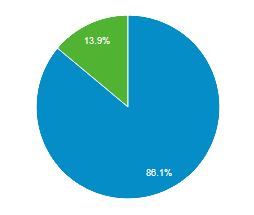
<p>For more information about the impact of <code>content-visibility</code> on content accessibility, I recommend <a href="https://dev.to/marcysutton/content-visibility-and-accessible-semantics-2994">Content-visibility and Accessible Semantics</a> by Marcy Sutton and <a href="https://html5accessibility.com/stuff/2020/08/25/short-note-on-content-visibility-hidden/">Short note on content-visibility: hidden</a> by Steve Faulkner.</p>
</div>
]]></content>
    
  </entry>
  
  
  <entry>
    <title>Inlining scripts and styles in 11ty</title>
    <link href="https://portfolio-kittygiraudel.vercel.app/2020/12/03/inlining-scripts-and-styles-in-11ty/" />
    <published>2020-12-03T00:00:00Z</published>
    <id>https://portfolio-kittygiraudel.vercel.app/2020/12/03/inlining-scripts-and-styles-in-11ty/</id>
    
    <content type="html"><![CDATA[<p>I recently got <a href="https://gumroad.com/l/eihdtmcwf">Harry Robert’s course on CSS performance</a> (you totally should to, it’s a goldmine of information) and worked on improving performance for this site. I quickly spotted 2 performance <a class="Footnotes__ref" href="#bottleneck-note" id="bottleneck-ref" aria-describedby="footnotes-label" role="doc-noteref">bottlenecks</a>: requesting the stylesheet, and requesting the main script.</p>
<p>I had about 4.7Kb of CSS, and less than 1Kb of JavaScript, so I figured the HTTP requests weren’t that necessary at all and I could inject styles and scripts directly within the page to avoid HTTP roundtrips. <a href="https://www.11ty.dev/docs/quicktips/inline-css/">Inlining CSS</a> and <a href="https://www.11ty.dev/docs/quicktips/inline-js/">inlining JavaScript</a> is explained in the 11ty docs, so not really warrant of a blog post I head you say.</p>
<p>Now the thing is not all styles are necessary on all pages. For instance, the home page have some components that do not exist anywhere else on the site, and an article page like this one has a lot of styles which are not needed anywhere else (code snippets, figures, tables, post date…). So instead of inlining 5Kb of CSS in the head, most of which would not be needed, I decided to split it across pages.</p>
<p>My CSS (formerly authored in Sass) is split by concern, somewhat following the <a href="https://sass-guidelin.es/#the-7-1-pattern">7-1 pattern</a> (my JavaScript also follows a similar structure but I’m going to drop it from now on for sake of simplicity). That’s good because that mean I didn’t really have to figure out how to break it down—I only needed a way to include specific parts in specific contexts. Namely:</p>
<ul>
<li>Including the core styles (such as layout &amp; typography) in every page.</li>
<li>Including page-specific styles (blog post, home page, resume…) on specific pages.</li>
</ul>
<h2 id="implementation" tabindex="-1">Implementation</h2>
<p>The implementation concept is relatively simple: in the <code>&lt;head&gt;</code> of the document, include all core styles in a <code>&lt;style&gt;</code> tag. And in specific layouts and pages, include specific stylesheets within a <code>&lt;style&gt;</code> tag as well. No more <code>&lt;link rel=&quot;stylesheet&quot;&gt;</code> and no more monolithic stylesheet with the entire site’s styles.</p>
<p>Now, including files can be done with the <code>{% include %}</code> tag. From 11ty ≥0.9.0, it is possible to <a href="https://www.11ty.dev/docs/languages/liquid/#supported-features">include relative paths</a> so files do not have to live in the <code>_includes</code> folder. That means we can keep a project structure like this (irrelevant parts omitted):</p>
<pre><code>├── _includes/
└── assets/
    ├── css/
    │   ├── base/
    │   ├── components/
    │   ├── layouts/
    │   └── pages/
    └── js/
</code></pre>
<p>Now, I wanted to minimise the amount of boilerplate needed to include some specific styles or script in a template, and making it easy to maintain. For instance, in my <code>post.liquid</code> layout, I wanted to have this include at the top:</p>
<pre class="language-liquid"><code class="language-liquid">___LIQUID0___</code></pre>
<p>So I came up with this small <code>_includes/styles.html</code> Liquid partial:</p>
<pre class="language-liquid"><code class="language-liquid">___LIQUID0___<br>  ___LIQUID1___<br><br>  ___LIQUID2___<br>    ___LIQUID3___<br>      ___LIQUID4___<br>    ___LIQUID5___<br>  ___LIQUID6___<br><br>  <span class="token tag"><span class="token tag"><span class="token punctuation">&lt;</span>style</span><span class="token punctuation">></span></span><span class="token style"><span class="token language-css">___LIQUID7___</span></span><span class="token tag"><span class="token tag"><span class="token punctuation">&lt;/</span>style</span><span class="token punctuation">></span></span><br>___LIQUID8___</code></pre>
<p>Alright, so there is quite a lot to unpack here. Here is the breakdown:</p>
<ol>
<li>In case the <code>paths</code> argument was not provided, we do nothing.</li>
<li>We reassign <code>paths</code> from a string to an array by splitting it on commas.</li>
<li>We open a capture group, which is basically a block-level variable assignment.</li>
<li>We loop over every given path.</li>
<li>For every path, we import it from the <code>assets</code> folder while making sure to trim it with <code>strip</code>. This is what allows us to have the <code>paths</code> argument authored across multiple lines for clarity.</li>
<li>We close our capture group after having imported the last path, yielding a <code>css</code> variable containing all our relevant styles.</li>
<li>We render our styles within a <code>&lt;style&gt;</code> tag.</li>
</ol>
<div class="Info"><p>The <code>script.html</code> partial works exactly the same way except it looks into <code>assets/js</code> and renders a <code>&lt;script&gt;</code> tag. I guess both partials could be abstracted into a single one, but I don’t think it’s particularly necessary.</p>
</div>
<h2 id="minification" tabindex="-1">Minification</h2>
<p>When it comes to minification, there are a few approaches here. One way would be to have a <code>cssmin</code> filter based on <a href="https://github.com/jakubpawlowicz/clean-css">clean-css</a> (or any other CSS minifier). Inside of the <code>styles.html</code> partial, we’d apply <code>| cssmin</code> to our CSS so it gets optimised.</p>
<p>I went a slightly different path and have an <a href="https://www.11ty.dev/docs/config/#transforms">11ty transform</a> to minify HTML with <a href="https://github.com/kangax/html-minifier">html-minifier</a>. The nice thing about it is that it offers a <code>minifyCSS</code> and a <code>minifyJS</code> option to compress styles and scripts authored in <code>&lt;style&gt;</code> and <code>&lt;script&gt;</code> tags respectively. Therefore I have a single transform to minify everything.</p>
<p>I decided to run that transform only in production because a) I don’t like to have compressed styles and scripts in development since it can make them harder to debug and b) minification is actually not cheat and can take a few seconds on a site as small as mine which means it would dramatically slow down compilation.</p>
<pre class="language-js"><code class="language-js">module<span class="token punctuation">.</span><span class="token function-variable function">exports</span> <span class="token operator">=</span> <span class="token keyword">function</span> <span class="token punctuation">(</span><span class="token parameter">config</span><span class="token punctuation">)</span> <span class="token punctuation">{</span><br>  <span class="token keyword">if</span> <span class="token punctuation">(</span>process<span class="token punctuation">.</span>env<span class="token punctuation">.</span><span class="token constant">NODE_ENV</span> <span class="token operator">===</span> <span class="token string">'production'</span><span class="token punctuation">)</span> <span class="token punctuation">{</span><br>    config<span class="token punctuation">.</span><span class="token function">addTransform</span><span class="token punctuation">(</span><span class="token string">'htmlmin'</span><span class="token punctuation">,</span> <span class="token punctuation">(</span><span class="token parameter">content<span class="token punctuation">,</span> path</span><span class="token punctuation">)</span> <span class="token operator">=></span><br>      path<span class="token punctuation">.</span><span class="token function">endsWith</span><span class="token punctuation">(</span><span class="token string">'.html'</span><span class="token punctuation">)</span><br>        <span class="token operator">?</span> htmlmin<span class="token punctuation">.</span><span class="token function">minify</span><span class="token punctuation">(</span>content<span class="token punctuation">,</span> <span class="token punctuation">{</span> minifyCSS<span class="token operator">:</span> <span class="token boolean">true</span><span class="token punctuation">,</span> minifyJS<span class="token operator">:</span> <span class="token boolean">true</span><span class="token punctuation">,</span> <span class="token punctuation">}</span><span class="token punctuation">)</span><br>        <span class="token operator">:</span> content<br>    <span class="token punctuation">)</span><br>  <span class="token punctuation">}</span><br><span class="token punctuation">}</span></code></pre>
<p>That’s about it, really. To sum up: no more HTTP requests for my styles and scripts, which improves performance by reducing the amount HTTP roundtrips. Of course, we no longer benefit from caching, but I believe the performance gain is worth it.</p>
<p>I hope this help! ✨</p>
]]></content>
    
  </entry>
  
  
  <entry>
    <title>A11yAdvent Day 2: Evaluating Accessibility</title>
    <link href="https://portfolio-kittygiraudel.vercel.app/2020/12/02/a11y-advent-evaluating-accessibility/" />
    <published>2020-12-02T00:00:00Z</published>
    <id>https://portfolio-kittygiraudel.vercel.app/2020/12/02/a11y-advent-evaluating-accessibility/</id>
    
    <content type="html"><![CDATA[<p>Now that we have broadly defined what accessibility is, we need to discuss how to measure it. Accessibility is audited through the <a href="https://www.w3.org/TR/WCAG21/">Web Content Accessibility Guidelines</a> (WCAG for short), a technical standard currently in version 2.1, planned to reach 2.2 in 2021.</p>
<p>The WCAG offer a dozen guidelines organised under the <a href="https://www.w3.org/WAI/WCAG21/Understanding/intro#understanding-the-four-principles-of-accessibility">POUR principles</a>, which stands for Perceivable, Operable, Understandable and Robust. Each guideline is testable through <em>success criteria</em> (a total of over 80 of these), each of them with <a href="https://www.w3.org/WAI/WCAG21/Understanding/conformance#levels">3 level of conformance: A, AA and AAA</a>.</p>
<p>For instance, the <a href="https://www.w3.org/TR/WCAG21/#contrast-minimum">success criterion related to sufficient color contrast</a> looks like this:</p>
<blockquote>
<p><strong>Success Criterion 1.4.3 Contrast (Minimum)</strong><br>
(Level AA)<br>
The visual presentation of text and images of text has a contrast ratio of at least 4.5:1, except for the following:</p>
<ul>
<li><strong>Large Text:</strong> Large-scale text and images of large-scale text have a contrast ratio of at least 3:1.</li>
<li><strong>Incidental:</strong> Text or images of text that are part of an inactive user interface component, that are pure decoration, that are not visible to anyone, or that are part of a picture that contains significant other visual content, have no contrast requirement.</li>
<li><strong>Logotypes:</strong> Text that is part of a logo or brand name has no contrast requirement.</li>
</ul>
</blockquote>
<p>Generally speaking, reaching a conformance level of A is the strict minimum and required by law, and it is usually encouraged to go for AA. Now, it is not always possible to reach AAA on all success criteria depending on the site, so it’s a nice objective to aim for but shouldn’t be the end goal.</p>
<p>What is important to remember is that even beyond strict specification conformance, there are still a lot of things that can be done to improve accessibility. As we’ve seen yesterday, this is a broad—almost endless topic—so it should never considered <em>done</em> per se and can be actively worked on at all time.</p>
<p class="Info">Interestingly enough, <a href="https://www.w3.org/TR/mobile-accessibility-mapping/">the WCAG also apply to mobile interfaces</a>. There is no other significant body of work covering mobile accessibility, so the WCAG can and should be followed (when applicable) for mobile applications, even though they are not written for web technologies.</p>
]]></content>
    
  </entry>
  
  
  <entry>
    <title>Footnotes in 11ty</title>
    <link href="https://portfolio-kittygiraudel.vercel.app/2020/12/02/footnotes-in-11ty/" />
    <published>2020-12-02T00:00:00Z</published>
    <id>https://portfolio-kittygiraudel.vercel.app/2020/12/02/footnotes-in-11ty/</id>
    
    <content type="html"><![CDATA[<p>After having <a href="https://kittygiraudel.com/2020/11/30/from-jekyll-to-11ty/">moved from Jekyll to 11ty</a>, I realised I could extend Liquid in fancy ways to make some things a little easier (or down right possible). In this article, I’d like to share how I built a tiny footnotes plugin with <a class="Footnotes__ref" href="#liquid-note" id="liquid-ref" aria-describedby="footnotes-label" role="doc-noteref">Liquid</a>. If you are not interested in how the sausage is made and just want to use the code, check <a href="https://github.com/KittyGiraudel/eleventy-plugin-footnotes">eleventy-plugin-footnotes</a> for usage instructions.</p>
<div class="Info"><p>Nicolas Hoizey pointed out on Twitter that <a href="https://github.com/markdown-it/markdown-it-footnote">markdown-it-footnote</a> does essentially the same thing with less integration and using Markdown syntax instead of Liquid.</p>
<p><em>Maybe</em>, but my main problem with it is that it’s not super accessible (let alone by default), even considering all the customisation options. That’s because the footnote references end up being numbers (e.g. [1]) which are meaningless when listed or tabbed through because devoid of their surrounding context.</p>
</div>
<p>I have recently blogged about <a href="https://kittygiraudel.com/2020/11/24/accessible-footnotes-and-a-bit-of-react/">accessible footnotes</a> again and if you haven’t read the article yet, I recommend you do so you fully grasp what comes next. To put things simply, we need 2 things: a way to register a footnote reference within the text, and a way to display the footnotes for a given page at the bottom of a post. Let’s start with the first one.</p>
<h2 id="registering-footnotes" tabindex="-1">Registering footnotes</h2>
<p>To author a footnote within text content, we use a <code>footnoteref</code> Liquid tag which takes the footnote identifier and the footnote content as arguments (in that order). It looks like this:</p>
<pre class="language-html"><code class="language-html">Something about {% footnoteref "css-counters" "CSS counters are, in<br>essence, variables maintained by CSS whose values may be<br>incremented by CSS rules to track how many times they’re used." %}<br>CSS counters{% endfootnoteref %} that deserves a footnote explaining<br>what they are.</code></pre>
<p>The 11ty configuration would be authored like this:</p>
<pre class="language-js"><code class="language-js"><span class="token keyword">const</span> <span class="token constant">FOOTNOTE_MAP</span> <span class="token operator">=</span> <span class="token punctuation">[</span><span class="token punctuation">]</span><br><br>config<span class="token punctuation">.</span><span class="token function">addPairedShortcode</span><span class="token punctuation">(</span><br>  <span class="token string">'footnoteref'</span><span class="token punctuation">,</span><br>  <span class="token keyword">function</span> <span class="token function">footnoteref</span> <span class="token punctuation">(</span><span class="token parameter">content<span class="token punctuation">,</span> id<span class="token punctuation">,</span> description</span><span class="token punctuation">)</span> <span class="token punctuation">{</span><br>    <span class="token keyword">const</span> key <span class="token operator">=</span> <span class="token keyword">this</span><span class="token punctuation">.</span>page<span class="token punctuation">.</span>inputPath<br>    <span class="token keyword">const</span> footnote <span class="token operator">=</span> <span class="token punctuation">{</span> id<span class="token punctuation">,</span> description <span class="token punctuation">}</span><br><br>    <span class="token constant">FOOTNOTE_MAP</span><span class="token punctuation">[</span>key<span class="token punctuation">]</span> <span class="token operator">=</span> <span class="token constant">FOOTNOTE_MAP</span><span class="token punctuation">[</span>key<span class="token punctuation">]</span> <span class="token operator">||</span> <span class="token punctuation">{</span><span class="token punctuation">}</span><br>    <span class="token constant">FOOTNOTE_MAP</span><span class="token punctuation">[</span>key<span class="token punctuation">]</span><span class="token punctuation">[</span>id<span class="token punctuation">]</span> <span class="token operator">=</span> footnote<br><br>    <span class="token keyword">return</span> <span class="token template-string"><span class="token template-punctuation string">`</span><span class="token string">&lt;a href="#</span><span class="token interpolation"><span class="token interpolation-punctuation punctuation">${</span>id<span class="token interpolation-punctuation punctuation">}</span></span><span class="token string">-note" id="</span><span class="token interpolation"><span class="token interpolation-punctuation punctuation">${</span>id<span class="token interpolation-punctuation punctuation">}</span></span><span class="token string">-ref" aria-describedby="footnotes-label" role="doc-noteref" class="Footnotes__ref"></span><span class="token interpolation"><span class="token interpolation-punctuation punctuation">${</span>content<span class="token interpolation-punctuation punctuation">}</span></span><span class="token string">&lt;/a></span><span class="token template-punctuation string">`</span></span><br>  <span class="token punctuation">}</span><br><span class="token punctuation">)</span></code></pre>
<p>Here is how it works: when rendering the <code>footnoteref</code> Liquid tag, we retrieve the registered footnotes for the current page (if any) from the <code>FOOTNOTE_MAP</code> map. We add the newly registered footnote to it, and we render an anchor link to the footnote.</p>
<div class="Info"><p>It is important not to use an arrow function but a function declaration since we need to access the page stored on the <code>this</code> context. The ability to <a href="https://www.11ty.dev/docs/languages/liquid/#access-to-page-data-values">access page data values within shortcode definitions</a> comes from 11ty.</p>
</div>
<h2 id="rendering-footnotes" tabindex="-1">Rendering footnotes</h2>
<p>For that I created a <code>footnotes.html</code> partial which I render at the bottom of the <code>post</code> layout (passing it the current page object), like so:</p>
<pre class="language-html"><code class="language-html"><span class="token tag"><span class="token tag"><span class="token punctuation">&lt;</span>article</span><span class="token punctuation">></span></span><br>  {{ content }}<br>  {% include "components/footnotes.html", page: page %}<br><span class="token tag"><span class="token tag"><span class="token punctuation">&lt;/</span>article</span><span class="token punctuation">></span></span></code></pre>
<p>Now, we need a way to retrieve the footnotes from the page. That’s actually not too easy in Liquid unfortunately since there is no way to inject a global variable or simply assign a function call to a variable. Liquid’s utilities mostly aim at rendering HTML (as shown above) so it’s not too straightforward to return an array.</p>
<p>I played around a few solutions, and eventually landed with a wacky filter. Basically I expose a <code>footnotes</code> filter which expects the page as argument, and returns the footnotes for that page.</p>
<pre class="language-liquid"><code class="language-liquid">___LIQUID0___</code></pre>
<p>This is pretty ugly. We need a value to be able to apply a filter, even though that value can be anything since the filter will just replace it with an array of footnotes.</p>
<div class="Info"><p>Note that this hack is rendered moot by the plugin since it exposes a <code>footnotes</code> shortcode which does the full HTML rendering. Therefore, there is no need to access the array of footnotes in the template as it’s all done from within the plugin.</p>
</div>
<p>Here is how it’s defined:</p>
<pre class="language-js"><code class="language-js">config<span class="token punctuation">.</span><span class="token function">addFilter</span><span class="token punctuation">(</span><br>  <span class="token string">'footnotes'</span><span class="token punctuation">,</span> <br>  <span class="token comment">// The first argument is the value the filter is applied to,</span><br>  <span class="token comment">// which is irrelevant here.</span><br>  <span class="token punctuation">(</span><span class="token parameter">_<span class="token punctuation">,</span> page</span><span class="token punctuation">)</span> <span class="token operator">=></span> Object<span class="token punctuation">.</span><span class="token function">values</span><span class="token punctuation">(</span><span class="token constant">FOOTNOTES_MAP</span><span class="token punctuation">[</span>page<span class="token punctuation">.</span>inputPath<span class="token punctuation">]</span> <span class="token operator">||</span> <span class="token punctuation">{</span><span class="token punctuation">}</span><span class="token punctuation">)</span><br><span class="token punctuation">)</span></code></pre>
<p>From there, we can render the necessary markup to output the footnotes using a for loop to iterate over each of them.</p>
<pre class="language-html"><code class="language-html">{% assign footnotes = '' | footnotes: page %}<br>{% assign count = footnotes | size %}<br><br>{% if count > 0 %}<br><span class="token tag"><span class="token tag"><span class="token punctuation">&lt;</span>footer</span> <span class="token attr-name">role</span><span class="token attr-value"><span class="token punctuation attr-equals">=</span><span class="token punctuation">"</span>doc-endnotes<span class="token punctuation">"</span></span><span class="token punctuation">></span></span><br>  <span class="token tag"><span class="token tag"><span class="token punctuation">&lt;</span>h2</span> <span class="token attr-name">id</span><span class="token attr-value"><span class="token punctuation attr-equals">=</span><span class="token punctuation">"</span>footnotes-label<span class="token punctuation">"</span></span><span class="token punctuation">></span></span>Footnotes<span class="token tag"><span class="token tag"><span class="token punctuation">&lt;/</span>h2</span><span class="token punctuation">></span></span><br>  <span class="token tag"><span class="token tag"><span class="token punctuation">&lt;</span>ol</span><span class="token punctuation">></span></span><br>    {% for footnote in footnotes %}<br>    <span class="token tag"><span class="token tag"><span class="token punctuation">&lt;</span>li</span> <span class="token attr-name">id</span><span class="token attr-value"><span class="token punctuation attr-equals">=</span><span class="token punctuation">"</span>{{ footnote.id }}-note<span class="token punctuation">"</span></span> <span class="token attr-name">role</span><span class="token attr-value"><span class="token punctuation attr-equals">=</span><span class="token punctuation">"</span>doc-endnote<span class="token punctuation">"</span></span><span class="token punctuation">></span></span><br>      {{ footnote.description | markdown }}<br>      <span class="token tag"><span class="token tag"><span class="token punctuation">&lt;</span>a</span><br>        <span class="token attr-name">href</span><span class="token attr-value"><span class="token punctuation attr-equals">=</span><span class="token punctuation">"</span>#{{ footnote.id }}-ref<span class="token punctuation">"</span></span><br>        <span class="token attr-name">aria-label</span><span class="token attr-value"><span class="token punctuation attr-equals">=</span><span class="token punctuation">"</span>Back to reference {{ forloop.index }}<span class="token punctuation">"</span></span><br>        <span class="token attr-name">role</span><span class="token attr-value"><span class="token punctuation attr-equals">=</span><span class="token punctuation">"</span>doc-backlink<span class="token punctuation">"</span></span><br>        <span class="token punctuation">></span></span>↩<span class="token tag"><span class="token tag"><span class="token punctuation">&lt;/</span>a</span><br>      <span class="token punctuation">></span></span><br>    <span class="token tag"><span class="token tag"><span class="token punctuation">&lt;/</span>li</span><span class="token punctuation">></span></span><br>    {% endfor %}<br>  <span class="token tag"><span class="token tag"><span class="token punctuation">&lt;/</span>ol</span><span class="token punctuation">></span></span><br><span class="token tag"><span class="token tag"><span class="token punctuation">&lt;/</span>footer</span><span class="token punctuation">></span></span><br>{% endif %}</code></pre>
<h2 id="wrapping-up" tabindex="-1">Wrapping up</h2>
<p>So to sum up:</p>
<ul>
<li>We have a <code>footnoteref</code> Liquid tag to wrap footnote references in the text. It takes an id and the footnote description as arguments, and renders an anchor to the correct footnote.</li>
<li>We have a <code>footnotes</code> Liquid filter which is basically a hacky way to get the footnotes for a given page so it can be assigned onto a variable. This hack is solved by using the plugin.</li>
<li>We have a <code>footnotes.html</code> Liquid partial which get the footnotes for the current page and render them within the appropriate DOM structure. The plugin exposes a <code>footnotes</code> shortcode does that.</li>
</ul>
<p>That’s about it. Pretty cool, huh? ✨</p>
<p>If you are interested in using these footnotes in 11ty, check out <a href="https://github.com/KittyGiraudel/eleventy-plugin-footnotes">eleventy-plugin-footnotes</a> on GitHub. There are install instructions, guidelines and examples.</p>
]]></content>
    
  </entry>
  
  
  <entry>
    <title>A11yAdvent Day 1: What is Accessibility?</title>
    <link href="https://portfolio-kittygiraudel.vercel.app/2020/12/01/a11y-advent-what-is-accessibility/" />
    <published>2020-12-01T12:00:00Z</published>
    <id>https://portfolio-kittygiraudel.vercel.app/2020/12/01/a11y-advent-what-is-accessibility/</id>
    
    <content type="html"><![CDATA[<p>I thought we would start this calendar by talking about what is accessibility. There is a common belief in the web industry that accessibility is only about blind users. While it certainly involves blind people, it also encompasses way more than that.</p>
<p>The idea behind accessibility is to provide equal access to content to everyone, regardless of who they are or how they browse the web. Indeed, universal access to information and communication technologies is considered a basic human right by the United Nations.</p>
<p>In other words, providing accessible interfaces and content is about considering everyone, regardless of their abilities or disabilities, or the context in which they access content. Practically speaking, we can draw 5 large categories of impairments:</p>
<ul>
<li>
<p><strong>Visual:</strong> this ranges from poor eyesight, to colour-blindness, from cloudiness to complete blindness, from fatigue to cataract. The web being a platform primarily consumed with the eyes, a lot of technology improvements have been made in that regard, and that is why accessibility is sometimes thought to be solely about accommodating towards blind users.</p>
</li>
<li>
<p><strong>Motor:</strong> motor impairments, when it comes to the web, are usually considering solely upper-limbs disabilities, so nothing below the belt. There are a wide range of reasons for someone to have limited mobility, such as tendonitis, carpal tunnel syndrom, arthritis broken hand or arm, skin condition, hand tremor, Parkinson disease or more commonly, having only one hand free.</p>
</li>
<li>
<p><strong>Cognitive:</strong> cognitive impairments is a broad and practically endless category because brains are complicated pieces of machinery and everyone is different. Some example could include dyslexia, post-traumatic stress disorder (PTSD), attention deficit and hyperactivity disorder (ADHA), amnesia, insomnia, vestibular disorder (motion sickness), anxiety, dementia…</p>
</li>
<li>
<p><strong>Auditive:</strong> while not originally too considered when the web was designed as an essentially all-text media, auditive impairments are more relevant than ever in this day and age where a lot of content is provided through videos and podcasts. They include but are not limited to being hard-of-hearing (HoH), in a loud environment or completely deaf.</p>
</li>
<li>
<p><strong>Vocal:</strong> vocal impediments range from benign (and sometimes temporary) situations such as having soar throat or a foreign accent, to more serious conditions like stutter or mutism. Because the web is seldom interacted with solely through oral interfaces, this category tends to be left out.</p>
</li>
</ul>
<p>As you can see, there are so many things to consider. It may be daunting, but it’s also the beauty of our job as designers and frontend developers. We get to work <em>for</em> everyone. I don’t know about you, but I find it inspiring. ✨</p>
]]></content>
    
  </entry>
  
  
  <entry>
    <title>A11y Advent Calendar</title>
    <link href="https://portfolio-kittygiraudel.vercel.app/2020/12/01/a11y-advent-calendar/" />
    <published>2020-12-01T10:00:00Z</published>
    <id>https://portfolio-kittygiraudel.vercel.app/2020/12/01/a11y-advent-calendar/</id>
    
    <content type="html"><![CDATA[<p>I am between jobs with a bit of free time, so I thought I would try something new this year and publish <strong>an accessibility tip a day</strong>. Nothing too ground-breaking, and I expect a lot of these tips to be common knowledge for many of you, yet we’ll end the month with a nice list of do’s &amp; don’ts. ✨</p>
<p>I will also announce the daily tip on Twitter with the <a href="https://twitter.com/search?q=from%3A%40HugoGiraudel%20%23A11yAdvent&amp;src=typed_query">#A11yAdvent hashtag</a>. Feel free to share your opinion and tips under that hashtag as well!</p>
<p>The calendar was originally entirely on this page, but I have decided to break it down in more digestible pieces under their own page. <span hidden id="hint">Given the link you just followed, it looks like you’re looking for: <span id="hint-title"></span>.</span></p>
<script>
document.addEventListener('DOMContentLoaded', () => {
  const hint = document.querySelector('#hint')
  const title = document.querySelector('#hint-title')
  const node = document.querySelector(location.hash)

  if (node) {
    title.innerHTML = `<a href="${node.getAttribute('href')}">${node.innerText}</a>`
    hint.removeAttribute('hidden')
  }
})
</script>
<style>
.toc { margin-top: 2em }
.toc > ul { columns: 16em; column-fill: balance; margin-top: 0 }
.toc a:target { font-weight: bold }
</style>
<div class="toc">
<ul>
<li><a id="day-1-what-is-accessibility" href="https://kittygiraudel.com/2020/12/01/a11y-advent-what-is-accessibility">Day 1: What is Accessibility?</a></li>
<li><a id="day-2-evaluating-accessibility" href="https://kittygiraudel.com/2020/12/02/a11y-advent-evaluating-accessibility">Day 2: Evaluating Accessibility</a></li>
<li><a id="day-3-hiding-content" href="https://kittygiraudel.com/2020/12/03/a11y-advent-hiding-content">Day 3: Hiding Content</a></li>
<li><a id="day-4-self-explanatory-links" href="https://kittygiraudel.com/2020/12/04/a11y-advent-self-explanatory-links">Day 4: Self-Explanatory Links</a></li>
<li><a id="day-5-document-outline" href="https://kittygiraudel.com/2020/12/05/a11y-advent-document-outline">Day 5: Document Outline</a></li>
<li><a id="day-6-skip-to-content" href="https://kittygiraudel.com/2020/12/06/a11y-advent-skip-to-content">Day 6: Skip to Content</a></li>
<li><a id="day-7-page-title-in-spa" href="https://kittygiraudel.com/2020/12/07/a11y-advent-page-title-in-spa">Day 7: Page Title in SPA</a></li>
<li><a id="day-8-alternative-text-to-images" href="https://kittygiraudel.com/2020/12/08/a11y-advent-alternative-text-to-images">Day 8: Alternative Text to Images</a></li>
<li><a id="day-9-forms" href="https://kittygiraudel.com/2020/12/09/a11y-advent-forms">Day 9: Forms</a></li>
<li><a id="day-10-aria" href="https://kittygiraudel.com/2020/12/10/a11y-advent-aria">Day 10: ARIA</a></li>
<li><a id="day-11-emojis" href="https://kittygiraudel.com/2020/12/11/a11y-advent-emojis">Day 11: Emojis</a></li>
<li><a id="day-12-readability" href="https://kittygiraudel.com/2020/12/12/a11y-advent-Readability">Day 12: Readability</a></li>
<li><a id="day-13-zooming" href="https://kittygiraudel.com/2020/12/13/a11y-advent-zooming">Day 13: Zooming</a></li>
<li><a id="day-14-captions" href="https://kittygiraudel.com/2020/12/14/a11y-advent-captions">Day 14: Captions</a></li>
<li><a id="day-15-content-warnings" href="https://kittygiraudel.com/2020/12/15/a11y-advent-content-warnings">Day 15: Content Warnings</a></li>
<li><a id="day-16-animations" href="https://kittygiraudel.com/2020/12/16/a11y-advent-Animations">Day 16: Animations</a></li>
<li><a id="day-17-anxiety" href="https://kittygiraudel.com/2020/12/17/a11y-advent-anxiety">Day 17: Anxiety</a></li>
<li><a id="day-18-internationalisation" href="https://kittygiraudel.com/2020/12/18/a11y-advent-internationalisation">Day 18: Internationalisation</a></li>
<li><a id="day-19-performance" href="https://kittygiraudel.com/2020/12/19/a11y-advent-performance">Day 19: Performance</a></li>
<li><a id="day-20-content-tone" href="https://kittygiraudel.com/2020/12/20/a11y-advent-content-tone">Day 20: Content and Tone</a></li>
<li><a id="day-21-testing-accessibility" href="https://kittygiraudel.com/2020/12/21/a11y-advent-testing-accessibility">Day 21: Testing Accessibility</a></li>
<li><a id="day-22-interactive-widgets" href="https://kittygiraudel.com/2020/12/22/a11y-advent-interactive-widgets">Day 22: Interactive Widgets</a></li>
<li><a id="day-23-oral-interfaces" href="https://kittygiraudel.com/2020/12/23/a11y-advent-oral-interfaces">Day 23: Oral interfaces</a></li>
<li><a id="day-24-the-case-for-accessibility" href="https://kittygiraudel.com/2020/12/24/a11y-advent-the-case-for-accessibility">Day 24: The Case for Accessibility</a></li>
</ul>
</div>
]]></content>
    
  </entry>
  
  
  <entry>
    <title>From Jekyll to 11ty</title>
    <link href="https://portfolio-kittygiraudel.vercel.app/2020/11/30/from-jekyll-to-11ty/" />
    <published>2020-11-30T00:00:00Z</published>
    <id>https://portfolio-kittygiraudel.vercel.app/2020/11/30/from-jekyll-to-11ty/</id>
    
    <content type="html"><![CDATA[<p>Over the weekend, I decided to migrate my website from <a href="https://jekyllrb.com/">Jekyll</a> to <a href="https://www.11ty.dev/">11ty</a>. If I’m being honest, there was no good reason for me to change blogging systems. I like Jekyll. I have been using Jekyll since 2013 and have built countless sites with it.</p>
<p>I guess I wanted to try 11ty since it’s all the cool kids talk about nowadays. Additionally, it feels nice leaving Ruby behind because that’s a pain to deal with as far as I’m concerned. 11ty is built on Node.js, which is more up my alley.</p>
<p>Paul Lloyd wrote <a href="https://24ways.org/2018/turn-jekyll-up-to-eleventy/">a very good article on migrating from Jekyll</a>. <a href="https://stedman.dev/2020/04/29/make-the-jump-from-jekyll-to-javascript/">So did Steve Stedman</a>. <a href="https://alexpearce.me/2020/06/jekyll-to-eleventy/">And Alex Pearce</a>. And probably other smart people. I’d like to add my own contribution to the growing collection of articles about coming from Jekyll.</p>
<p>I’m mostly going to expand on things that took me a while to figure out, hoping to help other poor souls lost in their journey. Find a short table of contents below:</p>
<ul>
<li><a href="#tldr">TL;DR</a></li>
<li><a href="#posts-permalinks">Posts &amp; permalinks</a></li>
<li><a href="#heading-anchors">Heading anchors</a></li>
<li><a href="#markdown-liquid">Markdown &amp; Liquid</a></li>
<li><a href="#jekyll-filters">Jekyll filters</a></li>
<li><a href="#production-specific-code">Production specific code</a></li>
<li><a href="#wrapping-up">Wrapping up</a></li>
</ul>
<h2 id="tldr" tabindex="-1">TL;DR</h2>
<p>Overall, the migration was relatively smooth. It took me about 10 hours spread across a week-end, so I consider it an affordable amount of time for what is essentially changing build systems.</p>
<p>Here are some things I do like a lot from 11ty:</p>
<ul>
<li>The configuration is really enjoyable to use. I like that it does not live in a JSON file which sometimes lacks flexibility, and that it exposes a class with lots of helper utilities to configure compilation.</li>
<li>I felt helped with templating errors. I don’t now to which extend 11ty customises error reporting to make it friendly, but it’s overall pretty good I would say.</li>
<li>The pagination is overall better than the Jekyll one I feel, because it can be used on any collection instead of exclusively for the posts.</li>
<li>The automatic browser reload is a really nice touch that does not exist in Jekyll. It’s not much, but it’s appreciable during development.</li>
</ul>
<p>And some of the things I was either a little frustrated or not super happy with:</p>
<ul>
<li>I find the handling of global variables confusing at best. In Jekyll, I knew the difference between variables on the <code>include</code>, <code>page</code> or <code>site</code> objects. Here everything sort of blends together in an opaque way.</li>
<li>I personally like YAML over JSON, and it was a little disappointing <a href="https://www.11ty.dev/docs/data-custom/#yaml">not being able to maintain my data files in YAML by default</a>. Not a huge deal, but I find authoring JSON tedious compared to YAML.</li>
<li>There is a lot of documentation, and the maintainers clearly care a lot about it—yet it did feel like there were some glaring caps somewhat. For instance, it was unclear to me how to issue a production build or how to <a href="#posts-permalinks">maintain dynamic permalinks over a collection</a>—both of which I’d consider pretty basic things.</li>
</ul>
<p>That being said, I am overall pleased with the migration and the tool as a whole. Interesting thing to point out is that the compilation didn’t get much faster for me: both systems take about 2 seconds to compile hundreds of pages.</p>
<p>Anyway, without further ado let’s dive in.</p>
<h2 id="posts-permalinks" tabindex="-1">Posts &amp; permalinks</h2>
<p>I have about 300 articles on this blog, so there was no way I would do anything manually. Even an automated script would have been a pain, so I was really looking forward to preserving everything about the blog as is through the configuration only. I started by configuring a custom collection for posts:</p>
<pre class="language-js"><code class="language-js">config<span class="token punctuation">.</span><span class="token function">addCollection</span><span class="token punctuation">(</span><span class="token string">'posts'</span><span class="token punctuation">,</span> <span class="token parameter">collection</span> <span class="token operator">=></span><br>  collection<span class="token punctuation">.</span><span class="token function">getFilteredByGlob</span><span class="token punctuation">(</span><span class="token string">'_posts/*.md'</span><span class="token punctuation">)</span><br>    <span class="token punctuation">.</span><span class="token function">sort</span><span class="token punctuation">(</span><span class="token punctuation">(</span><span class="token parameter">a<span class="token punctuation">,</span> b</span><span class="token punctuation">)</span> <span class="token operator">=></span> b<span class="token punctuation">.</span>date <span class="token operator">-</span> a<span class="token punctuation">.</span>date<span class="token punctuation">)</span><br><span class="token punctuation">)</span></code></pre>
<p>I use this collection in multiple places: in the blog, but also on the home page to list the most recent articles as well as in the RSS feed. I figured it was easier to sort the collection once in the configuration rather than everywhere I look up <code>collections.posts</code> since 11ty sorts it chronologically by default.</p>
<p>Now, Jekyll being a <em>blogging</em> system at the core, it treats posts as first-class citizens and expects an article’s date to be in its slug—for instance <code>2020-11-30-from-jekyll-to-11ty.md</code> would then be compiled into <code>/2020/11/30/from-jekyll-to-11ty/index.html</code>.</p>
<p>In its documentation, 11ty explains pretty extensively how to handle permalinks, but not really how to define a permalink pattern for an entire collection. It took me a while to figure out that I needed to create a <code>_posts.json</code> file in the <code>_posts</code> directory with the following JSON:</p>
<pre class="language-json"><code class="language-json"><span class="token punctuation">{</span><br>  <span class="token property">"layout"</span><span class="token operator">:</span> <span class="token string">"post"</span><span class="token punctuation">,</span><br>  <span class="token property">"permalink"</span><span class="token operator">:</span> <span class="token string">"/{{ page.date | date: '%Y/%m/%d' }}/{{ page.fileSlug }}/"</span><br><span class="token punctuation">}</span></code></pre>
<p>This way, every article has its permalink defined based on its file name, and it is not necessary to manually author the <code>permalink</code> property in every single post. Same thing for the <code>layout</code> property.</p>
<h2 id="heading-anchors" tabindex="-1">Heading anchors</h2>
<p>I do not provide an anchor for every single heading, but I do rely on headings having an <code>id</code> attribute to create table of contents in long articles like this one. I used to rely on Kramdown and its GFM option for that, but 11ty uses <a href="https://github.com/markdown-it/markdown-it">markdown-it</a> which <a href="https://github.com/markdown-it/markdown-it/issues/28">does not come with automatic heading <code>id</code> generation</a>.</p>
<p>To preserve that behaviour, we need to use our own markdown-it instance, as well as the <a href="https://github.com/valeriangalliat/markdown-it-anchor">markdown-it-anchor</a> plugin. The latter comes with unicode support by default, which is not what GFM defaults to, so we also need to use <a href="https://github.com/jeremys/uslug">uslug</a> <a href="https://github.com/valeriangalliat/markdown-it-anchor#unicode-support">as a slugifier</a> to come closer to the original behaviour.</p>
<pre class="language-js"><code class="language-js">config<span class="token punctuation">.</span><span class="token function">setLibrary</span><span class="token punctuation">(</span><br>  <span class="token string">'md'</span><span class="token punctuation">,</span><br>  <span class="token function">markdownIt</span><span class="token punctuation">(</span><span class="token punctuation">{</span> html<span class="token operator">:</span> <span class="token boolean">true</span> <span class="token punctuation">}</span><span class="token punctuation">)</span><span class="token punctuation">.</span><span class="token function">use</span><span class="token punctuation">(</span>markdownItAnchor<span class="token punctuation">,</span> <span class="token punctuation">{</span> slugify<span class="token operator">:</span> uslugify <span class="token punctuation">}</span><span class="token punctuation">)</span><br><span class="token punctuation">)</span></code></pre>
<p>The last thing I couldn’t solve was that the GFM slugifier would maintain consecutive hyphens while uslug doesn’t. For instance, “Posts &amp; permalinks” gets slugified as <code>posts--permalinks</code> with GFM, but <code>posts-permalinks</code> with uslug.</p>
<h2 id="markdown-liquid" tabindex="-1">Markdown &amp; Liquid</h2>
<p>Jekyll, for good or for bad, seems to be playing fast and loose with file extensions. You can have Markdown in Liquid files, Liquid in Markdown files, or use the <code>.html</code> extension, and Jekyll would process everything mostly how you expected it to.</p>
<p>11ty is a little more conservative with that which is probably a good thing. Liquid files do not compile their content as Markdown, which means everything needs to be authored as HTML in them. That can be a little cumbersome, especially when there are a lot of links within paragraphs, since they are way more convenient to author in Markdown.</p>
<p>To work around the problem, I decided to use the <code>.liquid</code> file extension everywhere, and expose a <code>markdown</code> Liquid tag which would compile its content to Markdown.</p>
<pre class="language-js"><code class="language-js">config<span class="token punctuation">.</span><span class="token function">addPairedShortcode</span><span class="token punctuation">(</span><br>  <span class="token string">'markdown'</span><span class="token punctuation">,</span><br>  <span class="token parameter">content</span> <span class="token operator">=></span> <span class="token function">markdownIt</span><span class="token punctuation">(</span><span class="token punctuation">)</span><span class="token punctuation">.</span><span class="token function">render</span><span class="token punctuation">(</span>content<span class="token punctuation">)</span><br><span class="token punctuation">)</span></code></pre>
<p>Then, I can safely author Markdown content within Liquid files:</p>
<pre class="language-liquid"><code class="language-liquid">___LIQUID0___<br>My name is Kitty. I’m a non-binary web developer in Berlin. I have led<br>the web team at [N26](https://n26.com) for over 4 years and am about<br>to get started at [Gorillas](https://gorillas.io). I specialise in<br>accessibility and inclusivity. For a longer version, [read more about<br>me](/about/).<br>___LIQUID1___</code></pre>
<p>Surprisingly enough, <a href="https://www.11ty.dev/docs/config/#default-template-engine-for-markdown-files">11ty compiles Markdown files with Liquid</a> by default which can be pretty annoying in an article like this that contains Liquid syntax in code blocks since it gets evaluated literally. I had to disable the Liquid renderer for this specific article (and similar ones mentioning Liquid syntax in code snippets) by adding this to the YAML front matter:</p>
<pre class="language-yml"><code class="language-yml"><span class="token key atrule">templateEngineOverride</span><span class="token punctuation">:</span> md</code></pre>
<h2 id="jekyll-filters" tabindex="-1">Jekyll filters</h2>
<p>The nice thing about Jekyll is that it comes with <a href="https://jekyllrb.com/docs/liquid/filters/">a collection of Liquid filters</a> to help with rendering. These filters do not exist in 11ty, so I had to recreate them. Fortunately, it’s relatively easy as they can be authored with JavaScript and injected into the configuration:</p>
<pre class="language-js"><code class="language-js">config<span class="token punctuation">.</span><span class="token function">addFilter</span><span class="token punctuation">(</span><span class="token string">'date_to_string'</span><span class="token punctuation">,</span> dateToString<span class="token punctuation">)</span><br>config<span class="token punctuation">.</span><span class="token function">addFilter</span><span class="token punctuation">(</span><span class="token string">'date_to_xmlschema'</span><span class="token punctuation">,</span> dateToXmlSchema<span class="token punctuation">)</span><br>config<span class="token punctuation">.</span><span class="token function">addFilter</span><span class="token punctuation">(</span><span class="token string">'group_by'</span><span class="token punctuation">,</span> groupBy<span class="token punctuation">)</span><br>config<span class="token punctuation">.</span><span class="token function">addFilter</span><span class="token punctuation">(</span><span class="token string">'number_of_words'</span><span class="token punctuation">,</span> numberOfWords<span class="token punctuation">)</span><br>config<span class="token punctuation">.</span><span class="token function">addFilter</span><span class="token punctuation">(</span><span class="token string">'sort_by'</span><span class="token punctuation">,</span> sortBy<span class="token punctuation">)</span><br>config<span class="token punctuation">.</span><span class="token function">addFilter</span><span class="token punctuation">(</span><span class="token string">'where'</span><span class="token punctuation">,</span> where<span class="token punctuation">)</span></code></pre>
<p>If you would like to read the code for these filters, open <a href="https://github.com/kittygiraudel/site/tree/main/.eleventy.js">the <code>.eleventy.js</code> file on GitHub</a>.</p>
<h2 id="production-specific-code" tabindex="-1">Production specific code</h2>
<p>I used to have 2 Jekyll configuration files: one for the production site (<code>_config.yml</code>), and a development one which overrides some settings during development (<code>_config.dev.yml</code>). The first would expose an <code>environment</code> global set to <code>production</code>, and the second would overwrite it to <code>development</code>. Then I would read <code>site.environment</code> to know whether to register the service worker for instance.</p>
<p>As far as I understand, 11ty does not have a concept of environment. There is no such thing as a production build vs a development one. If anything, the development environment is just a build with watchers enabled. So it took me a while to come up with a way to know in which environment the code is compiled.</p>
<p>Only the <a href="https://github.com/11ty/eleventy/pull/1060">Nunjucks templater allows injecting globals</a> and I didn’t originally get that data files could be authored in something else than JSON, so I decided to create a Liquid tag which would only output its content in production.</p>
<pre class="language-js"><code class="language-js">config<span class="token punctuation">.</span><span class="token function">addPairedShortcode</span><span class="token punctuation">(</span><br>  <span class="token string">'production'</span><span class="token punctuation">,</span><br>  <span class="token parameter">content</span> <span class="token operator">=></span> process<span class="token punctuation">.</span>env<span class="token punctuation">.</span><span class="token constant">NODE_ENV</span> <span class="token operator">===</span> <span class="token string">'production'</span> <span class="token operator">?</span> content <span class="token operator">:</span> <span class="token keyword">undefined</span><br><span class="token punctuation">)</span></code></pre>
<p>Then I used it in my Liquid templates to wrap content that should only be rendered when the <code>NODE_ENV</code> environment variable is set to <code>production</code>. I don’t set it anywhere locally, and it’s set to <code>production</code> when building on Netlify.</p>
<pre class="language-html"><code class="language-html">{% production %}<br><span class="token tag"><span class="token tag"><span class="token punctuation">&lt;</span>script</span><span class="token punctuation">></span></span><span class="token script"><span class="token language-javascript"><br>  <span class="token keyword">if</span> <span class="token punctuation">(</span><span class="token string">'serviceWorker'</span> <span class="token keyword">in</span> navigator<span class="token punctuation">)</span> <span class="token punctuation">{</span><br>    navigator<span class="token punctuation">.</span>serviceWorker<span class="token punctuation">.</span><span class="token function">register</span><span class="token punctuation">(</span><span class="token string">'/service-worker.js'</span><span class="token punctuation">,</span> <span class="token punctuation">{</span> scope<span class="token operator">:</span> <span class="token string">'/'</span> <span class="token punctuation">}</span><span class="token punctuation">)</span><br>  <span class="token punctuation">}</span><br></span></span><span class="token tag"><span class="token tag"><span class="token punctuation">&lt;/</span>script</span><span class="token punctuation">></span></span><br>{% endproduction %}</code></pre>
<p>Browsing the documentation, I eventually found out that <a href="https://www.11ty.dev/docs/data-js/#example-exposing-environment-variables">environment variables can be exposed through a <code>.js</code> data file</a>. That’s what I finally opted for:  <code>environment: process.env.NODE_ENV</code>.</p>
<pre class="language-html"><code class="language-html">{% if site.environment == 'production' %}<br><span class="token tag"><span class="token tag"><span class="token punctuation">&lt;</span>script</span><span class="token punctuation">></span></span><span class="token script"><span class="token language-javascript"><br>  <span class="token keyword">if</span> <span class="token punctuation">(</span><span class="token string">'serviceWorker'</span> <span class="token keyword">in</span> navigator<span class="token punctuation">)</span> <span class="token punctuation">{</span><br>    navigator<span class="token punctuation">.</span>serviceWorker<span class="token punctuation">.</span><span class="token function">register</span><span class="token punctuation">(</span><span class="token string">'/service-worker.js'</span><span class="token punctuation">,</span> <span class="token punctuation">{</span> scope<span class="token operator">:</span> <span class="token string">'/'</span> <span class="token punctuation">}</span><span class="token punctuation">)</span><br>  <span class="token punctuation">}</span><br></span></span><span class="token tag"><span class="token tag"><span class="token punctuation">&lt;/</span>script</span><span class="token punctuation">></span></span><br>{% endif %}</code></pre>
<h2 id="wrapping-up" tabindex="-1">Wrapping up</h2>
<p>Would I recommend someone to migrate from Jekyll to 11ty? Not necessarily. Once again, Jekyll is still a robust blogging system. For good or for bad, it is pretty opinionated which makes getting started a little easier in my opinion. 11ty feels more flexible which is nice, but can be daunting at the same time.</p>
<p>That being said, 11ty fills a glaring gap in the static site generator landscape: a simple and extensible platform written on Node which does not enforce the usage of single-page applications like Gatsby can do. In the grand scheme of things, it’s still a recent technology, and I can see it flourish in the next year or two. ✨</p>
<p>On my side, I’m going to experiment with a few things now that my site is built in an environment I can control better, namely:</p>
<ul>
<li>Inline the entire website’s CSS into the head to avoid an extra HTTP request.</li>
<li>Moving some templating logic into custom filters to simplify templates.</li>
<li>Maybe switching templating language entirely for something a little more robust than Liquid. I got used to Liquid because I had to, but it’s objectively a pretter poor templater which is frustratingly opaque.</li>
<li>I would like to experiment with using React as a templater. It has already been done, but I want to do it myself to get a better feel of how it would work, especially since it’s more about the challenge of doing it.</li>
</ul>
<p>That’s it for today folks! Stay safe. 💚</p>
]]></content>
    
  </entry>
  
  
  <entry>
    <title>Accessible footnotes and a bit of React</title>
    <link href="https://portfolio-kittygiraudel.vercel.app/2020/11/24/accessible-footnotes-and-a-bit-of-react/" />
    <published>2020-11-24T00:00:00Z</published>
    <id>https://portfolio-kittygiraudel.vercel.app/2020/11/24/accessible-footnotes-and-a-bit-of-react/</id>
    
    <content type="html"><![CDATA[<p><a class="Footnotes__ref" href="#footnotes-note" id="footnotes-ref" aria-describedby="footnotes-label" role="doc-noteref">Footnotes</a> are not as straightforward as they seem to be. One might thing it’s just a matter of slapping an asterisk or a number after a word, and dumping some extra sweet knowledge at the bottom of the page, but that’s not it. Assistive technologies require some careful mapping in order to correctly associate the reference with its footnote.</p>
<p>A few years back, I wrote <a href="https://www.sitepoint.com/accessible-footnotes-css/">Accessible footnotes with CSS</a>, now the first result when asking Google for “accessible footnotes”. To this day, I still think it’s one of the most useful articles I’ve ever written because: a) most footnotes out there are not accessible and b) the CSS in that demo is actually pretty clever and was fun to write.</p>
<p>Today, I would like to revisit that implementation for using it in React. If you are interested in a ready-to-go solution, I am currently working on <a href="https://github.com/KittyGiraudel/react-a11y-footnotes">react-a11y-footnotes</a>, an <a class="Footnotes__ref" href="#experimental-note" id="experimental-ref" aria-describedby="footnotes-label" role="doc-noteref">experimental</a> library that you can install directly from npm to use in your projects.</p>
<h2 id="whats-so-hard-about-it" tabindex="-1">What’s so hard about it?</h2>
<p>First of all, let’s sort out nomenclature so we are all on the same page:</p>
<ul>
<li>The part that is highlighted or appended with an asterisk or a number within the main body is called the “footnote reference”.</li>
<li>The additional content at the bottom of the page which is referred to is called the “footnote”.</li>
</ul>
<p>Here is how a footnote reference should be marked:</p>
<pre class="language-html"><code class="language-html"><span class="token tag"><span class="token tag"><span class="token punctuation">&lt;</span>p</span><span class="token punctuation">></span></span><br>  Something about<br>  <span class="token tag"><span class="token tag"><span class="token punctuation">&lt;</span>a</span><br>    <span class="token attr-name">href</span><span class="token attr-value"><span class="token punctuation attr-equals">=</span><span class="token punctuation">"</span>#css-counters-note<span class="token punctuation">"</span></span><br>    <span class="token attr-name">id</span><span class="token attr-value"><span class="token punctuation attr-equals">=</span><span class="token punctuation">"</span>css-counters-ref<span class="token punctuation">"</span></span><br>    <span class="token attr-name">aria-describedby</span><span class="token attr-value"><span class="token punctuation attr-equals">=</span><span class="token punctuation">"</span>footnotes-label<span class="token punctuation">"</span></span><br>    <span class="token attr-name">role</span><span class="token attr-value"><span class="token punctuation attr-equals">=</span><span class="token punctuation">"</span>doc-noteref<span class="token punctuation">"</span></span><br>    <span class="token punctuation">></span></span>CSS counters<span class="token tag"><span class="token tag"><span class="token punctuation">&lt;/</span>a</span><br>  <span class="token punctuation">></span></span><br>  that deserves a footnote explaining what they are.<br><span class="token tag"><span class="token tag"><span class="token punctuation">&lt;/</span>p</span><span class="token punctuation">></span></span></code></pre>
<p>Let’s break it down:</p>
<ul>
<li>The <code>href</code> attribute is what makes the footnote reference link to the actual footnote further down the page. It is a regular anchor link pointing to an <code>id</code>.</li>
<li>The <code>id</code> attribute is necessary to be able to come back to the footnote reference after having read the footnote.</li>
<li>The <code>aria-describedby</code> attribute is indicating that the anchor link is a footnote reference. It refers to the title of the footnotes section.</li>
<li>The <code>role</code> attribute is used for digital publishing (DPUB) contexts to indicate that the link is a footnote reference.</li>
<li>The content is the segment of text which can be interacted with to move to the footnote.</li>
</ul>
<p>And here is out the footnotes section would be authored:</p>
<pre class="language-html"><code class="language-html"><span class="token tag"><span class="token tag"><span class="token punctuation">&lt;</span>footer</span> <span class="token attr-name">role</span><span class="token attr-value"><span class="token punctuation attr-equals">=</span><span class="token punctuation">"</span>doc-endnotes<span class="token punctuation">"</span></span><span class="token punctuation">></span></span><br>  <span class="token tag"><span class="token tag"><span class="token punctuation">&lt;</span>h2</span> <span class="token attr-name">id</span><span class="token attr-value"><span class="token punctuation attr-equals">=</span><span class="token punctuation">"</span>footnotes-label<span class="token punctuation">"</span></span><span class="token punctuation">></span></span>Footnotes<span class="token tag"><span class="token tag"><span class="token punctuation">&lt;/</span>h2</span><span class="token punctuation">></span></span><br>  <span class="token tag"><span class="token tag"><span class="token punctuation">&lt;</span>ol</span><span class="token punctuation">></span></span><br>    <span class="token tag"><span class="token tag"><span class="token punctuation">&lt;</span>li</span> <span class="token attr-name">id</span><span class="token attr-value"><span class="token punctuation attr-equals">=</span><span class="token punctuation">"</span>css-counters-note<span class="token punctuation">"</span></span> <span class="token attr-name">role</span><span class="token attr-value"><span class="token punctuation attr-equals">=</span><span class="token punctuation">"</span>doc-endnote<span class="token punctuation">"</span></span><span class="token punctuation">></span></span><br>      CSS counters are, in essence, variables maintained by CSS whose values may<br>      be incremented by CSS rules to track how many times they’re used.<br>      <span class="token tag"><span class="token tag"><span class="token punctuation">&lt;</span>a</span><br>        <span class="token attr-name">href</span><span class="token attr-value"><span class="token punctuation attr-equals">=</span><span class="token punctuation">"</span>#css-counters-ref<span class="token punctuation">"</span></span><br>        <span class="token attr-name">aria-label</span><span class="token attr-value"><span class="token punctuation attr-equals">=</span><span class="token punctuation">"</span>Back to reference 1<span class="token punctuation">"</span></span><br>        <span class="token attr-name">role</span><span class="token attr-value"><span class="token punctuation attr-equals">=</span><span class="token punctuation">"</span>doc-backlink<span class="token punctuation">"</span></span><br>        <span class="token punctuation">></span></span>↩<span class="token tag"><span class="token tag"><span class="token punctuation">&lt;/</span>a</span><br>      <span class="token punctuation">></span></span><br>    <span class="token tag"><span class="token tag"><span class="token punctuation">&lt;/</span>li</span><span class="token punctuation">></span></span><br>  <span class="token tag"><span class="token tag"><span class="token punctuation">&lt;/</span>ol</span><span class="token punctuation">></span></span><br><span class="token tag"><span class="token tag"><span class="token punctuation">&lt;/</span>footer</span><span class="token punctuation">></span></span></code></pre>
<p>Again, let’s break it down:</p>
<ul>
<li>The container does not <em>have to</em> be a <code>&lt;footer&gt;</code> per se, but it seems like an appropriate sectioning element for footnotes. I guess <code>&lt;aside&gt;</code> could also do the trick, and in last resort, a <code>&lt;div&gt;</code>.</li>
<li>The <code>role</code> attribute is used for digital publishing (DPUB) contexts to indicate that this section contains footnotes.</li>
<li>The title does not necessarily <em>have to</em> be a heading either (although it seems to make sense to me), but it needs its <code>id</code> since it is referred to by every reference in their <code>aria-describedby</code> attribute.</li>
<li>The footnotes do not <em>have to</em> be authored as an ordered list, and could also be authored as individual paragraphs, but an ordered list seems more semantic to me. Additionally, it deals with the numbering for us which is handy.</li>
<li>Every back link needs to link back to the reference within the text. The <code>aria-label</code> attribute is necessary to provide explanatory content if the link text does not (like here, with an icon).</li>
</ul>
<p>As you can see, there is quite a lot to unpack, and you can soon realise why maintaining footnotes by hand can be tedious and error-prone.</p>
<h2 id="here-comes-react" tabindex="-1">Here comes React</h2>
<p>My React implementation of footnotes aims at making it easier to author the references, and making it automatic to author the footnotes—including their numbering. To do that, it needs 3 different part:</p>
<ul>
<li>A <code>FootnoteRef</code> component that will render a reference (an anchor tag with all the necessary attributes).</li>
<li>A <code>Footnotes</code> component that will render the footer and all the footnotes in the correct order.</li>
<li>A <code>FootnotesProvider</code> context that will tie all of this together by storing registered references in the correct order to provide relevant footnotes to the footer.</li>
</ul>
<p>Coming back at our initial example, the usage might look like this:</p>
<pre class="language-jsx"><code class="language-jsx"><span class="token keyword">const</span> <span class="token function-variable function">BlogPage</span> <span class="token operator">=</span> <span class="token parameter">props</span> <span class="token operator">=></span> <span class="token punctuation">(</span><br>  <span class="token tag"><span class="token tag"><span class="token punctuation">&lt;</span><span class="token class-name">FootnotesProvider</span></span><span class="token punctuation">></span></span><span class="token plain-text"><br>    </span><span class="token tag"><span class="token tag"><span class="token punctuation">&lt;</span>article</span><span class="token punctuation">></span></span><span class="token plain-text"><br>      </span><span class="token tag"><span class="token tag"><span class="token punctuation">&lt;</span>p</span><span class="token punctuation">></span></span><span class="token plain-text"><br>        Something about</span><span class="token punctuation">{</span><span class="token string">' '</span><span class="token punctuation">}</span><span class="token plain-text"><br>        </span><span class="token tag"><span class="token tag"><span class="token punctuation">&lt;</span><span class="token class-name">FootnoteRef</span></span> <span class="token attr-name">description</span><span class="token attr-value"><span class="token punctuation attr-equals">=</span><span class="token punctuation">'</span>CSS Counters are, in essence, variables maintained by CSS whose values may be incremented by CSS rules to track how many times they’re used.<span class="token punctuation">'</span></span><span class="token punctuation">></span></span><span class="token plain-text"><br>          CSS counters<br>        </span><span class="token tag"><span class="token tag"><span class="token punctuation">&lt;/</span><span class="token class-name">FootnoteRef</span></span><span class="token punctuation">></span></span><span class="token plain-text"><br>        that deserves a footnote explaining what they are.<br>      </span><span class="token tag"><span class="token tag"><span class="token punctuation">&lt;/</span>p</span><span class="token punctuation">></span></span><span class="token plain-text"><br>      </span><span class="token punctuation">{</span><span class="token comment">/* Some more content */</span><span class="token punctuation">}</span><span class="token plain-text"><br>      </span><span class="token tag"><span class="token tag"><span class="token punctuation">&lt;</span><span class="token class-name">Footnotes</span></span> <span class="token punctuation">/></span></span><span class="token plain-text"><br>    </span><span class="token tag"><span class="token tag"><span class="token punctuation">&lt;/</span>article</span><span class="token punctuation">></span></span><span class="token plain-text"><br>  </span><span class="token tag"><span class="token tag"><span class="token punctuation">&lt;/</span><span class="token class-name">FootnotesProvider</span></span><span class="token punctuation">></span></span><br><span class="token punctuation">)</span></code></pre>
<p>What’s nice about this approach is that footnotes are essentially out of sight, out of mind. The footnote itself is authored as the <code>description</code> prop on the <code>FootnoteRef</code> component, which makes it easy to maintain. The <code>Footnotes</code> component does the work of laying out the footnotes in the order of appearance in the text.</p>
<h2 id="wrapping-things-up" tabindex="-1">Wrapping things up</h2>
<p>I hope <a href="https://github.com/KittyGiraudel/react-a11y-footnotes">react-a11y-footnotes</a> will help people implement clean and accessible footnotes for everyone. I’m currently finalising the API and will most likely publish a first version some time this week.</p>
<p>I am also playing with providing optional basic styling—especially for the references themselves since they currently rely on CSS counters—to make it easy to import the library, its styles, and start footnoting.</p>
<p>If you have any suggestion, comment or issue, feel free to share on Twitter or in an issue on the GitHub repository!</p>
]]></content>
    
  </entry>
  
  
  <entry>
    <title>Retrospective on Fela</title>
    <link href="https://portfolio-kittygiraudel.vercel.app/2020/11/23/retrospective-on-fela/" />
    <published>2020-11-23T00:00:00Z</published>
    <id>https://portfolio-kittygiraudel.vercel.app/2020/11/23/retrospective-on-fela/</id>
    
    <content type="html"><![CDATA[<p>Over the years, I have tweeted about <a href="https://fela.js.org">Fela</a> a few times. And as I am about to leave N26 and behind me the decisions I made, I want to properly reflect on the choice of going with Fela instead of any other CSS-in-JS library you might have heard of.</p>
<ul>
<li><a href="#discovering-fela-in-2016">Discovering Fela in 2016</a></li>
<li><a href="#whats-fela">What’s Fela?</a></li>
<li><a href="#whats-good-about-it">What’s good about it?</a>
<ul>
<li><a href="#transparent-atomic-output">Transparent atomic output</a></li>
<li><a href="#rich-ecosystem">Rich ecosystem</a></li>
<li><a href="#extensive-RTL-support">Extensive RTL support</a></li>
</ul>
</li>
<li><a href="#what-are-the-caveats">What are the caveats?</a>
<ul>
<li><a href="#shorthand-and-longhands">Shorthands and longhands</a></li>
<li><a href="#small-community">Small community</a></li>
<li><a href="#solved-pattern-evolution">Pattern evolution (solved)</a></li>
</ul>
</li>
<li><a href="#tips-tricks">Tips &amp; Tricks</a>
<ul>
<li><a href="#fela-dev-utils-as-devdependencies">Fela dev utils as devDependencies</a></li>
<li><a href="#integrating-react-dates-with-fela">Integrating react-dates with Fela</a></li>
<li><a href="#avoid-adblockers-messing-with-styles">Avoid adblockers messing with styles</a></li>
<li><a href="#custom-processing">Custom processing</a></li>
</ul>
</li>
<li><a href="#wrapping-up">Wrapping up</a></li>
</ul>
<h2 id="discovering-fela-in-2016" tabindex="-1">Discovering Fela in 2016</h2>
<p>The year is 2016. <a href="https://twitter.com/smartmike">Mike Smart</a> and I just joined N26 in Berlin to revamp their web strategy, hire a team and build a platform that will last longer than the previous one. With but a rough idea in mind of what we wanted to achieve, we had a mountain of decisions to take. Amongst them, how to author our styles.</p>
<p>We originally started with <a href="https://github.com/css-modules/css-modules">CSS modules</a>. This was principally motivated by the fact that I was under a writing contract for a book on the matter at the time. Don’t waste your time looking for it, it was neither written nor published and given CSS modules has lost a lot of its traction in favour of more modern solutions, maybe it’s for the best after all. CSS modules also came with <a href="https://create-react-app.dev/">create-react-app</a> if I’m not mistaken, which is what we started with (before ejecting literally during our first week).</p>
<p>There were good things and bad things with CSS modules. On one hand, writing plain CSS was nice and we knew it would come with virtually no learning curve for people joining us down the line. On the other, style composition was a little clumsy (probably because we didn’t know how to do it well) and variables were a mix between Sass and JavaScript imports, but neither really.</p>
<pre class="language-css"><code class="language-css"><span class="token atrule"><span class="token rule">@value</span> blue<span class="token punctuation">,</span> teal from <span class="token string">'../../styles/variables.css'</span><span class="token punctuation">;</span></span><br><br><span class="token selector">.base</span> <span class="token punctuation">{</span><br>  <span class="token property">composes</span><span class="token punctuation">:</span> base from <span class="token string">"./index.css"</span><span class="token punctuation">;</span><br>  <span class="token property">background-color</span><span class="token punctuation">:</span> blue<span class="token punctuation">;</span><br>  <span class="token property">border</span><span class="token punctuation">:</span> 2px solid blue<span class="token punctuation">;</span><br>  <span class="token property">color</span><span class="token punctuation">:</span> white<span class="token punctuation">;</span><br>  <span class="token property">padding</span><span class="token punctuation">:</span> 0.5em 1em<span class="token punctuation">;</span><br><span class="token punctuation">}</span></code></pre>
<p>We were already 2,000 commits in the making at that stage, and our roadmap was getting clearer and clearer: we’d end up with multiple large-scale projects within the same codebase, and I was growing worried of our CSS scaling poorly in the long run. That’s when on February 17th 2017, two weeks before our very first live release, I came to work one morning and told Mike “hear me out… how about CSS-in-JS?”</p>
<p>I had done some research on JS libraries for styling, and while the ecosystem was nowhere near what it is today, there were a few contenders: <a href="https://styled-components.com/">styled-components</a>, <a href="https://fela.js.org">Fela</a>, <a href="https://github.com/Khan/aphrodite">Aphrodite</a> and <a href="https://emotion.sh/">Emotion</a> were all in 0.x or v1 at most and <a href="https://cssinjs.org/?v=v10.5.0">JSS</a> was going strong for over 2 years already. So there were definitely options—or so we thought. Now, we had 2 main constraints (besides obvious aesthetic considerations):</p>
<ol>
<li>We implemented server-side rendering (SSR) from day 1, and completely supported the absence of client-side JavaScript, so we needed an isomorphic solution which would deal properly with rehydration.</li>
<li>The main reason to move away from CSS modules was to have critical CSS and most importantly atomic CSS out of the box so we needed a library able to provide that with minor effort.</li>
</ol>
<p>At that time, styled-components was getting hyped for its elegant syntactic approach so we were really hoping we could get to use it. Unfortunately, <a href="https://github.com/styled-components/styled-components/releases/tag/v2.0.0">it did not support server-side rendering until v2</a>, and it <a href="https://github.com/styled-components/styled-components/issues/351">still does not provide support for atomic CSS output</a>. That meant styled-components was not an option.</p>
<p>Other libraries did offer SSR support, but they didn’t give the ability to get atomic classes. Some were built with atomic CSS in mind, but they did not integrate nicely in a React ecosystem. Long story short, it turns out that we didn’t have <em>that</em> many options in the end.</p>
<p>Fela offered a glimmer of hope though. It did support SSR from its very first version, and was designed in such way that it was possible to author monolithic CSS <em>and</em> get atomic output (more on that later). Bingo, we had a winner and I rewrote our entire styling layer in the few days before launch.</p>
<h2 id="whats-fela" tabindex="-1">What’s Fela?</h2>
<p>Fastforward late 2020, what is Fela? Fela describes itself as a small, high-performant and framework-agnostic toolbelt to handle state-driven styling in JavaScript. It continues stating it is dynamic by design and renders styles depending on the application state.</p>
<p>If I had to describe it, I would say Fela is an ecosystem of styling utilities to write styles for JavaScript application (from vanilla to React, from Angular to Inferno, from React Native to ReasonML). At the core, it’s a small styling engine, on which can be plugged extensions and enhancers to make it proper to one’s project.</p>
<p><a href="https://github.com/robinweser">Robin Weser</a>, the developer behind Fela, considers it to be feature-complete. It hasn’t changed too much in a while because it doesn’t need much more by now. It should either provide the tools one needs, or make it possible to author these tools in a straightforward fashion.</p>
<h2 id="whats-good-about-it" tabindex="-1">What’s good about it?</h2>
<p>Today, Fela is one CSS-in-JS library amongst others, and to some extent they all more or less do the same things: dynamic styling, performant rendering, optimisations… Still, there are a few things where Fela shines.</p>
<h3 id="transparent-atomic-output" tabindex="-1">Transparent atomic output</h3>
<p>I think the main benefit of Fela is the ability to output styles in an atomic way without enforcing authoring styles as such. Authors get to write CSS as they would usually do (in a “monolithic way”), and the tool does the hard job of outputing atomic classes for maximum performance.</p>
<p>Consider the following React components styling two <code>p</code> as a coloured squares (Fela integration code omitted for sake of simplicity):</p>
<pre class="language-jsx"><code class="language-jsx"><span class="token keyword">const</span> <span class="token function-variable function">a</span> <span class="token operator">=</span> <span class="token punctuation">(</span><span class="token punctuation">)</span> <span class="token operator">=></span> <span class="token punctuation">(</span><span class="token punctuation">{</span><br>  width<span class="token operator">:</span> <span class="token string">"5em"</span><span class="token punctuation">,</span><br>  height<span class="token operator">:</span> <span class="token string">"5em"</span><span class="token punctuation">,</span><br>  backgroundColor<span class="token operator">:</span> <span class="token string">"deepskyblue"</span><span class="token punctuation">,</span><br><span class="token punctuation">}</span><span class="token punctuation">)</span><span class="token punctuation">;</span><br><span class="token keyword">const</span> <span class="token function-variable function">b</span> <span class="token operator">=</span> <span class="token punctuation">(</span><span class="token punctuation">)</span> <span class="token operator">=></span> <span class="token punctuation">(</span><span class="token punctuation">{</span><br>  width<span class="token operator">:</span> <span class="token string">"5em"</span><span class="token punctuation">,</span><br>  height<span class="token operator">:</span> <span class="token string">"5em"</span><span class="token punctuation">,</span><br>  backgroundColor<span class="token operator">:</span> <span class="token string">"deeppink"</span><span class="token punctuation">,</span><br><span class="token punctuation">}</span><span class="token punctuation">)</span><span class="token punctuation">;</span><br><span class="token keyword">const</span> <span class="token function-variable function">SquareA</span> <span class="token operator">=</span> <span class="token punctuation">(</span><span class="token parameter">props</span><span class="token punctuation">)</span> <span class="token operator">=></span> <span class="token tag"><span class="token tag"><span class="token punctuation">&lt;</span>p</span> <span class="token attr-name">className</span><span class="token script language-javascript"><span class="token script-punctuation punctuation">=</span><span class="token punctuation">{</span>rule<span class="token punctuation">}</span></span><span class="token punctuation">></span></span><span class="token plain-text">I’m deepskyblue!</span><span class="token tag"><span class="token tag"><span class="token punctuation">&lt;/</span>p</span><span class="token punctuation">></span></span><span class="token punctuation">;</span><br><span class="token keyword">const</span> <span class="token function-variable function">SquareB</span> <span class="token operator">=</span> <span class="token punctuation">(</span><span class="token parameter">props</span><span class="token punctuation">)</span> <span class="token operator">=></span> <span class="token tag"><span class="token tag"><span class="token punctuation">&lt;</span>p</span> <span class="token attr-name">className</span><span class="token script language-javascript"><span class="token script-punctuation punctuation">=</span><span class="token punctuation">{</span>rule<span class="token punctuation">}</span></span><span class="token punctuation">></span></span><span class="token plain-text">I’m pink!</span><span class="token tag"><span class="token tag"><span class="token punctuation">&lt;/</span>p</span><span class="token punctuation">></span></span><span class="token punctuation">;</span></code></pre>
<p>Now the output would look like this (prettified for illustration):</p>
<pre class="language-css"><code class="language-css"><span class="token selector">.a</span> <span class="token punctuation">{</span><br>  <span class="token property">width</span><span class="token punctuation">:</span> 5em<span class="token punctuation">;</span><br><span class="token punctuation">}</span><br><span class="token selector">.b</span> <span class="token punctuation">{</span><br>  <span class="token property">height</span><span class="token punctuation">:</span> 5em<span class="token punctuation">;</span><br><span class="token punctuation">}</span><br><span class="token selector">.c</span> <span class="token punctuation">{</span><br>  <span class="token property">background-color</span><span class="token punctuation">:</span> deepskyblue<span class="token punctuation">;</span><br><span class="token punctuation">}</span><br><span class="token selector">.d</span> <span class="token punctuation">{</span><br>  <span class="token property">background-color</span><span class="token punctuation">:</span> deeppink<span class="token punctuation">;</span><br><span class="token punctuation">}</span></code></pre>
<pre class="language-html"><code class="language-html"><span class="token tag"><span class="token tag"><span class="token punctuation">&lt;</span>p</span> <span class="token attr-name">class</span><span class="token attr-value"><span class="token punctuation attr-equals">=</span><span class="token punctuation">"</span>a b c<span class="token punctuation">"</span></span><span class="token punctuation">></span></span>I’m blue!<span class="token tag"><span class="token tag"><span class="token punctuation">&lt;/</span>p</span><span class="token punctuation">></span></span><br><span class="token tag"><span class="token tag"><span class="token punctuation">&lt;</span>p</span> <span class="token attr-name">class</span><span class="token attr-value"><span class="token punctuation attr-equals">=</span><span class="token punctuation">"</span>a b d<span class="token punctuation">"</span></span><span class="token punctuation">></span></span>I’m pink!<span class="token tag"><span class="token tag"><span class="token punctuation">&lt;/</span>p</span><span class="token punctuation">></span></span></code></pre>
<p>While this might look like unnecessary optimisation on such a reduced example, it does matter on projects growing fast and large. This effectively caps the amount of CSS that gets shipped to the browser to the amount of different CSS declarations. Of course, there will be quite a lot (every different padding, margin, colour and so on) but there will be an upper limit. Particularly when following a design system or component library where styling is dictated by a strict set of reusable rules.</p>
<p>This is what makes Fela really stand out from other similar CSS-in-JS libraries. Atomic CSS happens silently and out of the box without having to think in an atomic way. No need to remember atomic class names, or force a specific naming convention; keep writing CSS as always (except, well, as JavaScript objects), and benefit from highly performant output.</p>
<h3 id="rich-ecosystem" tabindex="-1">Rich ecosystem</h3>
<p>To this day, if there is one thing that I always found impressive about Fela is its <a href="https://github.com/robinweser/fela/tree/master/packages">rich ecosystem of utilities and plugins</a>, especially considering they are almost all authored and maintained by Robin Weser, the original creator, and part of the main lerna repo.</p>
<p>Even pretty advanced behaviour such as <a href="https://github.com/robinweser/fela/tree/master/packages/fela-plugin-responsive-value">responsive properties</a>—properties whose value varies across pre-defined breakpoints—or <a href="https://github.com/robinweser/fela/tree/master/packages/fela-plugin-simulate">extensive testing of state-specific styles</a> (e.g. hover) are already built and ready to use.</p>
<p>And if something happens to be missing, Fela is very easy to customise with <a href="http://fela.js.org/docs/advanced/Plugins.html">plugins</a> and <a href="http://fela.js.org/docs/advanced/Enhancers.html">enhancers</a>. Both are essentially functions to customise style processing.</p>
<h3 id="extensive-rtl-support" tabindex="-1">Extensive RTL support</h3>
<p>Having never worked on a project requiring right-to-left support, I unfortunately have very little experience in that area. That being said, <a href="https://github.com/robinweser/fela/tree/master/packages/fela-plugin-rtl">Fela’s support for RTL styling is excellent</a>, especially when compared to other CSS-in-JS libraries (it even has <a href="https://github.com/robinweser/fela/tree/master/packages/fela-plugin-bidi">bidi support</a>).</p>
<p>What’s particularly interesting about the way Fela handle RTL is that it can be localised to specific sub-trees. This makes it especially relevant for internationalised applications with certain parts of the UI needing right-to-left content. The configuration is not set globally at the root level (although it can), and can be configured at will within the tree.</p>
<h2 id="what-are-the-caveats" tabindex="-1">What are the caveats?</h2>
<p>Nothing is ever perfect, and while Fela has been fantastic looking back at the last 4 years, it also came with some ups and downs along the way. Allow me to paint you a word picture.</p>
<h3 id="shorthands-and-longhands" tabindex="-1">Shorthands and longhands</h3>
<p>Shorthand and longhands are somewhat conflicting, which can be messy when not properly enforced with either strict methodology or a plugin. For instance, if you apply <code>padding</code> with the shorthand in one component, but the longhand properties in another, these properties could end up conflicting (just like in CSS).</p>
<p>This is actually outlined in <a href="http://fela.js.org/docs/introduction/Caveats.html#2-shorthand--longhand-properties">Fela’s documentation</a>, and recommended to use longhands everywhere to avoid these situations. There is also the <a href="https://github.com/robinweser/fela/tree/master/packages/fela-plugin-expand-shorthand">fela-plugin-expand-shorthand</a> official package to break down shorthand declarations in their longhand properties.</p>
<h3 id="small-community" tabindex="-1">Small community</h3>
<p>Fela, comparatively to styled-components especially, has a relatively small community. Omitting the occasional minor contributor, Robin Weser is basically the sole maintainer although he is currently sponsored to maintain Fela as part of his full-time work.</p>
<p>On the bright side, it got us to actually invite Robin to come visit the N26 office in Berlin to have a look at our code base and help us diagnose a mismatch issue we were having. And also have some delicious vegan food. ✨</p>
<h3 id="solved-pattern-evolution" tabindex="-1">[Solved] Pattern evolution</h3>
<p>Being almost 5 years old, Fela evolved alongside React. When we started using it in 2017, higher-order components were all the hype. So every component needing styles would end up being wrapped with the <code>connect</code> higher-order component that would provide resolved classNames.</p>
<pre class="language-jsx"><code class="language-jsx"><span class="token keyword">import</span> <span class="token punctuation">{</span> connect <span class="token punctuation">}</span> <span class="token keyword">from</span> <span class="token string">"react-fela"</span><span class="token punctuation">;</span><br><br><span class="token keyword">const</span> <span class="token function-variable function">square</span> <span class="token operator">=</span> <span class="token punctuation">(</span><span class="token punctuation">)</span> <span class="token operator">=></span> <span class="token punctuation">(</span><span class="token punctuation">{</span> width<span class="token operator">:</span> <span class="token string">"5em"</span><span class="token punctuation">,</span> height<span class="token operator">:</span> <span class="token string">"5em"</span> <span class="token punctuation">}</span><span class="token punctuation">)</span><span class="token punctuation">;</span><br><span class="token keyword">const</span> Square <span class="token operator">=</span> <span class="token function">connect</span><span class="token punctuation">(</span><span class="token punctuation">{</span> square <span class="token punctuation">}</span><span class="token punctuation">)</span><span class="token punctuation">(</span><span class="token punctuation">(</span><span class="token parameter">props</span><span class="token punctuation">)</span> <span class="token operator">=></span> <span class="token punctuation">(</span><br>  <span class="token tag"><span class="token tag"><span class="token punctuation">&lt;</span>p</span> <span class="token attr-name">className</span><span class="token script language-javascript"><span class="token script-punctuation punctuation">=</span><span class="token punctuation">{</span>props<span class="token punctuation">.</span>styles<span class="token punctuation">.</span>square<span class="token punctuation">}</span></span><span class="token punctuation">></span></span><span class="token plain-text">I’m a square!</span><span class="token tag"><span class="token tag"><span class="token punctuation">&lt;/</span>p</span><span class="token punctuation">></span></span><br><span class="token punctuation">)</span><span class="token punctuation">)</span><span class="token punctuation">;</span></code></pre>
<p>And soon enough, higher-order components were not the way to go anymore, and render functions were supposedly a better approach, so we’d use <code>FelaComponent</code> everywhere:</p>
<pre class="language-jsx"><code class="language-jsx"><span class="token keyword">import</span> <span class="token punctuation">{</span> FelaComponent <span class="token punctuation">}</span> <span class="token keyword">from</span> <span class="token string">"react-fela"</span><span class="token punctuation">;</span><br><br><span class="token keyword">const</span> <span class="token function-variable function">square</span> <span class="token operator">=</span> <span class="token punctuation">(</span><span class="token punctuation">)</span> <span class="token operator">=></span> <span class="token punctuation">(</span><span class="token punctuation">{</span> width<span class="token operator">:</span> <span class="token string">"5em"</span><span class="token punctuation">,</span> height<span class="token operator">:</span> <span class="token string">"5em"</span> <span class="token punctuation">}</span><span class="token punctuation">)</span><span class="token punctuation">;</span><br><span class="token keyword">const</span> <span class="token function-variable function">Square</span> <span class="token operator">=</span> <span class="token punctuation">(</span><span class="token parameter">props</span><span class="token punctuation">)</span> <span class="token operator">=></span> <span class="token punctuation">(</span><br>  <span class="token tag"><span class="token tag"><span class="token punctuation">&lt;</span><span class="token class-name">FelaComponent</span></span> <span class="token attr-name">style</span><span class="token script language-javascript"><span class="token script-punctuation punctuation">=</span><span class="token punctuation">{</span>square<span class="token punctuation">}</span></span><span class="token punctuation">></span></span><span class="token plain-text"><br>    </span><span class="token punctuation">{</span><span class="token punctuation">(</span><span class="token parameter"><span class="token punctuation">{</span> className <span class="token punctuation">}</span></span><span class="token punctuation">)</span> <span class="token operator">=></span> <span class="token tag"><span class="token tag"><span class="token punctuation">&lt;</span>p</span> <span class="token attr-name">className</span><span class="token script language-javascript"><span class="token script-punctuation punctuation">=</span><span class="token punctuation">{</span>className<span class="token punctuation">}</span></span><span class="token punctuation">></span></span><span class="token plain-text">I’m a square!</span><span class="token tag"><span class="token tag"><span class="token punctuation">&lt;/</span>p</span><span class="token punctuation">></span></span><span class="token punctuation">}</span><span class="token plain-text"><br>  </span><span class="token tag"><span class="token tag"><span class="token punctuation">&lt;/</span><span class="token class-name">FelaComponent</span></span><span class="token punctuation">></span></span><br><span class="token punctuation">)</span><span class="token punctuation">;</span></code></pre>
<p>And while render functions are great, they also clutter the JSX quite a lot so we turned to creating our styled containers with <code>createComponent</code>.</p>
<pre class="language-jsx"><code class="language-jsx"><span class="token keyword">import</span> <span class="token punctuation">{</span> createComponent <span class="token punctuation">}</span> <span class="token keyword">from</span> <span class="token string">"react-fela"</span><span class="token punctuation">;</span><br><br><span class="token keyword">const</span> <span class="token function-variable function">square</span> <span class="token operator">=</span> <span class="token punctuation">(</span><span class="token punctuation">)</span> <span class="token operator">=></span> <span class="token punctuation">(</span><span class="token punctuation">{</span> width<span class="token operator">:</span> <span class="token string">"5em"</span><span class="token punctuation">,</span> height<span class="token operator">:</span> <span class="token string">"5em"</span> <span class="token punctuation">}</span><span class="token punctuation">)</span><span class="token punctuation">;</span><br><span class="token keyword">const</span> Styled <span class="token operator">=</span> <span class="token function">createComponent</span><span class="token punctuation">(</span>styles<span class="token punctuation">.</span>square<span class="token punctuation">,</span> <span class="token string">"p"</span><span class="token punctuation">)</span><span class="token punctuation">;</span><br><span class="token keyword">const</span> <span class="token function-variable function">Square</span> <span class="token operator">=</span> <span class="token punctuation">(</span><span class="token parameter">props</span><span class="token punctuation">)</span> <span class="token operator">=></span> <span class="token tag"><span class="token tag"><span class="token punctuation">&lt;</span><span class="token class-name">Styled</span></span><span class="token punctuation">></span></span><span class="token plain-text">I’m a square!</span><span class="token tag"><span class="token tag"><span class="token punctuation">&lt;/</span><span class="token class-name">Styled</span></span><span class="token punctuation">></span></span><span class="token punctuation">;</span></code></pre>
<p>And it’s pretty great until you start passing a lot of prop to your components for styling purposes, and only want some of them to make their way to the DOM as actual HTML attributes. So there is a hook instead:</p>
<pre class="language-jsx"><code class="language-jsx"><span class="token keyword">import</span> <span class="token punctuation">{</span> useFela <span class="token punctuation">}</span> <span class="token keyword">from</span> <span class="token string">"react-fela"</span><span class="token punctuation">;</span><br><br><span class="token keyword">const</span> <span class="token function-variable function">square</span> <span class="token operator">=</span> <span class="token punctuation">(</span><span class="token punctuation">)</span> <span class="token operator">=></span> <span class="token punctuation">(</span><span class="token punctuation">{</span> width<span class="token operator">:</span> <span class="token string">"5em"</span><span class="token punctuation">,</span> height<span class="token operator">:</span> <span class="token string">"5em"</span> <span class="token punctuation">}</span><span class="token punctuation">)</span><span class="token punctuation">;</span><br><span class="token keyword">const</span> <span class="token function-variable function">Square</span> <span class="token operator">=</span> <span class="token punctuation">(</span><span class="token parameter">props</span><span class="token punctuation">)</span> <span class="token operator">=></span> <span class="token punctuation">{</span><br>  <span class="token keyword">const</span> <span class="token punctuation">{</span> css <span class="token punctuation">}</span> <span class="token operator">=</span> <span class="token function">useFela</span><span class="token punctuation">(</span><span class="token punctuation">)</span><span class="token punctuation">;</span><br>  <span class="token keyword">return</span> <span class="token tag"><span class="token tag"><span class="token punctuation">&lt;</span>p</span> <span class="token attr-name">className</span><span class="token script language-javascript"><span class="token script-punctuation punctuation">=</span><span class="token punctuation">{</span><span class="token function">css</span><span class="token punctuation">(</span>square<span class="token punctuation">)</span><span class="token punctuation">}</span></span><span class="token punctuation">></span></span><span class="token plain-text">I’m a square!</span><span class="token tag"><span class="token tag"><span class="token punctuation">&lt;/</span>p</span><span class="token punctuation">></span></span><span class="token punctuation">;</span><br><span class="token punctuation">}</span><span class="token punctuation">;</span></code></pre>
<p>As of writing, it seems that this is the way forward. Robin confirmed using the <code>useFela</code> hook was the recommended way, and the fact that there are so many approaches to using Fela is a side-effect of it growing alongside React and its evolving design patterns.</p>
<blockquote>
<p>I think most libs had that issue since its kinda linked to how React evolved. In the beginning it was all about HoCs until the render-props pattern emerged just to be dethroned by hooks later on.</p>
<p>So the official recommend way will be hooks for everyone on react &gt; 16.3 these days. I’m going to reflect that in the new docs. It’s the fastest and most simple API of all yet the others are totally fine.</p>
<p>I just don’t like them anymore since you need to be more careful with e.g. the props passthrough where hooks are not tied to the rendering at all—they just provide a nice CSS API just like Emotion has.</p>
<p>— Robin Weser, creator of Fela about the evolution of its API</p>
</blockquote>
<p>This API evolution is not Fela’s fault per se. If anything, it is a testament of it keeping up with what the React community wants to use. Nevertheless, it did give us some challenge to keep our code base clean and up to date. Full disclosure, we never migrated to <code>useFela</code> and still use <code>createComponent</code> everywhere. At least it’s consistent.</p>
<h2 id="tips-tricks" tabindex="-1">Tips &amp; Tricks</h2>
<h3 id="fela-dev-utils-as-devdependencies" tabindex="-1">Fela dev utils as devDependencies</h3>
<p>Fela provides a lot of useful plugins to ease development, such as <a href="https://github.com/robinweser/fela/tree/master/packages/fela-beautifier">beautified styles</a>, <a href="https://github.com/robinweser/fela/tree/master/packages/fela-enzyme">Enzyme bindings</a>, <a href="https://github.com/robinweser/fela/tree/master/packages/fela-layout-debugger">a layout debugger</a>, <a href="https://github.com/robinweser/fela/tree/master/packages/fela-plugin-logger">a verbose logger</a>, <a href="https://github.com/robinweser/fela/tree/master/packages/fela-perf">performance audits</a>, <a href="https://github.com/robinweser/fela/tree/master/packages/fela-statistics">styling statistics</a> to name just a few.</p>
<p>What I wanted was having these dependencies as <code>devDependencies</code> since this is what they are: development dependencies. The problem came when importing these dependencies in the file instantiating the Fela renderer: all good in development, but broken in production since these dependencies were not installed.</p>
<p>It took me a bit of fiddling to figure out a solution involving Webpack. I would assume it would work similarly in any bundler able to inject global variables during compilation.</p>
<p>The main idea is to have 2 different files exporting plugins and enhances: one for development (<code>fela.development.js</code>), and one for production (<code>fela.production.js</code>). The development one could look like this:</p>
<pre class="language-js"><code class="language-js"><span class="token keyword">import</span> beautifier <span class="token keyword">from</span> <span class="token string">"fela-beautifier"</span><span class="token punctuation">;</span><br><span class="token keyword">import</span> validator <span class="token keyword">from</span> <span class="token string">"fela-plugin-validator"</span><span class="token punctuation">;</span><br><span class="token keyword">import</span> embedded <span class="token keyword">from</span> <span class="token string">"fela-plugin-embedded"</span><span class="token punctuation">;</span><br><br><span class="token keyword">export</span> <span class="token keyword">const</span> enhancers <span class="token operator">=</span> <span class="token punctuation">[</span><span class="token function">beautifier</span><span class="token punctuation">(</span><span class="token punctuation">)</span><span class="token punctuation">]</span><span class="token punctuation">;</span><br><span class="token keyword">export</span> <span class="token keyword">const</span> plugins <span class="token operator">=</span> <span class="token punctuation">[</span><span class="token function">validator</span><span class="token punctuation">(</span><span class="token punctuation">)</span><span class="token punctuation">,</span> <span class="token function">embedded</span><span class="token punctuation">(</span><span class="token punctuation">)</span><span class="token punctuation">]</span><span class="token punctuation">;</span></code></pre>
<p>And the production one:</p>
<pre class="language-js"><code class="language-js"><span class="token keyword">import</span> embedded <span class="token keyword">from</span> <span class="token string">"fela-plugin-embedded"</span><span class="token punctuation">;</span><br><br><span class="token keyword">export</span> <span class="token keyword">const</span> enhancers <span class="token operator">=</span> <span class="token punctuation">[</span><span class="token punctuation">]</span><span class="token punctuation">;</span><br><span class="token keyword">export</span> <span class="token keyword">const</span> plugins <span class="token operator">=</span> <span class="token punctuation">[</span><span class="token function">embedded</span><span class="token punctuation">(</span><span class="token punctuation">)</span><span class="token punctuation">]</span><span class="token punctuation">;</span></code></pre>
<p>Then in Webpack, provide the content of the correct file as a global variable (e.g. <code>FELA_CONFIG</code>) based on the environment:</p>
<pre class="language-js"><code class="language-js"><span class="token comment">// Using some Fela plugins/enhancers in development exclusively,</span><br><span class="token comment">// which are (and should be) `devDependencies`. Relying on Webpack</span><br><span class="token comment">// to provide them to the application to avoid a crash on production</span><br><span class="token comment">// environments where `devDependencies` are absent.</span><br><span class="token keyword">new</span> <span class="token class-name">webpack<span class="token punctuation">.</span>ProvidePlugin</span><span class="token punctuation">(</span><span class="token punctuation">{</span><br>  <span class="token constant">FELA_CONFIG</span><span class="token operator">:</span> path<span class="token punctuation">.</span><span class="token function">resolve</span><span class="token punctuation">(</span><span class="token template-string"><span class="token template-punctuation string">`</span><span class="token string">src/fela.</span><span class="token interpolation"><span class="token interpolation-punctuation punctuation">${</span>process<span class="token punctuation">.</span>env<span class="token punctuation">.</span><span class="token constant">NODE_ENV</span><span class="token interpolation-punctuation punctuation">}</span></span><span class="token string">.js</span><span class="token template-punctuation string">`</span></span><span class="token punctuation">)</span><span class="token punctuation">,</span><br><span class="token punctuation">}</span><span class="token punctuation">)</span><span class="token punctuation">;</span></code></pre>
<p>Finally, when instantiating the Fela renderer, read the plugins and enhancers from the global <code>FELA_CONFIG</code> variable.</p>
<pre class="language-js"><code class="language-js"><span class="token comment">/* global FELA_CONFIG */</span><br><span class="token keyword">export</span> <span class="token keyword">default</span> <span class="token function">createRenderer</span><span class="token punctuation">(</span><span class="token punctuation">{</span><br>  plugins<span class="token operator">:</span> <span class="token constant">FELA_CONFIG</span><span class="token punctuation">.</span>plugins<span class="token punctuation">,</span><br>  enhancers<span class="token operator">:</span> <span class="token constant">FELA_CONFIG</span><span class="token punctuation">.</span>enhancers<span class="token punctuation">,</span><br><span class="token punctuation">}</span><span class="token punctuation">)</span><span class="token punctuation">;</span></code></pre>
<h3 id="integrating-react-dates-with-fela" tabindex="-1">Integrating react-dates with Fela</h3>
<p><a href="https://github.com/airbnb/react-dates">react-dates</a> is a fantastic date-picker library from AirBnB. It’s built on top of Aphrodite and comes with monolithic class names by default in order to be unopinionated regarding the styling layer.</p>
<p>It took us some time to figure out how to integrate it properly with Fela so styles are applied atomically with Fela (and therefore optimised) instead of through the original CSS classes. Fortunately, react-dates offers a way to customise the rendering process with <code>react-with-styles</code> interfaces.</p>
<pre class="language-js"><code class="language-js"><span class="token keyword">import</span> ThemedStyleSheet <span class="token keyword">from</span> <span class="token string">"react-with-styles/lib/ThemedStyleSheet"</span><span class="token punctuation">;</span><br><br>ThemedStyleSheet<span class="token punctuation">.</span><span class="token function">registerInterface</span><span class="token punctuation">(</span>OurFelaInterface<span class="token punctuation">)</span><span class="token punctuation">;</span></code></pre>
<p>Now we just had to write an interface for Fela. I’m going to save you the trouble and show you how it looks. It needs the Fela renderer as an argument in order to compute resolved class names.</p>
<pre class="language-js"><code class="language-js"><span class="token keyword">import</span> <span class="token punctuation">{</span> StyleSheet <span class="token punctuation">}</span> <span class="token keyword">from</span> <span class="token string">"fela-tools"</span><span class="token punctuation">;</span><br><span class="token keyword">import</span> <span class="token punctuation">{</span> combineRules <span class="token punctuation">}</span> <span class="token keyword">from</span> <span class="token string">"fela"</span><span class="token punctuation">;</span><br><br><span class="token comment">// Custom `react-with-styles` interface for Fela:</span><br><span class="token comment">// https://github.com/airbnb/react-with-styles</span><br><span class="token keyword">export</span> <span class="token keyword">default</span> <span class="token punctuation">(</span><span class="token parameter">renderer</span><span class="token punctuation">)</span> <span class="token operator">=></span> <span class="token punctuation">(</span><span class="token punctuation">{</span><br>  <span class="token function">create</span><span class="token punctuation">(</span><span class="token parameter">styleHash</span><span class="token punctuation">)</span> <span class="token punctuation">{</span><br>    <span class="token keyword">return</span> StyleSheet<span class="token punctuation">.</span><span class="token function">create</span><span class="token punctuation">(</span>styleHash<span class="token punctuation">)</span><span class="token punctuation">;</span><br>  <span class="token punctuation">}</span><span class="token punctuation">,</span><br><br>  <span class="token function">resolve</span><span class="token punctuation">(</span><span class="token parameter">stylesArray</span><span class="token punctuation">)</span> <span class="token punctuation">{</span><br>    <span class="token keyword">const</span> styles <span class="token operator">=</span> stylesArray<span class="token punctuation">.</span><span class="token function">flat</span><span class="token punctuation">(</span><span class="token punctuation">)</span><span class="token punctuation">;</span><br>    <span class="token keyword">const</span> rules <span class="token operator">=</span> <span class="token punctuation">[</span><span class="token punctuation">]</span><span class="token punctuation">;</span><br>    <span class="token keyword">const</span> classNames <span class="token operator">=</span> <span class="token punctuation">[</span><span class="token punctuation">]</span><span class="token punctuation">;</span><br><br>    <span class="token comment">// This is run on potentially every node in the tree when rendering,</span><br>    <span class="token comment">// where performance is critical. Normally we would prefer using</span><br>    <span class="token comment">// `forEach`, but old-fashioned `for` loops are slightly faster.</span><br>    <span class="token keyword">for</span> <span class="token punctuation">(</span><span class="token keyword">let</span> i <span class="token operator">=</span> <span class="token number">0</span><span class="token punctuation">;</span> i <span class="token operator">&lt;</span> styles<span class="token punctuation">.</span>length<span class="token punctuation">;</span> i <span class="token operator">+=</span> <span class="token number">1</span><span class="token punctuation">)</span> <span class="token punctuation">{</span><br>      <span class="token keyword">const</span> style <span class="token operator">=</span> styles<span class="token punctuation">[</span>i<span class="token punctuation">]</span><span class="token punctuation">;</span><br><br>      <span class="token keyword">if</span> <span class="token punctuation">(</span><span class="token operator">!</span>style<span class="token punctuation">)</span> <span class="token keyword">continue</span><span class="token punctuation">;</span><br>      <span class="token keyword">if</span> <span class="token punctuation">(</span>style<span class="token punctuation">.</span>ruleName<span class="token punctuation">)</span> classNames<span class="token punctuation">.</span><span class="token function">push</span><span class="token punctuation">(</span>style<span class="token punctuation">.</span>ruleName<span class="token punctuation">)</span><span class="token punctuation">;</span><br>      <span class="token keyword">if</span> <span class="token punctuation">(</span><span class="token keyword">typeof</span> style <span class="token operator">===</span> <span class="token string">"function"</span><span class="token punctuation">)</span> rules<span class="token punctuation">.</span><span class="token function">push</span><span class="token punctuation">(</span>style<span class="token punctuation">)</span><span class="token punctuation">;</span><br>      <span class="token keyword">else</span> rules<span class="token punctuation">.</span><span class="token function">push</span><span class="token punctuation">(</span><span class="token punctuation">(</span><span class="token punctuation">)</span> <span class="token operator">=></span> style<span class="token punctuation">)</span><span class="token punctuation">;</span><br>    <span class="token punctuation">}</span><br><br>    <span class="token keyword">const</span> rule <span class="token operator">=</span> <span class="token function">combineRules</span><span class="token punctuation">(</span><span class="token operator">...</span>rules<span class="token punctuation">)</span><span class="token punctuation">;</span><br>    <span class="token keyword">const</span> classes <span class="token operator">=</span> renderer<span class="token punctuation">.</span><span class="token function">renderRule</span><span class="token punctuation">(</span><span class="token function">combineRules</span><span class="token punctuation">(</span><span class="token operator">...</span>rules<span class="token punctuation">)</span><span class="token punctuation">)</span><span class="token punctuation">;</span><br>    classNames<span class="token punctuation">.</span><span class="token function">push</span><span class="token punctuation">(</span>classes<span class="token punctuation">)</span><span class="token punctuation">;</span><br><br>    <span class="token keyword">return</span> <span class="token punctuation">{</span> className<span class="token operator">:</span> classNames<span class="token punctuation">.</span><span class="token function">join</span><span class="token punctuation">(</span><span class="token string">" "</span><span class="token punctuation">)</span> <span class="token punctuation">}</span><span class="token punctuation">;</span><br>  <span class="token punctuation">}</span><span class="token punctuation">,</span><br><span class="token punctuation">}</span><span class="token punctuation">)</span><span class="token punctuation">;</span></code></pre>
<h3 id="avoid-adblockers-messing-with-styles" tabindex="-1">Avoid adblockers messing with styles</h3>
<p>One minor problem with atomic classes is that they tend to be incorrectly flagged by adblockers as elements to be hidden. This is something we learnt the hard way mid-2017 and <a href="https://github.com/robinweser/fela/pull/319">that we fixed in Fela directly</a> with the <code>filterClassName</code> option.</p>
<p>By default, Fela now skips the <code>.ad</code> class, but there are more to add to the list to make sure no adblocker mess with the styles.</p>
<pre class="language-js"><code class="language-js"><span class="token keyword">const</span> <span class="token constant">SKIPPED_CLASSNAMES</span> <span class="token operator">=</span> <span class="token punctuation">[</span><br>  <span class="token comment">// Short for “advertisment”</span><br>  <span class="token string">"ad"</span><span class="token punctuation">,</span><br>  <span class="token string">"ads"</span><span class="token punctuation">,</span><br>  <span class="token string">"adv"</span><span class="token punctuation">,</span><br>  <span class="token comment">// See: https://github.com/adblockultimate/AdBlocker-Ultimate-for-Chrome/blob/3f07afbffa5c389270abe9ee4dc13333ca35613e/filters/filter_9.txt#L867</span><br>  <span class="token string">"bi"</span><span class="token punctuation">,</span><br>  <span class="token string">"fb"</span><span class="token punctuation">,</span><br>  <span class="token string">"ig"</span><span class="token punctuation">,</span><br>  <span class="token string">"pin"</span><span class="token punctuation">,</span><br>  <span class="token string">"tw"</span><span class="token punctuation">,</span><br>  <span class="token string">"vk"</span><span class="token punctuation">,</span><br><span class="token punctuation">]</span><span class="token punctuation">;</span><br><br><span class="token keyword">export</span> <span class="token keyword">default</span> <span class="token function">createRenderer</span><span class="token punctuation">(</span><span class="token punctuation">{</span><br>  <span class="token function-variable function">filterClassName</span><span class="token operator">:</span> <span class="token punctuation">(</span><span class="token parameter">className</span><span class="token punctuation">)</span> <span class="token operator">=></span> <span class="token operator">!</span><span class="token constant">SKIPPED_CLASSNAMES</span><span class="token punctuation">.</span><span class="token function">includes</span><span class="token punctuation">(</span>className<span class="token punctuation">)</span><span class="token punctuation">,</span><br><span class="token punctuation">}</span><span class="token punctuation">)</span><span class="token punctuation">;</span></code></pre>
<h3 id="custom-processing" tabindex="-1">Custom processing</h3>
<p>Thanks to the <a href="https://github.com/robinweser/fela/tree/master/packages/fela-plugin-custom-property">fela-plugin-custom-property</a> package, it is possible to add support for custom properties. Not the CSS kind though. In that case, custom properties refers to custom-named object properties and their process towards CSS. This plugin can be leveraged to implement warnings or post-processing when writing specific declarations.</p>
<p>Consider for a moment that you expect all your durations to be authored in milliseconds instead of seconds. By surcharging the duration properties, you can warn or even manipulate their value through Fela. For instance, convertion the values into milliseconds:</p>
<pre class="language-js"><code class="language-js"><span class="token keyword">import</span> custom <span class="token keyword">from</span> <span class="token string">"fela-plugin-custom-property"</span><span class="token punctuation">;</span><br><br><span class="token keyword">const</span> <span class="token function-variable function">handleDuration</span> <span class="token operator">=</span> <span class="token punctuation">(</span><span class="token parameter">property</span><span class="token punctuation">)</span> <span class="token operator">=></span> <span class="token punctuation">(</span><span class="token parameter">value</span><span class="token punctuation">)</span> <span class="token operator">=></span> <span class="token punctuation">(</span><span class="token punctuation">{</span><br>  <span class="token comment">// Convert durations expressed in seconds into milliseconds</span><br>  <span class="token comment">// E.g. 0.2s, 1s -> 200ms, 1000ms</span><br>  <span class="token punctuation">[</span>property<span class="token punctuation">]</span><span class="token operator">:</span> value<span class="token punctuation">.</span><span class="token function">replace</span><span class="token punctuation">(</span><br>    <span class="token regex"><span class="token regex-delimiter">/</span><span class="token regex-source language-regex"><span class="token group punctuation">(</span><span class="token charset"><span class="token charset-punctuation punctuation">[</span><span class="token charclass class-name">\d</span><span class="token special-escape escape">\.</span><span class="token charset-punctuation punctuation">]</span></span><span class="token quantifier number">+</span><span class="token group punctuation">)</span><span class="token charset"><span class="token charset-punctuation punctuation">[</span>m^<span class="token charset-punctuation punctuation">]</span></span><span class="token quantifier number">*</span>s</span><span class="token regex-delimiter">/</span><span class="token regex-flags">g</span></span><span class="token punctuation">,</span><br>    <span class="token punctuation">(</span><span class="token parameter">_<span class="token punctuation">,</span> a</span><span class="token punctuation">)</span> <span class="token operator">=></span> <span class="token function">Number</span><span class="token punctuation">(</span>a<span class="token punctuation">)</span> <span class="token operator">*</span> <span class="token number">1000</span> <span class="token operator">+</span> <span class="token string">"ms"</span><br>  <span class="token punctuation">)</span><span class="token punctuation">,</span><br><span class="token punctuation">}</span><span class="token punctuation">)</span><span class="token punctuation">;</span><br><br><span class="token keyword">const</span> renderer <span class="token operator">=</span> <span class="token function">createRenderer</span><span class="token punctuation">(</span><span class="token punctuation">{</span><br>  plugins<span class="token operator">:</span> <span class="token punctuation">[</span><br>    <span class="token function">custom</span><span class="token punctuation">(</span><span class="token punctuation">{</span><br>      transitionDuration<span class="token operator">:</span> <span class="token function">handleDuration</span><span class="token punctuation">(</span><span class="token string">"transitionDuration"</span><span class="token punctuation">)</span><span class="token punctuation">,</span><br>      transitionDelay<span class="token operator">:</span> <span class="token function">handleDuration</span><span class="token punctuation">(</span><span class="token string">"transitionDelay"</span><span class="token punctuation">)</span><span class="token punctuation">,</span><br>      animationDuration<span class="token operator">:</span> <span class="token function">handleDuration</span><span class="token punctuation">(</span><span class="token string">"animationDuration"</span><span class="token punctuation">)</span><span class="token punctuation">,</span><br>      animationDelay<span class="token operator">:</span> <span class="token function">handleDuration</span><span class="token punctuation">(</span><span class="token string">"animationDelay"</span><span class="token punctuation">)</span><span class="token punctuation">,</span><br>    <span class="token punctuation">}</span><span class="token punctuation">)</span><span class="token punctuation">,</span><br>  <span class="token punctuation">]</span><span class="token punctuation">,</span><br><span class="token punctuation">}</span><span class="token punctuation">)</span><span class="token punctuation">;</span></code></pre>
<h2 id="wrapping-up" tabindex="-1">Wrapping up</h2>
<p>All in all, Fela is an amazing piece of software. It’s pretty powerful, relatively easy to use and very performant. For small to medium scale projects—especially those based on create-react-app—I would probably stick to plain CSS, or maybe Sass. But for anything large scale, I would highly recommend Fela as a bulletproof styling solution.</p>
<p>Despite its relatively small community, Fela has been around for 4 years, and is still actively maintained and update. The future roadmap includes:</p>
<ul>
<li>A brand new documentation platform, with more details and examples.</li>
<li>A revamp of the plugin system for increased performance.</li>
<li>Small improvements and minor bugfixes across the board.</li>
</ul>
<p>Robin Weser has also been working on <a href="https://elodin-lang.org/">Elodin</a> for a few years now, an experimental universal styling language, usable across platforms. If design languages are your thing, be sure to check it out!</p>
]]></content>
    
  </entry>
  
  
  <entry>
    <title>User preferences in React</title>
    <link href="https://portfolio-kittygiraudel.vercel.app/2020/11/20/user-preferences-in-react/" />
    <published>2020-11-20T00:00:00Z</published>
    <id>https://portfolio-kittygiraudel.vercel.app/2020/11/20/user-preferences-in-react/</id>
    
    <content type="html"><![CDATA[<p>I have recently been playing with a concept of React hooks and React components to handle user preferences such as light/dark mode, reduced motion, reduced data usage, reduced transparency, or basically anything else.</p>
<div class="Info"><p>You might be interested in reading <a href="https://kittygiraudel.com/2018/03/19/implementing-a-reduced-motion-mode/">Implementing a reduced motion mode</a> where I go in details on how to use the OS preference alongside CSS custom properties to manage motion preferences.</p>
</div>
<p>The idea is to provide an easy way to access this information, and react (no pun intended) to it would it change thanks to media queries. It could be either a React hook to abstract that away, or a React component for a very declarative approach like below.</p>
<pre class="language-jsx"><code class="language-jsx"><span class="token keyword">const</span> <span class="token function-variable function">ThankYouPage</span> <span class="token operator">=</span> <span class="token parameter">props</span> <span class="token operator">=></span> <span class="token punctuation">(</span><br>  <span class="token tag"><span class="token tag"><span class="token punctuation">&lt;</span></span><span class="token punctuation">></span></span><span class="token plain-text"><br>    </span><span class="token tag"><span class="token tag"><span class="token punctuation">&lt;</span>p</span><span class="token punctuation">></span></span><span class="token plain-text">Thank you for subscribing to our newsletter!</span><span class="token tag"><span class="token tag"><span class="token punctuation">&lt;/</span>p</span><span class="token punctuation">></span></span><span class="token plain-text"><br>    </span><span class="token tag"><span class="token tag"><span class="token punctuation">&lt;</span><span class="token class-name">Settings.WithMotion</span></span><span class="token punctuation">></span></span><span class="token plain-text"><br>      </span><span class="token tag"><span class="token tag"><span class="token punctuation">&lt;</span>img</span> <span class="token attr-name">src</span><span class="token attr-value"><span class="token punctuation attr-equals">=</span><span class="token punctuation">'</span>./assets/party.gif<span class="token punctuation">'</span></span> <span class="token attr-name">alt</span><span class="token attr-value"><span class="token punctuation attr-equals">=</span><span class="token punctuation">'</span>Cat chasing confettis<span class="token punctuation">'</span></span><span class="token punctuation">></span></span><span class="token plain-text"><br>    </span><span class="token tag"><span class="token tag"><span class="token punctuation">&lt;/</span><span class="token class-name">Settings.WithMotion</span></span><span class="token punctuation">></span></span><span class="token plain-text"><br>  </span><span class="token tag"><span class="token tag"><span class="token punctuation">&lt;/</span></span><span class="token punctuation">></span></span><span class="token plain-text"><br>)</code></pre>
<p>Our <code>Settings</code> object (sometimes called <code>Only</code>) could hold several React component such as <code>WithMotion</code>, <code>WithoutMotion</code>, <code>WithTransparency</code>, <code>LightMode</code>, <code>WithReducedData</code>…</p>
<p>They would all essentially be based on a <code>useMatchMedia</code> hook. It would query the browser for a certain preference, listen for any change, and set it in a local state for convenience.</p>
<pre class="language-js"><code class="language-js"><span class="token keyword">const</span> <span class="token function-variable function">useMatchMedia</span> <span class="token operator">=</span> <span class="token punctuation">(</span><span class="token parameter">query<span class="token punctuation">,</span> defaultValue <span class="token operator">=</span> <span class="token boolean">false</span></span><span class="token punctuation">)</span> <span class="token operator">=></span> <span class="token punctuation">{</span><br>  <span class="token keyword">const</span> <span class="token punctuation">[</span>matches<span class="token punctuation">,</span> setMatches<span class="token punctuation">]</span> <span class="token operator">=</span> React<span class="token punctuation">.</span><span class="token function">useState</span><span class="token punctuation">(</span>defaultValue<span class="token punctuation">)</span><span class="token punctuation">;</span><br><br>  React<span class="token punctuation">.</span><span class="token function">useEffect</span><span class="token punctuation">(</span><span class="token punctuation">(</span><span class="token punctuation">)</span> <span class="token operator">=></span> <span class="token punctuation">{</span><br>    <span class="token keyword">const</span> q <span class="token operator">=</span> window<span class="token punctuation">.</span><span class="token function">matchMedia</span><span class="token punctuation">(</span>query<span class="token punctuation">)</span><span class="token punctuation">;</span><br>    <span class="token keyword">const</span> <span class="token function-variable function">onChange</span> <span class="token operator">=</span> <span class="token punctuation">(</span><span class="token parameter"><span class="token punctuation">{</span> matches <span class="token punctuation">}</span></span><span class="token punctuation">)</span> <span class="token operator">=></span> <span class="token function">setMatches</span><span class="token punctuation">(</span>matches<span class="token punctuation">)</span><span class="token punctuation">;</span><br>    <span class="token function">onChange</span><span class="token punctuation">(</span>q<span class="token punctuation">)</span><span class="token punctuation">;</span><br>    q<span class="token punctuation">.</span><span class="token function">addListener</span><span class="token punctuation">(</span>onChange<span class="token punctuation">)</span><span class="token punctuation">;</span><br>    <span class="token keyword">return</span> <span class="token punctuation">(</span><span class="token punctuation">)</span> <span class="token operator">=></span> q<span class="token punctuation">.</span><span class="token function">removeListener</span><span class="token punctuation">(</span>onChange<span class="token punctuation">)</span><span class="token punctuation">;</span><br>  <span class="token punctuation">}</span><span class="token punctuation">,</span> <span class="token punctuation">[</span>query<span class="token punctuation">]</span><span class="token punctuation">)</span><span class="token punctuation">;</span><br><br>  <span class="token keyword">return</span> matches<span class="token punctuation">;</span><br><span class="token punctuation">}</span><span class="token punctuation">;</span></code></pre>
<p>From there, creating our React component is pretty straightforward:</p>
<pre class="language-jsx"><code class="language-jsx"><span class="token keyword">export</span> <span class="token keyword">const</span> Settings <span class="token operator">=</span> <span class="token punctuation">{</span><span class="token punctuation">}</span><span class="token punctuation">;</span><br><br><span class="token keyword">const</span> <span class="token function-variable function">WithMotion</span> <span class="token operator">=</span> <span class="token punctuation">(</span><span class="token parameter"><span class="token punctuation">{</span> children <span class="token punctuation">}</span></span><span class="token punctuation">)</span> <span class="token operator">=></span><br>  <span class="token function">useMatchMedia</span><span class="token punctuation">(</span><span class="token string">"(prefers-reduced-motion: no-preference)"</span><span class="token punctuation">)</span> <span class="token operator">?</span> children <span class="token operator">:</span> <span class="token keyword">null</span><span class="token punctuation">;</span><br><br><span class="token keyword">const</span> <span class="token function-variable function">WithoutMotion</span> <span class="token operator">=</span> <span class="token punctuation">(</span><span class="token parameter"><span class="token punctuation">{</span> children <span class="token punctuation">}</span></span><span class="token punctuation">)</span> <span class="token operator">=></span><br>  <span class="token function">useMatchMedia</span><span class="token punctuation">(</span><span class="token string">"(prefers-reduced-motion: reduce)"</span><span class="token punctuation">)</span> <span class="token operator">?</span> children <span class="token operator">:</span> <span class="token keyword">null</span><span class="token punctuation">;</span><br><br><span class="token keyword">const</span> <span class="token function-variable function">WithReducedData</span> <span class="token operator">=</span> <span class="token punctuation">(</span><span class="token parameter"><span class="token punctuation">{</span> children <span class="token punctuation">}</span></span><span class="token punctuation">)</span> <span class="token operator">=></span><br>  <span class="token function">useMatchMedia</span><span class="token punctuation">(</span><span class="token string">"(prefers-reduced-data: reduce)"</span><span class="token punctuation">)</span> <span class="token operator">?</span> children <span class="token operator">:</span> <span class="token keyword">null</span><span class="token punctuation">;</span><br><br><span class="token keyword">const</span> <span class="token function-variable function">WithReducedTransparency</span> <span class="token operator">=</span> <span class="token punctuation">(</span><span class="token parameter"><span class="token punctuation">{</span> children <span class="token punctuation">}</span></span><span class="token punctuation">)</span> <span class="token operator">=></span><br>  <span class="token function">useMatchMedia</span><span class="token punctuation">(</span><span class="token string">"(prefers-reduced-transparency: reduce)"</span><span class="token punctuation">)</span> <span class="token operator">?</span> children <span class="token operator">:</span> <span class="token keyword">null</span><span class="token punctuation">;</span><br><br><span class="token keyword">const</span> <span class="token function-variable function">DarkMode</span> <span class="token operator">=</span> <span class="token punctuation">(</span><span class="token parameter"><span class="token punctuation">{</span> children <span class="token punctuation">}</span></span><span class="token punctuation">)</span> <span class="token operator">=></span><br>  <span class="token function">useMatchMedia</span><span class="token punctuation">(</span><span class="token string">"(prefers-color-scheme: dark)"</span><span class="token punctuation">)</span> <span class="token operator">?</span> children <span class="token operator">:</span> <span class="token keyword">null</span><span class="token punctuation">;</span><br><br><span class="token keyword">const</span> <span class="token function-variable function">LightMode</span> <span class="token operator">=</span> <span class="token punctuation">(</span><span class="token parameter"><span class="token punctuation">{</span> children <span class="token punctuation">}</span></span><span class="token punctuation">)</span> <span class="token operator">=></span><br>  <span class="token function">useMatchMedia</span><span class="token punctuation">(</span><span class="token string">"(prefers-color-scheme: light)"</span><span class="token punctuation">)</span> <span class="token operator">?</span> children <span class="token operator">:</span> <span class="token keyword">null</span><span class="token punctuation">;</span><br><br>Settings<span class="token punctuation">.</span>WithMotion <span class="token operator">=</span> WithMotion<span class="token punctuation">;</span><br>Settings<span class="token punctuation">.</span>WithoutMotion <span class="token operator">=</span> WithoutMotion<span class="token punctuation">;</span><br>Settings<span class="token punctuation">.</span>WithReducedData <span class="token operator">=</span> WithReducedData<span class="token punctuation">;</span><br>Settings<span class="token punctuation">.</span>WithReducedTransparency <span class="token operator">=</span> WithReducedTransparency<span class="token punctuation">;</span><br>Settings<span class="token punctuation">.</span>DarkMode <span class="token operator">=</span> DarkMode<span class="token punctuation">;</span><br>Settings<span class="token punctuation">.</span>LightMode <span class="token operator">=</span> LightMode<span class="token punctuation">;</span></code></pre>
<p>At this stage, we could add as many options as we want: viewport size, device type, contrast preference… There are a lot of possibilities.</p>
<p>If you prefer hooks to React components, you could write small wrapper hooks for every individual preference:</p>
<pre class="language-js"><code class="language-js"><span class="token keyword">const</span> <span class="token function-variable function">useMotionPreference</span> <span class="token operator">=</span> <span class="token punctuation">(</span><span class="token punctuation">)</span> <span class="token operator">=></span> <span class="token punctuation">{</span><br>  <span class="token keyword">const</span> prefersReducedMotion <span class="token operator">=</span> <span class="token function">useMatchMedia</span><span class="token punctuation">(</span><br>    <span class="token string">"(prefers-reduced-motion: reduce)"</span><br>  <span class="token punctuation">)</span><span class="token punctuation">;</span><br><br>  <span class="token comment">// Or really any API you would like… A few ideas:</span><br>  <span class="token comment">// - `reduce` vs `no-preference` to match the CSS spec</span><br>  <span class="token comment">// - `on` vs `off`</span><br>  <span class="token comment">// - just a boolean instead</span><br>  <span class="token keyword">return</span> prefersReducedMotion <span class="token operator">?</span> <span class="token string">"reduced"</span> <span class="token operator">:</span> <span class="token string">"default"</span><span class="token punctuation">;</span><br><span class="token punctuation">}</span><span class="token punctuation">;</span><br><br><span class="token keyword">const</span> <span class="token function-variable function">useColorScheme</span> <span class="token operator">=</span> <span class="token punctuation">(</span><span class="token punctuation">)</span> <span class="token operator">=></span><br>  <span class="token function">useMatchMedia</span><span class="token punctuation">(</span><span class="token string">"(prefers-color-schema: dark)"</span><span class="token punctuation">)</span> <span class="token operator">?</span> <span class="token string">"dark"</span> <span class="token operator">:</span> <span class="token string">"light"</span><span class="token punctuation">;</span></code></pre>
<hr>
<p>I hope you like the idea! Adapting to users’ preferences is not only a good design principle, it can also help with accessibility (for instance, disabled animations for people suffering from vestibular disorder). If you are going to rely on the operating system’s preferences, be sure to provide a way to still customise them on a per website basis.</p>
<p>If you are interested in the intersection of React code and web accessibility, be sure to have a look at the following articles:</p>
<ul>
<li><a href="https://kittygiraudel.com/2020/01/15/accessible-title-in-a-single-page-react-application/">Accessible page title in a single-page React application</a></li>
<li><a href="https://kittygiraudel.com/2020/01/16/accessible-visibility-react-component/">An accessible visibility React component</a></li>
<li><a href="https://kittygiraudel.com/2020/01/17/accessible-links-and-buttons-with-react/">Accessible links and buttons with React</a></li>
</ul>
]]></content>
    
  </entry>
  
  
  <entry>
    <title>Managing npm dependencies</title>
    <link href="https://portfolio-kittygiraudel.vercel.app/2020/11/19/managing-npm-dependencies/" />
    <published>2020-11-19T00:00:00Z</published>
    <id>https://portfolio-kittygiraudel.vercel.app/2020/11/19/managing-npm-dependencies/</id>
    
    <content type="html"><![CDATA[<p>Dependencies are part of software development. It is unrealistic to expect running a project of any decent size without external dependencies. Not all code is worth writing, and a lot of clever people have written clever code which we would be clever to use in our projects.</p>
<p>But managing dependencies can be tricky. In this article, I’ll share some thoughts on how we stayed sane with dependencies at N26.</p>
<ul>
<li><a href="#documenting-dependencies">Documenting dependencies</a></li>
<li><a href="#auditing-dependencies">Auditing dependencies</a></li>
<li><a href="#unused-dependencies">Unused dependencies</a></li>
<li><a href="#outdated-dependencies">Outdated dependencies</a></li>
</ul>
<h2 id="documenting-dependencies" tabindex="-1">Documenting dependencies</h2>
<p>As a project grows bigger and older, it sometimes becomes difficult to know which dependency serves what purpose. For some of them, it’s pretty obvious, but for dependencies around tooling for instance, it can get tricky to keep track of what’s needed.</p>
<p>A good practice could be to document when to add a dependency, and why a dependency is being used if not obvious. Our documentation on the matter contains the following cheatsheet to figure out how to decide to add a new package:</p>
<ul>
<li>Is the dependency needed or can it easily be done internally?</li>
<li>Is the dependency covered with tests and safe to use?</li>
<li>Is the dependency provided under a permissive license (e.g. MIT)?</li>
<li>Is the dependency maintained (date of last commit, number of open issues and pull-requests…)?</li>
<li>Is the dependency a decent size (can be checked with <a href="https://bundlephobia.com/">bundlephobia</a>)?</li>
</ul>
<h2 id="auditing-dependencies" tabindex="-1">Auditing dependencies</h2>
<p>Auditing dependencies is important to make sure we do not use packages afflicted with known vulnerabilities. Various projects tackle this issue at scale such as <a href="https://snyk.io/">Snyk</a> or <a href="https://docs.npmjs.com/cli/v6/commands/npm-audit/">npm audit</a>.</p>
<p>I personally like <code>npm audit</code> because it’s baked by npm and free to use, but the console output can be daunting. That’s why I wrote a Node script wrapping <code>npm audit</code> to make the CLI output a little more digestable and actionable.</p>
<p>It’s not published on npm because who has time for that, but it’s <a href="https://gist.github.com/KittyGiraudel/37438267cb36448a85d56b8501d91aab">available as a GitHub Gist</a> and then can be copied and pasted in a JavaScript file in one’s project. Cool features include:</p>
<ul>
<li>The ability to define a severity threshold, above which the script will return a non-zero exit code. For instance, finding a <code>critical</code> dependency would throw an error. This makes it easy to include it in CI/CD pipelines.</li>
<li>Similar dependencies are grouped, so they are not announced multiple times. That makes it more convenient to see the actual overview. npm audit might announce 9 vulnerabilities, but it could very well be only 2 issues to be fixed, because they occur in more than one package.</li>
</ul>
<h2 id="unused-dependencies" tabindex="-1">Unused dependencies</h2>
<p>Looking for unused dependencies is not very convenient. There might be projects out there doing it, but who has time to deal with thirt-party dependencies to manage dependencies. So I wrote a very small Bash script to look whether dependencies are referenced at all in a project.</p>
<p>The idea is pretty straightforward: go through all the <code>dependencies</code> (or <code>devDependencies</code>), and then search within the project whether they are referenced, prefixed with an open quote (e.g. <code>'lodash</code>).</p>
<p>This specific search pattern will make sure to work for:</p>
<ul>
<li><code>require</code> calls (e.g. <code>require('lodash')</code>)</li>
<li><code>import</code> statements (e.g. <code>import lodash from 'lodash'</code>)</li>
<li>non-root paths (e.g. <code>import lodash from 'lodash/fp</code>)</li>
</ul>
<div class="Info"><p>If you happen to use double-quotes, you will need to update the script to reference a double-quote (<code>&quot;</code>) instead of single-quote (<code>'</code>).</p>
</div>
<p>When extracted as a little <code>groom_deps</code> function in one’s <code>.zshrc</code> or <code>.bashrc</code> file, it can be used within any project pretty conveniently. The type of dependencies (<code>dependencies</code>, <code>devDependencies</code> or <code>peerDependencies</code>) can be passed as an argument and defaults to <code>dependencies</code>.</p>
<pre class="language-bash"><code class="language-bash"><span class="token keyword">function</span> <span class="token function-name function">groom_deps</span> <span class="token punctuation">{</span><br>  <span class="token assign-left variable">key</span><span class="token operator">=</span><span class="token variable">${1<span class="token operator">:-</span>dependencies}</span><br>  <span class="token keyword">for</span> <span class="token for-or-select variable">dep</span> <span class="token keyword">in</span> <span class="token variable"><span class="token variable">$(</span><span class="token function">cat</span> package.json <span class="token operator">|</span> jq -cr <span class="token string">".<span class="token variable">$key</span>|keys|.[]"</span><span class="token variable">)</span></span><span class="token punctuation">;</span><br>  <span class="token keyword">do</span> <span class="token punctuation">[</span><span class="token punctuation">[</span> -z <span class="token string">"<span class="token variable"><span class="token variable">$(</span><span class="token function">grep</span> -r  --exclude-dir<span class="token operator">=</span>node_modules <span class="token string">"'<span class="token variable">${dep}</span>"</span> <span class="token builtin class-name">.</span><span class="token variable">)</span></span>"</span> <span class="token punctuation">]</span><span class="token punctuation">]</span> <span class="token operator">&amp;&amp;</span> <span class="token builtin class-name">echo</span> <span class="token string">"<span class="token variable">$dep</span> appears unused"</span><span class="token punctuation">;</span><br>  <span class="token keyword">done</span><br><span class="token punctuation">}</span></code></pre>
<pre class="language-bash"><code class="language-bash">groom_deps devDependencies</code></pre>
<p>Note that some dependencies are required while not being imported anywhere in JavaScript code. For instance, <code>@babel/polyfill</code>, <code>iltorb</code> or other similar dependencies can be necessary while not being explicitly mentioned in JavaScript code. Therefore, tread carefully.</p>
<div class="Info"><p>The above script requires <a href="https://stedolan.github.io/jq/">jq</a>, which is a command-line utility to manipulate JSON.</p>
</div>
<h2 id="outdated-dependencies" tabindex="-1">Outdated dependencies</h2>
<p>You might be familiar with third-party tools like <a href="https://dependabot.com/">Dependabot</a> or <a href="https://greenkeeper.io/">Greenkeeper</a> to automatically submit pull-requests to update dependencies. They are nice, but they also have downsides:</p>
<ul>
<li>They require some initial setup.</li>
<li>They create a lot of noise, and a permanent stream of updates.</li>
<li>They could fail to pass security approvals in some organisation.</li>
</ul>
<p>That’s why a long time ago I authored <a href="https://github.com/KittyGiraudel/dependency-checker">a small Node program to look for outdated dependencies</a>. Similar packages exist as well, this is just my take on it.</p>
<p>It works like this: it goes through the <code>dependencies</code> (and optionally <code>devDependencies</code> and <code>peerDependencies</code>) of the given <code>package.json</code> file. For each package, it requests information from the npm registry, and compares the versions to see if the one listed is the latest one. If it is not, it mentions it.</p>
<p>The output could look something like this:</p>
<pre class="language-bash"><code class="language-bash">Unsafe updates<br><span class="token operator">==</span><span class="token operator">==</span><span class="token operator">==</span><span class="token operator">==</span><span class="token operator">==</span><span class="token operator">==</span><span class="token operator">==</span><br>Major version bumps or any version bumps prior to the first major release <span class="token punctuation">(</span><span class="token number">0</span>.y.z<span class="token punctuation">)</span>.<br><br>* chalk @ <span class="token number">4.1</span>.0 is available <span class="token punctuation">(</span>currently ^2.4.2<span class="token punctuation">)</span><br>* commander @ <span class="token number">6.2</span>.0 is available <span class="token punctuation">(</span>currently ^3.0.0<span class="token punctuation">)</span><br>* ora @ <span class="token number">5.1</span>.0 is available <span class="token punctuation">(</span>currently ^3.4.0<span class="token punctuation">)</span><br>* pacote @ <span class="token number">11.1</span>.13 is available <span class="token punctuation">(</span>currently ^9.5.8<span class="token punctuation">)</span><br>* semver @ <span class="token number">7.3</span>.2 is available <span class="token punctuation">(</span>currently ^6.3.0<span class="token punctuation">)</span><br>* ava @ <span class="token number">3.13</span>.0 is available <span class="token punctuation">(</span>currently ^2.3.0<span class="token punctuation">)</span><br>* standard @ <span class="token number">16.0</span>.3 is available <span class="token punctuation">(</span>currently ^14.1.0<span class="token punctuation">)</span><br><br><span class="token function">npm</span> <span class="token function">install</span> --save chalk@4.1.0 commander@6.2.0 ora@5.1.0 pacote@11.1.13 semver@7.3.2<br><span class="token function">npm</span> <span class="token function">install</span> --save-dev ava@3.13.0 standard@16.0.3</code></pre>
<p>I actually never published the package on npm because I couldn’t be bothered to find a name that wasn’t already taken yet. The current recommended usage is to clone it locally and use it through Node or the CLI. I personally added the little snippet to my <code>.zshrc</code> file so it provides me a <code>deps</code> function I can run in a project to look for dependency updates.</p>
<pre class="language-bash"><code class="language-bash"><span class="token keyword">function</span> <span class="token function-name function">deps</span><span class="token punctuation">(</span><span class="token punctuation">)</span> <span class="token punctuation">{</span><br>  node <span class="token punctuation">..</span>/dependency-checker/bin -p package.json --dev --no-pr<br><span class="token punctuation">}</span></code></pre>
<p>The script is by no mean perfect:</p>
<ul>
<li>As mentioned, it’s not published on npm, so right now you need to clone it to use it. Not the most convenient, but heh, also not the worst.</li>
<li>If a dependency has a major available update, it will shadow any potential minor (safe) updates, so you might be missing on minor/patches if you’re down one or more major versions.</li>
<li>It doesn’t provide a link to changelogs (since there is no standardised way to do that), so you would have to search for them yourself.</li>
</ul>
<p>That’s all I have. What about you, what are your tricks to keep your sanity when dealing with lots of dependencies in large projects?</p>
]]></content>
    
  </entry>
  
  
  <entry>
    <title>Looking for dead code</title>
    <link href="https://portfolio-kittygiraudel.vercel.app/2020/11/18/looking-for-dead-code/" />
    <published>2020-11-18T00:00:00Z</published>
    <id>https://portfolio-kittygiraudel.vercel.app/2020/11/18/looking-for-dead-code/</id>
    
    <content type="html"><![CDATA[<p>The N26 web platform has about 1,000 components and over 300 helpers. It’s not a huge code base per se (certainly not Facebook size anyway), but with over 250,000 lines of code, it is definitely on the big side of the spectrum.</p>
<p>In an ever-growing code base, it can be tedious, not to mention difficult, to look for code that is no longer used (or “dead code”). It cannot realistically done by hand, and I don’t know any solid tool that can automate that entirely.</p>
<p>So I wrote a small Bash script to take its best guess as to which files were no longer used. To detect that, I rely on the fact that all our imports look the same. For instance:</p>
<pre class="language-js"><code class="language-js"><span class="token keyword">import</span> Input <span class="token keyword">from</span> <span class="token string">"@components/Input"</span><span class="token punctuation">;</span><br><span class="token keyword">import</span> looksLikeEmail <span class="token keyword">from</span> <span class="token string">"@helpers/looksLikeEmail"</span><span class="token punctuation">;</span></code></pre>
<div class="Info"><p>The leading at-sign (<code>@</code>) is a Webpack alias to mean “from the root of the project”. This makes it more convenient to import files from anywhere. It has no incidence on the purpose of this article however.</p>
</div>
<p><strong>This means if we search for <code>/Input'</code> and find no result, it means the <code>Input</code> component is never imported anywhere.</strong> This only works because we never add <code>/index</code> or <code>/index.js</code> at the end of our imports.</p>
<p>Now, we only have to loop through all paths in our <code>components</code> directory (or any other), and perform a search for every one of them. If the search yields nothing, the component is unused.</p>
<pre class="language-bash"><code class="language-bash"><span class="token comment"># Loop over every entry within the given path</span><br><span class="token keyword">for</span> <span class="token for-or-select variable">entry</span> <span class="token keyword">in</span> src/components/*<br><span class="token keyword">do</span><br>  <span class="token comment"># Grab only the directory name</span><br>  <span class="token comment"># (e.g. `Input` from `src/components/Input`)</span><br>  <span class="token assign-left variable">name</span><span class="token operator">=</span><span class="token variable"><span class="token variable">$(</span><span class="token function">basename</span> $entry<span class="token variable">)</span></span><br><br>  <span class="token comment"># Perform a search in the `./src` directory</span><br>  <span class="token comment"># and echo the path if it yields nothing</span><br>  <span class="token keyword">if</span> <span class="token punctuation">[</span><span class="token punctuation">[</span> -z <span class="token string">"<span class="token variable"><span class="token variable">$(</span><span class="token function">grep</span> -r <span class="token string">"/<span class="token variable">$name</span>'"</span> ./src<span class="token variable">)</span></span>"</span> <span class="token punctuation">]</span><span class="token punctuation">]</span><span class="token punctuation">;</span> <span class="token keyword">then</span><br>    <span class="token builtin class-name">echo</span> <span class="token string">"<span class="token variable">$entry</span> is unused"</span><br>  <span class="token keyword">fi</span><br><span class="token keyword">done</span></code></pre>
<p>A convenient way to execute that code is to define it as a function in one’s <code>.bashrc</code> or <code>.zshrc</code> file. When wrapped as a function, it might look like this:</p>
<pre class="language-bash"><code class="language-bash"><span class="token keyword">function</span> <span class="token function-name function">groom</span> <span class="token punctuation">{</span><br>  <span class="token assign-left variable">root</span><span class="token operator">=</span><span class="token string">"<span class="token variable">${2<span class="token operator">:-</span>.}</span>"</span><br>  <span class="token keyword">for</span> <span class="token for-or-select variable">entry</span> <span class="token keyword">in</span> <span class="token string">"<span class="token variable">$1</span>"</span>/*<br>  <span class="token keyword">do</span><br>    <span class="token assign-left variable">name</span><span class="token operator">=</span><span class="token variable"><span class="token variable">$(</span><span class="token function">basename</span> $entry<span class="token variable">)</span></span><br>    <span class="token keyword">if</span> <span class="token punctuation">[</span><span class="token punctuation">[</span> -z <span class="token string">"<span class="token variable"><span class="token variable">$(</span><span class="token function">grep</span> -r <span class="token string">"/<span class="token variable">$name</span>'"</span> $root<span class="token variable">)</span></span>"</span> <span class="token punctuation">]</span><span class="token punctuation">]</span><span class="token punctuation">;</span> <span class="token keyword">then</span><br>      <span class="token builtin class-name">echo</span> <span class="token string">"<span class="token variable">$entry</span> is unused"</span><br>    <span class="token keyword">fi</span><br>  <span class="token keyword">done</span><br><span class="token punctuation">}</span></code></pre>
<p>It can then be used by passing the folder to ‘groom’ as an argument, and the root directory for the code search as a second argument (<code>./</code> by default):</p>
<pre class="language-bash"><code class="language-bash">groom src/components<br>groom src/components src</code></pre>
<p>It’s not much, but I hope this helps you finding some dead code without having to rely on build tools or dependencies. It’s a pretty low hanging fruit. ✨</p>
]]></content>
    
  </entry>
  
  
  <entry>
    <title>Everything I know about Jenkins</title>
    <link href="https://portfolio-kittygiraudel.vercel.app/2020/11/17/everything-i-know-about-jenkins/" />
    <published>2020-11-17T00:00:00Z</published>
    <id>https://portfolio-kittygiraudel.vercel.app/2020/11/17/everything-i-know-about-jenkins/</id>
    
    <content type="html"><![CDATA[<p>N26 has been using Jenkins for as long as I’ve been part of this company. Over the last few years, I have been responsible for the quality of our delivery, and this involved getting my hands dirty with Jenkins. I learnt a lot, sometimes the hard way, and thought I’d share what I know before I leave the company and loose access to the code.</p>
<p>Please note that I am by no mean a Jenkins expert. I’m a frontend developer at heart, so this is all pretty alien to me. I just wanted to share what I learnt but this might not be optimal in any way.</p>
<ul>
<li><a href="#go-scripted">Go scripted</a></li>
<li><a href="#jenkins-fails-fast">Jenkins fails fast</a></li>
<li><a href="#conditional-parallelisation">Conditional parallelisation</a></li>
<li><a href="#mark-stages-as-skipped">Mark stages as skipped</a></li>
<li><a href="#built-in-retry">Built-in retry</a></li>
<li><a href="#manual-stage-retry">Manual stage retry</a></li>
<li><a href="#confirmation-stage">Confirmation stage</a></li>
<li><a href="#handle-aborted-builds">Handle aborted builds</a></li>
<li><a href="#build-artefacts">Build artefacts</a></li>
</ul>
<h2 id="go-scripted" tabindex="-1">Go scripted</h2>
<p>The declarative syntax is nice for simple things, but it is eventually quite limited in what can be done. For more complex things, consider using the scripted pipeline, which can be authored with Groovy.</p>
<p>I would personally recommend this structure:</p>
<pre class="language-groovy"><code class="language-groovy"><span class="token comment">// All your globals and helpers</span><br><br>node <span class="token punctuation">{</span><br>  <span class="token keyword">try</span> <span class="token punctuation">{</span><br>    <span class="token comment">// Your actual pipeline code</span><br>  <span class="token punctuation">}</span> <span class="token keyword">catch</span> <span class="token punctuation">(</span>error<span class="token punctuation">)</span> <span class="token punctuation">{</span><br>    <span class="token comment">// Global error handler for your pipeline</span><br>  <span class="token punctuation">}</span><br><span class="token punctuation">}</span></code></pre>
<p>For more information between the scripted and the declarative syntaxes, refer to the <a href="https://www.jenkins.io/doc/book/pipeline/syntax/">Jenkins documentation on the pipeline syntax</a>.</p>
<h2 id="jenkins-fails-fast" tabindex="-1">Jenkins fails fast</h2>
<p>By default, Jenkins tends to resort to fast failing strategies. Parallel branches will all fail if one of them does, and sub-jobs will propagate their failure to their parent. These are good defaults in my opinion, but they can also be a problem when doing more complex things.</p>
<p>When parallelising tasks with <a href="https://www.jenkins.io/doc/book/pipeline/syntax/#parallel">the <code>parallel</code> function</a>, you can opt-out to this fast-failing behaviour with the <code>failFast</code> key. I’m not super comfortable with the idea of having an arbitrarily named key on the argument of <code>parallel</code> but heh, it is what it is.</p>
<pre class="language-groovy"><code class="language-groovy">Map<span class="token operator">&lt;</span>String<span class="token punctuation">,</span> Object<span class="token operator">></span> branches <span class="token operator">=</span> <span class="token punctuation">[</span><span class="token punctuation">:</span><span class="token punctuation">]</span><br><br><span class="token comment">// Opt-out to fail-fast behaviour</span><br>branches<span class="token punctuation">.</span>failFast <span class="token operator">=</span> <span class="token boolean">false</span><br><br>branches<span class="token punctuation">.</span>foo <span class="token operator">=</span> <span class="token punctuation">{</span> <span class="token comment">/* … */</span> <span class="token punctuation">}</span><br>branches<span class="token punctuation">.</span>bar <span class="token operator">=</span> <span class="token punctuation">{</span> <span class="token comment">/* … */</span> <span class="token punctuation">}</span><br><br>parallel branches</code></pre>
<p>For programmatically scheduled jobs, you can also opt-out the failures being propagated up the execution tree with the <code>propagate</code> option:</p>
<pre class="language-groovy"><code class="language-groovy"><span class="token keyword">final</span> build <span class="token operator">=</span> steps<span class="token punctuation">.</span><span class="token function">build</span><span class="token punctuation">(</span><br>  job<span class="token punctuation">:</span> <span class="token string">'path/to/job'</span><span class="token punctuation">,</span><br>  parameters<span class="token punctuation">:</span> <span class="token punctuation">[</span><span class="token punctuation">]</span><span class="token punctuation">,</span><br>  propagate<span class="token punctuation">:</span> <span class="token boolean">false</span><br><span class="token punctuation">)</span></code></pre>
<p>The nice thing about this is that you can then use <code>build.status</code> to read whether the job was successful or not. We use that when scheduling sub-jobs to run our end-to-end tests, and reacting to tests having failed within terminating the parent job.</p>
<h2 id="conditional-parallelisation" tabindex="-1">Conditional parallelisation</h2>
<p>For performance reasons, we have a case where we want to run two tasks in parallel (<code>foo</code> and <code>bar</code> for sake of simplicty), but whether or not one of these tasks (<code>bar</code>) should run at all depends on environment factors. It took a bit of fidling to figure out how to skip the parallelisation when there is only one branch:</p>
<pre class="language-groovy"><code class="language-groovy"><span class="token keyword">def</span> branches <span class="token operator">=</span> <span class="token punctuation">[</span><span class="token punctuation">:</span><span class="token punctuation">]</span><br><br><span class="token comment">// Define the branch that should always run</span><br>branches<span class="token punctuation">.</span>foo <span class="token operator">=</span> <span class="token punctuation">{</span> <span class="token comment">/* … */</span> <span class="token punctuation">}</span><br><br><span class="token keyword">if</span> <span class="token punctuation">(</span>shouldRunBar<span class="token punctuation">)</span> <span class="token punctuation">{</span><br>  branches<span class="token punctuation">.</span>bar <span class="token operator">=</span> <span class="token punctuation">{</span> <span class="token comment">/* … */</span> <span class="token punctuation">}</span><br>  parallel branches<br><span class="token punctuation">}</span> <span class="token keyword">else</span> <span class="token punctuation">{</span><br>  <span class="token comment">// Otherwise skip parallelisation and manually execute the first branch</span><br>  branches<span class="token punctuation">.</span><span class="token function">foo</span><span class="token punctuation">(</span><span class="token punctuation">)</span><br><span class="token punctuation">}</span></code></pre>
<h2 id="mark-stages-as-skipped" tabindex="-1">Mark stages as skipped</h2>
<p>I don’t know how universal this is, but if you would like to mark a stage as actually skipped (and not just guard your code with a if statement), you can use the following monstrosity. This will effectively change the layout in BlueOcean to illustrate the skip.</p>
<pre class="language-groovy"><code class="language-groovy">org<span class="token punctuation">.</span>jenkinsci<span class="token punctuation">.</span>plugins<span class="token punctuation">.</span>pipeline<span class="token punctuation">.</span>modeldefinition<span class="token punctuation">.</span>Utils<span class="token punctuation">.</span><span class="token function">markStageSkippedForConditional</span><span class="token punctuation">(</span><span class="token string gstring">"<span class="token expression"><span class="token punctuation">$</span><span class="token punctuation">{</span>STAGE_NAME<span class="token punctuation">}</span></span>"</span><span class="token punctuation">)</span></code></pre>
<p>For instance:</p>
<pre class="language-groovy"><code class="language-groovy"><span class="token function">stage</span><span class="token punctuation">(</span><span class="token string">'Second'</span><span class="token punctuation">)</span> <span class="token punctuation">{</span><br>  <span class="token keyword">if</span> <span class="token punctuation">(</span>env <span class="token operator">==</span> <span class="token string">'live'</span><span class="token punctuation">)</span> <span class="token punctuation">{</span><br>    <span class="token function">skipStage</span><span class="token punctuation">(</span><span class="token punctuation">)</span><br>  <span class="token punctuation">}</span> <span class="token keyword">else</span> <span class="token punctuation">{</span><br>    <span class="token comment">// Test code</span><br>  <span class="token punctuation">}</span><br><span class="token punctuation">}</span></code></pre>
<p><img src="https://comquent.de/wp-content/uploads/skip.png" alt="Example of a skipped stage being marked as such in Jenkins BlueOcean interface"></p>
<h2 id="built-in-retry" tabindex="-1">Built-in retry</h2>
<p>It can happen that some specific tasks are flaky. Maybe it’s a test that sometimes fail, or a fragile install, or whatnot. Jenkins has a built-in way to retry a block for a certain amount of times.</p>
<pre class="language-groovy"><code class="language-groovy">retry <span class="token punctuation">(</span><span class="token number">3</span><span class="token punctuation">)</span> <span class="token punctuation">{</span><br>  sh <span class="token string gstring">"npm ci"</span><br><span class="token punctuation">}</span></code></pre>
<h2 id="manual-stage-retry" tabindex="-1">Manual stage retry</h2>
<p>Our testing setup is pretty complex. We run <em>a lot</em> of <a href="https://cypress.io">Cypress</a> tests, and they interact with the staging backend, so they can be flaky. We cannot afford to restart the entire build from scratch every time a request fails during the tests, so we have built a lot of resilience within our test setup.</p>
<p>On top of automatic retrying of failing steps (both <a href="https://docs.cypress.io/guides/references/migration-guide.html#Tests-retries">from Cypress behaviour</a> and from a more advanced home made strategy), we also have a way to manually retry a stage if it failed. The idea is that it does not immediately fail the build—it waits for input (“Proceed” or “Abort”) until the stage either passes or is manually aborted.</p>
<pre class="language-groovy"><code class="language-groovy"><span class="token function">stage</span><span class="token punctuation">(</span><span class="token string">'Tests'</span><span class="token punctuation">)</span> <span class="token punctuation">{</span><br>  waitUntil <span class="token punctuation">{</span><br>    <span class="token keyword">try</span> <span class="token punctuation">{</span><br>      <span class="token comment">// Run tests</span><br>      <span class="token keyword">return</span> <span class="token boolean">true</span><br>    <span class="token punctuation">}</span> <span class="token keyword">catch</span> <span class="token punctuation">(</span>error<span class="token punctuation">)</span> <span class="token punctuation">{</span><br>      <span class="token comment">// This will offer a boolean option to retry the stage. Since</span><br>      <span class="token comment">// it is within a `waitUntil` block, proceeding will restart</span><br>      <span class="token comment">// the body of the function. Aborting results in an abort</span><br>      <span class="token comment">// error, which causes the `waitUntil` block to exit with an</span><br>      <span class="token comment">// error.</span><br>      input <span class="token string">'Retry stage?'</span><br>      <span class="token keyword">return</span> <span class="token boolean">false</span><br>    <span class="token punctuation">}</span><br>  <span class="token punctuation">}</span><br><span class="token punctuation">}</span></code></pre>
<h2 id="confirmation-stage" tabindex="-1">Confirmation stage</h2>
<p>When you are not quite ready for continuous deployment, having a stage to confirm whether the build should deploy to production can be handy.</p>
<pre class="language-groovy"><code class="language-groovy"><span class="token function">stage</span><span class="token punctuation">(</span><span class="token string">'Confirmation'</span><span class="token punctuation">)</span> <span class="token punctuation">{</span><br>  <span class="token function">timeout</span><span class="token punctuation">(</span>time<span class="token punctuation">:</span> <span class="token number">60</span><span class="token punctuation">,</span> unit<span class="token punctuation">:</span> <span class="token string">'MINUTES'</span><span class="token punctuation">)</span> <span class="token punctuation">{</span><br>    input <span class="token string gstring">"Release to production?"</span><br>  <span class="token punctuation">}</span><br><span class="token punctuation">}</span></code></pre>
<p>We use <a href="https://www.jenkins.io/doc/book/pipeline/syntax/#input">the <code>input</code> command</a> to await for input (a boolean value labeled “Proceed” or “Abort” by default). If confirmed, the pipeline will move on to the next instruction. If declined, the <code>input</code> function will throw an <a href="#handle-aborted-builds">interruption error</a>.</p>
<p>We also wrap the <code>input</code> command in a <code>timeout</code> block to avoid having builds queued endlessly all waiting for confirmation. If no interaction was performed within an hour, the input will be considered rejected.</p>
<p>To avoid missing this stage, it can be interesting to make it send a notification of some sort (Slack, Discord, email…).</p>
<h2 id="handle-aborted-builds" tabindex="-1">Handle aborted builds</h2>
<p>To know whether a build is aborted, you could wrap your entire pipeline in a try/catch block, and then use the following mess in the catch.</p>
<pre class="language-groovy"><code class="language-groovy">node <span class="token punctuation">{</span><br>  <span class="token keyword">try</span> <span class="token punctuation">{</span><br>    <span class="token comment">// The whole thing</span><br>  <span class="token punctuation">}</span> <span class="token keyword">catch</span> <span class="token punctuation">(</span>error<span class="token punctuation">)</span> <span class="token punctuation">{</span><br>    <span class="token keyword">if</span> <span class="token punctuation">(</span><span class="token string gstring">"<span class="token expression"><span class="token punctuation">$</span><span class="token punctuation">{</span>error<span class="token punctuation">}</span></span>"</span><span class="token punctuation">.</span><span class="token function">startsWith</span><span class="token punctuation">(</span><span class="token string">'org.jenkinsci.plugins.workflow.steps.FlowInterruptedException'</span><span class="token punctuation">)</span><span class="token punctuation">)</span> <span class="token punctuation">{</span><br>      <span class="token comment">// Build was aborted</span><br>    <span class="token punctuation">}</span> <span class="token keyword">else</span> <span class="token punctuation">{</span><br>      <span class="token comment">// Build failed</span><br>    <span class="token punctuation">}</span><br>  <span class="token punctuation">}</span><br><span class="token punctuation">}</span></code></pre>
<h2 id="build-artefacts" tabindex="-1">Build artefacts</h2>
<p>It can be interesting for a build to archive some of its assets (known as “artefacts” in the Jenkins jargon). For instance, if you run Cypress tests as part of your pipeline, you might want to archive the failing screenshots so they can be browsed from the build page on Jenkins.</p>
<pre class="language-groovy"><code class="language-groovy"><span class="token keyword">try</span> <span class="token punctuation">{</span><br>  sh <span class="token string gstring">"cypress run"</span><br><span class="token punctuation">}</span> <span class="token keyword">catch</span> <span class="token punctuation">(</span>error<span class="token punctuation">)</span> <span class="token punctuation">{</span><br>  <span class="token function">archiveArtifacts</span><span class="token punctuation">(</span><br>    artifacts<span class="token punctuation">:</span> <span class="token string gstring">"cypress/screenshots/**/*.png"</span><span class="token punctuation">,</span><br>    fingerprint<span class="token punctuation">:</span> <span class="token boolean">true</span><span class="token punctuation">,</span><br>    allowEmptyArchive<span class="token punctuation">:</span> <span class="token boolean">true</span><br>  <span class="token punctuation">)</span><br><span class="token punctuation">}</span></code></pre>
<p>Artefacts can also be retrieved programmatically <em>across</em> builds. We use that feature to know which tests to retry in subsequent runs. Our test job archives a JSON file listing failing specs, and the main job collects that file to run only these specs the 2nd time.</p>
<pre class="language-groovy"><code class="language-groovy"><span class="token keyword">final</span> build <span class="token operator">=</span> steps<span class="token punctuation">.</span><span class="token function">build</span><span class="token punctuation">(</span>job<span class="token punctuation">:</span> <span class="token string">'path/to/job'</span><span class="token punctuation">,</span> propagate<span class="token punctuation">:</span> <span class="token boolean">false</span><span class="token punctuation">)</span><br><br><span class="token comment">// Copy in the root directory the artefacts archived by the sub-job,</span><br><span class="token comment">// referred to by its name and job number</span><br><span class="token keyword">if</span> <span class="token punctuation">(</span>build<span class="token punctuation">.</span>status <span class="token operator">=</span> <span class="token string">'FAILURE'</span><span class="token punctuation">)</span> <span class="token punctuation">{</span><br>  <span class="token function">copyArtifacts</span><span class="token punctuation">(</span><br>    projectName<span class="token punctuation">:</span> <span class="token string">'path/to/job'</span><span class="token punctuation">,</span><br>    selector<span class="token punctuation">:</span> <span class="token function">specific</span><span class="token punctuation">(</span><span class="token string gstring">"<span class="token expression"><span class="token punctuation">$</span><span class="token punctuation">{</span>build<span class="token punctuation">.</span>number<span class="token punctuation">}</span></span>"</span><span class="token punctuation">)</span><br>  <span class="token punctuation">)</span><br><span class="token punctuation">}</span></code></pre>
<p>That’s about it. If you think I’ve made a gross error in this article, please let me know on Twitter. And if I’ve helped you, I would also love to know! 💖</p>
]]></content>
    
  </entry>
  
  
  <entry>
    <title>Replace me at N26</title>
    <link href="https://portfolio-kittygiraudel.vercel.app/2020/11/03/replace-me-at-n26/" />
    <published>2020-11-03T00:00:00Z</published>
    <id>https://portfolio-kittygiraudel.vercel.app/2020/11/03/replace-me-at-n26/</id>
    
    <content type="html"><![CDATA[<p>After about more than 4 years, my co-worker <a href="https://twitter.com/smartmike">Mike Smart</a> and I both have resigned from our position of web tech leads at N26. We will be sticking around for a few more weeks/months during our notice period, giving us enough time to look for someone to replace us as <em>tech lead of the Core segment</em> (more on what it means further down).</p>
<ul>
<li><a href="#terminology">Terminology</a></li>
<li><a href="#the-team">The team</a></li>
<li><a href="#the-role">The role</a></li>
<li><a href="#the-candidate">The candidate</a></li>
<li><a href="#why-its-a-good-opportunity">Why it’s a good opportunity</a></li>
</ul>
<p><strong>Disclaimer: this is not an official job offer.</strong> Please refer to the <a href="https://n26.com/en/careers/positions/2435542?gh_jid=2435542">position on the N26 website</a> to formally apply.</p>
<h2 id="terminology" tabindex="-1">Terminology</h2>
<p>I will use certain terms over and over in this post, so I’d like to clarify terminology first and foremost so the rest makes sense:</p>
<ul>
<li><em>Web team:</em> this refers to the community of web engineers working on customer-facing applications at N26. It is not a team per se, since they are distributed across product teams and work on different topics. Consider it a synonym to “web discipline”.</li>
<li><em>Web platform:</em> The range of features and products served by the web team to N26 prospects and customers. This encompasses the <a href="https://n26.com">website</a>, the <a href="https://support.n26.com">support center</a>, the <a href="https://get.n26.com">signup</a>, the <a href="https://app.n26.com">web-app</a> and some webviews.</li>
<li><em>Web code base:</em> the <a href="https://kittygiraudel.com/2020/03/25/web-mono-repo-at-n26/">single repository containing the entire code base</a> used to build, deploy, test and serve the web platform.</li>
<li><em>Segment:</em> a division of the N26 product organisation, with its own responsibilities, goals and objectives. For instance, the Growth segment, or Memberships segment, or Core segment.</li>
</ul>
<h2 id="the-team" tabindex="-1">The team</h2>
<p>As of today, there are about 15 engineers working on the customer-facing web platform, distributed across the product department in cross-functional teams, and located in our 4 offices (well, at least officially; they are currently working home)—Berlin, Barcelona, Vienna and New-York.</p>
<p>The web team is absolutely fantastic. 💖 Not only is it quite mature with people having been there for several years, it also values inclusion and respect at its core. There are no overly inflated egos, no openly passive-aggressive behaviours.</p>
<p>It is a diverse group of people, from various genders, nationalities, backgrounds, with a common understanding of what it means to work with one another in a highly toxic and biased industry that stacked cards against certain groups of people.</p>
<h2 id="the-role" tabindex="-1">The role</h2>
<p>While it did serve us to have two core tech leads for the longest time, the truth is there is less of a need for such bi-headed leadership at this stage. Thanks to a bit of restructuring to decentralise authority in order to empower our most senior engineers to move towards tech lead positions within their segment of work, we are now looking for a single person to replace the both of us as tech lead for the Core segment.</p>
<p>This role is definitely a little hybrid. Surprisingly enough, there is not a whole lot of feature development involved as this person would not work in a cross-functional team on product features. The goal is mainly to care after the web team and the web platform and its underlying code base, maintaining the high quality standards already in place, and caring for web engineers all across.</p>
<p>A non-exhaustive list of responsibilities would go like this:</p>
<ul>
<li>
<p>Make sure web engineers get to do their best work without being limited or restrained by technical decisions. That implies a good deal of communication with them on a regular basis to make sure they are doing alright, can progress and understand what’s going on.</p>
</li>
<li>
<p>Ensure the <a href="https://kittygiraudel.com/2020/03/25/web-mono-repo-at-n26/">web mono-repo</a> remains up-to-date and tech-debt free, and continues to serve the goals of the company by enabling fast and continuous delivery of features and improvements across all web projects (website, support center, signup, web-app and webviews).</p>
</li>
<li>
<p>Continue to uphold high quality standards, especially when it comes to accessibility, security, testing and documentation. We have always gone to great lengths to deliver stellar work, which scales and stands the test of time, and it should continue this way.</p>
</li>
<li>
<p>Look after testability, deliverability and observability of the web platform. That might mean improving testing stability and speed, optimising the deployment pipelines, and working towards having necessary stats and metrics necessary to ensure permanent good health for the code base and the team.</p>
</li>
<li>
<p>Own the continuous integration and deployment pipeline of the web platform (and its testing and reporting strategy), and lead the migration from Jenkins to GitHub Actions and Kubernetes.</p>
</li>
</ul>
<h2 id="the-candidate" tabindex="-1">The candidate</h2>
<p>We need someone with strong understanding of frontend development. While the mileage may vary, I think anyone who hasn’t worked in frontend and beyond for at least 5 years might be falling a little short for such a role. The code base is vast and somewhat complex, and this has to be balanced with difficult topics such as legal compliance, inclusive design, incident management, infrastructure work and of course, diplomacy and cross-team communication. This is not as scary as it sounds, but it definitely requires some experience. In other words, we probably need a senior fullstack engineer here.</p>
<p>More than that, we need someone who can join a team that puts people at the center of what they do—before code, before design, before product and bureaucracy. I believe this is one of the reasons people enjoy working in this environment, and I expect the next person to cultivate that empathetic mindset. That means making sure we run stress-free, we can make mistakes, we can learn from them.</p>
<p>Summing up what kind of candidate we would like to see taking on that role:</p>
<ul>
<li>
<p>At least 5 years of frontend experience with some degree of expertise in accessibility, security, testing, documentation and observability. Additionally, due to the “fullstackiness” of the role, it is important to have experience with Node, Apollo GraphQL and desire to work on CI/CD.</p>
</li>
<li>
<p>Being able to show empathy and people skills (for lack of a better term). Even though this role has no direct reporting lines, a non-trivial part of the job will be managing expectations, aligning teams/goals, and ensuring everyone is doing well and can work efficiently. It’s important to be comfortable in that aspect, and be willing to do it.</p>
</li>
<li>
<p>Some diplomacy, stability, and ability to work through difficult situations such as production incidents. Fortunately, there are very few incidents impacting web, but it happens. Being able to investigate issues, communicate outcomes, inform other departments such as customer support; it’s all to be expected.</p>
</li>
</ul>
<h2 id="why-its-a-good-opportunity" tabindex="-1">Why it’s a good opportunity</h2>
<p>If you’ve been following along this post, I think you’ll know what I’m going to say next. Here are a few reasons I would recommend that opportunity:</p>
<ul>
<li>
<p>👩🏽‍💻 The web team is quite diverse, and cares about the environment in which we work and the way we communicate with each other. If you know anyone who’s interviewed for our team, they’ll tell you we actually discuss diversity and inclusion during out tech interview. It’s genuinely a wonderful team to be a part of.</p>
</li>
<li>
<p>⚙️ The web code base is modern and, for all intents and purposes, pretty damn clean. Keeping things tidy and understandable was a non-trivial part of my job for the last few years, and I hope that shows. Things are mostly consistent through and through, and all web features are built the same way, so the learning curve is essentially non-existent when navigating projects.</p>
</li>
<li>
<p>📖 We have <em>a lot</em> of documentation. If you have been following my work, you know how passionate I am about technical documentation. I have written about it on many occasions, and our docs is the pinnacle of my role at N26. I encourage you to <a href="https://kittygiraudel.com/2020/01/23/technical-documentation-for-everyone/">read more about the N26 docs</a>.</p>
</li>
<li>
<p>♿️ We really care about accessibility. We have baked this topic in our ways of working virtually since day 1 and have been leading the topic at N26 for a long time. We automate accessibility testing where possible, and have documentation and knowledge sharing on the topic. This is not that common, and it’s a great environment to work in.</p>
</li>
<li>
<p>✅ Our motto has long been “do your work and go home on time” (or “stay home” since, you know, COVID). I’ve spoken repeatedly against people working too early or too late or during weekends (although I have done it myself on many occasions, thus being both hypocritical and a poor leadership example). This means we focus on testing automation, so people <em>never</em> have to deal with incidents. There is a formal on-call process which is opt-in and incredibly chill for web as anything seldom happens.</p>
</li>
</ul>
<p>If all of this sounds interesting to you, and you think you’d be a good fit, please apply on the official job posting. If you would like more information about the role or have any question, you can ask me on Twitter—my DMs are open.</p>
<p>Last but not least, <strong>I would absolutely highly encourage people from under-represented groups</strong> to apply. Please, please, do apply. ✨</p>
]]></content>
    
  </entry>
  
  
  <entry>
    <title>Writing a debug script</title>
    <link href="https://portfolio-kittygiraudel.vercel.app/2020/09/09/writing-a-debug-script/" />
    <published>2020-09-09T00:00:00Z</published>
    <id>https://portfolio-kittygiraudel.vercel.app/2020/09/09/writing-a-debug-script/</id>
    
    <content type="html"><![CDATA[<p>To help debugging situations and collaborating with others when we cannot sit together, I came up with a little Node “doctor” script (in hommage to <code>brew doctor</code>). The goal is to emit a lot of information about the system and working environment (git status, system, environment variables…) so the output can be shared with someone to compare with.</p>
<p>As you will see, there is quite a lot of information in there. And while most of it was relatively easy to access and display, some bits were trickier than I thought so, here we are.</p>
<ul>
<li><a href="#detecting-internet-connection">Detecting internet connection</a></li>
<li><a href="#detecting-vpn-access">Detecting VPN access</a></li>
<li><a href="#detecting-mac-version">Detecting Mac version</a></li>
<li><a href="#detecting-nvm">Detecting nvm</a></li>
<li><a href="#detecting-last-npm-install">Detecting last npm install</a></li>
<li><a href="#detecting-whether-docker-is-running">Detecting whether Docker is running</a></li>
<li><a href="#displaying-some-git-information">Displaying some Git information</a></li>
</ul>
<p>Without further ado, let me show you what the script outputs (without fancy colours, sorry):</p>
<pre class="language-bash"><code class="language-bash"><span class="token operator">==</span><span class="token operator">==</span><span class="token operator">==</span><span class="token operator">==</span><span class="token operator">==</span><span class="token operator">==</span><span class="token operator">==</span><span class="token operator">==</span><span class="token operator">==</span><span class="token operator">==</span><span class="token operator">==</span><span class="token operator">==</span><span class="token operator">==</span><span class="token operator">==</span><span class="token operator">==</span><span class="token operator">==</span><span class="token operator">==</span><span class="token operator">==</span><span class="token operator">==</span><span class="token operator">==</span><span class="token operator">==</span><span class="token operator">==</span><span class="token operator">==</span><span class="token operator">==</span><span class="token operator">==</span><span class="token operator">==</span><span class="token operator">==</span><span class="token operator">==</span><span class="token operator">==</span><span class="token operator">==</span><span class="token operator">==</span><span class="token operator">==</span><span class="token operator">==</span><span class="token operator">==</span><span class="token operator">==</span><span class="token operator">==</span><span class="token operator">==</span><span class="token operator">==</span><span class="token operator">==</span><span class="token operator">=</span><br>* System                                                                      *<br><span class="token operator">==</span><span class="token operator">==</span><span class="token operator">==</span><span class="token operator">==</span><span class="token operator">==</span><span class="token operator">==</span><span class="token operator">==</span><span class="token operator">==</span><span class="token operator">==</span><span class="token operator">==</span><span class="token operator">==</span><span class="token operator">==</span><span class="token operator">==</span><span class="token operator">==</span><span class="token operator">==</span><span class="token operator">==</span><span class="token operator">==</span><span class="token operator">==</span><span class="token operator">==</span><span class="token operator">==</span><span class="token operator">==</span><span class="token operator">==</span><span class="token operator">==</span><span class="token operator">==</span><span class="token operator">==</span><span class="token operator">==</span><span class="token operator">==</span><span class="token operator">==</span><span class="token operator">==</span><span class="token operator">==</span><span class="token operator">==</span><span class="token operator">==</span><span class="token operator">==</span><span class="token operator">==</span><span class="token operator">==</span><span class="token operator">==</span><span class="token operator">==</span><span class="token operator">==</span><span class="token operator">==</span><span class="token operator">=</span><br>Operating System: Mac OS X <span class="token number">10.15</span>.6<br>Distribution: darwin<br>CPUs: <span class="token number">12</span><br>Internet: <span class="token boolean">true</span><br>VPN: none<br>→ Currently not on any VPN<span class="token punctuation">;</span> consider connecting to the VPN.<br>Docker running: <span class="token boolean">true</span><br><br><span class="token operator">==</span><span class="token operator">==</span><span class="token operator">==</span><span class="token operator">==</span><span class="token operator">==</span><span class="token operator">==</span><span class="token operator">==</span><span class="token operator">==</span><span class="token operator">==</span><span class="token operator">==</span><span class="token operator">==</span><span class="token operator">==</span><span class="token operator">==</span><span class="token operator">==</span><span class="token operator">==</span><span class="token operator">==</span><span class="token operator">==</span><span class="token operator">==</span><span class="token operator">==</span><span class="token operator">==</span><span class="token operator">==</span><span class="token operator">==</span><span class="token operator">==</span><span class="token operator">==</span><span class="token operator">==</span><span class="token operator">==</span><span class="token operator">==</span><span class="token operator">==</span><span class="token operator">==</span><span class="token operator">==</span><span class="token operator">==</span><span class="token operator">==</span><span class="token operator">==</span><span class="token operator">==</span><span class="token operator">==</span><span class="token operator">==</span><span class="token operator">==</span><span class="token operator">==</span><span class="token operator">==</span><span class="token operator">=</span><br>* Node                                                                        *<br><span class="token operator">==</span><span class="token operator">==</span><span class="token operator">==</span><span class="token operator">==</span><span class="token operator">==</span><span class="token operator">==</span><span class="token operator">==</span><span class="token operator">==</span><span class="token operator">==</span><span class="token operator">==</span><span class="token operator">==</span><span class="token operator">==</span><span class="token operator">==</span><span class="token operator">==</span><span class="token operator">==</span><span class="token operator">==</span><span class="token operator">==</span><span class="token operator">==</span><span class="token operator">==</span><span class="token operator">==</span><span class="token operator">==</span><span class="token operator">==</span><span class="token operator">==</span><span class="token operator">==</span><span class="token operator">==</span><span class="token operator">==</span><span class="token operator">==</span><span class="token operator">==</span><span class="token operator">==</span><span class="token operator">==</span><span class="token operator">==</span><span class="token operator">==</span><span class="token operator">==</span><span class="token operator">==</span><span class="token operator">==</span><span class="token operator">==</span><span class="token operator">==</span><span class="token operator">==</span><span class="token operator">==</span><span class="token operator">=</span><br>Version: v12.18.3<br>npm: <span class="token number">6.14</span>.8<br>nvm: <span class="token boolean">true</span><br>Env: development<br>Modules: <span class="token number">1523</span><br>Installed: <span class="token number">13</span> days ago<br>→ The last node_modules <span class="token function">install</span> is over a week old.<br>→ Consider reinstalling dependencies: <span class="token variable"><span class="token variable">`</span><span class="token function">npm</span> ci<span class="token variable">`</span></span><span class="token builtin class-name">.</span><br><br><span class="token operator">==</span><span class="token operator">==</span><span class="token operator">==</span><span class="token operator">==</span><span class="token operator">==</span><span class="token operator">==</span><span class="token operator">==</span><span class="token operator">==</span><span class="token operator">==</span><span class="token operator">==</span><span class="token operator">==</span><span class="token operator">==</span><span class="token operator">==</span><span class="token operator">==</span><span class="token operator">==</span><span class="token operator">==</span><span class="token operator">==</span><span class="token operator">==</span><span class="token operator">==</span><span class="token operator">==</span><span class="token operator">==</span><span class="token operator">==</span><span class="token operator">==</span><span class="token operator">==</span><span class="token operator">==</span><span class="token operator">==</span><span class="token operator">==</span><span class="token operator">==</span><span class="token operator">==</span><span class="token operator">==</span><span class="token operator">==</span><span class="token operator">==</span><span class="token operator">==</span><span class="token operator">==</span><span class="token operator">==</span><span class="token operator">==</span><span class="token operator">==</span><span class="token operator">==</span><span class="token operator">==</span><span class="token operator">=</span><br>* Environment variables                                                       *<br><span class="token operator">==</span><span class="token operator">==</span><span class="token operator">==</span><span class="token operator">==</span><span class="token operator">==</span><span class="token operator">==</span><span class="token operator">==</span><span class="token operator">==</span><span class="token operator">==</span><span class="token operator">==</span><span class="token operator">==</span><span class="token operator">==</span><span class="token operator">==</span><span class="token operator">==</span><span class="token operator">==</span><span class="token operator">==</span><span class="token operator">==</span><span class="token operator">==</span><span class="token operator">==</span><span class="token operator">==</span><span class="token operator">==</span><span class="token operator">==</span><span class="token operator">==</span><span class="token operator">==</span><span class="token operator">==</span><span class="token operator">==</span><span class="token operator">==</span><span class="token operator">==</span><span class="token operator">==</span><span class="token operator">==</span><span class="token operator">==</span><span class="token operator">==</span><span class="token operator">==</span><span class="token operator">==</span><span class="token operator">==</span><span class="token operator">==</span><span class="token operator">==</span><span class="token operator">==</span><span class="token operator">==</span><span class="token operator">=</span><br>HTTP port: <span class="token number">8080</span><br>Source maps: none<br>Webpack bundle analyzer: <span class="token boolean">false</span><br>Webpack metrics: <span class="token boolean">false</span><br>Node process inspect: <span class="token boolean">false</span><br>Verbosity level: info<br>Memory cache: <span class="token boolean">true</span><br>Local API: staging<br>Code instrumentation: <span class="token boolean">false</span><br><br><span class="token operator">==</span><span class="token operator">==</span><span class="token operator">==</span><span class="token operator">==</span><span class="token operator">==</span><span class="token operator">==</span><span class="token operator">==</span><span class="token operator">==</span><span class="token operator">==</span><span class="token operator">==</span><span class="token operator">==</span><span class="token operator">==</span><span class="token operator">==</span><span class="token operator">==</span><span class="token operator">==</span><span class="token operator">==</span><span class="token operator">==</span><span class="token operator">==</span><span class="token operator">==</span><span class="token operator">==</span><span class="token operator">==</span><span class="token operator">==</span><span class="token operator">==</span><span class="token operator">==</span><span class="token operator">==</span><span class="token operator">==</span><span class="token operator">==</span><span class="token operator">==</span><span class="token operator">==</span><span class="token operator">==</span><span class="token operator">==</span><span class="token operator">==</span><span class="token operator">==</span><span class="token operator">==</span><span class="token operator">==</span><span class="token operator">==</span><span class="token operator">==</span><span class="token operator">==</span><span class="token operator">==</span><span class="token operator">=</span><br>* Git                                                                         *<br><span class="token operator">==</span><span class="token operator">==</span><span class="token operator">==</span><span class="token operator">==</span><span class="token operator">==</span><span class="token operator">==</span><span class="token operator">==</span><span class="token operator">==</span><span class="token operator">==</span><span class="token operator">==</span><span class="token operator">==</span><span class="token operator">==</span><span class="token operator">==</span><span class="token operator">==</span><span class="token operator">==</span><span class="token operator">==</span><span class="token operator">==</span><span class="token operator">==</span><span class="token operator">==</span><span class="token operator">==</span><span class="token operator">==</span><span class="token operator">==</span><span class="token operator">==</span><span class="token operator">==</span><span class="token operator">==</span><span class="token operator">==</span><span class="token operator">==</span><span class="token operator">==</span><span class="token operator">==</span><span class="token operator">==</span><span class="token operator">==</span><span class="token operator">==</span><span class="token operator">==</span><span class="token operator">==</span><span class="token operator">==</span><span class="token operator">==</span><span class="token operator">==</span><span class="token operator">==</span><span class="token operator">==</span><span class="token operator">=</span><br>Branch: doctor-script<br>Difference: <span class="token number">1</span><br>Last commit: Add a doctor script<br>Clean: <span class="token boolean">false</span></code></pre>
<h2 id="detecting-internet-connection" tabindex="-1">Detecting internet connection</h2>
<p>Interestingly enough, there is no obvious way to check whether the machine has internet access from a Node script. A StackOverflow answer mentions that <a href="https://stackoverflow.com/a/15271685">performing a DNS lookup on a popular domain</a> is likely the way to go.</p>
<pre class="language-js"><code class="language-js"><span class="token keyword">const</span> <span class="token function-variable function">hasInternetAccess</span> <span class="token operator">=</span> <span class="token keyword">async</span> <span class="token punctuation">(</span><span class="token punctuation">)</span> <span class="token operator">=></span> <span class="token punctuation">{</span><br>  <span class="token keyword">try</span> <span class="token punctuation">{</span><br>    <span class="token keyword">await</span> <span class="token function">promisify</span><span class="token punctuation">(</span><span class="token function">require</span><span class="token punctuation">(</span><span class="token string">"dns"</span><span class="token punctuation">)</span><span class="token punctuation">.</span>resolve<span class="token punctuation">)</span><span class="token punctuation">(</span><span class="token string">"www.google.com"</span><span class="token punctuation">)</span><span class="token punctuation">;</span><br>    <span class="token keyword">return</span> <span class="token boolean">true</span><span class="token punctuation">;</span><br>  <span class="token punctuation">}</span> <span class="token keyword">catch</span> <span class="token punctuation">{</span><br>    <span class="token keyword">return</span> <span class="token boolean">false</span><span class="token punctuation">;</span><br>  <span class="token punctuation">}</span><br><span class="token punctuation">}</span><span class="token punctuation">;</span></code></pre>
<p>Alternatively, Sindre Sorhus (no surprise there) has <a href="https://github.com/sindresorhus/is-online">a handy npm package called <code>is-online</code></a> which does essentially the same thing while being a bit more resilient to a single domain not being available.</p>
<h2 id="detecting-vpn-access" tabindex="-1">Detecting VPN access</h2>
<p>This one has to be put in context: in the case of my team, the VPN grants us access to some APIs, so we tend to need to be connected to it in order to work. Therefore, I didn’t have to go too far here, and simply tried to ping our API domains. If it works, it means we’re on the VPN, otherwise we’re not. This is by no-mean a bulletproof solution to detect the presence of a VPN.</p>
<pre class="language-js"><code class="language-js"><span class="token keyword">const</span> <span class="token function-variable function">ping</span> <span class="token operator">=</span> <span class="token keyword">async</span> <span class="token punctuation">(</span><span class="token parameter">url</span><span class="token punctuation">)</span> <span class="token operator">=></span> <span class="token punctuation">{</span><br>  <span class="token keyword">try</span> <span class="token punctuation">{</span><br>    <span class="token keyword">await</span> axios<span class="token punctuation">.</span><span class="token function">get</span><span class="token punctuation">(</span>url<span class="token punctuation">,</span> <span class="token punctuation">{</span><br>      <span class="token comment">// This is necessary to circumvent a `UNABLE_TO_VERIFY_LEAF_SIGNATURE`</span><br>      <span class="token comment">// Node.js error (at least in our case).</span><br>      <span class="token comment">// See: https://stackoverflow.com/questions/20082893/unable-to-verify-leaf-signature</span><br>      httpsAgent<span class="token operator">:</span> <span class="token keyword">new</span> <span class="token class-name">https<span class="token punctuation">.</span>Agent</span><span class="token punctuation">(</span><span class="token punctuation">{</span> rejectUnauthorized<span class="token operator">:</span> <span class="token boolean">false</span> <span class="token punctuation">}</span><span class="token punctuation">)</span><span class="token punctuation">,</span><br>    <span class="token punctuation">}</span><span class="token punctuation">)</span><span class="token punctuation">;</span><br><br>    <span class="token keyword">return</span> <span class="token boolean">true</span><span class="token punctuation">;</span><br>  <span class="token punctuation">}</span> <span class="token keyword">catch</span> <span class="token punctuation">{</span><br>    <span class="token keyword">return</span> <span class="token boolean">false</span><span class="token punctuation">;</span><br>  <span class="token punctuation">}</span><br><span class="token punctuation">}</span><span class="token punctuation">;</span><br><br><span class="token keyword">const</span> onVPN <span class="token operator">=</span> <span class="token keyword">await</span> <span class="token function">ping</span><span class="token punctuation">(</span><span class="token string">"https://our.internal.api.domain"</span><span class="token punctuation">)</span><span class="token punctuation">;</span></code></pre>
<h2 id="detecting-mac-version" tabindex="-1">Detecting Mac version</h2>
<p>You might be familiar with the <a href="https://nodejs.org/api/os.html">native <code>os</code> Node module</a> which grants some insights onto the operating system details such as the platform, the amount of CPUs, and so on and so forth.</p>
<p>However, I wanted to detect the precise Mac version (e.g. Mac OS X 10.15.6) since we don’t all use the same. It turns out that this is not provided by the <code>os</code> module—the best we get is <code>darwin</code> as the platform. In another StackOverflow answer, I learnt that there is <a href="https://stackoverflow.com/questions/14989081/node-js-to-get-determine-os-version">a file on all Mac systems that contains basic information about the OS</a>.</p>
<p>If we could read that file, we could get the information we need. It turns out that we can definitely do that. It’s a <code>plist</code> file which I came to understand is a flavour of XML for Apple systems (I guess?). In my case, I had <code>xml2js</code> at the ready, but <a href="https://www.npmjs.com/package/plist">the <code>plist</code> npm package</a> might be even better.</p>
<pre class="language-js"><code class="language-js"><span class="token keyword">const</span> <span class="token function-variable function">getMacOsVersion</span> <span class="token operator">=</span> <span class="token keyword">async</span> <span class="token punctuation">(</span><span class="token punctuation">)</span> <span class="token operator">=></span> <span class="token punctuation">{</span><br>  <span class="token keyword">const</span> path <span class="token operator">=</span> <span class="token string">"/System/Library/CoreServices/SystemVersion.plist"</span><span class="token punctuation">;</span><br>  <span class="token keyword">const</span> content <span class="token operator">=</span> fs<span class="token punctuation">.</span><span class="token function">readFileSync</span><span class="token punctuation">(</span>path<span class="token punctuation">,</span> <span class="token string">"utf8"</span><span class="token punctuation">)</span><span class="token punctuation">;</span><br>  <span class="token keyword">const</span> <span class="token punctuation">{</span> plist <span class="token punctuation">}</span> <span class="token operator">=</span> <span class="token keyword">await</span> xml2js<span class="token punctuation">.</span><span class="token function">parseStringPromise</span><span class="token punctuation">(</span>content<span class="token punctuation">)</span><span class="token punctuation">;</span><br><br>  <span class="token comment">// Returns `Mac OS X` (at index 2) and `10.15.6` (at index 3)</span><br>  <span class="token keyword">return</span> plist<span class="token punctuation">.</span>dict<span class="token punctuation">[</span><span class="token number">0</span><span class="token punctuation">]</span><span class="token punctuation">.</span>string<span class="token punctuation">.</span><span class="token function">slice</span><span class="token punctuation">(</span><span class="token number">2</span><span class="token punctuation">,</span> <span class="token number">4</span><span class="token punctuation">)</span><span class="token punctuation">.</span><span class="token function">join</span><span class="token punctuation">(</span><span class="token string">" "</span><span class="token punctuation">)</span><span class="token punctuation">;</span><br><span class="token punctuation">}</span><span class="token punctuation">;</span></code></pre>
<p>For a more comprehensive solution, Sindre Sorhus happens to have a <a href="https://github.com/sindresorhus/macos-release">package to get the Mac OS release</a> as well as <a href="https://github.com/sindresorhus/os-name/blob/master/index.js">a package to get the OS name</a>.</p>
<h2 id="detecting-nvm" tabindex="-1">Detecting nvm</h2>
<p>To better manage our Node environment, we use <a href="https://github.com/nvm-sh/nvm">nvm</a>. As part of its documentation, nvm claims one can verify the installation worked properly by running <code>command -v nvm</code>.</p>
<p>Running this command should return <code>nvm</code> if it’s installed. And it does do that just fine, but when running it from within the script with <code>execSync</code> (from the <code>child_process</code> native module) I got a permission error for some reason.</p>
<p>After much searching, I found a StackOverflow answer that explains that <a href="https://stackoverflow.com/a/43726209"><code>nvm</code> is meant to be sourced</a>, which means it cannot be run programmatically from a script.</p>
<blockquote>
<p><code>~/.nvm/nvm.sh</code> is not executable script, it is meant to be &quot;sourced&quot; (not run in a separate shell, but loaded and executed in the current shell context).</p>
</blockquote>
<p>I had to change strategies, and decided to keep things simple by checking whether the <code>$NVM_DIR</code> environment variable—installed by nvm—was empty or not.</p>
<pre class="language-js"><code class="language-js"><span class="token keyword">const</span> <span class="token function-variable function">exec</span> <span class="token operator">=</span> <span class="token punctuation">(</span><span class="token parameter">command</span><span class="token punctuation">)</span> <span class="token operator">=></span> cp<span class="token punctuation">.</span><span class="token function">execSync</span><span class="token punctuation">(</span>command<span class="token punctuation">)</span><span class="token punctuation">.</span><span class="token function">toString</span><span class="token punctuation">(</span><span class="token punctuation">)</span><span class="token punctuation">.</span><span class="token function">trim</span><span class="token punctuation">(</span><span class="token punctuation">)</span><span class="token punctuation">;</span><br><span class="token keyword">const</span> hasNvm <span class="token operator">=</span> <span class="token function">exec</span><span class="token punctuation">(</span><span class="token string">"echo $NVM_DIR"</span><span class="token punctuation">)</span> <span class="token operator">!==</span> <span class="token string">""</span><span class="token punctuation">;</span></code></pre>
<h2 id="detecting-last-npm-install" tabindex="-1">Detecting last npm install</h2>
<p>Debugging a Node problem usually ends up with “I reinstalled my node_modules and now it works.” I was wondering if I could detect when was the last time Node modules were installed.</p>
<p>To do so, I thought I could check the creation date of any folder within the <code>node_modules</code> directory (here I use <code>react</code> because it’s one of our dependencies we’ll likely never get rid of). I initially thought I could check the <code>node_modules</code> folder itself, but it turns out it’s not removed when reinstalled modules, only emptied.</p>
<p>I have come to understand that this will not work on all operating systems, because it relies on the <a href="https://unix.stackexchange.com/questions/24441/get-file-created-creation-time">timestamp at which a folder was created, which is not a standard</a>.</p>
<pre class="language-js"><code class="language-js"><span class="token keyword">const</span> getStats <span class="token operator">=</span> <span class="token function">promisify</span><span class="token punctuation">(</span><span class="token function">require</span><span class="token punctuation">(</span><span class="token string">"fs"</span><span class="token punctuation">)</span><span class="token punctuation">.</span>stat<span class="token punctuation">)</span><span class="token punctuation">;</span><br><span class="token keyword">const</span> stats <span class="token operator">=</span> <span class="token keyword">await</span> <span class="token function">getStats</span><span class="token punctuation">(</span><span class="token string">"./node_modules/react"</span><span class="token punctuation">)</span><span class="token punctuation">;</span><br><span class="token keyword">const</span> lastInstall <span class="token operator">=</span> <span class="token function">moment</span><span class="token punctuation">(</span>timestamp<span class="token punctuation">.</span>birthtime<span class="token punctuation">)</span><span class="token punctuation">;</span><br><span class="token keyword">const</span> relative <span class="token operator">=</span> lastInstall<span class="token punctuation">.</span><span class="token function">fromNow</span><span class="token punctuation">(</span><span class="token punctuation">)</span><span class="token punctuation">;</span> <span class="token comment">// E.g. 3 days</span></code></pre>
<p>From there, we can emit a gentle warning if the last install is over, say, a week old.</p>
<pre class="language-js"><code class="language-js"><span class="token keyword">if</span> <span class="token punctuation">(</span><span class="token function">moment</span><span class="token punctuation">(</span><span class="token punctuation">)</span><span class="token punctuation">.</span><span class="token function">diff</span><span class="token punctuation">(</span>lastInstall<span class="token punctuation">,</span> <span class="token string">"days"</span><span class="token punctuation">)</span> <span class="token operator">>=</span> <span class="token number">7</span><span class="token punctuation">)</span> <span class="token punctuation">{</span><br>  console<span class="token punctuation">.</span><span class="token function">warn</span><span class="token punctuation">(</span><span class="token string">"The last node_modules install is over a week old."</span><span class="token punctuation">)</span><span class="token punctuation">;</span><br>  console<span class="token punctuation">.</span><span class="token function">warn</span><span class="token punctuation">(</span><span class="token string">"Consider reinstalling dependencies: `npm ci`."</span><span class="token punctuation">)</span><span class="token punctuation">;</span><br><span class="token punctuation">}</span></code></pre>
<h2 id="detecting-whether-docker-is-running" tabindex="-1">Detecting whether Docker is running</h2>
<p>There are probably more elegant checks we can do regarding Docker, but I wanted a quick way to figure out whether Docker was running in the background or not. The <code>docker version</code> command will only return a 0 exit code when effectively running, and a non-0 otherwise (not running or not installed).</p>
<pre class="language-js"><code class="language-js"><span class="token keyword">const</span> <span class="token function-variable function">isDockerRunning</span> <span class="token operator">=</span> <span class="token punctuation">(</span><span class="token punctuation">)</span> <span class="token operator">=></span> <span class="token punctuation">{</span><br>  <span class="token keyword">try</span> <span class="token punctuation">{</span><br>    cp<span class="token punctuation">.</span><span class="token function">execSync</span><span class="token punctuation">(</span><span class="token string">"docker version"</span><span class="token punctuation">,</span> <span class="token punctuation">{</span> stdio<span class="token operator">:</span> <span class="token string">"ignore"</span> <span class="token punctuation">}</span><span class="token punctuation">)</span><span class="token punctuation">;</span><br><br>    <span class="token keyword">return</span> <span class="token boolean">true</span><span class="token punctuation">;</span><br>  <span class="token punctuation">}</span> <span class="token keyword">catch</span> <span class="token punctuation">{</span><br>    <span class="token keyword">return</span> <span class="token boolean">false</span><span class="token punctuation">;</span><br>  <span class="token punctuation">}</span><br><span class="token punctuation">}</span><span class="token punctuation">;</span></code></pre>
<h2 id="displaying-some-git-information" tabindex="-1">Displaying some Git information</h2>
<p>There are a few pieces of Git information we can display: which branch are we currently on, is it clean, how far is it from the main branch, and what is the last commit?</p>
<p>Finding the current branch is easy, as Git provides a way to get just that. To know whether this is clean, we can use the <code>--porcelaine</code> option (so sweet) of <code>git status</code>, which will return an empty string if clean.</p>
<pre class="language-js"><code class="language-js"><span class="token keyword">const</span> branch <span class="token operator">=</span> <span class="token function">exec</span><span class="token punctuation">(</span><span class="token string">"git branch --show-current"</span><span class="token punctuation">)</span><span class="token punctuation">;</span><br><span class="token keyword">const</span> clean <span class="token operator">=</span> <span class="token function">exec</span><span class="token punctuation">(</span><span class="token string">"git status --porcelain"</span><span class="token punctuation">)</span> <span class="token operator">===</span> <span class="token string">""</span><span class="token punctuation">;</span></code></pre>
<p>Getting the amount of commits between the current branch and the main branch (in whichever way), is a little more tricky but can be done with <code>git log</code>. From there, we could emit a gentle warning if it looks quite far apart:</p>
<pre class="language-js"><code class="language-js"><span class="token keyword">const</span> mainBranch <span class="token operator">=</span> <span class="token string">"develop"</span><span class="token punctuation">;</span><br><span class="token keyword">const</span> difference <span class="token operator">=</span> <span class="token function">Number</span><span class="token punctuation">(</span><br>  <span class="token function">exec</span><span class="token punctuation">(</span><span class="token template-string"><span class="token template-punctuation string">`</span><span class="token string">git log --oneline </span><span class="token interpolation"><span class="token interpolation-punctuation punctuation">${</span>branch<span class="token interpolation-punctuation punctuation">}</span></span><span class="token string"> ^</span><span class="token interpolation"><span class="token interpolation-punctuation punctuation">${</span>mainBranch<span class="token interpolation-punctuation punctuation">}</span></span><span class="token string"> | wc -l</span><span class="token template-punctuation string">`</span></span><span class="token punctuation">)</span><br><span class="token punctuation">)</span><span class="token punctuation">;</span><br><span class="token keyword">const</span> threshold <span class="token operator">=</span> <span class="token number">10</span><span class="token punctuation">;</span><br><br><span class="token keyword">if</span> <span class="token punctuation">(</span>difference <span class="token operator">></span> threshold<span class="token punctuation">)</span> <span class="token punctuation">{</span><br>  console<span class="token punctuation">.</span><span class="token function">warn</span><span class="token punctuation">(</span><br>    <span class="token template-string"><span class="token template-punctuation string">`</span><span class="token string">The local branch (</span><span class="token interpolation"><span class="token interpolation-punctuation punctuation">${</span>branch<span class="token interpolation-punctuation punctuation">}</span></span><span class="token string">) is over </span><span class="token interpolation"><span class="token interpolation-punctuation punctuation">${</span>threshold<span class="token interpolation-punctuation punctuation">}</span></span><span class="token string"> commits apart (</span><span class="token interpolation"><span class="token interpolation-punctuation punctuation">${</span>difference<span class="token interpolation-punctuation punctuation">}</span></span><span class="token string">) from </span><span class="token interpolation"><span class="token interpolation-punctuation punctuation">${</span>mainBranch<span class="token interpolation-punctuation punctuation">}</span></span><span class="token string">; consider rebasing.</span><span class="token template-punctuation string">`</span></span><br>  <span class="token punctuation">)</span><span class="token punctuation">;</span><br><span class="token punctuation">}</span></code></pre>
<p>Finally, grepping the last commit message can be done with <code>git log</code> as well:</p>
<pre class="language-js"><code class="language-js"><span class="token keyword">const</span> lastCommit <span class="token operator">=</span> <span class="token function">exec</span><span class="token punctuation">(</span><span class="token string">"git log -1 --pretty=%B"</span><span class="token punctuation">)</span><span class="token punctuation">.</span><span class="token function">trim</span><span class="token punctuation">(</span><span class="token punctuation">)</span><span class="token punctuation">;</span></code></pre>
<h2 id="wrapping-up" tabindex="-1">Wrapping up</h2>
<p>I am sure there are many other details we could add to the script (<a href="https://gist.github.com/KittyGiraudel/143318842e836d6db2a28c621f3d49bc">find a lite version on GitHub Gist</a>), and it will likely evolve across the next few weeks and months. Some ideas I played with but didn’t complete for not wanting to install more npm packages just for the sake of it:</p>
<ul>
<li>Display the current IP address.</li>
<li>Detect whether the OS dark mode preference is enabled—<a href="https://github.com/sindresorhus/node-dark-mode"><code>node-dark-mode</code></a> from Sindre Sorhus does just that by interacting with the OS.</li>
<li>Detect whether the camera is on with something like <a href="https://github.com/sindresorhus/is-camera-on"><code>is-camera-on</code></a> from you know who.</li>
</ul>
<p>Nevertheless, that was a lot of fun to write and figure out. If it helped you or you have any suggestion, please get in touch on Twitter! :)</p>
]]></content>
    
  </entry>
  
  
  <entry>
    <title>Using calc to figure out optimal line-height</title>
    <link href="https://portfolio-kittygiraudel.vercel.app/2020/05/18/using-calc-to-figure-out-optimal-line-height/" />
    <published>2020-05-18T00:00:00Z</published>
    <id>https://portfolio-kittygiraudel.vercel.app/2020/05/18/using-calc-to-figure-out-optimal-line-height/</id>
    
    <content type="html"><![CDATA[<div class="Info"><p>The following is a guest post by <a href="https://twitter.com/supersimplenet">Jesús Ricarte</a>, a frontend developer and volunteer translator for A List Apart in Spanish. I’m very glad to have him writing here today about line heights and using math in CSS!</p>
</div>
<p>Although we can apply any CSS Unit to line-height, a <a href="https://css-tricks.com/almanac/properties/l/line-height/#article-header-id-0">unitless</a> 1.5 value is the most recommended way to handle it. To begin with, an explanatory image on how line-height is applied by the browser:</p>
<p><img src="https://kittygiraudel.com/assets/images/using-calc-to-figure-out-optimal-line-height/line-height.png" alt="Using calc to figure out optimal line-height"></p>
<p>As you can see, every line-height is distributed in different areas:</p>
<ol>
<li>A “content area”, that would be ≈1 tall.</li>
<li>A “leading area”, that would be the remaining space, halved in top &amp; bottom leadings.</li>
</ol>
<p>Therefore we could express it as:</p>
<pre class="language-js"><code class="language-js">lineHeight <span class="token operator">=</span> leading <span class="token operator">/</span> <span class="token number">2</span> <span class="token operator">+</span> content <span class="token operator">+</span> leading <span class="token operator">/</span> <span class="token number">2</span></code></pre>
<p>Or:</p>
<pre class="language-scss"><code class="language-scss"><span class="token property">line-height</span><span class="token punctuation">:</span> <span class="token function">calc</span><span class="token punctuation">(</span>0.25 <span class="token operator">+</span> 1 <span class="token operator">+</span> 0.25<span class="token punctuation">)</span><span class="token punctuation">;</span></code></pre>
<p>However, this approach has a maitenance downside: as you can note in following demo, it sets too much line height in larger font sizes. In order to establish an optimal readability, we must manually tweak it on every <code>font-size</code> increment, down to 1.1 on very large font sizes.</p>
<p class="codepen" data-height="400" data-theme-id="light" data-default-tab="result" data-user="supersimplenet" data-slug-hash="RwWyjKV" style="height: 400px; box-sizing: border-box; display: flex; align-items: center; justify-content: center; border: 2px solid; margin: 1em 0; padding: 1em;" data-pen-title="calc line-height: demo 1">
  <span>See the Pen <a href="https://codepen.io/supersimplenet/pen/RwWyjKV">
  calc line-height: demo 1</a> by super-simple.net (<a href="https://codepen.io/supersimplenet">@supersimplenet</a>)
  on <a href="https://codepen.io">CodePen</a>.</span>
</p>
<h2 id="looking-for-a-formula" tabindex="-1">Looking for a formula</h2>
<p>To have a clearer way, let's take a look to our demo figures, on a comparison table (computed line-height values are in pixels for easier understanding):</p>
<table>
<thead>
<tr>
<th style="text-align:left"></th>
<th style="text-align:left">line-height: 1.5</th>
<th style="text-align:left">line-height: 1.1</th>
</tr>
</thead>
<tbody>
<tr>
<td style="text-align:left">font-size: 10px</td>
<td style="text-align:left">15px</td>
<td style="text-align:left"><s>11px</s></td>
</tr>
<tr>
<td style="text-align:left">font-size: 50px</td>
<td style="text-align:left"><s>75px</s></td>
<td style="text-align:left">55px</td>
</tr>
</tbody>
</table>
<p>In order get an optimal <code>line-height</code> we will need to be as close as possible to <strong>1.5</strong> value (15px), on smaller font sizes, but closer to <strong>1.1</strong> (55px) on larger ones.</p>
<p>Wait… 11px is already pretty close to 15px. We're just a few pixels away.</p>
<p>So, instead of starting on a <strong>1.5</strong> value, why don't we flip it over? We could start down from <strong>1.1</strong>, adding just the few pixels we need, which will make almost no visual difference in larger font sizes, but on smaller ones.</p>
<p>Something like:</p>
<pre class="language-scss"><code class="language-scss"><span class="token property">line-height</span><span class="token punctuation">:</span> <span class="token function">calc</span><span class="token punctuation">(</span>2px <span class="token operator">+</span> 1.1 <span class="token operator">+</span> 2px<span class="token punctuation">)</span><span class="token punctuation">;</span></code></pre>
<p>Revisiting our computed <code>line-height</code> comparison table:</p>
<table>
<thead>
<tr>
<th style="text-align:left"></th>
<th style="text-align:left">LH 1.5</th>
<th>LH (2px + 1.1 + 2px)</th>
<th style="text-align:left">LH 1.1</th>
</tr>
</thead>
<tbody>
<tr>
<td style="text-align:left">font-size: 10px</td>
<td style="text-align:left">15px</td>
<td>15px</td>
<td style="text-align:left"><s>11px</s></td>
</tr>
<tr>
<td style="text-align:left">font-size: 50px</td>
<td style="text-align:left"><s>75px</s></td>
<td>59px</td>
<td style="text-align:left">55px</td>
</tr>
</tbody>
</table>
<p>That's better! We nailed it in small font sizes, and get pretty close on larger ones.</p>
<p>Unfortunately, <code>line-height: calc(2px + 1.1 + 2px)</code> is invalid CSS, since unit &amp; unitless values can't be mixed. Could we use any relative unit that gets computed to about 1.1?</p>
<p>Kind of: the <a href="https://developer.mozilla.org/en-US/docs/Web/CSS/length#ex"><code>ex</code></a> unit computes to current font x-height (the height of the lowercase letter “x”), so we just find out the perfect match for our formula.</p>
<p>In fact, any relative unit (<code>em</code>, <code>rem</code>…) can be used, but since we’re calculating line <em>height</em>, it makes sense to use a height unit.</p>
<p>Since every typeface has its own <code>ex</code> value, we still need to fine-tune our <code>px</code> &amp; <code>ex</code> values. Anyway, consider this a good starting point:</p>
<pre class="language-scss"><code class="language-scss"><span class="token property">line-height</span><span class="token punctuation">:</span> <span class="token function">calc</span><span class="token punctuation">(</span>2px <span class="token operator">+</span> 2ex <span class="token operator">+</span> 2px<span class="token punctuation">)</span><span class="token punctuation">;</span></code></pre>
<p>As you can see in following demo, it sets a very nice line height, in a wide range of different typefaces:</p>
<p class="codepen" data-height="400" data-theme-id="light" data-default-tab="result" data-user="supersimplenet" data-slug-hash="vYNjaem" style="height: 400px; box-sizing: border-box; display: flex; align-items: center; justify-content: center; border: 2px solid; margin: 1em 0; padding: 1em;" data-pen-title="calc line-height: demo 2">
  <span>See the Pen <a href="https://codepen.io/supersimplenet/pen/vYNjaem">
  calc line-height: demo 2</a> by super-simple.net (<a href="https://codepen.io/supersimplenet">@supersimplenet</a>)
  on <a href="https://codepen.io">CodePen</a>.</span>
</p>
<p>That’s valid CSS. Also, <a href="https://caniuse.com/#feat=mdn-css_types_length_ex">the <code>ex</code> unit has very good browser support</a>. Hooray!</p>
<h2 id="descendant-elements" tabindex="-1">Descendant elements</h2>
<p>If you apply the formula on a parent element, and <code>font-size</code> is a changed on a descendant element, <code>line-height</code> would be unafected on the descendant, since it has been calculated based on parent <code>font-size</code>:</p>
<pre class="language-css"><code class="language-css"><span class="token selector">.parent</span> <span class="token punctuation">{</span><br>  <span class="token property">font-size</span><span class="token punctuation">:</span> 20px<span class="token punctuation">;</span><br>  <span class="token property">line-height</span><span class="token punctuation">:</span> <span class="token function">calc</span><span class="token punctuation">(</span>2px + 2ex + 2px<span class="token punctuation">)</span><span class="token punctuation">;</span><br>  <span class="token comment">/* computed: 2px + (2 * 20px) + 2px = 44px */</span><br><span class="token punctuation">}</span><br><br><span class="token selector">.parent .descendant</span> <span class="token punctuation">{</span><br>  <span class="token property">font-size</span><span class="token punctuation">:</span> 40px<span class="token punctuation">;</span><br>  <span class="token comment">/* desired:  2px + (2 * 40px) + 2px = 84px */</span><br>  <span class="token comment">/* computed: 2px + (2 * 20px) + 2px = 44px (same as .parent) */</span><br><span class="token punctuation">}</span></code></pre>
<p>This can be solved by applying the formula to all descendants, with the universal selector:</p>
<pre class="language-scss"><code class="language-scss"><span class="token selector">.parent * </span><span class="token punctuation">{</span><br>  <span class="token property">line-height</span><span class="token punctuation">:</span> <span class="token function">calc</span><span class="token punctuation">(</span>2px <span class="token operator">+</span> 2ex <span class="token operator">+</span> 2px<span class="token punctuation">)</span><span class="token punctuation">;</span><br><span class="token punctuation">}</span></code></pre>
<h2 id="on-responsive-typography" tabindex="-1">On responsive typography</h2>
<p>Our formula also helps with <a href="https://www.madebymike.com.au/writing/precise-control-responsive-typography/">reponsive typography</a>. Using relative-to-viewport units (<code>vw</code>, <code>vh</code>, <code>vmin</code>, <code>vmax</code>) leads to a lack of fine control, so we can't tweak line-height on every font-size change.</p>
<p>This issue was also tackled by <a href="https://fvsch.com/css-locks/">CSS locks technique</a>, which uses relatively complex arithmetic to establish a minimum and maximum line-height.</p>
]]></content>
    
  </entry>
  
  
  <entry>
    <title>Web mono-repo at N26</title>
    <link href="https://portfolio-kittygiraudel.vercel.app/2020/03/25/web-mono-repo-at-n26/" />
    <published>2020-03-25T00:00:00Z</published>
    <id>https://portfolio-kittygiraudel.vercel.app/2020/03/25/web-mono-repo-at-n26/</id>
    
    <content type="html"><![CDATA[<p>I have recently been asked what made us go with a mono-repository approach for the N26 web platform, and I thought it was an interesting question, so here is my 2 cents on this.</p>
<h2 id="mono-repo-not-monolith" tabindex="-1">Mono-repo, not monolith</h2>
<p>Quick back-story about web at N26: we started <a href="https://kittygiraudel.com/2020/02/03/lessons-from-building-n26-for-web/">rebuilding the web platform from scratch as well as the web team</a> about 3.5 years ago. We had a super fragmented tech stack at the time (webapp in Backbone, site in Wordpress, support center in Node + templates…) and wanted to unify all of it. We had a few options, but ultimately decided to go with a monolith approach.</p>
<p>For us, it works like this: the web platform is on a single repository, but serves 4 different projects (the registration flow, the online banking application, the website and the support center). We build projects individually with Webpack, but 95% of the code-base is considered shared. In a way, our repository is a framework on which we build web projects.</p>
<p>N26 currently have about 20+ web engineers who all work full-time on the mono-repo albeit in different cross-functional teams. On top of that, we release our 4 web projects at the same time on a daily basis. That means we need our code-base to be in a constant “ready state”. We ensure that by having an easy to use feature flagging setup, a all-hands-on-deck peer review process, and an open and quick feedback loop. Expanding on these points below.</p>
<h2 id="easy-feature-flags" tabindex="-1">Easy feature flags</h2>
<p>Because we release every day, and because most non-trivial stories need more than a day to be completed, we need a way to work without impeding live deployments.</p>
<p>We have build-time feature flags that can be toggled on and off per environment. They are injected as global variables with Webpack and thus benefit from dead-code elimination.</p>
<p>When starting a new feature, we add a new feature flag which is only enabled in local environment. Once the feature is taking shape, we enable it for the dev environment. When it’s getting ready, we enable it on staging environment. And finally, after some staging testing (both manual and automated) we can turn it on for live. We leave the flag for a day or two in the code base in case we need to turn it off, and eventually remove all the new dead code around it.</p>
<h2 id="efficient-code-reviews" tabindex="-1">Efficient code reviews</h2>
<p>We take a very pragmatic approach to reviewing code: everybody should do it, regardless of seniority level, and we have no concept like “1 senior approval to merge”.</p>
<p>We trust people to make smart decisions. If it’s a small thing, having a single approval is fine. If it’s a critical refactoring, having multiple reviews, including from people more familiar with the code is recommended.</p>
<p>This loose policy as well as the fact <a href="https://kittygiraudel.com/2020/02/03/lessons-from-building-n26-for-web/#dont-talk-about-code">we don’t debate code opinions during review</a> means we go through 20 to 30 pull-requests a day, and most of them tend to be open for less than an hour.</p>
<h2 id="quick-feedback-loop" tabindex="-1">Quick feedback loop</h2>
<p>We make sure we communicate, not only on pull-requests but also in person (whether physically or remotely). Most changes affecting more than a single engineer are announced on Slack, and we have a weekly meeting to talk about repo-wide improvements and refactoring so no one is left behind.</p>
<p>We also started doing screencast sessions, where an engineer familiar with a portion of the code-base would walk through it sharing their screen so other engineers get a sense of how things work besides documentation.</p>
<p>The idea is that engineers relate to the whole platform rather than their project alone. That’s critical so that we keep things aligned and not too project-specific which will lead us towards the micro-projects path.</p>
<h2 id="core-infrastructure" tabindex="-1">Core infrastructure</h2>
<p>I think another big aspect of our structure is that we have the concept of “Web Core”. The idea is that there are always some engineers working on the web platform as a whole. Things like release process, test infrastructure, dependency updates, large-scale refactoring and so on.</p>
<p>This is done in a unit of a few engineers changing every 2 weeks, with permanent tech leads. This way, we can keep things moving forward and up to date, and all engineers get a feeling of how our system works besides their project.</p>
<h2 id="drawbacks-of-a-mono-repo" tabindex="-1">Drawbacks of a mono-repo</h2>
<p>Now I must be transparent about the drawbacks of a mono-repo and a unified releasing approach.</p>
<p>The main thing is that we’re only as fast as our slowest project. We have a lot of automated tests for our banking application, and it can take a few hours to have a passing build. This means projects that are faster are still released only once a day at best because our slowest project cannot realistically be deployed more than once a day at the moment.</p>
<p>We could work towards having independent releases, but given everything is shared, that remains tricky. “Which version of the button component is currently deployed on the website?” or “Why isn’t this security patch live on the registration flow?” are not questions you want to ask.</p>
<p>Another possible drawback is that all projects use the exact same tech stack and system, even though that might not be the best suited approach. For instance, could we have a statically generated website instead of having server-side rendering at all? Probably. But we don’t because we didn’t design it that way, and that would be unique to a project which our codebase doesn’t quite permit.</p>
<h2 id="wrapping-up" tabindex="-1">Wrapping up</h2>
<p>Other than that, it’s pretty great.</p>
<p>We all have an impact on each other’s work—for good or for bad. That means no one is truly isolated on their own project. They are an active member of our web community and see the platform grow and improve on a daily basis, which is a good thing both from a technical standpoint but also a communication one.</p>
<p>All projects become better by the day by the sheer fact that they belong to the mono-repo, and that’s pretty good for maintainability (and security, performance, consistency, and whatnot). I can’t stress enough how important this all is.</p>
<p>TL;DR: There are quite some technical decisions I regret, but going with a mono-repo ain’t one of them.</p>
]]></content>
    
  </entry>
  
  
  <entry>
    <title>Account handling with Cypress</title>
    <link href="https://portfolio-kittygiraudel.vercel.app/2020/03/15/account-handling-with-cypress/" />
    <published>2020-03-15T00:00:00Z</published>
    <id>https://portfolio-kittygiraudel.vercel.app/2020/03/15/account-handling-with-cypress/</id>
    
    <content type="html"><![CDATA[<p>At <a href="https://n26.com">N26</a>, we banked on <a href="https://cypress.io">Cypress</a> (see what I did there?) pretty much from the start. We migrated our then small testing suite from Nightwatch and the horrors of Selenium to Cypress while it was still in closed beta. And we’ve been basing more and more of our testing infrastructure on it ever since.</p>
<p>Our web banking application is almost entirely tested end-to-end with Cypress. We have about 120 suites, taking up to an hour to run.</p>
<p>In this article, I’d like to share how we went from having <a href="#static-accounts">static accounts</a> to handling <a href="#dynamic-accounts">dynamic account</a> creation and authentication, and how we came up with <a href="#caching-accounts">account caching</a> to speed up our runs.</p>
<h2 id="static-accounts" tabindex="-1">Static accounts</h2>
<p>Originally, we had a few static accounts that we manually created for test purposes. We’d have an account that didn’t confirm their email, one that did, one that didn’t go through the product selection, one that did, an account that’s premium, and so on.</p>
<p>These accounts’ credentials were stored in a JavaScript file, which we imported and used as part of our custom <code>login</code> <a href="https://docs.cypress.io/api/cypress-api/custom-commands.html">command</a> at the beginning of each test.</p>
<pre class="language-js"><code class="language-js"><span class="token keyword">import</span> <span class="token punctuation">{</span> <span class="token constant">STANDARD_ACCOUNT</span> <span class="token punctuation">}</span> <span class="token keyword">from</span> <span class="token string">"@tests/utils/accounts"</span><span class="token punctuation">;</span><br><br><span class="token function">describe</span><span class="token punctuation">(</span><span class="token string">"Personal settings"</span><span class="token punctuation">,</span> <span class="token punctuation">(</span><span class="token punctuation">)</span> <span class="token operator">=></span> <span class="token punctuation">{</span><br>  <span class="token function">before</span><span class="token punctuation">(</span><span class="token punctuation">(</span><span class="token punctuation">)</span> <span class="token operator">=></span> <span class="token punctuation">{</span><br>    cy<span class="token punctuation">.</span><span class="token function">login</span><span class="token punctuation">(</span><span class="token constant">STANDARD_ACCOUNT</span><span class="token punctuation">)</span><span class="token punctuation">;</span><br>  <span class="token punctuation">}</span><span class="token punctuation">)</span><span class="token punctuation">;</span><br><span class="token punctuation">}</span><span class="token punctuation">)</span><span class="token punctuation">;</span></code></pre>
<p>The problem with this strategy was that soon enough, these accounts were extensively bloated with hundred of thousands of transactions and hundreds of inactive credit cards. In turn, pages were getting slugish and the tests more and more flaky. Moreover, our tests were thus bound to a single environment.</p>
<h2 id="dynamic-accounts" tabindex="-1">Dynamic accounts</h2>
<p>N26 has an internal service to create accounts. We created a Cypress command to dynamically create a user through that service. Fortunately, the service comes with a lot of handy default values, so we can only pass a few key parameters.</p>
<pre class="language-js"><code class="language-js">cy<span class="token punctuation">.</span><span class="token function">createUser</span><span class="token punctuation">(</span><span class="token punctuation">{</span><br>  confirmEmail<span class="token operator">:</span> <span class="token boolean">false</span><span class="token punctuation">,</span><br>  residenceCountry<span class="token operator">:</span> <span class="token string">"ITA"</span><span class="token punctuation">,</span><br>  topUp<span class="token operator">:</span> <span class="token number">100</span><span class="token punctuation">,</span><br><span class="token punctuation">}</span><span class="token punctuation">)</span><span class="token punctuation">;</span></code></pre>
<p>Under the hood, this command fires a request to the internal service, and receives the newly-created user’s information as a response. It contains a lot of data about the user, such as their identifier, name, birth date, residency, nationality—all of which is generated at random with <a href="https://github.com/marak/Faker.js/">Faker</a>.</p>
<p>Then we would start all our tests with creating an account, then logging into that account with another custom command.</p>
<pre class="language-js"><code class="language-js"><span class="token function">describe</span><span class="token punctuation">(</span><span class="token string">"Personal settings"</span><span class="token punctuation">,</span> <span class="token punctuation">(</span><span class="token punctuation">)</span> <span class="token operator">=></span> <span class="token punctuation">{</span><br>  <span class="token function">before</span><span class="token punctuation">(</span><span class="token punctuation">(</span><span class="token punctuation">)</span> <span class="token operator">=></span> <span class="token punctuation">{</span><br>    cy<span class="token punctuation">.</span><span class="token function">createUser</span><span class="token punctuation">(</span><span class="token punctuation">)</span><span class="token punctuation">.</span><span class="token function">then</span><span class="token punctuation">(</span><span class="token punctuation">(</span><span class="token parameter">user</span><span class="token punctuation">)</span> <span class="token operator">=></span> cy<span class="token punctuation">.</span><span class="token function">login</span><span class="token punctuation">(</span>user<span class="token punctuation">)</span><span class="token punctuation">)</span><span class="token punctuation">;</span><br>  <span class="token punctuation">}</span><span class="token punctuation">)</span><span class="token punctuation">;</span><br><span class="token punctuation">}</span><span class="token punctuation">)</span><span class="token punctuation">;</span></code></pre>
<h2 id="caching-accounts" tabindex="-1">Caching accounts</h2>
<p>While creating accounts on the fly for each test turned out great for test isolation and avoiding account bloating, it also slowed down our test suite quite a bit, as every test ended up doing multiple requests just to set up an account.</p>
<p>Because most tests are not performing destructive actions, we thought we could try caching them during a test run. For instance, the first test would create an account, then the second test would login with that account instead of creating yet another one.</p>
<p>Two critical aspects of that solution: it needed to be opt-in, so we don’t introduce side effects. And we needed to make sure that accounts are reused only when they are in the same state. That means for instance that a test needing an account with a deactivated card cannot reuse an account with an activated card.</p>
<p>We created a <code>getAccount</code> command on top of our <code>createUser</code> one. It takes the exact same configuration as the <code>createUser</code> command, that is, the payload sent to the internal service to create a new account. The only difference is that it also accepts a <code>cache</code> option that is <code>false</code> by default (opt-in, remember?).</p>
<p>It works like this:</p>
<ul>
<li>If the <code>cache</code> option is not passed or false, the <code>getAccount</code> just calls <code>createUser</code> and that’s it.</li>
<li>If the <code>cache</code> option is true, the <code>getAccount</code> command serialises the given configuration object, and see if a cached account for that configuration exists already.
<ul>
<li>If an account for the same configuration has been created, we read it from the cache and return it. No extra request!</li>
<li>If no account for the given configuration exists yet, we call <code>createUser</code> to get an account and we store it in the cache before returning it.</li>
</ul>
</li>
</ul>
<p>The code (stripped out of unnecessary things) looks like this:</p>
<pre class="language-js"><code class="language-js"><span class="token keyword">const</span> cache <span class="token operator">=</span> <span class="token keyword">new</span> <span class="token class-name">Map</span><span class="token punctuation">(</span><span class="token punctuation">)</span><span class="token punctuation">;</span><br><br><span class="token keyword">export</span> <span class="token keyword">default</span> <span class="token keyword">function</span> <span class="token function">getAccount</span><span class="token punctuation">(</span><span class="token parameter">conf <span class="token operator">=</span> <span class="token punctuation">{</span><span class="token punctuation">}</span></span><span class="token punctuation">)</span> <span class="token punctuation">{</span><br>  <span class="token keyword">const</span> key <span class="token operator">=</span> <span class="token function">stringify</span><span class="token punctuation">(</span>conf<span class="token punctuation">)</span><span class="token punctuation">;</span><br><br>  <span class="token keyword">if</span> <span class="token punctuation">(</span>conf<span class="token punctuation">.</span>cache <span class="token operator">&amp;&amp;</span> cache<span class="token punctuation">.</span><span class="token function">has</span><span class="token punctuation">(</span>key<span class="token punctuation">)</span><span class="token punctuation">)</span> <span class="token punctuation">{</span><br>    <span class="token keyword">return</span> <span class="token keyword">typeof</span> conf<span class="token punctuation">.</span>login <span class="token operator">===</span> <span class="token string">"undefined"</span> <span class="token operator">||</span> conf<span class="token punctuation">.</span>login<br>      <span class="token operator">?</span> cy<span class="token punctuation">.</span><span class="token function">login</span><span class="token punctuation">(</span>cache<span class="token punctuation">.</span><span class="token function">get</span><span class="token punctuation">(</span>key<span class="token punctuation">)</span><span class="token punctuation">)</span><br>      <span class="token operator">:</span> cy<span class="token punctuation">.</span><span class="token function">wrap</span><span class="token punctuation">(</span>cache<span class="token punctuation">.</span><span class="token function">get</span><span class="token punctuation">(</span>key<span class="token punctuation">)</span><span class="token punctuation">)</span><span class="token punctuation">;</span><br>  <span class="token punctuation">}</span><br><br>  <span class="token keyword">return</span> cy<span class="token punctuation">.</span><span class="token function">createUser</span><span class="token punctuation">(</span>conf<span class="token punctuation">)</span><span class="token punctuation">.</span><span class="token function">then</span><span class="token punctuation">(</span><span class="token punctuation">(</span><span class="token parameter">account</span><span class="token punctuation">)</span> <span class="token operator">=></span> <span class="token punctuation">{</span><br>    <span class="token keyword">if</span> <span class="token punctuation">(</span>conf<span class="token punctuation">.</span>cache <span class="token operator">&amp;&amp;</span> account<span class="token punctuation">)</span> <span class="token punctuation">{</span><br>      cache<span class="token punctuation">.</span><span class="token function">set</span><span class="token punctuation">(</span>key<span class="token punctuation">,</span> account<span class="token punctuation">)</span><span class="token punctuation">;</span><br>    <span class="token punctuation">}</span><br><br>    <span class="token keyword">return</span> cy<span class="token punctuation">.</span><span class="token function">wrap</span><span class="token punctuation">(</span>account<span class="token punctuation">)</span><span class="token punctuation">;</span><br>  <span class="token punctuation">}</span><span class="token punctuation">)</span><span class="token punctuation">;</span><br><span class="token punctuation">}</span></code></pre>
<div class="Info"><p>Note that <code>JSON.stringify</code> does not guarantee key order, which means two identical objects with keys in a different order will not be stringified the same way. We use a lib that ensures key sorting to prevent that problem.</p>
</div>
<p>We can now start our tests with a single call to <code>getAccount</code> passing the <code>cache: true</code> option when possible so we retrieve accounts from local cache if available, or create and cache them otherwise.</p>
<pre class="language-js"><code class="language-js"><span class="token function">describe</span><span class="token punctuation">(</span><span class="token string">"Personal settings"</span><span class="token punctuation">,</span> <span class="token punctuation">(</span><span class="token punctuation">)</span> <span class="token operator">=></span> <span class="token punctuation">{</span><br>  <span class="token function">before</span><span class="token punctuation">(</span><span class="token punctuation">(</span><span class="token punctuation">)</span> <span class="token operator">=></span> <span class="token punctuation">{</span><br>    cy<span class="token punctuation">.</span><span class="token function">getAccount</span><span class="token punctuation">(</span><span class="token punctuation">{</span> cache<span class="token operator">:</span> <span class="token boolean">true</span> <span class="token punctuation">}</span><span class="token punctuation">)</span><span class="token punctuation">;</span><br>  <span class="token punctuation">}</span><span class="token punctuation">)</span><span class="token punctuation">;</span><br><span class="token punctuation">}</span><span class="token punctuation">)</span><span class="token punctuation">;</span></code></pre>
<h2 id="wrapping-up" tabindex="-1">Wrapping up</h2>
<p>I believe one of Cypress’ best features is its extensibility. Creating custom commands is trivial, and it becomes very easy to create your own testing framework on top of Cypress.</p>
<p>We’re consistently working on making our testing infrastructure faster and more resilient. Cypress, in many ways, enable us to do that in ways that other testing tools like Selenium could not.</p>
<p>I hope this helps!</p>
]]></content>
    
  </entry>
  
  
  <entry>
    <title>Preventing cookie banners with Cypress</title>
    <link href="https://portfolio-kittygiraudel.vercel.app/2020/03/15/preventing-cookie-banners-with-cypress/" />
    <published>2020-03-15T00:00:00Z</published>
    <id>https://portfolio-kittygiraudel.vercel.app/2020/03/15/preventing-cookie-banners-with-cypress/</id>
    
    <content type="html"><![CDATA[<p>If your company has one of these cookie banners and you use Cypress for testing, you might have had issues with your tests failing because the banner covers the page. Here is a super small article to explain how to work around that problem.</p>
<p>In most cases, the way a cookie banner works is that it renders the banner, and when the user interacts with it, it sets a value in a cookie so next page loads do not render the banner again.</p>
<p>We can set that cookie before loading any page thanks to a <a href="https://docs.cypress.io/api/events/catalog-of-events.html#App-Events">Cypress event</a>.</p>
<p>In the code below, replace the value of the two main constants with the way it works for your website, and add this code snippet in Cypress “support file” (defaults to <code>cypress/support/index.js</code>).</p>
<pre class="language-js"><code class="language-js"><span class="token comment">// The name of the cookie holding whether the user has accepted</span><br><span class="token comment">// the cookie policy</span><br><span class="token keyword">const</span> <span class="token constant">COOKIE_NAME</span> <span class="token operator">=</span> <span class="token string">"cookie_notice"</span><span class="token punctuation">;</span><br><span class="token comment">// The value meaning that user has accepted the cookie policy</span><br><span class="token keyword">const</span> <span class="token constant">COOKIE_VALUE</span> <span class="token operator">=</span> <span class="token string">"ACCEPTED"</span><span class="token punctuation">;</span><br><br>Cypress<span class="token punctuation">.</span><span class="token function">on</span><span class="token punctuation">(</span><span class="token string">"window:before:load"</span><span class="token punctuation">,</span> <span class="token parameter">window</span> <span class="token operator">=></span> <span class="token punctuation">{</span><br>  window<span class="token punctuation">.</span>document<span class="token punctuation">.</span>cookie <span class="token operator">=</span> <span class="token template-string"><span class="token template-punctuation string">`</span><span class="token interpolation"><span class="token interpolation-punctuation punctuation">${</span><span class="token constant">COOKIE_NAME</span><span class="token interpolation-punctuation punctuation">}</span></span><span class="token string">=</span><span class="token interpolation"><span class="token interpolation-punctuation punctuation">${</span><span class="token constant">COOKIE_VALUE</span><span class="token interpolation-punctuation punctuation">}</span></span><span class="token template-punctuation string">`</span></span><span class="token punctuation">;</span><br><span class="token punctuation">}</span><span class="token punctuation">)</span><span class="token punctuation">;</span></code></pre>
<p>If your code relies on <a href="https://developer.mozilla.org/en-US/docs/Web/API/Window/localStorage">Local Storage</a> instead of cookies to store consent, the concept is exactly the same.</p>
]]></content>
    
  </entry>
  
  
  <entry>
    <title>Making sense out of Node</title>
    <link href="https://portfolio-kittygiraudel.vercel.app/2020/03/14/making-sense-out-of-node/" />
    <published>2020-03-14T00:00:00Z</published>
    <id>https://portfolio-kittygiraudel.vercel.app/2020/03/14/making-sense-out-of-node/</id>
    
    <content type="html"><![CDATA[<p>My partner has started getting into test automation and has had fun playing with Cypress, Backstop and Faker recently. However, the whole Node/npm/npx jargon was very obscure to them, so I wrote the little beginner’s guide you can find below.</p>
<h2 id="the-jargon" tabindex="-1">The jargon</h2>
<p><strong><a href="http://jargon.js.org/_glossary/NODEJS.md">Node</a>:</strong> Node (or Node.js) is a “runtime environment”. It’s a server-side environment that runs JavaScript code. The same way your browser has a JavaScript engine, well Node has one as well. This allows you to execute JavaScript code, like scripts, outside of a browser environment.</p>
<p><strong><a href="http://jargon.js.org/_glossary/NPM.md">npm</a>:</strong> npm is the package manager for Node (despite claims it doesn’t stand for “Node Package Manager”). All languages have a package manager (Java has Maven, PHP has Composer, Ruby has RubyGems, etc.). Npm allows you to manage Node dependencies (packages), such as installing and removing them. Npm comes bundled with Node by default, so you don’t have to install it yourself.</p>
<p><strong>Packages:</strong> Packages are versioned little bundles of code that people write and publish for other to use. Cypress and Faker, amongst many many others, are packages (and big ones at that).</p>
<p><strong><a href="https://www.npmjs.com/package/npx">npx</a>:</strong> npx is another command-line utility provided by npm. It’s a bit of an all-in-one command to execute the binary (see <a href="#using-dependencies">below</a>) of the given package name. It will try within the local project if installed, or globally on your machine if installed, or it will temporarily install it otherwise.</p>
<h2 id="managing-dependencies" tabindex="-1">Managing dependencies</h2>
<p>When you want to use a package, such as Cypress or Faker, you need to install it. There are two ways to do that: you can install it globally on your machine (with the <code>-g</code> option) which is usually discouraged because a little obscure and not very manageable. Or you can install locally for your project. This is the recommended option.</p>
<p>When you do <code>npm install &lt;package&gt;</code> in a directory that has a <code>package.json</code> file, it will do 3 things:</p>
<ol>
<li>
<p>It will add a line inside your <code>package.json</code> file to note that the package you just installed is now a dependency of your project. That means your project relies on it.</p>
</li>
<li>
<p>It will add the package’s code, as well as the code of all the dependencies of that package (and their dependencies, and so on and so forth) into a directory called <code>node_modules</code>. This automatically-generated directory contains the source code of all the dependencies of your project. It is usually listed in <code>.gitignore</code> so that it doesn’t get committed (as it’s freaking huge and not your own code). You can safely delete this directory and reinstall all the dependencies of your project with <code>npm install</code> at any time. “Have you tried reinstalling your node_modules?” is basically the debug-101 of projects using Node. 😅</p>
</li>
<li>
<p>It will generate (or update) a file called <code>package-lock.json</code>. This is an automatically generated file that should never be updated by hand. It contains the version of all your dependencies (as well as their dependencies, and the dependencies of your dependencies, and so on and so forth). This file is a manifest that makes it possible for someone to come after you (or yourself), run <code>npm install</code>, and have the exact same packages as you did. Think of it as a snapshot of all your project’s dependencies.</p>
</li>
</ol>
<h2 id="using-dependencies" tabindex="-1">Using dependencies</h2>
<p>Alright, so let’s recap a little bit what we just learnt.</p>
<ol>
<li>
<p>Node is an environment to execute JavaScript code. It has a package manager called npm, which is used to install (and reinstall) packages.</p>
</li>
<li>
<p>A project usually has dependencies, because not everything should be coded from scratch. These dependencies are installed through npm, and listed in the <code>package.json</code> file. When installed, their code is in <code>node_modules</code>.</p>
</li>
</ol>
<p>Okay, so now that we have dependencies installed for our project, how do we use them? Well, that depends what these dependencies do. Let’s take two different examples: <code>cypress</code> and <code>faker</code>.</p>
<p><a href="https://cypress.io">Cypress</a> is a tool. It gives you commands like <code>cypress open</code> and <code>cypress run</code>. That’s what we call a “binary”. Basically it means it gives you something you can execute from your terminal. This executable is exposed by Cypress in the <code>node_modules/.bin</code> folder. Any package that provides an executable will be located in that folder. That’s why you can run <code>./node_modules/.bin/cypress</code> (or <code>$(npm bin)/cypress</code> which is the exact same thing).</p>
<p><a href="https://github.com/marak/Faker.js/">Faker</a>, on the other hand, does not provide an executable. It gives you JavaScript utilities you can import in your JavaScript code. You import that dependency doing <code>import faker from 'faker'</code> in your JavaScript files. Node can magically resolve <code>from 'faker'</code> by going into <code>node_modules/faker</code> and finding the relevant files. That’s pretty handy so you don’t have to do <code>import faker from './node_modules/faker/lib/something/specific/to/faker/index.js</code>.</p>
<h2 id="wrapping-up" tabindex="-1">Wrapping up</h2>
<p>Alright, so let’s sum up what we just learnt:</p>
<p>Some packages provide executables, some don’t. All packages providing an executable can be executed with <code>./node_modules/.bin/&lt;package&gt;</code>.</p>
<p>Most packages do not provide a command-line executable, and are made to be imported within a JavaScript file. This can be done with <code>import something from '&lt;package&gt;'</code>. What is being imported depends on the package and can be figured out by reading its documentation.</p>
<p>I hope this helps!</p>
]]></content>
    
  </entry>
  
  
  <entry>
    <title>Lessons from building “N26 for Web”</title>
    <link href="https://portfolio-kittygiraudel.vercel.app/2020/02/03/lessons-from-building-n26-for-web/" />
    <published>2020-02-03T00:00:00Z</published>
    <id>https://portfolio-kittygiraudel.vercel.app/2020/02/03/lessons-from-building-n26-for-web/</id>
    
    <content type="html"><![CDATA[<p>In just about a month, that will be 3.5 years I am at N26. I was hired as the first web developer to rebuild the N26 web platform. At the time, that meant rebuilding the Wordpress website, rebuilding the Backbone webapp, rebuilding the Onsen UI webviews and rebuilding the custom support center, all in a new unified tech stack. And also, building a team, that could achieve all that, and work on the new platform to bring “N26 for Web” to a whole new shiny state.</p>
<p>So I did, with incommensurable help from <a href="https://twitter.com/smartmike">Mike Smart</a>. So we did, us all, the web engineers that have been and are still with us to this day. In this article, I would like to share a few things I learnt and discovered along the way.</p>
<ul>
<li><a href="#hire-people-not-skills">Hire people, not skills</a></li>
<li><a href="#dont-talk-about-code">Don’t talk about code</a></li>
<li><a href="#documentation-documentation-documentation">Documentation, documentation, documentation</a></li>
<li><a href="#make-tests-first-class-citizens">Make tests first-class citizens</a></li>
<li><a href="#so-much-to-do-so-little-time">So much to do, so little time</a></li>
<li><a href="#just-do-it-yourself">Just do it (yourself)</a></li>
<li><a href="#wrapping-up">Wrapping up</a></li>
</ul>
<h2 id="hire-people-not-skills" tabindex="-1">Hire people, not skills</h2>
<p>N26, like many startups, is growing fast. When I joined, we were just about 100 people. Now, it’s way over a thousand, in about 3 years. We had to hire a lot, and quickly. I am very thankful I got to lead hiring for the web team because I could made sure we balance hiring fast with hiring well.</p>
<p>Hiring in the tech industry is just like the tech industry itself: completely messed up. We impose unrealistic and unreasonable expectations on people. We completely overstate the value of technical skills and we think writing code is way more difficult than it is. This, in turn, creates weak homogeneous teams of fragile egos.</p>
<p>I <a href="https://kittygiraudel.com/2020/01/13/lets-talk-about-your-resume/">wrote extensively on how we hire</a> and—while I do think I made a few mistakes along the way—I also feel like it worked exceptionally well. At the risk of sounding cheesy, the N26 web team is by far the best team I have ever worked in. It’s made of over 20 diverse individuals who respect each other to build a good product for everyone.</p>
<p>We are not just a group of technicians working for the same company. And by that, I don’t mean that we are necessarily all friends, or “like a family” (which I think is also an understated wrong trait of the startup culture). I mean that we are more than the sum of our skills. We have a shared vision, with shared values, like respect, trust, and inclusion (both within, and from a product standpoint).</p>
<h2 id="dont-talk-about-code" tabindex="-1">Don’t talk about code</h2>
<p>As your team grows, you want to cut as many sources of friction as possible when it comes to writing code. One way to do that is to make most discussions around the <em>way</em> to write code over before they even start.</p>
<p>Don’t spend time arguing about formatting: set up <a href="https://prettier.io/">Prettier</a>. Don’t spend time reviewing coding errors: set up <a href="https://eslint.org/">ESLint</a>. Don’t spend time discussing about common patterns: define and <a href="#documentation-documentation-documentation">document them</a>.</p>
<p>You will want your time spent discussing code to be about solving problems, not bikeshedding on the way to write said code. Writing the code truly is the easy part of our job, in part because it can be significantly eased with tools and processes.</p>
<h2 id="documentation-documentation-documentation" tabindex="-1">Documentation, documentation, documentation</h2>
<p>I have recently <a href="https://kittygiraudel.com/2020/01/23/technical-documentation-for-everyone/">written about our documentation</a>. I cannot stress this enough: it’s all about documentation. I think most developers seriously tend to underestimate the benefits of properly written and maintained docs.</p>
<p>Here are the things that it makes easier:</p>
<p>👋🏻 Onboarding new team members. Having comprehensive documentation gives them autonomy, and enables them to get started faster and more comfortably. It gives people the tools to work and progress—especially to the people who crucially need these tools.</p>
<p>✅ Settling discussions by defining one way to do things. Of course this can change, and the one way might become another way down the line, but at any point in time, it is important to have a single common and agreed on approach.</p>
<p>🏝 Removing knowledge islands. One of the worst things about someone leaving (besides, you know, them leaving) is all the knowledge they are taking with them. Companies tend to think that having a month or two of overlap with the next hire is enough to minimise that, but that’s not. I can guarantee, no amount of time overlap will be enough for me to share over 3 years of company, product and code knowledge. Documentation is what will. Note that this is not too specific to someone leaving, but also applies for someone with specific knowledge not being available (other project, holidays, sickness…).</p>
<h2 id="make-tests-first-class-citizens" tabindex="-1">Make tests first-class citizens</h2>
<p>There are many reasons why a company would not invest in testing. Sometimes we “don’t have time”. Or “it’s never gonna change, no need”. Or “it’s too complicated to test”. That might be a fine decision on the spot, but that’s going to come bite you down the line.</p>
<p>One way to fight that problem is to not only invest in tests, but also invest in a testing framework. And by this I don’t mean Jest, Mocha or Cypress. I mean in building a tooling system that enables developers to write tests efficiently, and said tests to be run automatically at appropriate time.</p>
<p>We noticed that a lot of junior and mid-level engineers have only very little experience with automated testing, if at all. For most of them, it’s a bit of Jest here, and sometimes some Cypress there. Given how complex it can be to set up automated testing, I can totally understand why testing knowledge is not more widely spread.</p>
<p>having to mess with dependencies, environment variables, configuration and whatnot. Have them focus on the meat: writing good and relevant tests. They should not have to worry too much about where or when these tests will be run. The system should guarantee that the tests they write will be run.</p>
<p>Invest in your testing setup, folks. Make it good. Make it robust. Make it helpful. Don’t let it fall through the cracks.</p>
<h2 id="so-much-to-do-so-little-time" tabindex="-1">So much to do, so little time</h2>
<p>As more and more engineers work on a given project, the technical debt will grow. That’s pretty normal, and that probably stands true for most projects, regardless of the amount of developers working on it. Because technical debt is inevitable, it is also somewhat okay. What is important is to not only acknowledge it, but also keep track of it. I would recommend maintaining a backlog of things to do.</p>
<p>Whenever something out of scope comes up in code review, add a ticket to the backlog describing the task. This makes sure it won’t be forgotten, and avoid riddling the code base with <code>@TODO</code>s. Similarly, whenever someone has an idea for improvement, add a ticket to the backlog. It can be picked up later.</p>
<p>I believe we should always be able to assess the health of a code base, at least on a high level. Things like large-scale refactoring and major dependency updates should be accounted for so they don’t get forgotten.</p>
<h2 id="just-do-it-yourself" tabindex="-1">Just do it (yourself)</h2>
<p>If I had to reflect on my experience as a tech lead (or whatever fancy title it is) over these 3 years is that it’s important to let people experiment, make mistakes and take ownership. Micro-management is a counter-intuitive work methodology, and I certainly must have failed at this on multiple occasions.</p>
<p>For people to grow and feel valued in an organisation, they have to be able to take on responsibilities. I feel like we did a fair job at making sure people would not be imposed responsibilities they didn’t want or couldn’t live up to, but probably we could have done better at letting people take on more at times.</p>
<p>I have always felt conflicted between doing things myself so people don’t have to deal with them and can focus on their work, and letting people do these things at the risk of causing them stress or discomfort.</p>
<p>A good example of that is shipping code to production. We have released our web platform over 700 times in the last 3 years, and I must have orchestrated 90% of those releases. Mostly because it’s sometimes a little difficult, and more importantly, because I know it can be stressful for some people, especially less seasoned engineers. Now, some people were probably happy I took on this task repeatedly, but by doing so I also deprived some curious engineers from a learning opportunity.</p>
<p>I have recently been taught the word “sonder”. That is the realisation that everyone, including passers-by, has a life as complex as our own, which they are living despite our personal lack of awareness of it. I find it interesting because it’s all too obvious but also quite a discovery in itself. People are not <abbr title="Non-Playable Characters">NPCs</abbr> in our lives. Who knew, right?</p>
<p>I have absurdly high expectations for myself, and sometimes I expect people to do the same about themselves. That’s not quite how things work though, and every one is trying to do the best they can. The <a href="https://retrospectivewiki.org/index.php?title=The_Prime_Directive">Prime Directive of Agile</a> says something similar:</p>
<blockquote>
<p>“[W]e understand and truly believe that everyone did the best job they could, given what they knew at the time, their skills and abilities, the resources available, and the situation at hand.”<br>
— <a href="https://retrospectivewiki.org/index.php?title=The_Prime_Directive">The Prime Directive of Agile</a></p>
</blockquote>
<p>I guess the lesson here is to manage expectations. Sometimes we’re in the wrong assuming people don’t want responsibilities. What’s important is that people get to decide when they’re ready, so they remain in control of their personal growth.</p>
<h2 id="wrapping-up" tabindex="-1">Wrapping up</h2>
<p>There are many more things I could share about my experience at N26, but I guess that will do for now. If I have to give key takeaways for anyone having the responsibility to build a team and a platform, it’s these:</p>
<p>💖 Be kind. Show empathy. Trust the people you hire and work with, and constantly aim to have a safe and healthy environment for everyone. Especially for the most vulnerable people.</p>
<p>🤔 Don’t overthink code decisions too much. At the end of the day, this is usually not that crucial, and this is not what defines you and your team. Make sure things are clean and consistent, but don’t fall into bikeshedding.</p>
<p>✅ Make sure to consider tests and documentation from the start, and all the way through. They are not sprinkles on top of the cake. They should be an essential part of your actual output, and they help tremendously down the line.</p>
<p>Finally, enjoy what you do, and make sure other people do too. We spend so much time at work. And even when we’re not behind the desk, work is somewhat at the back of our mind. Make sure that time counts.</p>
]]></content>
    
  </entry>
  
  
  <entry>
    <title>Technical documentation for everyone</title>
    <link href="https://portfolio-kittygiraudel.vercel.app/2020/01/23/technical-documentation-for-everyone/" />
    <published>2020-01-23T00:00:00Z</published>
    <id>https://portfolio-kittygiraudel.vercel.app/2020/01/23/technical-documentation-for-everyone/</id>
    
    <content type="html"><![CDATA[<p>I have <a href="https://twitter.com/KittyGiraudel/status/1189941096559861760">tweeted a few times about the web documentation</a> we built at N26 and how I think this is one of the things we have truly nailed over the last few years. In this article, I would like to share my experience more in details, and give suggestions on how to write helpful documentation.</p>
<ul>
<li><a href="#documentation-101">Documentation 101</a></li>
<li><a href="#fighting-obsolescence">Fighting obsolescence</a></li>
<li><a href="#keeping-it-real">Keeping it real</a>
<ul>
<li><a href="#publishing-documentation">Publishing documentation</a></li>
<li><a href="#promoting-documentation">Promoting documentation</a></li>
</ul>
</li>
<li><a href="#wrapping-up">Wrapping up</a></li>
</ul>
<h2 id="documentation-101" tabindex="-1">Documentation 101</h2>
<p>The purpose of technical documentation is to help people, of any level, perform the task at hand. It should serve as a knowledge base and a guide. It should explain how things work and how to do things in a given project.</p>
<p>Having said that, the first thing I personally feel strongly about when it comes to documentation is that <strong>it is not a history document</strong>. It should not tell the tale of how things were back in the days™, or how they will eventually maybe hypothetically be in a distant future. It should describe the current state of things only.</p>
<p>Similarly, technical documentation <strong>is not a litterary essay</strong> aiming as entertaining its readers with anecdotes and jokes. It should be straightforward and efficient. Contrary to a blog of some sort, documentation is not centered around its author but around its readers.</p>
<p>Speaking of the author, I believe it should be non-existent. The personal experience and viewpoint of the author is irrelevant to the purpose of technical documentation. I recommend using “we” or “you” all over, depending on whichever you prefer or is more suited to the content. Remember that the more consistent the better.</p>
<h2 id="fighting-obsolescence" tabindex="-1">Fighting obsolescence</h2>
<p>The biggest problem of technical documentation—probably after the lack thereof—is keeping it up-to-date. You know how it goes: someone writes a handy guide for a feature of some sort. Then, months later, someone else changes the way the feature works, but completely forgets about the documentation. Then months later, someone finds the documentation to update the feature again, but it is completely obsolete and makes no sense whatsoever. And everybody’s sad.</p>
<p>N26, like many companies, uses the Atlassian tools suite, including Confluence for documentation. Most of the company’s documentation lives there so it can be searched, used and most importantly audited. That mostly matters for topics that are likely to be audited such as product, legal, compliance, data privacy, banking regulations, security and such.</p>
<p>Having said that, let me share my personal opinion: Confluence is absolute garbage when it comes to technical documentation. It is clumsy to write on Confluence. It is cumbersome to read on Confluence. It is slow, it is ugly, it is far away from the code… That’s why we (the web team) decided from day 1 not to use Confluence for our technical documentation.</p>
<p>We keep our documentation on GitHub, alongside the code. The web platform is stored in a single repository, which makes it even easier. We have a <code>docs</code> folder at the root level which contains all our documentation in Markdown format. A few benefits to that:</p>
<ul>
<li>Searches within the code editor brings up documentation hits as well. Even better, because <code>docs</code> comes before <code>src</code> alphabetically, documentation comes up first in search results.</li>
<li>Documentation is treated just as code, which means it can be reviewed.</li>
<li>Because documentation is commited, its history is preserved through git (or whatever SCM one uses).</li>
<li>Markdown is a fantastic authoring <strong>and</strong> reading format, which is portable and convertible to HTML. Take it from someone who wrote two books, one in proprietary ODT templates, the other in Markdown: Markdown is goddamn bliss.</li>
</ul>
<p>To make it even less likely to forget updating documentation, we also mention it in our GitHub pull-request template, so we have an extra reminder when submitting a pull-request for review.</p>
<p><img src="https://kittygiraudel.com/assets/images/technical-documentation-for-everyone/pull-request-template.png" alt="Documentation being mentioned in the pull-request template"></p>
<h2 id="keeping-it-real" tabindex="-1">Keeping it real</h2>
<p>Documentation is only as useful as it is read. There is no point having the best docs in the world if nobody knows it exists. So it’s important not only to emphasise on the fact that documentation is a first-class citizen like code, but also to make it available to everyone.</p>
<h3 id="publishing-documentation" tabindex="-1">Publishing documentation</h3>
<p>In order not to restrict access to GitHub users, we decided to build it with <a href="https://github.com/GitbookIO/gitbook-cli">Gitbook</a> and publish it on a route of our testing servers. The nice thing about Gitbook is that it comes with a search engine, a soft design, a robust navigation system and some accessibility features out of the box.</p>
<p>Somewhere in our deployment pipeline, we run the following command:</p>
<pre class="language-bash"><code class="language-bash">npx --package gitbook-cli gitbook build <span class="token builtin class-name">.</span> build/docs</code></pre>
<p>And our Express server has the following route:</p>
<pre class="language-js"><code class="language-js"><span class="token keyword">if</span> <span class="token punctuation">(</span><span class="token operator">!</span><span class="token constant">LIVE</span><span class="token punctuation">)</span> <span class="token punctuation">{</span><br>  server<span class="token punctuation">.</span><span class="token function">use</span><span class="token punctuation">(</span><span class="token string">'/docs'</span><span class="token punctuation">,</span> express<span class="token punctuation">.</span><span class="token function">static</span><span class="token punctuation">(</span><span class="token string">'build/docs'</span><span class="token punctuation">)</span><span class="token punctuation">)</span><br><span class="token punctuation">}</span></code></pre>
<p>And voilà, look at this beauty:</p>
<p><img src="https://kittygiraudel.com/assets/images/technical-documentation-for-everyone/gitbook.jpeg" alt="N26 web platform documentation published with GitBook"></p>
<h3 id="promoting-documentation" tabindex="-1">Promoting documentation</h3>
<p>Once our documentation is up and running, it is important to actively promote it. Getting-started guides and related READMEs should mention and link to it. The documentation itself should be generous with links to other parts of itself, cross-referencing pages to encourage people to browse through it.</p>
<p>When answering someone’s question, it is a good idea to join a link to the relevant section of the documentation if it contains the answer or related content. And if it doesn’t, this is likely to be a good opportunity for an addition.</p>
<p>Similarly, I recommend openly announcing (in an organisation tech channel of some sort) when new pages are being added to the hub. This contributes to growing the influence of the documentation hub within the company.</p>
<h2 id="wrapping-up" tabindex="-1">Wrapping up</h2>
<p>So if I had to sum up, here is a <abbr title="Too Long; Didn’t Read">TL;DR</abbr> of what I would recommend in regard to documentation:</p>
<ul>
<li>Keep technical documentation alongside the code. That is the best advice I can keep to fight obsolescence.</li>
<li>Make sure documentation is both easy to read <strong>and</strong> easy to write. The more convenient it is to just hop in and write/update a few lines, the more likely people will.</li>
<li>Talk about your documentation, link it, and refer people to it. Make sure your organisation knows about it so it becomes an active part of your work.</li>
</ul>
<p>Documentation is a living organism. Our hub is 3 years old and keeps growing on a daily basis. As of writing, it is almost 60,000 words (or the equivalent of ~200 pages book) spread across about 60 Markdown files.</p>
<p>The more people rely on it, the better its quality as there are more and more authors and maintainers. It is everyone’s responsibility to keep it alive and healthy, from the new-comer to the most senior person on the team. Everyone reads docs, ergo everyone should write docs.</p>
<p>Oh, and in case you came for the memes, you’ll be pleased to know that this has been in our README for pretty much ever:</p>
<p><img src="https://kittygiraudel.com/assets/images/technical-documentation-for-everyone/good-docs-brent.png" alt="Parody of the “they’re good dogs Brent” meme as “they’re good docs Brent”"></p>
]]></content>
    
  </entry>
  
  
  <entry>
    <title>Corner ribbon with trigonometry</title>
    <link href="https://portfolio-kittygiraudel.vercel.app/2020/01/22/corner-ribbon-with-trigonometry/" />
    <published>2020-01-22T00:00:00Z</published>
    <id>https://portfolio-kittygiraudel.vercel.app/2020/01/22/corner-ribbon-with-trigonometry/</id>
    
    <content type="html"><![CDATA[<p>I was never the best at trigonometry, so I was very proud finally cracking how to perfectly position a corner ribbon within a box with CSS.</p>
<p><img src="https://kittygiraudel.com/assets/images/corner-ribbon-with-trigonometry/ribbon.png" alt="Colorful corner ribbon saying “Express”"></p>
<p>Unfortunately for us, CSS does not provide trigonometry functions yet (although there are plans to implement them), so we have to rely on another language for that. We have three options:</p>
<ul>
<li>We can use a preprocessor like Sass (although we might have to <a href="https://www.unindented.org/blog/trigonometry-in-sass/">implement our own math functions</a>).</li>
<li>We can use JavaScript, which is a compelling option when using CSS-in-JS.</li>
<li>We can run the math on the side and hard-code the value. That’s what we’ll do here.</li>
</ul>
<p>Let’s start with some simple markup:</p>
<pre class="language-html"><code class="language-html"><span class="token tag"><span class="token tag"><span class="token punctuation">&lt;</span>div</span> <span class="token attr-name">class</span><span class="token attr-value"><span class="token punctuation attr-equals">=</span><span class="token punctuation">"</span>container<span class="token punctuation">"</span></span><span class="token punctuation">></span></span><br>  <span class="token tag"><span class="token tag"><span class="token punctuation">&lt;</span>div</span> <span class="token attr-name">class</span><span class="token attr-value"><span class="token punctuation attr-equals">=</span><span class="token punctuation">"</span>ribbon<span class="token punctuation">"</span></span><span class="token punctuation">></span></span>Express<span class="token tag"><span class="token tag"><span class="token punctuation">&lt;/</span>div</span><span class="token punctuation">></span></span><br><span class="token tag"><span class="token tag"><span class="token punctuation">&lt;/</span>div</span><span class="token punctuation">></span></span></code></pre>
<p>And some basic styling (without all purely aestethic considerations):</p>
<pre class="language-css"><code class="language-css"><span class="token comment">/**<br> * 1. Positioning context for the ribbon.<br> * 2. Prevent the edges of the ribbon from being visible outside the<br> *    box.<br> */</span><br><span class="token selector">.container</span> <span class="token punctuation">{</span><br>  <span class="token property">position</span><span class="token punctuation">:</span> relative<span class="token punctuation">;</span> <span class="token comment">/* 1 */</span><br>  <span class="token property">overflow</span><span class="token punctuation">:</span> hidden<span class="token punctuation">;</span> <span class="token comment">/* 2 */</span><br><span class="token punctuation">}</span><br><br><span class="token comment">/**<br> * 1. Start absolutely positioned in the top right corner of the<br> *    container.<br> * 2. Horizontal padding is considered in the ribbon placement.<br> *    The larger the ribbon (text + padding), the lower in the<br> *    container it might have to be.<br> * 3. Make sure the content is centered within the ribbon itself.<br> * 4. Position the ribbon correctly based on its width, as per<br> *    the following formula: `cos(45 * π / 180) * 100%`.<br> */</span><br><span class="token selector">.ribbon</span> <span class="token punctuation">{</span><br>  <span class="token property">position</span><span class="token punctuation">:</span> absolute<span class="token punctuation">;</span> <span class="token comment">/* 1 */</span><br>  <span class="token property">top</span><span class="token punctuation">:</span> 0<span class="token punctuation">;</span> <span class="token comment">/* 1 */</span><br>  <span class="token property">right</span><span class="token punctuation">:</span> 0<span class="token punctuation">;</span> <span class="token comment">/* 1 */</span><br>  <span class="token property">padding</span><span class="token punctuation">:</span> 0 2em<span class="token punctuation">;</span> <span class="token comment">/* 2 */</span><br>  <span class="token property">text-align</span><span class="token punctuation">:</span> center<span class="token punctuation">;</span> <span class="token comment">/* 3 */</span><br>  <span class="token property">transform</span><span class="token punctuation">:</span> <span class="token function">translateY</span><span class="token punctuation">(</span>-100%<span class="token punctuation">)</span> <span class="token function">rotate</span><span class="token punctuation">(</span>90deg<span class="token punctuation">)</span> <span class="token function">translateX</span><span class="token punctuation">(</span>70.71067811865476%<span class="token punctuation">)</span> <span class="token function">rotate</span><span class="token punctuation">(</span><br>      -45deg<br>    <span class="token punctuation">)</span><span class="token punctuation">;</span> <span class="token comment">/* 4 */</span><br>  <span class="token property">transform-origin</span><span class="token punctuation">:</span> bottom right<span class="token punctuation">;</span> <span class="token comment">/* 4 */</span><br><span class="token punctuation">}</span></code></pre>
<h2 id="trigonometry-just-like-in-school" tabindex="-1">Trigonometry, just like in school</h2>
<p>This <code>transform</code> declaration is quite a mouthful. Let’s apply it left to right and see the result at every step to try and make sense of it. We start with the ribbon absolutely positioned in the top right corner of the container.</p>
<p><img src="https://kittygiraudel.com/assets/images/corner-ribbon-with-trigonometry/ribbon_1.png" alt="Ribbon positioned in the top right corner of its container"></p>
<ol>
<li><code>translateY(-100%)</code> translates the ribbon on its Y axis by its height.</li>
</ol>
<p><img src="https://kittygiraudel.com/assets/images/corner-ribbon-with-trigonometry/ribbon_2.png" alt="Ribbon translated on its Y axis by its height"></p>
<ol start="2">
<li><code>rotate(90deg)</code> rotates the ribbon 90 degrees clockwise to inverse its axis.</li>
</ol>
<p><img src="https://kittygiraudel.com/assets/images/corner-ribbon-with-trigonometry/ribbon_3.png" alt="Ribbon rotated 90 degrees to inverse its axis"></p>
<ol start="3">
<li><code>translateX(70.71067811865476%)</code> translates the ribbon vertically (axes have been swapped) by <code>cos(45)</code> (while remembering that math functions expect radians, not degrees).</li>
</ol>
<p><img src="https://kittygiraudel.com/assets/images/corner-ribbon-with-trigonometry/ribbon_4.png" alt="Ribbon translated vertically by cos(45)"></p>
<ol start="4">
<li><code>rotate(-45deg)</code> rotates the ribbon 45 degrees counter-clockwise to orient it correctly. <code>overflow: hidden</code> on the container is enough to clip these corners.</li>
</ol>
<p><img src="https://kittygiraudel.com/assets/images/corner-ribbon-with-trigonometry/ribbon_5.png" alt="Ribbon rotated -45 degrees"></p>
<p>That’s it! ✨ What is nice with this solution is that tweaking the horizontal padding or the text content will automatically preserve the ribbon in the corner as expected. No need to change anything!</p>
<p>Feel free to play with <a href="https://codepen.io/KittyGiraudel/pen/ExaeLXW?editors=0100">the interactive demo on CodePen</a>.</p>
]]></content>
    
  </entry>
  
  
  <entry>
    <title>Apollo GraphQL without JavaScript</title>
    <link href="https://portfolio-kittygiraudel.vercel.app/2020/01/21/apollo-graphql-without-javascript/" />
    <published>2020-01-21T00:00:00Z</published>
    <id>https://portfolio-kittygiraudel.vercel.app/2020/01/21/apollo-graphql-without-javascript/</id>
    
    <content type="html"><![CDATA[<p>The N26 web platform is built on top of <a href="https://www.apollographql.com/">GraphQL</a>. Our Express server exposes a GraphQL API that proxies internal REST endpoints. This gives us a lot of flexibility and allows us to fill potential gaps while ensuring more consistency: we can rename fields and arguments, modify the response or even return data from several endpoints under a single operation.</p>
<p>As mentioned before, we <a href="https://kittygiraudel.com/2020/01/18/n26-and-lack-of-javascript/">fully support the absence of JavaScript</a> (thanks to a carefully creafted server-side rendering solution). This brings an interesting challenge: how to work with Apollo GraphQL when JavaScript is not available? That is what we’ll cover in that article.</p>
<ul>
<li><a href="#apollo-in-react">Apollo in React</a></li>
<li><a href="#back-to-basics-forms">Back to basics: forms</a></li>
<li><a href="#layering-a-custom-graphql-middleware">Layering a custom GraphQL middleware</a></li>
<li><a href="#error-handling">Error handling</a></li>
<li><a href="#going-further">Going further</a></li>
</ul>
<h2 id="apollo-in-react" tabindex="-1">Apollo in React</h2>
<p>To work with Apollo in React, we use <a href="https://github.com/apollographql/react-apollo"><code>react-apollo</code></a>. This driver provides <code>useQuery</code> and <code>useMutation</code> hooks which are very handy to communicate with our Apollo server through React components. A simple example might look like this:</p>
<pre class="language-jsx"><code class="language-jsx"><span class="token keyword">import</span> <span class="token punctuation">{</span> useMutation <span class="token punctuation">}</span> <span class="token keyword">from</span> <span class="token string">'react-apollo'</span><br><br><span class="token keyword">const</span> <span class="token constant">MUTATION</span> <span class="token operator">=</span> <span class="token string">'mutation removeEntry ($id: ID!) { removeEntry(id: $id) }'</span><br><br><span class="token keyword">const</span> <span class="token function-variable function">RemoveEntryButton</span> <span class="token operator">=</span> <span class="token parameter">props</span> <span class="token operator">=></span> <span class="token punctuation">{</span><br>  <span class="token keyword">const</span> <span class="token punctuation">[</span>removeEntry<span class="token punctuation">]</span> <span class="token operator">=</span> <span class="token function">useMutation</span><span class="token punctuation">(</span><span class="token constant">MUTATION</span><span class="token punctuation">)</span><br>  <span class="token keyword">const</span> <span class="token function-variable function">handleClick</span> <span class="token operator">=</span> <span class="token punctuation">(</span><span class="token punctuation">)</span> <span class="token operator">=></span> <span class="token function">removeEntry</span><span class="token punctuation">(</span><span class="token punctuation">{</span> variables<span class="token operator">:</span> <span class="token punctuation">{</span> id<span class="token operator">:</span> props<span class="token punctuation">.</span>id <span class="token punctuation">}</span> <span class="token punctuation">}</span><span class="token punctuation">)</span><br><br>  <span class="token keyword">return</span> <span class="token punctuation">(</span><br>    <span class="token tag"><span class="token tag"><span class="token punctuation">&lt;</span>button</span> <span class="token attr-name">type</span><span class="token attr-value"><span class="token punctuation attr-equals">=</span><span class="token punctuation">'</span>button<span class="token punctuation">'</span></span> <span class="token attr-name">onClick</span><span class="token script language-javascript"><span class="token script-punctuation punctuation">=</span><span class="token punctuation">{</span>handleClick<span class="token punctuation">}</span></span><span class="token punctuation">></span></span><span class="token plain-text"><br>      Remove entry<br>    </span><span class="token tag"><span class="token tag"><span class="token punctuation">&lt;/</span>button</span><span class="token punctuation">></span></span><br>  <span class="token punctuation">)</span><br><span class="token punctuation">}</span></code></pre>
<p>When interacting with the button, the mutation is sent to the Express server by firing an AJAX request (that’s what <code>useMutation</code> does) with everything necessary for <code>apollo-server-express</code> to handle it.</p>
<p>The problem is that when JavaScript is disabled or unavailable, the button ends up doing nothing. We could remove the button, but that means the feature altogether doesn’t work with JavaScript. No good!</p>
<h2 id="back-to-basics-forms" tabindex="-1">Back to basics: forms</h2>
<p>Before the web became a wasteland of abandoned JavaScript frameworks, forms were all the hype to perform actions on web pages. So if we want to provide our features when JavaScript is not available, we need to render forms, fields, inputs and buttons. Our server needs to accept and treat these requests, then redirect back to the correct URL.</p>
<p>Originally, we used to duplicate our GraphQL logic into individual REST endpoints. So if we had a <code>removeEntry</code> mutation, we used to have a <code>/remove-entry</code> Express route just for no-JavaScript. Needless to say, that was not a scalable solution.</p>
<p>Instead, my amazing colleague <a href="https://twitter.com/smartmike">Mike Smart</a> came up with an original solution: communicating with the GraphQL endpoint through HTML forms. We could keep things the way they are when JavaScript is enabled, and properly submit the form itself when JavaScript is not available. On the server, if it looks like it was coming from a form, we manually handle our request with Apollo.</p>
<p>Here is what our new <code>MutationForm</code> component looks like (with code comments for explanation):</p>
<pre class="language-jsx"><code class="language-jsx"><span class="token keyword">import</span> <span class="token punctuation">{</span> useMutation <span class="token punctuation">}</span> <span class="token keyword">from</span> <span class="token string">'@apollo/react-hooks'</span><br><span class="token keyword">import</span> gql <span class="token keyword">from</span> <span class="token string">'graphql-tag'</span><br><span class="token keyword">import</span> serialize <span class="token keyword">from</span> <span class="token string">'form-serialize'</span><br><br><span class="token keyword">const</span> <span class="token function-variable function">MutationForm</span> <span class="token operator">=</span> <span class="token parameter">props</span> <span class="token operator">=></span> <span class="token punctuation">{</span><br>  <span class="token keyword">const</span> <span class="token punctuation">[</span>mutate<span class="token punctuation">]</span> <span class="token operator">=</span> <span class="token function">useMutation</span><span class="token punctuation">(</span><span class="token function">gql</span><span class="token punctuation">(</span>props<span class="token punctuation">.</span>mutation<span class="token punctuation">)</span><span class="token punctuation">)</span><br>  <span class="token keyword">const</span> formRef <span class="token operator">=</span> React<span class="token punctuation">.</span><span class="token function">useRef</span><span class="token punctuation">(</span><span class="token punctuation">)</span><br>  <span class="token keyword">const</span> <span class="token function-variable function">handleSubmit</span> <span class="token operator">=</span> <span class="token parameter">event</span> <span class="token operator">=></span> <span class="token punctuation">{</span><br>    <span class="token comment">// When submitting the form with JavaScript enabled, prevent the</span><br>    <span class="token comment">// default behaviour to avoid a page refresh.</span><br>    event<span class="token punctuation">.</span><span class="token function">preventDefault</span><span class="token punctuation">(</span><span class="token punctuation">)</span><br><br>    <span class="token comment">// Call the mutation with the serialised form for variables, then</span><br>    <span class="token comment">// redirect to the correct path accordingly.</span><br>    <span class="token function">mutate</span><span class="token punctuation">(</span><span class="token punctuation">{</span> variables<span class="token operator">:</span> <span class="token function">serialize</span><span class="token punctuation">(</span>formRef<span class="token punctuation">.</span>current<span class="token punctuation">,</span> <span class="token punctuation">{</span> hash<span class="token operator">:</span> <span class="token boolean">true</span> <span class="token punctuation">}</span><span class="token punctuation">)</span> <span class="token punctuation">}</span><span class="token punctuation">)</span><br>      <span class="token punctuation">.</span><span class="token function">then</span><span class="token punctuation">(</span><span class="token punctuation">(</span><span class="token punctuation">)</span> <span class="token operator">=></span> window<span class="token punctuation">.</span>history<span class="token punctuation">.</span><span class="token function">pushState</span><span class="token punctuation">(</span><span class="token keyword">null</span><span class="token punctuation">,</span> <span class="token keyword">null</span><span class="token punctuation">,</span> props<span class="token punctuation">.</span>successPath<span class="token punctuation">)</span><span class="token punctuation">)</span><br>      <span class="token punctuation">.</span><span class="token function">catch</span><span class="token punctuation">(</span><span class="token punctuation">(</span><span class="token punctuation">)</span> <span class="token operator">=></span> window<span class="token punctuation">.</span>history<span class="token punctuation">.</span><span class="token function">pushState</span><span class="token punctuation">(</span><span class="token keyword">null</span><span class="token punctuation">,</span> <span class="token keyword">null</span><span class="token punctuation">,</span> props<span class="token punctuation">.</span>failurePath<span class="token punctuation">)</span><span class="token punctuation">)</span><br>  <span class="token punctuation">}</span><br><br>  <span class="token comment">// Render a &lt;form> with a ref to be able to serialise it, and a</span><br>  <span class="token comment">// few hidden fields to hold the mutation and the redirect paths.</span><br>  <span class="token keyword">return</span> <span class="token punctuation">(</span><br>    <span class="token tag"><span class="token tag"><span class="token punctuation">&lt;</span>form</span> <span class="token attr-name">action</span><span class="token attr-value"><span class="token punctuation attr-equals">=</span><span class="token punctuation">'</span>/graphql<span class="token punctuation">'</span></span> <span class="token attr-name">method</span><span class="token attr-value"><span class="token punctuation attr-equals">=</span><span class="token punctuation">'</span>POST<span class="token punctuation">'</span></span> <span class="token attr-name">ref</span><span class="token script language-javascript"><span class="token script-punctuation punctuation">=</span><span class="token punctuation">{</span>formRef<span class="token punctuation">}</span></span> <span class="token attr-name">onSubmit</span><span class="token script language-javascript"><span class="token script-punctuation punctuation">=</span><span class="token punctuation">{</span>handleSubmit<span class="token punctuation">}</span></span><span class="token punctuation">></span></span><span class="token plain-text"><br>      </span><span class="token tag"><span class="token tag"><span class="token punctuation">&lt;</span>input</span> <span class="token attr-name">type</span><span class="token attr-value"><span class="token punctuation attr-equals">=</span><span class="token punctuation">'</span>hidden<span class="token punctuation">'</span></span> <span class="token attr-name">name</span><span class="token attr-value"><span class="token punctuation attr-equals">=</span><span class="token punctuation">'</span>__mutation<span class="token punctuation">'</span></span> <span class="token attr-name">value</span><span class="token script language-javascript"><span class="token script-punctuation punctuation">=</span><span class="token punctuation">{</span>props<span class="token punctuation">.</span>mutation<span class="token punctuation">}</span></span> <span class="token punctuation">/></span></span><span class="token plain-text"><br>      </span><span class="token tag"><span class="token tag"><span class="token punctuation">&lt;</span>input</span> <span class="token attr-name">type</span><span class="token attr-value"><span class="token punctuation attr-equals">=</span><span class="token punctuation">'</span>hidden<span class="token punctuation">'</span></span> <span class="token attr-name">name</span><span class="token attr-value"><span class="token punctuation attr-equals">=</span><span class="token punctuation">'</span>__successPath<span class="token punctuation">'</span></span> <span class="token attr-name">value</span><span class="token script language-javascript"><span class="token script-punctuation punctuation">=</span><span class="token punctuation">{</span>props<span class="token punctuation">.</span>successPath<span class="token punctuation">}</span></span> <span class="token punctuation">/></span></span><span class="token plain-text"><br>      </span><span class="token tag"><span class="token tag"><span class="token punctuation">&lt;</span>input</span> <span class="token attr-name">type</span><span class="token attr-value"><span class="token punctuation attr-equals">=</span><span class="token punctuation">'</span>hidden<span class="token punctuation">'</span></span> <span class="token attr-name">name</span><span class="token attr-value"><span class="token punctuation attr-equals">=</span><span class="token punctuation">'</span>__failurePath<span class="token punctuation">'</span></span> <span class="token attr-name">value</span><span class="token script language-javascript"><span class="token script-punctuation punctuation">=</span><span class="token punctuation">{</span>props<span class="token punctuation">.</span>failurePath<span class="token punctuation">}</span></span> <span class="token punctuation">/></span></span><span class="token plain-text"><br><br>      </span><span class="token punctuation">{</span><br>        <span class="token comment">// Mutation-specific fields, as well as the submit &lt;button></span><br>        <span class="token comment">// are up to the component to render.</span><br>        props<span class="token punctuation">.</span>children<br>      <span class="token punctuation">}</span><span class="token plain-text"><br>    </span><span class="token tag"><span class="token tag"><span class="token punctuation">&lt;/</span>form</span><span class="token punctuation">></span></span><br>  <span class="token punctuation">)</span><br><span class="token punctuation">}</span></code></pre>
<p>Then we can rewrite our <code>RemoveEntryButton</code> as follow. Note how we now provide the <code>id</code> as a hidden input within our form, and how the button has <code>type=&quot;submit&quot;</code>.</p>
<pre class="language-jsx"><code class="language-jsx"><span class="token keyword">const</span> <span class="token constant">MUTATION</span> <span class="token operator">=</span> <span class="token string">'mutation removeEntry ($id: ID!) { removeEntry(id: $id) }'</span><br><br><span class="token keyword">const</span> <span class="token function-variable function">RemoveEntryButton</span> <span class="token operator">=</span> <span class="token parameter">props</span> <span class="token operator">=></span> <span class="token punctuation">(</span><br>  <span class="token tag"><span class="token tag"><span class="token punctuation">&lt;</span><span class="token class-name">MutationForm</span></span> <span class="token attr-name">mutation</span><span class="token script language-javascript"><span class="token script-punctuation punctuation">=</span><span class="token punctuation">{</span><span class="token constant">MUTATION</span><span class="token punctuation">}</span></span> <span class="token attr-name">successPath</span><span class="token attr-value"><span class="token punctuation attr-equals">=</span><span class="token punctuation">'</span>/<span class="token punctuation">'</span></span> <span class="token attr-name">failurePath</span><span class="token attr-value"><span class="token punctuation attr-equals">=</span><span class="token punctuation">'</span>/<span class="token punctuation">'</span></span><span class="token punctuation">></span></span><span class="token plain-text"><br>    </span><span class="token tag"><span class="token tag"><span class="token punctuation">&lt;</span>input</span> <span class="token attr-name">type</span><span class="token attr-value"><span class="token punctuation attr-equals">=</span><span class="token punctuation">'</span>hidden<span class="token punctuation">'</span></span> <span class="token attr-name">name</span><span class="token attr-value"><span class="token punctuation attr-equals">=</span><span class="token punctuation">'</span>id<span class="token punctuation">'</span></span> <span class="token attr-name">value</span><span class="token script language-javascript"><span class="token script-punctuation punctuation">=</span><span class="token punctuation">{</span>props<span class="token punctuation">.</span>id<span class="token punctuation">}</span></span> <span class="token punctuation">/></span></span><span class="token plain-text"><br>    </span><span class="token tag"><span class="token tag"><span class="token punctuation">&lt;</span>button</span> <span class="token attr-name">type</span><span class="token attr-value"><span class="token punctuation attr-equals">=</span><span class="token punctuation">'</span>submit<span class="token punctuation">'</span></span><span class="token punctuation">></span></span><span class="token plain-text">Remove entry</span><span class="token tag"><span class="token tag"><span class="token punctuation">&lt;/</span>button</span><span class="token punctuation">></span></span><span class="token plain-text"><br>  </span><span class="token tag"><span class="token tag"><span class="token punctuation">&lt;/</span><span class="token class-name">MutationForm</span></span><span class="token punctuation">></span></span><br><span class="token punctuation">)</span></code></pre>
<h2 id="layering-a-custom-graphql-middleware" tabindex="-1">Layering a custom GraphQL middleware</h2>
<p>A typical integration between Apollo and Express might look like this:</p>
<pre class="language-js"><code class="language-js"><span class="token keyword">const</span> express <span class="token operator">=</span> <span class="token function">require</span><span class="token punctuation">(</span><span class="token string">'express'</span><span class="token punctuation">)</span><br><span class="token keyword">const</span> bodyParser <span class="token operator">=</span> <span class="token function">require</span><span class="token punctuation">(</span><span class="token string">'body-parser'</span><span class="token punctuation">)</span><br><span class="token keyword">const</span> <span class="token punctuation">{</span> ApolloServer<span class="token punctuation">,</span> makeExecutableSchema <span class="token punctuation">}</span> <span class="token operator">=</span> <span class="token function">require</span><span class="token punctuation">(</span><span class="token string">'apollo-server-express'</span><span class="token punctuation">)</span><br><span class="token keyword">const</span> <span class="token punctuation">{</span> typeDefs<span class="token punctuation">,</span> resolvers <span class="token punctuation">}</span> <span class="token operator">=</span> <span class="token function">require</span><span class="token punctuation">(</span><span class="token string">'./schema'</span><span class="token punctuation">)</span><br><br><span class="token keyword">const</span> app <span class="token operator">=</span> <span class="token function">express</span><span class="token punctuation">(</span><span class="token punctuation">)</span><br><span class="token keyword">const</span> schema <span class="token operator">=</span> <span class="token function">makeExecutableSchema</span><span class="token punctuation">(</span><span class="token punctuation">{</span> typeDefs<span class="token punctuation">,</span> resolvers <span class="token punctuation">}</span><span class="token punctuation">)</span><br><span class="token keyword">const</span> server <span class="token operator">=</span> <span class="token keyword">new</span> <span class="token class-name">ApolloServer</span><span class="token punctuation">(</span><span class="token punctuation">{</span> schema<span class="token punctuation">,</span> uploads<span class="token operator">:</span> <span class="token boolean">false</span> <span class="token punctuation">}</span><span class="token punctuation">)</span><br><br>app<span class="token punctuation">.</span><span class="token function">use</span><span class="token punctuation">(</span>bodyParser<span class="token punctuation">.</span><span class="token function">urlencoded</span><span class="token punctuation">(</span><span class="token punctuation">)</span><span class="token punctuation">)</span><br>server<span class="token punctuation">.</span><span class="token function">applyMiddleware</span><span class="token punctuation">(</span><span class="token punctuation">{</span> app <span class="token punctuation">}</span><span class="token punctuation">)</span><br><br>app<span class="token punctuation">.</span><span class="token function">listen</span><span class="token punctuation">(</span><span class="token number">8081</span><span class="token punctuation">,</span> <span class="token punctuation">(</span><span class="token punctuation">)</span> <span class="token operator">=></span> console<span class="token punctuation">.</span><span class="token function">log</span><span class="token punctuation">(</span><span class="token template-string"><span class="token template-punctuation string">`</span><span class="token string">🚀 Server ready at </span><span class="token interpolation"><span class="token interpolation-punctuation punctuation">${</span>server<span class="token punctuation">.</span>graphqlPath<span class="token interpolation-punctuation punctuation">}</span></span><span class="token template-punctuation string">`</span></span><span class="token punctuation">)</span><span class="token punctuation">)</span></code></pre>
<p>What we are going to need is a custom GraphQL middleware (<code>handleNoJavaScriptGraphQL</code>). We are going to insert it before setting up ApolloServer, so that if our middleware doesn’t need to do anything (when the request comes from <code>useMutation</code> with JavaScript), it can forward it to ApolloServer:</p>
<pre class="language-js"><code class="language-js">app<span class="token punctuation">.</span><span class="token function">use</span><span class="token punctuation">(</span>bodyParser<span class="token punctuation">.</span><span class="token function">urlencoded</span><span class="token punctuation">(</span><span class="token punctuation">)</span><span class="token punctuation">)</span><br>app<span class="token punctuation">.</span><span class="token function">post</span><span class="token punctuation">(</span><span class="token string">'/graphql'</span><span class="token punctuation">,</span> bodyParser<span class="token punctuation">.</span><span class="token function">json</span><span class="token punctuation">(</span><span class="token punctuation">)</span><span class="token punctuation">,</span> <span class="token function">handleNoJavaScriptGraphQL</span><span class="token punctuation">(</span>schema<span class="token punctuation">)</span><span class="token punctuation">)</span><br>server<span class="token punctuation">.</span><span class="token function">applyMiddleware</span><span class="token punctuation">(</span><span class="token punctuation">{</span> app <span class="token punctuation">}</span><span class="token punctuation">)</span></code></pre>
<p>Our middleware should do a few things. First, it should detect whether the request comes from a client-side request, or the form submission (basically whether or not JavaScript was available).</p>
<p>If the request was performed with JavaScript, there is nothing more to do. <code>ApolloServer</code> will treat the request as always.</p>
<p>If the request comes from the form submission, it needs to call Apollo directly (with the undocumented but stable and exported <a href="https://github.com/apollographql/apollo-server/blob/master/packages/apollo-server-core/src/runHttpQuery.ts"><code>runHttpQuery</code></a> function), passing it all the necessary information to perform the mutation. Then, depending on the result of the mutation, it will redirect to the success URL or to the failure one.</p>
<pre class="language-js"><code class="language-js"><span class="token keyword">const</span> <span class="token punctuation">{</span> runHttpQuery <span class="token punctuation">}</span> <span class="token operator">=</span> <span class="token function">require</span><span class="token punctuation">(</span><span class="token string">'apollo-server-core'</span><span class="token punctuation">)</span><br><br><span class="token keyword">const</span> <span class="token function-variable function">handleNoJavaScriptGraphQL</span> <span class="token operator">=</span> <span class="token parameter">schema</span> <span class="token operator">=></span> <span class="token punctuation">(</span><span class="token parameter">request<span class="token punctuation">,</span> response<span class="token punctuation">,</span> next</span><span class="token punctuation">)</span> <span class="token operator">=></span> <span class="token punctuation">{</span><br>  <span class="token keyword">const</span> <span class="token punctuation">{</span><br>    __mutation<span class="token operator">:</span> query<span class="token punctuation">,</span><br>    __successPath<span class="token operator">:</span> successPath<span class="token punctuation">,</span><br>    __failurePath<span class="token operator">:</span> failurePath<span class="token punctuation">,</span><br>    <span class="token operator">...</span>variables<br>  <span class="token punctuation">}</span> <span class="token operator">=</span> request<span class="token punctuation">.</span>body<br><br>  <span class="token comment">// Pick the `MutationForm`’s hidden fields from the request body. If</span><br>  <span class="token comment">// they happen to be absent, return early and call `next`, as this</span><br>  <span class="token comment">// means the request was performed with JavaScript, and this</span><br>  <span class="token comment">// middleware has no purpose.</span><br>  <span class="token keyword">if</span> <span class="token punctuation">(</span><span class="token operator">!</span>query <span class="token operator">||</span> <span class="token operator">!</span>successPath <span class="token operator">||</span> <span class="token operator">!</span>failurePath<span class="token punctuation">)</span> <span class="token punctuation">{</span><br>    <span class="token keyword">return</span> <span class="token function">next</span><span class="token punctuation">(</span><span class="token punctuation">)</span><br>  <span class="token punctuation">}</span><br><br>  <span class="token comment">// Pass the schema, the mutation and the variables to Apollo manually</span><br>  <span class="token comment">// to execute the mutation.</span><br>  <span class="token keyword">return</span> <span class="token function">runHttpQuery</span><span class="token punctuation">(</span><span class="token punctuation">[</span>request<span class="token punctuation">,</span> response<span class="token punctuation">]</span><span class="token punctuation">,</span> <span class="token punctuation">{</span><br>    method<span class="token operator">:</span> request<span class="token punctuation">.</span>method<span class="token punctuation">,</span><br>    options<span class="token operator">:</span> <span class="token punctuation">{</span> schema <span class="token punctuation">}</span><span class="token punctuation">,</span><br>    query<span class="token operator">:</span> <span class="token punctuation">{</span> query<span class="token punctuation">,</span> variables <span class="token punctuation">}</span><span class="token punctuation">,</span><br>  <span class="token punctuation">}</span><span class="token punctuation">)</span><br>    <span class="token punctuation">.</span><span class="token function">then</span><span class="token punctuation">(</span><span class="token punctuation">(</span><span class="token parameter"><span class="token punctuation">{</span> graphqlResponse <span class="token punctuation">}</span></span><span class="token punctuation">)</span> <span class="token operator">=></span> <span class="token punctuation">{</span><br>      <span class="token keyword">const</span> <span class="token punctuation">{</span> data <span class="token punctuation">}</span> <span class="token operator">=</span> <span class="token constant">JSON</span><span class="token punctuation">.</span><span class="token function">parse</span><span class="token punctuation">(</span>graphqlResponse<span class="token punctuation">)</span><br>      <span class="token keyword">const</span> operationName <span class="token operator">=</span> Object<span class="token punctuation">.</span><span class="token function">keys</span><span class="token punctuation">(</span>data<span class="token punctuation">)</span><span class="token punctuation">[</span><span class="token number">0</span><span class="token punctuation">]</span><br>      <span class="token keyword">const</span> url <span class="token operator">=</span> <span class="token operator">!</span>data<span class="token punctuation">[</span>operationName<span class="token punctuation">]</span> <span class="token operator">?</span> failurePath <span class="token operator">:</span> successPath<br><br>      <span class="token comment">// CAUTION: be sure to sanitise that URL to make sure</span><br>      <span class="token comment">// it doesn’t redirect to a malicious website.</span><br>      <span class="token keyword">return</span> response<span class="token punctuation">.</span><span class="token function">redirect</span><span class="token punctuation">(</span>url<span class="token punctuation">)</span><br>    <span class="token punctuation">}</span><span class="token punctuation">)</span><br>    <span class="token punctuation">.</span><span class="token function">catch</span><span class="token punctuation">(</span><span class="token parameter">error</span> <span class="token operator">=></span> response<span class="token punctuation">.</span><span class="token function">redirect</span><span class="token punctuation">(</span>failurePath<span class="token punctuation">)</span><span class="token punctuation">)</span><br><span class="token punctuation">}</span></code></pre>
<p>That’s it! We managed to issue and handle a mutation with Apollo without having JavaScript available in the browser. All we did was submitting all the necessary information for Apollo in a HTML form, and process it ourselves on the server.</p>
<h2 id="error-handling" tabindex="-1">Error handling</h2>
<p>It took us a bit of head-scratching to come up with a way to send potential errors back to the page. Originally, we prototyped passing them as part of the URL when redirecting back to the failure path. This was not ideal for several reasons, privacy and security being the most important ones.</p>
<p>We ended up serialising (and encrypting in our case, but this is not a required step) the outcome of the mutation and storing it in a cookie. Then, <em>after</em> we redirect back to the failure path, we read that cookie on the server, and pass it in a React context, then delete the cookie. From there, the React tree can read the errors from the React context and render them.</p>
<h2 id="going-further" tabindex="-1">Going further</h2>
<p>In this article, we cover only the very basics to make it possible to use Apollo without necessarily relying on client-side JavaScript. That being said, a lot can be done to go further that route. Here are a few suggestions.</p>
<p>⚙️ When client-side JavaScript is available and we do not go through a page render after a mutation, it might be handy to refetch some GraphQL queries. To do so, we can make the <code>MutationForm</code> accept an <code>options</code> prop that is passed to Apollo.</p>
<pre class="language-diff"><code class="language-diff"><span class="token deleted-sign deleted"><span class="token prefix deleted">-</span><span class="token line">mutate({ variables })<br></span></span><span class="token inserted-sign inserted"><span class="token prefix inserted">+</span><span class="token line">mutate({ ...props.options, variables })</code></pre>
<hr>
<p>⏳ It is commonly advised to visually represent that an action is taking place through a loading state (when client-side JavaScript is present). We can modify our <code>handleSubmit</code> handler to save that state.</p>
<pre class="language-js"><code class="language-js"><span class="token keyword">const</span> <span class="token punctuation">[</span>isLoading<span class="token punctuation">,</span> setIsLoading<span class="token punctuation">]</span> <span class="token operator">=</span> React<span class="token punctuation">.</span><span class="token function">useState</span><span class="token punctuation">(</span><span class="token boolean">false</span><span class="token punctuation">)</span><br><span class="token keyword">const</span> <span class="token function-variable function">handleSubmit</span> <span class="token operator">=</span> <span class="token parameter">event</span> <span class="token operator">=></span> <span class="token punctuation">{</span><br>  event<span class="token punctuation">.</span><span class="token function">preventDefault</span><span class="token punctuation">(</span><span class="token punctuation">)</span><br>  <span class="token function">setIsLoading</span><span class="token punctuation">(</span><span class="token boolean">true</span><span class="token punctuation">)</span><br><br>  <span class="token function">mutate</span><span class="token punctuation">(</span><span class="token punctuation">{</span> variables<span class="token operator">:</span> <span class="token function">serialize</span><span class="token punctuation">(</span>formRef<span class="token punctuation">.</span>current<span class="token punctuation">,</span> <span class="token punctuation">{</span> hash<span class="token operator">:</span> <span class="token boolean">true</span> <span class="token punctuation">}</span><span class="token punctuation">)</span> <span class="token punctuation">}</span><span class="token punctuation">)</span><br>    <span class="token punctuation">.</span><span class="token function">then</span><span class="token punctuation">(</span><span class="token punctuation">(</span><span class="token punctuation">)</span> <span class="token operator">=></span> window<span class="token punctuation">.</span>history<span class="token punctuation">.</span><span class="token function">pushState</span><span class="token punctuation">(</span><span class="token keyword">null</span><span class="token punctuation">,</span> <span class="token keyword">null</span><span class="token punctuation">,</span> props<span class="token punctuation">.</span>successPath<span class="token punctuation">)</span><span class="token punctuation">)</span><br>    <span class="token punctuation">.</span><span class="token function">catch</span><span class="token punctuation">(</span><span class="token punctuation">(</span><span class="token punctuation">)</span> <span class="token operator">=></span> window<span class="token punctuation">.</span>history<span class="token punctuation">.</span><span class="token function">pushState</span><span class="token punctuation">(</span><span class="token keyword">null</span><span class="token punctuation">,</span> <span class="token keyword">null</span><span class="token punctuation">,</span> props<span class="token punctuation">.</span>failurePath<span class="token punctuation">)</span><span class="token punctuation">)</span><br>    <span class="token punctuation">.</span><span class="token function">finally</span><span class="token punctuation">(</span><span class="token punctuation">(</span><span class="token punctuation">)</span> <span class="token operator">=></span> <span class="token function">setIsLoading</span><span class="token punctuation">(</span><span class="token boolean">false</span><span class="token punctuation">)</span><span class="token punctuation">)</span><br><span class="token punctuation">}</span></code></pre>
<p>We can then pass that state to the React children by expecting a function instead of a React tree.</p>
<pre class="language-js"><code class="language-js">props<span class="token punctuation">.</span><span class="token function">children</span><span class="token punctuation">(</span><span class="token punctuation">{</span> isLoading <span class="token punctuation">}</span><span class="token punctuation">)</span></code></pre>
<p>While let us re-author our <code>RemoveEntryButton</code> as such:</p>
<pre class="language-jsx"><code class="language-jsx"><span class="token tag"><span class="token tag"><span class="token punctuation">&lt;</span><span class="token class-name">MutationForm</span></span><span class="token punctuation">></span></span><span class="token plain-text"><br>  </span><span class="token punctuation">{</span><span class="token punctuation">(</span><span class="token parameter"><span class="token punctuation">{</span> isLoading <span class="token punctuation">}</span></span><span class="token punctuation">)</span> <span class="token operator">=></span> <span class="token punctuation">(</span><br>    <span class="token tag"><span class="token tag"><span class="token punctuation">&lt;</span>button</span> <span class="token attr-name">type</span><span class="token attr-value"><span class="token punctuation attr-equals">=</span><span class="token punctuation">'</span>submit<span class="token punctuation">'</span></span> <span class="token attr-name">aria-disabled</span><span class="token script language-javascript"><span class="token script-punctuation punctuation">=</span><span class="token punctuation">{</span>isLoading<span class="token punctuation">}</span></span><span class="token punctuation">></span></span><span class="token plain-text"><br>      </span><span class="token punctuation">{</span>isLoading <span class="token operator">&amp;&amp;</span> <span class="token tag"><span class="token tag"><span class="token punctuation">&lt;</span><span class="token class-name">Loader</span></span> <span class="token punctuation">/></span></span><span class="token punctuation">}</span><span class="token plain-text"><br>      </span><span class="token punctuation">{</span>isLoading <span class="token operator">?</span> <span class="token string">'Removing entry…'</span> <span class="token operator">:</span> <span class="token string">'Remove entry'</span><span class="token punctuation">}</span><span class="token plain-text"><br>    </span><span class="token tag"><span class="token tag"><span class="token punctuation">&lt;/</span>button</span><span class="token punctuation">></span></span><br>  <span class="token punctuation">)</span><span class="token punctuation">}</span><span class="token plain-text"><br></span><span class="token tag"><span class="token tag"><span class="token punctuation">&lt;/</span><span class="token class-name">MutationForm</span></span><span class="token punctuation">></span></span></code></pre>
<p>This entire concept required some outside-the-box thinking, but it enabled us to keep offering a JavaScript-less experience in a scalable way. We get no-JS support basically out-of-the-box by simply using our <code>MutationForm</code> component. Totally worth it. ✨</p>
]]></content>
    
  </entry>
  
  
  <entry>
    <title>N26 and lack of JavaScript</title>
    <link href="https://portfolio-kittygiraudel.vercel.app/2020/01/20/n26-and-lack-of-javascript/" />
    <published>2020-01-20T00:00:00Z</published>
    <id>https://portfolio-kittygiraudel.vercel.app/2020/01/20/n26-and-lack-of-javascript/</id>
    
    <content type="html"><![CDATA[<p>I have been meaning to write about this topic for years now and always found a reason to postpone. Now is the time, and I am incredible excited to uncover one of the best features of the N26 web platform.</p>
<ul>
<li><a href="#why-bother">Why bother?</a></li>
<li><a href="#tailoring-the-experience">Tailoring the experience</a></li>
<li><a href="#detecting-javascript">Detecting JavaScript</a></li>
<li><a href="#avoiding-mounting-flash">Avoiding mounting flash</a></li>
<li><a href="#minimising-failure">Minimising failure</a></li>
</ul>
<h2 id="why-bother" tabindex="-1">Why bother?</h2>
<p>JavaScript is fickle. It can fail to load. It can be disabled. It can be blocked. It can fail to run. It probably is fine most of the time, but when it fails, everything tends to go bad. And having such a hard point of failure is not ideal.</p>
<p>In the last few years, we have seen more and more ways to build highly interactive web applications relying almost exclusively on JavaScript. To the point where we almost wonder whether we forgot from where we come from. Not so long ago was a time was JavaScript was just sprinkled on top of web pages to have custom cursors and cool sound hover effects. But I digress.</p>
<p>The N26 web platform is built on React. One interesting thing about React as a library is that it can run seamlessly on the client as well as the server. In other word, generating HTML to send to the client is not only feasible, it’s also relatively easy.</p>
<p>So here is the gist: we render the React tree on the server as a string, sends it to the client. Once the browser is done downloading, parsing and executing the JavaScript bundles, the web page behaves as a single page application: HTTP calls are performed with AJAX, links are simulated with the History API and everything should work without having to refresh the browser at all.</p>
<h2 id="tailoring-the-experience" tabindex="-1">Tailoring the experience</h2>
<p>Here is the thing though: we cannot expect the experience to be the same with and without JavaScript. That’s just not possible. JavaScript enables so many possibilities that the JavaScript-less experience will <em>always</em> feel worse in some ways.</p>
<p>Therefore it’s important not to try making the no-JS experience work like the full one. The interface has to be revisited. Some features might even have to be removed, or dramatically reduced in scope. That’s also okay. As long as the main features are there and things work nicely, it should be fine that the experience is not as polished.</p>
<h2 id="detecting-javascript" tabindex="-1">Detecting JavaScript</h2>
<p>This title is a bit of a misnomer, because we don’t really want to detect whether JavaScript is enabled. We want to detect that all the following events have successfully happened:</p>
<ol>
<li>JavaScript is enabled.</li>
<li>The page has been loaded.</li>
<li>The browser has downloaded the JavaScript bundle.</li>
<li>The browser has parsed the JavaScript bundle.</li>
<li>The browser has executed the JavaScript bundle.</li>
<li>The React tree has been rendered and is ready to be interacted with.</li>
</ol>
<p>Thankfully, React makes it trivial to detect all that: when a component has mounted, we can store on the state that it is ready, and from there we know that JavaScript is available since components don’t actually mount on the server.</p>
<pre class="language-jsx"><code class="language-jsx"><span class="token keyword">const</span> <span class="token function-variable function">MyComponent</span> <span class="token operator">=</span> <span class="token parameter">props</span> <span class="token operator">=></span> <span class="token punctuation">{</span><br>  <span class="token keyword">const</span> <span class="token punctuation">[</span>hasJavaScript<span class="token punctuation">,</span> setHasJavaScript<span class="token punctuation">]</span> <span class="token operator">=</span> React<span class="token punctuation">.</span><span class="token function">useState</span><span class="token punctuation">(</span><span class="token boolean">false</span><span class="token punctuation">)</span><br><br>  React<span class="token punctuation">.</span><span class="token function">useEffect</span><span class="token punctuation">(</span><span class="token punctuation">(</span><span class="token punctuation">)</span> <span class="token operator">=></span> <span class="token function">setHasJavaScript</span><span class="token punctuation">(</span><span class="token boolean">true</span><span class="token punctuation">)</span><span class="token punctuation">,</span> <span class="token punctuation">[</span><span class="token punctuation">]</span><span class="token punctuation">)</span><br><br>  <span class="token keyword">return</span> <span class="token punctuation">(</span><br>    <span class="token tag"><span class="token tag"><span class="token punctuation">&lt;</span></span><span class="token punctuation">></span></span><span class="token plain-text"><br>      </span><span class="token punctuation">{</span>hasJavaScript <span class="token operator">?</span> <span class="token punctuation">(</span><br>        <span class="token tag"><span class="token tag"><span class="token punctuation">&lt;</span>p</span><span class="token punctuation">></span></span><span class="token plain-text">This will not render on the server, only on the client when JavaScript is finally available.</span><span class="token tag"><span class="token tag"><span class="token punctuation">&lt;/</span>p</span><span class="token punctuation">></span></span><br>      <span class="token punctuation">)</span> <span class="token operator">:</span> <span class="token punctuation">(</span><br>        <span class="token tag"><span class="token tag"><span class="token punctuation">&lt;</span>p</span><span class="token punctuation">></span></span><span class="token plain-text">This will render on the server, and on the client until JavaScript is finally available.</span><span class="token tag"><span class="token tag"><span class="token punctuation">&lt;/</span>p</span><span class="token punctuation">></span></span><br>      <span class="token punctuation">)</span><span class="token punctuation">}</span><span class="token plain-text"><br>    </span><span class="token tag"><span class="token tag"><span class="token punctuation">&lt;/</span></span><span class="token punctuation">></span></span><br>  <span class="token punctuation">)</span><br><span class="token punctuation">}</span></code></pre>
<p>To avoid using a local state and a <code>useEffect</code> hook in every component that needs to know whether JavaScript is available, my amazing colleague <a href="https://twitter.com/JuliettePretot">Juliette Pretot</a> suggested we do it at the top-level, and then provide that information through the React context.</p>
<pre class="language-jsx"><code class="language-jsx"><span class="token keyword">export</span> <span class="token keyword">const</span> HasJavaScriptContext <span class="token operator">=</span> React<span class="token punctuation">.</span><span class="token function">createContext</span><span class="token punctuation">(</span><span class="token boolean">false</span><span class="token punctuation">)</span><br><br><span class="token keyword">const</span> <span class="token function-variable function">App</span> <span class="token operator">=</span> <span class="token parameter">props</span> <span class="token operator">=></span> <span class="token punctuation">{</span><br>  <span class="token keyword">const</span> <span class="token punctuation">[</span>hasJavaScript<span class="token punctuation">,</span> setHasJavaScript<span class="token punctuation">]</span> <span class="token operator">=</span> React<span class="token punctuation">.</span><span class="token function">useState</span><span class="token punctuation">(</span><span class="token boolean">false</span><span class="token punctuation">)</span><br>  React<span class="token punctuation">.</span><span class="token function">useEffect</span><span class="token punctuation">(</span><span class="token punctuation">(</span><span class="token punctuation">)</span> <span class="token operator">=></span> <span class="token function">setHasJavaScript</span><span class="token punctuation">(</span><span class="token boolean">true</span><span class="token punctuation">)</span><span class="token punctuation">,</span> <span class="token punctuation">[</span><span class="token punctuation">]</span><span class="token punctuation">)</span><br><br>  <span class="token keyword">return</span> <span class="token punctuation">(</span><br>    <span class="token tag"><span class="token tag"><span class="token punctuation">&lt;</span><span class="token class-name">HasJavaScriptContext.Provider</span></span> <span class="token attr-name">value</span><span class="token script language-javascript"><span class="token script-punctuation punctuation">=</span><span class="token punctuation">{</span>hasJavaScript<span class="token punctuation">}</span></span><span class="token punctuation">></span></span><span class="token plain-text"><br>      </span><span class="token punctuation">{</span>props<span class="token punctuation">.</span>children<span class="token punctuation">}</span><span class="token plain-text"><br>    </span><span class="token tag"><span class="token tag"><span class="token punctuation">&lt;/</span><span class="token class-name">HasJavaScriptContext.Provider</span></span><span class="token punctuation">></span></span><br>  <span class="token punctuation">)</span><br><span class="token punctuation">}</span></code></pre>
<p>Then components can read that value from the context:</p>
<pre class="language-jsx"><code class="language-jsx"><span class="token keyword">const</span> <span class="token function-variable function">MyComponent</span> <span class="token operator">=</span> <span class="token parameter">props</span> <span class="token operator">=></span> <span class="token punctuation">{</span><br>  <span class="token keyword">const</span> hasJavaScript <span class="token operator">=</span> React<span class="token punctuation">.</span><span class="token function">useContext</span><span class="token punctuation">(</span>HasJavaScriptContext<span class="token punctuation">)</span><br><br>  <span class="token keyword">return</span> <span class="token punctuation">(</span><br>    <span class="token tag"><span class="token tag"><span class="token punctuation">&lt;</span></span><span class="token punctuation">></span></span><span class="token plain-text"><br>      </span><span class="token punctuation">{</span>hasJavaScript <span class="token operator">?</span> <span class="token punctuation">(</span><br>        <span class="token tag"><span class="token tag"><span class="token punctuation">&lt;</span>p</span><span class="token punctuation">></span></span><span class="token plain-text">This will not render on the server, only on the client when JavaScript is finally available.</span><span class="token tag"><span class="token tag"><span class="token punctuation">&lt;/</span>p</span><span class="token punctuation">></span></span><br>      <span class="token punctuation">)</span> <span class="token operator">:</span> <span class="token punctuation">(</span><br>        <span class="token tag"><span class="token tag"><span class="token punctuation">&lt;</span>p</span><span class="token punctuation">></span></span><span class="token plain-text">This will render on the server, and on the client until JavaScript is finally available.</span><span class="token tag"><span class="token tag"><span class="token punctuation">&lt;/</span>p</span><span class="token punctuation">></span></span><br>      <span class="token punctuation">)</span><span class="token punctuation">}</span><span class="token plain-text"><br>    </span><span class="token tag"><span class="token tag"><span class="token punctuation">&lt;/</span></span><span class="token punctuation">></span></span><br>  <span class="token punctuation">)</span><br><span class="token punctuation">}</span></code></pre>
<h2 id="avoiding-mounting-flash" tabindex="-1">Avoiding mounting flash</h2>
<p>One slight inconvenience with the aforementionned solution, is that the no-JavaScript version is visible while the JavaScript bundles get downloaded, parsed and executed. In a way, that’s the entire point, so that if they fail to be, the page remains usable. However, that’s sometimes a little awkward when the no-JavaScript and the JavaScript versions are visually quite different.</p>
<p>To try improving the user experience, my other amazing colleague <a href="https://github.com/dge808">Alina Dzhepparova</a> started experimenting with an addition to our solution, still making no asumption whether the user wants JavaScript, let alone whether they are a good enough network to download it.</p>
<p>When a user visits one of our web pages for the first time, and provided their browser is executing JavaScript properly, we set a flag in a cookie. During subsequent visits, we retrieve that cookie on the server and prefill the <code>HasJavaScriptContext</code> with the correct value. This way, we can render the JavaScript version right away, although it only becomes fully usable once bundles finally kick in.</p>
<p>For users with JavaScript turned off, but with the cookie flag set somehow (from a former visit), a <code>&lt;meta http-equiv='refresh' /&gt;</code> with a <code>&lt;noscript&gt;</code> tag gets added to the document <code>&lt;head&gt;</code>.</p>
<pre class="language-js"><code class="language-js">$<span class="token punctuation">{</span>props<span class="token punctuation">.</span>hasJavascriptCookie<br>  <span class="token operator">?</span> <span class="token template-string"><span class="token template-punctuation string">`</span><span class="token string"><br>    &lt;noscript><br>      &lt;meta http-equiv='refresh' content='0; url=/js' /><br>    &lt;/noscript><br>    </span><span class="token template-punctuation string">`</span></span><br>  <span class="token operator">:</span> <span class="token string">''</span><span class="token punctuation">}</span></code></pre>
<p>This meta tag redirects to an Express route (simplified below), where the cookie is deleted and the user is redirected back to the page they were on, thus causing the process to start again.</p>
<pre class="language-js"><code class="language-js">server<span class="token punctuation">.</span><span class="token function">get</span><span class="token punctuation">(</span><span class="token string">'/js'</span><span class="token punctuation">,</span> <span class="token punctuation">(</span><span class="token punctuation">)</span> <span class="token operator">=></span> <span class="token punctuation">{</span><br>  response<span class="token punctuation">.</span><span class="token function">clearCookie</span><span class="token punctuation">(</span><span class="token string">'expects_javascript'</span><span class="token punctuation">)</span><span class="token punctuation">.</span><span class="token function">redirect</span><span class="token punctuation">(</span><span class="token string">'back'</span><span class="token punctuation">)</span><br><span class="token punctuation">}</span><span class="token punctuation">)</span></code></pre>
<h2 id="minimising-failure" tabindex="-1">Minimising failure</h2>
<p>We track all JavaScript errors by sending some logs to our aggregator. Over the months, we realised we had an impressively high amount of errors coming from Internet Explorer 11, despite using <a href="https://polyfill.io/v3/">Polyfill.io</a> to provide unsupported features.</p>
<p>While we do manage to <a href="https://kittygiraudel.com/2018/08/13/recovering-from-javascript-errors/">recover from client-side JavaScript errors</a>, we decided to route our Internet Explorer traffic to our no-JS version. On the server, we use <a href="https://www.npmjs.com/package/ua-parser-js">ua-parser-js</a> to (hopefully) detect the browser; if it is Internet Explorer, we no longer render JavaScript bundles, effectively simulating the no-JavaScript experience.</p>
<p>We realise it is an arbitrary and opinionated decision to make on behalf of the user, but we also believe a basic working experience is better than a fully broken one.</p>
]]></content>
    
  </entry>
  
  
  <entry>
    <title>Accessible links and buttons with React</title>
    <link href="https://portfolio-kittygiraudel.vercel.app/2020/01/17/accessible-links-and-buttons-with-react/" />
    <published>2020-01-17T00:00:00Z</published>
    <id>https://portfolio-kittygiraudel.vercel.app/2020/01/17/accessible-links-and-buttons-with-react/</id>
    
    <content type="html"><![CDATA[<p>An age old problem of the web platform when it comes to accessibility has been to confuse links and buttons. A link (<code>&lt;a&gt;</code>) leads to somewhere. A button (<code>&lt;button&gt;</code>) performs an action. It’s important to respect that convention.</p>
<p>Now, in single page applications, things are bit more blurry because we no longer follow links which cause a page to reload entirely. Links, while still changing the URL, tend to replace the part of the page that changed. Sometimes, they might be replaced entirely by an inline action.</p>
<p>At N26, we have a pretty unique challenge: we support almost all of our features with and <strong>without</strong> JavaScript (thanks to server-side rendering). This implies that a lot of links should become buttons when JavaScript is enabled and running. To avoid authoring ternaries all over the place, we have a single component capable of rendering both links and buttons depending on the given props. We call it <code>Action</code>.</p>
<ul>
<li><a href="#what-component-to-render">What component to render</a></li>
<li><a href="#open-a-tab-for-me-will-you">Open a tab for me, will you?</a></li>
<li><a href="#no-opener-no-referrer">No opener, no referrer</a></li>
<li><a href="#is-this-your-type">Is this your type?</a></li>
<li><a href="#one-component-many-outfits">One component, many outfits</a></li>
<li><a href="#wrapping-up">Wrapping up</a></li>
</ul>
<h2 id="what-component-to-render" tabindex="-1">What component to render</h2>
<p>Our line of reasoning to determine what to render is as follow: if we have an <code>href</code> prop, we should render a link (<code>&lt;a&gt;</code> element), otherwise we should render a button. It would look like this:</p>
<pre class="language-jsx"><code class="language-jsx"><span class="token keyword">const</span> <span class="token function-variable function">Action</span> <span class="token operator">=</span> <span class="token parameter">props</span> <span class="token operator">=></span> <span class="token punctuation">{</span><br>  <span class="token keyword">const</span> Component <span class="token operator">=</span> props<span class="token punctuation">.</span>href <span class="token operator">?</span> <span class="token string">'a'</span> <span class="token operator">:</span> <span class="token string">'button'</span><br><br>  <span class="token keyword">return</span> <span class="token tag"><span class="token tag"><span class="token punctuation">&lt;</span><span class="token class-name">Component</span></span> <span class="token spread"><span class="token punctuation">{</span><span class="token operator">...</span>props<span class="token punctuation">}</span></span> <span class="token punctuation">/></span></span><br><span class="token punctuation">}</span></code></pre>
<p>If like us, you use client-side routing such as <code>react-router</code>, you might also want to render a <code>Link</code> component to render router links when the <code>to</code> prop is provided.</p>
<pre class="language-jsx"><code class="language-jsx"><span class="token keyword">import</span> <span class="token punctuation">{</span> Link <span class="token punctuation">}</span> <span class="token keyword">from</span> <span class="token string">'react-router-dom'</span><br><br><span class="token keyword">const</span> <span class="token function-variable function">Action</span> <span class="token operator">=</span> <span class="token parameter">props</span> <span class="token operator">=></span> <span class="token punctuation">{</span><br>  <span class="token keyword">const</span> Component <span class="token operator">=</span> props<span class="token punctuation">.</span>to <span class="token operator">?</span> Link <span class="token operator">:</span> props<span class="token punctuation">.</span>href <span class="token operator">?</span> <span class="token string">'a'</span> <span class="token operator">:</span> <span class="token string">'button'</span><br><br>  <span class="token keyword">return</span> <span class="token tag"><span class="token tag"><span class="token punctuation">&lt;</span><span class="token class-name">Component</span></span> <span class="token spread"><span class="token punctuation">{</span><span class="token operator">...</span>props<span class="token punctuation">}</span></span> <span class="token punctuation">/></span></span><br><span class="token punctuation">}</span></code></pre>
<p>Then, we can have a link changing into a <code>&lt;button&gt;</code> when JavaScript eventually kicks in:</p>
<pre class="language-jsx"><code class="language-jsx"><span class="token keyword">const</span> <span class="token function-variable function">MyComponent</span> <span class="token operator">=</span> <span class="token parameter">props</span> <span class="token operator">=></span> <span class="token punctuation">{</span><br>  <span class="token keyword">const</span> <span class="token punctuation">[</span>isMounted<span class="token punctuation">,</span> setIsMounted<span class="token punctuation">]</span> <span class="token operator">=</span> React<span class="token punctuation">.</span><span class="token function">useState</span><span class="token punctuation">(</span><span class="token boolean">false</span><span class="token punctuation">)</span><br><br>  React<span class="token punctuation">.</span><span class="token function">useEffect</span><span class="token punctuation">(</span><span class="token punctuation">(</span><span class="token punctuation">)</span> <span class="token operator">=></span> <span class="token function">setIsMounted</span><span class="token punctuation">(</span><span class="token boolean">true</span><span class="token punctuation">)</span><span class="token punctuation">,</span> <span class="token punctuation">[</span><span class="token punctuation">]</span><span class="token punctuation">)</span><br><br>  <span class="token keyword">return</span> <span class="token punctuation">(</span><br>    <span class="token tag"><span class="token tag"><span class="token punctuation">&lt;</span><span class="token class-name">Action</span></span><br>      <span class="token attr-name">href</span><span class="token script language-javascript"><span class="token script-punctuation punctuation">=</span><span class="token punctuation">{</span>isMounted <span class="token operator">?</span> <span class="token keyword">undefined</span> <span class="token operator">:</span> <span class="token string">'/about'</span><span class="token punctuation">}</span></span><br>      <span class="token attr-name">onClick</span><span class="token script language-javascript"><span class="token script-punctuation punctuation">=</span><span class="token punctuation">{</span>isMounted <span class="token operator">?</span> props<span class="token punctuation">.</span>displayAboutDialog <span class="token operator">:</span> <span class="token keyword">undefined</span><span class="token punctuation">}</span></span><br>    <span class="token punctuation">></span></span><span class="token plain-text"><br>      Learn more about us<br>    </span><span class="token tag"><span class="token tag"><span class="token punctuation">&lt;/</span><span class="token class-name">Action</span></span><span class="token punctuation">></span></span><br>  <span class="token punctuation">)</span><br><span class="token punctuation">}</span></code></pre>
<h2 id="open-a-tab-for-me-will-you" tabindex="-1">Open a tab for me, will you?</h2>
<p>The <a href="https://www.w3.org/TR/WCAG20-TECHS/G201.html">technique G201</a> of the <abbr title="Web Content Accessibility Guidelines">WCAG</abbr> asks that each link opens in a new tab has:</p>
<ul>
<li>a warning spoken in assistive technology that this link opens to a new tab,</li>
<li>a visual warning in text that this link opens to a new window.</li>
</ul>
<p>To achieve that, we can render a small icon with an associated label stating “(opens in a new tab)”. The resulting markup would look like this:</p>
<pre class="language-html"><code class="language-html"><span class="token tag"><span class="token tag"><span class="token punctuation">&lt;</span>a</span> <span class="token attr-name">href</span><span class="token attr-value"><span class="token punctuation attr-equals">=</span><span class="token punctuation">"</span>/about<span class="token punctuation">"</span></span> <span class="token attr-name">target</span><span class="token attr-value"><span class="token punctuation attr-equals">=</span><span class="token punctuation">"</span>_blank<span class="token punctuation">"</span></span> <span class="token attr-name">class</span><span class="token attr-value"><span class="token punctuation attr-equals">=</span><span class="token punctuation">"</span>link<span class="token punctuation">"</span></span><span class="token punctuation">></span></span><br>  Learn more about us<br>  <span class="token tag"><span class="token tag"><span class="token punctuation">&lt;</span>svg</span> <span class="token attr-name">aria-hidden</span><span class="token attr-value"><span class="token punctuation attr-equals">=</span><span class="token punctuation">"</span>true<span class="token punctuation">"</span></span> <span class="token attr-name">focusable</span><span class="token attr-value"><span class="token punctuation attr-equals">=</span><span class="token punctuation">"</span>false<span class="token punctuation">"</span></span> <span class="token attr-name">xmlns</span><span class="token attr-value"><span class="token punctuation attr-equals">=</span><span class="token punctuation">"</span>https://www.w3.org/2000/svg<span class="token punctuation">"</span></span> <span class="token attr-name">viewBox</span><span class="token attr-value"><span class="token punctuation attr-equals">=</span><span class="token punctuation">"</span>0 0 32 32<span class="token punctuation">"</span></span> <span class="token punctuation">></span></span><span class="token tag"><span class="token tag"><span class="token punctuation">&lt;</span>path</span> <span class="token attr-name">d</span><span class="token attr-value"><span class="token punctuation attr-equals">=</span><span class="token punctuation">"</span>M22 11L10.5 22.5M10.44 11H22v11.56<span class="token punctuation">"</span></span> <span class="token attr-name">fill</span><span class="token attr-value"><span class="token punctuation attr-equals">=</span><span class="token punctuation">"</span>none<span class="token punctuation">"</span></span><span class="token punctuation">></span></span><span class="token tag"><span class="token tag"><span class="token punctuation">&lt;/</span>path</span><span class="token punctuation">></span></span><span class="token tag"><span class="token tag"><span class="token punctuation">&lt;/</span>svg</span><span class="token punctuation">></span></span><br>  <span class="token tag"><span class="token tag"><span class="token punctuation">&lt;</span>span</span> <span class="token attr-name">class</span><span class="token attr-value"><span class="token punctuation attr-equals">=</span><span class="token punctuation">"</span>sr-only<span class="token punctuation">"</span></span><span class="token punctuation">></span></span>(opens in new tab)<span class="token tag"><span class="token tag"><span class="token punctuation">&lt;/</span>span</span><span class="token punctuation">></span></span><br><span class="token tag"><span class="token tag"><span class="token punctuation">&lt;/</span>a</span><span class="token punctuation">></span></span></code></pre>
<p>For the sake of simplicity, let’s assume we have an <code>Icon</code> component that rends a SVG, and a <a href="https://kittygiraudel.com/2020/01/16/accessible-visibility-react-component/"><code>VisuallyHidden</code> component</a> that renders hidden accessible text.</p>
<pre class="language-jsx"><code class="language-jsx"><span class="token keyword">const</span> <span class="token function-variable function">Action</span> <span class="token operator">=</span> <span class="token parameter">props</span> <span class="token operator">=></span> <span class="token punctuation">{</span><br>  <span class="token keyword">const</span> Component <span class="token operator">=</span> props<span class="token punctuation">.</span>to <span class="token operator">?</span> Link <span class="token operator">:</span> props<span class="token punctuation">.</span>href <span class="token operator">?</span> <span class="token string">'a'</span> <span class="token operator">:</span> <span class="token string">'button'</span><br><br>  <span class="token keyword">return</span> <span class="token punctuation">(</span><br>    <span class="token tag"><span class="token tag"><span class="token punctuation">&lt;</span><span class="token class-name">Component</span></span> <span class="token spread"><span class="token punctuation">{</span><span class="token operator">...</span>props<span class="token punctuation">}</span></span><span class="token punctuation">></span></span><span class="token plain-text"><br>      </span><span class="token punctuation">{</span>props<span class="token punctuation">.</span>children<span class="token punctuation">}</span><span class="token plain-text"><br>      </span><span class="token punctuation">{</span>props<span class="token punctuation">.</span>target <span class="token operator">===</span> <span class="token string">'_blank'</span> <span class="token operator">&amp;&amp;</span> <span class="token punctuation">(</span><br>        <span class="token tag"><span class="token tag"><span class="token punctuation">&lt;</span></span><span class="token punctuation">></span></span><span class="token plain-text"><br>          </span><span class="token tag"><span class="token tag"><span class="token punctuation">&lt;</span><span class="token class-name">Icon</span></span> <span class="token attr-name">icon</span><span class="token attr-value"><span class="token punctuation attr-equals">=</span><span class="token punctuation">'</span>new-tab<span class="token punctuation">'</span></span> <span class="token punctuation">/></span></span><span class="token plain-text"><br>          </span><span class="token tag"><span class="token tag"><span class="token punctuation">&lt;</span><span class="token class-name">VisuallyHidden</span></span><span class="token punctuation">></span></span><span class="token plain-text">(opens in a new tab)</span><span class="token tag"><span class="token tag"><span class="token punctuation">&lt;/</span><span class="token class-name">VisuallyHidden</span></span><span class="token punctuation">></span></span><span class="token plain-text"><br>        </span><span class="token tag"><span class="token tag"><span class="token punctuation">&lt;/</span></span><span class="token punctuation">></span></span><br>      <span class="token punctuation">)</span><span class="token punctuation">}</span><span class="token plain-text"><br>    </span><span class="token tag"><span class="token tag"><span class="token punctuation">&lt;/</span><span class="token class-name">Component</span></span><span class="token punctuation">></span></span><br>  <span class="token punctuation">)</span><br><span class="token punctuation">}</span></code></pre>
<p>We can also extract this logic into its own little component to make the JSX of our <code>Action</code> component a little easier to read:</p>
<pre class="language-jsx"><code class="language-jsx"><span class="token keyword">const</span> <span class="token function-variable function">NewTabIcon</span> <span class="token operator">=</span> <span class="token parameter">props</span> <span class="token operator">=></span> <span class="token punctuation">(</span><br>  <span class="token tag"><span class="token tag"><span class="token punctuation">&lt;</span></span><span class="token punctuation">></span></span><span class="token plain-text"><br>    </span><span class="token tag"><span class="token tag"><span class="token punctuation">&lt;</span><span class="token class-name">Icon</span></span> <span class="token attr-name">icon</span><span class="token attr-value"><span class="token punctuation attr-equals">=</span><span class="token punctuation">'</span>new-tab<span class="token punctuation">'</span></span> <span class="token punctuation">/></span></span><span class="token plain-text"><br>    </span><span class="token tag"><span class="token tag"><span class="token punctuation">&lt;</span><span class="token class-name">VisuallyHidden</span></span><span class="token punctuation">></span></span><span class="token plain-text">(opens in a new tab)</span><span class="token tag"><span class="token tag"><span class="token punctuation">&lt;/</span><span class="token class-name">VisuallyHidden</span></span><span class="token punctuation">></span></span><span class="token plain-text"><br>  </span><span class="token tag"><span class="token tag"><span class="token punctuation">&lt;/</span></span><span class="token punctuation">></span></span><br><span class="token punctuation">)</span></code></pre>
<h2 id="no-opener-no-referrer" tabindex="-1">No opener, no referrer</h2>
<p>When following a link using <code>target='_blank'</code>, the other page can access the <code>window</code> object of the original page through the <code>window.opener</code> property. This exposes an attack surface because the other page can potentially redirect to a malicious URL.</p>
<p>The solution to this problem has been around for pretty much ever and is to add <code>rel='noopener'</code> or <code>rel='noreferrer'</code> (or both) to the links opening in a new tab so the <code>window.opener</code> object is not accessible.</p>
<p>To make sure never to forget these attributes, we can bake this logic in our <code>Action</code> component.</p>
<pre class="language-jsx"><code class="language-jsx"><span class="token keyword">const</span> <span class="token function-variable function">Action</span> <span class="token operator">=</span> <span class="token parameter">props</span> <span class="token operator">=></span> <span class="token punctuation">{</span><br>  <span class="token keyword">const</span> Component <span class="token operator">=</span> props<span class="token punctuation">.</span>to <span class="token operator">?</span> Link <span class="token operator">:</span> props<span class="token punctuation">.</span>href <span class="token operator">?</span> <span class="token string">'a'</span> <span class="token operator">:</span> <span class="token string">'button'</span><br>  <span class="token keyword">const</span> rel <span class="token operator">=</span> props<span class="token punctuation">.</span>target <span class="token operator">===</span> <span class="token string">'_blank'</span><br>    <span class="token operator">?</span> <span class="token string">'noopener noreferrer'</span><br>    <span class="token operator">:</span> <span class="token keyword">undefined</span><br><br>  <span class="token keyword">return</span> <span class="token punctuation">(</span><br>    <span class="token tag"><span class="token tag"><span class="token punctuation">&lt;</span><span class="token class-name">Component</span></span> <span class="token spread"><span class="token punctuation">{</span><span class="token operator">...</span>props<span class="token punctuation">}</span></span> <span class="token attr-name">rel</span><span class="token script language-javascript"><span class="token script-punctuation punctuation">=</span><span class="token punctuation">{</span>rel<span class="token punctuation">}</span></span><span class="token punctuation">></span></span><span class="token plain-text"><br>      </span><span class="token punctuation">{</span>props<span class="token punctuation">.</span>children<span class="token punctuation">}</span><span class="token plain-text"><br>      </span><span class="token punctuation">{</span>props<span class="token punctuation">.</span>target <span class="token operator">===</span> <span class="token string">'_blank'</span> <span class="token operator">&amp;&amp;</span> <span class="token tag"><span class="token tag"><span class="token punctuation">&lt;</span><span class="token class-name">NewTabIcon</span></span> <span class="token punctuation">/></span></span><span class="token punctuation">}</span><span class="token plain-text"><br>    </span><span class="token tag"><span class="token tag"><span class="token punctuation">&lt;/</span><span class="token class-name">Component</span></span><span class="token punctuation">></span></span><br>  <span class="token punctuation">)</span><br><span class="token punctuation">}</span></code></pre>
<p>If we want to be able to pass a custom <code>rel</code> attribute as well, we can extract this logic in a small function:</p>
<pre class="language-js"><code class="language-js"><span class="token keyword">const</span> <span class="token function-variable function">getRel</span> <span class="token operator">=</span> <span class="token parameter">props</span> <span class="token operator">=></span> <span class="token punctuation">{</span><br>  <span class="token keyword">if</span> <span class="token punctuation">(</span>props<span class="token punctuation">.</span>target <span class="token operator">===</span> <span class="token string">'_blank'</span><span class="token punctuation">)</span> <span class="token punctuation">{</span><br>    <span class="token keyword">return</span> <span class="token punctuation">(</span>props<span class="token punctuation">.</span>rel <span class="token operator">||</span> <span class="token string">''</span><span class="token punctuation">)</span> <span class="token operator">+</span> <span class="token string">' noopener noreferrer'</span><br>  <span class="token punctuation">}</span><br><br>  <span class="token keyword">return</span> props<span class="token punctuation">.</span>rel<br><span class="token punctuation">}</span></code></pre>
<h2 id="is-this-your-type" tabindex="-1">Is this your type?</h2>
<p>The default value for the <code>type</code> attribute on a <code>&lt;button&gt;</code> element is <code>submit</code>. This decision comes from a time where buttons were almost exclusively used in forms. And while this is no longer the case, the default value remains. Therefore, it is recommended to always specify a <code>type</code> to all <code>&lt;button&gt;</code> elements: <code>submit</code> if their purpose is to submit their parent form, <code>button</code> otherwise.</p>
<p>As this can be a little cumbersome, we can bake that logic in our component once again:</p>
<pre class="language-jsx"><code class="language-jsx"><span class="token keyword">const</span> <span class="token function-variable function">Action</span> <span class="token operator">=</span> <span class="token parameter">props</span> <span class="token operator">=></span> <span class="token punctuation">{</span><br>  <span class="token keyword">const</span> Component <span class="token operator">=</span> props<span class="token punctuation">.</span>to <span class="token operator">?</span> Link <span class="token operator">:</span> props<span class="token punctuation">.</span>href <span class="token operator">?</span> <span class="token string">'a'</span> <span class="token operator">:</span> <span class="token string">'button'</span><br>  <span class="token keyword">const</span> rel <span class="token operator">=</span> <span class="token function">getRel</span><span class="token punctuation">(</span>props<span class="token punctuation">)</span><br>  <span class="token keyword">const</span> type <span class="token operator">=</span> Component <span class="token operator">===</span> <span class="token string">'button'</span> <span class="token operator">?</span> props<span class="token punctuation">.</span>type <span class="token operator">||</span> <span class="token string">'button'</span> <span class="token operator">:</span> <span class="token keyword">undefined</span><br><br>  <span class="token keyword">return</span> <span class="token punctuation">(</span><br>    <span class="token tag"><span class="token tag"><span class="token punctuation">&lt;</span><span class="token class-name">Component</span></span> <span class="token spread"><span class="token punctuation">{</span><span class="token operator">...</span>props<span class="token punctuation">}</span></span> <span class="token attr-name">rel</span><span class="token script language-javascript"><span class="token script-punctuation punctuation">=</span><span class="token punctuation">{</span>rel<span class="token punctuation">}</span></span> <span class="token attr-name">type</span><span class="token script language-javascript"><span class="token script-punctuation punctuation">=</span><span class="token punctuation">{</span>type<span class="token punctuation">}</span></span><span class="token punctuation">></span></span><span class="token plain-text"><br>      </span><span class="token punctuation">{</span>props<span class="token punctuation">.</span>children<span class="token punctuation">}</span><span class="token plain-text"><br>      </span><span class="token punctuation">{</span>props<span class="token punctuation">.</span>target <span class="token operator">===</span> <span class="token string">'_blank'</span> <span class="token operator">&amp;&amp;</span> <span class="token tag"><span class="token tag"><span class="token punctuation">&lt;</span><span class="token class-name">NewTabIcon</span></span> <span class="token punctuation">/></span></span><span class="token punctuation">}</span><span class="token plain-text"><br>    </span><span class="token tag"><span class="token tag"><span class="token punctuation">&lt;/</span><span class="token class-name">Component</span></span><span class="token punctuation">></span></span><br>  <span class="token punctuation">)</span><br><span class="token punctuation">}</span></code></pre>
<h2 id="one-component-many-outfits" tabindex="-1">One component, many outfits</h2>
<p>One of the reasons why people tend to use links when they should use a button, or buttons when they should use a link is because they think in terms of styles, rather than semantics.</p>
<p>If the design in place instructs to render a link to another page as a button, an uninformed (or sloppy) developer might decide to use a button, and then use some JavaScript <s>magic</s> voodoo to redirect to the new page.</p>
<p>By making our component themable, we can provide a styling API without injuring the underlying semantics. For our example, we’ll consider two HTML classes, <code>button</code> and <code>link</code>, styling like a button and like a link respectively.</p>
<pre class="language-jsx"><code class="language-jsx"><span class="token keyword">const</span> <span class="token function-variable function">Action</span> <span class="token operator">=</span> <span class="token parameter">props</span> <span class="token operator">=></span> <span class="token punctuation">{</span><br>  <span class="token keyword">const</span> Component <span class="token operator">=</span> props<span class="token punctuation">.</span>to <span class="token operator">?</span> Link <span class="token operator">:</span> props<span class="token punctuation">.</span>href <span class="token operator">?</span> <span class="token string">'a'</span> <span class="token operator">:</span> <span class="token string">'button'</span><br>  <span class="token keyword">const</span> rel <span class="token operator">=</span> <span class="token function">getRel</span><span class="token punctuation">(</span>props<span class="token punctuation">)</span><br>  <span class="token keyword">const</span> type <span class="token operator">=</span> Component <span class="token operator">===</span> <span class="token string">'button'</span> <span class="token operator">?</span> props<span class="token punctuation">.</span>type <span class="token operator">||</span> <span class="token string">'button'</span> <span class="token operator">:</span> <span class="token keyword">undefined</span><br>  <span class="token keyword">const</span> className <span class="token operator">=</span> <span class="token punctuation">[</span><br>    props<span class="token punctuation">.</span>className<span class="token punctuation">,</span><br>    props<span class="token punctuation">.</span>theme <span class="token operator">===</span> <span class="token string">'LINK'</span> <span class="token operator">?</span> <span class="token string">'link'</span> <span class="token operator">:</span> <span class="token string">'button'</span><br>  <span class="token punctuation">]</span><br>    <span class="token punctuation">.</span><span class="token function">filter</span><span class="token punctuation">(</span>Boolean<span class="token punctuation">)</span><br>    <span class="token punctuation">.</span><span class="token function">join</span><span class="token punctuation">(</span><span class="token string">' '</span><span class="token punctuation">)</span><br><br>  <span class="token keyword">return</span> <span class="token punctuation">(</span><br>    <span class="token tag"><span class="token tag"><span class="token punctuation">&lt;</span><span class="token class-name">Component</span></span> <span class="token spread"><span class="token punctuation">{</span><span class="token operator">...</span>props<span class="token punctuation">}</span></span> <span class="token attr-name">rel</span><span class="token script language-javascript"><span class="token script-punctuation punctuation">=</span><span class="token punctuation">{</span>rel<span class="token punctuation">}</span></span> <span class="token attr-name">type</span><span class="token script language-javascript"><span class="token script-punctuation punctuation">=</span><span class="token punctuation">{</span>type<span class="token punctuation">}</span></span> <span class="token attr-name">className</span><span class="token script language-javascript"><span class="token script-punctuation punctuation">=</span><span class="token punctuation">{</span>className<span class="token punctuation">}</span></span><span class="token punctuation">></span></span><span class="token plain-text"><br>      </span><span class="token punctuation">{</span>props<span class="token punctuation">.</span>children<span class="token punctuation">}</span><span class="token plain-text"><br>      </span><span class="token punctuation">{</span>props<span class="token punctuation">.</span>target <span class="token operator">===</span> <span class="token string">'_blank'</span> <span class="token operator">&amp;&amp;</span> <span class="token tag"><span class="token tag"><span class="token punctuation">&lt;</span><span class="token class-name">NewTabIcon</span></span> <span class="token punctuation">/></span></span><span class="token punctuation">}</span><span class="token plain-text"><br>    </span><span class="token tag"><span class="token tag"><span class="token punctuation">&lt;/</span><span class="token class-name">Component</span></span><span class="token punctuation">></span></span><br>  <span class="token punctuation">)</span><br><span class="token punctuation">}</span></code></pre>
<p>Then we can render a button, styled as a link:</p>
<pre class="language-jsx"><code class="language-jsx"><span class="token keyword">const</span> <span class="token function-variable function">MyComponent</span> <span class="token operator">=</span> <span class="token parameter">props</span> <span class="token operator">=></span> <span class="token punctuation">(</span><br>  <span class="token tag"><span class="token tag"><span class="token punctuation">&lt;</span><span class="token class-name">Action</span></span> <span class="token attr-name">theme</span><span class="token attr-value"><span class="token punctuation attr-equals">=</span><span class="token punctuation">'</span>LINK<span class="token punctuation">'</span></span> <span class="token attr-name">type</span><span class="token attr-value"><span class="token punctuation attr-equals">=</span><span class="token punctuation">'</span>button<span class="token punctuation">'</span></span> <span class="token attr-name">onClick</span><span class="token script language-javascript"><span class="token script-punctuation punctuation">=</span><span class="token punctuation">{</span>toggle<span class="token punctuation">}</span></span><span class="token punctuation">></span></span><span class="token plain-text">Toggle</span><span class="token tag"><span class="token tag"><span class="token punctuation">&lt;/</span><span class="token class-name">Action</span></span><span class="token punctuation">></span></span><br><span class="token punctuation">)</span></code></pre>
<p>Or a link, styled as a button:</p>
<pre class="language-jsx"><code class="language-jsx"><span class="token keyword">const</span> <span class="token function-variable function">MyComponent</span> <span class="token operator">=</span> <span class="token parameter">props</span> <span class="token operator">=></span> <span class="token punctuation">(</span><br>  <span class="token tag"><span class="token tag"><span class="token punctuation">&lt;</span><span class="token class-name">Action</span></span> <span class="token attr-name">theme</span><span class="token attr-value"><span class="token punctuation attr-equals">=</span><span class="token punctuation">'</span>BUTTON<span class="token punctuation">'</span></span> <span class="token attr-name">href</span><span class="token attr-value"><span class="token punctuation attr-equals">=</span><span class="token punctuation">'</span>/about<span class="token punctuation">'</span></span><span class="token punctuation">></span></span><span class="token plain-text">Learn more about us</span><span class="token tag"><span class="token tag"><span class="token punctuation">&lt;/</span><span class="token class-name">Action</span></span><span class="token punctuation">></span></span><br><span class="token punctuation">)</span></code></pre>
<p>Note how we preserve any provided <code>className</code> so it becomes possible to give our component a class name on top of the one used by the component itself for styling.</p>
<pre class="language-jsx"><code class="language-jsx"><span class="token keyword">const</span> <span class="token function-variable function">MyComponent</span> <span class="token operator">=</span> <span class="token parameter">props</span> <span class="token operator">=></span> <span class="token punctuation">(</span><br>  <span class="token tag"><span class="token tag"><span class="token punctuation">&lt;</span><span class="token class-name">Action</span></span> <span class="token attr-name">theme</span><span class="token attr-value"><span class="token punctuation attr-equals">=</span><span class="token punctuation">'</span>BUTTON<span class="token punctuation">'</span></span> <span class="token attr-name">href</span><span class="token attr-value"><span class="token punctuation attr-equals">=</span><span class="token punctuation">'</span>/about<span class="token punctuation">'</span></span> <span class="token attr-name">className</span><span class="token attr-value"><span class="token punctuation attr-equals">=</span><span class="token punctuation">'</span>about-link<span class="token punctuation">'</span></span><span class="token punctuation">></span></span><span class="token plain-text"><br>    Learn more about us<br>  </span><span class="token tag"><span class="token tag"><span class="token punctuation">&lt;/</span><span class="token class-name">Action</span></span><span class="token punctuation">></span></span><br><span class="token punctuation">)</span></code></pre>
<h2 id="wrapping-up" tabindex="-1">Wrapping up</h2>
<p>Our <code>Action</code> component holds even more logic (especially around webviews), but that is no longer relevant for our article. I guess the point is that anything that is important for accessibility or security reasons should be abstracted in a React component. This way, it no longer becomes the responsibility of the developer to remember it.</p>
]]></content>
    
  </entry>
  
  
  <entry>
    <title>An accessible visibility React component</title>
    <link href="https://portfolio-kittygiraudel.vercel.app/2020/01/16/accessible-visibility-react-component/" />
    <published>2020-01-16T00:00:00Z</published>
    <id>https://portfolio-kittygiraudel.vercel.app/2020/01/16/accessible-visibility-react-component/</id>
    
    <content type="html"><![CDATA[<p>In <a href="https://www.ffoodd.fr/cache-cache-css/">Cache-Cache CSS</a> (translated by yours truly on this very blog as <a href="https://kittygiraudel.com/2016/10/13/css-hide-and-seek/">CSS hide-and-seek</a>), Gaël Poupard offers a bulletproof solution to visually hide some content while keeping it accessible to assistive technologies.</p>
<p>In this post, I want to show a teeny-tiny React component to make it more explicit and convenient to use the original utility class.</p>
<pre class="language-jsx"><code class="language-jsx"><span class="token keyword">const</span> <span class="token function-variable function">VisuallyHidden</span> <span class="token operator">=</span> <span class="token punctuation">(</span><span class="token parameter"><span class="token punctuation">{</span> <span class="token keyword">as</span><span class="token operator">:</span> Component<span class="token punctuation">,</span> <span class="token operator">...</span>props <span class="token punctuation">}</span></span><span class="token punctuation">)</span> <span class="token operator">=></span> <span class="token punctuation">(</span><br>  <span class="token tag"><span class="token tag"><span class="token punctuation">&lt;</span><span class="token class-name">Component</span></span> <span class="token spread"><span class="token punctuation">{</span><span class="token operator">...</span>props<span class="token punctuation">}</span></span> <span class="token attr-name">className</span><span class="token attr-value"><span class="token punctuation attr-equals">=</span><span class="token punctuation">"</span>sr-only<span class="token punctuation">"</span></span> <span class="token punctuation">/></span></span><br><span class="token punctuation">)</span><br><br>VisuallyHidden<span class="token punctuation">.</span>defaultProps <span class="token operator">=</span> <span class="token punctuation">{</span><br>  <span class="token keyword">as</span><span class="token operator">:</span> <span class="token string">'span'</span><br><span class="token punctuation">}</span></code></pre>
<p>And here is how you would use it (taking the example from <a href="https://kittygiraudel.com/2020/01/15/accessible-title-in-a-single-page-react-application/#title-announcer">Accessible page title in a single-page React application</a>).</p>
<pre class="language-jsx"><code class="language-jsx"><span class="token keyword">const</span> <span class="token function-variable function">TitleAnnouncer</span> <span class="token operator">=</span> <span class="token parameter">props</span> <span class="token operator">=></span> <span class="token punctuation">{</span><br>  <span class="token keyword">const</span> <span class="token punctuation">[</span>title<span class="token punctuation">,</span> setTitle<span class="token punctuation">]</span> <span class="token operator">=</span> React<span class="token punctuation">.</span><span class="token function">useState</span><span class="token punctuation">(</span><span class="token string">''</span><span class="token punctuation">)</span><br>  <span class="token comment">// More React code…</span><br><br>  <span class="token keyword">return</span> <span class="token tag"><span class="token tag"><span class="token punctuation">&lt;</span><span class="token class-name">VisuallyHidden</span></span> <span class="token attr-name">as</span><span class="token attr-value"><span class="token punctuation attr-equals">=</span><span class="token punctuation">'</span>p<span class="token punctuation">'</span></span> <span class="token attr-name">tabIndex</span><span class="token script language-javascript"><span class="token script-punctuation punctuation">=</span><span class="token punctuation">{</span><span class="token operator">-</span><span class="token number">1</span><span class="token punctuation">}</span></span><span class="token punctuation">></span></span><span class="token punctuation">{</span>title<span class="token punctuation">}</span><span class="token tag"><span class="token tag"><span class="token punctuation">&lt;/</span><span class="token class-name">VisuallyHidden</span></span><span class="token punctuation">></span></span><br><span class="token punctuation">}</span></code></pre>
<p>A few comments about the component:</p>
<p>Depending on the way you author styles in your application, you could author <a href="https://kittygiraudel.com/2016/10/13/css-hide-and-seek#wrapping-things-up">the relevant styles</a> differently (pure CSS, inline styles, CSS-in-JS…).</p>
<p>The <code>as</code> prop is intended to provide a way to change the underlying DOM element that is rendered. We found that <code>span</code> is a good default in most cases, but you might want a <code>p</code> (like we do in our example), a <code>div</code> or something else.</p>
<p>Finally, we spread the props so that it is possible to pass other DOM attributes to the underlying element (e.g. <code>tabIndex</code>). Note that we spread <strong>before</strong> the <code>className</code> prop so we don’t inadvertently override it.</p>
<p>Feel free to <a href="https://codesandbox.io/s/accessible-visibility-react-component-o3nbv">play with the code</a> on CodeSandbox.</p>
]]></content>
    
  </entry>
  
  
  <entry>
    <title>Accessible page title in a single-page React application</title>
    <link href="https://portfolio-kittygiraudel.vercel.app/2020/01/15/accessible-title-in-a-single-page-react-application/" />
    <published>2020-01-15T00:00:00Z</published>
    <id>https://portfolio-kittygiraudel.vercel.app/2020/01/15/accessible-title-in-a-single-page-react-application/</id>
    
    <content type="html"><![CDATA[<p>Over the summer, we, at N26, got the company Temesis to audit the accessibility of our web application. As part of their comprehensive and exhaustive report, we learnt that we were not handling page titles properly.</p>
<p>Traditionally, following a link causes the page to reload with the content of the new page. This makes it possible for screen-readers to pick up on the new page title and announce it.</p>
<p>With single-page applications using a JavaScript-powered routing system, only the content of the page tends to be reloaded in order to improve the perceived performance of the page.</p>
<p>In this article, I will share what I learnt from Temesis and how to make sure the title of your React <abbr title='Single-Page Applications'>SPAs</abbr> is accessible to assistive technologies.</p>
<ul>
<li><a href="#overview">Overview</a></li>
<li><a href="#boilerplate-code">Boilerplate code</a></li>
<li><a href="#title-announcer">Title announcer</a></li>
<li><a href="#wrapping-up">Wrapping up</a></li>
</ul>
<h2 id="overview" tabindex="-1">Overview</h2>
<p>We will build a teeny-tiny React application with <a href="https://reacttraining.com/react-router"><code>react-router</code></a> and <a href="https://github.com/nfl/react-helmet"><code>react-helmet</code></a>. Our application will consist of:</p>
<ul>
<li>A top-level component rendering a navigation and the router.</li>
<li>Three different pages served under different paths.</li>
<li>A “page title announcer”, the core topic of our article.</li>
</ul>
<p>The main idea is that every page will define its own title. The page title announcer listens for page changes, stores the page title and renders it in a visually hidden paragraph which gets focused. This enables screen-readers to announce the new page title.</p>
<p>You can already <a href="https://codesandbox.io/s/accessible-page-title-in-single-page-react-applications-u9e52">look at the code</a> on CodeSandbox.</p>
<h2 id="boilerplate-code" tabindex="-1">Boilerplate code</h2>
<p>To begin with, let’s create our page components. Each page is a simply React component rendering a <code>&lt;h1&gt;</code> element, and a <code>&lt;title&gt;</code> element with <code>react-helmet</code>.</p>
<pre class="language-jsx"><code class="language-jsx"><span class="token keyword">import</span> React <span class="token keyword">from</span> <span class="token string">'react'</span><br><span class="token keyword">import</span> <span class="token punctuation">{</span> Helmet <span class="token punctuation">}</span> <span class="token keyword">from</span> <span class="token string">'react-helmet'</span><br><br><span class="token keyword">const</span> <span class="token function-variable function">Home</span> <span class="token operator">=</span> <span class="token punctuation">(</span><span class="token punctuation">)</span> <span class="token operator">=></span> <span class="token punctuation">(</span><br>  <span class="token tag"><span class="token tag"><span class="token punctuation">&lt;</span></span><span class="token punctuation">></span></span><span class="token plain-text"><br>    </span><span class="token tag"><span class="token tag"><span class="token punctuation">&lt;</span>h1</span><span class="token punctuation">></span></span><span class="token plain-text">Home</span><span class="token tag"><span class="token tag"><span class="token punctuation">&lt;/</span>h1</span><span class="token punctuation">></span></span><span class="token plain-text"><br>    </span><span class="token tag"><span class="token tag"><span class="token punctuation">&lt;</span><span class="token class-name">Helmet</span></span><span class="token punctuation">></span></span><span class="token plain-text"><br>      </span><span class="token tag"><span class="token tag"><span class="token punctuation">&lt;</span>title</span><span class="token punctuation">></span></span><span class="token plain-text">Home</span><span class="token tag"><span class="token tag"><span class="token punctuation">&lt;/</span>title</span><span class="token punctuation">></span></span><span class="token plain-text"><br>    </span><span class="token tag"><span class="token tag"><span class="token punctuation">&lt;/</span><span class="token class-name">Helmet</span></span><span class="token punctuation">></span></span><span class="token plain-text"><br>  </span><span class="token tag"><span class="token tag"><span class="token punctuation">&lt;/</span></span><span class="token punctuation">></span></span><br><span class="token punctuation">)</span><br><br><span class="token keyword">const</span> <span class="token function-variable function">About</span> <span class="token operator">=</span> <span class="token punctuation">(</span><span class="token punctuation">)</span> <span class="token operator">=></span> <span class="token punctuation">(</span><br>  <span class="token tag"><span class="token tag"><span class="token punctuation">&lt;</span></span><span class="token punctuation">></span></span><span class="token plain-text"><br>    </span><span class="token tag"><span class="token tag"><span class="token punctuation">&lt;</span>h1</span><span class="token punctuation">></span></span><span class="token plain-text">About</span><span class="token tag"><span class="token tag"><span class="token punctuation">&lt;/</span>h1</span><span class="token punctuation">></span></span><span class="token plain-text"><br>    </span><span class="token tag"><span class="token tag"><span class="token punctuation">&lt;</span><span class="token class-name">Helmet</span></span><span class="token punctuation">></span></span><span class="token plain-text"><br>      </span><span class="token tag"><span class="token tag"><span class="token punctuation">&lt;</span>title</span><span class="token punctuation">></span></span><span class="token plain-text">About</span><span class="token tag"><span class="token tag"><span class="token punctuation">&lt;/</span>title</span><span class="token punctuation">></span></span><span class="token plain-text"><br>    </span><span class="token tag"><span class="token tag"><span class="token punctuation">&lt;/</span><span class="token class-name">Helmet</span></span><span class="token punctuation">></span></span><span class="token plain-text"><br>  </span><span class="token tag"><span class="token tag"><span class="token punctuation">&lt;/</span></span><span class="token punctuation">></span></span><br><span class="token punctuation">)</span><br><br><span class="token keyword">const</span> <span class="token function-variable function">Dashboard</span> <span class="token operator">=</span> <span class="token punctuation">(</span><span class="token punctuation">)</span> <span class="token operator">=></span> <span class="token punctuation">(</span><br>  <span class="token tag"><span class="token tag"><span class="token punctuation">&lt;</span></span><span class="token punctuation">></span></span><span class="token plain-text"><br>    </span><span class="token tag"><span class="token tag"><span class="token punctuation">&lt;</span>h1</span><span class="token punctuation">></span></span><span class="token plain-text">Dashboard</span><span class="token tag"><span class="token tag"><span class="token punctuation">&lt;/</span>h1</span><span class="token punctuation">></span></span><span class="token plain-text"><br>    </span><span class="token tag"><span class="token tag"><span class="token punctuation">&lt;</span><span class="token class-name">Helmet</span></span><span class="token punctuation">></span></span><span class="token plain-text"><br>      </span><span class="token tag"><span class="token tag"><span class="token punctuation">&lt;</span>title</span><span class="token punctuation">></span></span><span class="token plain-text">Dashboard</span><span class="token tag"><span class="token tag"><span class="token punctuation">&lt;/</span>title</span><span class="token punctuation">></span></span><span class="token plain-text"><br>    </span><span class="token tag"><span class="token tag"><span class="token punctuation">&lt;/</span><span class="token class-name">Helmet</span></span><span class="token punctuation">></span></span><span class="token plain-text"><br>  </span><span class="token tag"><span class="token tag"><span class="token punctuation">&lt;/</span></span><span class="token punctuation">></span></span><br><span class="token punctuation">)</span></code></pre>
<p>Now, let’s create a top-level component which will handle the routing to these different pages. To keep it simple, let’s take it (almost) as is from <a href="https://reacttraining.com/react-router/web/example/basic">the basic example of <code>react-router</code></a>. It is our <a href="#title-announcer"><code>&lt;TitleAnnouncer&gt;</code> component</a> (described in the next section), a navigation, and a router.</p>
<pre class="language-jsx"><code class="language-jsx"><span class="token keyword">const</span> <span class="token function-variable function">Root</span> <span class="token operator">=</span> <span class="token punctuation">(</span><span class="token punctuation">)</span> <span class="token operator">=></span> <span class="token punctuation">(</span><br>  <span class="token tag"><span class="token tag"><span class="token punctuation">&lt;</span><span class="token class-name">Router</span></span><span class="token punctuation">></span></span><span class="token plain-text"><br>    </span><span class="token tag"><span class="token tag"><span class="token punctuation">&lt;</span></span><span class="token punctuation">></span></span><span class="token plain-text"><br>      </span><span class="token tag"><span class="token tag"><span class="token punctuation">&lt;</span><span class="token class-name">TitleAnnouncer</span></span> <span class="token punctuation">/></span></span><span class="token plain-text"><br><br>      </span><span class="token tag"><span class="token tag"><span class="token punctuation">&lt;</span>nav</span> <span class="token attr-name">role</span><span class="token attr-value"><span class="token punctuation attr-equals">=</span><span class="token punctuation">'</span>navigation<span class="token punctuation">'</span></span><span class="token punctuation">></span></span><span class="token plain-text"><br>        </span><span class="token tag"><span class="token tag"><span class="token punctuation">&lt;</span><span class="token class-name">Link</span></span> <span class="token attr-name">to</span><span class="token attr-value"><span class="token punctuation attr-equals">=</span><span class="token punctuation">'</span>/<span class="token punctuation">'</span></span><span class="token punctuation">></span></span><span class="token plain-text">Home</span><span class="token tag"><span class="token tag"><span class="token punctuation">&lt;/</span><span class="token class-name">Link</span></span><span class="token punctuation">></span></span><span class="token plain-text"><br>        </span><span class="token tag"><span class="token tag"><span class="token punctuation">&lt;</span><span class="token class-name">Link</span></span> <span class="token attr-name">to</span><span class="token attr-value"><span class="token punctuation attr-equals">=</span><span class="token punctuation">'</span>/about<span class="token punctuation">'</span></span><span class="token punctuation">></span></span><span class="token plain-text">About</span><span class="token tag"><span class="token tag"><span class="token punctuation">&lt;/</span><span class="token class-name">Link</span></span><span class="token punctuation">></span></span><span class="token plain-text"><br>        </span><span class="token tag"><span class="token tag"><span class="token punctuation">&lt;</span><span class="token class-name">Link</span></span> <span class="token attr-name">to</span><span class="token attr-value"><span class="token punctuation attr-equals">=</span><span class="token punctuation">'</span>/dashboard<span class="token punctuation">'</span></span><span class="token punctuation">></span></span><span class="token plain-text">Dashboard</span><span class="token tag"><span class="token tag"><span class="token punctuation">&lt;/</span><span class="token class-name">Link</span></span><span class="token punctuation">></span></span><span class="token plain-text"><br>      </span><span class="token tag"><span class="token tag"><span class="token punctuation">&lt;/</span>nav</span><span class="token punctuation">></span></span><span class="token plain-text"><br><br>      </span><span class="token tag"><span class="token tag"><span class="token punctuation">&lt;</span>hr</span> <span class="token punctuation">/></span></span><span class="token plain-text"><br><br>      </span><span class="token tag"><span class="token tag"><span class="token punctuation">&lt;</span><span class="token class-name">Switch</span></span><span class="token punctuation">></span></span><span class="token plain-text"><br>        </span><span class="token tag"><span class="token tag"><span class="token punctuation">&lt;</span><span class="token class-name">Route</span></span> <span class="token attr-name">exact</span> <span class="token attr-name">path</span><span class="token attr-value"><span class="token punctuation attr-equals">=</span><span class="token punctuation">'</span>/<span class="token punctuation">'</span></span><span class="token punctuation">></span></span><span class="token plain-text"><br>          </span><span class="token tag"><span class="token tag"><span class="token punctuation">&lt;</span><span class="token class-name">Home</span></span> <span class="token punctuation">/></span></span><span class="token plain-text"><br>        </span><span class="token tag"><span class="token tag"><span class="token punctuation">&lt;/</span><span class="token class-name">Route</span></span><span class="token punctuation">></span></span><span class="token plain-text"><br>        </span><span class="token tag"><span class="token tag"><span class="token punctuation">&lt;</span><span class="token class-name">Route</span></span> <span class="token attr-name">path</span><span class="token attr-value"><span class="token punctuation attr-equals">=</span><span class="token punctuation">'</span>/about<span class="token punctuation">'</span></span><span class="token punctuation">></span></span><span class="token plain-text"><br>          </span><span class="token tag"><span class="token tag"><span class="token punctuation">&lt;</span><span class="token class-name">About</span></span> <span class="token punctuation">/></span></span><span class="token plain-text"><br>        </span><span class="token tag"><span class="token tag"><span class="token punctuation">&lt;/</span><span class="token class-name">Route</span></span><span class="token punctuation">></span></span><span class="token plain-text"><br>        </span><span class="token tag"><span class="token tag"><span class="token punctuation">&lt;</span><span class="token class-name">Route</span></span> <span class="token attr-name">path</span><span class="token attr-value"><span class="token punctuation attr-equals">=</span><span class="token punctuation">'</span>/dashboard<span class="token punctuation">'</span></span><span class="token punctuation">></span></span><span class="token plain-text"><br>          </span><span class="token tag"><span class="token tag"><span class="token punctuation">&lt;</span><span class="token class-name">Dashboard</span></span> <span class="token punctuation">/></span></span><span class="token plain-text"><br>        </span><span class="token tag"><span class="token tag"><span class="token punctuation">&lt;/</span><span class="token class-name">Route</span></span><span class="token punctuation">></span></span><span class="token plain-text"><br>      </span><span class="token tag"><span class="token tag"><span class="token punctuation">&lt;/</span><span class="token class-name">Switch</span></span><span class="token punctuation">></span></span><span class="token plain-text"><br>    </span><span class="token tag"><span class="token tag"><span class="token punctuation">&lt;/</span></span><span class="token punctuation">></span></span><span class="token plain-text"><br>  </span><span class="token tag"><span class="token tag"><span class="token punctuation">&lt;/</span><span class="token class-name">Router</span></span><span class="token punctuation">></span></span><br><span class="token punctuation">)</span></code></pre>
<h2 id="title-announcer" tabindex="-1">Title announcer</h2>
<p>The last missing piece of the puzzle is the actual title announcer. It does a few things:</p>
<ul>
<li>It holds the page title in a local state.</li>
<li>It renders said title in a visually hidden paragraph (here with the <a href="https://kittygiraudel.com/2016/10/13/css-hide-and-seek/#wrapping-things-up"><code>.sr-only</code> class</a>).</li>
<li>It listens to Helmet data change to update the local state.</li>
<li>It listens for page change to focus the hidden paragraph (hence the <code>tabIndex={-1}</code>).</li>
</ul>
<pre class="language-jsx"><code class="language-jsx"><span class="token keyword">import</span> React <span class="token keyword">from</span> <span class="token string">'react'</span><br><span class="token keyword">import</span> <span class="token punctuation">{</span> useLocation <span class="token punctuation">}</span> <span class="token keyword">from</span> <span class="token string">'react-helmet'</span><br><span class="token keyword">import</span> <span class="token punctuation">{</span> Helmet <span class="token punctuation">}</span> <span class="token keyword">from</span> <span class="token string">'react-helmet'</span><br><br><span class="token keyword">const</span> <span class="token function-variable function">TitleAnnouncer</span> <span class="token operator">=</span> <span class="token parameter">props</span> <span class="token operator">=></span> <span class="token punctuation">{</span><br>  <span class="token keyword">const</span> <span class="token punctuation">[</span>title<span class="token punctuation">,</span> setTitle<span class="token punctuation">]</span> <span class="token operator">=</span> React<span class="token punctuation">.</span><span class="token function">useState</span><span class="token punctuation">(</span><span class="token string">''</span><span class="token punctuation">)</span><br>  <span class="token keyword">const</span> titleRef <span class="token operator">=</span> React<span class="token punctuation">.</span><span class="token function">createRef</span><span class="token punctuation">(</span><span class="token punctuation">)</span><br>  <span class="token keyword">const</span> <span class="token punctuation">{</span> pathname <span class="token punctuation">}</span> <span class="token operator">=</span> <span class="token function">useLocation</span><span class="token punctuation">(</span><span class="token punctuation">)</span><br>  <span class="token keyword">const</span> <span class="token function-variable function">onHelmetChange</span> <span class="token operator">=</span> <span class="token punctuation">(</span><span class="token parameter"><span class="token punctuation">{</span> title <span class="token punctuation">}</span></span><span class="token punctuation">)</span> <span class="token operator">=></span> <span class="token function">setTitle</span><span class="token punctuation">(</span>title<span class="token punctuation">)</span><br><br>  React<span class="token punctuation">.</span><span class="token function">useEffect</span><span class="token punctuation">(</span><span class="token punctuation">(</span><span class="token punctuation">)</span> <span class="token operator">=></span> <span class="token punctuation">{</span><br>    <span class="token keyword">if</span> <span class="token punctuation">(</span>titleRef<span class="token punctuation">.</span>current<span class="token punctuation">)</span> titleRef<span class="token punctuation">.</span>current<span class="token punctuation">.</span><span class="token function">focus</span><span class="token punctuation">(</span><span class="token punctuation">)</span><br>  <span class="token punctuation">}</span><span class="token punctuation">,</span> <span class="token punctuation">[</span>pathname<span class="token punctuation">]</span><span class="token punctuation">)</span><br><br>  <span class="token keyword">return</span> <span class="token punctuation">(</span><br>    <span class="token tag"><span class="token tag"><span class="token punctuation">&lt;</span></span><span class="token punctuation">></span></span><span class="token plain-text"><br>      </span><span class="token tag"><span class="token tag"><span class="token punctuation">&lt;</span>p</span> <span class="token attr-name">tabIndex</span><span class="token script language-javascript"><span class="token script-punctuation punctuation">=</span><span class="token punctuation">{</span><span class="token operator">-</span><span class="token number">1</span><span class="token punctuation">}</span></span> <span class="token attr-name">ref</span><span class="token script language-javascript"><span class="token script-punctuation punctuation">=</span><span class="token punctuation">{</span>titleRef<span class="token punctuation">}</span></span> <span class="token attr-name">className</span><span class="token attr-value"><span class="token punctuation attr-equals">=</span><span class="token punctuation">'</span>sr-only<span class="token punctuation">'</span></span><span class="token punctuation">></span></span><span class="token plain-text"><br>        </span><span class="token punctuation">{</span>title<span class="token punctuation">}</span><span class="token plain-text"><br>      </span><span class="token tag"><span class="token tag"><span class="token punctuation">&lt;/</span>p</span><span class="token punctuation">></span></span><span class="token plain-text"><br><br>      </span><span class="token tag"><span class="token tag"><span class="token punctuation">&lt;</span><span class="token class-name">Helmet</span></span> <span class="token attr-name">onChangeClientState</span><span class="token script language-javascript"><span class="token script-punctuation punctuation">=</span><span class="token punctuation">{</span>onHelmetChange<span class="token punctuation">}</span></span> <span class="token punctuation">/></span></span><span class="token plain-text"><br>    </span><span class="token tag"><span class="token tag"><span class="token punctuation">&lt;/</span></span><span class="token punctuation">></span></span><br>  <span class="token punctuation">)</span><br><span class="token punctuation">}</span></code></pre>
<h2 id="wrapping-up" tabindex="-1">Wrapping up</h2>
<p>That is all that is needed to handle page titles in an accessible way in a single-page React application. The <code>react-router</code> and <code>react-helmet</code> libraries are not necessary either, and the same pattern should be applicable regardless of the library (or lack thereof) in use.</p>
<p>Note that if you have a simple application and can guarantee there is always a relevant <code>&lt;h1&gt;</code> element (independently of loading states, query errors and such), another, possibly simpler solution arises. It should be possible to skip that hidden element altogether, and focus the <code>&lt;h1&gt;</code> element instead (still with <code>tabIndex={-1}</code>). This solution could not scale for us as we have hundreds of sometimes complex and dynamic pages, some with a visible <code>&lt;h1&gt;</code> element, some with a hidden one, and so on.</p>
<p>Feel free to <a href="https://codesandbox.io/s/accessible-page-title-in-single-page-react-applications-u9e52">play with the code</a> on CodeSandbox.</p>
]]></content>
    
  </entry>
  
  
  <entry>
    <title>Let’s talk about your resume</title>
    <link href="https://portfolio-kittygiraudel.vercel.app/2020/01/13/lets-talk-about-your-resume/" />
    <published>2020-01-13T00:00:00Z</published>
    <id>https://portfolio-kittygiraudel.vercel.app/2020/01/13/lets-talk-about-your-resume/</id>
    
    <content type="html"><![CDATA[<p>Folks, we need to talk about resumes. Over the last 3 years at N26, I have had to get quite involved in hiring. I virtually interviewed every single person who joined the web team, and have probably reviewed enough CVs for a life time. The point is, I have come to spot red flags quickly and can notice candidates who care and invest time into their profile.</p>
<p>In this article, I would like to share everything I have learnt about online applications for software development jobs. Please, keep in mind that my point of view is the one of someone who is hiring for a diverse team in a fast growing startup. I’ve never worked in Human Resources, and I have so many privileges that I haven’t had to make a resume in the last decade so, as always, your mileage may vary.</p>
<p>This is going to be a long one, so I broke it down into pieces so you can jump to a specific session more conveniently. The next section is a big summary of the article, and every section also contains its own little TL;DR at the end.</p>
<ul>
<li><a href="#too-long-didnt-read">Too Long; Didn’t Read</a></li>
<li><a href="#look-after-the-look-and-feel">Look after the look and feel</a></li>
<li><a href="#the-basic-info">The basic info</a></li>
<li><a href="#be-cautious-with-links">Be cautious with links</a></li>
<li><a href="#mountains-o-skills">Mountains o’ skills</a></li>
<li><a href="#education-and-lack-thereof">Education and lack thereof</a></li>
<li><a href="#its-all-about-experience">It’s all about experience</a></li>
<li><a href="#we-need-something-more">We need something more</a></li>
<li><a href="#to-cover-letter-or-not-to-cover-letter">To cover letter or not to cover letter?</a></li>
</ul>
<h2 id="too-long-didnt-read" tabindex="-1">Too Long; Didn’t Read</h2>
<p>✨ First impression is everything. Make sure your resume stands out nicely. Work on the presentation and the appearance. Beware of typos, inconsistencies and design flaws. Keep it within a page or two.</p>
<p>👋 Introduce yourself honestly, and provide only the relevant details about yourself. Remove superfluous information that risk cluttering your resume.</p>
<p>🔗 Make sure any link your provide works and helps the reviewer understands your profile. Skip anything private or irrelevant.</p>
<p>👩‍💻 Focus on your core skills and the ones you want your job to be about. Do not emphasise on skills you are not interested in to make sure it is clear what you are all about.</p>
<p>👩‍🎓 Do not overdo the section on your education. Mention your level of education, and any diploma or certifications you have, but feel free to skip superfluous information.</p>
<p>🏃‍♀️ Be straightforward with your professional experience. Mention the main few things you accomplished, and skip anything barely relevant or anecdotal. The more focused, the better.</p>
<p>🌱 Give something more to your tech profile. You are not your tools, and it is important to show that there is something about you outside of writing code.</p>
<p>📝 If you want to attach a cover letter, make sure it is tailored to the company you apply for, and is a helpful complement to your resume.</p>
<h2 id="look-after-the-look-and-feel" tabindex="-1">Look after the look and feel</h2>
<p>Many companies, especially tech startups, are constantly hiring. The job ads are basically always up, and the pipeline gets screened on a weekly or even daily basis. That means there are dozens, if not hundreds of applications for some tech jobs. At the peak of hiring for our web developer position, I used to screen about 50 profiles a week. That is <em>a lot</em>.</p>
<p>That means the way your resume looks is absolutely critical. Now, I understand that not everyone has the time, the energy or the will to design their own resume. Fortunately, that is not necessary, because the internet is full of free or cheap CV templates that are ready to be filled.</p>
<p>What is important is that it looks clean, tidy and properly structured. The hierarchy of information needs to stand out (often helped by breathing space), and it should be inviting—which means it shouldn’t be 10 pages long, one or 2 pages at most is good. When I open the resume for the first time, I should say “Ah!” not “Oooh…”.</p>
<p>Be careful with typos. Similarly, be weary with consistency. If you are going to write “frontend” with an hyphen, or “React.js” (although this is no longer correct), do so all the way through. Pay attention to capitalisation: it’s “JavaScript”, not “javascript”; <a href="https://sassnotsass.com/">“Sass”, not “SASS”</a>; “git” not “GIT”, and so on. Along the same line, pay attention to the punctuation: if you end a sentence with a fullstop, do the same for all the others sentences.</p>
<p>All of this may sound silly, although what you want to avoid is to have these things distracting from the actual content. Every typo, every inconsistency, every minor mistake, every design glitch is something that catches the eye when it should not. And for a reviewer as nitpicky as I am, that’s not ideal.</p>
<p><strong>TL;DR</strong></p>
<ul>
<li>✅ Your resume should be clean and tidy. It is important it looks readable and elegant from the first glance.</li>
<li>❌ Typos, grammatical and typographic inconsistencies, as well as design flaws (such as broken fonts and unequal spacing) are distracting and give a bad impression.</li>
</ul>
<h2 id="the-basic-info" tabindex="-1">The basic info</h2>
<p>A resume is supposed to introduce you, so it obviously needs the very basic information about you. Something interesting is that the information that is relevant to the Human Resources department is unlikely to be the same as for me, a technical reviewer.</p>
<p>Things I, a tech reviewer, care about: the name you use, the pronouns you use, the country you currently live in. Things I don’t care about: your official legal name, the sex you were assigned at birth, your fully qualified current address, your age, your marital status and whether or not you own a driving license.</p>
<p>I think the opinions vary when it comes to whether or not a resume should include a picture. My personal opinion is that it probably should not. At best, it brings nothing, at worse it risks interfering with the content of the resume.</p>
<p>I have seen candidates include a few short sentences about themselves and what they are looking for. I believe this is a nice touch, as this gives immediate information in a digestible way.</p>
<p><strong>TL;DR:</strong></p>
<ul>
<li>✅ Provide one or two ways of contact.</li>
<li>❌ Don’t feel like you have to attach a photo.</li>
<li>❌ Avoid information that is not strictly relevant to your application.</li>
</ul>
<h2 id="be-cautious-with-links" tabindex="-1">Be cautious with links</h2>
<p>Let’s briefly talk about links to social networks:</p>
<ul>
<li><strong>Personal website:</strong> if you have one, by all mean, please link it. However note that I will look at the code if you apply as a web/frontend developer. That is basically a window into your skills, so it does matter to me.</li>
<li><strong>LinkedIn:</strong> unless you really trimmed down your resume so that your LinkedIn contains more relevant information abour yourself, I would say this is not necessary. More often than not, the resume is a refactored PDF version of the LinkedIn profile.</li>
<li><strong>GitHub:</strong> that can be interesting <strong>if</strong> you have something on there that is relevant for your application. In other words, if there are no repositories, no contributions, that’s unnecessary. Similarly, if all the code on there is years old, that’s not helping you either.</li>
<li><strong>Twitter:</strong> I personally like it as I get to see what you are interested in, talk about and how you interact in a public forum. Having been a solid user of Twitter for about 8 years, I do go check your feed if you link it (and it’s not protected…).</li>
<li><strong>Facebook:</strong> I have never been on Facebook, so my opinion might be biased here but it doesn’t strike me as a professional network, so I would probably skip this one entirely.</li>
<li><strong>Instagram:</strong> Like Facebook, it is probably not very helpful. That being said, if you think it shows more about you maybe it’s worth linking it.</li>
</ul>
<p><strong>TL;DR:</strong></p>
<ul>
<li>✅ A link to a personal website is very welcome, but make sure the appearance and the code are decent.</li>
<li>✅ GitHub is helpful provided it contains code and contributions that can be checked.</li>
<li>❌ Personal networks such as Facebook, Instagram or Twitter (depending on its usage) probably should not be linked.</li>
</ul>
<h2 id="mountains-o-skills" tabindex="-1">Mountains o’ skills</h2>
<p>Your resume is not the package.json of your last project. It cannot be just a collection of languages, libraries and frameworks. You are more than your tools.</p>
<p>Focus on your top skills. And by top skills, I mean the ones you either excel in, or you want your next job to be about. Knowing you did a course of Visual Basic in college 7 years ago has little to no value for me. It certainly won’t have any for the company if you apply for building React applications or working on Rails systems.</p>
<p>Give it a deep thought: what is it you’re passionate about and/or you are—comparatively to the rest of your skills—talented at? It should be a few skills top, not dozens. Statistically speaking, one doesn’t get to be an expert in many topics, especially not in the course of just a few years.</p>
<p>Myself, I would emphasise on HTML, CSS, React, accessibility and documentation (not necessarily in that order). Sure, I have some knowledge in Jenkins, Bash and PHP but a) I don’t want my job to focus on these and b) these are not my strong suit.</p>
<p>Now I know charts, diagrams and gauges are trendy and colorful, but they really shouldn’t be used to represent your skills. Competency is not absolute. There is no such thing as “100% in CSS” or “5 stars in JavaScript” or “8/10 in React”. There rarely is a way to measure skills in a strict and deterministic manner. We happen to be talented in something <em>comparatively</em> to our other skills or to other people. Therefore, charts are not the best way to showcase this information.</p>
<p>I would recommend listing your core skills in the order you care about, and accompany them with an explicit level or a full on explanation. For instance, in my case:</p>
<blockquote>
<ul>
<li>Accessibility (steady theoretical knowledge)</li>
<li>Documentation (tech-writer and passionate)</li>
<li>React (main JS framework for the last few years)</li>
<li>CSS (authored a book about it)</li>
<li>HTML (knowledgeable)</li>
</ul>
</blockquote>
<p>Reading this tells the reviewer that: these constitude my area of expertise to the level described along with it, and I want this to be the focus of my job.</p>
<p>I would also warn against listing skills such as operating systems, tools suites like Office, and unrelated tools like Adobe InDesign or Gimp. When applying in international companies, be sure to mention the languages you speak though, and at which level.</p>
<p><strong>TL;DR:</strong></p>
<ul>
<li>✅ Focus on a your main skills, and the one you are interested in.</li>
<li>❌ Do not list all the libraries, languages, frameworks and tools you have ever user.</li>
<li>❌ Only mention software versions when they make a difference.</li>
<li>❌ Avoid mentioning side skills such as Office, operating systems and so on.</li>
</ul>
<h2 id="education-and-lack-thereof" tabindex="-1">Education and lack thereof</h2>
<p>The tech industry is, comparatively to other industries, quite self-made. A lot of people taught themselves web development, sometimes alongside one (or more) job to change career entirely. That is one of the beautiful thing about our industry (if only we were not chasing our most vulnerable members away, but that’s for another article).</p>
<p>This also means the need for formal education is lesser than in some other industries or part of our industries. Unless you are applying at big name tech companies or you didn’t have the chance to have much experience yet, whether you own a Computer Science degree will be of little importance. Now that is probably still worth mentioning your education level, but I would not overdo it with a comprehensive list of your entire cursus, with location and whatnot. In my experience this is not really needed in most cases.</p>
<p><strong>TL;DR:</strong></p>
<ul>
<li>✅ Mention your level of education, in which city/country you graduated, and when.</li>
<li>✅ Mention any extra certification you have (e.g. ScrumMaster certification).</li>
<li>❌ Keep the information about your education at a minimum unless you have little experience yet.</li>
</ul>
<h2 id="its-all-about-experience" tabindex="-1">It’s all about experience</h2>
<p>If our job is not about diplomas, it is about experience. That’s sometimes difficult for entry-level developers, who have to alleviate with other things such as education and side-projects. But for the rest of us who had at least some work experience, our resume should be mostly about this.</p>
<p>If you have been working for a long time and happen to have a lot of experience, stay focused. List the last few positions you held, do not go all the way back to that internship you did in college. Your engineering profile from 2010 is likely to be so different and outdated that it is not relevant to that position you are applying for.</p>
<p>For each held position, state the name of the company, the role you occupied and its time frame. I would advise against explaining what the company does as this information should be easily available on the company’s website. I am also not a fan of mentioning the tech stack, unless very relevant. I would expect a frontend developer to master the main languages of the web; the details of the tech stack itself are not very relevant in my opinion.</p>
<p>Then, list a few of your responsibilities and accomplishments. There again, stay focused. Do not list that one time you had to write an Excel formula, it doesn’t matter. Write about what was the core of your job, and things you are proud of. They are the things you will bring with you in your next job, and they are the one that matter.</p>
<p>For my experience at N26, it might have been:</p>
<blockquote>
<p>N26 — Web Tech Lead (September 2016 – present)</p>
<ul>
<li>Created and led development on what is now the web platform for 3M users</li>
<li>Initiated engineering practices around accessibility and its testing</li>
<li>Authored large parts of the (mostly tech) documentation for the web platform</li>
<li>Designed the testing setup and deployment pipeline for the web platform</li>
<li>Contributed to the hiring process and conducted interviews for all web engineers</li>
<li>Performed onboarding, code reviews and pair-programming sessions with web engineers</li>
</ul>
</blockquote>
<p>Interesting point to make is that the things I mention about my job at N26 somehow match the core skills I listed above. There again, it gives the reviewer a sense of what kind of developer I am, and what I am looking for.</p>
<p><strong>TL;DR:</strong></p>
<ul>
<li>✅ For each experience, mention the company, the role and the timeframe.</li>
<li>✅ List the few main accomplishments and responsibilities.</li>
<li>❌ Keep the content focused on what you find relevant for your application.</li>
<li>❌ Avoid explaining what the companies do, as this is accessible online.</li>
<li>❌ Do not go too far back if you have been working for years or decades.</li>
</ul>
<h2 id="we-need-something-more" tabindex="-1">We need something more</h2>
<p>Now, this is the tricky part. You might have done everything else by the book (if there is even such a thing), but that might not have been quite enough… Maybe, it’s because it lacks a little something that makes your profile stand out.</p>
<p>We are more than the sum of our skills. Coding is the easy part. We are human beings, and most of our job is about working with other human beings. It’s important to show that we are able to work in a team, to care for one another, to display empathy.</p>
<p>There are a few things I consider positive signs: any work dedicated to make a team better (as an acting facilitator for instance), conducting workshops, onboarding engineers, writing substantial documentation, doing humanitarian work, volunteering, teaching classes, organising events… The list goes on. And while it’s not a perfect indicator, it usually says something important: there is more to your profile than a list of technologies and a couple of roles in tech companies.</p>
<p><strong>TL;DR:</strong></p>
<ul>
<li>✅ Mention anything that can show interests outside of coding.</li>
<li>✅ Mention experience around improving or leading a team.</li>
<li>✅ Feel free to mention awards, honorable mentions and hobbies.</li>
</ul>
<h2 id="to-cover-letter-or-not-to-cover-letter" tabindex="-1">To cover letter or not to cover letter?</h2>
<p>There seems to be mixed opinions about whether or not to join a cover letter to a resume. In my opinion, a cover letter is only helpful when done properly and personalised, otherwise it just looks sloppy and uninspired. So my recommendation would be to only join a letter if you can afford the time to make it relevant and helpful for your application. Otherwise, feel free to skip it.</p>
<p>Things a cover letter are not: snippets of your resume, a link to your website, a checklist of your skills. Things a cover letter should do: complement your resume, give insights on who you are, tell why you like the company and think you would fit.</p>
<p>Interesting letters I have read started by talking a bit about who they are. Then explain how they learnt about the company/position. Finally, mentioned why they would like to join (new challenge, working on the product, learning new tech, etc.). Kindness and humour is also nice of course.</p>
<p>Also, final pet-peeve of mine: please don’t start your letter with “Dear Sir or Madam”, let alone “Dear Sir”. I’m the non-binary person that will review your application. You might not want to misgender me on the 2nd word of your letter. Prefer neutral forms such as “To whom it may concern”, “Dear &lt;company&gt;”, or something more casual (depending on the company you apply for).</p>
<p><strong>TL;DR:</strong></p>
<ul>
<li>✅ Make your cover letter personalised to the company.</li>
<li>✅ Briefly explain who you are, and why you want to work at the company.</li>
<li>❌ Do not copy the content of your resume, and vice versa.</li>
<li>❌ Do not use gendered term to begin with.</li>
</ul>
<p>That is pretty much all I have to share on this topic. I hope this helps you land your next job. And if you have any question or comment, as always, feel free to get in touch on Twitter. ✨</p>
]]></content>
    
  </entry>
  
  
  <entry>
    <title>A decade in review</title>
    <link href="https://portfolio-kittygiraudel.vercel.app/2020/01/01/a-decade-in-review/" />
    <published>2020-01-01T00:00:00Z</published>
    <id>https://portfolio-kittygiraudel.vercel.app/2020/01/01/a-decade-in-review/</id>
    
    <content type="html"><![CDATA[<p>First day of the year, first blog post. For someone who use to write <em>so much</em> over the last decade, I sure stopped writing in the last few years. Let’s hope this year will see me scribe down my thoughts a little more regularly.</p>
<p>Seeing all these decade-in-review articles and Twitter threads made me want to reflect on those last 10 years and see what I’ve accomplished (and failed to accomplish).</p>
<h2 id="overview" tabindex="-1">Overview</h2>
<p>Ten years ago, I had just turned 18. I was living with my parents in Grenoble (France), and was in my first year after high-school. I had no idea what I wanted to do. At that time, playing video games was basically all I was interested in. Your typical boring shy nerd.</p>
<p>Obviously, a lot has happened over the last 10 years for me. People say one’s twenties are the most active years of one’s life. Yet, if you’d had told me 10 years ago where I’d be today, I would not have believed it.</p>
<h2 id="life" tabindex="-1">Life</h2>
<ul>
<li>🏠 I moved out of my parents’ house, in with my then partner in their apartment in Grenoble (France).</li>
<li>🇩🇪 I moved from Grenoble (France) to Berlin (Germany), then moved two more times in Berlin, although both times on the same street (I like it here).</li>
<li>🤓 I taught myself English and worked hard to disguise my accent as “non-native but not French either”.</li>
<li>✊ I started learning a 3rd language (Dutch, as mentioned in <a href="https://kittygiraudel.com/2019/12/31/looking-back-at-2019/">my article about 2019</a>).</li>
<li>✈️ I have been to 14 countries across Europe, and left Europe on a single occasion to visit Istanbul (Turkey).</li>
<li>🐈 I got (and still have) 3 cats: <a href="https://twitter.com/KittyGiraudel/status/830035815036239872">Griffith and Lilith, from my former relationship</a>, and <a href="https://twitter.com/KittyGiraudel/status/1168626800425091073">Macbeth from my current partner</a>.</li>
<li>💵 Thanks to hard work and more importantly a lot of privileges, I managed to become financially independent.</li>
</ul>
<h2 id="work" tabindex="-1">Work</h2>
<ul>
<li>❌ I failed to get my diploma in Computer Science.</li>
<li>📚 I wrote 2 books: <a href="https://kittygiraudel.com/2015/02/23/what-i-learnt-from-writing-a-book/">one book on CSS</a> and <a href="https://www.sitepoint.com/introducing-our-newest-book-jump-start-sass/">one book on Sass</a>.</li>
<li>👀 I got to endorse and be a reviewer for “CSS Secrets”, Lea Verou’s bestselling CSS book—which is not nothing for me given she is one of the figures who inspired me to pursue a career in web development.</li>
<li>📝 I <a href="https://kittygiraudel.com/blog/">wrote over 250 articles</a>, some on highly regarded websites such as CSS-Tricks, Codrops, Tuts+ and SitePoint (read <a href="https://kittygiraudel.com/2014/05/26/how-i-came-to-write-for-the-web/">how I got to write for the web</a>).</li>
<li>🏦 I worked in 4 different companies across 2 countries, 3 of them being banks or bank-related.</li>
<li>🏆 I <a href="https://thenetawards.com/vote/developer/">got short-listed for Developer of the Year 2015</a> by Net Awards (although I should have been in the “Young Developer of the Year” category at that time, since I was under 25).</li>
<li>🤓 I have been a Google Developer Expert in web development.</li>
<li>🎤 I <a href="https://kittygiraudel.com/talks/">spoke at a dozen conferences</a> over Europe.</li>
<li>👩‍💻 I <a href="https://kittygiraudel.com/projects/">authored or co-authored over 40 open-source projects</a>, such as <a href="https://sass-guidelin.es/">Sass Guidelines</a>, <a href="http://sassdoc.com/">SassDoc</a> and <a href="http://browserhacks.com/">Browserhacks</a>.</li>
<li>🐦 I have never been on Facebook, but did get on Twitter and have built a substantial audience, principally around web development.</li>
<li>♿️ I got really invested in digital accessibility, making it the flagship of my current position, and trying my best to make the web a better place.</li>
</ul>
<h2 id="relationships" tabindex="-1">Relationships</h2>
<ul>
<li>👫 I have made incredible friends and lost touch with a few (thankfully not all of them).</li>
<li>💔 I went through a 4+ year long relationship as well as its aftermath, yet managed to stay good friends.</li>
<li>😅 I realised dating is really not my thing.</li>
<li>❤️ I found someone I want to construct things with again.</li>
<li>👨‍👩‍👧‍👧 I managed to stay very close with my family, especially with my siblings, even though I lived in a different country for half of the decade.</li>
</ul>
<h2 id="health-insights" tabindex="-1">Health &amp; insights</h2>
<ul>
<li>🖐 I <a href="https://kittygiraudel.com/2015/12/02/dealing-with-tendonitis/">experienced some form of tendonitis</a> caused by high level of stress during the break-up with my former partner.</li>
<li>🦶 I managed to twist both my ankles in one night, making for a fun trip home back from Croatia (not).</li>
<li>🏳️‍🌈 I learnt that sexuality and, more importantly for me, gender as well as physical representation are flexible concepts and that it’s okay to experiment with them.</li>
<li>😬 I’ve come to realise that I am not always good enough, that I have flaws, that I can be a jerk (with or without wanting to be one) and that being a good human being takes effort and self-reflection.</li>
<li>😔 I finally understood how privileged I am in this society (young, white, male-passing, from a upper middle-class family). This knowledge, and the thought that not every one has been as fortunate as I was, I carry with me every day.</li>
<li>😣 I spent so much time coding or talking and writing about code that I got close to burning myself out a few years back. Since then, I have been balancing coding with other activities.</li>
</ul>
<h2 id="hobbies" tabindex="-1">Hobbies</h2>
<ul>
<li>✏️ I stopped drawing. I realised it was just getting frustrating. Drawing has always been very connected with difficult emotions for me, and that’s not something I wanted to keep carrying with me.</li>
<li>👩‍💻 I discovered web development (more about <a href="https://github.com/KittyGiraudel/ama/issues/82">how I got there</a>), enjoyed it, realised I was good at it, and made a career out of it.</li>
<li>🎱 I learnt how to play pool, to a level that is enjoyable. And I taught a dear friend how to play as well.</li>
<li>📖 I still haven’t really got to enjoy reading literature, which is funny for someone who likes to write that much. I did manage to read a few books over the last years, mostly humourous or scientifical (or both) but it takes me a long time.</li>
<li>🎮 For the better or worse, I kept my love for games, be it video games, board games, or even role-playing games.</li>
<li>🌱 Since living alone, I started caring for plants, getting more and more enthusiastic to the idea of getting new ones.</li>
</ul>
<h2 id="food" tabindex="-1">Food</h2>
<ul>
<li>☕️ I started to really appreciate coffee and beer in a different way, especially since moving to Germany.</li>
<li>👩‍🍳 I got into cooking, not just to survive but also as a hobbie, and I am getting better and better at it.</li>
<li>🌶 Thanks to my Dutch-with-Indonesian-heritage partner, I’m learning to appreciate spice, something sorely lacking from French cooking.</li>
<li>🍽 I had diner at a Michelin Star restaurant on 3 occasions in 3 different countries (Les Terrasses d’Uriage in France, Bandol sur Mer in Germany, Niven in the Netherlands). Each occasion has been incredible, and they are memories I will not forget.</li>
</ul>
<p>I guess that’s a short and sweet recap’ of the last 10 years, focusing on the positive. Now onto 10 more!</p>
]]></content>
    
  </entry>
  
  
  <entry>
    <title>Looking back at 2019</title>
    <link href="https://portfolio-kittygiraudel.vercel.app/2019/12/31/looking-back-at-2019/" />
    <published>2019-12-31T00:00:00Z</published>
    <id>https://portfolio-kittygiraudel.vercel.app/2019/12/31/looking-back-at-2019/</id>
    
    <content type="html"><![CDATA[<p>Hey friends! This is the time of the year where I look back at these last 12 months. It’s a bit long and is more of an introspection, so feel free to skip to what you want to read.</p>
<ul>
<li><a href="#things-ive-done">Things I’ve done</a>
<ul>
<li><a href="#timeline">Timeline</a></li>
<li><a href="#on-the-work-side">On the work side</a></li>
<li><a href="#on-the-personal-side">On the personal side</a></li>
</ul>
</li>
<li><a href="#things-ive-learnt">Things I’ve learnt</a></li>
<li><a href="#things-id-like-to-do">Things I’d like to do</a></li>
</ul>
<h2 id="things-ive-done" tabindex="-1">Things I’ve done</h2>
<h3 id="timeline" tabindex="-1">Timeline</h3>
<p>✨ <strong>February 10th.</strong> After long overdue, I took some time to redesign this website, with a softer palette and design. I went with large typography, white and pastel rose and a rather minimalistic approach. 10 months in, I still like it very much so I guess it was a success.</p>
<p>🔏 <strong>February 18th.</strong> After 1.5 year of working relentlessly with the security engineers at N26, I got to publish one of the company’s most comprehensive technical articles about <a href="https://medium.com/insiden26/web-security-at-n26-d1b4644c32fb">web security at N26</a>. A lot of work went into it, and I’m still very proud of this write-up.</p>
<p>🇳🇱 <strong>March 21st.</strong> In an attempt at understanding my partner’s culture and family better, I started learning Dutch on Duolingo on a daily basis. I can now read menus, signs and simple texts, and get to ask small things without struggling too much. Learning a new language is difficult, but I’m slowly getting there.</p>
<p>🏃‍♀️ <strong>August.</strong> I tried my hand (or rather, foot?) at running. I managed to run a few kilometers every weekend for a couple of months, until I stopped late October. I kind of liked it and might get back to it next year.</p>
<p>🇦🇹 <strong>August 9th.</strong> I have been to Vienna for the very first time for a get-away weekend. I got the great opportunity to attend a live and intimate piano performance, making for a lovely memory. All in all, I haven’t been disappointed and am looking forward to going back.</p>
<p>👩‍💻 <strong>September 1st.</strong> This day marked 3 years of me working for N26, the longest I have been in a company so far. I’ve achieved a lot, and am looking forward to keep making digital banking good and accessible to y’all.</p>
<p>🐟 <strong>November 15th.</strong> After a year to the day without eating meat, I stopped eating fish as well. That’s it, I am now vegetarian!</p>
<p>📦 <strong>December 11th.</strong> I moved into a bigger and nicer flat with my partner and our 3 cats and although it has been a stressful few weeks, it’s very nice to get to start fresh somewhere new.</p>
<p>🎄 <strong>December 25th.</strong> I was in Delft (Netherlands) with my partner to celebrate their birthday and Christmas alongside their family—now marking my 3rd visit to this city, which I like very much for all the food and drinks I get to have there.</p>
<h3 id="on-the-work-side" tabindex="-1">On the work side</h3>
<p>We expanded our team from 9 to 25 web engineers, now in 4 different countries, still all working on a unique code base. We have yet to solve all communication challenges that arise with a cross-office working environment, but I am confident we are on a good track for that.</p>
<p>I kept pushing for more accessibility and diversity in the work place, organising the Accessibility Championship Program with my incredible coworker <a href="https://twitter.com/mariiapunda">Mariia Punda</a>. We are raising awareness about accessibility issues across teams in order to hopefully make N26 a front-runner for accessible banking.</p>
<p>I also invested quite some time into our deployment pipeline, namely Jenkins, in order to improve our efficiency and reliability. It’s an area I have been notoriously bad at, yet it was very interesting and enjoyable having to navigate the complexity of the matter.</p>
<p>Another ongoing personal achievement of my work at N26 is the documentation we have for our web platform—<a href="https://twitter.com/KittyGiraudel/status/1189941543156797442?s=20">about which I’ve tweeted a few times</a>. It is about 60,000 words (or the equivalent of a ~200 pages book) divided in 50+ chapters, published with Gitbook on internal servers for the entire company to have access to it.</p>
<h3 id="on-the-personal-side" tabindex="-1">On the personal side</h3>
<p>Following 2018, I spent 2019 feeling less and less guilty about not hustling all the time. I spent less time writing, less time coding, less time on side projects, less time on open-source software. It took me years to get to a point where I feel like time spent doing something else than banking on my career is time well spent as well. I have the feeling 2020 is going to be similar.</p>
<h2 id="things-ive-learnt" tabindex="-1">Things I’ve learnt</h2>
<p>🌱 Over the last two years, I decided to try being more healthy in general, especially when it comes to food. I stopped eating meat and fish (although reasons are mostly environmental), as well as candy and soda, and reduced my consumption of refined sugars, caffein and, to a lesser extent, alcohol. As a result, I have been feeling more healthy and less self-conscious.</p>
<hr>
<p>🤯 Early in the year, it occurred to me that the less comfortable I am with a technical topic, the more I tend to use overly complicated words when explaining it in order to convince myself I’m familiar with it. It took some conscious effort, but I feel like I got way better at admitting I don’t know things, or that I don’t know enough to explain them.</p>
<h2 id="things-id-like-to-do" tabindex="-1">Things I’d like to do</h2>
<p>I know it’s a bit out of scope for a yearly retrospective, but I think it’s worth mentioning what I would like to focus on for next year. If only for me.</p>
<p>👩‍🍳 In 2020, I would like to brew my own beer and make my own cheese, at least once, to know how it works and whether I like it or not. Along the same line, I hope I will keep cooking more and more as I have been doing this year.</p>
<p>💧 I need to drink more water. I’m not drinking enough water, and I still haven’t found a reminder that works for me. I tried a few apps, but they all got in the way somehow.</p>
<p>I think that’s it for this year, folks. I hope you had it good yourself, and are ready for the new year!</p>
]]></content>
    
  </entry>
  
  
  <entry>
    <title>Web security at N26</title>
    <link href="https://medium.com/insiden26/web-security-at-n26-d1b4644c32fb" />
    <published>2019-02-18T00:00:00Z</published>
    <id>https://medium.com/insiden26/web-security-at-n26-d1b4644c32fb</id>
    
  </entry>
  
  
  <entry>
    <title>Shipping code at N26</title>
    <link href="https://portfolio-kittygiraudel.vercel.app/2019/01/28/shipping-code-at-n26/" />
    <published>2019-01-28T00:00:00Z</published>
    <id>https://portfolio-kittygiraudel.vercel.app/2019/01/28/shipping-code-at-n26/</id>
    
    <content type="html"><![CDATA[<p>This article is a response to a question I’ve recently received on Twitter:</p>
<blockquote>
<p>I would be curious to learn how you approach releasing software at @n26. To be more precise, what has to happen to go from finishing something on your machine to releasing it to all customers. I would assume you have a pretty sophisticated test setup by now.<br>
— <a href="https://twitter.com/_floriannagel/status/1074660340414205958">Florian Nagel, Twitter</a></p>
</blockquote>
<p>Note that I will be talking exclusively about the web services’ process. Backend microservices, native applications and other pieces of the N26 software architecture might have a different system in place due to their specific constraints and requirements.</p>
<h2 id="catching-mistakes-early" tabindex="-1">Catching mistakes early</h2>
<p>When committing code on our mono-repository, code changes go through linting with <a href="https://eslint.org/">ESLint</a> and formatting with <a href="https://github.com/prettier/prettier">Prettier</a> automatically via a Git commit hook.</p>
<p>Our linting setup is quite thorough, and includes things like static evaluation of the JSX to spot accessibility mistakes with <a href="https://www.npmjs.com/package/eslint-plugin-jsx-a11y">eslint-plugin-jsx-a11y</a> and auditing the code for security with <a href="https://www.npmjs.com/package/eslint-plugin-security">eslint-plugin-security</a>. Linting prevents us from a lot of silly mistakes which can happen when writing code. That’s the first line of defense.</p>
<h2 id="reviewing-carefully" tabindex="-1">Reviewing carefully</h2>
<p>Once the code has been committed and push to the remote repository, it has to go through a pull-request in order to be merged. No one has write-access on the <code>master</code> and <code>develop</code> branches, so no one can force push code to production.</p>
<p>We give a lot of importance to code reviews in our team: everybody is welcome to review code, suggest improvements, make comments and ask questions. Only once at least one other person has approved the code can the pull-request be merged.</p>
<p>While other developers review the code changes, unit tests run against the branch on Jenkins in order to make sure the code doesn’t break anything.</p>
<h2 id="testing-a-lot" tabindex="-1">Testing a lot</h2>
<p>When the pull-request has been merged, we initiate a testing build. This mimicks a product environment (with dead code elimination, minification, production dependencies…), and run an extensive test suite:</p>
<ul>
<li>
<p>We make sure depencencies are free of vulnerabilities by auditing them with <code>npm audit</code>. If there are any vulnerabilities, the build is immediately aborted to ensure we don’t allow our dependencies to offer attack vectors into our client-side applications.</p>
</li>
<li>
<p>We test all our security features such as Cross-Site Resource Forgery protection, client-side encryption, brute-force protection, and so on. This is to ensure the building blocks of our web security are working as expected and never fails.</p>
</li>
<li>
<p>We test that all our routes return what we expect (200, 301, 302, 404…). This works by building a “routes manifest” by merging static routes and dynamic ones coming from our Contentful CMS. All web services combined, we test about 3500 routes to make sure there is no rendering error and they actually work.</p>
</li>
<li>
<p>We then run <a href="https://pa11y.org/">pa11y</a> on all these routes which return markup (which is most of them) to test for basic accessibility requirements (mostly correct DOM structure). This ensures we don’t break accessibility basics without realising it.</p>
</li>
<li>
<p>Then, we run an extensive suite of end-to-end tests powered by <a href="https://www.cypress.io/">Cypress</a> to test most main scenarios of our web platform. This mimicks proper user interaction, and most of them actually hit a testing database, therefore also covering the communication between the frontend and the backend API.</p>
</li>
<li>
<p>Finally, we run some performance auditing with <a href="https://github.com/GoogleChrome/lighthouse">Lighthouse</a> to ensure our main landing pages (e.g. the website’s home page, the login page, and so on) are fast and respond quickly.</p>
</li>
</ul>
<p>Once all the tests have passed, the code is deployed on staging servers only available internally, on which we do some manual smoke testing to make sure things are working well.</p>
<p>When we are ready to go live, we do a production build that goes through a similar testing flow, although without even remotely touching the production databases.</p>
<h2 id="documenting-everything" tabindex="-1">Documenting everything</h2>
<p>Due–among other things–to our banking requirements, we have to be very thorough with documentation. Every single pull-request we merge go in release notes we keep on GitHub and is linked to a product requirement on Jira. When releasing code live, we publish the release following <a href="https://semver.org/">semver</a> conventions.</p>
<p>Being that verbose with contribution history makes it easier for us, but also teams relying on our work, to know what goes in each release, and when was specific code changes shipped live.</p>
<p>I hope this inspire you to make your deployment process and pipeline fast and efficient as well! Feel free to share your thoughts with me on Twitter. Oh, and don’t forget that we are currently <a href="https://n26.com/en/careers/departments/13426?gh_jid=1485191&amp;gh_src=4f88b7891">hiring in Berlin and Barcelona</a>!</p>
]]></content>
    
  </entry>
  
  
  <entry>
    <title>Creating a banking web app with accessibility in mind</title>
    <link href="https://marcus.io/blog/interview-with-kitty-giraudel-of-n26" />
    <published>2018-12-17T00:00:00Z</published>
    <id>https://marcus.io/blog/interview-with-kitty-giraudel-of-n26</id>
    
  </entry>
  
  
  <entry>
    <title>Recovering from JavaScript errors</title>
    <link href="https://portfolio-kittygiraudel.vercel.app/2018/08/13/recovering-from-javascript-errors/" />
    <published>2018-08-13T00:00:00Z</published>
    <id>https://portfolio-kittygiraudel.vercel.app/2018/08/13/recovering-from-javascript-errors/</id>
    
    <content type="html"><![CDATA[<p>There are many reasons why making JavaScript optional is a Good Thing™. Some people might disable JavaScript all together or JavaScript could fail to load. However, one reason that is often overlooked is the ability to recover from runtime errors. That’s what this article is about.</p>
<h2 id="the-idea" tabindex="-1">The idea</h2>
<p>At N26, we recently discovered a nifty little bug which likely had been around for a few days unnoticed: entering an initial white space in the IBAN field when performing a transfer would cause a JavaScript error. Not ideal I hear you say, and you’re right. In a typical client-side application, this would cause the entire page to fail Because JavaScript™.</p>
<p>What happens in our case is that we immediately reload the page without loading any JavaScript. At this stage, the user is informed they have been redirected to the “basic version”, and are free to continue using it or to go back to the interactive version.</p>
<figure class="figure">
<img alt="Transfer page with an error banner about being redirected to the basic version of the site" src="https://user-images.githubusercontent.com/1889710/44032814-95fc7de0-9f08-11e8-8f10-cc79d95a5b50.png" />
<figcaption>PS: we fixed that bug. 😅</figcaption>
</figure>
<h2 id="the-implementation" tabindex="-1">The implementation</h2>
<p>So how does this thing work under the hood? Let’s start with the obvious: the app needs to run seamlessly without JavaScript. That’s one thing for sure.</p>
<p>Then, we need:</p>
<ul>
<li>A way to catch unhandled exceptions. We use <code>componentDidCatch</code> from React, but it could also be using <code>window.onerror</code> or something similar.</li>
<li>A way to load a page without loading JavaScript bundles. In our case, we rely on a query parameter.</li>
</ul>
<p>A very simple implementation with React might look like this:</p>
<pre class="language-js"><code class="language-js"><span class="token keyword">class</span> <span class="token class-name">Root</span> <span class="token keyword">extends</span> <span class="token class-name">React<span class="token punctuation">.</span>Component</span> <span class="token punctuation">{</span><br>  <span class="token function">componentDidCatch</span><span class="token punctuation">(</span><span class="token parameter">error</span><span class="token punctuation">)</span> <span class="token punctuation">{</span><br>    <span class="token keyword">const</span> <span class="token punctuation">{</span> href<span class="token punctuation">,</span> search<span class="token punctuation">,</span> hash <span class="token punctuation">}</span> <span class="token operator">=</span> window<span class="token punctuation">.</span>location<br>    <span class="token keyword">const</span> query <span class="token operator">=</span> search <span class="token operator">?</span> search <span class="token operator">+</span> <span class="token string">'&amp;noscript=1'</span> <span class="token operator">:</span> <span class="token string">'?noscript=1'</span><br><br>    window<span class="token punctuation">.</span>location<span class="token punctuation">.</span>href <span class="token operator">=</span> href <span class="token operator">+</span> query <span class="token operator">+</span> hash<br>    <span class="token comment">// Feel free to log `error` in your error tracker as well.</span><br>  <span class="token punctuation">}</span><br><span class="token punctuation">}</span></code></pre>
<p>Server-side setup is very project specific and tends to be quite complex so it is difficult to provide an adequat code example. Basically your implementation needs to check the query to figure whether bundles should be rendered/loaded or omitted.</p>
<p>In our case, it looks a little bit like this:</p>
<pre class="language-js"><code class="language-js">Object<span class="token punctuation">.</span><span class="token function">keys</span><span class="token punctuation">(</span>webpackBundles<span class="token punctuation">)</span><span class="token punctuation">.</span><span class="token function">map</span><span class="token punctuation">(</span><span class="token parameter">bundleName</span> <span class="token operator">=></span> <span class="token punctuation">(</span><br>  <span class="token operator">&lt;</span>script src<span class="token operator">=</span><span class="token punctuation">{</span>webpackBundles<span class="token punctuation">[</span>bundleName<span class="token punctuation">]</span><span class="token punctuation">.</span>js<span class="token punctuation">}</span> key<span class="token operator">=</span><span class="token punctuation">{</span>bundleName<span class="token punctuation">}</span> defer <span class="token operator">/</span><span class="token operator">></span><br><span class="token punctuation">)</span><span class="token punctuation">)</span></code></pre>
<p>While the user technically doesn’t have to know they have been redirected to a lite version, it might be more transparent and less confusing to tell them. In our case, we render a fixed message at the bottom of the screen with a link to reload the page with JavaScript enabled.</p>
<p>There has been <a href="https://twitter.com/KittyGiraudel/status/1022762218075697152">an interesting discussion on Twitter around the wording</a>. Something along these lines should work:</p>
<blockquote>
<p>Something went wrong and we switched you to the basic version. You can continue browsing or switch back to the full version.</p>
</blockquote>
<p>… with a link on the last part of this sentence linking to the same page but without the query parameter.</p>
<h2 id="wrapping-up" tabindex="-1">Wrapping up</h2>
<p>One would call that “progressive enhancement” but I’d rather talk about “graceful degradation” here, because this is more of a safe check than anything else.</p>
<p>In all honesty, we don’t want to encourage people to use our lite version. It’s there for recovery reasons:</p>
<ul>
<li>If JavaScript is disabled by the user or if it fails to load due to connectivity issues.</li>
<li>For legacy or weak browsers such as Internet Explorer 11, which we force into this mode.</li>
<li>And as we’ve just seen—in case there is a runtime error.</li>
</ul>
<p>That’s pretty much it. I hope you like this idea and you’ll consider making your apps working without JavaScript!</p>
]]></content>
    
  </entry>
  
  
  <entry>
    <title>Building the N26 discreet mode</title>
    <link href="https://portfolio-kittygiraudel.vercel.app/2018/08/01/building-the-n26-discreet-mode/" />
    <published>2018-08-01T00:00:00Z</published>
    <id>https://portfolio-kittygiraudel.vercel.app/2018/08/01/building-the-n26-discreet-mode/</id>
    
    <content type="html"><![CDATA[<p>When we launched “<a href="https://n26.com/en-de/webapp">N26 for web</a>” a couple of weeks back, we introduced a sweet feature called the “discreet mode”. To put it simply, this switch masks all sensitive information from the user interface such as amounts and private tokens.</p>
<p>In this article, we’ll see how we built that discreet mode and why it is worth considering adding one to your application as well.</p>
<h2 id="what-is-it" tabindex="-1">What is it</h2>
<p>Our goal at N26 is to make users comfortable dealing with their money. We go to great lengths to enable people to perform boring banking actions in a simple and efficient way, be it on mobile or desktop.</p>
<p>This certainly comes with its own challenges. Money being the sensitive topic it is, many people feel uncomfortable talking about it, especially their own. This is how the idea of having a discreet mode came up.</p>
<p><img src="https://user-images.githubusercontent.com/1889710/43515691-77428d7e-9583-11e8-8f5d-475d0bd7b5ba.png" alt="Discreet mode within the N26 webapp"></p>
<p>A simple toggle to mask all sensitive user information, mainly amounts and account balance. Checking your account in the public transports or in a shared open space? We got you covered.</p>
<p><img src="https://user-images.githubusercontent.com/1889710/43516741-c5b90048-9586-11e8-8506-08684216cfed.png" alt="Ways to toggle the discreet mode in the N26 webapp"></p>
<p>An interesting side effect we didn’t anticipate from this feature is that some people use this mode not to make sure that no one sees it but rather to avoid being confronted to their own account balance every time they use the app.</p>
<h2 id="how-it-works" tabindex="-1">How it works</h2>
<p>Under the hood, this is not dramatically complex: there is a control which dispatches a Redux action to define whether the discreet mode is enabled or not. This setting is saved in a cookie, but eventually will make its way to our database once/if the native N26 apps get to implement the discreet mode.</p>
<p>Between the account balance, and each transaction total, we display a lot of amounts. This means we need a centralised way to display or mask an amount based on the state of that preference. Our <code>Amount</code> React component connects to the Redux store and applies different styles based on the preference status.</p>
<p>We want to mask the amount on the screen while making it obvious that some content is being masked. We don’t want to remove the content from the document entirely. To do so, we decided to use the <code>blur</code> CSS filter.</p>
<pre class="language-css"><code class="language-css"><span class="token selector">.amount</span> <span class="token punctuation">{</span><br>  <span class="token property">filter</span><span class="token punctuation">:</span> <span class="token function">blur</span><span class="token punctuation">(</span>10px<span class="token punctuation">)</span><span class="token punctuation">;</span><br><span class="token punctuation">}</span></code></pre>
<p>We have to consider the case where CSS filters are not supported (such as on Internet Explorer). There are a few ways to work around this:</p>
<ul>
<li>We could use a custom blur SVG filter, but it seemed a little overkill.</li>
<li>We could apply a similar background color as the text color, but it could get odd on some elements.</li>
<li>We decided to fall back on using <code>opacity</code>, while not ideal because it becomes unclear some content has been masked.</li>
</ul>
<pre class="language-css"><code class="language-css"><span class="token selector">.amount</span> <span class="token punctuation">{</span><br>  <span class="token property">opacity</span><span class="token punctuation">:</span> 0<span class="token punctuation">;</span><br><span class="token punctuation">}</span><br><br><span class="token atrule"><span class="token rule">@supports</span> <span class="token punctuation">(</span><span class="token property">filter</span><span class="token punctuation">:</span> <span class="token function">blur</span><span class="token punctuation">(</span>10px<span class="token punctuation">)</span><span class="token punctuation">)</span></span> <span class="token punctuation">{</span><br>  <span class="token selector">.amount</span> <span class="token punctuation">{</span><br>    <span class="token property">opacity</span><span class="token punctuation">:</span> 1<span class="token punctuation">;</span><br>    <span class="token property">filter</span><span class="token punctuation">:</span> <span class="token function">blur</span><span class="token punctuation">(</span>10px<span class="token punctuation">)</span><span class="token punctuation">;</span><br>  <span class="token punctuation">}</span><br><span class="token punctuation">}</span></code></pre>
<p>On top of that, we add some CSS transitions so the switch between the two modes is smooth.</p>
<h2 id="wrapping-up" tabindex="-1">Wrapping up</h2>
<p>For now, we only use the discreet mode to hide amounts. That being said, we are considering further applications of this settings, such as hiding identifying information, displayed digits of credit card numbers, card tokens and more.</p>
<p>We are also investigating faster ways to toggle this mode: either by long-tapping/double-clicking a discreet piece of information, or with a custom keyboard shortcut.</p>
<p>If you have ideas on how to improve this feature, be sure to <a href="https://twitter.com/KittyGiraudel">get in touch with me on Twitter</a>!</p>
]]></content>
    
  </entry>
  
  
  <entry>
    <title>Implementing a reduced-motion mode</title>
    <link href="https://portfolio-kittygiraudel.vercel.app/2018/03/19/implementing-a-reduced-motion-mode/" />
    <published>2018-03-19T00:00:00Z</published>
    <id>https://portfolio-kittygiraudel.vercel.app/2018/03/19/implementing-a-reduced-motion-mode/</id>
    
    <content type="html"><![CDATA[<p>There are quite <a href="https://kittygiraudel.com/2017/07/02/accessibility-feedback-from-twitter/">a few reasons for someone not to want animations</a>. Some people suffer from motion sickness. Some people suffer from <abbr title='Attention Deficit and Hyperactivity Disorder'>ADHD</abbr>. Some people simply don’t like the fancy woosh-swoosh.</p>
<p>It turns out implementing an option for users to disable animations across the board is surprisingly easy. This is what we’ve done at N26 as part of the rewriting of the web application. Here’s how we did it, and how you could too.</p>
<h2 id="how-it-works" tabindex="-1">How it works</h2>
<p>The core concept behind this technique is rather simple, only the implementation differs based on the tech stack.</p>
<p>Here is how it works: an option to toggle a flag exists somewhere on the user’s settings. Under the hood, this flag changes a CSS custom property to <code>0</code> (disabled) or <code>1</code> (enabled). All animations and transitions’ duration and delay are multiplied by this flag using <code>calc(..)</code>; when disabled, the operation will result in 0, effectively disabling the animation/transation.</p>
<p><img src="https://kittygiraudel.com/assets/images/implementing-a-reduced-motion-mode/reduced-motion.png" alt="Checkbox to toggle the reduced motion mode"></p>
<p>Last but not least, we can read the system preference through the <a href="https://caniuse.com/#feat=prefers-reduced-motion"><code>prefers-reduced-motion</code> media query when supported</a> to automatically turn off this flag. CSS-Tricks has a <a href="https://css-tricks.com/introduction-reduced-motion-media-query/">fantastic article about reduced motion</a>, in case you haven’t read it yet.</p>
<h2 id="authoring-animations-and-durations" tabindex="-1">Authoring animations and durations</h2>
<p>The very first thing we need to do is to define the CSS custom property at the root of the document. We called it <code>--duration</code>, but feel free to pick another name.</p>
<pre class="language-css"><code class="language-css"><span class="token selector">:root</span> <span class="token punctuation">{</span><br>  <span class="token property">--duration</span><span class="token punctuation">:</span> 1<span class="token punctuation">;</span><br><span class="token punctuation">}</span></code></pre>
<p>For this technique to work, all animations and transitions need to be authored in a specific way. The trick is to multiply the desired value by the value of the flag through the <code>calc(..)</code> function.</p>
<p>For the sake of the argument, consider the following declaration:</p>
<pre class="language-css"><code class="language-css"><span class="token selector">.foobar</span> <span class="token punctuation">{</span><br>  <span class="token property">transition</span><span class="token punctuation">:</span> transform 250ms<span class="token punctuation">;</span><br><span class="token punctuation">}</span></code></pre>
<p>We need to rewrite it like this:</p>
<pre class="language-css"><code class="language-css"><span class="token selector">.foobar</span> <span class="token punctuation">{</span><br>  <span class="token property">transition</span><span class="token punctuation">:</span> transform <span class="token function">calc</span><span class="token punctuation">(</span><span class="token function">var</span><span class="token punctuation">(</span>--duration<span class="token punctuation">)</span> * 250ms<span class="token punctuation">)</span><span class="token punctuation">;</span><br><span class="token punctuation">}</span></code></pre>
<p>When the <code>--duration</code> CSS custom property is set to <code>1</code>, the duration gets resolved to <code>250ms</code>, otherwise to <code>0ms</code>. This works the same for animations.</p>
<h2 id="implementing-control" tabindex="-1">Implementing control</h2>
<p>Because this is a strictly visual concern, we don’t save this option in our database. We keep that as a cookie on the browser level. We could have used <code>localStorage</code> all the same by the way, which will do for the sake of simplicity. Our application is in React, but here is a how it could be written in plain old JavaScript:</p>
<pre class="language-js"><code class="language-js">document<br>  <span class="token punctuation">.</span><span class="token function">querySelector</span><span class="token punctuation">(</span><span class="token string">'#reduced-motion'</span><span class="token punctuation">)</span><br>  <span class="token punctuation">.</span><span class="token function">addEventListener</span><span class="token punctuation">(</span><span class="token string">'change'</span><span class="token punctuation">,</span> <span class="token keyword">function</span> <span class="token punctuation">(</span><span class="token parameter">event</span><span class="token punctuation">)</span> <span class="token punctuation">{</span><br>    <span class="token keyword">const</span> reducedMotion <span class="token operator">=</span> event<span class="token punctuation">.</span>target<span class="token punctuation">.</span>checked<br><br>    <span class="token function">saveReducedMotionOption</span><span class="token punctuation">(</span>reducedMotion<span class="token punctuation">)</span><br>    <span class="token function">updateReducedMotionFlag</span><span class="token punctuation">(</span>reducedMotion<span class="token punctuation">)</span><br>  <span class="token punctuation">}</span><span class="token punctuation">)</span><br><br><span class="token keyword">function</span> <span class="token function">saveReducedMotionOption</span><span class="token punctuation">(</span><span class="token parameter">value</span><span class="token punctuation">)</span> <span class="token punctuation">{</span><br>  localStorage<span class="token punctuation">.</span><span class="token function">setItem</span><span class="token punctuation">(</span><span class="token string">'reducedMotion'</span><span class="token punctuation">,</span> value<span class="token punctuation">)</span><br><span class="token punctuation">}</span><br><br><span class="token keyword">function</span> <span class="token function">updateReducedMotionFlag</span><span class="token punctuation">(</span><span class="token parameter">value</span><span class="token punctuation">)</span> <span class="token punctuation">{</span><br>  <span class="token comment">// `true` (reduced) should be `0`, `false` should be `1`.</span><br>  <span class="token keyword">const</span> flag <span class="token operator">=</span> <span class="token function">Number</span><span class="token punctuation">(</span><span class="token operator">!</span>value<span class="token punctuation">)</span><br>  document<span class="token punctuation">.</span>documentElement<span class="token punctuation">.</span>style<span class="token punctuation">.</span><span class="token function">setProperty</span><span class="token punctuation">(</span><span class="token string">'--duration'</span><span class="token punctuation">,</span> flag<span class="token punctuation">)</span><br><span class="token punctuation">}</span></code></pre>
<p>On page load, we need to check the stored value and update the <code>--duration</code> custom property accordingly.</p>
<pre class="language-js"><code class="language-js">document<span class="token punctuation">.</span><span class="token function">addEventListener</span><span class="token punctuation">(</span><span class="token string">'DOMContentLoaded'</span><span class="token punctuation">,</span> <span class="token keyword">function</span> <span class="token punctuation">(</span><span class="token parameter">event</span><span class="token punctuation">)</span> <span class="token punctuation">{</span><br>  <span class="token keyword">const</span> reducedMotion <span class="token operator">=</span> <span class="token function">Boolean</span><span class="token punctuation">(</span>localStorage<span class="token punctuation">.</span><span class="token function">getItem</span><span class="token punctuation">(</span><span class="token string">'reducedMotion'</span><span class="token punctuation">)</span><span class="token punctuation">)</span><br><br>  <span class="token function">updateReducedMotionFlag</span><span class="token punctuation">(</span>reducedMotion<span class="token punctuation">)</span><br>  <span class="token function">updateReducedMotionCheckbox</span><span class="token punctuation">(</span>reducedMotion<span class="token punctuation">)</span><br><span class="token punctuation">}</span><span class="token punctuation">)</span><br><br><span class="token keyword">function</span> <span class="token function">updateReducedMotionCheckbox</span><span class="token punctuation">(</span><span class="token parameter">value</span><span class="token punctuation">)</span> <span class="token punctuation">{</span><br>  document<span class="token punctuation">.</span><span class="token function">querySelector</span><span class="token punctuation">(</span><span class="token string">'#reduced-motion'</span><span class="token punctuation">)</span><span class="token punctuation">.</span>checked <span class="token operator">=</span> <span class="token operator">!</span><span class="token operator">!</span>value<br><span class="token punctuation">}</span></code></pre>
<h2 id="detecting-system-preference" tabindex="-1">Detecting system preference</h2>
<p>At this point, we should have a working reduced-motion mode that users can toggle at their will. Now an extra nice thing we can do is detect if the user has enabled the reduced motion mode on their operating system already. Not all <abbr title='Operating System'>OS</abbr> have one. Here is how it looks on macOS for instance:</p>
<p><img src="https://kittygiraudel.com/assets/images/implementing-a-reduced-motion-mode/os-setting.png" alt="Reduced motion option in accessibility settings from macOS"></p>
<p>In theory, this hint is being passed down to the browser (if supported) so it can be detected through a media query. The <a href="https://caniuse.com/#feat=prefers-reduced-motion">support for the reduced-motion media query is rather scarce</a> so far, but it will get better eventually.</p>
<p>If we can detect the reduced mode, we can turn on the flag automatically and disable the checkbox. The first part can be done in CSS (or in JavaScript directly, up to you):</p>
<pre class="language-css"><code class="language-css"><span class="token atrule"><span class="token rule">@media</span> <span class="token punctuation">(</span><span class="token property">prefers-reduced-motion</span><span class="token punctuation">:</span> reduce<span class="token punctuation">)</span></span> <span class="token punctuation">{</span><br>  <span class="token selector">:root</span> <span class="token punctuation">{</span><br>    <span class="token property">--duration</span><span class="token punctuation">:</span> 0<span class="token punctuation">;</span><br>  <span class="token punctuation">}</span><br><span class="token punctuation">}</span></code></pre>
<p>The second part will need a little bit of JavaScript.</p>
<pre class="language-js"><code class="language-js">document<span class="token punctuation">.</span><span class="token function">addEventListener</span><span class="token punctuation">(</span><span class="token string">'DOMContentLoaded'</span><span class="token punctuation">,</span> <span class="token keyword">function</span> <span class="token punctuation">(</span><span class="token parameter">event</span><span class="token punctuation">)</span> <span class="token punctuation">{</span><br>  <span class="token keyword">const</span> checkbox <span class="token operator">=</span> document<span class="token punctuation">.</span><span class="token function">querySelector</span><span class="token punctuation">(</span><span class="token string">'#reduced-motion'</span><span class="token punctuation">)</span><br>  <span class="token keyword">const</span> query <span class="token operator">=</span> <span class="token string">'(prefers-reduced-motion: reduce)'</span><br>  <span class="token keyword">const</span> hasOSReducedMotion <span class="token operator">=</span> window<span class="token punctuation">.</span><span class="token function">matchMedia</span><span class="token punctuation">(</span>query<span class="token punctuation">)</span><span class="token punctuation">.</span>matches<br><br>  <span class="token keyword">if</span> <span class="token punctuation">(</span>hasOSReducedMotion<span class="token punctuation">)</span> <span class="token punctuation">{</span><br>    checkbox<span class="token punctuation">.</span>checked <span class="token operator">=</span> <span class="token boolean">true</span><br>    checkbox<span class="token punctuation">.</span>disabled <span class="token operator">=</span> <span class="token boolean">true</span><br>  <span class="token punctuation">}</span><br><span class="token punctuation">}</span><span class="token punctuation">)</span></code></pre>
<p>At N26, we even changed the copy to explain why the setting is checked but disabled:</p>
<p><img src="https://kittygiraudel.com/assets/images/implementing-a-reduced-motion-mode/reduced-motion-disabled.png" alt="Checked &amp; disabled checkbox when reduced motion is enabled from the OS"></p>
<h2 id="pushing-things-further" tabindex="-1">Pushing things further</h2>
<p>From there, we can use this reduced motion mode for more than just disabling animations and transitions. For instance, we swap all looping GIFs with static images. We keep videos as long as they need user activation (which they should anyway).</p>
<p>One thing to be careful of however is not to remove important interactions such as hover / focus states. This “lite mode” is really about reduced motion on screen, but it doesn’t mean we abandon the concept of visual states.</p>
<p>I hope you liked this article. You can play with <a href="https://codepen.io/KittyGiraudel/pen/WzoLjM">a small demo on CodePen</a>.</p>
]]></content>
    
  </entry>
  
  
  <entry>
    <title>How I use Git</title>
    <link href="https://portfolio-kittygiraudel.vercel.app/2018/02/17/how-i-use-git/" />
    <published>2018-02-17T00:00:00Z</published>
    <id>https://portfolio-kittygiraudel.vercel.app/2018/02/17/how-i-use-git/</id>
    
    <content type="html"><![CDATA[<p>After <a href="https://twitter.com/KittyGiraudel/status/964875913371570177">a tweet about how I like Git but find it hard to use</a>, I thought it would be interesting to share how I use it on a daily basis. Including some cool aliases and practices you can borrow right away. It’s a bit long so here is a table of contents:</p>
<ul>
<li><a href="#getting-information">Getting information</a></li>
<li><a href="#working-with-branches">Working with branches</a></li>
<li><a href="#doing-some-work">Doing some work</a></li>
<li><a href="#undoing-some-work">Undoing some work</a></li>
<li><a href="#getting-up-to-date">Getting up to date</a></li>
<li><a href="#rewriting-history">Rewriting history</a></li>
</ul>
<p><em>If you’re unaware what Git is, I wrote <a href="http://adopteungit.fr/en/methodology/2017/07/02/git-practical-very-basics.html">Git, the practical very basis</a> on my brother’s blog where I explain the baby steps in version control. Check it out.</em></p>
<h2 id="getting-information" tabindex="-1">Getting information</h2>
<p>I quickly realised there is no way to be comfortable with command-line Git in the default OS terminal. On macOS, I recommend installing iTerm2 and <a href="https://github.com/KittyGiraudel/dotfiles/blob/master/.bashrc">pimping it to display the branch name as part of the prompt</a>. Also, colors. I mean, look at that beauty:</p>
<p><img src="https://kittygiraudel.com/assets/images/how-i-use-git/git-prompt.png" alt="A display of my Git prompt including the branch name"></p>
<p>The command I type the most has to be <code>git status</code>, and given how annoying that word can be, I have <code>git s</code> for short. The other thing that’s very important, <a href="#rewriting-history">especially when rebasing</a> is to be able to see what the history looks like.</p>
<p>There is <code>git log</code> but that’s a very blend display of the past commits, not too mention unbearable to read. Because I like my Git logs to reflect what really happened, I have a <code>git lg</code> that’s short for <code>git log --pretty=oneline --abbrev-commit --graph --decorate</code>. I am <em>not</em> typing this by hand.</p>
<p>This creates a nice graph with the commits id, message, branch name, etc. Like this:</p>
<p><img src="https://kittygiraudel.com/assets/images/how-i-use-git/git-lg.png" alt="Example output of my  alias"></p>
<h2 id="working-with-branches" tabindex="-1">Working with branches</h2>
<p>To quickly jump between branches, I created a few aliases. At N26, the <code>master</code> branch is the protected release branch, and <code>develop</code> is the main one—also protected. Everything goes through pull-requests against the main branch.</p>
<p>I aliased <code>git checkout</code> as <code>git co</code> and <code>git branch</code> as <code>git br</code>:</p>
<pre class="language-bash"><code class="language-bash">$ <span class="token function">git</span> br -D feature/my-old-feature<br>$ <span class="token function">git</span> co -b feature/my-new-feature</code></pre>
<p>To make it easier to move to the <code>master</code> and <code>develop</code> branches (as it can happen quite a lot, especially <code>develop</code>), I created the <code>git com</code> and <code>git cod</code> aliases respectively.</p>
<h2 id="doing-some-work" tabindex="-1">Doing some work</h2>
<p>The basics of Git are adding some files to the index, committing the index in history, then pushing the history diff to the remote. Also known as “add-commit-push”.</p>
<p>I didn’t alias the <code>add</code> command because it’s short enough that an alias is not necessarily going to bring me any value. I could alias to <code>git a</code> but at this stage it would be more annoying to deal with muscle memory than typing these two extra characters. I did alias <code>git commit -m</code> into <code>git cm</code> though.</p>
<pre class="language-bash"><code class="language-bash">$ <span class="token function">git</span> <span class="token function">add</span> <span class="token builtin class-name">.</span><br>$ <span class="token function">git</span> cm <span class="token string">"Replace a regular expression with a split in the forwarder"</span><br>$ <span class="token function">git</span> push</code></pre>
<p>When it comes to pushing, I like to avoid having to type the name of the remote (usually <code>origin</code>) and the name of the branch. Problem is Git 1.* uses <code>matching</code> as a default configuration for the <code>push</code> command without arguments. This pushes <em>all</em> branches using the same name locally and on the upstream repository.</p>
<p>Because this is a terrible default value (which has been changed in Git 2.* for safety reasons), I updated the push configuration in my <code>.gitconfig</code> (and made all my coworkers do the same):</p>
<pre class="language-bash"><code class="language-bash"><span class="token comment"># See: https://git-scm.com/docs/git-config#git-config-pushdefault</span><br><span class="token punctuation">[</span>push<span class="token punctuation">]</span><br>  default <span class="token operator">=</span> current</code></pre>
<h2 id="undoing-some-work" tabindex="-1">Undoing some work</h2>
<p>Git’s interface to undo things is unbearable in my opinion. <code>git reset --soft HEAD^</code>, what the hell is that? So let’s see how I make undoing/redoing things easy.</p>
<p>To undo a commit entirely, I created a <code>git undo</code> alias (short for <code>git reset --soft HEAD^</code>) which deletes the last commit from history but keeps the changes in the index in case I want to do something with them.</p>
<p>To move things out of the index (the opposite of <code>git add</code>), I have <code>git wait</code> (for <code>git reset HEAD</code>). And to remove things from the index entirely, I aliased <code>git checkout .</code> into <code>git abort</code>. I also had it under <code>git nope</code> for a while. Not sure why I ever changed though, <code>git nope</code> is gold.</p>
<p>So let’s say I realised my last commit was complete poppycock and I want to undo all of it and never speak of it ever again:</p>
<pre class="language-bash"><code class="language-bash">$ <span class="token function">git</span> undo  <span class="token comment"># This undoes the last commit</span><br>$ <span class="token function">git</span> <span class="token function">wait</span>  <span class="token comment"># This moves staged files out of the index</span><br>$ <span class="token function">git</span> abort <span class="token comment"># This cancels anything in the index</span></code></pre>
<h2 id="getting-up-to-date" tabindex="-1">Getting up to date</h2>
<p>Updating a branch with the main one is done through fetching and rebasing with the origin (or merging but that’s not my thing). I didn’t alias <code>git fetch</code>, but I did create <code>git rod</code> for <code>git rebase origin/develop</code> —mostly because I never remember if it should be a space or a slash.</p>
<pre class="language-bash"><code class="language-bash">$ <span class="token function">git</span> fetch <span class="token operator">&amp;&amp;</span> <span class="token function">git</span> rod <span class="token comment"># Boom, up to date</span></code></pre>
<p>Updating <code>develop</code> with its remote counterpart is done through <code>git pur</code> (or <code>git purr</code> for when I feel particularly kitty) for <code>git pull --rebase</code>. The <code>--rebase</code> flag unsprisingly rebases the current branch on top of the upstream branch after fetching. This avoids a merge commit whenever I get up to date with the remote branch.</p>
<h2 id="rewriting-history" tabindex="-1">Rewriting history</h2>
<p>When working on a branch, I commit frequently and tend to rewrite my commits many times. The goal is that once the feature is done, the <a href="https://twitter.com/KittyGiraudel/status/963003283156631554">branch history should be clean, helpful and explicit</a>. Someone could start reviewing my PR by checking the list of commits and have a pretty good idea of what’s happening before even looking at the code.</p>
<p><img src="https://kittygiraudel.com/assets/images/how-i-use-git/branch-commits-history.png" alt="Example of a clean branch commits history"></p>
<p>To achieve that, I rebase a lot. I know a lot of people don’t like rebasing, and that’s a shame. Rebase is an outstanding tool to make sure the history of the branch you work on is meaningful. I don’t want to open that can of worms, but if you’d like my take on rebasing vs merging: rebase feature branches until they are clean, merge them into main branches. Been running like this for years including on projects with multiple developers and it’s been great.</p>
<p>Anyway, the point is: I do a lot of interactive rebases. My usual workflow looks like this: do a bit of work, do a commit, realise I forgot something therefore update the history (no “fix” commit with me). Eventually push the history onto the remote.</p>
<p>If the commit I want to update is the very last one in history, that’s rather easy: there is <code>git amend</code> (short for <code>git commit --amend --no-edit</code>). This simply adds what’s in my index to the last commit, without even asking me if I want to change the message.</p>
<pre><code>$ git add path/to/file/i/updated.js
$ git amend
</code></pre>
<p>If the commit is further away in the history of the branch though, I need something more powerful. Usually, I rebase <code>n</code> commits in the past. Git opens a Visual Studio Code tab/window (yep) to ask me what to do with all them commits. I edit and save this file to continue the rebase, until I’m done. Let’s unfold this.</p>
<p>The command to rebase <code>n</code> commits is <code>git rebase -i HEAD~n</code> but seriously, who has time for that? I created a <code>git rb</code> alias that accepts a number argument. Here it is:</p>
<pre><code>rb = &quot;!sh -c \&quot;git rebase -i HEAD~$1\&quot; -&quot;
</code></pre>
<p>I can use it like this:</p>
<pre><code>$ git rb 2
</code></pre>
<p>I’m not a fan a Vim, so I made Visual Studio Code my editor for Git. You can do that by updating your <code>.gitconfig</code> like so (provided <code>code</code> is in your PATH):</p>
<pre><code>[core]
  editor = code -w
</code></pre>
<p>After running the <code>git rb</code> command, a Visual Studio Code tab gets open with content like this:</p>
<pre class="language-bash"><code class="language-bash">pick a22f893d3 Inline outputPath and chunkOutputPath <span class="token keyword">in</span> the client-side configuration<br>pick 5b861eb7f Add process.env.STATS_MODE to configure stats option<br><br><span class="token comment"># Rebase 2ec919432..5b861eb7f onto 2ec919432 (2 commands)</span><br><span class="token comment">#</span><br><span class="token comment"># Commands:</span><br><span class="token comment"># p, pick = use commit</span><br><span class="token comment"># r, reword = use commit, but edit the commit message</span><br><span class="token comment"># e, edit = use commit, but stop for amending</span><br><span class="token comment"># s, squash = use commit, but meld into previous commit</span><br><span class="token comment"># f, fixup = like "squash", but discard this commit’s log message</span><br><span class="token comment"># x, exec = run command (the rest of the line) using shell</span><br><span class="token comment"># d, drop = remove commit</span></code></pre>
<p>I can change the <code>pick</code> keyword to <code>edit</code> (or the action of my choice). When I save and close this window (<kbd>⌘S</kbd>, <kbd>⌘W</kbd>), the rebase starts and applies commit one by one, stopping on these I tagged for edition. On these, I can perform the changes I want, then add my files and do <code>git rc</code> (for <code>git rebase --continue</code>), until the rebase is complete. Note that I also aliases <code>git rebase --abort</code> to <code>git ra</code> and <code>git rebase --skip</code> to <code>git rs</code> for consistency.</p>
<p>At this stage, I might need to update the remote branch with the new history. To do so, I have a <code>git force</code> alias which is a shortcut for <code>git push --force-with-lease</code>. The <code>--force-with-lease</code> argument is a seriously underrated option which protects all remote refs that are going to be updated by requiring their current value to be the same as the remote-tracking branch we have for them. Basically, it makes sure you’re not overriding someone else’s work.</p>
<p>So to sum up:</p>
<pre><code>$ git rb 2
# Tag commits for edition in VSC, ⌘S, ⌘W
$ git add path/to/file/i/updated.js
$ git rc
$ git force
</code></pre>
<h1 id="wrappings-things-up" tabindex="-1">Wrappings things up</h1>
<p>I have quite a few other Git tricks up my sleeve, but that will be for another article. For a complete list of my Git aliases, refer to <a href="https://github.com/KittyGiraudel/dotfiles/blob/master/.gitconfig">my dotfiles repo</a>.</p>
<p>Speaking of Git tricks, this is your reminde that my brother knows his shit and wrote on this very blog a 3-parts article on Git tips &amp; tricks:</p>
<ul>
<li><a href="https://kittygiraudel.com/2014/03/10/git-tips-and-tricks-part-1/">Git Tips &amp; Tricks – part 1</a></li>
<li><a href="https://kittygiraudel.com/2014/03/17/git-tips-and-tricks-part-2/">Git Tips &amp; Tricks – part 2</a></li>
<li><a href="https://kittygiraudel.com/2014/03/24/git-tips-and-tricks-part-3/">Git Tips &amp; Tricks – part 3</a></li>
</ul>
<p>What about you, what are your Git secrets?</p>
]]></content>
    
  </entry>
  
  
  <entry>
    <title>Little steps for accessibility at N26</title>
    <link href="https://portfolio-kittygiraudel.vercel.app/2018/01/08/little-steps-for-accessibility-at-n26/" />
    <published>2018-01-08T00:00:00Z</published>
    <id>https://portfolio-kittygiraudel.vercel.app/2018/01/08/little-steps-for-accessibility-at-n26/</id>
    
    <content type="html"><![CDATA[<p>Over the last year, I have been driving the accessibility initiative at N26 to a point where it’s interesting enough that I can write about it. Because it’s a step by step process, this write-up is divided in sections. Feel free to jump to the one relevant to your interests.</p>
<ul>
<li><a href="##making-it-a-non-functional-requirement">Making it a non-functional requirement</a></li>
<li><a href="#preventing-mistakes-early">Preventing mistakes early</a></li>
<li><a href="#enabling-power">Enabling power</a></li>
<li><a href="#sharing-knowledge">Sharing knowledge</a></li>
<li><a href="#testing-whats-testable">Testing what’s testable</a></li>
<li><a href="#wrapping-things-up">TL;DR</a></li>
</ul>
<h2 id="making-it-a-non-functional-requirement" tabindex="-1">Making it a non-functional requirement</h2>
<p>An issue that often arises when it comes to introducing accessibility on a project is that there is either no time or no money for that. “That’s not our audience!” they say. Product owners, often by (understandable) lack of knowledge on the topic, dismiss accessibility for it being too inconvenient to implement.</p>
<p>At N26, I had the luck to start fresh. We had an empty code-base and a platform to build from the ground up. Being an advocate for inclusive experiences, it was out of question for me to give up on web accessibility before even starting. Recently hired in the company, I knew this was likely a battle I could lose, so I decided not to even fight it.</p>
<p>For the first few months, we never mentioned accessibility in plannings, and Just Did It™. We made our interfaces as inclusive as possible. We tried our best to accomodate to different usages of the web (devices, possible handicaps, sizes…). During review, we would usually point out how we made this component or user interface robust for different scenarios, including for people with disabilities.</p>
<p>This is how we slowly implemented in everyone’s mind —including our product owner— that web accessibility doesn’t have too be hard or longer to implement. We could just do it as we do everything else provided we’d consider it from the ground up. And this is how we made it a non-functional requirement. In systems engineering, a non-functional requirement (or NFR for short) is a criterion that describes how a system should <em>be</em> (rather than what it should <em>do</em>). Practically speaking, it means we now have to make things accessible for them to be considered done: accessibility is part of our baseline for quality.</p>
<h2 id="preventing-mistakes-early" tabindex="-1">Preventing mistakes early</h2>
<p>Web accessibility is a complex topic. It’s one of these things where everybody is convinced it’s great and it should be done, but nobody really knows how to do so. The knowledge varies from person to person. Most developers (should) have the basics, but unless they are directly confronted to the problems they are trying to solve (blindness for instance), they often tend to omit things. We’re only humans after all.</p>
<p>The good thing about this, is that mistakes are easily prevented with proper tooling. At N26, we introduced two ways for us to minimize the amount of accessibility problems: via linting, and through the developer tools.</p>
<h3 id="linting" tabindex="-1">Linting</h3>
<p>The new N26 web platform is an isomorphic React application. One of the cool things about this is that everything is written on JavaScript (don’t quote me on this statement). Including our markup, which is authored using JSX. JSX is an extension of JavaScript used to represent HTML structure in a declarative way. The reason I mention JSX is because since it’s JavaScript (even though eventually compiled), it can be linted with ESLint. And the nice thing about this, is because there is an ESLint plugin called <a href="https://github.com/evcohen/eslint-plugin-jsx-a11y">eslint-plugin-jsx-a11y</a>.</p>
<p>This plugin does static evaluation of the JSX to look for possible accessibility issues. Because it is fully static (which means it does not operate in a runtime environment, such as a browser), its effectiveness is limited. But it can help catching early mistakes such as missing alternative content for images, lack of label for fields or possible broken or inexisting keyboard support.</p>
<p>At N26, we run ESLint on a pre-commit hook. That is, every time a developer commits code, ESLint runs on indexed files, and aborts the commit if there is an error. This way, we can ensure committed code is free of basic mistakes. I highly recommend anyone using React to setup this plugin: it takes little time and it can make a big difference.</p>
<p><img src="https://i.imgur.com/zdtmkAt.png" alt="eslint-plugin-jsx-a11y helps us catching mistakes early"></p>
<h3 id="developer-tools" tabindex="-1">Developer tools</h3>
<p>Linting is an excellent way to avoid mistakes early, but there is only so much it can prevent. Accessibility is a lot about the environment in which it operates, and without a runtime, there is a lot of issues that are impossible to catch.</p>
<p>That’s why we introduced <a href="https://github.com/dequelabs/react-axe">react-aXe</a> to our code base. It’s a React wrapper around <a href="https://github.com/dequelabs/axe-core">aXe</a>, an accessibility engine for testing HTML-based interfaces. It runs in the browser, and provides insightful information in the developer console.</p>
<p><img src="https://i.imgur.com/5jjed0b.png" alt="react-aXe provides information in the console about accessibility errors"></p>
<p>Because react-aXe modifies the rendering functions from React and React DOM, it should be run in development mode only. It’s also a bit greedy in term of performance, so better make sure not to enable it in production.</p>
<pre class="language-js"><code class="language-js"><span class="token keyword">import</span> React <span class="token keyword">from</span> <span class="token string">'react'</span><br><span class="token keyword">import</span> ReactDOM <span class="token keyword">from</span> <span class="token string">'react-dom'</span><br><br><span class="token comment">// …</span><br><br><span class="token keyword">if</span> <span class="token punctuation">(</span>__DEV__<span class="token punctuation">)</span> <span class="token punctuation">{</span><br>  <span class="token function">require</span><span class="token punctuation">(</span><span class="token string">'react-axe'</span><span class="token punctuation">)</span><span class="token punctuation">(</span>React<span class="token punctuation">,</span> ReactDOM<span class="token punctuation">,</span> <span class="token number">1000</span><span class="token punctuation">)</span><br><span class="token punctuation">}</span></code></pre>
<p>This developer tool helper does not prevent us from making mistakes of course, but it warns us early (during development) when we do, and tells us how to fix them. Not too bad for 2 lines of code!</p>
<h2 id="enabling-power" tabindex="-1">Enabling power</h2>
<p>The bigger the code base, the more developers contribute to it, and the higher are the chances that someone makes a mistake, causing a user experience to be sub-optimal at best, unusable at worst. This will happen, that’s alright. Still there are things we can do to prevent that.</p>
<p>Like often in software development, the idea is to do things once correctly so they don’t have to be done again (with the increasingly likely possibility of them being done wrong).</p>
<p>Consider an a11y 101 rule: all form fields should have an associated label, even though visually hidden. In order to make sure never to forget it, you write a thin layer around the <code>&lt;input&gt;</code> element which accepts a label and renders it. In React for instance:</p>
<pre class="language-jsx"><code class="language-jsx"><span class="token keyword">import</span> React<span class="token punctuation">,</span> <span class="token punctuation">{</span> Fragment <span class="token punctuation">}</span> <span class="token keyword">from</span> <span class="token string">'react'</span><br><span class="token keyword">import</span> PropTypes <span class="token keyword">from</span> <span class="token string">'prop-types'</span><br><br><span class="token keyword">const</span> <span class="token function-variable function">Input</span> <span class="token operator">=</span> <span class="token parameter">props</span> <span class="token operator">=></span> <span class="token punctuation">(</span><br>  <span class="token tag"><span class="token tag"><span class="token punctuation">&lt;</span><span class="token class-name">Fragment</span></span><span class="token punctuation">></span></span><span class="token plain-text"><br>    </span><span class="token tag"><span class="token tag"><span class="token punctuation">&lt;</span>label</span> <span class="token attr-name">htmlFor</span><span class="token script language-javascript"><span class="token script-punctuation punctuation">=</span><span class="token punctuation">{</span>props<span class="token punctuation">.</span>id<span class="token punctuation">}</span></span><span class="token punctuation">></span></span><span class="token punctuation">{</span>props<span class="token punctuation">.</span>label<span class="token punctuation">}</span><span class="token tag"><span class="token tag"><span class="token punctuation">&lt;/</span>label</span><span class="token punctuation">></span></span><span class="token plain-text"><br>    </span><span class="token tag"><span class="token tag"><span class="token punctuation">&lt;</span>input</span> <span class="token spread"><span class="token punctuation">{</span><span class="token operator">...</span>props<span class="token punctuation">}</span></span> <span class="token punctuation">/></span></span><span class="token plain-text"><br>  </span><span class="token tag"><span class="token tag"><span class="token punctuation">&lt;/</span><span class="token class-name">Fragment</span></span><span class="token punctuation">></span></span><br><span class="token punctuation">)</span><br><br>Input<span class="token punctuation">.</span>propTypes <span class="token operator">=</span> <span class="token punctuation">{</span><br>  id<span class="token operator">:</span> PropTypes<span class="token punctuation">.</span>string<span class="token punctuation">.</span>isRequired<span class="token punctuation">,</span><br>  label<span class="token operator">:</span> PropTypes<span class="token punctuation">.</span>string<span class="token punctuation">.</span>isRequired<br><span class="token punctuation">}</span></code></pre>
<p>This way, the label is required to render an <code>Input</code> component, making sure never to introduce an unlabelled form field. Then, you could add a prop to <a href="https://kittygiraudel.com/2016/10/13/css-hide-and-seek/">make the label correctly invisible to assistive technologies</a> so that no developer has to write it by hand, risking doing something incorrect such as <code>display: none</code>.</p>
<p>The general idea is to make sure all accessibility related considerations don’t have to be repeated and are implicitly embedded in the development process. Again, this obviously won’t prevent all mistakes from happening, but over time it will dramatically reduce the number of flagged issues.</p>
<h2 id="sharing-knowledge" tabindex="-1">Sharing knowledge</h2>
<p>We mentioned it before: accessibility is a complex topic. It gets even more difficult when you start blurrying the line with inclusive design and consider accessibility as a way to offer anyone, regarding who they are or how they use your project, the best experience as possible.</p>
<p>It is because it is so complex that communication is critical to make it successful on the long run. At N26 —at least on our platform— we have a strong code review culture. Everybody contributes to it. Everybody is encouraged to ask questions, comment, suggest improvements and pinpoint possible pitfalls or mistakes. There is no one directly assigned to do reviews, it’s everyone’s job.</p>
<p>On top of the obvious fact that reviewing code carefully helps preventing mistakes, having everyone chiming in encourages communication across contributors and sparks discussions that might otherwise not have been had. As a result, people tend to learn from each other and understand why things are done (or not done) the way they are.</p>
<p>In the current team setup, I tend to be the one with the most knowledge on accessibility and inclusivity through design. I take pull-requests as an opportunity to share my knowledge on the topic so soon enough everybody understands the state of things and can contribute to making all our user interfaces as accessible as they can be.</p>
<p><img src="https://i.imgur.com/1eKJL0M.png" alt="GitHub discussion on the need for a label on a  element"></p>
<p>We also have a Markdown document on accessibility. It contains a definition of the term and what we do about it, as well as instructions around our linting and testing setup (as explained in this article). Every time a pull-request sparks an insightful discussion around the topic, we sum it up in our documentation. At the time of writing, here is the table of contents:</p>
<ul>
<li>Introduction</li>
<li>Linting</li>
<li>Testing</li>
<li>Hiding content</li>
<li>Self-explanatory call-to-actions</li>
<li>Alternative text
<ul>
<li>Icons</li>
</ul>
</li>
<li>Forms &amp; errors</li>
<li>DOM &amp; Visual order</li>
<li>Going further</li>
</ul>
<h2 id="testing-whats-testable" tabindex="-1">Testing what’s testable</h2>
<p>Accessibility is not something trivial to test. Fortunately, some brilliant people with their heart in the right place built tooling around it, such as aXe for instance. A fantastic tool to automate accessibility testing is <a href="https://github.com/pa11y/pa11y">pa11y</a>.</p>
<p>Pa11y is a Node / CLI utility running HTML Code Sniffer (a library to analyse HTML code) in a headless browser (Phantom in v4, Puppeteer in v5). Like aXe, it embeds the rules from accessibility standards, and test them against given URLs. From their, it gives an extensive report with hints on how to fix.</p>
<p>We set up pa11y to run on deployment on all our pages, so that if there is an accessibility error, it fails with a non-zero error code and aborts the procedure. Essentially, we made accessibility mistakes first class errors, so that we don’t deploy broken code.</p>
<p><img src="https://i.imgur.com/pSiDHTX.png" alt="pa11y tests our pages for accessibility errors on deployment"></p>
<p>In order to test dynamic URLs (articles for instance), we start by retreiving them all from our <abbr title="Content Management System">CMS</abbr> so that we can provide them to pa11y for testing. It makes testing slightly longer, and dependent on the CMS’ API health, but it really helps us making sure we don’t inadvertently break accessibility. I find it especially useful given we don’t actively do manual QA on keyboard navigation or screen-reader usage.</p>
<hr>
<p>In the future, we might be able to access the Accessibility Object Model (or AOM for short) to unit-test accessibility. The Web Incubator Community Group is pushing for a proper <a href="https://github.com/wicg/aom">AOM</a> implementation. If Chromium ever gets to implement it, we’ll be able to use it through Puppeteer which opens a whole new world for testing accessibility. If you are interested in the topic, I highly recommend <a href="https://robdodson.me/why-you-cant-test-a-screen-reader-yet/">“Why you can’t test a screen reader (yet)!”</a> for Rob Dodson.</p>
<h2 id="wrapping-things-up" tabindex="-1">Wrapping things up</h2>
<p>As Heydon Pickering says, accessibility is not about doing more work but doing the work correctly. And it’s never truely finished. It’s something we should keep doing all the time to make our products accessible to the many.</p>
<p>This is hard to do. It requires expertise, and often seems like an ideal beyond reach. I hope this write-up helped you find ways to introduce an accessibility mindset to your team.</p>
<p>If we sum up:</p>
<ul>
<li>Make sure everybody is on the same page, from the product owner to the designers to the development team. It becomes much easier to implement things correctly when everybody is aware of the constraints and implications.</li>
<li>Set up linting and developer tools to help you prevent mistakes, as early as possible in the development process. You should not catch a missing <code>alt</code> attribute or <code>label</code> element when deploying to production.</li>
<li>Build a culture around accessibility. Involve everyone in your team. Make people ask questions. Document everything related to the topic. Share knowledge as much as possible. One shall not own all the expertise on a single topic.</li>
<li>Consider implementing test automation to catch problems before they impact your users. It might require a bit of infrastructure to get started, but once set up, it just works.</li>
</ul>
<p>Thanks for doing the Right Thing™ and happy coding!</p>
]]></content>
    
  </entry>
  
  
  <entry>
    <title>Looking back at 2017</title>
    <link href="https://portfolio-kittygiraudel.vercel.app/2017/12/30/looking-back-at-2017/" />
    <published>2017-12-30T00:00:00Z</published>
    <id>https://portfolio-kittygiraudel.vercel.app/2017/12/30/looking-back-at-2017/</id>
    
    <content type="html"><![CDATA[<p>Hey friends! This is the time of the year where I look back at these last 12 months. With emojis, as per us’! It’s a bit long so feel free to skip to what you want to read.</p>
<ul>
<li><a href="#things-ive-done">Things I’ve done</a>
<ul>
<li><a href="#timeline">Timeline</a></li>
<li><a href="#on-the-work-side">On the work side</a></li>
<li><a href="#on-the-personal-side">On the personal side</a></li>
</ul>
</li>
<li><a href="#things-ive-learnt">Things I’ve learnt</a></li>
<li><a href="#things-id-like-to-do">Things I’d like to do</a></li>
</ul>
<h2 id="things-ive-done" tabindex="-1">Things I’ve done</h2>
<h3 id="timeline" tabindex="-1">Timeline</h3>
<p>📦 <strong>January 30th</strong>. I started the year with releasing the version 3 of <a href="https://github.com/edenspiekermann/a11y-dialog">a11y-dialog</a>, nicely refining the API. I went to release a version 4 (although less interesting) on October 4th. To this day, a11y-dialog remains the open-source project I’m the most happy with. I highly encourage you to use it in your projects. And for y’all React fans, I wrote a component wrapper: <a href="https://github.com/KittyGiraudel/react-a11y-dialog">react-a11y-dialog</a>.</p>
<p>👩‍💻 <strong>May 19th</strong>. DEVit in Thessaloniki (Greece) was so much fun last year that I decided to go back in 2017. I went with my friend and co-worker <a href="https://twitter.com/smartmike">Mike Smart</a> where we conducted a workshop (our very first) on React. It had way more success than originally expected since we ended up with 45 participants! So if you’d like us to run a workshop on React, let us know.</p>
<p>🎤 <strong>May 20th</strong>. Back at DEVit in Thessaloniki (Greece) to talk about diversity in gender and names in our industry. It felt very good not giving a technical talk and focusing on a topic that I think really matters. Also the conference was a blast, just like last year!</p>
<p>🐦 <strong>June 20th</strong>. I went on a Twitter frenzy and did a <a href="https://twitter.com/i/moments/877084869309980672">100-tweets long thread on accessibility</a> and inclusive design. It contains tips, advice, comments, and all in all a lot of information about these topics.</p>
<p>📦 <strong>July 27th</strong>. I open-sourced the first web project from N26. <a href="https://github.com/n26/express-simple-locale">express-simple-locale</a> a small Express middleware to retreive the language of a user, intended to replace the more convoluted <code>express-locale</code>.</p>
<p>🎤 <strong>September 10th</strong>. I went to Minsk (Republic of Belarus) for the first time, to give my “Clever, stop being so” talk about inclusive design for the CSS-Minsk-JS conference. It was quite interesting realising about the cultural differences between France/Germany and Belarus.</p>
<p>📦 <strong>September 21st</strong>. At N26, we use GitHub releases to list our changes for each release. They present a lot of benefits: they live with the code without having to be versioned, they support Markdown, they’re readable without having to clone the repo… But they are not searchable. Until now! I wrote a <a href="https://github.com/KittyGiraudel/github-release-search">script to search for text within GitHub releases</a>. I hope it helps!</p>
<p>👥 <strong>October</strong>. It was the month when I got the opportunity to take the role of a facilitator in my team, acting as a part-time (unofficial) scrum master (thanks to my friend and outstanding co-worker <a href="https://twitter.com/franklyandrea">Andrea Franke</a>). I’ve been endorsing that function since, getting more and more interested in processes, agile methodologies and how to create a safe environment for a team to work in.</p>
<p>📦 <strong>October 13th</strong>. After multiple failed attempts at setting up Greenkeeper at work, I decided to make my life easier and wrote a tiny <a href="https://github.com/KittyGiraudel/dependency-checker">Node script to check for outdated dependencies</a> in a <code>package.json</code>. Feel free to go nuts with it!</p>
<p>🎤 <strong>October 26th</strong>. Invited by the kind folks from Locastic to speak at their Tinel event, I gave my very first talk at a local meetup in Split, Croatia. It was a lot of fun and felt super good going back to Croatia after a few years. Also had the tuna steak of a lifetime there!</p>
<p>💻 <strong>November 17th.</strong> I switched from Sublime Text 3 to Visual Studio Code after my co-workers convinced me to try it out. It took me half a day on VSC to realise I wasn’t switching back. I’ve been delighted to work within this IDE since, it’s brilliant.</p>
<h3 id="on-the-work-side" tabindex="-1">On the work side</h3>
<p>In September 2016, <a href="https://twitter.com/smartmike">Mike Smart</a> and I joined N26 to build the new web platform. Over the course of 2017, we have rebuilt the registration process, the Mastercard selection, all the logged-out pages (login, password reset…) and half the website. All of this runs on a unique repository (deployed across multiple servers), giving us the ability to share and reuse infrastructure and components between projects.</p>
<p>We have a lot of freedom to make this entreprise as good as it can be, which gives us room to experiment with a lot of interesting technologies such as <a href="https://reactjs.org/">React</a>, <a href="https://graphql.org/">GraphQL</a> (with <a href="https://www.apollographql.com/">Apollo</a>), <a href="https://fela.js.org">Fela</a>, <a href="https://www.cypress.io/">Cypress</a>, <a href="https://prettier.io/">Prettier</a>, <a href="https://www.docker.com/">Docker</a>, <a href="https://jenkins.io/">Jenkins</a>…</p>
<p>With more projects coming up and a lot of work to do, we have been and still are hiring for our team, currently made of 5 developers from diverse backgrounds and skillsets. We should see 3 new faces joining us during 2018, and I’m very excited to see what we can achieve with such a talented team!</p>
<h3 id="on-the-personal-side" tabindex="-1">On the personal side</h3>
<p>I started burning out a little mid-2016. I say a little, because it was nowhere near as bad as a proper burnout. But it definitely was noticeable: I stopped writing, I slowed down with my open-source contributions, I spent less time on Twitter…</p>
<p>2017 has been sort of on the same track. But I think I figured out why. As much as I enjoy coding, I get to find it quite boring. We tend to solve the same problems over and over. And while some projects are exciting, all in all, we build the same thing a little different, again and again.</p>
<p>This is why I got really into accessibility and inclusive design. This is why I stopped giving technical talks and started talking about building interfaces with diversity in mind. This is what I want to do now, because I think at the end of the day it matters way more than the name of that function or the character used for indentation.</p>
<p>Therefore if you’d like me to speak at your event in 2018, feel free to get in touch. Let’s see if we can make this happen. :)</p>
<h2 id="things-ive-learnt" tabindex="-1">Things I’ve learnt</h2>
<p>✨ Prettier is an outstanding project. Of all the technical decisions we made during this year at work, this is the one I’m the most happy with. Even though I was quite skeptical to start with. Having Prettier autoformatting our code on commit massively improved our code review process. Because there is no questioning formatting anymore, comments and questions are now focused on the logic of the code itself rather than its appearance. I highly recommend Prettier to all teams.</p>
<hr>
<p>❗️ Along the same line, I’ve realised how good can be a well-tuned linter. We moved from <a href="https://standardjs.com/">standard</a> to a custom ESLint configuration to make it play nicely with Prettier. Which allowed us to pimp it further. We added <a href="https://github.com/evcohen/eslint-plugin-jsx-a11y">eslint-plugin-jsx-a11y</a> to statically evaluate JSX in order to spot obvious accessibility mistakes. We disabled some rules with extensive documentation explaining why it was worth removing. Most if not all of use have linting integration within our IDE, and we lint (and run prettier) on a pre-commit hook to ensure no incorrect code reaches the repository.</p>
<details markdown="1">
<summary style="cursor: pointer">➡️ In case you’re interested, here is our ESLint configuration.</summary>
<pre class="language-js"><code class="language-js">module<span class="token punctuation">.</span>exports <span class="token operator">=</span> <span class="token punctuation">{</span><br>  parser<span class="token operator">:</span> <span class="token string">'babel-eslint'</span><span class="token punctuation">,</span><br>  <span class="token keyword">extends</span><span class="token operator">:</span> <span class="token punctuation">[</span><span class="token string">'standard'</span><span class="token punctuation">,</span> <span class="token string">'standard-react'</span><span class="token punctuation">,</span> <span class="token string">'plugin:jsx-a11y/recommended'</span><span class="token punctuation">]</span><span class="token punctuation">,</span><br>  plugins<span class="token operator">:</span> <span class="token punctuation">[</span><span class="token string">'jsx-a11y'</span><span class="token punctuation">]</span><span class="token punctuation">,</span><br>  env<span class="token operator">:</span> <span class="token punctuation">{</span> jest<span class="token operator">:</span> <span class="token boolean">true</span> <span class="token punctuation">}</span><span class="token punctuation">,</span><br>  rules<span class="token operator">:</span> <span class="token punctuation">{</span><br>    <span class="token comment">// We always want a blank line before a `return` statement. This rule</span><br>    <span class="token comment">// enforces that and saves us from pinpointing this in every code review.</span><br>    <span class="token comment">// Ref: https://eslint.org/docs/rules/padding-line-between-statements</span><br>    <span class="token string">'padding-line-between-statements'</span><span class="token operator">:</span> <span class="token punctuation">[</span><br>      <span class="token number">2</span><span class="token punctuation">,</span><br>      <span class="token punctuation">{</span><br>        blankLine<span class="token operator">:</span> <span class="token string">'always'</span><span class="token punctuation">,</span><br>        prev<span class="token operator">:</span> <span class="token string">'*'</span><span class="token punctuation">,</span><br>        next<span class="token operator">:</span> <span class="token string">'return'</span><span class="token punctuation">,</span><br>      <span class="token punctuation">}</span><span class="token punctuation">,</span><br>    <span class="token punctuation">]</span><span class="token punctuation">,</span><br>    <span class="token comment">// These rules conflict with Prettier formatting and therefore need to be</span><br>    <span class="token comment">// disabled.</span><br>    <span class="token comment">// Ref: https://eslint.org/docs/rules/operator-linebreak</span><br>    <span class="token comment">// Ref: https://github.com/xjamundx/eslint-plugin-standard/blob/master/rules/computed-property-even-spacing.js</span><br>    <span class="token string">'operator-linebreak'</span><span class="token operator">:</span> <span class="token number">0</span><span class="token punctuation">,</span><br>    <span class="token string">'standard/computed-property-even-spacing'</span><span class="token operator">:</span> <span class="token number">0</span><span class="token punctuation">,</span><br>    <span class="token comment">// PropTypes validation does improve readability and understandability of</span><br>    <span class="token comment">// React components, but authoring and maintaining them everywhere is</span><br>    <span class="token comment">// unrealistic.</span><br>    <span class="token comment">// Ref: https://github.com/yannickcr/eslint-plugin-react/blob/master/docs/rules/prop-types.md</span><br>    <span class="token string">'react/prop-types'</span><span class="token operator">:</span> <span class="token number">0</span><span class="token punctuation">,</span><br>    <span class="token comment">// This rule enforcers that `onClick` handlers come with key handlers as</span><br>    <span class="token comment">// well. There are cases where this is not what we want, such as for the</span><br>    <span class="token comment">// `SideTracker` higher-order component.</span><br>    <span class="token comment">// Ref: https://github.com/evcohen/eslint-plugin-jsx-a11y/blob/master/docs/rules/click-events-have-key-events.md.</span><br>    <span class="token string">'jsx-a11y/click-events-have-key-events'</span><span class="token operator">:</span> <span class="token number">0</span><span class="token punctuation">,</span><br>    <span class="token comment">// This rule prevents using the `autofocus` HTML attribute (`autoFocus` in</span><br>    <span class="token comment">// JSX) because the W3C warns against possible accessibility issues.</span><br>    <span class="token comment">// Ref: https://w3c.github.io/html/sec-forms.html#autofocusing-a-form-control-the-autofocus-attribute</span><br>    <span class="token comment">// As long as we don’t abuse this and we pay attention to how we use it,</span><br>    <span class="token comment">// there is no good reason not to use it.</span><br>    <span class="token comment">// Ref: https://github.com/evcohen/eslint-plugin-jsx-a11y/blob/master/docs/rules/no-autofocus.md.</span><br>    <span class="token string">'jsx-a11y/no-autofocus'</span><span class="token operator">:</span> <span class="token number">0</span><span class="token punctuation">,</span><br>    <span class="token comment">// By default, this rule expects all form controls to have an associated</span><br>    <span class="token comment">// label with a `htmlFor` props mapped to their `id` prop *and* that their</span><br>    <span class="token comment">// label wraps them entirely. This latter behaviour is undesired.</span><br>    <span class="token comment">// Ref: https://github.com/evcohen/eslint-plugin-jsx-a11y/blob/master/docs/rules/label-has-for.md</span><br>    <span class="token string">'jsx-a11y/label-has-for'</span><span class="token operator">:</span> <span class="token punctuation">[</span><span class="token number">2</span><span class="token punctuation">,</span> <span class="token punctuation">{</span> required<span class="token operator">:</span> <span class="token string">'id'</span> <span class="token punctuation">}</span><span class="token punctuation">]</span><span class="token punctuation">,</span><br>  <span class="token punctuation">}</span><span class="token punctuation">,</span><br><span class="token punctuation">}</span></code></pre>
</details>
<hr>
<p>✅ Tests are nice. Like, really nice. Throughout the year, I’ve been working hard on our testing setup. My goal was (still is in fact) to make tests easy to write, and enjoyable to run. We’re still not quite there yet, but I’m super happy with what we have so far. It looks more or less like this:</p>
<ul>
<li>All helpers are unit-tested with <a href="https://facebook.github.com/jest">Jest</a> (right now about 93% coverage).</li>
<li>All routes are tested with <a href="https://github.com/visionmedia/supertest">Supertest</a> (expecting 200, 301…).</li>
<li>All pages are tested for basic accessibility with <a href="https://github.com/pa11y/pa11y">pa11y</a> and <a href="https://github.com/edenspiekermann/outline-audit">outline-audit</a>.</li>
<li>All critical paths are tested end-to-end with <a href="https://www.cypress.io">Cypress</a>.</li>
</ul>
<p>Having such a strong focus on testing enabled us to do 195 live releases between March and December (~9 months) without stressing about breaking something. It also allows me to tell new team members what I told the CTO when I got hired: “[I] plan on writing tests and go home on time.” I stand by this, and don’t want any of my teammate to pull extra hours, especially for something that could have been prevented with proper test coverage.</p>
<hr>
<p>💢 On most projects, technical expertise is not the bottleneck. It does matter. It does help to have experienced developers in a team. But the idea under which having a team made of highly skilled developers is going to outperform is very misguided. Most problems coming up, especially in a fast growing company, are human-related issues (lack of communication, ego clashes, misunderstandings…). During this year, I’ve tried my best to give a safe space for my teams to enable everyone to work at their best, no matter their technical skills to begin with. I only want to keep doing that in 2018.</p>
<h2 id="things-id-like-to-do" tabindex="-1">Things I’d like to do</h2>
<p>I know it’s a bit out of scope for the yearly retrospective, but I think it’s worth mentioning what I would like to focus on for next year. If only for me.</p>
<p>👭 I get my energy from enabling people to work better. Both from a technical standpoint as well as a process and communication side. I would like to keep doing that next year. I learn a lot doing so, and develop a social side of me that has long been lagging behind. It’s helpful, both for me and other people.</p>
<p>🌱 I should try to be a bit more healthy next year. Maybe do some sports, eat better, or at least more regularly. Clean my flat more often. All in all, get my shit together. I tend to enter phases where I just let myself go, and that’s not good. I need to work on that.</p>
<p>📝 I didn’t write much in 2017, and in many subtle ways, I realise I’ve missed it. Maybe I should try to write a bit more in 2018, even if it’s only small write-ups. I’d like to share more of what I do at work, because I’m very proud of the platform our team have been building. Hopefully I’ll be able to write about small parts every now and then.</p>
<p>I think that’s it for this year, folks. I hope you had it good yourself, and are ready for the new year!</p>
]]></content>
    
  </entry>
  
  
  <entry>
    <title>How to encourage accessibility in an organisation?</title>
    <link href="https://github.com/KittyGiraudel/ama/issues/88" />
    <published>2017-10-03T00:00:00Z</published>
    <id>https://github.com/KittyGiraudel/ama/issues/88</id>
    
  </entry>
  
  
  <entry>
    <title>Where to start with accessibility?</title>
    <link href="https://github.com/KittyGiraudel/ama/issues/87" />
    <published>2017-10-03T00:00:00Z</published>
    <id>https://github.com/KittyGiraudel/ama/issues/87</id>
    
  </entry>
  
  
  <entry>
    <title>Web Standards podcast</title>
    <link href="https://soundcloud.com/web-standards/episode-85#t=1:02:13" />
    <published>2017-09-14T00:00:00Z</published>
    <id>https://soundcloud.com/web-standards/episode-85#t=1:02:13</id>
    
  </entry>
  
  
  <entry>
    <title>Qu’est-ce que l’accessibilité web ?</title>
    <link href="https://mag-fr.n26.com/quest-ce-que-l-accessibilit%C3%A9-web-4ede72ff2f81" />
    <published>2017-09-12T00:00:00Z</published>
    <id>https://mag-fr.n26.com/quest-ce-que-l-accessibilit%C3%A9-web-4ede72ff2f81</id>
    
  </entry>
  
  
  <entry>
    <title>Инклюзивность в веб-разработке</title>
    <link href="https://dev.by/lenta/main/web-inclusion" />
    <published>2017-09-01T00:00:00Z</published>
    <id>https://dev.by/lenta/main/web-inclusion</id>
    
  </entry>
  
  
  <entry>
    <title>What’s your story?</title>
    <link href="https://github.com/KittyGiraudel/ama/issues/82" />
    <published>2017-07-27T00:00:00Z</published>
    <id>https://github.com/KittyGiraudel/ama/issues/82</id>
    
  </entry>
  
  
  <entry>
    <title>Accessibility feedback from Twitter</title>
    <link href="https://portfolio-kittygiraudel.vercel.app/2017/07/02/accessibility-feedback-from-twitter/" />
    <published>2017-07-02T00:00:00Z</published>
    <id>https://portfolio-kittygiraudel.vercel.app/2017/07/02/accessibility-feedback-from-twitter/</id>
    
    <content type="html"><![CDATA[<h2 id="accessibility-feedback" tabindex="-1">Accessibility feedback</h2>
<p><a href="https://twitter.com/captainsafia/status/871056480799162368">Safia Abdalla started a thread</a> about problems encountered on the web by people with (any kind) of disability.</p>
<p>It’s super insightful but there are hundreds of response so I thought I’d write a TL;DR organised in categories (TL;DR which is still long…).</p>
<ul>
<li><a href="#vision-disability">Vision disability</a></li>
<li><a href="#mobility-physical-impairments">Mobility &amp; physical impairments</a></li>
<li><a href="#cognitive-learning-disabilities">Cognitive &amp; learning disabilities</a></li>
<li><a href="#hearing-impairments">Hearing impairments</a></li>
</ul>
<p><em>Note: let me take this as an opportunity to link to this <a href="https://gist.github.com/KittyGiraudel/5150c87d807f629ab006e2f6d2d9e86c">introduction to web accessibility</a> I wrote.</em></p>
<h2 id="vision-disability" tabindex="-1">Vision disability</h2>
<ul>
<li>
<p>Someone explains their <a class="Footnotes__ref" href="#small_font_sizes-note" id="small_font_sizes-ref" aria-describedby="footnotes-label" role="doc-noteref">frustration about small font sizes</a> that cannot be safely increased because it breaks the layout. A few persons —<a class="Footnotes__ref" href="#migraines-note" id="migraines-ref" aria-describedby="footnotes-label" role="doc-noteref">some with, some without <abbr title="Myalgic Encephalopathy">ME</abbr> / <abbr title="Chronic Fatigue Syndrome">CFS</abbr></a>— agree or express a similar statement.</p>
</li>
<li>
<p>Some people extend the previous statement to include <a class="Footnotes__ref" href="#color_contrast-note" id="color_contrast-ref" aria-describedby="footnotes-label" role="doc-noteref">poor color contrasts</a>, such as light grey on white background for instance or text on top of image.</p>
</li>
<li>
<p>A colorblind person says <a href="https://twitter.com/AndrewDixonSo/status/871279577758392321">color-coded interfaces are very hard to use</a> (toggles, heatmaps, etc.). This statement is shared by several other people having the <a href="https://twitter.com/may_gun/status/871204180345729024">same kind of visually impairment</a>.</p>
</li>
<li>
<p>A person says that they would really <a href="https://twitter.com/kalcobalt/status/871190773038841857">need to be able to turn an article into plain text</a>, so they can export it to their Kindle where they can read in optimal circumstances. Unfortunately, that’s usually not that easy. Another person says they copy and paste content in another program which has better reading abilities.</p>
</li>
<li>
<p>A visually-impaired person has a lot of <a href="https://twitter.com/AndrewDixonSo/status/871083590456492032">troubles with non-accessible CAPTCHAs</a>. This limits which services they can use.</p>
</li>
<li>
<p>A person suffering from chronic migraines says they <a href="https://twitter.com/xpyrrh/status/871085248250957824">turn down the brightness of their screen</a> and/or wear sunglasses to browse the web. For a person with similar symptoms, sites and apps offering a night mode are fantastic. <a href="https://twitter.com/ai_valentin/status/871128305235361793">Another person mentions migraines</a> and how they are often completely underestimated in webdesign.</p>
</li>
<li>
<p>A person describing themselves as “visually challenged” says simply <a href="https://twitter.com/AndrewDixonSo/status/871081499608588288">understanding the layout is sometimes difficult</a>.</p>
</li>
<li>
<p>A person apparently using a screen-reader says <a href="https://twitter.com/AndrewDixonSo/status/871187732109840384">long navigation menus that get read out are annoying</a>; websites should implement a “skip-to-content” link. They also say alt text for images and captions for videos should not directly repeat the text from the page.</p>
</li>
<li>
<p>Someone says the <a href="https://twitter.com/NutonDev/status/871096476423925761">lack of focus outline is a big problem</a> for them when navigating with the keyboard, especially on links. They should not be removed (without replacement) because they “look ugly”.</p>
</li>
</ul>
<h2 id="mobility-physical-impairments" tabindex="-1">Mobility &amp; physical impairments</h2>
<ul>
<li>
<p>Someone warns against the <a href="https://twitter.com/zkline/status/871063757715193856">abuse of hovering effects and mouseover only interactions</a>, such as <a href="https://twitter.com/lizl_genealogy/status/871093933710876673">opening a navigation menu</a>.</p>
</li>
<li>
<p>A person with Parkinson disease explains how <a href="https://twitter.com/KodierKroete/status/871175620146982912">mouse interactions are extremely hard to perform accurately</a>.</p>
</li>
<li>
<p>People with hand tremor say <a class="Footnotes__ref" href="#hand_tremor-note" id="hand_tremor-ref" aria-describedby="footnotes-label" role="doc-noteref">precise gestures such as double-clicking or tap-and-hold are difficult</a> to perform.</p>
</li>
<li>
<p>Someone having a cerebral palsy shares the same problem and literally <a href="https://twitter.com/garyrozanc/status/871061173545963522">cannot use a mouse</a> because of that; they use touch screens instead.</p>
</li>
<li>
<p>Someone says <a href="https://twitter.com/csixty4/status/871116171566862337">click/tap targets that are either too small to aim precisely</a>, or —interestingly enough— bigger than they need to be (such as headline + excerpt instead of just headline) are sometimes hard to use.</p>
</li>
<li>
<p>A person explains their fingers sort of stop working after a little while of using the computer / touch screen at which point they <a href="https://twitter.com/WhitCoko/status/871108709652496385">have to rely on voice-to-text</a>.</p>
</li>
<li>
<p>A person with deep pain in their elbow says the <a href="https://twitter.com/marcysutton/status/871221541526228993">lack of keyboard support across the web is dramatic</a>. Statement (unfortunately) shared by other people.</p>
</li>
</ul>
<h2 id="cognitive-learning-disabilities" tabindex="-1">Cognitive &amp; learning disabilities</h2>
<ul>
<li>
<p>Someone with <abbr title="Attention Deficit Hyperactivity Disorder">ADHD</abbr> says <a href="https://twitter.com/tigt_/status/871061419600510978">they can’t focus as soon as there is a “subtle” animation always running</a>. <a class="Footnotes__ref" href="#adhd_animations-note" id="adhd_animations-ref" aria-describedby="footnotes-label" role="doc-noteref">A lot of people suffering from ADHD to a certain level share the same opinion about animations</a>.</p>
</li>
<li>
<p>Along the same lines, someone <a href="https://twitter.com/DaxAeterna/status/871205860285988865">wishes they could disable GIFs</a>.</p>
</li>
<li>
<p>Another person with ADHD says <a class="Footnotes__ref" href="#adhd_wall_of_text-note" id="adhd_wall_of_text-ref" aria-describedby="footnotes-label" role="doc-noteref">big walls of text can be difficult to get through</a>. To work around this problem, they use text-to-speech. This is a common problem for a lot of people suffering from a large variety of impairments and disorders.</p>
</li>
<li>
<p>Similarly, another person says Wikipedia is hard to browse as pages often consist of long paragraphs where they get lost very quickly. This person also resorts to text-to-speech.</p>
</li>
<li>
<p>Another dyslexic person says that <a href="https://twitter.com/nothe/status/871271420545744896">automatically moving scroll position really hurts readability</a>. Anything that also removes the current text selection can be a problem.</p>
</li>
<li>
<p>Someone with sleep disorder says <a href="https://twitter.com/tigt_/status/871061632155340800">they have to run f.lux</a> (popular light &amp; color adjustment software) as soon as 5PM, which makes them notice a lot of contrast issues (especially on links).</p>
</li>
<li>
<p>A person with autism says they <a href="https://twitter.com/UntoNuggan/status/871063283951960064">struggle processing audio input when they feel overloaded</a>, making them rely on captions.</p>
</li>
<li>
<p>The same person explains how <a href="https://twitter.com/UntoNuggan/status/871057829519667200">some design choices can cause migranes</a> or dizziness, which is unfortunate but not as bad as <a href="https://twitter.com/UntoNuggan/status/871058016585613312">possible seizures triggered by heavily animated websites</a>.</p>
</li>
<li>
<p>Another person with cognitive disorder explain how <a href="https://twitter.com/CatherineKlatt/status/871090518377324544">autoplaying videos</a> and <a href="https://twitter.com/ProfBanks/status/871132148278972417">moving ads</a> can cause overload quite quickly.</p>
</li>
<li>
<p>A person suffering from ADHD and autism joins in about <a href="https://twitter.com/elementnumber46/status/871065807165558786">automatically playing videos</a>. Let it be said that this is also very annoying to anyone (although not damaging).</p>
</li>
<li>
<p>A person with Asperger syndrom says <a href="https://twitter.com/pherring/status/871087733661462528">certain types of humor are “hard to process”</a>.</p>
</li>
<li>
<p>Some people —some with ADHD or <abbr title="Post Traumatic Stress Disorder">PTSD</abbr>, some without— share their experience about <a href="https://twitter.com/sliminality/status/871240090181390336">zoning out and following links</a> like Alice and the rabbit hole.</p>
</li>
<li>
<p>A person suffering from epilepsy says how <a href="https://twitter.com/angeltrainee/status/871267069068681216">the lack of content warnings is a problem</a>.</p>
</li>
</ul>
<h2 id="hearing-impairments" tabindex="-1">Hearing impairments</h2>
<ul>
<li>
<p>A <abbr title="Hard of Hearing">HoH</abbr> person points out that <a class="Footnotes__ref" href="#no_captions-note" id="no_captions-ref" aria-describedby="footnotes-label" role="doc-noteref">not enough videos/audios are captioned</a>, which is a shame because they are useful to more people than just HoH/deafs.</p>
</li>
<li>
<p>Someone says they feel like we sometimes <a href="https://twitter.com/Polenth/status/871080703370424321">abuse the video media on the web</a> and <a href="https://twitter.com/Lesbiologist/status/871109089740210176">not everything has to be a video</a>. Simple text often is just fine. It seems shared by a few people.</p>
</li>
</ul>
]]></content>
    
  </entry>
  
  
  <entry>
    <title>Git, the practical very basics</title>
    <link href="http://adopteungit.fr/en/methodology/2017/07/02/git-practical-very-basics.html" />
    <published>2017-07-02T00:00:00Z</published>
    <id>http://adopteungit.fr/en/methodology/2017/07/02/git-practical-very-basics.html</id>
    
  </entry>
  
  
  <entry>
    <title>100 tweets on accessibility</title>
    <link href="https://twitter.com/i/moments/877084869309980672" />
    <published>2017-06-20T00:00:00Z</published>
    <id>https://twitter.com/i/moments/877084869309980672</id>
    
  </entry>
  
  
  <entry>
    <title>Using create-react-app on Netlify</title>
    <link href="https://portfolio-kittygiraudel.vercel.app/2017/05/13/using-create-react-app-on-netlify/" />
    <published>2017-05-13T00:00:00Z</published>
    <id>https://portfolio-kittygiraudel.vercel.app/2017/05/13/using-create-react-app-on-netlify/</id>
    
    <content type="html"><![CDATA[<p>A short article about how to work around the 404 issue with create-react-app on <a href="https://www.netlify.com">Netlify</a> (and possibly other hosting platforms like <a href="https://pages.github.com/">GitHub Pages</a>).</p>
<h2 id="whats-the-problem" tabindex="-1">What’s the problem?</h2>
<p>When building a client-side React application, routing is usually handled with <a href="https://github.com/ReactTraining/react-router/">React Router</a>. Everything works like a charm until you try to load / refresh a page whose path is not <code>/</code>. Then, you hit the 404 wall. Which is just a blank page, really.</p>
<p>This pitfall is documented in <a href="https://github.com/facebookincubator/create-react-app/blob/master/packages/react-scripts/template/README.md#notes-on-client-side-routing">create-react-app README</a>. It currently suggests to use a hash router or some very clever yet unfortunate hacks.</p>
<h2 id="using-a-custom-404-file" tabindex="-1">Using a custom 404 file</h2>
<p>In their <a href="https://www.netlify.com/docs/redirects/#custom-404">docs</a>, Netlify explains how a <code>404.html</code> file can be added so it’s served in case a non-matching URL is requested.</p>
<p>In theory, that works. You can create the file and Netlify will serve it. Except that there is no trace of your JavaScript bundle in this file, and you don’t know its complete file name since it’s being hashed in production (e.g. <code>main.8626537e.js</code>).</p>
<p>Indeed, create-react-app dynamically adds the script tag to your bundle (as well as other things) to your <code>index.html</code> file when building your project (through <code>npm run build</code>). And as far a I know there is no way to tell it to do that on another file or to change the name of this file.</p>
<h2 id="the-solution" tabindex="-1">The solution</h2>
<p>The solution ends up being super simple. Duplicate the <code>index.html</code> file under <code>404.html</code> post-build. To do so, update the <code>build</code> task like so:</p>
<pre class="language-json"><code class="language-json"><span class="token punctuation">{</span><br>  <span class="token property">"build"</span><span class="token operator">:</span> <span class="token string">"react-scripts build &amp;&amp; cp build/index.html build/404.html"</span><br><span class="token punctuation">}</span></code></pre>
<p>Both files being identical, the app will work the same on the root path or on any path that do not resolve and make Netlify redirect to <code>404.html</code>.</p>
<p>That’s it. ✨</p>
<p>PS: I suspect this would work the same on GitHub Pages according to <a href="https://help.github.com/articles/creating-a-custom-404-page-for-your-github-pages-site/">theirs docs</a>. If anyone can confirm, that would be super rad.</p>
]]></content>
    
  </entry>
  
  
  <entry>
    <title>About fintech and accessibility</title>
    <link href="https://github.com/KittyGiraudel/ama/issues/80" />
    <published>2017-04-14T00:00:00Z</published>
    <id>https://github.com/KittyGiraudel/ama/issues/80</id>
    
  </entry>
  
  
  <entry>
    <title>Trading whiteboards for code reviews</title>
    <link href="https://portfolio-kittygiraudel.vercel.app/2017/02/27/trading-whiteboards-for-code-reviews/" />
    <published>2017-02-27T00:00:00Z</published>
    <id>https://portfolio-kittygiraudel.vercel.app/2017/02/27/trading-whiteboards-for-code-reviews/</id>
    
    <content type="html"><![CDATA[<p>Yesterday night, hundreds of developers, engineers, tech leads and more generally IT workers have <a href="https://twitter.com/i/moments/835942450103451649">shared on Twitter</a> their inability to perform some simple tasks without help despite being entirely qualified and doing a respectful job. It is a great thread of comically funny short stories that I highly recommend you to read. All this to protest against whiteboard interviews.</p>
<p>“Whiteboard interview” is a term describing the practice of asking a candidate to perform a coding exercise on a whiteboard (hence the name) to judge their technical skills. The usual example is to ask an applying engineer to revert a binary tree using nothing but a pen.</p>
<p>While it may sound stupid, whiteboard interviews are actually quite popular including in very large corporations, and sometimes referred to as a good way to judge the technical ability for a candidate to fulfill a position.</p>
<p>Well, this is fucking bullshit.</p>
<h2 id="whats-wrong-with-whiteboard-interviews" tabindex="-1">What’s wrong with whiteboard interviews?</h2>
<p>Short answer: it has little to no connection to the real world and what the candidate will actually do in their job would they be hired.</p>
<p>Now for the long answer. I understand the idea behind the whiteboard exercise: testing the ability for a candidate to solve a problem without focusing too much on the code itself. On paper, that makes sense. In practice, it’s quite irrelevant. As the aforementioned Twitter thread shows, no developer —no matter the experience— is able to function fully without a little help from StackOverflow once in a while. Nor should they.</p>
<p>Secondly, it puts a hell lot of pressure on the candidate. Not all of them can handle that. Hell, I’d be terrible. You know how you hate when someone stands behind your shoulder when you’re working? Well, guess what, it’s the same fucking thing. Nobody likes that. Ever heard of impostor syndrom? Nothing like someone silently judging every move to trigger that. I know some fantastic developers who would be petrified in such a session. They would be fully adequate to do the job though, and they would friggin’ nail it.</p>
<p>I hear some people say “yes, but you can judge resilience to pressure”. Fuck. That. Putting pressure on employees is not a safe space and a good way to improve productivity. How about giving them the right mindset and environment so they feel empowered and willing to commit to their work?</p>
<p>Also, it usually puts the focus on the wrong point. Don’t ask someone to demonstrate algorithmic understanding on a whiteboard if they are going to be implementing REST APIs or CSS layers for the next two years. At least try to ask something related to what they will actually do. At the very least.</p>
<p>Anyway, this is not an article about why I think whiteboard interviews are a bad idea. <a href="https://modelviewculture.com/pieces/technical-interviews-are-bullshit">Some people did that better than I would</a>. I actually wanted to share an idea to improve the situation (hopefully): <strong>replacing the whiteboard challenge with a code review</strong>. It’s not a new idea, but it seems so uncommon compared to code challenges that I thought it might be worth a few lines.</p>
<h2 id="whats-good-with-code-reviews" tabindex="-1">What’s good with code reviews?</h2>
<p>I have been thinking about this quite a lot, and I found many benefits to conducting a code review in place of a technical challenge, so bare with me for a long list.</p>
<p><strong>It’s an encouraging setup.</strong> Reviewing code is much less stressful than writing code. Both the candidate and the interviewer can sit side-by-side to do it. It is basically going to be a discussion, slowly going through the code and commenting things that pop out, maybe even making suggestions. The risk of a candidate under-performing due to pressure is much lower. Therefore the outcome is more likely to be representative. This is pairing to improve code, not fighting to prove who’s smarter.</p>
<p><strong>It’s real-world work.</strong> Unlike coding on paper or a whiteboard, reviewing code is something one is actually likely to do on daily basis. Be it through the GitHub interface or by sitting with someone during a pair-programming session. This is a direct glimpse into how the candidate will approach this exercise, which is what they will do once hired.</p>
<p><strong>Perfect to judge technical skills.</strong> There is no need to see someone code to judge their ability to write code. If you can trust someone’s technical knowledge from a Twitter timeline, you can definitely do that by watching them comment code. By skimming through a pull-request, a candidate can definitely show they know their thing (or not). Did not spot the obvious mistakes from the PR? Well, that’s worrying. Actually found a bug that silently sneaked in? Pretty impressive.</p>
<p><strong>Excellent to get the full picture.</strong> Provided the pull-request is not too narrowed down, reviewing code can tell a lot about the candidate’s attention to detail and general knowledge about the stack the company works with. In the case of a frontend developer for instance, a complete feature PR could involve HTML, CSS, JavaScript, accessibility, performance, design, documentation, security, etc. A good way to see if the candidate is curious about other topics or very much focused on a specific technology.</p>
<p><strong>Focused on empathy.</strong> Code review is not exclusively about code. It is also about empathy. It’s about phrasing comments in a positive, non-blaming way. It’s about focusing on the things that matter, and not necessarily nitpicking on details. It’s about sharing positive comments as well, and showing appreciation. For instance, I used to perform code reviews the way a code linter throws errors. I learnt to be more tactful.</p>
<p><strong>Tells about the company.</strong> Bringing code review and knowledge sharing in the interview tells a lot about the mindset of the company. It shows code review is a thing (hint: it’s not the case everywhere), and that people actually work as a team by helping each others. It might also introduce the tech stack, the standards in place, the conventions, etc; it basically gives a good glimpse at the way code is written in the company which is definitely something the candidate is interested in.</p>
<h2 id="crafting-the-perfect-pull-request" tabindex="-1">Crafting the perfect pull-request</h2>
<p>Now it’s always the same: the content still matters. You can’t ask any candidate to review any kind of code. I think the best would be to create a pull-request specifically for that.</p>
<p>If hiring a senior JavaScript engineer to build an engine, you don’t want them to review CSS code, but you definitely want to test their knowledge about performance and their attention to documentation and testing. Similarly, if hiring a frontend designer, you want to make sure they know a good deal of valid, accessible HTML/CSS and have an eye for design.</p>
<p>Here are a few topics you could involve when hiring a frontend position:</p>
<ul>
<li>HTML</li>
<li>CSS</li>
<li>JavaScript</li>
<li>Design</li>
<li>Accessibility</li>
<li>Performance</li>
<li>Documentation</li>
<li>Testing</li>
<li>Tooling</li>
<li>Security</li>
</ul>
<p>For a more general approach, I recommend creating a pull-request that covers an entire feature, for instance the implementation of a UI component (for instance a dropdown, a slider, a media object…).</p>
<p>Now there are several ways to tackle this. Either you create this pull-request the way you would write and submit it for review. Or you make it contain some errors to see if the candidate would notice them.</p>
<p>If you go this way, you might want to include some admittedly big issues: invalid HTML, unsupported CSS with no fallback, JavaScript bug, accessibility mistake, XSS vulnerability, poorly performing code… Then you could introduce some smaller issues, like typos in documentation, lack of comment on something obscure, duplicated code, non-tested edge-case, inconsistent naming convention, etc.</p>
<p>If you want to test git knowledge, work on your commits. Craft a commit that leave the branch in an unstable state, one that do several things at once, one that does not respect the wording convention, and so on.</p>
<p>Don’t forget to add a bit of description to the pull-request like a developer would normally do. It should give the context: what does this do, why, and how.</p>
<h2 id="how-to-conduct-the-interview" tabindex="-1">How to conduct the interview</h2>
<p>If you receive the candidate, I’d suggest sitting side-by-side to go through the pull-request together. Just ask the candidate to comment what they spot. There is no right or wrong answer per se, it’s just a matter of seeing how they approach this exercise. Try to get the big picture.</p>
<ul>
<li>Did they take the code review seriously or did they just skimmed quickly through the code?</li>
<li>Did they find anything you wanted them to spot?</li>
<li>Did they present a particular attention to detail?</li>
<li>Did they ask questions about the code and/or the context?</li>
<li>Did they only go through the code or did they also read the PR title, description and commit messages?</li>
</ul>
<p>If you perform the interview remotely, their might not be a need to do this exercise live. If the candidate has access to the repository, they can submit their review and the whole process can be done asynchronously. It’s up to you, but I would recommend doing this face-to-face or during a call, if only to make the whole thing a bit more human.</p>
<h2 id="wrapping-up" tabindex="-1">Wrapping up</h2>
<p>I have never had the chance to conduct an interview like this so far. I am convinced it is more relevant than whiteboard or code challenges most of the time. I shared this thought on Twitter and some people told me they have been doing this successfully for a while.</p>
<p>A good open-source project would be to create a solid pull-request to conduct code review interviews and put it on GitHub, at least to give an idea on how it could look like.</p>
<p>Anyway, I hope I convinced you as well! If you ever try this, either as a candidate or an interviewer, please tell me how it was. I’m very interested.</p>
]]></content>
    
  </entry>
  
  
  <entry>
    <title>Introducing a11y-dialog v3</title>
    <link href="https://portfolio-kittygiraudel.vercel.app/2017/01/30/introducing-a11y-dialog-v3/" />
    <published>2017-01-30T00:00:00Z</published>
    <id>https://portfolio-kittygiraudel.vercel.app/2017/01/30/introducing-a11y-dialog-v3/</id>
    
    <content type="html"><![CDATA[<p>Just a couple of words to talk about the work I’ve done to get <a href="https://github.com/edenspiekermann/a11y-dialog/releases/tag/3.0.0">a11y-dialog v3.0.0</a> out of the door, and so you can safely upgrade to the newest and shiniest!</p>
<p>All in all, it’s quite a big version as the script has been almost entirely rewritten. There are not much rationale behind it except that it seemed like a good time to dust everything.</p>
<p>Still, quite a few things changed for you, hence the major release. Let’s have a little tour.</p>
<h2 id="main-element-no-longer-assumed-breaking" tabindex="-1">Main element no longer assumed (breaking)</h2>
<p>In version 2.*, the main element was assumed to have a <code>main</code> id. Not only was this highly arbitrary, but it also did not play quite well with CMS like Drupal or Wordpress. There was a <a href="https://github.com/edenspiekermann/a11y-dialog/issues/56">long discussion about it</a>.</p>
<p>From version 3, all siblings of the dialog element will be toggled (understand via the <code>aria-hidden</code> attribute). Since the documentation has always recommended having the main content container and the dialog element side by side, it should not be a big deal for most projects.</p>
<p>If toggling siblings does not work for any reason, it is possible to pass an <code>Element</code>, a <code>NodeList</code> or a selector as second argument. This will define which elements should be toggled on and off when the dialog is being hidden or shown. For instance:</p>
<pre class="language-js"><code class="language-js"><span class="token keyword">const</span> el <span class="token operator">=</span> document<span class="token punctuation">.</span><span class="token function">querySelector</span><span class="token punctuation">(</span><span class="token string">'#dialog'</span><span class="token punctuation">)</span><br><span class="token keyword">const</span> dialog <span class="token operator">=</span> <span class="token keyword">new</span> <span class="token class-name">A11yDialog</span><span class="token punctuation">(</span>el<span class="token punctuation">,</span> <span class="token string">'body > *:not(#dialog)'</span><span class="token punctuation">)</span></code></pre>
<p>This should hopefully make CMS integrations easier.</p>
<p>To maintain the exact same behaviour as before, you can do:</p>
<pre class="language-js"><code class="language-js"><span class="token keyword">const</span> el <span class="token operator">=</span> document<span class="token punctuation">.</span><span class="token function">querySelector</span><span class="token punctuation">(</span><span class="token string">'#your-dialog'</span><span class="token punctuation">)</span><br><span class="token keyword">const</span> dialog <span class="token operator">=</span> <span class="token keyword">new</span> <span class="token class-name">A11yDialog</span><span class="token punctuation">(</span>el<span class="token punctuation">,</span> <span class="token string">'#main'</span><span class="token punctuation">)</span></code></pre>
<h2 id="new-create-method" tabindex="-1">New <code>.create()</code> method</h2>
<p>In version 2.5.0 was added the <code>.destroy()</code> method, which essentially removed all bound listeners from dialog openers and closers (as per <a href="https://github.com/edenspiekermann/a11y-dialog/issues/52">#52</a>). From there, the dialog was still sort of usable, but only programmatically through the JS API.</p>
<p>From version 3, there is now a <code>.create()</code> method in order to pair nicely with <code>.destroy()</code>. It is called automatically from the constructor when instantiating a dialog so nothing should change for the most part.</p>
<p>This method is essentially meant to provide a counterpart to the <code>.destroy()</code> method. It binds click listeners to dialog openers and closers. It can be particularly useful when adding openers and closers dynamically to the page as the <code>.create()</code> re-performs a DOM query to fetch them.</p>
<pre class="language-js"><code class="language-js"><span class="token comment">// Remove click event listeners from all dialog openers and closers, and removes</span><br><span class="token comment">// all custom event listeners from dialog events</span><br>dialog<span class="token punctuation">.</span><span class="token function">destroy</span><span class="token punctuation">(</span><span class="token punctuation">)</span><br><br><span class="token comment">// Add back event listeners to all dialog openers and closers</span><br>dialog<span class="token punctuation">.</span><span class="token function">create</span><span class="token punctuation">(</span><span class="token punctuation">)</span></code></pre>
<p>Note that it is also possible to pass the targets containers (the ones which are toggled along with the dialog element) to the <code>.create()</code> method if they ever happen to change (unlikely). Otherwise, the one given on dialog instantiation will remain.</p>
<h2 id="events-no-longer-dom-based-breaking" tabindex="-1">Events no longer DOM based (breaking)</h2>
<p>In version 2.*, the dialog element itself was firing DOM events when shown or hidden. To be honest, I have no idea why I went down the DOM events route before as this is a nightmare of compatibility.</p>
<pre class="language-js"><code class="language-js"><span class="token comment">// Version 2.*</span><br>dialogEl<br>  <span class="token punctuation">.</span><span class="token function">addEventListener</span><span class="token punctuation">(</span><span class="token string">'show'</span><span class="token punctuation">,</span> <span class="token keyword">function</span><span class="token punctuation">(</span><span class="token punctuation">)</span> <span class="token punctuation">{</span><br>    <span class="token comment">// Do something</span><br>  <span class="token punctuation">}</span><span class="token punctuation">)</span><br>  <span class="token punctuation">.</span><span class="token function">addEventListener</span><span class="token punctuation">(</span><span class="token string">'hide'</span><span class="token punctuation">,</span> <span class="token keyword">function</span><span class="token punctuation">(</span><span class="token punctuation">)</span> <span class="token punctuation">{</span><br>    <span class="token comment">// Do something</span><br>  <span class="token punctuation">}</span><span class="token punctuation">)</span></code></pre>
<p>From version 3, it is now possible to register event listeners on the dialog instance itself with the <code>.on(type, handler)</code> method. It is obviously possible to unregister event listeners with the <code>.off(type, handler)</code> method.</p>
<pre class="language-js"><code class="language-js"><span class="token comment">// Version 3</span><br>dialog<br>  <span class="token punctuation">.</span><span class="token function">on</span><span class="token punctuation">(</span><span class="token string">'show'</span><span class="token punctuation">,</span> <span class="token keyword">function</span><span class="token punctuation">(</span><span class="token punctuation">)</span> <span class="token punctuation">{</span><br>    <span class="token comment">// Do something</span><br>  <span class="token punctuation">}</span><span class="token punctuation">)</span><br>  <span class="token punctuation">.</span><span class="token function">on</span><span class="token punctuation">(</span><span class="token string">'hide'</span><span class="token punctuation">,</span> <span class="token keyword">function</span><span class="token punctuation">(</span><span class="token punctuation">)</span> <span class="token punctuation">{</span><br>    <span class="token comment">// Do something</span><br>  <span class="token punctuation">}</span><span class="token punctuation">)</span></code></pre>
<p>Note that the <code>.destroy()</code> and <code>.create()</code> instance also emit events.</p>
<pre class="language-js"><code class="language-js">dialog<span class="token punctuation">.</span><span class="token function">on</span><span class="token punctuation">(</span><span class="token string">'destroy'</span><span class="token punctuation">,</span> removeDialogNode<span class="token punctuation">)</span><br><span class="token comment">// …</span><br>dialog<span class="token punctuation">.</span><span class="token function">off</span><span class="token punctuation">(</span><span class="token string">'destroy'</span><span class="token punctuation">,</span> removeDialogNode<span class="token punctuation">)</span></code></pre>
<h2 id="new-events-callback-signature-breaking" tabindex="-1">New events callback signature (breaking)</h2>
<p>In version 2.*, custom (DOM) events used to pass an object to the registered callbacks. It had a <code>target</code> key containing the dialog element, and when triggered from a user action (such as click), a <code>detail</code> key containing the trigger element.</p>
<pre class="language-js"><code class="language-js"><span class="token comment">// Version 2.*</span><br>dialogEl<span class="token punctuation">.</span><span class="token function">addEventListener</span><span class="token punctuation">(</span><span class="token string">'show'</span><span class="token punctuation">,</span> <span class="token keyword">function</span><span class="token punctuation">(</span><span class="token parameter">event</span><span class="token punctuation">)</span> <span class="token punctuation">{</span><br>  <span class="token comment">// event.target = dialog element</span><br>  <span class="token comment">// event.detail = trigger element</span><br><span class="token punctuation">}</span><span class="token punctuation">)</span></code></pre>
<p>From version 3, events pass two separate arguments to the registered listeners: the dialog element, and the trigger element (if any).</p>
<pre class="language-js"><code class="language-js"><span class="token comment">// Version 3</span><br>dialog<span class="token punctuation">.</span><span class="token function">on</span><span class="token punctuation">(</span><span class="token string">'show'</span><span class="token punctuation">,</span> <span class="token keyword">function</span><span class="token punctuation">(</span><span class="token parameter">dialogEl<span class="token punctuation">,</span> triggerEl</span><span class="token punctuation">)</span> <span class="token punctuation">{</span><br>  <span class="token comment">// …</span><br><span class="token punctuation">}</span><span class="token punctuation">)</span></code></pre>
<h2 id="lack-of-initial-aria-hiddentrue-now-safe-possibly-breaking" tabindex="-1">Lack of initial <code>aria-hidden=&quot;true&quot;</code> now safe (possibly breaking)</h2>
<p>In version 2.*, omitting the <code>aria-hidden=&quot;true&quot;</code> attribute on the dialog element could cause weird issues where the <code>.shown</code> property would be correctly synced with the attribute, but the rest of the lib could be buggy on the first show/hide.</p>
<p>From version 3, the <code>aria-hidden</code> attribute will be set to <code>true</code> when instantiating the dialog, and the <code>.shown</code> attribute to <code>false</code>. When wanting to have a dialog open by default (please don’t), simply run <code>.show()</code> directly after instantiation.</p>
<h2 id="method-chaining-now-possible" tabindex="-1">Method chaining now possible</h2>
<p>This is nice little addition allowing you to chain all method calls.</p>
<pre class="language-js"><code class="language-js">dialog<span class="token punctuation">.</span><span class="token function">on</span><span class="token punctuation">(</span><span class="token string">'show'</span><span class="token punctuation">,</span> doSomething<span class="token punctuation">)</span><span class="token punctuation">.</span><span class="token function">show</span><span class="token punctuation">(</span><span class="token punctuation">)</span></code></pre>
<h2 id="wrapping-things-up" tabindex="-1">Wrapping things up</h2>
<p>As stated before, this version also comes with brand new code that I took time to heavily comment, as well as a brand new test suite (that should hopefully be much more thorough).</p>
<p>That’s it, and that’s already quite a lot if you want my opinion! I’d be glad to have some feedback about this if you happen to use a11y-dialog. Also, if you find any bug, please kindly <a href="https://github.com/edenspiekermann/a11y-dialog/issues">report them on GitHub</a>.</p>
<p><em>Thanks to <a href="https://twitter.com/smartmike">Mike Smart</a> and <a href="https://twitter.com/l_giraudel">Loïc Giraudel</a> for their insightful help.</em></p>
]]></content>
    
  </entry>
  
  
  <entry>
    <title>Looking back at 2016</title>
    <link href="https://portfolio-kittygiraudel.vercel.app/2017/01/03/looking-back-at-2016/" />
    <published>2017-01-03T00:00:00Z</published>
    <id>https://portfolio-kittygiraudel.vercel.app/2017/01/03/looking-back-at-2016/</id>
    
    <content type="html"><![CDATA[<p>Hey y’all! This is the time of the year again. And what a year, my friends. What a crappy petty miserable one of a year. I can’t tell for you, but those last 6 months have been just a permanent stream of bad news.</p>
<p>But let’s try to focus on the bright side, shall we? Last year, I did <a href="https://kittygiraudel.com/2016/01/05/looking-back-at-2015/">a little recap’</a> of the things I did that are worth mentioning. With emojis. Because everything is better with emojis. Here we go again!</p>
<p>♿️ <strong>February 11th</strong>. I released <a href="https://github.com/edenspiekermann/a11y-dialog">a11y-dialog</a>, a lightweight and flexible accessible dialog script without any dependency. To this day, it remains one of my best open source projects in terms of usefulness. Also was the project which drove me onto the accessility path.</p>
<p>📝 <strong>March 1st</strong>. I finally published version 1.3 of <a href="https://sass-guidelin.es">Sass Guidelines</a>, six months to the day after the previous version. Version 1.4 is likely to be published some time after Sass 4 sees the light. Since then, many contributors have helped making Sass Guidelines what they are today, a huge set of guidelines translated in 12 languages.</p>
<p>♿️ <strong>March 7th</strong>. Not even a month after a11y-dialog, I released <a href="https://github.com/edenspiekermann/a11y-toggle">a11y-toggle</a>, a small script for content toggles. Slightly less popular than the first one, but still worth it!</p>
<p>📘 <strong>April 4th</strong>. I released Jump Start Sass, my second book (in English this time). I had the luck to co-author it with <a href="https://twitter.com/mirisuzanne">Miriam Suzanne</a> and am super happy with the result. I believe it’s a short yet insightful piece to learn how to use Sass efficiently.</p>
<p>🏆 <strong>May 13th</strong>. Google made me a Google Expert in frontend development after a few weeks of going through the process. It’s quite an honor being amongst such brilliant minds!</p>
<p>🎤 <strong>May 20th</strong>. I gave a talk named <a href="https://www.youtube.com/watch?v=LIUdaegJi20">“Local styling with CSS Modules”</a> in Thessaloniki (Greece) at DevIt conference. What an amazing conference it was my friends, can’t wait to get back there next year!</p>
<p>📦 <strong>May 29th</strong>. I silently shipped a small contribution to open source with <a href="https://github.com/KittyGiraudel/jekyll-boilerplate">Jekyll Boilerplate</a>, an improved fork of the initial Jekyll project to get started more quickly. If you work with Jekyll quite a bit, be sure to have a look!</p>
<p>😰 <strong>Summer</strong>. I started feeling overwhelmed with my work in the web industry. I went through (and still kind of am in) a phase where I didn’t want to write technical articles anymore. Where I didn’t want to spend so much time doing open source. Where I just wanted to do something else.</p>
<p>💶 <strong>September 1st</strong>. After a year and a half at Edenspiekermann, I decided to leave the agency world for a while to join the kind folks at <a href="https://n26.com">N26</a> in order to push the mobile banking forward.</p>
<p>🎤 <strong>September 15th</strong>. I gave my talk about CSS Modules again in Bologna (Italy) at From The Front this time. Lovely conference once again. Too bad it was the last edition.</p>
<p>🇧🇪 <strong>October 1st</strong>. I’ve been back in Brussels (Belgium) for a weekend. All the beers!</p>
<p>🇩🇪 <strong>December 8th</strong>. I left Berlin for another German city for the first time since i moved here last year. I visited Munich for a couple of days. What a lovely city!</p>
<p>Last thing I didn’t mention—because that spreaded from March until now—is that I have been coding some Node.js with my mom on a personal project of hers. She had an initial PHP version last year which I rewrote entirely in Node.js to make it more flexible and structured. She took over it and maintains it (mostly) by herself since then. HOW FUCKING COOL IS THAT? ✨</p>
<p>Anyway, that’s still a few things for this year, but that’s without counting all the downs and hard times. All in all, 2016 was pretty crappy. Let’s hope 2017 gets better.</p>
]]></content>
    
  </entry>
  
  
  <entry>
    <title>CSS hide-and-seek</title>
    <link href="https://portfolio-kittygiraudel.vercel.app/2016/10/13/css-hide-and-seek/" />
    <published>2016-10-13T00:00:00Z</published>
    <id>https://portfolio-kittygiraudel.vercel.app/2016/10/13/css-hide-and-seek/</id>
    
    <content type="html"><![CDATA[<div class="Info"><p>This article is a translation from <a href="https://www.ffoodd.fr/cache-cache-css/">Cache-cache CSS</a> by accessibility expert <a href="https://twitter.com/ffoodd_fr">Gaël Poupard</a>. All credits to him.</p>
</div>
<p><strong>Or how to visually hide some text while keeping it accessible.</strong></p>
<p>And even if I find this stupid—hiding text from some users but not others seems inherently wrong from an accessibility stand point to me—it’s a recurring need.</p>
<p>There are many ways of doing this, that I won’t detail here. For the past few years, I’ve been using this technique from <a href="https://twitter.com/thierrykoblentz">Thierry Koblentz</a> described on <a href="https://developer.yahoo.com/blogs/ydn/clip-hidden-content-better-accessibility-53456.html">Yahoo!’s dev blog</a>. It’s by far the most comprehensive, and—to my knowledge—the only way supporting <abbr title="Right To Left">RTL</abbr> text orientation.</p>
<p>Unfortunately it’s not without issue anymore.</p>
<h2 id="deprecated-property" tabindex="-1">Deprecated property</h2>
<p>The “magic trick” of this solution relies on the <code>clip</code> property. It’s simple to understand and very efficient. Only downside: <code>clip</code> has been deprecated by the <a href="https://www.w3.org/TR/css-masking-1/">CSS Masking Level 1 module</a>.</p>
<p>No worries. This technique being quite old now, there is no surprise it’s getting obsolete. The new specification recommends using <code>clip-path</code> to replace <code>clip</code>. Which is not ideal, because <a href="https://caniuse.com/#feat=css-clip-path"><code>clip-path</code> support is still so-so</a>. Thus we have to keep <code>clip</code> <em>and</em> add <code>clip-path</code> as progressive enhancement.</p>
<p>That being said, the syntax is different. After a bit of research, <a href="https://twitter.com/ryuran78/status/778943389819604992">Yvain Liechti suggested this short version</a> to get the expected result:</p>
<pre class="language-css"><code class="language-css"><span class="token property">clip-path</span><span class="token punctuation">:</span> <span class="token function">inset</span><span class="token punctuation">(</span>50%<span class="token punctuation">)</span><span class="token punctuation">;</span></code></pre>
<p>Problem solved.</p>
<h2 id="shrinked-text" tabindex="-1">Shrinked text</h2>
<p><a href="https://medium.com/@jessebeach/beware-smushed-off-screen-accessible-text-5952a4c2cbfe">J. Renée Beach warned</a> about the <code>width: 1px</code> declaration having side effects on text rendering and therefore on its vocalisation by screen readers.</p>
<p>The suggested solution is both simple and logical: preventing the text from wrapping so that spaces between words are preserved.</p>
<p>Only one declaration does that:</p>
<pre class="language-css"><code class="language-css"><span class="token property">white-space</span><span class="token punctuation">:</span> nowrap<span class="token punctuation">;</span></code></pre>
<p>Problem solved again.</p>
<h2 id="wrapping-things-up" tabindex="-1">Wrapping things up</h2>
<p>Here is the final version I came up with:</p>
<pre class="language-css"><code class="language-css"><span class="token selector">.sr-only</span> <span class="token punctuation">{</span><br>  <span class="token property">border</span><span class="token punctuation">:</span> 0 <span class="token important">!important</span><span class="token punctuation">;</span><br>  <span class="token property">clip</span><span class="token punctuation">:</span> <span class="token function">rect</span><span class="token punctuation">(</span>1px<span class="token punctuation">,</span> 1px<span class="token punctuation">,</span> 1px<span class="token punctuation">,</span> 1px<span class="token punctuation">)</span> <span class="token important">!important</span><span class="token punctuation">;</span><br>  <span class="token property">-webkit-clip-path</span><span class="token punctuation">:</span> <span class="token function">inset</span><span class="token punctuation">(</span>50%<span class="token punctuation">)</span> <span class="token important">!important</span><span class="token punctuation">;</span><br>  <span class="token property">clip-path</span><span class="token punctuation">:</span> <span class="token function">inset</span><span class="token punctuation">(</span>50%<span class="token punctuation">)</span> <span class="token important">!important</span><span class="token punctuation">;</span><br>  <span class="token property">height</span><span class="token punctuation">:</span> 1px <span class="token important">!important</span><span class="token punctuation">;</span><br>  <span class="token property">overflow</span><span class="token punctuation">:</span> hidden <span class="token important">!important</span><span class="token punctuation">;</span><br>  <span class="token property">padding</span><span class="token punctuation">:</span> 0 <span class="token important">!important</span><span class="token punctuation">;</span><br>  <span class="token property">position</span><span class="token punctuation">:</span> absolute <span class="token important">!important</span><span class="token punctuation">;</span><br>  <span class="token property">width</span><span class="token punctuation">:</span> 1px <span class="token important">!important</span><span class="token punctuation">;</span><br>  <span class="token property">white-space</span><span class="token punctuation">:</span> nowrap <span class="token important">!important</span><span class="token punctuation">;</span><br><span class="token punctuation">}</span></code></pre>
<h3 id="warning" tabindex="-1">Warning</h3>
<p>This technique should only be used to mask <strong>text</strong>. In other words, there shouldn’t be any focusable element <strong>inside</strong> the hidden element. This could lead to annoying behaviours, like scrolling to an invisible element.</p>
<p>That being said, you may want to hide a focusable element <strong>itself</strong>; a common candidate are <strong>skip links</strong> (<a href="https://www.w3.org/TR/2013/NOTE-WCAG20-TECHS-20130905/G1">a WCAG 2.0 technique</a>). Most of the time we hide them until they get the focus.</p>
<p><a href="https://github.com/twbs/bootstrap/blob/cf5d94f6d5685c371dcb157af74a3c6b14ec8d8e/scss/mixins/_screen-reader.scss">Bootstrap</a> and <a href="https://github.com/h5bp/html5-boilerplate/blob/a2356c1cbfc560c2b140d4ab507c2a4fdc9f58f0/src/css/main.css#L119">HTML5 Boilerplate</a> have a pretty good solution for this: another class meant to reset these properties.</p>
<p>Here is the adapted version:</p>
<pre class="language-css"><code class="language-css"><span class="token selector">.sr-only-focusable:focus,<br>.sr-only-focusable:active</span> <span class="token punctuation">{</span><br>  <span class="token property">clip</span><span class="token punctuation">:</span> auto <span class="token important">!important</span><span class="token punctuation">;</span><br>  <span class="token property">-webkit-clip-path</span><span class="token punctuation">:</span> none <span class="token important">!important</span><span class="token punctuation">;</span><br>  <span class="token property">clip-path</span><span class="token punctuation">:</span> none <span class="token important">!important</span><span class="token punctuation">;</span><br>  <span class="token property">height</span><span class="token punctuation">:</span> auto <span class="token important">!important</span><span class="token punctuation">;</span><br>  <span class="token property">overflow</span><span class="token punctuation">:</span> visible <span class="token important">!important</span><span class="token punctuation">;</span><br>  <span class="token property">width</span><span class="token punctuation">:</span> auto <span class="token important">!important</span><span class="token punctuation">;</span><br>  <span class="token property">white-space</span><span class="token punctuation">:</span> normal <span class="token important">!important</span><span class="token punctuation">;</span><br><span class="token punctuation">}</span></code></pre>
<h2 id="go-for-it" tabindex="-1">Go for it</h2>
<p>You can find it <a href="https://codepen.io/ffoodd/pen/gwKZyq?editors=1100#">on CodePen</a> or in <a href="https://gist.github.com/ffoodd/000b59f431e3e64e4ce1a24d5bb36034">this Gist</a>. What do you think?</p>
<h3 id="screen-readers-and-touch-devices-edit-19102016" tabindex="-1">Screen readers and touch devices (edit: 19/10/2016)</h3>
<p>Seeking some testers to make sure I didn’t cause any regression, <a href="https://twitter.com/johan_ramon/status/788372720224526336">Johan Ramon met a strange bug with VoiceOver</a>. Digging further with <a href="https://github.com/PigeardSylvain">Sylvain Pigeard</a>, we found out that <code>position: static</code> is buggy on iOS 10 + VO when <code>.sr-only-focusable</code> is focused.</p>
<p>As we thought we discovered a real bug, I headed up to Bootstrap in order to open an issue. But it came out that <a href="https://github.com/twbs/bootstrap/issues/20732">an issue was already opened, involving TalkBack too</a>. I shared our result to contribute, then <a href="https://twitter.com/patrick_h_lauke">Patrick H. Lauke</a> did an awesome (and still in progress) work to determinate and describe precisely the problem. As a result, he filled many bugs:</p>
<ul>
<li><a href="https://microsoftaccessibility.uservoice.com/forums/307429-microsoft-accessibility-feedback/suggestions/16717318-focusable-elements-should-fire-focus-event-recei">Narrator</a>, included in Windows 10 and Windows Phone;</li>
<li><a href="https://bugs.chromium.org/p/chromium/issues/detail?id=657157">Chromium</a>, impacting TalkBack on Android;</li>
<li><a href="https://bugzilla.mozilla.org/show_bug.cgi?id=1000082">Firefox</a> — this one was already opened, but also by Patrick Lauke recently;</li>
<li>and finally, <a href="https://bugs.webkit.org/show_bug.cgi?id=116046" title="First webkit bug">two</a> <a href="https://bugs.webkit.org/show_bug.cgi?id=163658" title="Second webkit bug">bugs</a> for Webkit, impacting VoiceOver.</li>
</ul>
<p>So. In fact, <strong>skip links don’t work with screen readers on touch devices at the time of writing</strong>. Nice.</p>
<h3 id="seo" tabindex="-1">SEO</h3>
<p><a href="https://twitter.com/stevefaulkner">Steve Faulkner</a> from <a href="https://www.paciellogroup.com/blog/">the Paciello Group</a> asked to the Google Webmaster Central Help Forum directly if <a href="https://productforums.google.com/forum/#!msg/webmasters/YJcZUhtMIE4/XkOEzVakBAAJ">extra context for vision impaired users has a negative effect on search ranking?</a>.</p>
<p>Short answer: <strong>nope</strong>. However visually hidden content are considered secondary, in order to prevent abuses. And that’s great.</p>
]]></content>
    
  </entry>
  
  
  <entry>
    <title>You might need JavaScript</title>
    <link href="https://portfolio-kittygiraudel.vercel.app/2016/10/13/you-might-need-javascript/" />
    <published>2016-10-13T00:00:00Z</published>
    <id>https://portfolio-kittygiraudel.vercel.app/2016/10/13/you-might-need-javascript/</id>
    
    <content type="html"><![CDATA[<p>It’s been a rough couple of months for JavaScript. Another day, another rant about it, another article about how the ecosystem is too fragmented, the language too convoluted, and what else.</p>
<p>Recently enough, a project named <a href="https://youmightnotneedjs.com">You Might Not Need JS</a> has seen the day. I have mixed opinions about it, and rather than writing a series of context-less tweets, I thought the sensible thing to do would be to write a couple of lines here.</p>
<p>Needless to say, this is obviously not meant as an offense to the project’s author, especially since I believe they (mostly) did a great job. More on that later.</p>
<h2 id="a-word-about-the-inspiration" tabindex="-1">A word about the inspiration</h2>
<p>The project which has inspired the aforementioned one is <a href="https://youmightnotneedjquery.com/">You Might Not Need jQuery</a>, in which its author outlined ways to use plain JavaScript rather than the jQuery library for simple tasks. It was quite a hit when it came out.</p>
<p>What I liked with this attempt is that it showed the world that JavaScript had come a long way and was not as hard to author as when jQuery was first invented. It also had the benefit of introducing new browser APIs (<code>.querySelectorAll</code>, <code>.classList</code>, <code>.matches</code>, <code>bind</code>) which is obviously a Good Thing™.</p>
<h2 id="know-your-browser" tabindex="-1">Know your browser</h2>
<p>Coming back to my initial point: I am all for teaching people not to abuse JavaScript and not to use it when it is not needed. No need to convince me that progressive enhancement is the way to go, and that relying on JavaScript for critical features is to be avoided. For that, I think Una (the project’s author) did a fantastic job.</p>
<p>However, I don’t believe replacing JavaScript with <a href="https://youmightnotneedjs.com/#view_switcher">CSS hacks</a> is any better. People, JavaScript is not a problem. I repeat it, because it doesn’t seem that obvious these days: <strong>JavaScript is not a problem</strong>. It has been invented for a reason. Replacing it for the sake of replacing it is not only useless, it’s also quite harmful.</p>
<p>CSS is not meant to handle logic and states. It has some simple mechanisms to ease styling based on states (pseudo-classes mostly), but it is not meant to control states. JavaScript is.</p>
<p>At the end of the day, it boils down to knowing your browser. There are some excellent examples in this project, and almost all of them are about replacing JavaScript with native HTML. A good one is <a href="https://youmightnotneedjs.com/#color_picker">the color picker</a>:</p>
<pre class="language-html"><code class="language-html"><span class="token tag"><span class="token tag"><span class="token punctuation">&lt;</span>label</span> <span class="token attr-name">for</span><span class="token attr-value"><span class="token punctuation attr-equals">=</span><span class="token punctuation">"</span>color-picker<span class="token punctuation">"</span></span><span class="token punctuation">></span></span>Select a color<span class="token tag"><span class="token tag"><span class="token punctuation">&lt;/</span>label</span><span class="token punctuation">></span></span><br><span class="token tag"><span class="token tag"><span class="token punctuation">&lt;</span>input</span> <span class="token attr-name">type</span><span class="token attr-value"><span class="token punctuation attr-equals">=</span><span class="token punctuation">"</span>color<span class="token punctuation">"</span></span> <span class="token attr-name">id</span><span class="token attr-value"><span class="token punctuation attr-equals">=</span><span class="token punctuation">"</span>color-picker<span class="token punctuation">"</span></span> <span class="token punctuation">/></span></span></code></pre>
<p>Fantastic! No need for JavaScript if the browser supports the <code>color</code> input type. Maybe only load a JS-powered color picker if it doesn’t.</p>
<p>Another good example is the form validation, with all the fancy HTML attributes allowing that (<code>required</code>, <code>pattern</code>, etc.). Indeed, no need for JavaScript client-side validation if the browser can do the heavy lifting for us.</p>
<p>I really appreciate this project promoting these new browser features in favor of heavy JavaScript modules, the same way You Might Not Need jQuery featured new DOM APIs instead of jQuery-dependent scripts. But I don’t think all examples are correctly picked, which brings me to my last point.</p>
<h2 id="a-word-on-accessibility" tabindex="-1">A word on accessibility</h2>
<p>The problem with blindly banishing JavaScript from interactive components is that it often means making them inaccessible. It is a popular belief to think that JavaScript is an enemy of accessibility; that’s a fallacy.</p>
<p>While it is strongly encouraged to make websites work without JavaScript (because it can fail to load or execute and be blocked or disabled), it does not mean JavaScript should be avoided at all cost. It means it shouldn’t be used in a critical way.</p>
<p>If there is one thing I learnt while building <a href="https://github.com/edenspiekermann/a11y-dialog">a11y-dialog</a> and <a href="https://github.com/edenspiekermann/a11y-toggle">a11y-toggle</a>, it’s that JavaScript is necessary for interactive modules to be fully accessible for people using assistive technologies (such as a screen reader for instance).</p>
<p>A dialog element is not going to be accessible with CSS only. The <code>aria-hidden</code> attribute needs to be toggled, the focus needs to be trapped, the escape key needs to close the dialog, and I could go on.</p>
<p>Maybe instead of trying to reproduce the exact same module without JavaScript by using CSS hacks, we could display the content in a way that is suited for no JavaScript behaviour. Nothing states that both JS and no-JS environments should behave the same. If a module cannot fully exist without JavaScript, don’t use it in a no-JS environment; find something else.</p>
<h2 id="final-thoughts" tabindex="-1">Final thoughts</h2>
<p><strong>Be pragmatic about your approach.</strong> If something can be done in HTML exclusively, it probably means it should be done in HTML. If the lack of browser support is likely to be an issue, fix it with JavaScript.</p>
<p>If something needs interactivity and state handling, it is likely to be a job for JavaScript, not CSS. A CSS hack is not any better than a clean JavaScript solution.</p>
<p>If you want to make it work without JavaScript: go simple. Accessible content powered by clean code is better than non-accessible content made with hacks.</p>
<p>With that said, happy coding. 💖</p>
]]></content>
    
  </entry>
  
  
  <entry>
    <title>Tilted angles in Sass</title>
    <link href="https://www.sitepoint.com/tilted-angles-in-sass/" />
    <published>2016-09-21T00:00:00Z</published>
    <id>https://www.sitepoint.com/tilted-angles-in-sass/</id>
    
  </entry>
  
  
  <entry>
    <title>Setting up a living styleguide in Jekyll</title>
    <link href="https://www.sitepoint.com/setting-up-a-living-styleguide-in-jekyll/" />
    <published>2016-08-18T00:00:00Z</published>
    <id>https://www.sitepoint.com/setting-up-a-living-styleguide-in-jekyll/</id>
    
  </entry>
  
  
  <entry>
    <title>The forms of gender</title>
    <link href="https://www.edenspiekermann.com/magazine/the-forms-of-gender/" />
    <published>2016-08-18T00:00:00Z</published>
    <id>https://www.edenspiekermann.com/magazine/the-forms-of-gender/</id>
    
  </entry>
  
  
  <entry>
    <title>JavaScript functional testing with Nightwatch.js</title>
    <link href="https://www.sitepoint.com/javascript-functional-testing-nightwatch-js/" />
    <published>2016-08-10T00:00:00Z</published>
    <id>https://www.sitepoint.com/javascript-functional-testing-nightwatch-js/</id>
    
  </entry>
  
  
  <entry>
    <title>The science of making coffee</title>
    <link href="https://www.edenspiekermann.com/magazine/the-science-of-making-coffee/" />
    <published>2016-07-15T00:00:00Z</published>
    <id>https://www.edenspiekermann.com/magazine/the-science-of-making-coffee/</id>
    
  </entry>
  
  
  <entry>
    <title>SitePoint’s tiles: a case study</title>
    <link href="https://www.sitepoint.com/sitepoints-tiles-a-case-study/" />
    <published>2016-07-12T00:00:00Z</published>
    <id>https://www.sitepoint.com/sitepoints-tiles-a-case-study/</id>
    
  </entry>
  
  
  <entry>
    <title>The importance of code reviews</title>
    <link href="https://www.sitepoint.com/the-importance-of-code-reviews/" />
    <published>2016-06-10T00:00:00Z</published>
    <id>https://www.sitepoint.com/the-importance-of-code-reviews/</id>
    
  </entry>
  
  
  <entry>
    <title>Boilerplate-ing Jekyll</title>
    <link href="https://portfolio-kittygiraudel.vercel.app/2016/06/06/boilerplate-ing-jekyll/" />
    <published>2016-06-06T00:00:00Z</published>
    <id>https://portfolio-kittygiraudel.vercel.app/2016/06/06/boilerplate-ing-jekyll/</id>
    
    <content type="html"><![CDATA[<p>I have long been a fan of the static website generator <a href="https://jekyllrb.com/">Jekyll</a>. It is a splendid project, fast and efficient, and I cannot count the number of sites I have built with it.</p>
<p>Still, I realised that I was doing the same thing over and over again for every new Jekyll project. It was way past time to create myself a tiny boilerplate. Which I did. Say hi to <a href="https://github.com/KittyGiraudel/jekyll-boilerplate">jekyll-boilerplate</a>.</p>
<h2 id="whats-in-there" tabindex="-1">What’s in there?</h2>
<p>The goal behind this project was to speed up the beginning of projects using Jekyll. Meanwhile, I wanted not to be too opinionated to avoid finding myself in the exact same situation at the other end of the spectrum; and also so that other people could use this starter pack without having to change much.</p>
<p>I feel like I have done a pretty decent job covering <a href="https://github.com/KittyGiraudel/jekyll-boilerplate">what jekyll-boilerplate does</a> in the project’s README, so feel free to have a look at it to know what’s up. In case you’re lazy, here’s a sum up:</p>
<ul>
<li>All the initial set up has been wiped out (example article and page, extra layouts, partials, initial styles, etc.) to start fresh and clean.</li>
<li>All the assets (images, stylesheets, scripts, etc.) are gathered in a <code>assets</code> folder rather than being spreaded in their individual folders at the root of the project.</li>
<li>The initial configuration has been cleaned up to remove unnecessary options, and provide some default interesting ones (Markdown, Sass, etc.).</li>
<li>Two gems have been introduced to automate the generation of an Atom feed (<code>jekyll-feed</code>) and a sitemap (<code>jekyll-sitemap</code>); both running in safe mode to stay compatible with GitHub Pages.</li>
<li>Some improvements have been performed in order to improve accessibility (use of <code>main</code> element, presence of a <code>lang</code> attribute…).</li>
</ul>
<h2 id="how-to-use-it" tabindex="-1">How to use it?</h2>
<p>As of today, this is mostly a personal helper so I did not distribute jekyll-boilerplate in anyway, however you can definitely use it by cloning the repository and wiping out the git folder.</p>
<pre class="language-bash"><code class="language-bash"><span class="token function">git</span> clone git@github.com:KittyGiraudel/jekyll-boilerplate <span class="token operator">&lt;</span>your_project_name<span class="token operator">></span><br><span class="token builtin class-name">cd</span> <span class="token operator">&lt;</span>your_project_name<span class="token operator">></span><br><span class="token function">rm</span> -rf .git</code></pre>
<h2 id="whats-next" tabindex="-1">What’s next</h2>
<p>You tell me. Feel free to <a href="https://github.com/KittyGiraudel/jekyll-boilerplate/issues">open an issue on the repository</a> if you have an idea or highly disagree on a choice made in the boilerplate. I’ll be happy to discuss it!</p>
]]></content>
    
  </entry>
  
  
  <entry>
    <title>Using MJML in Rails</title>
    <link href="https://dev.edenspiekermann.com/2016/06/02/using-mjml-in-rails/" />
    <published>2016-06-02T00:00:00Z</published>
    <id>https://dev.edenspiekermann.com/2016/06/02/using-mjml-in-rails/</id>
    
  </entry>
  
  
  <entry>
    <title>Inline CSS in Jekyll</title>
    <link href="https://www.sitepoint.com/inline-css-in-jekyll/" />
    <published>2016-06-01T00:00:00Z</published>
    <id>https://www.sitepoint.com/inline-css-in-jekyll/</id>
    
  </entry>
  
  
  <entry>
    <title>Markdown as a design</title>
    <link href="https://portfolio-kittygiraudel.vercel.app/2016/05/30/markdown-as-a-design/" />
    <published>2016-05-30T00:00:00Z</published>
    <id>https://portfolio-kittygiraudel.vercel.app/2016/05/30/markdown-as-a-design/</id>
    
    <content type="html"><![CDATA[<p>A short post to talk about the recent redesign of this site.</p>
<p>I’ve never been quite happy with the design of this blog. Let’s face it: I am no designer, and coming up with a fancy layout is not really my strong suit.</p>
<p>So I was thinking… hey, why not trying something <em>different</em> for once?</p>
<p>Markdown is one of my favourite things in this industry. I use it so much. For articles. For books. For sites. For mails. For personal content. It is such an amazing text format, both simple and obvious.</p>
<p>Last year, I have written about <a href="https://kittygiraudel.com/2015/05/18/writing-in-sublime-text/">how I use Sublime Text as a writing environment</a>. And now, I wanted to move my Sublime Text design in the browser. Here we are.</p>
<h2 id="what-the-hell-is-this" tabindex="-1">What the hell is this?</h2>
<p>This site runs on Jekyll. Almost everything that is not structural (such as the sidebar, the footer, etc.) is written in Markdown. Jekyll compiles everything to static HTML. Then I use CSS to style HTML as raw Markdown.</p>
<p>This is not a new concept. A couple of libraries style HTML like Markdown, such as <a href="https://fvsch.com/remarkdown/">ReMarkdown</a> or <a href="http://mrcoles.com/demo/markdown-css/">Markdown.css</a>, and I myself made <a href="https://codepen.io/KittyGiraudel/pen/JmonG">a pretty detailed CodePen</a> about this last year.</p>
<p>It is surprisingly easy to do. Basically, pseudo-elements are used to display characters at specific location, such as <code>#</code> before headings, or <code>**</code> around <code>&lt;strong&gt;</code> elements.</p>
<pre class="language-css"><code class="language-css"><span class="token selector">strong::before,<br>strong::after</span> <span class="token punctuation">{</span><br>  <span class="token property">content</span><span class="token punctuation">:</span> <span class="token string">'**'</span><span class="token punctuation">;</span><br><span class="token punctuation">}</span></code></pre>
<p>A monospace typeface (here “Source Code Pro”) is required to make the whole thing look even better, and a special care must be given to spacing and line height in order to align everything on a grid.</p>
<h2 id="the-hard-parts" tabindex="-1">The hard parts</h2>
<p>While most of the design is surprisingly easy to implement, there are a few things that turned out to be slightly more tricky. Here they are, and how I solved them.</p>
<h3 id="long-urls-in-links" tabindex="-1">Long URLs in links</h3>
<p>To make it look like Markdown, the <code>href</code> attribute of a link is being displayed with a pseudo-element, like this:</p>
<pre class="language-css"><code class="language-css"><span class="token selector">a::before</span> <span class="token punctuation">{</span><br>  <span class="token property">content</span><span class="token punctuation">:</span> <span class="token string">'['</span><span class="token punctuation">;</span><br><span class="token punctuation">}</span><br><br><span class="token selector">a::after</span> <span class="token punctuation">{</span><br>  <span class="token property">content</span><span class="token punctuation">:</span> <span class="token string">']('</span> <span class="token function">attr</span><span class="token punctuation">(</span>href<span class="token punctuation">)</span> <span class="token string">')'</span><span class="token punctuation">;</span><br><span class="token punctuation">}</span></code></pre>
<p>The problem is that some URLs are very long. Veeeery long. Sometimes, it resulted in odd and quite confusing line breaks. I managed to solve it (or rather make it less painful) by forcing line breaks at end of line anywhere in a URL, thanks to <code>word-break: break-all</code>.</p>
<pre class="language-css"><code class="language-css"><span class="token selector">a::after</span> <span class="token punctuation">{</span><br>  <span class="token property">content</span><span class="token punctuation">:</span> <span class="token string">']('</span> <span class="token function">attr</span><span class="token punctuation">(</span>href<span class="token punctuation">)</span> <span class="token string">')'</span><span class="token punctuation">;</span><br>  <span class="token property">word-wrap</span><span class="token punctuation">:</span> break-word<span class="token punctuation">;</span><br>  <span class="token property">overflow-wrap</span><span class="token punctuation">:</span> break-word<span class="token punctuation">;</span><br>  <span class="token property">word-break</span><span class="token punctuation">:</span> break-all<span class="token punctuation">;</span><br><span class="token punctuation">}</span></code></pre>
<p>This declaration is usually to avoid because it does not respect language-specific line breaking rules and arbitrarily breaks a word when reaching the end of a line. In this scenario though, it is exactly what we want, and does not cause any readability issue because it’s limited to the link pseudo-element only.</p>
<h3 id="line-numbers" tabindex="-1">Line numbers</h3>
<p>When I launched the redesign, there was no line numbers, and I could not help thinking it really was missing. I was not sure how to implement it best and I must say my current solution is quite fragile.</p>
<p>Right now, the main container has an absolutely positioned pseudo-element displaying numbers through the <code>content</code> property. Line breaks between numbers are made with <code>\A</code> and the <code>white-space</code> property. It looks like this (shortened for sanity):</p>
<pre class="language-css"><code class="language-css"><span class="token selector">.main</span> <span class="token punctuation">{</span><br>  <span class="token property">overflow</span><span class="token punctuation">:</span> hidden<span class="token punctuation">;</span><br><span class="token punctuation">}</span><br><br><span class="token selector">.main::before</span> <span class="token punctuation">{</span><br>  <span class="token property">position</span><span class="token punctuation">:</span> absolute<span class="token punctuation">;</span><br>  <span class="token property">left</span><span class="token punctuation">:</span> 0<span class="token punctuation">;</span><br>  <span class="token property">top</span><span class="token punctuation">:</span> 0<span class="token punctuation">;</span><br>  <span class="token property">bottom</span><span class="token punctuation">:</span> 0<span class="token punctuation">;</span><br>  <span class="token property">white-space</span><span class="token punctuation">:</span> pre<span class="token punctuation">;</span><br>  <span class="token property">text-align</span><span class="token punctuation">:</span> right<span class="token punctuation">;</span><br>  <span class="token property">padding</span><span class="token punctuation">:</span> 0 0.5em<span class="token punctuation">;</span><br>  <span class="token property">content</span><span class="token punctuation">:</span> <span class="token string">'1\A 2\A 3\A 4\A 5\A 6\A 7\A 8\A 9\A 10\A 11\A 12…'</span><span class="token punctuation">;</span><br><span class="token punctuation">}</span></code></pre>
<p>Numbers go up to about 700, a magic number that I estimated would cover all of my pages in a matter of length, even the very long ones. I can see 3 problems with this approach though:</p>
<ul>
<li>If I ever write a super-duper long article, numbers might cease before the end of the page.</li>
<li>The <code>content</code> property itself is so long that it weights 4.31Kb, which is almost a third of the stylesheet.</li>
<li>The page does not necessarily (and most likely does not) have a round height, resulting in a line number being half displayed.</li>
</ul>
<p>I tried playing with CSS counters but I could not come up with something working as nicely. If someone has a solution to make this more elegant, please tell! My bet is that we can probably remove the <code>\A</code> from the <code>content</code> property by relying on natural line breaking. That would shorten the whole thing a hell lot already.</p>
<h3 id="aligning-images-on-a-grid" tabindex="-1">Aligning images on a grid</h3>
<p>I don’t over-use images on this blog, but a few articles use some. The problem with images is that I don’t control their height. Which means they kind of break the line-based flow.</p>
<p>I managed to solve this with a little bit of JavaScript, to scale down an image just enough to fit on a rounded amount of lines, but that’s not super nice. Unfortunately, I am not sure there is a good solution for this.</p>
<h2 id="whats-next" tabindex="-1">What’s next</h2>
<p>I don’t know yet if I am going to keep this design for a long time, but right now I am super happy with it. It looks very different to what I used to have, or to any other blog on the internet, for that matters. And <a href="https://twitter.com/KittyGiraudel/status/736181867653779456">reactions on Twitter</a> were surprisingly very positive, so thank you for the support y’all!</p>
<p>If you can think of anything to improve the design, or to make it look even more like Sublime Text while still providing value, please tell me! In the mean time, happy coding. :)</p>
]]></content>
    
  </entry>
  
  
  <entry>
    <title>A tale of CSS and Sass precision</title>
    <link href="https://www.sitepoint.com/a-tale-of-css-and-sass-precision/" />
    <published>2016-05-12T00:00:00Z</published>
    <id>https://www.sitepoint.com/a-tale-of-css-and-sass-precision/</id>
    
  </entry>
  
  
  <entry>
    <title>Syncing a site between GitHub and Jekyll</title>
    <link href="https://portfolio-kittygiraudel.vercel.app/2016/05/10/syncing-a-site-between-github-and-jekyll/" />
    <published>2016-05-10T00:00:00Z</published>
    <id>https://portfolio-kittygiraudel.vercel.app/2016/05/10/syncing-a-site-between-github-and-jekyll/</id>
    
    <content type="html"><![CDATA[<p>The other day, I built a small Jekyll website for <a href="https://jargon.js.org">Simplified JavaScript Jargon</a>. If you are not familiar with the project, it is a community attempt at explaining JavaScript related buzzwords in simpler words to prevent JavaScript fatigue and ease adoption for new comers.</p>
<p>The project has long lived as a self-sufficient GitHub repository (gaining a bit of traction and a lot of stars in the process), but I wanted to given a nicer way for users to browse it. Hence a small Jekyll website.</p>
<p>The thing is, I did not want to make the GitHub repository non-usable anymore. Basically, I wanted everything to work both on GitHub and on <a href="https://jargon.js.org">jargon.js.org</a>. Tricky! I eventually found a way, not without a struggle though so here are a few lines to explain the process.</p>
<h2 id="the-main-problem" tabindex="-1">The main problem</h2>
<p>SJSJ is community-driven. It means that while I take care of the repository and the technical setup, I do not write entries (anymore). Generous contributors do that. They submit a pull-request to add a new Markdown file in the repository, and voila. I wanted this process to remain as simple.</p>
<p>The main problem is that when contributors want to link to another entry from their content, they do something like this:</p>
<pre class="language-markdown"><code class="language-markdown">Redux is an alternative to <span class="token url">[<span class="token content">Flux</span>](<span class="token url">/glossary/FLUX.md</span>)</span> and used a lot together with <span class="token url">[<span class="token content">React</span>](<span class="token url">/glossary/REACT.md</span>)</span>, but you can use it with any other view library.</code></pre>
<p>When clicking such a link on GitHub, it will head to the file <code>FLUX.md</code> file located in the <code>glossary/</code> folder for instance. Very good. Except that I needed these links to work the same on the Jekyll website.</p>
<p><strong>One source of content. Two ways of browsing it. Two URL structures. A lot of troubles.</strong></p>
<h2 id="how-i-tried-to-solve-it" tabindex="-1">How I tried to solve it</h2>
<p>I cannot change the way GitHub works (or can I…?), so if I want the entries to be consumable and linkable from both GitHub and Jekyll, I need to dig on the Jekyll side.</p>
<p>It turns out Jekyll 3 has lovely support for <a href="https://jekyllrb.com/docs/collections/">collections</a>. And the nice things with collections, is that you can output pages, iterate on them and even specify the permalink you want. Neat.</p>
<p>I created a <code>glossary</code> collection, containing all the Markdown files, outputting pages at <code>/glossary/&lt;path&gt;/</code>:</p>
<pre class="language-yaml"><code class="language-yaml"><span class="token key atrule">collections</span><span class="token punctuation">:</span><br>  <span class="token key atrule">glossary</span><span class="token punctuation">:</span><br>    <span class="token key atrule">output</span><span class="token punctuation">:</span> <span class="token boolean important">true</span><br>    <span class="token key atrule">permalink</span><span class="token punctuation">:</span> /glossary/<span class="token punctuation">:</span>path/</code></pre>
<p>A few problems there already. For starters, a collection folder has to be prefixed with an underscore (<code>_</code>) in Jekyll, so the files would actually live in <code>/_glossary/</code> but served over <code>/glossary/</code>. Secondly, in-content links are rooting to <code>/glossary/&lt;path&gt;.md</code>, not <code>/glossary/&lt;path&gt;/</code> so they were broken. Bummer. There has to be a way.</p>
<h2 id="how-i-actually-solved-it" tabindex="-1">How I actually solved it</h2>
<p>The first issue is easily fixed by tweaking the permalink configuration to serve files over <code>/_glossary/</code> to have a 1:1 mapping between the folder structure and the URL routing:</p>
<pre class="language-yaml"><code class="language-yaml"><span class="token key atrule">collections</span><span class="token punctuation">:</span><br>  <span class="token key atrule">glossary</span><span class="token punctuation">:</span><br>    <span class="token key atrule">output</span><span class="token punctuation">:</span> <span class="token boolean important">true</span><br>    <span class="token key atrule">permalink</span><span class="token punctuation">:</span> /_glossary/<span class="token punctuation">:</span>path/</code></pre>
<p>I thought the second problem would be harder to fix, but it turns out I could simply serve entries with a URL ending in <code>.md</code>. I believe under the hood all this is just URL rewriting, so it was not an issue at all.</p>
<pre class="language-yaml"><code class="language-yaml"><span class="token key atrule">collections</span><span class="token punctuation">:</span><br>  <span class="token key atrule">glossary</span><span class="token punctuation">:</span><br>    <span class="token key atrule">output</span><span class="token punctuation">:</span> <span class="token boolean important">true</span><br>    <span class="token key atrule">permalink</span><span class="token punctuation">:</span> /_glossary/<span class="token punctuation">:</span>path.md</code></pre>
<p>Tada! Files are located at <code>/_glossary/&lt;path&gt;.md</code>, served over <code>/_glossary/&lt;path&gt;.md</code>. 1:1 mapping, site is browsable in both GitHub and Jekyll seamlessly.</p>
<p><img src="https://i.imgur.com/HVuKEOr.png" alt="The “AJAX” entry served over /_glossary/AJAX.md in Jekyll"></p>
<h2 id="final-thoughts" tabindex="-1">Final thoughts</h2>
<p>Admittedly enough, this is kind of an odd use case to want content to work on both GitHub and a custom website, but I think SJSJ is a good candidate for that.</p>
<p>Thanks to Jekyll friendly handling of permalinks and a bit of trial and error, it turned out to be quite simple to do.</p>
]]></content>
    
  </entry>
  
  
  <entry>
    <title>Giving a frontend workshop</title>
    <link href="https://portfolio-kittygiraudel.vercel.app/2016/05/09/giving-a-frontend-workshop/" />
    <published>2016-05-09T00:00:00Z</published>
    <id>https://portfolio-kittygiraudel.vercel.app/2016/05/09/giving-a-frontend-workshop/</id>
    
    <content type="html"><![CDATA[<p>Last week, I gave an internal workshop on HTML and CSS at <a href="https://edenspiekermann.com">Edenspiekermann</a>. The point was to give a short introduction on frontend development to whoever was interested. It was such an amazing experience that I thought it would be worth sharing my thoughts on the topic.</p>
<h2 id="the-setup" tabindex="-1">The Setup</h2>
<p>The workshop lasted 2 days, with a solid 6 hours a day.</p>
<p>There were 9 participants, coming from pretty much all departments (except development, quite obviously): accounting, finance, design, product management, etc. Six of them were women. The participants age ranged between 20 something to 40+.</p>
<p>Most of them had little to no clue what HTML and CSS were about, and I assume some (if not most) of them never really opened a development-oriented text editor. After all, why would they?</p>
<h2 id="the-plan" tabindex="-1">The plan</h2>
<p>Ironically enough, when it comes to teaching HTML and CSS, I don’t like to work on a website. I believe a website is a product that is already too complex to begin with. Not only is it hard to build from a technical point-of-view, but it also involves a lot of design and user experience to be done right.</p>
<p>Also, we are so used to browsing incredible websites on a daily basis that I believe trying to build one from scratch when knowing nothing about HTML and CSS (let alone JavaScript) can be extremely frustrating. I don’t want people to start with frustration. They will have a hard enough time to overcoming the baby steps that are necessary to write HTML and CSS.</p>
<p>When teaching the basics of frontend development, I like to work on cooking recipes. A cooking recipe is usually a very simple and straight-forward document that can make sense on its own, even when undesigned. A cooking recipe is enough to learn about HTML without feeling overwhelmed, and more than enough to experiment with CSS for literally hours.</p>
<figure class="figure">
  <img src="https://kittygiraudel.com/assets/images/giving-a-frontend-workshop/recipe-example.png" alt="Example of a recipe that I prepared for the workshop" />
  <figcaption>Example of a recipe that I prepared for the workshop</figcaption>
</figure>
<p>So before the workshop, I asked every participant to prepare a recipe as text format: a title, a few meta data such as the preparation time or the number of portions, a list of ingredients, a list of steps to reproduce and at least an image.</p>
<p>Over the course of these 2 days, every participant was working on their own recipe, with their own content, and their own design, then I gathered them all into a small website that we named “ESPI Cookbook”.</p>
<h2 id="the-scenario" tabindex="-1">The scenario</h2>
<p>I kicked off the workshop with a 15 minutes introduction on what the whole thing was about: how a website works in a few simple words, what is frontend development (and de facto what is backend as well), what are the 2 essential languages that compose it (no, none of them is JavaScript) and what we wanted to build in those 2 days.</p>
<p>After that, I asked the participants to create a folder for their project, containing only a single <code>index.html</code> file in which they had to paste their recipe content, as plain text. Time to start.</p>
<h3 id="learning-html" tabindex="-1">Learning HTML</h3>
<p>At first, I thought I could start with the doctype, then the <code>&lt;html&gt;</code> tag, then the <code>&lt;head&gt;</code> and all it contains, then the <code>&lt;body&gt;</code> tag, then the content, and so on. And then I realised it was already way too complex to start with. And unnecessary.</p>
<p>So I started by introducing what HTML is meant for and how to write it. Opening a tag, putting some content, closing a tag. Easy peasy. From there, they could put their title in a <code>&lt;h1&gt;</code>, their sub-titles in <code>&lt;h2&gt;</code> and their content in <code>&lt;p&gt;</code>. Two interesting things there:</p>
<ul>
<li>Most of the participants turned out a bit confused about the headings hierarchy; some of them thought the first heading had to be <code>h1</code>, the second <code>h2</code>, the third <code>h3</code> and so on. Maybe I just went a bit too fast on what the number in the tags meant.</li>
<li>Almost at the same time, all participants were puzzled about how to mark up lists, which was a good sign to me: <code>&lt;p&gt;</code> did not seem correct to any of them.</li>
</ul>
<p>The next hour (and a half or so) was about marking up all the content from the recipe. Still no mention of the <code>&lt;body&gt;</code> tag, let alone anything outside of it. We kept moving forward with HTML while remaining heavily focused on our content. It took a bit of time to some participants to understand where to close tags, but eventually everyone got there.</p>
<p>At this stage, I invited them to open the file inside Chrome (because I knew Chrome was adding all the things we did not add manually) so they could see what was going in once in the browser.</p>
<p>We encountered the first encoding issues (since we did not add a charset meta) with German and Japanese characters. We solved it by adding the <code>&lt;html&gt;</code> element, the <code>&lt;body&gt;</code> element, and a <code>&lt;head&gt;</code> element with the charset meta tag only.</p>
<pre class="language-html"><code class="language-html"><span class="token tag"><span class="token tag"><span class="token punctuation">&lt;</span>html</span> <span class="token attr-name">lang</span><span class="token attr-value"><span class="token punctuation attr-equals">=</span><span class="token punctuation">"</span>en<span class="token punctuation">"</span></span><span class="token punctuation">></span></span><br>  <span class="token tag"><span class="token tag"><span class="token punctuation">&lt;</span>head</span><span class="token punctuation">></span></span><br>    <span class="token tag"><span class="token tag"><span class="token punctuation">&lt;</span>meta</span> <span class="token attr-name">charset</span><span class="token attr-value"><span class="token punctuation attr-equals">=</span><span class="token punctuation">"</span>utf-8<span class="token punctuation">"</span></span> <span class="token punctuation">/></span></span><br>  <span class="token tag"><span class="token tag"><span class="token punctuation">&lt;/</span>head</span><span class="token punctuation">></span></span><br>  <span class="token tag"><span class="token tag"><span class="token punctuation">&lt;</span>body</span><span class="token punctuation">></span></span><br>    Content…<br>  <span class="token tag"><span class="token tag"><span class="token punctuation">&lt;/</span>body</span><span class="token punctuation">></span></span><br><span class="token tag"><span class="token tag"><span class="token punctuation">&lt;/</span>html</span><span class="token punctuation">></span></span></code></pre>
<p>I took this as an opportunity to introduce HTML attributes, such as <code>lang</code> on the <code>&lt;html&gt;</code> element. Retrospectively, I am not sure it was a good timing for that. Maybe it was unnecessary complexity at this stage.</p>
<p>This marked the end of the first half-day and the HTML part.</p>
<h3 id="learning-css" tabindex="-1">Learning CSS</h3>
<p>I did not want to start right away with the <code>&lt;link&gt;</code> tag and how to connect a stylesheet to the document, so I started the second half day with a practical example to introduce CSS.</p>
<pre class="language-css"><code class="language-css"><span class="token selector">h1</span> <span class="token punctuation">{</span><br>  <span class="token property">color</span><span class="token punctuation">:</span> pink<span class="token punctuation">;</span><br><span class="token punctuation">}</span></code></pre>
<p>Simple enough, but for someone with no clue how CSS works, there are already quite a few things going on there: a selector, a rule, a property, a value, a declaration, a motherfucking semi-colon… After a few explanations on this snippet, we actually created a stylesheet and used the <code>&lt;link&gt;</code> tag to connect it to the HTML document.</p>
<p>I’ll be honest and admit at this point I found myself a bit cornered. The thing is, there is usually only one good way to use HTML (especially on something that simple). But regarding CSS, and depending on what the result should be, there are dozens or hundreds of ways to write a stylesheet. And since they had free rein on the design, well… I had no idea how to move forward.</p>
<p>Luckily for me, they all started applying styles to their pages. First the main title, then the sub-titles, then the paragraphs, the lists, and so on. Since I did not want to introduce hundreds of CSS properties, I suggested they check <a href="http://overapi.com/css">the CSS cheatsheet from OverAPI.com</a>. I accompagnied them one by one in what they wanted to. I was actually surprised at how fast they managed to get this and style their document.</p>
<p>It was not without a few mistakes though. Here are a few things I noticed:</p>
<ul>
<li>Because we worked exclusively in pixels, some participants used to author lengths without a unit.</li>
<li>For participants with no design background at all, the hexadecimal notation for colors was not so straightforward, leading them to omit the hash symbol (<code>#</code>).</li>
<li>Most if not all participants really struggled with semi-colons and syntax in general. Missing semi-colons, braces closed twice, typos and such. It generated a bit of frustration for some of them to not have more information about where they made a mistake.</li>
</ul>
<p>Eventually, all participants managed to have their recipe styled pretty much how they wanted it. I even went further than expected with some of them, including these topics:</p>
<ul>
<li>Floats;</li>
<li>CSS Columns;</li>
<li>CSS Counters;</li>
<li>Replaced bullets with pseudo-elements;</li>
<li>Class composition;</li>
<li>Inline SVG…</li>
</ul>
<h2 id="things-i-noticed" tabindex="-1">Things I noticed</h2>
<p><strong>Beginners do not really care about syntax consistency.</strong> Sometimes they will add a space before the opening brace, sometimes not. Sometimes they will put the opening brace on the same line as the selector, sometimes on its own line. Sometimes there are spaces before or after the color of a declaration, sometimes not. Sometimes there are blank lines between rules or even between declarations, sometimes not. It does not seem to matter.</p>
<p>I have to say I found this very curious as being consistent seems like it would make things much easier for them to read their own code and update it. Don’t get me wrong, I am not implying everybody should lint their code; just that being consistent with whatever rules one feels comfortable with makes things simpler.</p>
<p><strong>Participants did not seem bothered having to repeat styles several times.</strong> Since I did not explicitly explained how the cascade works, some of them did copy their <code>font-family</code> declaration in all selectors without finding this particularly annoying. Same of colors, font-sizing and such. They all seemed to assume that it was perfectly normal having to repeat all this, and did not really consider a way to make it simpler.</p>
<p><strong><code>&lt;div&gt;</code> and <code>&lt;span&gt;</code> were harder to grasp than I thought they would.</strong> I introduced them as “semantically empty (inline / block) containers”, but that was not an easy concept to comprehend for every body. We eventually get there when we started naming elements with the <code>class</code> attribute, but the necessity of “dumb” containers was not as straight-forward as I thought it would be.</p>
<h2 id="final-thoughts" tabindex="-1">Final thoughts</h2>
<p>All participants seemed happy with what they came up with in just a few hours, so there is that. On my side, I am super happy with the workshop. It was such a great teaching experience that I cannot wait to do it again.</p>
<p>If you have any tip or comment, please be sure to share in the comment section. In the mean time, here are a few screenshots of the work done by some participants:</p>
<figure class="figure">
  <img src="https://kittygiraudel.com/assets/images/giving-a-frontend-workshop/recipe-1.png" alt="Screenshot of a participant’s recipe" />
  <img src="https://kittygiraudel.com/assets/images/giving-a-frontend-workshop/recipe-2.png" alt="Screenshot of a participant’s recipe" />
  <img src="https://kittygiraudel.com/assets/images/giving-a-frontend-workshop/recipe-3.png" alt="Screenshot of a participant’s recipe" />
  <figcaption>Screenshots of some participants’ recipes</figcaption>
</figure>
<p>Quite nice, for a just a few hours of playing with HTML and CSS, don’t you think? :)</p>
]]></content>
    
  </entry>
  
  
  <entry>
    <title>Links and accessibility</title>
    <link href="https://dev.edenspiekermann.com/2016/04/14/links-and-accessibility/" />
    <published>2016-04-14T00:00:00Z</published>
    <id>https://dev.edenspiekermann.com/2016/04/14/links-and-accessibility/</id>
    
  </entry>
  
  
  <entry>
    <title>Twitter as a techie</title>
    <link href="https://portfolio-kittygiraudel.vercel.app/2016/04/07/twitter-as-a-techie/" />
    <published>2016-04-07T00:00:00Z</published>
    <id>https://portfolio-kittygiraudel.vercel.app/2016/04/07/twitter-as-a-techie/</id>
    
    <content type="html"><![CDATA[<p>Hey there. I really hesitated before publishing this post, because it’s going to be about Twitter and how I use it, and I’m pretty sure this is an adequat topic for trolls and flame (and flaming trolls). But, a friend asked me to talk about this so here it is.</p>
<p>Before I get started though, don’t take this as the bible or anything. It’s just how I made my way through Twitter after a few years (almost 4 to the day as of writing this), and how I can still enjoy using it today, despite all the problems it presents. Might not suit everybody, or you could also have a different opinion, that’s totally fine.</p>
<p><strong>How do you make something out of your Twitter account as a worker of the IT industry?</strong> And by this, I mean how do you grow a Twitter audience, if there is even such a thing.</p>
<h2 id="use-twitter" tabindex="-1">Use Twitter</h2>
<p>I’ll start by stating the obvious, but the first thing to enjoy using Twitter is to actually use Twitter. Follow people, read what they say, react to what they say, and bring your own content. You know, nothing ground-breaking there.</p>
<p>If you don’t know where to start as a frontend developer, <a href="https://twitter.com/frontendrescue/lists/cool-people/members">this Twitter list is full of good people</a>. If you want more than just people, have a look at <a href="https://uptodate.frontendrescue.org/#follow-cool-people">Frontend Rescue</a>.</p>
<p>Try to find your limit: when you can’t really browse through your timeline anymore because there is too much noise, try unfollowing a few accounts to see if it gets better. My personal limit is 500 followed accounts. I can’t really keep up when it gets higher.</p>
<h2 id="tweet-often" tabindex="-1">Tweet often</h2>
<p>The main problem is that Twitter is fundamentally broken for new comers. It is a social network where nobody can initially read you. Let this sink for a second. When you join Twitter, you can read everybody’s words, but nobody can read yours.</p>
<p>Joining Twitter is like arriving at a party and talking alone in your side of the room, hoping that someone will care enough to join you. Trust me, it sucks.</p>
<p>Unfortunately, there is no good solution for this. The only one I know is to keep producing meaningful content hoping that people will notice, retweet your content, follow your account and so on. From my own experience, the first hundred followers is the worst part. If you can get past this stage, slowly but surely it will get better.</p>
<p>I know that some people reached a very decent followers count by following (literally) thousands of accounts, hoping a few of them will follow back. It does work, however you end up with an audience that has little to no interest in what you can say, because they just followed back almost mechanically, not because of your content. I’d advise not to do that.</p>
<p>Tweet often. Produce meaningful content. You know the saying, “if you build it, they will come.”</p>
<h2 id="dont-be-afraid-to-give-your-opinion" tabindex="-1">Don’t be afraid to give your opinion</h2>
<p>Tweeting links, articles, citations and such is a very fine way to build your audience and to tell the world you exist and share insightful content, but it is also fine to give your opinion. Especially on topics you feel confident enough to have one.</p>
<p>I personally do not follow people only for what they share, but also (and mostly) for what they think and say. Even if I don’t always agree, I like reading people’s opinion about our industry, our work, my work and whatelse.</p>
<p>I suppose it is important to find the good balance between giving opinions and sharing resources. Some people will like one more than the other. Bringing a bit of all on the table helps gathering a larger audience.</p>
<h2 id="avoid-too-much-off-topic" tabindex="-1">Avoid too much off-topic</h2>
<p>I have really no problem with people tweeting about their life, what they enjoy doing outside of work and anything not web industry, but I know for a fact that a lot of designers, developers and workers from our field on Twitter do not enjoy it.</p>
<p>If you want your Twitter account to grow, I would advise not to do too much off-topic. It’s fine once in a while, but I guess on Twitter we all follow someone for a reason. For instance, I follow <a href="https://twitter.com/brad_frost">Brad Frost</a> because he tweets insightful links and content about Responsive Web Design. That said I am perfectly fine with him talking about anything else from time to time. But when it gets too much like <a href="https://twitter.com/codepo8">Christian Heilmann</a>, I am losing interest. That’s also the nice thing on Twitter: we can kind of pick what/who we want to read.</p>
<p>But again, some people will be completely fine with this, and some people won’t like it at all. You can’t please everybody, so it really depends on how you envision your Twitter account.</p>
<h2 id="take-care-of-your-profile" tabindex="-1">Take care of your profile</h2>
<p>Ironically, I believe this is the kind of thing that matters less and less when your account is getting more and more attention. However when you get started and nobody knows you, it is worth spending a bit of time on your profile to show who you are, what you do and what you are using Twitter for.</p>
<p>Put a picture, a background image and find a short bio. I hate writing bios so I am definitely not an example here, but that can be short and sweet. I personally tend to dislike bios that are a super serious list of all the achievements and titles of a person. I don’t really care. I’d rather have a smile at a joke, or simply see what is the person interested in.</p>
<p>I also noticed that company / product / project accounts usually perform worse than user accounts. Probably because they are less personal, but that’s still an interesting thing to acknowledge.</p>
<p>You can also pin in a tweet on the top of your timeline. It has no impact on users browsing Twitter through a third party client such as Tweetdeck. But for those on the .com, they’ll see your tweet right away when visiting your profile.</p>
<p>The feature being fairly new, I am not entirely just about what is the best to pin up there. I chose <a href="https://twitter.com/KittyGiraudel/status/656052512395362304">a tweet</a> that had some impact and could be useful for beginning developers. But a fun tweet could also work I guess. Think about what you’d want people to think when checking your page.</p>
<h2 id="just-enjoy-it" tabindex="-1">Just enjoy it</h2>
<p>Last piece of advice would be to just enjoy it. It should not be a pain for you to tweet or to browse your timeline. Twitter is also so specific that I’d say it’s not for everybody. Not in the way that some people should not use it; just that I understand how some people could dislike it.</p>
<p>Find what works for you on both sides of Twitter: reading, and tweeting, then stick to it. Patience is what works on this social network. It takes time, but that’s part of the journey.</p>
<p>Enjoy it. The more you do, the more you will. :)</p>
]]></content>
    
  </entry>
  
  
  <entry>
    <title>Introducing iframify</title>
    <link href="https://dev.edenspiekermann.com/2016/04/05/introducing-iframify/" />
    <published>2016-04-06T00:00:00Z</published>
    <id>https://dev.edenspiekermann.com/2016/04/05/introducing-iframify/</id>
    
  </entry>
  
  
  <entry>
    <title>A working SVG workflow for accessible icons</title>
    <link href="https://www.sitepoint.com/a-working-svg-workflow-for-accessible-icons/" />
    <published>2016-04-05T00:00:00Z</published>
    <id>https://www.sitepoint.com/a-working-svg-workflow-for-accessible-icons/</id>
    
  </entry>
  
  
  <entry>
    <title>Introducing Jump Start Sass</title>
    <link href="https://www.sitepoint.com/introducing-our-newest-book-jump-start-sass/" />
    <published>2016-04-04T00:00:00Z</published>
    <id>https://www.sitepoint.com/introducing-our-newest-book-jump-start-sass/</id>
    
  </entry>
  
  
  <entry>
    <title>Introducing Outline Audit</title>
    <link href="https://dev.edenspiekermann.com/2016/03/29/introducing-outline-audit/" />
    <published>2016-03-30T00:00:00Z</published>
    <id>https://dev.edenspiekermann.com/2016/03/29/introducing-outline-audit/</id>
    
  </entry>
  
  
  <entry>
    <title>Cleaning up a CSS codebase</title>
    <link href="https://www.sitepoint.com/cleaning-up-a-css-codebase/" />
    <published>2016-03-09T00:00:00Z</published>
    <id>https://www.sitepoint.com/cleaning-up-a-css-codebase/</id>
    
  </entry>
  
  
  <entry>
    <title>Code for edge cases</title>
    <link href="https://dev.edenspiekermann.com/2016/03/08/code-for-edge-cases/" />
    <published>2016-03-08T00:00:00Z</published>
    <id>https://dev.edenspiekermann.com/2016/03/08/code-for-edge-cases/</id>
    
  </entry>
  
  
  <entry>
    <title>Introducing A11y Toggle</title>
    <link href="https://dev.edenspiekermann.com/2016/03/07/introducing-a11y-toggle/" />
    <published>2016-03-07T00:00:00Z</published>
    <id>https://dev.edenspiekermann.com/2016/03/07/introducing-a11y-toggle/</id>
    
  </entry>
  
  
  <entry>
    <title>Open Source at Edenspiekermann</title>
    <link href="https://edenspiekermann.medium.com/open-source-at-edenspiekermann-by-hugo-giraudel-e976c2aa5857" />
    <published>2016-03-04T00:00:00Z</published>
    <id>https://edenspiekermann.medium.com/open-source-at-edenspiekermann-by-hugo-giraudel-e976c2aa5857</id>
    
  </entry>
  
  
  <entry>
    <title>Gists as npm packages</title>
    <link href="https://dev.edenspiekermann.com/2016/03/02/gists-as-npm-packages/" />
    <published>2016-03-02T00:00:00Z</published>
    <id>https://dev.edenspiekermann.com/2016/03/02/gists-as-npm-packages/</id>
    
  </entry>
  
  
  <entry>
    <title>Dear PayPal</title>
    <link href="https://portfolio-kittygiraudel.vercel.app/2016/02/29/dear-paypal/" />
    <published>2016-02-29T00:00:00Z</published>
    <id>https://portfolio-kittygiraudel.vercel.app/2016/02/29/dear-paypal/</id>
    
    <content type="html"><![CDATA[<p>I have been a long time user of your online services. I trust you with my money. I like how easy and convenient it is to send and receive cash through your service. I also like that you polished your interface over time. It got better.</p>
<p>But these brighter colors and shiny buttons are just a mask for the pile of inconsistencies and poor user experience lying underneath. The bad practices and anti-patterns you use in your service makes me sad and wonder how you can handle that much money and still be that wrong with your users.</p>
<p>Here are just a few things that are terrible, from the top of my head.</p>
<h2 id="p4w0rd5" tabindex="-1">P4$$w0rd5</h2>
<p>Online security is a tough topic, I think we can all agree on this. And password security is a serious business. Especially when you hold people’s money, credit card information and more broadly speaking so much sensitive data.</p>
<p>Then how comes you are so <em>terrible</em> (and I strongly believe this is an understatement) at protecting all this?</p>
<p>We have been advocating for years now that the strength of a password is a function of length and unpredictability, not character set complexity. Still, you stick to these <a href="https://twitter.com/KittyGiraudel/status/690477975804968960">silly password requirements</a> such as 8 to 20 characters including at least one number or symbol (like !@#$%^) but no space (<a href="http://passrequirements.com/passwordrequirements/paypal">amongst others</a>).</p>
<p>Let me try to clear this up a bit. For starters, there is absolutely no good reason to enforce a character limit on a password. Not one. Length is the primary criteria of a strong password. A 8-characters long password containing only latin characters is a matter of hours to a few days to brute force on a decent machine. A 12-characters long could take years and a 20+-characters long would take decades. Still, that is not a valid reason to limit the number of characters in a password to 20.</p>
<p>You surely know the saying: “hard to guess, easy to remember.” It turns out, we humans are very good at remembering sentences. Because they make sense. By preventing a password from being longer than 20 characters and most importantly from containing any space, you basically prevent people from using sentences. And when you prevent people from using <em>passphrases</em>, you make them choose something small and simple enough to be remembered, which is a dull and ridiculously easy-to-crack password.</p>
<figure class="figure">
  <img src="https://kittygiraudel.com/assets/images/dear-paypal/xkcd.png" alt="Hard to guess, easy to remember" />
  <figcaption>From <a href="https://xkcd.com/936/">xkcd #936</a></figcaption>
</figure>
<p>On top of that, you also make the process of choosing / changing a password so hard and painful. Finding a password is quite annoying in itself. How do you think people feel when they have to find 2, 3 or 4 passwords in a row because none of them fit your stupid “strength” criterias?</p>
<p>You are absolutely not helping your users by doing this. Do you want to make your users’ password secure? Ask for 12+ characters without any character restriction. Then on your side, make sure it’s not a repeated string, number sequence or a common word that’s in all brute-forcing dictionaries.</p>
<p>That’s it. Regarding password entropy, this is all where it’s at. You make sure your users pick hard-to-crack passwords without standing in the way of their brain. Users are happy to be able to use whatever sentence or long word they want. Win-win.</p>
<h2 id="two-steps-authentication" tabindex="-1">Two-steps authentication</h2>
<p>Password is not the only thing that matters when it comes to users’ data security. There is also Two Factor Authentication (2FA). Broadly speaking, 2-factor authentication is a way to protect an account by asking for a regular password plus a code received by SMS, mail, or authentication application.</p>
<p>Thanks to the insightful <a href="https://twofactorauth.org/">twofactorauth.org</a>, we can see that PayPal does support it —which is great— but only in 6 countries (USA, Canada, UK, Germany, Austria and Australia). 6 countries out of roughly 200. It’s 3%. Meanwhile, your <a href="https://www.paypal.com/en/webapps/mpp/country-worldwide">country picker page</a> displays proudly “We are available in 203 markets and 26 currencies.”</p>
<p>For a company that pernickety about security and data privacy, I find your lack of concern about providing 2-factor authentication across the board very worrying. I’d love nothing more than being able to fully secure my money with 2-steps authentication. Especially given how poor you force my password to be.</p>
<h2 id="signing-in-madness" tabindex="-1">Signing-in madness</h2>
<p>Yesterday night, I wanted to check the status of my PayPal account. After 10 minutes trying to remember my password in vain because of the aforementioned restrictions, I asked for a new one. And when I finally signed in, I got faced with a page asking to verify my account. Before anything else, let me tell you that I believe it is a good idea. I attempted to sign into my account 5 times without success, then changed my password. Making sure that <em>I</em> am the one messing with my own account is a good idea. I don’t have any problem with that.</p>
<p>The problem I had is that you wanted to send me a security code by text to my phone. Unfortunately, the registered phone number is my old French number which is not mine anymore. I’ll give you some credit and concede that I should have changed my number before. Fair enough. However you did not provide another way to verify my identity even though you have security questions and answers, as well as my email address. So at this point of the night, I was literally stuck and unable to access my account even though I already signed in successfully.</p>
<p>Now I guess the funny part is how I managed to solve this. I signed in with my phone, and deleted the phone number from my account. Then went back on my computer, signed out, signed in again and could finally access my dashboard. Now, how is it a good user experience? I am asking you.</p>
<h2 id="a-word-about-phone-numbers" tabindex="-1">A word about phone numbers</h2>
<p>Last but not least, I would like to tell you about phone numbers. For starters, phone numbers are not actual numbers. I know the name is misleading, but you cannot reasonably think that a phone number is made exclusively of numbers. There are also spaces, plus signs, parentheses, and a lot of things. So <code>[0-9]*</code> is not a correct pattern for this.</p>
<figure class="figure">
  <img src="https://kittygiraudel.com/assets/images/dear-paypal/phone-html.png" alt="Incorrect pattern attribute for a phone number" />
  <figcaption>Incorrect <code>pattern</code> for a phone number</figcaption>
</figure>
<p>Another problem of storing phone numbers as actual numbers is that leading zeros are getting removed. This is an issue. <em>0102030405</em> is a valid phone number. <em>102030405</em> is not. The leading zero matters. Again, a phone number is not an actual number. <em>01 02 03 04 05</em> is a phone number. <em>102030405</em> is not.</p>
<p>Now the real reason why I never changed my registered phone number to my new one is because you did not let me. Yes, it starts with 01 and not 06. Because this is a German line. Why do you even care about what kind of number this is as long as you can text me? What’s happening right now is that I literally cannot map a number to my PayPal account because you want a French mobile phone number, and the only one I got is German. How is this okay?</p>
<p>My dear PayPal, I love your services but your site and the way you handle my data, my privacy and my experience as a user is just terrible. I wish you’d do better.</p>
<p>Oh, and little bonus for the end. When I have to open the Developer Tools to remove a container of yours in order to click a button, you know you have done it wrong.</p>
<p><img src="https://pbs.twimg.com/media/CZ5IiJXWQAA2bSq.png" alt="Overlapping container on top of button"></p>
<p>Sincerely yours.</p>
]]></content>
    
  </entry>
  
  
  <entry>
    <title>Brainstorming on Dev Couch</title>
    <link href="https://www.edenspiekermann.com/magazine/brainstorming-on-devcouch/" />
    <published>2016-02-24T00:00:00Z</published>
    <id>https://www.edenspiekermann.com/magazine/brainstorming-on-devcouch/</id>
    
  </entry>
  
  
  <entry>
    <title>Introducing transync</title>
    <link href="https://dev.edenspiekermann.com/2016/02/22/introducing-transync/" />
    <published>2016-02-22T00:00:00Z</published>
    <id>https://dev.edenspiekermann.com/2016/02/22/introducing-transync/</id>
    
  </entry>
  
  
  <entry>
    <title>Introducing A11y Dialog</title>
    <link href="https://dev.edenspiekermann.com/2016/02/11/introducing-accessible-modal-dialog/" />
    <published>2016-02-11T00:00:00Z</published>
    <id>https://dev.edenspiekermann.com/2016/02/11/introducing-accessible-modal-dialog/</id>
    
  </entry>
  
  
  <entry>
    <title>Introducing spritesh</title>
    <link href="https://dev.edenspiekermann.com/2016/02/10/introducing-spritesh/" />
    <published>2016-02-10T00:00:00Z</published>
    <id>https://dev.edenspiekermann.com/2016/02/10/introducing-spritesh/</id>
    
  </entry>
  
  
  <entry>
    <title>Looking back at 2015</title>
    <link href="https://portfolio-kittygiraudel.vercel.app/2016/01/05/looking-back-at-2015/" />
    <published>2016-01-05T00:00:00Z</published>
    <id>https://portfolio-kittygiraudel.vercel.app/2016/01/05/looking-back-at-2015/</id>
    
    <content type="html"><![CDATA[<p>It is that time of the year again. 🎉 First, allow make to take this post as an opportunity to wish you all a very happy new year. Had you a rough time in 2015, be sure that it’s now over and 2016 will be a new fresh start. And if you had a wonderful year, then let’s make 2016 even better! In any cases, here are all my wishes to y’all for this new year.</p>
<p>Now, this article is yet another “here is what I’ve done in 2015”. Some would argue it does not belong on this blog (or any other similar blog), but I feel like it’s important to look back and have a glance at what has been and not been done so we can focus more closely on realistic goals for the year to come.</p>
<p>All in all, 2015 was a very fine year, not without a few downs as well though. Here is a (emoji-powered) timeline.</p>
<p>🌍 <strong>January 7th</strong>. I released <a href="https://sass-guidelin.es">Sass Guidelines</a>, one of the biggest projects of my own (currently in version 1.2). Over 15 000 opinionated words about Sass (roughly 50 pages), which have been translated in over 12 languages so far. If this project has taught me anything, it is that internationalisation is hard. But interesting. But hard.</p>
<p>💥 <strong>February 5th</strong>. I, with <a href="http://sassdoc.com/about/">SassDoc team</a>, <a href="https://www.sitepoint.com/sassdoc-2-shiny-streamy-octopus/">released the second major version</a> of SassDoc, my big project of 2014. It was quite a large launch for us as it involved a complete rewriting, a redesign, a new site, a logo, a lot of tests, and so on. Pretty happy with what we have so far and for good reason: the <a href="https://foundation.zurb.com/sites/docs/v/5.5.3/sass.html">Zurb Foundation framework</a> is using SassDoc to document all their Sass assets!</p>
<p>📘 <strong>February 27th</strong>. I released my very first book, <a href="https://www.amazon.fr/CSS3-Pratique-du-design-web/dp/2212678967">CSS 3 Pratique du Design Web</a>. It took me about <a href="https://kittygiraudel.com/2015/02/23/what-i-learnt-from-writing-a-book/">half of 2014 to write</a>, and I am very proud to see it live. Holding your very first book in your hands is a priceless feeling and hopefully it is something I will renew!</p>
<p>🇩🇪 <strong>March 15th</strong>. I moved from Grenoble (France) to Berlin (Germany), despite not knowing a single word of German. I learnt a few words since then but it’s still far from ideal. In any case, I learnt to love the city and its how open-minded people. Planning on staying there for a while.</p>
<figure class="figure">
  <img src="https://kittygiraudel.com/assets/images/looking-back-at-2015/alps.jpg" alt="Picture of the Alps" />
  <figcaption>This, is what I left behind.</figcaption>
</figure>
<p>💻 <strong>April 1st</strong>. I started as a frontend developer at <a href="https://edenspiekermann.com">Edenspiekermann</a> in Berlin. Needless to say it has been a very exciting move, and working with so many inspiring people on a daily basis makes me very happy.</p>
<p>🇳🇱 <strong>April 2 — 5th</strong>. I visited Amsterdam for the first time (yup, took some holidays directly after my start at ESPI ¯\_(ツ)_/¯). Lovely city, it goes without saying, although super crowded at that time of the year. I am likely to go back there for a talk in the next months.</p>
<p>✒ <strong>May 12th</strong>. I signed a contract with SitePoint to co-author <a href="https://www.sitepoint.com/premium/books/jump-start-sass">Jump Start Sass</a> with <a href="https://twitter.com/mirisuzanne">Miriam Suzanne</a> (author of Susy grid engine), an introduction book to Sass which will be released in February this year (if all goes right).</p>
<p>🔙 <strong>May 29th</strong>. I <a href="https://kittygiraudel.com/2015/05/29/oh-jekyll-here-we-go-again/">moved my site back to Jekyll</a> after roughly a year on Mixture. Took it at an opportunity to freshen up the design and add a few features. Might seem like nothing, but we all know that the project we usually deal the less with is our own site. :)</p>
<p>📝 <strong>June 24th</strong>. I released in a joint effort with SitePoint the <a href="https://www.sitepoint.com/introducing-the-sitepoint-sass-reference/">SitePoint Sass Reference</a>, a platform aiming at explaining the Sass buzzwords, mostly targetted at new comers.</p>
<p>❓<strong>July 19th</strong>. I opened a <a href="https://kittygiraudel.com/2015/07/19/ask-me-anything/">Ask Me Anything</a> repository and replied to over 50 questions already. Feel free to add your owns!</p>
<p>🏆 <strong>July 20th</strong>. I made it to the <a href="https://www.edenspiekermann.com/blog/posts/net-awards-shortlist">shortlist</a> for the “Developer of the Year” Net Award. At 23, needless to say it is a huge honor. <a href="https://sarasoueidan.com/blog/developer-of-the-year-2-15-net-award/">Sara Soueidan</a> later won the well-deserved award on September 21st.</p>
<figure class="figure">
<img src="https://kittygiraudel.com/assets/images/looking-back-at-2015/coding.jpg" alt="Picture of me coding" />
<figcaption>Me, casually writing some code. Courtesy of <a href="https://twitter.com/franklyandrea">Andrea Franke</a>.</figcaption>
</figure>
<p>🎤 <strong>August 27 — 28th</strong>. I gave a talk entitled <a href="https://speakerdeck.com/kittygiraudel/three-years-of-purging-sass">Three Years of Purging Sass</a> at Frontend Conference in Zurich. It was a great venue, and as always, a good opportunity to meet all the nice folks from our industry.</p>
<p>🔥 <strong>August — September</strong>. Some time at the end of the summer, I started suffering from tendonitis on my right wrist, probably (although yet to be confirmed) due to a larger than average amount of stress at that time. To this day, I still happen to feel some pain in the arm, even though I <a href="https://kittygiraudel.com/2015/12/02/dealing-with-tendonitis/">found some tricks to leverage it</a>.</p>
<p>🇹🇷 <strong>September 17 — 21st</strong>. I left Europe for the very first time, although didn’t go much further and visited Istanbul. Very interesting city, although probably not one I would like to live in. I have good memories though.</p>
<p>💔 <strong>October 4th</strong>. I ended a 4 years long relationship with my girlfriend.</p>
<p>✨ <strong>November 6th</strong>. I built <a href="https://github.com/KittyGiraudel/node-legofy">node-legofy</a> with my friend <a href="https://twitter.com/valeriangalliat">Valérian Galliat</a>, a script to convert your images to mosaics of LEGO. Super fun side project.</p>
<p>💬 <strong>December 7th</strong>. I created the <a href="https://kittygiraudel.com/2015/12/07/introducing-sjsj/">SJSJ</a> (Simplified JavaScript Jargon) repository as an attempt to make the JavaScript buzzwords a bit less obscure to new comers. I am astonished as how welcome the project is, with already over 1300 stars on GitHub. Keep it up you people!</p>
<p>And that’s pretty much it I guess. Which is already a lot for a single year if you ask me! 2015 is also the year where I started pool (billards) as a serious hobby (quite antinomic some would say). Again, all in all, it was quite a good year, rich in new experiences and people. Let’s hope 2016 gets similar. :)</p>
<p>What about you my friends, how was 2015 for you?</p>
]]></content>
    
  </entry>
  
  
  <entry>
    <title>Understanding CSS Modules methodology</title>
    <link href="https://www.sitepoint.com/understanding-css-modules-methodology/" />
    <published>2015-12-17T00:00:00Z</published>
    <id>https://www.sitepoint.com/understanding-css-modules-methodology/</id>
    
  </entry>
  
  
  <entry>
    <title>Interview by Ignacio Villanueva</title>
    <link href="https://ignaciodenuevo.com/projects/interviews/hugo-giraudel" />
    <published>2015-12-15T00:00:00Z</published>
    <id>https://ignaciodenuevo.com/projects/interviews/hugo-giraudel</id>
    
  </entry>
  
  
  <entry>
    <title>Introducing Simplified JavaScript Jargon</title>
    <link href="https://portfolio-kittygiraudel.vercel.app/2015/12/07/introducing-sjsj/" />
    <published>2015-12-07T00:00:00Z</published>
    <id>https://portfolio-kittygiraudel.vercel.app/2015/12/07/introducing-sjsj/</id>
    
    <content type="html"><![CDATA[<p>Hey folks! Let’s talk JavaScript, shall we? It all started with a tweet from Nate Bailey:</p>
<blockquote>
<p>@brad_frost Brain wave: a cheat sheet for web developers that explains, in simple terms, what npm/composer/babel/etc are/do/require/etc<br>
— <a href="https://twitter.com/ntdb/status/671821812536229888">Nate Bailey, Twitter</a></p>
</blockquote>
<p>The general idea is that the JavaScript ecosystem has gotten both complex and bloated in the last few years, to the point where it might look scary for newcomers (and even experienced developers). And this is too bad.</p>
<h2 id="involving-the-community" tabindex="-1">Involving the community</h2>
<p>I gave it a night and thought it would be a good idea to have a GitHub repository acting as a glossary for most (<em>all</em> is likely to be impossible) JavaScript buzzwords. This repository, I named <a href="https://github.com/KittyGiraudel/SJSJ">SJSJ</a> for <em>Simplified JavaScript Jargon</em>.</p>
<p>The reason why I introduce it in a proper blog post is because <strong>I would need your help</strong>. Indeed, I would like this to become a community-driven project, as:</p>
<ul>
<li>it is likely to get outdated and die pretty soon if I maintain it by myself;</li>
<li>my JavaScript knowledge is good but I don’t know everything, hence the need your expertise;</li>
<li>I believe that this is precisely on such a project that the community can kick in.</li>
</ul>
<p>As of today, not even a week since the creation of the repository, there are already 66 terms listed, 40 of them being properly documented. And each day brings new kids on the block! Generous contributors are generous, I’m telling you.</p>
<h2 id="how-to-contribute" tabindex="-1">How to contribute</h2>
<p>The cool thing with this project is that an entry does not need to be long. Nobody has to write 700 words on a concept or a JavaScript library. It is all about explaining a word in a few sentences, the simplest way as possible.</p>
<p>Ideally, I would like this to follow the traces of <a href="https://amzn.com/0544668251">Things Explainer</a> from xkcd, where Randall Munroe explains complicated concepts with nothing more than the thousand most used words from the English dictionary. If we can do that to explain the JavaScript ecosystem, we can make it accessible to everybody, even beginners and this is a big deal.</p>
<p>So how can you contribute to this sweet little project? Well, as of today the best thing to do would be to check for <em>to be completed</em> entry in the README, and fill them. If you would like to document a term that is not part of the list, feel free to add one; as long as it is related to JavaScript.</p>
<h2 id="whats-next" tabindex="-1">What’s next?</h2>
<p>There are a lot of things we can do from there. For starters, we can make sure that all existing entries are correctly documented, with no mistake, and in a way that is so simple that even somebody with little to no JavaScript background could understand it.</p>
<p>Then, maybe it might be interesting to add categories to these entries, such as <em>libraries</em>, <em>frameworks</em>, <em>concepts</em>, <em>APIs</em>, etc. We could have an alphabetical glossary, and a category-based one. I am not sure it is necessary, but if we hit 100+ entries, it might eventually become needed.</p>
<p>I would also love to see links to related reads inside each entry so that people can actually go further with a concept by browsing these links. On topic, someone <a href="https://twitter.com/PhilippeVay/status/671988998974406656">suggested</a> to add a link to a StackOverflow tag when possible. I like that idea, so there is that.</p>
<p>In any case, I am open to any suggestion to make this project, so feel free to ping me here or on Twitter to discuss this!</p>
<p>Thank you my friends, and happy coding!</p>
]]></content>
    
  </entry>
  
  
  <entry>
    <title>Dealing with tendonitis</title>
    <link href="https://portfolio-kittygiraudel.vercel.app/2015/12/02/dealing-with-tendonitis/" />
    <published>2015-12-02T00:00:00Z</published>
    <id>https://portfolio-kittygiraudel.vercel.app/2015/12/02/dealing-with-tendonitis/</id>
    
    <content type="html"><![CDATA[<p>Having a tendonitis is a painful experience. It is the kind of pain that you don’t feel all the time (unless it has gotten really bad…), but the single movement reminds you that your tendons are burning like hell fire. It takes time to get better, and the longer it takes, the most likely it is to come back at some point.</p>
<p>Here are a few tips I have found helping when struggling with tendonitises. They might not all work for everybody, but they did the trick for me.</p>
<h2 id="low-hanging-fruits" tabindex="-1">Low hanging fruits</h2>
<p><strong>Do not trigger the pain</strong>, under any circumstances. It is not like a cramp where forcing a bit of pain helps making it better. It makes things worse. When you feel pain, stop what you are doing.</p>
<p>When you are in pain and not using your tendons (see first advice), <strong>try putting some ice on the inflamed area</strong>. It’s not much, but it can reduce the pain a little. Also <strong>put some specialized oitment or green argile on the painful area and rub it</strong> (or ask someone to do it if it is to painful to do it) for a few minutes a few times a day.</p>
<p><strong>Drink a lot of water</strong>, it helps hydrating the tendons (as I’ve heard) and can help in the long run. Also good for the body in general, so you know: win-win.</p>
<p><strong>Be super careful not to force on your other healthy hand</strong> or you will end up with both arms blocked. When you feel like your okay arm is even starting to get tired, stop what you are doing and do something else. Seriously, make sure not to let tendonitis install on the other arm.</p>
<h2 id="health-care" tabindex="-1">Health care</h2>
<p>Take anti-inflammatory pills only if you really need it (and if your doctor prescribes some) and stop when you feel like it’s going better. Still, try to <strong>reduce the usage of your tendons to a bare minimum even under anti-inflammatory treatment</strong> (<em>especially</em> when under treatment, actually): they do not heal, they just make the pain disappear. If you keep forcing on your tendons in the mean time, you are making things worse.</p>
<p><strong>Consider taking specialized food supplements</strong>. Cicatendon is a French brand focusing on helping getting rid of tendonitises. You can probably order it or find an equivalent in your country. You won’t notice a different within 2 days of course, but I suppose it can help in the long run.</p>
<p>When dealing with wrist tendonitises, it might be a good idea to <strong>wear a splint</strong>. It is annoying and quite ugly I concede, but it helps maintaining the arm and preventing it from moving too much which would trigger pain (see first advice).</p>
<p>If the pain is located in the arm and you notice your mouse or trackpad is causing partially responsible for this, <strong>it might be worth looking for specialized equipment</strong> allowing your arm to sit in a more comfortable (understand <em>less painful</em>) position. Most companies are well willing to help you with this kind of request, so be sure to talk about this with your employer.</p>
<p>When you finally feel better, still be careful. It can (and is likely to) come back quite quickly. Do not force as soon as you feel healed, or you will have to start over.</p>
<p>I hope it helps. Keep it up, and feel better! Further tips on <a href="https://twitter.com/SaraSoueidan/status/672032950683353094">this Twitter discussion</a>.</p>
]]></content>
    
  </entry>
  
  
  <entry>
    <title>Running ES6 code in the browser</title>
    <link href="https://dev.edenspiekermann.com/2015/11/18/running-node-es6-code-in-the-browser/" />
    <published>2015-11-18T00:00:00Z</published>
    <id>https://dev.edenspiekermann.com/2015/11/18/running-node-es6-code-in-the-browser/</id>
    
  </entry>
  
  
  <entry>
    <title>Semistandard linting in Sublime Text</title>
    <link href="https://dev.edenspiekermann.com/2015/11/18/semistandard-linting-in-sublime-text/" />
    <published>2015-11-18T00:00:00Z</published>
    <id>https://dev.edenspiekermann.com/2015/11/18/semistandard-linting-in-sublime-text/</id>
    
  </entry>
  
  
  <entry>
    <title>The Sound of Bullets</title>
    <link href="https://portfolio-kittygiraudel.vercel.app/2015/11/15/the-sound-of-bullets/" />
    <published>2015-11-15T00:00:00Z</published>
    <id>https://portfolio-kittygiraudel.vercel.app/2015/11/15/the-sound-of-bullets/</id>
    
    <content type="html"><![CDATA[<div class="Info"><p>Words cannot even begin to describe the horror that happened on November 13th in Paris. Yet Mehdi Meklat and Badroudine Said Abdallah did something touching in their essay entitled <a href="https://bondyblog.liberation.fr/201511141918/le-bruit-des-balles/#.Vke74a6rRE_">“Le bruit des balles”</a> (literally “The sound of bullets”). That’s why I felt the urge to translate it in English, in the best way I could, so that more people could read it.</p>
</div>
<p>A street, very near République. It was around 10PM. And the sound of war…</p>
<p>The lady was wearing a white coat. And small ballet pumps. She had some kind of bun that was getting untied as she was moving faster. She was walking in one way yet looked in the other. At this moment, she was alone in this street where gunshots were showering down. There was a characteristic resonance, that sound so sudden, so odd, bullets sliding in the air. She was walking, terrified, eyes wide open, running away from the horror she was hoping to leave behind. And then, on the other side of the street, a crowd started running, coming out of nowhere.</p>
<p>Everybody was screaming and trying to hide in any corner. Panic made a man stumble. He fell down, then stood up and kept on with his hellish race, the price of his life. Bullets, with no interruption. Seconds, not that long really, still this image of crowds, hysteria, fear, which will last until the end of our days.</p>
<p>Calm never really came back in this street. Night was getting darker and darker. People all over the place. Cold hearts. Only a man started dancing. A few hundrers of meters away from the attacks. In a neighborhood where life had fainted. While the TV was yelling terrible words, horror, war, terrorists, death. Only a man started dancing, as if it was the only thing left to do. A few steps, a rhythm, on the sound of horrors.</p>
<p>And the sound never stopped. Revolving lights transforming the walls of the city in gloomy paintings, the sound of police cars replacing the one from bullets, trucks hurtling and deafening remaining passers-by. Windows opening timidly, trying to see what is going on, to hear a last sound. The TV keeps going, the horror, war, death, like a fucking chorus that we will remember. It is the war of sounds, of screams echoing in this street, near République.</p>
<p>It is in such a moment, so unique, so terrible, that we feel a swing.</p>
<p>Our lives getting transformed, which will continue probably far away from here, when we will tell ourselves we have nothing left to do. “Shall we leave?”, messages are falling and networks are getting clogged up. We close the windows to get away from the way too noisy street, from the steeped in sounds that will play again for ever. We want to close our eyes. We want to wake up.</p>
<p>— Mehdi Meklat and Badroudine Said Abdallah in <a href="https://bondyblog.liberation.fr/201511141918/le-bruit-des-balles/#.Vke74a6rRE_">Le bruit des balles</a></p>
]]></content>
    
  </entry>
  
  
  <entry>
    <title>When to use Jekyll?</title>
    <link href="https://github.com/KittyGiraudel/ama/issues/52" />
    <published>2015-11-02T00:00:00Z</published>
    <id>https://github.com/KittyGiraudel/ama/issues/52</id>
    
  </entry>
  
  
  <entry>
    <title>Preloading images in parallel with promises</title>
    <link href="https://www.sitepoint.com/preloading-images-in-parallel-with-promises/" />
    <published>2015-09-10T00:00:00Z</published>
    <id>https://www.sitepoint.com/preloading-images-in-parallel-with-promises/</id>
    
  </entry>
  
  
  <entry>
    <title>An introduction to hardware acceleration</title>
    <link href="https://dev.edenspiekermann.com/2015/09/03/hardware-acceleration-introduction/" />
    <published>2015-09-03T00:00:00Z</published>
    <id>https://dev.edenspiekermann.com/2015/09/03/hardware-acceleration-introduction/</id>
    
  </entry>
  
  
  <entry>
    <title>How I use Trello to stop forgetting things</title>
    <link href="https://portfolio-kittygiraudel.vercel.app/2015/08/31/how-i-use-trello-to-stop-forgetting-things/" />
    <published>2015-08-31T00:00:00Z</published>
    <id>https://portfolio-kittygiraudel.vercel.app/2015/08/31/how-i-use-trello-to-stop-forgetting-things/</id>
    
    <content type="html"><![CDATA[<p>Like everybody else, I have a lot going on in my life. There is working full-time at Edenspiekermann, focusing on the relationship with my girlfriend, keeping the flat a non-chaotic place, seeing friends, petting the cats, enjoying the city, working on open-source projects, and much more. Handling everything at once can be hard and overwhelming.</p>
<p>Over the months, I noticed that I started forgetting about stuff… Forgetting to reply to some emails. Forgetting to buy some stuff at the supermarket. Forgetting to do important things in the house. There is just so much going on that my brain prioritises and filters things, although not always in the correct order… Duh.</p>
<p>Therefore I started looking for a solution to work around this problem. I am not much of a paper-and-pen kind of person, so it was not really a solution for me to have post-it notes everywhere. After trying a few things, I finally realized that <a href="https://trello.com">Trello</a> could actually do the trick!</p>
<h2 id="setting-up-the-board" tabindex="-1">Setting up the board</h2>
<p>If I were to use Trello to manage my life, the first thing to do was opening a dedicated board, and creating relevant columns. I went with a 7-columns system:</p>
<ul>
<li>A “House” column where I store everything that needs to be done in the flat;</li>
<li>A “People” column where lives everything related to friends, family and contacts;</li>
<li>A “Web” column to keep track of all that needs to be done about my open-source projects;</li>
<li>A “Twitter” column holding ideas for tweets and links to post, as I try to tweet meaningful content at specific moments in the day</li>
<li>An “Invoice” column to make sure I don’t forget to invoice some work at the end of the month;</li>
<li>A “Groceries” column where I write things I need to buy next time I go do the groceries so I stop coming home only to realize I forgot to buy milk;</li>
<li>A “Miscellaneous” column where I put anything that cannot fit in the 6 others, such as appointments.</li>
</ul>
<figure class="figure">
  <img src="https://kittygiraudel.com/assets/images/how-i-use-trello/trello-overview.png" alt="An overview of my Trello board" />
  <figcaption>An overview of my Trello board</figcaption>
</figure>
<h2 id="actually-using-trello" tabindex="-1">Actually using Trello</h2>
<p>I have to admit it took me a few days to get used to it and to actually think of launching Trello and adding cards to the board when needed. I also set up the Trello app on my phone so it’s easy to create a card no matter where I am or if I have connectivy (as the app works seamlessly offline as well).</p>
<p>Slowly but surely, it became more natural to me to add and move cards on the board to the point where whenever I have a few minutes (and want to be productive), I open Trello to see if I can cross something off the list. It could be as simple as replying to an email someone sent me a few days ago, or just reviewing a specific pull-request on GitHub so it can be merged. Most of the things on the board are very fast to perform anyway, it’s only a matter of not forgetting to do them (and doing them eventually).</p>
<p>It might sound silly but I also really dig using Trello for the groceries. I used to have post-it notes that I took with me whenever I went shopping. Except when I went shopping directly from work, in which case I didn’t have the list… Having a dedicated column on the board makes it super easy to add things to it during the week in order not to forget anything once at the supermarket.</p>
<h2 id="making-good-use-of-trello-features" tabindex="-1">Making good use of Trello features</h2>
<p>For time-boxed items, I use the “Due date” feature from Trello. The coupling of the date with a color system getting more and more proheminent as the date comes closer makes it very valuable to actually achieve things before it’s too late. Could it be having an appointment, sending an invoice, or finishing this chapter the editor keeps asking for.</p>
<figure class="figure">
  <img src="https://kittygiraudel.com/assets/images/how-i-use-trello/trello-labels.png" alt="One label per project in the Web column" />
  <figcaption>One label per project in the Web column</figcaption>
</figure>
<p>As my <em>Web</em> column usually contains a large number of cards, I like to use labels to filter them. By having one colour (label) per project, it gets easier to spot which projects need extra attention. Another use of labels could be to adopt a more <em>Scrum-y</em> approach, with only 3 columns: <em>To do</em>, <em>Doing</em> and <em>Done</em>, and then use colors to replace my current category-based column setup. You’d have a label for Web, a label for People, a label for Twitter and so on. Although given the boolean state (done or not done) of most items and the fact that we don’t care about an item once done, I don’t feel like this Agile approach would suit me well.</p>
<p>One good thing from Trello is also the ability to re-order cards in a column which can come in handy for prioritizing. I usually put important cards at the top (such as time-boxed ones) and cards with low priority at the very bottom. It then gets super easy to visualise important items by scanning the top cards of each column.</p>
<h2 id="final-thoughts" tabindex="-1">Final thoughts</h2>
<figure class="figure">
  <img src="https://kittygiraudel.com/assets/images/how-i-use-trello/trello-due-date.png" alt="Using due date for time-boxed items" />
  <figcaption>Using due date for time-boxed items</figcaption>
</figure>
<p>I have been using Trello like this for the last few months and I must say it has proven to work well for me so far. I also shared this board with my girlfriend so she can deal with stuff that implies us both. She actually has a board of her own (which has waaaaay more cards than mine) to keep track of everything she has to do.</p>
<p>I know it might not suit everybody. Still, I feel like it is an interesting alternate usage of a scrum tool so I thought it would be cool to write about it. What do you think? How do you manage to keep track of everything?</p>
]]></content>
    
  </entry>
  
  
  <entry>
    <title>Learning regular expressions: the practical way</title>
    <link href="https://portfolio-kittygiraudel.vercel.app/2015/08/19/learning-regular-expressions-the-practical-way/" />
    <published>2015-08-19T00:00:00Z</published>
    <id>https://portfolio-kittygiraudel.vercel.app/2015/08/19/learning-regular-expressions-the-practical-way/</id>
    
    <content type="html"><![CDATA[<p>The single fact that you clicked on that link to come here shows that you are brave. Most people just run away when it comes to regular expressions. They are wrong to do so! Not only are they extremely valuable, but their foundations also are actually quite easy to grasp.</p>
<figure class="figure">
  <img src="https://kittygiraudel.com/assets/images/learning-regular-expressions/scared-cat.gif" alt="People when seeing a regex" />
  <figcaption>People when seeing a regex</figcaption>
</figure>
<p>However, regular expressions are hard to read, if not to say barely decipherable. That’s why I thought an article on the basics of regular expressions would not be such a bad idea after all. And to avoid the very theoretical approach, I feel like actually building a regular expression the hard way from the ground up would be a good way to learn.</p>
<p><em>Disclaimer!</em> I am not an expert in regular expressions, although I guess I can make my way in most situations with them, as long as it’s not getting overly complex. If you happen to find a way to improve this code, be kind enough to explain what you would do in the comments. That would be super great. :)</p>
<figure class="figure">
  <img src="https://kittygiraudel.com/assets/images/learning-regular-expressions/xkcd-1.png" alt="Everybody stands back, I know regular expressions!" />
  <figcaption>From <a href="https://xkcd.com/208/">xkcd #208</a></figcaption>
</figure>
<h2 id="what-is-this-all-about" tabindex="-1">What is this all about?</h2>
<p>In case you are not entirely sure what this is all about, allow me to put you back on track. A <a href="https://en.wikipedia.org/wiki/Regular_expression">regular expression</a>, often shortened as “regex” or “regexp”, is a sequence of characters that define a search pattern. Because of their usefulness, regular expressions are built-in in most programming languages. A very practical example would be a regular expression to validate an email address.</p>
<p>That being said it is important to point out that not all regular expression engines are the same. You might have heard of <a href="https://en.wikipedia.org/wiki/Perl_Compatible_Regular_Expressions">PCRE</a> (<em>Perl Compatible Regular Expression</em>) or POSIX regular expressions. PCRE is the engine used in many languages including PHP, and can be thought as <em>regex on steroids</em>. It is the “new standard” so to say. However not all languages stick to PCRE. For instance JavaScript has a limited support of PCRE and a lot of features, such as the ability to write regular expressions on several lines using safe spaces and line-breaks, are absent.</p>
<p>Also, as it is forbidden to write about regular expressions without dropping some bombs, here is a famous quote to get started:</p>
<blockquote>
<p>Some people, when confronted with a problem, think “I know, I’ll use regular expressions.” Now they have two problems.
— Jamie Zawinski</p>
</blockquote>
<p>Note: to play with regular expressions, I highly recommend <a href="https://www.regexr.com/">Regexr</a> which not only is extremely well thought, but also provides a handy reference as well as a way to save a regular expression for sharing. There is also <a href="https://regex101.com/">Regex101</a> which is a great tool to fiddle with regular expressions.</p>
<h2 id="finding-a-use-case" tabindex="-1">Finding a use-case</h2>
<p>Everything started from <a href="https://twitter.com/gregwhitworth/status/627218301622484992">a tweet</a> from Greg Whitworth about regular expressions:</p>
<blockquote>
<p>This is my most illegible regex to date: <code>\w+\[\w+(\|\=|\*\=|\$\=|\^\=|~\=|\=)(|\&amp;quot;)\w+(|\&amp;quot;)](|\s+){</code></p>
<p><a href="https://twitter.com/gregwhitworth/status/627218301622484992">Greg Whitworth, Twitter</a></p>
</blockquote>
<p>It does look illegible. As most regular expressions. I started discussing with Greg about what he was trying to achieve and learnt he wanted to find CSS attribute selectors in a document. It seemed like a fun challenge so I spent a few minutes on it and came up with this:</p>
<pre class="language-regex"><code class="language-regex"><span class="token special-escape escape">\[</span><span class="token charset"><span class="token charset-punctuation punctuation">[</span><span class="token range">a<span class="token range-punctuation operator">-</span>z</span><span class="token charset-punctuation punctuation">]</span></span><span class="token charset"><span class="token charset-punctuation punctuation">[</span><span class="token range">a<span class="token range-punctuation operator">-</span>z</span><span class="token range">0<span class="token range-punctuation operator">-</span>9</span>-<span class="token charset-punctuation punctuation">]</span></span><span class="token quantifier number">*</span><span class="token group punctuation">(</span><span class="token charset"><span class="token charset-punctuation punctuation">[</span>|*$^~<span class="token charset-punctuation punctuation">]</span></span><span class="token quantifier number">?</span>=<span class="token group punctuation">(</span>"<span class="token charset"><span class="token charset-punctuation punctuation">[</span><span class="token charset-negation operator">^</span>"<span class="token escape">\n</span><span class="token charset-punctuation punctuation">]</span></span><span class="token quantifier number">*</span>"<span class="token alternation keyword">|</span>'<span class="token charset"><span class="token charset-punctuation punctuation">[</span><span class="token charset-negation operator">^</span>'<span class="token escape">\n</span><span class="token charset-punctuation punctuation">]</span></span><span class="token quantifier number">*</span>'<span class="token alternation keyword">|</span><span class="token charset"><span class="token charset-punctuation punctuation">[</span><span class="token charset-negation operator">^</span>"'<span class="token charclass class-name">\s</span><span class="token special-escape escape">\]</span><span class="token charset-punctuation punctuation">]</span></span><span class="token quantifier number">+</span><span class="token group punctuation">)</span><span class="token group punctuation">(</span><span class="token charclass class-name">\s</span><span class="token quantifier number">+</span>i<span class="token group punctuation">)</span><span class="token quantifier number">?</span><span class="token group punctuation">)</span><span class="token quantifier number">?</span>]</code></pre>
<p>In this article, we will see how to come up with such a monster, and what are the required steps to get there. But first, let’s be clear on what we want to match: attribute selectors. These are some examples of selectors we want to match:</p>
<ul>
<li>No value: <code>[foo]</code></li>
<li>Empty value: <code>[foo=&quot;&quot;]</code></li>
<li>Unquoted valid value: <code>[foo=bar]</code></li>
<li>Quoted value using double quotes: <code>[foo=&quot;bar baz&quot;]</code></li>
<li>Quoted value using simple quotes: <code>[foo='bar baz']</code></li>
<li>Modulators: <code>[foo^='bar']</code>, <code>[foo$='bar']</code>, <code>[foo|='bar']</code>, <code>[foo~='bar']</code>, <code>[foo*='bar']</code></li>
<li>Case-sensitivity flag with unquoted valid value: <code>[foo=bar i]</code></li>
<li>Case-sensitivity flag with quoted value using double quotes: <code>[foo=&quot;bar&quot; i]</code></li>
<li>Case-sensitivity flag with quoted value using simple quotes: <code>[foo='bar' i]</code></li>
</ul>
<p>On the other hand, these are some examples of things we do <strong>not</strong> want to match:</p>
<ul>
<li>Invalid modulator: <code>[foo@='bar']</code></li>
<li>Unquoted invalid value: <code>[foo=bar baz]</code></li>
<li>Non-matching quotes: <code>[foo='bar&quot;]</code>, <code>[foo=&quot;bar']</code></li>
<li>Non-closed quotes: <code>[foo=']</code>, <code>[foo=&quot;]</code></li>
<li>Non-closed brackets: <code>[foo</code></li>
<li>Invalid flag: <code>[foo='bar' j]</code></li>
</ul>
<p>We will also assume that selectors are correctly written, sticking to what is possible and allowed by the specifications. For instance, the following are theoretically invalid:</p>
<ul>
<li>Attribute name starting with number: <code>[42foo]</code></li>
<li>Attribute name containing undescores: <code>[foo_bar]</code></li>
<li>Attribute name containing uppercase characters: <code>[FOO]</code></li>
<li>Attribute name containing invalid characters: <code>[-\_(ツ)_/¯]</code></li>
</ul>
<p>Alright? Let’s get started slowly but surely.</p>
<p><em>Note: for sake of readability, I omitted the <a href="https://php.net/manual/en/regexp.reference.delimiters.php">PCRE delimiters</a> (<code>/…/</code>) from all regular expressions in this article. We also won’t talk about <a href="https://php.net/manual/en/reference.pcre.pattern.modifiers.php">flags</a> as they are basically irrelevant to this discussion.</em></p>
<h2 id="matching-a-raw-attribute-selector" tabindex="-1">Matching a raw attribute selector</h2>
<p>Let’s start easy. We want to match an attribute selector that only checks for the presence of the attribute, without checking its value, such as <code>[href]</code>. To do so, we are looking for a word inside of brackets.</p>
<p>To match a word character, we can use the <code>\w</code> meta character. This literally means:</p>
<blockquote>
<p>Matches any word character (alphanumeric &amp; underscore). Only matches low-ascii characters (no accented or non-roman characters). Equivalent to <code>[A-Za-z0-9_]</code>.</p>
</blockquote>
<p>So the very first version of our regular expression to match an attribute selector would look like this:</p>
<pre class="language-regex"><code class="language-regex"><span class="token special-escape escape">\[</span><span class="token charclass class-name">\w</span><span class="token quantifier number">+</span>]</code></pre>
<p>Let’s dissect it:</p>
<ol>
<li><code>\[</code>: matches an opening square bracket. The leading backslash is a way to escape the next characted. It is needed as <code>[</code> has a special meaning in regex.</li>
<li><code>\w</code>: matches a word characted which is basically a lowercase letter, an uppercase letter, a number or an undescore.</li>
<li><code>+</code>: matches the last token (here <code>\w</code>) at least one time. Here, we want to imply that we need at least one character.</li>
<li><code>]</code>: matches a closing square bracket. As there is no unescaped opening bracket, this one does not need to be escaped.</li>
</ol>
<p>So far so good, right? Let’s check our test list to see how our regular expression performs.</p>
<figure class="figure">
  <img src="https://kittygiraudel.com/assets/images/learning-regular-expressions/01.png" alt="\[\w+]" />
  <figcaption>You can play with this regular expression on <a href="https://www.regexr.com/3bk5q" target="_blank" rel="noopener noreferrer">Regexr</a></figcaption>
</figure>
<p>Oops, <code>\w+</code> is actually not quite right! For starters, we do not want the attribute name to start with a number, and we don’t want to allow underscores either, only hyphens. Along the same lines, uppercase letters are not actually allowed, so instead of <code>\w+</code> we should check for: <code>[a-z][a-z0-9-]*</code>. This means a mandatory latin letter that can be (but not necessarily) followed by any number of latin letters, numbers or hyphens. This is what the star (<code>*</code>) implies: from 0 to infinity. Our regex is now:</p>
<pre class="language-regex"><code class="language-regex"><span class="token special-escape escape">\[</span><span class="token charset"><span class="token charset-punctuation punctuation">[</span><span class="token range">a<span class="token range-punctuation operator">-</span>z</span><span class="token charset-punctuation punctuation">]</span></span><span class="token charset"><span class="token charset-punctuation punctuation">[</span><span class="token range">a<span class="token range-punctuation operator">-</span>z</span><span class="token range">0<span class="token range-punctuation operator">-</span>9</span>-<span class="token charset-punctuation punctuation">]</span></span><span class="token quantifier number">*</span>]</code></pre>
<figure class="figure">
  <img src="https://kittygiraudel.com/assets/images/learning-regular-expressions/02.png" alt="\[[a-z][a-z0-9-]*]" />
  <figcaption>You can play with this regular expression on <a href="https://www.regexr.com/3bk5t" target="_blank" rel="noopener noreferrer">Regexr</a></figcaption>
</figure>
<p>To be completely honest, we could actually very slightly tweak our regular expression and stop here. Think about it: what if we said that an attribute selector is an opening bracket followed by anything, and then a closing bracket? As a regular expression, that would look like this:</p>
<pre class="language-regex"><code class="language-regex"><span class="token special-escape escape">\[</span><span class="token charset"><span class="token charset-punctuation punctuation">[</span><span class="token charset-negation operator">^</span><span class="token special-escape escape">\]</span><span class="token charset-punctuation punctuation">]</span></span><span class="token quantifier number">+</span>]</code></pre>
<p>This bracket mess literally means “find an opening square bracket, followed by anything that is not a closing square bracket, followed by a closing square bracket”. To do so, it relies on a negated set that we will see more in-depth in the next section.</p>
<p>Broadly speaking, it is more than enough to find attribute selectors in a stylesheet but we didn’t learn much! Also, this version captures a lot of poorly formatted selectors, as well as some false-positive results as you can see in the next image. Let’s try to match a valid selector!</p>
<figure class="figure">
  <img src="https://kittygiraudel.com/assets/images/learning-regular-expressions/03.png" alt="\[[^\]]+]" />
  <figcaption>You can play with this regular expression on <a href="https://www.regexr.com/3bk60" target="_blank" rel="noopener noreferrer">Regexr</a></figcaption>
</figure>
<h2 id="matching-attribute-selectors-with-values" tabindex="-1">Matching attribute selectors with values</h2>
<p>We now want to match raw attribute selectors as well as attribute selectors checking for the value. For now, let’s focus on something like <code>[foo=bar]</code> without caring too much about modulators and quotes. Let’s put our current version here:</p>
<pre class="language-regex"><code class="language-regex"><span class="token special-escape escape">\[</span><span class="token charset"><span class="token charset-punctuation punctuation">[</span><span class="token range">a<span class="token range-punctuation operator">-</span>z</span><span class="token charset-punctuation punctuation">]</span></span><span class="token charset"><span class="token charset-punctuation punctuation">[</span><span class="token range">a<span class="token range-punctuation operator">-</span>z</span><span class="token range">0<span class="token range-punctuation operator">-</span>9</span>-<span class="token charset-punctuation punctuation">]</span></span><span class="token quantifier number">*</span>]</code></pre>
<p>To match a value, we need to check for the presence of an equal sign (<code>=</code>), then a series of at least one character that is not a closing square bracket (for now). To match anything that is not a specific character we use a <em>negated set</em>, written as: <code>[^X]</code> where <code>X</code> is the character you do not want to match (escaped if needed).</p>
<blockquote>
<p>A negated set is a way to match any character that is not in the set.</p>
</blockquote>
<p>So to match anything that is not a closing square bracket, it is: <code>[^\]]</code>, as we’ve seen in the previous section. Our regex is now:</p>
<pre class="language-regex"><code class="language-regex"><span class="token special-escape escape">\[</span><span class="token charset"><span class="token charset-punctuation punctuation">[</span><span class="token range">a<span class="token range-punctuation operator">-</span>z</span><span class="token charset-punctuation punctuation">]</span></span><span class="token charset"><span class="token charset-punctuation punctuation">[</span><span class="token range">a<span class="token range-punctuation operator">-</span>z</span><span class="token range">0<span class="token range-punctuation operator">-</span>9</span>-<span class="token charset-punctuation punctuation">]</span></span><span class="token quantifier number">*</span>=<span class="token charset"><span class="token charset-punctuation punctuation">[</span><span class="token charset-negation operator">^</span><span class="token special-escape escape">\]</span><span class="token charset-punctuation punctuation">]</span></span><span class="token quantifier number">+</span>]</code></pre>
<figure class="figure">
  <img src="https://kittygiraudel.com/assets/images/learning-regular-expressions/04.png" alt="\[[a-z][a-z0-9-]*=[^\]]+]" />
  <figcaption>You can play with this regular expression on <a href="https://www.regexr.com/3bk63" target="_blank" rel="noopener noreferrer">Regexr</a></figcaption>
</figure>
<p>Oh-ho though… Now <code>[foo]</code> doesn’t match anymore! That’s because we did not make the equal + something part optional. We can do that by wrapping it in parentheses and add a question mark right after it (<code>(..)?</code>). Like so:</p>
<pre class="language-regex"><code class="language-regex"><span class="token special-escape escape">\[</span><span class="token charset"><span class="token charset-punctuation punctuation">[</span><span class="token range">a<span class="token range-punctuation operator">-</span>z</span><span class="token charset-punctuation punctuation">]</span></span><span class="token charset"><span class="token charset-punctuation punctuation">[</span><span class="token range">a<span class="token range-punctuation operator">-</span>z</span><span class="token range">0<span class="token range-punctuation operator">-</span>9</span>-<span class="token charset-punctuation punctuation">]</span></span><span class="token quantifier number">*</span><span class="token group punctuation">(</span>=<span class="token charset"><span class="token charset-punctuation punctuation">[</span><span class="token charset-negation operator">^</span><span class="token special-escape escape">\]</span><span class="token charset-punctuation punctuation">]</span></span><span class="token quantifier number">+</span><span class="token group punctuation">)</span><span class="token quantifier number">?</span>]</code></pre>
<p>The question mark says:</p>
<blockquote>
<p>Matches 0 or 1 of the preceding token, effectively making it optional.</p>
</blockquote>
<figure class="figure">
  <img src="https://kittygiraudel.com/assets/images/learning-regular-expressions/05.png" alt="\[[a-z][a-z0-9-]*(=[^\]]+)?]" />
  <figcaption>You can play with this regular expression on <a href="https://www.regexr.com/3bk66" target="_blank" rel="noopener noreferrer">Regexr</a></figcaption>
</figure>
<p>That’s going somewhere! Attribute selectors can involve <a href="https://www.w3.org/TR/selectors4/#attribute-selectors">a modulator</a> before the equal sign to add extra validations. There can be only 0 or 1 modulator at a time, and it has to be one of: <code>|</code>, <code>*</code>, <code>$</code>, <code>^</code>, <code>~</code>. We can make sure the modulator is valid by using a character set. To make it optional, there again we will use the question mark:</p>
<pre class="language-regex"><code class="language-regex"><span class="token special-escape escape">\[</span><span class="token charset"><span class="token charset-punctuation punctuation">[</span><span class="token range">a<span class="token range-punctuation operator">-</span>z</span><span class="token charset-punctuation punctuation">]</span></span><span class="token charset"><span class="token charset-punctuation punctuation">[</span><span class="token range">a<span class="token range-punctuation operator">-</span>z</span><span class="token range">0<span class="token range-punctuation operator">-</span>9</span>-<span class="token charset-punctuation punctuation">]</span></span><span class="token quantifier number">*</span><span class="token group punctuation">(</span><span class="token charset"><span class="token charset-punctuation punctuation">[</span>|*$^~<span class="token charset-punctuation punctuation">]</span></span><span class="token quantifier number">?</span>=<span class="token charset"><span class="token charset-punctuation punctuation">[</span><span class="token charset-negation operator">^</span><span class="token special-escape escape">\]</span><span class="token charset-punctuation punctuation">]</span></span><span class="token quantifier number">+</span><span class="token group punctuation">)</span><span class="token quantifier number">?</span>]</code></pre>
<figure class="figure">
  <img src="https://kittygiraudel.com/assets/images/learning-regular-expressions/06.png" alt="\[[a-z][a-z0-9-]*([|*$^~]?=[^\]]+)?]" />
  <figcaption>You can play with this regular expression on <a href="https://www.regexr.com/3bk69" target="_blank" rel="noopener noreferrer">Regexr</a></figcaption>
</figure>
<h2 id="dealing-with-quotes" tabindex="-1">Dealing with quotes</h2>
<p>Like many languages, CSS does not enforce a specific quote style. It can be either double (<code>&quot;</code>) or simple (<code>'</code>). Actually most of the time, quotes can be safely omitted! It is the case for attribute values, as long as they don’t contain any specific character. It is best practice to put them anyway, but our regular expression should make sure it works for valid unquoted values as well.</p>
<p>So instead of matching anything but a closing square bracket, we want to match either:</p>
<ul>
<li>a double quote (<code>&quot;</code>) followed by anything that is not a double quote or a forbidden line break (using the <code>\n</code> character class), then a double quote again: <code>&quot;[^&quot;\n]*&quot;</code>.</li>
<li>or a single quote (<code>'</code>) followed by anything that is not a single quote or a line break, then a single quote again: <code>'[^'\n]*'</code>.</li>
<li>or anything (yet at least 1 character) that is not a double quote, a single quote, a space-like character (using the <code>\s</code> character class) or a closing square bracket: <code>[^&quot;'\s\]]+</code>.</li>
</ul>
<p>To achieve this, we can use the alternation operator <code>|</code>:</p>
<blockquote>
<p>Acts like a boolean OR. Matches the expression before or after the <code>|</code>. It can operate within a group, or on a whole expression. The patterns will be tested in order.</p>
</blockquote>
<p>It gives us this pattern:</p>
<pre class="language-regex"><code class="language-regex"><span class="token group punctuation">(</span>"<span class="token charset"><span class="token charset-punctuation punctuation">[</span><span class="token charset-negation operator">^</span>"<span class="token escape">\n</span><span class="token charset-punctuation punctuation">]</span></span><span class="token quantifier number">*</span>"<span class="token alternation keyword">|</span>'<span class="token charset"><span class="token charset-punctuation punctuation">[</span><span class="token charset-negation operator">^</span>'<span class="token escape">\n</span><span class="token charset-punctuation punctuation">]</span></span><span class="token quantifier number">*</span>'<span class="token alternation keyword">|</span><span class="token charset"><span class="token charset-punctuation punctuation">[</span><span class="token charset-negation operator">^</span>"'<span class="token charclass class-name">\s</span><span class="token charset-punctuation punctuation">]</span></span><span class="token quantifier number">+</span><span class="token group punctuation">)</span></code></pre>
<p>Which we can now incorporate in our expression:</p>
<pre class="language-regex"><code class="language-regex"><span class="token special-escape escape">\[</span><span class="token charset"><span class="token charset-punctuation punctuation">[</span><span class="token range">a<span class="token range-punctuation operator">-</span>z</span><span class="token charset-punctuation punctuation">]</span></span><span class="token charset"><span class="token charset-punctuation punctuation">[</span><span class="token range">a<span class="token range-punctuation operator">-</span>z</span><span class="token range">0<span class="token range-punctuation operator">-</span>9</span>-<span class="token charset-punctuation punctuation">]</span></span><span class="token quantifier number">*</span><span class="token group punctuation">(</span><span class="token charset"><span class="token charset-punctuation punctuation">[</span>|*$^~<span class="token charset-punctuation punctuation">]</span></span><span class="token quantifier number">?</span>=<span class="token group punctuation">(</span>"<span class="token charset"><span class="token charset-punctuation punctuation">[</span><span class="token charset-negation operator">^</span>"<span class="token escape">\n</span><span class="token charset-punctuation punctuation">]</span></span><span class="token quantifier number">*</span>"<span class="token alternation keyword">|</span>'<span class="token charset"><span class="token charset-punctuation punctuation">[</span><span class="token charset-negation operator">^</span>'<span class="token escape">\n</span><span class="token charset-punctuation punctuation">]</span></span><span class="token quantifier number">*</span>'<span class="token alternation keyword">|</span><span class="token charset"><span class="token charset-punctuation punctuation">[</span><span class="token charset-negation operator">^</span>"'<span class="token charclass class-name">\s</span><span class="token special-escape escape">\]</span><span class="token charset-punctuation punctuation">]</span></span><span class="token quantifier number">+</span><span class="token group punctuation">)</span><span class="token group punctuation">)</span><span class="token quantifier number">?</span>]</code></pre>
<figure class="figure">
  <img src="https://kittygiraudel.com/assets/images/learning-regular-expressions/07.png" alt="\[[a-z][a-z0-9-]*([|*$^~]?=(&quot;[^&quot;\n]*&quot;|'[^'\n]*'|[^&quot;'\s\]]+))?]" />
  <figcaption>You can play with this regular expression on <a href="https://www.regexr.com/3bk6c" target="_blank" rel="noopener noreferrer">Regexr</a></figcaption>
</figure>
<h2 id="testing-the-case-insensitive-flag" tabindex="-1">Testing the case-insensitive flag</h2>
<p><a href="https://drafts.csswg.org/selectors/#attribute-case">CSS Selectors Level 4</a> introduces a flag to attribute selectors to discard case-sensitivity. When present, this option tells the browser to match no matter whether the case is matching the requested one.</p>
<p>This flag (noted <code>i</code>) must be present after at least 1 space right before the closing square bracket. Testing for it in our regular expression is actually super easy using <code>\s+i</code>.</p>
<pre class="language-regex"><code class="language-regex"><span class="token special-escape escape">\[</span><span class="token charset"><span class="token charset-punctuation punctuation">[</span><span class="token range">a<span class="token range-punctuation operator">-</span>z</span><span class="token charset-punctuation punctuation">]</span></span><span class="token charset"><span class="token charset-punctuation punctuation">[</span><span class="token range">a<span class="token range-punctuation operator">-</span>z</span><span class="token range">0<span class="token range-punctuation operator">-</span>9</span>-<span class="token charset-punctuation punctuation">]</span></span><span class="token quantifier number">*</span><span class="token group punctuation">(</span><span class="token charset"><span class="token charset-punctuation punctuation">[</span>|*$^~<span class="token charset-punctuation punctuation">]</span></span><span class="token quantifier number">?</span>=<span class="token group punctuation">(</span>"<span class="token charset"><span class="token charset-punctuation punctuation">[</span><span class="token charset-negation operator">^</span>"<span class="token escape">\n</span><span class="token charset-punctuation punctuation">]</span></span><span class="token quantifier number">*</span>"<span class="token alternation keyword">|</span>'<span class="token charset"><span class="token charset-punctuation punctuation">[</span><span class="token charset-negation operator">^</span>'<span class="token escape">\n</span><span class="token charset-punctuation punctuation">]</span></span><span class="token quantifier number">*</span>'<span class="token alternation keyword">|</span><span class="token charset"><span class="token charset-punctuation punctuation">[</span><span class="token charset-negation operator">^</span>"'<span class="token charclass class-name">\s</span><span class="token special-escape escape">\]</span><span class="token charset-punctuation punctuation">]</span></span><span class="token quantifier number">+</span><span class="token group punctuation">)</span><span class="token group punctuation">(</span><span class="token charclass class-name">\s</span><span class="token quantifier number">+</span>i<span class="token group punctuation">)</span><span class="token quantifier number">?</span><span class="token group punctuation">)</span><span class="token quantifier number">?</span>]</code></pre>
<figure class="figure">
  <img src="https://kittygiraudel.com/assets/images/learning-regular-expressions/08.png" alt="\[[a-z][a-z0-9-]*([|*$^~]?=(&quot;[^&quot;\n]*&quot;|'[^'\n]*'|[^&quot;'\s\]]+)(\s+i)?)?]" />
  <figcaption>You can play with this regular expression on <a href="https://www.regexr.com/3bk6f" target="_blank" rel="noopener noreferrer">Regexr</a></figcaption>
</figure>
<h2 id="capturing-sections-of-content" tabindex="-1">Capturing sections of content</h2>
<p>Regular expressions are not exclusively made for matching and validating content. They are also super useful when it comes to capturing some dynamic content as part of a search pattern. For instance, let’s say we want to grab the attribute value in our regular expression.</p>
<p>Capturing content as part of a regular expression is made with parentheses (<code>(..)</code>). This is called a <em>capturing group</em>:</p>
<blockquote>
<p>Groups multiple tokens together and creates a capture group for extracting a substring or using a backreference.</p>
</blockquote>
<p>You might be confused as we already used parentheses in our expression but not for capturing. We used them to group tokens together. This kind of behaviour is what makes the language of regular expressions difficult to grasp: it is not regular, and some characters have different meanings depending on their position or the context they are used in.</p>
<p>To use parentheses as a grouping feature without capturing anything, it is needed to start their content with a question mark (<code>?</code>) directly followed by a colon (<code>:</code>), like this: <code>(?: … )</code>. This intimates the engine not to capture what is being matched inside the parentheses. We should update our expression to avoid capturing the equal part (as well as the case-sentivity flag):</p>
<pre class="language-regex"><code class="language-regex"><span class="token special-escape escape">\[</span><span class="token charset"><span class="token charset-punctuation punctuation">[</span><span class="token range">a<span class="token range-punctuation operator">-</span>z</span><span class="token charset-punctuation punctuation">]</span></span><span class="token charset"><span class="token charset-punctuation punctuation">[</span><span class="token range">a<span class="token range-punctuation operator">-</span>z</span><span class="token range">0<span class="token range-punctuation operator">-</span>9</span>-<span class="token charset-punctuation punctuation">]</span></span><span class="token quantifier number">*</span><span class="token group punctuation">(?:</span><span class="token charset"><span class="token charset-punctuation punctuation">[</span>|*$^~<span class="token charset-punctuation punctuation">]</span></span><span class="token quantifier number">?</span>=<span class="token group punctuation">(</span>"<span class="token charset"><span class="token charset-punctuation punctuation">[</span><span class="token charset-negation operator">^</span>"<span class="token escape">\n</span><span class="token charset-punctuation punctuation">]</span></span><span class="token quantifier number">*</span>"<span class="token alternation keyword">|</span>'<span class="token charset"><span class="token charset-punctuation punctuation">[</span><span class="token charset-negation operator">^</span>'<span class="token escape">\n</span><span class="token charset-punctuation punctuation">]</span></span><span class="token quantifier number">*</span>'<span class="token alternation keyword">|</span><span class="token charset"><span class="token charset-punctuation punctuation">[</span><span class="token charset-negation operator">^</span>"'<span class="token charclass class-name">\s</span><span class="token special-escape escape">\]</span><span class="token charset-punctuation punctuation">]</span></span><span class="token quantifier number">+</span><span class="token group punctuation">)</span><span class="token group punctuation">(?:</span><span class="token charclass class-name">\s</span><span class="token quantifier number">+</span>i<span class="token group punctuation">)</span><span class="token quantifier number">?</span><span class="token group punctuation">)</span><span class="token quantifier number">?</span>]</code></pre>
<p>As you can see, we added <code>?:</code> right after the first opening parenthese so we do not capture what is being matched. On the other hand, the second opening parenthese, after the equal sign, is capturing the attribute value. Which could be desired! Now, if we want to capture the attribute name as well, we only have to wrap the relevant part of the regex in parentheses:</p>
<pre class="language-regex"><code class="language-regex"><span class="token special-escape escape">\[</span><span class="token group punctuation">(</span><span class="token charset"><span class="token charset-punctuation punctuation">[</span><span class="token range">a<span class="token range-punctuation operator">-</span>z</span><span class="token charset-punctuation punctuation">]</span></span><span class="token charset"><span class="token charset-punctuation punctuation">[</span><span class="token range">a<span class="token range-punctuation operator">-</span>z</span><span class="token range">0<span class="token range-punctuation operator">-</span>9</span>-<span class="token charset-punctuation punctuation">]</span></span><span class="token quantifier number">*</span><span class="token group punctuation">)</span><span class="token group punctuation">(?:</span><span class="token charset"><span class="token charset-punctuation punctuation">[</span>|*$^~<span class="token charset-punctuation punctuation">]</span></span><span class="token quantifier number">?</span>=<span class="token group punctuation">(</span>"<span class="token charset"><span class="token charset-punctuation punctuation">[</span><span class="token charset-negation operator">^</span>"<span class="token escape">\n</span><span class="token charset-punctuation punctuation">]</span></span><span class="token quantifier number">*</span>"<span class="token alternation keyword">|</span>'<span class="token charset"><span class="token charset-punctuation punctuation">[</span><span class="token charset-negation operator">^</span>'<span class="token escape">\n</span><span class="token charset-punctuation punctuation">]</span></span><span class="token quantifier number">*</span>'<span class="token alternation keyword">|</span><span class="token charset"><span class="token charset-punctuation punctuation">[</span><span class="token charset-negation operator">^</span>"'<span class="token charclass class-name">\s</span><span class="token special-escape escape">\]</span><span class="token charset-punctuation punctuation">]</span></span><span class="token quantifier number">+</span><span class="token group punctuation">)</span><span class="token group punctuation">(?:</span><span class="token charclass class-name">\s</span><span class="token quantifier number">+</span>i<span class="token group punctuation">)</span><span class="token quantifier number">?</span><span class="token group punctuation">)</span><span class="token quantifier number">?</span>]</code></pre>
<p>To make it easier to understand, consider this selector: <code>[href^=&quot;#&quot;]</code>. When running the previous regular expression against it, we will capture 2 things:</p>
<ol>
<li><code>href</code>: the attribute name</li>
<li><code>&quot;#&quot;</code>: the attribute value</li>
</ol>
<figure class="figure">
  <img src="https://kittygiraudel.com/assets/images/learning-regular-expressions/09.png" alt="\[([a-z][a-z0-9-]*)(?:[|*$^~]?=(&quot;[^&quot;\n]*&quot;|'[^'\n]*'|[^&quot;'\s\]]+)(?:\s+i)?)?]" />
  <figcaption>We use the regular expression to both match and capture some content</figcaption>
</figure>
<p>If we want to grab the value only, without the possible quotes, we need to move the capturing group inside the quotes. Depending on the purpose of the regular expression (validation, capture, etc.), it might be interesting or even needed to use capturing groups to grab content from the matched patterns.</p>
<h2 id="final-words" tabindex="-1">Final words</h2>
<p>That’s it! The final state of our regular expression is able to correctly match and validate a CSS attribute selector. I have run some tests on it and could not find a reasonable way to break it (as long as the selectors are sticking to what is allowed by the CSS specifications).</p>
<p>As you can see, it is not <em>that</em> hard to write a decent regular expression, especially when you take it slow and build it step by step. Do not try to rush the perfect solution right away. Start with the basic match, then enhance it to deal with more complex scenarios and edge cases.</p>
<p>It is worth noting that the difficulty with regular expressions is usually not to write them but to read them, and thus maintain them. Therefore, it is highly recommended to extensively unit-test code snippets relying on regular expressions. It can be a huge time-saviour when updating a regular expression to have a few dozens of tests making sure that the behaviour didn’t break.</p>
<figure class="figure">
  <img src="https://kittygiraudel.com/assets/images/learning-regular-expressions/xkcd-2.png" alt="xkcd comics about regular expressions" />
  <figcaption>From <a href="https://xkcd.com/1171/">xkcd #1171</a></figcaption>
</figure>
<p>Last but not least, Adonis mentioned in the comments a very handy tool to visualize the meaning of a regular expression in a graphical way. This tool, called <a href="https://regexper.com/">Regexper</a> manages to define an render a graph based on a given regular expression. Impressive! Here is the graph for our regex (using non-capturing groups only for the sake of simplicity):</p>
<figure class="figure">
  <img src="https://kittygiraudel.com/assets/images/learning-regular-expressions/visualisation.png" alt="The graphical representation of our regular expression" />
  <figcaption>The graphical representation of our regular expression</figcaption>
</figure>
<p>I hope you learnt a few things anyway. And if you find a way to improve it, be sure to share in the comments!</p>
<p><em>Huge thanks to <a href="https://twitter.com/l_giraudel">my brother Loïc</a> for helping me making this article a valuable piece of information about regular expressions. :)</em></p>
]]></content>
    
  </entry>
  
  
  <entry>
    <title>GitHub as a workflow</title>
    <link href="https://portfolio-kittygiraudel.vercel.app/2015/08/13/github-as-a-workflow/" />
    <published>2015-08-13T00:00:00Z</published>
    <id>https://portfolio-kittygiraudel.vercel.app/2015/08/13/github-as-a-workflow/</id>
    
    <content type="html"><![CDATA[<p>This article is the result of a discussion about development workflow with one of our Scrum Masters at Edenspiekermann. Therefore, it assumes you have basic notions of <a href="https://en.wikipedia.org/wiki/Agile_software_development">Agile</a> and <a href="https://en.wikipedia.org/wiki/Scrum_(software_development)">Scrum</a>. If you don’t, you still might benefit from reading the article but might be missing some keys to fully appreciate it. It also uses (although does not rely on) the <a href="https://www.atlassian.com/git/tutorials/comparing-workflows/gitflow-workflow/">Gitflow</a> workflow.</p>
<p>In this short document, I try to describe what I feel would be a great workflow for me, using <a href="https://github.com">GitHub</a> as a central point rather than having a collection of tools. Obviously, this standpoint is highly developer-centric and might not fit all teams / projects.</p>
<p>Given how long this article is, here is a table of contents so you can quickly jump to the section you want:</p>
<ol>
<li><a href="#introduction">Introduction</a></li>
<li><a href="#what-problem-does-it-solve">What problem does it solve</a></li>
<li><a href="#what-problem-does-it-introduce">What problem does it introduce</a></li>
<li><a href="#creating-the-pull-request">Creating the pull-request</a></li>
<li><a href="#naming-the-pull-request">Naming the pull-request</a></li>
<li><a href="#filling-the-description">Filling the description</a></li>
<li><a href="#using-comments">Using comments</a></li>
<li><a href="#reviewing-the-pull-request">Reviewing the pull-request</a></li>
<li><a href="#merging-the-pull-request">Merging the pull-request</a></li>
<li><a href="#tip-using-labels">Tip: using labels</a></li>
<li><a href="#tip-using-assignees">Tip: using assignees</a></li>
<li><a href="#tip-using-milestones">Tip: using milestones</a></li>
<li><a href="#tip-using-issues">Tip: using issues</a></li>
</ol>
<h2 id="introduction" tabindex="-1">Introduction</h2>
<p>Below is a short and informal methodology on how to use <a href="https://github.com">GitHub</a> as a project workflow, heavily relying on <a href="https://help.github.com/articles/using-pull-requests/">pull-requests</a>. While it might sound scary as first, this approach actually has a lot of benefits that we’ll investigate further in the next section.</p>
<p>The rough idea is that at the beginning of a <a href="http://scrummethodology.com/scrum-sprint/">sprint</a>, we create a(n empty) pull-request for all <a href="http://scrummethodology.com/scrum-user-stories/">user stories</a>. In the description of the pull-request, we write tasks in (GitHub Flavoured) Markdown using <a href="https://github.com/blog/1375%0A-task-lists-in-gfm-issues-pulls-comments">GitHub support for checkboxes</a>. Then, affected developers commit their work to this branch, progressively checking out the tasks. Once all tasks from a pull-request have been treated, this one can be reviewed then merged.</p>
<h2 id="what-problem-does-it-solve" tabindex="-1">What problem does it solve</h2>
<ul>
<li>The code, code reviews, stories and tasks are all centralized in the same place, making it very easy for a developer to jump from one thing to the other.</li>
<li><a href="https://app.scrumdo.com">ScrumDo</a> and other process tools are not always the best place for discussions and commenting, while GitHub is actually meant for this.</li>
<li>GitHub has email notifications, which is helpful to know what’s going in the project and where a developer might need to get involved.</li>
<li>GitHub has a lot of handy features, such as labels, Markdown, user pinging and code integration, which makes it a good tool for managing code projects.</li>
<li>Bonus: <a href="https://slack.com">Slack</a> has GitHub integration, making the whole process seamless.</li>
</ul>
<h2 id="what-problem-does-it-introduce" tabindex="-1">What problem does it introduce</h2>
<p>Everybody, from the Scrum Master to the Product Owner, needs a GitHub account. It actually is only a matter of minutes, but it still needs to be done for this workflow to work correctly.</p>
<h2 id="creating-the-pull-request" tabindex="-1">Creating the pull-request</h2>
<p>The idea is that every feature involving some development has its own pull-request opened at the beginning of the sprint. Tasks are handled as a checklist in the description of the pull-request. The good thing with this is that GitHub is clever and shows the progress of the pull-request in the list view directly.</p>
<figure class="figure">
  <img alt="The progress is shown directly in the PR view" src="https://kittygiraudel.com/assets/images/github-as-a-workflow/01.png" />
  <figcaption>The progress is shown directly in the PR view</figcaption>
</figure>
<p>For all stories involving development, create a branch named after the story and open a pull-request from this branch to the main one. When sticking to <a href="https://www.atlassian.com/git/tutorials/comparing-workflows/gitflow-workflow/">Gitflow</a> conventions, the main branch is <code>develop</code>, and story branches should start with <code>feature/</code> (some might start with <code>fix/</code> or <code>refactor/</code>). Then, we usually put the number of the story first, and a slug for the story goal (e.g. <code>feature/42-basic-teaser</code>).</p>
<p>Opening pull-requests can be done directly on GitHub, without having to clone the project locally or even having any Git knowledge whatsoever. But only when there is <em>something to compare</em>. It means that it is not possible to open a pull-request between two identical branches. Bummer.</p>
<p>To work around this issue, there are two options: either waiting for the story to be started by someone (with at least a commit) so there is actually something to compare between the feature branch and the main branch. Although that is not ideal as the idea would be to have it from the beginning of the sprint so that all stories have their own PR opened directly. A possible workaround to this issue would be to do an empty commit like so:</p>
<pre class="language-git"><code class="language-git"><span class="token comment"># Creating the branch</span><br>git checkout -b feature/42-basic-teaser<br><br><span class="token comment"># Adding an empty commit (with a meaningful name) to make the pull-request possible</span><br>git commit --allow-empty -m <span class="token string">"Feature 42: Basic teaser component"</span></code></pre>
<p>The point of this commit is to initialize the branch and the feature so that a pull-request can be created on GitHub.</p>
<p>At this point, head onto the home of the GitHub repository and click on the big ol' green button. Then, create a pull-request from the relevant branch to the main one (automatically selected). That’s it! For more details about how to name and fill the pull-request, refer to the next sections.</p>
<h2 id="naming-the-pull-request" tabindex="-1">Naming the pull-request</h2>
<p>Name the pull-request after the feature name, and prefix it with <code>[WIP]</code> for <em>Work In Progress</em>. This will then be changed to <code>[RFR]</code> for <em>Ready For Review</em> once the story is done (see <a href="#reviewing-the-pull-request">Reviewing the pull-request</a>). If it is someone’s specific job to merge pull-requests and deploy, you can also change the name for <code>[RFM]</code> (for <em>Ready For Merging</em>) after the reviewing process so it’s clear that the feature can be safely merged.</p>
<p><em>Note: depending on your usage of GitHub labels, you can also ditch this part and use <code>WIP</code>, <code>RFR</code> and <code>RFM</code> labels instead. I prefer saving labels for other things and stick the status in the PR name but it’s really up to you.</em></p>
<h2 id="filling-the-description" tabindex="-1">Filling the description</h2>
<p>In the description of the story, create a list of tasks where a task is a checkbox, a short description and importantly enough, one or several persons involved in the making. From the Markdown side, it might look like this:</p>
<pre class="language-git"><code class="language-git">* [ ] Create the basic React component (@KittyGiraudel)<br>* [ ] Design the icons (@sharonwalsh)<br>* [ ] Integrate component in current page (@mattberridge)<br>* [ ] Clarify types of teasers with client (@moritzguth)</code></pre>
<figure class="figure">
  <img src="https://kittygiraudel.com/assets/images/github-as-a-workflow/02.png" alt="The PR description contains the task to be accomplished for the feature" />
  <figcaption>The PR description contains the task to be accomplished for the feature</figcaption>
</figure>
<p>As long as all actors from a project are part of the GitHub organisation behind the project, everybody can edit/delete any comment, so anyone is able to add new tasks to the description if deemed necessary.</p>
<p><em>Note: GitHub Flavoured Markdown will automatically convert <code>[ ]</code> into an unticked checkbox and <code>[x]</code> into a ticked one. It will also remember the state of the checkbox so you can actually rely on it.</em></p>
<figure class="figure">
  <img src="https://kittygiraudel.com/assets/images/github-as-a-workflow/03.png" alt="The PR description contains checkboxes that can be checked to show current progress" />
  <figcaption>The PR description contains checkboxes that can be checked to show current progress</figcaption>
</figure>
<h2 id="using-comments" tabindex="-1">Using comments</h2>
<p>The comments on the pull-request can be used to discuss the story or specific tasks. We can safely ask questions in there, tagging relevant contributors by prefixing their GitHub username with a <code>@</code> sign, include code blocks, quotations, images and pretty much whatever else we want. Also, everything is in Markdown, making it super easy to use.</p>
<figure class="figure">
  <img src="https://kittygiraudel.com/assets/images/github-as-a-workflow/04.png" alt="Comments are used to discuss some concerns and ask questions" />
  <figcaption>Comments are used to discuss some concerns and ask questions</figcaption>
</figure>
<h2 id="reviewing-the-pull-request" tabindex="-1">Reviewing the pull-request</h2>
<p>Once all checkboxes from the description have been checked, the name of the pull-request can be updated to <code>[RFR]</code> for <em>Ready For Review</em>. Ideally, the person checking the last bullet might want to ping someone to get the reviewing process started. Doing so avoid having a pull-request done but unmerged because nobody has reviewed it.</p>
<p>To review a pull-request, we use GitHub inline comments in the <em>Files changed</em> tab. In there, we can comment any line to ask for modification. Adding a line comment notifies the owner of the pull-request so that they know they have some re-working to do, and the comment shows up in the <em>Conversation</em> tab.</p>
<figure class="figure">
  <img src="https://kittygiraudel.com/assets/images/github-as-a-workflow/05.png" alt="GitHub inline comments are the ideal way for collaborating on code" />
  <figcaption>GitHub inline comments are the ideal way for collaborating on code</figcaption>
</figure>
<p>When updating a line that is the object of an inline comment, the latter disappears because it is not relevant anymore. Then, as comments get fixed, they disappear so the pull-request remains clean.</p>
<figure class="figure">
  <img src="https://kittygiraudel.com/assets/images/github-as-a-workflow/06.png" alt="When an inline comment has been taken care of, it disappears to avoid cluttering the diff" />
  <figcaption>When an inline comment has been taken care of, it disappears to avoid cluttering the diff</figcaption>
</figure>
<h2 id="merging-the-pull-request" tabindex="-1">Merging the pull-request</h2>
<p>Once the review has been done, the pull-request can be merged into the main branch. If everything is fine, it should be mergeable from GitHub directly but sometimes there are potential conflicts so we need to either rebase the branch to synchronize it with the main branch or merge it manually. Anybody can do it, but the pull-request owner is probably the best person to do it.</p>
<p><em>Note: in order to keep a relevant and clean commit history, it would be wise to keep commit messages clear and meaningful. While this is not specific to this methodology, I think it is important enough to stress it.</em></p>
<h2 id="tip-using-labels" tabindex="-1">Tip: using labels</h2>
<p>Labels can be very helpful to add extra pieces of information to a pull-request on GitHub. They come in particularly handy as they show up in the list view, making it visible and obvious for everybody scanning through the open pull-requests.</p>
<p>There is no limit regarding the amount of labels a project can have. They also are associated with colors, building a little yet powerful nomenclaturing system. Labels can be something such as <em>Design</em>, <em>Frontend</em>, <em>Backend</em>, or even <em>Waiting for info</em>, <em>Waiting for review</em> or <em>To be started</em>. You name it.</p>
<figure class="figure">
  <img src="https://kittygiraudel.com/assets/images/github-as-a-workflow/07.png" alt="Labels are used to create a nomenclature" />
  <figcaption>Labels are used to create a nomenclature</figcaption>
</figure>
<p>On a project involving design, frontend, backend and devops teams, I would recommend having these team names as labels so each team is aware of the stories they have to be working on.</p>
<figure class="figure">
  <img src="https://kittygiraudel.com/assets/images/github-as-a-workflow/08.png" alt="Labels are applied to stories to be able to filter them as well as givin more information from the PR view directly" />
  <figcaption>Labels are applied to stories to be able to filter them as well as givin more information from the PR view directly</figcaption>
</figure>
<h2 id="tip-using-assignees" tabindex="-1">Tip: using assignees</h2>
<p>More often than not, a story is mostly for one person. Or when several actors have to get involved in a story, it usually happens one after the other (the designer does the mockup, then the frontend developer does the component, then the backend developer integrates it in the process, etc.). Because of this, it might be interesting to <em>assign</em> the pull-request to the relevant actor on GitHub, and change this assignment when needed.</p>
<figure class="figure">
  <img src="https://kittygiraudel.com/assets/images/github-as-a-workflow/09.png" alt="Assignees are a good way of knowing who works on what from the PR view" />
  <figcaption>Assignees are a good way of knowing who works on what from the PR view</figcaption>
</figure>
<h2 id="tip-using-milestones" tabindex="-1">Tip: using milestones</h2>
<p>Because GitHub is a platform for Git, it is a great tool to conserve a clean history of a project. One way to achieve this goal (if desired), would be to use milestones. To put it simply, on GitHub a milestone is a named bucket of issues/pull-requests, that can optionally have a description and a date.</p>
<p>Applying this to a Scrum project could mean having a milestone per sprint (named after the number of the sprint), with a due date matching the one from the end of the sprint and the goals of the sprint in the description. All pull-requests (stories) would be tagged as part of the milestone.</p>
<figure class="figure">
  <img src="https://kittygiraudel.com/assets/images/github-as-a-workflow/10.png" alt="In this workflow, a milestone equals a sprint" />
  <figcaption>In this workflow, a milestone equals a sprint</figcaption>
</figure>
<p>While not very helpful for the develop because all open pull-requests are part of the current sprint anyway, it might be interesting to have this as an history, where all pull-requests are gathered in milestones corresponding to sprints.</p>
<figure class="figure">
  <img src="https://kittygiraudel.com/assets/images/github-as-a-workflow/11.png" alt="From the view, we can know to which sprint a story belongs, in case some of them are late to be resolved" />
  <figcaption>From the view, we can know to which sprint a story belongs, in case some of them are late to be resolved</figcaption>
</figure>
<h2 id="tip-using-issues" tabindex="-1">Tip: using issues</h2>
<p>The fact that this workflow is heavily focused on pull-requests does not mean that GitHub issues are irrelevant. <em>Au contraire</em>! Issues can still be used for additional conversations, bug reports, and basically any non-feature-specific discussion.</p>
<p>Also depending on the relationship with the client (internal or external), issues might be the good place for them to report problems, bugs and suggestions. Again, everything is centralized on GitHub: the pull-requests remain clean and focused on features; issues are kept for all side-discussions.</p>
<p>That is all I have written about it so far. I would love to collect opinions and have feedback about this way of doing. Has anyone ever tried it? How does it perform? How does it scale? What are the flaws? What are the positive effects? Cheers!</p>
]]></content>
    
  </entry>
  
  
  <entry>
    <title>Using error responsibly in Sass</title>
    <link href="https://www.sitepoint.com/using-error-responsibly-in-sass/" />
    <published>2015-08-11T00:00:00Z</published>
    <id>https://www.sitepoint.com/using-error-responsibly-in-sass/</id>
    
  </entry>
  
  
  <entry>
    <title>An easy way to document your Sass code</title>
    <link href="https://www.creativebloq.com/web-design/easy-way-document-your-sass-code-61515222" />
    <published>2015-07-27T00:00:00Z</published>
    <id>https://www.creativebloq.com/web-design/easy-way-document-your-sass-code-61515222</id>
    
  </entry>
  
  
  <entry>
    <title>Net Awards shortlist</title>
    <link href="https://www.edenspiekermann.com/blog/posts/net-awards-shortlist" />
    <published>2015-07-21T00:00:00Z</published>
    <id>https://www.edenspiekermann.com/blog/posts/net-awards-shortlist</id>
    
  </entry>
  
  
  <entry>
    <title>Ask Me Anything</title>
    <link href="https://portfolio-kittygiraudel.vercel.app/2015/07/19/ask-me-anything/" />
    <published>2015-07-19T00:00:00Z</published>
    <id>https://portfolio-kittygiraudel.vercel.app/2015/07/19/ask-me-anything/</id>
    
    <content type="html"><![CDATA[<p>I recently discovered the <em>Ask Me Anything</em> concept, through the <a href="https://github.com/sindresorhus/ama">AMA repository</a> of <a href="https://twitter.com/sindresorhus">Sindre Sorhus</a>, the author of countless node modules.</p>
<p>The idea is simple: people can ask questions about basically anything on the repository, to whom the author reply the way they feels. Once a question has been answered, the issue gets closed and that’s it.</p>
<p>It turns out he is not the only one with an Ask Me Anything repository; there are <a href="https://github.com/sindresorhus/amas">a whole bunch of people</a> replying to questions about them on GitHub!</p>
<h2 id="lets-try-this" tabindex="-1">Let’s try this</h2>
<p>I really dig this idea. I feel it’s a great way to know more about someone or to be able to ask questions in a more robust way than Twitter, and less private (so more searchable) than emails.</p>
<p>That’s why I created an <a href="https://github.com/KittyGiraudel/ama">Ask Me Anything</a> repository for me where you can ask me questions if you feel like it. Feel free to ask anything; code, Sass, life, hobbies, stupid, non-stupid, whatever.</p>
<p><img src="https://media.giphy.com/media/dXICCcws9oxxK/giphy.gif" alt="This is an excellent question"></p>
<p>I already replied to about <a href="https://github.com/KittyGiraudel/ama/issues?q=is%3Aissue+is%3Aclosed">20 questions</a> so far, among which you’ll learn that:</p>
<ul>
<li><a href="https://github.com/KittyGiraudel/ama/issues/15">I roughly spend 62.5% of my time working</a>,</li>
<li><a href="https://github.com/KittyGiraudel/ama/issues/12">I have spent an average of 36% of my life in my bed</a>,</li>
<li><a href="https://github.com/KittyGiraudel/ama/issues/4">My superpower would definitely be <em>teleportation</em></a>,</li>
<li><a href="https://github.com/KittyGiraudel/ama/issues/14">I don’t believe in God</a>,</li>
<li><a href="https://github.com/KittyGiraudel/ama/issues/17">I enjoy a solid workflow</a>.</li>
</ul>
<p>And much more! I realise this is probably something I should have done a while ago given the amount of questions I’ve been asked on Twitter / GitHub / email. Better late than never!</p>
<p>I also incite you to have your own repository so people can ask you questions! Let’s dig this AMA concept!</p>
]]></content>
    
  </entry>
  
  
  <entry>
    <title>Do you believe in God?</title>
    <link href="https://github.com/KittyGiraudel/ama/issues/14" />
    <published>2015-07-17T00:00:00Z</published>
    <id>https://github.com/KittyGiraudel/ama/issues/14</id>
    
  </entry>
  
  
  <entry>
    <title>Centering with Sass</title>
    <link href="https://www.sitepoint.com/centering-with-sass/" />
    <published>2015-07-16T00:00:00Z</published>
    <id>https://www.sitepoint.com/centering-with-sass/</id>
    
  </entry>
  
  
  <entry>
    <title>Structuring CSS class selectors with Sass</title>
    <link href="https://www.sitepoint.com/structuring-css-class-selectors-with-sass/" />
    <published>2015-07-09T00:00:00Z</published>
    <id>https://www.sitepoint.com/structuring-css-class-selectors-with-sass/</id>
    
  </entry>
  
  
  <entry>
    <title>Getting to know Stylus</title>
    <link href="https://www.sitepoint.com/getting-to-know-stylus/" />
    <published>2015-06-30T00:00:00Z</published>
    <id>https://www.sitepoint.com/getting-to-know-stylus/</id>
    
  </entry>
  
  
  <entry>
    <title>Getting started with SCSS-lint</title>
    <link href="https://www.sitepoint.com/getting-started-with-scss-lint/" />
    <published>2015-06-25T00:00:00Z</published>
    <id>https://www.sitepoint.com/getting-started-with-scss-lint/</id>
    
  </entry>
  
  
  <entry>
    <title>Introducing the SitePoint Sass Reference</title>
    <link href="https://www.sitepoint.com/introducing-the-sitepoint-sass-reference/" />
    <published>2015-06-24T00:00:00Z</published>
    <id>https://www.sitepoint.com/introducing-the-sitepoint-sass-reference/</id>
    
  </entry>
  
  
  <entry>
    <title>Accessible footnotes with CSS</title>
    <link href="https://www.sitepoint.com/accessible-footnotes-css/" />
    <published>2015-06-19T00:00:00Z</published>
    <id>https://www.sitepoint.com/accessible-footnotes-css/</id>
    
  </entry>
  
  
  <entry>
    <title>Styling React Components in Sass</title>
    <link href="https://portfolio-kittygiraudel.vercel.app/2015/06/18/styling-react-components-in-sass/" />
    <published>2015-06-18T00:00:00Z</published>
    <id>https://portfolio-kittygiraudel.vercel.app/2015/06/18/styling-react-components-in-sass/</id>
    
    <content type="html"><![CDATA[<div class="Info"><p>The following is a guest post by David Khourshid about how he uses Sass and the <a href="https://sass-guidelin.es/#architecture">7-1 pattern</a> to style React components. React being all over the place these days, I am very glad to have him talking about his experience here.</p>
</div>
<p>Chances are, as a frontend developer, you’ve heard of Facebook’s library for building user interfaces, <a href="https://facebook.github.io/react/">React</a>. Of course, an important part of building UI is styling it, as well. React strongly enforces the idea that a user interface is composed of many <a href="https://facebook.github.io/react/docs/reusable-components.html">&quot;reusable components with well-defined interfaces&quot;</a>, and many CSS methodologies and architectures embrace this as well, including:</p>
<ul>
<li><a href="https://bradfrost.com/blog/post/atomic-web-design/">Atomic Design</a></li>
<li><a href="https://smacss.com/">SMACSS</a></li>
<li><a href="http://oocss.org/">OOCSS</a></li>
<li><a href="https://sass-guidelin.es/#architecture">The 7-1 Pattern</a></li>
</ul>
<p>Fortunately, any of these architectures can be used for styling React components, or any components for that matter! (&quot;Styling Components in Sass&quot; sounded a bit too dry for an article title, though.) We will be focusing on Kitty’s own <a href="https://sass-guidelin.es/#the-7-1-pattern">7-1 pattern</a> for this article, which I have used in multiple projects.</p>
<h2 id="the-problems-with-unorganized-css-at-scale" tabindex="-1">The Problems with (Unorganized) CSS at Scale</h2>
<p>Just like with any language, writing CSS without a well-defined architecture and/or organizational pattern quickly becomes an unmaintainable mess. Christopher Chedeau, a developer at Facebook, listed the problems in his <a href="https://speakerdeck.com/vjeux/react-css-in-js">&quot;CSS in JS&quot; presentation</a>:</p>
<ul>
<li>Global Namespace</li>
<li>Dependencies</li>
<li>Dead Code Elimination</li>
<li>Minification</li>
<li>Sharing Constants</li>
<li>Non-deterministic Resolution</li>
<li>Isolation</li>
</ul>
<p>We will explore how using proper organization and architecture in Sass can mitigate these problems, especially within the context of styling React components.</p>
<h2 id="the-result" tabindex="-1">The Result</h2>
<p>If you want to jump straight to the code, you can check the <a href="https://github.com/davidkpiano/react-simple-datepicker">sample React component</a> I put on GitHub.</p>
<p>Before we dive into how each of the above problems are solved, let’s take a look at the end result by styling a simple React datepicker component from this mock-up:</p>
<p><img src="https://i.imgur.com/TS5WfFa.png" alt="Simple React Datepicker screenshot"></p>
<p>Our solution will have these characteristics:</p>
<ul>
<li>Only Sass (SCSS), no extra frameworks/libraries</li>
<li>No dependencies</li>
<li>Truly framework-agnostic - can be used with React, Angular, Ember, etc.</li>
<li>Naming system agnostic - can use BEM, SUIT, etc.</li>
<li>No JavaScript overhead in rendering styles</li>
</ul>
<h3 id="file-organization-and-architecture" tabindex="-1">File Organization and Architecture</h3>
<p>Using the 7-1 pattern, the file organization for our datepicker component looks like this:</p>
<p><img src="https://i.imgur.com/5KxdGRH.png" alt="Simple Datepicker file organization"></p>
<p>All of our React components are in the <code>/components</code> folder, which are imported inside <code>index.js</code>. <a href="https://webpack.github.io/">Webpack</a> is used in this example to bundle the JS (and optionally the CSS) files, which we’ll explain later.</p>
<p>Each component used is represented in Sass inside the <code>/stylesheets/components</code> folder, which is part of the <a href="https://sass-guidelin.es/#the-7-1-pattern">7-1 pattern</a>. Inside <code>/stylesheets</code>, <code>/base</code> and <code>/utils</code> is also included -- <code>/base</code> includes a simple box-sizing reset, and <code>/utils</code> includes a clearfix mixin and shared constants (variables). The <code>/layout</code>, <code>/pages</code>, and <code>/vendors</code> folders are not necessary for this project.</p>
<p>You’ll also notice the <code>_all.scss</code> partial file in each of the folders. This file provides a way to consolidate all partials inside a file that should be exported, so that only <code>_all.scss</code> needs to be imported into <code>main.scss</code>:</p>
<pre class="language-scss"><code class="language-scss"><span class="token comment">// Inside /components/_all.scss</span><br><span class="token keyword">@import</span> <span class="token string">'calendar'</span><span class="token punctuation">;</span><br><span class="token keyword">@import</span> <span class="token string">'date'</span><span class="token punctuation">;</span><br><span class="token keyword">@import</span> <span class="token string">'datepicker'</span><span class="token punctuation">;</span><br><span class="token keyword">@import</span> <span class="token string">'header'</span><span class="token punctuation">;</span><br><span class="token keyword">@import</span> <span class="token string">'month'</span><span class="token punctuation">;</span></code></pre>
<p>And finally, the <code>main.scss</code> file, which imports all partial stylesheets:</p>
<pre class="language-scss"><code class="language-scss"><span class="token selector">.my-datepicker-component </span><span class="token punctuation">{</span><br>  <span class="token keyword">@import</span> <span class="token string">'utils/all'</span><span class="token punctuation">;</span><br>  <span class="token keyword">@import</span> <span class="token string">'base/all'</span><span class="token punctuation">;</span><br>  <span class="token keyword">@import</span> <span class="token string">'components/all'</span><span class="token punctuation">;</span><br>  <span class="token keyword">@import</span> <span class="token string">'themes/all'</span><span class="token punctuation">;</span><br><span class="token punctuation">}</span></code></pre>
<p>Yes, the imports are wrapped inside a <code>.my-datepicker-component</code> block, which is the target selector of <code>React.render(…)</code> in this project. This is <em>completely optional</em>, and just allows greater isolation for the component via increased specificity.</p>
<h3 id="component-specific-styles" tabindex="-1">Component-specific Styles</h3>
<p>Each <code>.scss</code> component file should only have these concerns:</p>
<ul>
<li>Its own inherent styling</li>
<li>Styling of its different variants/modifiers/states</li>
<li>Styling of its descendents (i.e. children) and/or siblings (if necessary)</li>
</ul>
<p>If you want your components to be able to be themed externally, limit the declarations to only structural styles, such as dimensions (width/height), padding, margins, alignment, etc. Exclude styles such as colors, shadows, font rules, background rules, etc.</p>
<p>Here’s an example rule set for the “date” component:</p>
<pre class="language-scss"><code class="language-scss"><span class="token selector">.sd-date </span><span class="token punctuation">{</span><br>  <span class="token property">width</span><span class="token punctuation">:</span> <span class="token function">percentage</span><span class="token punctuation">(</span>1/7<span class="token punctuation">)</span><span class="token punctuation">;</span><br>  <span class="token property">float</span><span class="token punctuation">:</span> left<span class="token punctuation">;</span><br>  <span class="token property">text-align</span><span class="token punctuation">:</span> center<span class="token punctuation">;</span><br>  <span class="token property">padding</span><span class="token punctuation">:</span> 0.5rem<span class="token punctuation">;</span><br>  <span class="token property">font-size</span><span class="token punctuation">:</span> 0.75rem<span class="token punctuation">;</span><br>  <span class="token property">font-weight</span><span class="token punctuation">:</span> 400<span class="token punctuation">;</span><br>  <span class="token property">border-radius</span><span class="token punctuation">:</span> 0.25rem<span class="token punctuation">;</span><br>  <span class="token property">transition</span><span class="token punctuation">:</span> background-color 0.25s ease-in-out<span class="token punctuation">;</span><br><br>  <span class="token comment">// Variants</span><br>  <span class="token selector"><span class="token parent important">&amp;</span>.past,<br>  <span class="token parent important">&amp;</span>.future </span><span class="token punctuation">{</span><br>    <span class="token property">opacity</span><span class="token punctuation">:</span> 0.5<span class="token punctuation">;</span><br>  <span class="token punctuation">}</span><br><br>  <span class="token comment">// States</span><br>  <span class="token selector"><span class="token parent important">&amp;</span>:hover </span><span class="token punctuation">{</span><br>    <span class="token property">cursor</span><span class="token punctuation">:</span> pointer<span class="token punctuation">;</span><br>    <span class="token property">background-color</span><span class="token punctuation">:</span> <span class="token function">rgba</span><span class="token punctuation">(</span>white<span class="token punctuation">,</span> 0.3<span class="token punctuation">)</span><span class="token punctuation">;</span><br>  <span class="token punctuation">}</span><br><span class="token punctuation">}</span></code></pre>
<p>Just as you’d expect, everything’s neatly contained inside <code>.sd-date</code>. There are quite a few magic numbers in this rule set, though, such as <code>font-size: 0.75rem;</code>. I implore you to use Sass <code>$variables</code> to reference these values, and Kitty <a href="https://sass-guidelin.es/#variables">provides guidelines</a> on this.</p>
<p>I’m using a very thin naming system for component selectors; that is, I’m only prefixing each component with <code>sd-</code> (simple-datepicker). As previously mentioned, you can use any naming system you (and your team) are most comfortable with, such as BEM.</p>
<h3 id="styling-in-react" tabindex="-1">Styling in React</h3>
<p>It goes without saying that we will be referencing styles in our React components using <strong>classes</strong>. There is a very useful, framework-independent utility for conditionally assigning classes by Jed Watson called <a href="https://github.com/JedWatson/classnames">classnames</a>, which is often used in React:</p>
<pre class="language-javascript"><code class="language-javascript"><span class="token keyword">import</span> React <span class="token keyword">from</span> <span class="token string">'react'</span><br><span class="token keyword">import</span> classnames <span class="token keyword">from</span> <span class="token string">'classnames'</span><br><br><span class="token keyword">export</span> <span class="token keyword">default</span> <span class="token keyword">class</span> <span class="token class-name">CalendarDate</span> <span class="token keyword">extends</span> <span class="token class-name">React<span class="token punctuation">.</span>Component</span> <span class="token punctuation">{</span><br>  <span class="token function">render</span><span class="token punctuation">(</span><span class="token punctuation">)</span> <span class="token punctuation">{</span><br>    <span class="token keyword">let</span> date <span class="token operator">=</span> <span class="token keyword">this</span><span class="token punctuation">.</span>props<span class="token punctuation">.</span>date<br><br>    <span class="token keyword">let</span> classes <span class="token operator">=</span> <span class="token function">classnames</span><span class="token punctuation">(</span><span class="token string">'sd-date'</span><span class="token punctuation">,</span> <span class="token punctuation">{</span><br>      current<span class="token operator">:</span> date<span class="token punctuation">.</span><span class="token function">month</span><span class="token punctuation">(</span><span class="token punctuation">)</span> <span class="token operator">===</span> <span class="token keyword">this</span><span class="token punctuation">.</span>props<span class="token punctuation">.</span>month<span class="token punctuation">,</span><br>      future<span class="token operator">:</span> date<span class="token punctuation">.</span><span class="token function">month</span><span class="token punctuation">(</span><span class="token punctuation">)</span> <span class="token operator">></span> <span class="token keyword">this</span><span class="token punctuation">.</span>props<span class="token punctuation">.</span>month<span class="token punctuation">,</span><br>      past<span class="token operator">:</span> date<span class="token punctuation">.</span><span class="token function">month</span><span class="token punctuation">(</span><span class="token punctuation">)</span> <span class="token operator">&lt;</span> <span class="token keyword">this</span><span class="token punctuation">.</span>props<span class="token punctuation">.</span>month<span class="token punctuation">,</span><br>    <span class="token punctuation">}</span><span class="token punctuation">)</span><br><br>    <span class="token keyword">return</span> <span class="token punctuation">(</span><br>      <span class="token operator">&lt;</span>div<br>        className<span class="token operator">=</span><span class="token punctuation">{</span>classes<span class="token punctuation">}</span><br>        key<span class="token operator">=</span><span class="token punctuation">{</span>date<span class="token punctuation">}</span><br>        onClick<span class="token operator">=</span><span class="token punctuation">{</span><span class="token keyword">this</span><span class="token punctuation">.</span>props<span class="token punctuation">.</span><span class="token function">updateDate</span><span class="token punctuation">.</span><span class="token function">bind</span><span class="token punctuation">(</span><span class="token keyword">this</span><span class="token punctuation">,</span> date<span class="token punctuation">)</span><span class="token punctuation">}</span><br>      <span class="token operator">></span><br>        <span class="token punctuation">{</span>date<span class="token punctuation">.</span><span class="token function">date</span><span class="token punctuation">(</span><span class="token punctuation">)</span><span class="token punctuation">}</span><br>      <span class="token operator">&lt;</span><span class="token operator">/</span>div<span class="token operator">></span><br>    <span class="token punctuation">)</span><br>  <span class="token punctuation">}</span><br><span class="token punctuation">}</span><br><br><span class="token comment">// Note: CalendarDate used instead of Date, since</span><br><span class="token comment">// Date is a native JavaScript object.</span></code></pre>
<p>The simple convention here is that the (prefixed) component class (<code>sd-date</code> in this example) is always included as the first argument in <code>classnames(…)</code>. No other CSS/style-specific dependencies are necessary for styling React components.</p>
<h3 id="exporting-stylesheets" tabindex="-1">Exporting Stylesheets</h3>
<p>Depending on your build system, there are a number of ways that a stylesheet can be exported and used within a project. Sass files can be compiled and bundled with Webpack (or Browserify), in which case you would require it within your <code>index.js</code> file…</p>
<pre class="language-javascript"><code class="language-javascript"><span class="token keyword">import</span> React <span class="token keyword">from</span> <span class="token string">'react'</span><br><br><span class="token keyword">import</span> Datepicker <span class="token keyword">from</span> <span class="token string">'./components/datepicker'</span><br><br><span class="token function">require</span><span class="token punctuation">(</span><span class="token string">'./stylesheets/main.scss'</span><span class="token punctuation">)</span><br><br>React<span class="token punctuation">.</span><span class="token function">render</span><span class="token punctuation">(</span><span class="token operator">&lt;</span>Datepicker <span class="token operator">/</span><span class="token operator">></span><span class="token punctuation">,</span> document<span class="token punctuation">.</span><span class="token function">querySelector</span><span class="token punctuation">(</span><span class="token string">'.my-datepicker-component'</span><span class="token punctuation">)</span><span class="token punctuation">)</span></code></pre>
<p>… and include the proper loader (<a href="https://github.com/jtangelder/sass-loader">sass-loader</a>, in this case) in <code>webpack.config.js</code>. You can also compile Sass files separately into CSS, and embed them inside the bundle using <code>require('./stylesheets/main.css')</code>. For more info, check out the <a href="https://webpack.github.io/docs/stylesheets.html">Webpack documentation on stylesheets</a>.</p>
<p>For bundle-independent compilation, you have a few options, such as <a href="https://www.sitepoint.com/simple-gulpy-workflow-sass/">using Gulp</a>, Grunt, or <code>sass --watch src/stylesheets/main.scss:dist/stylesheets/main.css</code>. To keep dependencies to a minimum, this project uses the <code>sass watch</code> command line option. Use whichever workflow you and your team are most comfortable with.</p>
<h2 id="the-solution" tabindex="-1">The Solution</h2>
<p>Now, let’s see how using a proper Sass architecture and organizational method solves each of the seven problems mentioned at the beginning of this article.</p>
<h3 id="global-namespace-and-breaking-isolation" tabindex="-1">Global Namespace and Breaking Isolation</h3>
<p>It’s worth mentioning (repeatedly) that <strong>CSS selectors are not variables</strong>. Selectors are “patterns that match against elements in a tree” (see <a href="https://dev.w3.org/csswg/selectors-4/#abstract">the W3C specification on Selectors</a>) and <strong>constrain declarations</strong> to the matched elements. With that said, a global selector is one that runs the risk of styling an element that it did not intend to style. These kinds of selectors are potentially hazardous, and should be avoided:</p>
<ul>
<li>Universal selector (<code>*</code>)</li>
<li>Type selectors (e.g. <code>div</code>, <code>nav</code>, <code>ul li</code>, <code>.foo &gt; span</code>)</li>
<li>Non-namespaced class selectors (e.g. <code>.button</code>, <code>.text-right</code>, <code>.foo &gt; .bar</code>)</li>
<li>Non-namespaced attribute selectors (e.g. <code>[aria-checked], [data-foo], [type]</code>)</li>
<li>A pseudoselector that’s not within a <a href="https://dev.w3.org/csswg/selectors-4/#structure">compound selector</a> (e.g. <code>:hover</code>, <code>.foo &gt; :checked</code>)</li>
</ul>
<p>There are a few ways to “namespace” a selector so that there’s very little risk of unintentional styling (not to be confused with <a href="https://www.w3.org/TR/css3-namespace/"><code>@namespace</code></a>):</p>
<ul>
<li>Prefixing classes (e.g. <code>.sd-date</code>, <code>.sd-calendar</code>)</li>
<li>Prefixing attributes (e.g. <code>[data-sd-value]</code>)</li>
<li>Defining unprefixed classes inside unique/prefixed compound selectors (e.g. <code>.sd-date.past</code>)</li>
</ul>
<p>With the last namespacing suggestion, there is still the risk of 3rd-party styles leaking into these selectors. The simple solution is to strongly reduce your dependency on 3rd-party styles, or prefix all of your classes.</p>
<p>The class naming system (which can be used in conjunction with BEM, etc.) for our React components mitigates the risk of global selectors and avoids a global namespace by <strong>prefixing classes</strong> and optionally wrapping all classes inside a parent class (<code>.my-datepicker-component</code>, in this case).</p>
<p>By doing this, the only way our selectors can possibly leak (i.e. cause collisions) is if external components have the same prefixed classes, which is highly unlikely. With Web Components, you have even greater style scope isolation with the shadow DOM, but that’s outside the scope of this article (no pun intended).</p>
<h3 id="dependencies-and-dead-code-elimination" tabindex="-1">Dependencies and Dead-Code Elimination</h3>
<p>The organization of the component styles in the 7-1 pattern can be considered <em>parallel</em> to that of the JavaScript (React) components, in that for every React component, there exists a Sass component partial file that styles the component. All of these component styles are contained in one <code>main.css</code> file. There are a few good reasons for this separation:</p>
<ul>
<li>Component styles should be frontend framework-agnostic.</li>
<li>Component styles aren’t necessarily hierarchical (e.g. a button inside a modal may look identical to a standalone button)</li>
<li>Component styles are guaranteed to only be defined once.</li>
<li>No overhead - JavaScript is never required to render static CSS.</li>
</ul>
<p>The only potential performance-related issue with this is that each page will include all component styles, whether they’re used or not. However, using the same file allows the browser to cache the main stylesheet, whereas an inversion-of-control scenario (e.g. <code>require('stylesheets/components/button.css');</code>) is likely to cause many cache misses, since the bundled stylesheet would be different for each page.</p>
<p>A well-defined stylesheet architecture will only ever include styles for components that a project uses, but if you still want to be sure that there is no dead-code (unused CSS), try including <a href="https://github.com/giakki/uncss">uncss</a> in your build process.</p>
<h3 id="minification" tabindex="-1">Minification</h3>
<p>Add <a href="https://github.com/jakubpawlowicz/clean-css">clean-css</a> to your build process, or any of its related plugins, such as <a href="https://github.com/murphydanger/gulp-minify-css">gulp-minify-css</a>. Alternatively, you can specify the <code>outputStyle</code> as <code>'compressed'</code> when <a href="https://github.com/sass/node-sass#outputstyle">compiling with Sass</a>. Doing this and using GZIP will already provide a significant performance boost; shortening class names is a bit overkill and only useful at a (really) large scale.</p>
<h3 id="sharing-constants" tabindex="-1">Sharing Constants</h3>
<p>You’re in luck -- Sass has <a href="https://sass-lang.com/documentation/file.SASS_REFERENCE.html#variables_">variables</a> for this very purpose. Lists and maps give you more flexibility in organizing shared values between components. In the 7-1 pattern, variables can be referenced in a <code>utils/_variables.scss</code> file, or you can get more granular and store related variables in the <code>base/</code> folder, such as <code>base/_typography.scss</code> for font sizes and names, or <code>base/_colors.scss</code> for brand and asset colors used in your project. Check out the <a href="https://sass-guidelin.es/#variables">Sass guidelines</a> for more information.</p>
<h3 id="non-deterministic-resolution" tabindex="-1">Non-deterministic Resolution</h3>
<p>This is just a fancy way of saying “not knowing when styles are being unintentionally overridden by selectors of the <em>same specificity</em>”. Turns out, this is rarely ever an issue when following a component-based architecture such as the 7-1 pattern. Take this example:</p>
<pre class="language-scss"><code class="language-scss"><span class="token comment">// In components/_overlay.scss</span><br><span class="token selector">.my-overlay </span><span class="token punctuation">{</span><br>  <span class="token comment">// … overlay styles</span><br><br>  <span class="token selector">> .my-button </span><span class="token punctuation">{</span><br>    <span class="token comment">// … overlay-specific button styles</span><br>  <span class="token punctuation">}</span><br><span class="token punctuation">}</span><br><br><span class="token comment">// In components/_button.scss</span><br><span class="token selector">.my-button </span><span class="token punctuation">{</span><br>  <span class="token comment">// … button styles</span><br><span class="token punctuation">}</span></code></pre>
<p>Above, we are taking full advantage of specificity to solve our non-deterministic resolution woes. And we’re doing so by using specificity intuitively, and with no specificity hacks! We have two button selectors:</p>
<ul>
<li><code>.my-button</code> (specificity 0 1 0)</li>
<li><code>.my-overlay &gt; .my-button</code> (specificity 0 2 0)</li>
</ul>
<p>Since <code>.my-overlay &gt; .my-button</code> has a higher specificity, its styles will <em>always</em> override <code>.my-button</code> styles (as desired), regardless of declaration order. Furthermore, the intent is clear: “style this button” vs. “style this button <em>when</em> it is inside an overlay”. Having a selector such as <code>.my-overlay-button</code> might make sense to us, but CSS doesn’t understand that it’s intended for a button inside of an overlay. <strong>Specificity is really useful.</strong> Take advantage of it.</p>
<p>By the way, with a well-structured design system, contextual styling can (and should) be avoided. See <a href="https://csswizardry.com/2015/06/contextual-styling-ui-components-nesting-and-implementation-detail/">this article by Harry Roberts on contextual styling</a> for more information.</p>
<h3 id="customization" tabindex="-1">Customization</h3>
<p>As a developer who understands the value of good, consistent design, you’ll probably want a component to be customizable by any developer who decides to use it. There are many ways that you can make configurable styles and themes in Sass, but the simplest is to provide an “API” of default variables in the component stylesheets:</p>
<pre class="language-scss"><code class="language-scss"><span class="token comment">// in base/_color.scss:</span><br><span class="token property"><span class="token variable">$sd-color-primary</span></span><span class="token punctuation">:</span> <span class="token function">rgb</span><span class="token punctuation">(</span>41<span class="token punctuation">,</span> 130<span class="token punctuation">,</span> 217<span class="token punctuation">)</span> <span class="token statement keyword">!default</span><span class="token punctuation">;</span><br><br><span class="token comment">// in the main project stylesheet</span><br><span class="token property"><span class="token variable">$sd-color-primary</span></span><span class="token punctuation">:</span> #c0ff33<span class="token punctuation">;</span> <span class="token comment">// overwrites default primary color</span><br><br><span class="token keyword">@import</span> <span class="token string">'path/to/simple-datepicker/stylesheets/main'</span><span class="token punctuation">;</span></code></pre>
<p>Conversely, you can customize similar 3rd-party components by just styling equal (or more) specific selectors. As 3rd-party stylesheets should be loaded first, the CSS cascade works naturally to override styles to the desired ones.</p>
<pre class="language-scss"><code class="language-scss"><span class="token comment">// after the simple datepicker stylesheet has been imported…</span><br><br><span class="token comment">// in stylesheets/components/_sd-month.scss</span><br><span class="token selector">#my-app .sd-month </span><span class="token punctuation">{</span><br>  <span class="token comment">// overriding styles</span><br><span class="token punctuation">}</span></code></pre>
<p>Personally, I wouldn’t include 3rd-party styling at all, as the more style dependencies your project includes, the more complex your project’s styling becomes, especially if they aren’t using a similar component-based architecture. If you must use 3rd-party components, make sure that they have a clean, semantic DOM structure that can be styled intuitively. Then, you can style 3rd-party components just like any other component.</p>
<h2 id="conclusion" tabindex="-1">Conclusion</h2>
<p>React components can be styled in Sass in an efficient, flexible, and maintainable way by using a proper organizational structure, such as SMACSS and the 7-1 pattern. If you know Sass, there’s no new libraries to learn, and no extra dependencies besides React and Sass.</p>
<blockquote class="twitter-tweet" data-partner="tweetdeck"><p><a href="https://twitter.com/rmurphey">@rmurphey</a> those problems can all be solved with good architecture and preprocesseors  <a href="https://t.co/JqbK3SBD6d">https://t.co/JqbK3SBD6d</a><br />— Una Kravets (@Una) <a href="https://twitter.com/Una/status/608271323941486592">June 9, 2015</a></p></blockquote>
<p>The problems that Christopher Chedeau lists in his “CSS in JS” presentation are valid problems, albeit ones that are easily solved with a well-defined stylesheet architecture, organizational structure, and Sass (or any other preprocessor). Styling the web isn’t easy, and there are many very useful open-source Sass tools and libraries for grids, typography, breakpoints, animations, UI pattern libraries, and more to help develop stylesheets for components much more efficiently. Take advantage of these Sassy resources.</p>
<p>Check out the <a href="https://github.com/davidkpiano/react-simple-datepicker">example simple React datepicker</a> on Github for an example of how Sass can be used to style React components. Oh, and here is a CodePen for you, as a treat!</p>
<p data-height="280" data-theme-id="0" data-slug-hash="1e170149edee4b13737894b435b21724" data-default-tab="result" data-user="KittyGiraudel" class='codepen'>See the Pen <a href='https://codepen.io/KittyGiraudel/pen/1e170149edee4b13737894b435b21724/'>1e170149edee4b13737894b435b21724</a> by Kitty Giraudel (<a href='https://codepen.io/KittyGiraudel'>@KittyGiraudel</a>) on <a href='https://codepen.io'>CodePen</a>.</p>
]]></content>
    
  </entry>
  
  
  <entry>
    <title>Testing a Sass function in 5 minutes</title>
    <link href="https://www.sitepoint.com/testing-sass-function-5-minutes/" />
    <published>2015-06-16T00:00:00Z</published>
    <id>https://www.sitepoint.com/testing-sass-function-5-minutes/</id>
    
  </entry>
  
  
  <entry>
    <title>Simple Gulpy workflow for Sass</title>
    <link href="https://www.sitepoint.com/simple-gulpy-workflow-sass/" />
    <published>2015-06-11T00:00:00Z</published>
    <id>https://www.sitepoint.com/simple-gulpy-workflow-sass/</id>
    
  </entry>
  
  
  <entry>
    <title>Sass mixin and media merging</title>
    <link href="https://www.sitepoint.com/sass-mixin-media-merging/" />
    <published>2015-06-02T00:00:00Z</published>
    <id>https://www.sitepoint.com/sass-mixin-media-merging/</id>
    
  </entry>
  
  
  <entry>
    <title>Oh Jekyll, here we go again…</title>
    <link href="https://portfolio-kittygiraudel.vercel.app/2015/05/29/oh-jekyll-here-we-go-again/" />
    <published>2015-05-29T00:00:00Z</published>
    <id>https://portfolio-kittygiraudel.vercel.app/2015/05/29/oh-jekyll-here-we-go-again/</id>
    
    <content type="html"><![CDATA[<p>I <a href="https://kittygiraudel.com/2012/11/09/site-redesign-new-blog/">created this site</a> in November 2012, with a strictly static old school set up. I quickly moved on to a custom PHP workflow only to move to <a href="https://jekyllrb.com">Jekyll</a> about 3 months later (February 2013). I wrote about the experience in <a href="https://kittygiraudel.com/2013/02/21/moving-to-jekyll/">this article</a>.</p>
<p><img src="https://kittygiraudel.com/assets/images/oh-jekyll-here-we-go-again/mixture.png" alt="Mixture.io"></p>
<p>Over a year later (June 2014), I decided to give Mixture a go. Mixture is a static site generator as well, but it is packaged as an application with a nice interface and a couple of extra features that Jekyll does not have. The kind folks at Mixture offered me to write about the transition on their blog.</p>
<p>And here we are, almost a year later again, back to Jekyll, one more time. I thought it would wait for Jekyll 3 to be released but it did not. To be perfectly honest with you, I don’t see it changing anytime soon (but I might be wrong, I seem to be quite undecided regarding this).</p>
<figure class="figure">
<img src="https://fc03.deviantart.net/fs70/f/2013/085/6/b/one_more_time_a_tribute_to_daft_punk_rainmeter_by_crazyxb-d5zbgb5.png" alt="" />
<figcaption>Wallpaper by <a href="https://www.deviantart.com/crazyxb" target="_blank" rel="noopener noreferrer">crazyxb</a> DeviantArt user</figcaption>
</figure>
<h2 id="what-was-wrong" tabindex="-1">What was wrong?</h2>
<p>Let me get something straight before going any further: Mixture is a terrific tool. Moreover, <a href="https://twitter.com/neiltak">Neil Kinnish</a> and <a href="https://twitter.com/petetak">Pete Nelson</a> are great people who provide one of the best support I’ve ever seen. So Mixture definitely is an interesting piece of software.</p>
<p>Okay, now what did I dislike with it? I think the most annoying thing for me was to push the compiled sources to the repository instead of the actual development sources. While this seems irrelevant it actually prevented me from quickly fixing a typo directly from the GitHub interface.</p>
<p>Fixing anything required me to have the Mixture application installed (which is less of a problem now that I don’t work on Linux anymore), the repository cloned and up-to-date, then to make the change, compiled the sources and finally push it back to the repository. Tedious at best, highly annoying at worst.</p>
<p>Along the same lines, it was literally impossible for anybody to contribute in any way unless they happen to be Mixture subscribers. I will concede that it is not like hundreds of people would contribute to this blog, still some people do submit pull requests to fix typos. Also, as I often offer guest posts to people, I’d like them to be able to submit their work through a pull request as well.</p>
<p>So being able to push uncompiled sources to the GitHub repository and let <a href="https://pages.github.com/">GitHub Pages</a> do all the compilation and deployment work for me was actually the major factor for me to leave Mixture behind and go back to Jekyll.</p>
<h2 id="how-hard-was-it-to-switch-back" tabindex="-1">How hard was it to switch back?</h2>
<p>Since it was a going back and not actually a completely new migration, it ended up being extremely easy. Not only both generators rely on Liquid, but they also pretty much work the same. Only Jekyll relies on a specific naming convention for posts which I stuck to during this year using Mixture. So moving back took me something like 10 minutes I’d say.</p>
<p>The 4 next hours were spent redesigning the site (which I suck at).</p>
<h2 id="final-thoughts" tabindex="-1">Final thoughts</h2>
<p>Anyway, that’s done now. And I am glad to be back. Also I can’t wait for Jekyll 3. I can now update small things directly from <a href="https://github.com/KittyGiraudel/site">GitHub</a> without having to worry about the computer I’m using. And you can now fix my many typos by submitting nice pull requests! :D</p>
<p>Also, if you have any recommendation for the design part, please feel free to suggest. I’m not quite convinced with the current design so I’d be glad to have some feedback. :)</p>
]]></content>
    
  </entry>
  
  
  <entry>
    <title>Sass theming: the neverending story</title>
    <link href="https://www.sitepoint.com/sass-theming-neverending-story/" />
    <published>2015-05-26T00:00:00Z</published>
    <id>https://www.sitepoint.com/sass-theming-neverending-story/</id>
    
  </entry>
  
  
  <entry>
    <title>Writing in Sublime Text</title>
    <link href="https://portfolio-kittygiraudel.vercel.app/2015/05/18/writing-in-sublime-text/" />
    <published>2015-05-18T00:00:00Z</published>
    <id>https://portfolio-kittygiraudel.vercel.app/2015/05/18/writing-in-sublime-text/</id>
    
    <content type="html"><![CDATA[<p>I use to write a lot.<sup>[citation needed]</sup> I have spent countless hours writing articles, books, mails and what else. And for all that, I use a single tool: Sublime Text. As far as I am concerned, Sublime Text is the perfect environment for writing, especially tech writing. In this article, I’d like to show you my setup so you can use Sublime Text for writing as well.</p>
<figure class="figure" style="clear: both">
  <img src="https://kittygiraudel.com/assets/images/writing-in-sublime-text/preview.png" alt="" />
  <figcaption>My writing environment in Sublime Text</figcaption>
</figure>
<h2 id="pimp-my-editor" tabindex="-1">Pimp my editor!</h2>
<p>Let’s get started with the basics: a beautiful theme for Sublime Text. If you ask me, there is nothing better than <a href="https://github.com/kkga/spacegray">Spacegray</a>. Spacegray not only provides a new syntax highlighting theme for the coding area, but also redefines the whole UI to change color, styles and more generally the whole look and feel.</p>
<p>Spacegray provides three different themes:</p>
<ul>
<li>Spacegray Grey Dark</li>
<li>Spacegray Grey Light</li>
<li>Spacegray Eighties</li>
</ul>
<p>I’ve been running on the dark grey default theme for a while but I recently moved on to Eighties which has a browish style that is very appealing.</p>
<h2 id="customize-the-thing" tabindex="-1">Customize the thing</h2>
<p>If there is one thing I do like with Sublime Text, it is the amount of options. If you haven’t already, open the default settings file (<em>Sublime Text &gt; Preferences &gt; Settings - Default</em>) and browse through all the available options. You’ll probably discover a thing or two.</p>
<p>Most options default value make sense although there are some of theme that you might want to change. Here is my own configuration file (omitting a few boring things), annotated with comments to explain each choice:</p>
<pre class="language-javascript"><code class="language-javascript"><span class="token punctuation">{</span><br>  <span class="token comment">// Bold folder labels in the sidebar</span><br>  <span class="token comment">// so they are distinguishable from regular files</span><br>  <span class="token string">"bold_folder_labels"</span><span class="token operator">:</span> <span class="token boolean">true</span><span class="token punctuation">,</span><br><br>  <span class="token comment">// Make the caret blink with a smooth transition</span><br>  <span class="token comment">// rather than a harsh one</span><br>  <span class="token string">"caret_style"</span><span class="token operator">:</span> <span class="token string">"phase"</span><span class="token punctuation">,</span><br><br>  <span class="token comment">// Draw a border around the visible part of the minimap</span><br>  <span class="token string">"draw_minimap_border"</span><span class="token operator">:</span> <span class="token boolean">true</span><span class="token punctuation">,</span><br><br>  <span class="token comment">// Draw all white spaces as very subtle dots</span><br>  <span class="token comment">// as white spaces are very important in some cases</span><br>  <span class="token string">"draw_white_space"</span><span class="token operator">:</span> <span class="token string">"all"</span><span class="token punctuation">,</span><br><br>  <span class="token comment">// EOF is kind of a convention and this option makes sure</span><br>  <span class="token comment">// there is always one as soon as you save a file</span><br>  <span class="token string">"ensure_newline_at_eof_on_save"</span><span class="token operator">:</span> <span class="token boolean">true</span><span class="token punctuation">,</span><br><br>  <span class="token comment">// I have a terrible sight and this makes things big</span><br>  <span class="token string">"font_size"</span><span class="token operator">:</span> <span class="token number">20</span><span class="token punctuation">,</span><br><br>  <span class="token comment">// Add extra gap on top and bottom of each line</span><br>  <span class="token comment">// which is basically increasing line height</span><br>  <span class="token string">"line_padding_bottom"</span><span class="token operator">:</span> <span class="token number">8</span><span class="token punctuation">,</span><br>  <span class="token string">"line_padding_top"</span><span class="token operator">:</span> <span class="token number">8</span><span class="token punctuation">,</span><br><br>  <span class="token comment">// Show encoding and line endings</span><br>  <span class="token comment">// in the status bar on the bottom right</span><br>  <span class="token string">"show_encoding"</span><span class="token operator">:</span> <span class="token boolean">true</span><span class="token punctuation">,</span><br>  <span class="token string">"show_line_endings"</span><span class="token operator">:</span> <span class="token boolean">true</span><span class="token punctuation">,</span><br><br>  <span class="token comment">// Force tab size to be equivalent to 2 spaces</span><br>  <span class="token string">"tab_size"</span><span class="token operator">:</span> <span class="token number">2</span><span class="token punctuation">,</span><br><br>  <span class="token comment">// Make sure there are no tabs, only spaces</span><br>  <span class="token string">"translate_tabs_to_spaces"</span><span class="token operator">:</span> <span class="token boolean">true</span><br><span class="token punctuation">}</span></code></pre>
<h2 id="extra-plugins" tabindex="-1">Extra plugins</h2>
<h3 id="markdown-all-the-things" tabindex="-1">Markdown all the things!</h3>
<p>The first thing to know is that I, as most tech writers, use Markdown for basically any write up. Markdown is a terrific format for both writing (obviously) and reading, no matter whether it’s been compiled to HTML or not. Because Markdown uses text symbols to represent content hierarchy (<code>#</code> for title, <code>*</code> and <code>_</code> for emphasis, <code>&gt;</code> for blockquotes…), it makes it very convenient to read an unprocessed Markdown file.</p>
<p>Sublime Text comes with a default Markdown syntax highlighter, although you might need some extra features if you happen to write a lot in the editor. For this, there is <a href="https://github.com/jonschlinkert/sublime-markdown-extended">Markdown Extended</a>. This plugin adds extra feature to the default Markdown highlighter, such as highlighting for any YAML Front Matter and sub-highlighting of fenced code blocks. <em>This</em>, is absolutely amazing. Basically, that allows you to have Markdown syntax highlighting in the current file <strong>and</strong> highlighting code blocks with their relevant highlighter (CSS, JS or whatever).</p>
<figure class="figure">
  <img src="https://kittygiraudel.com/assets/images/writing-in-sublime-text/sub-highlighting.png" alt="" />
  <figcaption>Lines 31 to 37 are being highlighted as SCSS</figcaption>
</figure>
<p>Last but not least tool for Markdown: <a href="https://github.com/revolunet/sublimetext-markdown-preview">Markdown Preview</a>. This plugin is actually quite huge, but there is one thing I use it for: previewing the current file in the browser using the GitHub API (or Python-Markdown when running offline). I don’t use it that often, but sometimes it is better to actual render the file in a browser to see what it looks like (especially when it involves images).</p>
<figure class="figure">
  <img src="https://kittygiraudel.com/assets/images/writing-in-sublime-text/preview-in-browser.png" alt="" />
  <figcaption>This article previewed in Chrome locally thanks to Markdown Preview</figcaption>
</figure>
<h3 id="1-word-2-words-3-words" tabindex="-1">1 word, 2 words, 3 words…</h3>
<p>Let’s be honest: everything is about word count when writing. How long is this article? How many pages are there in this chapter? Knowing the number of words in a document is extremely handy.</p>
<p>I suppose there are countless (see what I did there?) word counter plugins for Sublime Text out there; I chose <a href="https://github.com/titoBouzout/WordCount">WordCount</a>. This simple plugin adds the number of words at the very left of the status bar, below the coding area.</p>
<p>On top of word counting, I also use WordCount to count the number of estimated pages (number of words per page is configurable, since I tend to write books inside Sublime Text. It turns out to be quite handy knowing the approximate number of pages for a given chapter in the blink of an eye.</p>
<p>Neat addition: when selecting a portion of content, WordCount gives the number of words in this section only instead of the whole document.</p>
<h3 id="sidebar-enhancements" tabindex="-1">Sidebar Enhancements</h3>
<p>Last major Sublime Text plugin for me: <a href="https://github.com/titoBouzout/SideBarEnhancements">Sidebar Enhancements</a>. For the record, this plugin has been made by the same person behind WordCount, so you can say this is good stuff.</p>
<p>Sidebar Enhancements, as the name states, improves the sidebar projet manager by adding extra options on right click, such as a clipboard to actually copy and paste files, a move command, and much more.</p>
<figure class="figure">
  <img src="https://kittygiraudel.com/assets/images/writing-in-sublime-text/sidebar-enhancements.png" alt="" />
  <figcaption>Right click on file provides a lot of new options thanks to Sidebar Enhancements</figcaption>
</figure>
<p>Last time I had a fresh install of Sublime Text, I realized how poor the default sidebar is compared to the one provided by this excellent plugin. Highly recommended.</p>
<h2 id="spell-checking" tabindex="-1">Spell checking</h2>
<p>Paweł Grzybek, in the comments, asked for a spell checking feature. I don’t use it myself, but I know that Sublime Text does support spell checking through 2 options:</p>
<pre class="language-javascript"><code class="language-javascript"><span class="token string">"spell_check"</span><span class="token operator">:</span> <span class="token boolean">true</span><span class="token punctuation">,</span><br><span class="token string">"dictionary"</span><span class="token operator">:</span> <span class="token string">"Packages/Language - English/en_US.dic"</span></code></pre>
<p>The first one enables spell checking, and the second one is the dictionary used to perform the corrections. I am not entirely sure where to download a language dictionary file, but I suppose this is actually quite easy to find. If English is the only language you need spell checking for, then you can have direct out-of-the-box support for it.</p>
<h2 id="final-thoughts" tabindex="-1">Final thoughts</h2>
<p>That’s it folks, you know all my secret to writing in Sublime Text! I have been using this set up for years now and I don’t think this is going to change anytime soon. So far, so good.</p>
<p>Although, if you have any advice… I’m all ears! :)</p>
]]></content>
    
  </entry>
  
  
  <entry>
    <title>Netflix logo in CSS</title>
    <link href="https://portfolio-kittygiraudel.vercel.app/2015/04/15/netflix-logo-in-css/" />
    <published>2015-04-15T00:00:00Z</published>
    <id>https://portfolio-kittygiraudel.vercel.app/2015/04/15/netflix-logo-in-css/</id>
    
    <content type="html"><![CDATA[<div class="Info"><p>The following is a guest post by <a href="https://twitter.com/gregoradams">Gregor Adams</a> about how he managed to re-create the Netflix logo in CSS. Gregor is kind of the rising star when it comes to CSS, so needless to say it is a great honor to have him here.</p>
</div>
<p>A few months ago I tested Netflix, immediately got hooked and got myself an account. I started watching a lot of series that I usually had to view elsewhere. Each episode or movie starts with the Netflix logo animation.</p>
<figure class="figure">
<img src="https://kittygiraudel.com/assets/images/netflix-logo-in-css/logo.gif" alt="" />
<figcaption>Original animated Netflix logo</figcaption>
</figure>
<p>I immediately started thinking about implementing this in CSS. So after watching a few episodes I went over to <a href="https://codepen.io/pixelass">CodePen</a> and started to work on the logo.</p>
<h2 id="first-concept" tabindex="-1">First concept</h2>
<p>My first implementation was a little dirty since I was trying a few things.</p>
<p>For example: I wanted to do this in pure CSS and I also wanted to be able to run the animation again when I click a button, so I had to use some magic. Luckily I always have a few tricks up my sleeve when it comes to CSS.</p>
<p>But let’s talk about the actual animation.</p>
<p>I recorded the logo and looped it in Quicktime so I could examine it in detail. I tend to do that a lot because it allows me to stop at certain frames to figure out what is actually going on.</p>
<p>The logo:</p>
<ol>
<li>starts with a white screen;</li>
<li>pops out as white 3d letters;</li>
<li>throws a shadow;</li>
<li>fades back;</li>
<li>changes the font color to red.</li>
</ol>
<p>So these were the animation steps I needed to replicate. But there is something else about the logo that I needed to take care of: <strong>the letters are tilted to the center of the logo</strong>.</p>
<p>People have been asking me how I did that… I do a lot of 3d experiments, so this wasn’t that much of a difficulty to me.</p>
<h2 id="deformingtilting-the-letters" tabindex="-1">Deforming/Tilting the letters</h2>
<p>I started with some basic markup for the word “Netflix”</p>
<pre class="language-html"><code class="language-html"><span class="token tag"><span class="token tag"><span class="token punctuation">&lt;</span>div</span> <span class="token attr-name">class</span><span class="token attr-value"><span class="token punctuation attr-equals">=</span><span class="token punctuation">"</span>logo<span class="token punctuation">"</span></span><span class="token punctuation">></span></span><br>  <span class="token tag"><span class="token tag"><span class="token punctuation">&lt;</span>span</span><span class="token punctuation">></span></span>N<span class="token tag"><span class="token tag"><span class="token punctuation">&lt;/</span>span</span><span class="token punctuation">></span></span><br>  <span class="token tag"><span class="token tag"><span class="token punctuation">&lt;</span>span</span><span class="token punctuation">></span></span>E<span class="token tag"><span class="token tag"><span class="token punctuation">&lt;/</span>span</span><span class="token punctuation">></span></span><br>  <span class="token tag"><span class="token tag"><span class="token punctuation">&lt;</span>span</span><span class="token punctuation">></span></span>T<span class="token tag"><span class="token tag"><span class="token punctuation">&lt;/</span>span</span><span class="token punctuation">></span></span><br>  <span class="token tag"><span class="token tag"><span class="token punctuation">&lt;</span>span</span><span class="token punctuation">></span></span>F<span class="token tag"><span class="token tag"><span class="token punctuation">&lt;/</span>span</span><span class="token punctuation">></span></span><br>  <span class="token tag"><span class="token tag"><span class="token punctuation">&lt;</span>span</span><span class="token punctuation">></span></span>L<span class="token tag"><span class="token tag"><span class="token punctuation">&lt;/</span>span</span><span class="token punctuation">></span></span><br>  <span class="token tag"><span class="token tag"><span class="token punctuation">&lt;</span>span</span><span class="token punctuation">></span></span>I<span class="token tag"><span class="token tag"><span class="token punctuation">&lt;/</span>span</span><span class="token punctuation">></span></span><br>  <span class="token tag"><span class="token tag"><span class="token punctuation">&lt;</span>span</span><span class="token punctuation">></span></span>X<span class="token tag"><span class="token tag"><span class="token punctuation">&lt;/</span>span</span><span class="token punctuation">></span></span><br><span class="token tag"><span class="token tag"><span class="token punctuation">&lt;/</span>logo</span><span class="token punctuation">></span></span></code></pre>
<p>I made a wrapper with the class <code>logo</code> and wrapped each letter in a span.</p>
<p>Then I rotated the letters on the y-axis and scaled them on the x-axis to retain its original width. The important part is setting a <code>perspective</code> on the wrapper and defining its <code>perspective-origin</code>.</p>
<pre class="language-scss"><code class="language-scss"><span class="token comment">// Basic letter styling</span><br><span class="token selector">span </span><span class="token punctuation">{</span><br>  <span class="token property">font-size</span><span class="token punctuation">:</span> 8em<span class="token punctuation">;</span><br>  <span class="token property">font-family</span><span class="token punctuation">:</span> impact<span class="token punctuation">;</span><br>  <span class="token property">display</span><span class="token punctuation">:</span> block<span class="token punctuation">;</span><br><span class="token punctuation">}</span><br><br><span class="token comment">// Enable a 3d space</span><br><span class="token selector">.logo </span><span class="token punctuation">{</span><br>  <span class="token property">perspective</span><span class="token punctuation">:</span> 1000px<span class="token punctuation">;</span><br>  <span class="token property">perspective-origin</span><span class="token punctuation">:</span> 50% 0<span class="token punctuation">;</span><br><span class="token punctuation">}</span><br><br><span class="token comment">// Transform the letter</span><br><span class="token selector">.logo span </span><span class="token punctuation">{</span><br>  <span class="token property">transform-origin</span><span class="token punctuation">:</span> 0 0<span class="token punctuation">;</span><br>  <span class="token property">transform</span><span class="token punctuation">:</span> <span class="token function">scaleX</span><span class="token punctuation">(</span>80<span class="token punctuation">)</span> <span class="token function">rotateY</span><span class="token punctuation">(</span>89.5deg<span class="token punctuation">)</span><span class="token punctuation">;</span><br><span class="token punctuation">}</span></code></pre>
<p>There are different way of doing this, like using a different perspective (e.g. <code>500px</code>), rotation-angle (e.g. <code>9deg</code>) and scale value (e.g. <code>0.5</code>) but these values turned out to work the best for my needs.</p>
<p>Here’s a demo on CodePen:</p>
<p data-height="440" data-theme-id="0" data-slug-hash="raEojV" data-default-tab="result" data-user="pixelass" class='codepen'>See the Pen <a href='https://codepen.io/pixelass/pen/raEojV/'>netflix logo | (figure--1)</a> by Gregor Adams (<a href='https://codepen.io/pixelass'>@pixelass</a>) on <a href='https://codepen.io'>CodePen</a>.</p>
<p>Next I had to apply this to all the letters respecting that the middle letter is not transformed, the ones to the right are tilted in the opposite direction and the height of the letters changes.</p>
<p>To do this I needed to add some logic: I use Sass with the SCSS syntax to do this.</p>
<pre class="language-scss"><code class="language-scss"><span class="token selector">.logo </span><span class="token punctuation">{</span><br>  <span class="token property">perspective</span><span class="token punctuation">:</span> 1000px<span class="token punctuation">;</span><br>  <span class="token property">perspective-origin</span><span class="token punctuation">:</span> 50% 0<span class="token punctuation">;</span><br>  <span class="token property">font-size</span><span class="token punctuation">:</span> 8em<span class="token punctuation">;</span><br>  <span class="token property">display</span><span class="token punctuation">:</span> inline-flex<span class="token punctuation">;</span><br><br>  <span class="token selector">span </span><span class="token punctuation">{</span><br>    <span class="token property">font-family</span><span class="token punctuation">:</span> impact<span class="token punctuation">;</span><br>    <span class="token property">display</span><span class="token punctuation">:</span> block<span class="token punctuation">;</span><br><br>    <span class="token property"><span class="token variable">$letters</span></span><span class="token punctuation">:</span> 7<span class="token punctuation">;</span><br>    <span class="token keyword">@for</span> <span class="token variable">$i</span> <span class="token keyword">from</span> 1 <span class="token keyword">through</span> <span class="token selector"><span class="token variable">$letters</span> </span><span class="token punctuation">{</span><br>      <span class="token property"><span class="token variable">$offset</span></span><span class="token punctuation">:</span> <span class="token variable">$i</span> <span class="token operator">-</span> <span class="token function">ceil</span><span class="token punctuation">(</span><span class="token variable">$letters</span> <span class="token operator">/</span> 2<span class="token punctuation">)</span><span class="token punctuation">;</span><br>      <span class="token property"><span class="token variable">$trans</span></span><span class="token punctuation">:</span> <span class="token function">if</span><span class="token punctuation">(</span><span class="token variable">$offset</span> <span class="token operator">></span> 0<span class="token punctuation">,</span> -89.5deg<span class="token punctuation">,</span> 89.5deg<span class="token punctuation">)</span><span class="token punctuation">;</span><br><br>      &amp;<span class="token punctuation">:</span><span class="token function">nth-child</span><span class="token punctuation">(</span><span class="token variable">#{$i}</span><span class="token punctuation">)</span> <span class="token punctuation">{</span><br>        <span class="token comment">// trans/de-form the letters</span><br>        <span class="token property">transform-origin</span><span class="token punctuation">:</span> 50% <span class="token operator">+</span> 50%/<span class="token variable">$offset</span> 200%<span class="token punctuation">;</span><br>        <span class="token property">font-size</span><span class="token punctuation">:</span> <span class="token function">if</span><span class="token punctuation">(</span><span class="token variable">$offset</span> <span class="token operator">==</span> 0<span class="token punctuation">,</span> 0.85em<span class="token punctuation">,</span> 0.9em <span class="token operator">+</span> 0.015*<span class="token function">pow</span><span class="token punctuation">(</span><span class="token function">abs</span><span class="token punctuation">(</span><span class="token variable">$offset</span><span class="token punctuation">)</span><span class="token punctuation">,</span> 2<span class="token punctuation">)</span><span class="token punctuation">)</span><span class="token punctuation">;</span><br>        <span class="token property">transform</span><span class="token punctuation">:</span> <span class="token function">if</span><span class="token punctuation">(</span><br>            <span class="token variable">$offset</span> <span class="token operator">==</span> 0<span class="token punctuation">,</span><br>            <span class="token function">scale</span><span class="token punctuation">(</span>1<span class="token punctuation">,</span> 1<span class="token punctuation">)</span><span class="token punctuation">,</span><br>            <span class="token function">scale</span><span class="token punctuation">(</span>95.9 <span class="token operator">-</span> <span class="token function">abs</span><span class="token punctuation">(</span><span class="token variable">$offset</span><span class="token punctuation">)</span> <span class="token operator">*</span> 10<span class="token punctuation">,</span> 1<span class="token punctuation">)</span><br>          <span class="token punctuation">)</span> <span class="token function">if</span><span class="token punctuation">(</span><span class="token variable">$offset</span> <span class="token operator">==</span> 0<span class="token punctuation">,</span> <span class="token function">translatey</span><span class="token punctuation">(</span>0%<span class="token punctuation">)</span><span class="token punctuation">,</span> <span class="token function">rotatey</span><span class="token punctuation">(</span><span class="token variable">$trans</span><span class="token punctuation">)</span><span class="token punctuation">)</span><span class="token punctuation">;</span><br>      <span class="token punctuation">}</span><br>    <span class="token punctuation">}</span><br>  <span class="token punctuation">}</span><br><span class="token punctuation">}</span></code></pre>
<p>Here’s a demo on CodePen</p>
<p data-height="240" data-theme-id="0" data-slug-hash="yydGPL" data-default-tab="result" data-user="pixelass" class='codepen'>See the Pen <a href='https://codepen.io/pixelass/pen/yydGPL/'>netflix logo (figure--2)</a> by Gregor Adams (<a href='https://codepen.io/pixelass'>@pixelass</a>) on <a href='https://codepen.io'>CodePen</a>.</p>
<h2 id="a-function-for-the-shadow" tabindex="-1">A function for the shadow</h2>
<p>Let’s write a function for the 3d-effect and the shadow. I paused on one frame of the video I had made before and looked at it in detail.</p>
<figure class="figure">
<img src="https://kittygiraudel.com/assets/images/netflix-logo-in-css/shadow.png" alt="" />
<figcaption>Image extracted from the original animated Netflix logo</figcaption>
</figure>
<p>As you can see the 3d effect’s vanishing point is in the center while the shadow drops to the bottom right. Now we know what our function has to be able to do.</p>
<p>We will call this function inside keyframes so we want it to be able to handle a few values like:</p>
<ul>
<li>color</li>
<li>x</li>
<li>y</li>
<li>blur</li>
<li>mix</li>
</ul>
<p>We need one more argument to define the depth of the shadow or 3d-effect.</p>
<figure class="figure">
<img src="https://kittygiraudel.com/assets/images/netflix-logo-in-css/shadow-css.png" alt="" />
<figcaption>My CSS implementation of the previously shown image</figcaption>
</figure>
<p>Here’s the function I am using to handle all these requirements:</p>
<pre class="language-scss"><code class="language-scss"><span class="token comment">/// Create a 3d-shadow in a certain direction</span><br><span class="token comment">/// @author Gregor Adams</span><br><span class="token comment">/// @param  {Number}        $depth - length of the shadow</span><br><span class="token comment">/// @param  {Unit}          $color - color of the shadow</span><br><span class="token comment">/// @param  {Unit}          $x     - step to next shadow on the x axis</span><br><span class="token comment">/// @param  {Unit}          $y     - step to next shadow on the y axis</span><br><span class="token comment">/// @param  {Unit}          $blur  - blur of the shadow</span><br><span class="token comment">/// @param  {Color|false}   $mix   - optionally add a color to mix in</span><br><span class="token comment">/// @return {List}          - returns a text-shadow</span><br><span class="token keyword">@function</span> <span class="token function">d3</span><span class="token punctuation">(</span><span class="token variable">$depth</span><span class="token punctuation">,</span> <span class="token variable">$color</span><span class="token punctuation">,</span> <span class="token property"><span class="token variable">$x</span></span><span class="token punctuation">:</span> 1px<span class="token punctuation">,</span> <span class="token property"><span class="token variable">$y</span></span><span class="token punctuation">:</span> 1px<span class="token punctuation">,</span> <span class="token property"><span class="token variable">$blur</span></span><span class="token punctuation">:</span> 0<span class="token punctuation">,</span> <span class="token property"><span class="token variable">$mix</span></span><span class="token punctuation">:</span> <span class="token boolean">false</span><span class="token punctuation">)</span> <span class="token punctuation">{</span><br>  <span class="token property"><span class="token variable">$shadow</span></span><span class="token punctuation">:</span> <span class="token punctuation">(</span><span class="token punctuation">)</span><span class="token punctuation">;</span><br><br>  <span class="token keyword">@for</span> <span class="token variable">$i</span> <span class="token keyword">from</span> 1 <span class="token keyword">through</span> <span class="token selector"><span class="token variable">$depth</span> </span><span class="token punctuation">{</span><br>    <span class="token comment">// append to the existing shadow</span><br>    <span class="token keyword">@if</span> <span class="token function">type-of</span><span class="token punctuation">(</span><span class="token variable">$mix</span><span class="token punctuation">)</span> <span class="token selector">!= 'color' </span><span class="token punctuation">{</span><br>      <span class="token property"><span class="token variable">$shadow</span></span><span class="token punctuation">:</span> <span class="token function">append</span><span class="token punctuation">(</span><br>        <span class="token variable">$shadow</span><span class="token punctuation">,</span><br>        <span class="token function">round</span><span class="token punctuation">(</span><span class="token variable">$i</span> <span class="token operator">*</span> <span class="token variable">$x</span><span class="token punctuation">)</span> <span class="token function">round</span><span class="token punctuation">(</span><span class="token variable">$i</span> <span class="token operator">*</span> <span class="token variable">$y</span><span class="token punctuation">)</span> <span class="token variable">$blur</span> <span class="token variable">$color</span><span class="token punctuation">,</span><br>        comma<br>      <span class="token punctuation">)</span><span class="token punctuation">;</span><br>    <span class="token punctuation">}</span> <span class="token keyword">@else</span> <span class="token punctuation">{</span><br>      <span class="token property"><span class="token variable">$shadow</span></span><span class="token punctuation">:</span> <span class="token function">append</span><span class="token punctuation">(</span><br>        <span class="token variable">$shadow</span><span class="token punctuation">,</span><br>        <span class="token function">round</span><span class="token punctuation">(</span><span class="token variable">$i</span> <span class="token operator">*</span> <span class="token variable">$x</span><span class="token punctuation">)</span> <span class="token function">round</span><span class="token punctuation">(</span><span class="token variable">$i</span> <span class="token operator">*</span> <span class="token variable">$y</span><span class="token punctuation">)</span> <span class="token variable">$blur</span> <span class="token function">mix</span><span class="token punctuation">(</span><span class="token variable">$mix</span><span class="token punctuation">,</span> <span class="token variable">$color</span><span class="token punctuation">,</span> 0.3%*<span class="token variable">$i</span><span class="token punctuation">)</span><span class="token punctuation">,</span><br>        comma<br>      <span class="token punctuation">)</span><span class="token punctuation">;</span><br>    <span class="token punctuation">}</span><br>  <span class="token punctuation">}</span><br><br>  <span class="token keyword">@return</span> <span class="token variable">$shadow</span><span class="token punctuation">;</span><br><span class="token punctuation">}</span></code></pre>
<p>This function might be a little hard to understand for Sass-noobs or developers/designers that only use the basic features of the language, so let me explain it in detail.</p>
<p>I start off with a variable I called <code>$shadow</code>. It is an empty list.</p>
<pre class="language-scss"><code class="language-scss"><span class="token property"><span class="token variable">$shadow</span></span><span class="token punctuation">:</span> <span class="token punctuation">(</span><span class="token punctuation">)</span><span class="token punctuation">;</span></code></pre>
<p>I am looping from 1 <em>through</em> the depth. <code>through</code> in Sass means that we iterate including this value.</p>
<ul>
<li><code>from 0 to 5 = 0, 1, 2, 3, 4</code></li>
<li><code>from 0 through 5 = 0, 1, 2, 3, 4, 5</code></li>
</ul>
<p>In each iteration I append a text-shadow to the list. So in the end the variable looks something like this:</p>
<pre class="language-scss"><code class="language-scss"><span class="token property"><span class="token variable">$shadow</span></span><span class="token punctuation">:</span> <span class="token punctuation">(</span><br>  0 1px 0 red<span class="token punctuation">,</span><br>  1px 2px 0 red<span class="token punctuation">,</span><br>  2px 3px 0 red<span class="token punctuation">,</span><br>  …<br><span class="token punctuation">)</span><span class="token punctuation">;</span></code></pre>
<p>… and I use it like this:</p>
<pre class="language-scss"><code class="language-scss"><span class="token property">text-shadow</span><span class="token punctuation">:</span> <span class="token function">d3</span><span class="token punctuation">(</span>5<span class="token punctuation">,</span> red<span class="token punctuation">,</span> [<span class="token variable">$x</span>]<span class="token punctuation">,</span> [<span class="token variable">$y</span>]<span class="token punctuation">,</span> [<span class="token variable">$blur</span>]<span class="token punctuation">,</span> [<span class="token variable">$mix</span>]<span class="token punctuation">)</span><span class="token punctuation">;</span></code></pre>
<p><code>$x</code>, <code>$y</code>, <code>$blur</code> and <code>$mix</code> are optional arguments. I already mentioned that I will call this function inside keyframes so I need to be able to optionally change them. <code>$mix</code> will allow to add a second color so the shadow fades from one to the other.</p>
<p>Here’s a demo on CodePen:</p>
<p data-height="320" data-theme-id="0" data-slug-hash="XJLOXg" data-default-tab="result" data-user="pixelass" class='codepen'>See the Pen <a href='https://codepen.io/pixelass/pen/XJLOXg/'>netflix logo (figure--3)</a> by Gregor Adams (<a href='https://codepen.io/pixelass'>@pixelass</a>) on <a href='https://codepen.io'>CodePen</a>.</p>
<h2 id="putting-it-all-together" tabindex="-1">Putting it all together</h2>
<p>Since I have created all the parts I need, I can now create the animation.</p>
<h3 id="popping-out-animation-intro" tabindex="-1">Popping out (animation-intro)</h3>
<p>I am using two variables <code>$offset</code> and <code>$trans</code> which I have already defined above. The animation has 3 stages, so I can carefully decide when it reaches a certain point.</p>
<pre class="language-scss"><code class="language-scss"><span class="token atrule"><span class="token rule">@keyframes</span> pop-out</span> <span class="token punctuation">{</span><br>  <span class="token selector">0% </span><span class="token punctuation">{</span><br>    <span class="token property">transform</span><span class="token punctuation">:</span> <span class="token function">if</span><span class="token punctuation">(</span><span class="token variable">$offset</span> <span class="token operator">==</span> 0<span class="token punctuation">,</span> <span class="token function">scale</span><span class="token punctuation">(</span>1<span class="token punctuation">,</span> 1<span class="token punctuation">)</span><span class="token punctuation">,</span> <span class="token function">scale</span><span class="token punctuation">(</span>95.9 <span class="token operator">-</span> <span class="token function">abs</span><span class="token punctuation">(</span><span class="token variable">$offset</span><span class="token punctuation">)</span> <span class="token operator">*</span> 10<span class="token punctuation">,</span> 1<span class="token punctuation">)</span><span class="token punctuation">)</span><br>      <span class="token function">if</span><span class="token punctuation">(</span><span class="token variable">$offset</span> <span class="token operator">==</span> 0<span class="token punctuation">,</span> <span class="token function">translatey</span><span class="token punctuation">(</span>0%<span class="token punctuation">)</span><span class="token punctuation">,</span> <span class="token function">rotatey</span><span class="token punctuation">(</span><span class="token variable">$trans</span><span class="token punctuation">)</span><span class="token punctuation">)</span><span class="token punctuation">;</span><br>    <span class="token property">text-shadow</span><span class="token punctuation">:</span> <span class="token function">d3</span><span class="token punctuation">(</span>15<span class="token punctuation">,</span> <span class="token function">rgba</span><span class="token punctuation">(</span><span class="token variable">$c_3d</span><span class="token punctuation">,</span> 0<span class="token punctuation">)</span><span class="token punctuation">,</span> 0<span class="token punctuation">,</span> 0<span class="token punctuation">)</span><span class="token punctuation">,</span> <span class="token function">d3</span><span class="token punctuation">(</span>50<span class="token punctuation">,</span> <span class="token function">rgba</span><span class="token punctuation">(</span><span class="token variable">$c_shadow</span><span class="token punctuation">,</span> 0<span class="token punctuation">)</span><span class="token punctuation">,</span> 0<span class="token punctuation">,</span> 0<span class="token punctuation">)</span><span class="token punctuation">;</span><br>  <span class="token punctuation">}</span><br><br>  <span class="token selector">50% </span><span class="token punctuation">{</span><br>    <span class="token property">transform</span><span class="token punctuation">:</span> <span class="token function">if</span><span class="token punctuation">(</span><br>        <span class="token variable">$offset</span> <span class="token operator">==</span> 0<span class="token punctuation">,</span><br>        <span class="token function">scale</span><span class="token punctuation">(</span>1.2<span class="token punctuation">,</span> 1.2<span class="token punctuation">)</span><span class="token punctuation">,</span><br>        <span class="token function">scale</span><span class="token punctuation">(</span>126.2 <span class="token operator">-</span> <span class="token function">abs</span><span class="token punctuation">(</span><span class="token variable">$offset</span><span class="token punctuation">)</span> <span class="token operator">*</span> 10<span class="token punctuation">,</span> 1.2<span class="token punctuation">)</span><br>      <span class="token punctuation">)</span> <span class="token function">if</span><span class="token punctuation">(</span><span class="token variable">$offset</span> <span class="token operator">==</span> 0<span class="token punctuation">,</span> <span class="token function">translatey</span><span class="token punctuation">(</span>-16%<span class="token punctuation">)</span><span class="token punctuation">,</span> <span class="token function">rotatey</span><span class="token punctuation">(</span><span class="token variable">$trans</span><span class="token punctuation">)</span><span class="token punctuation">)</span><span class="token punctuation">;</span><br>    <span class="token property">text-shadow</span><span class="token punctuation">:</span> <span class="token function">d3</span><span class="token punctuation">(</span>15<span class="token punctuation">,</span> <span class="token variable">$c_3d</span><span class="token punctuation">,</span> <span class="token function">if</span><span class="token punctuation">(</span><span class="token variable">$offset</span> <span class="token operator">==</span> 0<span class="token punctuation">,</span> 0<span class="token punctuation">,</span> -0.25px <span class="token operator">*</span> <span class="token variable">$offset</span><span class="token punctuation">)</span><span class="token punctuation">,</span> 1px<span class="token punctuation">)</span><span class="token punctuation">,</span> <span class="token function">d3</span><span class="token punctuation">(</span>50<span class="token punctuation">,</span> <span class="token variable">$c_shadow</span><span class="token punctuation">,</span> 1px<span class="token punctuation">,</span> 3px<span class="token punctuation">,</span> 3px<span class="token punctuation">,</span> <span class="token variable">$c_shadow-mix</span><span class="token punctuation">)</span><span class="token punctuation">;</span><br>  <span class="token punctuation">}</span><br><br>  <span class="token selector">100% </span><span class="token punctuation">{</span><br>    <span class="token property">transform</span><span class="token punctuation">:</span> <span class="token function">if</span><span class="token punctuation">(</span><br>        <span class="token variable">$offset</span> <span class="token operator">==</span> 0<span class="token punctuation">,</span><br>        <span class="token function">scale</span><span class="token punctuation">(</span>1.1<span class="token punctuation">,</span> 1.1<span class="token punctuation">)</span><span class="token punctuation">,</span><br>        <span class="token function">scale</span><span class="token punctuation">(</span>116.2 <span class="token operator">-</span> <span class="token function">abs</span><span class="token punctuation">(</span><span class="token variable">$offset</span><span class="token punctuation">)</span> <span class="token operator">*</span> 10<span class="token punctuation">,</span> 1.1<span class="token punctuation">)</span><br>      <span class="token punctuation">)</span> <span class="token function">if</span><span class="token punctuation">(</span><span class="token variable">$offset</span> <span class="token operator">==</span> 0<span class="token punctuation">,</span> <span class="token function">translatey</span><span class="token punctuation">(</span>-12%<span class="token punctuation">)</span><span class="token punctuation">,</span> <span class="token function">rotatey</span><span class="token punctuation">(</span><span class="token variable">$trans</span><span class="token punctuation">)</span><span class="token punctuation">)</span><span class="token punctuation">;</span><br>    <span class="token property">text-shadow</span><span class="token punctuation">:</span> <span class="token function">d3</span><span class="token punctuation">(</span>15<span class="token punctuation">,</span> <span class="token variable">$c_3d</span><span class="token punctuation">,</span> <span class="token function">if</span><span class="token punctuation">(</span><span class="token variable">$offset</span> <span class="token operator">==</span> 0<span class="token punctuation">,</span> 0<span class="token punctuation">,</span> -0.25px <span class="token operator">*</span> <span class="token variable">$offset</span><span class="token punctuation">)</span><span class="token punctuation">,</span> 1px<span class="token punctuation">)</span><span class="token punctuation">,</span> <span class="token function">d3</span><span class="token punctuation">(</span>50<span class="token punctuation">,</span> <span class="token variable">$c_shadow</span><span class="token punctuation">,</span> 1px<span class="token punctuation">,</span> 3px<span class="token punctuation">,</span> 3px<span class="token punctuation">,</span> <span class="token variable">$c_shadow-mix</span><span class="token punctuation">)</span><span class="token punctuation">;</span><br>  <span class="token punctuation">}</span><br><span class="token punctuation">}</span></code></pre>
<h3 id="fading-back-animation-outro" tabindex="-1">Fading back (animation-outro)</h3>
<p>Now let’s do the same thing for fading back.</p>
<pre class="language-scss"><code class="language-scss"><span class="token atrule"><span class="token rule">@keyframes</span> fade-back</span> <span class="token punctuation">{</span><br>  <span class="token selector">0% </span><span class="token punctuation">{</span><br>    <span class="token property">transform</span><span class="token punctuation">:</span> <span class="token function">if</span><span class="token punctuation">(</span><br>        <span class="token variable">$offset</span> <span class="token operator">==</span> 0<span class="token punctuation">,</span><br>        <span class="token function">scale</span><span class="token punctuation">(</span>1.1<span class="token punctuation">,</span> 1.1<span class="token punctuation">)</span><span class="token punctuation">,</span><br>        <span class="token function">scale</span><span class="token punctuation">(</span>116.2 <span class="token operator">-</span> <span class="token function">abs</span><span class="token punctuation">(</span><span class="token variable">$offset</span><span class="token punctuation">)</span> <span class="token operator">*</span> 10<span class="token punctuation">,</span> 1.1<span class="token punctuation">)</span><br>      <span class="token punctuation">)</span> <span class="token function">if</span><span class="token punctuation">(</span><span class="token variable">$offset</span> <span class="token operator">==</span> 0<span class="token punctuation">,</span> <span class="token function">translatey</span><span class="token punctuation">(</span>-12%<span class="token punctuation">)</span><span class="token punctuation">,</span> <span class="token function">rotatey</span><span class="token punctuation">(</span><span class="token variable">$trans</span><span class="token punctuation">)</span><span class="token punctuation">)</span><span class="token punctuation">;</span><br>    <span class="token property">text-shadow</span><span class="token punctuation">:</span> <span class="token function">d3</span><span class="token punctuation">(</span>15<span class="token punctuation">,</span> <span class="token variable">$c_3d</span><span class="token punctuation">,</span> <span class="token function">if</span><span class="token punctuation">(</span><span class="token variable">$offset</span> <span class="token operator">==</span> 0<span class="token punctuation">,</span> 0<span class="token punctuation">,</span> -0.25px <span class="token operator">*</span> <span class="token variable">$offset</span><span class="token punctuation">)</span><span class="token punctuation">,</span> 1px<span class="token punctuation">)</span><span class="token punctuation">,</span> <span class="token function">d3</span><span class="token punctuation">(</span>50<span class="token punctuation">,</span> <span class="token variable">$c_shadow</span><span class="token punctuation">,</span> 1px<span class="token punctuation">,</span> 3px<span class="token punctuation">,</span> 3px<span class="token punctuation">,</span> <span class="token variable">$c_shadow-mix</span><span class="token punctuation">)</span><span class="token punctuation">;</span><br>  <span class="token punctuation">}</span><br><br>  <span class="token selector">20% </span><span class="token punctuation">{</span><br>    <span class="token property">transform</span><span class="token punctuation">:</span> <span class="token function">if</span><span class="token punctuation">(</span><br>        <span class="token variable">$offset</span> <span class="token operator">==</span> 0<span class="token punctuation">,</span><br>        <span class="token function">scale</span><span class="token punctuation">(</span>1.05<span class="token punctuation">,</span> 1.05<span class="token punctuation">)</span><span class="token punctuation">,</span><br>        <span class="token function">scale</span><span class="token punctuation">(</span>105.9 <span class="token operator">-</span> <span class="token function">abs</span><span class="token punctuation">(</span><span class="token variable">$offset</span><span class="token punctuation">)</span> <span class="token operator">*</span> 10<span class="token punctuation">,</span> 1.05<span class="token punctuation">)</span><br>      <span class="token punctuation">)</span> <span class="token function">if</span><span class="token punctuation">(</span><span class="token variable">$offset</span> <span class="token operator">==</span> 0<span class="token punctuation">,</span> <span class="token function">translatey</span><span class="token punctuation">(</span>-7%<span class="token punctuation">)</span><span class="token punctuation">,</span> <span class="token function">rotatey</span><span class="token punctuation">(</span><span class="token variable">$trans</span><span class="token punctuation">)</span><span class="token punctuation">)</span><span class="token punctuation">;</span><br>    <span class="token property">text-shadow</span><span class="token punctuation">:</span> <span class="token function">d3</span><span class="token punctuation">(</span>15<span class="token punctuation">,</span> <span class="token function">rgba</span><span class="token punctuation">(</span><span class="token variable">$c_3d</span><span class="token punctuation">,</span> 0<span class="token punctuation">)</span><span class="token punctuation">,</span> 0<span class="token punctuation">,</span> 0<span class="token punctuation">)</span><span class="token punctuation">,</span> <span class="token function">d3</span><span class="token punctuation">(</span>50<span class="token punctuation">,</span> <span class="token function">rgba</span><span class="token punctuation">(</span><span class="token variable">$c_shadow</span><span class="token punctuation">,</span> 0<span class="token punctuation">)</span><span class="token punctuation">,</span> 0<span class="token punctuation">,</span> 0<span class="token punctuation">)</span><span class="token punctuation">;</span><br>  <span class="token punctuation">}</span><br><br>  <span class="token selector">100% </span><span class="token punctuation">{</span><br>    <span class="token property">transform</span><span class="token punctuation">:</span> <span class="token function">if</span><span class="token punctuation">(</span><span class="token variable">$offset</span> <span class="token operator">==</span> 0<span class="token punctuation">,</span> <span class="token function">scale</span><span class="token punctuation">(</span>1<span class="token punctuation">,</span> 1<span class="token punctuation">)</span><span class="token punctuation">,</span> <span class="token function">scale</span><span class="token punctuation">(</span>95.9 <span class="token operator">-</span> <span class="token function">abs</span><span class="token punctuation">(</span><span class="token variable">$offset</span><span class="token punctuation">)</span> <span class="token operator">*</span> 10<span class="token punctuation">,</span> 1<span class="token punctuation">)</span><span class="token punctuation">)</span><br>      <span class="token function">if</span><span class="token punctuation">(</span><span class="token variable">$offset</span> <span class="token operator">==</span> 0<span class="token punctuation">,</span> <span class="token function">translatey</span><span class="token punctuation">(</span>0%<span class="token punctuation">)</span><span class="token punctuation">,</span> <span class="token function">rotatey</span><span class="token punctuation">(</span><span class="token variable">$trans</span><span class="token punctuation">)</span><span class="token punctuation">)</span><span class="token punctuation">;</span><br>    <span class="token property">text-shadow</span><span class="token punctuation">:</span> <span class="token function">d3</span><span class="token punctuation">(</span>15<span class="token punctuation">,</span> <span class="token function">rgba</span><span class="token punctuation">(</span><span class="token variable">$c_3d</span><span class="token punctuation">,</span> 0<span class="token punctuation">)</span><span class="token punctuation">,</span> 0<span class="token punctuation">,</span> 0<span class="token punctuation">)</span><span class="token punctuation">,</span> <span class="token function">d3</span><span class="token punctuation">(</span>50<span class="token punctuation">,</span> <span class="token function">rgba</span><span class="token punctuation">(</span><span class="token variable">$c_shadow</span><span class="token punctuation">,</span> 0<span class="token punctuation">)</span><span class="token punctuation">,</span> 0<span class="token punctuation">,</span> 0<span class="token punctuation">)</span><span class="token punctuation">;</span><br>  <span class="token punctuation">}</span><br><span class="token punctuation">}</span></code></pre>
<h3 id="change-color" tabindex="-1">Change color</h3>
<p>I also needed to provide an animation to change the color.</p>
<pre class="language-scss"><code class="language-scss"><span class="token atrule"><span class="token rule">@keyframes</span> change-color</span> <span class="token punctuation">{</span><br>  <span class="token selector">0% </span><span class="token punctuation">{</span><br>    <span class="token property">color</span><span class="token punctuation">:</span> <span class="token variable">$c_bg</span><span class="token punctuation">;</span><br>  <span class="token punctuation">}</span><br>  <span class="token selector">100% </span><span class="token punctuation">{</span><br>    <span class="token property">color</span><span class="token punctuation">:</span> <span class="token variable">$c_fg</span><span class="token punctuation">;</span><br>  <span class="token punctuation">}</span><br><span class="token punctuation">}</span></code></pre>
<h3 id="calling-the-animations" tabindex="-1">Calling the animations</h3>
<p>Now we can chain these animations like so:</p>
<pre class="language-css"><code class="language-css"><span class="token property">animation-name</span><span class="token punctuation">:</span> pop-out<span class="token punctuation">,</span> fade-back<span class="token punctuation">,</span> change-color<span class="token punctuation">;</span><br><span class="token property">animation-duration</span><span class="token punctuation">:</span> 4s<span class="token punctuation">,</span> 2s<span class="token punctuation">,</span> 0.1s<span class="token punctuation">;</span><br><span class="token property">animation-delay</span><span class="token punctuation">:</span> 0s<span class="token punctuation">,</span> 2s<span class="token punctuation">,</span> 3.2s<span class="token punctuation">;</span></code></pre>
<p>The code above is just an approximate example. Each letter has a different delay and duration. You can see the final implementation here <a href="https://codepen.io/pixelass/pen/MYYReK">Netflix animation in pure CSS</a></p>
<p>Final notice: I added some magic to retrigger the animation in pure CSS but that’s something I might explain in another article.</p>
<p>I am never really happy with my experiments and while writing this article I found several ways how I could improve the code and effect.</p>
<p>I rewrote the entire Sass code prior to writing this article but I still feel that I can improve some parts. That is the main reason why I never stop making experiments. It just makes me smarter and bends my thoughts in directions I never knew existed.</p>
<p>I barely make use of techniques like these in real-life projects but I very often use the functions I needed to implement that effect. Anyway, I hope you enjoyed this article.</p>
]]></content>
    
  </entry>
  
  
  <entry>
    <title>Understanding Sass units</title>
    <link href="https://www.sitepoint.com/understanding-sass-units/" />
    <published>2015-02-26T00:00:00Z</published>
    <id>https://www.sitepoint.com/understanding-sass-units/</id>
    
  </entry>
  
  
  <entry>
    <title>What I learnt from writing a book</title>
    <link href="https://portfolio-kittygiraudel.vercel.app/2015/02/23/what-i-learnt-from-writing-a-book/" />
    <published>2015-02-23T00:00:00Z</published>
    <id>https://portfolio-kittygiraudel.vercel.app/2015/02/23/what-i-learnt-from-writing-a-book/</id>
    
    <content type="html"><![CDATA[<p>In a couple of days, my book “CSS 3 Pratique de Design Web” (<em>CSS 3 Practicing Web Design</em>) will be on sale. It has been a one-year road to get there, and one hell of a journey so I thought I’d relate it to you in case you find yourself in my position.</p>
<figure class="figure">
<img src="https://kittygiraudel.com/assets/images/what-i-learnt-from-writing-a-book/book-cover.png" alt="Cover of “CSS 3 Pratique du Design Web”" />
<figcaption>Cover of “CSS 3 Pratique du Design Web”</figcaption>
</figure>
<h2 id="stating-the-obvious" tabindex="-1">Stating the obvious</h2>
<p>Let me start with a couple of things I should have told myself more often during this journey.</p>
<ul>
<li><strong>You cannot update a book</strong>. If you screw up, that’s too bad because there are 2500 copies out there. Don’t worry, you’ll update it next year.</li>
<li><strong>A book is not a 5 minutes read</strong>. It should make sense and be accessible from the beginning to the end. If it’s annoying, readers won’t go through it; they’ll just throw it away.</li>
<li><strong>A book is not free</strong>. People pay for it. And they don’t buy it in order to have something to do in the train; they want to learn from it.</li>
</ul>
<p>I should have kept this in mind during those months, and so should you if you happen to write a book yourself.</p>
<h2 id="you-will-run-out-of-time" tabindex="-1">You will run out of time</h2>
<p>The first thing I can tell is that you will run out of time, I guarantee it. And this, no matter how long your editor gives you to write your book. There is never enough time, because it is never finished.</p>
<figure class="figure">
<img src="https://kittygiraudel.com/assets/images/what-i-learnt-from-writing-a-book/book-meme.jpeg" alt="You will run out of time, I guarantee it." />
<figcaption>You will run out of time, I guarantee it.</figcaption>
</figure>
<p>Trust me, you will always find things to improve. I found myself writing new sections and examples a couple of hours before handing the book back to the editor. And if I had a couple of extra days, I’d have spent those until I needed three more…</p>
<blockquote>
<p>Our work is never over.
— <a href="https://www.youtube.com/watch?v=gAjR4_CbPpQ">Daft Punk, Harder Better Faster Stronger</a></p>
</blockquote>
<p>The last revision I made of the book, just before it went to press, involved not less than 250 editions. There is no such thing as “too much proofreading”, or even “too much work” on such a colossal project. You could work on it forever.</p>
<p>My advice would be: <strong>plan well, and start early</strong>. Don’t be like &quot;6 months is huge, I have plenty of time&quot;. When the due date comes closer, you’ll regreat not having spent more time on your work before.</p>
<h2 id="you-will-get-sick-and-tired-of-your-work" tabindex="-1">You will get sick and tired of your work</h2>
<p>I spent the last week reading what I wrote over and over to make sure it was okay. I’ve read the whole book from A to Z at least 5 times, and I’ve spent countless hours on some sections (hey Grid Layout fucker). I was sick and tired of reading my own write-ups and I think it’s perfectly normal after months of working on the same thing.</p>
<p>At some point, you’ll get paranoid about what you come up with. “What if it sounds dull? What if it makes no sense? What if it’s not interesting enough?”.</p>
<p>It’s okay. Keep in mind people won’t be reading your book over and over again, and most of them will go pretty quickly through it, not paying extra attention to every single word. Don’t put too much on yourself.</p>
<h2 id="its-not-all-fun" tabindex="-1">It’s not all fun</h2>
<p>When Eyrolles came to me asking if I would like to write a book, I was like “yeeepeee! it’s like a really long article!”. I thought I would just have to sit in front on the keyboard, unleash the beast and be done with 300 pages of writing.</p>
<p>Nope. It doesn’t work like this. There is the fun part: writing content. And there is all the boring stuff that comes with: taking screenshots, indexing everything, making sure content flows correctly…</p>
<p>Also you have to make sure people are okay with you using their work in your book. Cool demo? Make sure the author is okay. Beautiful photo? Ask the photographer if he’s cool with you using it. This is not fun, this is annoying. But it has to be done.</p>
<h2 id="youll-need-help" tabindex="-1">You’ll need help</h2>
<p>Writing a book is a colossal task. Don’t think you’ll be able to manage it all by yourself from A to Z without any external help. You won’t.</p>
<p>Asking for help is not weakness, it’s perfectly normal. Also, asking for help doesn’t devalue your work whatsoever (as long as you don’t ask someone to do all the work for you, which would obviously be stupid).</p>
<p>Not sure of something? Ask someone to review it. Need some information? Ask on Twitter. Need a piece of advice regarding something specific? Find an expert on the topic and ask them. They will feel flattered, you will have your information: win/win.</p>
<p>When you come close to the end, ask someone to proof-read the whole book (yes, it takes some time). I had the amazing opportunity to have <a href="https://twitter.com/goetter">Raphaël Goetter</a>, <a href="https://twitter.com/geoffrey_crofte">Geoffrey Crofte</a> and <a href="https://twitter.com/iamtzi">Thomas Zilliox</a> reading the whole thing. It surely helped a lot having something well tied and finished.</p>
<p>Having a much better taste for design than me, I asked my girlfriend to review all the images from the book, making sure the screenshots were actually appealing.</p>
<p>Long story short, have your work reviewed. It will pay.</p>
<h2 id="keep-calm-and-keep-working" tabindex="-1">Keep calm and keep working</h2>
<p>About two months after we launched the project, I started getting anxious. Sleep started to elude me and I had trouble chilling. I had already some solid bases for my book, yet I was entering a phase where everything was started but nothing was finished. It was scary as shit.</p>
<p>After a couple of weeks and with the deadline coming closer, as suprising as it may be, I started feeling more peaceful. I got more and more comfident in my work, feeling like I was actually building something good. This wasn’t scary anymore, it was exciting.</p>
<p>Even during my last week, I wasn’t stressed. I worked 5 hours every night after my 8-hours day, and spent 30 hours proofreading everything during the last week-end, without feeling a tiny bit anxious. At some point, stress doesn’t bring anything good to the game anymore.</p>
<p>Use your stress to get your shit done, but don’t let it overwhelm you. Just keep calm and keep working. Soon enough, there won’t be anxiety anymore. Soon enough, there will be a book waiting for you. :)</p>
]]></content>
    
  </entry>
  
  
  <entry>
    <title>Breakpoints and tweakpoints in Sass</title>
    <link href="https://www.sitepoint.com/breakpoints-tweakpoints-sass/" />
    <published>2015-02-17T00:00:00Z</published>
    <id>https://www.sitepoint.com/breakpoints-tweakpoints-sass/</id>
    
  </entry>
  
  
  <entry>
    <title>Why I don’t use Compass anymore</title>
    <link href="https://www.sitepoint.com/dont-use-compass-anymore/" />
    <published>2015-02-10T00:00:00Z</published>
    <id>https://www.sitepoint.com/dont-use-compass-anymore/</id>
    
  </entry>
  
  
  <entry>
    <title>SassDoc 2 is out!</title>
    <link href="https://www.sitepoint.com/sassdoc-2-shiny-streamy-octopus/" />
    <published>2015-02-05T00:00:00Z</published>
    <id>https://www.sitepoint.com/sassdoc-2-shiny-streamy-octopus/</id>
    
  </entry>
  
  
  <entry>
    <title>Translating Sass Guidelines</title>
    <link href="https://portfolio-kittygiraudel.vercel.app/2015/02/03/translating-sass-guidelines/" />
    <published>2015-02-03T00:00:00Z</published>
    <id>https://portfolio-kittygiraudel.vercel.app/2015/02/03/translating-sass-guidelines/</id>
    
    <content type="html"><![CDATA[<p>A couple of weeks ago, I <a href="https://kittygiraudel.com/2015/01/07/introducing-sass-guidelines/">introduced Sass Guidelines</a>, a huge styleguide to write efficient, sain and scalable Sass code in pretty much any project. It has known a massive success, so thank you all for your support! I am very glad to maintain this project knowning how popular it has gotten, especially this quick.</p>
<p>Actually, it was so welcome that some lovely folks started translating it in different languages. It is currently available in <a href="https://sass-guidelin.es">English</a>, <a href="https://sass-guidelin.es/fr/">French</a>, <a href="https://sass-guidelin.es/es/">Spanish</a>, <a href="https://sass-guidelin.es/pl/">Polish</a>, <a href="https://sass-guidelin.es/ru/">Russian</a>, <a href="https://sass-guidelin.es/ko/">Korean</a>, <a href="https://sass-guidelin.es/zh/">Chinese</a>. <a href="https://sass-guidelin.es/de/">German</a>, <a href="https://sass-guidelin.es/it/">Italian</a>, <a href="https://sass-guidelin.es/pt/">Portuguese</a>, <a href="https://sass-guidelin.es/da/">Danish</a>, <a href="https://sass-guidelin.es/nl/">Dutch</a>, <a href="https://sass-guidelin.es/cz/">Czech</a> and <a href="https://sass-guidelin.es/el/">Greek</a>.</p>
<p>Anyway, managing different languages as part of a <a href="https://jekyllrb.com">Jekyll</a> powered site turned out to be quite an interesting challenge in order to keep everything scalable, so I thought <em>why not writing about this</em>. Hence you reading this.</p>
<h2 id="translating-the-content" tabindex="-1">Translating the content</h2>
<p>A translation of Sass Guidelines consists on a folder named after the <a href="https://www.w3.org/TR/html401/types.html#type-langcode">language code</a> of the translation, for instance <code>en</code> for English, or <code>cz</code> for Czech. This folder should contain all 18 chapters in Markdown (one file per chapter) as well as an <code>index.md</code> file to import them all.</p>
<p>For instance, the <a href="https://github.com/KittyGiraudel/sass-guidelines/tree/gh-pages/fr">French translation</a> looks like this:</p>
<pre><code>fr/
 |- _architecture.md
 |- _author.md
 |- _comments.md
 |- _conditions.md
 |- _contributing.md
 |- _errors.md
 |- _extend.md
 |- _introduction.md
 |- _loops.md
 |- _mixins.md
 |- _naming.md
 |- _rwd.md
 |- _sass.md
 |- _syntax.md
 |- _tldr.md
 |- _toc.md
 |- _tools.md
 |- _variables.md
 `- index.md
</code></pre>
<p>However I did not want each translation’s index to be in charge of importing the chapters in the correct order. What if I want to switch the position of two chapters? Having to update all <code>index.md</code> is not very convenient. Furthermore, some chapters are separated by the <a href="https://github.com/KittyGiraudel/sass-guidelines/blob/gh-pages/_includes/donate.html">donate partial</a>. This should not be language-specific but a global configuration.</p>
<p>Thus, I found a way to keep <code>index.md</code> clean and tidy, like so:</p>
<pre class="language-liquid"><code class="language-liquid">---<br>layout: default<br>language: fr<br>---<br><br><span class="token liquid language-liquid"><span class="token delimiter punctuation">{%</span> <span class="token keyword">include</span> chapters<span class="token punctuation">.</span>html <span class="token delimiter punctuation">%}</span></span></code></pre>
<p>That’s it. The only difference between the French index and the Polish index is the <code>language</code> variable in the YAML Front Matter. Everything else is handled by <code>chapters.html</code>.</p>
<p><a href="https://github.com/KittyGiraudel/sass-guidelines/blob/gh-pages/_includes/chapters.html">This file</a> (living in the <code>_includes</code> folder) is in charge of including all chapters from the current page language in the right order, including the donate partials. Thanks to <code>include_relative</code> tag, it gets extremely easy to do:</p>
<pre class="language-liquid"><code class="language-liquid"><span class="token liquid language-liquid"><span class="token delimiter punctuation">{%</span> include_relative _author<span class="token punctuation">.</span>md <span class="token delimiter punctuation">%}</span></span><br><span class="token liquid language-liquid"><span class="token delimiter punctuation">{%</span> include_relative _contributing<span class="token punctuation">.</span>md <span class="token delimiter punctuation">%}</span></span><br><span class="token liquid language-liquid"><span class="token delimiter punctuation">{%</span> include_relative _toc<span class="token punctuation">.</span>md <span class="token delimiter punctuation">%}</span></span><br><br><span class="token liquid language-liquid"><span class="token delimiter punctuation">{%</span> include_relative _sass<span class="token punctuation">.</span>md <span class="token delimiter punctuation">%}</span></span><br><span class="token liquid language-liquid"><span class="token delimiter punctuation">{%</span> include_relative _introduction<span class="token punctuation">.</span>md <span class="token delimiter punctuation">%}</span></span><br><span class="token liquid language-liquid"><span class="token delimiter punctuation">{%</span> include_relative _syntax<span class="token punctuation">.</span>md <span class="token delimiter punctuation">%}</span></span><br><br><span class="token liquid language-liquid"><span class="token delimiter punctuation">{%</span> <span class="token keyword">include</span> donate<span class="token punctuation">.</span>html <span class="token delimiter punctuation">%}</span></span><br><br><span class="token liquid language-liquid"><span class="token delimiter punctuation">{%</span> include_relative _naming<span class="token punctuation">.</span>md <span class="token delimiter punctuation">%}</span></span><br><span class="token liquid language-liquid"><span class="token delimiter punctuation">{%</span> include_relative _comments<span class="token punctuation">.</span>md <span class="token delimiter punctuation">%}</span></span><br><span class="token liquid language-liquid"><span class="token delimiter punctuation">{%</span> include_relative _architecture<span class="token punctuation">.</span>md <span class="token delimiter punctuation">%}</span></span><br><span class="token liquid language-liquid"><span class="token delimiter punctuation">{%</span> include_relative _rwd<span class="token punctuation">.</span>md <span class="token delimiter punctuation">%}</span></span><br><br><span class="token liquid language-liquid"><span class="token delimiter punctuation">{%</span> <span class="token keyword">include</span> donate<span class="token punctuation">.</span>html <span class="token delimiter punctuation">%}</span></span><br><br><span class="token liquid language-liquid"><span class="token delimiter punctuation">{%</span> include_relative _variables<span class="token punctuation">.</span>md <span class="token delimiter punctuation">%}</span></span><br><span class="token liquid language-liquid"><span class="token delimiter punctuation">{%</span> include_relative _extend<span class="token punctuation">.</span>md <span class="token delimiter punctuation">%}</span></span><br><span class="token liquid language-liquid"><span class="token delimiter punctuation">{%</span> include_relative _mixins<span class="token punctuation">.</span>md <span class="token delimiter punctuation">%}</span></span><br><span class="token liquid language-liquid"><span class="token delimiter punctuation">{%</span> include_relative _conditions<span class="token punctuation">.</span>md <span class="token delimiter punctuation">%}</span></span><br><br><span class="token liquid language-liquid"><span class="token delimiter punctuation">{%</span> <span class="token keyword">include</span> donate<span class="token punctuation">.</span>html <span class="token delimiter punctuation">%}</span></span><br><br><span class="token liquid language-liquid"><span class="token delimiter punctuation">{%</span> include_relative _loops<span class="token punctuation">.</span>md <span class="token delimiter punctuation">%}</span></span><br><span class="token liquid language-liquid"><span class="token delimiter punctuation">{%</span> include_relative _errors<span class="token punctuation">.</span>md <span class="token delimiter punctuation">%}</span></span><br><span class="token liquid language-liquid"><span class="token delimiter punctuation">{%</span> include_relative _tools<span class="token punctuation">.</span>md <span class="token delimiter punctuation">%}</span></span><br><span class="token liquid language-liquid"><span class="token delimiter punctuation">{%</span> include_relative _tldr<span class="token punctuation">.</span>md <span class="token delimiter punctuation">%}</span></span><br><br><span class="token liquid language-liquid"><span class="token delimiter punctuation">{%</span> <span class="token keyword">include</span> donate<span class="token punctuation">.</span>html <span class="token delimiter punctuation">%}</span></span></code></pre>
<p><a href="https://jekyllrb.com/docs/templates/#including-files-relative-to-another-file">This tag</a> from Jekyll makes it possible to include a file not from the <code>_includes</code> folder but from the current folder. Now this is where it’s getting tricky: while <code>chapters.html</code> lives in <code>_includes</code>, <code>{% include_relative %}</code> doesn’t include from the <code>_includes</code> folder but from the folder where lives the requested page (including <code>chapters.html</code>), for instance <code>fr/</code>.</p>
<p>That’s pretty much how it works.</p>
<h2 id="translating-the-ui" tabindex="-1">Translating the UI</h2>
<p>Now, content is not everything <sup>[citation needed]</sup>. There are also some UI components to translate, such as the <a href="https://github.com/KittyGiraudel/sass-guidelines/blob/gh-pages/_layouts/default.html#L11">baseline</a>, the <a href="https://github.com/KittyGiraudel/sass-guidelines/blob/gh-pages/_includes/footer.html">footer</a> and the <a href="https://github.com/KittyGiraudel/sass-guidelines/blob/gh-pages/_includes/donate.html">donate partial</a>.</p>
<p>In a matter of convenience, all UI translations live in a <a href="https://github.com/KittyGiraudel/sass-guidelines/blob/gh-pages/_data/translations.yml"><code>translations.yml</code></a> file in the <code>_data</code> folder so they can be accessed from the views. This file is structured as follow:</p>
<pre class="language-yml"><code class="language-yml"><span class="token key atrule">en</span><span class="token punctuation">:</span><br>  <span class="token key atrule">donate</span><span class="token punctuation">:</span><br>    <span class="token key atrule">content</span><span class="token punctuation">:</span> <span class="token string">'If you enjoy Sass Guidelines, please consider supporting them.'</span><br>    <span class="token key atrule">button</span><span class="token punctuation">:</span> <span class="token string">'Support Sass Guidelines'</span><br>  <span class="token key atrule">baseline</span><span class="token punctuation">:</span><br>    <span class="token key atrule">content</span><span class="token punctuation">:</span> <span class="token string">'An opinionated styleguide for writing sane, maintainable and scalable Sass.'</span><br>  <span class="token key atrule">footer</span><span class="token punctuation">:</span><br>    <span class="token key atrule">content</span><span class="token punctuation">:</span> <span class="token string">'Made with love by [Kitty Giraudel]()'</span><br>  <span class="token key atrule">note</span><span class="token punctuation">:</span> <span class="token string">'Note'</span><br><span class="token comment"># Other languages…</span></code></pre>
<p>At this point, it is a breeze to access to this content from a partial, such as <code>donate.html</code>.</p>
<pre class="language-html"><code class="language-html"><span class="token tag"><span class="token tag"><span class="token punctuation">&lt;</span>div</span> <span class="token attr-name">class</span><span class="token attr-value"><span class="token punctuation attr-equals">=</span><span class="token punctuation">"</span>donate<span class="token punctuation">"</span></span><span class="token punctuation">></span></span><br>  <span class="token tag"><span class="token tag"><span class="token punctuation">&lt;</span>div</span> <span class="token attr-name">class</span><span class="token attr-value"><span class="token punctuation attr-equals">=</span><span class="token punctuation">"</span>donate__content<span class="token punctuation">"</span></span><span class="token punctuation">></span></span><br>    <span class="token tag"><span class="token tag"><span class="token punctuation">&lt;</span>p</span><span class="token punctuation">></span></span>{{ site.data.translations[page.language].donate.content }}<span class="token tag"><span class="token tag"><span class="token punctuation">&lt;/</span>p</span><span class="token punctuation">></span></span><br>    <span class="token tag"><span class="token tag"><span class="token punctuation">&lt;</span>a</span><br>      <span class="token attr-name">href</span><span class="token attr-value"><span class="token punctuation attr-equals">=</span><span class="token punctuation">"</span>https://gum.co/sass-guidelines<span class="token punctuation">"</span></span><br>      <span class="token attr-name">target</span><span class="token attr-value"><span class="token punctuation attr-equals">=</span><span class="token punctuation">"</span>_blank<span class="token punctuation">"</span></span><br>      <span class="token attr-name">rel</span><span class="token attr-value"><span class="token punctuation attr-equals">=</span><span class="token punctuation">"</span>noopener noreferrer<span class="token punctuation">"</span></span><br>      <span class="token attr-name">class</span><span class="token attr-value"><span class="token punctuation attr-equals">=</span><span class="token punctuation">"</span>button<span class="token punctuation">"</span></span><br>    <span class="token punctuation">></span></span><br>      {{ site.data.translations[page.language].donate.button }}<br>    <span class="token tag"><span class="token tag"><span class="token punctuation">&lt;/</span>a</span><span class="token punctuation">></span></span><br>  <span class="token tag"><span class="token tag"><span class="token punctuation">&lt;/</span>div</span><span class="token punctuation">></span></span><br><span class="token tag"><span class="token tag"><span class="token punctuation">&lt;/</span>div</span><span class="token punctuation">></span></span></code></pre>
<p>Easy peasy! It works exactly the same for the baseline, the footer and pretty much any UI component we want to translate to the current language. Pretty neat, right?</p>
<h2 id="displaying-credits-per-translation" tabindex="-1">Displaying credits per translation</h2>
<p>If you have checked one of the currently available translations, you may have noticed a message right under the baseline introducting the translators and warning about outdated information. Obviously, this is not manually computed. Actually, data is pulled from another YML file, <a href="https://github.com/KittyGiraudel/sass-guidelines/blob/gh-pages/_data/languages.yml"><code>languages.yml</code></a> this time, looking like this:</p>
<pre class="language-yml"><code class="language-yml"><span class="token key atrule">fr</span><span class="token punctuation">:</span><br>  <span class="token key atrule">version</span><span class="token punctuation">:</span> 1.0.0<br>  <span class="token key atrule">label</span><span class="token punctuation">:</span> French<br>  <span class="token key atrule">prefix</span><span class="token punctuation">:</span> /fr/<br>  <span class="token key atrule">available</span><span class="token punctuation">:</span> <span class="token boolean important">true</span><br>  <span class="token key atrule">translators</span><span class="token punctuation">:</span><br>    <span class="token punctuation">-</span> <span class="token key atrule">name</span><span class="token punctuation">:</span> Pierre Choffé<br>      <span class="token key atrule">link</span><span class="token punctuation">:</span> https<span class="token punctuation">:</span>//la<span class="token punctuation">-</span>cascade.io/<br><span class="token comment"># Other languages…</span></code></pre>
<p>I am sure you have figured out where this is going. We only need <a href="https://github.com/KittyGiraudel/sass-guidelines/blob/gh-pages/_layouts/default.html#L13">a partial included within the layout itself</a> (since it is always there). Let’s call it <a href="https://github.com/KittyGiraudel/sass-guidelines/blob/gh-pages/_includes/translation-warning.html"><code>translation-warning.html</code></a>. One thing before jumping on the code: we need to display a completely different message on the English version. I took this as an opportunity to tell people Sass Guidelines are being translated in other languages so they can switch from the options panel.</p>
<pre class="language-html"><code class="language-html">{% if page.language == "en" %}<br><br><span class="token tag"><span class="token tag"><span class="token punctuation">&lt;</span>div</span> <span class="token attr-name">class</span><span class="token attr-value"><span class="token punctuation attr-equals">=</span><span class="token punctuation">"</span>translation-warning<span class="token punctuation">"</span></span><span class="token punctuation">></span></span><br>  <span class="token tag"><span class="token tag"><span class="token punctuation">&lt;</span>p</span><span class="token punctuation">></span></span><br>    The Sass Guidelines project has been translated into several languages by<br>    <span class="token tag"><span class="token tag"><span class="token punctuation">&lt;</span>a</span><br>      <span class="token attr-name">target</span><span class="token attr-value"><span class="token punctuation attr-equals">=</span><span class="token punctuation">"</span>_blank<span class="token punctuation">"</span></span><br>      <span class="token attr-name">rel</span><span class="token attr-value"><span class="token punctuation attr-equals">=</span><span class="token punctuation">"</span>noopener noreferrer<span class="token punctuation">"</span></span><br>      <span class="token attr-name">href</span><span class="token attr-value"><span class="token punctuation attr-equals">=</span><span class="token punctuation">"</span>https://github.com/KittyGiraudel/sass-guidelines/blob/gh-pages/_data/languages.yml<span class="token punctuation">"</span></span><br>      <span class="token punctuation">></span></span>generous contributors<span class="token tag"><span class="token tag"><span class="token punctuation">&lt;/</span>a</span><br>    <span class="token punctuation">></span></span>. Open the<br>    <span class="token tag"><span class="token tag"><span class="token punctuation">&lt;</span>span</span> <span class="token attr-name">data-toggle</span><span class="token attr-value"><span class="token punctuation attr-equals">=</span><span class="token punctuation">"</span>aside<span class="token punctuation">"</span></span> <span class="token attr-name">class</span><span class="token attr-value"><span class="token punctuation attr-equals">=</span><span class="token punctuation">"</span>link-like<span class="token punctuation">"</span></span> <span class="token attr-name">role</span><span class="token attr-value"><span class="token punctuation attr-equals">=</span><span class="token punctuation">"</span>button<span class="token punctuation">"</span></span> <span class="token attr-name">aria-expanded</span><br>      <span class="token punctuation">></span></span>options panel<span class="token tag"><span class="token tag"><span class="token punctuation">&lt;/</span>span</span><br>    <span class="token punctuation">></span></span><br>    to switch.<br>  <span class="token tag"><span class="token tag"><span class="token punctuation">&lt;/</span>p</span><span class="token punctuation">></span></span><br><span class="token tag"><span class="token tag"><span class="token punctuation">&lt;/</span>div</span><span class="token punctuation">></span></span><br><br>{% else %} {% capture translators %}{% for translator in<br>site.data.languages[page.language].translators %}<span class="token tag"><span class="token tag"><span class="token punctuation">&lt;</span>a</span><br>  <span class="token attr-name">href</span><span class="token attr-value"><span class="token punctuation attr-equals">=</span><span class="token punctuation">"</span>{{ translator.link }}<span class="token punctuation">"</span></span><br>  <span class="token attr-name">target</span><span class="token attr-value"><span class="token punctuation attr-equals">=</span><span class="token punctuation">"</span>_blank<span class="token punctuation">"</span></span><br>  <span class="token attr-name">rel</span><span class="token attr-value"><span class="token punctuation attr-equals">=</span><span class="token punctuation">"</span>noopener noreferrer<span class="token punctuation">"</span></span><br>  <span class="token punctuation">></span></span>{{ translator.name }}<span class="token tag"><span class="token tag"><span class="token punctuation">&lt;/</span>a</span><br><span class="token punctuation">></span></span>{% if forloop.last == false %}, {% endif %}{% endfor %}{% endcapture %}<br><br><span class="token tag"><span class="token tag"><span class="token punctuation">&lt;</span>div</span> <span class="token attr-name">class</span><span class="token attr-value"><span class="token punctuation attr-equals">=</span><span class="token punctuation">"</span>translation-warning<span class="token punctuation">"</span></span><span class="token punctuation">></span></span><br>  <span class="token tag"><span class="token tag"><span class="token punctuation">&lt;</span>p</span><span class="token punctuation">></span></span><br>    You are viewing the {{ site.data.languages[page.language].label }}<br>    translation by {{ translators }} of the original<br>    <span class="token tag"><span class="token tag"><span class="token punctuation">&lt;</span>a</span> <span class="token attr-name">href</span><span class="token attr-value"><span class="token punctuation attr-equals">=</span><span class="token punctuation">"</span>/<span class="token punctuation">"</span></span><span class="token punctuation">></span></span>Sass Guidelines<span class="token tag"><span class="token tag"><span class="token punctuation">&lt;/</span>a</span><span class="token punctuation">></span></span> from<br>    <span class="token tag"><span class="token tag"><span class="token punctuation">&lt;</span>a</span> <span class="token attr-name">target</span><span class="token attr-value"><span class="token punctuation attr-equals">=</span><span class="token punctuation">"</span>_blank<span class="token punctuation">"</span></span> <span class="token attr-name">rel</span><span class="token attr-value"><span class="token punctuation attr-equals">=</span><span class="token punctuation">"</span>noopener noreferrer<span class="token punctuation">"</span></span> <span class="token attr-name">href</span><span class="token attr-value"><span class="token punctuation attr-equals">=</span><span class="token punctuation">"</span><span class="token punctuation">"</span></span><span class="token punctuation">></span></span>Kitty Giraudel<span class="token tag"><span class="token tag"><span class="token punctuation">&lt;/</span>a</span><span class="token punctuation">></span></span>.<br>  <span class="token tag"><span class="token tag"><span class="token punctuation">&lt;/</span>p</span><span class="token punctuation">></span></span><br>  <span class="token tag"><span class="token tag"><span class="token punctuation">&lt;</span>p</span><span class="token punctuation">></span></span><br>    This version is exclusively maintained by contributors without the review of<br>    the main author, therefore might not be completely up-to-date{% if<br>    site.data.languages[page.language].version != site.data.languages.en.version<br>    %}, especially since it is currently in version {{<br>    site.data.languages[page.language].version }} while the<br>    <span class="token tag"><span class="token tag"><span class="token punctuation">&lt;</span>a</span> <span class="token attr-name">href</span><span class="token attr-value"><span class="token punctuation attr-equals">=</span><span class="token punctuation">"</span>/<span class="token punctuation">"</span></span><span class="token punctuation">></span></span>English version<span class="token tag"><span class="token tag"><span class="token punctuation">&lt;/</span>a</span><span class="token punctuation">></span></span> is in version {{<br>    site.data.languages.en.version }}{% endif %}.<br>  <span class="token tag"><span class="token tag"><span class="token punctuation">&lt;/</span>p</span><span class="token punctuation">></span></span><br><span class="token tag"><span class="token tag"><span class="token punctuation">&lt;/</span>div</span><span class="token punctuation">></span></span><br><br>{% endif %}</code></pre>
<p>Okay, that might look a little complicated. Worry not, it is not as complex as it looks. Let’s leave aside the English part since it is fairly obvious, to focus on the <code>{% else %}</code> block. The first thing we need is to compute a string from the array of translators with have in our YML file. This is what the <code>{% capture %}</code> tag does.</p>
<p>A YML such as:</p>
<pre class="language-yaml"><code class="language-yaml"><span class="token key atrule">gr</span><span class="token punctuation">:</span><br>  <span class="token key atrule">version</span><span class="token punctuation">:</span> 1.0.0<br>  <span class="token key atrule">label</span><span class="token punctuation">:</span> Greek<br>  <span class="token key atrule">prefix</span><span class="token punctuation">:</span> /gr/<br>  <span class="token key atrule">available</span><span class="token punctuation">:</span> <span class="token boolean important">false</span><br>  <span class="token key atrule">translators</span><span class="token punctuation">:</span><br>    <span class="token punctuation">-</span> <span class="token key atrule">name</span><span class="token punctuation">:</span> Adonis K.<br>      <span class="token key atrule">link</span><span class="token punctuation">:</span> https<span class="token punctuation">:</span>//github.com/varemenos<br>    <span class="token punctuation">-</span> <span class="token key atrule">name</span><span class="token punctuation">:</span> Konstantinos Margaritis<br>      <span class="token key atrule">link</span><span class="token punctuation">:</span> https<span class="token punctuation">:</span>//github.com/kmargaritis</code></pre>
<p>… will be captured as this HTML string</p>
<pre class="language-html"><code class="language-html"><span class="token tag"><span class="token tag"><span class="token punctuation">&lt;</span>a</span> <span class="token attr-name">href</span><span class="token attr-value"><span class="token punctuation attr-equals">=</span><span class="token punctuation">"</span>https://github.com/varemenos<span class="token punctuation">"</span></span><span class="token punctuation">></span></span>Adonis K.<span class="token tag"><span class="token tag"><span class="token punctuation">&lt;/</span>a</span><span class="token punctuation">></span></span>,<br><span class="token tag"><span class="token tag"><span class="token punctuation">&lt;</span>a</span> <span class="token attr-name">href</span><span class="token attr-value"><span class="token punctuation attr-equals">=</span><span class="token punctuation">"</span>https://github.com/kmargaritis<span class="token punctuation">"</span></span><span class="token punctuation">></span></span>Konstantinos Margaritis<span class="token tag"><span class="token tag"><span class="token punctuation">&lt;/</span>a</span><span class="token punctuation">></span></span></code></pre>
<p>Then this HTML string can be safely used as part of our paragraph with <code>{{ translators }}</code>.</p>
<p>The second paragraph is intended to warn against outdated information. To make it quite clear when a version is obsolete, we compare <a href="https://github.com/KittyGiraudel/sass-guidelines/blob/gh-pages/_data/languages.yml#L29">the English version</a> (stored in the <code>languages.yml</code>) with the current language’s version. If the latter is lower, then it means the translation is outdated, in which case we explicitly say it.</p>
<h2 id="final-thoughts" tabindex="-1">Final thoughts</h2>
<p>I am still looking for extra languages, such as Japanese, Norwegian, Swedish, Finnish, and so on. If you speak one of these languages or know someone who would like to translate Sass Guidelines, please be sure to get in touch!</p>
]]></content>
    
  </entry>
  
  
  <entry>
    <title>Stop fucking up code learning</title>
    <link href="https://portfolio-kittygiraudel.vercel.app/2015/01/26/stop-fucking-up-code-learning/" />
    <published>2015-01-26T00:00:00Z</published>
    <id>https://portfolio-kittygiraudel.vercel.app/2015/01/26/stop-fucking-up-code-learning/</id>
    
    <content type="html"><![CDATA[<p>During Christmas holidays, I have had the pleasure to see my little cousin. If I tell you this, it is because she showed me what she is currently studying in her schooling. She is a 20 year-old student in a field more or less related to the web. Because of this, she has been given some introduction lessons to web design and development. No big deal, only some basic HTML and CSS.</p>
<p><em>Why would we care?</em>, you think. Wait, I am not done yet. They have been taught to use tables for layout. It’s 2015 and some <em>web teacher</em> in some public school is teaching their student to use HTML tables for layout and Dreamweaver as a working environment. This is wrong on so many levels.</p>
<p>Then I thought, okay, maybe the teacher is more like a design person than an actual developer. I was wrong all again. The teacher forbade them to use bright colors because it would look <em>unprofessional</em>. Along the same lines, the teacher advised them to have a 800px wide centered container, good ol' fashion style. Please.</p>
<p>Have you ever taken over a project only to find the code looks like it has been vomitted by some weird Godzilla? Me too. When it happens, we use to think “god, the developer was a mess”. Not entirely wrong, I suppose. But if they have done things like this, it is probably because someone has told them to do it like this.</p>
<h2 id="poor-teaching-means-no-fun" tabindex="-1">Poor teaching means no fun</h2>
<p>Coding is slowly becoming an important skill that is being taught in many trainings, even when remotely related to web. Some schools even introduce code to very young children. I think this is amazing. Not only because I am a developer myself, but because I do think having basic coding skills is valuable in everyday’s like now that Internet is everywhere.</p>
<p>For instance, having a basic knowledge of what is the Internet, what is a browser, how it works, what are the essential languages to build websites, what is a database, what are the risks of giving sensible informations online, how to spot poor phishing… This would prevent situations where people feel the urge to reboot their computer when there is a JavaScript issue on a web page, or give their credit card informations on phishing websites.</p>
<p>Meanwhile, many people end up saying they don’t like to code. Understandable, this is a quite specific discipline. However more often than not, I think people don’t cling to coding because they are being very poorly taught. Of course you cannot enjoy writing CSS if no one even bother explaining you the box model. This is the fucking base.</p>
<h2 id="start-with-a-project" tabindex="-1">Start with a project</h2>
<p>There are few people who like code for what it is. I am one of those people, but that does not matter. Most people see code as <em>an</em> end, not <em>the</em> end. To make them enjoy coding, you need to give them a real project. Something they want to achieve. A goal. It could be anything: a portfolio, a little app to write cooking recipes, a game, whatever as long as it’s stimulating.</p>
<p>My little cousin was asked to do a cooking website. She had to scrap some recipes from Marmiton.org, then put them as a website. While the idea makes sense, I still don’t think it is a good one. This is certainly not something exciting for her, hence I don’t see how she could enjoy building this site. And, oh, she didn’t.</p>
<p>A more suitable exercise would be to ask each student to pick a recipe of their own, and display it the way they want as long as they write valid markup, cross-browser styles, everything powered by a well-thought design.</p>
<p>This would be much better than asking them to have 25 HTML files with the header, footer and sidebar repeated in all of them. This teaches nothing, and certainly does not reflect the way we actually build websites.</p>
<h2 id="things-have-changed" tabindex="-1">Things have changed</h2>
<p>Frontend development, and more generally web development, witnessed a tremendous evolution since its early stages. Because of this, people whose job is to teach web development should be aware that we don’t build website the way we did 10 years ago. Or 5 years ago. Things have changed, and teaching should change as well.</p>
<p>You don’t teach people to build websites using tables for layout or Dreamweaver as an editor. You give them a project to think about, and teach them the basics: box model, and valid markup. You don’t teach aspiring web developer Flash or Flex. You tell them about mobile-first design. Git. JavaScript. Grids. Postprocessors and preprocessors. Tooling.</p>
<p>Tell them about what they will use when building websites and applications. Not what you used when you started. This is likely to be outdated. Stop fucking up code learning.</p>
]]></content>
    
  </entry>
  
  
  <entry>
    <title>The ultimate long shadow Sass mixin</title>
    <link href="https://www.sitepoint.com/ultimate-long-shadow-sass-mixin/" />
    <published>2015-01-22T00:00:00Z</published>
    <id>https://www.sitepoint.com/ultimate-long-shadow-sass-mixin/</id>
    
  </entry>
  
  
  <entry>
    <title>Getting to know LibSass</title>
    <link href="https://webdesign.tutsplus.com/articles/getting-to-know-libsass--cms-23114" />
    <published>2015-01-21T00:00:00Z</published>
    <id>https://webdesign.tutsplus.com/articles/getting-to-know-libsass--cms-23114</id>
    
  </entry>
  
  
  <entry>
    <title>Extra map functions in Sass</title>
    <link href="https://www.sitepoint.com/extra-map-functions-sass/" />
    <published>2015-01-15T00:00:00Z</published>
    <id>https://www.sitepoint.com/extra-map-functions-sass/</id>
    
  </entry>
  
  
  <entry>
    <title>Color Clock Experiment</title>
    <link href="https://portfolio-kittygiraudel.vercel.app/2015/01/12/color-clock-experiment/" />
    <published>2015-01-12T00:00:00Z</published>
    <id>https://portfolio-kittygiraudel.vercel.app/2015/01/12/color-clock-experiment/</id>
    
    <content type="html"><![CDATA[<p>A while back, a developer posted a little experiment in which the current time was being used as an hexadecimal color, applied to the body element. Better have a look at <a href="http://www.jacopocolo.com/hexclock">the demo</a>.</p>
<p><img src="https://kittygiraudel.com/assets/images/color-clock-experiment/hexclock.png" alt="Hexclock experiment"></p>
<p>What a clever little experiment it was, yet I can’t say I am completely fond of the way it has been implemented. Not only colors are restricted between <code>#000000</code> (00:00:00) and <code>#235959</code> (23:59:59), but the JavaScript part did not really please me. So here is my try.</p>
<p>There are two things I wanted to give specific attention to:</p>
<ul>
<li>Having a very wide range of colors available;</li>
<li>Making sure the clock is still readable on very dark/light colors.</li>
</ul>
<p>Alright, let’s go.</p>
<p data-height="320" data-theme-id="0" data-slug-hash="JobxQR" data-default-tab="result" data-user="KittyGiraudel" class='codepen'>See the Pen <a href='https://codepen.io/KittyGiraudel/pen/JobxQR/'>Color Clock</a> by Kitty Giraudel (<a href='https://codepen.io/KittyGiraudel'>@KittyGiraudel</a>) on <a href='https://codepen.io'>CodePen</a>.</p>
<h2 id="building-the-app" tabindex="-1">Building the app</h2>
<p>Let’s start with a little skeleton for our application:</p>
<pre class="language-javascript"><code class="language-javascript"><span class="token punctuation">;</span><span class="token punctuation">(</span><span class="token keyword">function</span> <span class="token punctuation">(</span><span class="token punctuation">)</span> <span class="token punctuation">{</span><br>  <span class="token string">'use strict'</span><br><br>  <span class="token comment">// Our main function</span><br>  <span class="token keyword">function</span> <span class="token function">colorClock</span><span class="token punctuation">(</span><span class="token punctuation">)</span> <span class="token punctuation">{</span><br>    <span class="token comment">// …</span><br>  <span class="token punctuation">}</span><br><br>  <span class="token comment">// Call our function every second</span><br>  <span class="token keyword">var</span> timer <span class="token operator">=</span> <span class="token function">setInterval</span><span class="token punctuation">(</span>colorClock<span class="token punctuation">,</span> <span class="token number">1000</span><span class="token punctuation">)</span><br><span class="token punctuation">}</span><span class="token punctuation">)</span><span class="token punctuation">(</span><span class="token punctuation">)</span></code></pre>
<p>Nothing special here: at every second, we call the <code>colorClock</code> function. This function will have to do three things:</p>
<ul>
<li>display the current time;</li>
<li>apply the computed color to the body;</li>
<li>change font color if too dark/light.</li>
</ul>
<h2 id="printing-the-current-time" tabindex="-1">Printing the current time</h2>
<p>Displaying the current time is probably the easiest part of the exercise. Although I must say I got helped by a <a href="https://stackoverflow.com/a/12612778">StackOverflow answer</a>.</p>
<pre class="language-javascript"><code class="language-javascript"><span class="token keyword">function</span> <span class="token function">colorClock</span><span class="token punctuation">(</span><span class="token punctuation">)</span> <span class="token punctuation">{</span><br>  <span class="token comment">// …</span><br><br>  <span class="token keyword">function</span> <span class="token function">dateToContent</span><span class="token punctuation">(</span><span class="token parameter">date</span><span class="token punctuation">)</span> <span class="token punctuation">{</span><br>    <span class="token keyword">return</span> date<span class="token punctuation">.</span><span class="token function">toTimeString</span><span class="token punctuation">(</span><span class="token punctuation">)</span><span class="token punctuation">.</span><span class="token function">replace</span><span class="token punctuation">(</span><span class="token regex"><span class="token regex-delimiter">/</span><span class="token regex-source language-regex">.*(\d{2}:\d{2}:\d{2}).*</span><span class="token regex-delimiter">/</span></span><span class="token punctuation">,</span> <span class="token string">'$1'</span><span class="token punctuation">)</span><br>  <span class="token punctuation">}</span><br><br>  <span class="token keyword">var</span> date <span class="token operator">=</span> <span class="token keyword">new</span> <span class="token class-name">Date</span><span class="token punctuation">(</span><span class="token punctuation">)</span><br>  document<span class="token punctuation">.</span>body<span class="token punctuation">.</span>innerHTML <span class="token operator">=</span> <span class="token function">dateToContent</span><span class="token punctuation">(</span>date<span class="token punctuation">)</span><br><span class="token punctuation">}</span></code></pre>
<h2 id="applying-the-computed-color-to-the-body" tabindex="-1">Applying the computed color to the body</h2>
<p>Let’s tackle the actual challenge. My thought process was as follow. Our time is made of 3 components: hours, minutes and seconds. A color is made of 3 components: red, green and blue channels. If I convert each component to a 255 value, I can have a color from the current time (where hours are converted to red, minutes to green and seconds to blue).</p>
<p>Alright. The first thing we need is to compute our color channels based on the current time. To do so, we need a <code>RGBFromDate</code> function that takes an instance of <code>Date</code>, and returns an array of 3 channels expressed as (rounded) numbers between 0 and 255.</p>
<pre class="language-javascript"><code class="language-javascript"><span class="token keyword">function</span> <span class="token function">RGBFromDate</span><span class="token punctuation">(</span><span class="token parameter">date</span><span class="token punctuation">)</span> <span class="token punctuation">{</span><br>  <span class="token keyword">return</span> <span class="token punctuation">[</span><br>    <span class="token punctuation">(</span>date<span class="token punctuation">.</span><span class="token function">getHours</span><span class="token punctuation">(</span><span class="token punctuation">)</span> <span class="token operator">/</span> <span class="token number">24</span><span class="token punctuation">)</span> <span class="token operator">*</span> <span class="token number">255</span><span class="token punctuation">,</span><br>    <span class="token punctuation">(</span>date<span class="token punctuation">.</span><span class="token function">getMinutes</span><span class="token punctuation">(</span><span class="token punctuation">)</span> <span class="token operator">/</span> <span class="token number">60</span><span class="token punctuation">)</span> <span class="token operator">*</span> <span class="token number">255</span><span class="token punctuation">,</span><br>    <span class="token punctuation">(</span>date<span class="token punctuation">.</span><span class="token function">getSeconds</span><span class="token punctuation">(</span><span class="token punctuation">)</span> <span class="token operator">/</span> <span class="token number">60</span><span class="token punctuation">)</span> <span class="token operator">*</span> <span class="token number">255</span><span class="token punctuation">,</span><br>  <span class="token punctuation">]</span><span class="token punctuation">.</span><span class="token function">map</span><span class="token punctuation">(</span><span class="token keyword">function</span> <span class="token punctuation">(</span><span class="token parameter">e</span><span class="token punctuation">)</span> <span class="token punctuation">{</span><br>    <span class="token keyword">return</span> Math<span class="token punctuation">.</span><span class="token function">round</span><span class="token punctuation">(</span>e<span class="token punctuation">)</span><br>  <span class="token punctuation">}</span><span class="token punctuation">)</span><br><span class="token punctuation">}</span></code></pre>
<p>At this point, we have everything we need to apply the color to the body.</p>
<pre class="language-javascript"><code class="language-javascript"><span class="token keyword">var</span> date <span class="token operator">=</span> <span class="token keyword">new</span> <span class="token class-name">Date</span><span class="token punctuation">(</span><span class="token punctuation">)</span><br><span class="token keyword">var</span> channels <span class="token operator">=</span> <span class="token function">RGBFromDate</span><span class="token punctuation">(</span>date<span class="token punctuation">)</span><br><br>document<span class="token punctuation">.</span>body<span class="token punctuation">.</span>style<span class="token punctuation">.</span>backgroundColor <span class="token operator">=</span> <span class="token string">'rgb('</span> <span class="token operator">+</span> channels<span class="token punctuation">.</span><span class="token function">join</span><span class="token punctuation">(</span><span class="token string">','</span><span class="token punctuation">)</span> <span class="token operator">+</span> <span class="token string">')'</span></code></pre>
<h2 id="changing-font-color-based-on-body-color" tabindex="-1">Changing font color based on body color</h2>
<p>Last but not least, we need to find a way to change the font color if the background color is too dark or too light, so the text remains readable at all time. To do this, we have to compute the <a href="https://en.wikipedia.org/wiki/Relative_luminance">luminance</a> of a color. If it is higher than <code>.7</code>, then the color is very bright and text should be black.</p>
<pre class="language-javascript"><code class="language-javascript"><span class="token keyword">function</span> <span class="token function">colorLuminance</span><span class="token punctuation">(</span><span class="token parameter">red<span class="token punctuation">,</span> green<span class="token punctuation">,</span> blue</span><span class="token punctuation">)</span> <span class="token punctuation">{</span><br>  <span class="token keyword">return</span> <span class="token punctuation">(</span><span class="token number">0.299</span> <span class="token operator">*</span> red <span class="token operator">+</span> <span class="token number">0.587</span> <span class="token operator">*</span> green <span class="token operator">+</span> <span class="token number">0.114</span> <span class="token operator">*</span> blue<span class="token punctuation">)</span> <span class="token operator">/</span> <span class="token number">256</span><br><span class="token punctuation">}</span><br><br><span class="token keyword">function</span> <span class="token function">colorFromRGB</span><span class="token punctuation">(</span><span class="token parameter">red<span class="token punctuation">,</span> green<span class="token punctuation">,</span> blue</span><span class="token punctuation">)</span> <span class="token punctuation">{</span><br>  <span class="token keyword">return</span> <span class="token function">colorLuminance</span><span class="token punctuation">(</span>red<span class="token punctuation">,</span> green<span class="token punctuation">,</span> blue<span class="token punctuation">)</span> <span class="token operator">></span> <span class="token number">0.7</span> <span class="token operator">?</span> <span class="token string">'black'</span> <span class="token operator">:</span> <span class="token string">'white'</span><br><span class="token punctuation">}</span><br><br>document<span class="token punctuation">.</span>body<span class="token punctuation">.</span>style<span class="token punctuation">.</span>color <span class="token operator">=</span> <span class="token function">colorFromRGB</span><span class="token punctuation">.</span><span class="token function">apply</span><span class="token punctuation">(</span><span class="token keyword">this</span><span class="token punctuation">,</span> channels<span class="token punctuation">)</span></code></pre>
<h2 id="final-thoughts" tabindex="-1">Final thoughts</h2>
<p>That’s it. Here is the final code:</p>
<pre class="language-javascript"><code class="language-javascript"><span class="token punctuation">;</span><span class="token punctuation">(</span><span class="token keyword">function</span> <span class="token punctuation">(</span><span class="token punctuation">)</span> <span class="token punctuation">{</span><br>  <span class="token string">'use strict'</span><br><br>  <span class="token keyword">function</span> <span class="token function">colorClock</span><span class="token punctuation">(</span><span class="token punctuation">)</span> <span class="token punctuation">{</span><br>    <span class="token comment">// Get RGB channels from a date</span><br>    <span class="token keyword">function</span> <span class="token function">RGBFromDate</span><span class="token punctuation">(</span><span class="token parameter">date</span><span class="token punctuation">)</span> <span class="token punctuation">{</span><br>      <span class="token keyword">return</span> <span class="token punctuation">[</span><br>        <span class="token punctuation">(</span>date<span class="token punctuation">.</span><span class="token function">getHours</span><span class="token punctuation">(</span><span class="token punctuation">)</span> <span class="token operator">/</span> <span class="token number">24</span><span class="token punctuation">)</span> <span class="token operator">*</span> <span class="token number">255</span><span class="token punctuation">,</span><br>        <span class="token punctuation">(</span>date<span class="token punctuation">.</span><span class="token function">getMinutes</span><span class="token punctuation">(</span><span class="token punctuation">)</span> <span class="token operator">/</span> <span class="token number">60</span><span class="token punctuation">)</span> <span class="token operator">*</span> <span class="token number">255</span><span class="token punctuation">,</span><br>        <span class="token punctuation">(</span>date<span class="token punctuation">.</span><span class="token function">getSeconds</span><span class="token punctuation">(</span><span class="token punctuation">)</span> <span class="token operator">/</span> <span class="token number">60</span><span class="token punctuation">)</span> <span class="token operator">*</span> <span class="token number">255</span><span class="token punctuation">,</span><br>      <span class="token punctuation">]</span><span class="token punctuation">.</span><span class="token function">map</span><span class="token punctuation">(</span><span class="token keyword">function</span> <span class="token punctuation">(</span><span class="token parameter">e</span><span class="token punctuation">)</span> <span class="token punctuation">{</span><br>        <span class="token keyword">return</span> Math<span class="token punctuation">.</span><span class="token function">round</span><span class="token punctuation">(</span>e<span class="token punctuation">)</span><br>      <span class="token punctuation">}</span><span class="token punctuation">)</span><br>    <span class="token punctuation">}</span><br><br>    <span class="token comment">// Get color luminance as a float from RGB channels</span><br>    <span class="token keyword">function</span> <span class="token function">colorLuminance</span><span class="token punctuation">(</span><span class="token parameter">red<span class="token punctuation">,</span> green<span class="token punctuation">,</span> blue</span><span class="token punctuation">)</span> <span class="token punctuation">{</span><br>      <span class="token keyword">return</span> <span class="token punctuation">(</span><span class="token number">0.299</span> <span class="token operator">*</span> red <span class="token operator">+</span> <span class="token number">0.587</span> <span class="token operator">*</span> green <span class="token operator">+</span> <span class="token number">0.114</span> <span class="token operator">*</span> blue<span class="token punctuation">)</span> <span class="token operator">/</span> <span class="token number">256</span><br>    <span class="token punctuation">}</span><br><br>    <span class="token comment">// Get font color from RGB channels from background</span><br>    <span class="token keyword">function</span> <span class="token function">colorFromRGB</span><span class="token punctuation">(</span><span class="token parameter">red<span class="token punctuation">,</span> green<span class="token punctuation">,</span> blue</span><span class="token punctuation">)</span> <span class="token punctuation">{</span><br>      <span class="token keyword">return</span> <span class="token function">colorLuminance</span><span class="token punctuation">(</span>red<span class="token punctuation">,</span> green<span class="token punctuation">,</span> blue<span class="token punctuation">)</span> <span class="token operator">></span> <span class="token number">0.7</span> <span class="token operator">?</span> <span class="token string">'black'</span> <span class="token operator">:</span> <span class="token string">'white'</span><br>    <span class="token punctuation">}</span><br><br>    <span class="token comment">// Get formatted date</span><br>    <span class="token keyword">function</span> <span class="token function">dateToContent</span><span class="token punctuation">(</span><span class="token parameter">date</span><span class="token punctuation">)</span> <span class="token punctuation">{</span><br>      <span class="token keyword">return</span> date<span class="token punctuation">.</span><span class="token function">toTimeString</span><span class="token punctuation">(</span><span class="token punctuation">)</span><span class="token punctuation">.</span><span class="token function">replace</span><span class="token punctuation">(</span><span class="token regex"><span class="token regex-delimiter">/</span><span class="token regex-source language-regex">.*(\d{2}:\d{2}:\d{2}).*</span><span class="token regex-delimiter">/</span></span><span class="token punctuation">,</span> <span class="token string">'$1'</span><span class="token punctuation">)</span><br>    <span class="token punctuation">}</span><br><br>    <span class="token keyword">var</span> date <span class="token operator">=</span> <span class="token keyword">new</span> <span class="token class-name">Date</span><span class="token punctuation">(</span><span class="token punctuation">)</span><br>    <span class="token keyword">var</span> channels <span class="token operator">=</span> <span class="token function">RGBFromDate</span><span class="token punctuation">(</span>date<span class="token punctuation">)</span><br><br>    document<span class="token punctuation">.</span>body<span class="token punctuation">.</span>style<span class="token punctuation">.</span>color <span class="token operator">=</span> <span class="token function">colorFromRGB</span><span class="token punctuation">.</span><span class="token function">apply</span><span class="token punctuation">(</span><span class="token keyword">this</span><span class="token punctuation">,</span> channels<span class="token punctuation">)</span><br>    document<span class="token punctuation">.</span>body<span class="token punctuation">.</span>style<span class="token punctuation">.</span>backgroundColor <span class="token operator">=</span> <span class="token string">'rgb('</span> <span class="token operator">+</span> channels<span class="token punctuation">.</span><span class="token function">join</span><span class="token punctuation">(</span><span class="token string">','</span><span class="token punctuation">)</span> <span class="token operator">+</span> <span class="token string">')'</span><br>    document<span class="token punctuation">.</span>body<span class="token punctuation">.</span>innerHTML <span class="token operator">=</span> <span class="token function">dateToContent</span><span class="token punctuation">(</span>date<span class="token punctuation">)</span><br>  <span class="token punctuation">}</span><br><br>  <span class="token keyword">var</span> t <span class="token operator">=</span> <span class="token function">setInterval</span><span class="token punctuation">(</span>colorClock<span class="token punctuation">,</span> <span class="token number">1000</span><span class="token punctuation">)</span><br><span class="token punctuation">}</span><span class="token punctuation">)</span><span class="token punctuation">(</span><span class="token punctuation">)</span></code></pre>
<p>You can play with the code on CodePen:</p>
<p data-height="320" data-theme-id="0" data-slug-hash="JobxQR" data-default-tab="result" data-user="KittyGiraudel" class='codepen'>See the Pen <a href='https://codepen.io/KittyGiraudel/pen/JobxQR/'>Color Clock</a> by Kitty Giraudel (<a href='https://codepen.io/KittyGiraudel'>@KittyGiraudel</a>) on <a href='https://codepen.io'>CodePen</a>.</p>
<p>Hope you liked it!</p>
]]></content>
    
  </entry>
  
  
  <entry>
    <title>Introducing Sass Guidelines</title>
    <link href="https://portfolio-kittygiraudel.vercel.app/2015/01/07/introducing-sass-guidelines/" />
    <published>2015-01-07T00:00:00Z</published>
    <id>https://portfolio-kittygiraudel.vercel.app/2015/01/07/introducing-sass-guidelines/</id>
    
    <content type="html"><![CDATA[<p>I don’t know why I did not think of writing Sass guidelines when <a href="https://csswizardry.com">Harry Roberts</a> first released his <a href="https://cssguidelin.es">CSS Guidelines</a> a couple of months back. Anyway, on saturday evening I had a <em>eureka moment</em>:</p>
<blockquote>
<p>“I SHOULD WRITE SASS GUIDELINES!”<br>
— Me, in the shower.</p>
</blockquote>
<p>After two days working on them, I am very proud and excited to release a 10000 words long styleguide on working with Sass: <a href="https://sass-guidelin.es">sass-guidelin.es</a>.</p>
<blockquote class="twitter-tweet" data-partner="tweetdeck"><p>Game on, folks! <a href="https://twitter.com/SassCSS">@SassCSS</a> guidelines, just for you: <a href="https://t.co/8ybeXdBOFY">https://t.co/8ybeXdBOFY</a>.<br />— Kitty Giraudel (@KittyGiraudel) <a href="https://twitter.com/KittyGiraudel/status/552472109797371906">January 6, 2015</a></p></blockquote>
<h2 id="what-is-that" tabindex="-1">What is that?</h2>
<p>I think we have been on a need for Sass guidelines for months now. Here is my shot at it. However note that this document is very opinionated. This is <em>a</em> styleguide, <em>the</em> styleguide.</p>
<p><img src="https://kittygiraudel.com/assets/images/introducing-sass-guidelines/preview.png" alt="Sass Guidelines"></p>
<p>In it, I tackle almost all aspects of the Sass language: colors, strings, nesting, variables, mixins, extend, warnings, architecture, tools… I may have missed something, but I would be glad to complete it with your ideas.</p>
<h2 id="what-now" tabindex="-1">What now?</h2>
<p>I worked like crazy for two days to have a first version that is good enough to be released. I think I nailed it. Now, we can always improve things. For instance, some people have been complaining about the use of double quotes, which seem to be a pain to type on an american keyboard. Fair enough. I opened a <a href="https://github.com/KittyGiraudel/sass-guidelines/pull/27">pull request</a> to move to simple quotes instead.</p>
<p>Similarly, there is <a href="https://github.com/iamcarrico">Ian Carrico</a> who seems a bit upset by my agressive <em>no <code>@extend</code></em> rule. While this is an opinionated document, I feel like I can still round up the edges and make things a little better for everybody so I need to rewrite the section about extending selectors.</p>
<p>Also, and I need your help with this, for such a styleguide to make sense, it has to get popular. It has already received some good vibes yesterday thanks to all your tweets (especially <a href="https://twitter.com/real_css_tricks">CSS-Tricks</a> and <a href="https://twitter.com/smashingmagazine">Smashing Magazine</a>, let’s be honest).</p>
<p><a href="https://twitter.com/share?text=Sass%20Guidelines%2C%20a%20styleguide%20for%20writing%20sane%2C%20maintainable%20and%20scalable%20Sass%20by%20%40KittyGiraudel%20%E2%80%94%20&amp;url=https://sass-guidelin.es">Tweet it</a>, upvote it on <a href="https://news.ycombinator.com/item?id=8845421">Hacker News</a> and <a href="https://redd.it/2rj36x">reddit</a> and above all: tell me what you think. This is the only way for me to improve it.</p>
<p>Last but not least, if this project helps you getting started with Sass, if it helps your team staying consistent or if you simply like it, consider <a href="https://gumroad.com/l/sass-guildelines">supporting the project</a>. Like <a href="https://cssguidelin.es">CSS Guidelines</a>, this document is completely free. Still, it took a lot of time to write it and will take even more keeping it up-to-date. Anyway, if you want to pay me a beer through Gumroad, that would be awesome. :)</p>
]]></content>
    
  </entry>
  
  
  <entry>
    <title>Looking back at 2014</title>
    <link href="https://portfolio-kittygiraudel.vercel.app/2015/01/05/looking-back-at-2014/" />
    <published>2015-01-05T00:00:00Z</published>
    <id>https://portfolio-kittygiraudel.vercel.app/2015/01/05/looking-back-at-2014/</id>
    
    <content type="html"><![CDATA[<p>Happy New Year to y’all folks! I hope you enjoyed your holidays.</p>
<p>The end of the year often means looking back at the last dozen of months to see what has been done and what’s not. Because of this, this article is mostly personal; kind of a note to myself to keep track of what I have done this year.</p>
<p><em>Note: let me take this occasion as an opportunity to suggest you read <a href="https://meyerweb.com/eric/thoughts/2014/12/24/inadvertent-algorithmic-cruelty/">this article</a> from Eric Meyer about this whole “your-year-on-our-network” thing. Quite heartbreaking, definitely insightful to us all designers and developers.</em></p>
<h2 id="i-started-writing-for-money" tabindex="-1">I started writing for money</h2>
<p>Early 2014, I officially started writing as a freelancer. Since then, my secondary activity has been giving me the ability to invoice sites for articles, including SitePoint and Tuts+.</p>
<p>Along the same lines, I have written a total of 91 articles published on 6 different sites in 2014. It is not quite but very close to 2 articles a week. I am very proud of such a pace and hope I’ll be able to keep writing at a decent rate, if not as much.</p>
<h2 style="clear: both">I gave my first talk out of France</h2>
<figure class="figure">
<img src="https://kittygiraudel.com/assets/images/feedbacks-feweb/speakers.jpg" alt="">
<figcaption>Thierry Michel and I on stage.</figcaption>
</figure>
<p>In May, I have given <a href="">my very first talk out of France</a>, in Bruxelles, Belgium. It was almost 1000km away for a 30 minutes talk during a 2 hours event. Needless to say, I expected much from it! It went very well. Belgium is a very welcoming country, if you ever wondered.</p>
<h2 id="i-gave-my-first-talk-in-english" tabindex="-1">I gave my first talk in English</h2>
<p>Later this year, in November, <a href="https://kittygiraudel.com/2014/11/17/feedback-on-dotcss-2014/">I gave my first talk in English</a>, in Paris for dotCSS. A 15-20 minutes long talk in front of 400 attendees at the Théâtre des Variétés. Amazing venue, great people, it was an incredible experience.</p>
<script async class="speakerdeck-embed" data-id="117e5ae04f2501329d875e31c290001e" data-ratio="1.36898395721925" src="https://kittygiraudel.com//speakerdeck.com/assets/embed.js"></script>
<h2 id="i-wrote-a-book" tabindex="-1">I wrote a book</h2>
<figure class="figure">
<img src="https://kittygiraudel.com/assets/images/looking-back-at-2014/book-cover.png" alt="" />
<figcaption>My upcoming book</figcaption>
</figure>
<p>Apparently I wrote a book this year. It is not published yet, will be in January 2015 if no mistake. Anyway I spent over 7 months working on it with the help of <a href="https://twitter.com/goetter">Raphaël Goetter</a>, so I think it deserves a big spot on the list of things I’ve done in 2014.</p>
<p>The book will be entitled “<a href="https://www.amazon.fr/dp/2212140231">CSS 3, Pratique du Design Web</a>” (French for “CSS 3 for Web Design”), and published by French editor <a href="https://www.eyrolles.com/">Eyrolles</a>. Oh, and the preface is from <a href="https://twitter.com/chriscoyier">Chris Coyier</a> himself.</p>
<p>An article specifically about this will be released soon.</p>
<h2 id="i-created-sassdoc" tabindex="-1">I created SassDoc</h2>
<p>Since June, I have been working on <a href="http://sassdoc.com">SassDoc</a>, a documentation tool for Sass, with <a href="https://twitter.com/pascalduez">Pascal Duez</a>, <a href="https://twitter.com/valeriangalliat">Valérian Galliat</a> and <a href="https://twitter.com/fweinb">Fabrice Weinberg</a>.</p>
<p>SassDoc has been very welcomed, and some massive projects already use it to manage their API docs, including The Guardian, Bourbon, Neat and Origami from Financial Times. We are thrilled to see what such interesting projects do with our own.</p>
<h2 id="what-about-2015" tabindex="-1">What about 2015?</h2>
<p>Well, aside from releasing my book, I’d like to keep doing talks possibly in English now that I know I am capable of speaking in English in front of people. My goal would be a talk per quarter, but we all know timing is hard so we’ll see.</p>
<figure class="figure">
<img src="https://kittygiraudel.com/assets/images/feedback-on-dotcss/kitty.jpg" alt="" />
<figcaption>Me on stage. Photo by dotCSS.</figcaption>
</figure>
<p>SassDoc should also hit v2 with major changes in the next few weeks, and we have a lot of plans for v2.1 and further. Our goal for this year is to make it the go-to tool for Sass documentation, let’s hope we achieve this.</p>
<p>Also, I should change job in the next few months, at the very beginning of quarter 2 if everything plays right but I think I’ll deal with this in another article when it’s all settled down.</p>
<p>What about you my friends, what have you been up to in 2014?</p>
]]></content>
    
  </entry>
  
  
  <entry>
    <title>Introducing Sass-Compatibility</title>
    <link href="https://www.sitepoint.com/introducing-sass-compatibility/" />
    <published>2014-12-23T00:00:00Z</published>
    <id>https://www.sitepoint.com/introducing-sass-compatibility/</id>
    
  </entry>
  
  
  <entry>
    <title>Functional wrappers in Sass</title>
    <link href="https://www.sitepoint.com/functional-wrappers-sass/" />
    <published>2014-12-18T00:00:00Z</published>
    <id>https://www.sitepoint.com/functional-wrappers-sass/</id>
    
  </entry>
  
  
  <entry>
    <title>CSS Riddle: reverse ellipsis</title>
    <link href="https://portfolio-kittygiraudel.vercel.app/2014/12/16/css-riddle-reverse-ellipsis/" />
    <published>2014-12-16T00:00:00Z</published>
    <id>https://portfolio-kittygiraudel.vercel.app/2014/12/16/css-riddle-reverse-ellipsis/</id>
    
    <content type="html"><![CDATA[<p>The other day, I wanted to do something in CSS that turned out to be quite complicated to achieve. Actually it’s amazing that something <em>that</em> common ends up being so difficult to implement. Anyway, how would you do a reverse ellipsis in CSS, or <em>start ellipsis</em>?</p>
<p>A single-line <em>end-ellipsis</em> is often used when you have some long content that you want to hide behind a <code>…</code> to prevent a line-break. It is very easy to do. You can implement it with:</p>
<pre class="language-css"><code class="language-css"><span class="token comment">/**<br> * 1. Hide any overflow<br> * 2. Prevent any line-break<br> * 3. Add ellipsis at end of line<br> */</span><br><span class="token selector">.ellipsis</span> <span class="token punctuation">{</span><br>  <span class="token property">overflow</span><span class="token punctuation">:</span> hidden<span class="token punctuation">;</span> <span class="token comment">/* 1 */</span><br>  <span class="token property">white-space</span><span class="token punctuation">:</span> nowrap<span class="token punctuation">;</span> <span class="token comment">/* 2 */</span><br>  <span class="token property">text-overflow</span><span class="token punctuation">:</span> ellipsis<span class="token punctuation">;</span> <span class="token comment">/* 3 */</span><br><span class="token punctuation">}</span></code></pre>
<p>For instance, consider this content:</p>
<blockquote>
<p>The answer to life, the universe, and everything is 42.</p>
</blockquote>
<p>If you have some restricted width and applies the <code>.ellipsis</code> class:</p>
<blockquote>
<p>The answer to life, the univer…</p>
</blockquote>
<p>Now what if you want to display the end of content and add ellipsis at beginning of line? Something like:</p>
<blockquote>
<p>…niverse, and everything is 42.</p>
</blockquote>
<p>That is what I call a <em>reverse ellipsis</em>, although I suspect CSS specifications to call it <em>start ellipsis</em> since the current value for <code>text-overflow</code> is actually called <em>end-overflow-type</em>. Anyway, now it’s your turn. I have created <a href="https://codepen.io/KittyGiraudel/pen/5582f35c9596c40ae947bad2f5993fb2/">a pen</a> if you want to play with the initial code:</p>
<p data-height="280" data-theme-id="0" data-slug-hash="5582f35c9596c40ae947bad2f5993fb2" data-default-tab="result" data-user="KittyGiraudel" class='codepen'>See the Pen <a href='https://codepen.io/KittyGiraudel/pen/5582f35c9596c40ae947bad2f5993fb2/'>5582f35c9596c40ae947bad2f5993fb2</a> by Kitty Giraudel (<a href='https://codepen.io/KittyGiraudel'>@KittyGiraudel</a>) on <a href='https://codepen.io'>CodePen</a>.</p>
<p><strong>Beware</strong>, next content is spoiler!</p>
<h2 id="the-solution-that-doesnt-work-everywhere" tabindex="-1">The solution that doesn’t work everywhere</h2>
<p>Many of you have been advising using <code>direction: rtl</code> as a magic solution.</p>
<p>I suspect all of you who suggested this to run Firefox, in which it does work like a charm (well, kind of). Unfortunately, Firefox is the only browser behaving correctly in right-to-left with <code>text-overflow: ellipsis</code>.</p>
<p>That being said, I am not sure why but Firefox does eat the full stop at the end of content. It doesn’t not happen with another character as far as I can tell. If someone has an explanation for this, please report.</p>
<p>In other browsers, especially Chrome, the start ellipsis is correctly displayed but not the end of content. It leads to something like:</p>
<blockquote>
<p>…The answer to life, the univer</p>
</blockquote>
<p>No luck. :(</p>
<h2 id="hacking-a-solution" tabindex="-1">Hacking a solution</h2>
<p>So there is no magic one-liner to make it work everywhere. Fortunately, some of you are very creative and came up with smart hacks to achieve the desired effect. The best solution given so far is the one from <a href="https://twitter.com/__Godwin__">Michael Godwin</a>:</p>
<pre class="language-css"><code class="language-css"><span class="token selector">.reverse-ellipsis</span> <span class="token punctuation">{</span><br>  <span class="token property">text-overflow</span><span class="token punctuation">:</span> clip<span class="token punctuation">;</span><br>  <span class="token property">position</span><span class="token punctuation">:</span> relative<span class="token punctuation">;</span><br>  <span class="token property">background-color</span><span class="token punctuation">:</span> white<span class="token punctuation">;</span><br><span class="token punctuation">}</span><br><br><span class="token selector">.reverse-ellipsis:before</span> <span class="token punctuation">{</span><br>  <span class="token property">content</span><span class="token punctuation">:</span> <span class="token string">'\02026'</span><span class="token punctuation">;</span><br>  <span class="token property">position</span><span class="token punctuation">:</span> absolute<span class="token punctuation">;</span><br>  <span class="token property">z-index</span><span class="token punctuation">:</span> 1<span class="token punctuation">;</span><br>  <span class="token property">left</span><span class="token punctuation">:</span> -1em<span class="token punctuation">;</span><br>  <span class="token property">background-color</span><span class="token punctuation">:</span> inherit<span class="token punctuation">;</span><br>  <span class="token property">padding-left</span><span class="token punctuation">:</span> 1em<span class="token punctuation">;</span><br>  <span class="token property">margin-left</span><span class="token punctuation">:</span> 0.5em<span class="token punctuation">;</span><br><span class="token punctuation">}</span><br><br><span class="token selector">.reverse-ellipsis span</span> <span class="token punctuation">{</span><br>  <span class="token property">min-width</span><span class="token punctuation">:</span> 100%<span class="token punctuation">;</span><br>  <span class="token property">position</span><span class="token punctuation">:</span> relative<span class="token punctuation">;</span><br>  <span class="token property">display</span><span class="token punctuation">:</span> inline-block<span class="token punctuation">;</span><br>  <span class="token property">float</span><span class="token punctuation">:</span> right<span class="token punctuation">;</span><br>  <span class="token property">overflow</span><span class="token punctuation">:</span> visible<span class="token punctuation">;</span><br>  <span class="token property">background-color</span><span class="token punctuation">:</span> inherit<span class="token punctuation">;</span><br>  <span class="token property">text-indent</span><span class="token punctuation">:</span> 0.5em<span class="token punctuation">;</span><br><span class="token punctuation">}</span><br><br><span class="token selector">.reverse-ellipsis span:before</span> <span class="token punctuation">{</span><br>  <span class="token property">content</span><span class="token punctuation">:</span> <span class="token string">''</span><span class="token punctuation">;</span><br>  <span class="token property">position</span><span class="token punctuation">:</span> absolute<span class="token punctuation">;</span><br>  <span class="token property">display</span><span class="token punctuation">:</span> inline-block<span class="token punctuation">;</span><br>  <span class="token property">width</span><span class="token punctuation">:</span> 1em<span class="token punctuation">;</span><br>  <span class="token property">height</span><span class="token punctuation">:</span> 1em<span class="token punctuation">;</span><br>  <span class="token property">background-color</span><span class="token punctuation">:</span> inherit<span class="token punctuation">;</span><br>  <span class="token property">z-index</span><span class="token punctuation">:</span> 200<span class="token punctuation">;</span><br>  <span class="token property">left</span><span class="token punctuation">:</span> -0.5em<span class="token punctuation">;</span><br><span class="token punctuation">}</span></code></pre>
<p>A couple issues with Michael’s solution:</p>
<ul>
<li>It needs an extra element within <code>.reverse-ellipsis</code> (here a <code>span</code>);</li>
<li>It involves 25 lines of CSS for such a simple effect;</li>
<li>It needs a background color;</li>
<li>Ellipsis is slightly off.</li>
</ul>
<p>That being said, it is — as far as I can tell — the only solution I have seen that does work even if content does not overflow. All over solutions always display the ellipsis, even when content does fit within the container, which is a bit agressive, yielding something like:</p>
<blockquote>
<p>…      Here is some short content.</p>
</blockquote>
<p>This is far from ideal, and Michael’s solution prevents this so congratulations to Michael Godwin.</p>
<p data-height="280" data-theme-id="0" data-slug-hash="NPNZRx" data-default-tab="result" data-user="Godwin" class='codepen'>See the Pen <a href='https://codepen.io/Godwin/pen/NPNZRx/'>NPNZRx</a> by Godwin (<a href='https://codepen.io/Godwin'>@Godwin</a>) on <a href='https://codepen.io'>CodePen</a>.</p>
<p>Cheers to all of you who tried, and if you come up with something better, please be sure to share. ;)</p>
]]></content>
    
  </entry>
  
  
  <entry>
    <title>Why you should avoid Sass extend</title>
    <link href="https://www.sitepoint.com/avoid-sass-extend/" />
    <published>2014-12-11T00:00:00Z</published>
    <id>https://www.sitepoint.com/avoid-sass-extend/</id>
    
  </entry>
  
  
  <entry>
    <title>Hacking a routing component in Jekyll</title>
    <link href="https://www.sitepoint.com/hacking-routing-component-jekyll/" />
    <published>2014-12-10T00:00:00Z</published>
    <id>https://www.sitepoint.com/hacking-routing-component-jekyll/</id>
    
  </entry>
  
  
  <entry>
    <title>Building a linear-gradient mixin in Sass</title>
    <link href="https://www.sitepoint.com/building-linear-gradient-mixin-sass/" />
    <published>2014-12-02T00:00:00Z</published>
    <id>https://www.sitepoint.com/building-linear-gradient-mixin-sass/</id>
    
  </entry>
  
  
  <entry>
    <title>Quand Sass ne rend plus service</title>
    <link href="https://www.24joursdeweb.fr/2014/quand-sass-ne-rend-plus-service/" />
    <published>2014-12-01T00:00:00Z</published>
    <id>https://www.24joursdeweb.fr/2014/quand-sass-ne-rend-plus-service/</id>
    
  </entry>
  
  
  <entry>
    <title>Calculating specificity in Sass</title>
    <link href="https://portfolio-kittygiraudel.vercel.app/2014/11/25/calculating-specificity-in-sass/" />
    <published>2014-11-25T00:00:00Z</published>
    <id>https://portfolio-kittygiraudel.vercel.app/2014/11/25/calculating-specificity-in-sass/</id>
    
    <content type="html"><![CDATA[<div class="Info"><p>The following is a guest post by <a href="https://twitter.com/davidkpiano">David Khourshid</a> about how he managed to build a specificity calculator in Sass. In all honesty, I would not have made any better than David with this, so I have to say I am very glad to have him talking about his experiment here.</p>
</div>
<p>As any web developer who has to write CSS knows, specificity is both an important and confusing concept. You might be familiar with principles such as avoiding nesting and IDs to keep specificity low, but knowing exactly <em>how</em> specific your selectors are can provide you valuable insight for improving your stylesheets. Understanding specificity is especially important if you are culpable of sprinkling <code>!important</code> throughout your CSS rules in frustration, which ironically, makes specificity less important.</p>
<p><img src="https://kittygiraudel.com/assets/images/calculating-specificity-in-sass/important.png" alt="CSS Specificity issue"></p>
<p><strong>TL;DR:</strong> Check out the source (and examples) <a href="https://www.sassmeister.com/gist/dbf20a242bcccd1d789c">here on SassMeister</a> or directly on <a href="https://github.com/davidkpiano/sass-specificity">GitHub</a>.</p>
<h2 id="what-is-specificity" tabindex="-1">What is Specificity?</h2>
<p>In short, specificity determines <strong>how specific</strong> a selector is. This might sound like a tautology, but the concept is simple: rules contained in a <em>more specific</em> selector will have greater <strong>weight</strong> over rules contained in a <em>less specific</em> selector. This plays a role in the <strong>cascading</strong> part of CSS, and ultimately determines which style rule (the one with the greatest weight) will be applied to an element. Specifically, specificity of a selector is the collective <a href="https://en.wikipedia.org/wiki/Multiplicity_(mathematics)">multiplicity</a> of its simple selector types.</p>
<p>There are plenty of articles that further explain/simplify specificity:</p>
<ul>
<li>W3C - <a href="https://www.w3.org/TR/CSS2/cascade.html#specificity">the Cascade and Specificity</a> and <a href="https://www.w3.org/TR/css3-selectors/#specificity">Calculating Specificity</a>;</li>
<li>Smashing Mag - <a href="https://www.smashingmagazine.com/2007/07/27/css-specificity-things-you-should-know/">CSS Specificity: Things You Should Know</a>;</li>
<li>CSS Tricks - <a href="https://css-tricks.com/specifics-on-css-specificity/">Specifics on CSS Specificity</a>;</li>
<li>CSS Specificity illustrated on <a href="https://cssspecificity.com/">cssspecificity.com</a>;</li>
<li>Sitepoint - <a href="https://www.sitepoint.com/web-foundations/specificity/">Specificity</a>.</li>
</ul>
<h2 id="the-simplicity-of-calculating-specificity" tabindex="-1">The Simplicity of Calculating Specificity</h2>
<p>The algorithm for calculating the specificity of a selector is surprisingly simple. A simple selector can fall into three types:</p>
<ul>
<li><strong>Type A</strong>: ID selectors;</li>
<li><strong>Type B</strong>: class, attribute, and pseudo-class selectors;</li>
<li><strong>Type C</strong>: element (type) and pseudo-element selectors.</li>
</ul>
<p>Compound and complex selectors are composed of simple selectors. To calculate specificity, simply break apart your selector into simple selectors, and count the <strong>occurances of each type</strong>. For example:</p>
<pre class="language-css"><code class="language-css"><span class="token selector">#main ul li > a[href].active.current:hover</span> <span class="token punctuation">{</span><br><span class="token punctuation">}</span></code></pre>
<p>…has <strong>1 ID (type A)</strong> selector, <strong>2 class + 1 attribute + 1 pseudo-class (type B)</strong> selector, and <strong>3 element type (type C)</strong> selectors, giving it a specificity of <code>1, 4, 3</code>. We’ll talk about how we can represent this accurately as an integer value later.</p>
<h2 id="the-specifics" tabindex="-1">The Specifics</h2>
<p>Now that we have our basic algorithm, let’s dive right in to calculating specificity with Sass. In Sass 3.4 (Selective Steve), one of the major new features was the addition of many useful <a href="https://sass-lang.com/documentation/Sass/Script/Functions.html#selector_functions">selector functions</a> that might have seemed pretty useless…</p>
<p>…<em>until now.</em> (Okay, I’m sure people have found perfectly good uses for them, but still.)</p>
<p>First things first, let’s determine what our API is going to look like. The simpler, the better. I want two things:</p>
<ul>
<li>A <strong>function</strong> that returns specificity as a type map or integer, given a selector (string), and…</li>
<li>A <strong>mixin</strong> that outputs both a type map and an integer value inside the generated CSS of the <em>current selector’s</em> specificity.</li>
</ul>
<p>Great; our API will look like this, respectively:</p>
<pre class="language-scss"><code class="language-scss"><span class="token comment">/// Returns the specificity map or value of given simple/complex/multiple selector(s).</span><br><span class="token comment">/// @access public</span><br><span class="token comment">/// @param {List | String} $initial-selector - selector returned by '&amp;'</span><br><span class="token comment">/// @param {Bool} $integer - output specificity as integer? (default: false)</span><br><span class="token comment">/// @return {Map | Number} specificity map or specificity value represented as integer</span><br><span class="token keyword">@function</span> <span class="token function">specificity</span><span class="token punctuation">(</span><span class="token variable">$selector</span><span class="token punctuation">,</span> <span class="token variable">$integer</span><span class="token punctuation">)</span> <span class="token punctuation">{</span><br><span class="token punctuation">}</span><br><br><span class="token comment">/// Outputs specificity in your CSS as (invalid) properties.</span><br><span class="token comment">/// Please, don’t use this mixin in production.</span><br><span class="token comment">/// @access public</span><br><span class="token comment">/// @require {function} specificity</span><br><span class="token comment">/// @output specificity (map as string), specificity-value (specificity value as integer)</span><br><span class="token keyword">@mixin</span> <span class="token function">specificity</span><span class="token punctuation">(</span><span class="token punctuation">)</span> <span class="token punctuation">{</span><br><span class="token punctuation">}</span></code></pre>
<p>Looks clean and simple. Let’s move on.</p>
<h3 id="determining-selector-type" tabindex="-1">Determining Selector Type</h3>
<p>Consider a simple selector. In order to implement the algorithm described above, we need to know what <strong>type</strong> the simple selector is - <strong>A, B, or C</strong>. Let’s represent this as a map of what each type <strong>begins with</strong> (I call these <em>type tokens</em>):</p>
<pre class="language-scss"><code class="language-scss"><span class="token property"><span class="token variable">$types</span></span><span class="token punctuation">:</span> <span class="token punctuation">(</span><br>  <span class="token property">c</span><span class="token punctuation">:</span> <span class="token punctuation">(</span><span class="token string">':before'</span><span class="token punctuation">,</span> <span class="token string">':after'</span><span class="token punctuation">,</span> <span class="token string">':first-line'</span><span class="token punctuation">,</span> <span class="token string">':first-letter'</span><span class="token punctuation">,</span> <span class="token string">':selection'</span><span class="token punctuation">)</span><span class="token punctuation">,</span><br>  <span class="token property">b</span><span class="token punctuation">:</span> <span class="token punctuation">(</span><span class="token string">'.'</span><span class="token punctuation">,</span> <span class="token string">'['</span><span class="token punctuation">,</span> <span class="token string">':'</span><span class="token punctuation">)</span><span class="token punctuation">,</span><br>  <span class="token property">a</span><span class="token punctuation">:</span> <span class="token punctuation">(</span><span class="token string">'#'</span><span class="token punctuation">)</span><br><span class="token punctuation">)</span><span class="token punctuation">;</span></code></pre>
<p>You’ll notice that the map is in reverse order, and that’s because of our irritable colon (<code>:</code>) - both pseudo-elements and pseudo-classes start with one. The less general (pseudo-element) selectors are filtered out first so that they aren’t accidentally categorized as a type B selector.</p>
<p>Next, according to the <a href="https://www.w3.org/TR/css3-selectors/#specificity">W3C spec</a>, <code>:not()</code> does <em>not</em> count towards specificity, but the simple selector <em>inside</em> the parentheses does count. We can grab that with some string manipulation:</p>
<pre class="language-scss"><code class="language-scss"><span class="token keyword">@if</span>  <span class="token punctuation">{</span><br>  <span class="token property"><span class="token variable">$simple-selector</span></span><span class="token punctuation">:</span> <span class="token function">str-slice</span><span class="token punctuation">(</span><span class="token variable">$simple-selector</span><span class="token punctuation">,</span> 6<span class="token punctuation">,</span> -2<span class="token punctuation">)</span><span class="token punctuation">;</span><br><span class="token punctuation">}</span></code></pre>
<p>Then, iterate through the <code>$types</code> map and see if the <code>$simple-selector</code> begins with any of the <em>type tokens</em>. If it does, return the type.</p>
<pre class="language-scss"><code class="language-scss"><span class="token keyword">@each</span> <span class="token selector"><span class="token variable">$type-key</span>, <span class="token variable">$type-tokens</span> in <span class="token variable">$types</span> </span><span class="token punctuation">{</span><br>  <span class="token keyword">@each</span> <span class="token selector"><span class="token variable">$token</span> in <span class="token variable">$type-tokens</span> </span><span class="token punctuation">{</span><br>    <span class="token keyword">@if</span> <span class="token function">str-index</span><span class="token punctuation">(</span><span class="token variable">$simple-selector</span><span class="token punctuation">,</span> <span class="token variable">$token</span><span class="token punctuation">)</span> <span class="token selector">== 1 </span><span class="token punctuation">{</span><br>      <span class="token keyword">@return</span> <span class="token variable">$type-key</span><span class="token punctuation">;</span><br>    <span class="token punctuation">}</span><br>  <span class="token punctuation">}</span><br><span class="token punctuation">}</span></code></pre>
<p>As a catch-all, if none of the type tokens matched, then the simple selector is either the universal selector (<code>*</code>) or an element type selector. Here’s the full function:</p>
<pre class="language-scss"><code class="language-scss"><span class="token keyword">@function</span> <span class="token function">specificity-type</span><span class="token punctuation">(</span><span class="token variable">$simple-selector</span><span class="token punctuation">)</span> <span class="token punctuation">{</span><br>  <span class="token property"><span class="token variable">$types</span></span><span class="token punctuation">:</span> <span class="token punctuation">(</span><br>    <span class="token property">c</span><span class="token punctuation">:</span> <span class="token punctuation">(</span><span class="token string">':before'</span><span class="token punctuation">,</span> <span class="token string">':after'</span><span class="token punctuation">,</span> <span class="token string">':first-line'</span><span class="token punctuation">,</span> <span class="token string">':first-letter'</span><span class="token punctuation">,</span> <span class="token string">':selection'</span><span class="token punctuation">)</span><span class="token punctuation">,</span><br>    <span class="token property">b</span><span class="token punctuation">:</span> <span class="token punctuation">(</span><span class="token string">'.'</span><span class="token punctuation">,</span> <span class="token string">'['</span><span class="token punctuation">,</span> <span class="token string">':'</span><span class="token punctuation">)</span><span class="token punctuation">,</span><br>    <span class="token property">a</span><span class="token punctuation">:</span> <span class="token punctuation">(</span><span class="token string">'#'</span><span class="token punctuation">)</span><br>  <span class="token punctuation">)</span><span class="token punctuation">;</span><br><br>  <span class="token property"><span class="token variable">$simple-selector</span></span><span class="token punctuation">:</span> <span class="token function">str-replace-batch</span><span class="token punctuation">(</span><span class="token variable">$simple-selector</span><span class="token punctuation">,</span> <span class="token string">'::'</span><span class="token punctuation">,</span> <span class="token string">':'</span><span class="token punctuation">)</span><span class="token punctuation">;</span><br><br>  <span class="token keyword">@if</span>  <span class="token punctuation">{</span><br>    <span class="token property"><span class="token variable">$simple-selector</span></span><span class="token punctuation">:</span> <span class="token function">str-slice</span><span class="token punctuation">(</span><span class="token variable">$simple-selector</span><span class="token punctuation">,</span> 6<span class="token punctuation">,</span> -2<span class="token punctuation">)</span><span class="token punctuation">;</span><br>  <span class="token punctuation">}</span><br><br>  <span class="token keyword">@each</span> <span class="token selector"><span class="token variable">$type-key</span>, <span class="token variable">$type-tokens</span> in <span class="token variable">$types</span> </span><span class="token punctuation">{</span><br>    <span class="token keyword">@each</span> <span class="token selector"><span class="token variable">$token</span> in <span class="token variable">$type-tokens</span> </span><span class="token punctuation">{</span><br>      <span class="token keyword">@if</span> <span class="token function">str-index</span><span class="token punctuation">(</span><span class="token variable">$simple-selector</span><span class="token punctuation">,</span> <span class="token variable">$token</span><span class="token punctuation">)</span> <span class="token selector">== 1 </span><span class="token punctuation">{</span><br>        <span class="token keyword">@return</span> <span class="token variable">$type-key</span><span class="token punctuation">;</span><br>      <span class="token punctuation">}</span><br>    <span class="token punctuation">}</span><br>  <span class="token punctuation">}</span><br><br>  <span class="token comment">// Ignore the universal selector</span><br>  <span class="token keyword">@if</span> <span class="token function">str-index</span><span class="token punctuation">(</span><span class="token variable">$simple-selector</span><span class="token punctuation">,</span> <span class="token string">'*'</span><span class="token punctuation">)</span> <span class="token selector">== 1 </span><span class="token punctuation">{</span><br>    <span class="token keyword">@return</span> <span class="token boolean">false</span><span class="token punctuation">;</span><br>  <span class="token punctuation">}</span><br><br>  <span class="token comment">// Simple selector is type selector (element)</span><br>  <span class="token keyword">@return</span> c<span class="token punctuation">;</span><br><span class="token punctuation">}</span></code></pre>
<h3 id="determining-specificity-value" tabindex="-1">Determining Specificity Value</h3>
<p>Fair warning, this section might get a bit mathematical. According to the W3C spec:</p>
<blockquote>
<p>Concatenating the three numbers a-b-c (in a <strong>number system with a large base</strong>) gives the specificity.</p>
</blockquote>
<p>Our goal is to represent the multiplicity of the three types (A, B, C) as a (base 10) integer from a larger (base ??) number. A common mistake is to use base 10, as this seems like the most straightforward approach. Consider a selector like:</p>
<pre class="language-css"><code class="language-css"><span class="token selector">body nav ul > li > a + div > span ~ div.icon > i:before</span> <span class="token punctuation">{</span><br><span class="token punctuation">}</span></code></pre>
<p>This <a href="https://dev.w3.org/csswg/selectors4/#complex">complex selector</a> doesn’t look <em>too</em> ridiculous, but its type map is <code>a: 0, b: 1, c: 10</code>. If you multiply the types by 10<sup>2</sup>, 10<sup>1</sup>, and 10<sup>0</sup> respectively, and add them together, you get <strong>20</strong>. This implies that the above selector has the same specificity as <em>two classes</em>.</p>
<p><strong>This is inaccurate.</strong></p>
<p>In reality, even a selector with a single class should have greater specificity than a selector with <strong>any</strong> number of (solely) element type selectors.</p>
<p><img src="https://kittygiraudel.com/assets/images/calculating-specificity-in-sass/xkcd.png" alt="What if we tried more power by XKCD"></p>
<p>I chose base 256 (16<sup>2</sup>) to represent two hexadecimal digits per type. This is historically how specificity was calculated, but also lets <a href="https://www.thecssninja.com/css/extreme-specificity">256 classes override an ID</a>. The larger you make the base, the more accurate your (relative) specificity will be.</p>
<p>Our job is simple, now. Multiply the multiplicity (frequency) of each type by an exponent of the base according to the map <code>(a: 2, b: 1, c: 0)</code> (remember - type A selectors are the most specific). E.g. the selector <code>#foo .bar.baz &gt; ul &gt; li</code> would have a <strong>specificity type map</strong> <code>(a: 1, b: 2, c: 2)</code> which would give it a specificity of 1 _ 256<sup>2</sup> + 2 _ 256<sup>1</sup> + 2 * 256<sup>0</sup> = 66050. Here’s that function:</p>
<pre class="language-scss"><code class="language-scss"><span class="token keyword">@function</span> <span class="token function">specificity-value</span><span class="token punctuation">(</span><span class="token variable">$specificity-map</span><span class="token punctuation">,</span> <span class="token property"><span class="token variable">$base</span></span><span class="token punctuation">:</span> 256<span class="token punctuation">)</span> <span class="token punctuation">{</span><br>  <span class="token property"><span class="token variable">$exponent-map</span></span><span class="token punctuation">:</span> <span class="token punctuation">(</span><br>    <span class="token property">a</span><span class="token punctuation">:</span> 2<span class="token punctuation">,</span><br>    <span class="token property">b</span><span class="token punctuation">:</span> 1<span class="token punctuation">,</span><br>    <span class="token property">c</span><span class="token punctuation">:</span> 0<br>  <span class="token punctuation">)</span><span class="token punctuation">;</span><br>  <span class="token property"><span class="token variable">$specificity</span></span><span class="token punctuation">:</span> 0<span class="token punctuation">;</span><br><br>  <span class="token keyword">@each</span> <span class="token selector"><span class="token variable">$specificity-type</span>, <span class="token variable">$specificity-value</span> in <span class="token variable">$specificity-map</span> </span><span class="token punctuation">{</span><br>    <span class="token property"><span class="token variable">$specificity</span></span><span class="token punctuation">:</span> <span class="token variable">$specificity</span> <span class="token operator">+</span> <span class="token punctuation">(</span><span class="token variable">$specificity-value</span> <span class="token operator">*</span> <span class="token function">pow</span><span class="token punctuation">(</span><span class="token variable">$base</span><span class="token punctuation">,</span> <span class="token function">map-get</span><span class="token punctuation">(</span><span class="token variable">$exponent-map</span><span class="token punctuation">,</span> <span class="token variable">$specificity-type</span><span class="token punctuation">)</span><span class="token punctuation">)</span><span class="token punctuation">)</span><span class="token punctuation">;</span><br>  <span class="token punctuation">}</span><br><br>  <span class="token keyword">@return</span> <span class="token variable">$specificity</span><span class="token punctuation">;</span><br><span class="token punctuation">}</span></code></pre>
<h3 id="dealing-with-complex-and-compound-selectors" tabindex="-1">Dealing with Complex and Compound Selectors</h3>
<p>Thankfully, with Sass 3.4's selector functions, we can split a selector list comprised of complex and compound selectors into simple selectors. We’re going to be using two of these functions:</p>
<ul>
<li><a href="https://sass-lang.com/documentation/Sass/Script/Functions.html#selector_parse-instance_method"><code>selector-parse($selector)</code></a> to split a <a href="https://dev.w3.org/csswg/selectors4/#selector-list">selector list</a> into a list of selectors;</li>
<li><a href="https://sass-lang.com/documentation/Sass/Script/Functions.html#simple_selectors-instance_method"><code>simple-selectors($selector)</code></a> to split each compound/complex selector into a list of simple selectors.</li>
</ul>
<p>Some points to note: I’m using a homemade <code>str-replace-batch</code> function to remove combinators, as these don’t count towards specificity:</p>
<pre class="language-scss"><code class="language-scss"><span class="token property"><span class="token variable">$initial-selector</span></span><span class="token punctuation">:</span> <span class="token function">str-replace-batch</span><span class="token punctuation">(</span><span class="token variable">#{$initial-selector}</span><span class="token punctuation">,</span>  <span class="token punctuation">(</span><span class="token string">'+'</span><span class="token punctuation">,</span> <span class="token string">'>'</span><span class="token punctuation">,</span> <span class="token string">'~'</span><span class="token punctuation">)</span><span class="token punctuation">)</span><span class="token punctuation">;</span></code></pre>
<p>And more importantly, I’m keeping a running total of the multiplicity of each simple selector using a map:</p>
<pre class="language-scss"><code class="language-scss"><span class="token property"><span class="token variable">$selector-specificity-map</span></span><span class="token punctuation">:</span> <span class="token punctuation">(</span><br>  <span class="token property">a</span><span class="token punctuation">:</span> 0<span class="token punctuation">,</span><br>  <span class="token property">b</span><span class="token punctuation">:</span> 0<span class="token punctuation">,</span><br>  <span class="token property">c</span><span class="token punctuation">:</span> 0<br><span class="token punctuation">)</span><span class="token punctuation">;</span></code></pre>
<p>Then, I can just use my previously defined function <code>selector-type</code> to iterate through each simple selector (<code>$part</code>) and increment the <code>$selector-specificity-map</code> accordingly:</p>
<pre class="language-scss"><code class="language-scss"><span class="token keyword">@each</span> <span class="token selector"><span class="token variable">$part</span> in <span class="token variable">$parts</span> </span><span class="token punctuation">{</span><br>  <span class="token property"><span class="token variable">$specificity-type</span></span><span class="token punctuation">:</span> <span class="token function">specificity-type</span><span class="token punctuation">(</span><span class="token variable">$part</span><span class="token punctuation">)</span><span class="token punctuation">;</span><br><br>  <span class="token keyword">@if</span> <span class="token selector"><span class="token variable">$specificity-type</span> </span><span class="token punctuation">{</span><br>    <span class="token property"><span class="token variable">$selector-specificity-map</span></span><span class="token punctuation">:</span> <span class="token function">map-merge</span><span class="token punctuation">(</span><br>      <span class="token variable">$selector-specificity-map</span><span class="token punctuation">,</span><br><br>      <span class="token punctuation">(</span><br>        <span class="token property"><span class="token variable">#{$specificity-type}</span></span><span class="token punctuation">:</span> <span class="token function">map-get</span><span class="token punctuation">(</span><br>            <span class="token variable">$selector-specificity-map</span><span class="token punctuation">,</span><br>            <span class="token variable">$specificity-type</span><br>          <span class="token punctuation">)</span> <span class="token operator">+</span> 1<br>      <span class="token punctuation">)</span><br>    <span class="token punctuation">)</span><span class="token punctuation">;</span><br>  <span class="token punctuation">}</span><br><span class="token punctuation">}</span></code></pre>
<p>The rest of the function just returns the specificity map (or integer value, if desired) with the highest specificity, determined by the <code>specificity-value</code> function, by keeping track of it here:</p>
<pre class="language-scss"><code class="language-scss"><span class="token property"><span class="token variable">$specificities-map</span></span><span class="token punctuation">:</span> <span class="token function">map-merge</span><span class="token punctuation">(</span><br>  <span class="token variable">$specificities-map</span><span class="token punctuation">,</span><br>   <span class="token punctuation">(</span><span class="token function">specificity-value</span><span class="token punctuation">(</span><span class="token variable">$selector-specificity-map</span><span class="token punctuation">)</span><span class="token punctuation">:</span> <span class="token variable">$selector-specificity-map</span><span class="token punctuation">)</span><br><span class="token punctuation">)</span><span class="token punctuation">;</span></code></pre>
<p>Here’s the full function:</p>
<pre class="language-scss"><code class="language-scss"><span class="token keyword">@function</span> <span class="token function">specificity</span><span class="token punctuation">(</span><span class="token variable">$initial-selector</span><span class="token punctuation">,</span> <span class="token property"><span class="token variable">$integer</span></span><span class="token punctuation">:</span> <span class="token boolean">false</span><span class="token punctuation">)</span> <span class="token punctuation">{</span><br>  <span class="token property"><span class="token variable">$initial-selector</span></span><span class="token punctuation">:</span> <span class="token function">str-replace-batch</span><span class="token punctuation">(</span><span class="token variable">#{$initial-selector}</span><span class="token punctuation">,</span>  <span class="token punctuation">(</span><span class="token string">'+'</span><span class="token punctuation">,</span> <span class="token string">'>'</span><span class="token punctuation">,</span> <span class="token string">'~'</span><span class="token punctuation">)</span><span class="token punctuation">)</span><span class="token punctuation">;</span><br>  <span class="token property"><span class="token variable">$selectors</span></span><span class="token punctuation">:</span> <span class="token function">selector-parse</span><span class="token punctuation">(</span><span class="token variable">$initial-selector</span><span class="token punctuation">)</span><span class="token punctuation">;</span><br>  <span class="token property"><span class="token variable">$specificities-map</span></span><span class="token punctuation">:</span> <span class="token punctuation">(</span><span class="token punctuation">)</span><span class="token punctuation">;</span><br><br>  <span class="token keyword">@each</span> <span class="token selector"><span class="token variable">$selector</span> in <span class="token variable">$selectors</span> </span><span class="token punctuation">{</span><br>    <span class="token property"><span class="token variable">$parts</span></span><span class="token punctuation">:</span> <span class="token punctuation">(</span><span class="token punctuation">)</span><span class="token punctuation">;</span><br>    <span class="token property"><span class="token variable">$selector-specificity-map</span></span><span class="token punctuation">:</span> <span class="token punctuation">(</span><br>      <span class="token property">a</span><span class="token punctuation">:</span> 0<span class="token punctuation">,</span><br>      <span class="token property">b</span><span class="token punctuation">:</span> 0<span class="token punctuation">,</span><br>      <span class="token property">c</span><span class="token punctuation">:</span> 0<br>    <span class="token punctuation">)</span><span class="token punctuation">;</span><br><br>    <span class="token keyword">@each</span> <span class="token selector"><span class="token variable">$simple-selectors</span> in <span class="token variable">$selector</span> </span><span class="token punctuation">{</span><br>      <span class="token keyword">@each</span> <span class="token variable">$simple-selector</span> in <span class="token function">simple-selectors</span><span class="token punctuation">(</span><span class="token variable">$simple-selectors</span><span class="token punctuation">)</span> <span class="token punctuation">{</span><br>        <span class="token property"><span class="token variable">$parts</span></span><span class="token punctuation">:</span> <span class="token function">append</span><span class="token punctuation">(</span><span class="token variable">$parts</span><span class="token punctuation">,</span> <span class="token variable">$simple-selector</span><span class="token punctuation">)</span><span class="token punctuation">;</span><br>      <span class="token punctuation">}</span><br>    <span class="token punctuation">}</span><br><br>    <span class="token keyword">@each</span> <span class="token selector"><span class="token variable">$part</span> in <span class="token variable">$parts</span> </span><span class="token punctuation">{</span><br>      <span class="token property"><span class="token variable">$specificity-type</span></span><span class="token punctuation">:</span> <span class="token function">specificity-type</span><span class="token punctuation">(</span><span class="token variable">$part</span><span class="token punctuation">)</span><span class="token punctuation">;</span><br>      <span class="token keyword">@if</span> <span class="token selector"><span class="token variable">$specificity-type</span> </span><span class="token punctuation">{</span><br>        <span class="token property"><span class="token variable">$selector-specificity-map</span></span><span class="token punctuation">:</span> <span class="token function">map-merge</span><span class="token punctuation">(</span><br>          <span class="token variable">$selector-specificity-map</span><span class="token punctuation">,</span><br><br>          <span class="token punctuation">(</span><br>            <span class="token property"><span class="token variable">#{$specificity-type}</span></span><span class="token punctuation">:</span> <span class="token function">map-get</span><span class="token punctuation">(</span><br>                <span class="token variable">$selector-specificity-map</span><span class="token punctuation">,</span><br>                <span class="token variable">$specificity-type</span><br>              <span class="token punctuation">)</span> <span class="token operator">+</span> 1<br>          <span class="token punctuation">)</span><br>        <span class="token punctuation">)</span><span class="token punctuation">;</span><br>      <span class="token punctuation">}</span><br>    <span class="token punctuation">}</span><br><br>    <span class="token property"><span class="token variable">$specificities-map</span></span><span class="token punctuation">:</span> <span class="token function">map-merge</span><span class="token punctuation">(</span><br>      <span class="token variable">$specificities-map</span><span class="token punctuation">,</span><br>       <span class="token punctuation">(</span><span class="token function">specificity-value</span><span class="token punctuation">(</span><span class="token variable">$selector-specificity-map</span><span class="token punctuation">)</span><span class="token punctuation">:</span> <span class="token variable">$selector-specificity-map</span><span class="token punctuation">)</span><br>    <span class="token punctuation">)</span><span class="token punctuation">;</span><br>  <span class="token punctuation">}</span><br><br>  <span class="token property"><span class="token variable">$specificity-value</span></span><span class="token punctuation">:</span> <span class="token function">max</span><span class="token punctuation">(</span><span class="token function">map-keys</span><span class="token punctuation">(</span><span class="token variable">$specificities-map</span><span class="token punctuation">)</span>...<span class="token punctuation">)</span><span class="token punctuation">;</span><br>  <span class="token property"><span class="token variable">$specificity-map</span></span><span class="token punctuation">:</span> <span class="token function">map-values</span><span class="token punctuation">(</span><span class="token function">map-get</span><span class="token punctuation">(</span><span class="token variable">$specificities-map</span><span class="token punctuation">,</span> <span class="token variable">$specificity-value</span><span class="token punctuation">)</span><span class="token punctuation">)</span><span class="token punctuation">;</span><br><br>  <span class="token keyword">@return</span> <span class="token function">if</span><span class="token punctuation">(</span><span class="token variable">$integer</span><span class="token punctuation">,</span> <span class="token variable">$specificity-value</span><span class="token punctuation">,</span> <span class="token variable">$specificity-map</span><span class="token punctuation">)</span><span class="token punctuation">;</span><br><span class="token punctuation">}</span></code></pre>
<h2 id="the-applicability-of-specificity" tabindex="-1">The Applicability of Specificity</h2>
<p>So, aside from this being another application of a <a href="https://kittygiraudel.com/2014/10/27/rethinking-atwoods-law/">rethinking of Atwood’s Law</a>, knowing <strong>exactly how specific</strong> your selectors are can be much more beneficial than seeing in your dev tools that your desired styles have been overridden by another style for some relatively unknown reason (which I’m sure is a common frustration). You can easily output specificity as a mixin:</p>
<pre class="language-scss"><code class="language-scss"><span class="token keyword">@mixin</span> <span class="token function">specificity</span><span class="token punctuation">(</span><span class="token punctuation">)</span> <span class="token punctuation">{</span><br>  <span class="token property">specificity</span><span class="token punctuation">:</span> <span class="token function">specificity</span><span class="token punctuation">(</span>&amp;<span class="token punctuation">)</span><span class="token punctuation">;</span><br>  <span class="token property">specificity-value</span><span class="token punctuation">:</span> <span class="token function">specificity</span><span class="token punctuation">(</span>&amp;<span class="token punctuation">,</span> <span class="token boolean">true</span><span class="token punctuation">)</span><span class="token punctuation">;</span><br><span class="token punctuation">}</span></code></pre>
<p>On top of this, you can <a href="https://kittygiraudel.com/2014/01/20/sassyjson-talk-to-the-browser/">find some way</a> to communicate the specificities of your selectors to the browser in development, and output a <a href="https://csswizardry.com/2014/10/the-specificity-graph/">specificity graph</a> to ensure that your CSS is well-organized.</p>
<p>You can take this even further and, if you have dynamic selectors in your SCSS, know ahead of time which one will have the highest specificity:</p>
<pre class="language-scss"><code class="language-scss"><span class="token keyword">@if</span> <span class="token function">specificity</span><span class="token punctuation">(</span><span class="token variable">$foo-selector</span><span class="token punctuation">,</span> <span class="token boolean">true</span><span class="token punctuation">)</span> <span class="token operator">></span> <span class="token function">specificity</span><span class="token punctuation">(</span><span class="token variable">$bar-selector</span><span class="token punctuation">,</span> <span class="token boolean">true</span><span class="token punctuation">)</span> <span class="token punctuation">{</span><br>  <span class="token comment">// …</span><br><span class="token punctuation">}</span></code></pre>
<p>The full source for the specificity functions/mixins, as well as examples, are available <a href="http:s//sassmeister.com/gist/dbf20a242bcccd1d789c">here on SassMeister</a>:</p>
<p class="sassmeister" data-gist-id="dbf20a242bcccd1d789c" data-height="480" data-theme="tomorrow"><a href="http:s//sassmeister.com/gist/dbf20a242bcccd1d789c">Play with this gist on SassMeister.</a></p>
]]></content>
    
  </entry>
  
  
  <entry>
    <title>Sass multiple arguments, lists or arglists</title>
    <link href="https://www.sitepoint.com/sass-multiple-arguments-lists-or-arglist/" />
    <published>2014-11-20T00:00:00Z</published>
    <id>https://www.sitepoint.com/sass-multiple-arguments-lists-or-arglist/</id>
    
  </entry>
  
  
  <entry>
    <title>Feedback on dotCSS 2014</title>
    <link href="https://portfolio-kittygiraudel.vercel.app/2014/11/17/feedback-on-dotcss-2014/" />
    <published>2014-11-17T00:00:00Z</published>
    <id>https://portfolio-kittygiraudel.vercel.app/2014/11/17/feedback-on-dotcss-2014/</id>
    
    <content type="html"><![CDATA[<p>I have been invited to speak at the very first <a href="https://www.dotcss.io/">dotCSS</a> in Paris on November 14th, as part of a beautiful lineup of incredible speakers and not less than 400 attendees. It was a truely great experience, hence a little article to sum up the journey.</p>
<h2 id="about-the-event" tabindex="-1">About the event</h2>
<p>It was the first time that organisers of <a href="https://twitter.com/dotconferences">dotConferences</a>, mostly famous for <a href="https://dotjs.io">dotJS</a> happening on November 17th, were producing a <a href="https://dotcss.io">dotCSS</a> and I have to say <a href="https://twitter.com/sylvinus">Sylvain Zimmer</a>, <a href="https://twitter.com/ferdinandboas">Ferdinand Boas</a> and <a href="https://twitter.com/mauriz">Maurice Svay</a> (as well as all the people who helped) really did a great job with this one.</p>
<p>I can’t tell for the attendees, but as as speaker I must say they took great care of me. Everything has been made so I, as for the others, don’t get under too much pressure once on stage and actually enjoy the experience. Challenge completed, more about that later on.</p>
<p>Anyway, if you felt frisky coming to dotCSS this year because it was the first edition, be sure to come next year because it was so much fun!</p>
<h2 id="about-the-stage" tabindex="-1">About the stage</h2>
<p>The conference happened at the <a href="https://en.wikipedia.org/wiki/Th%C3%A9%C3%A2tre_des_Vari%C3%A9t%C3%A9s">Théâtre des Variétés</a> in Paris, a beautiful 19th century redish and goldish theatre with balconies, great lights and everything. It was absolutely gorgeous. The stage was not huge but definitely big enough to move a bit around. I think one could not dream of a best location to give a talk.</p>
<figure class="figure">
<img src="https://kittygiraudel.com/assets/images/feedback-on-dotcss/theatre.jpg" alt="" />
<figcaption>Théâtre des Variétés in Paris. Photo by dotCSS.</figcaption>
</figure>
<h2 id="about-the-talks" tabindex="-1">About the talks</h2>
<p>As I said, the lineup was really appealing. Quite impressive how a new event like dotCSS was able to gather so many talented people in the same room (note that I don’t necessarily include myself in this).</p>
<p>The whole event was mono-track, meaning there is always a single speaker giving a presentation at a given time, which is much better this way if you ask me. And all talks were 18-minutes long.</p>
<p>The 18-minutes format is probably one of the best if you ask me. Not only is time management much easier than for lightning talks (4-5 minutes) and long talks (45-60 minutes), but the audience is also much more receptive.</p>
<p>I don’t think the attention-span for a talk is meant to last any longer than 30-something minutes. At some point, people just get bored. I feel like this point happens between 20 and 30 minutes; before if they are not interested in the topic, slightly after if the speaker is really good on stage.</p>
<figure class="figure">
<img src="https://kittygiraudel.com/assets/images/feedback-on-dotcss/speakers.jpg" alt="" />
<figcaption>All speakers and organisers. Photo by dotCSS.</figcaption>
</figure>
<p>Anyway, allow me to give you a quick round-up.</p>
<p><a href="https://twitter.com/glazou">Daniel Glazman</a>, co-chairman at the CSS Working Group opened the stage with <a href="http://disruptive-innovations.com/zoo/slides/20141114-dotCSS/dotCSS2014.pdf">a talk about how CSS got there</a>, what were the mistakes made, and why. I was not really familiar with Daniel’s work before the event so I found his talk very insightful. Plus, he really is talented speaker with great humour, thus I could not think of a better person to open the event.</p>
<p>Then <a href="https://twitter.com/kaelig">Kaelig</a>, French frontend developer previously at BBC and the Guardian, now at the Financial Times, presented a very interesting talk about <a href="https://www.slideshare.net/kaelig/bridging-the-gap-between-designers-and-developers-at-the-guardian">bridging the gap between designers and developers</a> (essentially using Sass) in big teams such at The Guardian’s.</p>
<p>Kaelig was followed by <a href="https://twitter.com/csswizardry">Harry Roberts</a>, with probably the less technical talk of the day (but definitely not the least interesting!): <a href="https://speakerdeck.com/csswizardry/ten-principles-for-effective-frontend-development">Ten Principles for Frontend Development</a>. In this case, Harry did apply it to CSS but it ended up being a very generic talk that could apply to many languages or even professions.</p>
<p>Then there was some lightning talks that I did not really catch because I was backstage getting prepared, but I always have a profound respect to lightning speakers: I feel like time management is hell for so short presentations.</p>
<p>I came next with a deck entitled <a href="https://speakerdeck.com/kittygiraudel/keep-calm-and-write-sass">Keep Calm And Write Sass</a>. It was an 18 minutes talk about the do’s and don’ts of using Sass, especially the don’ts. My point was to try to get people focused on Sass main role: helping writing CSS, not making codebases more complex.</p>
<p><a href="https://twitter.com/estellevw">Estelle Weyl</a> then presented <a href="http://estelle.github.io/doyouknowcss/">CSS WTF</a>, a collection of little known facts about CSS that ended up being quite technical actually. Counters in HTML forms, SVG animations, contenteditable attribute for head elements and much more. If you like clever stuff, have a look at her deck.</p>
<p>After a second break, <a href="https://twitter.com/necolas">Nicolas Gallagher</a> presented an insightful talk about <a href="https://speakerdeck.com/necolas/making-twitter-ui-infrastructure">scaling CSS</a>, essentially based from his experience at Twitter. While not necessarily applicable right now in any project, it is interesting knowing how such a large-scale compary manage their CSS codebase.</p>
<p>The inventor of CSS, <a href="https://en.wikipedia.org/wiki/Bert_Bos">Bert Bos</a> came next with a presentation about typography on the web, and how HTML and CSS are currently poorly suited for it. What’s funny is that Bert actually ended up (implicitly) asking the audience how they would do it, rather than coming and saying “this is how it should be done”. Food for thoughts.</p>
<p>Last but not least, <a href="https://twitter.com/thebabydino">Ana Tudor</a> gave a talk about <a href="https://codepen.io/thebabydino/full/1dac5e91f697438ea420d6f5b429c253">shapes and CSS and Sass and geometry</a> and craziness. Her scientific brain never fails to amuse me, and as always, her presentation was very impressive.</p>
<h2 id="about-my-talk" tabindex="-1">About my talk</h2>
<p>It was my first talk in English, and as far as I can tell it went quite well. I felt absolutely no pressure thanks to the supporting organisers and speakers and everything went very smoothly.</p>
<p>When I came up on stage, as for other speakers, I couldn’t see a single face in the audience. Lights were all turned to the stage, and the room was kept dark, so all I could see was bright (while not blinding) light.</p>
<p>Interestingly enough, I realised that I feel much more confident when I don’t see people’s face. Seeing people is disturbing because you may assist to things that you don’t want to see in order to provide a clear talk.</p>
<ul>
<li>People that don’t give a fuck and are coding or reading Twitter. Those people make you wonder whether or not your talk is interesting and this is not the kind of things you should be thinking <em>while</em> talking.</li>
<li>People that seem completely lost. While it can be helpful to know that some people can’t follow along because things are getting too technical, seeing those reactions directly put you back to the previous bullet: you’ll end up wondering whether your talk is good enough.</li>
<li>People that are smiling or laughing when there is nothing to laugh about. If their laugh is communicative, you could start laughing as well which is not that bad obviously but kind of breaks the flow. More importantly, you could start thinking they are making fun of you for some reason, and again this is not something you want to deal with.</li>
</ul>
<p>So facing a black wall was actually much easier than expected. It allowed me to keep tracks of my thoughts without being disturbed. Loved it.</p>
<figure class="figure">
<img src="https://kittygiraudel.com/assets/images/feedback-on-dotcss/kitty.jpg" alt="" />
<figcaption>Me on stage. Photo by dotCSS.</figcaption>
</figure>
<p>Anyhow, things went great from what I can tell. There were two screens right below the stage, one with the timer, one mirroring the current slide (so speakers don’t have to turn their back to the audience); both helped a lot feeling safe on stage.</p>
<p>Now as a non-native English speaker, who never spent more than 4 days in an English-speaking country, I obviously chocked a bit once or twice but overall I feel like my English was quite understandable. Plus, this is only about practice, so it can only get better over time.</p>
<p>Among things I should pay attention to though:</p>
<ul>
<li>walking less. I end up having the same habits than when I’m on the phone: I keep walking around spinning.</li>
<li>watching the audience (a.k.a the black wall) more. Again, same as on the phone, I keep looking at the floor.</li>
<li>practicing the end of my talk. I think I could have managed to find some kind of punchline to have some impact when the talk is over.</li>
</ul>
<h2 id="final-thoughts" tabindex="-1">Final thoughts</h2>
<p>Anyway, the event was really great, full of interesting talks and cool people. If there is another dotCSS next year, chances are high that you’ll see me there if I can attend it.</p>
<p>If you missed my talk (or anyone’s talk actually), worry not because everything will be online in a couple of weeks. Meanwhile, you can have a look at my slidedeck; feel free to get in touch for any question. Also, special thanks to <a href="https://twitter.com/komiska">Jesterhead</a> who designed the first slide for me.</p>
<script async class="speakerdeck-embed" data-id="117e5ae04f2501329d875e31c290001e" data-ratio="1.36898395721925" src="https://kittygiraudel.com//speakerdeck.com/assets/embed.js"></script>
]]></content>
    
  </entry>
  
  
  <entry>
    <title>Blogging: WordPress or Jekyll</title>
    <link href="https://www.sitepoint.com/blogging-wordpress-or-jekyll/" />
    <published>2014-11-05T00:00:00Z</published>
    <id>https://www.sitepoint.com/blogging-wordpress-or-jekyll/</id>
    
  </entry>
  
  
  <entry>
    <title>Dealing with constants in Sass</title>
    <link href="https://www.sitepoint.com/dealing-constants-sass/" />
    <published>2014-10-28T00:00:00Z</published>
    <id>https://www.sitepoint.com/dealing-constants-sass/</id>
    
  </entry>
  
  
  <entry>
    <title>Cubic Bézier representation in Sass</title>
    <link href="https://portfolio-kittygiraudel.vercel.app/2014/10/27/cubic-bezier-representation-in-sass/" />
    <published>2014-10-27T00:00:00Z</published>
    <id>https://portfolio-kittygiraudel.vercel.app/2014/10/27/cubic-bezier-representation-in-sass/</id>
    
    <content type="html"><![CDATA[<p>It all started when <a href="https://twitter.com/timseverien">Tim Severien</a> showed me a pen where he managed to display a Bezier curve with nothing but Sass. After a couple of hours of fiddling, between his math/geometry knowledge and my love of Sass, we came up with a neat little tool to display a Cubic Bezier function in Sass. This is the story of how we we built that tool.</p>
<p>But before we get too far, let me turn it over to Tim to catch us up on some basic knowledge regarding Bezier functions. Tim, please.</p>
<p>(Note: if you're only interested in the code, please head straight to <a href="http://codepen.io/KittyGiraudel/pen/eqCvo?editors=010">CodePen</a>.)</p>
<h2 id="what-is-a-bézier-curve" tabindex="-1">What is a Bézier curve?</h2>
<p>In computer graphics, creating curves was quite a complex task. In 1959, physiscist and mathematician Paul de Casteljau, who worked at Citroën, developed an algorithm that helped create curves for car designs. Mathematician Pierre Bézier adopted the algorithm to design the curvatures for Renault. In 1962 Pierre widely publicised what we now know as the Bézier curve.</p>
<p>The curve is used across many fields in computer graphics. Most digitally produced curves are made using this algorithm. Think of your car, phone or the font you’re reading. It was also adapted in less visible fields, like easing transitions.</p>
<p>The most known implementations are vector paths in 2D and 3D graphics software. A path usually consists of many points connected by lines. Each line gets one or two “control points” to that determine the curvature.</p>
<p>To create Bézier curves, a basic understanding of linear interpolation is required.</p>
<p>Linear interpolation (or lerping), is finding a point between two points (or along a line). It’s likely you’ve done this before, but in one dimension.</p>
<p>Imagine you have two numbers, 3 and 7. Supose you needed to find the number exactly between these numbers. The difference between 7 and 3 is 4. Adding half of 4 to 3 makes 5. So 5 is the correct answer. That’s exactly how linear interpolation works, but instead of dealing with numbers, we’re dealing with points in a 2D or 3D space, thus you have to do this two or three times.</p>
<p>To lerp, we need to know two points, and a number that indicates the progress along the line. This number is a decimal between 0 and 1 and indicates how far along the line the result should be. Just multiply this number with the difference between the two points. The start would be 0, the end is 1 and 0.5 would be halfway on the line.</p>
<p>The first step is to get the difference between the two points:</p>
<pre><code>(p1 - p0)
</code></pre>
<p>Then we need to multiply the difference with that third number I just explained:</p>
<pre><code>(p1 - p0) * t
</code></pre>
<p>Finally, the minimal value is added:</p>
<pre class="language-sass"><code class="language-sass"><span class="token selector">p = (p1 - p0) * t + p0</span></code></pre>
<p><img src="https://upload.wikimedia.org/wikipedia/commons/0/00/B%C3%A9zier_1_big.gif" alt="Lerping"></p>
<p>To get a point along a <em>curved path</em>, we do this for every line along the path. If the path consists of more than two lines, we get two or more interpolated points, and multiple points makes a line which can be lerped as well. This simply repeats until we have one single point left.</p>
<p>Lets try this with three points:</p>
<pre class="language-sass"><code class="language-sass"><span class="token selector">p0 = (0,   0)</span><br><span class="token selector">p1 = (0.4, 0.8)</span><br><span class="token selector">p2 = (1,   1)</span><br><br><span class="token selector">t = 0.4</span><br><br><span class="token comment">// First iteration</span><br><span class="token selector">i0 = </span><span class="token function">lerp</span><span class="token selector">(p0, p1, t)</span><br><span class="token selector">i1 = </span><span class="token function">lerp</span><span class="token selector">(p1, p2, t)</span><br><br><span class="token comment">// Second, final iteration</span><br><span class="token selector">p = </span><span class="token function">lerp</span><span class="token selector">(i0, i1, t)</span></code></pre>
<p>A Bézier of three points is called a Quadratic Bézier.</p>
<p><img src="https://upload.wikimedia.org/wikipedia/commons/3/3d/B%C3%A9zier_2_big.gif" alt="Quadratic bezier"></p>
<p>We can do this for four points as well which requires a third iteration:</p>
<pre class="language-sass"><code class="language-sass"><span class="token selector">p0 = (0,   0)</span><br><span class="token selector">p1 = (0.3, 0)</span><br><span class="token selector">p2 = (0.6, 0.8)</span><br><span class="token selector">p3 = (1,   1)</span><br><br><span class="token selector">t = 0.6</span><br><br><span class="token comment">// First iteration</span><br><span class="token selector">i00 = </span><span class="token function">lerp</span><span class="token selector">(p0, p1, t)</span><br><span class="token selector">i01 = </span><span class="token function">lerp</span><span class="token selector">(p1, p2, t)</span><br><span class="token selector">i02 = </span><span class="token function">lerp</span><span class="token selector">(p2, p3, t)</span><br><br><span class="token comment">// Second iteration</span><br><span class="token selector">i10 = </span><span class="token function">lerp</span><span class="token selector">(i00, i01, t)</span><br><span class="token selector">i11 = </span><span class="token function">lerp</span><span class="token selector">(i01, i02, t)</span><br><br><span class="token comment">// Third, final iteration</span><br><span class="token selector">p = </span><span class="token function">lerp</span><span class="token selector">(i10, i11)</span></code></pre>
<p>A curve of four points is called a Cubic Bézier.</p>
<p><img src="https://upload.wikimedia.org/wikipedia/commons/d/db/B%C3%A9zier_3_big.gif" alt="Cubic bezier"></p>
<p>As stated before, the amount of points is irrelevant, so we can use five points, or six, or seven!</p>
<p><img src="https://upload.wikimedia.org/wikipedia/commons/a/a4/B%C3%A9zier_4_big.gif" alt="High order bezier"></p>
<p>As you add more points, the more coordinates play a part in the final curve, making it increasingly difficult to add desired detail. This is why the Cubic Bézier curve, the curve with four points is most common. If you’re familiar with software like Illustrator, you will know that between two points, you get two control points, which makes four.</p>
<p><em>Note: if you haven't already, I highly recommand you to watch <a href="http://vimeo.com/106757336">this 4 minute video</a> about the way Bézier curves are drawn by a computer. Fair warning: ah-ha moment triggerer.</em></p>
<h2 id="coming-back-to-sass" tabindex="-1">Coming back to Sass</h2>
<p>Okay, at this point you should be in a pretty good shape to understand cubic Bézier functions. But why is this related to Sass in any way? Well, CSS transitions and animations heavily rely on cubic Bezier functions. Both <code>transition-timing-function</code> and <code>animation-timing-function</code> properties support a cubic Bézier function described with <code>cubic-bezier()</code>.</p>
<p>Such a function can be reprensented on a 2-axis plan with the transition/animation progression along the Y axis, and the time along the X axis. A curve is then drawen on the graph, representing the timing function.</p>
<p><img src="https://i.imgur.com/OqWlIjv.png" alt="What we'll come up with"></p>
<p>This is what we wanted to achieve. Although we wanted a very simple API, something like:</p>
<pre class="language-scss"><code class="language-scss"><span class="token selector">.grid </span><span class="token punctuation">{</span><br>  <span class="token keyword">@include</span> <span class="token function">cubic-bezier</span><span class="token punctuation">(</span>0.32<span class="token punctuation">,</span> 1<span class="token punctuation">,</span> 0.53<span class="token punctuation">,</span> 0.8<span class="token punctuation">)</span><span class="token punctuation">;</span><br><span class="token punctuation">}</span></code></pre>
<p>Basically exactly like the <code>cubic-bezier</code> function from CSS. We can also add an extra argument to pass a map of options if defaults are not convenient enough (see below for an explanation of the available options):</p>
<pre class="language-scss"><code class="language-scss"><span class="token selector">.grid </span><span class="token punctuation">{</span><br>  <span class="token keyword">@include</span> <span class="token function">cubic-bezier</span><span class="token punctuation">(</span><br>    0.32<span class="token punctuation">,</span><br>    1<span class="token punctuation">,</span><br>    0.53<span class="token punctuation">,</span><br>    0.8<span class="token punctuation">,</span><br>    <span class="token punctuation">(</span><br>      <span class="token string">'control-points'</span><span class="token punctuation">:</span> <span class="token boolean">true</span><span class="token punctuation">,</span><br>      <span class="token string">'informations'</span><span class="token punctuation">:</span> <span class="token boolean">true</span><span class="token punctuation">,</span><br>      <span class="token string">'size'</span><span class="token punctuation">:</span> 300px<span class="token punctuation">,</span><br>      <span class="token string">'color'</span><span class="token punctuation">:</span> #999<span class="token punctuation">,</span><br>      <span class="token string">'details'</span><span class="token punctuation">:</span> 64<span class="token punctuation">,</span><br>    <span class="token punctuation">)</span><br>  <span class="token punctuation">)</span><span class="token punctuation">;</span><br><span class="token punctuation">}</span></code></pre>
<p>Let's see how we did it.</p>
<h2 id="implementing-the-math-part" tabindex="-1">Implementing the math part</h2>
<p>Luckily, Sass provides basic mathematical operations like addition, subtraction, multiplication and division. Enough to create some basic curves. Because CSS lacks a drawing API to draw lines, I chose to use box-shadow on one element to mark some points along the path, generated using Sass.</p>
<p>It all starts with linear interpolation. I already showed you how that works.</p>
<pre class="language-scss"><code class="language-scss"><span class="token comment">/// Linear interpolation</span><br><span class="token comment">/// @author Tim Severien</span><br><span class="token comment">/// @param {Number} $a</span><br><span class="token comment">/// @param {Number} $b</span><br><span class="token comment">/// @param {Number} $p</span><br><span class="token comment">/// @return {Number} Return a number between `$a` and `$b`, based on `$p`</span><br><span class="token keyword">@function</span> <span class="token function">lerp</span><span class="token punctuation">(</span><span class="token variable">$a</span><span class="token punctuation">,</span> <span class="token variable">$b</span><span class="token punctuation">,</span> <span class="token variable">$p</span><span class="token punctuation">)</span> <span class="token punctuation">{</span><br>  <span class="token keyword">@return</span> <span class="token punctuation">(</span><span class="token variable">$b</span> <span class="token operator">-</span> <span class="token variable">$a</span><span class="token punctuation">)</span> <span class="token operator">*</span> <span class="token variable">$p</span> <span class="token operator">+</span> <span class="token variable">$a</span><span class="token punctuation">;</span><br><span class="token punctuation">}</span></code></pre>
<p>However, Sass doesn’t do arithmetic operations on maps or lists. Linear interpolation only works with numbers, so an extra function is required to lerp on each axis, assuming a point is a list of two numbers:</p>
<pre class="language-scss"><code class="language-scss"><span class="token comment">/// Linear interpolation points</span><br><span class="token comment">/// Arithmatic operators only work for numbers, so lerp the X and Y axis seperately</span><br><span class="token comment">/// @author Tim Severien</span><br><span class="token comment">/// @param {Number} $a</span><br><span class="token comment">/// @param {Number} $b</span><br><span class="token comment">/// @param {Number} $p</span><br><span class="token comment">/// @return {List}</span><br><span class="token keyword">@function</span> <span class="token function">lerp-point</span><span class="token punctuation">(</span><span class="token variable">$a</span><span class="token punctuation">,</span> <span class="token variable">$b</span><span class="token punctuation">,</span> <span class="token variable">$p</span><span class="token punctuation">)</span> <span class="token punctuation">{</span><br>  <span class="token keyword">@return</span> <span class="token function">lerp</span><span class="token punctuation">(</span><span class="token function">nth</span><span class="token punctuation">(</span><span class="token variable">$a</span><span class="token punctuation">,</span> 1<span class="token punctuation">)</span><span class="token punctuation">,</span> <span class="token function">nth</span><span class="token punctuation">(</span><span class="token variable">$b</span><span class="token punctuation">,</span> 1<span class="token punctuation">)</span><span class="token punctuation">,</span> <span class="token variable">$p</span><span class="token punctuation">)</span><span class="token punctuation">,</span> <span class="token function">lerp</span><span class="token punctuation">(</span><span class="token function">nth</span><span class="token punctuation">(</span><span class="token variable">$a</span><span class="token punctuation">,</span> 2<span class="token punctuation">)</span><span class="token punctuation">,</span> <span class="token function">nth</span><span class="token punctuation">(</span><span class="token variable">$b</span><span class="token punctuation">,</span> 2<span class="token punctuation">)</span><span class="token punctuation">,</span> <span class="token variable">$p</span><span class="token punctuation">)</span><span class="token punctuation">;</span><br><span class="token punctuation">}</span></code></pre>
<p>At this point, we have to apply the interpolation. Remember that a the amount of points for a curve is irrelevant, and that you can recursively calculate the interpolated points? This all looks very similar to the well-known <code>reduce()</code> function; just do [something] until there’s one left. In this case, that something is lerping.</p>
<pre class="language-scss"><code class="language-scss"><span class="token comment">/// Bezier Reduce</span><br><span class="token comment">/// @author Tim Severien</span><br><span class="token comment">/// @param {List} $points</span><br><span class="token comment">/// @param {Number} $p</span><br><span class="token comment">/// @return {Number}</span><br><span class="token keyword">@function</span> <span class="token function">bezier-reduce</span><span class="token punctuation">(</span><span class="token variable">$points</span><span class="token punctuation">,</span> <span class="token variable">$p</span><span class="token punctuation">)</span> <span class="token punctuation">{</span><br>  <span class="token comment">// Keep lerping until one point is left</span><br>  <span class="token keyword">@while</span> <span class="token function">length</span><span class="token punctuation">(</span><span class="token variable">$points</span><span class="token punctuation">)</span> <span class="token selector">> 1 </span><span class="token punctuation">{</span><br>    <span class="token comment">// Temporary list containing the newly lerped points</span><br>    <span class="token property"><span class="token variable">$tmp</span></span><span class="token punctuation">:</span> <span class="token punctuation">(</span><span class="token punctuation">)</span><span class="token punctuation">;</span><br><br>    <span class="token comment">// Iterate through all (current) points</span><br>    <span class="token keyword">@for</span> <span class="token variable">$i</span> <span class="token keyword">from</span> 1 to <span class="token function">length</span><span class="token punctuation">(</span><span class="token variable">$points</span><span class="token punctuation">)</span> <span class="token punctuation">{</span><br>      <span class="token comment">// Add lerped point to the temporary list</span><br>      <span class="token property"><span class="token variable">$tmp</span></span><span class="token punctuation">:</span> <span class="token function">append</span><span class="token punctuation">(</span><br>        <span class="token variable">$tmp</span><span class="token punctuation">,</span><br>        <span class="token function">lerp-point</span><span class="token punctuation">(</span><span class="token function">nth</span><span class="token punctuation">(</span><span class="token variable">$points</span><span class="token punctuation">,</span> <span class="token variable">$i</span><span class="token punctuation">)</span><span class="token punctuation">,</span> <span class="token function">nth</span><span class="token punctuation">(</span><span class="token variable">$points</span><span class="token punctuation">,</span> <span class="token variable">$i</span> <span class="token operator">+</span> 1<span class="token punctuation">)</span><span class="token punctuation">,</span> <span class="token variable">$p</span><span class="token punctuation">)</span><br>      <span class="token punctuation">)</span><span class="token punctuation">;</span><br>    <span class="token punctuation">}</span><br><br>    <span class="token comment">// Replace old points by new interpolated list</span><br>    <span class="token property"><span class="token variable">$points</span></span><span class="token punctuation">:</span> <span class="token variable">$tmp</span><span class="token punctuation">;</span><br>  <span class="token punctuation">}</span><br><br>  <span class="token keyword">@return</span> <span class="token function">nth</span><span class="token punctuation">(</span><span class="token variable">$points</span><span class="token punctuation">,</span> 1<span class="token punctuation">)</span><span class="token punctuation">;</span><br><span class="token punctuation">}</span></code></pre>
<p>All that remains now is generating a sequence of points to display the graph and to generate the shadows:</p>
<pre class="language-scss"><code class="language-scss"><span class="token comment">/// Bezier shadow</span><br><span class="token comment">/// @param {List} $points - List of points from Bezier</span><br><span class="token comment">/// @param {Number} $detail - Number of particles</span><br><span class="token comment">/// @output box-shadow</span><br><span class="token comment">/// @author Tim Severien</span><br><span class="token keyword">@mixin</span> <span class="token function">bezier-shadow</span><span class="token punctuation">(</span><span class="token variable">$points</span><span class="token punctuation">,</span> <span class="token variable">$detail</span><span class="token punctuation">)</span> <span class="token punctuation">{</span><br>  <span class="token comment">// Create a list of shadows</span><br>  <span class="token property"><span class="token variable">$shadow</span></span><span class="token punctuation">:</span> <span class="token punctuation">(</span><span class="token punctuation">)</span><span class="token punctuation">;</span><br><br>  <span class="token keyword">@for</span> <span class="token variable">$i</span> <span class="token keyword">from</span> <span class="token selector">0 to <span class="token variable">$detail</span> </span><span class="token punctuation">{</span><br>    <span class="token comment">// Get the point at $i / $detail</span><br>    <span class="token property"><span class="token variable">$point</span></span><span class="token punctuation">:</span> <span class="token function">bezier-reduce</span><span class="token punctuation">(</span><span class="token variable">$points</span><span class="token punctuation">,</span> <span class="token variable">$i</span> <span class="token operator">/</span> <span class="token variable">$detail</span><span class="token punctuation">)</span><span class="token punctuation">;</span><br><br>    <span class="token comment">// Create a new shadow for current point</span><br>    <span class="token property"><span class="token variable">$shadow</span></span><span class="token punctuation">:</span> <span class="token function">append</span><span class="token punctuation">(</span><span class="token variable">$shadow</span><span class="token punctuation">,</span> <span class="token function">nth</span><span class="token punctuation">(</span><span class="token variable">$point</span><span class="token punctuation">,</span> 1<span class="token punctuation">)</span> <span class="token function">nth</span><span class="token punctuation">(</span><span class="token variable">$point</span><span class="token punctuation">,</span> 2<span class="token punctuation">)</span><span class="token punctuation">,</span> comma<span class="token punctuation">)</span><span class="token punctuation">;</span><br>  <span class="token punctuation">}</span><br><br>  <span class="token property">box-shadow</span><span class="token punctuation">:</span> <span class="token variable">$shadow</span><span class="token punctuation">;</span><br><span class="token punctuation">}</span></code></pre>
<h2 id="implementing-the-api" tabindex="-1">Implementing the API</h2>
<p>I won't dig too much into the code since it's mostly writing CSS at this point, still I'll explain the logic behind our API, especially the <code>cubic-bezier</code> mixin, dealing with configuration, and such.</p>
<pre class="language-scss"><code class="language-scss"><span class="token keyword">@mixin</span> <span class="token function">cubic-bezier</span><span class="token punctuation">(</span><span class="token variable">$x1</span><span class="token punctuation">,</span> <span class="token variable">$y1</span><span class="token punctuation">,</span> <span class="token variable">$x2</span><span class="token punctuation">,</span> <span class="token variable">$y2</span><span class="token punctuation">,</span> <span class="token property"><span class="token variable">$options</span></span><span class="token punctuation">:</span> <span class="token punctuation">(</span><span class="token punctuation">)</span><span class="token punctuation">)</span> <span class="token punctuation">{</span><br>  <span class="token property"><span class="token variable">$options</span></span><span class="token punctuation">:</span> <span class="token function">map-merge</span><span class="token punctuation">(</span><br>    <span class="token punctuation">(</span><br>      <span class="token comment">// Enable/disable control-points</span><br>      <span class="token string">'control-points'</span><span class="token punctuation">:</span> <span class="token boolean">true</span><span class="token punctuation">,</span><br>      <span class="token comment">// Extra informations</span><br>      <span class="token string">'informations'</span><span class="token punctuation">:</span> <span class="token boolean">true</span><span class="token punctuation">,</span><br>      <span class="token comment">// Size of the grid</span><br>      <span class="token string">'size'</span><span class="token punctuation">:</span> 300px<span class="token punctuation">,</span><br>      <span class="token comment">// Color scheme</span><br>      <span class="token string">'color'</span><span class="token punctuation">:</span> #999<span class="token punctuation">,</span><br>      <span class="token comment">// Points from the curve</span><br>      <span class="token string">'points'</span><span class="token punctuation">:</span> <span class="token punctuation">(</span><span class="token variable">$x1</span><span class="token punctuation">,</span> <span class="token variable">$y1</span><span class="token punctuation">,</span> <span class="token variable">$x2</span><span class="token punctuation">,</span> <span class="token variable">$y2</span><span class="token punctuation">)</span><span class="token punctuation">,</span><br>      <span class="token comment">// Number of dots on the curve</span><br>      <span class="token string">'detail'</span><span class="token punctuation">:</span> 30<br>    <span class="token punctuation">)</span><span class="token punctuation">,</span><br>    <span class="token variable">$options</span><br>  <span class="token punctuation">)</span><span class="token punctuation">;</span><br><br>  <span class="token keyword">@include</span> <span class="token function">draw-system</span><span class="token punctuation">(</span><span class="token variable">$options</span><span class="token punctuation">)</span><span class="token punctuation">;</span><br><span class="token punctuation">}</span></code></pre>
<p>As you can see, this mixin only deals with configuration. All it does is merging the given configuration, if any, with the default one. Then, it calls the <code>draw-system</code> mixin with the configuration as only parameter.</p>
<pre class="language-scss"><code class="language-scss"><span class="token keyword">@mixin</span> <span class="token function">draw-system</span><span class="token punctuation">(</span><span class="token variable">$conf</span><span class="token punctuation">)</span> <span class="token punctuation">{</span><br>  <span class="token property">width</span><span class="token punctuation">:</span> <span class="token function">map-get</span><span class="token punctuation">(</span><span class="token variable">$conf</span><span class="token punctuation">,</span> <span class="token string">'size'</span><span class="token punctuation">)</span><span class="token punctuation">;</span><br>  <span class="token property">height</span><span class="token punctuation">:</span> <span class="token function">map-get</span><span class="token punctuation">(</span><span class="token variable">$conf</span><span class="token punctuation">,</span> <span class="token string">'size'</span><span class="token punctuation">)</span><span class="token punctuation">;</span><br>  <span class="token property">position</span><span class="token punctuation">:</span> relative<span class="token punctuation">;</span><br>  <span class="token property">color</span><span class="token punctuation">:</span> <span class="token function">map-get</span><span class="token punctuation">(</span><span class="token variable">$conf</span><span class="token punctuation">,</span> <span class="token string">'color'</span><span class="token punctuation">)</span><span class="token punctuation">;</span><br>  <span class="token property">border-left</span><span class="token punctuation">:</span> 2px solid<span class="token punctuation">;</span><br>  <span class="token property">border-bottom</span><span class="token punctuation">:</span> 2px solid<span class="token punctuation">;</span><br>  <span class="token property">border-top</span><span class="token punctuation">:</span> 1px dashed<span class="token punctuation">;</span><br>  <span class="token property">border-right</span><span class="token punctuation">:</span> 1px dashed<span class="token punctuation">;</span><br><br>  <span class="token keyword">@if</span> <span class="token function">map-get</span><span class="token punctuation">(</span><span class="token variable">$conf</span><span class="token punctuation">,</span> <span class="token string">'informations'</span><span class="token punctuation">)</span> <span class="token punctuation">{</span><br>    <span class="token selector"><span class="token parent important">&amp;</span>::after,<br>    <span class="token parent important">&amp;</span>::before </span><span class="token punctuation">{</span><br>      <span class="token property">position</span><span class="token punctuation">:</span> absolute<span class="token punctuation">;</span><br>      <span class="token property">bottom</span><span class="token punctuation">:</span> -1.75em<span class="token punctuation">;</span><br>      <span class="token property">text-transform</span><span class="token punctuation">:</span> uppercase<span class="token punctuation">;</span><br>      <span class="token property">font-size</span><span class="token punctuation">:</span> 0.75em<span class="token punctuation">;</span><br>    <span class="token punctuation">}</span><br><br>    <span class="token keyword">@if</span> <span class="token function">map-has-key</span><span class="token punctuation">(</span><span class="token variable">$conf</span><span class="token punctuation">,</span> <span class="token string">'name'</span><span class="token punctuation">)</span> <span class="token punctuation">{</span><br>      <span class="token comment">// Display name</span><br>      <span class="token selector"><span class="token parent important">&amp;</span>::before </span><span class="token punctuation">{</span><br>        <span class="token property">content</span><span class="token punctuation">:</span> <span class="token string">"#{map-get($conf, 'name')}"</span><span class="token punctuation">;</span><br>        <span class="token property">left</span><span class="token punctuation">:</span> 0<span class="token punctuation">;</span><br>      <span class="token punctuation">}</span><br>    <span class="token punctuation">}</span><br><br>    <span class="token comment">// Display values</span><br>    <span class="token selector"><span class="token parent important">&amp;</span>::after </span><span class="token punctuation">{</span><br>      <span class="token property">content</span><span class="token punctuation">:</span> <span class="token string">"#{map-get($conf, 'points')}"</span><span class="token punctuation">;</span><br>      <span class="token property">right</span><span class="token punctuation">:</span> 0<span class="token punctuation">;</span><br>    <span class="token punctuation">}</span><br>  <span class="token punctuation">}</span><br><br>  <span class="token comment">// Print the curve</span><br>  <span class="token selector">> * </span><span class="token punctuation">{</span><br>    <span class="token keyword">@include</span> <span class="token function">draw-curve</span><span class="token punctuation">(</span><span class="token variable">$conf</span><span class="token punctuation">)</span><span class="token punctuation">;</span><br>  <span class="token punctuation">}</span><br><span class="token punctuation">}</span></code></pre>
<p>If the <code>informations</code> key from options map is truthy, it means we have to display function's informations under the graph. To do this, nothing like pseudo-elements: <code>::before</code> for the name (if there is a name), and <code>::after</code> for the function parameters (e.g. <code>0.42, 0, 0.58, 1</code>).</p>
<p>Then, it calls <code>draw-curve</code> mixin.</p>
<pre class="language-scss"><code class="language-scss"><span class="token keyword">@mixin</span> <span class="token function">draw-curve</span><span class="token punctuation">(</span><span class="token variable">$conf</span><span class="token punctuation">)</span> <span class="token punctuation">{</span><br>  <span class="token comment">// Print the wrapper</span><br>  <span class="token keyword">@include</span> <span class="token function">draw-curve-wrapper</span><span class="token punctuation">(</span><span class="token variable">$conf</span><span class="token punctuation">)</span><span class="token punctuation">;</span><br><br>  <span class="token comment">// Print the dots</span><br>  <span class="token keyword">@include</span> <span class="token function">draw-dots</span><span class="token punctuation">(</span><span class="token variable">$conf</span><span class="token punctuation">)</span><span class="token punctuation">;</span><br><br>  <span class="token comment">// Print the control-points</span><br>  <span class="token keyword">@if</span> <span class="token function">map-get</span><span class="token punctuation">(</span><span class="token variable">$conf</span><span class="token punctuation">,</span> <span class="token string">'control-points'</span><span class="token punctuation">)</span> <span class="token punctuation">{</span><br>    <span class="token keyword">@include</span> <span class="token function">draw-control-points</span><span class="token punctuation">(</span><span class="token variable">$conf</span><span class="token punctuation">)</span><span class="token punctuation">;</span><br>  <span class="token punctuation">}</span><br><span class="token punctuation">}</span></code></pre>
<p>We'll skip <code>draw-curve-wrapper</code> since it does nothing more than a couple of boring CSS lines. Moving on to <code>draw-dots</code>. This is where Tim's work and mine meet.</p>
<pre class="language-scss"><code class="language-scss"><span class="token keyword">@mixin</span> <span class="token function">draw-dots</span><span class="token punctuation">(</span><span class="token variable">$conf</span><span class="token punctuation">)</span> <span class="token punctuation">{</span><br>  <span class="token property"><span class="token variable">$points</span></span><span class="token punctuation">:</span> <span class="token function">map-get</span><span class="token punctuation">(</span><span class="token variable">$conf</span><span class="token punctuation">,</span> <span class="token string">'points'</span><span class="token punctuation">)</span><span class="token punctuation">;</span><br>  <span class="token property"><span class="token variable">$size</span></span><span class="token punctuation">:</span> <span class="token function">map-get</span><span class="token punctuation">(</span><span class="token variable">$conf</span><span class="token punctuation">,</span> <span class="token string">'size'</span><span class="token punctuation">)</span><span class="token punctuation">;</span><br><br>  <span class="token selector"><span class="token parent important">&amp;</span>::after </span><span class="token punctuation">{</span><br>    <span class="token property">content</span><span class="token punctuation">:</span> <span class="token string">''</span><span class="token punctuation">;</span><br>    <span class="token keyword">@include</span> <span class="token function">circle</span><span class="token punctuation">(</span>4px<span class="token punctuation">)</span><span class="token punctuation">;</span><br>    <span class="token keyword">@include</span> <span class="token function">absolute</span><span class="token punctuation">(</span><span class="token property"><span class="token variable">$left</span></span><span class="token punctuation">:</span> 0<span class="token punctuation">,</span> <span class="token property"><span class="token variable">$top</span></span><span class="token punctuation">:</span> 0<span class="token punctuation">)</span><span class="token punctuation">;</span><br>    <span class="token keyword">@include</span> <span class="token function">bezier-shadow</span><span class="token punctuation">(</span><br>      <span class="token punctuation">(</span><br>        0 <span class="token variable">$size</span><span class="token punctuation">,</span><br>        <span class="token punctuation">(</span><span class="token function">nth</span><span class="token punctuation">(</span><span class="token variable">$points</span><span class="token punctuation">,</span> 1<span class="token punctuation">)</span> <span class="token operator">*</span> <span class="token variable">$size</span><span class="token punctuation">)</span> <span class="token punctuation">(</span><span class="token punctuation">(</span>1 <span class="token operator">-</span> <span class="token function">nth</span><span class="token punctuation">(</span><span class="token variable">$points</span><span class="token punctuation">,</span> 2<span class="token punctuation">)</span><span class="token punctuation">)</span> <span class="token operator">*</span> <span class="token variable">$size</span><span class="token punctuation">)</span><span class="token punctuation">,</span><br>        <span class="token punctuation">(</span><span class="token function">nth</span><span class="token punctuation">(</span><span class="token variable">$points</span><span class="token punctuation">,</span> 3<span class="token punctuation">)</span> <span class="token operator">*</span> <span class="token variable">$size</span><span class="token punctuation">)</span> <span class="token punctuation">(</span><span class="token punctuation">(</span>1 <span class="token operator">-</span> <span class="token function">nth</span><span class="token punctuation">(</span><span class="token variable">$points</span><span class="token punctuation">,</span> 4<span class="token punctuation">)</span><span class="token punctuation">)</span> <span class="token operator">*</span> <span class="token variable">$size</span><span class="token punctuation">)</span><span class="token punctuation">,</span><br>        <span class="token variable">$size</span> 0<br>      <span class="token punctuation">)</span><span class="token punctuation">,</span><br>      <span class="token function">map-get</span><span class="token punctuation">(</span><span class="token variable">$conf</span><span class="token punctuation">,</span> <span class="token string">'detail'</span><span class="token punctuation">)</span><br>    <span class="token punctuation">)</span><span class="token punctuation">;</span><br>  <span class="token punctuation">}</span><br><span class="token punctuation">}</span></code></pre>
<p>Regarding <code>draw-control-points</code> now, it gets called only if <code>control-points</code> key from map is truthy. Controls points are the blue and red dots, as well as the lines joining the dots to the corners of the graph.</p>
<p>The way they are drawn are kind of tricky I must say (also quite complicated, so I won't display the code here). Basically, it consists on two pseudo-elements with their diagonal displayed thanks to a linear-gradient and some geometry magic using <code>atan</code> function (<a href="http://compass-style.org/reference/compass/helpers/math/#atan">from Compass</a>).</p>
<p>(Note: if you don't use Compass, you can use <a href="https://github.com/at-import/Sassy-math/blob/60d130108bcd20c5cd5aa50b52505afab9a40519/compass/lib/sassy-math.rb#L136">this (Ruby) implementation</a> from Sassy-Math, or <a href="https://thesassway.herokuapp.com/advanced/inverse-trigonometric-functions-with-sass#coding-the-atan-function">this (Sass) one</a> from Ana Tudor.)</p>
<h2 id="final-thoughts" tabindex="-1">Final thoughts</h2>
<p>This expirement was fun, but really not very useful in practice. It can give you an idea of what a besier curve looks like and how it is manipulated, but it probably won't change your life if you write Sass for your day job.</p>
<p>If you need to create your own cubic-bezier animation function,<a href="http://cubic-bezier.com/">this tool</a> from Lea Verou would probably be more useful.</p>
<p>I hope you enjoyed this experiment. You can play with the code on CodePen:</p>
<p data-height="380" data-theme-id="0" data-slug-hash="eqCvo" data-default-tab="result" data-user="KittyGiraudel" class='codepen'>See the Pen <a href='https://codepen.io/KittyGiraudel/pen/eqCvo/'>Cubic Bezier functions visualize</a> by Kitty Giraudel (<a href='https://codepen.io/KittyGiraudel'>@KittyGiraudel</a>) on <a href='https://codepen.io'>CodePen</a>.</p>
]]></content>
    
  </entry>
  
  
  <entry>
    <title>Rethinking Atwood’s law</title>
    <link href="https://portfolio-kittygiraudel.vercel.app/2014/10/27/rethinking-atwoods-law/" />
    <published>2014-10-27T00:00:00Z</published>
    <id>https://portfolio-kittygiraudel.vercel.app/2014/10/27/rethinking-atwoods-law/</id>
    
    <content type="html"><![CDATA[<p>A couple years ago, the 17th of July 2007 to be exact, <a href="https://twitter.com/codinghorror">Jeff Atwood</a>, founder and builder of StackOverflow and StackExchange <a href="https://blog.codinghorror.com/the-principle-of-least-power/">wrote</a> about the <a href="https://www.w3.org/DesignIssues/Principles.html">principle of least power</a> and said:</p>
<blockquote>
<p>[A]ny application that can be written in JavaScript, will eventually be written in JavaScript.</p>
</blockquote>
<p>Not only is this quote famous by now, but it also turned to be quite true. JavaScript grew from this weird little nerd to the cool kid we all know it is today. What Jeff didn’t know back then perhaps, is how his law can apply to other things as well.</p>
<p>That’s why today, I hope he won’t mind if I expand his thought to declare the revisited Atwood’s law (calling it Atwood-Giraudel would be quite presomptuous):</p>
<blockquote>
<p>[A]ny application that can be written in Sass, will eventually be written in Sass.</p>
</blockquote>
<p>And given my obsession for Sass, I’ll go even further and add this extra part to the quote, even if it won’t ever be retained:</p>
<blockquote>
<p>… and chances are high that it will be done by me.</p>
</blockquote>
<p>Disclaimer: as for the original law from Jeff Atwood, it is obvious that Sass (or JavaScript) is not always the best choice: more often than not, things should be done in a different way, but the fact that we <strong>can</strong> usually makes use <strong>do</strong> it nevertheless.</p>
<h2 id="nonsense-you-say" tabindex="-1">Nonsense you say!</h2>
<p>Sass is 7 years old if no mistake, and has come a long since its early days. In 7 years, and especially because of silly people like me loving doing crazy shits, a lot of stuff has been made in Sass already. Let’s see:</p>
<ul>
<li><a href="https://kittygiraudel.com/2014/01/20/sassyjson-talk-to-the-browser/">a JSON parser</a>;</li>
<li><a href="https://kittygiraudel.com/2014/06/22/bitwise-operators-in-sass/">bitwise operators</a>;</li>
<li><a href="https://kittygiraudel.com/2014/03/18/sassysort-sorting-algorithms-in-sass/">sorting algorithms</a>;</li>
<li><a href="https://www.sassmeister.com/gist/c36be3440dc2b5ae9ba2">functional programming</a>;</li>
<li><a href="https://www.sassmeister.com/gist/8334461">Levenshtein distance implementation</a>;</li>
<li><a href="https://thesassway.herokuapp.com/advanced/inverse-trigonometric-functions-with-sass">inverse trigonometric functions</a> by Ana Tudor…</li>
</ul>
<p>And there are countless more examples I’m probably not even aware of.</p>
<h2 id="how-did-we-get-there" tabindex="-1">How did we get there?</h2>
<p>I think the main reason is it’s challenging. Because Sass is a very limited language, doing advanced things can turn out to be quite challenging. And as we all know, challenge is fun.</p>
<p>Aside from being fun to write, it actually helps a lot understanding the language. I would not be that skilled with Sass if I had stopped after declaring a couple of variables and functions. You don’t get good by doing what everybody does. You get good by pushing the limits.</p>
<p>I think I could not stress this enough: try things folks. Do silly stuff. The only rule is to remember what is an experiment and what belongs to production code. Don’t use experimental/crazy code in a live code base. It doesn’t smell good.</p>
<h2 id="final-thoughts" tabindex="-1">Final thoughts</h2>
<p>Any application that can be written in Sass, will eventually be written in Sass. And we are already close to the end.</p>
]]></content>
    
  </entry>
  
  
  <entry>
    <title>Building an ad manager with Symfony</title>
    <link href="https://www.sitepoint.com/building-ad-manager-symfony-2/" />
    <published>2014-10-24T00:00:00Z</published>
    <id>https://www.sitepoint.com/building-ad-manager-symfony-2/</id>
    
  </entry>
  
  
  <entry>
    <title>Translation system in Sass</title>
    <link href="https://portfolio-kittygiraudel.vercel.app/2014/10/22/translation-system-in-sass/" />
    <published>2014-10-22T00:00:00Z</published>
    <id>https://portfolio-kittygiraudel.vercel.app/2014/10/22/translation-system-in-sass/</id>
    
    <content type="html"><![CDATA[<p>Lately, I have been actively contributing to <a href="https://github.com/ffoodd/a11y.css">a11y.css</a> project. If you don’t know it yet and happen to be interested in accessibility, I highly recommand you give it a glance. It is a massive work from French developer and accessibility activist <a href="https://twitter.com/ffoodd_fr">Gaël Poupard</a>.</p>
<p>As far as I am concerned, I am no accessibility expert, so I always find this kind of initiatives very helpful. To briefly introduce a11y.css, it is a stylesheet that you can include in any web page to highlight possible mistakes, errors and improvements. Each notification comes with a message (displayed with pseudo-elements) explaining what’s going on and what should be done. Cool stuff, really.</p>
<p>I thought it was too bad to keep it exclusively in French so I opened <a href="https://github.com/ffoodd/a11y.css/issues/13">an issue</a> to suggest a Sass solution (project was already running on Sass anyway) to provide messages in different languages. I am very happy with what I have come up hence this article to explain how I did it.</p>
<h2 id="introducing-the-api" tabindex="-1">Introducing the API</h2>
<p>The goal was not to switch the whole thing to English. I think Gaël wanted to keep French and in the mean time provide an English version. So the idea was to find a way to generate a stylesheet per language. Feel like adding Spanish? Go for it, should be a breeze.</p>
<p>My idea was to have a <code>.scss</code> file per language, following a pattern like <code>a11y-&lt;language&gt;.scss</code> for convenience that gets compiled into a <code>a11y-&lt;language&gt;.css</code> file. This file shouldn’t contain much. Actually only:</p>
<ol>
<li>defining <code>@charset</code> (obviously to <code>UTF-8</code>);</li>
<li>importing utilities (translation map, mixins, configuration…);</li>
<li>defining the language to use (as of today <code>fr</code> or <code>en</code>);</li>
<li>importing CSS styles.</li>
</ol>
<p>For instance, <code>a11y-en.scss</code> would look like:</p>
<pre class="language-scss"><code class="language-scss">@charset <span class="token string">"UTF-8"</span><span class="token punctuation">;</span><br><br><span class="token keyword">@import</span> <span class="token string">'utils/all'</span><span class="token punctuation">;</span><br><span class="token keyword">@include</span> <span class="token function">set-locale</span><span class="token punctuation">(</span><span class="token string">'en'</span><span class="token punctuation">)</span><span class="token punctuation">;</span><br><span class="token keyword">@import</span> <span class="token string">'a11y/a11y'</span><span class="token punctuation">;</span></code></pre>
<p>Looking pretty neat, right?</p>
<h2 id="setting-the-language" tabindex="-1">Setting the language</h2>
<p>You’ve seen from the previous code snippet that we have a <code>set-locale</code> mixin accepting a language (shortcut) as a parameter. Let’s see how it works:</p>
<pre class="language-scss"><code class="language-scss"><span class="token comment">/// Defines the language used by `a11y.css`. For now, only `fr` and `en` allowed.</span><br><span class="token comment">/// @group languages</span><br><span class="token comment">/// @param {String} $language</span><br><span class="token comment">/// @output Nothing</span><br><span class="token comment">/// @example scss - Defines the language to `fr`.</span><br><span class="token comment">///  @include set-locale('fr');</span><br><span class="token keyword">@mixin</span> <span class="token function">set-locale</span><span class="token punctuation">(</span><span class="token variable">$language</span><span class="token punctuation">)</span> <span class="token punctuation">{</span><br>  <span class="token property"><span class="token variable">$supported-languages</span></span><span class="token punctuation">:</span> <span class="token string">'fr'</span><span class="token punctuation">,</span> <span class="token string">'en'</span><span class="token punctuation">;</span><br>  <span class="token property"><span class="token variable">$language</span></span><span class="token punctuation">:</span> <span class="token function">to-lower-case</span><span class="token punctuation">(</span><span class="token variable">$language</span><span class="token punctuation">)</span><span class="token punctuation">;</span><br><br>  <span class="token keyword">@if</span> <span class="token operator">not</span> <span class="token function">index</span><span class="token punctuation">(</span><span class="token variable">$supported-languages</span><span class="token punctuation">,</span> <span class="token variable">$language</span><span class="token punctuation">)</span> <span class="token punctuation">{</span><br>    @error <span class="token string">"Language `#{$language}` is not supported. Pull request welcome!"</span><span class="token punctuation">;</span><br>  <span class="token punctuation">}</span><br><br>  <span class="token property"><span class="token variable">$language</span></span><span class="token punctuation">:</span> <span class="token variable">$language</span> !global<span class="token punctuation">;</span><br><span class="token punctuation">}</span></code></pre>
<p>There is very little done here. First, it makes sure the given language is supported. For now, only <code>fr</code> and <code>en</code> are. If it is not supported, it throws an error. Else, it creates a global variable called <code>$language</code> containing the language (<code>fr</code> or <code>en</code>). Easy, let’s move on.</p>
<h2 id="gathering-all-messages-within-a-map" tabindex="-1">Gathering all messages within a map</h2>
<p>The point of this system is to gather all messages within a big Sass map. Thus, we don’t have dozens of strings scattered across stylesheets. Every single message, no matter the language, lives inside the <code>$messages</code> map. Then, we’ll have an accessor (a getter function) to retrieve a message from this map depending on the global language.</p>
<p>Gaël has divided messages in different themes: <code>errors</code>, <code>advices</code> or <code>warnings</code>. This is the first level of our map.</p>
<pre class="language-scss"><code class="language-scss"><span class="token property"><span class="token variable">$messages</span></span><span class="token punctuation">:</span> <span class="token punctuation">(</span><br>  <span class="token string">'errors'</span><span class="token punctuation">:</span> <span class="token punctuation">(</span><span class="token punctuation">)</span><span class="token punctuation">,</span><br>  <span class="token string">'advices'</span><span class="token punctuation">:</span> <span class="token punctuation">(</span><span class="token punctuation">)</span><span class="token punctuation">,</span><br>  <span class="token string">'warnings'</span><span class="token punctuation">:</span> <span class="token punctuation">(</span><span class="token punctuation">)</span><br><span class="token punctuation">)</span><span class="token punctuation">;</span></code></pre>
<p>Then each theme gets mapped to a sub-map (second level) containing keys for different situations. For instance, the <code>error</code> telling that there a missing <code>src</code> attribute on images:</p>
<blockquote>
<p>[src] attribute missing or empty. Oh, well…</p>
</blockquote>
<p>… is arbitrary named <code>no-src</code>.</p>
<pre class="language-scss"><code class="language-scss"><span class="token property"><span class="token variable">$messages</span></span><span class="token punctuation">:</span> <span class="token punctuation">(</span><br>  <span class="token string">'errors'</span><span class="token punctuation">:</span> <span class="token punctuation">(</span><span class="token string">'no-src'</span><span class="token punctuation">:</span> <span class="token punctuation">(</span><span class="token punctuation">)</span><span class="token punctuation">)</span><span class="token punctuation">,</span><br>  <span class="token string">'advices'</span><span class="token punctuation">:</span> <span class="token punctuation">(</span><span class="token punctuation">)</span><span class="token punctuation">,</span><br>  <span class="token string">'warnings'</span><span class="token punctuation">:</span> <span class="token punctuation">(</span><span class="token punctuation">)</span><br><span class="token punctuation">)</span><span class="token punctuation">;</span></code></pre>
<p>And finally, this key is mapped to another sub-map (third level) where each key is the language and each value the translation:</p>
<pre class="language-scss"><code class="language-scss"><span class="token property"><span class="token variable">$messages</span></span><span class="token punctuation">:</span> <span class="token punctuation">(</span><br>  <span class="token string">'errors'</span><span class="token punctuation">:</span> <span class="token punctuation">(</span><span class="token string">'no-src'</span><span class="token punctuation">:</span> <span class="token punctuation">(</span><span class="token string">'fr'</span><span class="token punctuation">:</span> <span class="token string">'Attribut [src] manquant ou vide. Bon.'</span><span class="token punctuation">,</span> <span class="token string">'en'</span><span class="token punctuation">:</span><br>            <span class="token string">'[src] attribute missing or empty. Oh, well…'</span><span class="token punctuation">)</span><span class="token punctuation">)</span><span class="token punctuation">,</span><br>  <span class="token string">'advices'</span><span class="token punctuation">:</span> <span class="token punctuation">(</span><span class="token punctuation">)</span><span class="token punctuation">,</span><br>  <span class="token string">'warnings'</span><span class="token punctuation">:</span> <span class="token punctuation">(</span><span class="token punctuation">)</span><br><span class="token punctuation">)</span><span class="token punctuation">;</span></code></pre>
<p>However fetching <code>fr</code> key from <code>no-src</code> key from <code>errors</code> key from <code>$messages</code> map would look like:</p>
<pre class="language-scss"><code class="language-scss"><span class="token property"><span class="token variable">$message</span></span><span class="token punctuation">:</span> <span class="token function">map-get</span><span class="token punctuation">(</span><span class="token function">map-get</span><span class="token punctuation">(</span><span class="token function">map-get</span><span class="token punctuation">(</span><span class="token variable">$messages</span><span class="token punctuation">,</span> <span class="token string">'errors'</span><span class="token punctuation">)</span><span class="token punctuation">,</span> <span class="token string">'no-src'</span><span class="token punctuation">)</span><span class="token punctuation">,</span> <span class="token string">'fr'</span><span class="token punctuation">)</span><span class="token punctuation">)</span><span class="token punctuation">)</span><span class="token punctuation">;</span></code></pre>
<p>This is both ugly and a pain in the ass to write. With a <a href="https://github.com/ffoodd/a11y.css/blob/master/sass/utils/_functions.scss#L6-L12"><code>map-deep-get</code></a> function, we could shorten this to:</p>
<pre class="language-scss"><code class="language-scss"><span class="token property"><span class="token variable">$message</span></span><span class="token punctuation">:</span> <span class="token function">map-deep-get</span><span class="token punctuation">(</span><span class="token variable">$messages</span><span class="token punctuation">,</span> <span class="token string">'errors'</span><span class="token punctuation">,</span> <span class="token string">'no-src'</span><span class="token punctuation">,</span> <span class="token string">'fr'</span><span class="token punctuation">)</span><span class="token punctuation">;</span></code></pre>
<p>Much better, isn’t it? Although having to type the language over and over is not very convenient. And we could also make sure <code>errors</code> is a valid theme (which is the case) and <code>no-src</code> is a valid key from theme <code>errors</code> (which is also the case). To do all this, we need a little wrapper function. Let’s call it <code>message</code>, in all its simplicity:</p>
<pre class="language-scss"><code class="language-scss"><span class="token comment">/// Retrieve message from series of keys</span><br><span class="token comment">/// @access private</span><br><span class="token comment">/// @param {String} $theme - Either `advice`, `error` or `warning`</span><br><span class="token comment">/// @param {String} $key - Key to find message for</span><br><span class="token comment">/// @requires $messages</span><br><span class="token comment">/// @return {String} Message</span><br><span class="token keyword">@function</span> <span class="token function">message</span><span class="token punctuation">(</span><span class="token variable">$theme</span><span class="token punctuation">,</span> <span class="token variable">$key</span><span class="token punctuation">)</span> <span class="token punctuation">{</span><br>  <span class="token property"><span class="token variable">$locale</span></span><span class="token punctuation">:</span> <span class="token function">if</span><span class="token punctuation">(</span><span class="token function">global-variable-exists</span><span class="token punctuation">(</span><span class="token string">'language'</span><span class="token punctuation">)</span><span class="token punctuation">,</span> <span class="token variable">$language</span><span class="token punctuation">,</span> <span class="token string">'en'</span><span class="token punctuation">)</span><span class="token punctuation">;</span><br><br>  <span class="token keyword">@if</span> <span class="token operator">not</span> <span class="token function">index</span><span class="token punctuation">(</span><span class="token function">map-keys</span><span class="token punctuation">(</span><span class="token variable">$messages</span><span class="token punctuation">)</span><span class="token punctuation">,</span> <span class="token variable">$theme</span><span class="token punctuation">)</span> <span class="token punctuation">{</span><br>    @error <span class="token string">"Theme `#{$theme}` does not exist."</span><span class="token punctuation">;</span><br>  <span class="token punctuation">}</span><br><br>  <span class="token keyword">@if</span> <span class="token operator">not</span> <span class="token function">index</span><span class="token punctuation">(</span><span class="token function">map-keys</span><span class="token punctuation">(</span><span class="token function">map-get</span><span class="token punctuation">(</span><span class="token variable">$messages</span><span class="token punctuation">,</span> <span class="token variable">$theme</span><span class="token punctuation">)</span><span class="token punctuation">)</span><span class="token punctuation">,</span> <span class="token variable">$key</span><span class="token punctuation">)</span> <span class="token punctuation">{</span><br>    @error <span class="token string">"No key `#{$key}` found for theme `#{$theme}`."</span><span class="token punctuation">;</span><br>  <span class="token punctuation">}</span><br><br>  <span class="token keyword">@return</span> <span class="token function">map-deep-get</span><span class="token punctuation">(</span><span class="token variable">$messages</span><span class="token punctuation">,</span> <span class="token variable">$theme</span><span class="token punctuation">,</span> <span class="token variable">$key</span><span class="token punctuation">,</span> <span class="token variable">$locale</span><span class="token punctuation">)</span><span class="token punctuation">;</span><br><span class="token punctuation">}</span></code></pre>
<p>The <code>message</code> function first deals with the language. If a global variable called <code>language</code> exists — which is the case if <code>set-locale</code> has been called — it uses it, else it falls back to <code>en</code>. Then, it makes sure arguments are valid. Finally, it returns the result of <code>map-deep-get</code> as we’ve seen above.</p>
<p>So we could use it like this:</p>
<pre class="language-scss"><code class="language-scss"><span class="token property">img</span><span class="token punctuation">:</span><span class="token function">not</span><span class="token punctuation">(</span>[src]<span class="token punctuation">)</span><span class="token selector">::after </span><span class="token punctuation">{</span><br>  <span class="token property">content</span><span class="token punctuation">:</span> <span class="token function">message</span><span class="token punctuation">(</span><span class="token string">'errors'</span><span class="token punctuation">,</span> <span class="token string">'no-src'</span><span class="token punctuation">)</span><span class="token punctuation">;</span><br><span class="token punctuation">}</span></code></pre>
<p>Pretty cool! Although having to type <code>content</code> everywhere could be avoided. Plus, Gaël uses <code>!important</code> in order to make sure the messages are correctly being displayed. Let’s have a <code>message</code> mixin wrapping around <code>message</code> function!</p>
<pre class="language-scss"><code class="language-scss"><span class="token comment">/// Get a message from the translation map based on the defined language.</span><br><span class="token comment">/// The message contains the icon associated to the message type.</span><br><span class="token comment">/// @group languages</span><br><span class="token comment">/// @param {String} $theme - Theme name</span><br><span class="token comment">/// @param {String} $key - Key name</span><br><span class="token comment">/// @require {function} message</span><br><span class="token comment">/// @output `content`, with `!important`</span><br><span class="token comment">/// @example scss - Get message for `no-src` from `errors` category when language is set to `en`</span><br><span class="token comment">/// .selector {</span><br><span class="token comment">///   @include message('errors', 'no-src');</span><br><span class="token comment">/// }</span><br><span class="token comment">/// @example css - Resulting CSS</span><br><span class="token comment">/// .selector {</span><br><span class="token comment">///   content: '[src] attribute missing or empty. Oh, well…';</span><br><span class="token comment">/// }</span><br><span class="token keyword">@mixin</span> <span class="token function">message</span><span class="token punctuation">(</span><span class="token variable">$theme</span><span class="token punctuation">,</span> <span class="token variable">$key</span><span class="token punctuation">)</span> <span class="token punctuation">{</span><br>  <span class="token property">content</span><span class="token punctuation">:</span> <span class="token function">message</span><span class="token punctuation">(</span><span class="token variable">$theme</span><span class="token punctuation">,</span> <span class="token variable">$key</span><span class="token punctuation">)</span> <span class="token important">!important</span><span class="token punctuation">;</span><br><span class="token punctuation">}</span></code></pre>
<p>Same arguments. No logic. Nothing but the <code>content</code> property with <code>!important</code>. Thus we would use it like this:</p>
<pre class="language-scss"><code class="language-scss"><span class="token property">img</span><span class="token punctuation">:</span><span class="token function">not</span><span class="token punctuation">(</span>[src]<span class="token punctuation">)</span><span class="token selector">::after </span><span class="token punctuation">{</span><br>  <span class="token keyword">@include</span> <span class="token function">message</span><span class="token punctuation">(</span><span class="token string">'errors'</span><span class="token punctuation">,</span> <span class="token string">'no-src'</span><span class="token punctuation">)</span><span class="token punctuation">;</span><br><span class="token punctuation">}</span></code></pre>
<p>We’re done. It’s over!</p>
<h2 id="final-thoughts" tabindex="-1">Final thoughts</h2>
<p>Cases where we need a translation system in Sass are close to zero, but for a11y.css this work proves to be useful after all. Adding a new language, for instance German, is as easy as adding a <code>de</code> key to all messages in the <code>$messages</code> map, and adding <code>de</code> to <code>$supported-languages</code> within <code>set-locale</code> mixin.</p>
<p>That’s it! Anyway, have a look at <a href="https://ffoodd.github.io/a11y.css">a11y.css</a>, contribute to this awesome project and share the love!</p>
]]></content>
    
  </entry>
  
  
  <entry>
    <title>Debugging Sass maps</title>
    <link href="https://www.sitepoint.com/debugging-sass-maps/" />
    <published>2014-10-21T00:00:00Z</published>
    <id>https://www.sitepoint.com/debugging-sass-maps/</id>
    
  </entry>
  
  
  <entry>
    <title>Building a step wizard with BEM and Sass</title>
    <link href="https://www.sitepoint.com/building-step-wizard-bem-sass/" />
    <published>2014-10-02T00:00:00Z</published>
    <id>https://www.sitepoint.com/building-step-wizard-bem-sass/</id>
    
  </entry>
  
  
  <entry>
    <title>Beware of selector nesting in Sass</title>
    <link href="https://www.sitepoint.com/beware-selector-nesting-sass/" />
    <published>2014-09-25T00:00:00Z</published>
    <id>https://www.sitepoint.com/beware-selector-nesting-sass/</id>
    
  </entry>
  
  
  <entry>
    <title>A bulletproof function to validate lengths in Sass</title>
    <link href="https://www.sitepoint.com/bulletproof-function-validate-length-values-sass/" />
    <published>2014-09-10T00:00:00Z</published>
    <id>https://www.sitepoint.com/bulletproof-function-validate-length-values-sass/</id>
    
  </entry>
  
  
  <entry>
    <title>Building a logger mixin in Sass</title>
    <link href="https://webdesign.tutsplus.com/tutorials/building-a-logger-mixin-in-sass--cms-22070" />
    <published>2014-09-02T00:00:00Z</published>
    <id>https://webdesign.tutsplus.com/tutorials/building-a-logger-mixin-in-sass--cms-22070</id>
    
  </entry>
  
  
  <entry>
    <title>SassDoc and Semantic Versioning</title>
    <link href="https://portfolio-kittygiraudel.vercel.app/2014/09/01/sassdoc-and-semantic-versioning/" />
    <published>2014-09-01T00:00:00Z</published>
    <id>https://portfolio-kittygiraudel.vercel.app/2014/09/01/sassdoc-and-semantic-versioning/</id>
    
    <content type="html"><![CDATA[<p>If you are not familiar with the concept of Semantic Versioning, I invite you to read <a href="https://www.sitepoint.com/semantic-versioning-why-you-should-using/">my article</a> on topic at SitePoint. To sum things up, it is a way to version softwares in ordre to provide meaning across version number bumps.</p>
<p>It looks like this: <code>major.minor.patch</code> (e.g. <code>1.3.37</code>). <em>Major</em> version is for API changes and backward incompatibilities, <em>minor</em> is for backward compatible features and <em>patch</em> is for bug fixes.</p>
<p><a href="https://npmjs.org">npm</a> using Semantic Versioning for its packages, it is no surprise we use it at <a href="https://github.com/SassDoc/sassdoc">SassDoc</a>. Meanwhile, we have seen quite a few suprises regarding our version bumps, so I thought I would clarify some things in a short article.</p>
<h2 id="isnt-it-too-soon-for-100" tabindex="-1">Isn’t it too soon for <code>1.0.0</code>?</h2>
<p>We have started working on SassDoc mid-June and released the stable version of <code>1.0.0</code> on July 17th according to npm, so we basically took a month for the launch.</p>
<p>When we were first talking about <code>1.0.0</code>, someone told us it was too soon because the projet needed to mature a bit first.</p>
<p>While it makes sense in some way, I think releasing a stable version after a month of such a small project as SassDoc isn’t <em>too soon</em>, especially when 4 developers have been working on it.</p>
<p>The project mature as we are working on it and as people start using it. There is no need to wait weeks or months before launching it: we need feedbacks. And you don’t get feedbacks when project is on <code>0.4.3</code>.</p>
<h2 id="youve-released-4-minor-versions-in-2-weeks" tabindex="-1">You’ve released 4 minor versions in 2 weeks!</h2>
<p>Version <code>1.1.0</code> came on July 20th (3 days after <code>1.0.0</code>). Version <code>1.2.0</code> has been released on August 11th (<a href="https://webdesign.tutsplus.com/articles/new-features-and-a-new-look-for-sassdoc--cms-21914">announced on Tuts+</a> the next day). Version <code>1.3.0</code> came one week later, on August 18th, and version <code>1.4.0</code> has been launched 2 days later, on August 20th. Finally, version <code>1.5.0</code> (latest stable as of writing) came on August 25th.</p>
<p>So indeed, between August 10th and August 25th, we went from <code>1.1.0</code> to <code>1.5.0</code>. So what?</p>
<p>Here is how we plan versions minor versions: we have a list of features we’d like to work on. Small features are planned for the next minor version, while features that require a reasonable amount of work are delayed for 1 or 2 versions.</p>
<p>Version <code>1.2.0</code> has been quite long to build because we released a major feature: custom themes and templates. Not only did this required to build a whole <a href="https://github.com/themeleon/themeleon">theming engine</a>, but we also had to make sure the <a href="https://github.com/SassDoc/sassdoc/wiki/SassDoc-Data-Interface">data structure</a> we hand over to the theme is fixed and documented so that people are able to build their own themes right away.</p>
<p>But for other minor versions, we just group a couple of features and bundle them together once they are ready. There is no need to wait a specific amount of time. I suppose we could release one version every two weeks as agile methodology dictates, but I’m not sure that would help us whatsoever.</p>
<p>In the end, we’ve seen some positive effects with this feature-rush. People seem enthusiastic about SassDoc and willing to get their hands on a project that is being improved on a daily basis.</p>
<h2 id="youll-hit-200-in-no-time" tabindex="-1">You’ll hit <code>2.0.0</code> in no time!</h2>
<p>And so what? Is there some specific rule telling that v2 should happend like one year after v1? Here is the thing: we push as many things in v1 as possible as long as they do not introduce backward incompatible changes. When this won’t be possible anymore, we’ll move on to the next major version.</p>
<p>For instance, if we ever come up with a way to allow both invisible comments and C-styles comments, chances are high that we will break something. Thus, we push it back to <code>2.0.0</code>. It may be in <code>2.0.0</code> or <code>2.4.0</code>, we don’t know.</p>
<p>Along the same line, we are considering providing a way to document BEM architecture (<code>@module</code>, <code>@element</code>…) but since this is likely to be one of the biggest feature we’ve ever shipped, we’ll probably break something; probably minor, but still. So this is delayed to <code>~2.0.0</code>.</p>
<p>Meanwhile, while we’re able to add new features without breaking the API, we keep going. I can already tell there will be a <code>1.6.0</code> that we are currently working on (bringing YAML configuration on the tabl)e, and while I don’t exclude a <code>1.7.0</code>, I think we will jump on <code>2.0.0</code> at this point.</p>
<h2 id="you-dont-use-patches" tabindex="-1">You don’t use patches!</h2>
<p>Well, this is wrong for starter. Plus, when you release a minor version every 3 days, you are less likely to have bug reports. Anyway, when we find a bug in stable version, we immediately push a patch (hence <code>1.1.1</code> to <code>1.1.6</code>, <code>1.3.1</code>, <code>1.3.2</code>, <code>1.4.1</code>), and we’ll keep doing so.</p>
<h2 id="final-thoughts" tabindex="-1">Final thoughts</h2>
<p>We’ve been working like crazy on SassDoc lately because not only is this Node project very fun to work on, but we’ve realized our 4-people crew is working quite well. Each of us have some special skills that fit very well with others.</p>
<p>Plus, we have noticed people were really interested in having a powerful tool to document their Sass projects. We only hope SassDoc will soon be the go-to tool for this.</p>
<p>By the way, we need feedbacks. And opinions. Consider joining us on <a href="https://github.com/SassDoc/sassdoc">the repository</a> to chat on opened issues!</p>
]]></content>
    
  </entry>
  
  
  <entry>
    <title>Sass 3.4 is out!</title>
    <link href="https://www.sitepoint.com/sass-3-4-is-out/" />
    <published>2014-08-22T00:00:00Z</published>
    <id>https://www.sitepoint.com/sass-3-4-is-out/</id>
    
  </entry>
  
  
  <entry>
    <title>What’s up with SassDoc 1.2?</title>
    <link href="https://webdesign.tutsplus.com/articles/new-features-and-a-new-look-for-sassdoc--cms-21914" />
    <published>2014-08-12T00:00:00Z</published>
    <id>https://webdesign.tutsplus.com/articles/new-features-and-a-new-look-for-sassdoc--cms-21914</id>
    
  </entry>
  
  
  <entry>
    <title>Keep Sass simple</title>
    <link href="https://www.sitepoint.com/keep-sass-simple/" />
    <published>2014-07-30T00:00:00Z</published>
    <id>https://www.sitepoint.com/keep-sass-simple/</id>
    
  </entry>
  
  
  <entry>
    <title>Podcast about Sass at CDNify</title>
    <link href="https://cdnify.com/blog/sassdoc-document-sass-files-functions-mixins/" />
    <published>2014-07-24T00:00:00Z</published>
    <id>https://cdnify.com/blog/sassdoc-document-sass-files-functions-mixins/</id>
    
  </entry>
  
  
  <entry>
    <title>Using Sass to build color palettes</title>
    <link href="https://www.sitepoint.com/using-sass-build-color-palettes/" />
    <published>2014-07-17T00:00:00Z</published>
    <id>https://www.sitepoint.com/using-sass-build-color-palettes/</id>
    
  </entry>
  
  
  <entry>
    <title>Automating CSS animations with Sass</title>
    <link href="https://portfolio-kittygiraudel.vercel.app/2014/07/16/automating-css-animations-with-sass/" />
    <published>2014-07-16T00:00:00Z</published>
    <id>https://portfolio-kittygiraudel.vercel.app/2014/07/16/automating-css-animations-with-sass/</id>
    
    <content type="html"><![CDATA[<p>The other day, <a href="https://twitter.com/csswizardry">Harry Roberts</a> featured a snippet of code from his own site <a href="https://twitter.com/csswizardry/status/489038580128686081">on Twitter</a>, asking for some ways to improve it (if any). What Harry did was computing by hand the keyframes of a carousel animation, thus claiming that high school algebra indeed <strong>is</strong> useful.</p>
<blockquote>
<p>“Why do we have to learn algebra, Miss? We’re never going to use it…”<br>
—Everyone in my maths class <a href="https://bit.ly/UaM2wf">bit.ly/UaM2wf</a></p>
</blockquote>
<h2 id="whats-the-idea" tabindex="-1">What’s the idea?</h2>
<p>As far as I can see, Harry uses a carousel to display quotes about his work on his <a href="https://csswizardry.com">home page</a>. Why use JavaScript when we can use CSS, right? So he uses a CSS animation to run the carousel. That sounds like a lovely idea, until you have to compute keyframes…</p>
<p>Below is <a href="https://github.com/csswizardry/csswizardry.github.com/blob/5e8de0bcdd845c1fc46d622a1c605af89ac13208/css/_components.carousel.scss#L42-L87">Harry’s comment</a> in his carousel component:</p>
<blockquote>
<p>Scroll the carousel (all hard-coded; yuk!) and apply a subtle blur to imply motion/speed. Equation for the carousel’s transitioning and delayed points in order to complete an entire animation (i.e. 100%):</p>
<img style="display: block; margin: 0 0 1em 0; float: none; max-width: 100%;" alt='Carousel formula' src='/assets/images/automating-css-animations-with-sass/formula-1.png' />
<p>where <var>n</var> is the number of slides, <var>x</var> is the percentage of the animation spent static, and <var>y</var> is the percentage of the animation spent animating.</p>
<p>This carousel has five panes, so:</p>
<img style="display: block; margin: 0 0 1em 0; float: none; max-width: 100%;" alt='5 frames' src='/assets/images/automating-css-animations-with-sass/formula-2.png' />
<p>To work out <var>y</var> if we know <var>n</var> and decide on a value for <var>x</var>:</p>
<img style="display: block; margin: 0 0 1em 0; float: none; max-width: 100%;" alt='Formula to find Y' src='/assets/images/automating-css-animations-with-sass/formula-3.png' />
<p>If we choose that <var>x</var> equals 17.5 (i.e. a frame spends 17.5% of the animation’s total time <em>not</em> animating), and we know that <var>n</var> equals 5, then <var>y</var> = 3.125:</p>
<img style="display: block; margin: 0 0 1em 0; float: none; max-width: 100%;" alt='Y when X equals 17.5' src='/assets/images/automating-css-animations-with-sass/formula-4.png' />
<p>Static for 17.5%, transition for 3.125%, and so on, until we hit 100%.</p>
<p>If we were to choose that <var>x</var> equals 15, then we would find that <var>y</var> equals 6.25:</p>
<img style="display: block; margin: 0 0 1em 0; float: none; max-width: 100%;" alt='Y when X equals 15' src='/assets/images/automating-css-animations-with-sass/formula-5.png' />
<p>If <var>y</var> comes out as zero-or-below, it means the number we chose for <var>x</var> was too large: pick again.</p>
<p>N.B. We also include a halfway point in the middle of our transitioning frames to which we apply a subtle blur. This number is derived from:</p>
<img style="display: block; margin: 0 0 1em 0; float: none; max-width: 100%;" alt='Computing a halfway point' src='/assets/images/automating-css-animations-with-sass/formula-6.png' />
<p>where <var>a</var> is the frame in question (out of <var>n</var> frames). The halfway point between frames 3 and 4 is:</p>
<img style="display: block; margin: 0 0 1em 0; float: none; max-width: 100%;" alt='Halfway point between frames 3 and 4' src='/assets/images/automating-css-animations-with-sass/formula-7.png' />
<p>I’m pretty sure this is all a mess. To any kind person reading this who would be able to improve it, I would be very grateful if you would advise :)</p>
</blockquote>
<p>And the result is:</p>
<pre class="language-css"><code class="language-css"><span class="token atrule"><span class="token rule">@keyframes</span> carousel</span> <span class="token punctuation">{</span><br>  <span class="token selector">0%</span> <span class="token punctuation">{</span><br>    <span class="token property">transform</span><span class="token punctuation">:</span> <span class="token function">translate3d</span><span class="token punctuation">(</span>0<span class="token punctuation">,</span> 0<span class="token punctuation">,</span> 0<span class="token punctuation">)</span><span class="token punctuation">;</span><br>    <span class="token property">filter</span><span class="token punctuation">:</span> <span class="token function">blur</span><span class="token punctuation">(</span>0<span class="token punctuation">)</span><span class="token punctuation">;</span><br>  <span class="token punctuation">}</span><br>  <span class="token selector">17.5%</span> <span class="token punctuation">{</span><br>    <span class="token property">transform</span><span class="token punctuation">:</span> <span class="token function">translate3d</span><span class="token punctuation">(</span>0<span class="token punctuation">,</span> 0<span class="token punctuation">,</span> 0<span class="token punctuation">)</span><span class="token punctuation">;</span><br>    <span class="token property">filter</span><span class="token punctuation">:</span> <span class="token function">blur</span><span class="token punctuation">(</span>0<span class="token punctuation">)</span><span class="token punctuation">;</span><br>  <span class="token punctuation">}</span><br>  <span class="token selector">19.0625%</span> <span class="token punctuation">{</span><br>    <span class="token property">filter</span><span class="token punctuation">:</span> <span class="token function">blur</span><span class="token punctuation">(</span>2px<span class="token punctuation">)</span><span class="token punctuation">;</span><br>  <span class="token punctuation">}</span><br>  <span class="token selector">20.625%</span> <span class="token punctuation">{</span><br>    <span class="token property">transform</span><span class="token punctuation">:</span> <span class="token function">translate3d</span><span class="token punctuation">(</span>-20%<span class="token punctuation">,</span> 0<span class="token punctuation">,</span> 0<span class="token punctuation">)</span><span class="token punctuation">;</span><br>    <span class="token property">filter</span><span class="token punctuation">:</span> <span class="token function">blur</span><span class="token punctuation">(</span>0<span class="token punctuation">)</span><span class="token punctuation">;</span><br>  <span class="token punctuation">}</span><br>  <span class="token selector">38.125%</span> <span class="token punctuation">{</span><br>    <span class="token property">transform</span><span class="token punctuation">:</span> <span class="token function">translate3d</span><span class="token punctuation">(</span>-20%<span class="token punctuation">,</span> 0<span class="token punctuation">,</span> 0<span class="token punctuation">)</span><span class="token punctuation">;</span><br>    <span class="token property">filter</span><span class="token punctuation">:</span> <span class="token function">blur</span><span class="token punctuation">(</span>0<span class="token punctuation">)</span><span class="token punctuation">;</span><br>  <span class="token punctuation">}</span><br>  <span class="token selector">39.6875%</span> <span class="token punctuation">{</span><br>    <span class="token property">filter</span><span class="token punctuation">:</span> <span class="token function">blur</span><span class="token punctuation">(</span>2px<span class="token punctuation">)</span><span class="token punctuation">;</span><br>  <span class="token punctuation">}</span><br>  <span class="token selector">41.25%</span> <span class="token punctuation">{</span><br>    <span class="token property">transform</span><span class="token punctuation">:</span> <span class="token function">translate3d</span><span class="token punctuation">(</span>-40%<span class="token punctuation">,</span> 0<span class="token punctuation">,</span> 0<span class="token punctuation">)</span><span class="token punctuation">;</span><br>    <span class="token property">filter</span><span class="token punctuation">:</span> <span class="token function">blur</span><span class="token punctuation">(</span>0<span class="token punctuation">)</span><span class="token punctuation">;</span><br>  <span class="token punctuation">}</span><br>  <span class="token selector">58.75%</span> <span class="token punctuation">{</span><br>    <span class="token property">transform</span><span class="token punctuation">:</span> <span class="token function">translate3d</span><span class="token punctuation">(</span>-40%<span class="token punctuation">,</span> 0<span class="token punctuation">,</span> 0<span class="token punctuation">)</span><span class="token punctuation">;</span><br>    <span class="token property">filter</span><span class="token punctuation">:</span> <span class="token function">blur</span><span class="token punctuation">(</span>0<span class="token punctuation">)</span><span class="token punctuation">;</span><br>  <span class="token punctuation">}</span><br>  <span class="token selector">60.3125%</span> <span class="token punctuation">{</span><br>    <span class="token property">filter</span><span class="token punctuation">:</span> <span class="token function">blur</span><span class="token punctuation">(</span>2px<span class="token punctuation">)</span><span class="token punctuation">;</span><br>  <span class="token punctuation">}</span><br>  <span class="token selector">61.875%</span> <span class="token punctuation">{</span><br>    <span class="token property">transform</span><span class="token punctuation">:</span> <span class="token function">translate3d</span><span class="token punctuation">(</span>-60%<span class="token punctuation">,</span> 0<span class="token punctuation">,</span> 0<span class="token punctuation">)</span><span class="token punctuation">;</span><br>    <span class="token property">filter</span><span class="token punctuation">:</span> <span class="token function">blur</span><span class="token punctuation">(</span>0<span class="token punctuation">)</span><span class="token punctuation">;</span><br>  <span class="token punctuation">}</span><br>  <span class="token selector">79.375%</span> <span class="token punctuation">{</span><br>    <span class="token property">transform</span><span class="token punctuation">:</span> <span class="token function">translate3d</span><span class="token punctuation">(</span>-60%<span class="token punctuation">,</span> 0<span class="token punctuation">,</span> 0<span class="token punctuation">)</span><span class="token punctuation">;</span><br>    <span class="token property">filter</span><span class="token punctuation">:</span> <span class="token function">blur</span><span class="token punctuation">(</span>0<span class="token punctuation">)</span><span class="token punctuation">;</span><br>  <span class="token punctuation">}</span><br>  <span class="token selector">80.9375%</span> <span class="token punctuation">{</span><br>    <span class="token property">filter</span><span class="token punctuation">:</span> <span class="token function">blur</span><span class="token punctuation">(</span>2px<span class="token punctuation">)</span><span class="token punctuation">;</span><br>  <span class="token punctuation">}</span><br>  <span class="token selector">82.5%</span> <span class="token punctuation">{</span><br>    <span class="token property">transform</span><span class="token punctuation">:</span> <span class="token function">translate3d</span><span class="token punctuation">(</span>-80%<span class="token punctuation">,</span> 0<span class="token punctuation">,</span> 0<span class="token punctuation">)</span><span class="token punctuation">;</span><br>    <span class="token property">filter</span><span class="token punctuation">:</span> <span class="token function">blur</span><span class="token punctuation">(</span>0<span class="token punctuation">)</span><span class="token punctuation">;</span><br>  <span class="token punctuation">}</span><br>  <span class="token selector">100%</span> <span class="token punctuation">{</span><br>    <span class="token property">transform</span><span class="token punctuation">:</span> <span class="token function">translate3d</span><span class="token punctuation">(</span>-80%<span class="token punctuation">,</span> 0<span class="token punctuation">,</span> 0<span class="token punctuation">)</span><span class="token punctuation">;</span><br>    <span class="token property">filter</span><span class="token punctuation">:</span> <span class="token function">blur</span><span class="token punctuation">(</span>0<span class="token punctuation">)</span><span class="token punctuation">;</span><br>  <span class="token punctuation">}</span><br><span class="token punctuation">}</span></code></pre>
<p>Holy moly!</p>
<h2 id="cleaning-the-animation" tabindex="-1">Cleaning the animation</h2>
<p>Before even thinking about Sass, let’s lighten the animation a little bit. As we can see from the previous code block, some keyframes are identical. Let’s combine them to make the whole animation simpler:</p>
<pre class="language-css"><code class="language-css"><span class="token atrule"><span class="token rule">@keyframes</span> carousel</span> <span class="token punctuation">{</span><br>  <span class="token selector">0%,<br>  17.5%</span> <span class="token punctuation">{</span><br>    <span class="token property">transform</span><span class="token punctuation">:</span> <span class="token function">translate3d</span><span class="token punctuation">(</span>0<span class="token punctuation">,</span> 0<span class="token punctuation">,</span> 0<span class="token punctuation">)</span><span class="token punctuation">;</span><br>    <span class="token property">filter</span><span class="token punctuation">:</span> <span class="token function">blur</span><span class="token punctuation">(</span>0<span class="token punctuation">)</span><span class="token punctuation">;</span><br>  <span class="token punctuation">}</span><br><br>  <span class="token selector">19.0625%</span> <span class="token punctuation">{</span><br>    <span class="token property">filter</span><span class="token punctuation">:</span> <span class="token function">blur</span><span class="token punctuation">(</span>2px<span class="token punctuation">)</span><span class="token punctuation">;</span><br>  <span class="token punctuation">}</span><br><br>  <span class="token selector">20.625%,<br>  38.125%</span> <span class="token punctuation">{</span><br>    <span class="token property">transform</span><span class="token punctuation">:</span> <span class="token function">translate3d</span><span class="token punctuation">(</span>-20%<span class="token punctuation">,</span> 0<span class="token punctuation">,</span> 0<span class="token punctuation">)</span><span class="token punctuation">;</span><br>    <span class="token property">filter</span><span class="token punctuation">:</span> <span class="token function">blur</span><span class="token punctuation">(</span>0<span class="token punctuation">)</span><span class="token punctuation">;</span><br>  <span class="token punctuation">}</span><br><br>  <span class="token selector">39.6875%</span> <span class="token punctuation">{</span><br>    <span class="token property">filter</span><span class="token punctuation">:</span> <span class="token function">blur</span><span class="token punctuation">(</span>2px<span class="token punctuation">)</span><span class="token punctuation">;</span><br>  <span class="token punctuation">}</span><br><br>  <span class="token selector">41.25%,<br>  58.75%</span> <span class="token punctuation">{</span><br>    <span class="token property">transform</span><span class="token punctuation">:</span> <span class="token function">translate3d</span><span class="token punctuation">(</span>-40%<span class="token punctuation">,</span> 0<span class="token punctuation">,</span> 0<span class="token punctuation">)</span><span class="token punctuation">;</span><br>    <span class="token property">filter</span><span class="token punctuation">:</span> <span class="token function">blur</span><span class="token punctuation">(</span>0<span class="token punctuation">)</span><span class="token punctuation">;</span><br>  <span class="token punctuation">}</span><br><br>  <span class="token selector">60.3125%</span> <span class="token punctuation">{</span><br>    <span class="token property">filter</span><span class="token punctuation">:</span> <span class="token function">blur</span><span class="token punctuation">(</span>2px<span class="token punctuation">)</span><span class="token punctuation">;</span><br>  <span class="token punctuation">}</span><br><br>  <span class="token selector">61.875%,<br>  79.375%</span> <span class="token punctuation">{</span><br>    <span class="token property">transform</span><span class="token punctuation">:</span> <span class="token function">translate3d</span><span class="token punctuation">(</span>-60%<span class="token punctuation">,</span> 0<span class="token punctuation">,</span> 0<span class="token punctuation">)</span><span class="token punctuation">;</span><br>    <span class="token property">filter</span><span class="token punctuation">:</span> <span class="token function">blur</span><span class="token punctuation">(</span>0<span class="token punctuation">)</span><span class="token punctuation">;</span><br>  <span class="token punctuation">}</span><br><br>  <span class="token selector">80.9375%</span> <span class="token punctuation">{</span><br>    <span class="token property">filter</span><span class="token punctuation">:</span> <span class="token function">blur</span><span class="token punctuation">(</span>2px<span class="token punctuation">)</span><span class="token punctuation">;</span><br>  <span class="token punctuation">}</span><br><br>  <span class="token selector">82.5%,<br>  100%</span> <span class="token punctuation">{</span><br>    <span class="token property">transform</span><span class="token punctuation">:</span> <span class="token function">translate3d</span><span class="token punctuation">(</span>-80%<span class="token punctuation">,</span> 0<span class="token punctuation">,</span> 0<span class="token punctuation">)</span><span class="token punctuation">;</span><br>    <span class="token property">filter</span><span class="token punctuation">:</span> <span class="token function">blur</span><span class="token punctuation">(</span>0<span class="token punctuation">)</span><span class="token punctuation">;</span><br>  <span class="token punctuation">}</span><br><span class="token punctuation">}</span></code></pre>
<p>Fine! That’s less code to output.</p>
<h2 id="bringing-sass-in-the-game" tabindex="-1">Bringing Sass in the game</h2>
<p>Keyframes are typically the kind of things you can optimize. Because they are heavily bound to numbers and loop iterations, it is usually quite easy to generate a repetitive <code>@keyframes</code> animation with a loop. Let’s try that, shall we?</p>
<p>First, bring the basics. For sake of consistency, I kept Harry’s variable names: <code>n</code>, <code>x</code> and <code>y</code>. Let’s not forget their meaning:</p>
<ul>
<li><code>$n</code> is the number of frames in the animation</li>
<li><code>$x</code> is the percentage of the animation spent static for each frame. Logic wants it to be less than <code>100% / $n</code> then.</li>
<li><code>$y</code> is the percentage of the animation spent animation for each frame.</li>
</ul>
<pre class="language-scss"><code class="language-scss"><span class="token property"><span class="token variable">$n</span></span><span class="token punctuation">:</span> 5<span class="token punctuation">;</span><br><span class="token property"><span class="token variable">$x</span></span><span class="token punctuation">:</span> 17.5%<span class="token punctuation">;</span><br><span class="token property"><span class="token variable">$y</span></span><span class="token punctuation">:</span> <span class="token punctuation">(</span>100% <span class="token operator">-</span> <span class="token variable">$n</span> <span class="token operator">*</span> <span class="token variable">$x</span><span class="token punctuation">)</span> <span class="token operator">/</span> <span class="token punctuation">(</span><span class="token variable">$n</span> <span class="token operator">-</span> 1<span class="token punctuation">)</span><span class="token punctuation">;</span></code></pre>
<p>Now, we need to open the <code>@keyframes</code> directive, then a loop.</p>
<pre class="language-scss"><code class="language-scss"><span class="token atrule"><span class="token rule">@keyframes</span> carousel</span> <span class="token punctuation">{</span><br>  <span class="token keyword">@for</span> <span class="token variable">$i</span> <span class="token keyword">from</span> <span class="token selector">0 to <span class="token variable">$n</span> </span><span class="token punctuation">{</span><br>    <span class="token comment">// 0, 1, 2, 3, 4</span><br>    <span class="token comment">// Sass Magic</span><br>  <span class="token punctuation">}</span><br><span class="token punctuation">}</span></code></pre>
<p>Inside the loop, we will use Harry’s formulas to compute each pair of identical keyframes (for instance, 41.25% and 58.75%):</p>
<pre class="language-scss"><code class="language-scss"><span class="token property"><span class="token variable">$current-frame</span></span><span class="token punctuation">:</span> <span class="token punctuation">(</span><span class="token variable">$i</span> <span class="token operator">*</span> <span class="token variable">$x</span><span class="token punctuation">)</span> <span class="token operator">+</span> <span class="token punctuation">(</span><span class="token variable">$i</span> <span class="token operator">*</span> <span class="token variable">$y</span><span class="token punctuation">)</span><span class="token punctuation">;</span><br><span class="token property"><span class="token variable">$next-frame</span></span><span class="token punctuation">:</span> <span class="token punctuation">(</span><span class="token punctuation">(</span><span class="token variable">$i</span> <span class="token operator">+</span> 1<span class="token punctuation">)</span> <span class="token operator">*</span> <span class="token variable">$x</span><span class="token punctuation">)</span> <span class="token operator">+</span> <span class="token punctuation">(</span><span class="token variable">$i</span> <span class="token operator">+</span> <span class="token variable">$y</span><span class="token punctuation">)</span><span class="token punctuation">;</span></code></pre>
<p><em>Note: braces are completely optional here, we just use them to keep things clean.</em></p>
<p>And now, we use those variables to generate a keyframe inside the loop. Let’s not forget to interpolate them so they are correctly output in the resulting CSS (more informations about <a href="https://webdesign.tutsplus.com/tutorials/all-you-ever-need-to-know-about-sass-interpolation--cms-21375">Sass interpolation on Tuts+</a>).</p>
<pre class="language-scss"><code class="language-scss">#<span class="token punctuation">{</span><span class="token variable">$current-frame</span><span class="token punctuation">,</span><br><span class="token variable">$next-frame</span><span class="token punctuation">}</span> <span class="token punctuation">{</span><br>  <span class="token property">transform</span><span class="token punctuation">:</span> <span class="token function">translateX</span><span class="token punctuation">(</span><span class="token variable">$i</span> <span class="token operator">*</span> -100% <span class="token operator">/</span> <span class="token variable">$frames</span><span class="token punctuation">)</span><span class="token punctuation">;</span><br>  <span class="token property">filter</span><span class="token punctuation">:</span> <span class="token function">blur</span><span class="token punctuation">(</span>0<span class="token punctuation">)</span><span class="token punctuation">;</span><br><span class="token punctuation">}</span></code></pre>
<p>Quite simple, isn’t it? For the first loop run, this would output:</p>
<pre class="language-css"><code class="language-css"><span class="token selector">0%,<br>17.5%</span> <span class="token punctuation">{</span><br>  <span class="token property">transform</span><span class="token punctuation">:</span> <span class="token function">translate3d</span><span class="token punctuation">(</span>0%<span class="token punctuation">,</span> 0<span class="token punctuation">,</span> 0<span class="token punctuation">)</span><span class="token punctuation">;</span><br>  <span class="token property">filter</span><span class="token punctuation">:</span> <span class="token function">blur</span><span class="token punctuation">(</span>0<span class="token punctuation">)</span><span class="token punctuation">;</span><br><span class="token punctuation">}</span></code></pre>
<p>All we have left is outputing what Harry calls <em>an halfway frame</em> to add a little blur effect. Then again, we’ll use his formula to compute the keyframe selectors:</p>
<pre class="language-scss"><code class="language-scss"><span class="token property"><span class="token variable">$halfway-frame</span></span><span class="token punctuation">:</span> <span class="token variable">$i</span> <span class="token operator">*</span> <span class="token punctuation">(</span><span class="token variable">$x</span> <span class="token operator">/</span> 1%<span class="token punctuation">)</span> <span class="token operator">+</span> <span class="token punctuation">(</span><span class="token variable">$i</span> <span class="token operator">-</span> 1<span class="token punctuation">)</span> <span class="token operator">*</span> <span class="token variable">$y</span> <span class="token operator">+</span> <span class="token punctuation">(</span><span class="token variable">$y</span> <span class="token operator">/</span> 2<span class="token punctuation">)</span><span class="token punctuation">;</span><br><br><span class="token selector"><span class="token variable">#{$halfway-frame}</span> </span><span class="token punctuation">{</span><br>  <span class="token property">filter</span><span class="token punctuation">:</span> <span class="token function">blur</span><span class="token punctuation">(</span>2px<span class="token punctuation">)</span><span class="token punctuation">;</span><br><span class="token punctuation">}</span></code></pre>
<p>Oh-ho! We got an error here!</p>
<blockquote>
<p>Invalid CSS after &quot;&quot;: expected keyframes selector (e.g. 10%), was &quot;-1.5625%&quot;</p>
</blockquote>
<p>As you can see, we end up with a negative keyframe selector. This is prohibited by the <a href="https://www.w3.org/TR/css3-animations/#keyframes">CSS specifications</a> and Sass considers this a syntax error so we need to make sure this does not happen. Actually, it only happens when <code>$i</code> is <code>0</code>, so basically on first loop run. An easy way to prevent this error from happening is to condition the output of this rule to the value of <code>$i</code>:</p>
<pre class="language-scss"><code class="language-scss"><span class="token keyword">@if</span> <span class="token selector"><span class="token variable">$i</span> > 0 </span><span class="token punctuation">{</span><br>  <span class="token selector"><span class="token variable">#{$halfway-frame}</span> </span><span class="token punctuation">{</span><br>    <span class="token property">filter</span><span class="token punctuation">:</span> <span class="token function">blur</span><span class="token punctuation">(</span>2px<span class="token punctuation">)</span><span class="token punctuation">;</span><br>  <span class="token punctuation">}</span><br><span class="token punctuation">}</span></code></pre>
<p>Error gone, all good! So here is how our code looks so far:</p>
<pre class="language-scss"><code class="language-scss"><span class="token property"><span class="token variable">$n</span></span><span class="token punctuation">:</span> 5<span class="token punctuation">;</span><br><span class="token property"><span class="token variable">$x</span></span><span class="token punctuation">:</span> 17.5%<span class="token punctuation">;</span><br><span class="token property"><span class="token variable">$y</span></span><span class="token punctuation">:</span> <span class="token punctuation">(</span>100% <span class="token operator">-</span> <span class="token variable">$n</span> <span class="token operator">*</span> <span class="token variable">$x</span><span class="token punctuation">)</span> <span class="token operator">/</span> <span class="token punctuation">(</span><span class="token variable">$n</span> <span class="token operator">-</span> 1<span class="token punctuation">)</span><span class="token punctuation">;</span><br><br><span class="token atrule"><span class="token rule">@keyframes</span> carousel</span> <span class="token punctuation">{</span><br>  <span class="token keyword">@for</span> <span class="token variable">$i</span> <span class="token keyword">from</span> <span class="token selector">0 to <span class="token variable">$n</span> </span><span class="token punctuation">{</span><br>    <span class="token property"><span class="token variable">$current-frame</span></span><span class="token punctuation">:</span> <span class="token punctuation">(</span><span class="token variable">$i</span> <span class="token operator">*</span> <span class="token variable">$x</span><span class="token punctuation">)</span> <span class="token operator">+</span> <span class="token punctuation">(</span><span class="token variable">$i</span> <span class="token operator">*</span> <span class="token variable">$y</span><span class="token punctuation">)</span><span class="token punctuation">;</span><br>    <span class="token property"><span class="token variable">$next-frame</span></span><span class="token punctuation">:</span> <span class="token punctuation">(</span><span class="token punctuation">(</span><span class="token variable">$i</span> <span class="token operator">+</span> 1<span class="token punctuation">)</span> <span class="token operator">*</span> <span class="token variable">$x</span><span class="token punctuation">)</span> <span class="token operator">+</span> <span class="token punctuation">(</span><span class="token variable">$i</span> <span class="token operator">+</span> <span class="token variable">$y</span><span class="token punctuation">)</span><span class="token punctuation">;</span><br><br>    #<span class="token punctuation">{</span><span class="token variable">$current-frame</span><span class="token punctuation">,</span><br>    <span class="token variable">$next-frame</span><span class="token punctuation">}</span> <span class="token punctuation">{</span><br>      <span class="token property">transform</span><span class="token punctuation">:</span> <span class="token function">translate3d</span><span class="token punctuation">(</span><span class="token variable">$i</span> <span class="token operator">*</span> -100% <span class="token operator">/</span> <span class="token variable">$frames</span><span class="token punctuation">,</span> 0<span class="token punctuation">,</span> 0<span class="token punctuation">)</span><span class="token punctuation">;</span><br>    <span class="token punctuation">}</span><br><br>    <span class="token property"><span class="token variable">$halfway-frame</span></span><span class="token punctuation">:</span> <span class="token variable">$i</span> <span class="token operator">*</span> <span class="token punctuation">(</span><span class="token variable">$x</span> <span class="token operator">/</span> 1%<span class="token punctuation">)</span> <span class="token operator">+</span> <span class="token punctuation">(</span><span class="token variable">$i</span> <span class="token operator">-</span> 1<span class="token punctuation">)</span> <span class="token operator">*</span> <span class="token variable">$y</span> <span class="token operator">+</span> <span class="token punctuation">(</span><span class="token variable">$y</span> <span class="token operator">/</span> 2<span class="token punctuation">)</span><span class="token punctuation">;</span><br><br>    <span class="token keyword">@if</span> <span class="token selector"><span class="token variable">$i</span> > 0 </span><span class="token punctuation">{</span><br>      <span class="token selector"><span class="token variable">#{$halfway-frame}</span> </span><span class="token punctuation">{</span><br>        <span class="token property">filter</span><span class="token punctuation">:</span> <span class="token function">blur</span><span class="token punctuation">(</span>2px<span class="token punctuation">)</span><span class="token punctuation">;</span><br>      <span class="token punctuation">}</span><br>    <span class="token punctuation">}</span><br>  <span class="token punctuation">}</span><br><span class="token punctuation">}</span></code></pre>
<h2 id="pushing-things-further-with-a-mixin" tabindex="-1">Pushing things further with a mixin</h2>
<p>So far so good? It works pretty well in automating Harry’s code so he does not have to compute everything from scratch again if he ever wants to display —let’s say— 4 slides instead of 5, or wants the animation to be quicker or longer.</p>
<p>But we are basically polluting the global scope with our variables. Also, if he needs another carousel animation elsewhere, we will need to find other variable names, and copy the whole content of the animation into the new one. That’s definitely not ideal.</p>
<p>So we have variables and possible duplicated content: <a href="https://www.sitepoint.com/sass-mixin-placeholder/">perfect case for a mixin</a>! In order to make things easier to understand, we will replace those one-letter variable names with actual words if you don’t mind:</p>
<ul>
<li><code>$n</code> becomes <code>$frames</code></li>
<li><code>$x</code> becomes <code>$static</code></li>
<li><code>$y</code> becomes <code>$animating</code></li>
</ul>
<p>Also, because a mixin can be called several times with different arguments, we should make sure it outputs different animations. For this, we need to add a 3rd parameter: the animation name.</p>
<pre class="language-scss"><code class="language-scss"><span class="token keyword">@mixin</span> <span class="token function">carousel-animation</span><span class="token punctuation">(</span><span class="token variable">$frames</span><span class="token punctuation">,</span> <span class="token variable">$static</span><span class="token punctuation">,</span> <span class="token property"><span class="token variable">$name</span></span><span class="token punctuation">:</span> <span class="token string">'carousel'</span><span class="token punctuation">)</span> <span class="token punctuation">{</span><br>  <span class="token property"><span class="token variable">$animating</span></span><span class="token punctuation">:</span> <span class="token punctuation">(</span>100% <span class="token operator">-</span> <span class="token variable">$frames</span> <span class="token operator">*</span> <span class="token variable">$static</span><span class="token punctuation">)</span> <span class="token operator">/</span> <span class="token punctuation">(</span><span class="token variable">$frames</span> <span class="token operator">-</span> 1<span class="token punctuation">)</span><span class="token punctuation">;</span><br><br>  <span class="token comment">// Moar Sass</span><br><span class="token punctuation">}</span></code></pre>
<p>Since it is now a mixin, it can be called from several places: probably the root level, but there is nothing preventing us from including it from within a selector. Because <code>@</code>-directives need to be stand at root level in CSS, we’ll use <code>@at-root</code> from Sass to make sure the animation gets output at root level.</p>
<pre class="language-scss"><code class="language-scss"><span class="token keyword">@mixin</span> <span class="token function">carousel-animation</span><span class="token punctuation">(</span><span class="token variable">$frames</span><span class="token punctuation">,</span> <span class="token variable">$static</span><span class="token punctuation">,</span> <span class="token property"><span class="token variable">$name</span></span><span class="token punctuation">:</span> <span class="token string">'carousel'</span><span class="token punctuation">)</span> <span class="token punctuation">{</span><br>  <span class="token property"><span class="token variable">$animating</span></span><span class="token punctuation">:</span> <span class="token punctuation">(</span>100% <span class="token operator">-</span> <span class="token variable">$frames</span> <span class="token operator">*</span> <span class="token variable">$static</span><span class="token punctuation">)</span> <span class="token operator">/</span> <span class="token punctuation">(</span><span class="token variable">$frames</span> <span class="token operator">-</span> 1<span class="token punctuation">)</span><span class="token punctuation">;</span><br><br>  <span class="token atrule"><span class="token rule">@at-root</span></span> <span class="token punctuation">{</span><br>    <span class="token atrule"><span class="token rule">@keyframes</span> <span class="token variable">#{$name}</span></span> <span class="token punctuation">{</span><br>      <span class="token comment">// Animation logic here</span><br>    <span class="token punctuation">}</span><br>  <span class="token punctuation">}</span><br><span class="token punctuation">}</span></code></pre>
<p>Rest is pretty much the same. Calling it is quite easy now:</p>
<pre class="language-scss"><code class="language-scss"><span class="token keyword">@include</span> <span class="token function">carousel-animation</span><span class="token punctuation">(</span><br>    <span class="token property"><span class="token variable">$frames</span></span><span class="token punctuation">:</span> 5<span class="token punctuation">,</span><br>    <span class="token property"><span class="token variable">$static</span></span><span class="token punctuation">:</span> 17.5%<br>  <span class="token punctuation">)</span><span class="token punctuation">;</span></code></pre>
<p>Resulting in:</p>
<pre class="language-css"><code class="language-css"><span class="token atrule"><span class="token rule">@keyframes</span> carousel</span> <span class="token punctuation">{</span><br>  <span class="token selector">0%,<br>  17.5%</span> <span class="token punctuation">{</span><br>    <span class="token property">transform</span><span class="token punctuation">:</span> <span class="token function">translateX</span><span class="token punctuation">(</span>0%<span class="token punctuation">)</span><span class="token punctuation">;</span><br>    <span class="token property">filter</span><span class="token punctuation">:</span> <span class="token function">blur</span><span class="token punctuation">(</span>0<span class="token punctuation">)</span><span class="token punctuation">;</span><br>  <span class="token punctuation">}</span><br>  <span class="token selector">19.0625%</span> <span class="token punctuation">{</span><br>    <span class="token property">filter</span><span class="token punctuation">:</span> <span class="token function">blur</span><span class="token punctuation">(</span>2px<span class="token punctuation">)</span><span class="token punctuation">;</span><br>  <span class="token punctuation">}</span><br>  <span class="token selector">20.625%,<br>  38.125%</span> <span class="token punctuation">{</span><br>    <span class="token property">transform</span><span class="token punctuation">:</span> <span class="token function">translateX</span><span class="token punctuation">(</span>-20%<span class="token punctuation">)</span><span class="token punctuation">;</span><br>    <span class="token property">filter</span><span class="token punctuation">:</span> <span class="token function">blur</span><span class="token punctuation">(</span>0<span class="token punctuation">)</span><span class="token punctuation">;</span><br>  <span class="token punctuation">}</span><br>  <span class="token selector">39.6875%</span> <span class="token punctuation">{</span><br>    <span class="token property">filter</span><span class="token punctuation">:</span> <span class="token function">blur</span><span class="token punctuation">(</span>2px<span class="token punctuation">)</span><span class="token punctuation">;</span><br>  <span class="token punctuation">}</span><br>  <span class="token selector">41.25%,<br>  58.75%</span> <span class="token punctuation">{</span><br>    <span class="token property">transform</span><span class="token punctuation">:</span> <span class="token function">translateX</span><span class="token punctuation">(</span>-40%<span class="token punctuation">)</span><span class="token punctuation">;</span><br>    <span class="token property">filter</span><span class="token punctuation">:</span> <span class="token function">blur</span><span class="token punctuation">(</span>0<span class="token punctuation">)</span><span class="token punctuation">;</span><br>  <span class="token punctuation">}</span><br>  <span class="token selector">60.3125%</span> <span class="token punctuation">{</span><br>    <span class="token property">filter</span><span class="token punctuation">:</span> <span class="token function">blur</span><span class="token punctuation">(</span>2px<span class="token punctuation">)</span><span class="token punctuation">;</span><br>  <span class="token punctuation">}</span><br>  <span class="token selector">61.875%,<br>  79.375%</span> <span class="token punctuation">{</span><br>    <span class="token property">transform</span><span class="token punctuation">:</span> <span class="token function">translateX</span><span class="token punctuation">(</span>-60%<span class="token punctuation">)</span><span class="token punctuation">;</span><br>    <span class="token property">filter</span><span class="token punctuation">:</span> <span class="token function">blur</span><span class="token punctuation">(</span>0<span class="token punctuation">)</span><span class="token punctuation">;</span><br>  <span class="token punctuation">}</span><br>  <span class="token selector">80.9375%</span> <span class="token punctuation">{</span><br>    <span class="token property">filter</span><span class="token punctuation">:</span> <span class="token function">blur</span><span class="token punctuation">(</span>2px<span class="token punctuation">)</span><span class="token punctuation">;</span><br>  <span class="token punctuation">}</span><br>  <span class="token selector">82.5%,<br>  100%</span> <span class="token punctuation">{</span><br>    <span class="token property">transform</span><span class="token punctuation">:</span> <span class="token function">translateX</span><span class="token punctuation">(</span>-80%<span class="token punctuation">)</span><span class="token punctuation">;</span><br>    <span class="token property">filter</span><span class="token punctuation">:</span> <span class="token function">blur</span><span class="token punctuation">(</span>0<span class="token punctuation">)</span><span class="token punctuation">;</span><br>  <span class="token punctuation">}</span><br><span class="token punctuation">}</span></code></pre>
<p>Mission accomplished! And if we want another animation for the contact page for instance:</p>
<pre class="language-scss"><code class="language-scss"><span class="token keyword">@include</span> <span class="token function">carousel-animation</span><span class="token punctuation">(</span><br>    <span class="token property"><span class="token variable">$name</span></span><span class="token punctuation">:</span> <span class="token string">'carousel-contact'</span><span class="token punctuation">,</span><br>    <span class="token property"><span class="token variable">$frames</span></span><span class="token punctuation">:</span> 3<span class="token punctuation">,</span><br>    <span class="token property"><span class="token variable">$static</span></span><span class="token punctuation">:</span> 20%<br>  <span class="token punctuation">)</span><span class="token punctuation">;</span></code></pre>
<p>Pretty neat, heh?</p>
<h2 id="final-thoughts" tabindex="-1">Final thoughts</h2>
<p>That’s pretty much it. While Harry’s initial code is easier to read for the human eye, it’s really not ideal when it comes to maintenance. That’s where Sass can comes in handy, automating the whole thing with calculations and loops. It does make the code a little more complex, but it also makes it easier to maintain and update for future use cases.</p>
<p>You can play with the code on SassMeister:</p>
<p class="sassmeister" data-gist-id="b657072d11c527f3a016" data-height="480"><a href="https://www.sassmeister.com/gist/b657072d11c527f3a016">Play with this gist on SassMeister.</a></p>
]]></content>
    
  </entry>
  
  
  <entry>
    <title>Semantic Versioning: why you should be using it</title>
    <link href="https://www.sitepoint.com/semantic-versioning-why-you-should-using/" />
    <published>2014-07-09T00:00:00Z</published>
    <id>https://www.sitepoint.com/semantic-versioning-why-you-should-using/</id>
    
  </entry>
  
  
  <entry>
    <title>SassyLists moving to 2.x</title>
    <link href="https://web-design-weekly.com/2014/07/08/sassylists-moving-2-x/" />
    <published>2014-07-08T00:00:00Z</published>
    <id>https://web-design-weekly.com/2014/07/08/sassylists-moving-2-x/</id>
    
  </entry>
  
  
  <entry>
    <title>SassDoc, a documentation tool for Sass</title>
    <link href="https://www.sitepoint.com/sassdoc-documentation-tool-sass/" />
    <published>2014-07-03T00:00:00Z</published>
    <id>https://www.sitepoint.com/sassdoc-documentation-tool-sass/</id>
    
  </entry>
  
  
  <entry>
    <title>How to check for dependencies in Sass libraries</title>
    <link href="https://webdesign.tutsplus.com/tutorials/how-to-check-for-dependencies-in-sass-libraries--cms-21558" />
    <published>2014-07-02T00:00:00Z</published>
    <id>https://webdesign.tutsplus.com/tutorials/how-to-check-for-dependencies-in-sass-libraries--cms-21558</id>
    
  </entry>
  
  
  <entry>
    <title>Building a customization API in Sass</title>
    <link href="https://portfolio-kittygiraudel.vercel.app/2014/07/01/building-a-customization-api-in-sass/" />
    <published>2014-07-01T00:00:00Z</published>
    <id>https://portfolio-kittygiraudel.vercel.app/2014/07/01/building-a-customization-api-in-sass/</id>
    
    <content type="html"><![CDATA[<div class="Info"><p>I am glad to have <a href="https://ezekielg.com/">Ezekiel Gabrielse</a> today, dropping some Sass knowledge on how to build a powerful Sass API to customize the feel and look of elements. Fasten your belts peeps, this is quite intense!</p>
</div>
<p>Hey people! I am the creator of a relatively new Sass grid-system called <a href="https://github.com/ezekg/flint">Flint</a>, and a lightweight Compass extension called <a href="https://github.com/ezekg/SassyExport">SassyExport</a>, which we will be discussing throughout this series.</p>
<p>Since I already mentioned the word <em>series</em>, this article will be the first post of a 2 part series. Today we’re going to create a Sass-powered customization API that can be plugged into a frontend API, such as a Wordpress theming framework or even allow live customization through JS.</p>
<p>Today’s discussion will focus on the Sass part, but it will flow straight into part 2 of this series, where we will be utilizing a brand new tool I developed called <a href="https://github.com/ezekg/SassyExport">SassyExport</a>, which allows you to <em>export</em> JSON <em>from</em> Sass and write it into a new file to use elsewhere in your projects.</p>
<h2 id="how-does-it-work" tabindex="-1">How does it work?</h2>
<p><strong>Our Sass-powered customization API</strong> will essentially be able to <em>mark</em> elements within our stylesheet that we want to customize, and which of those elements <em>properties</em> may be customized as well as default <em>values</em> for these properties.</p>
<p>To be able to track all this stuff, we are going to use Sass maps to sort the output of this API by selector. Within that selector’s map, we’ll not only list its customizable properties but also the defaults for its values in case the user has not modified those.</p>
<p>We are going to do this all within Sass, and as we will discuss in part 2 of the series, a language like PHP or JS can hook in to our Sass-API and use the data to modify our stylesheet for these specific <code>$selector-&gt;$property</code> relationships. For the sake of time, we’re going to keep this project simple and only stick to color customization.</p>
<p>Therefore, we will create a color palette as a map, in order to pull <em>values</em> from it. That way we can also hook into this palette <em>module</em> through our frontend API and then allow the user to modify the original color palette.</p>
<p>Furthermore, because we’ll be keeping track of which selectors (or if we’re getting really technical — which <em>sub-modules</em>) are using which color, we can then update their values if the user ever modifies that sub-module’s color <em>value</em>.</p>
<h3 id="okay-lets-sum-up" tabindex="-1">Okay, let’s sum up</h3>
<p><strong>We need to create a global variable for our color palette.</strong></p>
<ul>
<li>The palette naming convention should be semantic. For instance, we’ll prefer <em>primary</em> and <em>complementary</em> to <em>red</em> and <em>blue</em>.</li>
<li>The code itself needs to be modular and flexible, allowing the user to create a color palette of any scale.</li>
</ul>
<p><strong>We need to keep another global variable of all customizable elements with the following data:</strong></p>
<ul>
<li>the full selector name (kind of <code>&amp;</code>);</li>
<li>its customizable properties;</li>
<li>default values for each property.</li>
</ul>
<p><strong>We also need to output these default values into our stylesheet, that way our mixin will have two purposes: serve as our customization API and a way to retrieve our color palette to use within the actual stylesheet.</strong></p>
<h2 id="what-we-want-api" tabindex="-1">What we want? API!</h2>
<p><em>Throughout this article I will be using another project of mine called <a href="https://github.com/ezekg/flint">Flint</a> as a base. It has various helper-functions that we will be using such as <code>selector_string()</code>, a Ruby function returning a stringified version of the current selector (<code>&amp;</code>) so that we can use it in interpolation (which currently isn’t possible). As well as a few others self-explanitory functions such as <code>exists()</code>, <code>is-map()</code>, <code>is-list()</code> and <code>map-fetch()</code>.</em></p>
<p>This is the end result of what we will be building today. Take a look at the code, and follow along as we go through creating this API and understanding the methodology behind it, if that’s your thing.</p>
<p class="sassmeister" data-gist-id="ccf842e5ee74287f1868" data-height="480"><a href="https://ssassmeister.com/gist/ccf842e5ee74287f1868">Play with this gist on SassMeister.</a></p>
<h2 id="building-our-palette" tabindex="-1">Building our palette</h2>
<p>Firstly, let’s create the map for our color palette setup.</p>
<p>We are going to keep our colors in a sub-map called <em>&quot;palette&quot;</em> so we can keep our main API’s code more modular to allow it to work with other customizable properties than just colors.</p>
<pre class="language-scss"><code class="language-scss"><span class="token comment">// Customization module defaults</span><br><span class="token property"><span class="token variable">$customizer</span></span><span class="token punctuation">:</span> <span class="token punctuation">(</span><br>    <span class="token string">'palette'</span><span class="token punctuation">:</span> <span class="token punctuation">(</span><span class="token string">'primary'</span><span class="token punctuation">:</span> <span class="token punctuation">(</span><span class="token string">'lightest'</span><span class="token punctuation">:</span> #eff3d1<span class="token punctuation">,</span> <span class="token string">'light'</span><span class="token punctuation">:</span> #bbdfbc<span class="token punctuation">,</span> <span class="token string">'base'</span><span class="token punctuation">:</span><br>              #8bb58e<span class="token punctuation">,</span> <span class="token string">'dark'</span><span class="token punctuation">:</span> #0b3c42<span class="token punctuation">,</span> <span class="token string">'darkest'</span><span class="token punctuation">:</span> #092226<span class="token punctuation">)</span><span class="token punctuation">,</span> <span class="token string">'complementary'</span><span class="token punctuation">:</span> <span class="token punctuation">(</span><span class="token string">'light'</span><span class="token punctuation">:</span><br>              #f6616e<span class="token punctuation">,</span> <span class="token string">'base'</span><span class="token punctuation">:</span> #f2192c<span class="token punctuation">,</span> <span class="token string">'dark'</span><span class="token punctuation">:</span> #b40a19<span class="token punctuation">)</span><span class="token punctuation">,</span> <span class="token string">'gray'</span><span class="token punctuation">:</span> <span class="token punctuation">(</span><span class="token string">'light'</span><span class="token punctuation">:</span><br>              #819699<span class="token punctuation">,</span> <span class="token string">'base'</span><span class="token punctuation">:</span> #4b5557<span class="token punctuation">,</span> <span class="token string">'dark'</span><span class="token punctuation">:</span> #333a3b<span class="token punctuation">)</span><span class="token punctuation">,</span> <span class="token string">'black'</span><span class="token punctuation">:</span> #131517<span class="token punctuation">,</span> <span class="token string">'white'</span><span class="token punctuation">:</span><br>          #f2f9ff<span class="token punctuation">)</span><br>  <span class="token punctuation">)</span><br>  !global<span class="token punctuation">;</span><br><br><span class="token comment">// Global variables</span><br><span class="token property"><span class="token variable">$customizer-instances</span></span><span class="token punctuation">:</span> <span class="token punctuation">(</span><span class="token punctuation">)</span> !global<span class="token punctuation">;</span></code></pre>
<p>As you can see, we have a pretty simple map of our default color palette to use within our customization API. I also created another global variable called <code>$customizer-instances</code> that will keep a record of all the data from each use of the API. It’s an empty map for now.</p>
<p>So, let’s go ahead and move on to the next step, which is fleshing out the bones of our main mixin that we will be using to drive the API.</p>
<h2 id="building-our-apis-driver" tabindex="-1">Building our API’s driver</h2>
<p>Before we go any further, let’s decide on how we want our API to work. To be able to jump right into the code in the rest of this article, this is what our syntax is going to look like at the end:</p>
<pre class="language-scss"><code class="language-scss"><span class="token selector">.selector </span><span class="token punctuation">{</span><br>  <span class="token keyword">@include</span> <span class="token function">customizer</span><span class="token punctuation">(</span><br>        <span class="token property"><span class="token variable">$args</span></span><span class="token punctuation">:</span> <span class="token punctuation">(</span><br>          <span class="token property">color</span><span class="token punctuation">:</span> <span class="token string">'white'</span><span class="token punctuation">,</span><br>          <span class="token property">background</span><span class="token punctuation">:</span> <span class="token string">'primary'</span> <span class="token string">'darkest'</span><span class="token punctuation">,</span><br>          <span class="token property">border-color</span><span class="token punctuation">:</span> <span class="token string">'complementary'</span> <span class="token string">'base'</span><br>        <span class="token punctuation">)</span><span class="token punctuation">,</span><br>        <span class="token property"><span class="token variable">$uses</span></span><span class="token punctuation">:</span> <span class="token string">'palette'</span><br>      <span class="token punctuation">)</span><span class="token punctuation">;</span><br><span class="token punctuation">}</span></code></pre>
<p>In order to make the API easy to use and as close to the usual CSS syntax as possible, we’re going to require the first argument to be a map called <code>$args</code> so that we can use <code>$key-&gt;$value</code> pairs for each customizable property, as well as allowing multiple properties to be passed to a single instance of the mixin.</p>
<p><em>Note: If you’re unfamiliar with using maps as arguments, <a href="https://www.sitepoint.com/using-sass-maps/">Kitty wrote up a pretty nifty article on that</a>, as well as many other use-cases for maps.</em></p>
<p>The next argument will be fetching a module from within the above <code>$customizer</code> map, which in this case will be our <em>&quot;palette&quot;</em> module. We’ll call this argument <code>$uses</code>, as we will be fetching (<em>using</em>) values from it for use in our first argument, <code>$args</code>.</p>
<p>I also want to make it fall back to outputting plain CSS if no module to use is specified, rather than erroring out we can simply <code>@warn</code> the user that the mixin shouldn’t be used that way. Therefore, our API will be less frustrating to newer users that don’t happen to be using it correctly.</p>
<pre class="language-scss"><code class="language-scss"><span class="token comment">// Create new customizable properties, save to instance map</span><br><span class="token comment">//</span><br><span class="token comment">// @param {Map}           $args         - map of customizable property->value pairs</span><br><span class="token comment">// @param {String | Null} $users (null) - module to pull property values from</span><br><span class="token comment">//</span><br><span class="token comment">// @output $property->$value pairs for each argument</span><br><br><span class="token keyword">@mixin</span> <span class="token function">customizer</span><span class="token punctuation">(</span><span class="token variable">$args</span><span class="token punctuation">,</span> <span class="token property"><span class="token variable">$uses</span></span><span class="token punctuation">:</span> <span class="token null keyword">null</span><span class="token punctuation">)</span> <span class="token punctuation">{</span><br>  <span class="token comment">// Make sure argument is a map</span><br>  <span class="token keyword">@if</span> <span class="token function">is-map</span><span class="token punctuation">(</span><span class="token variable">$args</span><span class="token punctuation">)</span> <span class="token punctuation">{</span><br>    <span class="token comment">// Use module? Expecting module to exist</span><br>    <span class="token keyword">@if</span> <span class="token selector"><span class="token variable">$uses</span> != null </span><span class="token punctuation">{</span><br>      <span class="token comment">// Check if module exists</span><br>      <span class="token keyword">@if</span> <span class="token function">exists</span><span class="token punctuation">(</span><span class="token variable">$customizer</span><span class="token punctuation">,</span> <span class="token variable">$uses</span><span class="token punctuation">)</span> <span class="token punctuation">{</span><br>        <span class="token comment">// … All is safe, let’s work with the arguments</span><br>      <span class="token punctuation">}</span><br><br>      <span class="token comment">// Module did not exist, throw error</span><br>      <span class="token keyword">@else</span> <span class="token punctuation">{</span><br>        <span class="token keyword">@warn</span> <span class="token string">"Invalid argument: #{$uses}. Module was not found."</span><span class="token punctuation">;</span><br>      <span class="token punctuation">}</span><br>    <span class="token punctuation">}</span><br><br>    <span class="token comment">// No module specified, expecting plain CSS</span><br>    <span class="token keyword">@else</span> <span class="token punctuation">{</span><br>      <span class="token comment">// … Since we’ll be expecting valid CSS, let’s output it here</span><br><br>      <span class="token comment">// Warn that customization mixin shouldn’t be used without a module</span><br>      <span class="token keyword">@warn</span> <span class="token string">"The customization mixin should not be used without specifying a module to use."</span><span class="token punctuation">;</span><br>    <span class="token punctuation">}</span><br>  <span class="token punctuation">}</span><br><br>  <span class="token comment">// Argument was not a map, throw error</span><br>  <span class="token keyword">@else</span> <span class="token punctuation">{</span><br>    <span class="token keyword">@warn</span> <span class="token string">"Invalid argument: #{$args}. Argument type is not a map."</span><span class="token punctuation">;</span><br>  <span class="token punctuation">}</span><br><span class="token punctuation">}</span></code></pre>
<p>I’ve commented the above code, but let’s go ahead and dig a little deeper into the structure of the mixin. Like I said above, the first thing we should do is check that the <code>$args</code> argument is a map, and depending on the result, we’ll either throw an error, or move on.</p>
<p>Next, let’s check if a module was passed as the <code>$uses</code> argument; if not, let’s output any <code>$key-&gt;$value</code> pairs as plain CSS. Also we will throw a warning to the user to let him know that the mixin shouldn’t be used for plain CSS output.</p>
<p>On the other hand, if <code>$uses</code> is not <code>null</code>, let’s move on to check whether or not the module actually exists within our <code>$customizer</code> variable (the palette map), like before we will either error out with a warning, or move forward.</p>
<p>Now, since we want to be able to pass multiple customizable properties into a single instance of the mixin, we need to iterate over each of those arguments. So, from within our conditional statement that checks whether or not the module exists, let’s add the following code:</p>
<pre class="language-scss"><code class="language-scss"><span class="token comment">// @if exists($customizer, $uses) {</span><br><br><span class="token comment">// Run through each argument individually</span><br><span class="token keyword">@each</span> <span class="token selector"><span class="token variable">$arg</span> in <span class="token variable">$args</span> </span><span class="token punctuation">{</span><br>  <span class="token comment">// Break up argument into property->value</span><br>  <span class="token property"><span class="token variable">$property</span></span><span class="token punctuation">:</span> <span class="token function">nth</span><span class="token punctuation">(</span><span class="token variable">$arg</span><span class="token punctuation">,</span> 1<span class="token punctuation">)</span><span class="token punctuation">;</span><br>  <span class="token property"><span class="token variable">$value</span></span><span class="token punctuation">:</span> <span class="token function">nth</span><span class="token punctuation">(</span><span class="token variable">$arg</span><span class="token punctuation">,</span> 2<span class="token punctuation">)</span><span class="token punctuation">;</span><br><br>  <span class="token comment">// Get values from module</span><br>  <span class="token keyword">@if</span> <span class="token function">is-list</span><span class="token punctuation">(</span><span class="token variable">$value</span><span class="token punctuation">)</span> <span class="token operator">or</span> <span class="token function">exists</span><span class="token punctuation">(</span><span class="token variable">$customizer</span><span class="token punctuation">,</span> <span class="token variable">$value</span><span class="token punctuation">)</span> <span class="token punctuation">{</span><br>    <span class="token property"><span class="token variable">$value</span></span><span class="token punctuation">:</span> <span class="token punctuation">;</span> <span class="token comment">// … We need to fetch the values from our module here;</span><br>  <span class="token punctuation">}</span><br><br>  <span class="token comment">// Output styles</span><br>  <span class="token property"><span class="token variable">#{$property}</span></span><span class="token punctuation">:</span> <span class="token variable">$value</span><span class="token punctuation">;</span><br><span class="token punctuation">}</span><br><br><span class="token comment">// } @else module did not exist</span></code></pre>
<p>In order to loop through each argument, we use an <code>@each</code> loop. Within the loop, we retrieve both the <code>$property</code> and the <code>$value</code> using the <code>nth()</code> function. Then, we check if <code>$value</code> is either a list (when we’re fetching the value from a deeper sub-module such as <em>&quot;primary&quot;</em>), or that the module exists (for values that don’t have additional sub-modules, but rather a single value such as <em>&quot;white&quot;</em>). Assuming this check returns <code>true</code>, we need a way to fetch these values from their deeper sub-modules; so let’s create a function for that called <code>use-module()</code>.</p>
<h2 id="fetching-our-colors" tabindex="-1">Fetching our colors</h2>
<p>The function is going to take two arguments, fairly similar to the arguments our main mixin takes. The first argument is a list of <code>$args</code>, which we will use to fetch the value from the module we passed into <code>$uses</code> in the main mixin.</p>
<p>Which brings us to the second argument! Since the function needs to know which module it’s fetching from, let’s create an argument called <code>$module</code>.</p>
<pre class="language-scss"><code class="language-scss"><span class="token comment">// Return value for property based on passed module</span><br><span class="token comment">//</span><br><span class="token comment">// @param {List}   $args   - list of keys for customizable property</span><br><span class="token comment">// @param {String} $module - module to pull property values from</span><br><span class="token comment">//</span><br><span class="token comment">// @return {*} - $value from $module</span><br><br><span class="token keyword">@function</span> <span class="token function">use-module</span><span class="token punctuation">(</span><span class="token variable">$args</span><span class="token punctuation">,</span> <span class="token variable">$module</span><span class="token punctuation">)</span> <span class="token punctuation">{</span><br>  <span class="token property"><span class="token variable">$exists</span></span><span class="token punctuation">:</span> <span class="token boolean">true</span><span class="token punctuation">;</span><br><br>  <span class="token comment">// Append the list of arguments to the module to pass to map-fetch</span><br>  <span class="token property"><span class="token variable">$module</span></span><span class="token punctuation">:</span> <span class="token function">join</span><span class="token punctuation">(</span><span class="token variable">$module</span><span class="token punctuation">,</span> <span class="token variable">$args</span><span class="token punctuation">)</span><span class="token punctuation">;</span><br><br>  <span class="token comment">// Check if sub-modules exist</span><br>  <span class="token comment">// Make sure all sub-modules exist</span><br>  <span class="token keyword">@if</span> <span class="token function">length</span><span class="token punctuation">(</span><span class="token variable">$args</span><span class="token punctuation">)</span> <span class="token selector">> 1 </span><span class="token punctuation">{</span><br>    <span class="token keyword">@each</span> <span class="token selector"><span class="token variable">$arg</span> in <span class="token variable">$args</span> </span><span class="token punctuation">{</span><br>      <span class="token keyword">@if</span> <span class="token operator">not</span> <span class="token function">exists</span><span class="token punctuation">(</span><span class="token variable">$customizer</span><span class="token punctuation">,</span> <span class="token variable">$arg</span><span class="token punctuation">)</span> <span class="token punctuation">{</span><br>        <span class="token property"><span class="token variable">$exists</span></span><span class="token punctuation">:</span> <span class="token boolean">false</span><span class="token punctuation">;</span><br>      <span class="token punctuation">}</span><br>    <span class="token punctuation">}</span><br>  <span class="token punctuation">}</span><br><br>  <span class="token keyword">@if</span> <span class="token selector"><span class="token variable">$exists</span> </span><span class="token punctuation">{</span><br>    <span class="token comment">// Grab value from module by passing in newly built list</span><br>    <span class="token keyword">@return</span> <span class="token function">map-fetch</span><span class="token punctuation">(</span><span class="token variable">$customizer</span><span class="token punctuation">,</span> <span class="token variable">$module</span><span class="token punctuation">)</span><span class="token punctuation">;</span><br>  <span class="token punctuation">}</span> <span class="token keyword">@else</span> <span class="token punctuation">{</span><br>    <span class="token comment">// One or more of the modules were not found, throw error</span><br>    <span class="token keyword">@warn</span> <span class="token string">"Invalid arguments: #{$module}. One or more module or sub-module not found."</span><span class="token punctuation">;</span><br>    <span class="token keyword">@return</span> <span class="token boolean">false</span><span class="token punctuation">;</span><br>  <span class="token punctuation">}</span><br><span class="token punctuation">}</span></code></pre>
<p>You can see that I’m doing a few simple checks to make sure every module and sub-module exists within <code>$customizer</code> map. If the argument was only a single value, then our check from the main mixin (before we even enter the function) will do just fine, but if we’re fetching from additional sub-modules, we need to make sure those exist so that we don’t get any error that would make the compilation crash.</p>
<p>So, our code is fully functional right now, but we haven’t kept a record of any of the data we passed, or what selectors and which of it’s properties are customizable. So, let’s go ahead and create the function needed to do that.</p>
<h2 id="creating-our-instance-map" tabindex="-1">Creating our instance map</h2>
<p>Remember we initialized an empty global map called <code>$customizer-instances</code>? As I said, we are going to use that variable to house each instance of the mixin and keep track of the selector, which modules it uses, all of its customizable properties as well as their default values.</p>
<p>The function will be called <code>new-customizer-instance()</code>. It will take two arguments indentical to the arguments that the main <code>customizer()</code> mixin takes, and for good reason: we’re essentially going to loop over the arguments the exact same way, but instead of outputting styles for the selector, we’re going to save these variables to an <code>$instance</code> map with the selectors name as the top-most key.</p>
<pre class="language-scss"><code class="language-scss"><span class="token comment">// Create new customizable instance</span><br><span class="token comment">//</span><br><span class="token comment">// @param {Map}    $args   - map of customizable property->value pairs</span><br><span class="token comment">// @param {String} $module - module to pull property values from</span><br><span class="token comment">//</span><br><span class="token comment">// @return {Map} updated instance map</span><br><br><span class="token keyword">@function</span> <span class="token function">new-customizer-instance</span><span class="token punctuation">(</span><span class="token variable">$args</span><span class="token punctuation">,</span> <span class="token variable">$module</span><span class="token punctuation">)</span> <span class="token punctuation">{</span><br>  <span class="token comment">// Define static selector</span><br>  <span class="token property"><span class="token variable">$selector</span></span><span class="token punctuation">:</span> <span class="token function">selector-string</span><span class="token punctuation">(</span><span class="token punctuation">)</span><span class="token punctuation">;</span> <span class="token comment">// Flint Ruby function</span><br>  <span class="token comment">// Empty argument map</span><br>  <span class="token property"><span class="token variable">$instance-properties</span></span><span class="token punctuation">:</span> <span class="token punctuation">(</span><span class="token punctuation">)</span><span class="token punctuation">;</span><br><br>  <span class="token comment">// Run through each argument individually</span><br>  <span class="token keyword">@each</span> <span class="token selector"><span class="token variable">$property</span>, <span class="token variable">$value</span> in <span class="token variable">$args</span> </span><span class="token punctuation">{</span><br>    <span class="token comment">// Merge into argument map</span><br>    <span class="token property"><span class="token variable">$instance-properties</span></span><span class="token punctuation">:</span> <span class="token function">map-merge</span><span class="token punctuation">(</span><br>      <span class="token variable">$instance-properties</span><span class="token punctuation">,</span><br>       <span class="token punctuation">(</span><span class="token string">'#{$property}'</span><span class="token punctuation">:</span> <span class="token punctuation">(</span><span class="token string">'module'</span><span class="token punctuation">:</span> <span class="token variable">$module</span><span class="token punctuation">,</span> <span class="token string">'value'</span><span class="token punctuation">:</span> <span class="token variable">$value</span><span class="token punctuation">)</span><span class="token punctuation">)</span><br>    <span class="token punctuation">)</span><span class="token punctuation">;</span><br>  <span class="token punctuation">}</span><br><br>  <span class="token comment">// Create new instance map for selector, save properties</span><br>  <span class="token property"><span class="token variable">$customizer-instance</span></span><span class="token punctuation">:</span> <span class="token punctuation">(</span><span class="token string">'#{$selector}'</span><span class="token punctuation">:</span> <span class="token variable">$instance-properties</span><span class="token punctuation">)</span><span class="token punctuation">;</span><br><br>  <span class="token comment">// Merge into main map</span><br>  <span class="token keyword">@return</span> <span class="token function">map-merge</span><span class="token punctuation">(</span><span class="token variable">$customizer-instances</span><span class="token punctuation">,</span> <span class="token variable">$customizer-instance</span><span class="token punctuation">)</span><span class="token punctuation">;</span><br><span class="token punctuation">}</span></code></pre>
<p>As you can see, we’re using the Ruby function I talked about ealier called <code>selector-string()</code>, which outputs a stringified version of the <code>&amp;</code> operator in Sass. That way we can work with the selector the same way we would with any other string, which currently isn’t possible when using the normal <code>&amp;</code> operator. You can read more about that issue <a href="https://gist.github.com/nex3/8050187">here</a>.</p>
<p>Next, we’re going to create an empty map that is going to contain each customizable <code>$property</code> and all of the data for it such as its <code>$module</code> and the <code>$value</code> that is used from the module.</p>
<p>Unlike the main mixin, we’re not going to keep track of what styles are actually outputted, but rather where those styles came from within our module (<em>&quot;palette&quot;</em>). That way, if say, the <em>&quot;primary&quot; &quot;base&quot;</em> color changes via our frontend API, we know that this element is using that value, so we can then update the stylesheet to reflect the change.</p>
<p>But, as we can tell from the function above, it’s returning a merged map, but we haven’t actually told the new map to override the global <code>$customizer-instances</code> variable. Instead of making the function do that, let’s create a mixin to handle that part so we can simply include it into the main mixin where we need to. That way, if we ever needed to make small minor adjustments, we only have to update it in one area. This next mixin is going to be rather simple.</p>
<pre class="language-scss"><code class="language-scss"><span class="token comment">// Create new customizable instance</span><br><span class="token comment">//</span><br><span class="token comment">// @param {Map}    $args   - map of customizable property->value pairs</span><br><span class="token comment">// @param {String} $module - module to pull property values from</span><br><span class="token comment">//</span><br><span class="token comment">// @return {Map} - updated instance map</span><br><br><span class="token keyword">@mixin</span> <span class="token function">new-customizer-instance</span><span class="token punctuation">(</span><span class="token variable">$args</span><span class="token punctuation">,</span> <span class="token variable">$module</span><span class="token punctuation">)</span> <span class="token punctuation">{</span><br>  <span class="token property"><span class="token variable">$customizer-instances</span></span><span class="token punctuation">:</span> <span class="token function">new-customizer-instance</span><span class="token punctuation">(</span><span class="token variable">$args</span><span class="token punctuation">,</span> <span class="token variable">$module</span><span class="token punctuation">)</span> !global<span class="token punctuation">;</span><br><span class="token punctuation">}</span></code></pre>
<p>All that this mixin is doing, is taking the updated instance map from the <code>new-customizer-instance()</code> function, and setting the global <code>$customizer-instances</code> variable to reflect that update.</p>
<h2 id="putting-it-all-together" tabindex="-1">Putting it all together</h2>
<p>Going back to our main <code>customizer()</code> mixin, let’s update the code to include all of our new functions.</p>
<pre class="language-scss"><code class="language-scss"><span class="token comment">// Create new customizable properties, save to instance map</span><br><span class="token comment">//</span><br><span class="token comment">// @param {Map}           $args        - map of customizable property->value pairs</span><br><span class="token comment">// @param {String | Null} $uses (null) - module to pull property values from</span><br><span class="token comment">//</span><br><span class="token comment">// @output $property->$value pairs for each argument</span><br><br><span class="token keyword">@mixin</span> <span class="token function">customizer</span><span class="token punctuation">(</span><span class="token variable">$args</span><span class="token punctuation">,</span> <span class="token property"><span class="token variable">$uses</span></span><span class="token punctuation">:</span> <span class="token null keyword">null</span><span class="token punctuation">)</span> <span class="token punctuation">{</span><br>  <span class="token comment">// Argument is not a map, throw error</span><br>  <span class="token keyword">@if</span> <span class="token operator">not</span> <span class="token function">is-map</span><span class="token punctuation">(</span><span class="token variable">$args</span><span class="token punctuation">)</span> <span class="token punctuation">{</span><br>    <span class="token keyword">@warn</span> <span class="token string">"Invalid argument: #{$args}. Argument type is not a map."</span><span class="token punctuation">;</span><br>  <span class="token punctuation">}</span> <span class="token keyword">@else</span> <span class="token punctuation">{</span><br>    <span class="token comment">// Use module? Expecting module to exist</span><br>    <span class="token keyword">@if</span> <span class="token selector"><span class="token variable">$uses</span> != null </span><span class="token punctuation">{</span><br>      <span class="token comment">// Module doesn’t exist, throw error</span><br>      <span class="token keyword">@if</span> <span class="token operator">not</span> <span class="token function">exists</span><span class="token punctuation">(</span><span class="token variable">$customizer</span><span class="token punctuation">,</span> <span class="token variable">$uses</span><span class="token punctuation">)</span> <span class="token punctuation">{</span><br>        <span class="token keyword">@warn</span> <span class="token string">"Invalid argument: #{$uses}. Module was not found."</span><span class="token punctuation">;</span><br>      <span class="token punctuation">}</span> <span class="token keyword">@else</span> <span class="token punctuation">{</span><br>        <span class="token comment">// Save arguments to instance map</span><br>        <span class="token keyword">@include</span> <span class="token function">new-customizer-instance</span><span class="token punctuation">(</span><span class="token variable">$args</span><span class="token punctuation">,</span> <span class="token variable">$uses</span><span class="token punctuation">)</span><span class="token punctuation">;</span><br><br>        <span class="token comment">// Run through each argument individually</span><br>        <span class="token keyword">@each</span> <span class="token selector"><span class="token variable">$property</span>, <span class="token variable">$value</span> in <span class="token variable">$args</span> </span><span class="token punctuation">{</span><br>          <span class="token comment">// Check if sub-module exists</span><br>          <span class="token keyword">@if</span> <span class="token function">is-list</span><span class="token punctuation">(</span><span class="token variable">$value</span><span class="token punctuation">)</span> <span class="token operator">or</span> <span class="token function">exists</span><span class="token punctuation">(</span><span class="token variable">$customizer</span><span class="token punctuation">,</span> <span class="token variable">$value</span><span class="token punctuation">)</span> <span class="token punctuation">{</span><br>            <span class="token comment">// Get values from sub-module</span><br>            <span class="token property"><span class="token variable">$value</span></span><span class="token punctuation">:</span> <span class="token function">use-module</span><span class="token punctuation">(</span><span class="token variable">$value</span><span class="token punctuation">,</span> <span class="token variable">$uses</span><span class="token punctuation">)</span><span class="token punctuation">;</span><br>          <span class="token punctuation">}</span><br><br>          <span class="token comment">// Sub-module did not exist, throw error</span><br>          <span class="token keyword">@else</span> <span class="token punctuation">{</span><br>            <span class="token keyword">@warn</span> <span class="token string">"Invalid argument: #{$value}. Sub-module was not found."</span><span class="token punctuation">;</span><br>          <span class="token punctuation">}</span><br><br>          <span class="token comment">// Output styles</span><br>          <span class="token property"><span class="token variable">#{$property}</span></span><span class="token punctuation">:</span> <span class="token variable">$value</span><span class="token punctuation">;</span><br>        <span class="token punctuation">}</span><br>      <span class="token punctuation">}</span><br>    <span class="token punctuation">}</span><br><br>    <span class="token comment">// No module specified, expecting plain CSS</span><br>    <span class="token keyword">@else</span> <span class="token punctuation">{</span><br>      <span class="token comment">// Loop through each argument individually and output</span><br>      <span class="token keyword">@each</span> <span class="token selector"><span class="token variable">$property</span>, <span class="token variable">$value</span> in <span class="token variable">$args</span> </span><span class="token punctuation">{</span><br>        <span class="token property"><span class="token variable">#{$property}</span></span><span class="token punctuation">:</span> <span class="token variable">$value</span><span class="token punctuation">;</span><br>      <span class="token punctuation">}</span><br><br>      <span class="token comment">// Warn that customization mixin shouldn’t be used without a module</span><br>      <span class="token keyword">@warn</span> <span class="token string">"The customization mixin should not be used without specifying a module to use."</span><span class="token punctuation">;</span><br>    <span class="token punctuation">}</span><br>  <span class="token punctuation">}</span><br><span class="token punctuation">}</span></code></pre>
<h2 id="the-result" tabindex="-1">The result</h2>
<p>Above, I simply added in our new functions, and if all went well, our code should be fully functional.</p>
<pre class="language-scss"><code class="language-scss"><span class="token selector">.selector </span><span class="token punctuation">{</span><br>  <span class="token keyword">@include</span> <span class="token function">customizer</span><span class="token punctuation">(</span><span class="token property"><span class="token variable">$args</span></span><span class="token punctuation">:</span> <span class="token punctuation">(</span><br>        <span class="token property">color</span><span class="token punctuation">:</span> <span class="token string">'white'</span><span class="token punctuation">,</span><br>        <span class="token property">background</span><span class="token punctuation">:</span> <span class="token string">'primary'</span> <span class="token string">'darkest'</span><span class="token punctuation">,</span><br>        <span class="token property">border-color</span><span class="token punctuation">:</span> <span class="token string">'complementary'</span> <span class="token string">'base'</span><span class="token punctuation">,</span><br>      <span class="token punctuation">)</span><span class="token punctuation">,</span> <span class="token property"><span class="token variable">$uses</span></span><span class="token punctuation">:</span> <span class="token string">'palette'</span><span class="token punctuation">)</span><span class="token punctuation">;</span><br><span class="token punctuation">}</span></code></pre>
<p>Everytime the <code>customizer()</code> mixin is run, a new instance is created with all of the needed data.</p>
<pre class="language-scss"><code class="language-scss"><span class="token comment">// Updates the global instance map with the new selector,</span><br><span class="token property"><span class="token variable">$customizer-instances</span></span><span class="token punctuation">:</span> <span class="token punctuation">(</span><br>  <span class="token string">".selector"</span><span class="token punctuation">:</span> <span class="token punctuation">(</span><br>      <span class="token string">"color"</span><span class="token punctuation">:</span> <span class="token punctuation">(</span><br>        <span class="token string">"module"</span><span class="token punctuation">:</span> <span class="token string">"palette"</span><span class="token punctuation">,</span><br>        <span class="token string">"value"</span><span class="token punctuation">:</span> <span class="token string">"white"</span><span class="token punctuation">,</span><br>      <span class="token punctuation">)</span><span class="token punctuation">,</span><br>      <span class="token string">"background"</span><span class="token punctuation">:</span> <span class="token punctuation">(</span><br>        <span class="token string">"module"</span><span class="token punctuation">:</span> <span class="token string">"palette"</span><span class="token punctuation">,</span><br>        <span class="token string">"value"</span><span class="token punctuation">:</span> <span class="token punctuation">(</span><span class="token string">"primary"</span><span class="token punctuation">,</span> <span class="token string">"darkest"</span><span class="token punctuation">)</span><span class="token punctuation">,</span><br>      <span class="token punctuation">)</span><span class="token punctuation">,</span><br>      <span class="token string">"border-color"</span><span class="token punctuation">:</span> <span class="token punctuation">(</span><br>        <span class="token string">"module"</span><span class="token punctuation">:</span> <span class="token string">"palette"</span><span class="token punctuation">,</span><br>        <span class="token string">"value"</span><span class="token punctuation">:</span> <span class="token punctuation">(</span><span class="token string">"complementary"</span><span class="token punctuation">,</span> <span class="token string">"base"</span><span class="token punctuation">)</span><span class="token punctuation">,</span><br>      <span class="token punctuation">)</span><span class="token punctuation">,</span><br>    <span class="token punctuation">)</span><span class="token punctuation">,</span><br>  <span class="token punctuation">)</span><span class="token punctuation">,</span><br><span class="token punctuation">)</span><span class="token punctuation">;</span></code></pre>
<p>Then the new styles are fetched and outputted into the stylesheet.</p>
<pre class="language-scss"><code class="language-scss"><span class="token comment">// And outputs the selectors styles from our module,</span><br><span class="token selector">.selector </span><span class="token punctuation">{</span><br>  <span class="token property">color</span><span class="token punctuation">:</span> #f2f9ff<span class="token punctuation">;</span><br>  <span class="token property">background</span><span class="token punctuation">:</span> #092226<span class="token punctuation">;</span><br>  <span class="token property">border-color</span><span class="token punctuation">:</span> #f2192c<span class="token punctuation">;</span><br><span class="token punctuation">}</span></code></pre>
<h2 id="final-thoughts" tabindex="-1">Final Thoughts</h2>
<p>Now that we have these variables (<code>$customizer</code> and <code>$customizer-instances</code>) containing a wealth of useful data, in part 2 we’ll walk through the basic syntax for <a href="https://github.com/ezekg/SassyExport">SassyExport</a> and how we’re going to use it to export all of this data into JSON. We will also discuss the various ways for this data to give opportunity to create some pretty impressive features when coupled with other languages, such as PHP.</p>
<p>Until next time, you can play with the customization API on <a href="https://www.sassmeister.com/gist/ccf842e5ee74287f1868">SassMeister</a>, check out <a href="https://github.com/ezekg/SassyExport">SassyExport on Github</a>, or <a href="https://rubygems.org/gems/SassyExport">download the gem</a> to use with Compass in your own project.</p>
]]></content>
    
  </entry>
  
  
  <entry>
    <title>Tips to help you level up your Sass</title>
    <link href="https://www.sitepoint.com/tips-help-level-up-sass/" />
    <published>2014-06-26T00:00:00Z</published>
    <id>https://www.sitepoint.com/tips-help-level-up-sass/</id>
    
  </entry>
  
  
  <entry>
    <title>Speaking on SassBites #42</title>
    <link href="https://www.youtube.com/watch?v=H6Y9r49InXo" />
    <published>2014-06-25T00:00:00Z</published>
    <id>https://www.youtube.com/watch?v=H6Y9r49InXo</id>
    
  </entry>
  
  
  <entry>
    <title>All you ever need to know about Sass interpolation</title>
    <link href="https://webdesign.tutsplus.com/tutorials/all-you-ever-need-to-know-about-sass-interpolation--cms-21375" />
    <published>2014-06-24T00:00:00Z</published>
    <id>https://webdesign.tutsplus.com/tutorials/all-you-ever-need-to-know-about-sass-interpolation--cms-21375</id>
    
  </entry>
  
  
  <entry>
    <title>Bitwise operators in Sass</title>
    <link href="https://portfolio-kittygiraudel.vercel.app/2014/06/22/bitwise-operators-in-sass/" />
    <published>2014-06-22T00:00:00Z</published>
    <id>https://portfolio-kittygiraudel.vercel.app/2014/06/22/bitwise-operators-in-sass/</id>
    
    <content type="html"><![CDATA[<p>A couple of days ago, <a href="https://twitter.com/valeriangalliat">Valérian Galliat</a> and I had the crazy idea of implementing bitwise operators in Sass. It went like this:</p>
<blockquote>
<p><strong>Kitty</strong>: Do you know how bitwise operators work?<br>
<strong>Val</strong>: Yes.<br>
<strong>Kitty</strong>: Do you think we could implement them in Sass?<br>
<strong>Val</strong>: No.<br>
(Loading…)<br>
<strong>Val</strong>: Well, in fact we could.<br>
<strong>Kitty</strong>: LET’S DO IT!</p>
</blockquote>
<p>And so we did, hence a short article to relate the story as well as providing a (useless) use case. But first let’s catch up on bitwise operators, shall we?</p>
<p><em>Note: project is on GitHub. Check out <a href="https://github.com/KittyGiraudel/SassyBitwise">SassyBitwise</a>.</em></p>
<h2 id="b-b-b-b-bitwise" tabindex="-1">B-b-b-b-bitwise</h2>
<p><em>Note: I am no programmer so please kindly apologize any shortcut I could make when explaining bitwise operators.</em></p>
<p>You are probably not without knowing numbers we use in everyday life are expressed in base 10, also known as <em>decimal</em>. <em>Hexadecimal</em> is base 16. <em>Octal</em> is base 8. And <em>binary</em> is base 2. Just to name a few popular bases.</p>
<p>Let’s put this very simple: bitwise operators are operators for numbers expressed in their binary form. Most common bitwise operators are AND (<code>&amp;</code>), OR (<code>|</code>) and NOT (<code>~</code>), but there are also XOR (<code>^</code>), LEFT-SHIFT (<code>&lt;&lt;</code>) and RIGHT-SHIFT (<code>&gt;&gt;</code>).</p>
<p>To illustrate this explanation, allow me to have a little example (inspired from <a href="https://en.wikipedia.org/wiki/Bitwise_operation#Bitwise_operators">Wikipedia</a>):</p>
<pre><code># ~7
NOT 0111 (decimal 7)
  = 1000 (decimal 8)

# 5 &amp; 3
    0101 (decimal 5)
AND 0011 (decimal 3)
  = 0001 (decimal 1)

# 5 | 3
    0101 (decimal 5)
OR  0011 (decimal 3)
  = 0111 (decimal 7)

# 2 ^ 10
    0010 (decimal 2)
XOR 1010 (decimal 10)
  = 1000 (decimal 8)

# 23 &lt;&lt; 1
   00010111 (decimal 23) LEFT-SHIFT 1
=  00101110 (decimal 46)

# 23 &gt;&gt; 1
   00010111 (decimal 23) RIGHT-SHIFT 1
=  00001011 (decimal 11)
</code></pre>
<p>As you can see, the idea is pretty straightforward:</p>
<ul>
<li><em>NOT</em> converts <code>1</code>s in <code>0</code>s, and <code>0</code>s in <code>1</code>s</li>
<li><em>AND</em> takes <code>1</code>s if both are <code>1</code>s, else <code>0</code></li>
<li><em>OR</em> takes <code>1</code> if any are <code>1</code>, else <code>0</code></li>
<li><em>XOR</em> takes <code>1</code> if one of 2 is <code>1</code>, else <code>0</code></li>
<li><em>LEFT-SHIFT</em> shifts all bits from <code>n</code> to the left</li>
<li><em>RIGHT-SHIFT</em> shifts all bits from <code>n</code> to the right</li>
</ul>
<p>If you’re more a <em>table</em> kind of person:</p>
<table>
<thead>
<tr>
<th style="text-align:center"></th>
<th style="text-align:center">Bit</th>
<th style="text-align:center">Result</th>
</tr>
</thead>
<tbody>
<tr>
<td style="text-align:center">NOT</td>
<td style="text-align:center">1</td>
<td style="text-align:center">0</td>
</tr>
<tr>
<td style="text-align:center">NOT</td>
<td style="text-align:center">0</td>
<td style="text-align:center">1</td>
</tr>
</tbody>
</table>
<table>
<thead>
<tr>
<th style="text-align:center">Bit 1</th>
<th style="text-align:center">Bit 2</th>
<th style="text-align:center">AND</th>
<th style="text-align:center">OR</th>
<th style="text-align:center">XOR</th>
</tr>
</thead>
<tbody>
<tr>
<td style="text-align:center">1</td>
<td style="text-align:center">0</td>
<td style="text-align:center">1</td>
</tr>
<tr>
<td style="text-align:center">0</td>
<td style="text-align:center">1</td>
<td style="text-align:center">0</td>
<td style="text-align:center">1</td>
</tr>
<tr>
<td style="text-align:center">0</td>
</tr>
<tr>
<td style="text-align:center">1</td>
<td style="text-align:center">0</td>
</tr>
</tbody>
</table>
<table>
<thead>
<tr>
<th style="text-align:center"></th>
<th style="text-align:center">Bit 1</th>
<th style="text-align:center">Bit 2</th>
<th style="text-align:center">Bit 3</th>
<th style="text-align:center">Bit 4</th>
<th style="text-align:center">Bit 5</th>
<th style="text-align:center">Bit 6</th>
<th style="text-align:center">Bit 7</th>
<th style="text-align:center">Bit 8</th>
</tr>
</thead>
<tbody>
<tr>
<td style="text-align:center">Binary</td>
<td style="text-align:center">0</td>
<td style="text-align:center">1</td>
<td style="text-align:center">0</td>
<td style="text-align:center">1</td>
</tr>
<tr>
<td style="text-align:center">LEFT-SHIFT</td>
<td style="text-align:center">0</td>
<td style="text-align:center">1</td>
<td style="text-align:center">0</td>
<td style="text-align:center">1</td>
<td style="text-align:center">0</td>
</tr>
<tr>
<td style="text-align:center">RIGHT-SHIFT</td>
<td style="text-align:center">0</td>
<td style="text-align:center">1</td>
<td style="text-align:center">0</td>
<td style="text-align:center">1</td>
</tr>
</tbody>
</table>
<p>So you got bitwise.</p>
<h2 id="sass-implementation" tabindex="-1">Sass implementation</h2>
<p>Now, we wanted to implement this in Sass. There are two ways of doing it:</p>
<ul>
<li>convert to binary string, then apply operations char per char (a char being a bit in this context)</li>
<li>rely on mathematical equivalents</li>
</ul>
<p>We could have decided to manipulate binary strings but god knows why, we ended up implementing the mathematical equivalents of all operators. Fortunately, we didn’t have to figure out the formula (we are not <em>that</em> clever): <a href="https://en.wikipedia.org/wiki/Bitwise_operation#Mathematical_equivalents">Wikipedia has them</a>.</p>
<p>You may think that we didn’t need a decimal to binary converter since we use math rather than string manipulation. Actually, we had to write a <code>decimal-to-binary()</code> function because we needed to know the length of the binary string to compute bitwise operations.</p>
<p>We could have figured this length without converting to binary if we had a <code>log()</code> function. And we could have made a <code>log()</code> function if we had a <code>frexp()</code> function. And we could have made a <code>frexp()</code> function if we had bitwise operators. Do you see the problem here?</p>
<p>Valérian summed it up quite nicely in a Tweet:</p>
<blockquote class="twitter-tweet" data-partner="tweetdeck"><p>&amp;, | and ^ bitwise operators math formulas needs log(), but log() needs frexp() which needs bitwise operators. Fak! cc <a href="https://twitter.com/KittyGiraudel">@KittyGiraudel</a><br />— Valérian Galliat (@valeriangalliat) <a href="https://twitter.com/valeriangalliat/statuses/474127810798555136">June 4, 2014</a></p></blockquote>
<p>I won’t dig into Sass code because it doesn’t have much point. Let’s just have a look at the final implementation. We have implemented each operator as a Sass function called <code>bw-*</code> where <code>*</code> stands for the name of the operator (e.g. <code>and</code>). Except for <code>bw-not()</code> which is a rather particuliar operator, all functions accept 2 arguments: both decimal numbers.</p>
<p>On top of that, we have built a <code>bitwise()</code> function (aliased as <code>bw()</code>) which provides a more friendly API when dealing with bitwise operations. It accepts any number of queued bitwise operations, where operators are quoted. For instance:</p>
<pre class="language-scss"><code class="language-scss"><span class="token comment">// 42 | 38 | 24</span><br><span class="token property"><span class="token variable">$value</span></span><span class="token punctuation">:</span> <span class="token function">bitwise</span><span class="token punctuation">(</span>42 <span class="token string">'|'</span> 38 <span class="token string">'|'</span> 24<span class="token punctuation">)</span><span class="token punctuation">;</span></code></pre>
<p>So that’s not too bad. The fact that operators have to be quoted for Sass not to crash is kind of annoying, but I suppose we can live with it. Other than that, it’s pretty much like if you were doing bitwise operations in other language, except you wrap all this stuff in <code>bitwise()</code> or <code>bw()</code>. In my opinion, the API is pretty simple to use.</p>
<h2 id="applications" tabindex="-1">Applications</h2>
<p>Let’s be honest: there is none. Sass is not a low-level programming language. It does not have any valid use case for bitwise operations. Meanwhile, we implemented bit flags. <em>Bit flags</em> is a programming technique aiming at storing several booleans in a single integer in ordre to save memory.</p>
<p>Here is a great <a href="http://forum.codecall.net/topic/56591-bit-fields-flags-tutorial-with-example/">introduction to bit flags</a> but I’ll try to sum up. The idea behind <em>bit flags</em> is to have a collection of flags (think of them as options) mapped to powers of 2 (usually with an <code>enum</code> field in C/C++). Each option will have its own bit flag.</p>
<pre><code>00000000 Bin    | Dec
│││││││└ 1 &lt;&lt; 0 | 1
││││││└─ 1 &lt;&lt; 1 | 2
│││││└── 1 &lt;&lt; 2 | 4
││││└─── 1 &lt;&lt; 3 | 8
│││└──── 1 &lt;&lt; 4 | 16
││└───── 1 &lt;&lt; 5 | 32
│└────── 1 &lt;&lt; 6 | 64
└─────── 1 &lt;&lt; 7 | 128
</code></pre>
<p>Now, let’s say option A is <code>1 &lt;&lt; 0</code> (DEC 1) and option B is <code>1 &lt;&lt; 1</code> (DEC 2). If we <em>OR</em> them:</p>
<pre><code>   00000001 (A)
OR 00000010 (B)
 = 00000011
</code></pre>
<p>The result — let’s call it <em>Z</em> — holds both options, right? To retrieve separately A and B from Z, we can use the <em>AND</em> operator:</p>
<pre><code>    00000011 (Z)
AND 00000001 (A)
  = 00000001

    00000011 (Z)
AND 00000010 (B)
  = 00000010
</code></pre>
<p>So far so good. Now what if we try to <em>AND</em> Z and, option C (<code>1 &lt;&lt; 2</code>).</p>
<pre><code>    00000011 (Z)
AND 00000100 (C)
  = 00000000
</code></pre>
<p>The result of <code>Z &amp; C</code> isn’t equal to <code>C</code>, so we can safely assume the C option hasn’t been passed.</p>
<p>That’s pretty much how bit flags work. Now let’s apply it to Sass as an example of SassyBitwise. First thing to do, define a couple of flags:</p>
<pre class="language-scss"><code class="language-scss"><span class="token comment">// Flags</span><br><span class="token property"><span class="token variable">$A</span></span><span class="token punctuation">:</span> <span class="token function">bw</span><span class="token punctuation">(</span>1 <span class="token string">'&lt;&lt;'</span> 0<span class="token punctuation">)</span><span class="token punctuation">;</span><br><span class="token property"><span class="token variable">$B</span></span><span class="token punctuation">:</span> <span class="token function">bw</span><span class="token punctuation">(</span>1 <span class="token string">'&lt;&lt;'</span> 1<span class="token punctuation">)</span><span class="token punctuation">;</span><br><span class="token property"><span class="token variable">$C</span></span><span class="token punctuation">:</span> <span class="token function">bw</span><span class="token punctuation">(</span>1 <span class="token string">'&lt;&lt;'</span> 2<span class="token punctuation">)</span><span class="token punctuation">;</span><br><span class="token property"><span class="token variable">$D</span></span><span class="token punctuation">:</span> <span class="token function">bw</span><span class="token punctuation">(</span>1 <span class="token string">'&lt;&lt;'</span> 3<span class="token punctuation">)</span><span class="token punctuation">;</span></code></pre>
<p>We also need a mixin that would theorically accepts multiple boolean options. As a proof of concept, our mixin will accept a single argument: <code>$options</code>, a <strong>number</strong>.</p>
<pre class="language-scss"><code class="language-scss"><span class="token comment">/// Custom mixin</span><br><span class="token comment">/// @param {Number} $options - Bitwise encoded flags</span><br><span class="token keyword">@mixin</span> <span class="token function">custom-test</span><span class="token punctuation">(</span><span class="token variable">$options</span><span class="token punctuation">)</span> <span class="token punctuation">{</span><br>  <span class="token property">is-a-flag-set</span><span class="token punctuation">:</span> <span class="token function">bw</span><span class="token punctuation">(</span><span class="token variable">$options</span> <span class="token string">'&amp;'</span> <span class="token variable">$A</span><span class="token punctuation">)</span><span class="token punctuation">;</span><br>  <span class="token property">is-b-flag-set</span><span class="token punctuation">:</span> <span class="token function">bw</span><span class="token punctuation">(</span><span class="token variable">$options</span> <span class="token string">'&amp;'</span> <span class="token variable">$B</span><span class="token punctuation">)</span><span class="token punctuation">;</span><br>  <span class="token property">is-c-flag-set</span><span class="token punctuation">:</span> <span class="token function">bw</span><span class="token punctuation">(</span><span class="token variable">$options</span> <span class="token string">'&amp;'</span> <span class="token variable">$C</span><span class="token punctuation">)</span><span class="token punctuation">;</span><br>  <span class="token property">is-d-flag-set</span><span class="token punctuation">:</span> <span class="token function">bw</span><span class="token punctuation">(</span><span class="token variable">$options</span> <span class="token string">'&amp;'</span> <span class="token variable">$D</span><span class="token punctuation">)</span><span class="token punctuation">;</span><br><span class="token punctuation">}</span></code></pre>
<p>And now we call it, passing it the result of a bitwise <em>OR</em> operation of all our flags.</p>
<pre class="language-scss"><code class="language-scss"><span class="token comment">// Call</span><br><span class="token selector">test </span><span class="token punctuation">{</span><br>  <span class="token keyword">@include</span> <span class="token function">custom-test</span><span class="token punctuation">(</span><span class="token function">bw</span><span class="token punctuation">(</span><span class="token variable">$A</span> <span class="token string">'|'</span> <span class="token variable">$C</span> <span class="token string">'|'</span> <span class="token variable">$D</span><span class="token punctuation">)</span><span class="token punctuation">)</span><span class="token punctuation">;</span><br><span class="token punctuation">}</span></code></pre>
<p>As expected, the result is the following:</p>
<pre class="language-css"><code class="language-css"><span class="token selector">test</span> <span class="token punctuation">{</span><br>  <span class="token property">is-a-flag-set</span><span class="token punctuation">:</span> true<span class="token punctuation">;</span><br>  <span class="token property">is-b-flag-set</span><span class="token punctuation">:</span> false<span class="token punctuation">;</span><br>  <span class="token property">is-c-flag-set</span><span class="token punctuation">:</span> true<span class="token punctuation">;</span><br>  <span class="token property">is-d-flag-set</span><span class="token punctuation">:</span> true<span class="token punctuation">;</span><br><span class="token punctuation">}</span></code></pre>
<h2 id="final-thoughts" tabindex="-1">Final thoughts</h2>
<p>That’s it folks, SassyBitwise. No point, much fun. As always.</p>
<p><em>Note: a huge thanks to <a href="https://twitter.com/valeriangalliat">Valérian Galliat</a> for helping me out with this.</em></p>
]]></content>
    
  </entry>
  
  
  <entry>
    <title>A better solution for managing z-index with Sass</title>
    <link href="https://www.sitepoint.com/better-solution-managing-z-index-sass/" />
    <published>2014-06-20T00:00:00Z</published>
    <id>https://www.sitepoint.com/better-solution-managing-z-index-sass/</id>
    
  </entry>
  
  
  <entry>
    <title>Template engines and JavaScript</title>
    <link href="https://portfolio-kittygiraudel.vercel.app/2014/06/17/template-engines-and-javascript/" />
    <published>2014-06-17T00:00:00Z</published>
    <id>https://portfolio-kittygiraudel.vercel.app/2014/06/17/template-engines-and-javascript/</id>
    
    <content type="html"><![CDATA[<p>I couldn’t find an appropriate title. I recently moved my site from Jekyll to Mixture and took the time to rethink the way I dealt with JavaScript. In this article, I will give you my opinion regarding this topic and show you how I managed to execute conditional JavaScript depending on global variables.</p>
<h2 id="template-what" tabindex="-1">Template what..?</h2>
<p>A template engine is some kind of tool helping you writing markup. <a href="https://twig.symfony.com/">Twig</a> is the template engine coming with Symfony. Both Jekyll and Mixture uses <a href="https://help.shopify.com/themes/liquid/basics">Liquid</a>, the template engine from Shopify. You may also have heard of Smarty, Mustache.js or Handlebars.js.</p>
<p>The idea behind any template engine is to have template files that can be used and reused, imported and extended in order to have a dynamic, DRY and reusable HTML architecture. In this article, I will mostly talk about Liquid because it is the one used by Jekyll and Mixture, as well as Twig which I heavily use at work.</p>
<h2 id="whats-the-matter" tabindex="-1">What’s the matter?</h2>
<p>Template engines expose global variables. In Liquid, those are mostly the ones declared in your YAML Front Matter (the header from every post). In Twig, they can be data passed from the controller, or super-global variables, whatever.</p>
<p>Sometimes, you need to access such variables in your JavaScript code. Let me make this as clear as possible: writing JavaScript in a template file just because you need a variable from a template is not a clean solution. At work, we had developers writing huge chunks of JavaScript in <code>.html.twig</code> files because they needed some data from the controller in their JavaScript application. This sucks.</p>
<p>JavaScript should mostly go in <code>.js</code> file. Markup should go in template files. Not the other way around. Especially not when it’s getting bigger than a couple of lines.</p>
<h2 id="back-to-the-problem" tabindex="-1">Back to the problem</h2>
<p>Let’s get back to the initial topic: on my blog, I need to execute some JavaScript snippets depending on the variables declared in the YAML Front Matter from the page I am in. For instance if the article includes a CodePen, I should be able to tell JavaScript to include CodePen JS file. If the article allows comments (which is usually the case), then JavaScript should include Disqus. If I want the article to include a table of contents at the top, then JavaScript should be aware of that and do what needs to be done.</p>
<p>Before moving to Mixture, I handled the problem in a rather drastic (and dirty) way: all templates included a <code>scripts.liquid</code> file at the bottom. In this file, I wrapped JavaScript snippets with Liquid conditions. For instance:</p>
<pre class="language-html"><code class="language-html">{% if post.codepen %}<br><span class="token tag"><span class="token tag"><span class="token punctuation">&lt;</span>script</span> <span class="token attr-name">src</span><span class="token attr-value"><span class="token punctuation attr-equals">=</span><span class="token punctuation">"</span>… source to CodePen JS file …<span class="token punctuation">"</span></span><span class="token punctuation">></span></span><span class="token script"></span><span class="token tag"><span class="token tag"><span class="token punctuation">&lt;/</span>script</span><span class="token punctuation">></span></span><br>{% endif % } {% if post.comments %} … Disqus JavaScript snippet … {% endif %} {%<br>if post.tableOfContents %} … Table of contents JavaScript snippet … {% endif %}</code></pre>
<p>As you can see, this is not ideal. First, JavaScript lays in a template file. We could work around the issue by moving JavaScript snippets to separate <code>.js</code> files, then only include them when needed but we would possibly do several HTTP requests while a single one could be enough. Secondly, it is ugly. Very ugly.</p>
<h2 id="a-possible-solution" tabindex="-1">A possible solution</h2>
<p>When moving to Mixture, I took the time to think of how I would solve this issue to end up with a clean and DRY solution. The first thing I wanted to do was putting the JavaScript in a <code>.js</code> file, so let’s start with that.</p>
<pre class="language-javascript"><code class="language-javascript"><span class="token comment">// app.js</span><br><span class="token punctuation">;</span><span class="token punctuation">(</span><span class="token keyword">function</span> <span class="token punctuation">(</span><span class="token parameter">global</span><span class="token punctuation">)</span> <span class="token punctuation">{</span><br>  <span class="token keyword">var</span> <span class="token function-variable function">App</span> <span class="token operator">=</span> <span class="token keyword">function</span> <span class="token punctuation">(</span><span class="token parameter">conf</span><span class="token punctuation">)</span> <span class="token punctuation">{</span><br>    <span class="token keyword">this</span><span class="token punctuation">.</span>conf <span class="token operator">=</span> global<span class="token punctuation">.</span><span class="token function">extend</span><span class="token punctuation">(</span><br>      <span class="token punctuation">{</span><br>        codepen<span class="token operator">:</span> <span class="token boolean">false</span><span class="token punctuation">,</span><br>        sassmeister<span class="token operator">:</span> <span class="token boolean">false</span><span class="token punctuation">,</span><br>        tableOfContent<span class="token operator">:</span> <span class="token boolean">false</span><span class="token punctuation">,</span><br>        tracking<span class="token operator">:</span> <span class="token boolean">true</span><span class="token punctuation">,</span><br>        ad<span class="token operator">:</span> <span class="token boolean">true</span><span class="token punctuation">,</span><br>        comments<span class="token operator">:</span> <span class="token boolean">false</span><span class="token punctuation">,</span><br>        layout<span class="token operator">:</span> <span class="token string">'default'</span><span class="token punctuation">,</span><br>      <span class="token punctuation">}</span><span class="token punctuation">,</span><br>      conf <span class="token operator">||</span> <span class="token punctuation">{</span><span class="token punctuation">}</span><br>    <span class="token punctuation">)</span><br><br>    <span class="token keyword">this</span><span class="token punctuation">.</span><span class="token function">initialize</span><span class="token punctuation">(</span><span class="token punctuation">)</span><br>  <span class="token punctuation">}</span><br><br>  <span class="token class-name">App</span><span class="token punctuation">.</span>prototype<span class="token punctuation">.</span><span class="token function-variable function">initialize</span> <span class="token operator">=</span> <span class="token keyword">function</span> <span class="token punctuation">(</span><span class="token punctuation">)</span> <span class="token punctuation">{</span><br>    <span class="token comment">/* … */</span><br>  <span class="token punctuation">}</span><br><br>  global<span class="token punctuation">.</span>App <span class="token operator">=</span> App<br><span class="token punctuation">}</span><span class="token punctuation">)</span><span class="token punctuation">(</span>window<span class="token punctuation">)</span></code></pre>
<p>So what’s going on here? In a JavaScript file, in a closure, we define a new class called <code>App</code>, that can be instantiated with an object of options (<code>conf</code>). This one is extended with an object of default parameters. When instantiated, it automatically calls the <code>initialize()</code> method. Let’s see what it does.</p>
<pre class="language-javascript"><code class="language-javascript"><span class="token class-name">App</span><span class="token punctuation">.</span>prototype<span class="token punctuation">.</span><span class="token function-variable function">initialize</span> <span class="token operator">=</span> <span class="token keyword">function</span> <span class="token punctuation">(</span><span class="token punctuation">)</span> <span class="token punctuation">{</span><br>  <span class="token keyword">if</span> <span class="token punctuation">(</span><span class="token keyword">this</span><span class="token punctuation">.</span>conf<span class="token punctuation">.</span>tracking <span class="token operator">===</span> <span class="token boolean">true</span><span class="token punctuation">)</span> <span class="token punctuation">{</span><br>    <span class="token keyword">this</span><span class="token punctuation">.</span><span class="token function">tracking</span><span class="token punctuation">(</span><span class="token punctuation">)</span><br>  <span class="token punctuation">}</span><br><br>  <span class="token keyword">if</span> <span class="token punctuation">(</span><span class="token keyword">this</span><span class="token punctuation">.</span>conf<span class="token punctuation">.</span>ad <span class="token operator">===</span> <span class="token boolean">true</span><span class="token punctuation">)</span> <span class="token punctuation">{</span><br>    <span class="token keyword">this</span><span class="token punctuation">.</span><span class="token function">ad</span><span class="token punctuation">(</span><span class="token punctuation">)</span><br>  <span class="token punctuation">}</span><br><br>  <span class="token keyword">if</span> <span class="token punctuation">(</span><span class="token keyword">this</span><span class="token punctuation">.</span>conf<span class="token punctuation">.</span>comments <span class="token operator">===</span> <span class="token boolean">true</span><span class="token punctuation">)</span> <span class="token punctuation">{</span><br>    <span class="token keyword">this</span><span class="token punctuation">.</span><span class="token function">comments</span><span class="token punctuation">(</span><span class="token punctuation">)</span><br>  <span class="token punctuation">}</span><br><br>  <span class="token keyword">if</span> <span class="token punctuation">(</span><span class="token keyword">this</span><span class="token punctuation">.</span>conf<span class="token punctuation">.</span>codepen <span class="token operator">===</span> <span class="token boolean">true</span><span class="token punctuation">)</span> <span class="token punctuation">{</span><br>    <span class="token keyword">this</span><span class="token punctuation">.</span><span class="token function">codepen</span><span class="token punctuation">(</span><span class="token punctuation">)</span><br>  <span class="token punctuation">}</span><br><br>  <span class="token keyword">if</span> <span class="token punctuation">(</span><span class="token keyword">this</span><span class="token punctuation">.</span>conf<span class="token punctuation">.</span>sassmeister <span class="token operator">===</span> <span class="token boolean">true</span><span class="token punctuation">)</span> <span class="token punctuation">{</span><br>    <span class="token keyword">this</span><span class="token punctuation">.</span><span class="token function">sassmeister</span><span class="token punctuation">(</span><span class="token punctuation">)</span><br>  <span class="token punctuation">}</span><br><br>  <span class="token comment">// …</span><br><span class="token punctuation">}</span></code></pre>
<p>No magic here, the <code>initialize()</code> method simply calls other methods based on the configuration. We could simplify the code even more by calling the methods based on the configuration key names:</p>
<pre class="language-javascript"><code class="language-javascript"><span class="token punctuation">;</span><span class="token punctuation">[</span><span class="token string">'tracking'</span><span class="token punctuation">,</span> <span class="token string">'ad'</span><span class="token punctuation">,</span> <span class="token string">'comments'</span><span class="token punctuation">,</span> <span class="token string">'codepen'</span><span class="token punctuation">,</span> <span class="token string">'sassmeister'</span><span class="token punctuation">]</span><span class="token punctuation">.</span><span class="token function">forEach</span><span class="token punctuation">(</span><br>  <span class="token keyword">function</span> <span class="token punctuation">(</span><span class="token parameter">key</span><span class="token punctuation">)</span> <span class="token punctuation">{</span><br>    <span class="token keyword">if</span> <span class="token punctuation">(</span><span class="token keyword">this</span><span class="token punctuation">.</span>conf<span class="token punctuation">[</span>key<span class="token punctuation">]</span> <span class="token operator">===</span> <span class="token boolean">true</span><span class="token punctuation">)</span> <span class="token punctuation">{</span><br>      <span class="token keyword">this</span><span class="token punctuation">[</span>key<span class="token punctuation">]</span><span class="token punctuation">(</span><span class="token punctuation">)</span><br>    <span class="token punctuation">}</span><br>  <span class="token punctuation">}</span><span class="token punctuation">.</span><span class="token function">bind</span><span class="token punctuation">(</span><span class="token keyword">this</span><span class="token punctuation">)</span><br><span class="token punctuation">)</span></code></pre>
<p>But it’s no big deal, we don’t really need this. And now, the other methods:</p>
<pre class="language-javascript"><code class="language-javascript"><span class="token class-name">App</span><span class="token punctuation">.</span>prototype<span class="token punctuation">.</span><span class="token function-variable function">tracking</span> <span class="token operator">=</span> <span class="token keyword">function</span> <span class="token punctuation">(</span><span class="token punctuation">)</span> <span class="token punctuation">{</span><br>  global<span class="token punctuation">.</span>_gaq <span class="token operator">=</span> <span class="token punctuation">[</span><span class="token punctuation">[</span><span class="token string">'_setAccount'</span><span class="token punctuation">,</span> <span class="token string">'UA-XXXXXXXX-X'</span><span class="token punctuation">]</span><span class="token punctuation">,</span> <span class="token punctuation">[</span><span class="token string">'_trackPageview'</span><span class="token punctuation">]</span><span class="token punctuation">]</span><br><br>  <span class="token keyword">this</span><span class="token punctuation">.</span><span class="token function">_inject</span><span class="token punctuation">(</span><span class="token string">'//www.google-analytics.com/ga.js'</span><span class="token punctuation">)</span><br><span class="token punctuation">}</span><br><br><span class="token class-name">App</span><span class="token punctuation">.</span>prototype<span class="token punctuation">.</span><span class="token function-variable function">ad</span> <span class="token operator">=</span> <span class="token keyword">function</span> <span class="token punctuation">(</span><span class="token punctuation">)</span> <span class="token punctuation">{</span><br>  <span class="token keyword">this</span><span class="token punctuation">.</span><span class="token function">_inject</span><span class="token punctuation">(</span><span class="token string">'//engine.carbonads.com/z/24598/azcarbon_2_1_0_HORIZ'</span><span class="token punctuation">)</span><br><span class="token punctuation">}</span><br><br><span class="token class-name">App</span><span class="token punctuation">.</span>prototype<span class="token punctuation">.</span><span class="token function-variable function">codepen</span> <span class="token operator">=</span> <span class="token keyword">function</span> <span class="token punctuation">(</span><span class="token punctuation">)</span> <span class="token punctuation">{</span><br>  <span class="token keyword">this</span><span class="token punctuation">.</span><span class="token function">_inject</span><span class="token punctuation">(</span><span class="token string">'//codepen.io/assets/embed/ei.js'</span><span class="token punctuation">)</span><br><span class="token punctuation">}</span><br><br><span class="token class-name">App</span><span class="token punctuation">.</span>prototype<span class="token punctuation">.</span><span class="token function-variable function">sassmeister</span> <span class="token operator">=</span> <span class="token keyword">function</span> <span class="token punctuation">(</span><span class="token punctuation">)</span> <span class="token punctuation">{</span><br>  <span class="token keyword">this</span><span class="token punctuation">.</span><span class="token function">_inject</span><span class="token punctuation">(</span><span class="token string">'//static.sassmeister.com/js/embed.js'</span><span class="token punctuation">)</span><br><span class="token punctuation">}</span><br><br><span class="token class-name">App</span><span class="token punctuation">.</span>prototype<span class="token punctuation">.</span><span class="token function-variable function">_inject</span> <span class="token operator">=</span> <span class="token keyword">function</span> <span class="token punctuation">(</span><span class="token parameter">url</span><span class="token punctuation">)</span> <span class="token punctuation">{</span><br>  <span class="token keyword">var</span> d <span class="token operator">=</span> document<span class="token punctuation">,</span><br>    s <span class="token operator">=</span> <span class="token string">'script'</span><span class="token punctuation">,</span><br>    g <span class="token operator">=</span> d<span class="token punctuation">.</span><span class="token function">createElement</span><span class="token punctuation">(</span>s<span class="token punctuation">)</span><span class="token punctuation">,</span><br>    z <span class="token operator">=</span> d<span class="token punctuation">.</span><span class="token function">getElementsByTagName</span><span class="token punctuation">(</span>s<span class="token punctuation">)</span><span class="token punctuation">[</span><span class="token number">0</span><span class="token punctuation">]</span><br><br>  g<span class="token punctuation">.</span>async <span class="token operator">=</span> <span class="token boolean">true</span><br>  g<span class="token punctuation">.</span>src <span class="token operator">=</span> url<br>  z<span class="token punctuation">.</span>parentNode<span class="token punctuation">.</span><span class="token function">insertBefore</span><span class="token punctuation">(</span>g<span class="token punctuation">,</span> z<span class="token punctuation">)</span><br><span class="token punctuation">}</span></code></pre>
<p>All resources are loaded asynchronously thanks to the <code>_inject</code> (pseudo-)private function.</p>
<h2 id="so-what" tabindex="-1">So what?</h2>
<p>We still haven’t really solved the problem yet. How are we going to pass our Liquid variables to the JavaScript? Well, this is the moment we need to get back to <code>scripts.liquid</code> file. No more conditional JavaScript snippets; instead, we instanciate the <code>App</code> class.</p>
<pre class="language-html"><code class="language-html"><span class="token tag"><span class="token tag"><span class="token punctuation">&lt;</span>script</span> <span class="token attr-name">src</span><span class="token attr-value"><span class="token punctuation attr-equals">=</span><span class="token punctuation">"</span>/assets/js/main.min.js<span class="token punctuation">"</span></span><span class="token punctuation">></span></span><span class="token script"></span><span class="token tag"><span class="token tag"><span class="token punctuation">&lt;/</span>script</span><span class="token punctuation">></span></span><br><br><span class="token tag"><span class="token tag"><span class="token punctuation">&lt;</span>script</span><span class="token punctuation">></span></span><span class="token script"><span class="token language-javascript"><br>  document<span class="token punctuation">.</span><span class="token function">addEventListener</span><span class="token punctuation">(</span><span class="token string">'DOMContentLoaded'</span><span class="token punctuation">,</span> <span class="token keyword">function</span><span class="token punctuation">(</span><span class="token punctuation">)</span> <span class="token punctuation">{</span><br>    <span class="token keyword">var</span> app <span class="token operator">=</span> <span class="token keyword">new</span> <span class="token class-name">App</span><span class="token punctuation">(</span><span class="token punctuation">{</span><br>      codepen<span class="token operator">:</span> <span class="token punctuation">{</span><span class="token punctuation">{</span> post<span class="token punctuation">.</span>codepen <span class="token punctuation">}</span><span class="token punctuation">}</span><span class="token punctuation">,</span><br>      sassmeister<span class="token operator">:</span> <span class="token punctuation">{</span><span class="token punctuation">{</span> post<span class="token punctuation">.</span>sassmeister <span class="token punctuation">}</span><span class="token punctuation">}</span><span class="token punctuation">,</span><br>      layout<span class="token operator">:</span> <span class="token string">'{{ post.layout }}'</span><span class="token punctuation">,</span><br>      tracking<span class="token operator">:</span> <span class="token boolean">true</span><span class="token punctuation">,</span><br>      ad<span class="token operator">:</span> <span class="token boolean">true</span><br>    <span class="token punctuation">}</span><span class="token punctuation">)</span><span class="token punctuation">;</span><br>  <span class="token punctuation">}</span><span class="token punctuation">)</span><span class="token punctuation">;</span><br></span></span><span class="token tag"><span class="token tag"><span class="token punctuation">&lt;/</span>script</span><span class="token punctuation">></span></span></code></pre>
<p>This is the only chunk of JavaScript in a template file. It is called on every page, once the DOM has been fully loaded. It grabs data from the YAML Front Matter in a clean and dynamic way. Than, JavaScript deals with the rest.</p>
<h2 id="final-thoughts" tabindex="-1">Final thoughts</h2>
<p>There you have it. A clean JavaScript application running on template variables, yet not using engine’s conditional tags or being written in a template file.</p>
<p>If you think of anything to improve it, be sure to share. In any case, I hope you liked it. :)</p>
]]></content>
    
  </entry>
  
  
  <entry>
    <title>Useful Compass extensions that are worth a try</title>
    <link href="https://www.sitepoint.com/compass-extensions-worth-a-try/" />
    <published>2014-06-11T00:00:00Z</published>
    <id>https://www.sitepoint.com/compass-extensions-worth-a-try/</id>
    
  </entry>
  
  
  <entry>
    <title>Using Sass maps</title>
    <link href="https://www.sitepoint.com/using-sass-maps/" />
    <published>2014-06-05T00:00:00Z</published>
    <id>https://www.sitepoint.com/using-sass-maps/</id>
    
  </entry>
  
  
  <entry>
    <title>Feedback on another conf</title>
    <link href="https://portfolio-kittygiraudel.vercel.app/2014/06/02/feedback-on-another-conf/" />
    <published>2014-06-02T00:00:00Z</published>
    <id>https://portfolio-kittygiraudel.vercel.app/2014/06/02/feedback-on-another-conf/</id>
    
    <content type="html"><![CDATA[<p>A couple of weeks ago, I have been invited by the <a href="https://www.feweb.be/fr/">FeWeb</a> (which stands for <em>La fédération des métiers du web</em>, literally <em>Web professions Federation</em>) to talk about Sass at <a href="https://www.co-station.com/">Co.Station</a> in Bruxelles, Belgium.</p>
<figure class="figure">
<img src="https://kittygiraudel.com/assets/images/feedbacks-feweb/feweb-costation.jpg" alt="">
<figcaption>FeWeb’s event, hosted by Co.Station</figcaption>
</figure>
<p>Obviously I accepted and took a plane to travel 900 kilometers from home with my dearest in order to give a talk about Sass architecture. Hence a short blog post to relate how it went.</p>
<p>Well, it went very well! Except for the weather which was pretty ugly and the fact that my girlfriend got her phone stolen. Anyway, the trip was worth it and we enjoyed Belgium.</p>
<h2 id="the-place" tabindex="-1">The place</h2>
<p>The Co.Station is a great spot in the heart of Bruxelles, aiming at helping startups, associations and business growing. In this case, Co.Station was hosting FeWeb’s event.</p>
<p>The room we were in was lovely. Completely made of white wood, perfectly lighted, very comfy. But… it was not a room made for such a crowd. We were 120, yet I think it would be best for around 80 to 90 persons. Sorry for those poor people who had to stand up for almost 2 hours, it sucks.</p>
<figure class="figure">
<img src="https://kittygiraudel.com/assets/images/feedbacks-feweb/room.jpg" alt="">
<figcaption>Crowded room is crowded.</figcaption>
</figure>
<h2 id="the-talks" tabindex="-1">The talks</h2>
<p>FeWeb’s events are usually composed of 2 successive talks, then a couple of beers (remember it’s in Belgium). Thus, <a href="https://twitter.com/thierrymichel">Thierry Michel</a> was giving an introduction to Sass and Compass, then I talked about architecture and components.</p>
<figure class="figure">
<img src="https://kittygiraudel.com/assets/images/feedbacks-feweb/speakers.jpg" alt="">
<figcaption>Thierry and I on stage.</figcaption>
</figure>
<p>Both talks have received positive feedback so I guess we did the job well. However, I was kind of nervous at first so I was speaking pretty fast, making my session a couple of minutes shorter than expected.</p>
<p>Also when tensed I tend to speak in low voice, certainly as an attempt to calm things down. Because of that, I had to hold the mic in my hand during the whole presentation. Trust me, figuring out the distance between the mouth and the mic every single time you say something is definitely not the kind of things you want to think about.</p>
<p>Anyway, I eventually went through the whole session and ended my talk peacefully. The audience was receptive and we got some interesting questions (what about post-processors, Autoprefixer…), so it was pretty cool.</p>
<figure class="figure">
<img src="https://kittygiraudel.com/assets/images/feedbacks-feweb/talk.jpg" alt="">
<figcaption>Because LEGOs are cool.</figcaption>
</figure>
<h2 id="slides" tabindex="-1">Slides</h2>
<p>Once again I have made my slides with <a href="https://slides.com">Slid.es</a>, the CMS for <a href="https://lab.hakim.se/reveal-js/#/">Reveal.js</a>. I even subscribed a PRO account to have access to all the cool features (offline and private decks, Dropbox sync, custom CSS, export to PDF…). I also used the <em>presentation mode</em> from Slid.es, which is great. Absolutely not disappointed.</p>
<p>I won’t walk through my slides like I did for my talk at <a href="https://kittygiraudel.com/2013/07/01/feedbacks-kiwiparty/">KiwiParty 2013</a> because in this case it is less focused on code. Plus, I think they are better designed than the previous one.</p>
<p>Anyway, here they are (in French).</p>
<iframe src="https://kittygiraudel.com//slides.com/kittygiraudel/sass-une-architecture-composee/embed" width="100%" height="420" scrolling="no" frameborder="0" webkitallowfullscreen mozallowfullscreen allowfullscreen></iframe>
<h2 id="final-thoughts" tabindex="-1">Final thoughts</h2>
<p>A warn thank to the FeWeb for their great welcome, the bear and the fries. And if you — whoever you are — were here on May 8th, thank you. If you were not, let’s hope we meet at another event.</p>
]]></content>
    
  </entry>
  
  
  <entry>
    <title>Compass or Bourbon</title>
    <link href="https://www.sitepoint.com/compass-or-bourbon-sass-frameworks/" />
    <published>2014-05-30T00:00:00Z</published>
    <id>https://www.sitepoint.com/compass-or-bourbon-sass-frameworks/</id>
    
  </entry>
  
  
  <entry>
    <title>How I came to write for the web</title>
    <link href="https://portfolio-kittygiraudel.vercel.app/2014/05/26/how-i-came-to-write-for-the-web/" />
    <published>2014-05-26T00:00:00Z</published>
    <id>https://portfolio-kittygiraudel.vercel.app/2014/05/26/how-i-came-to-write-for-the-web/</id>
    
    <content type="html"><![CDATA[<p>Today, no cool Sass stuff or neat CSS trick. I’d like to address a slightly more personnal topic people keep asking me about: how I came up to write for big online magazine (SitePoint, Tuts+, Codrops…). It’s true I have been very active lately and some people want to know how I can keep up with such a large amount of write ups. Well, if you happen to be one of those people, let me tell you my story (yes, you might find it boring!).</p>
<p>First of all, let me introduce with a little bit of background: as far as I can remember, I always liked writing. Back in high-school, I spent most French lessons writing prose or short stories. A few years later (late 2010), I launched a blog (in French) about World of Warcraft that got quite popular by the time. This was mostly due to the fact I published about 1000 words a day, and this during almost a year.</p>
<p>Long story short, you’d say I’m a writer. Ironically, I have never enjoyed reading. You would think someone who likes to write also likes to read but that is not my case. I don’t like reading. Especially books. I find it boring. Enough back story, let’s move on.</p>
<h2 id="how-did-it-all-started" tabindex="-1">How did it all started</h2>
<p>In this section, I’ll tell you how I went from doing CSS drawings on CodePen, to writing for SitePoint, CSS-Tricks and The Sass Way in about a year and a half. If you really just want to know how I write my articles, feel free to skip to the next section.</p>
<h3 id="codrops" tabindex="-1">Codrops</h3>
<p>During the summer vacations from 2012, I got contacted by <a href="https://twitter.com/o_telho">Pedro Botelho</a> one of the two folks behind <a href="https://tympanus.net/codrops/">Codrops</a> (the other one being the awesome <a href="https://twitter.com/crnacura">Manoela Ilic</a>, whom <a href="https://kittygiraudel.com/2013/03/11/interview-with-manoela-ilic/">I interviewed later on this very blog</a>) to know if I’d be interested in writing for Codrops. I was mostly unknown (not that I am specially popular today) at that time and I spent most of my free time doing silly CSS demos on CodePen.</p>
<p>Obviously I said <em>yes</em> and got to write quite <a href="https://tympanus.net/codrops/author/kittygiraudel/">a couple of posts for Codrops</a> between September 2012 and July 2013, including some pretty popular ones like <a href="https://tympanus.net/codrops/2013/07/17/troubleshooting-css/">Troubleshooting CSS</a>. After a dozen articles over a year, I realized Codrops was looking for design-related posts while I felt more technic-focused. As a matter of facts, my last posts at Codrops were quite technical (dealing with CSS counters, <code>clip()</code>, click events…).</p>
<h3 id="css-tricks" tabindex="-1">CSS-Tricks</h3>
<p>At that time (mid 2013), <a href="https://twitter.com/chriscoyier">Chris Coyier</a> from <a href="https://css-tricks.com">CSS-Tricks</a> was looking for authors to help him complete the Almanac, an alternative to MDN Docs on CSS selectors and properties. Being a big fan of Chris' work for years now, I have been helping him as much as I could, especially with a few interesting entries like <a href="https://css-tricks.com/almanac/properties/g/grid/">CSS Grid System</a>, <a href="https://css-tricks.com/snippets/css/a-guide-to-flexbox/">A Complete Guide to Flexbox</a> and a few other cool properties as well.</p>
<p>I still keep helping Chris updating the Almanac whenever I can. I recently added a couple entries, and we will soon update the Flexbox guide if Chris is still willing me to do so. I’m learning a lot and it’s a real pleasure to contribute to this famous site that is CSS-Tricks.</p>
<h3 id="david-walsh" tabindex="-1">David Walsh</h3>
<p><a href="https://twitter.com/davidwalshblog">David Walsh</a> and Chris being good buddies, David asked me if I’d be interested in writing a little article about Sass for his blog as a guest author (July 2013). A couple of days later, he released <a href="https://davidwalsh.name/future-sass">Looking into the Future of Sass</a> where I explained what’s coming up in Sass 3.3 which was on the tracks back then. Even today, this article is still getting linked to as an alternative to <a href="https://sass-lang.com/documentation/file.SASS_CHANGELOG.html">Sass' official changelog</a>. Needless to say you should check the changelog rather than external articles. ;)</p>
<p>On the very beginning of 2014, I gathered my courage and let David release another guest post from me, this time about JavaScript. Yes, you read right! I explained how I built <a href="https://davidwalsh.name/crud-javascript-class">a CRUD JavaScript class</a>. I spent a couple of days working on this piece of code and that was kind of a big deal for a JavaScript newbie like me to talk about it, especially at David Walsh’s which is well known for his JS skills. Thankfully I’ve got some positive feedbacks, so it’s all good!</p>
<h3 id="the-sass-way" tabindex="-1">The Sass Way</h3>
<p>A few months after my first article for David Walsh (October 2013), I think <a href="https://twitter.com/johnwlong">John W. Long</a> from The Sass Way asked me whether I’d like publishing a write up at The Sass Way. The Sass Way being one of the most central places for Sass related stuff, I jumped on the occasion and released a completely silly post about <a href="https://kittygiraudel.com/2013/10/14/math-sequences-with-sass">Math sequences in Sass</a>. While this was very interesting from a strictly technical point of view, it had absolutely no point whatsoever — making the article completely useless.</p>
<p>Thankfully, John gave me some extra opportunities to release more interesting articles on The Sass Way, including a cool one about <a href="https://kittygiraudel.com/2014/01/30/programmatically-go-from-one-color-to-another-with-sass/">how to programmatically go from one color to another</a> which is — in my opinion — quite neat, especially if you’re interested in how colors work.</p>
<h3 id="sitepoint" tabindex="-1">SitePoint</h3>
<p>In late January 2014, I got contacted by <a href="https://twitter.com/ImpressiveWebs">Louis Lazaris</a> (who was just named at a new position at <a href="https://sitepoint.com">SitePoint</a>) if I wanted to fill their CSS Section with a couple of Sass articles. Louis told me SitePoint at that time was willing to provide some content about CSS preprocessors, so he thought about me (thanks Louis!).</p>
<p>The day after, I sent him a first article, ready to roll. And in the week-end that followed, I sent him 2 or 3 new write ups about Sass. At a point where my articles were not even passing by the <em>Approved topics</em> and <em>Work in progress</em> on Trello but directly popping into <em>Ready for edit</em>. For about 3 months now, SitePoint has been releasing an article from me every week and I have to say I am very glad to be part of this.</p>
<p>I’m busting my ass to provide interesting and fresh Sass content (when it’s not too technical, in which case I keep it for my own blog). And it’s a really great adventure so I hope months from now, I’ll still be giving them food for thoughts.</p>
<h3 id="webdesign-tuts" tabindex="-1">Webdesign Tuts+</h3>
<p>Finally, a few weeks ago (March 2014) Ian Yates from <a href="https://webdesign.tutsplus.com">Webdesign Tuts+</a> got in touch with me to know if I could write a little something about Sass. A round of applause for Tuts+ because for once, someone contacted to ask me to write about something very specific, and not a <em>about Sass</em> or <em>about CSS</em>. In this case, Ian asked me to talk about <a href="https://webdesign.tutsplus.com/tutorials/an-introduction-to-error-handling-in-sass--cms-19996">error handling in Sass</a>.</p>
<p>This led to the fastest turn around in history because the same day I was able to hand over the finished article to Ian, which could be released on Webdesign Tuts+ the day after. So in about 24 hours, we went from not knowing each other, to having released an article on the site. That being said, it was fast because he knew right away what he wanted from me (and because I had some free time that day).</p>
<p>I really enjoyed how things went the first time so I hope Webdesign Tuts+ and I will keep working together in the future.</p>
<h3 id="kittygiraudelcom" tabindex="-1">kittygiraudel.com</h3>
<p>Last but not least, shortly after starting writing for Codrops, in November 2012, I launched my own blog to write about experiments and stuff. I’ve been writing almost once a week since then, and plan on keep doing so for as long as I can.</p>
<h2 id="about-actually-writing" tabindex="-1">About actually <em>writing</em></h2>
<p>So far, I have talked about all the places I’ve been writing for, but not really <em>how</em> I write. As you may have noticed, this is usually getting fast: in most cases a couple of days after establishing contact, the first article is out. Apart from the fact I have some free time during the evening where I can write, there are a couple of other reasons.</p>
<h3 id="i-know-my-topic" tabindex="-1">I know my topic</h3>
<p>Things are easier when you know what you’re talking about. Have you ever tried to explain to someone something you barely know? It hurts. You stutter. You make sentences that don’t always make sense. You take time to think before answering… It takes time and effort. When you know your topic, it’s getting simple. You don’t have to <em>think carefully before you speak</em>. It comes naturally.</p>
<p>Remember the article about JavaScript for David Walsh? That was longer. Some Almanac entries for Chris Coyier took me days to write, especially the one about CSS Grid. But when I write about Sass (<a href="https://gist.github.com/KittyGiraudel/8332582">which is usually the case</a>), it’s getting very easy. Except for the little things I still don’t get about Sass, I’m okay with talking about it for hours.</p>
<h3 id="i-one-shot-articles" tabindex="-1">I <em>one-shot</em> articles</h3>
<p>I never ever start an article without finishing it. Even this one you are currently reading. I wrote it in a single shot. If I leave an unfinished article, it will remain unfinished and won’t ever be released. I still have a draft from March 2013 which was meant to be an article about table design for Codrops.</p>
<p>I just can’t get back to an article I started. This might look incapacitating but I see it as a strength. Writing an article from the beginning to the end in a single session helps me keeping track of my thoughts and having a structured meaningful result.</p>
<p>I’ve seen friends working days on an article before delivering / releasing it. God, that would kill me. From start to end, every time. One shot.</p>
<h3 id="im-a-fast-typer" tabindex="-1">I’m a fast typer</h3>
<p>This might seem silly, but I am a very fast typer and this is not trivial when writing a lot. I usually sit on a comfortable 80 to 100 words per minute while being able to hit up to 120 words per minute with <a href="https://soundcloud.com/janskibeeeats/mini-montana">appropriate music in the ears</a>.</p>
<p>I grew up without a TV but as far as I can remember, there has always been a computer at home. When I was 3, my brother put me on Street Fighter, and I was smashing the keyboard with my little fingers without understanding much what I was doing. Before I was even 10, I started playing online. Which means typing to talk with people.</p>
<p>A few years later in secondary school, we had typing lessons to help us use a keyboard; it was already earned. I remember finding a website where you had to type the alphabet as fast as you can. Then, there was a scoreboard displaying best scores. After a couple of days of practice, I managed to type the entire latin alphabet in about <em>2-3 seconds</em>. As silly as this exercise may be, it helped a lot rushing a couple of keys in a short amount of time.</p>
<p>Anyway, being a fast typer is part how I am able to release as many articles. Writing a post doesn’t take forever because I can type almost as fast as I speak.</p>
<h2 id="writing-process" tabindex="-1">Writing process</h2>
<p>Well, it involves Markdown, for sure. If you ask me about the greatest improvement regarding writing for the web, I’d say it’s Markdown. Being able to have structured content that doesn’t hurt reading is essential. Add a syntax highlighter and you got the holy grail of web writing. I’m not sure I’d be writing that much if it wasn’t for Markdown.</p>
<p>Anyway, I usually open a <a href="https://gist.github.com">Github Gist</a> or Sublime Text and start writing in Markdown mode. As I’ve explained in the previous section, once I’ve started I don’t stop until the end. It usually takes no more than a couple of minutes or dozens of minutes depending on the article’s length. If everything is not perfect at first, it’s no big deal. What’s important is I have a backbone.</p>
<p>Once I’m done, I proof read the whole thing as if I were discovering it for the first time. I fix typos and try to level up my English so it’s not too much pain for the reader (a.k.a <em>you</em>) to read. It’s very unusual I have to re-write a whole section but it happens. In this case, I just fill the blanks or update as needed.</p>
<p>When the content seems fine, I have another read to see if I can add extras which would make the article more appealing: quotes, images, demos (usually as a Pen or a SassMeister Gist). If there is room for those, I add them.</p>
<p>And finally, I hand it to the site aiming at publishing it (e.g. SitePoint) or schedule it for my own blog.</p>
<h2 id="final-thoughts" tabindex="-1">Final thoughts</h2>
<p>There we are folks; you know everything! There is no magic. I just love what I do thus I enjoy writing about it. That’s why I’ve been able to write about 50 articles since the beginning of the year.</p>
<p>When I got some free time and a cool little idea in the back of my head, I open GitHub Gist, switch to Markdown and start typing. A couple of minutes later, the article is done, and I only have to proof read.</p>
<p>Of course it is time consuming. Yet, I try to find some time to write, because I really enjoy it. That’s all. If you want to write, you just have to love what you do.</p>
]]></content>
    
  </entry>
  
  
  <entry>
    <title>Managing responsive breakpoints in Sass</title>
    <link href="https://www.sitepoint.com/managing-responsive-breakpoints-sass/" />
    <published>2014-05-21T00:00:00Z</published>
    <id>https://www.sitepoint.com/managing-responsive-breakpoints-sass/</id>
    
  </entry>
  
  
  <entry>
    <title>A new Sass mixin for offsets</title>
    <link href="https://portfolio-kittygiraudel.vercel.app/2014/05/19/a-new-sass-mixin-for-offsets/" />
    <published>2014-05-19T00:00:00Z</published>
    <id>https://portfolio-kittygiraudel.vercel.app/2014/05/19/a-new-sass-mixin-for-offsets/</id>
    
    <content type="html"><![CDATA[<p>About a year ago, I wrote about how I managed to come up with what I think is <a href="https://kittygiraudel.com/2013/08/05/sass-mixin-for-offsets/">a clever Sass mixin to deal with offset positioning</a> in CSS, also known as <code>top</code>, <code>right</code>, <code>bottom</code> and <code>left</code>.</p>
<p>The mixin was directly inspired from <a href="https://github.com/visionmedia/nib">Nib</a>, <a href="https://stylus-lang.com/">Stylus</a>' most popular framework. The idea is to be able to declare all desired offsets in a single declaration rather than having to write multiple CSS properties.</p>
<pre class="language-scss"><code class="language-scss"><span class="token comment">// Stylus syntax</span><br><span class="token selector">selector </span><span class="token punctuation">{</span><br>  <span class="token property">absolute</span><span class="token punctuation">:</span> top 1em right 100%<span class="token punctuation">;</span><br><span class="token punctuation">}</span></code></pre>
<p>When looking back at Nib’s documentation a couple of weeks ago, I noticed there are a couple of features I missed when implementing the Sass version of this little gem. Hence the brand new version of the mixin, and the blog post explaining the process.</p>
<p>Unfortunately, Sass in its SCSS syntax doesn’t provide as much abstraction as Stylus does, so we still have to use some extra characters, especially <code>@include</code>, parenthesis, colons and semi-colons… That being said, the result is quite good in my opinion.</p>
<pre class="language-scss"><code class="language-scss"><span class="token comment">// SCSS</span><br><span class="token selector">selector </span><span class="token punctuation">{</span><br>  <span class="token keyword">@include</span> <span class="token function">absolute</span><span class="token punctuation">(</span>top 1em right 100%<span class="token punctuation">)</span><span class="token punctuation">;</span><br><span class="token punctuation">}</span></code></pre>
<h2 id="what-we-want-offsets" tabindex="-1">What we want? Offsets!</h2>
<p>Before jumping on the code, it is important to analyze the topic so we can implement things right. There are a few different use cases, but the main idea is always the same: we loop through the 4 offsets to see if they are being passed to our mixin. Then, depending on how it’s going, various things happen. Let’s see each case one by one.</p>
<p>Case 1. <strong>The offset has not been found in the list.</strong> Obviously, we stop there and do not output it.</p>
<p>Case 2. <strong>The offset has been found at the last index of list.</strong> We output it to <code>0</code>.</p>
<pre class="language-scss"><code class="language-scss"><span class="token comment">// SCSS</span><br><span class="token keyword">@include</span> <span class="token function">absolute</span><span class="token punctuation">(</span>top<span class="token punctuation">)</span><span class="token punctuation">;</span><br><br><span class="token comment">// CSS</span><br><span class="token property">position</span><span class="token punctuation">:</span> absolute<span class="token punctuation">;</span><br><span class="token property">top</span><span class="token punctuation">:</span> 0<span class="token punctuation">;</span></code></pre>
<p>Case 3. <strong>The offset has been found and the next item is another offset.</strong> We output it to <code>0</code>.</p>
<pre class="language-scss"><code class="language-scss"><span class="token comment">// SCSS</span><br><span class="token keyword">@include</span> <span class="token function">absolute</span><span class="token punctuation">(</span>top left<span class="token punctuation">)</span><span class="token punctuation">;</span><br><br><span class="token comment">// CSS</span><br><span class="token property">position</span><span class="token punctuation">:</span> absolute<span class="token punctuation">;</span><br><span class="token property">top</span><span class="token punctuation">:</span> 0<span class="token punctuation">;</span><br><span class="token property">left</span><span class="token punctuation">:</span> 0<span class="token punctuation">;</span></code></pre>
<p>Case 4. <strong>The offset has been found and the next item is invalid.</strong> An invalid value could be a string other than <code>auto</code>, <code>initial</code> and <code>inherit</code>, or any value that is not a number, or a unitless number. In any case, we do not output the offset.</p>
<pre class="language-scss"><code class="language-scss"><span class="token comment">// SCSS</span><br><span class="token keyword">@include</span> <span class="token function">absolute</span><span class="token punctuation">(</span>top <span class="token string">'string'</span><span class="token punctuation">)</span><span class="token punctuation">;</span><br><br><span class="token comment">// CSS</span><br><span class="token property">position</span><span class="token punctuation">:</span> absolute<span class="token punctuation">;</span></code></pre>
<p>Case 5. <strong>The offset has been found and the next item is valid.</strong> Of course then, we output the offset with the next item as a value.</p>
<pre class="language-scss"><code class="language-scss"><span class="token comment">// SCSS</span><br><span class="token keyword">@include</span> <span class="token function">absolute</span><span class="token punctuation">(</span>top 1em<span class="token punctuation">)</span><span class="token punctuation">;</span><br><br><span class="token comment">// CSS</span><br><span class="token property">position</span><span class="token punctuation">:</span> absolute<span class="token punctuation">;</span><br><span class="token property">top</span><span class="token punctuation">:</span> 1em<span class="token punctuation">;</span></code></pre>
<p>So if we sum up:</p>
<ul>
<li>if offset doesn’t exist or offset exists but is followed by an invalid value, we don’t output it</li>
<li>if offset exist as last item or offset is followed by another offset, we output it to <code>0</code></li>
<li>if offset exist and is followed by valid value, we output it to the value</li>
</ul>
<h2 id="starting-with-the-helper" tabindex="-1">Starting with the helper</h2>
<p>As you may have understood from what we have just seen, we will need to determine if the value directly following the offset is a valid value for an offset property (<code>top</code>, <code>right</code>, <code>bottom</code> or <code>left</code>). Nothing better than a little function to do that.</p>
<p>Should be considered as a valid length:</p>
<ul>
<li>a number with a unit</li>
<li><code>0</code></li>
<li><code>auto</code></li>
<li><code>initial</code></li>
<li><code>inherit</code></li>
</ul>
<pre class="language-scss"><code class="language-scss"><span class="token keyword">@function</span> <span class="token function">is-valid-length</span><span class="token punctuation">(</span><span class="token variable">$value</span><span class="token punctuation">)</span> <span class="token punctuation">{</span><br>  <span class="token keyword">@return</span> <span class="token punctuation">(</span><span class="token function">type-of</span><span class="token punctuation">(</span><span class="token variable">$value</span><span class="token punctuation">)</span> <span class="token operator">==</span> <span class="token string">'number'</span> <span class="token operator">and</span> <span class="token operator">not</span> <span class="token function">unitless</span><span class="token punctuation">(</span><span class="token variable">$value</span><span class="token punctuation">)</span><span class="token punctuation">)</span> <span class="token operator">or</span> <span class="token punctuation">(</span><span class="token function">index</span><span class="token punctuation">(</span>auto initial inherit 0<span class="token punctuation">,</span> <span class="token variable">$value</span><span class="token punctuation">)</span> <span class="token operator">!=</span> <span class="token boolean">false</span><span class="token punctuation">)</span><span class="token punctuation">;</span><br><span class="token punctuation">}</span></code></pre>
<p>The function is as simple as that. First we check if it’s a number with a unit. If it is not, we check whether it is an allowed value. If it is not again, then it is not a valid length for an offset property.</p>
<h2 id="building-the-mixin" tabindex="-1">Building the mixin</h2>
<p>Now that we have our helper function and all our use-cases, it is time to move on to the mixin.</p>
<pre class="language-scss"><code class="language-scss"><span class="token keyword">@mixin</span> <span class="token function">position</span><span class="token punctuation">(</span><span class="token variable">$position</span><span class="token punctuation">,</span> <span class="token property"><span class="token variable">$args</span></span><span class="token punctuation">:</span> <span class="token punctuation">(</span><span class="token punctuation">)</span><span class="token punctuation">)</span> <span class="token punctuation">{</span><br>  <span class="token property"><span class="token variable">$offsets</span></span><span class="token punctuation">:</span> top right bottom left<span class="token punctuation">;</span><br>  <span class="token property">position</span><span class="token punctuation">:</span> <span class="token variable">$position</span><span class="token punctuation">;</span><br><br>  <span class="token keyword">@each</span> <span class="token selector"><span class="token variable">$offset</span> in <span class="token variable">$offsets</span> </span><span class="token punctuation">{</span><br>    <span class="token comment">// Doing the magic trick</span><br>  <span class="token punctuation">}</span><br><span class="token punctuation">}</span></code></pre>
<p>From there, we iterate through the offsets list (so 4 times) and for each one, we do the checks we discussed in the first section of this article. I added comments to the code so you can follow along but it is pretty straight forward anyway.</p>
<pre class="language-scss"><code class="language-scss"><span class="token comment">// All this code happens inside the loop</span><br><span class="token property"><span class="token variable">$index</span></span><span class="token punctuation">:</span> <span class="token function">index</span><span class="token punctuation">(</span><span class="token variable">$args</span><span class="token punctuation">,</span> <span class="token variable">$offset</span><span class="token punctuation">)</span><span class="token punctuation">;</span><br><br><span class="token comment">// If offset is found in the list</span><br><span class="token keyword">@if</span> <span class="token selector"><span class="token variable">$index</span> </span><span class="token punctuation">{</span><br>  <span class="token comment">// If it is found at last position</span><br>  <span class="token keyword">@if</span> <span class="token variable">$index</span> <span class="token operator">==</span> <span class="token function">length</span><span class="token punctuation">(</span><span class="token variable">$args</span><span class="token punctuation">)</span> <span class="token punctuation">{</span><br>    <span class="token property"><span class="token variable">#{$offset}</span></span><span class="token punctuation">:</span> 0<span class="token punctuation">;</span><br>  <span class="token punctuation">}</span><br><br>  <span class="token comment">// If it is followed by a value</span><br>  <span class="token keyword">@else</span> <span class="token punctuation">{</span><br>    <span class="token property"><span class="token variable">$next</span></span><span class="token punctuation">:</span> <span class="token function">nth</span><span class="token punctuation">(</span><span class="token variable">$args</span><span class="token punctuation">,</span> <span class="token variable">$index</span> <span class="token operator">+</span> 1<span class="token punctuation">)</span><span class="token punctuation">;</span><br><br>    <span class="token comment">// If the next value is value length</span><br>    <span class="token keyword">@if</span> <span class="token function">is-valid-length</span><span class="token punctuation">(</span><span class="token variable">$next</span><span class="token punctuation">)</span> <span class="token punctuation">{</span><br>      <span class="token property"><span class="token variable">#{$offset}</span></span><span class="token punctuation">:</span> <span class="token variable">$next</span><span class="token punctuation">;</span><br>    <span class="token punctuation">}</span><br><br>    <span class="token comment">// If the next value is another offset</span><br>    <span class="token keyword">@else if</span> <span class="token function">index</span><span class="token punctuation">(</span><span class="token variable">$offsets</span><span class="token punctuation">,</span> <span class="token variable">$next</span><span class="token punctuation">)</span> <span class="token punctuation">{</span><br>      <span class="token property"><span class="token variable">#{$offset}</span></span><span class="token punctuation">:</span> 0<span class="token punctuation">;</span><br>    <span class="token punctuation">}</span><br><br>    <span class="token comment">// If it is invalid</span><br>    <span class="token keyword">@else</span> <span class="token punctuation">{</span><br>      <span class="token keyword">@warn</span> <span class="token string">"Invalid value `#{$next}` for offset `#{$offset}`."</span><span class="token punctuation">;</span><br>    <span class="token punctuation">}</span><br>  <span class="token punctuation">}</span><br><span class="token punctuation">}</span></code></pre>
<p>Then of course, there are still the 3 extra mixins <code>absolute</code>, <code>relative</code> and <code>fixed</code>. This doesn’t change at all from the previous version.</p>
<pre class="language-scss"><code class="language-scss"><span class="token keyword">@mixin</span> <span class="token function">absolute</span><span class="token punctuation">(</span><span class="token property"><span class="token variable">$args</span></span><span class="token punctuation">:</span> <span class="token punctuation">(</span><span class="token punctuation">)</span><span class="token punctuation">)</span> <span class="token punctuation">{</span><br>  <span class="token keyword">@include</span> <span class="token function">position</span><span class="token punctuation">(</span>absolute<span class="token punctuation">,</span> <span class="token variable">$args</span><span class="token punctuation">)</span><span class="token punctuation">;</span><br><span class="token punctuation">}</span><br><br><span class="token keyword">@mixin</span> <span class="token function">fixed</span><span class="token punctuation">(</span><span class="token property"><span class="token variable">$args</span></span><span class="token punctuation">:</span> <span class="token punctuation">(</span><span class="token punctuation">)</span><span class="token punctuation">)</span> <span class="token punctuation">{</span><br>  <span class="token keyword">@include</span> <span class="token function">position</span><span class="token punctuation">(</span>fixed<span class="token punctuation">,</span> <span class="token variable">$args</span><span class="token punctuation">)</span><span class="token punctuation">;</span><br><span class="token punctuation">}</span><br><br><span class="token keyword">@mixin</span> <span class="token function">relative</span><span class="token punctuation">(</span><span class="token property"><span class="token variable">$args</span></span><span class="token punctuation">:</span> <span class="token punctuation">(</span><span class="token punctuation">)</span><span class="token punctuation">)</span> <span class="token punctuation">{</span><br>  <span class="token keyword">@include</span> <span class="token function">position</span><span class="token punctuation">(</span>relative<span class="token punctuation">,</span> <span class="token variable">$args</span><span class="token punctuation">)</span><span class="token punctuation">;</span><br><span class="token punctuation">}</span></code></pre>
<h2 id="examples" tabindex="-1">Examples</h2>
<pre class="language-scss"><code class="language-scss"><span class="token selector">.a </span><span class="token punctuation">{</span><br>  <span class="token keyword">@include</span> <span class="token function">absolute</span><span class="token punctuation">(</span><span class="token punctuation">)</span><span class="token punctuation">;</span><br><span class="token punctuation">}</span><br><br><span class="token selector">.a </span><span class="token punctuation">{</span><br>  <span class="token property">position</span><span class="token punctuation">:</span> absolute<span class="token punctuation">;</span><br><span class="token punctuation">}</span></code></pre>
<pre class="language-scss"><code class="language-scss"><span class="token selector">.b </span><span class="token punctuation">{</span><br>  <span class="token keyword">@include</span> <span class="token function">absolute</span><span class="token punctuation">(</span>top<span class="token punctuation">)</span><span class="token punctuation">;</span><br><span class="token punctuation">}</span><br><br><span class="token selector">.b </span><span class="token punctuation">{</span><br>  <span class="token property">position</span><span class="token punctuation">:</span> absolute<span class="token punctuation">;</span><br>  <span class="token property">top</span><span class="token punctuation">:</span> 0<span class="token punctuation">;</span><br><span class="token punctuation">}</span></code></pre>
<pre class="language-scss"><code class="language-scss"><span class="token selector">.c </span><span class="token punctuation">{</span><br>  <span class="token keyword">@include</span> <span class="token function">absolute</span><span class="token punctuation">(</span>top right<span class="token punctuation">)</span><span class="token punctuation">;</span><br><span class="token punctuation">}</span><br><br><span class="token selector">.c </span><span class="token punctuation">{</span><br>  <span class="token property">position</span><span class="token punctuation">:</span> absolute<span class="token punctuation">;</span><br>  <span class="token property">top</span><span class="token punctuation">:</span> 0<span class="token punctuation">;</span><br>  <span class="token property">right</span><span class="token punctuation">:</span> 0<span class="token punctuation">;</span><br><span class="token punctuation">}</span></code></pre>
<pre class="language-scss"><code class="language-scss"><span class="token selector">.d </span><span class="token punctuation">{</span><br>  <span class="token keyword">@include</span> <span class="token function">absolute</span><span class="token punctuation">(</span>top right bottom<span class="token punctuation">)</span><span class="token punctuation">;</span><br><span class="token punctuation">}</span><br><br><span class="token selector">.d </span><span class="token punctuation">{</span><br>  <span class="token property">position</span><span class="token punctuation">:</span> absolute<span class="token punctuation">;</span><br>  <span class="token property">top</span><span class="token punctuation">:</span> 0<span class="token punctuation">;</span><br>  <span class="token property">right</span><span class="token punctuation">:</span> 0<span class="token punctuation">;</span><br>  <span class="token property">bottom</span><span class="token punctuation">:</span> 0<span class="token punctuation">;</span><br><span class="token punctuation">}</span></code></pre>
<pre class="language-scss"><code class="language-scss"><span class="token selector">.e </span><span class="token punctuation">{</span><br>  <span class="token keyword">@include</span> <span class="token function">absolute</span><span class="token punctuation">(</span>top right bottom left<span class="token punctuation">)</span><span class="token punctuation">;</span><br><span class="token punctuation">}</span><br><br><span class="token selector">.e </span><span class="token punctuation">{</span><br>  <span class="token property">position</span><span class="token punctuation">:</span> absolute<span class="token punctuation">;</span><br>  <span class="token property">top</span><span class="token punctuation">:</span> 0<span class="token punctuation">;</span><br>  <span class="token property">right</span><span class="token punctuation">:</span> 0<span class="token punctuation">;</span><br>  <span class="token property">bottom</span><span class="token punctuation">:</span> 0<span class="token punctuation">;</span><br>  <span class="token property">left</span><span class="token punctuation">:</span> 0<span class="token punctuation">;</span><br><span class="token punctuation">}</span></code></pre>
<pre class="language-scss"><code class="language-scss"><span class="token selector">.f </span><span class="token punctuation">{</span><br>  <span class="token keyword">@include</span> <span class="token function">absolute</span><span class="token punctuation">(</span>top right 1em<span class="token punctuation">)</span><span class="token punctuation">;</span><br><span class="token punctuation">}</span><br><br><span class="token selector">.f </span><span class="token punctuation">{</span><br>  <span class="token property">position</span><span class="token punctuation">:</span> absolute<span class="token punctuation">;</span><br>  <span class="token property">top</span><span class="token punctuation">:</span> 0<span class="token punctuation">;</span><br>  <span class="token property">right</span><span class="token punctuation">:</span> 1em<span class="token punctuation">;</span><br><span class="token punctuation">}</span></code></pre>
<pre class="language-scss"><code class="language-scss"><span class="token selector">.g </span><span class="token punctuation">{</span><br>  <span class="token keyword">@include</span> <span class="token function">absolute</span><span class="token punctuation">(</span>top 1em right<span class="token punctuation">)</span><span class="token punctuation">;</span><br><span class="token punctuation">}</span><br><br><span class="token selector">.g </span><span class="token punctuation">{</span><br>  <span class="token property">position</span><span class="token punctuation">:</span> absolute<span class="token punctuation">;</span><br>  <span class="token property">top</span><span class="token punctuation">:</span> 1em<span class="token punctuation">;</span><br>  <span class="token property">right</span><span class="token punctuation">:</span> 0<span class="token punctuation">;</span><br><span class="token punctuation">}</span></code></pre>
<pre class="language-scss"><code class="language-scss"><span class="token selector">.h </span><span class="token punctuation">{</span><br>  <span class="token keyword">@include</span> <span class="token function">absolute</span><span class="token punctuation">(</span>top 1em right 100%<span class="token punctuation">)</span><span class="token punctuation">;</span><br><span class="token punctuation">}</span><br><br><span class="token selector">.h </span><span class="token punctuation">{</span><br>  <span class="token property">position</span><span class="token punctuation">:</span> absolute<span class="token punctuation">;</span><br>  <span class="token property">top</span><span class="token punctuation">:</span> 1em<span class="token punctuation">;</span><br>  <span class="token property">right</span><span class="token punctuation">:</span> 100%<span class="token punctuation">;</span><br><span class="token punctuation">}</span></code></pre>
<pre class="language-scss"><code class="language-scss"><span class="token selector">.i </span><span class="token punctuation">{</span><br>  <span class="token keyword">@include</span> <span class="token function">absolute</span><span class="token punctuation">(</span>top right mistake<span class="token punctuation">)</span><span class="token punctuation">;</span><br><span class="token punctuation">}</span><br><br><span class="token selector">.i </span><span class="token punctuation">{</span><br>  <span class="token property">position</span><span class="token punctuation">:</span> absolute<span class="token punctuation">;</span><br>  <span class="token property">top</span><span class="token punctuation">:</span> 0<span class="token punctuation">;</span><br><span class="token punctuation">}</span></code></pre>
<pre class="language-scss"><code class="language-scss"><span class="token selector">.j </span><span class="token punctuation">{</span><br>  <span class="token keyword">@include</span> <span class="token function">absolute</span><span class="token punctuation">(</span>top 1em right 1em bottom 1em left 1em<span class="token punctuation">)</span><span class="token punctuation">;</span><br><span class="token punctuation">}</span><br><br><span class="token selector">.j </span><span class="token punctuation">{</span><br>  <span class="token property">position</span><span class="token punctuation">:</span> absolute<span class="token punctuation">;</span><br>  <span class="token property">top</span><span class="token punctuation">:</span> 1em<span class="token punctuation">;</span><br>  <span class="token property">right</span><span class="token punctuation">:</span> 1em<span class="token punctuation">;</span><br>  <span class="token property">bottom</span><span class="token punctuation">:</span> 1em<span class="token punctuation">;</span><br>  <span class="token property">left</span><span class="token punctuation">:</span> 1em<span class="token punctuation">;</span><br><span class="token punctuation">}</span></code></pre>
<h2 id="final-thoughts" tabindex="-1">Final thoughts</h2>
<p>So here we go with the new version people. It is slightly better than the old since you can now chain offsets to set them to <code>0</code>, and extra keywords like <code>auto</code>, <code>initial</code> and <code>inherit</code> are allowed, which wasn’t the case before.</p>
<p>I hope you like it. If you think of anything to improve it, be sure to share!</p>
<p class="sassmeister" data-gist-id="f8ab9cc308b84e37b18d" data-height="480"><a href="https://www.sassmeister.com/gist/f8ab9cc308b84e37b18d">Play with this gist on SassMeister.</a></p>
]]></content>
    
  </entry>
  
  
  <entry>
    <title>Supporting multiple versions of Sass</title>
    <link href="https://webdesign.tutsplus.com/articles/when-and-how-to-support-multiple-versions-of-sass--cms-20935" />
    <published>2014-05-13T00:00:00Z</published>
    <id>https://webdesign.tutsplus.com/articles/when-and-how-to-support-multiple-versions-of-sass--cms-20935</id>
    
  </entry>
  
  
  <entry>
    <title>Modernizr Sass mixin</title>
    <link href="https://portfolio-kittygiraudel.vercel.app/2014/05/12/modernizr-sass-mixin/" />
    <published>2014-05-12T00:00:00Z</published>
    <id>https://portfolio-kittygiraudel.vercel.app/2014/05/12/modernizr-sass-mixin/</id>
    
    <content type="html"><![CDATA[<div class="Info"><p>The following is a guest post by Daniel Guillan. Daniel is the co-founder and chief design officer at Vintisis. I am very glad to have him here today, writing about a clever mixin to ease the use of Modernizr with Sass.</p>
</div>
<p>I use <a href="https://modernizr.com/">Modernizr</a> on every single project I work on. In a nutshell, it’s a JS library that helps us take decisions based on the capabilities of the browser accessing our site. Modernizr quickly performs tests to check for browser support of modern CSS and HTML implementations like CSS 3d Transforms, HTML5 Video or Touch Events among <a href="https://modernizr.com/download/">many many others</a>.</p>
<p>Once it has checked for the features we intend to use, Modernizr appends classes to the <code>&lt;html&gt;</code> tag. We can then provide a set of CSS rules to browsers that support those features and another set of fallback rules to browsers that don’t support them.</p>
<p>I created a Sass mixin that helps us write those rules in a <em>DRYer</em> and more comprehensive way, reducing the amount of code needed and making it less error-prone and far easier to read and maintain.</p>
<p>Before jumping into the code for the actual mixin, let’s see how we actually write Modernizr tests in plain CSS.</p>
<h2 id="plain-css" tabindex="-1">Plain CSS</h2>
<p>This is how we can write a rule-set to add a CSS3 gradient background:</p>
<pre class="language-css"><code class="language-css"><span class="token selector">.cssgradients .my-selector</span> <span class="token punctuation">{</span><br>  <span class="token property">background-image</span><span class="token punctuation">:</span> <span class="token function">linear-gradient</span><span class="token punctuation">(</span>to bottom<span class="token punctuation">,</span> #fff<span class="token punctuation">,</span> #000<span class="token punctuation">)</span><span class="token punctuation">;</span><br><span class="token punctuation">}</span></code></pre>
<p>For browsers that don’t support CSS gradients or for those where Javascript is not available or disabled and thus we can’t test for support, we will need a fallback rule-set:</p>
<pre class="language-css"><code class="language-css"><span class="token selector">.no-js .my-selector,<br>.no-cssgradients .my-selector</span> <span class="token punctuation">{</span><br>  <span class="token property">background-image</span><span class="token punctuation">:</span> <span class="token url"><span class="token function">url</span><span class="token punctuation">(</span><span class="token string url">'gradient.png'</span><span class="token punctuation">)</span></span><span class="token punctuation">;</span><br>  <span class="token property">background-repeat</span><span class="token punctuation">:</span> repeat-x<span class="token punctuation">;</span><br><span class="token punctuation">}</span></code></pre>
<h2 id="making-it-sassier" tabindex="-1">Making it Sassier</h2>
<p>Sass allows selectors and rules to be <a href="https://sass-lang.com/documentation/file.SASS_REFERENCE.html#nested_rules">nested</a> so we can make that code prettier and much more organized, avoiding repetition of the selector:</p>
<pre class="language-scss"><code class="language-scss"><span class="token selector">.my-selector </span><span class="token punctuation">{</span><br>  <span class="token selector">.cssgradients <span class="token parent important">&amp;</span> </span><span class="token punctuation">{</span><br>    <span class="token property">background-image</span><span class="token punctuation">:</span> <span class="token function">linear-gradient</span><span class="token punctuation">(</span>to bottom<span class="token punctuation">,</span> #fff<span class="token punctuation">,</span> #000<span class="token punctuation">)</span><span class="token punctuation">;</span><br>  <span class="token punctuation">}</span><br><br>  <span class="token selector">.no-js <span class="token parent important">&amp;</span>,<br>  .no-cssgradients <span class="token parent important">&amp;</span> </span><span class="token punctuation">{</span><br>    <span class="token property">background-image</span><span class="token punctuation">:</span> <span class="token url">url</span><span class="token punctuation">(</span><span class="token string">'gradient.png'</span><span class="token punctuation">)</span><span class="token punctuation">;</span><br>    <span class="token property">background-repeat</span><span class="token punctuation">:</span> repeat-x<span class="token punctuation">;</span><br>  <span class="token punctuation">}</span><br><span class="token punctuation">}</span></code></pre>
<h2 id="even-better-with-a-mixin" tabindex="-1">Even better with a mixin</h2>
<p>Having written a lot of selectors and rules like the above, I got a bit tired of that code. It’s not a complicated code at all, but it’s a bit messy, it isn’t that easy to read and maintain and I tend to forget to add the <code>.no-js &amp;</code> bit. So I thought a couple of mixins would do the job.</p>
<p>One mixin would write the rule-set for available features. I called it <code>yep</code>. The other one, <code>nope</code>, would add the fallback rule-set. We use them like so:</p>
<pre class="language-scss"><code class="language-scss"><span class="token selector">.my-selector </span><span class="token punctuation">{</span><br>  <span class="token keyword">@include</span> <span class="token function">yep</span><span class="token punctuation">(</span>cssgradients<span class="token punctuation">)</span> <span class="token punctuation">{</span><br>    <span class="token comment">// …</span><br>  <span class="token punctuation">}</span><br><br>  <span class="token keyword">@include</span> <span class="token function">nope</span><span class="token punctuation">(</span>cssgradients<span class="token punctuation">)</span> <span class="token punctuation">{</span><br>    <span class="token comment">// …</span><br>  <span class="token punctuation">}</span><br><span class="token punctuation">}</span></code></pre>
<p>That’s extremely easy, I thought. This is all the code we actually need to make those two mixins work:</p>
<pre class="language-scss"><code class="language-scss"><span class="token keyword">@mixin</span> <span class="token function">yep</span><span class="token punctuation">(</span><span class="token variable">$feature</span><span class="token punctuation">)</span> <span class="token punctuation">{</span><br>  <span class="token selector">.<span class="token variable">#{$feature}</span> <span class="token parent important">&amp;</span> </span><span class="token punctuation">{</span><br>    <span class="token keyword">@content</span><span class="token punctuation">;</span><br>  <span class="token punctuation">}</span><br><span class="token punctuation">}</span><br><br><span class="token keyword">@mixin</span> <span class="token function">nope</span><span class="token punctuation">(</span><span class="token variable">$feature</span><span class="token punctuation">)</span> <span class="token punctuation">{</span><br>  <span class="token selector">.no-js <span class="token parent important">&amp;</span>,<br>  .no-<span class="token variable">#{$feature}</span> <span class="token parent important">&amp;</span> </span><span class="token punctuation">{</span><br>    <span class="token keyword">@content</span><span class="token punctuation">;</span><br>  <span class="token punctuation">}</span><br><span class="token punctuation">}</span></code></pre>
<h2 id="multiple-features-at-once" tabindex="-1">Multiple features at once</h2>
<p>Ouch! What if we need to test for multiple features at the same time?</p>
<p>It isn’t as straightforward as I first thought. The <code>yep</code> mixin should not produce the same kind of selectors as the <code>nope</code> mixin. Take this example: we want to test for <code>csstransforms</code> <strong>and</strong> <code>opacity</code> and declare a specific rule-set. But if one of those features isn’t supported, we need to fall back on another rule-set.</p>
<p>This is the compiled CSS we are looking for:</p>
<pre class="language-scss"><code class="language-scss"><span class="token selector">.csstransforms.opacity .my-selector </span><span class="token punctuation">{</span><br>  <span class="token comment">// …</span><br><span class="token punctuation">}</span><br><br><span class="token selector">.no-js .my-selector,<br>.no-csstransforms .my-selector,<br>.no-opacity .my-selector </span><span class="token punctuation">{</span><br>  <span class="token comment">// …</span><br><span class="token punctuation">}</span></code></pre>
<p>One thing I strived for was to keep the code as DRY as possible using some of the newness in Sass 3.3. As I worked through the logic I found that a single mixin could handle both cases.</p>
<h2 id="aliases" tabindex="-1">Aliases</h2>
<p>I created a main <code>modernizr</code> mixin to handle both situations. You won’t use it directly on your Sass stylesheet, but it’s used internally by <code>yep</code> and <code>nope</code>. In fact, <code>yep</code> and <code>nope</code> are merely aliases of this more complex mixin. They only do one thing: call the <code>modernizr</code> mixin with the set of features you’re passing, and set a <code>$supports</code> variable you won’t need to remember.</p>
<p>That’s it, they’re meant to be easier to remember because they require only one parameter: <code>$features...</code>, faster to write because they are shorter and make the whole thing extremely easy to read because you instantly know what the intention of the code is.</p>
<pre class="language-scss"><code class="language-scss"><span class="token comment">// `yep` is an alias for modernizr($features, $supports: true)</span><br><span class="token keyword">@mixin</span> <span class="token function">yep</span><span class="token punctuation">(</span><span class="token variable">$features</span>...<span class="token punctuation">)</span> <span class="token punctuation">{</span><br>  <span class="token keyword">@include</span> <span class="token function">modernizr</span><span class="token punctuation">(</span><span class="token variable">$features</span><span class="token punctuation">,</span> <span class="token property"><span class="token variable">$supports</span></span><span class="token punctuation">:</span> <span class="token boolean">true</span><span class="token punctuation">)</span> <span class="token punctuation">{</span><br>    <span class="token keyword">@content</span><span class="token punctuation">;</span><br>  <span class="token punctuation">}</span><br><span class="token punctuation">}</span><br><br><span class="token comment">// `nope` is an alias for modernizr($features, $supports: false)</span><br><span class="token keyword">@mixin</span> <span class="token function">nope</span><span class="token punctuation">(</span><span class="token variable">$features</span>...<span class="token punctuation">)</span> <span class="token punctuation">{</span><br>  <span class="token keyword">@include</span> <span class="token function">modernizr</span><span class="token punctuation">(</span><span class="token variable">$features</span><span class="token punctuation">,</span> <span class="token property"><span class="token variable">$supports</span></span><span class="token punctuation">:</span> <span class="token boolean">false</span><span class="token punctuation">)</span> <span class="token punctuation">{</span><br>    <span class="token keyword">@content</span><span class="token punctuation">;</span><br>  <span class="token punctuation">}</span><br><span class="token punctuation">}</span></code></pre>
<h2 id="the-ultimate-mixin" tabindex="-1">The ultimate mixin</h2>
<p>The <code>modernizr</code> mixin expects two arguments: <code>$features</code> which is our <code>argList</code>, a comma-separated list of features and <code>$supports</code>, a boolean which will be used to output the yep or the nope rules.</p>
<pre class="language-scss"><code class="language-scss"><span class="token keyword">@mixin</span> <span class="token function">modernizr</span><span class="token punctuation">(</span><span class="token variable">$features</span><span class="token punctuation">,</span> <span class="token variable">$supports</span><span class="token punctuation">)</span> <span class="token punctuation">{</span><br>  <span class="token comment">// Sass magic</span><br><span class="token punctuation">}</span></code></pre>
<p>Inside the mixin I set three variables to handle everything we need to generate.</p>
<h3 id="the-prefix" tabindex="-1">The prefix</h3>
<p>We need to use the <code>no-</code> prefix if checking for unsupported features (e.g. <code>.no-opacity</code>). If checking for supported features we need no prefix at all so we’ll use an empty string in this case:</p>
<pre class="language-scss"><code class="language-scss"><span class="token property"><span class="token variable">$prefix</span></span><span class="token punctuation">:</span> <span class="token function">if</span><span class="token punctuation">(</span><span class="token variable">$supports</span><span class="token punctuation">,</span> <span class="token string">''</span><span class="token punctuation">,</span> <span class="token string">'no-'</span><span class="token punctuation">)</span><span class="token punctuation">;</span></code></pre>
<h3 id="the-selector" tabindex="-1">The selector</h3>
<p>To generate our feature selector (e.g. <code>.opacity.csstransforms</code> or <code>.no-opacity, .no-csstransforms</code>), we need two different strategies. We have to create a string if checking for supported features and we’ll concatenate the class names later on. Or create a list if checking for unsupported features. We’ll append class names later on too.</p>
<pre class="language-scss"><code class="language-scss"><span class="token property"><span class="token variable">$selector</span></span><span class="token punctuation">:</span> <span class="token function">if</span><span class="token punctuation">(</span><span class="token variable">$supports</span><span class="token punctuation">,</span> <span class="token string">''</span><span class="token punctuation">,</span> <span class="token function">unquote</span><span class="token punctuation">(</span><span class="token string">'.no-js'</span><span class="token punctuation">)</span><span class="token punctuation">)</span><span class="token punctuation">;</span></code></pre>
<h3 id="the-placeholder" tabindex="-1">The placeholder</h3>
<p>You’ll see that all the magic that handles this thing is done by a placeholder. We’ll need to give it a name that will look something like <code>%yep-feature</code> or <code>%nope-feature</code>.</p>
<pre class="language-scss"><code class="language-scss"><span class="token property"><span class="token variable">$placeholder</span></span><span class="token punctuation">:</span> <span class="token function">if</span><span class="token punctuation">(</span><span class="token variable">$supports</span><span class="token punctuation">,</span> <span class="token string">'%yep'</span><span class="token punctuation">,</span> <span class="token string">'%nope'</span><span class="token punctuation">)</span><span class="token punctuation">;</span></code></pre>
<h3 id="error-handling" tabindex="-1">Error handling</h3>
<p>I also set a variable <code>$everything-okay: true</code> which is meant for error handling. More on this later on.</p>
<h3 id="generating-the-placeholder-and-selectors" tabindex="-1">Generating the placeholder and selectors</h3>
<p>Now it’s time to create our feature selectors and our placeholder names. We’ll loop through the passed <code>$features</code> to do so:</p>
<pre class="language-scss"><code class="language-scss"><span class="token keyword">@each</span> <span class="token selector"><span class="token variable">$feature</span> in <span class="token variable">$features</span> </span><span class="token punctuation">{</span><br>  <span class="token comment">// …</span><br><span class="token punctuation">}</span></code></pre>
<p>Within that loop we just need three lines of code. They’re a bit heavy, but what they accomplish is quite simple:</p>
<h3 id="generate-our-placeholder-name" tabindex="-1">Generate our placeholder name</h3>
<pre class="language-scss"><code class="language-scss"><span class="token property"><span class="token variable">$placeholder</span></span><span class="token punctuation">:</span> <span class="token variable">$placeholder</span> <span class="token operator">+</span> <span class="token string">'-'</span> <span class="token operator">+</span> <span class="token variable">$feature</span><span class="token punctuation">;</span></code></pre>
<p>The resulting <code>$placeholder</code> variables will look something like <code>%yep-opacity-csstransforms</code> or <code>%nope-opacity-csstransforms</code></p>
<h3 id="generate-our-selector-name" tabindex="-1">Generate our selector name</h3>
<pre class="language-scss"><code class="language-scss"><span class="token property"><span class="token variable">$new-selector</span></span><span class="token punctuation">:</span> #<span class="token punctuation">{</span><span class="token string">'.'</span> <span class="token operator">+</span> <span class="token variable">$prefix</span> <span class="token operator">+</span> <span class="token variable">$feature</span><span class="token punctuation">}</span><span class="token punctuation">;</span><br><span class="token property"><span class="token variable">$selector</span></span><span class="token punctuation">:</span> <span class="token function">if</span><span class="token punctuation">(</span><br>  <span class="token variable">$supports</span><span class="token punctuation">,</span><br>  <span class="token variable">$selector</span> <span class="token operator">+</span> <span class="token variable">$new-selector</span><span class="token punctuation">,</span><br>  <span class="token function">append</span><span class="token punctuation">(</span><span class="token variable">$selector</span><span class="token punctuation">,</span> <span class="token variable">$new-selector</span><span class="token punctuation">,</span> comma<span class="token punctuation">)</span><br><span class="token punctuation">)</span><span class="token punctuation">;</span></code></pre>
<p><code>$new-selector</code> will look something like <code>.csstransforms</code> or <code>.no-csstransforms</code>. We then concatenate <code>$new-selector</code> or append it to the list (e.g. <code>.opacity.csstransforms</code> or <code>.no-opacity, .no-csstransforms</code>).</p>
<p>That’s it for generating our placeholder and selector names. Take the <code>opacity</code> and <code>csstransforms</code> example. This is the result of using <code>@include yep(opacity, csstransforms)</code>;</p>
<pre class="language-scss"><code class="language-scss"><span class="token keyword">@debug</span> <span class="token variable">$placeholder</span><span class="token punctuation">;</span> <span class="token comment">// %yep-opacity-csstransforms</span><br><span class="token keyword">@debug</span> <span class="token variable">$selector</span><span class="token punctuation">;</span> <span class="token comment">// .opacity.csstransforms</span></code></pre>
<p>And this the result of using <code>@include nope(opacity, csstransforms)</code>:</p>
<pre class="language-scss"><code class="language-scss"><span class="token keyword">@debug</span> <span class="token variable">$placeholder</span><span class="token punctuation">;</span> <span class="token comment">// %nope-opacity-csstransforms</span><br><span class="token keyword">@debug</span> <span class="token variable">$selector</span><span class="token punctuation">;</span> <span class="token comment">// .no-js, .no-opacity, .no-csstransforms</span></code></pre>
<h3 id="the-placeholder-and-content" tabindex="-1">The placeholder and @content</h3>
<p>It’s time to write our placeholder. We use <a href="https://sass-lang.com/documentation/file.SASS_REFERENCE.html#interpolation_">Sass interpolation</a> to write the name we’ve generated within the loop and then print the declaration block (<code>@content</code>) we’ve passed within the <code>yep</code> or <code>nope</code> mixin.</p>
<pre class="language-scss"><code class="language-scss"><span class="token selector"><span class="token variable">#{$placeholder}</span> <span class="token parent important">&amp;</span> </span><span class="token punctuation">{</span><br>  <span class="token keyword">@content</span><span class="token punctuation">;</span><br><span class="token punctuation">}</span></code></pre>
<h3 id="extending-with-at-root" tabindex="-1">Extending with @at-root</h3>
<p>Now we’ll print our features <code>$selector</code>(s) and extend the placeholder. But, there’s a little problem here, if we extend the placeholder as-is:</p>
<pre class="language-scss"><code class="language-scss"><span class="token selector"><span class="token variable">#{$selector}</span> </span><span class="token punctuation">{</span><br>  <span class="token keyword">@extend</span> <span class="token variable">#{$placeholder}</span><span class="token punctuation">;</span><br><span class="token punctuation">}</span></code></pre>
<p>we’ll get an unexpected CSS output:</p>
<pre class="language-scss"><code class="language-scss"><span class="token selector">.my-selector .opacity.csstransforms .my-selector </span><span class="token punctuation">{</span><br>  <span class="token comment">// …</span><br><span class="token punctuation">}</span></code></pre>
<p>We need something to fix this. Sass 3.3's @at-root directive comes to the rescue:</p>
<pre class="language-scss"><code class="language-scss"><span class="token atrule"><span class="token rule">@at-root</span> <span class="token variable">#{$selector}</span></span> <span class="token punctuation">{</span><br>  <span class="token keyword">@extend</span> <span class="token variable">#{$placeholder}</span><span class="token punctuation">;</span><br><span class="token punctuation">}</span></code></pre>
<p>Now our features selector isn’t placed before the actual selector because <code>@at-root</code> cancels the selector nesting.</p>
<h2 id="error-handling-1" tabindex="-1">Error handling</h2>
<pre class="language-scss"><code class="language-scss"><span class="token keyword">@if</span> <span class="token function">type-of</span><span class="token punctuation">(</span><span class="token variable">$feature</span><span class="token punctuation">)</span> <span class="token selector">!= 'string' </span><span class="token punctuation">{</span><br>  <span class="token property"><span class="token variable">$everything-okay</span></span><span class="token punctuation">:</span> <span class="token boolean">false</span><span class="token punctuation">;</span><br>  <span class="token keyword">@warn</span> <span class="token string">'`#{$feature}` is not a string for `modernizr`'</span><span class="token punctuation">;</span><br><span class="token punctuation">}</span> <span class="token keyword">@else</span> <span class="token punctuation">{</span><br>  <span class="token comment">// proceed …</span><br><span class="token punctuation">}</span></code></pre>
<p>Within the previous loop we’ll also check if every <code>$feature</code> is a <code>string</code>. As Kitty Giraudel explains in their <a href="https://webdesign.tutsplus.com/tutorials/an-introduction-to-error-handling-in-sass--cms-19996">introduction to error handling in Sass</a> we shouldn’t let the Sass compiler fail and punch us in the face with an error. That’s why we should prevent things like <code>10px</code> or even nested lists like <code>(opacity csstransforms), hsla</code> to stop our stylesheet from successfully compiling.</p>
<p>If a wrong parameter is passed, the compilation won’t fail, but nothing will be generated and you’ll be warned of the problem.</p>
<p>If <code>$everything-okay</code> is still <code>true</code> after we iterate through the list of features, we’re ready to generate the output code.</p>
<h2 id="final-thoughts" tabindex="-1">Final thoughts</h2>
<p>It all started as a small Sass experiment and ended up being an incredibly interesting challenge. I came up with a piece of code that I never thought would make me push the Sass syntax as far as I did. It was really interesting to develop a solution that uses so many different Sass features like the <code>@at-root</code> directive, loops (<code>@each</code>), the ampersand (<code>&amp;</code>) to reference parent selectors, the <code>if()</code> function, placeholders, list manipulation, … and also stuff like mixin aliases and error handling.</p>
<p>That’s it, you can play with the code on <a href="https://www.sassmeister.com/gist/10578910">SassMeister</a> or <a href="https://github.com/danielguillan/modernizr-mixin">view the documentation and download on Github</a>. The Modernizr mixin is available as a <a href="https://rubygems.org/gems/modernizr-mixin">Compass extension</a> too.</p>
<p class="sassmeister" data-gist-id="10578910" data-height="480"><a href="https://www.sassmeister.com/gist/10578910">Play with this gist on SassMeister.</a></p><script src="https://static.sassmeister.com/js/embed.js" async></script>
]]></content>
    
  </entry>
  
  
  <entry>
    <title>Sass mixins to kickstart your project</title>
    <link href="https://www.sitepoint.com/sass-mixins-kickstart-project/" />
    <published>2014-05-08T00:00:00Z</published>
    <id>https://www.sitepoint.com/sass-mixins-kickstart-project/</id>
    
  </entry>
  
  
  <entry>
    <title>Bringing configuration objects to Sass</title>
    <link href="https://portfolio-kittygiraudel.vercel.app/2014/05/05/bringing-configuration-objects-to-sass/" />
    <published>2014-05-05T00:00:00Z</published>
    <id>https://portfolio-kittygiraudel.vercel.app/2014/05/05/bringing-configuration-objects-to-sass/</id>
    
    <content type="html"><![CDATA[<p>One thing I was really looking forward with <a href="https://viget.com/extend/sass-maps-are-awesome">Sass maps</a> is the ability to have configuration objects for functions and mixins. You know how you pass objects to your JavaScript class constructors instead of several parameters? Well fasten your belt peeps because I’m bringing this to Sass!</p>
<h2 id="an-insight-in-the-js-way-of-doing" tabindex="-1">An insight in the JS way of doing</h2>
<p>Before digging into Sass awesomeness, let’s first have a look at how we would do it in JavaScript:</p>
<pre class="language-javascript"><code class="language-javascript"><span class="token keyword">var</span> <span class="token function-variable function">Class</span> <span class="token operator">=</span> <span class="token keyword">function</span><span class="token punctuation">(</span><span class="token parameter">conf</span><span class="token punctuation">)</span> <span class="token punctuation">{</span><br>  <span class="token keyword">this</span><span class="token punctuation">.</span>conf <span class="token operator">=</span> <span class="token function">extend</span><span class="token punctuation">(</span><br>    <span class="token punctuation">{</span><br>      duration<span class="token operator">:</span> <span class="token number">2000</span><span class="token punctuation">,</span><br>      name<span class="token operator">:</span> <span class="token string">'class'</span><span class="token punctuation">,</span><br>      theme<span class="token operator">:</span> <span class="token string">'dark'</span><span class="token punctuation">,</span><br>      speed<span class="token operator">:</span> <span class="token number">500</span><br>    <span class="token punctuation">}</span><span class="token punctuation">,</span><br>    conf <span class="token operator">||</span> <span class="token punctuation">{</span><span class="token punctuation">}</span><br>  <span class="token punctuation">)</span><br><br>  <span class="token keyword">this</span><span class="token punctuation">.</span><span class="token function">init</span><span class="token punctuation">(</span><span class="token punctuation">)</span><br><span class="token punctuation">}</span></code></pre>
<p>So what’s going on here? The <code>Class</code> constructor is accepting a <code>conf</code> parameter. Then it defines its own <code>conf</code> property by merging the given object with a default configuration via the <code>extend</code> function. If <code>conf</code> isn’t defined, then it extends an empty object with default properties.</p>
<p>Extending an object based on another one is very convenient when you want to allow the user to define his own configuration but still want to provide defaults in case he doesn’t set all arguments.</p>
<h2 id="whats-wrong-with-several-parameters" tabindex="-1">What’s wrong with several parameters?</h2>
<p>One could ask what is wrong with having several arguments in the signature with a default value for each of them. Tl;dr version is that using an object is just easier and more convenient. Now if you want the detail, here are the reasons behind why an object as unique parameter instead of several parameters sounds better.</p>
<h3 id="harder-to-read" tabindex="-1">Harder to read</h3>
<p>To begin with, using an object makes it easier to understand since you have to specify the key associated to each value. While slightly longer to write, it’s easier to read; a fair trade-off in my opinion.</p>
<pre class="language-javascript"><code class="language-javascript"><span class="token comment">// This…</span><br><span class="token function">f</span><span class="token punctuation">(</span><span class="token punctuation">{</span><br>  message<span class="token operator">:</span> <span class="token string">'You shall not pass!'</span><span class="token punctuation">,</span><br>  close<span class="token operator">:</span> <span class="token boolean">false</span><span class="token punctuation">,</span><br>  error<span class="token operator">:</span> <span class="token number">42</span><span class="token punctuation">,</span><br>  type<span class="token operator">:</span> <span class="token string">'error'</span><br><span class="token punctuation">}</span><span class="token punctuation">)</span><br><br><span class="token comment">// … is easier to understand than this</span><br><span class="token function">f</span><span class="token punctuation">(</span><span class="token string">'You shall not pass!'</span><span class="token punctuation">,</span> <span class="token boolean">false</span><span class="token punctuation">,</span> <span class="token number">42</span><span class="token punctuation">,</span> <span class="token string">'error'</span><span class="token punctuation">)</span></code></pre>
<p>But the readibility argument is kind of a poor one. Some would say that they feel very comfortable with the multiple-arguments notation as long as they use a proper indentation for each argument (kind of like the object one) so let’s move on to something more robust.</p>
<h3 id="harder-to-call" tabindex="-1">Harder to call</h3>
<p>It’s generally simpler to store an object in a variable and then to pass it to the function rather than storing each individual parameter in its own variable. While <code>.call()</code> and <code>.apply()</code> let you do something around this, it’s not exquisite for readability (again!).</p>
<pre class="language-javascript"><code class="language-javascript"><span class="token comment">// This…</span><br><span class="token keyword">var</span> conf <span class="token operator">=</span> <span class="token punctuation">{</span><br>  message<span class="token operator">:</span> <span class="token string">'You shall not pass!'</span><span class="token punctuation">,</span><br>  close<span class="token operator">:</span> <span class="token boolean">false</span><span class="token punctuation">,</span><br>  error<span class="token operator">:</span> <span class="token number">42</span><span class="token punctuation">,</span><br>  type<span class="token operator">:</span> <span class="token string">'error'</span><br><span class="token punctuation">}</span><br><br><span class="token function">f</span><span class="token punctuation">(</span>conf<span class="token punctuation">)</span><br><br><span class="token comment">// … is easier to read than this</span><br><span class="token keyword">var</span> conf <span class="token operator">=</span> <span class="token punctuation">[</span><span class="token string">'You shall not pass!'</span><span class="token punctuation">,</span> <span class="token boolean">false</span><span class="token punctuation">,</span> <span class="token number">42</span><span class="token punctuation">,</span> <span class="token string">'error'</span><span class="token punctuation">]</span><br><br><span class="token function">f</span><span class="token punctuation">.</span><span class="token function">apply</span><span class="token punctuation">(</span><span class="token keyword">void</span> <span class="token number">0</span><span class="token punctuation">,</span> conf<span class="token punctuation">)</span></code></pre>
<p>Still not convince? Let’s move on.</p>
<h3 id="harder-to-maintain" tabindex="-1">Harder to maintain</h3>
<p>Adding or removing is as easy as updating the configuration object. No need to update all the calls or change arguments order if some of theme are optional.</p>
<pre class="language-javascript"><code class="language-javascript"><span class="token comment">// Adding a parameter is simple; no need to worry about argument order</span><br><span class="token function">f</span><span class="token punctuation">(</span><span class="token punctuation">{</span><br>  message<span class="token operator">:</span> <span class="token string">'You shall not pass!'</span><span class="token punctuation">,</span><br>  close<span class="token operator">:</span> <span class="token boolean">false</span><span class="token punctuation">,</span><br>  error<span class="token operator">:</span> <span class="token number">42</span><span class="token punctuation">,</span><br>  type<span class="token operator">:</span> <span class="token string">'error'</span><span class="token punctuation">,</span><br>  duration<span class="token operator">:</span> <span class="token number">5000</span><br><span class="token punctuation">}</span><span class="token punctuation">)</span><br><br><span class="token comment">// … while you have to put your required parameters before optional one in the signature</span><br><span class="token function">f</span><span class="token punctuation">(</span><span class="token string">'You shall not pass!'</span><span class="token punctuation">,</span> <span class="token number">42</span><span class="token punctuation">,</span> <span class="token boolean">false</span><span class="token punctuation">,</span> <span class="token number">5000</span><span class="token punctuation">,</span> <span class="token string">'error'</span><span class="token punctuation">)</span></code></pre>
<h3 id="harder-to-provide-default-parameters" tabindex="-1">Harder to provide default parameters</h3>
<p>Last but not least, I think an object notation makes it simpler to provide defaults arguments with an <code>extend</code> function than the multiple-arguments notation since JavaScript doesn’t support default values for arguments in the function signature (while PHP, Sass and other languages do). Because of this, using an object is definitely more elegant than multiplying ternary operators to check if arguments are defined or not.</p>
<p>I think we can agree on the fact that using a configuration object as a unique parameter is both better and more elegant than using a bunch of chained arguments. Now let’s move on to the core of this article: bringing this to Sass.</p>
<h2 id="bringing-it-to-sass" tabindex="-1">Bringing it to Sass</h2>
<p>In a way, we don’t really need this in Sass because it already provides <em>named arguments</em>. <a href="https://sass-lang.com/documentation/file.SASS_REFERENCE.html#keyword_arguments">Named arguments</a> give the ability to call a function without having to specify all its parameters. You can call it specifying only the arguments you want, no matter their index in the parameter list, like this.</p>
<pre class="language-scss"><code class="language-scss"><span class="token keyword">@mixin</span> <span class="token function">mixin</span><span class="token punctuation">(</span><span class="token property"><span class="token variable">$a</span></span><span class="token punctuation">:</span> <span class="token string">'a'</span><span class="token punctuation">,</span> <span class="token property"><span class="token variable">$b</span></span><span class="token punctuation">:</span> <span class="token string">'b'</span><span class="token punctuation">,</span> <span class="token property"><span class="token variable">$c</span></span><span class="token punctuation">:</span> <span class="token string">'c'</span><span class="token punctuation">)</span> <span class="token punctuation">{</span><br>  <span class="token comment">/* … */</span><br><span class="token punctuation">}</span><br><br><span class="token keyword">@include</span> <span class="token function">mixin</span><span class="token punctuation">(</span><span class="token property"><span class="token variable">$b</span></span><span class="token punctuation">:</span> <span class="token string">'boat'</span><span class="token punctuation">)</span><span class="token punctuation">;</span></code></pre>
<p>This is pretty neat. But if like me you’d rather have a single object instead of a collection of arguments, then read on.</p>
<p>Sass 3.3 is bringing maps which are the exact equivalent of JavaScript objects. Now that we have maps, we can do all the cool stuff we just talked about and <strong>this is amazing</strong>. All we need is an <code>extend</code> function to be able to extend a given object with an object of default parameters.</p>
<p>This could have been very easy to do but <code>map-merge</code> already does it for us. Indeed, when merging two maps it does exactly what we want: extend one map with the other. At best, we could alias the <code>map-merge</code> function with an <code>extend</code> function:</p>
<pre class="language-scss"><code class="language-scss"><span class="token keyword">@function</span> <span class="token function">extend</span><span class="token punctuation">(</span><span class="token variable">$obj</span><span class="token punctuation">,</span> <span class="token variable">$ext-obj</span><span class="token punctuation">)</span> <span class="token punctuation">{</span><br>  <span class="token keyword">@return</span> <span class="token function">map-merge</span><span class="token punctuation">(</span><span class="token variable">$obj</span><span class="token punctuation">,</span> <span class="token variable">$ext-obj</span><span class="token punctuation">)</span><span class="token punctuation">;</span><br><span class="token punctuation">}</span></code></pre>
<p>So here it is:</p>
<pre class="language-scss"><code class="language-scss"><span class="token property"><span class="token variable">$default-object</span></span><span class="token punctuation">:</span> <span class="token punctuation">(</span><br>  <span class="token property">dont</span><span class="token punctuation">:</span> you think<span class="token punctuation">,</span><br>  <span class="token property">this</span><span class="token punctuation">:</span> is awesome<br><span class="token punctuation">)</span><span class="token punctuation">;</span><br><br><span class="token property"><span class="token variable">$object</span></span><span class="token punctuation">:</span> <span class="token punctuation">(</span><span class="token property">this</span><span class="token punctuation">:</span> is amazing<span class="token punctuation">)</span><span class="token punctuation">;</span><br><br><span class="token property"><span class="token variable">$merge</span></span><span class="token punctuation">:</span><span class="token function">extend</span><span class="token punctuation">(</span><span class="token variable">$default-object</span><span class="token punctuation">,</span> <span class="token variable">$object</span><span class="token punctuation">)</span><span class="token punctuation">;</span><br><br><span class="token comment">/**<br> * This results in<br>$merge: (<br>  dont: you think,<br>  this: is amazing<br>);<br> */</span></code></pre>
<h2 id="using-it-for-real" tabindex="-1">Using it for real</h2>
<p>Now what’s the point of all of this? Let’s say you have a component you call with a mixin. This mixin accepts quite a few parameters like — I don’t know — the width, the color scheme, the animation duration, maybe a name or something. They probably have some default values defined to match a common use case. Until now, you have done it like this</p>
<pre class="language-scss"><code class="language-scss"><span class="token keyword">@mixin</span> <span class="token function">component</span><span class="token punctuation">(</span><span class="token property"><span class="token variable">$theme</span></span><span class="token punctuation">:</span> light<span class="token punctuation">,</span> <span class="token property"><span class="token variable">$size</span></span><span class="token punctuation">:</span> 100%<span class="token punctuation">,</span> <span class="token property"><span class="token variable">$duration</span></span><span class="token punctuation">:</span> 250ms<span class="token punctuation">,</span> <span class="token property"><span class="token variable">$name</span></span><span class="token punctuation">:</span> <span class="token string">'component'</span><span class="token punctuation">,</span> <span class="token property"><span class="token variable">$border</span></span><span class="token punctuation">:</span> <span class="token boolean">true</span><span class="token punctuation">)</span> <span class="token punctuation">{</span><br>  <span class="token selector">.<span class="token variable">#{$name}</span> </span><span class="token punctuation">{</span><br>    <span class="token property">width</span><span class="token punctuation">:</span> <span class="token variable">$size</span><span class="token punctuation">;</span><br>    <span class="token property">animation</span><span class="token punctuation">:</span> fade <span class="token variable">$duration</span><span class="token punctuation">;</span><br><br>    <span class="token keyword">@if</span> <span class="token selector"><span class="token variable">$border</span> </span><span class="token punctuation">{</span><br>      <span class="token property">border-top</span><span class="token punctuation">:</span> 0.25em solid<span class="token punctuation">;</span><br>    <span class="token punctuation">}</span><br><br>    <span class="token keyword">@if</span> <span class="token selector"><span class="token variable">$theme</span> == 'dark' </span><span class="token punctuation">{</span><br>      <span class="token property">background</span><span class="token punctuation">:</span> #333<span class="token punctuation">;</span><br>      <span class="token property">color</span><span class="token punctuation">:</span> #fefefe<span class="token punctuation">;</span><br>    <span class="token punctuation">}</span> <span class="token keyword">@else if</span> <span class="token selector"><span class="token variable">$theme</span> == 'light' </span><span class="token punctuation">{</span><br>      <span class="token property">background</span><span class="token punctuation">:</span> #fefefe<span class="token punctuation">;</span><br>      <span class="token property">color</span><span class="token punctuation">:</span> #333<span class="token punctuation">;</span><br>    <span class="token punctuation">}</span><br>  <span class="token punctuation">}</span><br><span class="token punctuation">}</span><br><br><span class="token comment">// Including component</span><br><span class="token keyword">@include</span> <span class="token function">component</span><span class="token punctuation">(</span>dark<span class="token punctuation">,</span> <span class="token property"><span class="token variable">$name</span></span><span class="token punctuation">:</span> <span class="token string">'module'</span><span class="token punctuation">)</span><span class="token punctuation">;</span></code></pre>
<p>This works great. It is easily readable, it does the job very well. However there is <em>one</em> thing that still sucks with this method: you can’t move the configuration elsewhere. Actually you can, but it will be like 5 variables which is getting a lot. Having a configuration map would be easier to move in a variable file or something.</p>
<pre class="language-scss"><code class="language-scss"><span class="token keyword">@mixin</span> <span class="token function">component</span><span class="token punctuation">(</span><span class="token property"><span class="token variable">$conf</span></span><span class="token punctuation">:</span> <span class="token punctuation">(</span><span class="token punctuation">)</span><span class="token punctuation">)</span> <span class="token punctuation">{</span><br>  <span class="token comment">// Extending the default arguments with the given object</span><br>  <span class="token property"><span class="token variable">$conf</span></span><span class="token punctuation">:</span><span class="token function">extend</span><span class="token punctuation">(</span><br>    <span class="token punctuation">(</span><span class="token property">size</span><span class="token punctuation">:</span> 100%<span class="token punctuation">,</span> <span class="token property">theme</span><span class="token punctuation">:</span> dark<span class="token punctuation">,</span> <span class="token property">duration</span><span class="token punctuation">:</span> 250ms<span class="token punctuation">,</span> <span class="token property">name</span><span class="token punctuation">:</span> <span class="token string">'component'</span><span class="token punctuation">,</span> <span class="token property">border</span><span class="token punctuation">:</span> <span class="token boolean">true</span><span class="token punctuation">)</span><span class="token punctuation">,</span><br>    <span class="token variable">$conf</span><br>  <span class="token punctuation">)</span><span class="token punctuation">;</span><br><br>  <span class="token comment">// Dumping CSS</span><br>  .#<span class="token punctuation">{</span><span class="token function">map-get</span><span class="token punctuation">(</span><span class="token variable">$conf</span><span class="token punctuation">,</span> name<span class="token punctuation">)</span><span class="token punctuation">}</span> <span class="token punctuation">{</span><br>    <span class="token property">width</span><span class="token punctuation">:</span> <span class="token function">map-get</span><span class="token punctuation">(</span><span class="token variable">$conf</span><span class="token punctuation">,</span> size<span class="token punctuation">)</span><span class="token punctuation">;</span><br>    <span class="token property">animation</span><span class="token punctuation">:</span> fade <span class="token function">map-get</span><span class="token punctuation">(</span><span class="token variable">$conf</span><span class="token punctuation">,</span> duration<span class="token punctuation">)</span><span class="token punctuation">;</span><br><br>    <span class="token property"><span class="token variable">$theme</span></span><span class="token punctuation">:</span> <span class="token function">map-get</span><span class="token punctuation">(</span><span class="token variable">$conf</span><span class="token punctuation">,</span> theme<span class="token punctuation">)</span><span class="token punctuation">;</span><br>    <span class="token keyword">@if</span> <span class="token selector"><span class="token variable">$theme</span> == 'dark' </span><span class="token punctuation">{</span><br>      <span class="token property">background</span><span class="token punctuation">:</span> #333<span class="token punctuation">;</span><br>      <span class="token property">color</span><span class="token punctuation">:</span> #fefefe<span class="token punctuation">;</span><br>    <span class="token punctuation">}</span> <span class="token keyword">@else if</span> <span class="token selector"><span class="token variable">$theme</span> == 'light' </span><span class="token punctuation">{</span><br>      <span class="token property">background</span><span class="token punctuation">:</span> #fefefe<span class="token punctuation">;</span><br>      <span class="token property">color</span><span class="token punctuation">:</span> #333<span class="token punctuation">;</span><br>    <span class="token punctuation">}</span><br>  <span class="token punctuation">}</span><br><span class="token punctuation">}</span><br><br><span class="token comment">// Including component</span><br><span class="token keyword">@include</span> <span class="token function">component</span><span class="token punctuation">(</span><span class="token punctuation">(</span><br>    <span class="token property">theme</span><span class="token punctuation">:</span> dark<span class="token punctuation">,</span><br>    <span class="token property">name</span><span class="token punctuation">:</span> <span class="token string">'module'</span><br>  <span class="token punctuation">)</span><span class="token punctuation">)</span><span class="token punctuation">;</span></code></pre>
<p>Both doesn’t look much different except the core function from the object-way looks more crowded. True, but now separating the setup from the code is getting very easy. All you have to do is defining a map and pass it to the mixin. No need to move around a couple of variables which can quickly become a mess.</p>
<pre class="language-scss"><code class="language-scss"><span class="token comment">// In `_config.scss` along with your other setup variables</span><br><span class="token property"><span class="token variable">$component-conf</span></span><span class="token punctuation">:</span> <span class="token punctuation">(</span><br>  <span class="token property">theme</span><span class="token punctuation">:</span> light<span class="token punctuation">,</span><br>  <span class="token property">name</span><span class="token punctuation">:</span> <span class="token string">'module'</span><br><span class="token punctuation">)</span><span class="token punctuation">;</span><br><br><span class="token comment">// In `_component.scss`</span><br><span class="token keyword">@include</span> <span class="token function">component</span><span class="token punctuation">(</span><span class="token variable">$component-conf</span><span class="token punctuation">)</span><span class="token punctuation">;</span></code></pre>
<h2 id="final-thoughts" tabindex="-1">Final thoughts</h2>
<p>There you go folks. This is definitely a more “Object” approach than the previous one and I can understand some people not liking it because it doesn’t look like we are dealing with CSS anymore.</p>
<p>Now if you ask me, not only does it make both the mixin signature cleaner, but it also gives you more flexibility about your code structure and <em>this</em> is a big deal when working on a huge project with countless components. Being able to gather configuration maps in a variables file can make a huge difference when it comes to code maintenance.</p>
<p>And while the mixin core is a little more crowded due to the map getters, the trade-off can be worth it in some cases.</p>
]]></content>
    
  </entry>
  
  
  <entry>
    <title>What’s the difference between Sass and SCSS?</title>
    <link href="https://www.sitepoint.com/whats-difference-sass-scss/" />
    <published>2014-04-29T00:00:00Z</published>
    <id>https://www.sitepoint.com/whats-difference-sass-scss/</id>
    
  </entry>
  
  
  <entry>
    <title>Casting a map into a list in Sass</title>
    <link href="https://portfolio-kittygiraudel.vercel.app/2014/04/28/casting-a-map-into-a-list-in-sass/" />
    <published>2014-04-28T00:00:00Z</published>
    <id>https://portfolio-kittygiraudel.vercel.app/2014/04/28/casting-a-map-into-a-list-in-sass/</id>
    
    <content type="html"><![CDATA[<p>I have this article ready for about 3 months now but I never found an occasion to release it… until today! This will be quite short but I still wanted to write a little something on the topic anyway. You might have read my <a href="https://kittygiraudel.com/2014/01/27/sassycast-type-conversion-in-sass/">article about SassyCast</a>, a small Compass extension I wrote to convert data types in Sass.</p>
<p>SassyCast making possible to go from any data type to any data type (or almost), it includes a way to cast a map into a list. While the function I wrote was kind of straight forward, <a href="https://twitter.com/JulienCabanes/status/427920448899538944">Julien Cabanes showed me a cool little improvement to the function</a> on Twitter. I merged his code in SassyCast 1.0.0.</p>
<h2 id="the-old-way" tabindex="-1">The old way</h2>
<p>The <code>to-list</code> function core is pretty straightforward. If the given value is a map, we iterate over it to create a 2-dimensional list like this: <code>( &quot;key-1&quot; &quot;value 1&quot;, &quot;key-2&quot; &quot;value 20&quot; )</code>.</p>
<pre class="language-scss"><code class="language-scss"><span class="token keyword">@function</span> <span class="token function">to-list</span><span class="token punctuation">(</span><span class="token variable">$value</span><span class="token punctuation">)</span> <span class="token punctuation">{</span><br>  <span class="token keyword">@if</span> <span class="token function">type-of</span><span class="token punctuation">(</span><span class="token variable">$value</span><span class="token punctuation">)</span> <span class="token selector">== 'map' </span><span class="token punctuation">{</span><br>    <span class="token property"><span class="token variable">$keys</span></span><span class="token punctuation">:</span> <span class="token punctuation">(</span><span class="token punctuation">)</span><span class="token punctuation">;</span><br>    <span class="token property"><span class="token variable">$values</span></span><span class="token punctuation">:</span> <span class="token punctuation">(</span><span class="token punctuation">)</span><span class="token punctuation">;</span><br><br>    <span class="token keyword">@each</span> <span class="token selector"><span class="token variable">$key</span>, <span class="token variable">$val</span> in <span class="token variable">$value</span> </span><span class="token punctuation">{</span><br>      <span class="token property"><span class="token variable">$keys</span></span><span class="token punctuation">:</span> <span class="token function">append</span><span class="token punctuation">(</span><span class="token variable">$keys</span><span class="token punctuation">,</span> <span class="token variable">$key</span><span class="token punctuation">)</span><span class="token punctuation">;</span><br>      <span class="token property"><span class="token variable">$values</span></span><span class="token punctuation">:</span> <span class="token function">append</span><span class="token punctuation">(</span><span class="token variable">$values</span><span class="token punctuation">,</span> <span class="token variable">$val</span><span class="token punctuation">)</span><span class="token punctuation">;</span><br>    <span class="token punctuation">}</span><br><br>    <span class="token keyword">@return</span> <span class="token function">zip</span><span class="token punctuation">(</span><span class="token variable">$keys</span><span class="token punctuation">,</span> <span class="token variable">$values</span><span class="token punctuation">)</span><span class="token punctuation">;</span><br>  <span class="token punctuation">}</span><br><br>  <span class="token keyword">@return</span> <span class="token function">if</span><span class="token punctuation">(</span><span class="token function">type-of</span><span class="token punctuation">(</span><span class="token variable">$value</span><span class="token punctuation">)</span> <span class="token operator">!=</span> <span class="token string">'list'</span><span class="token punctuation">,</span> <span class="token punctuation">(</span><span class="token variable">$value</span><span class="token punctuation">,</span><span class="token punctuation">)</span><span class="token punctuation">,</span> <span class="token variable">$value</span><span class="token punctuation">)</span><span class="token punctuation">;</span><br><span class="token punctuation">}</span></code></pre>
<p>To be a little more precise about what’s being done here: we loop through each map entry, store the key in a <code>$keys</code> list and the value in a <code>$values</code> list. Then we <a href="https://sass-lang.com/documentation/Sass/Script/Functions.html#zip-instance_method">zip</a> both to return a 2-dimensional list where the first element of each list if the former key and the second element of each list is the former value.</p>
<p>Does the job well.</p>
<h2 id="the-new-way" tabindex="-1">The new way</h2>
<p>Julien thought it would be cool to be able to keep only keys, or only values or both (what I’ve done) so he added an extra parameter to the function accepting either <code>keys</code> or <code>values</code> or <code>both</code>. Every other value would fallback to <code>both</code>.</p>
<p>Then depending on the flag, he returns either <code>$keys</code> or <code>$values</code> or a zip of both.</p>
<pre class="language-scss"><code class="language-scss"><span class="token keyword">@function</span> <span class="token function">to-list</span><span class="token punctuation">(</span><span class="token variable">$value</span><span class="token punctuation">,</span> <span class="token property"><span class="token variable">$keep</span></span><span class="token punctuation">:</span> <span class="token string">'both'</span><span class="token punctuation">)</span> <span class="token punctuation">{</span><br>  <span class="token property"><span class="token variable">$keep</span></span><span class="token punctuation">:</span> <span class="token function">if</span><span class="token punctuation">(</span><span class="token function">index</span><span class="token punctuation">(</span><span class="token string">'keys'</span> <span class="token string">'values'</span><span class="token punctuation">,</span> <span class="token variable">$keep</span><span class="token punctuation">)</span><span class="token punctuation">,</span> <span class="token variable">$keep</span><span class="token punctuation">,</span> <span class="token string">'both'</span><span class="token punctuation">)</span><span class="token punctuation">;</span><br><br>  <span class="token keyword">@if</span> <span class="token function">type-of</span><span class="token punctuation">(</span><span class="token variable">$value</span><span class="token punctuation">)</span> <span class="token selector">== 'map' </span><span class="token punctuation">{</span><br>    <span class="token property"><span class="token variable">$keys</span></span><span class="token punctuation">:</span> <span class="token punctuation">(</span><span class="token punctuation">)</span><span class="token punctuation">;</span><br>    <span class="token property"><span class="token variable">$values</span></span><span class="token punctuation">:</span> <span class="token punctuation">(</span><span class="token punctuation">)</span><span class="token punctuation">;</span><br><br>    <span class="token keyword">@each</span> <span class="token selector"><span class="token variable">$key</span>, <span class="token variable">$val</span> in <span class="token variable">$value</span> </span><span class="token punctuation">{</span><br>      <span class="token property"><span class="token variable">$keys</span></span><span class="token punctuation">:</span> <span class="token function">append</span><span class="token punctuation">(</span><span class="token variable">$keys</span><span class="token punctuation">,</span> <span class="token variable">$key</span><span class="token punctuation">)</span><span class="token punctuation">;</span><br>      <span class="token property"><span class="token variable">$values</span></span><span class="token punctuation">:</span> <span class="token function">append</span><span class="token punctuation">(</span><span class="token variable">$values</span><span class="token punctuation">,</span> <span class="token variable">$val</span><span class="token punctuation">)</span><span class="token punctuation">;</span><br>    <span class="token punctuation">}</span><br><br>    <span class="token keyword">@if</span> <span class="token selector"><span class="token variable">$keep</span> == 'keys' </span><span class="token punctuation">{</span><br>      <span class="token keyword">@return</span> <span class="token variable">$keys</span><span class="token punctuation">;</span><br>    <span class="token punctuation">}</span> <span class="token keyword">@else if</span> <span class="token selector"><span class="token variable">$keep</span> == 'values' </span><span class="token punctuation">{</span><br>      <span class="token keyword">@return</span> <span class="token variable">$values</span><span class="token punctuation">;</span><br>    <span class="token punctuation">}</span> <span class="token keyword">@else</span> <span class="token punctuation">{</span><br>      <span class="token keyword">@return</span> <span class="token function">zip</span><span class="token punctuation">(</span><span class="token variable">$keys</span><span class="token punctuation">,</span> <span class="token variable">$values</span><span class="token punctuation">)</span><span class="token punctuation">;</span><br>    <span class="token punctuation">}</span><br>  <span class="token punctuation">}</span><br><br>  <span class="token keyword">@return</span> <span class="token function">if</span><span class="token punctuation">(</span><span class="token function">type-of</span><span class="token punctuation">(</span><span class="token variable">$value</span><span class="token punctuation">)</span> <span class="token operator">!=</span> <span class="token string">'list'</span><span class="token punctuation">,</span> <span class="token punctuation">(</span><span class="token variable">$value</span><span class="token punctuation">,</span><span class="token punctuation">)</span><span class="token punctuation">,</span> <span class="token variable">$value</span><span class="token punctuation">)</span><span class="token punctuation">;</span><br><span class="token punctuation">}</span></code></pre>
<p>If you don’t like conditional return statements or if you simply want to look like a badass with an unreadable ternary mess, you could return something like this:</p>
<pre class="language-scss"><code class="language-scss"><span class="token keyword">@return</span> <span class="token function">if</span><span class="token punctuation">(</span><span class="token variable">$keep</span> <span class="token operator">==</span> <span class="token string">'keys'</span><span class="token punctuation">,</span> <span class="token variable">$keys</span><span class="token punctuation">,</span> <span class="token function">if</span><span class="token punctuation">(</span><span class="token variable">$keep</span> <span class="token operator">==</span> <span class="token string">'values'</span><span class="token punctuation">,</span> <span class="token variable">$values</span><span class="token punctuation">,</span> <span class="token function">zip</span><span class="token punctuation">(</span><span class="token variable">$keys</span><span class="token punctuation">,</span> <span class="token variable">$values</span><span class="token punctuation">)</span><span class="token punctuation">)</span><span class="token punctuation">)</span><span class="token punctuation">;</span></code></pre>
<p>Literally:</p>
<ol>
<li>If <code>$keep</code> is <code>'keys'</code>, return <code>$keys</code></li>
<li>Else if <code>$keep</code> is <code>'values'</code>, return <code>$values</code></li>
<li>Else return <code>zip($keys, $values)</code></li>
</ol>
<h2 id="final-thoughts" tabindex="-1">Final thoughts</h2>
<p>Let’s try it with a little example, shall we? First, our map.</p>
<pre class="language-scss"><code class="language-scss"><span class="token property"><span class="token variable">$breakpoints</span></span><span class="token punctuation">:</span> <span class="token punctuation">(</span><br>  <span class="token string">'small'</span><span class="token punctuation">:</span> 600px<span class="token punctuation">,</span><br>  <span class="token string">'medium'</span><span class="token punctuation">:</span> 900px<span class="token punctuation">,</span><br>  <span class="token string">'large'</span><span class="token punctuation">:</span> 1200px<br><span class="token punctuation">)</span><span class="token punctuation">;</span></code></pre>
<p>And now, we cast it to a list.</p>
<pre class="language-scss"><code class="language-scss"><span class="token property"><span class="token variable">$breakpoints-list</span></span><span class="token punctuation">:</span> <span class="token function">to-list</span><span class="token punctuation">(</span><span class="token variable">$breakpoints</span><span class="token punctuation">,</span> <span class="token string">'both'</span><span class="token punctuation">)</span><span class="token punctuation">;</span><br><span class="token comment">// ('small' 600px, 'medium' 900px, 'large' 1200px)</span><br><br><span class="token property"><span class="token variable">$breakpoints-keys</span></span><span class="token punctuation">:</span> <span class="token function">to-list</span><span class="token punctuation">(</span><span class="token variable">$breakpoints</span><span class="token punctuation">,</span> <span class="token string">'keys'</span><span class="token punctuation">)</span><span class="token punctuation">;</span><br><span class="token comment">// ('small' 'medium' 'large')</span><br><br><span class="token property"><span class="token variable">$breakpoints-values</span></span><span class="token punctuation">:</span> <span class="token function">to-list</span><span class="token punctuation">(</span><span class="token variable">$breakpoints</span><span class="token punctuation">,</span> <span class="token string">'values'</span><span class="token punctuation">)</span><span class="token punctuation">;</span><br><span class="token comment">// (600px 900px 1200px)</span></code></pre>
<p>That’s all folks! Thanks again Julien!</p>
]]></content>
    
  </entry>
  
  
  <entry>
    <title>My favourite Sass tools</title>
    <link href="https://www.sitepoint.com/my-favorite-sass-tools/" />
    <published>2014-04-23T00:00:00Z</published>
    <id>https://www.sitepoint.com/my-favorite-sass-tools/</id>
    
  </entry>
  
  
  <entry>
    <title>Why Element Queries matter</title>
    <link href="https://portfolio-kittygiraudel.vercel.app/2014/04/22/why-element-queries-matter/" />
    <published>2014-04-22T00:00:00Z</published>
    <id>https://portfolio-kittygiraudel.vercel.app/2014/04/22/why-element-queries-matter/</id>
    
    <content type="html"><![CDATA[<p>At work, many of our pages present one or more collection of items, like products, shops, or whatever. It’s basically a list of thumbnails, with a title and a location and/or a price. When you click on it, it leads you to the page related to the item. We call this the <code>elements</code> component (we could have called it <code>thumbs-list</code> or something but that doesn’t matter).</p>
<p>Now, this is the core of a lot of other components. For instance, we have a component featuring top products, with the same list of items but in a better wrapper with a heading, a “see more” link, a large left border for some visual impact and stuff. It’s just an example but the <code>elements</code> component is used in at least 3 to 4 other components of our architecture.</p>
<figure class="figure">
<img src="https://kittygiraudel.com/assets/images/why-element-queries-matter/thumbs-list.png" alt="" />
<figcaption>A sketch of our main component</figcaption>
</figure>
<p>Until now, no big deal. Au contraire, it looks pretty nice! DRY code, component-based architecture. Nothing but the best so let’s move on.</p>
<p>We also have a couple of different layouts:</p>
<ul>
<li>one column: the content spreads across the whole page</li>
<li>two columns: there is a sidebar on the right, with ads and related links</li>
<li>three columns: there is a sidebar on the left, gathering all search filters</li>
</ul>
<p>And now, here is the issue: depending on the component and the layout, we want to control the number of items to be displayed on a single row. For instance, in a one-column layout, we could spread to 6 items per row. 4 or 5 in a two-columns layout. 3 in the three-columns layout.</p>
<p>And all this has nothing to do with responsive design, yet. So you can imagine what a nightmare it can be when you have to make this component adapt not only to its context but to the screen size, from 300px to 1200px.</p>
<h2 id="the-problem-with-media-queries" tabindex="-1">The problem with media queries</h2>
<p><a href="https://ianstormtaylor.com/media-queries-are-a-hack/">Media queries are not a solution</a>. At least not in this case. Media queries are great when we want to adapt the layout to the screen size. This is where they really kick off. But that’s not what we want. I mean, first we want to be able to make our component work great in all situations at a single screen width, we’ll see responsive issues <em>after</em>.</p>
<p>And when switching from 1 to 2 to 3 columns, the viewport’s width has absolutely no impact on anything. It’s always the same. We don’t give a shit about the viewport’s size at the moment, we need to know how much space is available for the component depending on the layout used (and in a lesser extend the meta-component used).</p>
<h2 id="moving-on-to-element-queries" tabindex="-1">Moving on to element queries</h2>
<p>Element queries are not part of any CSS Specification. They basically do not exist as of today. There are a couple of JavaScript-based polyfills involving various syntaxes, but there is still no draft for a native support.</p>
<p>Yet, element queries would be so much better than media queries. The more I think about it, the more I fell like we almost wouldn’t need media queries if we had element queries. Working a site/application as a collection of components you put together like LEGOs not only makes more sense but also allows you to handle responsive design at a module level instead of a macro overview.</p>
<p>That’s why I’ve decided to give a serious go at element queries at work. I came across quite a couple of versions, all of them looking real good:</p>
<ul>
<li><a href="https://github.com/marcj/css-element-queries">CSS Element Queries</a> from Marcj</li>
<li><a href="https://github.com/tysonmatanich/elementQuery">Element Queries</a> from Tyson Matanich</li>
<li><a href="https://github.com/Snugug/eq.js">EQ.js</a> from Sam Richards</li>
</ul>
<p>I decided to set up on the last one which looks slightly better than the others. Also I like Sam Richards, that’s enough for me. Anyway, all we have to do to make it work — aside from including the script — is adding a <code>data-eq-pts</code> attribute to the component, listing breakpoints as a map.</p>
<pre class="language-html"><code class="language-html"><span class="token tag"><span class="token tag"><span class="token punctuation">&lt;</span>ul</span><br>  <span class="token attr-name">class</span><span class="token attr-value"><span class="token punctuation attr-equals">=</span><span class="token punctuation">"</span>component<span class="token punctuation">"</span></span><br>  <span class="token attr-name">data-eq-pts</span><span class="token attr-value"><span class="token punctuation attr-equals">=</span><span class="token punctuation">"</span>small: 300, medium: 500, large: 700, huge: 900<span class="token punctuation">"</span></span><br><span class="token punctuation">></span></span><br>  <span class="token comment">&lt;!-- … --></span><br><span class="token tag"><span class="token tag"><span class="token punctuation">&lt;/</span>ul</span><span class="token punctuation">></span></span></code></pre>
<p>Then when a min-width is matched, the element can be selected using an attribute selector <code>data-eq-state</code> matching the mapped keyword. For instance <code>.component[data-eq-state=&quot;small&quot;]</code> when the component is between 300 and 499px wide.</p>
<p>I have designed a little test case (you might want to test it on CodePen directly and resize the screen):</p>
<p data-height="460" data-theme-id="0" data-slug-hash="cfdf5410e622f1e5f41035232de4260c" data-default-tab="result" class='codepen'>See the Pen <a href='https://codepen.io/KittyGiraudel/pen/cfdf5410e622f1e5f41035232de4260c'>cfdf5410e622f1e5f41035232de4260c</a> by Kitty Giraudel (<a href='https://codepen.io/KittyGiraudel'>@KittyGiraudel</a>) on <a href='https://codepen.io'>CodePen</a>.</p>
<p>The first collection (top) is the 1-column layout, the second one (middle) is when we got a sidebar and the last one (bottom) is when we got both the filter bar and the sidebar. As you can see, the number of elements per row adapts to the available width to the component (not the screen size).</p>
<h2 id="final-thoughts" tabindex="-1">Final thoughts</h2>
<p>I truely believe future of responsive web design lay somewhere around Element Queries. They are not just convenient, they are essential to build a DRY and maintainable architecture.</p>
<p>However, they still come up with a couple of pitfalls like infinite loops and non-sense declarations. Imagine you tell a component to have a width of 399px when it is 400+ pixels large. This is brainfuck. This is probably because of such things element queries are still not natively implemented anywhere.</p>
<p>But I hope we might get to it. Some day.</p>
]]></content>
    
  </entry>
  
  
  <entry>
    <title>Caching Values from Sass Mixins</title>
    <link href="https://www.sitepoint.com/caching-values-sass-mixins/" />
    <published>2014-04-15T00:00:00Z</published>
    <id>https://www.sitepoint.com/caching-values-sass-mixins/</id>
    
  </entry>
  
  
  <entry>
    <title>Building a walk function in Sass</title>
    <link href="https://portfolio-kittygiraudel.vercel.app/2014/04/14/building-a-walk-function-in-sass/" />
    <published>2014-04-14T00:00:00Z</published>
    <id>https://portfolio-kittygiraudel.vercel.app/2014/04/14/building-a-walk-function-in-sass/</id>
    
    <content type="html"><![CDATA[<p>In the last couple of weeks, I have done some decent amount of code reviewing for various Sass frameworks and I have seen quite clever things. Meanwhile, I keep experimenting with Sass to find cool stuff, and I think this one will get frameworks' maintainers interested.</p>
<p>To please <a href="https://github.com/Team-Sass/SassyLists/issues/24">Joey Hoer’s request for SassyLists</a>, I have built a little <code>walk</code> function. The idea is the same as for the <code>array_walk</code> function from PHP if you’re familiar.</p>
<blockquote>
<p>array_walk — Apply a user function to every member of an array</p>
</blockquote>
<p>So whenever you have a list of values and want to apply a given function to each of them, you either need to write a loop in order to do this manually, or you need a <code>walk</code> function. Luckily for you, I’ve written one and looking back at my code I feel like it’s interesting enough to write about it: <code>call</code>, <code>set-nth</code> and <code>function-exists</code> functions, <code>argList</code>, nothing but the good.</p>
<h2 id="a-proof-of-concept" tabindex="-1">A proof of concept</h2>
<p>Pretty much like the <code>array_walk</code> function actually. Here is the syntax:</p>
<pre class="language-scss"><code class="language-scss"><span class="token function">walk</span><span class="token punctuation">(</span>list <span class="token variable">$list</span><span class="token punctuation">,</span> function <span class="token variable">$function</span><span class="token punctuation">,</span> argList <span class="token variable">$args</span>...<span class="token punctuation">)</span></code></pre>
<p>The first argument is the list you are walking through. The second argument is the function you want to call to each item from the list. Any argument after those 2 are optional and will be passed as extra argument to the function call.</p>
<p>This is why we add <code>...</code> to the <code>$args</code> parameter; because it is an <code>argList</code>. To put it simple: all arguments passed to the function (as many as you want) starting from the index of <code>$args</code> will be packaged as a list. Then, you can access them like regular list item with <code>nth()</code> for instance.</p>
<p>For example let’s say you have a list of colors you want to revert, in order to get complementary colors.</p>
<pre class="language-scss"><code class="language-scss"><span class="token property"><span class="token variable">$colors</span></span><span class="token punctuation">:</span> hotpink deepskyblue firebrick<span class="token punctuation">;</span><br><span class="token property"><span class="token variable">$complementary-colors</span></span><span class="token punctuation">:</span> <span class="token function">walk</span><span class="token punctuation">(</span><span class="token variable">$colors</span><span class="token punctuation">,</span> complementary<span class="token punctuation">)</span><span class="token punctuation">;</span><br><span class="token comment">// #69ffb4 #ff4000 #22b2b2</span></code></pre>
<p>As you can see, this is pretty straight-forward. The first argument is the list of colors (<code>$colors</code>) and the second argument is the name of the function you want to apply to each item from the list.</p>
<p>Now let’s move on to something slightly more complicated, with an extra parameter. Shall we? Instead of finding the complementary color of each item from the list, let’s lighten all those colors.</p>
<pre class="language-scss"><code class="language-scss"><span class="token property"><span class="token variable">$colors</span></span><span class="token punctuation">:</span> hotpink deepskyblue firebrick<span class="token punctuation">;</span><br><span class="token property"><span class="token variable">$complementary-colors</span></span><span class="token punctuation">:</span> <span class="token function">walk</span><span class="token punctuation">(</span><span class="token variable">$colors</span><span class="token punctuation">,</span> lighten<span class="token punctuation">,</span> 20%<span class="token punctuation">)</span><span class="token punctuation">;</span><br><span class="token comment">// #ffcfe7 #66d9ff #e05a5a</span></code></pre>
<p>Not much harder, is it? The second argument is still the function, and we pass a 3rd argument to the function: the percentage for the <code>lighten</code> function. This value will be passed as a 2nd argument to the <code>lighten</code> function, the first being the color of course.</p>
<h2 id="how-does-it-work" tabindex="-1">How does it work?</h2>
<p>Okay, let’s move on to the code now. Surprisingly enough, the function core is extremely short and simple. Actually, the <code>call</code> function is doing all the job.</p>
<pre class="language-scss"><code class="language-scss"><span class="token keyword">@function</span> <span class="token function">walk</span><span class="token punctuation">(</span><span class="token variable">$list</span><span class="token punctuation">,</span> <span class="token variable">$function</span><span class="token punctuation">,</span> <span class="token variable">$args</span>...<span class="token punctuation">)</span> <span class="token punctuation">{</span><br>  <span class="token keyword">@for</span> <span class="token variable">$i</span> <span class="token keyword">from</span> 1 <span class="token keyword">through</span> <span class="token function">length</span><span class="token punctuation">(</span><span class="token variable">$list</span><span class="token punctuation">)</span> <span class="token punctuation">{</span><br>    <span class="token property"><span class="token variable">$list</span></span><span class="token punctuation">:</span> <span class="token function">set-nth</span><span class="token punctuation">(</span><span class="token variable">$list</span><span class="token punctuation">,</span> <span class="token variable">$i</span><span class="token punctuation">,</span> <span class="token function">call</span><span class="token punctuation">(</span><span class="token variable">$function</span><span class="token punctuation">,</span> <span class="token function">nth</span><span class="token punctuation">(</span><span class="token variable">$list</span><span class="token punctuation">,</span> <span class="token variable">$i</span><span class="token punctuation">)</span><span class="token punctuation">,</span> <span class="token variable">$args</span>...<span class="token punctuation">)</span><span class="token punctuation">)</span><span class="token punctuation">;</span><br>  <span class="token punctuation">}</span><br><br>  <span class="token keyword">@return</span> <span class="token variable">$list</span><span class="token punctuation">;</span><br><span class="token punctuation">}</span></code></pre>
<p>Let’s have a little recap about both <code>call</code> and <code>set-nth</code> so you can fully understand what’s going on here. First, <code>set-nth</code> is a function added in Sass 3.3, aiming at updating a specific value from a list. The first argument is the list, the second is the index to be updated and the third the new value.</p>
<p>I intentionally choosed to use <code>set-nth()</code> here and not to build a new list from scratch because I feel like it makes more sense: we are not creating a new list, we are simply updating values. Also I think it’s faster but I’m not quite sure about that.</p>
<p>Regarding <code>call</code>, I’ve already written quite a couple of times about it. It does exactly what you are expecting it to do: call the function named after the first argument, passing it all the other arguments in the same order. This is quite cool when you want to dynamically call a function by its name, like we are doing right now.</p>
<p>Back to our function now, here it what’s going on: we loop through the list and update each value with what is being returned by the <code>call</code> function. If we take back the last exemple we’ve worked with, here is what happen step by step:</p>
<ol>
<li>Updating value of <code>$list</code> at index <code>1</code> with the result of <code>call(hotpink, lighten, 20%)</code> (<code>==lighten(hotpink, 20%</code>)</li>
<li>Updating value of <code>$list</code> at index <code>2</code> with the result of <code>call(deepskyblue, lighten, 20%)</code> (<code>==lighten(deepskyblue, 20%</code>)</li>
<li>Updating value of <code>$list</code> at index <code>3</code> with the result of <code>call(firebrick, lighten, 20%)</code> (<code>==lighten(firebrick, 20%</code>)</li>
<li>Returning <code>$list</code></li>
</ol>
<p>Simple, isn’t it?</p>
<h2 id="what-about-error-handling" tabindex="-1">What about error handling?</h2>
<p>The main problem I can see with this function is you can’t really make sure everything’s okay. For instance, there is absolutely no way to know the number of arguments expected by <code>$function</code>. If it’s <code>complementary</code>, then it’s 1; if it’s <code>lighten</code>, it needs 2; if it’s <code>rgba</code>, it’s 4, and so on… It really depends on the function name passed.</p>
<p>Also, we can’t make sure values from <code>$list</code> are valid for <code>$function</code>. What if you try to <code>to-upper-case</code> a list of numbers? It won’t work! Although we can’t make this check.</p>
<p>In the end, the only things we can check is whether or not the function exists thanks to <code>function-exists</code>:</p>
<pre class="language-scss"><code class="language-scss"><span class="token keyword">@function</span> <span class="token function">walk</span><span class="token punctuation">(</span><span class="token variable">$list</span><span class="token punctuation">,</span> <span class="token variable">$function</span><span class="token punctuation">,</span> <span class="token variable">$args</span>...<span class="token punctuation">)</span> <span class="token punctuation">{</span><br>  <span class="token keyword">@if</span> <span class="token operator">not</span> <span class="token function">function-exists</span><span class="token punctuation">(</span><span class="token variable">$function</span><span class="token punctuation">)</span> <span class="token punctuation">{</span><br>    <span class="token keyword">@warn</span> <span class="token string">"There is no `#{$function}` function."</span><span class="token punctuation">;</span><br>    <span class="token keyword">@return</span> <span class="token boolean">false</span><span class="token punctuation">;</span><br>  <span class="token punctuation">}</span><br><br>  <span class="token comment">/* Function core … */</span><br><span class="token punctuation">}</span></code></pre>
<p>Thanks to the new <code>function-exists</code> from Sass 3.3, we can test whether or not a function exists. In our case, we test if <code>$function</code> refers to an existing function. If it doesn’t, we warn the user and return false.</p>
<p>There is not much we can do aside of that. It’s the responsibility of each function to make the correct input validations so it doesn’t crash.</p>
<h2 id="final-thoughts" tabindex="-1">Final thoughts</h2>
<p>With such a simple function we can see how much Sass 3.3 brought to Sass. In about 5 lines of SCSS, we have used not less than 3 new functions from Sass 3.3: <code>function-exists</code>, <code>set-nth</code> and <code>call</code>. How cool is that?</p>
<p>Regarding the function in itself now, I think it might be used by some frameworks. I don’t have any use case coming up at the top of my head right now, but being able to walk through an array is actually more useful than we first think.</p>
<p>By the way, you play with the code on SassMeister:</p>
<p class="sassmeister" data-gist-id="9730068" data-height="480"><a href="https://www.sassmeister.com/gist/9730068">Play with this gist on SassMeister.</a></p>
<p>If you think of anything about the code, be sure to have a word my friends. :)</p>
]]></content>
    
  </entry>
  
  
  <entry>
    <title>Cross-media query @extend directives in Sass</title>
    <link href="https://www.sitepoint.com/cross-media-query-extend-sass/" />
    <published>2014-04-10T00:00:00Z</published>
    <id>https://www.sitepoint.com/cross-media-query-extend-sass/</id>
    
  </entry>
  
  
  <entry>
    <title>What to do with a Sass list?</title>
    <link href="https://portfolio-kittygiraudel.vercel.app/2014/04/07/what-to-do-with-a-sass-list/" />
    <published>2014-04-07T00:00:00Z</published>
    <id>https://portfolio-kittygiraudel.vercel.app/2014/04/07/what-to-do-with-a-sass-list/</id>
    
    <content type="html"><![CDATA[<p>A few weeks ago, <a href="https://twitter.com/ImpressiveWebs">Louis Lazaris</a> has been invited at <a href="https://shoptalkshow.com/episodes/103-louis-lazaris/">Shop Talk Show</a>, the frontend podcast by <a href="https://twitter.com/chriscoyier">Chris Coyier</a> and <a href="https://twitter.com/davatron5000">Dave Rupert</a>. I joined in the middle of the show and it was kind of cool hearing Louis talking about various stuff including Sass. By the way, if one of you people come over here, thanks for mentioning me. ;)</p>
<p>Anyway, at some point someone asked a very interesting question about Sass:</p>
<blockquote>
<p>I’m enjoying learning Sass, but one of those things I can’t wrap my head around is use cases for lists. What would you stuff in a Sass list?</p>
</blockquote>
<p>I can see why this nice folk came up with such a question. When you’ve been used to vanilla CSS for years, you hardly can see the use case for a Sass list. I’ll try to enlight the path people!</p>
<h2 id="a-quick-reminder" tabindex="-1">A quick reminder</h2>
<p>Let’s start with a quick reminder. First of all, the <code>list</code> data type isn’t specific to Sass. Actually CSS has been using lists for ages! Doubt it? Consider the following CSS rules:</p>
<pre class="language-css"><code class="language-css"><span class="token selector">.element,<br>.other-element</span> <span class="token punctuation">{</span><br>  <span class="token property">font-family</span><span class="token punctuation">:</span> <span class="token string">'Arial'</span><span class="token punctuation">,</span> <span class="token string">'Helvetica'</span><span class="token punctuation">,</span> sans-serif<span class="token punctuation">;</span><br>  <span class="token property">padding</span><span class="token punctuation">:</span> 10px 5px 15px 0<span class="token punctuation">;</span><br>  <span class="token property">margin</span><span class="token punctuation">:</span> 1em 0.5em<span class="token punctuation">;</span><br>  <span class="token property">background</span><span class="token punctuation">:</span> <span class="token url"><span class="token function">url</span><span class="token punctuation">(</span><span class="token string url">'my/awesome/image.png'</span><span class="token punctuation">)</span></span> 0 0 #666<span class="token punctuation">;</span><br>  <span class="token property">border</span><span class="token punctuation">:</span> 1px solid silver<span class="token punctuation">;</span><br>  <span class="token property">box-shadow</span><span class="token punctuation">:</span> 0 0.5em 0.25em -0.5em <span class="token function">rgba</span><span class="token punctuation">(</span>0<span class="token punctuation">,</span> 0<span class="token punctuation">,</span> 0<span class="token punctuation">,</span> 0.1<span class="token punctuation">)</span><span class="token punctuation">;</span><br><span class="token punctuation">}</span></code></pre>
<p>All these properties (and many more) use lists as values. To my knowledge, only <code>font-family</code> uses a comma-separated list though. Anyway, most of them are shorthands for multiple properties, so that’s not surprising but still. Even the selector itself is a (comma-separated) list!</p>
<p>Lists have been around for a long time now, we just didn’t call them “lists” because we didn’t have to. Now, Sass officially uses the word “list” as a data type, but that doesn’t mean Sass introduced lists to the CSS background.</p>
<p><em>Note: by the way, if you haven’t read <a href="https://kittygiraudel.com/2013/07/15/understanding-sass-lists/">my article about Sass lists</a>, I suggest you do.</em></p>
<h2 id="because-looping-is-fun" tabindex="-1">Because looping is fun!</h2>
<p>I believe what we’ve just seen in the first section is a valid answer for the question. Since CSS supports lists for some values, why wouldn’t Sass? But you might want to have a deeper answer I suppose. Actually a Sass list hasn’t much point by itself. However it’s getting pretty cool when you can iterate over it with a loop. Thankfully Sass provides three types of loop: <code>@for</code>, <code>@each</code> and <code>@while</code>.</p>
<p>Let me try with a practical example: at work, we display an image background directly related to the post-code the user is being geolocated in. For instance, I live in Grenoble, France of which the post-code is 38000, shortened as 38. Then, I got served a background image called <code>background-38.jpg</code>. To avoid doing this manually for all post-codes, we use a list.</p>
<pre class="language-scss"><code class="language-scss"><span class="token property"><span class="token variable">$zips</span></span><span class="token punctuation">:</span> 07<span class="token punctuation">,</span> 26<span class="token punctuation">,</span> 38<span class="token punctuation">,</span> 69<span class="token punctuation">,</span> <span class="token string">'unknown'</span><span class="token punctuation">;</span><br><br><span class="token comment">// 1. `.zipcode-*` class on body</span><br><span class="token comment">// 2. Header only</span><br><span class="token comment">// 3. Home page</span><br><span class="token keyword">@each</span> <span class="token selector"><span class="token variable">$zip</span> in <span class="token variable">$zips</span> </span><span class="token punctuation">{</span><br>  <span class="token selector">.zipcode-<span class="token variable">#{$zip}</span> </span><span class="token punctuation">{</span><br>    <span class="token comment">// 1</span><br>    <span class="token selector">.header </span><span class="token punctuation">{</span><br>      <span class="token comment">// 2</span><br>      <span class="token property">background-image</span><span class="token punctuation">:</span> <span class="token url">url</span><span class="token punctuation">(</span><span class="token string">'../bundles/images/backgrounds/#{$zip}-small.jpg'</span><span class="token punctuation">)</span><span class="token punctuation">;</span><br>    <span class="token punctuation">}</span><br><br>    <span class="token selector"><span class="token parent important">&amp;</span>.home </span><span class="token punctuation">{</span><br>      <span class="token comment">// 3</span><br>      <span class="token property">background-image</span><span class="token punctuation">:</span> <span class="token url">url</span><span class="token punctuation">(</span><span class="token string">'../bundles/images/backgrounds/#{$zip}-large.jpg'</span><span class="token punctuation">)</span><span class="token punctuation">;</span><br>    <span class="token punctuation">}</span><br>  <span class="token punctuation">}</span><br><span class="token punctuation">}</span></code></pre>
<p>Thanks to the <code>$zips</code> list and the <code>@each</code> loop, we can make the whole process of assigning a specific background image depending on a class very simple. Also it gets damn simple to add/remove a zip-code: all we have to do is updating the list.</p>
<p>Okay. I believe this is a decent use case for a list. Now what about lists functions like <code>append</code> or <code>length</code>? Finding a good example is getting tricky, but I suppose we could take the one I recently talked about in <a href="https://kittygiraudel.com/2014/02/24/star-rating-widget-with-sass/">this article about star rating widget in Sass</a> where I build a selector out of a Sass list.</p>
<pre class="language-scss"><code class="language-scss"><span class="token keyword">@for</span> <span class="token variable">$i</span> <span class="token keyword">from</span> <span class="token selector">1 to 5 </span><span class="token punctuation">{</span><br>  <span class="token property"><span class="token variable">$selector</span></span><span class="token punctuation">:</span> <span class="token punctuation">(</span><span class="token punctuation">)</span><span class="token punctuation">;</span><br><br>  <span class="token keyword">@for</span> <span class="token variable">$j</span> <span class="token keyword">from</span> 1 <span class="token keyword">through</span> <span class="token selector"><span class="token variable">$i</span> </span><span class="token punctuation">{</span><br>    <span class="token property"><span class="token variable">$selector</span></span><span class="token punctuation">:</span> <span class="token function">append</span><span class="token punctuation">(</span><br>      <span class="token variable">$selector</span><span class="token punctuation">,</span><br>      <span class="token function">unquote</span><span class="token punctuation">(</span><span class="token string">"[data-rating^='#{$i}'] .star-#{$j}"</span><span class="token punctuation">)</span><span class="token punctuation">,</span><br>      comma<br>    <span class="token punctuation">)</span><span class="token punctuation">;</span><br>  <span class="token punctuation">}</span><br><br>  <span class="token selector"><span class="token variable">#{$selector}</span> </span><span class="token punctuation">{</span><br>    <span class="token comment">// CSS rules</span><br>  <span class="token punctuation">}</span><br><span class="token punctuation">}</span></code></pre>
<p>The code might be complex to understand so I suggest you read the related article. For instance, when <code>$i</code> is 4, the generated <code>$selector</code> would be:</p>
<pre class="language-scss"><code class="language-scss"><span class="token selector">[data-rate^='4'] .star-1, [data-rate^='4'] .star-2, [data-rate^='4'] .star-3, [data-rate^='4'] .star-4 </span><span class="token punctuation">{</span> … <span class="token punctuation">}</span></code></pre>
<p>Anyway, this is a valid usecase for <code>append</code> even if you could have worked around the problem using <code>@extend</code>.</p>
<p>Another use case would be building a CSS gradient from a Sass list of colors. I have an article ready about this; SitePoint will release it in the next few weeks. By the way, I provide another example for lists in my article about making <a href="https://www.sitepoint.com/sass-component-10-minutes/">a Sass component in 10 minutes</a> at SitePoint where I use one to store various message types (alert, danger, info…) as well as a base color (orange, red, blue…). Probably one of my best write-up so far, be sure to have a look.</p>
<h2 id="final-thoughts" tabindex="-1">Final thoughts</h2>
<p>In most projects, Sass lists are not a game changer. They can be useful if properly used, but you can always do without. Now if you ask me, they are one of the most interesting feature in the whole language. Lists are arrays, and arrays are part of the core of any language. Once you get arrays and loops, you can do absolutely tons of stuff. However most of them won’t be used in the average CSS project.</p>
<p>Long story short: lists are awesome, folks.</p>
]]></content>
    
  </entry>
  
  
  <entry>
    <title>Pushing Sass placeholders further</title>
    <link href="https://portfolio-kittygiraudel.vercel.app/2014/04/01/pushing-sass-placeholders-further/" />
    <published>2014-04-01T00:00:00Z</published>
    <id>https://portfolio-kittygiraudel.vercel.app/2014/04/01/pushing-sass-placeholders-further/</id>
    
    <content type="html"><![CDATA[<p>Yesterday I released <a href="https://kittygiraudel.com/2014/03/31/getting-the-most-out-of-sass-placeholders/">Getting the most out of Sass placeholders</a>, where I explained how I came up with a little technique to work around the fact <code>@extend</code> doesn’t work whenever you’re in a <code>@media</code> block.</p>
<p>The trick was to wrap the placeholder extension in a mixin. This mixin accepts a single boolean, defining if it should extend the placeholder or include the mixin’s content as a regular mixin would do. Here is a short example:</p>
<pre class="language-scss"><code class="language-scss"><span class="token keyword">@mixin</span> <span class="token function">clearfix</span><span class="token punctuation">(</span><span class="token property"><span class="token variable">$extend</span></span><span class="token punctuation">:</span> <span class="token boolean">true</span><span class="token punctuation">)</span> <span class="token punctuation">{</span><br>  <span class="token keyword">@if</span> <span class="token selector"><span class="token variable">$extend</span> </span><span class="token punctuation">{</span><br>    <span class="token keyword">@extend</span> <span class="token placeholder selector">%clearfix</span><span class="token punctuation">;</span><br>  <span class="token punctuation">}</span> <span class="token keyword">@else</span> <span class="token punctuation">{</span><br>    <span class="token property">overflow</span><span class="token punctuation">:</span> hidden<span class="token punctuation">;</span><br>  <span class="token punctuation">}</span><br><span class="token punctuation">}</span><br><br><span class="token selector"><span class="token placeholder">%clear</span> </span><span class="token punctuation">{</span><br>  <span class="token keyword">@include</span> <span class="token function">clearfix</span><span class="token punctuation">(</span><span class="token property"><span class="token variable">$extend</span></span><span class="token punctuation">:</span> <span class="token boolean">false</span><span class="token punctuation">)</span><span class="token punctuation">;</span><br><span class="token punctuation">}</span></code></pre>
<p>For more informations about this technique and to understand this post, I suggest you read the article. Don’t worry, I’ll be there. I’ll wait, go ahead.</p>
<h2 id="pushing-things-further" tabindex="-1">Pushing things further</h2>
<p>All good? Fine. This morning, <a href="https://twitter.com/stowball/status/450917879047651328">Matt Stow</a> suggested a new version where we wouldn’t have to create a mixin for every placeholder we want to have. Instead, we would have a single mixin — let’s call it <code>extend()</code> — asking for a placeholder’s name, and extending it or including the mixin’s content as we did yesterday.</p>
<p>You can fin <a href="https://www.sassmeister.com/gist/9910272">Matt’s demo on SassMeister</a>. It looks about this:</p>
<pre class="language-scss"><code class="language-scss"><span class="token keyword">@mixin</span> <span class="token function">extend</span><span class="token punctuation">(</span><span class="token variable">$placeholder</span><span class="token punctuation">,</span> <span class="token property"><span class="token variable">$extend</span></span><span class="token punctuation">:</span> <span class="token boolean">true</span><span class="token punctuation">)</span> <span class="token punctuation">{</span><br>  <span class="token keyword">@if</span> <span class="token selector"><span class="token variable">$extend</span> </span><span class="token punctuation">{</span><br>    <span class="token keyword">@extend</span> %<span class="token variable">#{$placeholder}</span><span class="token punctuation">;</span><br>  <span class="token punctuation">}</span> <span class="token keyword">@else</span> <span class="token punctuation">{</span><br>    <span class="token keyword">@if</span> <span class="token selector"><span class="token variable">$placeholder</span> == clearfix </span><span class="token punctuation">{</span><br>      <span class="token property">overflow</span><span class="token punctuation">:</span> hidden<span class="token punctuation">;</span><br>    <span class="token punctuation">}</span> <span class="token keyword">@else if</span> <span class="token selector"><span class="token variable">$placeholder</span> == hide-text </span><span class="token punctuation">{</span><br>      <span class="token property">overflow</span><span class="token punctuation">:</span> hidden<span class="token punctuation">;</span><br>      <span class="token property">text-indent</span><span class="token punctuation">:</span> 100%<span class="token punctuation">;</span><br>      <span class="token property">white-space</span><span class="token punctuation">:</span> nowrap<span class="token punctuation">;</span><br>    <span class="token punctuation">}</span><br>    <span class="token comment">/* … any other placeholders you want … */</span><br>    <span class="token keyword">@else</span> <span class="token punctuation">{</span><br>      <span class="token keyword">@warn</span> <span class="token string">"`#{$placeholder}` doesn’t exist."</span><span class="token punctuation">;</span><br>    <span class="token punctuation">}</span><br>  <span class="token punctuation">}</span><br><span class="token punctuation">}</span><br><br><span class="token selector"><span class="token placeholder">%clearfix</span> </span><span class="token punctuation">{</span><br>  <span class="token keyword">@include</span> <span class="token function">extend</span><span class="token punctuation">(</span>clearfix<span class="token punctuation">,</span> <span class="token property"><span class="token variable">$extend</span></span><span class="token punctuation">:</span> <span class="token boolean">false</span><span class="token punctuation">)</span><span class="token punctuation">;</span><br><span class="token punctuation">}</span><br><br><span class="token selector"><span class="token placeholder">%hide-text</span> </span><span class="token punctuation">{</span><br>  <span class="token keyword">@include</span> <span class="token function">extend</span><span class="token punctuation">(</span><span class="token module-modifier keyword">hide</span>-text<span class="token punctuation">,</span> <span class="token property"><span class="token variable">$extend</span></span><span class="token punctuation">:</span> <span class="token boolean">false</span><span class="token punctuation">)</span><span class="token punctuation">;</span><br><span class="token punctuation">}</span></code></pre>
<p>This technique is great if you want to reduce the number of mixins. Indeed, you have only one <code>extend()</code> mixin, and all the placeholders you want. When you create a placeholder, all you have to do is adding its core content in the mixin by adding a <code>@else if ($class == my-placeholder)</code> clause.</p>
<p>However it can quickly become very messy when you have a lot of placeholders to deal with. I can see the <code>extend()</code> mixin’s core being dozens of lines long which is probably not a good idea. Also, I don’t like having a lot of conditional statements, especially since <a href="https://github.com/nex3/sass/issues/554">Sass doesn’t and won’t ever provide a <code>@switch</code> directive</a>.</p>
<h2 id="improving-the-improved-version" tabindex="-1">Improving the improved version</h2>
<p>That being said, I liked Matt’s idea so I tried to push things even further! To prevent from having a succession of conditional directives, we need a loop. And to use a loop, we need either a list or a map.</p>
<p>What’s cool with CSS declarations is they look like keys/values from a map. I think you can see where this is going.</p>
<p>My idea was to move all the mixin’s core to a configuration map so it only deals with logical stuff. Let me explain with an example; what if we had a map like this:</p>
<pre class="language-scss"><code class="language-scss"><span class="token property"><span class="token variable">$placeholders-map</span></span><span class="token punctuation">:</span> <span class="token punctuation">(</span><br>  <span class="token property">clearfix</span><span class="token punctuation">:</span> <span class="token punctuation">(</span><br>    <span class="token property">overflow</span><span class="token punctuation">:</span> hidden<span class="token punctuation">,</span><br>  <span class="token punctuation">)</span><span class="token punctuation">,</span><br>  <span class="token property">hide-text</span><span class="token punctuation">:</span> <span class="token punctuation">(</span><br>    <span class="token property">overflow</span><span class="token punctuation">:</span> hidden<span class="token punctuation">,</span><br>    <span class="token property">text-indent</span><span class="token punctuation">:</span> 100%<span class="token punctuation">,</span><br>    <span class="token property">white-space</span><span class="token punctuation">:</span> nowrap<span class="token punctuation">,</span><br>  <span class="token punctuation">)</span><span class="token punctuation">,</span><br><span class="token punctuation">)</span><span class="token punctuation">;</span></code></pre>
<p>We have a top-level map called <code>$placeholders-map</code>. Each key from the map is the name of a placeholder (e.g. <code>clearfix</code>). The value bound to a key is a map as well. Those inner maps are basically CSS declarations. There can be as many as we want.</p>
<p>Now that we have a map to loop through, we can slightly rethink Matt’s work:</p>
<pre class="language-scss"><code class="language-scss"><span class="token keyword">@mixin</span> <span class="token function">extend</span><span class="token punctuation">(</span><span class="token variable">$placeholder</span><span class="token punctuation">,</span> <span class="token property"><span class="token variable">$extend</span></span><span class="token punctuation">:</span> <span class="token boolean">true</span><span class="token punctuation">)</span> <span class="token punctuation">{</span><br>  <span class="token property"><span class="token variable">$content</span></span><span class="token punctuation">:</span> <span class="token function">map-get</span><span class="token punctuation">(</span><span class="token variable">$placeholders-map</span><span class="token punctuation">,</span> <span class="token variable">$placeholder</span><span class="token punctuation">)</span><span class="token punctuation">;</span><br><br>  <span class="token comment">// If the key doesn’t exist in map,</span><br>  <span class="token comment">// Do nothing and warn the user</span><br>  <span class="token keyword">@if</span> <span class="token selector"><span class="token variable">$content</span> == null </span><span class="token punctuation">{</span><br>    <span class="token keyword">@warn</span> <span class="token string">"`#{$class}` doesn’t exist in $extend-map."</span><span class="token punctuation">;</span><br>  <span class="token punctuation">}</span><br><br>  <span class="token comment">// If $extend is set to true (most cases)</span><br>  <span class="token comment">// Extend the placeholder</span><br>  <span class="token keyword">@else if</span> <span class="token selector"><span class="token variable">$extend</span> == true </span><span class="token punctuation">{</span><br>    <span class="token keyword">@extend</span> %<span class="token variable">#{$placeholder}</span><span class="token punctuation">;</span><br>  <span class="token punctuation">}</span><br><br>  <span class="token comment">// If $extend is set to false</span><br>  <span class="token comment">// Include placeholder’s content directly</span><br>  <span class="token keyword">@else</span> <span class="token punctuation">{</span><br>    <span class="token keyword">@each</span> <span class="token selector"><span class="token variable">$property</span>, <span class="token variable">$value</span> in <span class="token variable">$content</span> </span><span class="token punctuation">{</span><br>      <span class="token property"><span class="token variable">#{$property}</span></span><span class="token punctuation">:</span> <span class="token variable">$value</span><span class="token punctuation">;</span><br>    <span class="token punctuation">}</span><br>  <span class="token punctuation">}</span><br><span class="token punctuation">}</span></code></pre>
<p>First, we retreive placeholder’s content from <code>$placeholders-map</code> with <code>map-get($placeholders-map, $placeholder)</code>. If the name doesn’t exist as a key in the map (<code>null</code>) , we do nothing but warn the developer:</p>
<ul>
<li>either he made a typo in the placeholder’s name,</li>
<li>or he didn’t set the placeholder in the configuration map.</li>
</ul>
<p>If the placeholder’s name has been found and <code>$extend</code> is set to <code>true</code>, then we extend the actual Sass placeholder. Else if <code>$extend</code> is <code>false</code>, we dump the placeholder’s content from within the mixin. To do so, we loop through the inner map of declarations. Simple and comfy.</p>
<p>Last but not least, let’s not forget to create our Sass placeholders! And this is where there is a huge improvement compared to Matt’s version: since we have a map, we can loop through the map, to generate the placeholders. We don’t have to do it by hand!</p>
<pre class="language-scss"><code class="language-scss"><span class="token comment">// Looping through `$placeholders-map`</span><br><span class="token comment">// Instanciating a placeholder everytime</span><br><span class="token comment">// With $extend set to false so it dumps</span><br><span class="token comment">// mixin’s core in the placeholder’s content</span><br><span class="token keyword">@each</span> <span class="token selector"><span class="token variable">$placeholder</span>, <span class="token variable">$content</span> in <span class="token variable">$placeholders-map</span> </span><span class="token punctuation">{</span><br>  <span class="token selector">%<span class="token variable">#{$placeholder}</span> </span><span class="token punctuation">{</span><br>    <span class="token keyword">@include</span> <span class="token function">extend</span><span class="token punctuation">(</span><span class="token variable">$placeholder</span><span class="token punctuation">,</span> <span class="token property"><span class="token variable">$extend</span></span><span class="token punctuation">:</span> <span class="token boolean">false</span><span class="token punctuation">)</span><span class="token punctuation">;</span><br>  <span class="token punctuation">}</span><br><span class="token punctuation">}</span></code></pre>
<p>Done.</p>
<h2 id="final-thoughts" tabindex="-1">Final thoughts</h2>
<p>You can have a look at the fully commented code <a href="https://www.sassmeister.com/gist/9910527">here on SassMeister</a>:</p>
<p class="sassmeister" data-gist-id="9910527" data-height="480"><a href="https://www.sassmeister.com/gist/9910527">Play with this gist on SassMeister.</a></p>
<p>While the code does the job well, I am not sure how I feel about this. To be perfectly honest with you people, I think I’d rather use the version from yesterday’s article (which I already do at work) and this for two reasons.</p>
<p>First, there is a big problem with this version: since we are relying on the fact CSS declarations can be stored as keys/values in a Sass map, it makes it impossible to use nesting (including <code>&amp;</code>), inner mixins, or <code>@extend</code> in the mixin core. Thus, it does the job for simple placeholders as we’ve seen in our demo, but wouldn’t work for more complex pieces of code.</p>
<p>Secondly, I don’t like storing CSS declarations in a map, no matter how clever it is. In the end, I feel like it adds too much code complexity. <a href="https://codepen.io/KittyGiraudel/details/yGFri#comment-id-25055">Someone once told me it’s like a preprocessor in a preprocessor</a>. I don’t think it’s worth the pain.</p>
<p>That being said, it’s pretty cool as experimental stuff. Playing around Sass' syntax has always been one of the things I love the most about this preprocessor. Hence this blog post, and the pretty crazy demo. Anyway, I hope you liked it, and thanks Matt!</p>
]]></content>
    
  </entry>
  
  
  <entry>
    <title>Getting the most out of Sass placeholders</title>
    <link href="https://portfolio-kittygiraudel.vercel.app/2014/03/31/getting-the-most-out-of-sass-placeholders/" />
    <published>2014-03-31T00:00:00Z</published>
    <id>https://portfolio-kittygiraudel.vercel.app/2014/03/31/getting-the-most-out-of-sass-placeholders/</id>
    
    <content type="html"><![CDATA[<p>The other day I was looking at the source code from <a href="http://kenwheeler.github.io/guff/">GUFF</a>, a brand new Sass framework from <a href="https://github.com/kenwheeler">Ken Wheeler</a>. I like reviewing Sass code, I find it very interesting to have an insight at how other people tackle some common issues. By the way, if you want me to review your Sass code, I’ll be glad to do so. ;)</p>
<p>Anyway, I was looking at the code and to my surprise, Ken was mostly using mixins for common patterns, even when there was no variable involved whatsoever. You probably know it’s considered bad practice to use a mixin when you don’t need to make your styles varying according to passed arguments. Placeholders are best suited for such a thing. More informations on topic in <a href="https://www.sitepoint.com/sass-mixin-placeholder/">this article at SitePoint</a>.</p>
<p>So <a href="https://github.com/kenwheeler/guff/issues/1">I opened an issue</a> to prompt Ken to move away from mixins when there is no need for them, in favor of placeholders and while he was completely willing to do so, he was worried about usage in media queries. Let’s pause here for some explanations.</p>
<h2 id="extend-and-media-queries" tabindex="-1">@extend and media queries</h2>
<p>This is something I covered before in <a href="https://www.sitepoint.com/sass-extend-nobody-told-you/">this article about <code>@extend</code></a> at SitePoint but I’ll sum up here so you can follow along if you’re not very comfortable with Sass yet.</p>
<p>When extending a selector, Sass doesn’t take the CSS content from the extended selector to put it in the extending one. It works the other way around. It takes the extending selector and append it to the extended one. This is the reason why extending placeholders is better for final output than including mixins.</p>
<p>Because extending takes the current selector to move it to the extended selector, it makes it impossible to use it from different scopes. For instance, you can’t extend a placeholder that has been declared in a <code>@media</code> block, nor can you extend a placeholder from root if you’re within a <code>@media</code> directive.</p>
<p>And <em>this</em> is a huge issue. Fortunately, this has to be the most expected feature request from Sass (according to the outrageous number of issues mentioning this on their repo: <a href="https://github.com/nex3/sass/issues/501">#501</a>, <a href="https://github.com/nex3/sass/issues/640">#640</a>, <a href="https://github.com/nex3/sass/issues/915">#915</a>, <a href="https://github.com/nex3/sass/issues/1050">#1050</a>, <a href="https://github.com/nex3/sass/issues/1083">#1083</a>). At this point, we believe Sass maintainers will find a way to allow cross-scope extending.</p>
<p>Meanwhile, this is why Ken didn’t use placeholders and stuck to mixins. However from my experience, it’s not very common to have to include a mixin/extend a placeholder at a very specific breakpoint and not the others. Usually, rules scoped into mixins/placeholders are the core of the element they are applied to, meaning they should be there in all circumstancies. So I decided to find a solution.</p>
<h2 id="mixin-both-mixin-and-placeholder" tabindex="-1">Mixin both mixin and placeholder</h2>
<p>See what I did? With the title? “Mixin”… Because it’s like… Nevermind. I opened a SassMeister gist and started playing around to see if I could come up with a solution. First of all, what I ended up with is not unique. People have done it before me; and I remember seeing frameworks using it already.</p>
<p>My idea was the following: extend the placeholder when possible, else include the mixin. Also, I didn’t want to have code duplicates. Whenever I need to make a change in the code, I don’t want to edit both the placeholder and the mixin. There should be only a single place where the code lies.</p>
<p>For our example, let’s consider a basic need: a <a href="http://nicolasgallagher.com/micro-clearfix-hack/">micro-clearfix hack</a> mixin. Here is how I decided to tackle things:</p>
<pre class="language-scss"><code class="language-scss"><span class="token keyword">@mixin</span> <span class="token function">clear</span><span class="token punctuation">(</span><span class="token property"><span class="token variable">$extend</span></span><span class="token punctuation">:</span> <span class="token boolean">true</span><span class="token punctuation">)</span> <span class="token punctuation">{</span><br>  <span class="token keyword">@if</span> <span class="token selector"><span class="token variable">$extend</span> </span><span class="token punctuation">{</span><br>    <span class="token keyword">@extend</span> <span class="token placeholder selector">%clear</span><span class="token punctuation">;</span><br>  <span class="token punctuation">}</span> <span class="token keyword">@else</span> <span class="token punctuation">{</span><br>    <span class="token selector"><span class="token parent important">&amp;</span>:after </span><span class="token punctuation">{</span><br>      <span class="token property">content</span><span class="token punctuation">:</span> <span class="token string">''</span><span class="token punctuation">;</span><br>      <span class="token property">display</span><span class="token punctuation">:</span> table<span class="token punctuation">;</span><br>      <span class="token property">clear</span><span class="token punctuation">:</span> both<span class="token punctuation">;</span><br>    <span class="token punctuation">}</span><br>  <span class="token punctuation">}</span><br><span class="token punctuation">}</span><br><br><span class="token selector"><span class="token placeholder">%clear</span> </span><span class="token punctuation">{</span><br>  <span class="token keyword">@include</span> <span class="token function">clear</span><span class="token punctuation">(</span><span class="token property"><span class="token variable">$extend</span></span><span class="token punctuation">:</span> <span class="token boolean">false</span><span class="token punctuation">)</span><span class="token punctuation">;</span><br><span class="token punctuation">}</span></code></pre>
<p>Okay, that looks nasty. Here is what we do: first we define the <code>clear</code> mixin. The only parameter from the signature is <code>$extend</code>, which is a boolean set to <code>true</code> per default.</p>
<p>Then in the mixin core, we check whether or not <code>$extend</code> is set to <code>true</code>. If it is, then we extend the placeholder. If it is not, we dump the CSS code as a regular mixin would do.</p>
<p>Out of the mixin, we define the placeholder <code>%clear</code>. To avoid repeating the CSS code in the placeholder, we only have to include the mixin by setting <code>$extend</code> to false. This will dump the CSS code in the placeholder’s core.</p>
<p>Here is a boilerplate to code your own:</p>
<pre class="language-scss"><code class="language-scss"><span class="token keyword">@mixin</span> <span class="token function">myMixin</span><span class="token punctuation">(</span><span class="token property"><span class="token variable">$extend</span></span><span class="token punctuation">:</span> <span class="token boolean">true</span><span class="token punctuation">)</span> <span class="token punctuation">{</span><br>  <span class="token keyword">@if</span> <span class="token selector"><span class="token variable">$extend</span> </span><span class="token punctuation">{</span><br>    <span class="token keyword">@extend</span> <span class="token placeholder selector">%myMixin</span><span class="token punctuation">;</span><br>  <span class="token punctuation">}</span> <span class="token keyword">@else</span> <span class="token punctuation">{</span><br>    <span class="token comment">// Mixin core</span><br>  <span class="token punctuation">}</span><br><span class="token punctuation">}</span><br><br><span class="token selector"><span class="token placeholder">%myMixin</span> </span><span class="token punctuation">{</span><br>  <span class="token keyword">@include</span> <span class="token function">myMixin</span><span class="token punctuation">(</span><span class="token property"><span class="token variable">$extend</span></span><span class="token punctuation">:</span> <span class="token boolean">false</span><span class="token punctuation">)</span><span class="token punctuation">;</span><br><span class="token punctuation">}</span></code></pre>
<h2 id="using-it" tabindex="-1">Using it</h2>
<p>There it is. Now let’s try it:</p>
<pre class="language-scss"><code class="language-scss"><span class="token selector">.a </span><span class="token punctuation">{</span><br>  <span class="token keyword">@include</span> clear<span class="token punctuation">;</span><br><span class="token punctuation">}</span><br><span class="token selector">.b </span><span class="token punctuation">{</span><br>  <span class="token keyword">@include</span> clear<span class="token punctuation">;</span><br><span class="token punctuation">}</span></code></pre>
<p>This will result in the following CSS output:</p>
<pre class="language-scss"><code class="language-scss"><span class="token selector">.a:after,<br>.b:after </span><span class="token punctuation">{</span><br>  <span class="token property">content</span><span class="token punctuation">:</span> <span class="token string">''</span><span class="token punctuation">;</span><br>  <span class="token property">display</span><span class="token punctuation">:</span> table<span class="token punctuation">;</span><br>  <span class="token property">clear</span><span class="token punctuation">:</span> both<span class="token punctuation">;</span><br><span class="token punctuation">}</span></code></pre>
<p>Until now, quite nice isn’t it? Even if we are using a mixin, we have the behaviour of a placeholder since both selectors get merged into a single one, like extending a placeholder would do.</p>
<p>Now let’s imagine we need to have a clear fix at a certain breakpoint:</p>
<pre class="language-scss"><code class="language-scss"><span class="token atrule"><span class="token rule">@media</span> <span class="token punctuation">(</span><span class="token property">min-width</span><span class="token punctuation">:</span> 48em<span class="token punctuation">)</span></span> <span class="token punctuation">{</span><br>  <span class="token selector">.c </span><span class="token punctuation">{</span><br>    <span class="token keyword">@include</span> clear<span class="token punctuation">;</span><br>  <span class="token punctuation">}</span><br><span class="token punctuation">}</span></code></pre>
<p>This will throw an error:</p>
<pre class="language-scss"><code class="language-scss">You may <span class="token operator">not</span> <span class="token keyword">@extend</span> an outer selector <span class="token keyword">from</span> within @media.<br>You may only <span class="token keyword">@extend</span> selectors within the same directive.<br>From <span class="token string">"@extend %clear"</span> on line 3.</code></pre>
<p>This is exactly the issue we are trying to work around. Now, thanks to the way we wrote our mixin, we only have to move <code>$extend</code> to <code>false</code> in order to make it work:</p>
<pre class="language-scss"><code class="language-scss"><span class="token atrule"><span class="token rule">@media</span> <span class="token punctuation">(</span><span class="token property">min-width</span><span class="token punctuation">:</span> 48em<span class="token punctuation">)</span></span> <span class="token punctuation">{</span><br>  <span class="token selector">.c </span><span class="token punctuation">{</span><br>    <span class="token keyword">@include</span> <span class="token function">clear</span><span class="token punctuation">(</span><span class="token boolean">false</span><span class="token punctuation">)</span><span class="token punctuation">;</span><br>  <span class="token punctuation">}</span><br><span class="token punctuation">}</span></code></pre>
<p>No more error! The code is being output as usual because in this case, we are not extending a placeholder anymore (which would produce an error) but actually dumping CSS rules like a regular mixin.</p>
<h2 id="final-thoughts" tabindex="-1">Final thoughts</h2>
<p>It’s a shame we have to hack around the syntax in order to get the best from Sass placeholders. Hopefully cross-scope extending will save us from doing such nasty things whenever it comes live.</p>
<p>In any case, this looks like a robust way to get the most from both mixins and placeholders. Hope you like it people!</p>
]]></content>
    
  </entry>
  
  
  <entry>
    <title>A creative grid system with Sass and calc()</title>
    <link href="https://www.sitepoint.com/creative-grid-system-sass-calc/" />
    <published>2014-03-28T00:00:00Z</published>
    <id>https://www.sitepoint.com/creative-grid-system-sass-calc/</id>
    
  </entry>
  
  
  <entry>
    <title>SassyMatrix: because one dimension wasn’t enough</title>
    <link href="https://portfolio-kittygiraudel.vercel.app/2014/03/25/sassy-matrix-because-one-dimension-wasnt-enough/" />
    <published>2014-03-25T00:00:00Z</published>
    <id>https://portfolio-kittygiraudel.vercel.app/2014/03/25/sassy-matrix-because-one-dimension-wasnt-enough/</id>
    
    <content type="html"><![CDATA[<p>Sass is much more than just a CSS preprocessor. You can do ton of things you’re not supposed to do and won’t ever do except in your crazy demos. This is what is amazing about Sass: it can be use for (pseudo-)programming as well!</p>
<p>A while back, I wanted to create a function to calculate the Levenshtein distance between two strings. The <a href="https://en.wikipedia.org/wiki/Levenshtein_distance">Levenshtein distance</a> is the number of manipulations you need to do to string A in order to have string B. If you want Wikipedia’s definition, here it is:</p>
<blockquote>
<p>In information theory and computer science, the Levenshtein distance is a string metric for measuring the difference between two sequences. Informally, the Levenshtein distance between two words is the minimum number of single-character edits (insertion, deletion, substitution) required to change one word into the other.</p>
</blockquote>
<p>If you wonder whether I succeeded or failed, I succeeded. You can play with <a href="https://www.sassmeister.com/gist/8334461">the code</a> directly on SassMeister. So if you ever wanted to calculate the Levenshtein distance between two strings in Sass, now you can. Useless thus essential.</p>
<p>Now back to our main topic: I needed matrices. A matrix is basically a two-dimensional array (or list). For example this is a Sass matrix:</p>
<pre class="language-scss"><code class="language-scss"><span class="token property"><span class="token variable">$matrix</span></span><span class="token punctuation">:</span> <span class="token punctuation">(</span> <span class="token punctuation">(</span>0 1 2 3<span class="token punctuation">)</span> <span class="token punctuation">(</span>1 0 0 0<span class="token punctuation">)</span> <span class="token punctuation">(</span>2 0 0 0<span class="token punctuation">)</span> <span class="token punctuation">(</span>3 0 0 0<span class="token punctuation">)</span><span class="token punctuation">)</span><span class="token punctuation">;</span></code></pre>
<p>Well this was pretty easy. Now what if we want to dynamically create a matrix? Update values? Retreive values? And more stuff? This is getting harder. So I created a couple of functions to ease the pain.</p>
<h2 id="creating-a-matrix" tabindex="-1">Creating a matrix</h2>
<p>JavaScript allows you to instanciate a new array of <code>n</code> cells. This makes creating empty matrices quite easy, you only need a single for-loop like this:</p>
<pre class="language-javascript"><code class="language-javascript"><span class="token keyword">var</span> matrix <span class="token operator">=</span> <span class="token keyword">new</span> <span class="token class-name">Array</span><span class="token punctuation">(</span><span class="token number">9</span><span class="token punctuation">)</span><br><span class="token keyword">for</span> <span class="token punctuation">(</span><span class="token keyword">var</span> i <span class="token operator">=</span> <span class="token number">0</span><span class="token punctuation">;</span> i <span class="token operator">&lt;</span> matrix<span class="token punctuation">.</span>length<span class="token punctuation">;</span> i<span class="token operator">++</span><span class="token punctuation">)</span> <span class="token punctuation">{</span><br>  matrix<span class="token punctuation">[</span>i<span class="token punctuation">]</span> <span class="token operator">=</span> <span class="token keyword">new</span> <span class="token class-name">Array</span><span class="token punctuation">(</span><span class="token number">9</span><span class="token punctuation">)</span><br><span class="token punctuation">}</span></code></pre>
<p>This would be enough to create an empty matrix of 9x9 with all cells filled with <code>undefined</code>. In Sass, you cannot create a new list of <code>n</code> cell. If you do <code>$list: (9)</code>, you are basically assigning the number <code>9</code> to the <code>$list</code> variable which is not what you want.</p>
<p>Thus I found out it’s much easier to simply instanciate a new list with dummy values to be updated later than creating a matrix with definitive value right away. Let’s do that shall we?</p>
<pre class="language-scss"><code class="language-scss"><span class="token keyword">@function</span> <span class="token function">matrix</span><span class="token punctuation">(</span><span class="token variable">$x</span><span class="token punctuation">,</span> <span class="token property"><span class="token variable">$y</span></span><span class="token punctuation">:</span> <span class="token variable">$x</span><span class="token punctuation">)</span> <span class="token punctuation">{</span><br>  <span class="token property"><span class="token variable">$matrix</span></span><span class="token punctuation">:</span> <span class="token punctuation">(</span><span class="token punctuation">)</span><span class="token punctuation">;</span><br>  <span class="token keyword">@for</span> <span class="token variable">$i</span> <span class="token keyword">from</span> 1 <span class="token keyword">through</span> <span class="token selector"><span class="token variable">$x</span> </span><span class="token punctuation">{</span><br>    <span class="token property"><span class="token variable">$tmp</span></span><span class="token punctuation">:</span> <span class="token punctuation">(</span><span class="token punctuation">)</span><span class="token punctuation">;</span><br>    <span class="token keyword">@for</span> <span class="token variable">$j</span> <span class="token keyword">from</span> 1 <span class="token keyword">through</span> <span class="token selector"><span class="token variable">$y</span> </span><span class="token punctuation">{</span><br>      <span class="token property"><span class="token variable">$tmp</span></span><span class="token punctuation">:</span> <span class="token function">append</span><span class="token punctuation">(</span><span class="token variable">$tmp</span><span class="token punctuation">,</span> 0<span class="token punctuation">)</span><span class="token punctuation">;</span> <span class="token comment">// 0 is the filler value</span><br>    <span class="token punctuation">}</span><br>    <span class="token property"><span class="token variable">$matrix</span></span><span class="token punctuation">:</span> <span class="token function">append</span><span class="token punctuation">(</span><span class="token variable">$matrix</span><span class="token punctuation">,</span> <span class="token variable">$tmp</span><span class="token punctuation">)</span><span class="token punctuation">;</span><br>  <span class="token punctuation">}</span><br>  <span class="token keyword">@return</span> <span class="token variable">$matrix</span><span class="token punctuation">;</span><br><span class="token punctuation">}</span></code></pre>
<p>See how we make the <code>$y</code> parameter optional by defaulting it to <code>$x</code>? It makes instanciating squared matrices easier: <code>matrix(5)</code>. Little things matter. ;)</p>
<h2 id="updating-a-matrix" tabindex="-1">Updating a matrix</h2>
<p>Being able to instanciate an empty matrix is cool but being able to fill it with real values is even better! What if we had a <code>set-entry</code> function setting given value at given position on given matrix?</p>
<pre class="language-scss"><code class="language-scss"><span class="token keyword">@function</span> <span class="token function">set-entry</span><span class="token punctuation">(</span><span class="token variable">$matrix</span><span class="token punctuation">,</span> <span class="token variable">$coords</span><span class="token punctuation">,</span> <span class="token variable">$value</span><span class="token punctuation">)</span> <span class="token punctuation">{</span><br>  <span class="token property"><span class="token variable">$x</span></span><span class="token punctuation">:</span> <span class="token function">nth</span><span class="token punctuation">(</span><span class="token variable">$coords</span><span class="token punctuation">,</span> 1<span class="token punctuation">)</span><span class="token punctuation">;</span><br>  <span class="token property"><span class="token variable">$y</span></span><span class="token punctuation">:</span> <span class="token function">nth</span><span class="token punctuation">(</span><span class="token variable">$coords</span><span class="token punctuation">,</span> 2<span class="token punctuation">)</span><span class="token punctuation">;</span><br>  <span class="token property"><span class="token variable">$matrix</span></span><span class="token punctuation">:</span> <span class="token function">set-nth</span><span class="token punctuation">(</span><span class="token function">set-nth</span><span class="token punctuation">(</span><span class="token function">nth</span><span class="token punctuation">(</span><span class="token variable">$matrix</span><span class="token punctuation">,</span> <span class="token variable">$x</span><span class="token punctuation">)</span><span class="token punctuation">,</span> <span class="token variable">$y</span><span class="token punctuation">,</span> <span class="token variable">$value</span><span class="token punctuation">)</span><span class="token punctuation">,</span> <span class="token variable">$x</span><span class="token punctuation">,</span> <span class="token variable">$matrix</span><span class="token punctuation">)</span><span class="token punctuation">;</span><br>  <span class="token keyword">@return</span> <span class="token variable">$matrix</span><span class="token punctuation">;</span><br><span class="token punctuation">}</span></code></pre>
<p>We could have requested two distinct parameters for <code>$x</code> and <code>$y</code> but I feel like it’s better asking for a 2-items long list <code>($x $y)</code>. It keeps the signature cleaner and makes more sense to me. However we need to make sure <code>$coords</code> is actually a 2-items long list of coordinates, so why don’t we make a little helper for this?</p>
<pre class="language-scss"><code class="language-scss"><span class="token keyword">@function</span> _<span class="token function">valid-coords</span><span class="token punctuation">(</span><span class="token variable">$coords</span><span class="token punctuation">)</span> <span class="token punctuation">{</span><br>  <span class="token keyword">@if</span> <span class="token function">length</span><span class="token punctuation">(</span><span class="token variable">$coords</span><span class="token punctuation">)</span> <span class="token operator">!=</span> 2 <span class="token operator">or</span> <span class="token function">type-of</span><span class="token punctuation">(</span><span class="token function">nth</span><span class="token punctuation">(</span><span class="token variable">$coords</span><span class="token punctuation">,</span> 1<span class="token punctuation">)</span><span class="token punctuation">)</span> <span class="token operator">!=</span> number <span class="token operator">or</span> <span class="token function">type-of</span><span class="token punctuation">(</span><span class="token function">nth</span><span class="token punctuation">(</span><span class="token variable">$coords</span><span class="token punctuation">,</span> 2<span class="token punctuation">)</span><span class="token punctuation">)</span> <span class="token selector">!= number </span><span class="token punctuation">{</span><br>    <span class="token keyword">@return</span> <span class="token boolean">false</span><span class="token punctuation">;</span><br>  <span class="token punctuation">}</span><br>  <span class="token keyword">@return</span> <span class="token boolean">true</span><span class="token punctuation">;</span><br><span class="token punctuation">}</span></code></pre>
<p><em>Note: I like to prefix private functions with an underscore. By “private” I mean functions that are not supposed to be called from the outside. Unfortunately Sass doesn’t provide any way to privatize stuff.</em></p>
<p>All we did was checking for the length and the type. This doesn’t deal with out of bounds coordinates but that’s more than enough for now. Anyway, to set a value in the grid it is nothing easier than:</p>
<pre class="language-scss"><code class="language-scss"><span class="token property"><span class="token variable">$matrix</span></span><span class="token punctuation">:</span> <span class="token function">set-entry</span><span class="token punctuation">(</span><span class="token variable">$matrix</span><span class="token punctuation">,</span>  <span class="token punctuation">(</span>1 1<span class="token punctuation">)</span><span class="token punctuation">,</span> 42<span class="token punctuation">)</span><span class="token punctuation">;</span></code></pre>
<p>What is also pretty cool is you can use negative indexes to start from the end of columns/rows. So to fill the last entry from the last row of the grid, you’d do something like <code>set-entry($matrix, (-1 -1), 42)</code>.</p>
<h2 id="reading-a-matrix" tabindex="-1">Reading a matrix</h2>
<p>Now that we are able to easily set values in the grid, we need a way to retrieve those values! Let’s build a <code>get-entry</code> function working exactly like the one we just did.</p>
<pre class="language-scss"><code class="language-scss"><span class="token keyword">@function</span> <span class="token function">get-entry</span><span class="token punctuation">(</span><span class="token variable">$matrix</span><span class="token punctuation">,</span> <span class="token variable">$coords</span><span class="token punctuation">)</span> <span class="token punctuation">{</span><br>  <span class="token keyword">@if</span> <span class="token operator">not</span> _<span class="token function">valid-coords</span><span class="token punctuation">(</span><span class="token variable">$coords</span><span class="token punctuation">)</span> <span class="token punctuation">{</span><br>    <span class="token keyword">@warn</span> <span class="token string">"Invalid coords `#{$coords}` for `get-entry`."</span><span class="token punctuation">;</span><br>    <span class="token keyword">@return</span> <span class="token boolean">false</span><span class="token punctuation">;</span><br>  <span class="token punctuation">}</span><br><br>  <span class="token keyword">@return</span> <span class="token function">nth</span><span class="token punctuation">(</span><span class="token function">nth</span><span class="token punctuation">(</span><span class="token variable">$matrix</span><span class="token punctuation">,</span> <span class="token function">nth</span><span class="token punctuation">(</span><span class="token variable">$coords</span><span class="token punctuation">,</span> 1<span class="token punctuation">)</span><span class="token punctuation">)</span><span class="token punctuation">,</span> <span class="token function">nth</span><span class="token punctuation">(</span><span class="token variable">$coords</span><span class="token punctuation">,</span> 2<span class="token punctuation">)</span><span class="token punctuation">)</span><span class="token punctuation">;</span><br><span class="token punctuation">}</span></code></pre>
<p>See how we check for coordinates validity with our brand new helper? I don’t know for you, but I think it looks pretty neat! Anyway, to retrieve a value at position (x y), all we have to do is:</p>
<pre class="language-scss"><code class="language-scss"><span class="token property"><span class="token variable">$value</span></span><span class="token punctuation">:</span> <span class="token function">get-entry</span><span class="token punctuation">(</span><span class="token variable">$matrix</span><span class="token punctuation">,</span>  <span class="token punctuation">(</span>1 1<span class="token punctuation">)</span><span class="token punctuation">)</span><span class="token punctuation">;</span> <span class="token comment">// 42</span></code></pre>
<h2 id="displaying-a-matrix" tabindex="-1">Displaying a matrix</h2>
<p>What I always found difficult when working with matrices (no matter the language) is actually seeing what’s going on. I need a visual representation of the grid to understand what I am doing and whether I’m doing it properly. Unfortunately <a href="https://github.com/Team-Sass/SassyLists/blob/master/stylesheets/SassyLists/_debug.scss">my debug function from SassyLists</a> isn’t quite suited for such a case but the main idea is the same. I just had to revamp it a little bit.</p>
<pre class="language-scss"><code class="language-scss"><span class="token keyword">@function</span> <span class="token function">display</span><span class="token punctuation">(</span><span class="token variable">$matrix</span><span class="token punctuation">)</span> <span class="token punctuation">{</span><br>  <span class="token property"><span class="token variable">$str</span></span><span class="token punctuation">:</span> <span class="token string">''</span><span class="token punctuation">;</span><br>  <span class="token keyword">@each</span> <span class="token selector"><span class="token variable">$line</span> in <span class="token variable">$matrix</span> </span><span class="token punctuation">{</span><br>    <span class="token property"><span class="token variable">$tmp</span></span><span class="token punctuation">:</span> <span class="token string">''</span><span class="token punctuation">;</span><br>    <span class="token keyword">@each</span> <span class="token selector"><span class="token variable">$item</span> in <span class="token variable">$line</span> </span><span class="token punctuation">{</span><br>      <span class="token property"><span class="token variable">$tmp</span></span><span class="token punctuation">:</span> <span class="token variable">$tmp</span> <span class="token operator">+</span> <span class="token string">' '</span> <span class="token operator">+</span> <span class="token variable">$item</span><span class="token punctuation">;</span><br>    <span class="token punctuation">}</span><br>    <span class="token property"><span class="token variable">$str</span></span><span class="token punctuation">:</span> <span class="token variable">$str</span> <span class="token operator">+</span> <span class="token variable">$tmp</span> <span class="token operator">+</span> <span class="token string">'\A '</span><span class="token punctuation">;</span><br>  <span class="token punctuation">}</span><br>  <span class="token keyword">@return</span> <span class="token variable">$str</span><span class="token punctuation">;</span><br><span class="token punctuation">}</span></code></pre>
<p>This function returns a string like this: <code>&quot; 0 0 0\A 0 0 0\A 0 0 0\A &quot;</code>. As is, it is not very useful but when you couple it with generated content and white-space wrapping, you got something like this:</p>
<pre><code>0 0 0
0 0 0
0 0 0
</code></pre>
<p>… which is pretty nice. Basically I used the mixin from SassyLists which takes a string and displays it in the body pseudo-element with <code>white-space: pre-wrap</code>, allowing for line breaks.</p>
<pre class="language-scss"><code class="language-scss"><span class="token keyword">@mixin</span> <span class="token function">display</span><span class="token punctuation">(</span><span class="token variable">$matrix</span><span class="token punctuation">,</span> <span class="token property"><span class="token variable">$pseudo</span></span><span class="token punctuation">:</span> before<span class="token punctuation">)</span> <span class="token punctuation">{</span><br>  <span class="token selector">body:<span class="token variable">#{$pseudo}</span> </span><span class="token punctuation">{</span><br>    <span class="token property">content</span><span class="token punctuation">:</span> <span class="token function">display</span><span class="token punctuation">(</span><span class="token variable">$matrix</span><span class="token punctuation">)</span> <span class="token important">!important</span><span class="token punctuation">;</span><br><br>    <span class="token property">display</span><span class="token punctuation">:</span> block <span class="token important">!important</span><span class="token punctuation">;</span><br>    <span class="token property">margin</span><span class="token punctuation">:</span> 1em <span class="token important">!important</span><span class="token punctuation">;</span><br>    <span class="token property">padding</span><span class="token punctuation">:</span> 0.5em <span class="token important">!important</span><span class="token punctuation">;</span><br><br>    <span class="token property">background</span><span class="token punctuation">:</span> #efefef <span class="token important">!important</span><span class="token punctuation">;</span><br>    <span class="token property">border</span><span class="token punctuation">:</span> 1px solid #ddd <span class="token important">!important</span><span class="token punctuation">;</span><br>    <span class="token property">border-radius</span><span class="token punctuation">:</span> 0.2em <span class="token important">!important</span><span class="token punctuation">;</span><br><br>    <span class="token property">color</span><span class="token punctuation">:</span> #333 <span class="token important">!important</span><span class="token punctuation">;</span><br>    <span class="token property">font</span><span class="token punctuation">:</span> 1.5em/1.5 <span class="token string">'Courier New'</span><span class="token punctuation">,</span> monospace <span class="token important">!important</span><span class="token punctuation">;</span><br>    <span class="token property">text-shadow</span><span class="token punctuation">:</span> 0 1px white <span class="token important">!important</span><span class="token punctuation">;</span><br>    <span class="token property">white-space</span><span class="token punctuation">:</span> pre-wrap <span class="token important">!important</span><span class="token punctuation">;</span><br>  <span class="token punctuation">}</span><br><span class="token punctuation">}</span></code></pre>
<p>Since there are two pseudo-elements (<code>::after</code> and <code>::before</code>), you can watch for 2 matrices at the same time. Pretty convenient when working on complicated stuff or debugging a matrix.</p>
<h2 id="whats-next" tabindex="-1">What’s next?</h2>
<p>So far we managed to initialize a matrix, set values in it, retreive those values and display the whole thing as a two dimensional grid directly from CSS. This is quite a lot for a first roll with matrices don’t you think?</p>
<p>But what if we want to push things further? While I am not ace with matrices (I never really did extremely well in math), I know someone who is: <a href="https://twitter.com/thebabydino">Ana Tudor</a>. You may be familiar with some of her crazy experiments from CodePen. Anyway, Ana is most certainly a brainiac so she gave me plenty of ideas of functions to ease the pain of having to deal with matrices!</p>
<p>Among other things, there are a couple of functions to swap values and collection of values of position:</p>
<ul>
<li><code>swap-entries($matrix, $e1, $e2)</code>: swaps values <code>$e1</code> and <code>$e2</code> from <code>$matrix</code></li>
<li><code>swap-rows($matrix, $r1, $r2)</code>: swaps rows <code>$r1</code> and <code>$r2</code> from <code>$matrix</code></li>
<li><code>swap-columns($matrix, $c1, $c2)</code>: swaps columns <code>$c1</code> and <code>$c2</code> from <code>$matrix</code></li>
</ul>
<p>Some functions to know additional informations on the current matrix:</p>
<ul>
<li><code>columns($matrix)</code>: return number of columns in <code>$matrix</code></li>
<li><code>rows($matrix)</code>: return number of rows in <code>$matrix</code></li>
<li><code>is-square($matrix)</code>: check wether <code>$matrix</code> has as many rows as columns</li>
<li><code>is-diagonal($matrix)</code>: check wether all values from the main diagonal of <code>$matrix</code> are set while all other values are equal to 0</li>
<li><code>is-upper-triangular($matrix, $flag: null)</code>: check wether all value below <code>$matrix</code> diagonal are equal to 0</li>
<li><code>is-lower-triangular($matrix, $flag: null)</code>: check wether all value above <code>$matrix</code> diagonal are equal to 0</li>
</ul>
<p>… and much more. And because I needed a place to store all those functions I made a <a href="https://github.com/KittyGiraudel/SassyMatrix">GitHub repository</a> so if you feel like contributing, be sure to have a glance!</p>
<p>Also, there is a Compass extension for SassyMatrix now:</p>
<ol>
<li><code>gem install SassyMatrix</code></li>
<li>Add <code>require 'SassyMatrix'</code> in <code>config.rb</code></li>
<li><code>@import &quot;SassyMatrix&quot;</code> in your stylesheet</li>
</ol>
<p>Also, you can play with SassyMatrix directly at <a href="https://www.sassmeister.com">SassMeister</a>, so be sure to give it a try. Plus, I’d love to have some feedbacks!</p>
]]></content>
    
  </entry>
  
  
  <entry>
    <title>Git tips and tricks – Part 3</title>
    <link href="https://portfolio-kittygiraudel.vercel.app/2014/03/24/git-tips-and-tricks-part-3/" />
    <published>2014-03-24T00:00:00Z</published>
    <id>https://portfolio-kittygiraudel.vercel.app/2014/03/24/git-tips-and-tricks-part-3/</id>
    
    <content type="html"><![CDATA[<div class="Info"><p>This is the 3rd part of the <em>Git Tips &amp; Tricks</em> series from Loïc Giraudel. If you missed the <a href="https://kittygiraudel.com/2014/03/10/git-tips-and-tricks-part-1/">first post</a> and the <a href="https://kittygiraudel.com/2014/03/17/git-tips-and-tricks-part-2/">the second one</a>, be sure to give them a read! And now roll up your sleeves, because this is getting wicked!</p>
</div>
<p>Hi people ! Welcome to the third part of this Git Tips &amp; Tricks series ! This week I’m going to start with 2 useful tricks to fix conflicts or just see diff in a graphical tool instead of command line. Then we’ll explore the magic of the Git <code>bisect</code> command. Finally I will show how to merge commits into a single one before pushing it. What do you think? Let’s go?</p>
<h2 id="fix-merge-conflicts-with-a-graphical-tool" tabindex="-1">Fix merge conflicts with a graphical tool</h2>
<p>Whenever you face a merge conflict, you can use a merge tool to resolve it without too much headache. Just use the <code>git mergetool</code> command, it will ask you which tool to use.</p>
<h2 id="use-a-graphical-tool-for-diff" tabindex="-1">Use a graphical tool for diff</h2>
<p>Like <code>git mergetool</code> to resolve merge conflicts, there is a <code>git difftool</code> to see diff results in a graphical tool. Unfortunately, <code>git difftool</code> opens files sequentially: after checking a file, you have to close the diff tool so Git can reopen it with the next file.</p>
<p>Fortunately since version 1.7.11, Git allows to see diff on a whole directory with the <code>--dir-diff</code> parameter. If you are using an older version, worry not! It’s possible to install a <a href="https://github.com/wmanley/git-meld">small script</a> to do the same thing:</p>
<pre class="language-git"><code class="language-git"><span class="token command">/home/workspace $ git clone git@github.com:wmanley/git-meld.git</span><br>Cloning into git-meld...<br>remote: Counting objects: 64, done.<br>remote: Compressing objects: 100% (34/34), done.<br>remote: Total 64 (delta 31), reused 57 (delta 25)<br>Receiving objects: 100% (64/64), 17.83 KiB, done.<br>Resolving deltas: 100% (31/31), done.</code></pre>
<p>Then, create a new alias <em>meld</em> in Git, for example by adding the following line in the <strong>[alias]</strong> part of you <em>.git/config</em> file:</p>
<pre class="language-bash"><code class="language-bash">meld <span class="token operator">=</span> <span class="token operator">!</span>/home/workspace/git-meld/git-meld.pl</code></pre>
<p>Now, you just have to use <code>git meld</code> command for your diff:</p>
<pre class="language-git"><code class="language-git"><span class="token command">$ git meld HEAD HEAD~4</span><br><span class="token command">$ git meld myBranch myOtherBranch</span></code></pre>
<p>This command will ask you which diff tool to use, then open the whole directory in the tool instead of each file sequencially.</p>
<h2 id="find-a-bug-with-a-dichotomous-process" tabindex="-1">Find a bug with a dichotomous process</h2>
<p>When a new bug appears in your application, the best way to fix the bug is to find which commit introduced it. Git has an awesome method to find a specific commit with a dichotomic search solution.</p>
<blockquote>
<p>In computer science, a dichotomic search is a search algorithm that operates by selecting between two distinct alternatives (dichotomies) at each step. It is a specific type of divide and conquer algorithm. A well-known example is binary search.<br>
— <a href="https://en.wikipedia.org/wiki/Dichotomic_search">Wikipedia - Dichotomic Search</a></p>
</blockquote>
<p>The magic Git command is <code>git bisect</code>. This command requires 2 commits SHA1 (or references) to work: an old commit where the bug is not there and a recent commit where the bug is there. The command will checkout the commit in the middle of the interval of the two commits.</p>
<p>Once checkout of the <em>middle commit</em> has been done, user has to test if the bug is still there or not and inform <code>git bisect</code> command. According to user answer, <code>git bisect</code> will checkout a commit in the middle of the first or the second half of the initial interval.</p>
<p>Then the user has to check the bug again and inform <code>git bisect</code>. At each step of the process, <code>git bisect</code> reduce the interval and finally returns the SHA1 of the commit which has introduced the bug.</p>
<h3 id="manual-version" tabindex="-1">Manual version</h3>
<p>Let’s take an example. I’m going to create 20 commits; each commit adding a new line “line number #” in <em>file.txt</em>. One of the insertions will have a typing error <em>&quot;numer&quot;</em> instead of <em>&quot;number&quot;</em>. We are going to try to find the commit which has the typo with <code>git bisect</code>.</p>
<pre class="language-bash"><code class="language-bash">$ <span class="token comment"># I create 20 commits here</span><br>$ <span class="token function">cat</span> file.txt <span class="token operator">|</span> <span class="token function">grep</span> number <span class="token operator">|</span> <span class="token function">wc</span> -l<br><span class="token number">19</span><br>$ <span class="token function">cat</span> file.txt <span class="token operator">|</span> <span class="token function">grep</span> numer <span class="token operator">|</span> <span class="token function">wc</span> -l<br><span class="token number">1</span></code></pre>
<p>Ok, I have 19 occurences of <em>&quot;number&quot;</em> and 1 occurrence of <em>&quot;numer&quot;</em>, let’s find which commit inserted the typo. To do so, I run <code>git bisect</code> with two commits references. I know that the bug was not there 20 commits ago and is present now. So I can pass <code>HEAD</code> and <code>HEAD~20</code> for my two references.</p>
<pre class="language-git"><code class="language-git"><span class="token command">$ git bisect start HEAD HEAD~20</span><br>Bisecting: 9 revisions left to test after this (roughly 3 steps)<br>[2128ffe8f612d40bc15b617600b6de5f5231d58e] Commit 10</code></pre>
<p>Git checks my interval and calculates that I will need 3 steps to find the wrong commit after current step. The commit in the middle of my interval has been checkout (&quot;Commit 10&quot;). If I look at my <em>master</em> branch in Gitg (or Gitk, Gitx or any Git graphical tool…), I can see that Git has created two references <em>refs/bisect/start</em> and <em>refs/bisect/good-[…]</em> next to my <code>HEAD</code> and <code>HEAD~20</code> commits.</p>
<p><em>Note: It’s possible to use <code>git bisect visualize</code> or <code>git bisect view</code> to see the remaining interval in graphical tool. For a console view, you can use <code>git bisect view --stat</code>.</em></p>
<p><img src="https://kittygiraudel.com/assets/images/git-tips-and-tricks-part-3/bisect-1.png" alt="After starting git bisect"></p>
<p>Now I have to check if the bug is still there or not and inform Git according to my check.</p>
<pre class="language-bash"><code class="language-bash">$ <span class="token function">cat</span> file.txt <span class="token operator">|</span> <span class="token function">grep</span> numer <span class="token operator">|</span> <span class="token function">wc</span> -l<br><span class="token number">1</span></code></pre>
<p>The bug is still there, so I use <code>git bisect bad</code> to tell Git bisect that the current state is still broken.</p>
<pre class="language-git"><code class="language-git"><span class="token command">$ git bisect bad</span><br>Bisecting: 4 revisions left to test after this (roughly 2 steps)<br>[2c935028965bd60a8fe15d428feb1f3972245e75] Commit 5</code></pre>
<p>Git bisect has reduced the commit interval and checkout the “Commit 5”. I will find the typo bug in 2 steps from now. In gitg, my master branch looks like this:</p>
<p><img src="https://kittygiraudel.com/assets/images/git-tips-and-tricks-part-3/bisect-2.png" alt="After first git bisect bad"></p>
<p>The <em>refs/bisect/bad</em> reference has been moved to the “Commit 10”. I check if the bug is still there or not.</p>
<pre class="language-bash"><code class="language-bash">$ <span class="token function">cat</span> file.txt <span class="token operator">|</span> <span class="token function">grep</span> numer <span class="token operator">|</span> <span class="token function">wc</span> -l<br><span class="token number">1</span><br>$ <span class="token function">git</span> bisect bad<br>Bisecting: <span class="token number">2</span> revisions left to <span class="token builtin class-name">test</span> after this <span class="token punctuation">(</span>roughly <span class="token number">1</span> step<span class="token punctuation">)</span><br><span class="token punctuation">[</span>7ab0afc851dc3cdd1bee795b6bc0656d57497ca5<span class="token punctuation">]</span> Commit <span class="token number">2</span></code></pre>
<p>Now Gitg show this:</p>
<p><img src="https://kittygiraudel.com/assets/images/git-tips-and-tricks-part-3/bisect-3.png" alt="After second git bisect bad"></p>
<pre class="language-bash"><code class="language-bash">$ <span class="token function">cat</span> file.txt <span class="token operator">|</span> <span class="token function">grep</span> numer <span class="token operator">|</span> <span class="token function">wc</span> -l<br><span class="token number">0</span><br>$ <span class="token function">git</span> bisect good<br>Bisecting: <span class="token number">0</span> revisions left to <span class="token builtin class-name">test</span> after this <span class="token punctuation">(</span>roughly <span class="token number">1</span> step<span class="token punctuation">)</span><br><span class="token punctuation">[</span>a21e6e97e003b614793cffccbdc1a53985fc11d4<span class="token punctuation">]</span> Commit <span class="token number">4</span></code></pre>
<p>The bug wasn’t there in this step, so I use <code>git bisect good</code> instead of <code>git bisect bad</code>. Gitg has created a new <em>refs/bisect/good-[…]</em> reference.</p>
<p><img src="https://kittygiraudel.com/assets/images/git-tips-and-tricks-part-3/bisect-4.png" alt="After first git bisect good"></p>
<pre class="language-bash"><code class="language-bash">$ <span class="token function">cat</span> file.txt <span class="token operator">|</span> <span class="token function">grep</span> numer <span class="token operator">|</span> <span class="token function">wc</span> -l<br><span class="token number">1</span><br>$ <span class="token function">git</span> bisect bad<br>Bisecting: <span class="token number">0</span> revisions left to <span class="token builtin class-name">test</span> after this <span class="token punctuation">(</span>roughly <span class="token number">0</span> steps<span class="token punctuation">)</span><br><span class="token punctuation">[</span>7ae5192025b3a96520ee4897bd411ee7c9d0828f<span class="token punctuation">]</span> Commit <span class="token number">3</span></code></pre>
<p><img src="https://kittygiraudel.com/assets/images/git-tips-and-tricks-part-3/bisect-5.png" alt="After third git bisect bad"></p>
<pre class="language-bash"><code class="language-bash">$ <span class="token function">cat</span> file.txt <span class="token operator">|</span> <span class="token function">grep</span> numer <span class="token operator">|</span> <span class="token function">wc</span> -l<br><span class="token number">1</span><br>$ <span class="token function">git</span> bisect bad<br>7ae5192025b3a96520ee4897bd411ee7c9d0828f is the first bad commit<br>commit 7ae5192025b3a96520ee4897bd411ee7c9d0828f<br>Author: lgiraudel <span class="token operator">&lt;</span>lgiraudel@mydomain.com<span class="token operator">></span><br><br>    Commit <span class="token number">3</span><br><br>:100644 <span class="token number">100644</span> d133004b66122208e5a1841e01b77db5862548c0 cd8061d8bb277cb08d8965487ff263181a82e2e4 M  file.txt</code></pre>
<p>Finally, Git bisect gives me the guilty commit. Let’s check its content:</p>
<pre class="language-git"><code class="language-git"><span class="token command">$ git log<span class="token parameter"> -1</span><span class="token parameter"> -p</span></span><br><span class="token commit-sha1">commit 7ae5192025b3a96520ee4897bd411ee7c9d0828f</span><br>Author: lgiraudel &lt;lgiraudel@mydomain.com><br><br>    Commit 3<br><br>diff --git file.txt file.txt<br>index d133004..cd8061d 100644<br><span class="token deleted">-- - file.txt</span><br><span class="token inserted">+++ file.txt</span><br><span class="token coord">@@ -1,2 +1,3 @@</span><br> line number 1<br> line number 2<br><span class="token inserted">+line numer 3</span></code></pre>
<p>Now that I have found the commit which has introduced the typo, I can read its content to find how to fix my bug. Once the bisect is finished, I can use <code>git bisect reset</code> to go back to the HEAD and clean references in my branch. This command can be used in the middle of a bisect process to stop it.</p>
<h3 id="skip-a-bisect-step" tabindex="-1">Skip a bisect step</h3>
<p>Sometimes, it’s not possible to check if a bug is still present on a specific commit. In this case, instead of using <code>git bisect good</code> or <code>git bisect bad</code> commands, you can use <code>git bisect skip</code> to ask a commit near the current one.</p>
<pre class="language-git"><code class="language-git"><span class="token command">$ git bisect start HEAD HEAD~20</span><br>Bisecting: 9 revisions left to test after this (roughly 3 steps)<br>[2128ffe8f612d40bc15b617600b6de5f5231d58e] Commit 10<br>$ cat file.txt | grep numer | wc -l<br>1<br><span class="token command">$ git bisect bad</span><br>Bisecting: 4 revisions left to test after this (roughly 2 steps)<br>[2c935028965bd60a8fe15d428feb1f3972245e75] Commit 5<br><span class="token command">$ git bisect skip</span><br>Bisecting: 4 revisions left to test after this (roughly 2 steps)<br>[7ae5192025b3a96520ee4897bd411ee7c9d0828f] Commit 3<br>$ cat file.txt | grep numer | wc -l<br>1<br><span class="token command">$ git bisect bad</span><br>Bisecting: 0 revisions left to test after this (roughly 1 step)<br>[7ab0afc851dc3cdd1bee795b6bc0656d57497ca5] Commit 2<br>$ cat file.txt | grep numer | wc -l<br>0<br><span class="token command">$ git bisect good</span><br>7ae5192025b3a96520ee4897bd411ee7c9d0828f is the first bad commit<br><span class="token commit-sha1">commit 7ae5192025b3a96520ee4897bd411ee7c9d0828f</span><br>Author: lgiraudel &lt;lgiraudel@mydomain.com><br><br>    Commit 3<br><br>:100644 100644 d133004b66122208e5a1841e01b77db5862548c0 cd8061d8bb277cb08d8965487ff263181a82e2e4</code></pre>
<p>Of course, if you skip the last steps of the bisect process, Git won’t be able to tell you which commit has introduced the bug and will return a commit range instead of a commit.</p>
<h3 id="use-a-test-script" tabindex="-1">Use a test script</h3>
<p>If you want to avoid testing manually each step of the bisect process, you can use a test script to do it for you. Of course, it’s not always possible and sometimes you’ll spend more time creating the test than running the bisect manually. The script must return 0 if the code is good or 1 if the code is bad.</p>
<p>The test script is really easy to write for our usecase. For real usecases, it usually requires to use a testing techno like test unit frameworks, BDD frameworks or sanity frameworks.</p>
<pre class="language-bash"><code class="language-bash"><span class="token comment">#/bin/sh</span><br><br><span class="token builtin class-name">exit</span> <span class="token variable"><span class="token variable">`</span><span class="token function">cat</span> file.txt <span class="token operator">|</span> <span class="token function">grep</span> numer <span class="token operator">|</span> <span class="token function">wc</span> -l<span class="token variable">`</span></span></code></pre>
<p>Now, let’s just launch <code>git bisect</code> with the script:</p>
<pre class="language-git"><code class="language-git"><span class="token command">$ git bisect start HEAD HEAD~20</span><br>Bisecting: 9 revisions left to test after this (roughly 3 steps)<br><span class="token command">$ git bisect run ./bisect_auto.sh</span><br>running ./bisect_auto.sh<br>Bisecting: 4 revisions left to test after this (roughly 2 steps)<br>[2c935028965bd60a8fe15d428feb1f3972245e75] Commit 5<br>running ./bisect_auto.sh<br>Bisecting: 2 revisions left to test after this (roughly 1 step)<br>[7ab0afc851dc3cdd1bee795b6bc0656d57497ca5] Commit 2<br>running ./bisect_auto.sh<br>Bisecting: 0 revisions left to test after this (roughly 1 step)<br>[a21e6e97e003b614793cffccbdc1a53985fc11d4] Commit 4<br>running ./bisect_auto.sh<br>Bisecting: 0 revisions left to test after this (roughly 0 steps)<br>[7ae5192025b3a96520ee4897bd411ee7c9d0828f] Commit 3<br>running ./bisect_auto.sh<br>7ae5192025b3a96520ee4897bd411ee7c9d0828f is the first bad commit<br><span class="token commit-sha1">commit 7ae5192025b3a96520ee4897bd411ee7c9d0828f</span><br>Author: lgiraudel &lt;lgiraudel@mydomain.com><br><br>    Commit 3<br><br>:100644 100644 d133004b66122208e5a1841e01b77db5862548c0 cd8061d8bb277cb08d8965487ff263181a82e2e4 M  file.txt<br>bisect run success</code></pre>
<h2 id="merge-several-commits-into-a-single-one-before-pushing" tabindex="-1">Merge several commits into a single one before pushing</h2>
<p>If you are working on a big task, it’s a good thing to regularly commit, especially if you have to switch to other branches and don’t want to stash all your work. But you should remind that each commit must let the branch in a stable state: it will be easier to pick up a specific commit to another branch, revert a specific commit that doesn’t work as expected or just do a <code>git bisect</code> without skipping commits.</p>
<p>You can add new files to the last commit with the <code>git commit --amend</code> command instead of creating a new commit but there is a solution to merge commits easily with the interactive <code>git rebase</code> command.</p>
<p>Let’s take our 20 commits adding a new line to a text file:</p>
<p><img src="https://kittygiraudel.com/assets/images/git-tips-and-tricks-part-3/interactive-rebase.png" alt="20 commits to merge into a single one"></p>
<p>If my 20 commits haven’t been pushed to the remote repository yet, I can consider to merge them into a single commit.</p>
<p>The command to do this:</p>
<pre class="language-git"><code class="language-git"><span class="token command">$ git rebase<span class="token parameter"> -i</span> HEAD~20</span></code></pre>
<p>Git will open editor with one line per commit:</p>
<pre class="language-git"><code class="language-git">pick b2be46f Commit 1<br>pick 7d028f1 Commit 2<br>pick 90b2d43 Commit 3<br>pick b08b7ae Commit 4<br>pick 95d6490 Commit 5<br>pick 3ed326e Commit 6<br>pick 0472b8e Commit 7<br>pick 87ec4b6 Commit 8<br>pick 4aa29a1 Commit 9<br>pick b83b606 Commit 10<br>pick d5bcde4 Commit 11<br>pick b8bda01 Commit 12<br>pick b84c747 Commit 13<br>pick 880e179 Commit 14<br>pick b4b2c0c Commit 15<br>pick c2bfa94 Commit 16<br>pick dc4579d Commit 17<br>pick 8082b63 Commit 18<br>pick f40292b Commit 19<br>pick bb09305 Commit 20<br><br><span class="token comment"># Rebase 36b95b2..bb09305 onto 36b95b2</span><br><span class="token comment">#</span><br><span class="token comment"># Commands:</span><br><span class="token comment">#  p, pick = use commit</span><br><span class="token comment">#  r, reword = use commit, but edit the commit message</span><br><span class="token comment">#  e, edit = use commit, but stop for amending</span><br><span class="token comment">#  s, squash = use commit, but meld into previous commit</span><br><span class="token comment">#  f, fixup = like "squash", but discard this commit’s log message</span><br><span class="token comment">#  x, exec = run command (the rest of the line) using shell</span><br><span class="token comment">#</span><br><span class="token comment"># If you remove a line here THAT COMMIT WILL BE LOST.</span><br><span class="token comment"># However, if you remove everything, the rebase will be aborted.</span><br><span class="token comment">#</span></code></pre>
<p>If I want to merge my 20 commits, I can replace <strong>pick</strong> by <strong>squash</strong> or <strong>s</strong> for each commit except first one.</p>
<pre class="language-git"><code class="language-git">pick b2be46f Commit 1<br>s 7d028f1 Commit 2<br>s 90b2d43 Commit 3<br>s b08b7ae Commit 4<br>s 95d6490 Commit 5<br>s 3ed326e Commit 6<br>s 0472b8e Commit 7<br>s 87ec4b6 Commit 8<br>s 4aa29a1 Commit 9<br>s b83b606 Commit 10<br>s d5bcde4 Commit 11<br>s b8bda01 Commit 12<br>s b84c747 Commit 13<br>s 880e179 Commit 14<br>s b4b2c0c Commit 15<br>s c2bfa94 Commit 16<br>s dc4579d Commit 17<br>s 8082b63 Commit 18<br>s f40292b Commit 19<br>s bb09305 Commit 20<br><br><span class="token comment"># Rebase 36b95b2..bb09305 onto 36b95b2</span><br><span class="token comment">#</span><br><span class="token comment"># Commands:</span><br><span class="token comment">#  p, pick = use commit</span><br><span class="token comment">#  r, reword = use commit, but edit the commit message</span><br><span class="token comment">#  e, edit = use commit, but stop for amending</span><br><span class="token comment">#  s, squash = use commit, but meld into previous commit</span><br><span class="token comment">#  f, fixup = like "squash", but discard this commit’s log message</span><br><span class="token comment">#  x, exec = run command (the rest of the line) using shell</span><br><span class="token comment">#</span><br><span class="token comment"># If you remove a line here THAT COMMIT WILL BE LOST.</span><br><span class="token comment"># However, if you remove everything, the rebase will be aborted.</span><br><span class="token comment">#</span></code></pre>
<p>If I save the content and close the editor, Git will merge the 20 commits into a single one and then open the editor (again) to display the 20 commits messages. I can keep or change my commits message, then save and close the editor to finish the merging process.</p>
<p>Now I have a single commit which adds 20 lines in the text file, instead of having 20 commits, each one adding only one line:</p>
<pre class="language-git"><code class="language-git"><span class="token command">$ git log<span class="token parameter"> -1</span><span class="token parameter"> -p</span></span><br><span class="token commit-sha1">commit f523330f8db0030eadc41836b54713aac2baf18b</span><br>Author: lgiraudel &lt;lgiraudel@mydomain.com><br><br>    Many commits instead of 20<br><br>diff --git file.txt file.txt<br>new file mode 100644<br>index 0000000..b636d88<br><span class="token deleted">--- /dev/null</span><br><span class="token inserted">+++ file.txt</span><br><span class="token coord">@@ -0,0 +1,20 @@</span><br><span class="token inserted">+line number 1</span><br><span class="token inserted">+line number 2</span><br><span class="token inserted">+line numer 3</span><br><span class="token inserted">+line number 4</span><br><span class="token inserted">+line number 5</span><br><span class="token inserted">+line number 6</span><br><span class="token inserted">+line number 7</span><br><span class="token inserted">+line number 8</span><br><span class="token inserted">+line number 9</span><br><span class="token inserted">+line number 10</span><br><span class="token inserted">+line number 11</span><br><span class="token inserted">+line number 12</span><br><span class="token inserted">+line number 13</span><br><span class="token inserted">+line number 14</span><br><span class="token inserted">+line number 15</span><br><span class="token inserted">+line number 16</span><br><span class="token inserted">+line number 17</span><br><span class="token inserted">+line number 18</span><br><span class="token inserted">+line number 19</span><br><span class="token inserted">+line number 20</span></code></pre>
<h2 id="final-thoughts" tabindex="-1">Final thoughts</h2>
<p>That’s all folks! I hope those tricks will help you in your daily work. Git bisect has deeply changed the way I search for weird bug : finding the guilty commit is easier than digging in the code. And merging commits before pushing help to keep a clean commit log.</p>
]]></content>
    
  </entry>
  
  
  <entry>
    <title>Creating a rainbow border with Sass</title>
    <link href="https://www.sitepoint.com/rainbow-border-with-sass/" />
    <published>2014-03-19T00:00:00Z</published>
    <id>https://www.sitepoint.com/rainbow-border-with-sass/</id>
    
  </entry>
  
  
  <entry>
    <title>SassySort: sorting algorithms in Sass</title>
    <link href="https://portfolio-kittygiraudel.vercel.app/2014/03/18/sassysort-sorting-algorithms-in-sass/" />
    <published>2014-03-18T00:00:00Z</published>
    <id>https://portfolio-kittygiraudel.vercel.app/2014/03/18/sassysort-sorting-algorithms-in-sass/</id>
    
    <content type="html"><![CDATA[<p>The idea of building a sorting function in pure Sass isn’t new. I think everything started months ago when a fellow folk on Twitter asked how I would build a Sass function to sort a list of numeric values in order to create a modular scale. It was actually quite easy to do even if it could probably be optimized.</p>
<p>Although at this point, sorting numbers was not enough to me. I wanted to sort more. I wanted to sort everything! Thankfully, Sass 3.3 was providing me exactly what I needed: string manipulation functions. So I started hacking around to make a sorting function. It took me two days but eventually I did it.</p>
<p>That could have been the end of that if Sam Richards (a.k.a <a href="https://twitter.com/snugug">Snugug</a>) had not put his Quick Sort implementation on my way. God, it was both fast and beautiful but… it was for numeric values only. Challenge accepted!</p>
<p>It didn’t take me long to update his function in order to sort anything, very quickly (actually as quickly as Ruby can get, which means, not much…). And I really enjoyed working on this, so I started implementing other famous algorithms in Sass, resulting in <a href="https://github.com/KittyGiraudel/SassySort">SassySort</a>.</p>
<p><em>Note: I recently wrote <a href="https://kittygiraudel.com/2014/03/17/implementing-bubble-sort-with-sass">an article</a> about how to implement the Bubble Sort algorithm in Sass. If you haven’t read it, you should!</em></p>
<h2 id="how-to-use" tabindex="-1">How to use</h2>
<p>SassySort is now a Compass Extension, which means you can easily include it in any of your project.</p>
<ol>
<li>Run <code>gem install SassySort</code> in your terminal</li>
<li>Add <code>require 'SassySort'</code> to your <code>config.rb</code></li>
<li>Add <code>@import 'SassySort'</code> to your stylesheet</li>
</ol>
<p>If you simply want to add a file to your project, you can get the <a href="https://github.com/KittyGiraudel/SassySort/blob/master/dist/_SassySort.scss">dist file</a> from the repository, copy and paste its content to your project and voila.</p>
<p>Then you’ve access to a neat little API:</p>
<pre class="language-scss"><code class="language-scss"><span class="token property"><span class="token variable">$list</span></span><span class="token punctuation">:</span> oranges pears apples strawberries bananas<span class="token punctuation">;</span><br><span class="token property"><span class="token variable">$sort</span></span><span class="token punctuation">:</span> <span class="token function">sort</span><span class="token punctuation">(</span><span class="token variable">$list</span><span class="token punctuation">)</span><span class="token punctuation">;</span><br><span class="token comment">// => apples bananas oranges pears strawberries</span></code></pre>
<p>That’s pretty much the end of it.</p>
<p><em>Note: also, <a href="https://github.com/jedfoster/SassMeister/issues/64#issuecomment-35530071">I’ve asked SassMeister to include it</a>, so you might be able to use it directly into <a href="https://www.sassmeister.com/">SassMeister</a> in the not-so-far future.</em></p>
<h2 id="picking-the-algorithm" tabindex="-1">Picking the algorithm</h2>
<p>Looking back at my code, I think it’s pretty cool how I handled the whole thing.There are a couple of algorithms available but I wanted to keep the function name simple: <code>sort()</code> and not <code>bubble-sort()</code> or <code>insertion-sort()</code>. So you can pass the algorithm name as argument.</p>
<pre class="language-scss"><code class="language-scss"><span class="token property"><span class="token variable">$sort</span></span><span class="token punctuation">:</span> <span class="token function">sort</span><span class="token punctuation">(</span><span class="token variable">$list</span><span class="token punctuation">,</span> <span class="token property"><span class="token variable">$algorithm</span></span><span class="token punctuation">:</span> <span class="token string">'bubble'</span><span class="token punctuation">)</span><span class="token punctuation">;</span></code></pre>
<p>This will use the Bubble Sort implementation, because of the way the <code>sort()</code> function works:</p>
<pre class="language-scss"><code class="language-scss"><span class="token keyword">@function</span> <span class="token function">sort</span><span class="token punctuation">(</span><span class="token variable">$list</span><span class="token punctuation">,</span> <span class="token property"><span class="token variable">$order</span></span><span class="token punctuation">:</span> <span class="token variable">$default-order</span><span class="token punctuation">,</span> <span class="token property"><span class="token variable">$algorithm</span></span><span class="token punctuation">:</span> <span class="token string">'quick'</span><span class="token punctuation">)</span> <span class="token punctuation">{</span><br>  <span class="token keyword">@return</span> <span class="token function">call</span><span class="token punctuation">(</span><span class="token string">'#{$algorithm}-sort'</span><span class="token punctuation">,</span> <span class="token variable">$list</span><span class="token punctuation">,</span> <span class="token variable">$order</span><span class="token punctuation">)</span><span class="token punctuation">;</span><br><span class="token punctuation">}</span></code></pre>
<p>As you can see, the <code>sort()</code> function does no more than defering the return to a sub-function named after the algorithm you ask for (e.g.<code>%algorithm%-sort</code>). The default algorithm is <code>quick</code>, as specified in the function signature but you can use <code>bubble</code>, <code>insertion</code>, <code>shell</code>, <code>comb</code> and <code>selection</code> as well. However <code>quick</code> is simply… quicker.</p>
<h2 id="dealing-with-weird-characters" tabindex="-1">Dealing with weird characters</h2>
<p>Depending on what you aim at doing with this sorting function, you might or might not encounter some issues if you are trying to sort words with unexpected characters. This is because Sass doesn’t have access to some universal sorting order or something; I had to hard-code the order to follow somewhere.</p>
<p>And this somewhere is in the <code>$default-order</code> variable:</p>
<pre class="language-scss"><code class="language-scss"><span class="token property"><span class="token variable">$default-order</span></span><span class="token punctuation">:</span> <span class="token string">'!'</span> <span class="token string">'#'</span> <span class="token string">'$'</span> <span class="token string">'%'</span> <span class="token string">'&amp;'</span> <span class="token string">"'"</span> <span class="token string">'('</span> <span class="token string">')'</span> <span class="token string">'*'</span> <span class="token string">'+'</span> <span class="token string">','</span> <span class="token string">'-'</span> <span class="token string">'.'</span> <span class="token string">'/'</span> <span class="token string">'['</span><br>  <span class="token string">'\\'</span><span class="token string">']'</span> <span class="token string">'^'</span> <span class="token string">'_'</span> <span class="token string">'{'</span> <span class="token string">'|'</span> <span class="token string">'}'</span> <span class="token string">'~'</span><span class="token string">'0'</span> <span class="token string">'1'</span> <span class="token string">'2'</span> <span class="token string">'3'</span> <span class="token string">'4'</span> <span class="token string">'5'</span> <span class="token string">'6'</span> <span class="token string">'7'</span> <span class="token string">'8'</span> <span class="token string">'9'</span> <span class="token string">'a'</span> <span class="token string">'b'</span><br>  <span class="token string">'c'</span> <span class="token string">'d'</span> <span class="token string">'e'</span> <span class="token string">'f'</span> <span class="token string">'g'</span> <span class="token string">'h'</span> <span class="token string">'i'</span> <span class="token string">'j'</span> <span class="token string">'k'</span> <span class="token string">'l'</span> <span class="token string">'m'</span> <span class="token string">'n'</span> <span class="token string">'o'</span> <span class="token string">'p'</span> <span class="token string">'q'</span> <span class="token string">'r'</span> <span class="token string">'s'</span> <span class="token string">'t'</span> <span class="token string">'u'</span><br>  <span class="token string">'v'</span> <span class="token string">'w'</span> <span class="token string">'x'</span> <span class="token string">'y'</span> <span class="token string">'z'</span> <span class="token statement keyword">!default</span><span class="token punctuation">;</span></code></pre>
<p>As you can see, it only deals with a restricted amount of characters. Mostly special characters, numbers and letters. You might notice there are no uppercase letters. I decided I wouldn’t deal with case when sorting. It simply added to much complexity to sorting functions.</p>
<p>Anyway, if you need to add extra characters, you can override this list or make your own variable and pass it to the sort function as the <code>$order</code> (2nd) argument.</p>
<pre class="language-scss"><code class="language-scss"><span class="token property"><span class="token variable">$custom-order</span></span><span class="token punctuation">:</span> <span class="token punctuation">;</span><br><span class="token property"><span class="token variable">$sort</span></span><span class="token punctuation">:</span> <span class="token function">sort</span><span class="token punctuation">(</span><span class="token variable">$list</span><span class="token punctuation">,</span> <span class="token property"><span class="token variable">$order</span></span><span class="token punctuation">:</span> <span class="token variable">$custom-order</span><span class="token punctuation">)</span><span class="token punctuation">;</span></code></pre>
<p>Note that if an unrecognized character is found, it is skipped.</p>
<h2 id="final-thoughts" tabindex="-1">Final thoughts</h2>
<p>That’s pretty much it folks. If you really want to dig in the code of the algorithms, be sure to have a look at the <a href="https://github.com/KittyGiraudel/SassySort">repository</a> however it was mostly JavaScript to Sass code conversion, so there is no magic behind it.</p>
<p>If you feel like implementing other sorting algorithms, be sure to have a shot and open an issue / pull-request.</p>
]]></content>
    
  </entry>
  
  
  <entry>
    <title>Git tips and tricks – Part 2</title>
    <link href="https://portfolio-kittygiraudel.vercel.app/2014/03/17/git-tips-and-tricks-part-2/" />
    <published>2014-03-17T00:00:00Z</published>
    <id>https://portfolio-kittygiraudel.vercel.app/2014/03/17/git-tips-and-tricks-part-2/</id>
    
    <content type="html"><![CDATA[<div class="Info"><p>This is the 2nd part of the <em>Git Tips &amp; Tricks</em> series from Loïc Giraudel. If you missed the first post, be sure to <a href="https://kittygiraudel.com/2014/03/10/git-tips-and-tricks-part-1/">give it a read</a>! And now fasten your belts folks, because this is some serious Git fu!</p>
</div>
<p>Hey people! I hope you enjoyed the first part of the series. In this one, I will introduce you even more tricks to improve the diff output, create some useful aliases and master (no pun intended) mandatory commands to be able to approach advanced Git concepts and commands. Ready?</p>
<h2 id="improve-diff-output" tabindex="-1">Improve diff output</h2>
<h3 id="avoid-m-in-diff" tabindex="-1">Avoid ^M in diff</h3>
<p>Unix and Windows systems have different end-of-line characters. This is a problem when Windows and Unix developers work on the same Git project: Unix developers can see uglies <code>^M</code> symbols at the end of lines created by Windows developers.</p>
<p>To stop viewing those <code>^M</code> symbols, just change the <code>whitespace</code> option:</p>
<pre class="language-git"><code class="language-git"><span class="token command">$ git config<span class="token parameter"> --global</span> core.whitespace cr-at-eol</span></code></pre>
<h3 id="remove-file-prefix-in-diff" tabindex="-1">Remove file prefix in diff</h3>
<p>By default, the <code>git diff</code> command displays the filename with either <code>a/</code> or <code>b/</code> prefix:</p>
<pre class="language-git"><code class="language-git"><span class="token command">$ git diff</span><br>diff --git a/Gruntfile.js b/Gruntfile.js<br>index 74d58f9..569449c 100755<br>&amp;ndash;&amp;ndash;&amp;ndash; a/Gruntfile.js<br><span class="token inserted">+++ b/Gruntfile.js</span></code></pre>
<p>This prefix can be a little bit annoying when you want to quickly copy and past the filename (for instance to paste it in a <code>git add</code> command). Thus, the prefix is quite useless so you can remove it in the diff output with the <code>--no-prefix</code> parameter:</p>
<pre class="language-git"><code class="language-git"><span class="token command">$ git diff<span class="token parameter"> --no</span>-prefix</span><br>diff --git Gruntfile.js Gruntfile.js<br>index 74d58f9..569449c 100755<br>&amp;ndash;&amp;ndash;&amp;ndash; Gruntfile.js<br><span class="token inserted">+++ Gruntfile.js</span></code></pre>
<p>To avoid adding the flag on every single diff command, you can make it a default option in your config:</p>
<pre class="language-git"><code class="language-git"><span class="token command">$ git config<span class="token parameter"> --global</span><span class="token parameter"> --bool</span> diff.noprefix true</span></code></pre>
<h2 id="create-your-own-aliases" tabindex="-1">Create your own aliases</h2>
<p>Do you know that you can create your own Git aliases ?</p>
<pre class="language-git"><code class="language-git"><span class="token command">$ git config<span class="token parameter"> --global</span> alias.co </span><span class="token string">"checkout"</span><br><span class="token command">$ git config<span class="token parameter"> --global</span> alias.br </span><span class="token string">"branch"</span><br><span class="token command">$ git config<span class="token parameter"> --global</span> alias.cob </span><span class="token string">"checkout -b"</span><br><span class="token command">$ git config<span class="token parameter"> --global</span> alias.rh </span><span class="token string">"reset HEAD"</span><br><br><span class="token command">$ git co master</span><br><span class="token command">$ git br someStuff origin/someStuff</span><br><span class="token command">$ git cob someStuff origin/someStuff</span><br><span class="token command">$ git rh myFile</span></code></pre>
<p>My most used Git command is <code>git status</code> but instead of creating an alias like <code>git st</code>, I created a bash alias in my <code>~/.bashrc</code> file:</p>
<pre class="language-git"><code class="language-git">$ cat ~/.bashrc<br>[…]<br>alias gst=<span class="token string">"git status"</span></code></pre>
<h3 id="create-a-bash-alias-to-go-back-to-project-root" tabindex="-1">Create a bash alias to go back to project root</h3>
<p>If your project has a deep directory tree, it can be useful to have a bash alias to go back to the root of the Git project in one line instead of multiple <code>cd ..</code> commands or counting <code>/..</code> in a <code>cd ../../../..</code> command.</p>
<p>For unix systems, this alias looks like this (put it in your <code>~/.bashrc</code> file):</p>
<pre class="language-git"><code class="language-git">/home/workspace/myProject $ alias gr=<span class="token string">'[ ! -z `git rev-parse --show-cdup` ] &amp;&amp; cd `git rev-parse --show-cdup || pwd`'</span><br>/home/workspace/myProject $ cd test/phpunit/apps/sso/lib/action/<br>/home/workspace/myProject/test/phpunit/apps/sso/lib/action $ gr<br>/home/workspace/myProject $</code></pre>
<p>If you happen to be curious, feel free to explore the <code>git rev-parse</code> command: it’s a magic command used by many other commands to do many different things. The manual page says:</p>
<blockquote>
<p>&quot;git-rev-parse - Pick out and massage parameters&quot;</p>
</blockquote>
<p>For instance, this command can convert a commit ref to a real SHA1:</p>
<pre class="language-git"><code class="language-git"><span class="token command">$ git rev-parse HEAD~17</span><br>7f292beec1e55e33d911a942f59e942a04828935</code></pre>
<p>It can return the <code>.git</code> path of the current project:</p>
<pre class="language-git"><code class="language-git"><span class="token command">$ git rev-parse<span class="token parameter"> --git</span>-dir</span><br>/home/workspace/myProject/.git</code></pre>
<p>It can return the relative path to go back to project root:</p>
<pre class="language-git"><code class="language-git"><span class="token command">/home/workspace/myProject/test/phpunit/apps/sso/lib/action $ git rev-parse<span class="token parameter"> --show</span>-cdup</span><br>../../../../../../</code></pre>
<h2 id="change-default-message-editor" tabindex="-1">Change default message editor</h2>
<p>In Unix system, the default commit message editor is VI. To use your favorite editor, edit the core.editor option:</p>
<pre class="language-git"><code class="language-git"><span class="token command">$ git config<span class="token parameter"> --global</span> core.editor </span><span class="token string">"~/Sublime\ Text\ 3/sublime_text -w"</span></code></pre>
<h2 id="track-a-remote-branch" tabindex="-1">Track a remote branch</h2>
<p>Large scale projects have many Git branches: developers create new ones every day, do many merges, switch to branches created by workmates, co-develop features in shared branches and so on.</p>
<p>It’s possible to track a remote branch, which displays useful informations in the <code>git status</code> command:</p>
<pre class="language-git"><code class="language-git"><span class="token command">$ git status</span><br><span class="token comment"># On branch infinite-scroll</span><br><span class="token comment"># Your branch and 'origin/sharedBranches/frontendTeam/infinite-scroll' have diverged,</span><br><span class="token comment"># and have 1 and 2 different commits each, respectively.</span><br>nothing to commit (working directory clean)</code></pre>
<p>In the previous example, I’m on a local <em>infinite-scroll</em> branch which is tracking a <em>sharedBranches/frontendTeam/infinite-scroll</em> branch in the <em>origin</em> repository. My branch and the remote one have differed: my branch contains 1 commit which is not in the remote branch and the remote branch contains 2 commits which are not in my local branch. I will have to merge or rebase the remote branch if I want to push in the same remote location.</p>
<p>To track a remote branch you can type the following command:</p>
<pre class="language-git"><code class="language-git"><span class="token command">$ git branch<span class="token parameter"> --set</span>-upstream [name of the local branch] [name of the remote branch]</span></code></pre>
<p>For instance:</p>
<pre class="language-git"><code class="language-git"><span class="token command">$ git branch<span class="token parameter"> --set</span>-upstream infinite-scroll origin/sharedBranches/frontendTeam/infinite-scroll</span></code></pre>
<p>If you happen to be running Git version &gt;= 1.8.0, you can use the <code>-u</code> or <code>--set-upstream-to</code> parameter:</p>
<pre class="language-git"><code class="language-git"><span class="token command">$ git branch<span class="token parameter"> -u</span> [remote branch]</span><br><span class="token command">$ git branch<span class="token parameter"> -u</span> origin/sharedBranches/frontendTeam/infinite-scroll</span><br><span class="token command">$ git branch<span class="token parameter"> --set</span>-upstream-to origin/sharedBranches/frontendTeam/infinite-scroll</span></code></pre>
<p>When you create a new branch, you can specify a starting point. If this starting point is a remote branch (and not a local branch or a commit), the new branch will track the starting point.</p>
<pre class="language-git"><code class="language-git"><span class="token command">$ git branch foo origin/master</span><br>Branch foo set up to track remote branch master from origin.<br><span class="token command">$ git checkout foo</span><br>Switched to branch <span class="token string">'foo'</span><br>Your branch is up-to-date with <span class="token string">'origin/master'</span>.</code></pre>
<p>This is the default behavior but can be changed in your configuration with the <code>branch.autosetupmerge</code> parameter. The default value is <code>true</code> but if you want to track the starting point even if it’s a local branch, switch it to <code>always</code>.</p>
<pre class="language-git"><code class="language-git"><span class="token command">$ git config<span class="token parameter"> --global</span> branch.autosetupmerge always</span><br><span class="token command">$ git branch bar foo</span><br>Branch bar set up to track local branch foo.</code></pre>
<p>If you don’t want to track the starting point neither it’s a local nor remote branch, use <code>false</code>.</p>
<pre class="language-git"><code class="language-git"><span class="token command">$ git config<span class="token parameter"> --global</span> branch.autosetupmerge false</span><br><span class="token command">$ git branch foo origin/master</span><br><span class="token command">$ git checkout foo</span><br>Switched to branch <span class="token string">'foo'</span><br><span class="token command">$ git status</span><br><span class="token comment"># On branch foo</span><br>nothing to commit, working directory clean</code></pre>
<h2 id="how-to-delete-a-remote-branch" tabindex="-1">How to delete a remote branch</h2>
<p>It’s quite easy to delete a local branch with the <code>-d</code> and <code>-D</code> parameters of <code>git branch</code> command, but the syntax to delete a remote branch is not so instinctive. Actually you don’t really <em>delete</em> a remote branch per se; instead you push <em>nothing</em> to an existing destination.</p>
<p>The <code>git push origin master</code> command is a shortcut to the command <code>git push origin master:master</code>. The <code>master:master</code> syntax means <code>local-branch-name:destination-branch-name</code>. So to push <em>nothing</em> to a remote branch, you can use the following command:</p>
<pre class="language-git"><code class="language-git"><span class="token command">$ git push origin :myBranch</span></code></pre>
<p>Luckily, since Git 1.7.0, there is an easier syntax to do this:</p>
<pre class="language-git"><code class="language-git"><span class="token command">$ git push origin<span class="token parameter"> --delete</span> myBranch</span></code></pre>
<h2 id="use-a-git-message-template" tabindex="-1">Use a Git message template</h2>
<p>Using a message template for Git commits is a good practice, especially in big projects with a lot of people involved. It helps finding commits relative to a specific feature, relative to a specific work team, etc.</p>
<p>To change the default template, you can write a small text file somewhere on your disk, then reference it in your Git configuration:</p>
<pre class="language-git"><code class="language-git"><span class="token command">$ git config<span class="token parameter"> --global</span> commit.template /home/loic/git/committemplate.txt</span></code></pre>
<p>Here’s what my <code>committemplate.txt</code> looks like:</p>
<pre class="language-git"><code class="language-git">$ cat /home/loic/git/committemplate.txt<br>[MyTeam] [#FeatureId] - Description of the feature<br>More informations about the feature</code></pre>
<p>Unfortunately, it’s not possible to use a bash script instead of a text message, to — let’s say — dynamically add the branch name. Fortunately, the same thing can be done with Git hooks.</p>
<p><em>Hooking</em> is a common programming pattern to allow user to improve the behavior of a software by allowing custom piece of code to run at a specific moment.</p>
<p>With Git, you can create a client-side hook running before user writes his commit message. A hook can retrieve some informations to pre-fill the commit message. Let’s create one in order to fill the commit message with the local branch name, shall we?</p>
<pre class="language-git"><code class="language-git">$ cat .git/hooks/prepare-commit-msg<br><span class="token comment">#/bin/bash</span><br><br>branchname=`git rev-parse --abbrev-ref HEAD`<br>commitMsgFile=$1<br>commitMode=$2<br><br><span class="token comment"># $2 is the commit mode</span><br><span class="token comment"># if $2 == 'commit'  => user used `git commit`</span><br><span class="token comment"># if $2 == 'message' => user used `git commit -m '…'`</span><br><br>existingMsg=`cat $commitMsgFile`<br>if [ <span class="token string">"$commitMode"</span> = <span class="token string">"message"</span> ]; then<br><br>  echo -n <span class="token string">"[$branchname] "</span> > $commitMsgFile<br>  echo $existingMsg >> $commitMsgFile<br><br>else<br><br>  firstline=`head -n1 $commitMsgFile`<br><br>  # We check the fist line of the commit message file.<br>  # If it’s an empty string then user didn’t use `git commit --amend` so we can fill the commit msg file<br>  if [ -z <span class="token string">"$firstline"</span> ]; then<br>    echo <span class="token string">"[$branchname] "</span> > $commitMsgFile<br>  fi<br><br>fi</code></pre>
<p>Now let’s try our new hook:</p>
<pre class="language-git"><code class="language-git"><span class="token command">$ git checkout<span class="token parameter"> -b</span> my-local-branch</span><br>Switched to a new branch <span class="token string">'my-local-branch'</span><br>$ echo <span class="token string">'Some text'</span> > file1<br><span class="token command">$ git add file1</span><br><span class="token command">$ git commit</span></code></pre>
<p>My text editor opens with the following content:</p>
<pre class="language-git"><code class="language-git">[my-local-branch]</code></pre>
<p>I can update this message to add some informations. If I amend my commit to change the message, it shouldn’t overwrite my message :</p>
<pre class="language-git"><code class="language-git"><span class="token command">$ git log<span class="token parameter"> -1</span><span class="token parameter"> --oneline</span></span><br>cd2b660 [my-local-branch] This is my awesome feature.<br><span class="token command">$ git commit<span class="token parameter"> --amend</span></span></code></pre>
<p>My text editor opens with the following content:</p>
<pre class="language-git"><code class="language-git">[my-local-branch] This is my awesome feature.<br><br><span class="token comment"># Please enter the commit message for your changes. Lines starting</span><br><span class="token comment"># with '#' will be ignored, and an empty message aborts the commit.</span><br><span class="token comment"># On branch my-local-branch</span><br><span class="token comment"># Changes to be committed:</span><br><span class="token comment">#   new file:   file1</span><br><span class="token comment">#</span><br><span class="token comment"># Untracked files:</span><br><span class="token comment">#   commit</span><br><span class="token comment">#</span></code></pre>
<p>And if I try to commit with a <code>-m</code> parameter:</p>
<pre class="language-git"><code class="language-git">$ echo <span class="token string">'Some text'</span> > file2<br><span class="token command">$ git add file2</span><br><span class="token command">$ git commit<span class="token parameter"> -m</span> </span><span class="token string">'This is another feature'</span><br><span class="token command">$ git log<span class="token parameter"> -1</span><span class="token parameter"> --oneline</span></span><br>4d169f5 [my-local-branch] This is another feature</code></pre>
<h2 id="split-a-file-modification-into-two-commits" tabindex="-1">Split a file modification into two commits</h2>
<p>Now we’ve covered the basics, let’s move on to some advanced Git techniques. Those tricks get useful when you have a complex Git environment which can require:</p>
<ul>
<li>to regularly merge or rebase with other developers' stuff (which can introduce conflicts)</li>
<li>to play with commits (split, inject, merge, reorder)</li>
<li>to dig deep in your commit history to find the origin of a bug</li>
<li>to juggle with many branches</li>
<li>to use some submodules to split your project into several parts</li>
</ul>
<p>Each commit must have only one purpose (c.f. Law #2 at the beginning of the Git Tips &amp; Tricks - Part 1), but it’s easy to find some small mistakes when editing a file. If you don’t want to add those little fixes when you’re creating your commit in order to put them in a dedicated commit, the best way is to split the file modifications when adding the file to the staging area.</p>
<p>To do this you can use the <code>--patch</code> (or <code>-p</code>) parameter with the <code>git add</code> command.</p>
<p>Let’s take an example:</p>
<pre class="language-git"><code class="language-git">$ echo <span class="token string">"Here’s my tetx file"</span> > file.txt<br><span class="token command">$ git add<span class="token parameter"> -A</span></span><br><span class="token command">$ git commit<span class="token parameter"> -m</span> </span><span class="token string">'Initial commit'</span></code></pre>
<p>I’ve just created a text file with only one line. Now, I just want to add a second line but while editing my file, I see that I wrote “tetx file” and not “text file” so I add my new line and I fix the first one in the same time. Let’s see what our diff looks like:</p>
<pre class="language-git"><code class="language-git"><span class="token command">$ git diff</span><br>diff --git file.txt file.txt<br>index 6214953..1d54a52 100644<br>&amp;ndash;&amp;ndash;&amp;ndash; file.txt<br><span class="token inserted">+++ file.txt</span><br><span class="token coord">@@ -1 +1,2 @@</span><br><span class="token deleted">-Here’s my tetx file</span><br><span class="token inserted">+Here’s my text file</span><br><span class="token inserted">+And this is the second line</span></code></pre>
<p>If I want to split the two changes in two separate commits, I can use the <code>--patch</code> parameter. Let’s try to create a first commit fixing the mistake and a second commit adding the new line:</p>
<pre class="language-git"><code class="language-git"><span class="token command">$ git add<span class="token parameter"> --patch</span> file.txt</span><br>diff --git a/file.txt b/file.txt<br>index 6214953..1d54a52 100644<br>&amp;ndash;&amp;ndash;&amp;ndash; a/file.txt<br><span class="token inserted">+++ b/file.txt</span><br><span class="token coord">@@ -1 +1,2 @@</span><br><span class="token deleted">-Here’s my tetx file</span><br><span class="token inserted">+Here’s my text file</span><br><span class="token inserted">+And this is the second line</span><br>Stage this hunk [y,n,q,a,d,/,e,?]?</code></pre>
<p>At the end of the <code>git add</code> command, there is a prompt message asking me if I want to add this hunk to the commit. The available options are:</p>
<ul>
<li><strong>y</strong>es,</li>
<li><strong>n</strong>o,</li>
<li><strong>q</strong>uit,</li>
<li><strong>a</strong>ll later hunks (including current one),</li>
<li><strong>d</strong>on’t add all the later hunks (included current one),</li>
<li>search for a hunk with a regexp (<strong>/</strong>),</li>
<li><strong>e</strong>dit the current hunk,</li>
<li>show some help (<strong>?</strong>).</li>
</ul>
<p>If I type <strong>e</strong>, the hunk will be opened in my text editor:</p>
<pre class="language-git"><code class="language-git"><span class="token comment"># Manual hunk edit mode -- see bottom for a quick guide</span><br><span class="token coord">@@ -1 +1,2 @@</span><br><span class="token deleted">-Here’s my tetx file</span><br><span class="token inserted">+Here’s my text file</span><br><span class="token inserted">+And this is the second line</span><br><span class="token comment"># &amp;ndash;&amp;ndash;&amp;ndash;</span><br><span class="token comment"># To remove '-' lines, make them ' ' lines (context).</span><br><span class="token comment"># To remove '+' lines, delete them.</span><br><span class="token comment"># Lines starting with # will be removed.</span><br><span class="token comment">#</span><br><span class="token comment"># If the patch applies cleanly, the edited hunk will immediately be</span><br><span class="token comment"># marked for staging. If it does not apply cleanly, you will be given</span><br><span class="token comment"># an opportunity to edit again. If all lines of the hunk are removed,</span><br><span class="token comment"># then the edit is aborted and the hunk is left unchanged.</span></code></pre>
<p>The first commit should only fix the mistake so let’s remove the <strong>+And this is the second line</strong> line and save the change:</p>
<p>Now, if I launch a <code>git status</code> command, I can see this:</p>
<pre class="language-git"><code class="language-git"><span class="token command">$ git status</span><br><span class="token comment"># On branch master</span><br><span class="token comment"># Your branch is ahead of 'origin/master' by 1 commit.</span><br><span class="token comment">#</span><br><span class="token comment"># Changes to be committed:</span><br><span class="token comment">#   (use "git reset HEAD &lt;file>..." to unstage)</span><br><span class="token comment">#</span><br><span class="token comment"># modified:   file.txt</span><br><span class="token comment">#</span><br><span class="token comment"># Changes not staged for commit:</span><br><span class="token comment">#   (use "git add &lt;file>..." to update what will be committed)</span><br><span class="token comment">#   (use "git checkout -- &lt;file>..." to discard changes in working directory)</span><br><span class="token comment">#</span><br><span class="token comment"># modified:   file.txt</span><br><span class="token comment">#</span></code></pre>
<p>My file is partially staged. If I want to see the staged part:</p>
<pre class="language-git"><code class="language-git"><span class="token command">$ git diff<span class="token parameter"> --cached</span></span><br>diff --git file.txt file.txt<br>index 6214953..cc58d14 100644<br>&amp;ndash;&amp;ndash;&amp;ndash; file.txt<br><span class="token inserted">+++ file.txt</span><br><span class="token coord">@@ -1 +1 @@</span><br><span class="token deleted">-Here’s my tetx file</span><br><span class="token inserted">+Here’s my text file</span></code></pre>
<p>If I want to see the unstaged part:</p>
<pre class="language-git"><code class="language-git"><span class="token command">$ git diff</span><br>diff --git file.txt file.txt<br>index cc58d14..1d54a52 100644<br>&amp;ndash;&amp;ndash;&amp;ndash; file.txt<br><span class="token inserted">+++ file.txt</span><br><span class="token coord">@@ -1 +1,2 @@</span><br> Here’s my text file<br><span class="token inserted">+And this is the second line</span></code></pre>
<p>Now, I can create my first commit easily, then create the second one:</p>
<pre class="language-git"><code class="language-git"><span class="token command">$ git commit<span class="token parameter"> -m</span> </span><span class="token string">'Typo fix'</span><br>[master 87edc4a] Typo fix<br> 1 file changed, 1 insertion(+), 1 deletion(-)<br><br><span class="token command">$ git add file.txt</span><br><span class="token command">$ git commit<span class="token parameter"> -m</span> </span><span class="token string">'Add of a new line'</span><br>[master a11a14e] Add of a new line<br> 1 file changed, 1 insertion(+)<br><br><span class="token command">$ git log</span><br><span class="token commit-sha1">commit a11a14ef7e26f2ca62d4b35eac455ce636d0dc09</span><br>Author: lgiraudel &lt;lgiraudel@mydomain.com><br><br>    Add of a new line<br><br><span class="token commit-sha1">commit 87edc4ad8c71b95f6e46f736eb98b742859abd95</span><br>Author: lgiraudel &lt;lgiraudel@mydomain.com><br><br>    Typo fix<br><br><span class="token commit-sha1">commit 3102416a90c431400d2e2a14e707fb7fd6d9e06d</span><br>Author: lgiraudel &lt;lgiraudel@mydomain.com><br><br>    Initial commit</code></pre>
<h2 id="pick-a-commit-from-another-branch" tabindex="-1">Pick a commit from another branch</h2>
<p>It’s sometimes useful to pick a commit from another branch to add it in the current branch.</p>
<p>The command to do this is really simple:</p>
<pre class="language-git"><code class="language-git"><span class="token command">$ git cherry-pick [commit SHA1]</span></code></pre>
<p>This command has some useful parameters:</p>
<ul>
<li><code>-e</code> to edit git message</li>
<li><code>-x</code> to add a line &quot;Cherry-picked commit&quot; in the commit message</li>
<li><code>--no-commit</code> or <code>-n</code> to apply the commit changes in the unstaged area (unstead of creating a commit in the branch)</li>
</ul>
<h2 id="final-thoughts" tabindex="-1">Final thoughts</h2>
<p>That’s it for today folks! In the next parts, we’ll deal with the following subjects:</p>
<ul>
<li>fix conflicts with graphical tools</li>
<li>find a bug with a dichotomous process</li>
<li>why push must be forced sometimes</li>
<li>understand difference between merge and rebase</li>
<li>submodules</li>
</ul>
<p>Meanwhile keep practicing!</p>
]]></content>
    
  </entry>
  
  
  <entry>
    <title>Implementing the bubble sort algorithm in Sass</title>
    <link href="https://portfolio-kittygiraudel.vercel.app/2014/03/17/implementing-the-bubble-sort-algorithm-in-sass/" />
    <published>2014-03-17T00:00:00Z</published>
    <id>https://portfolio-kittygiraudel.vercel.app/2014/03/17/implementing-the-bubble-sort-algorithm-in-sass/</id>
    
    <content type="html"><![CDATA[<p>Several months ago someone asked me on Twitter if it was possible to sort a list of numeric values in Sass. They were trying to derive a <a href="http://alistapart.com/article/more-meaningful-typography">modular scale</a> in Sass and needed a sorting function. After a little bit of work I came up with a way to do it for numbers. However, because of limitations in Sass, there was no way to build a sorting function for other Sass types (like Strings).</p>
<p>Fast forward to the present day. Sass 3.3 has been released and with it <a href="http://davidwalsh.name/future-sass">a ton of new features</a>. Today, I'd like to show you how to use some of these features to build a sorting function in Sass.</p>
<h2 id="comparing-strings" tabindex="-1">Comparing strings</h2>
<p>The heart of any sorting function is the ability to compare two strings and determine which one should go before the other. Most programming languages make this fairly easy, but to do this in Sass we have to build our own string comparison function.</p>
<p>For starters, we need to teach Sass the correct order to sort strings in based on the characters each string contains. Let's define this in a variable:</p>
<pre class="language-scss"><code class="language-scss"><span class="token comment">// Declare the default sort order. Use Sass's !default flag so this</span><br><span class="token comment">// value doesn't override the variable if it was already declared.</span><br><span class="token property"><span class="token variable">$default-sort-order</span></span><span class="token punctuation">:</span> a b c d e f g h i j k l m n o p q r s t u v w x y z <span class="token statement keyword">!default</span><span class="token punctuation">;</span></code></pre>
<p>This can be used to declare that strings that begin with <code>a</code> should appear before strings that begin with <code>b</code> or <code>c</code> and so on. In real life you'd probably want to include other characters in your sort order string (like numbers, characters with accents, and other symbols), but <code>a-z</code> works for our example.</p>
<p>Now for the meat of our comparison function:</p>
<pre class="language-scss"><code class="language-scss"><span class="token keyword">@function</span> <span class="token function">str-compare</span><span class="token punctuation">(</span><span class="token variable">$string-a</span><span class="token punctuation">,</span> <span class="token variable">$string-b</span><span class="token punctuation">,</span> <span class="token property"><span class="token variable">$order</span></span><span class="token punctuation">:</span> <span class="token variable">$default-sort-order</span><span class="token punctuation">)</span> <span class="token punctuation">{</span><br>  <span class="token comment">// Cast values to strings</span><br>  <span class="token property"><span class="token variable">$string-a</span></span><span class="token punctuation">:</span> <span class="token function">to-lower-case</span><span class="token punctuation">(</span><span class="token variable">$string-a</span> <span class="token operator">+</span> <span class="token function">unquote</span><span class="token punctuation">(</span><span class="token string">''</span><span class="token punctuation">)</span><span class="token punctuation">)</span><span class="token punctuation">;</span><br>  <span class="token property"><span class="token variable">$string-b</span></span><span class="token punctuation">:</span> <span class="token function">to-lower-case</span><span class="token punctuation">(</span><span class="token variable">$string-b</span> <span class="token operator">+</span> <span class="token function">unquote</span><span class="token punctuation">(</span><span class="token string">''</span><span class="token punctuation">)</span><span class="token punctuation">)</span><span class="token punctuation">;</span><br><br>  <span class="token comment">// Loop through and compare the characters of each string...</span><br>  <span class="token keyword">@for</span> <span class="token variable">$i</span> <span class="token keyword">from</span> 1 <span class="token keyword">through</span> <span class="token function">min</span><span class="token punctuation">(</span><span class="token function">str-length</span><span class="token punctuation">(</span><span class="token variable">$string-a</span><span class="token punctuation">)</span><span class="token punctuation">,</span> <span class="token function">str-length</span><span class="token punctuation">(</span><span class="token variable">$string-b</span><span class="token punctuation">)</span><span class="token punctuation">)</span> <span class="token punctuation">{</span><br>    <span class="token comment">// Extract a character from each string</span><br>    <span class="token property"><span class="token variable">$char-a</span></span><span class="token punctuation">:</span> <span class="token function">str-slice</span><span class="token punctuation">(</span><span class="token variable">$string-a</span><span class="token punctuation">,</span> <span class="token variable">$i</span><span class="token punctuation">,</span> <span class="token variable">$i</span><span class="token punctuation">)</span><span class="token punctuation">;</span><br>    <span class="token property"><span class="token variable">$char-b</span></span><span class="token punctuation">:</span> <span class="token function">str-slice</span><span class="token punctuation">(</span><span class="token variable">$string-b</span><span class="token punctuation">,</span> <span class="token variable">$i</span><span class="token punctuation">,</span> <span class="token variable">$i</span><span class="token punctuation">)</span><span class="token punctuation">;</span><br><br>    <span class="token comment">// If characters exist in $order list and are different</span><br>    <span class="token comment">// return true if first comes before second</span><br>    <span class="token keyword">@if</span> <span class="token variable">$char-a</span> <span class="token operator">and</span> <span class="token variable">$char-b</span> <span class="token operator">and</span> <span class="token function">index</span><span class="token punctuation">(</span><span class="token variable">$order</span><span class="token punctuation">,</span> <span class="token variable">$char-a</span><span class="token punctuation">)</span> <span class="token operator">!=</span> <span class="token function">index</span><span class="token punctuation">(</span><span class="token variable">$order</span><span class="token punctuation">,</span> <span class="token variable">$char-b</span><span class="token punctuation">)</span><br>    <span class="token punctuation">{</span><br>      <span class="token keyword">@return</span> <span class="token function">index</span><span class="token punctuation">(</span><span class="token variable">$order</span><span class="token punctuation">,</span> <span class="token variable">$char-a</span><span class="token punctuation">)</span> <span class="token operator">&lt;</span> <span class="token function">index</span><span class="token punctuation">(</span><span class="token variable">$order</span><span class="token punctuation">,</span> <span class="token variable">$char-b</span><span class="token punctuation">)</span><span class="token punctuation">;</span><br>    <span class="token punctuation">}</span><br>  <span class="token punctuation">}</span><br><br>  <span class="token comment">// In case they are equal after all characters in one string are compared,</span><br>  <span class="token comment">// return the shortest first</span><br>  <span class="token keyword">@return</span> <span class="token function">str-length</span><span class="token punctuation">(</span><span class="token variable">$string-a</span><span class="token punctuation">)</span> <span class="token operator">&lt;</span> <span class="token function">str-length</span><span class="token punctuation">(</span><span class="token variable">$string-b</span><span class="token punctuation">)</span><span class="token punctuation">;</span><br><span class="token punctuation">}</span></code></pre>
<p>What's going on here? We are basically looping through the characters in each string (<code>$string-a</code> and <code>$string-b</code>) and looking up the location of each in the <code>$order</code> list with the Sass <code>index()</code> function. This gives us two numbers that can be compared to see which character goes before the other. If the numbers are the same we loop around to the next set of characters, but if they are different we've found which one goes first.</p>
<p>The <code>str-compare()</code> function returns <code>true</code> if <code>$string-a</code> goes before <code>$string-b</code> and <code>false</code> if it does not.</p>
<h2 id="swapping-two-values" tabindex="-1">Swapping two values</h2>
<p>For the sake of our example, I'm going to implement the sorting function using the <a href="http://en.wikipedia.org/wiki/Bubble_sort">Bubble Sort</a> algorithm because it's easy to understand.</p>
<p>Since Bubble Sort relies on swapping two values in a list we need one more function to make this easy for us:</p>
<pre class="language-scss"><code class="language-scss"><span class="token keyword">@function</span> <span class="token function">swap</span><span class="token punctuation">(</span><span class="token variable">$list</span><span class="token punctuation">,</span> <span class="token variable">$index-a</span><span class="token punctuation">,</span> <span class="token variable">$index-b</span><span class="token punctuation">)</span> <span class="token punctuation">{</span><br>  <span class="token keyword">@if</span> <span class="token function">abs</span><span class="token punctuation">(</span><span class="token variable">$index-a</span><span class="token punctuation">)</span> <span class="token operator">></span> <span class="token function">length</span><span class="token punctuation">(</span><span class="token variable">$list</span><span class="token punctuation">)</span> <span class="token operator">or</span> <span class="token function">abs</span><span class="token punctuation">(</span><span class="token variable">$index-b</span><span class="token punctuation">)</span> <span class="token operator">></span> <span class="token function">length</span><span class="token punctuation">(</span><span class="token variable">$list</span><span class="token punctuation">)</span> <span class="token punctuation">{</span><br>    <span class="token keyword">@return</span> <span class="token variable">$list</span><span class="token punctuation">;</span><br>  <span class="token punctuation">}</span><br>  <span class="token property"><span class="token variable">$tmp</span></span><span class="token punctuation">:</span> <span class="token function">nth</span><span class="token punctuation">(</span><span class="token variable">$list</span><span class="token punctuation">,</span> <span class="token variable">$index-a</span><span class="token punctuation">)</span><span class="token punctuation">;</span><br>  <span class="token property"><span class="token variable">$list</span></span><span class="token punctuation">:</span> <span class="token function">set-nth</span><span class="token punctuation">(</span><span class="token variable">$list</span><span class="token punctuation">,</span> <span class="token variable">$index-a</span><span class="token punctuation">,</span> <span class="token function">nth</span><span class="token punctuation">(</span><span class="token variable">$list</span><span class="token punctuation">,</span> <span class="token variable">$index-b</span><span class="token punctuation">)</span><span class="token punctuation">)</span><span class="token punctuation">;</span><br>  <span class="token property"><span class="token variable">$list</span></span><span class="token punctuation">:</span> <span class="token function">set-nth</span><span class="token punctuation">(</span><span class="token variable">$list</span><span class="token punctuation">,</span> <span class="token variable">$index-b</span><span class="token punctuation">,</span> <span class="token variable">$tmp</span><span class="token punctuation">)</span><span class="token punctuation">;</span><br>  <span class="token keyword">@return</span> <span class="token variable">$list</span><span class="token punctuation">;</span><br><span class="token punctuation">}</span></code></pre>
<p>Our new <code>swap()</code> function accepts a list along with two indexes (<code>$index-a</code> and <code>$index-b</code>) that indicate the positions of the two items in the list to swap. To avoid cycling through the list to swap values, I've taken advantage of the <code>set-nth()</code> function (new in Sass 3.3) which simply updates the list instead of building a fresh one (which is far better for performance).</p>
<h2 id="the-string-sorting-function" tabindex="-1">The string sorting function</h2>
<p>Armed with <code>str-compare()</code> and <code>swap()</code> we now have everything we need to build a proper string sorting function:</p>
<pre class="language-sass"><code class="language-sass"><span class="token atrule-line"><span class="token atrule">@function</span> sort($list, $order: $default-sort-order) {</span><br><br>  <span class="token comment">// Cycle through each item in the list</span><br><span class="token atrule-line">  <span class="token atrule">@for</span> $i from 1 through length($list) {</span><br><br>    <span class="token comment">// Compare the item with the previous items in the list</span><br><span class="token atrule-line">    <span class="token atrule">@for</span> $j from $i * -1 through -1 {</span><br><br>      <span class="token comment">// abs() trick to loop backward</span><br><span class="token variable-line">      <span class="token variable">$j</span><span class="token punctuation">:</span> abs(<span class="token variable">$j</span>);</span><br><br>      <span class="token comment">// Compare both values</span><br><span class="token atrule-line">      <span class="token atrule">@if</span> $j > 1 and str-compare(nth($list, $j), nth($list, $j - 1), $order) {</span><br>        <span class="token comment">// If the item should go before the other, swap them</span><br><span class="token variable-line">        <span class="token variable">$list</span><span class="token punctuation">:</span> swap(<span class="token variable">$list</span>, <span class="token variable">$j</span>, <span class="token variable">$j</span> <span class="token operator">-</span> 1);</span><br>      <span class="token selector">}</span><br>    <span class="token selector">}</span><br>  <span class="token selector">}</span><br><br>  <span class="token comment">// Return the sorted list</span><br><span class="token atrule-line">  <span class="token atrule">@return</span> $list;</span><br><span class="token selector">}</span></code></pre>
<p>Bubble Sort basically loops through the list, compares items with each other and swaps them once compared until the list is completely sorted.</p>
<p>Now let's test it:</p>
<pre class="language-scss"><code class="language-scss"><span class="token property"><span class="token variable">$list</span></span><span class="token punctuation">:</span> oranges pears apples strawberries bananas<span class="token punctuation">;</span><br><span class="token property"><span class="token variable">$sort</span></span><span class="token punctuation">:</span> <span class="token function">sort</span><span class="token punctuation">(</span><span class="token variable">$list</span><span class="token punctuation">)</span><span class="token punctuation">;</span><br><span class="token comment">// => apples bananas oranges pears strawberries</span></code></pre>
<p>Hurray! It works like a charm.</p>
<h2 id="learning-more" tabindex="-1">Learning more</h2>
<p>My first attempts to create a sorting function in Sass used a much slower algorithm. But thanks to some prompting by <a href="http://twitter.com/snugug">Sam Richards</a> (he got me started with QuickSort) I eventually explored a number of different sorting algorithms. I've now implemented several of these in Sass. You can find the code and tests in the <a href="https://github.com/KittyGiraudel/SassySort">SassySort</a> repository.</p>
]]></content>
    
  </entry>
  
  
  <entry>
    <title>My current CSS and Sass styleguide</title>
    <link href="https://www.sitepoint.com/css-sass-styleguide/" />
    <published>2014-03-13T00:00:00Z</published>
    <id>https://www.sitepoint.com/css-sass-styleguide/</id>
    
  </entry>
  
  
  <entry>
    <title>An introduction to error handling in Sass</title>
    <link href="https://webdesign.tutsplus.com/tutorials/an-introduction-to-error-handling-in-sass--cms-19996" />
    <published>2014-03-12T00:00:00Z</published>
    <id>https://webdesign.tutsplus.com/tutorials/an-introduction-to-error-handling-in-sass--cms-19996</id>
    
  </entry>
  
  
  <entry>
    <title>Git tips and tricks – Part 1</title>
    <link href="https://portfolio-kittygiraudel.vercel.app/2014/03/10/git-tips-and-tricks-part-1/" />
    <published>2014-03-10T00:00:00Z</published>
    <id>https://portfolio-kittygiraudel.vercel.app/2014/03/10/git-tips-and-tricks-part-1/</id>
    
    <content type="html"><![CDATA[<div class="Info"><p>The following is the first post of a series written by my dear brother Loïc, Git expert at Future PLC. I’ll release the next parts in the next few weeks, so be sure to stay tuned for more Git awesomeness!</p>
</div>
<p>Hi people! Today, I’m gonna share with you some Git tips &amp; tricks I’ve already shared with my workmates at Future PLC. But before even starting let’s never forget the more important laws of Git.</p>
<p><strong>Law #1</strong>: <strong>each commit must let the branch into a stable state</strong>. You must be able to checkout any commit in the project and still have a working application to play with. A functionality shouldn’t be splitted into several commits. For instance, don’t put the HTML, CSS and JS of a new feature in three separate commits: the functionality requires all of them to work so they should all belong to the same commit. If you have to pause your work (time to grab lunch, go home, switch to another thing or whatever), create a temporary commit which will be enhanced later.</p>
<p><strong>Law #2</strong>: <strong>each commit has only one purpose</strong>. If you see a bug while you’re working on a new functionality, try to fix this bug in a separate commit to be able to revert (or cherry-pick) one of both commit if needed.</p>
<p>Ok, now let’s start with the real tips &amp; tricks…</p>
<h2 id="use-an-awesome-prompt" tabindex="-1">Use an awesome prompt</h2>
<p>If you have to often switch from one branch to another (like a Git monkey), having a great prompt is quite useful to know what is the current branch you’re working on, if you have modified some files, if you have some commits to push or to pull from the server, and so on.</p>
<p>My favorite so far has been created by <a href="https://gist.github.com/tung">Tung Nguyen</a> and can be found <a href="https://gist.github.com/tung/409780">right here</a>.</p>
<p>This prompt displays:</p>
<ul>
<li>username@host</li>
<li>your current path</li>
<li>the current branch</li>
<li>a lightning if you have some modified files in your working directory or in your staging area, waiting to be packed in a commit</li>
<li>an up, down or up-and-down arrow if you have commits to push or pull from remote repository</li>
</ul>
<figure class="figure">
<img src="https://kittygiraudel.com/assets/images/git-tips-and-tricks-part-1/git-prompt.png" alt="" />
<figcaption>A Nguyen flavoured Git prompt</figcaption>
</figure>
<p>In this image, I’m working on the “myFork” branch and I have modified and/or staged some files but I don’t have any commit to push or to pull.</p>
<p>To install this prompt in a linux environment, just download it somewhere and update your ~/.bashrc file to add this line:</p>
<pre class="language-git"><code class="language-git">. /path/to/gitprompt</code></pre>
<p>That’s it. Just re-open your terminal and go to a Git project directory.</p>
<h2 id="find-a-commit" tabindex="-1">Find a commit</h2>
<p>This is the very basic when working with Git. Have you ever found yourself asking:</p>
<blockquote>
<p>How am I supposed to find a specific commit relative to a specific part of code?</p>
</blockquote>
<p>Thankfully there are quite a few ways to do this.</p>
<h3 id="with-git-log-p" tabindex="-1">With <code>git log -p</code></h3>
<p>The simplest is to use <code>git log</code>. If you add <code>-p</code> (or <code>-u</code> or <code>--patch</code>), you will have the modifier code of each commit, there’s nothing for it but to search in the output to find a specific string.</p>
<h3 id="with-git-log-s" tabindex="-1">With <code>git log -S</code></h3>
<p>A better method is to use the <code>-S</code> parameter to search for a specific string: <code>git log -S console.log</code> will search all commit which contains the string <code>console.log</code> in the patch content. It’s better than the previous method because it doesn’t search in the commit message or information (username, date…) and it’s only searching in the patch content and not in the lines added before and after the patch content.</p>
<p>You can add several parameters to reduce the commits related to the search:</p>
<pre class="language-git"><code class="language-git">git log -S console.log --author lgiraudel --before=<span class="token string">"2013-10-01 00:00"</span> --after=<span class="token string">"2013-06-01 00:00"</span> -- web/js</code></pre>
<h3 id="with-git-blame" tabindex="-1">With <code>git blame</code></h3>
<p><code>git blame</code> displays each line of a file and the last commit which has modified the line. It’s the better way to find who, when and why a specific line has been added to a file. Actually the command name kind of speaks for itself: <em>blame</em>.</p>
<p>It requires a filepath to works:</p>
<pre class="language-git"><code class="language-git"><span class="token command">$ git blame Gruntfile.js</span><br>15b95608 (Loic 2013-10-08 14:21:51 +0200  1) module.exports = function(grunt) {<br>15b95608 (Loic 2013-10-08 14:21:51 +0200  2)<br>15b95608 (Loic 2013-10-08 14:21:51 +0200  3)   // Project configuration.<br>15b95608 (Loic 2013-10-08 14:21:51 +0200  4)   var gruntConfig = {<br>15b95608 (Loic 2013-10-08 14:21:51 +0200  5)     pkg: grunt.file.readJSON(<span class="token string">'package.json'</span>),<br>0a1d4d7b (Alex 2013-10-25 18:15:36 +0200 42)     jshint: {<br>0a1d4d7b (Alex 2013-10-25 18:15:36 +0200 43)       all: [<br>0a1d4d7b (Alex 2013-10-25 18:15:36 +0200 44)         <span class="token string">'Gruntfile.js'</span>,<br>0a1d4d7b (Alex 2013-10-25 18:15:36 +0200 45)         <span class="token string">'/web/js/**/*.js'</span><br>0a1d4d7b (Alex 2013-10-25 18:15:36 +0200 46)       ],<br>0a1d4d7b (Alex 2013-10-25 18:15:36 +0200 47)       options: {<br>0a1d4d7b (Alex 2013-10-25 18:15:36 +0200 48)         jshintrc: <span class="token string">'.jshintrc'</span><br>0a1d4d7b (Alex 2013-10-25 18:15:36 +0200 49)       }<br>0a1d4d7b (Alex 2013-10-25 18:15:36 +0200 50)     },<br>15b95608 (Seb  2013-10-08 14:21:51 +0200  6)     jasmine: {<br>df9b1c21 (Seb  2013-10-11 11:50:08 +0200  7)       src: <span class="token string">'web/js/**/*.js'</span>,<br>df9b1c21 (Seb  2013-10-11 11:50:08 +0200  8)       options: {<br>df9b1c21 (Seb  2013-10-11 11:50:08 +0200  9)         vendor: [<br>[…]</code></pre>
<p>It’s possible to limit the output to specific lines with the parameter <code>-L</code>: <code>git blame -L 10,20</code> will only output lines 10 to 20.</p>
<h2 id="improve-diff-output" tabindex="-1">Improve diff output</h2>
<p><code>git diff</code> is one of the most used Git command before adding changes to the stage area to avoid pushing mistakes to the repository. The diff command can be customized to avoid some inconveniences.</p>
<h3 id="see-changes-in-one-line" tabindex="-1">See changes in one line</h3>
<p>In the diff output, each change is displayed like this :</p>
<pre class="language-git"><code class="language-git"><span class="token command">$ git diff</span><br>diff --git a/Gruntfile.js b/Gruntfile.js<br>index 74d58f9..569449c 100755<br>&amp;ndash;&amp;ndash;&amp;ndash; a/Gruntfile.js<br><span class="token inserted">+++ b/Gruntfile.js</span><br>@@ -41,7 +41,7 @@ module.exports = function(grunt) {<br>     },<br>     jshint: {<br>       all: [<br><span class="token deleted">-        'Gruntfile.js',&lt;/span></span><br><span class="token inserted">+        'gruntfile.js',&lt;/span></span><br>         <span class="token string">'/web/js/**/*.js'</span><br>       ],<br>       options: {</code></pre>
<p>But if you use the <code>--color-words</code> parameter, it will write the old and new text in the same line with red and green colors, which can be easier to read in some cases.</p>
<h3 id="disable-space-changes" tabindex="-1">Disable space changes</h3>
<p>When spaces are added in a line, the <code>git diff</code> command displays the line as changed. When you read your changes before creating a commit, this can be annoying to understand the diff, especially when the spaces have been added/removed by your IDE (useless spaces, fix indentation, replace tab by spaces, etc.).</p>
<p>To avoid this pollution in the git diff, you can add the <code>-w</code> option to omit spaces (and tabs) changes.</p>
<p>Let’s take an explicite example:</p>
<pre class="language-git"><code class="language-git"><span class="token command">$ git diff</span><br>diff --git a/web/js/testedJs/lazy.js b/web/js/testedJs/lazy.js<br>index b2185a2..887387f 100755<br>&amp;ndash;&amp;ndash;&amp;ndash; a/web/js/lazy.js<br><span class="token inserted">+++ b/web/js/lazy.js</span><br><span class="token coord">@@ -427,28 +427,30 @@</span><br>         return;<br>       }<br><span class="token deleted">-      if (url !== null &amp;&amp; url !== '' &amp;&amp; typeof url !== 'undefined') {</span><br><span class="token deleted">-        jQuery.ajax({</span><br><span class="token deleted">-          url: url,</span><br><span class="token deleted">-          type: 'GET',</span><br><span class="token deleted">-          context: this,</span><br><span class="token deleted">-          dataType: $elem.data('tmpl') !== undefined ? 'json' : 'html',</span><br><span class="token deleted">-          success: self.injectData,</span><br><span class="token deleted">-          error: oConf.onError || self.error,</span><br><span class="token deleted">-          beforeSend: function () {</span><br><span class="token deleted">-            $elem.addClass('loading');</span><br><span class="token deleted">-            if (oConf.onLoad &amp;&amp; 'function' === typeof oConf.onLoad) {</span><br><span class="token deleted">-              oConf.onLoad();</span><br><span class="token deleted">-            }</span><br><span class="token deleted">-          },</span><br><span class="token deleted">-          complete: function () {</span><br><span class="token deleted">-            $elem.removeClass('loading');</span><br><span class="token deleted">-            if (oConf.onComplete &amp;&amp; 'function' === typeof oConf.onComplete) {</span><br><span class="token deleted">-              oConf.onComplete();</span><br><span class="token deleted">-            }</span><br><span class="token deleted">-          }</span><br><span class="token deleted">-        });</span><br><span class="token inserted">+      if (url === null || url === '' || typeof url === 'undefined') {</span><br><span class="token inserted">+        return;</span><br>       }<br><span class="token inserted">+</span><br><span class="token inserted">+      jQuery.ajax({</span><br><span class="token inserted">+        url: url,</span><br><span class="token inserted">+        type: 'GET',</span><br><span class="token inserted">+        context: this,</span><br><span class="token inserted">+        dataType: $elem.data('tmpl') !== undefined ? 'json' : 'html',</span><br><span class="token inserted">+        success: self.injectData,</span><br><span class="token inserted">+        error: oConf.onError || self.error,</span><br><span class="token inserted">+        beforeSend: function () {</span><br><span class="token inserted">+          $elem.addClass('loading');</span><br><span class="token inserted">+          if (oConf.onLoad &amp;&amp; 'function' === typeof oConf.onLoad) {</span><br><span class="token inserted">+            oConf.onLoad();</span><br><span class="token inserted">+          }</span><br><span class="token inserted">+        },</span><br><span class="token inserted">+        complete: function () {</span><br><span class="token inserted">+          $elem.removeClass('loading');</span><br><span class="token inserted">+          if (oConf.onComplete &amp;&amp; 'function' === typeof oConf.onComplete) {</span><br><span class="token inserted">+            oConf.onComplete();</span><br><span class="token inserted">+          }</span><br><span class="token inserted">+        }</span><br><span class="token inserted">+      });</span><br>     };<br>     /**</code></pre>
<p>What are the important updates in this piece of code? It’s not quite easy to check what have been done with a diff like this. But with the <code>-w</code> option:</p>
<pre class="language-git"><code class="language-git"><span class="token command">$ git diff<span class="token parameter"> -w</span></span><br>diff --git a/web/js/testedJs/lazy.js b/web/js/testedJs/lazy.js<br>index b2185a2..887387f 100755<br>&amp;ndash;&amp;ndash;&amp;ndash; a/web/js/lazy.js<br><span class="token inserted">+++ b/web/js/lazy.js</span><br><span class="token coord">@@ -427,7 +427,10 @@</span><br>         return;<br>       }<br><span class="token deleted">-      if (url !== null &amp;&amp; url !== '' &amp;&amp; typeof url !== 'undefined') {</span><br><span class="token inserted">+      if (url === null || url === '' || typeof url === 'undefined') {</span><br><span class="token inserted">+        return;</span><br><span class="token inserted">+      }</span><br><span class="token inserted">+</span><br>         jQuery.ajax({<br>           url: url,<br>           type: <span class="token string">'GET'</span>,<br><span class="token coord">@@ -448,7 +451,6 @@</span><br>             }<br>           }<br>         });<br><span class="token deleted">-      }</span><br>     };<br>     /**</code></pre>
<p>It’s now easier to catch up with the changes: I’ve replaced the test wrapping my Ajax call by a 3-lines test checking right before, which reduces the indentation level of the Ajax call.</p>
<h2 id="final-thoughts" tabindex="-1">Final thoughts</h2>
<p>I hope those little tricks will help. In the next part, I’ll continue with other small smart tricks before tackling some advanced Fit useful features.</p>
]]></content>
    
  </entry>
  
  
  <entry>
    <title>Dealing with color schemes in Sass</title>
    <link href="https://www.sitepoint.com/dealing-color-schemes-sass/" />
    <published>2014-03-07T00:00:00Z</published>
    <id>https://www.sitepoint.com/dealing-color-schemes-sass/</id>
    
  </entry>
  
  
  <entry>
    <title>Another Sass button library</title>
    <link href="https://portfolio-kittygiraudel.vercel.app/2014/03/03/another-sass-button-library/" />
    <published>2014-03-03T00:00:00Z</published>
    <id>https://portfolio-kittygiraudel.vercel.app/2014/03/03/another-sass-button-library/</id>
    
    <content type="html"><![CDATA[<p>If you enjoy reading about Sass, you may have stumbled upon Stuart Robson’s <a href="http://www.alwaystwisted.com/post.php?s=2014-02-27-even-easier-bem-ing-with-sass-33">recent article promoting BEM</a> syntax with new Sass 3.3 features. Pretty cool article; if you haven’t read it, you definitely should.</p>
<p>Anyway, I had a couple of minutes to kill the other day so I opened new <a href="https://codepen.io">pen</a> and started writing a little button library. Yes, another one! Actually my point wasn’t to improve anything, I just wanted to code some Sass, just for the sake of it.</p>
<p>Anyway, I came up with some interesting things and Stuart suggested I wrote a little something about it so here we are.</p>
<h2 id="main-principles" tabindex="-1">Main principles</h2>
<p>My point was to create a base class and a couple of modifiers to be used along with the base class using the brand new <code>&amp;--modifier</code> syntax. Then you can stack as many modifiers as you want as long as they don’t conflict with each others (multiple color schemes for instance).</p>
<p>Also the code should be DRY and the CSS output well optimized. As light as it can be! And last but not least, the most important pieces of configuration should be handled with a couple of variables to avoid digging into the code.</p>
<h2 id="configuration" tabindex="-1">Configuration</h2>
<p>Let’s start with the configuration, shall we?</p>
<pre class="language-scss"><code class="language-scss"><span class="token comment">// Configuration</span><br><span class="token property"><span class="token variable">$btn-name</span></span><span class="token punctuation">:</span> <span class="token string">'button'</span> <span class="token statement keyword">!default</span><span class="token punctuation">;</span><br><span class="token property"><span class="token variable">$btn-size-ratio</span></span><span class="token punctuation">:</span> 1.2 <span class="token statement keyword">!default</span><span class="token punctuation">;</span><br><span class="token property"><span class="token variable">$btn-hover</span></span><span class="token punctuation">:</span> saturate 25% <span class="token statement keyword">!default</span><span class="token punctuation">;</span><br><span class="token property"><span class="token variable">$btn-border</span></span><span class="token punctuation">:</span> darken 20% <span class="token statement keyword">!default</span><span class="token punctuation">;</span><br><span class="token property"><span class="token variable">$btn-background</span></span><span class="token punctuation">:</span> <span class="token punctuation">(</span><br>  <span class="token string">'default'</span><span class="token punctuation">:</span> #565656<span class="token punctuation">,</span><br>  <span class="token string">'success'</span><span class="token punctuation">:</span> #468847<span class="token punctuation">,</span><br>  <span class="token string">'danger'</span><span class="token punctuation">:</span> #b94a48<span class="token punctuation">,</span><br>  <span class="token string">'warning'</span><span class="token punctuation">:</span> #c09853<span class="token punctuation">,</span><br>  <span class="token string">'info'</span><span class="token punctuation">:</span> #3a87ad<span class="token punctuation">,</span><br><span class="token punctuation">)</span> <span class="token statement keyword">!default</span><span class="token punctuation">;</span></code></pre>
<figure class="figure">
<img src="https://i.imgur.com/shEzy8H.jpg" alt="Variable all the things!" />
<figcaption>Variable all the things!</figcaption>
</figure>
<p>Everything might not be intuitive so let me explain what each variable is for:</p>
<ul>
<li><code>$btn-name</code> is the name of the module (e.g. the base class).</li>
<li><code>$btn-size-ratio</code> is the ratio used for small and large modifiers. Basically large is <code>$btn-size-ratio</code> times bigger than usual, while small is <code>$btn-size-ratio</code> smaller than usual.</li>
<li><code>$btn-hover</code> is a 2 items long list, the first item being the Sass color manipulation function used, while the second is the argument for this function (e.g. <code>saturate 25%</code>).</li>
<li><code>$btn-border</code> kind of works the same way; if not false, it defines the function used to compute the border-color based on the button color. If <code>false</code>, it just disables the border.</li>
<li><code>$btn-background</code> is a map of all color schemes; every color is mapped to a name so a modifier like <code>.button--default</code> will make a grey button.</li>
</ul>
<p>Also note the 2 measures we take to avoid conflicts with user’s code:</p>
<ul>
<li>the <code>!default</code> flag for each variable,</li>
<li>namespacing all variables with <code>$btn-</code></li>
</ul>
<h2 id="the-module" tabindex="-1">The module</h2>
<pre class="language-scss"><code class="language-scss"><span class="token selector">.<span class="token variable">#{$btn-name}</span> </span><span class="token punctuation">{</span><br>  <span class="token comment">// Default styles</span><br>  <span class="token property">padding</span><span class="token punctuation">:</span> 0.5em<span class="token punctuation">;</span><br>  <span class="token property">margin-bottom</span><span class="token punctuation">:</span> 1em<span class="token punctuation">;</span><br>  <span class="token property">color</span><span class="token punctuation">:</span> #fff<span class="token punctuation">;</span><br><br>  <span class="token comment">// Some sex appeal!</span><br>  <span class="token property">transition</span><span class="token punctuation">:</span> background 0.15s<span class="token punctuation">;</span><br>  <span class="token property">border-radius</span><span class="token punctuation">:</span> 0.15em<span class="token punctuation">;</span><br>  <span class="token property">box-shadow</span><span class="token punctuation">:</span> inset 0 1px <span class="token function">rgba</span><span class="token punctuation">(</span>255<span class="token punctuation">,</span> 255<span class="token punctuation">,</span> 255<span class="token punctuation">,</span> 0.15<span class="token punctuation">)</span><span class="token punctuation">;</span><br><br>  <span class="token comment">// Border or not border?</span><br>  <span class="token property">border</span><span class="token punctuation">:</span> <span class="token function">if</span><span class="token punctuation">(</span><span class="token variable">$btn-border</span><span class="token punctuation">,</span> 1px solid<span class="token punctuation">,</span> none<span class="token punctuation">)</span><span class="token punctuation">;</span><br><br>  <span class="token comment">// Modifiers</span><br>  <span class="token selector"><span class="token parent important">&amp;</span>--large </span><span class="token punctuation">{</span><br>    <span class="token property">font-size</span><span class="token punctuation">:</span> 1em <span class="token operator">*</span> <span class="token variable">$btn-size-ratio</span><span class="token punctuation">;</span><br>  <span class="token punctuation">}</span><br><br>  <span class="token selector"><span class="token parent important">&amp;</span>--small </span><span class="token punctuation">{</span><br>    <span class="token property">font-size</span><span class="token punctuation">:</span> 1em <span class="token operator">/</span> <span class="token variable">$btn-size-ratio</span><span class="token punctuation">;</span><br>  <span class="token punctuation">}</span><br><br>  <span class="token selector"><span class="token parent important">&amp;</span>--bold </span><span class="token punctuation">{</span><br>    <span class="token property">font-weight</span><span class="token punctuation">:</span> bold<span class="token punctuation">;</span><br>  <span class="token punctuation">}</span><br><br>  <span class="token selector"><span class="token parent important">&amp;</span>--upper </span><span class="token punctuation">{</span><br>    <span class="token property">text-transform</span><span class="token punctuation">:</span> uppercase<span class="token punctuation">;</span><br>  <span class="token punctuation">}</span><br><br>  <span class="token selector"><span class="token parent important">&amp;</span>--block </span><span class="token punctuation">{</span><br>    <span class="token property">display</span><span class="token punctuation">:</span> block<span class="token punctuation">;</span><br>    <span class="token property">width</span><span class="token punctuation">:</span> 100%<span class="token punctuation">;</span><br>  <span class="token punctuation">}</span><br><br>  <span class="token comment">// Color schemes</span><br>  <span class="token keyword">@each</span> <span class="token selector"><span class="token variable">$key</span>, <span class="token variable">$value</span> in <span class="token variable">$btn-background</span> </span><span class="token punctuation">{</span><br>    <span class="token selector"><span class="token parent important">&amp;</span>--<span class="token variable">#{$key}</span> </span><span class="token punctuation">{</span><br>      <span class="token keyword">@include</span> <span class="token function">button-color</span><span class="token punctuation">(</span><span class="token variable">$value</span><span class="token punctuation">)</span><span class="token punctuation">;</span><br>    <span class="token punctuation">}</span><br>  <span class="token punctuation">}</span><br><span class="token punctuation">}</span></code></pre>
<p>Here is how it works: we define everything inside a unique CSS selector named after the <code>$btn-name</code> variable. For each modifier, we use <code>&amp;--modifier</code> which outputs a <code>.button--modifier</code> rule at CSS root. I have made a couple of simple modifiers but you could make as many as you want of course.</p>
<p>You can see we make the border conditional thanks to the ternary <code>if()</code> function. If <code>$btn-border</code> is set to false, then we hide the border, else we add a 1px solid border without specifying any color for now.</p>
<p>Regarding color schemes, we simply loop through the <code>$btn-background</code> map, and call a <code>button-color</code> mixin passing the color as unique argument. Elegant.</p>
<h2 id="the-color-mixin" tabindex="-1">The color mixin</h2>
<p>The <code>button-color</code> mixin aims at dealing with color schemes. We have set up quite a few color schemes in the <code>$btn-background</code> map over which we’ve iterated to apply those color to the classes they belong to.</p>
<p>Now the mixin will actually apply the background-color to the button, as well as the hover/active state, and the border if not set to false.</p>
<pre class="language-scss"><code class="language-scss"><span class="token keyword">@mixin</span> <span class="token function">button-color</span><span class="token punctuation">(</span><span class="token variable">$color</span><span class="token punctuation">)</span> <span class="token punctuation">{</span><br>  <span class="token property">background-color</span><span class="token punctuation">:</span> <span class="token variable">$color</span><span class="token punctuation">;</span><br><br>  <span class="token selector"><span class="token parent important">&amp;</span>:hover,<br>  <span class="token parent important">&amp;</span>:active </span><span class="token punctuation">{</span><br>    <span class="token property">background</span><span class="token punctuation">:</span> <span class="token function">call</span><span class="token punctuation">(</span><span class="token function">nth</span><span class="token punctuation">(</span><span class="token variable">$btn-hover</span><span class="token punctuation">,</span> 1<span class="token punctuation">)</span><span class="token punctuation">,</span> <span class="token variable">$color</span><span class="token punctuation">,</span> <span class="token function">nth</span><span class="token punctuation">(</span><span class="token variable">$btn-hover</span><span class="token punctuation">,</span> 2<span class="token punctuation">)</span><span class="token punctuation">)</span><span class="token punctuation">;</span><br>  <span class="token punctuation">}</span><br><br>  <span class="token keyword">@if</span> <span class="token selector"><span class="token variable">$btn-border</span> != false </span><span class="token punctuation">{</span><br>    <span class="token property">border-color</span><span class="token punctuation">:</span> <span class="token function">call</span><span class="token punctuation">(</span><span class="token function">nth</span><span class="token punctuation">(</span><span class="token variable">$btn-border</span><span class="token punctuation">,</span> 1<span class="token punctuation">)</span><span class="token punctuation">,</span> <span class="token variable">$color</span><span class="token punctuation">,</span> <span class="token function">nth</span><span class="token punctuation">(</span><span class="token variable">$btn-border</span><span class="token punctuation">,</span> 2<span class="token punctuation">)</span><span class="token punctuation">)</span><span class="token punctuation">;</span><br>  <span class="token punctuation">}</span><br><span class="token punctuation">}</span></code></pre>
<p>Remember what our <code>$btn-hover</code> and <code>$btn-border</code> variables look like? First a color function, then a percentage. To apply this function to the color, we can use the <code>call</code> feature from Sass 3.3.</p>
<p><code>call</code> function calls the function named after the first argument if it exists, passing it all the remaining arguments in the same order. So in our case, the first <code>call</code> will be <code>saturate($color, 25%)</code>. Meanwhile the second one works the same except it first checks whether the variable is not false. In case <code>$btn-border</code> is set to <code>false</code>, we should not output the border-color.</p>
<h3 id="smart-error-handling" tabindex="-1">Smart error handling</h3>
<p>I don’t know for you, but I don’t like letting the compiler fail. I’d rather handle the potential errors myself; I feel like it’s better for the end user.</p>
<p>So we should probably make a couple of checks to make sure everything’s right before dumping our CSS in the <code>button-color</code> mixin. Here is how I did it:</p>
<pre class="language-scss"><code class="language-scss"><span class="token keyword">@mixin</span> <span class="token function">button-color</span><span class="token punctuation">(</span><span class="token variable">$color</span><span class="token punctuation">)</span> <span class="token punctuation">{</span><br>  <span class="token property"><span class="token variable">$everything-okay</span></span><span class="token punctuation">:</span> <span class="token boolean">true</span><span class="token punctuation">;</span><br><br>  <span class="token comment">// Making sure $color is a color</span><br>  <span class="token keyword">@if</span> <span class="token function">type-of</span><span class="token punctuation">(</span><span class="token variable">$color</span><span class="token punctuation">)</span> <span class="token selector">!= color </span><span class="token punctuation">{</span><br>    <span class="token keyword">@warn</span> <span class="token string">"`#{$color}` is not a color for `button-color`"</span><span class="token punctuation">;</span><br>    <span class="token property"><span class="token variable">$everything-okay</span></span><span class="token punctuation">:</span> <span class="token boolean">false</span><span class="token punctuation">;</span><br>  <span class="token punctuation">}</span><br><br>  <span class="token comment">// Making sure $btn-hover and $btn-border</span><br>  <span class="token comment">// are 2 items long</span><br>  <span class="token keyword">@if</span> <span class="token function">length</span><span class="token punctuation">(</span><span class="token variable">$btn-hover</span><span class="token punctuation">)</span> <span class="token operator">!=</span> 2 <span class="token operator">or</span> <span class="token function">length</span><span class="token punctuation">(</span><span class="token variable">$btn-border</span><span class="token punctuation">)</span> <span class="token selector">!= 2 </span><span class="token punctuation">{</span><br>    <span class="token keyword">@warn</span> <span class="token string">"Both `$btn-hover` and `$btn-border` should be two items long for `button-color`."</span><span class="token punctuation">;</span><br>    <span class="token property"><span class="token variable">$everything-okay</span></span><span class="token punctuation">:</span> <span class="token boolean">false</span><span class="token punctuation">;</span><br>  <span class="token punctuation">}</span><br><br>  <span class="token comment">// Making sure first items from $btn-hover and $btn-border</span><br>  <span class="token comment">// are valid functions</span><br>  <span class="token keyword">@if</span> <span class="token operator">not</span><br>    <span class="token function">function-exists</span><span class="token punctuation">(</span><span class="token function">nth</span><span class="token punctuation">(</span><span class="token variable">$btn-hover</span><span class="token punctuation">,</span> 1<span class="token punctuation">)</span><span class="token punctuation">)</span> <span class="token operator">or</span> <span class="token operator">not</span><br>    <span class="token function">function-exists</span><span class="token punctuation">(</span><span class="token function">nth</span><span class="token punctuation">(</span><span class="token variable">$btn-border</span><span class="token punctuation">,</span> 1<span class="token punctuation">)</span><span class="token punctuation">)</span><br>  <span class="token punctuation">{</span><br>    <span class="token keyword">@warn</span> <span class="token string">"Either `#{nth($btn-hover, 1)}` or `#{nth($btn-border, 1)}` is not a valid function for `button-color`."</span><span class="token punctuation">;</span><br>    <span class="token property"><span class="token variable">$everything-okay</span></span><span class="token punctuation">:</span> <span class="token boolean">false</span><span class="token punctuation">;</span><br>  <span class="token punctuation">}</span><br><br>  <span class="token comment">// Making sure second items from $btn-hover and $btn-border</span><br>  <span class="token comment">// are percentages</span><br>  <span class="token keyword">@if</span> <span class="token function">type-of</span><span class="token punctuation">(</span><span class="token function">nth</span><span class="token punctuation">(</span><span class="token variable">$btn-hover</span><span class="token punctuation">,</span> 2<span class="token punctuation">)</span><span class="token punctuation">)</span> <span class="token operator">!=</span><br>    number <span class="token operator">or</span><br>    <span class="token function">type-of</span><span class="token punctuation">(</span><span class="token function">nth</span><span class="token punctuation">(</span><span class="token variable">$btn-border</span><span class="token punctuation">,</span> 2<span class="token punctuation">)</span><span class="token punctuation">)</span> <span class="token selector">!=<br>    number<br>  </span><span class="token punctuation">{</span><br>    <span class="token keyword">@warn</span> <span class="token string">"Either `#{nth($btn-hover, 2)}` or `#{nth($btn-border, 2)}` is not a valid percentage for `button-color`."</span><span class="token punctuation">;</span><br>    <span class="token property"><span class="token variable">$everything-okay</span></span><span class="token punctuation">:</span> <span class="token boolean">false</span><span class="token punctuation">;</span><br>  <span class="token punctuation">}</span><br><br>  <span class="token comment">// If there is no mistake</span><br>  <span class="token keyword">@if</span> <span class="token selector"><span class="token variable">$everything-okay</span> == true </span><span class="token punctuation">{</span><br>    <span class="token comment">// Mixin content</span><br>  <span class="token punctuation">}</span><br><span class="token punctuation">}</span></code></pre>
<p>Always validate user input in your custom functions. Yes, it takes a decent amount of space. Yes, it makes the mixin longer. Yes, it’s a pain in the ass to write. On the other hand, if the user makes a mistake with one of the arguments, he’ll know what’s going on, or why the mixin didn’t output anything.</p>
<p>Note how we use the new <code>function-exists</code> from Sass 3.3 to make sure the functions set in <code>$btn-border</code> and <code>$btn-hover</code> variables actually exists. We could push the tests further by making sure it’s one of <code>saturate</code>, <code>desaturate</code>, <code>darken</code>, <code>lighten</code>, <code>adjust-hue</code>, <code>grayscale</code>, <code>complement</code> or <code>invert</code> but I feel like we already do a pretty good job covering potential mistakes here.</p>
<h2 id="final-thoughts" tabindex="-1">Final thoughts</h2>
<p>The module is quite simple right now but I feel like it introduces a couple of often overlooked and/or new notions like <code>call</code>, <code>function-exists</code>, <code>@warn</code>, <code>map</code>, BEM 3.3…</p>
<p>You can have a look at the final code here:</p>
<p data-height="320" data-theme-id="0" data-slug-hash="Dezad" data-default-tab="result" class='codepen'>See the Pen <a href='https://codepen.io/KittyGiraudel/pen/Dezad'>(Another) Sass button lib</a> by Kitty Giraudel (<a href='https://codepen.io/KittyGiraudel'>@KittyGiraudel</a>) on <a href='https://codepen.io'>CodePen</a>.</p>
]]></content>
    
  </entry>
  
  
  <entry>
    <title>Architecture for a Sass project</title>
    <link href="https://www.sitepoint.com/architecture-sass-project/" />
    <published>2014-02-28T00:00:00Z</published>
    <id>https://www.sitepoint.com/architecture-sass-project/</id>
    
  </entry>
  
  
  <entry>
    <title>The Magic Circle: trick revealed</title>
    <link href="https://portfolio-kittygiraudel.vercel.app/2014/02/26/the-magic-circle-trick-revealed/" />
    <published>2014-02-26T00:00:00Z</published>
    <id>https://portfolio-kittygiraudel.vercel.app/2014/02/26/the-magic-circle-trick-revealed/</id>
    
    <content type="html"><![CDATA[<div class="Info"><p>Spoilers! This post is the solution of a CSS riddle proposed in <a href="https://kittygiraudel.com/2014/02/19/the-magic-circle-a-css-brain-teaser/">a previous article</a>.</p>
</div>
<p>Time’s up people! First, thanks for playing. There have been quite a few proposals, all of them very interesting in their own way. In the end, I think the riddle was slightly easier than expected but it’s pretty cool to dig into your code to see how you’ve worked around the problem.</p>
<p>Among the possible solutions, I thought about:</p>
<ul>
<li>Pseudo-elements with box-shadows/borders (what I — and most of you — came up with)</li>
<li>Pseudo-elements with duplicated background</li>
<li>Clip-path</li>
<li>Radial-gradients</li>
<li>SVG?</li>
</ul>
<p>In this post I will be explaining my solution step by step and I’ll end the article by talking about some of the clever proposals you sent me.</p>
<h2 id="my-solution" tabindex="-1">My solution</h2>
<p>First, let’s give to Caesar what belongs to Caesar: the original idea comes from <a href="https://twitter.com/thebabydino">Ana Tudor</a> which I then revisited to make it backward-compatible, decent on small screens, easily maintainable with Sass and so on. So thanks Ana!</p>
<p>Then, be sure to know there is nothing magic in this trick. As a proof, some of you came up with a very similar solution. The main idea behind it is to use pseudo-elements to draw the invisible circle <strong>and</strong> apply a background color to the cropped sections. So for each box, the not-cropped part is colored with a background-color rule, while the cropped part is made of a huge box-shadow (<code>55em</code> spread, no blur) on an absolutely positioned pseudo-element.</p>
<h3 id="customizing-the-markup" tabindex="-1">Customizing the markup</h3>
<pre class="language-html"><code class="language-html"><span class="token tag"><span class="token tag"><span class="token punctuation">&lt;</span>ul</span> <span class="token attr-name">class</span><span class="token attr-value"><span class="token punctuation attr-equals">=</span><span class="token punctuation">"</span>boxes<span class="token punctuation">"</span></span><span class="token punctuation">></span></span><br>  <span class="token tag"><span class="token tag"><span class="token punctuation">&lt;</span>li</span> <span class="token attr-name">class</span><span class="token attr-value"><span class="token punctuation attr-equals">=</span><span class="token punctuation">"</span>box  box--top  box--left  box--alpha<span class="token punctuation">"</span></span><span class="token punctuation">></span></span><br>    <span class="token tag"><span class="token tag"><span class="token punctuation">&lt;</span>section</span> <span class="token attr-name">class</span><span class="token attr-value"><span class="token punctuation attr-equals">=</span><span class="token punctuation">"</span>box__content<span class="token punctuation">"</span></span><span class="token punctuation">></span></span><br>      <span class="token tag"><span class="token tag"><span class="token punctuation">&lt;</span>header</span> <span class="token attr-name">class</span><span class="token attr-value"><span class="token punctuation attr-equals">=</span><span class="token punctuation">"</span>box__header<span class="token punctuation">"</span></span><span class="token punctuation">></span></span><span class="token tag"><span class="token tag"><span class="token punctuation">&lt;/</span>header</span><span class="token punctuation">></span></span><br>      <span class="token tag"><span class="token tag"><span class="token punctuation">&lt;</span>footer</span> <span class="token attr-name">class</span><span class="token attr-value"><span class="token punctuation attr-equals">=</span><span class="token punctuation">"</span>box__footer  box__cut<span class="token punctuation">"</span></span><span class="token punctuation">></span></span><span class="token tag"><span class="token tag"><span class="token punctuation">&lt;/</span>footer</span><span class="token punctuation">></span></span><br>    <span class="token tag"><span class="token tag"><span class="token punctuation">&lt;/</span>section</span><span class="token punctuation">></span></span><br>  <span class="token tag"><span class="token tag"><span class="token punctuation">&lt;/</span>li</span><span class="token punctuation">></span></span><br><br>  <span class="token tag"><span class="token tag"><span class="token punctuation">&lt;</span>li</span> <span class="token attr-name">class</span><span class="token attr-value"><span class="token punctuation attr-equals">=</span><span class="token punctuation">"</span>box  box--top  box--right  box--beta<span class="token punctuation">"</span></span><span class="token punctuation">></span></span><br>    <span class="token tag"><span class="token tag"><span class="token punctuation">&lt;</span>section</span> <span class="token attr-name">class</span><span class="token attr-value"><span class="token punctuation attr-equals">=</span><span class="token punctuation">"</span>box__content<span class="token punctuation">"</span></span><span class="token punctuation">></span></span><br>      <span class="token tag"><span class="token tag"><span class="token punctuation">&lt;</span>header</span> <span class="token attr-name">class</span><span class="token attr-value"><span class="token punctuation attr-equals">=</span><span class="token punctuation">"</span>box__header<span class="token punctuation">"</span></span><span class="token punctuation">></span></span><span class="token tag"><span class="token tag"><span class="token punctuation">&lt;/</span>header</span><span class="token punctuation">></span></span><br>      <span class="token tag"><span class="token tag"><span class="token punctuation">&lt;</span>footer</span> <span class="token attr-name">class</span><span class="token attr-value"><span class="token punctuation attr-equals">=</span><span class="token punctuation">"</span>box__footer  box__cut<span class="token punctuation">"</span></span><span class="token punctuation">></span></span><span class="token tag"><span class="token tag"><span class="token punctuation">&lt;/</span>footer</span><span class="token punctuation">></span></span><br>    <span class="token tag"><span class="token tag"><span class="token punctuation">&lt;/</span>section</span><span class="token punctuation">></span></span><br>  <span class="token tag"><span class="token tag"><span class="token punctuation">&lt;/</span>li</span><span class="token punctuation">></span></span><br><br>  <span class="token tag"><span class="token tag"><span class="token punctuation">&lt;</span>li</span> <span class="token attr-name">class</span><span class="token attr-value"><span class="token punctuation attr-equals">=</span><span class="token punctuation">"</span>box  box--bottom  box--left  box--gamma<span class="token punctuation">"</span></span><span class="token punctuation">></span></span><br>    <span class="token tag"><span class="token tag"><span class="token punctuation">&lt;</span>section</span> <span class="token attr-name">class</span><span class="token attr-value"><span class="token punctuation attr-equals">=</span><span class="token punctuation">"</span>box__content<span class="token punctuation">"</span></span><span class="token punctuation">></span></span><br>      <span class="token tag"><span class="token tag"><span class="token punctuation">&lt;</span>header</span> <span class="token attr-name">class</span><span class="token attr-value"><span class="token punctuation attr-equals">=</span><span class="token punctuation">"</span>box__header  box__cut<span class="token punctuation">"</span></span><span class="token punctuation">></span></span><span class="token tag"><span class="token tag"><span class="token punctuation">&lt;/</span>header</span><span class="token punctuation">></span></span><br>      <span class="token tag"><span class="token tag"><span class="token punctuation">&lt;</span>footer</span> <span class="token attr-name">class</span><span class="token attr-value"><span class="token punctuation attr-equals">=</span><span class="token punctuation">"</span>box__footer<span class="token punctuation">"</span></span><span class="token punctuation">></span></span><span class="token tag"><span class="token tag"><span class="token punctuation">&lt;/</span>footer</span><span class="token punctuation">></span></span><br>    <span class="token tag"><span class="token tag"><span class="token punctuation">&lt;/</span>section</span><span class="token punctuation">></span></span><br>  <span class="token tag"><span class="token tag"><span class="token punctuation">&lt;/</span>li</span><span class="token punctuation">></span></span><br><br>  <span class="token tag"><span class="token tag"><span class="token punctuation">&lt;</span>li</span> <span class="token attr-name">class</span><span class="token attr-value"><span class="token punctuation attr-equals">=</span><span class="token punctuation">"</span>box  box--bottom  box--right  box--delta<span class="token punctuation">"</span></span><span class="token punctuation">></span></span><br>    <span class="token tag"><span class="token tag"><span class="token punctuation">&lt;</span>section</span> <span class="token attr-name">class</span><span class="token attr-value"><span class="token punctuation attr-equals">=</span><span class="token punctuation">"</span>box__content<span class="token punctuation">"</span></span><span class="token punctuation">></span></span><br>      <span class="token tag"><span class="token tag"><span class="token punctuation">&lt;</span>header</span> <span class="token attr-name">class</span><span class="token attr-value"><span class="token punctuation attr-equals">=</span><span class="token punctuation">"</span>box__header  box__cut<span class="token punctuation">"</span></span><span class="token punctuation">></span></span><span class="token tag"><span class="token tag"><span class="token punctuation">&lt;/</span>header</span><span class="token punctuation">></span></span><br>      <span class="token tag"><span class="token tag"><span class="token punctuation">&lt;</span>footer</span> <span class="token attr-name">class</span><span class="token attr-value"><span class="token punctuation attr-equals">=</span><span class="token punctuation">"</span>box__footer<span class="token punctuation">"</span></span><span class="token punctuation">></span></span><span class="token tag"><span class="token tag"><span class="token punctuation">&lt;/</span>footer</span><span class="token punctuation">></span></span><br>    <span class="token tag"><span class="token tag"><span class="token punctuation">&lt;/</span>section</span><span class="token punctuation">></span></span><br>  <span class="token tag"><span class="token tag"><span class="token punctuation">&lt;/</span>li</span><span class="token punctuation">></span></span><br><span class="token tag"><span class="token tag"><span class="token punctuation">&lt;/</span>ul</span><span class="token punctuation">></span></span></code></pre>
<p>As you can see I added a couple of classes to make the code DRYer:</p>
<ul>
<li><code>.box--left</code> to left boxes,</li>
<li><code>.box--right</code> to right boxes,</li>
<li><code>.box--top</code> to top boxes</li>
<li><code>.box--bottom</code> to bottom boxes,</li>
<li><code>.box__cut</code> to the cropped section of each box (<code>.box__footer</code> for top boxes, <code>.box__header</code> for bottom boxes).</li>
</ul>
<p>Also every box has its own name like <code>.box--alpha</code>. This is meant to be able to apply color based on a Sass map.</p>
<h3 id="setting-up-sass-variables" tabindex="-1">Setting up Sass variables</h3>
<p>Using Sass really helped me achieving such a tricky component. Thanks to Sass variables, it’s getting easy to maintain support for small screens, old browsers or simply update the gutter size or the invisible circle radius.</p>
<pre class="language-scss"><code class="language-scss"><span class="token property"><span class="token variable">$gutter</span></span><span class="token punctuation">:</span> 2em<span class="token punctuation">;</span><br><span class="token property"><span class="token variable">$mask-size</span></span><span class="token punctuation">:</span> 12em<span class="token punctuation">;</span> <span class="token comment">// Invisible circle</span><br><span class="token property"><span class="token variable">$circle-size</span></span><span class="token punctuation">:</span> 5em<span class="token punctuation">;</span> <span class="token comment">// Inner disk</span><br><span class="token property"><span class="token variable">$breakpoint</span></span><span class="token punctuation">:</span> 700px<span class="token punctuation">;</span><br><span class="token property"><span class="token variable">$border-radius</span></span><span class="token punctuation">:</span> 0.25em<span class="token punctuation">;</span> <span class="token comment">// Boxes radius</span><br><span class="token property"><span class="token variable">$colors</span></span><span class="token punctuation">:</span> <span class="token punctuation">(</span><br>  <span class="token property">alpha</span><span class="token punctuation">:</span> #1abc9c<span class="token punctuation">,</span><br>  <span class="token property">beta</span><span class="token punctuation">:</span> #2ecc71<span class="token punctuation">,</span><br>  <span class="token property">gamma</span><span class="token punctuation">:</span> #3498db<span class="token punctuation">,</span><br>  <span class="token property">delta</span><span class="token punctuation">:</span> #9b59b6<span class="token punctuation">,</span><br><span class="token punctuation">)</span><span class="token punctuation">;</span></code></pre>
<p>Everything is computed from there. There will be absolutely no magic number anywhere.</p>
<h3 id="styling-the-container" tabindex="-1">Styling the container</h3>
<p>Let’s start with applying some default styles to our element (<code>.boxes</code>, <code>.box</code>…).</p>
<pre class="language-scss"><code class="language-scss"><span class="token comment">// Boxes wrapper</span><br><span class="token comment">// 1. Clearing inner float</span><br><span class="token comment">// 2. Enabling position context for pseudo-element</span><br><span class="token selector">.boxes </span><span class="token punctuation">{</span><br>  <span class="token property">list-style</span><span class="token punctuation">:</span> none<span class="token punctuation">;</span><br>  <span class="token property">padding</span><span class="token punctuation">:</span> 0 <span class="token variable">$gutter</span><span class="token punctuation">;</span><br>  <span class="token property">margin</span><span class="token punctuation">:</span> 0<span class="token punctuation">;</span><br>  <span class="token property">overflow</span><span class="token punctuation">:</span> hidden<span class="token punctuation">;</span> <span class="token comment">// 1</span><br>  <span class="token property">position</span><span class="token punctuation">:</span> relative<span class="token punctuation">;</span> <span class="token comment">// 2</span><br><br>  <span class="token comment">// Central dark disk</span><br>  <span class="token selector"><span class="token parent important">&amp;</span>:after </span><span class="token punctuation">{</span><br>    <span class="token property">content</span><span class="token punctuation">:</span> <span class="token string">''</span><span class="token punctuation">;</span><br>    <span class="token property">position</span><span class="token punctuation">:</span> absolute<span class="token punctuation">;</span><br>    <span class="token property">width</span><span class="token punctuation">:</span> <span class="token variable">$circle-size</span><span class="token punctuation">;</span><br>    <span class="token property">height</span><span class="token punctuation">:</span> <span class="token variable">$circle-size</span><span class="token punctuation">;</span><br>    <span class="token property">top</span><span class="token punctuation">:</span> 50%<span class="token punctuation">;</span><br>    <span class="token property">left</span><span class="token punctuation">:</span> 50%<span class="token punctuation">;</span><br>    <span class="token property">margin</span><span class="token punctuation">:</span> -<span class="token variable">$circle-size</span>/2 <span class="token punctuation">(</span>0 0<span class="token punctuation">)</span> -<span class="token variable">$circle-size</span>/2<span class="token punctuation">;</span><br>    <span class="token property">border-radius</span><span class="token punctuation">:</span> 50%<span class="token punctuation">;</span><br>    <span class="token property">border</span><span class="token punctuation">:</span> 0.5em solid #2c3e50<span class="token punctuation">;</span><br>    <span class="token property">background</span><span class="token punctuation">:</span> #34495e<span class="token punctuation">;</span><br><br>    <span class="token comment">// Hiding it on small screens</span><br>    <span class="token atrule"><span class="token rule">@media</span> <span class="token punctuation">(</span><span class="token property">max-width</span><span class="token punctuation">:</span> <span class="token variable">$breakpoint</span><span class="token punctuation">)</span></span> <span class="token punctuation">{</span><br>      <span class="token property">content</span><span class="token punctuation">:</span> none<span class="token punctuation">;</span><br>    <span class="token punctuation">}</span><br><br>    <span class="token comment">// Hiding it on browsers not supporting box-shadow/border-radius/pseudo-elements</span><br>    <span class="token comment">// Thanks to Modernizr</span><br>    <span class="token selector">.no-boxshadow <span class="token parent important">&amp;</span> </span><span class="token punctuation">{</span><br>      <span class="token property">content</span><span class="token punctuation">:</span> none<span class="token punctuation">;</span><br>    <span class="token punctuation">}</span><br>  <span class="token punctuation">}</span><br><span class="token punctuation">}</span></code></pre>
<p>I think the code kind of speaks for itself until there. The <code>:after</code> pseudo-element is used to create the central dark disk. It is absolutely centered, sized according to Sass variables and so on. We remove it on small screens and unsupported browsers.</p>
<h3 id="gutters" tabindex="-1">Gutters</h3>
<p>One of the rules of the game was to keep the same gutter between left and right boxes and top and bottom boxes. Let’s start with the easiest of both: vertical gutter.</p>
<pre class="language-scss"><code class="language-scss"><span class="token selector">.box </span><span class="token punctuation">{</span><br>  <span class="token property">float</span><span class="token punctuation">:</span> left<span class="token punctuation">;</span><br>  <span class="token property">width</span><span class="token punctuation">:</span> 50%<span class="token punctuation">;</span><br>  <span class="token property">margin</span><span class="token punctuation">:</span> <span class="token variable">$gutter</span> 0<span class="token punctuation">;</span><br><br>  <span class="token comment">// Moving them back to a single column on small screens</span><br>  <span class="token atrule"><span class="token rule">@media</span> <span class="token punctuation">(</span><span class="token property">max-width</span><span class="token punctuation">:</span> <span class="token variable">$breakpoint</span><span class="token punctuation">)</span></span> <span class="token punctuation">{</span><br>    <span class="token property">width</span><span class="token punctuation">:</span> 100%<span class="token punctuation">;</span><br>    <span class="token property">float</span><span class="token punctuation">:</span> none<span class="token punctuation">;</span><br>  <span class="token punctuation">}</span><br><span class="token punctuation">}</span></code></pre>
<p>Boxes spread across half the width of the parent. Some of you people did use <code>calc</code> to handle the gutter between left and right boxes right away but it lowers the browser support so we’ll do it differently. For horizontal gutter, here is how we can handle it:</p>
<pre class="language-scss"><code class="language-scss"><span class="token comment">// Inner box wrapper</span><br><span class="token selector">.box__content </span><span class="token punctuation">{</span><br>  <span class="token comment">// Adding a right padding on left boxes for the central gutter</span><br>  <span class="token selector">.box--left <span class="token parent important">&amp;</span> </span><span class="token punctuation">{</span><br>    <span class="token property">padding-right</span><span class="token punctuation">:</span> <span class="token variable">$margin</span><span class="token punctuation">;</span><br>  <span class="token punctuation">}</span><br><br>  <span class="token comment">// Adding a left padding on right boxes for the central gutter</span><br>  <span class="token selector">.box--right <span class="token parent important">&amp;</span> </span><span class="token punctuation">{</span><br>    <span class="token property">padding-left</span><span class="token punctuation">:</span> <span class="token variable">$margin</span><span class="token punctuation">;</span><br>  <span class="token punctuation">}</span><br><br>  <span class="token comment">// Removing padding on small screens</span><br>  <span class="token atrule"><span class="token rule">@media</span> <span class="token punctuation">(</span><span class="token property">max-width</span><span class="token punctuation">:</span> <span class="token variable">$breakpoint</span><span class="token punctuation">)</span></span> <span class="token punctuation">{</span><br>    <span class="token property">padding</span><span class="token punctuation">:</span> 0 <span class="token important">!important</span><span class="token punctuation">;</span><br>  <span class="token punctuation">}</span><br><span class="token punctuation">}</span></code></pre>
<p>There we go. Since we are using a clean box model (i.e. <code>box-sizing: border-box</code>), we can add a padding to the inner wrapper (<code>section</code>) — left or right depending on their position — in order to simulate the horizontal gutter. No need for calc.</p>
<p>If you want to get rid of the sections at all cost, you can use <code>calc</code> however you end up hacking around for Internet Explorer 8 to have gutters. Not an interesting trade-off in my opinion, but that would make the code lighter and more elegant for sure.</p>
<h3 id="the-magic-circle" tabindex="-1">The magic circle</h3>
<p>Yes, finally. As I explained at the beginning of the article, the idea consists on simulating background on cropped parts with an absolutely positioned pseudo-element spreading a huge box-shadow.</p>
<pre class="language-scss"><code class="language-scss"><span class="token comment">// Part that is being truncated by the circle</span><br><span class="token comment">// 1. Removing background color</span><br><span class="token comment">// 2. Making sure the box-shadow from pseudo-element doesn’t leak outside the container</span><br><span class="token comment">// 3. Enabling position context for pseudo-element</span><br><span class="token selector">.box__cut </span><span class="token punctuation">{</span><br>  <span class="token property">background</span><span class="token punctuation">:</span> none <span class="token important">!important</span><span class="token punctuation">;</span> <span class="token comment">// 1</span><br>  <span class="token property">overflow</span><span class="token punctuation">:</span> hidden<span class="token punctuation">;</span> <span class="token comment">// 2</span><br>  <span class="token property">position</span><span class="token punctuation">:</span> relative<span class="token punctuation">;</span> <span class="token comment">// 3</span><br><br>  <span class="token comment">// Transparent circle</span><br>  <span class="token comment">// 1. Moving it on a lower plan</span><br>  <span class="token comment">// 2. Applying a very large box-shadow, using currentColor as color</span><br>  <span class="token selector"><span class="token parent important">&amp;</span>:after </span><span class="token punctuation">{</span><br>    <span class="token property">content</span><span class="token punctuation">:</span> <span class="token string">''</span><span class="token punctuation">;</span><br>    <span class="token property">position</span><span class="token punctuation">:</span> absolute<span class="token punctuation">;</span><br>    <span class="token property">width</span><span class="token punctuation">:</span> <span class="token variable">$mask-size</span><span class="token punctuation">;</span><br>    <span class="token property">height</span><span class="token punctuation">:</span> <span class="token variable">$mask-size</span><span class="token punctuation">;</span><br>    <span class="token property">z-index</span><span class="token punctuation">:</span> -1<span class="token punctuation">;</span> <span class="token comment">// 1</span><br>    <span class="token property">border-radius</span><span class="token punctuation">:</span> 50%<span class="token punctuation">;</span><br>    <span class="token property">margin</span><span class="token punctuation">:</span> <span class="token function">-</span><span class="token punctuation">(</span><span class="token variable">$mask-size</span> <span class="token operator">/</span> 2 <span class="token operator">+</span> <span class="token variable">$margin</span><span class="token punctuation">)</span><span class="token punctuation">;</span><br>    <span class="token property">box-shadow</span><span class="token punctuation">:</span> 0 0 0 55em<span class="token punctuation">;</span> <span class="token comment">// 2</span><br><br>    <span class="token comment">// Hiding it on small screens</span><br>    <span class="token atrule"><span class="token rule">@media</span> <span class="token punctuation">(</span><span class="token property">max-width</span><span class="token punctuation">:</span> <span class="token variable">$breakpoint</span><span class="token punctuation">)</span></span> <span class="token punctuation">{</span><br>      <span class="token property">content</span><span class="token punctuation">:</span> none<span class="token punctuation">;</span><br>    <span class="token punctuation">}</span><br>  <span class="token punctuation">}</span><br><br>  <span class="token comment">// Positioning transparent circle for left boxes</span><br>  <span class="token selector">.box--left <span class="token parent important">&amp;</span>:after </span><span class="token punctuation">{</span><br>    <span class="token property">right</span><span class="token punctuation">:</span> 0<span class="token punctuation">;</span><br>  <span class="token punctuation">}</span><br><br>  <span class="token comment">// Positioning transparent circle for right boxes</span><br>  <span class="token selector">.box--right <span class="token parent important">&amp;</span>:after </span><span class="token punctuation">{</span><br>    <span class="token property">left</span><span class="token punctuation">:</span> 0<span class="token punctuation">;</span><br>  <span class="token punctuation">}</span><br><br>  <span class="token comment">// Positioning transparent circle for top boxes</span><br>  <span class="token selector">.box--top <span class="token parent important">&amp;</span>:after </span><span class="token punctuation">{</span><br>    <span class="token property">bottom</span><span class="token punctuation">:</span> 0<span class="token punctuation">;</span><br>  <span class="token punctuation">}</span><br><br>  <span class="token comment">// Positioning transparent circle for bottom boxes</span><br>  <span class="token selector">.box--bottom <span class="token parent important">&amp;</span>:after </span><span class="token punctuation">{</span><br>    <span class="token property">top</span><span class="token punctuation">:</span> 0<span class="token punctuation">;</span><br>  <span class="token punctuation">}</span><br><span class="token punctuation">}</span></code></pre>
<h3 id="dealing-with-colors" tabindex="-1">Dealing with colors</h3>
<p>Last but not least, we have to apply colors all over our code like some sort of rainbow unicorn on extasy. Thankfully we made a map binding each box to a fancy color from <a href="flatuicolors.com">FlatUIColors</a>.</p>
<pre class="language-scss"><code class="language-scss"><span class="token comment">// Applying colors by looping on the color map</span><br><span class="token keyword">@each</span> <span class="token selector"><span class="token variable">$key</span>, <span class="token variable">$value</span> in <span class="token variable">$colors</span> </span><span class="token punctuation">{</span><br>  <span class="token comment">// Targeting the box</span><br>  <span class="token selector">.box--<span class="token variable">#{$key}</span> </span><span class="token punctuation">{</span><br>    <span class="token comment">// Applying background colors</span><br>    <span class="token selector">.box__header,<br>    .box__footer </span><span class="token punctuation">{</span><br>      <span class="token property">background</span><span class="token punctuation">:</span> <span class="token variable">$value</span><span class="token punctuation">;</span><br>    <span class="token punctuation">}</span><br><br>    <span class="token comment">// Will be used a color for box-shadow</span><br>    <span class="token selector">.box__cut </span><span class="token punctuation">{</span><br>      <span class="token selector"><span class="token parent important">&amp;</span>:after </span><span class="token punctuation">{</span><br>        <span class="token property">color</span><span class="token punctuation">:</span> <span class="token function">darken</span><span class="token punctuation">(</span><span class="token variable">$value</span><span class="token punctuation">,</span> 10%<span class="token punctuation">)</span><span class="token punctuation">;</span><br>      <span class="token punctuation">}</span><br><br>      <span class="token comment">// Applying background for small screens</span><br>      <span class="token comment">// since the pseudo-element will be hidden</span><br>      <span class="token atrule"><span class="token rule">@media</span> <span class="token punctuation">(</span><span class="token property">max-width</span><span class="token punctuation">:</span> <span class="token variable">$breakpoint</span><span class="token punctuation">)</span></span> <span class="token punctuation">{</span><br>        <span class="token property">background</span><span class="token punctuation">:</span> <span class="token function">darken</span><span class="token punctuation">(</span><span class="token variable">$value</span><span class="token punctuation">,</span> 10%<span class="token punctuation">)</span> <span class="token important">!important</span><span class="token punctuation">;</span><br>      <span class="token punctuation">}</span><br><br>      <span class="token comment">// Applying background on browsers not supporting box-shadow/border-radius/pseudo-elements</span><br>      <span class="token selector">.no-boxshadow <span class="token parent important">&amp;</span> </span><span class="token punctuation">{</span><br>        <span class="token property">background</span><span class="token punctuation">:</span> <span class="token function">darken</span><span class="token punctuation">(</span><span class="token variable">$value</span><span class="token punctuation">,</span> 10%<span class="token punctuation">)</span> <span class="token important">!important</span><span class="token punctuation">;</span><br>      <span class="token punctuation">}</span><br>    <span class="token punctuation">}</span><br>  <span class="token punctuation">}</span><br><span class="token punctuation">}</span></code></pre>
<p>We could have used advanced CSS selectors (e.g. <code>:nth-of-type</code>) to avoid having to name boxes however that would require either a polyfill for Internet Explorer 8, or another way to select box one by one. Not much point in using fancy selectors then.</p>
<h3 id="why-box-shadows-and-not-borders" tabindex="-1">Why box-shadows and not borders?</h3>
<p>Some of you used the same trick with borders instead of box-shadows. I think the main pro of using box-shadows is it doesn’t conflict with the box-model since it’s being rendered on its own layer. When you’re dealing with borders, you have to make sure you include the border in the width/height if you’re using <code>box-sizing: border-box</code>. And if you don’t… well that’s stupid, this property is golden.</p>
<p>However the major downside of box-shadows is they can be quite intensive for the CPU/GPU, causing expensive repaint when scrolling, especially on older browsers like Internet Explorer 9.</p>
<h3 id="what-about-internet-explorer-8" tabindex="-1">What about Internet Explorer 8?</h3>
<p>When it comes to Internet Explorer 8, or actually any browser not supporting any of the 3 major properties (pseudo-elements, box-shadow, border-radius, pick the lowest common denomitor which happens to be box-shadow), we simply apply a appropriate background color to the <code>.box__cut</code> elements. No circle, no big deal.</p>
<h2 id="your-clever-solutions" tabindex="-1">Your clever solutions</h2>
<p><a href="https://codepen.io/electric_g/pen/tyAcn">Giulia Alfonsi</a>, <a href="https://codepen.io/magnus16/pen/sadEg">Lokesh Suthar</a>, <a href="https://codepen.io/onediv/pen/Krypb">One div</a>, <a href="https://codepen.io/mh-nichts/pen/Giokl">mh-nichts</a> and <a href="https://codepen.io/hugo/pen/mIvfz">Hugo Darby-Brown</a> made it either with borders or box-shadows. Some of them did use <code>calc</code> for positioning/sizing although that wasn’t necessary. Good job people.</p>
<p><a href="https://codepen.io/rkrupinski/pen/psrBm">Rafał Krupiński</a> came up with a solution using radial-gradients. Even better, he used <code>calc</code> <strong>in</strong> the radial-gradients declaration to keep things fluid. You’ve to admit that’s clever. His solution is probably the one involving the lowest amount of code, at the price of browser support though. Anyway, congratulations Rafał!</p>
<p>I was hoping for one, <a href="https://codepen.io/ffoodd/pen/xHFjg">Gaël Poupard</a> did it: a solution with <code>clip-path</code>. Plus his code is fully commented so be sure to have a look at this beauty. Nice one Gaël!</p>
<p>Last but not least, <a href="https://codepen.io/vithun/full/gazbD">Vithun Kumar Gajendra</a> made an interesting demo animating the pseudo-elements to show the trick. Note he used duplicated background-image on pseudo-elements rather than box-shadows/borders, that’s a cool one too!</p>
<p>Anyway, you can have a look at my fully commented pen here:</p>
<p data-height="520" data-theme-id="0" data-slug-hash="b8e914a2caf8090a9fffa7cf194afc18" data-default-tab="result" class='codepen'>See the Pen <a href='https://codepen.io/KittyGiraudel/pen/b8e914a2caf8090a9fffa7cf194afc18'>b8e914a2caf8090a9fffa7cf194afc18</a> by Kitty Giraudel (<a href='https://codepen.io/KittyGiraudel'>@KittyGiraudel</a>) on <a href='https://codepen.io'>CodePen</a>.</p>
]]></content>
    
  </entry>
  
  
  <entry>
    <title>Star-rating widget with Sass</title>
    <link href="https://portfolio-kittygiraudel.vercel.app/2014/02/24/star-rating-widget-with-sass/" />
    <published>2014-02-24T00:00:00Z</published>
    <id>https://portfolio-kittygiraudel.vercel.app/2014/02/24/star-rating-widget-with-sass/</id>
    
    <content type="html"><![CDATA[<p>The other day, I was having a look at featured pens from CodePen to kill some time before getting a haircut. I ended up checking <a href="https://codepen.io/yelp/pen/aLxbG">a pen from Yelp Devs'</a> (in the person of <a href="https://twitter.com/benjamin_knight">Benjamin Knight</a>) in which they featured their star-rating system we can see pretty much all over their site.</p>
<figure class="figure">
<img src="https://kittygiraudel.com/assets/images/stars-rating-widget-with-sass/rating-widget.png" alt="" />
<figcaption>Star-rating widget from Yelp</figcaption>
</figure>
<p>I was both surprised and pleased to see they are using Sass for their CSS codebase, and more interestingly, they are using it pretty well if I may. Their code looked both logic and efficient so that was kind of a cool pen to look at.</p>
<p>Although after a couple of minutes digging into their code, I noticed the CSS output wasn’t as good as it could be. A couple of minutes later, I submitted <a href="https://codepen.io/KittyGiraudel/pen/DqBkH">a new verion</a> to them, taking care of a few optimizations they forgot.</p>
<p>Hence, a short blog post relating all this.</p>
<h2 id="whats-the-problem" tabindex="-1">What’s the problem?</h2>
<p>First of all, the way they approach the whole widget is <em>very</em> clever. To deal with half-star ratings, they use left and right borders instead of background-color. This way, they can color only half of the background for a star. This is brilliant.</p>
<p>So the few things I noticed were definitely not about their idea but more the way they use Sass. The first and most obvious mistake is they output a rule for 5.5-stars rating which simply cannot exist since it goes from 1 to 5.</p>
<pre class="language-css"><code class="language-css"><span class="token selector">.rating-5-half .star-6</span> <span class="token punctuation">{</span><br>  <span class="token property">border-left-color</span><span class="token punctuation">:</span> #dd050b<span class="token punctuation">;</span><br><span class="token punctuation">}</span></code></pre>
<p>Next and probably the biggest flaws in their code, they got a lot of duplicated rules. It’s not terrible but it could definitely be improved. Here is a little section of their output:</p>
<pre class="language-css"><code class="language-css"><span class="token selector">.rating-3 .star-1,<br>.rating-3-half .star-1</span> <span class="token punctuation">{</span><br>  <span class="token property">border-color</span><span class="token punctuation">:</span> #f0991e<span class="token punctuation">;</span><br>  <span class="token property">background</span><span class="token punctuation">:</span> #f0991e<span class="token punctuation">;</span><br><span class="token punctuation">}</span><br><br><span class="token selector">.rating-3 .star-2,<br>.rating-3-half .star-2</span> <span class="token punctuation">{</span><br>  <span class="token property">border-color</span><span class="token punctuation">:</span> #f0991e<span class="token punctuation">;</span><br>  <span class="token property">background</span><span class="token punctuation">:</span> #f0991e<span class="token punctuation">;</span><br><span class="token punctuation">}</span><br><br><span class="token selector">.rating-3 .star-3,<br>.rating-3-half .star-3</span> <span class="token punctuation">{</span><br>  <span class="token property">border-color</span><span class="token punctuation">:</span> #f0991e<span class="token punctuation">;</span><br>  <span class="token property">background</span><span class="token punctuation">:</span> #f0991e<span class="token punctuation">;</span><br><span class="token punctuation">}</span></code></pre>
<p>This is only for 3-stars ratings, but it’s the same for other ratings as well. We could merge the selectors into one in order to have a single rule with only two declarations in there which would be much better.</p>
<p>Last but not least, their <code>stars-color</code> function returning a color based on a number (of stars) is repetitive and could be refactored.</p>
<pre class="language-scss"><code class="language-scss"><span class="token keyword">@function</span> <span class="token function">stars-color</span><span class="token punctuation">(</span><span class="token variable">$num</span><span class="token punctuation">)</span> <span class="token punctuation">{</span><br>  <span class="token keyword">@if</span> <span class="token selector"><span class="token variable">$num</span> == 5 </span><span class="token punctuation">{</span><br>    <span class="token keyword">@return</span> #dd050b<span class="token punctuation">;</span><br>  <span class="token punctuation">}</span> <span class="token keyword">@else if</span> <span class="token selector"><span class="token variable">$num</span> == 4 </span><span class="token punctuation">{</span><br>    <span class="token keyword">@return</span> #f26a2c<span class="token punctuation">;</span><br>  <span class="token punctuation">}</span> <span class="token keyword">@else if</span> <span class="token selector"><span class="token variable">$num</span> == 3 </span><span class="token punctuation">{</span><br>    <span class="token keyword">@return</span> #f0991e<span class="token punctuation">;</span><br>  <span class="token punctuation">}</span> <span class="token keyword">@else if</span> <span class="token selector"><span class="token variable">$num</span> == 2 </span><span class="token punctuation">{</span><br>    <span class="token keyword">@return</span> #dcb228<span class="token punctuation">;</span><br>  <span class="token punctuation">}</span> <span class="token keyword">@else if</span> <span class="token selector"><span class="token variable">$num</span> == 1 </span><span class="token punctuation">{</span><br>    <span class="token keyword">@return</span> #cc8b1f<span class="token punctuation">;</span><br>  <span class="token punctuation">}</span><br><span class="token punctuation">}</span></code></pre>
<h2 id="solving-problems-one-at-a-time" tabindex="-1">Solving problems, one at a time</h2>
<h3 id="moving-to-data-attributes" tabindex="-1">Moving to data-attributes</h3>
<p>One thing I’ve been surprised to see is they use classes instead of data-attributes for their ratings. In my opinion the only valid option to do so is because you still have to support Internet Explorer 6 but I’m not sure Yelp does. So I decided to move everything to data-attributes.</p>
<pre class="language-html"><code class="language-html"><span class="token comment">&lt;!-- No more --></span><br><span class="token tag"><span class="token tag"><span class="token punctuation">&lt;</span>div</span> <span class="token attr-name">class</span><span class="token attr-value"><span class="token punctuation attr-equals">=</span><span class="token punctuation">"</span>rating rating-1-half<span class="token punctuation">"</span></span><span class="token punctuation">></span></span><span class="token tag"><span class="token tag"><span class="token punctuation">&lt;/</span>div</span><span class="token punctuation">></span></span><br><br><span class="token comment">&lt;!-- Instead --></span><br><span class="token tag"><span class="token tag"><span class="token punctuation">&lt;</span>div</span> <span class="token attr-name">class</span><span class="token attr-value"><span class="token punctuation attr-equals">=</span><span class="token punctuation">"</span>rating<span class="token punctuation">"</span></span> <span class="token attr-name">data-rating</span><span class="token attr-value"><span class="token punctuation attr-equals">=</span><span class="token punctuation">"</span>1.5<span class="token punctuation">"</span></span><span class="token punctuation">></span></span><span class="token tag"><span class="token tag"><span class="token punctuation">&lt;/</span>div</span><span class="token punctuation">></span></span></code></pre>
<p>There are two main reasons for this. The first one is it allows me to use data-attributes modulators to target both <code>x</code> and <code>x.y</code> by doing <code>data-rating^='x'</code>. This may seem insignificant but it makes a selector like <code>.rating-1 .star-1, .rating-1-half .star-1</code> turn into <code>[data-rating^='1'] .star-1</code>. Much shorter.</p>
<p>Another interesting about moving to data-attributes is it makes any JavaScript enhancement much lighter. Needless to say it’s easier to parse a numeric data-attribute than to parse a string in class lists. But that’s clearly out of the scope of this article though.</p>
<h3 id="revamping-the-stars-color-function" tabindex="-1">Revamping the <code>stars-color</code> function</h3>
<p>We’ll start with the simplest thing we can do to improve the code: refactoring the <code>stars-color</code> function. My idea was to have a list of colors (sorted from the lowest rating to the best one) so we can pick a color from its index in the list.</p>
<pre class="language-scss"><code class="language-scss"><span class="token keyword">@function</span> <span class="token function">stars-color</span><span class="token punctuation">(</span><span class="token variable">$stars</span><span class="token punctuation">)</span> <span class="token punctuation">{</span><br>  <span class="token keyword">@if</span> <span class="token function">type-of</span><span class="token punctuation">(</span><span class="token variable">$stars</span><span class="token punctuation">)</span> <span class="token selector">!= number </span><span class="token punctuation">{</span><br>    <span class="token keyword">@warn</span> <span class="token string">'#{$stars} is not a number for `stars-color`.'</span><span class="token punctuation">;</span><br>    <span class="token keyword">@return</span> <span class="token boolean">false</span><span class="token punctuation">;</span><br>  <span class="token punctuation">}</span><br>  <span class="token property"><span class="token variable">$colors</span></span><span class="token punctuation">:</span> #cc8b1f #dcb228 #f0991e #f26a2c #dd050b<span class="token punctuation">;</span><br>  <span class="token keyword">@return</span> <span class="token function">if</span><span class="token punctuation">(</span><span class="token variable">$stars</span> <span class="token operator">&lt;=</span> <span class="token function">length</span><span class="token punctuation">(</span><span class="token variable">$colors</span><span class="token punctuation">)</span><span class="token punctuation">,</span> <span class="token function">nth</span><span class="token punctuation">(</span><span class="token variable">$colors</span><span class="token punctuation">,</span> <span class="token variable">$stars</span><span class="token punctuation">)</span><span class="token punctuation">,</span> #333<span class="token punctuation">)</span><span class="token punctuation">;</span><br><span class="token punctuation">}</span></code></pre>
<p>Here we have a <code>$colors</code> Sass list containing 5 colors, the first being the color for 1 and 1.5 ratings, and the last for 5-stars ratings. The function accepts a single argument: <code>$stars</code> which is the rating.</p>
<p>Then all we have to do is check if <code>$stars</code> is a valid index for <code>$colors</code>. If it is, we return the color at index <code>$stars</code>, else we return a default color (here <code>#333</code>). Simple and efficient.</p>
<p>Also note how we make our function secure by making sure <code>$stars</code> is a number. When building custom functions, always think about data validation. ;)</p>
<h3 id="looping-is-fun-wheeee" tabindex="-1">Looping is fun, wheeee!</h3>
<p>Yelp Devs are using nested loops to output their CSS. The outer loop goes from 1 through 5 and the inner one is going from 1 to the value of the outer loop. So during the first loop run of the outer loop, the inner loop will go from 1 through… 1. During the second, from 1 through 2, and so on.</p>
<p>Because it does the work well and is quite smart, I kept this as is. However I decided not to output anything in the inner loop and instead use it to build a compound selector to avoid duplicated CSS rules.</p>
<pre class="language-scss"><code class="language-scss"><span class="token keyword">@for</span> <span class="token variable">$i</span> <span class="token keyword">from</span> <span class="token selector">1 to 5 </span><span class="token punctuation">{</span><br>  <span class="token property"><span class="token variable">$color</span></span><span class="token punctuation">:</span> <span class="token function">stars-color</span><span class="token punctuation">(</span><span class="token variable">$i</span><span class="token punctuation">)</span><span class="token punctuation">;</span><br>  <span class="token property"><span class="token variable">$selector</span></span><span class="token punctuation">:</span> <span class="token punctuation">(</span><span class="token punctuation">)</span><span class="token punctuation">;</span><br><br>  <span class="token keyword">@for</span> <span class="token variable">$j</span> <span class="token keyword">from</span> 1 <span class="token keyword">through</span> <span class="token selector"><span class="token variable">$i</span> </span><span class="token punctuation">{</span><br>    <span class="token property"><span class="token variable">$selector</span></span><span class="token punctuation">:</span> <span class="token function">append</span><span class="token punctuation">(</span><br>      <span class="token variable">$selector</span><span class="token punctuation">,</span><br>      <span class="token function">unquote</span><span class="token punctuation">(</span><span class="token string">"[data-rating^='#{$i}'] .star-#{$j}"</span><span class="token punctuation">)</span><span class="token punctuation">,</span><br>      comma<br>    <span class="token punctuation">)</span><span class="token punctuation">;</span><br>  <span class="token punctuation">}</span><br><br>  <span class="token selector"><span class="token variable">#{$selector}</span> </span><span class="token punctuation">{</span><br>    <span class="token property">border-color</span><span class="token punctuation">:</span> <span class="token variable">$color</span><span class="token punctuation">;</span><br>    <span class="token property">background</span><span class="token punctuation">:</span> <span class="token variable">$color</span><span class="token punctuation">;</span><br>  <span class="token punctuation">}</span><br><br>  [data-rating=<span class="token string">'#{$i + 0.5}'</span>] .star-#<span class="token punctuation">{</span><span class="token variable">$i</span> <span class="token operator">+</span> 1<span class="token punctuation">}</span> <span class="token punctuation">{</span><br>    <span class="token property">border-left-color</span><span class="token punctuation">:</span> <span class="token variable">$color</span><span class="token punctuation">;</span><br>  <span class="token punctuation">}</span><br><span class="token punctuation">}</span></code></pre>
<p>This may look a little complicated but I can assure you it is actually quite simple to understand. First, we retrieve the color for the current loop run and store it in a <code>$color</code> variable to avoid having to get it multiple times. We also instanciate an empty list named <code>$selector</code> which will contain our generated selector.</p>
<p>Then we run the inner loop. As we’ve seen previously, the inner loop goes from 1 through <code>$i</code>, and it doesn’t do much. The only thing that is going on inside the inner loop is appending a piece of selector to the selector list.</p>
<p>Once we get off the inner loop, we can use the generated selector to dump the rules. For instance, if <code>$i = 2</code>, <code>$selector</code> equals <code>[data-rating^='2'] .star-1, [data-rating^='2'] .star-2</code>. It succeeds in targeting stars 1 and 2 in ratings going from 1 to 2.5.</p>
<p>Last but not least, we need to deal with half-ratings. For this, we only have to dump a selector specifically targeting half ratings to have a result like this: <code>[data-rating='2.5'] .star-3</code>. Not that hard, is it?</p>
<h3 id="dealing-with-5-stars-ratings" tabindex="-1">Dealing with 5-stars ratings</h3>
<p>You may have noticed from the last code snippet the outer loop is not dealing with 5-stars rating because it goes from <code>1 to 5</code> (5 excluded) and not <code>1 through 5</code> (5 included). This is meant to be in order to optimize the CSS output for 5-stars rating.</p>
<p>There are 2 things that are different in this case:</p>
<ol>
<li>There is no half-rating since 5.5 doesn’t exist</li>
<li>There is no need to be specific since it’s the maximum rating: we should color all the stars anyway</li>
</ol>
<p>Then dealing with this case is as easy as writing:</p>
<pre class="language-scss"><code class="language-scss"><span class="token property"><span class="token variable">$color</span></span><span class="token punctuation">:</span> <span class="token function">stars-color</span><span class="token punctuation">(</span>5<span class="token punctuation">)</span><span class="token punctuation">;</span><br><span class="token selector">[data-rating='5'] i </span><span class="token punctuation">{</span><br>  <span class="token property">border-color</span><span class="token punctuation">:</span> <span class="token variable">$color</span><span class="token punctuation">;</span><br>  <span class="token property">background</span><span class="token punctuation">:</span> <span class="token variable">$color</span><span class="token punctuation">;</span><br><span class="token punctuation">}</span></code></pre>
<h2 id="final-code" tabindex="-1">Final code</h2>
<p>To see how efficient those little optimizations have been, I’ve minified both demo:</p>
<ul>
<li><a href="https://codepen.io/yelp/pen/aLxbG">Original</a>: 1.84Kb (2.38Kb unminified)</li>
<li><a href="https://codepen.io/KittyGiraudel/pen/DqBkH">Mine</a>: 1.05Kb (1.36Kb unminified)</li>
</ul>
<p>And here is what the loops' output looks like in my case:</p>
<pre class="language-css"><code class="language-css"><span class="token selector">[data-rating^='1'] .star-1</span> <span class="token punctuation">{</span><br>  <span class="token property">border-color</span><span class="token punctuation">:</span> #cc8b1f<span class="token punctuation">;</span><br>  <span class="token property">background</span><span class="token punctuation">:</span> #cc8b1f<span class="token punctuation">;</span><br><span class="token punctuation">}</span><br><br><span class="token selector">[data-rating='1.5'] .star-2</span> <span class="token punctuation">{</span><br>  <span class="token property">border-left-color</span><span class="token punctuation">:</span> #cc8b1f<span class="token punctuation">;</span><br><span class="token punctuation">}</span><br><br><span class="token selector">[data-rating^='2'] .star-1,<br>[data-rating^='2'] .star-2</span> <span class="token punctuation">{</span><br>  <span class="token property">border-color</span><span class="token punctuation">:</span> #dcb228<span class="token punctuation">;</span><br>  <span class="token property">background</span><span class="token punctuation">:</span> #dcb228<span class="token punctuation">;</span><br><span class="token punctuation">}</span><br><br><span class="token selector">[data-rating='2.5'] .star-3</span> <span class="token punctuation">{</span><br>  <span class="token property">border-left-color</span><span class="token punctuation">:</span> #dcb228<span class="token punctuation">;</span><br><span class="token punctuation">}</span><br><br><span class="token selector">[data-rating^='3'] .star-1,<br>[data-rating^='3'] .star-2,<br>[data-rating^='3'] .star-3</span> <span class="token punctuation">{</span><br>  <span class="token property">border-color</span><span class="token punctuation">:</span> #f0991e<span class="token punctuation">;</span><br>  <span class="token property">background</span><span class="token punctuation">:</span> #f0991e<span class="token punctuation">;</span><br><span class="token punctuation">}</span><br><br><span class="token selector">[data-rating='3.5'] .star-4</span> <span class="token punctuation">{</span><br>  <span class="token property">border-left-color</span><span class="token punctuation">:</span> #f0991e<span class="token punctuation">;</span><br><span class="token punctuation">}</span><br><br><span class="token selector">[data-rating^='4'] .star-1,<br>[data-rating^='4'] .star-2,<br>[data-rating^='4'] .star-3,<br>[data-rating^='4'] .star-4</span> <span class="token punctuation">{</span><br>  <span class="token property">border-color</span><span class="token punctuation">:</span> #f26a2c<span class="token punctuation">;</span><br>  <span class="token property">background</span><span class="token punctuation">:</span> #f26a2c<span class="token punctuation">;</span><br><span class="token punctuation">}</span><br><br><span class="token selector">[data-rating='4.5'] .star-5</span> <span class="token punctuation">{</span><br>  <span class="token property">border-left-color</span><span class="token punctuation">:</span> #f26a2c<span class="token punctuation">;</span><br><span class="token punctuation">}</span><br><br><span class="token selector">[data-rating='5'] i</span> <span class="token punctuation">{</span><br>  <span class="token property">border-color</span><span class="token punctuation">:</span> #dd050b<span class="token punctuation">;</span><br>  <span class="token property">background</span><span class="token punctuation">:</span> #dd050b<span class="token punctuation">;</span><br><span class="token punctuation">}</span></code></pre>
<p>Looks quite efficient, doesn’t it?</p>
<h2 id="final-thoughts" tabindex="-1">Final thoughts</h2>
<p>In the end, it’s really not that much; saving 800 bytes is quite ridiculous. However I think it’s interesting to see how we can use some features like Sass lists (often overlook by dervelopers) to improve CSS output.</p>
<p>Thanks to Sass lists and the <code>append</code> function, we have been able to create a selector from a loop and use this selector outside the loop to minimize the amount of CSS that is being compiled. This is definitely something fun doing, even if it needs to roll up the sleeves and hack around the code.</p>
<p>Hope you liked the demo anyway folks. Cheers!</p>
<p data-height="480" data-theme-id="0" data-slug-hash="DqBkH" data-default-tab="result" class='codepen'>See the Pen <a href='https://codepen.io/KittyGiraudel/pen/DqBkH'>CSS Rating Stars</a> by Kitty Giraudel (<a href='https://codepen.io/KittyGiraudel'>@KittyGiraudel</a>) on <a href='https://codepen.io'>CodePen</a>.</p>
<p><em>Update: be sure to check <a href="https://codepen.io/piouPiouM/pen/beBcJ">this version</a> from Mehdi Kabab, using placeholders to make it slightler lighter (14 bytes after gzip… :D).</em></p>
]]></content>
    
  </entry>
  
  
  <entry>
    <title>The Magic Circle: a CSS brain teaser</title>
    <link href="https://portfolio-kittygiraudel.vercel.app/2014/02/19/the-magic-circle-a-css-brain-teaser/" />
    <published>2014-02-19T00:00:00Z</published>
    <id>https://portfolio-kittygiraudel.vercel.app/2014/02/19/the-magic-circle-a-css-brain-teaser/</id>
    
    <content type="html"><![CDATA[<p>Months back at work, I have been asked to code a piece of design for the home page of our site that ended up being quite tricky. You know <a href="https://kittygiraudel.com/2014/02/06/css-trickery-and-calc-function/">I like riddles</a>, right? Feelink tricksy my precious? Want to play a game?</p>
<h2 id="what-we-want" tabindex="-1">What we want?!</h2>
<p>First of all, this is what you should come up with:</p>
<figure class="figure">
<img src="https://kittygiraudel.com/assets/images/the-magic-circle-a-css-brain-teaser/result.jpg" alt="">
<figcaption>Beautiful, isn’t it?</figcaption>
</figure>
<p>Obviously the difficult part is the transparent circle in the middle of the picture, not adding border-radius to the boxes. Anyway, as you can see we got 4 boxes (2 per row), each with its own color scheme because it’s prettier. On the middle of the frame, the four boxes are kind of cropped to make place to some kind of invisible circle. And in this circle there is a dark disk.</p>
<p><em>Note: this is not an image I made on Photoshop or whatever, this is the result I ended up with.</em></p>
<h2 id="rules" tabindex="-1">Rules</h2>
<p>There are no games without rules, so let me give you some constraints for the exercise, alright?</p>
<ul>
<li>As you can see, the circle must be transparent to allow the use of a background image,</li>
<li>the space between left blocks and right blocks, and the space between top blocks and bottom blocks should be the same,</li>
<li>boxes should be able to contain text; if you come up with a solution that makes this impossible, it’s not enough,</li>
<li>the DOM should look like this: <code>ul &gt; li &gt; section &gt; header + footer</code> (I came up with a solution to ditch the <code>section</code> element but it removes IE 8 support, see below),</li>
<li>no JavaScript, no images.</li>
</ul>
<p>Feel free to add as many classes and attributes as needed, and to use a CSS preprocessor if you feel more comfortable with it. I have no problem with this whatsoever.</p>
<p>Regarding browser support, I came up with a solution working from Internet Explorer 9 gracefully degrading on Internet Explorer 8. As far as I know, you simply can’t do this on IE 8 without images (or SVG or whatever).</p>
<h2 id="game-on" tabindex="-1">Game on!</h2>
<p>y much it. In a week or so, I’ll update the post with my solution and I’ll talk about the more creative and effective proposals you gave me. Surprise me people, and be sure to have fun doing it. It’s a tricky CSS brain-teaser, I’m sure you’re going to love it. ;)</p>
<p>To help you start, I created <a href="https://codepen.io/KittyGiraudel/pen/cffeb2facdf797f46617e9615105f38d">a very basic CodePen</a> you can fork and link to in the comments.</p>
<p>Game on!</p>
]]></content>
    
  </entry>
  
  
  <entry>
    <title>Is Compass to Sass what jQuery is to JavaScript?</title>
    <link href="https://www.sitepoint.com/compass-sass-jquery-javascript/" />
    <published>2014-02-17T00:00:00Z</published>
    <id>https://www.sitepoint.com/compass-sass-jquery-javascript/</id>
    
  </entry>
  
  
  <entry>
    <title>A Sass component in 10 minutes</title>
    <link href="https://www.sitepoint.com/sass-component-10-minutes/" />
    <published>2014-02-13T00:00:00Z</published>
    <id>https://www.sitepoint.com/sass-component-10-minutes/</id>
    
  </entry>
  
  
  <entry>
    <title>Parent selector: on has() and ^</title>
    <link href="https://portfolio-kittygiraudel.vercel.app/2014/02/13/parent-selector/" />
    <published>2014-02-13T00:00:00Z</published>
    <id>https://portfolio-kittygiraudel.vercel.app/2014/02/13/parent-selector/</id>
    
    <content type="html"><![CDATA[<p>Yesterday I stumbled upon <a href="https://docs.google.com/forms/d/1x0eXPBj1GN8Zau-7k9J_JGhoM6uGEqlJBkBBDFswT2w/viewform?edit_requested=true">this Google Survey</a> about the selector syntax for the incoming parent selector from <a href="https://dev.w3.org/csswg/selectors4/#subject">Selectors Level 4</a> module asking for developers' help on choosing the right syntax for this feature.</p>
<p>The official syntax for this has yet to be determined and as of writing there are two proposals grabbing some attention:</p>
<ul>
<li>the <code>:has()</code> pseudo-class (e.g. <code>X:has(Y)</code>)</li>
<li>the <code>^</code> operator (e.g. <code>^X Y</code>) ; an old proposal also mentions <code>!</code> instead of <code>^</code> but the idea is the same</li>
</ul>
<p>I think it should be <code>:has()</code>. Definitely. And here is why.</p>
<h2 id="starting-with-the-obvious" tabindex="-1">Starting with the obvious</h2>
<p>ses is how obvious the <code>:has()</code> proposal is. It speaks for itself. One thing I always liked in CSS is the ability to understand the selectors just by reading them out loud. When you see something like this:</p>
<blockquote>
<p>CSS selectors can be understood by reading them out loud.</p>
</blockquote>
<pre class="language-css"><code class="language-css"><span class="token property">a</span><span class="token punctuation">:</span> <span class="token function">has</span><span class="token punctuation">(</span>B<span class="token punctuation">)</span><span class="token punctuation">;</span></code></pre>
<p>… you only have to read it to understand it: <em>I want to select all elements <code>A</code> containing at least one element <code>B</code></em>. You can try it for pretty much all CSS selectors, it works pretty well. The exception could be <code>~</code> (and <code>&gt;</code> in a lesser extend) which isn’t as obvious as it should be.</p>
<p>Anyway, we got a first problem with <code>^</code> here: it doesn’t make any sense. You have to know it to understand it. This is rather bad in my opinion but I guess it’s not terrible and can still be a valid candidate for the parent selector.</p>
<p>Moving on.</p>
<h2 id="keeping-target-last" tabindex="-1">Keeping target last</h2>
<p>The “ah-ah moment” I had a while back about CSS was that the target (refered as <em>subject</em> in the specifications) of a CSS selector is always at the end of it. That’s also a reason why CSS parsers read selectors from right to left and not left to right. Because this is the way it makes sense.</p>
<pre class="language-css"><code class="language-css"><span class="token property">nav</span><span class="token punctuation">:</span> hover span<span class="token punctuation">;</span></code></pre>
<p>In this example, <code>span</code> is the target. Not <code>nav</code> or <code>a:hover</code>. Just <code>span</code>. This is the element you’re willing to style. The remaining pieces of the selector are nothing but the context. You may think of it this way:</p>
<ul>
<li><em>What we want?!</em> — <em><code>span</code>!</em></li>
<li><em>Where we want?!</em> — <em>When hovering <code>a</code> in <code>nav</code>!</em></li>
<li><em>When we want?!</em> — <em>Now!</em></li>
</ul>
<p>Adding a pseudo-class or a pseudo-element to the last element from the selector doesn’t change the target, it only adds some more context on the target itself.</p>
<pre class="language-css"><code class="language-css">nav <span class="token property">a</span><span class="token punctuation">:</span>hover <span class="token property">span</span><span class="token punctuation">:</span>after</code></pre>
<p>The last element is still the target of the selector, although now it’s not only <code>span</code> but <code>span:after</code>. Now back to our discussion, plus I’m sure you can see the problem now.</p>
<p>The <code>^</code> character — or whatever character could it be — breaks that rule and this is rather bad in my opinion. When you see <code>^A B</code>, the target is no longer <code>B</code>, it’s <code>A</code> because of this little character right on its left.</p>
<p>Meanwhile <code>:has()</code> being a pseudo-class it preserves this golden rule by keeping the selector’s target to the end. In <code>A B:has(C)</code>, there are only two dissociable parts: <code>A</code> and <code>B:has(C)</code>. And as you can see, the target (<code>B:has(C)</code>) is still at the end of the selector.</p>
<h2 id="keeping-it-consistent" tabindex="-1">Keeping it consistent</h2>
<p>Not only <code>:has()</code> is both more readable and more understandable, but it also goes very well with the existing pseudo-classes, especially <a href="https://dev.w3.org/csswg/selectors4/#negation"><code>:not()</code></a> and <a href="https://dev.w3.org/csswg/selectors4/#matches"><code>:matches()</code></a> (aliased as <a href="https://developer.mozilla.org/en-US/docs/Web/CSS/:any"><code>:any()</code></a> in Firefox) which both work in the exact same way.</p>
<p>Having meaningful pseudo-classes can make a huge difference. There are reasons why we have <code>:not()</code> and not <code>!</code> as a <em>negative operator</em>. Because <code>A:not(B):has(C)</code> is easier to read than <code>^A!B C</code>.</p>
<p>Actually the single fact <code>:not()</code> already exists as is in the spec is enough to make <code>:has()</code> the only valid choice to this whole discussion.</p>
<p>Also, no selector should start with an operator. You can’t write something like <code>&gt; A</code> or <code>~ B</code> so why should you be able to write something like <code>^ A B</code>? On the other hand, starting a selector with a pseudo-class/pseudo-element, while uncommon, is definitely valid (e.g. <code>:hover</code>).</p>
<h2 id="multiple-occurrences-mess" tabindex="-1">Multiple occurrences mess</h2>
<p>There are still edge cases I don’t really see handled with the single character notation. For instance, what happens if there are multiple occurrences of the <code>^</code> symbol in the selector, like:</p>
<pre class="language-css"><code class="language-css">A ^B ^C D</code></pre>
<p>What happens here? What is the selector’s target? Is it <code>C</code>? Is it <code>D</code>? We don’t know and more accurately: we can’t know. According to the specifications, a selector like <code>^A ^B</code> would result in <em>all <code>B</code> contained in <code>A</code> and their containing <code>A</code> elements</em>. Needless to say it’s getting crazy. If you ask me, this should simply throw an error (which, in CSS, is equivalent to <em>skip that shit and move on</em>).</p>
<p>On the other hand, the pseudo-class proposal makes it very easy to allow multiple occurrences of itself in a selector. Even better, chaining and nesting are possible.</p>
<pre class="language-css"><code class="language-css"><span class="token property">a</span><span class="token punctuation">:</span> <span class="token function">has</span><span class="token punctuation">(</span><span class="token property">B</span><span class="token punctuation">:</span><span class="token function">has</span><span class="token punctuation">(</span>C<span class="token punctuation">)</span><span class="token punctuation">)</span><span class="token punctuation">;</span></code></pre>
<p>This means we are looking for all <code>A</code> elements containing at least a <code>B</code> element, himself containing at least a <code>C</code> element. Doing this with the other syntax is close to impossible and if we can come up with a solution, would it be as clean as this one?</p>
<h2 id="in-favor-of" tabindex="-1">In favor of <code>^</code></h2>
<p>There are two major pros for the single character proposal:</p>
<ol>
<li>It’s shorter and easier to type. Typing <code>^</code> or <code>!</code> is very easy and takes no mare than a single keypress. Meanwhile, typing <code>:has()</code> takes 6 keypresses including a mix of letters and special characters. Sounds silly but that’s definitely longer to type.</li>
<li>Because it’s shorter, it means it results in a shorter stylesheet. Okay, it’s no big deal at this point but if you start using it a lot (and I know you will, come on it’s the parent selector) you can see a tiny difference in the resulting stylesheet.</li>
</ol>
<p>That being said, I really don’t see this as an interesting trade-off. Having consistent and robust selectors is far more important than having to type a couple of extra characters.</p>
<h2 id="final-thoughts" tabindex="-1">Final thoughts</h2>
<p>If you ask me, the <code>^</code> proposal (or <code>!</code> for that matter) sucks. Syntactically it’s very poor and messy. I don’t think it should even be considered. The only fair pro I can see is it’s shorter which is definitely not a good reason to consider it as a solid candidate for parent selector.</p>
<p>Meanwhile, <code>:has()</code> is robust, simple and very permissive. It’s the One folks.</p>
<p><em>Update: the <code>^</code> combinator is already used in Shadow DOM where it is a descendant selector crossing a single shadow boundary. More informations on this stuff at <a href="https://github.com/html5rocks/www.html5rocks.com/blob/master/content/tutorials/webcomponents/shadowdom-201/en/index.md#the--and--combinators">HTML5Rocks</a>.</em></p>
]]></content>
    
  </entry>
  
  
  <entry>
    <title>CSS trickery and calc function</title>
    <link href="https://portfolio-kittygiraudel.vercel.app/2014/02/06/css-trickery-and-calc-function/" />
    <published>2014-02-06T00:00:00Z</published>
    <id>https://portfolio-kittygiraudel.vercel.app/2014/02/06/css-trickery-and-calc-function/</id>
    
    <content type="html"><![CDATA[<figure class="figure">
<img src="https://kittygiraudel.com/assets/images/calc-css-riddle/gollum-riddle.gif" alt="">
<figcaption>Me trying to figure out a solution to a CSS issue</figcaption>
</figure>
<p>Yesterday, famous French frontend developer <a href="https://www.hteumeuleu.fr/un-casse-tete-en-integration-a-base-de-grille/">Rémi Parmentier proposed a little CSS brain-teaser on his blog</a> and you know how much I like riddles. I am kind of a CSS version of Gollum from The Hobbit - An unexpected journey. Nevermind.</p>
<p>I gave it a go and it turned out to be much easier than I firstly expected. No weird cross browser issue, no dirty hack and mostly just plain ol' good CSS. But you may want to give it a try, don’t you?</p>
<h2 id="it-likes-riddles-praps-it-does-does-it" tabindex="-1">It likes riddles, praps it does, does it?</h2>
<p>Let me translate the post from Rémi for you:</p>
<ol>
<li>The orange items have a fixed width of 200px</li>
<li>The grid is fluid and contains 4 cells per row</li>
<li>Grey cells have 10 left and right margins, except for:
<ul>
<li>The first cell of each row which doesn’t have left margin</li>
<li>The last cell of each row which doesn’t have right margin</li>
</ul>
</li>
<li>Items are horizontally centered in cells, except for:
<ul>
<li>The item of the first cell of each row which is left aligned</li>
<li>The item of the last cell of each row which is right aligned</li>
</ul>
</li>
<li>Items are equally distribued across each row and grey rectangles all share the same width</li>
<li>First item and last item from each row are stuck to the edges of the grid</li>
<li>All cells have the same parent so HTML should be something like <code>.grid &gt; .cell &gt; .item</code>. You can add specific classes if you need.</li>
<li>No JavaScript, only HTML and CSS.</li>
<li>It should work from IE 9 and gracefully degrades on older browsers.</li>
</ol>
<p>The tricky part is <em>5</em>. After checking at proposals submitted by various developers on Rémi’s post, it seems most of them didn’t catch that <strong>all grey rectangles should be the same width</strong>. Here is what you should be having:</p>
<p><img src="https://kittygiraudel.com/assets/images/calc-css-riddle/css-grid.gif" alt="The grid we want to create"></p>
<p>Rémi made <a href="https://codepen.io/hteumeuleu/pen/zLiGw">a CodePen</a> to kickstart the riddle if you’d like to give it a try. Go on, have a shot. I’ll be waiting.</p>
<h2 id="computing-the-whole-thing-one-step-at-a-time" tabindex="-1">Computing the whole thing, one step at a time</h2>
<p><strong>Spoilers!</strong> I’ll be giving the solution in a couple of lines or so, so if you don’t feel like knowing or are afraid of what you could read, close the tabs, close the browser, shut down your computer and lock yourself in!</p>
<p>The easiest (and best) solution was to use the <code>calc</code> function. A few came up with tricky things like absolute positioning but that doesn’t seem like a good idea for a grid system.</p>
<p>When I shared my solution on Twitter, some people seemed kind of amazed at how far I pushed the use of <code>calc()</code>. In the end I can assure you the solution is very easy to find, hence a little blog post to explain my thought process.</p>
<h3 id="understanding-the-problem" tabindex="-1">Understanding the problem.</h3>
<p>Many devs including myself jumped on the code assuming all cells would be the same width, obviously 25% since there are 4 cells per row. This was the first mistake, <strong>all cells don’t share the same width</strong>. Since all orange items are the same width (200px) and all grey spans are the same width (unknown) and some cells contain 2 grey spans while some contain only one, all cells can’t be the same width. Cells on sides are shorter than cells in the middle of a row.</p>
<p>Sometimes putting things on paper (well, in a text editor in my case) can help a lot to get things. Here is what I wrote:</p>
<pre><code>orange | grey | margin | margin | grey | orange | grey | margin | margin | grey | orange | grey | margin | margin | grey | orange
  200  |  ?   |   10   |   10   |  ?   |   200  |  ?   |   10   |   10   |  ?   |   200  |  ?   |   10   |   10   |  ?   |  200
</code></pre>
<p>This is what a row looks like.</p>
<h3 id="finding-a-grey-span-width" tabindex="-1">Finding <code>?</code>, a grey span width</h3>
<p>To compute the width of a cell (could it be one from the sides or one from the middle) we need to find the width of grey spans (marked as <code>?</code>). This is actually quite easy to do, isn’t it? What do we know so far?</p>
<ol>
<li>We know a row’s width is 100%,</li>
<li>We know an orange item is 200px, and we got 4 of them,</li>
<li>We know a margin is 10px and we go 6 of them.</li>
</ol>
<p>From this, we can easily pull out the space allowed for grey spans altogether: <code>100% - (200px * 4 + 10px * 6)</code>, or <code>100% - 860px</code>. To find the width of a single grey span, we only have to divide it per 6 since we have 6 grey rectangles per row. So: <code>(100% - 860px) / 6</code>.</p>
<p>Obviously the computed value depends on the actual width of the viewport. On a <code>1240px</code>-large screen, it will result in <code>380px / 6</code>, or <code>63.333333333333336px</code>. Good!</p>
<h3 id="computing-side-cells-width" tabindex="-1">Computing side cells width</h3>
<p>From there it’s getting very easy. Side cells have a 200px wide inner item like every other cells but they only have one grey span instead of two since the orange item is stuck to the edge of the grid.</p>
<p>So the width is <em>one orange item + one grey span</em> or <code>200px + (100% - 860px) / 6</code>.</p>
<h3 id="computed-middle-cells-width" tabindex="-1">Computed middle cells width</h3>
<p>And the middle cells have two grey spans so their width is <em>one orange item + two grey spans</em> or <code>200px + ((100% - 860X) / 6) * 2</code>.</p>
<h2 id="doing-it-in-css" tabindex="-1">Doing it in CSS</h2>
<p>Now that we’ve computed everything on paper, we need to move all this stuff to the stylesheet. Thankfully CSS provides us the ultimate way to do cross-unit calculations: <code>calc</code>. Even better, <code>calc</code> is <a href="https://caniuse.com/#search=calc">supported from IE9</a> so we only have to draw a quick and dirty fallback for IE8 and we’re good to go.</p>
<h3 id="how-to-distinguish-side-cells-from-middle-cells" tabindex="-1">How to distinguish side cells from middle cells</h3>
<p>If you are using a templating engine (SPIP, Twig, Liquid…), there are high chances you generate your rows within a loop. This allows you to dynamically add a class to side-cells. Basically every multiples of 4, and every multiple of 4 + 1 (1, 4, 5, 8, 9, 12, 13, 16…).</p>
<p>But since we only have to support a reasonably recent range of browsers, we could use advanced CSS selectors as well like <code>:nth-of-type()</code> to target side cells.</p>
<pre class="language-scss"><code class="language-scss"><span class="token comment">/* Side cells */</span><br>.<span class="token property">cell</span><span class="token punctuation">:</span><span class="token function">nth-of-type</span><span class="token punctuation">(</span>4n<span class="token punctuation">)</span><span class="token punctuation">,</span>       <span class="token comment">/* last  cells */</span><br>.<span class="token property">cell</span><span class="token punctuation">:</span><span class="token function">nth-of-type</span><span class="token punctuation">(</span>4n <span class="token operator">+</span> 1<span class="token punctuation">)</span> <span class="token punctuation">{</span><br>  <span class="token comment">/* first cells */</span><br>  <span class="token comment">/* Do something */</span><br><span class="token punctuation">}</span></code></pre>
<h3 id="defining-widths-with-calc" tabindex="-1">Defining widths with calc</h3>
<p>In the end, the core of the solution is no more than this:</p>
<pre class="language-scss"><code class="language-scss"><span class="token comment">/* Middle cells */</span><br><span class="token selector">.cell </span><span class="token punctuation">{</span><br>  <span class="token property">width</span><span class="token punctuation">:</span> <span class="token function">calc</span><span class="token punctuation">(</span><span class="token punctuation">(</span><span class="token punctuation">(</span>100% <span class="token operator">-</span> <span class="token punctuation">(</span>200px <span class="token operator">*</span> 4 <span class="token operator">+</span> 10px <span class="token operator">*</span> 6<span class="token punctuation">)</span><span class="token punctuation">)</span> <span class="token operator">/</span> 6<span class="token punctuation">)</span> <span class="token operator">*</span> 2 <span class="token operator">+</span> 200px<span class="token punctuation">)</span><span class="token punctuation">;</span><br><span class="token punctuation">}</span><br><br><span class="token comment">/* Side cells */</span><br>.<span class="token property">cell</span><span class="token punctuation">:</span><span class="token function">nth-of-type</span><span class="token punctuation">(</span>4n<span class="token punctuation">)</span><span class="token punctuation">,</span><br>.<span class="token property">cell</span><span class="token punctuation">:</span><span class="token function">nth-of-type</span><span class="token punctuation">(</span>4n <span class="token operator">+</span> 1<span class="token punctuation">)</span> <span class="token punctuation">{</span><br>  <span class="token property">width</span><span class="token punctuation">:</span> <span class="token function">calc</span><span class="token punctuation">(</span><span class="token punctuation">(</span><span class="token punctuation">(</span>100% <span class="token operator">-</span> <span class="token punctuation">(</span>200px <span class="token operator">*</span> 4 <span class="token operator">+</span> 10px <span class="token operator">*</span> 6<span class="token punctuation">)</span><span class="token punctuation">)</span> <span class="token operator">/</span> 6<span class="token punctuation">)</span> <span class="token operator">+</span> 200px<span class="token punctuation">)</span><span class="token punctuation">;</span><br><span class="token punctuation">}</span></code></pre>
<p>You can have a look at the <a href="https://codepen.io/KittyGiraudel/pen/tivIj">whole code directly on CodePen</a>.</p>
<h2 id="pushing-things-further-with-sass" tabindex="-1">Pushing things further with Sass</h2>
<p>What’s interesting when you put things on paper before coding is you quickly become aware of what would be good stored in a variable. And if you’re using a CSS preprocessor, making this whole grid system working on no more than a couple of variables is within easy reach.</p>
<p>There are 3 things we could store:</p>
<ul>
<li>The items' width (200px)</li>
<li>The margin (10px)</li>
<li>The number of cells per row (4)</li>
</ul>
<p>Once you’ve set up those 3 variables, you don’t have to edit the code anymore whenever you want to change something, could it be the size of the margin or the number of cells per rows. Pretty neat.</p>
<p><em>Note: whenever you’re trying to use Sass variables in <code>calc</code> function, be sure to escape them with <code>#{}</code>. For instance: <code>calc(#{$margin} + 42px)</code>.</em></p>
<p>Again, <a href="https://codepen.io/KittyGiraudel/pen/zFJvn">check code on CodePen</a>.</p>
<h2 id="final-thoughts" tabindex="-1">Final thoughts</h2>
<p>That’s pretty much it folks. In the end it wasn’t that hard, was it? I feel like the most difficult part of a such an exercice is to leave the code aside and taking a couple minutes to actually understand what happens.</p>
<p>Too many developers including myself sometimes are too hurried to jump in the code and try things. When it comes to grid system, it turns out every single time I started coding stuff right away instead of taking a deep breath to get things right, I ended up rewriting most of my code.</p>
<p>And this, as you know it, sucks.</p>
]]></content>
    
  </entry>
  
  
  <entry>
    <title>What nobody told you about Sass @extend</title>
    <link href="https://www.sitepoint.com/sass-extend-nobody-told-you/" />
    <published>2014-02-06T00:00:00Z</published>
    <id>https://www.sitepoint.com/sass-extend-nobody-told-you/</id>
    
  </entry>
  
  
  <entry>
    <title>Sass: mixin or placeholder</title>
    <link href="https://www.sitepoint.com/sass-mixin-placeholder/" />
    <published>2014-01-31T00:00:00Z</published>
    <id>https://www.sitepoint.com/sass-mixin-placeholder/</id>
    
  </entry>
  
  
  <entry>
    <title>Programmatically go from one color to another with Sass</title>
    <link href="https://portfolio-kittygiraudel.vercel.app/2014/01/30/programmatically-go-from-one-color-to-another-with-sass/" />
    <published>2014-01-30T00:00:00Z</published>
    <id>https://portfolio-kittygiraudel.vercel.app/2014/01/30/programmatically-go-from-one-color-to-another-with-sass/</id>
    
    <content type="html"><![CDATA[<p>At work, we have four major sections on our site: <em>Shopping</em>, <em>News</em>, <em>Associations</em>, and something that could be translated <em>Ads</em>. Each section has its own color scheme to make it visually distinct from the others. Shopping is blue, News is purple, Associations is orange, and Ads is green.</p>
<p>Each color scheme is made up of a few secondary colors that are based on the key color. The secondary colors are generally simple variations on the key color. One is a little lighter, another has less saturation, another a slightly different hue... You get the idea.</p>
<p>Now Sass allows us to use tools like <code>lighten()</code> and <code>adjust-hue()</code> to programmatically generate the secondary colors that we need, but often the differences between the key color and the secondary colors are not simple transformations.</p>
<p>This got me thinking! What if we could calculate the mathematical relationship between two colors and use that calculation to generate colors of other themes?</p>
<h2 id="understanding-colors" tabindex="-1">Understanding colors</h2>
<p>Before we go too far, perhaps it would be a good idea to review how colors actually work in CSS. I've got an older article on my own website that gives a good overview of <a href="http://Kittygiraudel.com/2012/11/27/css-colors/">Colors in CSS</a>. Go on. Have a look! I can wait.</p>
<p>Okay, ready now? So you've probably figured out that colors can be written using an HSL representation. HSL stands for <em>Hue Saturation Lightness</em>, the three main components of a color. According to Wikipedia:</p>
<blockquote>
<p>HSL [is one of] the two most common cylindrical-coordinate representations of points in an RGB color model. HSL stands for hue, saturation, and lightness, and is often also called HLS. [T]he angle around the central vertical axis corresponds to &quot;hue&quot;, the distance from the axis corresponds to &quot;saturation&quot;, and the distance along the axis corresponds to &quot;lightness&quot;, &quot;value&quot; or &quot;brightness&quot;.</p>
</blockquote>
<p>Hue is the base color that the color is derived from (red, green, blue...). Hue is defined based on the color wheel (given in degrees). Saturation defines if your color is bright or dull (given as a percentage). And lightness defines if you color is dark or light (also given as a percentage).</p>
<h2 id="moving-on-to-sass" tabindex="-1">Moving on to Sass</h2>
<p>To figure out the color operations required to go from one color to another, we need to determine the individual components of the two colors. Thankfully we don't have to manually figure this out because Sass already provides functions to do just this: <code>hue($color)</code>, <code>saturation($color)</code> and <code>lightness($color)</code>. These functions allow us to extract the individual components of a color.</p>
<p>To calculate the difference between two colors we need determine the differences between the individual components of each color:</p>
<pre class="language-scss"><code class="language-scss"><span class="token property"><span class="token variable">$hue</span></span><span class="token punctuation">:</span> <span class="token function">hue</span><span class="token punctuation">(</span><span class="token variable">$color-a</span><span class="token punctuation">)</span> <span class="token operator">-</span> <span class="token function">hue</span><span class="token punctuation">(</span><span class="token variable">$color-b</span><span class="token punctuation">)</span><span class="token punctuation">;</span><br><span class="token property"><span class="token variable">$saturation</span></span><span class="token punctuation">:</span> <span class="token function">saturation</span><span class="token punctuation">(</span><span class="token variable">$color-a</span><span class="token punctuation">)</span> <span class="token operator">-</span> <span class="token function">saturation</span><span class="token punctuation">(</span><span class="token variable">$color-b</span><span class="token punctuation">)</span><span class="token punctuation">;</span><br><span class="token property"><span class="token variable">$lightness</span></span><span class="token punctuation">:</span> <span class="token function">lightness</span><span class="token punctuation">(</span><span class="token variable">$color-a</span><span class="token punctuation">)</span> <span class="token operator">-</span> <span class="token function">lightness</span><span class="token punctuation">(</span><span class="token variable">$color-b</span><span class="token punctuation">)</span><span class="token punctuation">;</span></code></pre>
<p>As you can see, it is very easy to derive the differences between two colors in Sass. Now with these differences in hand we need to determine which functions we need to calculate <code>$color-b</code> from <code>$color-a</code>.</p>
<pre class="language-scss"><code class="language-scss"><span class="token comment">// Hue is easy, adjust-hue takes negative and positive params:</span><br><span class="token property"><span class="token variable">$function-hue</span></span><span class="token punctuation">:</span> <span class="token string">'adjust-hue'</span><span class="token punctuation">;</span><br><br><span class="token comment">// If saturation diff is positive then desaturate, otherwise saturate</span><br><span class="token property"><span class="token variable">$function-saturation</span></span><span class="token punctuation">:</span> <span class="token function">if</span><span class="token punctuation">(</span><span class="token variable">$saturation</span> <span class="token operator">></span> 0<span class="token punctuation">,</span> <span class="token string">'desaturate'</span><span class="token punctuation">,</span> <span class="token string">'saturate'</span><span class="token punctuation">)</span><span class="token punctuation">;</span><br><br><span class="token comment">// If lightness diff is positive then darken, otherwise lighten</span><br><span class="token property"><span class="token variable">$function-lightness</span></span><span class="token punctuation">:</span> <span class="token function">if</span><span class="token punctuation">(</span><span class="token variable">$lightness</span> <span class="token operator">></span> 0<span class="token punctuation">,</span> <span class="token string">'darken'</span><span class="token punctuation">,</span> <span class="token string">'lighten'</span><span class="token punctuation">)</span><span class="token punctuation">;</span></code></pre>
<p>To wrap up our <code>color-diff()</code> function we'll return a map of functions and value params. Maps are a new Sass 3.3 feature similar to a Hash in Ruby or an Object in JavaScript. It allows is to store keys and values:</p>
<pre class="language-scss"><code class="language-scss"><span class="token keyword">@function</span> <span class="token function">color-diff</span><span class="token punctuation">(</span><span class="token variable">$color-a</span><span class="token punctuation">,</span> <span class="token variable">$color-b</span><span class="token punctuation">)</span> <span class="token punctuation">{</span><br>  <span class="token property"><span class="token variable">$hue</span></span><span class="token punctuation">:</span> <span class="token function">hue</span><span class="token punctuation">(</span><span class="token variable">$color-a</span><span class="token punctuation">)</span> <span class="token operator">-</span> <span class="token function">hue</span><span class="token punctuation">(</span><span class="token variable">$color-b</span><span class="token punctuation">)</span><span class="token punctuation">;</span><br>  <span class="token property"><span class="token variable">$saturation</span></span><span class="token punctuation">:</span> <span class="token function">saturation</span><span class="token punctuation">(</span><span class="token variable">$color-a</span><span class="token punctuation">)</span> <span class="token operator">-</span> <span class="token function">saturation</span><span class="token punctuation">(</span><span class="token variable">$color-b</span><span class="token punctuation">)</span><span class="token punctuation">;</span><br>  <span class="token property"><span class="token variable">$lightness</span></span><span class="token punctuation">:</span> <span class="token function">lightness</span><span class="token punctuation">(</span><span class="token variable">$color-a</span><span class="token punctuation">)</span> <span class="token operator">-</span> <span class="token function">lightness</span><span class="token punctuation">(</span><span class="token variable">$color-b</span><span class="token punctuation">)</span><span class="token punctuation">;</span><br><br>  <span class="token property"><span class="token variable">$function-hue</span></span><span class="token punctuation">:</span> <span class="token string">'adjust-hue'</span><span class="token punctuation">;</span><br>  <span class="token property"><span class="token variable">$function-saturation</span></span><span class="token punctuation">:</span> <span class="token function">if</span><span class="token punctuation">(</span><span class="token variable">$saturation</span> <span class="token operator">></span> 0<span class="token punctuation">,</span> <span class="token string">'desaturate'</span><span class="token punctuation">,</span> <span class="token string">'saturate'</span><span class="token punctuation">)</span><span class="token punctuation">;</span><br>  <span class="token property"><span class="token variable">$function-lightness</span></span><span class="token punctuation">:</span> <span class="token function">if</span><span class="token punctuation">(</span><span class="token variable">$lightness</span> <span class="token operator">></span> 0<span class="token punctuation">,</span> <span class="token string">'darken'</span><span class="token punctuation">,</span> <span class="token string">'lighten'</span><span class="token punctuation">)</span><span class="token punctuation">;</span><br><br>  <span class="token keyword">@return</span> <span class="token punctuation">(</span><br>    <span class="token property"><span class="token variable">#{$function-hue}</span></span><span class="token punctuation">:</span> <span class="token operator">-</span> <span class="token punctuation">(</span><span class="token variable">$hue</span><span class="token punctuation">)</span><span class="token punctuation">,</span><br>    <span class="token property"><span class="token variable">#{$function-saturation}</span></span><span class="token punctuation">:</span> <span class="token function">abs</span><span class="token punctuation">(</span><span class="token variable">$saturation</span><span class="token punctuation">)</span><span class="token punctuation">,</span><br>    <span class="token property"><span class="token variable">#{$function-lightness}</span></span><span class="token punctuation">:</span> <span class="token function">abs</span><span class="token punctuation">(</span><span class="token variable">$lightness</span><span class="token punctuation">)</span><br>  <span class="token punctuation">)</span><span class="token punctuation">;</span><br><span class="token punctuation">}</span></code></pre>
<p>If this looks a little odd to you, we are using Sass interpolation to return something that looks like this:</p>
<pre class="language-scss"><code class="language-scss"><span class="token property"><span class="token variable">$map</span></span><span class="token punctuation">:</span> <span class="token punctuation">(</span><br>  <span class="token string">'adjust-hue'</span><span class="token punctuation">:</span> -42deg<span class="token punctuation">,</span><br>  <span class="token string">'saturate'</span><span class="token punctuation">:</span> 13.37%<span class="token punctuation">,</span><br>  <span class="token string">'darken'</span><span class="token punctuation">:</span> 4.2%<span class="token punctuation">,</span><br><span class="token punctuation">)</span><span class="token punctuation">;</span></code></pre>
<p>The keys are function names and values are the diff results. So the result of the <code>color-diff()</code> function is a map of the operations to apply to <code>$color-a</code> in order to get <code>$color-b</code>. Now let's make sure it works as expected.</p>
<h2 id="making-sure-it-works" tabindex="-1">Making sure it works</h2>
<p>Checking whether our work is efficient is actually quite simple: we only have to apply those operations to color <code>$color-a</code> and see if it returns color <code>$color-b</code>. Of course we are not going to do it manually, that would be time consuming and error prone. Let's make an <code>apply-color-diff()</code> function to alter a color with the diff returned from <code>color-diff()</code>.</p>
<pre class="language-scss"><code class="language-scss"><span class="token keyword">@function</span> <span class="token function">apply-color-diff</span><span class="token punctuation">(</span><span class="token variable">$color</span><span class="token punctuation">,</span> <span class="token variable">$diff</span><span class="token punctuation">)</span> <span class="token punctuation">{</span><br>  <span class="token keyword">@each</span> <span class="token selector"><span class="token variable">$key</span>, <span class="token variable">$value</span> in <span class="token variable">$diff</span> </span><span class="token punctuation">{</span><br>    <span class="token property"><span class="token variable">$color</span></span><span class="token punctuation">:</span> <span class="token function">call</span><span class="token punctuation">(</span><span class="token variable">$key</span><span class="token punctuation">,</span> <span class="token variable">$color</span><span class="token punctuation">,</span> <span class="token variable">$value</span><span class="token punctuation">)</span><span class="token punctuation">;</span><br>  <span class="token punctuation">}</span><br>  <span class="token keyword">@return</span> <span class="token variable">$color</span><span class="token punctuation">;</span><br><span class="token punctuation">}</span></code></pre>
<p>So here's how <code>apply-color-diff()</code> works.</p>
<ol>
<li>We loop through all the pairs from the color diff map</li>
<li>We call the function by then name stored in <code>$key</code> with two arguments: <code>$color</code> and <code>$value</code></li>
<li>We return the transformed color</li>
</ol>
<p>The Sass 3.3 <code>call($function, $param-1, $param-2...)</code> function makes this all possible. Call takes the name of a function in the form of a string and parameters to pass to the function. Here we are using it with our new color diff map to apply the functions in the map to the values.</p>
<p>Nothing better than a little example to make sure everything's right. Consider <code>$color-a: #BADA55</code> and <code>$color-b: #B0BCA7</code>. First, we run the <code>color-diff()</code> function to get the diff.</p>
<pre class="language-scss"><code class="language-scss"><span class="token property"><span class="token variable">$color-a</span></span><span class="token punctuation">:</span> #bada55<span class="token punctuation">;</span><br><span class="token property"><span class="token variable">$color-b</span></span><span class="token punctuation">:</span> #b0bca7<span class="token punctuation">;</span><br><span class="token property"><span class="token variable">$diff</span></span><span class="token punctuation">:</span> <span class="token function">color-diff</span><span class="token punctuation">(</span><span class="token variable">$color-a</span><span class="token punctuation">,</span> <span class="token variable">$color-b</span><span class="token punctuation">)</span><span class="token punctuation">;</span><br><span class="token comment">// (adjust-hue: 19.84962deg, desaturate: 50.70282%, lighten: 10.19608%)</span></code></pre>
<p>Now we run <code>apply-color-diff</code> on <code>$color-a</code> with <code>$diff</code> to check if <code>$color-b == apply-color-diff($color-a, color-diff($color-a, $color-b))</code>.</p>
<pre class="language-scss"><code class="language-scss"><span class="token property"><span class="token variable">$c</span></span><span class="token punctuation">:</span> <span class="token function">apply-color-diff</span><span class="token punctuation">(</span><span class="token variable">$color-a</span><span class="token punctuation">,</span> <span class="token variable">$diff</span><span class="token punctuation">)</span><span class="token punctuation">;</span><br><span class="token comment">// #B0BCA7</span></code></pre>
<p>Victory! It works like a charm.</p>
<h2 id="back-to-our-case" tabindex="-1">Back to our case</h2>
<p>Now getting back to my original use case. I wanted to see if there was a way to consistently calculate the secondary colors for each theme with one calculation.</p>
<p>Using the <code>color-diff()</code> function I can now see if there is a consistent mathematical relationship between the primary and secondary colors in each theme.</p>
<p>Using the function I get the following results:</p>
<pre class="language-scss"><code class="language-scss"><span class="token property"><span class="token variable">$shopping</span></span><span class="token punctuation">:</span> <span class="token function">color-diff</span><span class="token punctuation">(</span>#41cce4<span class="token punctuation">,</span> #4f8daa<span class="token punctuation">)</span><span class="token punctuation">;</span><br><span class="token comment">// (adjust-hue: 10.28652deg, desaturate: 38.56902%, darken: 8.62745%)</span><br><span class="token property"><span class="token variable">$associations</span></span><span class="token punctuation">:</span> <span class="token function">color-diff</span><span class="token punctuation">(</span>#ffa12c<span class="token punctuation">,</span> #fb6e04<span class="token punctuation">)</span><span class="token punctuation">;</span><br><span class="token comment">// (adjust-hue: -7.52115deg, desaturate: 3.13725%, darken: 8.62745%)</span><br><span class="token property"><span class="token variable">$news</span></span><span class="token punctuation">:</span> <span class="token function">color-diff</span><span class="token punctuation">(</span>#937ee1<span class="token punctuation">,</span> #ad69ec<span class="token punctuation">)</span><span class="token punctuation">;</span><br><span class="token comment">// (adjust-hue: 18.41777deg, saturate: 15.25064%, darken: 1.96078%)</span><br><span class="token property"><span class="token variable">$ads</span></span><span class="token punctuation">:</span> <span class="token function">color-diff</span><span class="token punctuation">(</span>#b1d360<span class="token punctuation">,</span> #88a267<span class="token punctuation">)</span><span class="token punctuation">;</span><br><span class="token comment">// (adjust-hue: 8.70155deg, desaturate: 32.56861%, darken: 8.23529%)</span></code></pre>
<p>Darn it! Since each color diff produces different results, I can't actually use this method on my project. There is no way to generate the precise secondary colors used in our design using this approach.</p>
<h2 id="final-thoughts" tabindex="-1">Final thoughts</h2>
<p>Even though I couldn't use the <code>color-diff()</code> function in my project, I still found the whole exercise quite valuable. After all, I got a great blog post out of this! It's also been interesting to study how you can morph one color into another one.</p>
<p>What do you think of all this? Have you found interesting ways to morph and use color in your own projects?</p>
<p>I hope you've enjoyed this experiment! If you'd like to play with the code in this project, check out this CodePen. Cheers!</p>
<div data-height="268" data-theme-id="0" data-slug-hash="gHEkA" data-default-tab="css" class='codepen'><p>See the Pen <a href='http://codepen.io/KittyGiraudel/pen/gHEkA'>Programmatically find one color from another one</a> by Kitty Giraudel (<a href='http://codepen.io/KittyGiraudel'>@KittyGiraudel</a>) on <a href='http://codepen.io'>CodePen</a>.</p> </div>
<p>On a side note, Brandon Mathis has also worked on <a href="https://github.com/imathis/color-hacker">Color Hacker</a>, a Compass extension providing some advanced color functions for dissecting your own color schemes.</p>
]]></content>
    
  </entry>
  
  
  <entry>
    <title>SassyCast: type conversion in Sass</title>
    <link href="https://portfolio-kittygiraudel.vercel.app/2014/01/27/sassycast-type-conversion-in-sass/" />
    <published>2014-01-27T00:00:00Z</published>
    <id>https://portfolio-kittygiraudel.vercel.app/2014/01/27/sassycast-type-conversion-in-sass/</id>
    
    <content type="html"><![CDATA[<p>To <em>cast</em> an entity means changing its data type to another one. This very particular thing so common in all programming languages can turn out to be a huge pain in the (S)ass. Mostly because Sass is not a programming language but that’s not the point.</p>
<p>Something so simple as changing a stringified number into an integer is actually quite difficult to do in Sass, yet sometimes you might find yourself in the need of doing that (which means there is probably something wrong somewhere in your code by the way).</p>
<p>Sass provides a few types:</p>
<ul>
<li><a href="#string">string</a> (with or without quotes)</li>
<li><a href="#number">number</a> (with or without CSS unit)</li>
<li><a href="#bool">bool</a> (<code>true</code> or <code>false</code>)</li>
<li><a href="#color">color</a> (hexadecimal, rgb, hsl, keyword)</li>
<li><a href="#list">list</a> (comma separated or space separated)</li>
<li><a href="#map">map</a> (from Sass 3.3)</li>
<li><a href="#null">null</a> (kind of a weird one)</li>
</ul>
<p>Let’s see how we can cast a value to another data type.</p>
<div class="Info"><p>Update: I just released <a href="https://github.com/KittyGiraudel/SassyCast">SassyCast</a>, also available as an eponym <a href="https://rubygems.org/gems/SassyCast">Compass extension</a>.</p>
</div>
<h2 id="to-string" tabindex="-1">To string</h2>
<p>Casting to a string has to be the easiest type of all thanks to the brand new <code>inspect</code> function from Sass 3.3 which does exactly that: casting to string.</p>
<pre class="language-scss"><code class="language-scss"><span class="token keyword">@function</span> <span class="token function">to-string</span><span class="token punctuation">(</span><span class="token variable">$value</span><span class="token punctuation">)</span> <span class="token punctuation">{</span><br>  <span class="token keyword">@return</span> <span class="token function">inspect</span><span class="token punctuation">(</span><span class="token variable">$value</span><span class="token punctuation">)</span><span class="token punctuation">;</span><br><span class="token punctuation">}</span></code></pre>
<p>It works with anything, even lists and maps. However it does some color conversions (hsl being converted to rgb and things like that) so if it’s important for you that the result of <code>to-string</code> is precisely the same as the input, you might want to opt for a <a href="https://github.com/KittyGiraudel/SassyJSON/blob/master/stylesheets/encode/helpers/_quote.scss">proof quoting function</a> instead. Same if you are running Sass 3.2 which doesn’t support <code>inspect</code>.</p>
<p>Another way to cast to string without quoting is adding an unquoted empty string to the value like this <code>$value + unquote(&quot;&quot;)</code> however it has two pitfalls:</p>
<ul>
<li>it doesn’t work with <code>null</code>: throws <code>Invalid null operation: &quot;null plus &quot;&quot;&quot;.</code></li>
<li>it doesn’t make maps displayble as CSS values: still throws <code>&quot;(a: 1, b: 2) isn’t a valid CSS value.&quot;</code></li>
</ul>
<h2 id="to-number" tabindex="-1">To number</h2>
<p>I have already written an article about how to convert a stringified number into an actual number, even if it has a CSS unit in <a href="https://kittygiraudel.com/2014/01/15/casting-a-string-to-a-number-in-sass/">this article</a>.</p>
<p>I feel like the function could be improved to accept a boolean to be converted into <code>0</code> or <code>1</code> and things like that but that’s mostly optimization at this point.</p>
<h2 id="to-bool" tabindex="-1">To bool</h2>
<p>Converting a value to a boolean is both simple and tricky. On the whole, the operation is quite easy because Sass does most of the work by evaluating a value to a boolean when in an <code>@if</code>/<code>@else if</code> directive. Meanwhile, there are some values that Sass considers as <code>true</code> while they are generally refered as <code>false</code>.</p>
<pre class="language-scss"><code class="language-scss"><span class="token keyword">@function</span> <span class="token function">to-bool</span><span class="token punctuation">(</span><span class="token variable">$value</span><span class="token punctuation">)</span> <span class="token punctuation">{</span><br>  <span class="token keyword">@return</span> <span class="token operator">not</span> <span class="token punctuation">(</span><span class="token variable">$value</span> <span class="token operator">or</span> <span class="token variable">$value</span> <span class="token operator">==</span> <span class="token string">''</span> <span class="token operator">or</span> <span class="token variable">$value</span> <span class="token operator">==</span> 0 <span class="token operator">or</span> <span class="token variable">$value</span> <span class="token operator">==</span> <span class="token punctuation">(</span><span class="token punctuation">)</span><span class="token punctuation">)</span><span class="token punctuation">;</span><br><span class="token punctuation">}</span></code></pre>
<p>Note how we have to manually check for <code>&quot;&quot;</code>, <code>()</code> and <code>0</code> because both evaluate to <code>true</code> in Sass.</p>
<pre class="language-js"><code class="language-js">to<span class="token operator">-</span><span class="token function">bool</span><span class="token punctuation">(</span><span class="token number">0</span><span class="token punctuation">)</span>           <span class="token comment">// false</span><br>to<span class="token operator">-</span><span class="token function">bool</span><span class="token punctuation">(</span><span class="token boolean">false</span><span class="token punctuation">)</span>       <span class="token comment">// false</span><br>to<span class="token operator">-</span><span class="token function">bool</span><span class="token punctuation">(</span><span class="token keyword">null</span><span class="token punctuation">)</span>        <span class="token comment">// false</span><br>to<span class="token operator">-</span><span class="token function">bool</span><span class="token punctuation">(</span><span class="token string">""</span><span class="token punctuation">)</span>          <span class="token comment">// false</span><br>to<span class="token operator">-</span><span class="token function">bool</span><span class="token punctuation">(</span><span class="token punctuation">(</span><span class="token punctuation">)</span><span class="token punctuation">)</span>          <span class="token comment">// false</span><br>to<span class="token operator">-</span><span class="token function">bool</span><span class="token punctuation">(</span><span class="token number">1</span><span class="token punctuation">)</span>           <span class="token comment">// true</span><br>to<span class="token operator">-</span><span class="token function">bool</span><span class="token punctuation">(</span><span class="token boolean">true</span><span class="token punctuation">)</span>        <span class="token comment">// true</span><br>to<span class="token operator">-</span><span class="token function">bool</span><span class="token punctuation">(</span><span class="token string">"abc"</span><span class="token punctuation">)</span>       <span class="token comment">// true</span><br>to<span class="token operator">-</span><span class="token function">bool</span><span class="token punctuation">(</span><span class="token number">0</span> <span class="token number">1</span> <span class="token number">2</span><span class="token punctuation">)</span>       <span class="token comment">// true</span><br>to<span class="token operator">-</span><span class="token function">bool</span><span class="token punctuation">(</span><span class="token punctuation">(</span>a<span class="token operator">:</span> <span class="token number">1</span><span class="token punctuation">,</span> b<span class="token operator">:</span> <span class="token number">2</span><span class="token punctuation">)</span> <span class="token comment">// true</span></code></pre>
<h2 id="to-color" tabindex="-1">To color</h2>
<p>We needed to be able to convert a stringified color into a real color for <a href="">SassyJSON</a> and we succeeded in doing so without too much troubles. Since we can’t build an hexadecimal color from the <code>#</code> symbol (because it would result in a string), we went with the <code>rgb()</code> for hexadecimal colors.</p>
<p>Basically we parse the triplet, convert each of its three parts from hexadecimal to decimal and run them through the <code>rgb</code> function to have a color. Not very short but does the trick!</p>
<p>I’ll let you have a look at <a href="https://github.com/KittyGiraudel/SassyJSON/tree/master/stylesheets/decode/helpers/color">the files</a> from our repo if you’re interested in casting a string to a color.</p>
<h2 id="to-list" tabindex="-1">To list</h2>
<p>Technically, Sass treats all values as single-item lists so in a way, your value is already a list even if it doesn’t have an explicit <code>list</code> type. Indeed, you can test its length with <code>length</code>, add new values to it with <code>append</code> and so on. That being said, if you still want to have a <code>list</code> data type anyway there is a very simple way in Sass 3.3 to do so:</p>
<pre class="language-scss"><code class="language-scss"><span class="token keyword">@function</span> <span class="token function">to-list</span><span class="token punctuation">(</span><span class="token variable">$value</span><span class="token punctuation">)</span> <span class="token punctuation">{</span><br>  <span class="token keyword">@return</span> <span class="token function">if</span><span class="token punctuation">(</span><span class="token function">type-of</span><span class="token punctuation">(</span><span class="token variable">$value</span><span class="token punctuation">)</span> <span class="token operator">!=</span> list<span class="token punctuation">,</span> <span class="token punctuation">(</span><span class="token variable">$value</span><span class="token punctuation">,</span><span class="token punctuation">)</span><span class="token punctuation">,</span> <span class="token variable">$value</span><span class="token punctuation">)</span><span class="token punctuation">;</span><br><span class="token punctuation">}</span></code></pre>
<p>No, there is no typo in this code snippet. It’s really returning <code>($value,)</code>, which is basically a singleton. Starting from Sass 3.3, both <a href="https://github.com/nex3/sass/pull/964">lists and maps accept trailing commas</a> and since <a href="https://github.com/nex3/sass/issues/837#issuecomment-20429965">it’s not the braces but the delimiter which makes a list</a>, returning <code>$value,</code> returns a list anyway.</p>
<p>If you are running Sass 3.2 and still want to create a singleton, there is a way which is actually kind of clever if you ask me:</p>
<pre class="language-scss"><code class="language-scss"><span class="token keyword">@function</span> <span class="token function">to-list</span><span class="token punctuation">(</span><span class="token variable">$args</span>...<span class="token punctuation">)</span> <span class="token punctuation">{</span><br>  <span class="token keyword">@return</span> <span class="token function">append</span><span class="token punctuation">(</span><span class="token punctuation">(</span><span class="token punctuation">)</span><span class="token punctuation">,</span> <span class="token variable">$args</span><span class="token punctuation">)</span><span class="token punctuation">;</span><br><span class="token punctuation">}</span></code></pre>
<h2 id="to-map" tabindex="-1">To map</h2>
<p>Converting a single value to a map doesn’t make much sense since a map is a key/value pair while a value is, well, a value. So in order to cast a value to map, we would have to invent a key to associate the value to. In a matter of simplicity, we can go with <code>1</code> but is it obvious? We could also use the <code>unique-id()</code> function or something. Anyway, here is the main picture:</p>
<pre class="language-scss"><code class="language-scss"><span class="token keyword">@function</span> <span class="token function">to-map</span><span class="token punctuation">(</span><span class="token variable">$value</span><span class="token punctuation">)</span> <span class="token punctuation">{</span><br>  <span class="token keyword">@return</span> <span class="token function">if</span><span class="token punctuation">(</span><span class="token function">type-of</span><span class="token punctuation">(</span><span class="token variable">$value</span><span class="token punctuation">)</span> <span class="token operator">!=</span> map<span class="token punctuation">,</span> <span class="token punctuation">(</span><span class="token property">1</span><span class="token punctuation">:</span> <span class="token variable">$value</span><span class="token punctuation">)</span><span class="token punctuation">,</span> <span class="token variable">$value</span><span class="token punctuation">)</span><span class="token punctuation">;</span><br><span class="token punctuation">}</span></code></pre>
<p>Feel free to replace <code>1</code> with whatever makes you feel happy.</p>
<pre class="language-scss"><code class="language-scss"><span class="token function">to-map</span><span class="token punctuation">(</span><span class="token string">"string"</span><span class="token punctuation">)</span> <span class="token comment">// (1: "string")</span><br><span class="token function">to-map</span><span class="token punctuation">(</span>1337<span class="token punctuation">)</span>     <span class="token comment">// (1: 1337)</span></code></pre>
<h2 id="to-null" tabindex="-1">To null</h2>
<p>Well, I don’t think there is such a thing as <em>casting to null</em>. In JavaScript, <code>typeof null</code> returns an object (…) but in Sass there is a <code>null</code> type which has a single value bound to it: <code>null</code>. So casting to null is the same as returning <code>null</code>. Pointless.</p>
<h2 id="final-words" tabindex="-1">Final words</h2>
<p>While we can find hacks and tricks to convert values from one type to another, I’d advise against doing so. By doing this, you are moving too much logic inside your stylesheet. More importantly, there is no good reason to cast a value in most cases.</p>
<p>In any case, I think it’s interesting to know <em>how</em> we can do such things. By tinkering around the syntax, we get to know it better and get more comfortable when it comes to do simple things.</p>
]]></content>
    
  </entry>
  
  
  <entry>
    <title>SassyJSON: talk to the browser!</title>
    <link href="https://portfolio-kittygiraudel.vercel.app/2014/01/20/sassyjson-talk-to-the-browser/" />
    <published>2014-01-20T00:00:00Z</published>
    <id>https://portfolio-kittygiraudel.vercel.app/2014/01/20/sassyjson-talk-to-the-browser/</id>
    
    <content type="html"><![CDATA[<p>If you are a reader of CSS-Tricks, you might have come across this article a while back about <a href="https://css-tricks.com/making-sass-talk-to-javascript-with-json/">making Sass talk to JavaScript with JSON</a>. The main idea behind this write up is to provide a way for JavaScript to access content from the stylesheet (a.k.a. CSS).</p>
<p>While the idea is solid, the realization is very simple. There was no CSS magic behind it at all. Les James (the author) manually wrote some <a href="https://json.org/">JSON</a> in the <code>content</code> property of body’s <code>::before</code> pseudo-element, like this:</p>
<pre class="language-css"><code class="language-css"><span class="token selector">body::before</span> <span class="token punctuation">{</span><br>  <span class="token property">display</span><span class="token punctuation">:</span> none<span class="token punctuation">;</span><br>  <span class="token property">content</span><span class="token punctuation">:</span> <span class="token selector">'</span><span class="token punctuation">{</span> <span class="token string">"current"</span><span class="token punctuation">:</span> <span class="token string">"small"</span><span class="token punctuation">,</span> <span class="token string">"all"</span><span class="token punctuation">:</span> [<span class="token string">"small"</span>] <span class="token punctuation">}</span>'<span class="token punctuation">;</span><br><span class="token punctuation">}</span></code></pre>
<p>Well, you have to tell it is actually kind of cool to be able to do so, right? This is neat! Well fasten your belt people because <a href="https://twitter.com/fweinb">Fabrice Weinberg</a> and I pushed this to an upper level.</p>
<h2 id="introducing-sassyjson" tabindex="-1">Introducing SassyJSON</h2>
<p>Fabrice and I recently released <a href="https://github.com/KittyGiraudel/SassyJSON">SassyJSON</a>, a Sass-powered API to communicate with JavaScript through JSON. Basically it’s <code>json-decode</code> and <code>json-encode</code> in Sass.</p>
<p><em>Why</em>, you ask? Well, I guess that could be useful at some point. With maps coming up in Sass 3.3, we are about to have real structured data in Sass. It will soon be very easy to have a config object (understand a map) or a media-query handler (a map again). Being able to encode those objects to JSON and move them out of the stylesheet opens us to a lot of new horizons. I’ll leave you the only judge of what you’ll do with this.</p>
<p>On my side, I already found a usecase. You may know <a href="https://github.com/thejameskyle/bootcamp">Bootcamp</a>, a Jasmine-like testing framework made in Sass for Sass by <a href="https://twitter.com/thejameskyle">James Kyle</a> (with a Grunt port). I am using Bootcamp for <a href="https://github.com/Team-Sass/SassyLists">SassyLists</a>. I am using Bootcamp for <a href="https://github.com/KittyGiraudel/SassyMatrix">SassyMatrix</a>. We are using Bootcamp for <a href="https://github.com/KittyGiraudel/SassyJSON">SassyJSON</a>. This makes sure our Sass code is clean and efficient.</p>
<p>Back to my point: Bootcamp 2 (work in progress) <a href="https://github.com/thejameskyle/bootcamp/issues/75#issuecomment-32131963">will use maps</a> to handle test results. Encoding this map to JSON makes it easy to parse it with JavaScript in order to make a real page for tests result, kind of like Jasmine SpecRunner. This is cool. Picture it people:</p>
<ol>
<li>You write a Sass library</li>
<li>You write Jasmine-like tests for your library</li>
<li>You run them with Grunt</li>
<li>And get a clean HTML page with your results</li>
</ol>
<p>How awesome is that?</p>
<h2 id="sass-to-json" tabindex="-1">Sass to JSON</h2>
<p>Writing the <code>json-encode</code> part has been very easy to do. It took us less than an hour to have everything set up. We are able to encode properly any Sass type to JSON, including lists and maps. We have a <code>json-encode</code> function delaying the encoding to type-specific <em>private</em> functions like <code>_json-encode--string</code>, <code>_json-encode--list</code> thanks to the brand new <code>call</code> function from Sass 3.3:</p>
<pre class="language-scss"><code class="language-scss"><span class="token keyword">@function</span> <span class="token function">json-encode</span><span class="token punctuation">(</span><span class="token variable">$value</span><span class="token punctuation">)</span> <span class="token punctuation">{</span><br>  <span class="token property"><span class="token variable">$type</span></span><span class="token punctuation">:</span> <span class="token function">type-of</span><span class="token punctuation">(</span><span class="token variable">$value</span><span class="token punctuation">)</span><span class="token punctuation">;</span> <span class="token comment">/* 1 */</span><br>  <span class="token keyword">@if</span> function_<span class="token function">exists</span><span class="token punctuation">(</span><span class="token string">'_json-encode--#{$type}'</span><span class="token punctuation">)</span> <span class="token punctuation">{</span><br>    <span class="token comment">/* 2 */</span><br>    <span class="token keyword">@return</span> <span class="token function">call</span><span class="token punctuation">(</span><span class="token string">'_json-encode--#{$type}'</span><span class="token punctuation">,</span> <span class="token variable">$value</span><span class="token punctuation">)</span><span class="token punctuation">;</span> <span class="token comment">/* 3 */</span><br>  <span class="token punctuation">}</span><br>  <span class="token keyword">@warn</span> <span class="token string">"Unknown type for #{$value} (#{$type}) ."</span><span class="token punctuation">;</span> <span class="token comment">/* 4 */</span><br>  <span class="token keyword">@return</span> <span class="token boolean">false</span><span class="token punctuation">;</span> <span class="token comment">/* 4 */</span><br><span class="token punctuation">}</span></code></pre>
<p>Here is what’s going on:</p>
<ol>
<li>First we check the type of the given value</li>
<li>We look for a function called <code>_json-encode--#{$type}</code> where <code>#{$type}</code> is the type of the value</li>
<li>If it exists, we call the function with <code>call</code> by passing it the value as parameter</li>
<li>If it doesn’t exist, we warn the user of the issue and return false</li>
</ol>
<p>We are very glad to be able to do clever stuff like this thanks to Sass 3.3 new functions. It looks both neat and clean, doesn’t it? Otherwise all functions are pretty straight-forward. Really, writing the encoding part has been easy as pie.</p>
<h3 id="dumping-json-in-css" tabindex="-1">Dumping JSON in CSS</h3>
<p>Once you’ve encoded your Sass into JSON, you’ll want to dump the JSON string into the CSS so that you can access it on the other side. There are several possibilities to dump a string into CSS without messing things up:</p>
<ul>
<li>using the <code>content</code> property of a pseudo-element (<code>::after</code> and <code>::before</code>)</li>
<li>using the <code>font-family</code> property, preferably on an used element (e.g. <code>head</code>)</li>
<li>using a falsy media query</li>
<li>using a persistent comment (<code>/*!*/</code>)</li>
</ul>
<p>Since we don’t like to choose, we picked all of them. We simply made <a href="https://github.com/KittyGiraudel/SassyJSON/blob/master/src/encode/mixins/_json.scss">a mixin with a flag</a> as a parameter defining the type of output you’ll get: <code>regular</code> for option 1 and 2 (cross-browser mess), <code>media</code> for the media query and <code>comment</code> for the comment or even <code>all</code> for all of them (which is the default). Judge for yourselves:</p>
<pre class="language-scss"><code class="language-scss"><span class="token property"><span class="token variable">$map</span></span><span class="token punctuation">:</span> <span class="token punctuation">(</span><br>  <span class="token punctuation">(</span><span class="token property">a</span><span class="token punctuation">:</span> <span class="token punctuation">(</span>1 2 <span class="token punctuation">(</span><span class="token property">b</span> <span class="token punctuation">:</span> 1<span class="token punctuation">)</span><span class="token punctuation">)</span><span class="token punctuation">,</span> <span class="token property">b</span><span class="token punctuation">:</span> <span class="token punctuation">(</span>#444444<span class="token punctuation">,</span> <span class="token boolean">false</span><span class="token punctuation">,</span>  <span class="token punctuation">(</span><span class="token property">a</span><span class="token punctuation">:</span> 1<span class="token punctuation">,</span> <span class="token property">b</span><span class="token punctuation">:</span> test<span class="token punctuation">)</span><span class="token punctuation">)</span><span class="token punctuation">,</span> <span class="token property">c</span><span class="token punctuation">:</span> <span class="token punctuation">(</span>2 3 4 string<span class="token punctuation">)</span><span class="token punctuation">)</span><br><span class="token punctuation">)</span><span class="token punctuation">;</span><br><span class="token keyword">@include</span> <span class="token function">json-encode</span><span class="token punctuation">(</span><span class="token variable">$map</span><span class="token punctuation">,</span> <span class="token property"><span class="token variable">$flag</span></span><span class="token punctuation">:</span> all<span class="token punctuation">)</span><span class="token punctuation">;</span></code></pre>
<pre class="language-css"><code class="language-css"><span class="token comment">/*! json-encode: '{"a": [1, 2, {"b": 1}], "b": ["#444444", false, {"a": 1, "b": "test"}], "c": [2, 3, 4, "string"]}' */</span><br><br><span class="token selector">body::before</span> <span class="token punctuation">{</span><br>  <span class="token property">display</span><span class="token punctuation">:</span> none <span class="token important">!important</span><span class="token punctuation">;</span><br>  <span class="token property">content</span><span class="token punctuation">:</span> <span class="token selector">'</span><span class="token punctuation">{</span><span class="token string">"a"</span><span class="token punctuation">:</span> <span class="token selector">[1, 2,</span> <span class="token punctuation">{</span><span class="token string">"b"</span><span class="token punctuation">:</span> 1<span class="token punctuation">}</span><span class="token selector">], "b": ["#444444", false,</span> <span class="token punctuation">{</span><span class="token string">"a"</span><span class="token punctuation">:</span> 1<span class="token punctuation">,</span> <span class="token string">"b"</span><span class="token punctuation">:</span> <span class="token string">"test"</span><span class="token punctuation">}</span>]<span class="token punctuation">,</span> <span class="token string">"c"</span><span class="token punctuation">:</span> [2<span class="token punctuation">,</span> 3<span class="token punctuation">,</span> 4<span class="token punctuation">,</span> <span class="token string">"string"</span>]<span class="token punctuation">}</span>'<span class="token punctuation">;</span><br><span class="token punctuation">}</span><br><br><span class="token selector">head</span> <span class="token punctuation">{</span><br>  <span class="token property">font-family</span><span class="token punctuation">:</span> <span class="token selector">'</span><span class="token punctuation">{</span><span class="token string">"a"</span><span class="token punctuation">:</span> <span class="token selector">[1, 2,</span> <span class="token punctuation">{</span><span class="token string">"b"</span><span class="token punctuation">:</span> 1<span class="token punctuation">}</span><span class="token selector">], "b": ["#444444", false,</span> <span class="token punctuation">{</span><span class="token string">"a"</span><span class="token punctuation">:</span> 1<span class="token punctuation">,</span> <span class="token string">"b"</span><span class="token punctuation">:</span> <span class="token string">"test"</span><span class="token punctuation">}</span>]<span class="token punctuation">,</span> <span class="token string">"c"</span><span class="token punctuation">:</span> [2<span class="token punctuation">,</span> 3<span class="token punctuation">,</span> 4<span class="token punctuation">,</span> <span class="token string">"string"</span>]<span class="token punctuation">}</span>'<span class="token punctuation">;</span><br><span class="token punctuation">}</span><br><br><span class="token atrule"><span class="token rule">@media</span> -json-encode</span> <span class="token punctuation">{</span><br>  <span class="token selector">json</span> <span class="token punctuation">{</span><br>    <span class="token property">json</span><span class="token punctuation">:</span> <span class="token selector">'</span><span class="token punctuation">{</span><span class="token string">"a"</span><span class="token punctuation">:</span> <span class="token selector">[1, 2,</span> <span class="token punctuation">{</span><span class="token string">"b"</span><span class="token punctuation">:</span> 1<span class="token punctuation">}</span><span class="token selector">], "b": ["#444444", false,</span> <span class="token punctuation">{</span><span class="token string">"a"</span><span class="token punctuation">:</span> 1<span class="token punctuation">,</span> <span class="token string">"b"</span><span class="token punctuation">:</span> <span class="token string">"test"</span><span class="token punctuation">}</span>]<span class="token punctuation">,</span> <span class="token string">"c"</span><span class="token punctuation">:</span> [2<span class="token punctuation">,</span> 3<span class="token punctuation">,</span> 4<span class="token punctuation">,</span> <span class="token string">"string"</span>]<span class="token punctuation">}</span>'<span class="token punctuation">;</span><br>  <span class="token punctuation">}</span><br><span class="token punctuation">}</span></code></pre>
<h2 id="json-to-sass" tabindex="-1">JSON to Sass</h2>
<p>Meanwhile <code>json-decode</code> has been a pain in the ass to write, so much that I was very close to give up. Between nested lists, maps, null values, falsy values and hundreds of other tricky cases it is probably one of the hardest thing I’ve ever done in Sass.</p>
<p>One of the main problem we faced was the ability to retrieve numbers and colors. You see, when you parse a string, everything is a <em>string</em>. Even if <em>you</em> now this part is a number and this part is a boolean, when you slice your string all you have is shorter strings. Not numbers and booleans.</p>
<p>And this is a big deal, because when you use those tiny bits of decoded JSON in your Sass, types matter. If you go <code>42px * 2</code> but <code>42px</code> is actually a <code>string</code> and not a <code>number</code> as it should be, <a href="https://kittygiraudel.com/2013/09/03/use-lengths-not-strings/">then your code breaks</a> and Sass is furious and you are sad. Hence this article about <a href="https://kittygiraudel.com/2014/01/15/casting-a-string-to-a-number-in-sass/">casting a string into a number in Sass</a>.</p>
<h3 id="getting-started" tabindex="-1">Getting started</h3>
<p>It took me 3 completely different tries before I come up with something that actually succeeds in parsing JSON. Frankly I was about to give up after the 2nd one because I had absolutely no idea how to do this efficiently. Just in case, I started searching for algorithms like how to build one’s own JSON parser or something.</p>
<p>I ended up in an obscure StackOverflow thread pointing to JSON parser implementations by browser vendors. Chrome’s one was impossible for me to understand, so I gave a shot at <a href="https://github.com/mozilla/rhino/blob/master/src/org/mozilla/javascript/json/JsonParser.java">Mozilla’s</a> and it looked actually understandable! Mozilla is using Java for their JSON parser, and their code is quite simple to catch up even for someone with absolutely no experience with Java at all (a.k.a. me).</p>
<p>So I followed the Fox' steps and began implementing it approximately like they did. Breaking news folks: Sass and Java are two very different languages. I had to be creative for some stuff because it was simply impossible to do it their way (number casting, anyone?).</p>
<p>Anyway, the main idea is the following:</p>
<ol>
<li>Call <code>json-decode</code> on a JSON string</li>
<li>This is defered to <code>_json-decode--value</code></li>
<li>This is defered to a type-specific decoding function like <code>__json-decode--number</code></li>
<li>The result bubbles up to <code>json-decode</code></li>
<li>You got your result</li>
</ol>
<h3 id="global-or-scoped" tabindex="-1">Global or scoped?</h3>
<p>As I said, the Fox implemented it as a Java class. Among other things, it means this class can have private properties to keep track of some global values. Well I don’t. At first, I used a couple of global variables for <code>$position</code> (the pointer position), <code>$source</code> (the JSON string), <code>$length</code> (the length of the string) to make my code very close to the Java implementation. Indeed, none of my functions required any argument to work, using everything from the global scope.</p>
<p>This was kind of dirty. I didn’t want the parser to rely on global variables and Fabrice wasn’t very satisfied either. So I moved everything back into the functions. This wasn’t an easy move because suddenly I had to pass the pointer from a function to another, from the beginning of the parsing until the very end. And since most functions do return a result, I had to return a list of two element where the first would be the pointer, and the second would be the actual result: <code>($pointer, $result)</code>. Messy but it did the trick.</p>
<h2 id="whats-left" tabindex="-1">What’s left?</h2>
<p>Almost nothing. I am very proud with what we have come up with. The <em>only</em> thing missing from our parser is the ability to detect special characters: <code>\&quot;</code>, <code>\\</code>, <code>\/</code>, <code>\b</code>, <code>\f</code>, <code>\t</code> and <code>\u</code>. We <a href="https://github.com/KittyGiraudel/SassyJSON/blob/master/src/decode/helpers/_strip-token.scss">found a way</a> for <code>\n</code> and <code>\r</code> and <code>\&quot;</code> but that’s pretty much it. I’m not sure we will be able to parse them all, but we need to dig deeper into it before determining.</p>
<p>Otherwise, I think we are good. We have already done almost <a href="https://github.com/KittyGiraudel/SassyJSON/tree/master/test">500 simple tests</a> to cover all basic usages of JSON. Now, we are likely to find edge cases like weird encoding, a space at the wrong place and so on…</p>
<p>Also, I’d like to be able to cover every case of invalid JSON with a <code>false</code> return along with an error message in the console. I don’t want to have a compiler error whenever the JSON string is invalid: this is dirty. To find all the error cases, I need tests. And if you feel like helping you testing it, you’d be more than welcome.</p>
<p>On the performance side, I suppose we could always do better. We try to make the code as fast as possible but it’s not easy when you nest multiple level of functions and loops. I am thinking of using some kind of cache system like <a href="https://github.com/Team-Sass/Sassy-Maps#memo">Memo</a> for SassyMaps by <a href="https://twitter.com/snugug">Snugug</a>. We’ll see.</p>
<h2 id="final-words" tabindex="-1">Final words</h2>
<p>That’s pretty much it folks. We hope you like it! It’s been one hell of a thing to do and we’re glad to have made it through. Comments and suggestions are obviously welcome!</p>
<p>If you want to test SassyJSON, you’ll be pleased to know it’s available on <a href="https://npmjs.org/">npm</a> or as <a href="https://rubygems.org/gems/SassyJSON">Ruby Gem</a>. We also <a href="https://github.com/jedfoster/SassMeister/issues/70">asked SassMeister to support it</a> so you should soon be able to play with it directly on SassMeister.</p>
]]></content>
    
  </entry>
  
  
  <entry>
    <title>Casting a string to a number in Sass</title>
    <link href="https://portfolio-kittygiraudel.vercel.app/2014/01/15/casting-a-string-to-a-number-in-sass/" />
    <published>2014-01-15T00:00:00Z</published>
    <id>https://portfolio-kittygiraudel.vercel.app/2014/01/15/casting-a-string-to-a-number-in-sass/</id>
    
    <content type="html"><![CDATA[<p>Hey people! I am currently working on a JSON parser in Sass (yes, you read right) thus I faced an issue I thought unsolvable until now: casting a string into a number in Sass. Needless to say I found a solution! Even better, I found a solution to convert a string into a valid CSS length you can use as a CSS value, in calculations and stuff.</p>
<p>I have to say I am pretty proud with what I have come up with. Not only does it work, but it is also very simple and from what I can tell quite efficient. This may be a bit slower for very large numbers but even there I’m not sure we can feel the difference in compilation time. It also lacks of support for very scientific notation like <code>e</code> but that’s no big deal for now.</p>
<h2 id="building-the-function" tabindex="-1">Building the function</h2>
<p>As I said, the function is actually simple. It relies on parsing the string character after character in order to map them to actual numbers. Then once you have numbers — well — you can do pretty much any thing. Let’s start with the skeleton, shall we?</p>
<pre class="language-scss"><code class="language-scss"><span class="token keyword">@function</span> <span class="token function">number</span><span class="token punctuation">(</span><span class="token variable">$string</span><span class="token punctuation">)</span> <span class="token punctuation">{</span><br>  <span class="token comment">// Matrices</span><br>  <span class="token property"><span class="token variable">$strings</span></span><span class="token punctuation">:</span> <span class="token string">'0'</span> <span class="token string">'1'</span> <span class="token string">'2'</span> <span class="token string">'3'</span> <span class="token string">'4'</span> <span class="token string">'5'</span> <span class="token string">'6'</span> <span class="token string">'7'</span> <span class="token string">'8'</span> <span class="token string">'9'</span><span class="token punctuation">;</span><br>  <span class="token property"><span class="token variable">$numbers</span></span><span class="token punctuation">:</span> 0 1 2 3 4 5 6 7 8 9<span class="token punctuation">;</span><br><br>  <span class="token comment">// Result</span><br>  <span class="token property"><span class="token variable">$result</span></span><span class="token punctuation">:</span> 0<span class="token punctuation">;</span><br><br>  <span class="token comment">// Looping through all characters</span><br>  <span class="token keyword">@for</span> <span class="token variable">$i</span> <span class="token keyword">from</span> 1 <span class="token keyword">through</span> <span class="token function">str-length</span><span class="token punctuation">(</span><span class="token variable">$string</span><span class="token punctuation">)</span> <span class="token punctuation">{</span><br>    <span class="token comment">// Do magic</span><br>  <span class="token punctuation">}</span><br><br>  <span class="token keyword">@return</span> <span class="token variable">$result</span><span class="token punctuation">;</span><br><span class="token punctuation">}</span></code></pre>
<p>I think you can see where this is going. Now let’s have a look at what happens inside the loop:</p>
<pre class="language-scss"><code class="language-scss"><span class="token keyword">@for</span> <span class="token variable">$i</span> <span class="token keyword">from</span> 1 <span class="token keyword">through</span> <span class="token function">str-length</span><span class="token punctuation">(</span><span class="token variable">$string</span><span class="token punctuation">)</span> <span class="token punctuation">{</span><br>  <span class="token property"><span class="token variable">$character</span></span><span class="token punctuation">:</span> <span class="token function">str-slice</span><span class="token punctuation">(</span><span class="token variable">$string</span><span class="token punctuation">,</span> <span class="token variable">$i</span><span class="token punctuation">,</span> <span class="token variable">$i</span><span class="token punctuation">)</span><span class="token punctuation">;</span><br>  <span class="token property"><span class="token variable">$index</span></span><span class="token punctuation">:</span> <span class="token function">index</span><span class="token punctuation">(</span><span class="token variable">$strings</span><span class="token punctuation">,</span> <span class="token variable">$character</span><span class="token punctuation">)</span><span class="token punctuation">;</span><br><br>  <span class="token keyword">@if</span> <span class="token selector">not <span class="token variable">$index</span> </span><span class="token punctuation">{</span><br>    <span class="token keyword">@warn</span> <span class="token string">"Unknown character `#{$character}`."</span><span class="token punctuation">;</span><br>    <span class="token keyword">@return</span> <span class="token boolean">false</span><span class="token punctuation">;</span><br>  <span class="token punctuation">}</span><br><br>  <span class="token property"><span class="token variable">$number</span></span><span class="token punctuation">:</span> <span class="token function">nth</span><span class="token punctuation">(</span><span class="token variable">$numbers</span><span class="token punctuation">,</span> <span class="token variable">$index</span><span class="token punctuation">)</span><span class="token punctuation">;</span><br>  <span class="token property"><span class="token variable">$result</span></span><span class="token punctuation">:</span> <span class="token variable">$result</span> <span class="token operator">*</span> 10 <span class="token operator">+</span> <span class="token variable">$number</span><span class="token punctuation">;</span><br><span class="token punctuation">}</span></code></pre>
<p>And this is enough to cast any positive integer from a string. But wait! What about negative integers? Plus I told you <code>number</code>, not <code>integer</code>. Let’s continue the journey!</p>
<h2 id="dealing-with-negative-numbers" tabindex="-1">Dealing with negative numbers</h2>
<p>Dealing with negative numbers is very easy: if we spot a dash (<code>-</code>) as a first character, then it’s a negative number. Thus, all we have to do is to multiply <code>$result</code> by <code>-1</code> (as soon as <code>$result</code> isn’t <code>0</code>).</p>
<pre class="language-scss"><code class="language-scss"><span class="token keyword">@function</span> <span class="token function">number</span><span class="token punctuation">(</span><span class="token variable">$string</span><span class="token punctuation">)</span> <span class="token punctuation">{</span><br><span class="token comment">// …</span><br><span class="token property"><span class="token variable">$result</span></span><span class="token punctuation">:</span> 0<span class="token punctuation">;</span><br><span class="token property"><span class="token variable">$minus</span></span><span class="token punctuation">:</span> <span class="token boolean">false</span><span class="token punctuation">;</span><br><br><span class="token keyword">@for</span> <span class="token variable">$i</span> <span class="token keyword">from</span> 1 <span class="token keyword">through</span> <span class="token function">str-length</span><span class="token punctuation">(</span><span class="token variable">$string</span><span class="token punctuation">)</span> <span class="token punctuation">{</span><br>  <span class="token comment">// …</span><br>  <span class="token keyword">@if</span> <span class="token selector"><span class="token variable">$character</span> == '-' </span><span class="token punctuation">{</span><br>    <span class="token property"><span class="token variable">$minus</span></span><span class="token punctuation">:</span> <span class="token boolean">true</span><span class="token punctuation">;</span><br>  <span class="token punctuation">}</span><br><br>  <span class="token keyword">@else</span> <span class="token punctuation">{</span><br>    <span class="token comment">// …</span><br>    <span class="token property"><span class="token variable">$result</span></span><span class="token punctuation">:</span> <span class="token variable">$result</span> <span class="token operator">*</span> 10 <span class="token operator">+</span> <span class="token variable">$number</span><span class="token punctuation">;</span><br>  <span class="token punctuation">}</span><br><br>  <span class="token keyword">@return</span> <span class="token function">if</span><span class="token punctuation">(</span><span class="token variable">$minus</span><span class="token punctuation">,</span> <span class="token variable">$result</span> <span class="token operator">*</span> -1<span class="token punctuation">,</span> <span class="token variable">$result</span><span class="token punctuation">)</span><span class="token punctuation">;</span><br><span class="token punctuation">}</span></code></pre>
<p>As I said, it is pretty straight forward.</p>
<h2 id="dealing-with-decimal-dot" tabindex="-1">Dealing with decimal dot</h2>
<p>Making sure we can convert floats and doubles took me a couple of minutes. I couldn’t find a way to deal with numbers once the decimal dot has been found. I always ended up with a completely wrong result until I find a tricky way.</p>
<pre class="language-scss"><code class="language-scss"><span class="token keyword">@function</span> <span class="token function">number</span><span class="token punctuation">(</span><span class="token variable">$string</span><span class="token punctuation">)</span> <span class="token punctuation">{</span><br>  <span class="token comment">// …</span><br>  <span class="token property"><span class="token variable">$result</span></span><span class="token punctuation">:</span> 0<span class="token punctuation">;</span><br>  <span class="token property"><span class="token variable">$divider</span></span><span class="token punctuation">:</span> 0<span class="token punctuation">;</span><br><br>  <span class="token keyword">@for</span> <span class="token variable">$i</span> <span class="token keyword">from</span> 1 <span class="token keyword">through</span> <span class="token function">str-length</span><span class="token punctuation">(</span><span class="token variable">$string</span><span class="token punctuation">)</span> <span class="token punctuation">{</span><br>    <span class="token comment">// …</span><br>    <span class="token keyword">@if</span> <span class="token selector"><span class="token variable">$character</span> == '-' </span><span class="token punctuation">{</span><br>      <span class="token comment">// …</span><br>    <span class="token punctuation">}</span> <span class="token keyword">@else if</span> <span class="token selector"><span class="token variable">$character</span> == '.' </span><span class="token punctuation">{</span><br>      <span class="token property"><span class="token variable">$divider</span></span><span class="token punctuation">:</span> 1<span class="token punctuation">;</span><br>    <span class="token punctuation">}</span> <span class="token keyword">@else</span> <span class="token punctuation">{</span><br>      <span class="token comment">// …</span><br><br>      <span class="token comment">// Decimal dot hasn’t been found yet</span><br>      <span class="token keyword">@if</span> <span class="token selector"><span class="token variable">$divider</span> == 0 </span><span class="token punctuation">{</span><br>        <span class="token property"><span class="token variable">$result</span></span><span class="token punctuation">:</span> <span class="token variable">$result</span> <span class="token operator">*</span> 10<span class="token punctuation">;</span><br>      <span class="token punctuation">}</span><br><br>      <span class="token comment">// Decimal dot has been found</span><br>      <span class="token keyword">@else</span> <span class="token punctuation">{</span><br>        <span class="token comment">// Move the decimal dot to the left</span><br>        <span class="token property"><span class="token variable">$divider</span></span><span class="token punctuation">:</span> <span class="token variable">$divider</span> <span class="token operator">*</span> 10<span class="token punctuation">;</span><br>        <span class="token property"><span class="token variable">$number</span></span><span class="token punctuation">:</span> <span class="token variable">$number</span> <span class="token operator">/</span> <span class="token variable">$divider</span><span class="token punctuation">;</span><br>      <span class="token punctuation">}</span><br><br>      <span class="token property"><span class="token variable">$result</span></span><span class="token punctuation">:</span> <span class="token variable">$result</span> <span class="token operator">+</span> <span class="token variable">$number</span><span class="token punctuation">;</span><br>    <span class="token punctuation">}</span><br>  <span class="token punctuation">}</span><br><br>  <span class="token keyword">@return</span> <span class="token function">if</span><span class="token punctuation">(</span><span class="token variable">$minus</span><span class="token punctuation">,</span> <span class="token variable">$result</span> <span class="token operator">*</span> -1<span class="token punctuation">,</span> <span class="token variable">$result</span><span class="token punctuation">)</span><span class="token punctuation">;</span><br><span class="token punctuation">}</span></code></pre>
<p>Since it can be a little tricky to understand, let’s try with a quick example. Here is what happen when we try to cast &quot;13.37&quot; to a number:</p>
<ol>
<li>We set <code>$divider</code> and <code>$result</code> variables to <code>0</code></li>
<li><code>&quot;1&quot;</code> gets found
<ol>
<li><code>$divider</code> is <code>0</code> so <code>$result</code> gets multiplied by <code>10</code> (still <code>0</code>)</li>
<li><code>1</code> gets added to <code>$result</code> (now <code>1</code>)</li>
</ol>
</li>
<li><code>&quot;3&quot;</code> gets found
<ol>
<li><code>$divider</code> is <code>0</code> so <code>$result</code> gets multiplied by <code>10</code> (now <code>10</code>)</li>
<li><code>3</code> gets added to <code>$result</code> (now <code>13</code>)</li>
</ol>
</li>
<li><code>&quot;.&quot;</code> gets found
<ol>
<li><code>$divider</code> is now set to <code>1</code></li>
</ol>
</li>
<li><code>&quot;3&quot;</code> gets found
<ol>
<li><code>$divider</code> is greater than <code>0</code> so it gets multiplied by <code>10</code> (now <code>10</code>)</li>
<li><code>3</code> gets divided by <code>$divider</code> (now <code>0.3</code>)</li>
<li><code>0.3</code> gets added to <code>$result</code> (now <code>13.3</code>)</li>
</ol>
</li>
<li><code>&quot;7&quot;</code> gets found
<ol>
<li><code>$divider</code> is greater than <code>0</code> so it gets multiplied by <code>10</code> (now <code>100</code>)</li>
<li><code>7</code> gets divided by <code>$divider</code> (now <code>0.07</code>)</li>
<li><code>0.07</code> gets added to <code>$result</code> (now <code>13.37</code>)</li>
</ol>
</li>
</ol>
<h2 id="dealing-with-css-lengths" tabindex="-1">Dealing with CSS lengths</h2>
<p>All we have left is the ability to retrieve the correct unit from the string and returning the length. At first I thought it would be hard to do, but it turned out to be very easy. I moved this to a second function to keep things clean but you could probably merge both functions.</p>
<p>First we need to get the unit as a string. It’s basically the string starting from the first not-numeric character. In <code>&quot;42px&quot;</code>, it would be <code>&quot;px&quot;</code>. We only need to slightly tweak our function to get this.</p>
<pre class="language-scss"><code class="language-scss"><span class="token keyword">@function</span> <span class="token function">number</span><span class="token punctuation">(</span><span class="token variable">$string</span><span class="token punctuation">)</span> <span class="token punctuation">{</span><br>  <span class="token comment">// …</span><br>  <span class="token keyword">@for</span> <span class="token variable">$i</span> <span class="token keyword">from</span> 1 <span class="token keyword">through</span> <span class="token function">str-length</span><span class="token punctuation">(</span><span class="token variable">$string</span><span class="token punctuation">)</span> <span class="token punctuation">{</span><br>    <span class="token comment">// …</span><br>    <span class="token keyword">@if</span> <span class="token selector"><span class="token variable">$char</span> == '-' </span><span class="token punctuation">{</span><br>      <span class="token comment">// …</span><br>    <span class="token punctuation">}</span> <span class="token keyword">@else if</span> <span class="token selector"><span class="token variable">$char</span> == '.' </span><span class="token punctuation">{</span><br>      <span class="token comment">// …</span><br>    <span class="token punctuation">}</span> <span class="token keyword">@else</span> <span class="token punctuation">{</span><br>      <span class="token keyword">@if</span> <span class="token selector">not <span class="token variable">$index</span> </span><span class="token punctuation">{</span><br>        <span class="token property"><span class="token variable">$result</span></span><span class="token punctuation">:</span> <span class="token function">if</span><span class="token punctuation">(</span><span class="token variable">$minus</span><span class="token punctuation">,</span> <span class="token variable">$result</span> <span class="token operator">*</span> -1<span class="token punctuation">,</span> <span class="token variable">$result</span><span class="token punctuation">)</span><span class="token punctuation">;</span><br>        <span class="token keyword">@return</span> _<span class="token function">length</span><span class="token punctuation">(</span><span class="token variable">$result</span><span class="token punctuation">,</span> <span class="token function">str-slice</span><span class="token punctuation">(</span><span class="token variable">$string</span><span class="token punctuation">,</span> <span class="token variable">$i</span><span class="token punctuation">)</span><span class="token punctuation">)</span><span class="token punctuation">;</span><br>      <span class="token punctuation">}</span><br>      <span class="token comment">// …</span><br>    <span class="token punctuation">}</span><br>  <span class="token punctuation">}</span><br>  <span class="token comment">// …</span><br><span class="token punctuation">}</span></code></pre>
<p>If we come to find a character that is neither <code>-</code>, nor <code>.</code> nor a number, it means we are moving onto the unit. Then we can return the result of the <code>_length</code> function.</p>
<pre class="language-scss"><code class="language-scss"><span class="token keyword">@function</span> _<span class="token function">length</span><span class="token punctuation">(</span><span class="token variable">$number</span><span class="token punctuation">,</span> <span class="token variable">$unit</span><span class="token punctuation">)</span> <span class="token punctuation">{</span><br>  <span class="token property"><span class="token variable">$strings</span></span><span class="token punctuation">:</span> <span class="token string">'px'</span> <span class="token string">'cm'</span> <span class="token string">'mm'</span> <span class="token string">'%'</span> <span class="token string">'ch'</span> <span class="token string">'pica'</span> <span class="token string">'in'</span> <span class="token string">'em'</span> <span class="token string">'rem'</span> <span class="token string">'pt'</span> <span class="token string">'pc'</span> <span class="token string">'ex'</span> <span class="token string">'vw'</span><br>    <span class="token string">'vh'</span> <span class="token string">'vmin'</span> <span class="token string">'vmax'</span><span class="token punctuation">;</span><br>  <span class="token property"><span class="token variable">$units</span></span><span class="token punctuation">:</span> 1px 1cm 1mm 1% 1ch 1pica 1in 1em 1rem 1pt 1pc 1ex 1vw 1vh 1vmin 1vmax<span class="token punctuation">;</span><br>  <span class="token property"><span class="token variable">$index</span></span><span class="token punctuation">:</span> <span class="token function">index</span><span class="token punctuation">(</span><span class="token variable">$strings</span><span class="token punctuation">,</span> <span class="token variable">$unit</span><span class="token punctuation">)</span><span class="token punctuation">;</span><br><br>  <span class="token keyword">@if</span> <span class="token selector">not <span class="token variable">$index</span> </span><span class="token punctuation">{</span><br>    <span class="token keyword">@warn</span> <span class="token string">"Unknown unit `#{$unit}`."</span><span class="token punctuation">;</span><br>    <span class="token keyword">@return</span> <span class="token boolean">false</span><span class="token punctuation">;</span><br>  <span class="token punctuation">}</span><br><br>  <span class="token keyword">@return</span> <span class="token variable">$number</span> <span class="token operator">*</span> <span class="token function">nth</span><span class="token punctuation">(</span><span class="token variable">$units</span><span class="token punctuation">,</span> <span class="token variable">$index</span><span class="token punctuation">)</span><span class="token punctuation">;</span><br><span class="token punctuation">}</span></code></pre>
<p>The idea is the same as for the <code>number</code> function. We retrieve the string in the <code>$strings</code> list in order to map it to an actual CSS length from the <code>$units</code> list, then we return the product of <code>$number</code> and the length. If the unit doesn’t exist, we simply return false.</p>
<h2 id="examples" tabindex="-1">Examples</h2>
<p>If you want to play with the code or the function, you can check it on <a href="https://www.sassmeister.com/gist/9647408">SassMeister</a>. In any case, here are a couple of examples of our awesome little function:</p>
<pre class="language-scss"><code class="language-scss"><span class="token selector">sass </span><span class="token punctuation">{</span><br>  <span class="token property">cast</span><span class="token punctuation">:</span> <span class="token function">number</span><span class="token punctuation">(</span><span class="token string">'-15'</span><span class="token punctuation">)</span><span class="token punctuation">;</span> <span class="token comment">// -15</span><br>  <span class="token property">cast</span><span class="token punctuation">:</span> <span class="token function">number</span><span class="token punctuation">(</span><span class="token string">'-1'</span><span class="token punctuation">)</span><span class="token punctuation">;</span> <span class="token comment">// -1</span><br>  <span class="token property">cast</span><span class="token punctuation">:</span> <span class="token function">number</span><span class="token punctuation">(</span><span class="token string">'-.5'</span><span class="token punctuation">)</span><span class="token punctuation">;</span> <span class="token comment">// -.5</span><br>  <span class="token property">cast</span><span class="token punctuation">:</span> <span class="token function">number</span><span class="token punctuation">(</span><span class="token string">'-0'</span><span class="token punctuation">)</span><span class="token punctuation">;</span> <span class="token comment">// 0</span><br>  <span class="token property">cast</span><span class="token punctuation">:</span> <span class="token function">number</span><span class="token punctuation">(</span><span class="token string">'0'</span><span class="token punctuation">)</span><span class="token punctuation">;</span> <span class="token comment">// 0</span><br>  <span class="token property">case</span><span class="token punctuation">:</span> <span class="token function">number</span><span class="token punctuation">(</span><span class="token string">'.10'</span><span class="token punctuation">)</span><span class="token punctuation">;</span> <span class="token comment">// 0.1</span><br>  <span class="token property">cast</span><span class="token punctuation">:</span> <span class="token function">number</span><span class="token punctuation">(</span><span class="token string">'1'</span><span class="token punctuation">)</span><span class="token punctuation">;</span> <span class="token comment">// 1</span><br>  <span class="token property">cast</span><span class="token punctuation">:</span> <span class="token function">number</span><span class="token punctuation">(</span><span class="token string">'1.5'</span><span class="token punctuation">)</span><span class="token punctuation">;</span> <span class="token comment">// 1.5</span><br>  <span class="token property">cast</span><span class="token punctuation">:</span> <span class="token function">number</span><span class="token punctuation">(</span><span class="token string">'10.'</span><span class="token punctuation">)</span><span class="token punctuation">;</span> <span class="token comment">// 10</span><br>  <span class="token property">cast</span><span class="token punctuation">:</span> <span class="token function">number</span><span class="token punctuation">(</span><span class="token string">'12.380'</span><span class="token punctuation">)</span><span class="token punctuation">;</span> <span class="token comment">// 12.38</span><br>  <span class="token property">cast</span><span class="token punctuation">:</span> <span class="token function">number</span><span class="token punctuation">(</span><span class="token string">'42'</span><span class="token punctuation">)</span><span class="token punctuation">;</span> <span class="token comment">// 42</span><br>  <span class="token property">cast</span><span class="token punctuation">:</span> <span class="token function">number</span><span class="token punctuation">(</span><span class="token string">'1337'</span><span class="token punctuation">)</span><span class="token punctuation">;</span> <span class="token comment">// 1337</span><br><br>  <span class="token property">cast</span><span class="token punctuation">:</span> <span class="token function">number</span><span class="token punctuation">(</span><span class="token string">'-10px'</span><span class="token punctuation">)</span><span class="token punctuation">;</span> <span class="token comment">// -10px</span><br>  <span class="token property">cast</span><span class="token punctuation">:</span> <span class="token function">number</span><span class="token punctuation">(</span><span class="token string">'20em'</span><span class="token punctuation">)</span><span class="token punctuation">;</span> <span class="token comment">// 20em</span><br>  <span class="token property">cast</span><span class="token punctuation">:</span> <span class="token function">number</span><span class="token punctuation">(</span><span class="token string">'30ch'</span><span class="token punctuation">)</span><span class="token punctuation">;</span> <span class="token comment">// 30ch</span><br><br>  <span class="token property">cast</span><span class="token punctuation">:</span> <span class="token function">number</span><span class="token punctuation">(</span><span class="token string">'1fail'</span><span class="token punctuation">)</span><span class="token punctuation">;</span> <span class="token comment">// Error</span><br>  <span class="token property">cast</span><span class="token punctuation">:</span> <span class="token function">number</span><span class="token punctuation">(</span><span class="token string">'string'</span><span class="token punctuation">)</span><span class="token punctuation">;</span> <span class="token comment">// Error</span><br><span class="token punctuation">}</span></code></pre>
<h2 id="final-words" tabindex="-1">Final words</h2>
<p>So people, what do you think? Pretty cool isn’t it? I’d be glad to see what you could be using this for so if you ever come up with a usecase, be sure to share. ;)</p>
<p>Oh by the way if you need to cast a number into a string, it is nothing easier than <code>$number + unquote(&quot;&quot;)</code>.</p>
]]></content>
    
  </entry>
  
  
  <entry>
    <title>String replacement function in Sass</title>
    <link href="https://portfolio-kittygiraudel.vercel.app/2014/01/13/string-replacement-function-in-sass/" />
    <published>2014-01-13T00:00:00Z</published>
    <id>https://portfolio-kittygiraudel.vercel.app/2014/01/13/string-replacement-function-in-sass/</id>
    
    <content type="html"><![CDATA[<p>The other day, I caught up a discussion on Twitter where famous French developer <a href="https://twitter.com/Nico3333fr/status/420557471745179648">Nicolas Hoffman asked for a way to replace a string into another string in Sass</a>. He quickly got some answers to dig into string functions coming in Sass 3.3, but I know playing around such tools can be quite time consuming for someone who’s not like super comfortable with the syntax.</p>
<p>So I thought I’d give it ago. Since I managed to have a decent result in a matter of minutes and I really enjoyed working on this little thing, here is an explanation of <a href="https://www.sassmeister.com/gist/8300738">the code</a>.</p>
<h2 id="a-quick-leveling-up-with-string-functions" tabindex="-1">A quick leveling-up with string functions</h2>
<p>We will need a couple of string functions that are not currently available in Sass but will in Sass 3.3 (which should be released in January according to <a href="https://gist.github.com/nex3/8050187">this post</a> by Nex3).</p>
<ul>
<li><code>str-length</code>: like <code>length</code> but for strings</li>
<li><code>str-slice</code>: slicing a string from index A to index B</li>
<li><code>str-insert</code>: insert a string in a string at index A`</li>
<li><code>str-index</code>: finds first occurence of string in string</li>
<li><code>to_lower_case</code>: move a whole string to lower case</li>
</ul>
<p>You can find the Ruby source code for those functions in <a href="https://github.com/chriseppstein/sass/blob/string_functions/lib/sass/script/functions.rb">this file</a>. I don’t do any Ruby, but the code is well documented so it’s really easy to understand what’s going on.</p>
<h2 id="building-the-str-replace-function" tabindex="-1">Building the <code>str-replace</code> function</h2>
<p>Let’s start with the skeleton:</p>
<pre class="language-scss"><code class="language-scss"><span class="token keyword">@function</span> <span class="token function">str-replace</span><span class="token punctuation">(</span><span class="token variable">$string</span><span class="token punctuation">,</span> <span class="token variable">$old</span><span class="token punctuation">,</span> <span class="token variable">$new</span><span class="token punctuation">)</span> <span class="token punctuation">{</span><br>  <span class="token comment">// Doing magic</span><br>  <span class="token keyword">@return</span> <span class="token variable">$string</span><span class="token punctuation">;</span><br><span class="token punctuation">}</span></code></pre>
<p>First things first, we need to check if the <code>$string</code> actually contains <code>$old</code>. If it doesn’t, well there is nothing we can do and we can do! For this, we’ll use the <code>str-index</code> function which returns either the index at which the first occurrence of <code>$old</code> has been found starting or <code>0</code> if <code>$old</code> hasn’t been found.</p>
<pre class="language-scss"><code class="language-scss"><span class="token keyword">@function</span> <span class="token function">str-replace</span><span class="token punctuation">(</span><span class="token variable">$string</span><span class="token punctuation">,</span> <span class="token variable">$old</span><span class="token punctuation">,</span> <span class="token variable">$new</span><span class="token punctuation">)</span> <span class="token punctuation">{</span><br>  <span class="token property"><span class="token variable">$index</span></span><span class="token punctuation">:</span> <span class="token function">str-index</span><span class="token punctuation">(</span><span class="token variable">$string</span><span class="token punctuation">,</span> <span class="token variable">$old</span><span class="token punctuation">)</span><span class="token punctuation">;</span><br>  <span class="token keyword">@if</span> <span class="token selector"><span class="token variable">$index</span> > 0 and <span class="token variable">$new</span> != <span class="token variable">$old</span> </span><span class="token punctuation">{</span><br>    <span class="token comment">// Doing magic</span><br>  <span class="token punctuation">}</span><br>  <span class="token keyword">@return</span> <span class="token variable">$string</span><span class="token punctuation">;</span><br><span class="token punctuation">}</span></code></pre>
<p>Note how we also make sure the <code>$new</code> string is different from the <code>$old</code> one. Obviously there is nothing to replace if both are the same! Now let’s dig into the core of our function. The first thing we need to do is to remove the <code>$old</code> string from the <code>$string</code>. To do this, we don’t have any other choice than recreating a new string by looping through each character of the string and not appending the one from <code>$old</code>. Because performance matters, we can start looping from <code>$index</code> instead of <code>1</code>.</p>
<pre class="language-scss"><code class="language-scss"><span class="token property"><span class="token variable">$new-string</span></span><span class="token punctuation">:</span> <span class="token function">quote</span><span class="token punctuation">(</span><span class="token function">str-slice</span><span class="token punctuation">(</span><span class="token variable">$string</span><span class="token punctuation">,</span> 1<span class="token punctuation">,</span> <span class="token variable">$index</span> <span class="token operator">-</span> 1<span class="token punctuation">)</span><span class="token punctuation">)</span><span class="token punctuation">;</span><br><span class="token keyword">@for</span> <span class="token variable">$i</span> <span class="token keyword">from</span> <span class="token variable">$index</span> <span class="token keyword">through</span> <span class="token function">str-length</span><span class="token punctuation">(</span><span class="token variable">$string</span><span class="token punctuation">)</span> <span class="token punctuation">{</span><br>  <span class="token keyword">@if</span> <span class="token variable">$i</span> <span class="token operator">&lt;</span> <span class="token variable">$index</span> <span class="token operator">or</span> <span class="token variable">$i</span> <span class="token operator">>=</span> <span class="token variable">$index</span> <span class="token operator">+</span> <span class="token function">str-length</span><span class="token punctuation">(</span><span class="token variable">$old</span><span class="token punctuation">)</span> <span class="token punctuation">{</span><br>    <span class="token property"><span class="token variable">$new-string</span></span><span class="token punctuation">:</span> <span class="token variable">$new-string</span> <span class="token operator">+</span> <span class="token function">str-slice</span><span class="token punctuation">(</span><span class="token variable">$string</span><span class="token punctuation">,</span> <span class="token variable">$i</span><span class="token punctuation">,</span> <span class="token variable">$i</span><span class="token punctuation">)</span><span class="token punctuation">;</span><br>  <span class="token punctuation">}</span><br><span class="token punctuation">}</span></code></pre>
<p>So we start by initializing the <code>$new-string</code> with the beginning of the <code>$string</code>, from the first character to the one right before <code>$index</code> (the start of <code>$old</code>). Then we loop through each character in the string, and append them to the new string only if they are not part of the <code>$old</code> occurrence.</p>
<p>Now that we’ve remove the old string, we need to append the new one. Couldn’t be easier with the <code>str-insert</code> function.</p>
<pre class="language-scss"><code class="language-scss"><span class="token property"><span class="token variable">$new-string</span></span><span class="token punctuation">:</span> <span class="token function">str-insert</span><span class="token punctuation">(</span><span class="token variable">$new-string</span><span class="token punctuation">,</span> <span class="token variable">$new</span><span class="token punctuation">,</span> <span class="token variable">$index</span><span class="token punctuation">)</span><span class="token punctuation">;</span></code></pre>
<p>Done. Now what if there were multiple occurrences of <code>$old</code> in the string? The easiest way is to go recursive.</p>
<pre class="language-scss"><code class="language-scss"><span class="token keyword">@return</span> <span class="token function">str-replace</span><span class="token punctuation">(</span><span class="token variable">$new-string</span><span class="token punctuation">,</span> <span class="token variable">$old</span><span class="token punctuation">,</span> <span class="token variable">$new</span><span class="token punctuation">)</span><span class="token punctuation">;</span></code></pre>
<p>The function will run once again. If <code>$old</code> is found again, then it will deal with it as we just did for the first occurrence and go recursive again until there is no more occurrence of <code>$old</code> in the string. And when there is none, we don’t satisfy the <code>@if $index &gt; 0</code> anymore so we just return <code>$string</code>. End of story.</p>
<h2 id="dealing-with-errors" tabindex="-1">Dealing with errors</h2>
<p>When you build such functions, it is always nice to handle edge cases like wrong arguments or things like this. You might know that the function requires a string for each argument to work but the end user might do something weird with it, like trying to replace a string by a number or something.</p>
<p>You usually put those kind of verifications at the top of the function in order to warn the user that something is wrong before doing anything else. Thankfully, Sass provides the <code>@warn</code> directive that allows you to display a message in the console. Beware, this directive doesn’t prevent the function from running so you might want to couple it with a <code>@return</code>.</p>
<h3 id="wrong-arguments" tabindex="-1">Wrong arguments</h3>
<pre class="language-scss"><code class="language-scss"><span class="token keyword">@function</span> <span class="token function">str-replace</span><span class="token punctuation">(</span><span class="token variable">$string</span><span class="token punctuation">,</span> <span class="token variable">$old</span><span class="token punctuation">,</span> <span class="token variable">$new</span><span class="token punctuation">)</span> <span class="token punctuation">{</span><br>  <span class="token keyword">@if</span> <span class="token function">type-of</span><span class="token punctuation">(</span><span class="token variable">$string</span><span class="token punctuation">)</span> <span class="token operator">!=</span> string <span class="token operator">or</span> <span class="token function">type-of</span><span class="token punctuation">(</span><span class="token variable">$old</span><span class="token punctuation">)</span> <span class="token operator">!=</span> string <span class="token operator">or</span> <span class="token function">type-of</span><span class="token punctuation">(</span><span class="token variable">$new</span><span class="token punctuation">)</span> <span class="token selector">!= string </span><span class="token punctuation">{</span><br>    <span class="token keyword">@warn</span> <span class="token string">"One of the 3 arguments is not a string."</span><span class="token punctuation">;</span><br>    <span class="token keyword">@return</span> <span class="token variable">$string</span><span class="token punctuation">;</span><br>  <span class="token punctuation">}</span><br><br>  <span class="token comment">// Doing magic</span><br><span class="token punctuation">}</span></code></pre>
<h3 id="infinite-recursion" tabindex="-1">Infinite recursion</h3>
<p>Because of the way we handle this function, we go recursive. That means if you include the <code>$old</code> string in the <code>$new</code> string, you can create an infinite loop and make the whole universe collapse. That wouldn’t be pretty; let’s warn the user.</p>
<pre class="language-scss"><code class="language-scss"><span class="token keyword">@function</span> <span class="token function">str-replace</span><span class="token punctuation">(</span><span class="token variable">$string</span><span class="token punctuation">,</span> <span class="token variable">$old</span><span class="token punctuation">,</span> <span class="token variable">$new</span><span class="token punctuation">)</span> <span class="token punctuation">{</span><br>  <span class="token keyword">@if</span> <span class="token function">str-index</span><span class="token punctuation">(</span><span class="token variable">$new</span><span class="token punctuation">,</span> <span class="token variable">$old</span><span class="token punctuation">)</span> <span class="token selector">!= 0 </span><span class="token punctuation">{</span><br>    <span class="token keyword">@warn</span> <span class="token string">"The string to be replaced is contained in the new string. Infinite recursion avoided."</span><span class="token punctuation">;</span><br>    <span class="token keyword">@return</span> <span class="token variable">$string</span><span class="token punctuation">;</span><br>  <span class="token punctuation">}</span><br><br>  <span class="token comment">// Doing magic</span><br><span class="token punctuation">}</span></code></pre>
<h2 id="dealing-with-case-sensitivity" tabindex="-1">Dealing with case sensitivity</h2>
<p>Last thing we can do to make our function even better is dealing with giving a way to enable case sensitivity. Simplest way to do so is to add another parameter to the function, let’s say a <code>$case-sensitive</code> boolean. Since <code>str-index</code> is case-sensitive by default, we’ll set <code>$case-sensitive</code> to true.</p>
<p>What we could do to allow case insentivity (when <code>$case-sensitive</code> is set to <code>false</code>) is to turn both the <code>$old</code> and the <code>$string</code> into lower case (or uppercase, whatever) to see if it finds anything. To do so, we only have to change the <code>$index</code> assignment:</p>
<pre class="language-scss"><code class="language-scss"><span class="token property"><span class="token variable">$index</span></span><span class="token punctuation">:</span> <span class="token function">if</span><span class="token punctuation">(</span><br>  <span class="token operator">not</span> <span class="token variable">$case-sensitive</span><span class="token punctuation">,</span><br>  <span class="token function">str-index</span><span class="token punctuation">(</span><span class="token function">to-lower-case</span><span class="token punctuation">(</span><span class="token variable">$string</span><span class="token punctuation">)</span><span class="token punctuation">,</span> <span class="token function">to-lower-case</span><span class="token punctuation">(</span><span class="token variable">$old</span><span class="token punctuation">)</span><span class="token punctuation">)</span><span class="token punctuation">,</span><br>  <span class="token function">str-index</span><span class="token punctuation">(</span><span class="token variable">$string</span><span class="token punctuation">,</span> <span class="token variable">$old</span><span class="token punctuation">)</span><br><span class="token punctuation">)</span><span class="token punctuation">;</span></code></pre>
<p>This doesn’t change the initial string at all, it just performs a search without being case sensitive. Easy peasy!</p>
<h2 id="final-words" tabindex="-1">Final words</h2>
<p>To be perfectly honest with you, I don’t yet have a use-case for this but I am sure there will be. String replacement is kind of a key feature as soon as you start playing with strings so if you ever come up with the need to replace a string into another string by another another string; think of me and tell me what was the usecase. ;)</p>
]]></content>
    
  </entry>
  
  
  <entry>
    <title>A CRUD JavaScript class</title>
    <link href="https://davidwalsh.name/crud-javascript-class" />
    <published>2014-01-07T00:00:00Z</published>
    <id>https://davidwalsh.name/crud-javascript-class</id>
    
  </entry>
  
  
  <entry>
    <title>2013 is over, let’s start 2014</title>
    <link href="https://portfolio-kittygiraudel.vercel.app/2014/01/06/2013-is-over-lets-start-2014/" />
    <published>2014-01-06T00:00:00Z</published>
    <id>https://portfolio-kittygiraudel.vercel.app/2014/01/06/2013-is-over-lets-start-2014/</id>
    
    <content type="html"><![CDATA[<p>Happy new year to you people! Let this year be the one that will see you succeed in all fields that are important to you, should it be family, work, friends, projects… Anyway, full of happiness. :)</p>
<p>So. This post is kind of a “me” post in a way I’ll mostly talk about what I’ve done in 2013 (web-related) and what I’d like to do in 2014. Let’s take this as an opportunity for all to look back at 2013 and see what we’ve done, shall we?</p>
<h2 id="2013-is-the-year-i" tabindex="-1">2013 is the year I…</h2>
<h3 id="got-hired" tabindex="-1">… got hired.</h3>
<p>After several years of school — the last two being in a work-based study (half part school, half part work) — I got hired at Tootici (Moirans, France) as a frontend developer as a full-time job.</p>
<p>Basically we create a platform aiming at promoting local proximity businesses and I am the one in charge of the frontend rendering. On the menu: HTML templating with Twig, CSS architecture with Sass &amp; Compass, some JavaScript as well as a little bit of PHP on the Symfony 2 framework. Very interesting work in a very cool team so big deal for me. :)</p>
<h3 id="attented-to-a-conf-as-a-speaker" tabindex="-1">… attented to a conf as a speaker.</h3>
<p>Actually 2013 is the year I attented a conf for the first time at all. Attending to a conference was a great experience; being able to be there as a speaker was even more awesome. Last june I had the opportunity to <a href="https://kittygiraudel.com/2013/07/01/feedback-on-my-first-conf/">talk about Sass at KiwiParty</a> (Strasbourg, France) in front of a very receptive audience.</p>
<figure class="figure">
<img src="https://kittygiraudel.com/assets/images/feedbacks-kiwiparty/kitty-giraudel.jpg" alt="">
<figcaption>Focus - photo by <a target="_blank" rel="noopener noreferrer" href="http://alixlucas.com">Alix Lucas</a></figcaption>
</figure>
<p>More than that, I could meet all those cool folks from Twitter for real this time, including the whole Alsacreations team led by <a href="https://twitter.com/goetter">Raphaël Goetter</a>. Many thanks to them, the event was wonderful. I hope to be able to attend it in next June. :)</p>
<h3 id="got-interested-in-javascript" tabindex="-1">… got interested in JavaScript.</h3>
<p>After about 3 years doing nothing else than CSS, I finally got interested in JavaScript. It’s about time! Actually I’ve come to a point with CSS where I don’t enjoy it as I used to. Don’t get me wrong: there are still topics I don’t fully understand in CSS (<code>z-index</code>, <code>flexbox</code> anyone?) but that doesn’t stop me from doing my job at — dare I say it — a quite honorable level.</p>
<p>Anyway in late 2013 I’ve started playing around JavaScript only to discover it is one hell of a language once you find a way to structure it. I think the reason I’ve been discouraged from JS so far is because it’s not that easy to organize. Things got better after I read <a href="https://css-tricks.com/how-do-you-structure-javascript-the-module-pattern-edition/">this article from Chris Coyier</a> about using the Literal Object pattern (incorrectly named “module pattern”).</p>
<p>Then things got even better once I started understanding what the prototype is, and how to use it. I’ve been practicing a little bit with this so far with <a href="https://github.com/KittyGiraudel/Countdown.js">Countdown.js</a> and <a href="https://github.com/KittyGiraudel/CRUD.js">CRUD.js</a>. Comments welcome. ;)</p>
<h3 id="launched-browserhacks" tabindex="-1">… launched Browserhacks.</h3>
<p><a href="http://browserhacks.com">Browserhacks</a> has been my first real project, with a purpose, issues, versions, features and so on. Launched in early 2013 with <a href="https://twitter.com/timpietrusky">Tim Pietrusky</a> we are very glad with what we’ve come up with so far (which is even more true since the fresh redesign from <a href="https://twitter.com/_joshnh">Joshua Hibbert</a>).</p>
<p>We have many plans for the future of Browserhacks, especially since <a href="https://twitter.com/fweinb">Fabrice Weinberg</a> joined the core team when we moved over to a Grunt-based workflow. The only thing missing is time.</p>
<p>But worry not my friend, and stay tuned because we won’t drop this project that soon. We have too much to do to give up now. Oh and of course, <a href="https://github.com/4ae9b8/browserhacks/">if you feel like contributing</a>…</p>
<h2 id="in-2014-id-like-to" tabindex="-1">In 2014, I’d like to …</h2>
<h3 id="attend-to-another-conf-possibly-as-a-speaker" tabindex="-1">… attend to another conf, possibly as a speaker.</h3>
<p>If I were brave I’d say “let’s have a talk in English!”. The truth is I feel very uncomfortable when it comes to speak in English. Ironically enough I have written about 60 articles in English during 2013. One day I’ll be comfident enough to do it, but for now I think I’ll keep going with French talks.</p>
<p>However, I’d like to attend an English conference. My heart tends towards <a href="https://smashingconf.com/">Smashing Conf</a> which looks absolutely awesome and is not that far from where I live.</p>
<h3 id="get-better-at-javascript-obviously" tabindex="-1">… get better at JavaScript, obviously!</h3>
<p>Actually getting good enough not to be ashamed to call myself a frontend developer would be a good start. Everytime I say I’m a “frontend dev” I always feel like that’s not entirely true because I am not a great JavaScript developer. Hopefully this will be fixed soon.</p>
<h2 id="final-words" tabindex="-1">Final words</h2>
<p>In any case, I hope 2014 will be the year I’ll keep doing what I like to do with such a passion. I think that’s the most important.</p>
<p>What about you people? Was 2013 a good year? What are your plans for 2014? :)</p>
]]></content>
    
  </entry>
  
  
  <entry>
    <title>Introducing Countdown.js</title>
    <link href="https://portfolio-kittygiraudel.vercel.app/2013/12/12/introducing-countdown-js/" />
    <published>2013-12-12T00:00:00Z</published>
    <id>https://portfolio-kittygiraudel.vercel.app/2013/12/12/introducing-countdown-js/</id>
    
    <content type="html"><![CDATA[<p>Hey people! Just a quick article to introduce <a href="https://github.com/KittyGiraudel/Countdown.js">Countdown.js</a>, a little script I recently made. During the last weeks, I’ve been practicing with JavaScript. It has been on <a href="https://kittygiraudel.com/2013/05/13/things-id-like-to-do-in-2013/">my wishlist</a> for 2013 and I’m glad that I could made some progress with it.</p>
<p>In order to start making clean scripts and not poorly designed pieces of crappy jQuery dumped in the global object, I have revisited <a href="https://codepen.io/KittyGiraudel/pen/jtJrq">an old countdown script</a> I made a while back with the <a href="https://css-tricks.com/how-do-you-structure-javascript-the-module-pattern-edition/">object literal pattern</a>.</p>
<h2 id="why-another-countdown-script" tabindex="-1">Why another countdown script?</h2>
<p>There are like a billion scripts for countdowns, timers and clocks made of JavaScript. That’s like the “hello world!” of JS scripts so why making another one? Everything has been done yet!</p>
<p>Well, for one it was mostly about practicing. Making a timer script is something quite simple yet there is often lot of room for improvements. It turns out to be quite a nice playground to work in.</p>
<p>Secondly, I needed a script able to display a countdown in the way I like and not only <code>hh:mm:ss</code>. I wanted to be able to display a sentence like <code>There are still X days, Y hours and Z minutes left</code> or whatever. And since I didn’t know any script that allowed the use of patterns in a string (<code>{days}</code>, <code>{years}</code>…), I started building one.</p>
<p>It worked pretty well and the code was clean enough so that I wasn’t ashamed to release it on CodePen in early September. But I wanted to try something else than the litteral object pattern.</p>
<p>As good as this pattern can be, it becomes highly annoying when you have to deal with multiple occurrences of your widget on the same page. For some things, that’s not a problem at all. But you could definitely come with the need to display multiple timers/countdowns on the same page so I needed something moar.</p>
<p>So here comes <a href="http://tobyho.com/2010/11/22/javascript-constructors-and/">Object Oriented JavaScript</a> in all its glory!</p>
<h2 id="how-to" tabindex="-1">How to</h2>
<p>Well, obviously you need to include the script in your page. But I made it pretty tiny plus it doesn’t have any requirement! It’s under 2Kb minified (which is about ~1.3Kb once gzipped).</p>
<pre class="language-html"><code class="language-html"><span class="token tag"><span class="token tag"><span class="token punctuation">&lt;</span>script</span> <span class="token attr-name">src</span><span class="token attr-value"><span class="token punctuation attr-equals">=</span><span class="token punctuation">"</span>js/countdown.js<span class="token punctuation">"</span></span><span class="token punctuation">></span></span><span class="token script"></span><span class="token tag"><span class="token tag"><span class="token punctuation">&lt;/</span>script</span><span class="token punctuation">></span></span></code></pre>
<p>Then using the countdown is as easy as instanciating the <code>Countdown</code> class:</p>
<pre class="language-javascript"><code class="language-javascript"><span class="token keyword">var</span> countdown <span class="token operator">=</span> <span class="token keyword">new</span> <span class="token class-name">Countdown</span><span class="token punctuation">(</span><span class="token punctuation">)</span></code></pre>
<p>This creates a new instance with all defaults values but you can pass quite a few options:</p>
<h3 id="selector" tabindex="-1"><code>selector</code></h3>
<p>Default: <code>.timer</code></p>
<p>The selector you want to inject Countdown into. It should be a valid string for <code>document.querySelector()</code>.</p>
<h3 id="datestart" tabindex="-1"><code>dateStart</code></h3>
<p>Default: <code>new Date()</code> (now)</p>
<p>The date to start the countdown to. It should be a valid instance of class <code>Date</code></p>
<h3 id="dateend" tabindex="-1"><code>dateEnd</code></h3>
<p>Default: <code>new Date(new Date().getTime() + (24 * 60 * 60 * 1000))</code> (tomorrow)</p>
<p>The date to end the countdown to. It should be a valid instance of class <code>Date</code></p>
<h3 id="msgbefore" tabindex="-1"><code>msgBefore</code></h3>
<p>Default: <code>Be ready!</code></p>
<p>The message to display before reaching <code>dateStart</code></p>
<h3 id="msgafter" tabindex="-1"><code>msgAfter</code></h3>
<p>Default: <code>It’s over, sorry folks!</code></p>
<p>The message to display once reaching <code>dateEnd</code></p>
<h3 id="msgpattern" tabindex="-1"><code>msgPattern</code></h3>
<p>Default: <code>{days} days, {hours} hours, {minutes} minutes and {seconds} seconds left</code></p>
<p>The message to display during the countdown where values between braces get replaced by actual numeric values. The possible patterns are:</p>
<ul>
<li><code>{years}</code></li>
<li><code>{months}</code></li>
<li><code>{weeks}</code></li>
<li><code>{days}</code></li>
<li><code>{hours}</code></li>
<li><code>{minutes}</code></li>
<li><code>{seconds}</code></li>
</ul>
<h3 id="onstart" tabindex="-1"><code>onStart</code></h3>
<p>Default: <code>null</code></p>
<p>The function to run whenever the countdown starts.</p>
<h3 id="onend" tabindex="-1"><code>onEnd</code></h3>
<p>Default: <code>null</code></p>
<p>The function to run whenever the countdown stops.</p>
<h3 id="example" tabindex="-1">Example</h3>
<pre class="language-javascript"><code class="language-javascript"><span class="token keyword">var</span> countdown <span class="token operator">=</span> <span class="token keyword">new</span> <span class="token class-name">Countdown</span><span class="token punctuation">(</span><span class="token punctuation">{</span><br>  selector<span class="token operator">:</span> <span class="token string">'#timer'</span><span class="token punctuation">,</span><br>  msgBefore<span class="token operator">:</span> <span class="token string">'Will start at Christmas!'</span><span class="token punctuation">,</span><br>  msgAfter<span class="token operator">:</span> <span class="token string">'Happy new year folks!'</span><span class="token punctuation">,</span><br>  msgPattern<span class="token operator">:</span><br>    <span class="token string">'{days} days, {hours} hours and {minutes} minutes before new year!'</span><span class="token punctuation">,</span><br>  dateStart<span class="token operator">:</span> <span class="token keyword">new</span> <span class="token class-name">Date</span><span class="token punctuation">(</span><span class="token string">'2013/12/25 12:00'</span><span class="token punctuation">)</span><span class="token punctuation">,</span><br>  dateEnd<span class="token operator">:</span> <span class="token keyword">new</span> <span class="token class-name">Date</span><span class="token punctuation">(</span><span class="token string">'Jan 1, 2014 12:00'</span><span class="token punctuation">)</span><span class="token punctuation">,</span><br>  <span class="token function-variable function">onStart</span><span class="token operator">:</span> <span class="token keyword">function</span> <span class="token punctuation">(</span><span class="token punctuation">)</span> <span class="token punctuation">{</span><br>    console<span class="token punctuation">.</span><span class="token function">log</span><span class="token punctuation">(</span><span class="token string">'Merry Christmas!'</span><span class="token punctuation">)</span><br>  <span class="token punctuation">}</span><span class="token punctuation">,</span><br>  <span class="token function-variable function">onEnd</span><span class="token operator">:</span> <span class="token keyword">function</span> <span class="token punctuation">(</span><span class="token punctuation">)</span> <span class="token punctuation">{</span><br>    console<span class="token punctuation">.</span><span class="token function">log</span><span class="token punctuation">(</span><span class="token string">'Happy New Year!'</span><span class="token punctuation">)</span><br>  <span class="token punctuation">}</span><span class="token punctuation">,</span><br><span class="token punctuation">}</span><span class="token punctuation">)</span></code></pre>
<h2 id="pushing-things-further" tabindex="-1">Pushing things further</h2>
<h3 id="custom-events" tabindex="-1">Custom events</h3>
<p>The script doesn’t use jQuery at all, mostly because there is no need for such a library for this. However if you happen to use jQuery in your project, you’ll be glad to know the Countdown throws custom events on the element you’re binding the countdown to.</p>
<p>As of today, two events are being fired: <code>countdownStart</code> and <code>countdownEnd</code>. You can use them as follow:</p>
<pre class="language-javascript"><code class="language-javascript"><span class="token keyword">var</span> countdown <span class="token operator">=</span> <span class="token keyword">new</span> <span class="token class-name">Countdown</span><span class="token punctuation">(</span><span class="token punctuation">{</span><br>  selector<span class="token operator">:</span> <span class="token string">'.timer'</span><span class="token punctuation">,</span><br><span class="token punctuation">}</span><span class="token punctuation">)</span><br><br><span class="token function">$</span><span class="token punctuation">(</span><span class="token string">'.timer'</span><span class="token punctuation">)</span><span class="token punctuation">.</span><span class="token function">on</span><span class="token punctuation">(</span><span class="token string">'countdownStart'</span><span class="token punctuation">,</span> <span class="token keyword">function</span> <span class="token punctuation">(</span><span class="token punctuation">)</span> <span class="token punctuation">{</span><br>  console<span class="token punctuation">.</span><span class="token function">log</span><span class="token punctuation">(</span><span class="token string">'The countdown has been started.'</span><span class="token punctuation">)</span><br><span class="token punctuation">}</span><span class="token punctuation">)</span><br><br><span class="token function">$</span><span class="token punctuation">(</span><span class="token string">'.timer'</span><span class="token punctuation">)</span><span class="token punctuation">.</span><span class="token function">on</span><span class="token punctuation">(</span><span class="token string">'countdownEnd'</span><span class="token punctuation">,</span> <span class="token keyword">function</span> <span class="token punctuation">(</span><span class="token punctuation">)</span> <span class="token punctuation">{</span><br>  console<span class="token punctuation">.</span><span class="token function">log</span><span class="token punctuation">(</span><span class="token string">'The countdown has reached 0.'</span><span class="token punctuation">)</span><br><span class="token punctuation">}</span><span class="token punctuation">)</span></code></pre>
<p>Pretty neat, right?</p>
<h3 id="validating-code" tabindex="-1">Validating code</h3>
<p>My brother <a href="https://twitter.com/l_giraudel">Loïc</a> helped me pushing things further by adding a couple of things to the project on GitHub:</p>
<ul>
<li><a href="https://www.jshint.com/">JSHint</a> tests to check JavaScript code quality</li>
<li><a href="https://jasmine.github.io/">Jasmine</a> tests to make sure the script does what it’s supposed to do</li>
<li><a href="https://gruntjs.com/">Grunt</a> to automate building process (also thanks to <a href="https://twitter.com/_agtlucas">Lucas Churchill</a> for this)</li>
</ul>
<p>Thanks bro! Anyway, I’m proud to tell this script as passed strict JSHint validations and Jasmine tests! Hurray!</p>
<h2 id="final-words" tabindex="-1">Final words</h2>
<p>That’s all folks! I hope you like this script and if you find anything worth mentioning, please be sure to shoot in the comments or directly on the <a href="https://github.com/KittyGiraudel/Countdown.js">GitHub repo</a>.</p>
<p>Oh and if you only want to hack around the code, check this pen:</p>
<p data-height="320" data-theme-id="0" data-slug-hash="vCyJq" data-user="KittyGiraudel" data-default-tab="result" class='codepen'>See the Pen <a href='https://codepen.io/KittyGiraudel/pen/vCyJq'>Object-oriented JS Countdown Class</a> by Kitty Giraudel (<a href='https://codepen.io/KittyGiraudel'>@KittyGiraudel</a>) on <a href='https://codepen.io'>CodePen</a>
]]></content>
    
  </entry>
  
  
  <entry>
    <title>The stylesheet breaker</title>
    <link href="https://portfolio-kittygiraudel.vercel.app/2013/12/09/the-stylesheet-breaker/" />
    <published>2013-12-09T00:00:00Z</published>
    <id>https://portfolio-kittygiraudel.vercel.app/2013/12/09/the-stylesheet-breaker/</id>
    
    <content type="html"><![CDATA[<p>Or <strong>how I found the one line of CSS that can break your entire stylesheet</strong>. Hopefully it is very unlikely that you’ll ever write this line so worry not; you should be safe.</p>
<p>However this is definitely something good to know so you might want to move on with the read.</p>
<h2 id="how-did-it-start" tabindex="-1">How did it start</h2>
<p>I was working on <a href="http://browserhacks.com">Browserhacks</a> pretty late very other night and just when I was about to turn everything off and go to bed, I runned the site on Google Chrome to “check that everything’s okay”.</p>
<p>And everything seemed okay until I noticed one deficient <a href="http://browserhacks.com/#hack-ac2480b5c83038f2d838e2a62e28a307">hack</a> we added a couple of days earlier, aiming for Chrome 29+ and Opera 16+. My Chrome 31.0.1650.57 didn’t seem targeted so I removed the hack from our database and added a note about it on our GitHub repository. No big deal.</p>
<p>But just to be sure, I launched Firefox (Aurora) to make some tests and then the same phenomenum happened: I noticed a deficient hack. And then another one. And another one. And another one. And again. What the fuck? All of our 9 hacks supposed to target latest Firefox seemed to be completely pointless against Firefox Aurora. Either this browser has become bulletproof during its last releases, or there was a problem on our side. The latter the more plausible, unfortunately.</p>
<p>First thing odd: all the JavaScript hacks were fine; only the CSS one were miserably failing. So I started checking the stylesheet dedicated to the hacks (merged into `main.css but whatever) and everything seemed good. I double checked the call, I double checked the selectors, I double checked many little things but no luck. Everything <em>seemed</em> fine.</p>
<h2 id="tracking-down-the-culprit" tabindex="-1">Tracking down the culprit</h2>
<p>Whenever you’re getting desperate about a bug, you start doing very unlikely things in hopes of solving your issues. I’m no exception so I started debugging like a blind man.</p>
<p>First thing I tried was removing the very first hack from the test sheet because it has a very weird syntax that I suspected could break things apart:</p>
<pre class="language-css"><code class="language-css"><span class="token selector">.selector</span> <span class="token punctuation">{</span> <span class="token punctuation">(</span><span class="token punctuation">;</span><span class="token property">property</span><span class="token punctuation">:</span> value<span class="token punctuation">;</span><span class="token punctuation">)</span><span class="token punctuation">;</span> <span class="token punctuation">}</span><br><span class="token selector">.selector</span> <span class="token punctuation">{</span> [<span class="token punctuation">;</span><span class="token property">property</span><span class="token punctuation">:</span> value<span class="token punctuation">;</span>]<span class="token punctuation">;</span> <span class="token punctuation">}</span></code></pre>
<p>Pretty weird, right? Anyway that wasn’t the problem. Then I removed a second one that I knew could be an issue at some point: the collection of IE 7- hacks that rely on adding special characters at the beginning of the property:</p>
<pre class="language-css"><code class="language-css"><span class="token selector">.selector</span> <span class="token punctuation">{</span> !<span class="token property">property</span><span class="token punctuation">:</span> value<span class="token punctuation">;</span> <span class="token punctuation">}</span><br><span class="token selector">.selector</span> <span class="token punctuation">{</span> $<span class="token property">property</span><span class="token punctuation">:</span> value<span class="token punctuation">;</span> <span class="token punctuation">}</span><br><span class="token selector">.selector</span> <span class="token punctuation">{</span> &amp;<span class="token property">property</span><span class="token punctuation">:</span> value<span class="token punctuation">;</span> <span class="token punctuation">}</span><br><span class="token selector">.selector</span> <span class="token punctuation">{</span> *<span class="token property">property</span><span class="token punctuation">:</span> value<span class="token punctuation">;</span> <span class="token punctuation">}</span><br><span class="token selector">.selector</span> <span class="token punctuation">{</span> <span class="token punctuation">)</span><span class="token property">property</span><span class="token punctuation">:</span> value<span class="token punctuation">;</span> <span class="token punctuation">}</span><br><span class="token selector">.selector</span> <span class="token punctuation">{</span> =<span class="token property">property</span><span class="token punctuation">:</span> value<span class="token punctuation">;</span> <span class="token punctuation">}</span><br><span class="token selector">.selector</span> <span class="token punctuation">{</span> %<span class="token property">property</span><span class="token punctuation">:</span> value<span class="token punctuation">;</span> <span class="token punctuation">}</span><br><span class="token selector">.selector</span> <span class="token punctuation">{</span> +<span class="token property">property</span><span class="token punctuation">:</span> value<span class="token punctuation">;</span> <span class="token punctuation">}</span><br><span class="token selector">.selector</span> <span class="token punctuation">{</span> <span class="token atrule"><span class="token rule">@property</span><span class="token punctuation">:</span> value<span class="token punctuation">;</span></span> <span class="token punctuation">}</span><br><span class="token selector">.selector</span> <span class="token punctuation">{</span> <span class="token punctuation">,</span><span class="token property">property</span><span class="token punctuation">:</span> value<span class="token punctuation">;</span> <span class="token punctuation">}</span><br><span class="token selector">.selector</span> <span class="token punctuation">{</span> .<span class="token property">property</span><span class="token punctuation">:</span> value<span class="token punctuation">;</span> <span class="token punctuation">}</span><br><span class="token selector">.selector</span> <span class="token punctuation">{</span> /<span class="token property">property</span><span class="token punctuation">:</span> value<span class="token punctuation">;</span> <span class="token punctuation">}</span><br><span class="token selector">.selector</span> <span class="token punctuation">{</span> `<span class="token property">property</span><span class="token punctuation">:</span> value<span class="token punctuation">;</span> <span class="token punctuation">}</span><br><span class="token selector">.selector</span> <span class="token punctuation">{</span> [<span class="token property">property</span><span class="token punctuation">:</span> value<span class="token punctuation">;</span> <span class="token punctuation">}</span><br><span class="token selector">.selector</span> <span class="token punctuation">{</span> ]<span class="token property">property</span><span class="token punctuation">:</span> value<span class="token punctuation">;</span> <span class="token punctuation">}</span><br><span class="token selector">.selector</span> <span class="token punctuation">{</span> #<span class="token property">property</span><span class="token punctuation">:</span> value<span class="token punctuation">;</span> <span class="token punctuation">}</span><br><span class="token selector">.selector</span> <span class="token punctuation">{</span> ~<span class="token property">property</span><span class="token punctuation">:</span> value<span class="token punctuation">;</span> <span class="token punctuation">}</span><br><span class="token selector">.selector</span> <span class="token punctuation">{</span> ?<span class="token property">property</span><span class="token punctuation">:</span> value<span class="token punctuation">;</span> <span class="token punctuation">}</span><br><span class="token selector">.selector</span> <span class="token punctuation">{</span> <span class="token punctuation">:</span><span class="token property">property</span><span class="token punctuation">:</span> value<span class="token punctuation">;</span> <span class="token punctuation">}</span><br><span class="token selector">.selector</span> <span class="token punctuation">{</span> |<span class="token property">property</span><span class="token punctuation">:</span> value<span class="token punctuation">;</span> <span class="token punctuation">}</span></code></pre>
<p>Well… BINGO! No more issue and all the CSS hacks were working again. Now that I found the deficient hack, I had to figure out which line could make the whole world explode (well, kind of). Not much to do except trying to remove them one by one to find out this one was guilty:</p>
<pre class="language-css"><code class="language-css"><span class="token selector">.selector</span> <span class="token punctuation">{</span> [<span class="token property">property</span><span class="token punctuation">:</span> value<span class="token punctuation">;</span> <span class="token punctuation">}</span></code></pre>
<h2 id="about-the-line" tabindex="-1">About the line</h2>
<p>Most CSS parsers are made in a way that if a line is not recognized as valid CSS, it is simply skipped. Mr. <a href="https://twitter.com/tabatkins">Tab Atkins Jr.</a> explains it very well in his article <a href="https://www.xanthir.com/blog/b4JF0">How CSS Handles Errors CSS</a>:</p>
<blockquote>
<p>CSS was written from the beginning to be very forgiving of errors. When the browser encounters something in a CSS file that it doesn’t understand, it does a very minimal freak-out, then continues on as soon as it can as if nothing bad had happened.</p>
</blockquote>
<p>Thus, CSS is not a language where a missing semi-colon can prevent your site from working. At best (worst?), it will break your layout because the one line with the missing semi-colon and the one line after it would not be executed. From the same source:</p>
<blockquote>
<p>If the browser is in trying to parse a declaration and it encounters something it doesn’t understand, it throws away the declaration, then seeks forward until it finds a semicolon that’s not inside of a {}, [], or () block.</p>
</blockquote>
<p>This very last quote explains why this line is able to break your entire stylesheet. Basically, you open a bracket you never close. And while the browser has started parsing the opening bracket, it won’t do anything else before finding the closing one so every rules written after this hack won’t even be processed.</p>
<p>I made some tests with an opening parenthesis and an open brace as well: same result. If you open either <code>{}</code>, <code>[]</code> or <code>()</code> in a property and don’t think about closing it, it will crash the whole stylesheet (actually everything after the hack, not before).</p>
<h2 id="final-words" tabindex="-1">Final words</h2>
<p>In the end I simply removed <code>.selector { [property: value; }</code> from our hacks database so that it doesn’t harm anyone again. If you want to play around this glitch, simply have a look at <a href="https://codepen.io/KittyGiraudel/pen/qztrl">this pen</a>:</p>
<p data-height="360" data-theme-id="0" data-slug-hash="qztrl" data-user="KittyGiraudel" data-default-tab="css" class='codepen'>See the Pen <a href='https://codepen.io/KittyGiraudel/pen/qztrl'>The stylesheet breaker line</a> by Kitty Giraudel (<a href='https://codepen.io/KittyGiraudel'>@KittyGiraudel</a>) on <a href='https://codepen.io'>CodePen</a>
<p>On a side note Sass, LESS and Stylus will all throw an error when encountering such a thing. In our case, we use Sass for everything but the hacks, for this very same reason: some hacks are not process-safe.</p>
<p>Anyway folks, that’s all I got. ;) Make sure you don’t have weird things in your stylesheets!</p>
]]></content>
    
  </entry>
  
  
  <entry>
    <title>Sass brainfuck</title>
    <link href="https://portfolio-kittygiraudel.vercel.app/2013/11/28/sass-brainfuck/" />
    <published>2013-11-28T00:00:00Z</published>
    <id>https://portfolio-kittygiraudel.vercel.app/2013/11/28/sass-brainfuck/</id>
    
    <content type="html"><![CDATA[<p>After months of experimenting with Sass, making crazy and useless things, hacking aroung the syntax and trying to do things not meant to be done, I have come up with a list of things that still kind of boggle my mind when it comes to Sass. Some of them are rather normal and some are just… plain weird. Please, follow my lead.</p>
<h2 id="lengths-are-numbers" tabindex="-1">Lengths are numbers</h2>
<p>Like… for real. There is no distinction in Sass between what you’d call a number (e.g. <code>42</code>) and what you’d call a length (e.g. <code>1337px</code>). In a sense, that makes sense (see what I did there?). You want to be able to do something like this:</p>
<pre class="language-scss"><code class="language-scss"><span class="token property"><span class="token variable">$value</span></span><span class="token punctuation">:</span> 42px<span class="token punctuation">;</span><br><span class="token keyword">@if</span> <span class="token selector"><span class="token variable">$value</span> > 10 </span><span class="token punctuation">{</span><br>  <span class="token comment">// do something</span><br><span class="token punctuation">}</span></code></pre>
<p>You can do this just because lengths are treated as numbers. Else, you would have an error like <em>&quot;42px is not a number for 42px gt 10&quot;</em>.</p>
<p>That being said…</p>
<pre class="language-scss"><code class="language-scss">42px <span class="token operator">==</span> 42<span class="token punctuation">;</span> <span class="token comment">// true</span></code></pre>
<p>I can’t help but to grind my teeth when I see that the previous assertion returns <code>true</code>. Yes, both are some kind of a number, but still… One has a unit and one does not. I don’t think the strict equality operator should return true for such a case.</p>
<h2 id="strict-equality-operator" tabindex="-1">Strict equality operator</h2>
<p>Sometimes I wish Sass would make a distinction between <code>==</code> and <code>===</code>. As a reminder, the first one checks whether values are equal while the latter makes sure both are of the same type. This is to prevent something like <code>5 == '5'</code> from returning <code>true</code>. When checking with <code>===</code>, it should return <code>false</code>.</p>
<p>Anyway, every time you use <code>==</code> in Sass, it actually means <code>===</code>. So basically there is no way to check whether two values are equal without checking their type as well.</p>
<p>In most cases, this is really not an issue but I came up with a case where I didn’t want to check the type. Please have a look at the following example:</p>
<pre class="language-scss"><code class="language-scss"><span class="token comment">// Initializing an empty list</span><br><span class="token property"><span class="token variable">$list</span></span><span class="token punctuation">:</span> <span class="token punctuation">(</span><span class="token punctuation">)</span><span class="token punctuation">;</span><br><br><span class="token comment">// Checking whether the list is true</span><br><span class="token property"><span class="token variable">$check</span></span><span class="token punctuation">:</span> <span class="token variable">$list</span> <span class="token operator">==</span> <span class="token boolean">true</span><span class="token punctuation">;</span> <span class="token comment">// false, as expected</span><br><br><span class="token comment">// Checking whether the list is false</span><br><span class="token property"><span class="token variable">$check</span></span><span class="token punctuation">:</span> <span class="token variable">$list</span> <span class="token operator">==</span> <span class="token boolean">false</span><span class="token punctuation">;</span> <span class="token comment">// false</span></code></pre>
<p>While we would expect an empty list to be <code>false</code>, it turns out it is not. If it’s not false, then it’s true! Right? Seems not. An empty list is neither true nor false because <code>==</code> also checks for types. So the previous statement would look like something like this: <code>[list] === [bool]</code> which is obviously false, no matter what the boolean is.</p>
<p>Okay so it makes sense that the previous example returns <code>false</code> in both cases! Nevertheless, <code>()</code> being evaluated to <code>false</code> would be quite cool when checking for a valid value to append to a list. Please consider the following code:</p>
<pre class="language-scss"><code class="language-scss"><span class="token property"><span class="token variable">$list</span></span><span class="token punctuation">:</span> <span class="token punctuation">(</span>a<span class="token punctuation">,</span> b<span class="token punctuation">,</span> c<span class="token punctuation">)</span><span class="token punctuation">;</span><br><span class="token property"><span class="token variable">$value</span></span><span class="token punctuation">:</span> <span class="token punctuation">(</span><span class="token punctuation">)</span><span class="token punctuation">;</span><br><br><span class="token keyword">@if</span> <span class="token selector"><span class="token variable">$value</span> </span><span class="token punctuation">{</span><br>  <span class="token comment">// Short for `$value == true` which is the same as `$value != false`</span><br>  <span class="token property"><span class="token variable">$list</span></span><span class="token punctuation">:</span> <span class="token function">append</span><span class="token punctuation">(</span><span class="token variable">$list</span><span class="token punctuation">,</span> <span class="token variable">$value</span><span class="token punctuation">)</span><span class="token punctuation">;</span><br><span class="token punctuation">}</span></code></pre>
<p>If <code>()</code> was treated as a falsy value, the condition wouldn’t match and the 4th element of <code>$list</code> wouldn’t be an empty list. This is how it works in JavaScript:</p>
<pre class="language-javascript"><code class="language-javascript"><span class="token keyword">var</span> array <span class="token operator">=</span> <span class="token punctuation">[</span><span class="token string">'a'</span><span class="token punctuation">,</span> <span class="token string">'b'</span><span class="token punctuation">,</span> <span class="token string">'c'</span><span class="token punctuation">]</span><br><span class="token keyword">var</span> value <span class="token operator">=</span> <span class="token punctuation">[</span><span class="token punctuation">]</span><br><br><span class="token keyword">if</span> <span class="token punctuation">(</span>value <span class="token operator">!=</span> <span class="token boolean">false</span><span class="token punctuation">)</span> <span class="token punctuation">{</span><br>  array<span class="token punctuation">.</span><span class="token function">push</span><span class="token punctuation">(</span>value<span class="token punctuation">)</span><br><span class="token punctuation">}</span></code></pre>
<p>This works because JavaScript makes a difference between <code>!=</code> and <code>!==</code> while Sass uses the latter no matter what.</p>
<p>We talked about the empty-list case in this section but there is the exact same problem with an empty string <code>&quot;&quot;</code> or even the <code>null</code> value. Anyway, as I said it’s barely an issue, but it has bugged me more than once.</p>
<h2 id="list-append" tabindex="-1">List append</h2>
<p>Even after <a href="https://kittygiraudel.com/2013/07/15/understanding-sass-lists/">many</a> <a href="https://kittygiraudel.com/2013/08/08/advanced-sass-list-functions/">articles</a> <a href="https://kittygiraudel.com/2013/10/09/advanced-sass-list-functions-again/">about</a> <a href="https://kittygiraudel.com/2013/10/14/math-sequences-with-sass">Sass</a> lists, they keep surprising me with how messed up they are.</p>
<p>As you may know, most single-values in Sass are considered as one item-long lists. This is to allow the use of <code>length()</code>, <code>nth()</code>, <code>index()</code> and more. Meanwhile, if you test the type of a single-value list, it won’t return <code>list</code> but whatever the type is (could it be <code>bool</code>, <code>number</code> or <code>string</code>). Quick example:</p>
<pre class="language-scss"><code class="language-scss"><span class="token property"><span class="token variable">$value</span></span><span class="token punctuation">:</span> <span class="token punctuation">(</span>1337<span class="token punctuation">)</span><span class="token punctuation">;</span><br><span class="token property"><span class="token variable">$type</span></span><span class="token punctuation">:</span> <span class="token function">type-of</span><span class="token punctuation">(</span><span class="token variable">$value</span><span class="token punctuation">)</span><span class="token punctuation">;</span> <span class="token comment">// number</span></code></pre>
<p>Indeed —as explained in <a href="https://github.com/nex3/sass/issues/837#issuecomment-20429965">this comment from Chris Eppstein</a> — parens are not what define lists; it’s the delimiter (commas/spaces).</p>
<p>Now what if we append this value to an empty list? Let’s see.</p>
<pre class="language-scss"><code class="language-scss"><span class="token property"><span class="token variable">$value</span></span><span class="token punctuation">:</span> <span class="token punctuation">(</span>1337<span class="token punctuation">)</span><span class="token punctuation">;</span><br><span class="token property"><span class="token variable">$value</span></span><span class="token punctuation">:</span> <span class="token function">append</span><span class="token punctuation">(</span><span class="token punctuation">(</span><span class="token punctuation">)</span><span class="token punctuation">,</span> <span class="token variable">$value</span><span class="token punctuation">)</span><span class="token punctuation">;</span><br><span class="token property"><span class="token variable">$type</span></span><span class="token punctuation">:</span> <span class="token function">type-of</span><span class="token punctuation">(</span><span class="token variable">$value</span><span class="token punctuation">)</span><span class="token punctuation">;</span> <span class="token comment">// list</span></code></pre>
<p>Bazinga! Now that you appended the value to an empty list, the type is a list. To be totally honest with you, I am not entirely sure why this happens. I believe the <code>append()</code> function returns a list no matter what, so if you append a single value to a list, it returns a list with a single item. That’s actually the only way I know to cast a single value into a string in Sass. Not that you’re going to need it, but that’s actually good to know!</p>
<h2 id="variable-scope" tabindex="-1">Variable scope</h2>
<p>Okay let’s put this straight: variable scope has always been my pet hate. I don’t know why, I always got it wrong. I believe variable scope in Sass is good, but for some reason it doesn’t always work the way I’d want it to work. I recall trying to help someone who wanted to do something like this:</p>
<pre class="language-scss"><code class="language-scss"><span class="token comment">// Initialize a variable</span><br><span class="token property"><span class="token variable">$color</span></span><span class="token punctuation">:</span> tomato<span class="token punctuation">;</span><br><br><span class="token comment">// Override it in an impossible @media directive</span><br><span class="token atrule"><span class="token rule">@media</span> <span class="token punctuation">(</span><span class="token property">min-width</span><span class="token punctuation">:</span> 10000em<span class="token punctuation">)</span><span class="token punctuation">,</span> <span class="token punctuation">(</span><span class="token property">-webkit-min-device-pixel-ratio</span><span class="token punctuation">:</span> 42<span class="token punctuation">)</span></span> <span class="token punctuation">{</span><br>  <span class="token property"><span class="token variable">$color</span></span><span class="token punctuation">:</span> lightgreen<span class="token punctuation">;</span><br><span class="token punctuation">}</span><br><br><span class="token comment">// Use it</span><br><span class="token selector">body </span><span class="token punctuation">{</span><br>  <span class="token property">background</span><span class="token punctuation">:</span> <span class="token variable">$color</span><span class="token punctuation">;</span> <span class="token comment">// lightgreen;</span><br><span class="token punctuation">}</span></code></pre>
<p>When I read it now, it seems obvious to me that the assignment in the <code>@media</code> directive will override the first one. Indeed Sass is compiled to serve CSS, not evaluated on the fly. This means Sass has no idea whether the <code>@media</code> will ever match and it doesn’t care. It simpy overrides the variable; there is no scoping involved here. But that would be cool, right?</p>
<p>Okay, let’s take another example with Sass scope in mixin directives shall we?</p>
<pre class="language-scss"><code class="language-scss"><span class="token comment">// Define a `$size` variable</span><br><span class="token property"><span class="token variable">$size</span></span><span class="token punctuation">:</span> 1em<span class="token punctuation">;</span><br><br><span class="token comment">// Define a mixin with an argument named `$size`</span><br><span class="token keyword">@mixin</span> <span class="token function">whatever</span><span class="token punctuation">(</span><span class="token property"><span class="token variable">$size</span></span><span class="token punctuation">:</span> 0.5em<span class="token punctuation">)</span> <span class="token punctuation">{</span><br>  <span class="token comment">// Include the `@content` directive in the mixin core</span><br>  <span class="token keyword">@content</span><span class="token punctuation">;</span><br>  <span class="token property">margin-bottom</span><span class="token punctuation">:</span> <span class="token variable">$size</span> <span class="token operator">*</span> 1.2<span class="token punctuation">;</span><br><span class="token punctuation">}</span><br><br><span class="token comment">// Use the mixin</span><br><span class="token selector">el </span><span class="token punctuation">{</span><br>  <span class="token keyword">@include</span> <span class="token selector">whatever </span><span class="token punctuation">{</span><br>    <span class="token property">font-size</span><span class="token punctuation">:</span> <span class="token variable">$size</span><span class="token punctuation">;</span><br>  <span class="token punctuation">}</span><br><span class="token punctuation">}</span></code></pre>
<p>I want to play a game. In your opinion, what is the CSS rendered by this code (shamelessly stolen from <a href="https://twitter.com/pioupioum">Mehdi Kabab</a>'s new book - “Advanced Sass and Compass”)?</p>
<p>The correct answer is:</p>
<pre class="language-scss"><code class="language-scss"><span class="token selector">el </span><span class="token punctuation">{</span><br>  <span class="token property">font-size</span><span class="token punctuation">:</span> 1em<span class="token punctuation">;</span><br>  <span class="token property">margin-bottom</span><span class="token punctuation">:</span> 0.6em<span class="token punctuation">;</span><br><span class="token punctuation">}</span></code></pre>
<p>This is actually not fucked up at all: it’s the expected behaviour from correct variable scoping. While it might look silly for an advanced Sass user, I bet it’s not that obvious to the beginner. The declared <code>$size</code> variable is used for the font-size while the default value for the <code>$size</code> argument is used for the bottom margin since it is inside the mixin, where the variable is scoped.</p>
<h2 id="if-ternary-then-sass-error" tabindex="-1">If ternary then… Sass error</h2>
<p>Since Sass 3.3, this is no longer a bug. It has been <a href="https://sass-lang.com/documentation/file.SASS_CHANGELOG.html#smaller_improvements">fixed</a>.</p>
<p>You all know what a ternary is, right? Kind of a one-line <code>if</code>/<code>else</code> statement. It’s pretty cool when you need to assign a variable differently depending on a condition. In JavaScript, you’d write something like this:</p>
<pre class="language-javascript"><code class="language-javascript"><span class="token keyword">var</span> whatever <span class="token operator">=</span> condition <span class="token operator">?</span> <span class="token boolean">true</span> <span class="token operator">:</span> <span class="token boolean">false</span></code></pre>
<p>Where the first part would be an expression evaluating to a truthy or falsy value, and the other two parts can be whatever you want, not necessarily booleans. Okay, so technically there is no ternary operator in Sass (even if there is one in Ruby very similar to the one we just used). However there is a function called <code>if()</code> which works the same way:</p>
<pre class="language-scss"><code class="language-scss"><span class="token property"><span class="token variable">$whatever</span></span><span class="token punctuation">:</span> <span class="token function">if</span><span class="token punctuation">(</span>condition<span class="token punctuation">,</span> <span class="token boolean">true</span><span class="token punctuation">,</span> <span class="token boolean">false</span><span class="token punctuation">)</span><span class="token punctuation">;</span></code></pre>
<p>First argument is the condition, second one is the value to return in case the condition is evaluated to <code>true</code> and as you may guess the third one is returned when the condition is false. 'til then, no surprise.</p>
<p>Let’s have a try, shall we? Consider a function accepting a list as its only argument. It checks for its length and returns either the 2nd item if it has multiple items, or the only item if it has only one.</p>
<pre class="language-scss"><code class="language-scss"><span class="token keyword">@function</span> <span class="token function">f</span><span class="token punctuation">(</span><span class="token variable">$a</span><span class="token punctuation">)</span> <span class="token punctuation">{</span><br>  <span class="token keyword">@return</span> <span class="token function">if</span><span class="token punctuation">(</span><span class="token function">length</span><span class="token punctuation">(</span><span class="token variable">$a</span><span class="token punctuation">)</span> <span class="token operator">></span> 1<span class="token punctuation">,</span> <span class="token function">nth</span><span class="token punctuation">(</span><span class="token variable">$a</span><span class="token punctuation">,</span> 2<span class="token punctuation">)</span><span class="token punctuation">,</span> <span class="token variable">$a</span><span class="token punctuation">)</span><span class="token punctuation">;</span><br><span class="token punctuation">}</span></code></pre>
<p>And this is how to use it:</p>
<pre class="language-scss"><code class="language-scss"><span class="token property"><span class="token variable">$c</span></span><span class="token punctuation">:</span> <span class="token function">f</span><span class="token punctuation">(</span>bazinga gloubiboulga<span class="token punctuation">)</span><span class="token punctuation">;</span><br><span class="token comment">// returns `gloubiboulga`</span></code></pre>
<p>And now with a one-item long list:</p>
<pre class="language-scss"><code class="language-scss"><span class="token property"><span class="token variable">$c</span></span><span class="token punctuation">:</span> <span class="token function">f</span><span class="token punctuation">(</span>bazinga<span class="token punctuation">)</span><span class="token punctuation">;</span><br><span class="token comment">// List index is 2 but list is only 1 item long for `nth'</span></code></pre>
<p>BAZINGA! The <code>if()</code> function returns an error. It looks like it’s trying to access the second item in the list, even if the list is only one item long. <em>Why</em> you ask? Because the ternary function from Sass parses both 2nd and 3rd arguments no matter what.</p>
<p>Hopefully this issue is supposed to be solved in the incoming Sass 3.3 according to <a href="https://github.com/nex3/sass/issues/470">this GitHub issue</a>. Meanwhile, a workaround would be to use a real <code>@if/@else</code> statement to bypass the issue. Not ideal but still better than nothing.</p>
<h2 id="final-words" tabindex="-1">Final words</h2>
<p>I love how powerful Sass has become but there are things that keep boggling my mind. <a href="https://twitter.com/pioupioum">Mehdi Kabab</a>, a fellow French developer (and author of a fresh new book called Advanced Sass and Compass) told me it was because I wasn’t using Sass as a preprocessor.</p>
<blockquote>
<p>@KittyGiraudel the main problem is you want use Sass like PHP or Ruby, and not like a CSS preprocessor ;) /cc @kaelig<br>
— <a href="https://twitter.com/piouPiouM/statuses/401427568592957441">Medhi Kabab, Twitter</a></p>
</blockquote>
<p>That’s actually true! I’ve done many things with Sass that are really beycond the scope of CSS. But that’s where I think the fun is: thinking out of box, and hacking around the syntax. That’s how I learnt to use Sass, and that’s how I’ll keep going on. ;)</p>
]]></content>
    
  </entry>
  
  
  <entry>
    <title>Themes and layouts with Twig</title>
    <link href="https://portfolio-kittygiraudel.vercel.app/2013/11/12/themes-and-layouts-with-twig/" />
    <published>2013-11-12T00:00:00Z</published>
    <id>https://portfolio-kittygiraudel.vercel.app/2013/11/12/themes-and-layouts-with-twig/</id>
    
    <content type="html"><![CDATA[<p>Hey people! This post is going to be quite different from what I usually write about since it will talk about <a href="https://twig.symfony.com/">Twig</a>, the template engine used by <a href="https://symfony.com/">Symfony 2</a>. I came across a pretty complicated case at work so I thought I’d write a little something about it.</p>
<p>But let’s put some context first: Twig presents itself as a <em>template engine for PHP</em>. Kind of Jekyll, but far more powerful. The basic idea is to create reusable templates also called “views” (basically HTML blocks) to avoid repeating the same code again and again.</p>
<h2 id="some-leveling-up-about-twig" tabindex="-1">Some leveling-up about Twig</h2>
<p>Since not all of you are Twig masters (neither am I though), I am going to explain a couple of things before entering the topic.</p>
<h3 id="extend" tabindex="-1">Extend</h3>
<p>Twig is mostly about extending templates (<a href="hhttps://twig.symfony.com/doc/tags/extends.html"><code>@extend</code></a>). Thus we start with setting up a base template outputing some HTML (<code>&lt;html&gt;</code>, <code>&lt;head&gt;</code>, <code>&lt;body&gt;</code>…) and defining Twig blocks. Quick example:</p>
<pre class="language-html"><code class="language-html"><span class="token comment">&lt;!-- base.html.twig --></span><br><span class="token doctype"><span class="token punctuation">&lt;!</span><span class="token doctype-tag">DOCTYPE</span> <span class="token name">html</span><span class="token punctuation">></span></span><br><span class="token tag"><span class="token tag"><span class="token punctuation">&lt;</span>html</span><span class="token punctuation">></span></span><br>  <span class="token tag"><span class="token tag"><span class="token punctuation">&lt;</span>head</span><span class="token punctuation">></span></span><span class="token comment">&lt;!-- whatever --></span><span class="token tag"><span class="token tag"><span class="token punctuation">&lt;/</span>head</span><span class="token punctuation">></span></span><br>  <span class="token tag"><span class="token tag"><span class="token punctuation">&lt;</span>body</span><span class="token punctuation">></span></span><br>    {% block header %}{% endblock %}<br>    {% block main   %}{% endblock %}<br>    {% block footer %}{% endblock %}<br>  <span class="token tag"><span class="token tag"><span class="token punctuation">&lt;/</span>body</span><span class="token punctuation">></span></span><br><span class="token tag"><span class="token tag"><span class="token punctuation">&lt;/</span>html</span><span class="token punctuation">></span></span></code></pre>
<p>When a second template extends from the first one, it can dump stuff into those blocks that will bubble up into the first one to finally output content. There is no maximum level of nesting for such a thing so you can do this as deep as you want. Let’s continue our example:</p>
<pre class="language-html"><code class="language-html"><span class="token comment">&lt;!-- page.html.twig --></span><br>{% extends 'base.html.twig' %}<br><br>{% block header %}<br>  <span class="token tag"><span class="token tag"><span class="token punctuation">&lt;</span>h1</span><span class="token punctuation">></span></span>Title<span class="token tag"><span class="token tag"><span class="token punctuation">&lt;/</span>h1</span><span class="token punctuation">></span></span><br>{% endblock %}<br><br>{% block main %}<br>  <span class="token tag"><span class="token tag"><span class="token punctuation">&lt;</span>p</span><span class="token punctuation">></span></span>My first page<span class="token tag"><span class="token tag"><span class="token punctuation">&lt;/</span>p</span><span class="token punctuation">></span></span><br>{% endblock %}<br><br>{% block footer %}<br>  <span class="token tag"><span class="token tag"><span class="token punctuation">&lt;</span>footer</span><span class="token punctuation">></span></span>Credits &amp; copyright<span class="token tag"><span class="token tag"><span class="token punctuation">&lt;/</span>footer</span><span class="token punctuation">></span></span><br>{% endblock %}</code></pre>
<p>That’s pretty much how you work a project with Twig.</p>
<h3 id="include" tabindex="-1">Include</h3>
<p>Now you also can also include files (<a href="https://twig.symfony.com/doc/tags/include.html"><code>@include</code></a>) which work has you would expect: this is basically the <code>@include</code> from PHP. So if you have some static content, like a footer for example, you can include a partials (a bunch of HTML if you will) directly into your footer block like this:</p>
<pre class="language-html"><code class="language-html">{% block footer %}<br>  {% include 'partials/footer.html.twig' %}<br>{% endblock %}</code></pre>
<h3 id="embed" tabindex="-1">Embed</h3>
<p>And finally, you can embed (<a href="https://twig.symfony.com/doc/tags/embed.html"><code>@embed</code></a>) files which is more complex. Embeding is a mix between both extending and including. Basically it includes a template with the ability to make blocks bubbling down instead of up. We’ll come back to this.</p>
<h2 id="the-problem" tabindex="-1">The problem</h2>
<p>The problem I faced at work was finding a way to manage both themes and layouts in Twig with <em>themes</em> being design schemes (mostly color-based) and <em>layouts</em> basically being the number of columns we use for the layout as well as their size.</p>
<p>So the theme is passed as a class to the body element (e.g. <code>&lt;body class=&quot;shopping&quot;&gt;</code>), while the layout defines what kind of dom nodes / HTML classes we will use for the main content of the site.</p>
<p>We have half a dozen of themes — one per section of site — (<code>shopping</code>, <code>news</code>, <code>admin</code>, <code>regular</code>…) and 4 different layouts based on the 12-columns grid system from Bootstrap (<code>12</code> for a full-width one-column template, <code>9-3</code> for two columns with a 3/1 ratio, <code>8-4</code> for a two columns with a 2/1 ratio and <code>2-7-3</code> for 3-columns).</p>
<p>Back to the issue: we had to be able to define both the theme and the layout on a page per page basis. Something like this:</p>
<pre class="language-html"><code class="language-html"><span class="token comment">&lt;!-- This doesn’t work. --></span><br>{% extends '@layout' %}<br>{% extends '@theme' %}</code></pre>
<p>Unfortunately, it’s not possible to extend multiple templates in Twig (which seems obvious) so we had to find a workaround.</p>
<h2 id="the-ultra-dirty-solution-we-didnt-even-try" tabindex="-1">The ultra dirty solution we didn’t even try</h2>
<p>One possible way to go — the one we wanted to avoid at all costs — was having either every layouts for every themes, or every themes for every layouts. Basically something like this:</p>
<ul>
<li>admin (theme)
<ul>
<li>12 (layout)</li>
<li>8-4 (layout)</li>
<li>9-3 (layout)</li>
<li>2-7-3 (layout)</li>
</ul>
</li>
<li>shopping (theme)
<ul>
<li>12 (layout)</li>
<li>8-4 (layout)</li>
<li>9-3 (layout)</li>
<li>2-7-3 (layout)</li>
</ul>
</li>
<li>…</li>
</ul>
<p>With this solution, you could do somethink like <code>{% extends 'shopping/12' %}</code>. Or the other way around:</p>
<ul>
<li>12 (layout)
<ul>
<li>shopping (theme)</li>
<li>news (theme)</li>
<li>…</li>
</ul>
</li>
<li>9-3 (layout)
<ul>
<li>shopping (theme)</li>
<li>news (theme)</li>
<li>…</li>
</ul>
</li>
<li>…</li>
</ul>
<p>With this solution, you could do somethink like <code>{% extends '12/shopping' %}</code>.</p>
<p>Both sucks. Really bad. It is not only very ugly but also a nightmare to maintain. Friends, don’t do this. This is not a good idea. Especially since Twig is the most powerful template engine out there: there is a better way.</p>
<h2 id="a-clean-solution" tabindex="-1">A clean solution</h2>
<p>After some searches, we finally found a way to do what we wanted with the <code>embed</code> directive. As I said earlier, embed really comes in handy when trying to achieve complicated systems like this. From the official Twig documentation:</p>
<blockquote>
<p>The embed tag combines the behaviour of include and extends. It allows you to include another template’s contents, just like include does. But it also allows you to override any block defined inside the included template, like when extending a template.</p>
</blockquote>
<p>In the end, we need 4 files to create a page:</p>
<ul>
<li><code>base.html.twig</code> which defines the page core and the major blocks</li>
<li><code>{theme}.html.twig</code> with <code>{theme}</code> being the name of the theme we want (e.g. <code>shopping</code>) which extends <code>base.html.twig</code> and defines the class for the body element (and if necessary some other theme-specific stuff)</li>
<li><code>{layout}.html.twig</code> with <code>{layout}</code> being the layout we want (e.g. <code>9-3</code>), defining content blocks</li>
<li><code>page.html.twig</code> which is the actual page, embeding the layout file in the main content to override its blocks</li>
</ul>
<p>This may sound a bit complicated so why not doing this step by step, shall we?</p>
<h3 id="setting-up-the-base-file" tabindex="-1">Setting up the base file</h3>
<p>As seen previously, the base file creates the HTML root document, the major HTML tags and defines the major Twig blocks, especially the one used to define the HTML class on the body element.</p>
<pre class="language-html"><code class="language-html"><span class="token doctype"><span class="token punctuation">&lt;!</span><span class="token doctype-tag">DOCTYPE</span> <span class="token name">html</span><span class="token punctuation">></span></span><br><span class="token tag"><span class="token tag"><span class="token punctuation">&lt;</span>html</span><span class="token punctuation">></span></span><br>  <span class="token tag"><span class="token tag"><span class="token punctuation">&lt;</span>head</span><span class="token punctuation">></span></span><span class="token comment">&lt;!-- whatever --></span><span class="token tag"><span class="token tag"><span class="token punctuation">&lt;/</span>head</span><span class="token punctuation">></span></span><br>  <span class="token tag"><span class="token tag"><span class="token punctuation">&lt;</span>body</span> <span class="token attr-name">class</span><span class="token attr-value"><span class="token punctuation attr-equals">=</span><span class="token punctuation">"</span>{% block theme %}default{% endblock %}<span class="token punctuation">"</span></span><span class="token punctuation">></span></span><br>    {% block layout %}{% endblock %}<br>  <span class="token tag"><span class="token tag"><span class="token punctuation">&lt;/</span>body</span><span class="token punctuation">></span></span><br><span class="token tag"><span class="token tag"><span class="token punctuation">&lt;/</span>html</span><span class="token punctuation">></span></span></code></pre>
<h3 id="defining-a-theme" tabindex="-1">Defining a theme</h3>
<p>Next, we need to define a theme. A theme file will directly extends the base file, and will be extended by the page file. The content of the theme file is very light. Let’s say we have a <em>shopping</em> theme; so we have the <code>shopping.html.twig</code> file:</p>
<pre class="language-html"><code class="language-html">{% extends 'base.html.twig' %}<br><br>{% block theme 'shopping' %}</code></pre>
<p>The last line of this code example may look a little weird to you: it is the short way for <code>{% block theme %}shopping{% endblock %}</code>. I like this way better when the content block is like a word or two without any HTML.</p>
<p>Anyway, when using this theme, the <code>theme</code> block defined in <code>base.html.twig</code> will be filled with <code>shopping</code>, setting a <code>shopping</code> class to the body element.</p>
<h3 id="defining-a-layout" tabindex="-1">Defining a layout</h3>
<p>Let’s say our page will use the shopping theme we just created with a 2-columns layout with a 2/1 ratio. Right? As I said previously, I like to call my themes the way they work with columns so in this case: <code>9-3.html.twig</code>.</p>
<pre class="language-html"><code class="language-html"><span class="token tag"><span class="token tag"><span class="token punctuation">&lt;</span>div</span> <span class="token attr-name">class</span><span class="token attr-value"><span class="token punctuation attr-equals">=</span><span class="token punctuation">"</span>wrapper<span class="token punctuation">"</span></span><span class="token punctuation">></span></span><br>  <span class="token tag"><span class="token tag"><span class="token punctuation">&lt;</span>div</span> <span class="token attr-name">class</span><span class="token attr-value"><span class="token punctuation attr-equals">=</span><span class="token punctuation">"</span>col-md-9  content<span class="token punctuation">"</span></span><span class="token punctuation">></span></span><br>    {% block content %}{% endblock %}<br>  <span class="token tag"><span class="token tag"><span class="token punctuation">&lt;/</span>div</span><span class="token punctuation">></span></span><br>  <span class="token tag"><span class="token tag"><span class="token punctuation">&lt;</span>div</span> <span class="token attr-name">class</span><span class="token attr-value"><span class="token punctuation attr-equals">=</span><span class="token punctuation">"</span>col-md-3  sidebar<span class="token punctuation">"</span></span><span class="token punctuation">></span></span><br>    {% block sidebar %}{% endblock %}<br>  <span class="token tag"><span class="token tag"><span class="token punctuation">&lt;/</span>div</span><span class="token punctuation">></span></span><br><span class="token tag"><span class="token tag"><span class="token punctuation">&lt;/</span>div</span><span class="token punctuation">></span></span></code></pre>
<h3 id="creating-the-page" tabindex="-1">Creating the page</h3>
<p>We only need the last piece of the puzzle: the page file. In this file, not much to do except dumping our content in the accurate blocks:</p>
<pre class="language-html"><code class="language-html">{% extends 'shopping.html.twig' %}<br><br><span class="token comment">&lt;!-- Filling the 'layout' block defined in base template --></span><br>{% block layout %}<br>  {% embed '9-3.html.twig' %}<br>    {% block content %}<br>      My awesome content<br>    {% endblock%}<br>    {% block sidebar %}<br>      My sidebar content<br>    {% endblock %}<br>  {% endembed %}<br>{% endblock %}</code></pre>
<h3 id="rendered-html" tabindex="-1">Rendered HTML</h3>
<pre class="language-html"><code class="language-html"><span class="token doctype"><span class="token punctuation">&lt;!</span><span class="token doctype-tag">DOCTYPE</span> <span class="token name">html</span><span class="token punctuation">></span></span><br><span class="token tag"><span class="token tag"><span class="token punctuation">&lt;</span>html</span><span class="token punctuation">></span></span><br><span class="token tag"><span class="token tag"><span class="token punctuation">&lt;</span>head</span><span class="token punctuation">></span></span><span class="token comment">&lt;!-- whatever --></span><span class="token tag"><span class="token tag"><span class="token punctuation">&lt;/</span>head</span><span class="token punctuation">></span></span><br><span class="token tag"><span class="token tag"><span class="token punctuation">&lt;</span>body</span> <span class="token attr-name">class</span><span class="token attr-value"><span class="token punctuation attr-equals">=</span><span class="token punctuation">"</span>shopping<span class="token punctuation">"</span></span><span class="token punctuation">></span></span><br>  <span class="token tag"><span class="token tag"><span class="token punctuation">&lt;</span>div</span> <span class="token attr-name">class</span><span class="token attr-value"><span class="token punctuation attr-equals">=</span><span class="token punctuation">"</span>col-md-9  content<span class="token punctuation">"</span></span><span class="token punctuation">></span></span><br>    My awesome content<br>  <span class="token tag"><span class="token tag"><span class="token punctuation">&lt;/</span>div</span><span class="token punctuation">></span></span><br>  <span class="token tag"><span class="token tag"><span class="token punctuation">&lt;</span>div</span> <span class="token attr-name">class</span><span class="token attr-value"><span class="token punctuation attr-equals">=</span><span class="token punctuation">"</span>col-md-3  sidebar<span class="token punctuation">"</span></span><span class="token punctuation">></span></span><br>    My sidebar content<br>  <span class="token tag"><span class="token tag"><span class="token punctuation">&lt;/</span>div</span><span class="token punctuation">></span></span><br><span class="token tag"><span class="token tag"><span class="token punctuation">&lt;/</span>body</span><span class="token punctuation">></span></span><br><span class="token tag"><span class="token tag"><span class="token punctuation">&lt;/</span>html</span><span class="token punctuation">></span></span></code></pre>
<p>Voila! Pretty neat, right?</p>
<h2 id="final-words" tabindex="-1">Final words</h2>
<p>That’s pretty much it. From there, dealing with color schemes is quite simple since you have a specific class on the body element. To ease the pain of working out design schemes on the CSS-side, I use a couple of Sass mixins and a bunch of Sass variables. It makes everything fits in a couple of lines instead of large amount of vanilla CSS.</p>
<p>Long story short: Twig is really powerful and so is the embed directive.</p>
]]></content>
    
  </entry>
  
  
  <entry>
    <title>How I learnt to like Bootstrap</title>
    <link href="https://portfolio-kittygiraudel.vercel.app/2013/11/06/how-i-learnt-to-like-bootstrap/" />
    <published>2013-11-06T00:00:00Z</published>
    <id>https://portfolio-kittygiraudel.vercel.app/2013/11/06/how-i-learnt-to-like-bootstrap/</id>
    
    <content type="html"><![CDATA[<p>A couple of days ago, I saw a <a href="https://twitter.com/Gandoulfe/status/392640481634422785">fellow French developer say how much he hates (Twitter) Bootstrap</a> for websites on Twitter. And I saw a couple of fellow French developers agree with him.</p>
<p><img src="https://kittygiraudel.com/assets/images/how-i-learnt-to-like-bootstrap/bootstrap.jpg" alt="Twitter Bootstrap 3"></p>
<p>This reminded me that no so long ago, I was a fervent defender of the tell <em>&quot;Bootstrap is good for prototypes and back offices or stuff like this&quot;</em>.</p>
<p>Until a recent project where I finally learnt to like Bootstrap, even for websites. But let’s back up a little bit!</p>
<h2 id="how-did-we-get-there" tabindex="-1">How did we get there</h2>
<p>I recently got hired for quite a big project as the only frontend developer in a team of a dozen of developers. The design itself is fairly complex since it involves various layouts, multiple themes, a lot of forms and a bunch of pages. Thankfully, <a href="https://symfony.com/">Symfony 2</a> and its template engine <a href="https://twig.symfony.com/">Twig</a> make it a lot easier to manage but that’s not the point.</p>
<p>So when I started working on this project, the project manager basically told me I would be the only one to deal with the front end which sounded great to me because other developers were mostly backend devs.</p>
<blockquote>
<p>Kitty, we’ll use Bootstrap.<br>
— NOOOOOO!</p>
</blockquote>
<p>And then he told me what I didn’t want to hear: <em>&quot;we will use Twitter Bootstrap&quot;</em> and I was like <em>&quot;NOOOO!!&quot;</em>.</p>
<p>But then he said something even worse: <em>&quot;Bootstrap 2.3&quot;</em> and then I was like <em>&quot;NOOOOOOOO!!&quot;</em> (note the number of <em>O</em> is increasing).</p>
<p>Since Bootstrap 3 was still in RC back then, it wasn’t possible for us to use it. Thankfully a couple of days later, it got officially released so we jumped onto it and moved the little frontend we had already done to v3.</p>
<h2 id="the-beginning" tabindex="-1">The beginning</h2>
<p>At first, it was a pain in the ass for me to work with Bootstrap. Mostly because I haven’t ever used it before. Especially the grid system which didn’t feel intuitive to me: <code>.container</code>, <code>.row</code>, <code>.col-md-*</code>? What is this?</p>
<p>But also because I thought my CSS skills were good enough so I don’t have to use some framework. And in a way, I was right: I don’t need a CSS framework to make a website. Now, even if I don’t need it doesn’t mean I shouldn’t use it at all.</p>
<p>It’s been a couple of weeks now we are working on this project and picking Bootstrap has to be one of the wisest moves we have taken so far.</p>
<h2 id="coding-fast" tabindex="-1">Coding fast</h2>
<p>This is the main reason that makes me like Bootstrap on this project: I can code really fast. Making a component displaying a row of product with their image, title and description takes me no more than a couple of minutes thanks to Bootstrap’s powerful grid system and its collection of components.</p>
<p>Also it provides a lot of helper classes like <code>.pull-left</code>, <code>.clearfix</code> and a good starter for responsiveness.</p>
<h2 id="less-dependencies" tabindex="-1">Less dependencies</h2>
<p>This heading can be confusing: I am not talking about <em>LESS</em>, the CSS preprocessor. I mean that using Bootstrap really reduces the number of dependencies used across a project.</p>
<p>Carousel? Check. No need of <em>FancyJqueryAnythingCarouselSlider.js</em>. Icon fonts? Check. No need of <em>FontAwesome</em>. Modal? Check. Dropdowns? Tabs? Tooltips? Check, check, check. It may sounds trivial, but not having thousands of dependencies is really important to keep things maintainable.</p>
<p>Of course we still have other dependencies than Bootstrap like <em>jQuery UI</em> (which could deserve a similar article I guess), <em>underscore.js</em> and quite a couple of other things but I can’t imagine the number of external dependencies we would have right now if we were not using Bootstrap.</p>
<h2 id="so-where-did-it-start" tabindex="-1">So where did it start?</h2>
<p>I believe this whole <em>&quot;Bootstrap is evil&quot;</em> thing started shortly after Twitter Bootstrap 2.x came out. Many people started creating websites with nothing more than the default collection of composents without even trying to customize them or to find a special scheme.</p>
<p>At this point, every sites looked alike and it was kind of annoying for sure. But I feel like this time is over and now most Bootstrap powered sites are using it wisely, adding their own custom design on top of Bootstrap components. That’s what Bootstrap is: a backbone for the site.</p>
<h2 id="final-words" tabindex="-1">Final words</h2>
<p>In the end, I think I’ve changed my mind on Bootstrap and I really start to understand what it’s for. On big websites, having a skeleton to work on is important. It’s like managing a huge JavaScript structure without a library (could it be jQuery, MooTools, whatever).</p>
<p>Long story short: Bootstrap is not that bad. Just don’t use it raw. Cook it your way first.</p>
]]></content>
    
  </entry>
  
  
  <entry>
    <title>Your work is not good enough</title>
    <link href="https://portfolio-kittygiraudel.vercel.app/2013/10/28/your-work-is-not-good-enough/" />
    <published>2013-10-28T00:00:00Z</published>
    <id>https://portfolio-kittygiraudel.vercel.app/2013/10/28/your-work-is-not-good-enough/</id>
    
    <content type="html"><![CDATA[<div class="Info"><p>The following is a guest post by <a href="https://christoph-rumpel.com/">Christoph Rumpel</a>, a passionate Web developer from Austria. I’m very glad to have him writing a motivational post here.</p>
</div>
<p>Here and now is really an exciting time as a web developer or web designer. You can find everything; you need to start your career on the web. There are articles, screencasts, podcasts and forum discussions on really every topic you can think of and this is why you can start being a web designer or developer right now. It is not necessary to have a degree in order to get a job like it is the case in other branches. It is all about what really counts: your work and your personality.</p>
<p>This is one of the thousand reasons why I love my job. What you see is what you get and the only thing you need to start is a computer and Internet access. Pants are not a must! Voila, here you go.</p>
<figure class="figure">
<img src="https://kittygiraudel.com/assets/images/your-work-is-not-good-enough/catch-phrase.png" alt="" />
<figcaption>Or is it?</figcaption>
</figure>
<h2 id="you-are-your-own-worst-enemy" tabindex="-1">You are your own worst enemy</h2>
<p>This isn’t something new to you, so where am I going? As I already mentioned this awesome basis we have is a great advantage for starting your career, but at the same time it can be the opposite.</p>
<p>People tend to think that their work is not good especially when they start learning and building something new. They aren’t satisfied with what they can accomplish. They are impatient alas for no reason. They avoid building real projects and hide what they do. And these are the two worst mistakes I can think of. Every beginning is hard, but this is the time where we learn the most and something we have to go through anyway. But who is telling you that your work is not good enough? It is only you!</p>
<blockquote>
<p>Design is here and now.</p>
</blockquote>
<p>I have run into this problem when I started learning HTML and CSS. Of course I was quickly able to build a simple website with what I have learned, but the result didn’t match my expectations; my wrong expectations. This is why I told myself I need more time to learn and that I am not good enough yet. Wrong wrong wrong! Unfortunately it took me some time to realize the issue. It was one of my design teachers at university who opened my mind when he said: <em>&quot;Start building things with your current skills now. If you can draw rectangles but no circles, draw something only with rectangles. Design is here and now!&quot;</em></p>
<h2 id="your-work-is-good-enough" tabindex="-1">Your work is good enough</h2>
<p>It sounds like something stupid but if you ask me, this is one of the most important lessons I have learned. You need to go out and build things right now. This is the best and only way to improve your skills and yourself too. There are projects waiting for you everywhere. There are always some friends who have this great little band and who would love to have a website and shirt designs. Or someone from your family needs a greeting card for a birthday. I swear it is more difficult to save yourself from too much work. But these are just some examples. It is ok if you just work for yourself too, but make sure to make projects as realistic as possible. Schedule it and write down the main goals in order to take the most out of it.</p>
<p>But there is more: please don’t be afraid to show what you have accomplished. There are simple reasons: 1) you should be proud about what you have done. You have created something new and I am damn sure you have learned a lot. That is awesome!; 2) this is the easiest way to get feedback. Learn from other opinions.</p>
<h2 id="conclusion" tabindex="-1">Conclusion</h2>
<p>This isn’t just something you have to consider at the beginning of your career. These things are important to all of us and we are facing similar situations every day. I hope I could open your minds and you will stop being too critical with yourself, because there is no need to. Mx. Kitty themselves are a great example. They are working a lot and sharing most of their work with us too. This is a great benefit for us and for them. They told me that there are times too, when they think their work is not good enough. I can tell you / them that their work is definitely good enough and <strong>so is yours</strong>!</p>
]]></content>
    
  </entry>
  
  
  <entry>
    <title>How I made a Sass debug function</title>
    <link href="https://portfolio-kittygiraudel.vercel.app/2013/10/21/how-i-made-a-sass-debug-function/" />
    <published>2013-10-21T00:00:00Z</published>
    <id>https://portfolio-kittygiraudel.vercel.app/2013/10/21/how-i-made-a-sass-debug-function/</id>
    
    <content type="html"><![CDATA[<div class="Info"><p>The code explained in this article has been slightly revisited in <a href="https://codepen.io/KittyGiraudel/pen/unyBH">the pen</a> afterwards. For the ultimate version of the code, check the pen.</p>
</div>
<p>You know how much I love playing with Sass lists. I think they are the most powerful and useful feature in Sass. It’s a shame there is so few functions to deal with them. This is why I made <a href="https://github.com/at-import/SassyLists">SassyLists</a>.</p>
<p>Most importantly, I always wanted a <code>console.log()</code> for Sass. You know, something to debug a variable, a list, a value, whatever… There is the <code>[@debug](https://sass-lang.com/documentation/file.SASS_REFERENCE.html#_4)</code> function but somehow it didn’t completely satisfy me. Plus, there is no console on <a href="https://codepen.io">CodePen</a> and since this is where I do most of my experiments I needed something else.</p>
<p>So I rolled up my sleeves, got my hands dirty and made my own Sass debug function. This is how it looks like:</p>
<p data-height="320" data-theme-id="0" data-slug-hash="unyBH" data-user="KittyGiraudel" data-default-tab="result" class='codepen'>See the Pen <a href='https://codepen.io/KittyGiraudel/pen/unyBH'>Debug Sass lists</a> by Kitty Giraudel (<a href='https://codepen.io/KittyGiraudel'>@KittyGiraudel</a>) on <a href='https://codepen.io'>CodePen</a></p>
<p>If you don’t want to read but simply want to dig into the code, check <a href="https://codepen.io/KittyGiraudel/pen/unyBH">this pen</a>.</p>
<h2 id="stringify-a-list" tabindex="-1">Stringify a list</h2>
<p>Everything started when I realized a function to stringify a list. At first, my point was to turn a regular Sass list into a JSON-like string in order to be able to output it into a CSS pseudo-element.</p>
<p>It was pretty easy to do.</p>
<pre class="language-scss"><code class="language-scss"><span class="token keyword">@function</span> <span class="token function">debug</span><span class="token punctuation">(</span><span class="token variable">$list</span><span class="token punctuation">)</span> <span class="token punctuation">{</span><br>  <span class="token comment">// We open the bracket</span><br>  <span class="token property"><span class="token variable">$result</span></span><span class="token punctuation">:</span> <span class="token string">'[ '</span><span class="token punctuation">;</span><br><br>  <span class="token comment">// For each item in list</span><br>  <span class="token keyword">@each</span> <span class="token selector"><span class="token variable">$item</span> in <span class="token variable">$list</span> </span><span class="token punctuation">{</span><br>    <span class="token comment">// We test its length</span><br>    <span class="token comment">// If it’s more than one item long</span><br>    <span class="token keyword">@if</span> <span class="token function">length</span><span class="token punctuation">(</span><span class="token variable">$item</span><span class="token punctuation">)</span> <span class="token selector">> 1 </span><span class="token punctuation">{</span><br>      <span class="token comment">// We deal with a nested list</span><br>      <span class="token property"><span class="token variable">$result</span></span><span class="token punctuation">:</span> <span class="token variable">$result</span> <span class="token operator">+</span> <span class="token function">debug</span><span class="token punctuation">(</span><span class="token variable">$item</span><span class="token punctuation">)</span><span class="token punctuation">;</span><br>    <span class="token punctuation">}</span><br>    <span class="token comment">// Else we append the item to $result</span><br>    <span class="token keyword">@else</span> <span class="token punctuation">{</span><br>      <span class="token property"><span class="token variable">$result</span></span><span class="token punctuation">:</span> <span class="token variable">$result</span> <span class="token operator">+</span> <span class="token variable">$item</span><span class="token punctuation">;</span><br>    <span class="token punctuation">}</span><br><br>    <span class="token comment">// If we are not dealing with the last item of the list</span><br>    <span class="token comment">// We add a comma and a space</span><br>    <span class="token keyword">@if</span> <span class="token function">index</span><span class="token punctuation">(</span><span class="token variable">$list</span><span class="token punctuation">,</span> <span class="token variable">$item</span><span class="token punctuation">)</span> <span class="token operator">!=</span> <span class="token function">length</span><span class="token punctuation">(</span><span class="token variable">$list</span><span class="token punctuation">)</span> <span class="token punctuation">{</span><br>      <span class="token property"><span class="token variable">$result</span></span><span class="token punctuation">:</span> <span class="token variable">$result</span> <span class="token operator">+</span> <span class="token string">', '</span><span class="token punctuation">;</span><br>    <span class="token punctuation">}</span><br>  <span class="token punctuation">}</span><br><br>  <span class="token comment">// We close the bracket</span><br>  <span class="token comment">// And return the string</span><br>  <span class="token property"><span class="token variable">$result</span></span><span class="token punctuation">:</span> <span class="token variable">$result</span> <span class="token operator">+</span> <span class="token string">' ]'</span><span class="token punctuation">;</span><br>  <span class="token keyword">@return</span> <span class="token function">quote</span><span class="token punctuation">(</span><span class="token variable">$result</span><span class="token punctuation">)</span><span class="token punctuation">;</span><br><span class="token punctuation">}</span></code></pre>
<p>This simple functions turns a Sass list into a readable string. It also deals with nested lists. Please have a look at the following example:</p>
<pre class="language-scss"><code class="language-scss"><span class="token property"><span class="token variable">$list</span></span><span class="token punctuation">:</span> a<span class="token punctuation">,</span> b<span class="token punctuation">,</span> c<span class="token punctuation">,</span> d e f<span class="token punctuation">,</span> g<span class="token punctuation">,</span> h i<span class="token punctuation">,</span> j<span class="token punctuation">;</span><br><span class="token selector">body:before </span><span class="token punctuation">{</span><br>  <span class="token property">content</span><span class="token punctuation">:</span> <span class="token function">debug</span><span class="token punctuation">(</span><span class="token variable">$list</span><span class="token punctuation">)</span><span class="token punctuation">;</span><br>  <span class="token comment">// [ a, b, c, [ d, e, f ], g, [ h, i ], j ]</span><br><span class="token punctuation">}</span></code></pre>
<p>Okay, this is pretty neat, right? However everytime I wanted to debug a list, I had to create a <code>body:before</code> rule, set the content property and all… I wanted something easier.</p>
<h2 id="mixinify-the-function" tabindex="-1">Mixinify the function</h2>
<p>Basically I wanted to go <code>@include debug($list)</code> and have everything displayed. Perfect usecase for a mixin, right?</p>
<pre class="language-scss"><code class="language-scss"><span class="token keyword">@mixin</span> <span class="token function">debug</span><span class="token punctuation">(</span><span class="token variable">$list</span><span class="token punctuation">)</span> <span class="token punctuation">{</span><br>  <span class="token selector">body:before </span><span class="token punctuation">{</span><br>    <span class="token property">content</span><span class="token punctuation">:</span> <span class="token function">debug</span><span class="token punctuation">(</span><span class="token variable">$list</span><span class="token punctuation">)</span> <span class="token important">!important</span><span class="token punctuation">;</span><br><br>    <span class="token property">display</span><span class="token punctuation">:</span> block <span class="token important">!important</span><span class="token punctuation">;</span><br>    <span class="token property">margin</span><span class="token punctuation">:</span> 1em <span class="token important">!important</span><span class="token punctuation">;</span><br>    <span class="token property">padding</span><span class="token punctuation">:</span> 0.5em <span class="token important">!important</span><span class="token punctuation">;</span><br><br>    <span class="token property">background</span><span class="token punctuation">:</span> #efefef <span class="token important">!important</span><span class="token punctuation">;</span><br>    <span class="token property">border</span><span class="token punctuation">:</span> 1px solid #ddd <span class="token important">!important</span><span class="token punctuation">;</span><br>    <span class="token property">border-radius</span><span class="token punctuation">:</span> 0.2em <span class="token important">!important</span><span class="token punctuation">;</span><br><br>    <span class="token property">color</span><span class="token punctuation">:</span> #333 <span class="token important">!important</span><span class="token punctuation">;</span><br>    <span class="token property">font</span><span class="token punctuation">:</span> 0.75em/1.5 <span class="token string">'Courier New'</span><span class="token punctuation">,</span> monospace <span class="token important">!important</span><span class="token punctuation">;</span><br>    <span class="token property">text-shadow</span><span class="token punctuation">:</span> 0 1px white <span class="token important">!important</span><span class="token punctuation">;</span><br>    <span class="token property">white-space</span><span class="token punctuation">:</span> pre-wrap <span class="token important">!important</span><span class="token punctuation">;</span><br>  <span class="token punctuation">}</span><br><span class="token punctuation">}</span></code></pre>
<p>In case you wonder, I bash <code>!important</code> in case <code>body:before</code> is already defined for something. Basically I force this pseudo-element to behave exactly how I want.</p>
<p>So. This mixin doesn’t do much more than styling the output of the <code>debug</code> function. So now instead of having to open the <code>body:before</code> rule, the content property and all, we just need to go <code>@include debug($list)</code>.</p>
<p>Pretty neat, but I wanted moar.</p>
<h2 id="improving-the-function" tabindex="-1">Improving the function</h2>
<p>I wanted two things: 1) explode the list into several lines to make it easier to read; 2) add the ability to display the type of each value in the list.</p>
<h3 id="dealing-with-line-breaks" tabindex="-1">Dealing with line breaks</h3>
<p>You might have stumbled upon my article <a href="https://kittygiraudel.com/2013/10/14/math-sequences-with-sass/">Math sequences with Sass</a> in which I explain how I created famous math sequences in Sass and how I managed to display them with nothing more than CSS. Anyway, I kind of answer the question of linebreaks in CSS.</p>
<p>If you’ve ever read the <a href="https://www.w3.org/TR/CSS2/generate.html#content">CSS specifications for the content property</a> (don’t worry, neither did I), you may know that there is a way to insert breaklines with <code>\A</code> (don’t forget the trailing white space). In the article, I used it as a <code>$glue</code> for the <a href="https://github.com/at-import/SassyLists/blob/master/stylesheets/functions/_to-string.scss"><code>to-string()</code></a> function from SassyLists.</p>
<p>This is pretty much what we will do here.</p>
<pre class="language-scss"><code class="language-scss"><span class="token keyword">@function</span> <span class="token function">debug</span><span class="token punctuation">(</span><span class="token variable">$list</span><span class="token punctuation">)</span> <span class="token punctuation">{</span><br>  <span class="token property"><span class="token variable">$line-break</span></span><span class="token punctuation">:</span> <span class="token string">'\A '</span><span class="token punctuation">;</span><br>  <span class="token property"><span class="token variable">$result</span></span><span class="token punctuation">:</span> <span class="token string">'[ '</span> <span class="token operator">+</span> <span class="token variable">$line-break</span><span class="token punctuation">;</span><br><br>  <span class="token keyword">@each</span> <span class="token selector"><span class="token variable">$item</span> in <span class="token variable">$list</span> </span><span class="token punctuation">{</span><br>    <span class="token property"><span class="token variable">$result</span></span><span class="token punctuation">:</span> <span class="token variable">$result</span> <span class="token operator">+</span> <span class="token string">'  '</span><span class="token punctuation">;</span><br><br>    <span class="token keyword">@if</span> <span class="token function">length</span><span class="token punctuation">(</span><span class="token variable">$item</span><span class="token punctuation">)</span> <span class="token selector">> 1 </span><span class="token punctuation">{</span><br>      <span class="token property"><span class="token variable">$result</span></span><span class="token punctuation">:</span> <span class="token variable">$result</span> <span class="token operator">+</span> <span class="token function">debug</span><span class="token punctuation">(</span><span class="token variable">$item</span><span class="token punctuation">)</span><span class="token punctuation">;</span><br>    <span class="token punctuation">}</span> <span class="token keyword">@else</span> <span class="token punctuation">{</span><br>      <span class="token property"><span class="token variable">$result</span></span><span class="token punctuation">:</span> <span class="token variable">$result</span> <span class="token operator">+</span> <span class="token variable">$item</span><span class="token punctuation">;</span><br>    <span class="token punctuation">}</span><br><br>    <span class="token keyword">@if</span> <span class="token function">index</span><span class="token punctuation">(</span><span class="token variable">$list</span><span class="token punctuation">,</span> <span class="token variable">$item</span><span class="token punctuation">)</span> <span class="token operator">!=</span> <span class="token function">length</span><span class="token punctuation">(</span><span class="token variable">$list</span><span class="token punctuation">)</span> <span class="token punctuation">{</span><br>      <span class="token property"><span class="token variable">$result</span></span><span class="token punctuation">:</span> <span class="token variable">$result</span> <span class="token operator">+</span> <span class="token string">', '</span> <span class="token operator">+</span> <span class="token variable">$line-break</span><span class="token punctuation">;</span><br>    <span class="token punctuation">}</span><br>  <span class="token punctuation">}</span><br><br>  <span class="token property"><span class="token variable">$result</span></span><span class="token punctuation">:</span> <span class="token variable">$result</span> <span class="token operator">+</span> <span class="token variable">$line-break</span> <span class="token operator">+</span> <span class="token string">']'</span><span class="token punctuation">;</span><br>  <span class="token keyword">@return</span> <span class="token function">quote</span><span class="token punctuation">(</span><span class="token variable">$result</span><span class="token punctuation">)</span><span class="token punctuation">;</span><br><span class="token punctuation">}</span></code></pre>
<p>All we did was adding a line-break after the bracket, after each value, then before the closing bracket. That looks great, but we need to handle the indentation now. This is where it gets a little tricky.</p>
<p>Actually the only way I could manage a perfect indentation is the same trick I used for the <code>to-string()</code> function: with an internal boolean to make a distinction between the root level (the one you called) and the inner levels (from nested lists). Problem with this boolean is it messes with the function signature but that’s the only way I found.</p>
<pre class="language-scss"><code class="language-scss"><span class="token keyword">@function</span> <span class="token function">debug</span><span class="token punctuation">(</span><span class="token variable">$list</span><span class="token punctuation">,</span> <span class="token property"><span class="token variable">$root</span></span><span class="token punctuation">:</span> <span class="token boolean">true</span><span class="token punctuation">)</span> <span class="token punctuation">{</span><br>  <span class="token property"><span class="token variable">$line-break</span></span><span class="token punctuation">:</span> <span class="token string">'\A '</span><span class="token punctuation">;</span><br>  <span class="token property"><span class="token variable">$result</span></span><span class="token punctuation">:</span> <span class="token string">'[ '</span> <span class="token operator">+</span> <span class="token variable">$line-break</span><span class="token punctuation">;</span><br>  <span class="token property"><span class="token variable">$space</span></span><span class="token punctuation">:</span> <span class="token function">if</span><span class="token punctuation">(</span><span class="token variable">$root</span><span class="token punctuation">,</span> <span class="token string">''</span><span class="token punctuation">,</span> <span class="token string">'  '</span><span class="token punctuation">)</span><span class="token punctuation">;</span><br><br>  <span class="token keyword">@each</span> <span class="token selector"><span class="token variable">$item</span> in <span class="token variable">$list</span> </span><span class="token punctuation">{</span><br>    <span class="token property"><span class="token variable">$result</span></span><span class="token punctuation">:</span> <span class="token variable">$result</span> <span class="token operator">+</span> <span class="token string">'  '</span><span class="token punctuation">;</span><br><br>    <span class="token keyword">@if</span> <span class="token function">length</span><span class="token punctuation">(</span><span class="token variable">$item</span><span class="token punctuation">)</span> <span class="token selector">> 1 </span><span class="token punctuation">{</span><br>      <span class="token property"><span class="token variable">$result</span></span><span class="token punctuation">:</span> <span class="token variable">$result</span> <span class="token operator">+</span> <span class="token function">debug</span><span class="token punctuation">(</span><span class="token variable">$item</span><span class="token punctuation">,</span> <span class="token boolean">false</span><span class="token punctuation">)</span><span class="token punctuation">;</span><br>    <span class="token punctuation">}</span> <span class="token keyword">@else</span> <span class="token punctuation">{</span><br>      <span class="token property"><span class="token variable">$result</span></span><span class="token punctuation">:</span> <span class="token variable">$result</span> <span class="token operator">+</span> <span class="token variable">$space</span> <span class="token operator">+</span> <span class="token variable">$item</span><span class="token punctuation">;</span><br>    <span class="token punctuation">}</span><br><br>    <span class="token keyword">@if</span> <span class="token function">index</span><span class="token punctuation">(</span><span class="token variable">$list</span><span class="token punctuation">,</span> <span class="token variable">$item</span><span class="token punctuation">)</span> <span class="token operator">!=</span> <span class="token function">length</span><span class="token punctuation">(</span><span class="token variable">$list</span><span class="token punctuation">)</span> <span class="token punctuation">{</span><br>      <span class="token property"><span class="token variable">$result</span></span><span class="token punctuation">:</span> <span class="token variable">$result</span> <span class="token operator">+</span> <span class="token string">', '</span> <span class="token operator">+</span> <span class="token variable">$line-break</span><span class="token punctuation">;</span><br>    <span class="token punctuation">}</span><br>  <span class="token punctuation">}</span><br><br>  <span class="token property"><span class="token variable">$result</span></span><span class="token punctuation">:</span> <span class="token variable">$result</span> <span class="token operator">+</span> <span class="token variable">$line-break</span> <span class="token operator">+</span> <span class="token variable">$space</span> <span class="token operator">+</span> <span class="token string">']'</span><span class="token punctuation">;</span><br>  <span class="token keyword">@return</span> <span class="token function">quote</span><span class="token punctuation">(</span><span class="token variable">$result</span><span class="token punctuation">)</span><span class="token punctuation">;</span><br><span class="token punctuation">}</span></code></pre>
<p>The list should now be properly indented. So should be the nested lists. Okaaaay this is getting quite cool! We can now output a list in a clean <code>var_dump()</code> way.</p>
<h3 id="displaying-variable-types" tabindex="-1">Displaying variable types</h3>
<p>Now the icing on top of the cake would be displaying variable types, right? Thanks to the <code>type-of()</code> function and some tweaks to our <code>debug</code> function, it is actually quite simple to do. Far simpler than what we previously did with indents and line breaks.</p>
<pre class="language-scss"><code class="language-scss"><span class="token keyword">@function</span> <span class="token function">debug</span><span class="token punctuation">(</span><span class="token variable">$list</span><span class="token punctuation">,</span> <span class="token property"><span class="token variable">$type</span></span><span class="token punctuation">:</span> <span class="token boolean">false</span><span class="token punctuation">,</span> <span class="token property"><span class="token variable">$root</span></span><span class="token punctuation">:</span> <span class="token boolean">true</span><span class="token punctuation">)</span> <span class="token punctuation">{</span><br>  <span class="token property"><span class="token variable">$line-break</span></span><span class="token punctuation">:</span> <span class="token string">"\A "</span><span class="token punctuation">;</span><br>  <span class="token property"><span class="token variable">$result</span></span><span class="token punctuation">:</span> <span class="token function">if</span><span class="token punctuation">(</span><span class="token variable">$type</span><span class="token punctuation">,</span><br>	  <span class="token string">"(list:#{length($list)})[ "</span>+ <span class="token variable">$line-break</span><span class="token punctuation">,</span><br>	  <span class="token string">"[ "</span> <span class="token operator">+</span> <span class="token variable">$line-break</span><br>  <span class="token punctuation">)</span><span class="token punctuation">;</span><br>  <span class="token property"><span class="token variable">$space</span></span><span class="token punctuation">:</span> <span class="token function">if</span><span class="token punctuation">(</span><span class="token variable">$root</span><span class="token punctuation">,</span><br>	  <span class="token string">""</span><span class="token punctuation">,</span><br>	  <span class="token string">"  "</span><br>  <span class="token punctuation">)</span><span class="token punctuation">;</span><br><br>  <span class="token keyword">@each</span> <span class="token selector"><span class="token variable">$item</span> in <span class="token variable">$list</span> </span><span class="token punctuation">{</span><br>	  <span class="token property"><span class="token variable">$result</span></span><span class="token punctuation">:</span> <span class="token variable">$result</span> <span class="token operator">+</span> <span class="token string">"  "</span><span class="token punctuation">;</span><br><br>		<span class="token keyword">@if</span> <span class="token function">length</span><span class="token punctuation">(</span><span class="token variable">$item</span><span class="token punctuation">)</span> <span class="token selector">> 1 </span><span class="token punctuation">{</span><br>			<span class="token property"><span class="token variable">$result</span></span><span class="token punctuation">:</span> <span class="token variable">$result</span> <span class="token operator">+</span> <span class="token function">debug</span><span class="token punctuation">(</span><span class="token variable">$item</span><span class="token punctuation">,</span> <span class="token variable">$type</span><span class="token punctuation">,</span> <span class="token boolean">false</span><span class="token punctuation">)</span><span class="token punctuation">;</span><br>		<span class="token punctuation">}</span><br><br>		<span class="token keyword">@else</span> <span class="token punctuation">{</span><br>			<span class="token property"><span class="token variable">$result</span></span><span class="token punctuation">:</span> <span class="token function">if</span><span class="token punctuation">(</span><span class="token variable">$type</span><span class="token punctuation">,</span><br>				<span class="token variable">$result</span> <span class="token operator">+</span> <span class="token variable">$space</span> <span class="token operator">+</span> <span class="token string">"("</span> <span class="token operator">+</span> <span class="token function">type-of</span><span class="token punctuation">(</span><span class="token variable">$item</span><span class="token punctuation">)</span> <span class="token operator">+</span> <span class="token string">") "</span> <span class="token operator">+</span> <span class="token variable">$item</span><span class="token punctuation">,</span><br>				<span class="token variable">$result</span> <span class="token operator">+</span> <span class="token variable">$space</span> <span class="token operator">+</span> <span class="token variable">$item</span><br>			<span class="token punctuation">)</span><span class="token punctuation">;</span><br>		<span class="token punctuation">}</span><br><br>		<span class="token keyword">@if</span> <span class="token function">index</span><span class="token punctuation">(</span><span class="token variable">$list</span><span class="token punctuation">,</span> <span class="token variable">$item</span><span class="token punctuation">)</span> <span class="token operator">!=</span> <span class="token function">length</span><span class="token punctuation">(</span><span class="token variable">$list</span><span class="token punctuation">)</span> <span class="token punctuation">{</span><br>			<span class="token property"><span class="token variable">$result</span></span><span class="token punctuation">:</span> <span class="token variable">$result</span> <span class="token operator">+</span> <span class="token string">", "</span> <span class="token operator">+</span> <span class="token variable">$line-break</span><span class="token punctuation">;</span><br>		<span class="token punctuation">}</span><br>	<span class="token punctuation">}</span><br><br>	<span class="token property"><span class="token variable">$result</span></span><span class="token punctuation">:</span> <span class="token variable">$result</span> <span class="token operator">+</span> <span class="token variable">$line-break</span> <span class="token operator">+</span> <span class="token variable">$space</span> <span class="token operator">+</span> <span class="token string">"]"</span><span class="token punctuation">)</span><span class="token punctuation">;</span><br>	<span class="token keyword">@return</span> <span class="token function">quote</span><span class="token punctuation">(</span><span class="token variable">$result</span><span class="token punctuation">)</span><span class="token punctuation">;</span><br><span class="token punctuation">}</span></code></pre>
<p>As you can see, it is pretty much the same. We only check for the <code>$type</code> boolean and add the value types accordingly wherever they belong. We’re almost there!</p>
<p><em>Note: I’ve set the <code>$type</code> boolean to <code>false</code> as a default for the <code>debug</code> function but to <code>true</code> for the mixin.</em></p>
<h3 id="making-it-work-for-single-values" tabindex="-1">Making it work for single values</h3>
<p>The only problem left is that if you debug a single value, it will wrap it into <code>(list:1) [ … ]</code>. While this is true, it doesn’t really help the user so we should get rid of this. Fairly easy! We just have to add a condition when entering the function.</p>
<pre class="language-scss"><code class="language-scss"><span class="token keyword">@function</span> <span class="token function">debug</span><span class="token punctuation">(</span><span class="token variable">$list</span><span class="token punctuation">,</span> <span class="token property"><span class="token variable">$type</span></span><span class="token punctuation">:</span> <span class="token boolean">false</span><span class="token punctuation">,</span> <span class="token property"><span class="token variable">$root</span></span><span class="token punctuation">:</span> <span class="token boolean">true</span><span class="token punctuation">)</span> <span class="token punctuation">{</span><br>	<span class="token keyword">@if</span> <span class="token function">length</span><span class="token punctuation">(</span><span class="token variable">$list</span><span class="token punctuation">)</span> <span class="token selector">== 1 </span><span class="token punctuation">{</span><br>    	<span class="token keyword">@return</span> <span class="token function">if</span><span class="token punctuation">(</span><span class="token variable">$type</span><span class="token punctuation">,</span><br>    		<span class="token function">quote</span><span class="token punctuation">(</span><span class="token string">"(#{type-of($list)}) #{$list}"</span><span class="token punctuation">)</span><span class="token punctuation">,</span><br>    		<span class="token function">quote</span><span class="token punctuation">(</span><span class="token variable">$list</span><span class="token punctuation">)</span><br>    	<span class="token punctuation">)</span><span class="token punctuation">;</span><br>	<span class="token punctuation">}</span><br>	…<br><span class="token punctuation">}</span></code></pre>
<h2 id="final-words" tabindex="-1">Final words</h2>
<p>That’s pretty much it people. I hope you like it. This has been added to <a href="https://github.com/at-import/SassyLists">SassyLists</a>, so if you think of something to improve it be sure to share!</p>
<p>Some of you might find this kind of overkill. Then you can try <a href="https://gist.github.com/piouPiouM/7030210">this <code>@debug</code>-powered version</a> by <a href="https://twitter.com/pioupioum">Mehdi Kabab</a> that does pretty much the same thing but in the Ruby console.</p>
]]></content>
    
  </entry>
  
  
  <entry>
    <title>Random function with Sass 3.3</title>
    <link href="https://portfolio-kittygiraudel.vercel.app/2013/10/17/random-function-with-sass-3-3/" />
    <published>2013-10-17T00:00:00Z</published>
    <id>https://portfolio-kittygiraudel.vercel.app/2013/10/17/random-function-with-sass-3-3/</id>
    
    <content type="html"><![CDATA[<div class="Info"><p>I wrote this article months ago when I was first experimenting with Sass 3.3 alpha features. I came up with a pretty wild solution to generate a random number in Sass. However it looks like <a href="https://github.com/nex3/sass/pull/968">Sass 3.3 will implement a random function</a> so we won’t need all this stuff. I still publish it for fun. :)</p>
</div>
<p>Everything started when I was spying on Sass 3.3 source code on GitHub for my article about the <a href="https://davidwalsh.name/future-sass">future of Sass</a> at David Walsh' Blog. I was sniffing the incoming functions when all of the sudden I came by a <code>unique-id()</code> function.</p>
<p>According to the <a href="https://github.com/nex3/sass/issues/771">issue</a> which started this idea, the <code>unique-id()</code> function should return a unique random alphanumeric identifier that could be used for whatever you like. As far as I understood the example provided by Chris Eppstein, it could be used to dynamically generate and extend a placeholder from within a mixin. Kind of complicated stuff, really.</p>
<p>Anyway, I saw this unique id thingie as an opportunity to have a random number with Sass. Why? I don’t know. I leave this question to you. Maybe some day I’ll find a usecase for a random number in CSS.</p>
<p><em>Note: the code in this article has not been tested at all since it requires some Sass 3.3 functions that are not implemented yet. This is more like a proof of concept.</em></p>
<h2 id="about-unique-id" tabindex="-1">About <code>unique-id()</code></h2>
<p>To understand what this is all about, you need to know what the <code>unique-id()</code> is and what it returns. First of all, there are two different functions for this in Sass source code, both from 2 months ago: one in tree <code>f3be0f40b7</code> (using base36) and <a href="https://github.com/nex3/sass/blob/unique_id/lib/sass/script/functions.rb#L1645">one in branch <code>unique_id</code></a> (using base16). I only worked on the latter since it’s most likely this is the one that will be implemented.</p>
<p>I’m not a Ruby pro, but with the help of a kind folk on Twitter, I could <a href="http://codepad.org/lojd8zLH">make it work on CodePad</a>. Here is what a couple of run of the function looks like:</p>
<pre><code>u84ec5b4cdecd4299
u871ec9c6e6049323
u8865b8a8e572e4e8
u85f6c40bb775eff2
u8868f6a1f716d29f
u89cf1fa575a7a765
u89184d7511933cd3
u8a7287c699a82902
u8547f4133644af4c
u86fb16af4800d46b
</code></pre>
<p>So the function returns a 19-characters long alphanumeric string. As you may have noticed, the returned string always starts with a <code>u</code>. This is actually hard-coded inside the function core to make sure the string always start with a letter in order to be able to be used as a class / placeholder / id, whatever.</p>
<p>To put it very simple, the function randoms a 19-digits number, convert it to base 16 (or base 36 in the other implementation), then append it a <code>u</code>. So when we use <code>unique-id()</code>, we end up with something like this: <code>u8547f4133644af4c</code>.</p>
<h2 id="random-the-dirty-way" tabindex="-1">Random, the dirty way</h2>
<p>My first attempt to get a random number from this string was to remove all alpha characters from it, then keep only the number of digits we want (or we still have). To do this, I used the incoming string manipulation functions (<code>str-length()</code>, <code>str-slice()</code>, <code>str-insert()</code>):</p>
<pre class="language-scss"><code class="language-scss"><span class="token keyword">@function</span> <span class="token function">rand</span><span class="token punctuation">(</span><span class="token property"><span class="token variable">$digits</span></span><span class="token punctuation">:</span> 16<span class="token punctuation">)</span> <span class="token punctuation">{</span><br>  <span class="token comment">/* Array of characters to remove */</span><br>  <span class="token property"><span class="token variable">$letters</span></span><span class="token punctuation">:</span> a b c d e f u<span class="token punctuation">;</span><br>  <span class="token property"><span class="token variable">$result</span></span><span class="token punctuation">:</span> <span class="token function">unquote</span><span class="token punctuation">(</span><span class="token string">''</span><span class="token punctuation">)</span><span class="token punctuation">;</span><br>  <span class="token property"><span class="token variable">$string</span></span><span class="token punctuation">:</span> <span class="token function">unique-id</span><span class="token punctuation">(</span><span class="token punctuation">)</span><span class="token punctuation">;</span><br><br>  <span class="token comment">/* For each character in the given string */</span><br>  <span class="token keyword">@for</span> <span class="token variable">$i</span> <span class="token keyword">from</span> 1 <span class="token keyword">through</span> <span class="token function">str-length</span><span class="token punctuation">(</span><span class="token variable">$string</span><span class="token punctuation">)</span> <span class="token punctuation">{</span><br>    <span class="token comment">/* Isolate character */</span><br>    <span class="token property"><span class="token variable">$character</span></span><span class="token punctuation">:</span> <span class="token function">str-slice</span><span class="token punctuation">(</span><span class="token variable">$string</span><span class="token punctuation">,</span> <span class="token variable">$i</span><span class="token punctuation">,</span> <span class="token variable">$i</span> <span class="token operator">+</span> 1<span class="token punctuation">)</span><span class="token punctuation">;</span><br>    <span class="token comment">/* If not a letter */</span><br>    <span class="token keyword">@if</span> <span class="token function">index</span><span class="token punctuation">(</span><span class="token variable">$character</span><span class="token punctuation">,</span> <span class="token variable">$letters</span><span class="token punctuation">)</span> <span class="token selector">== false </span><span class="token punctuation">{</span><br>      <span class="token comment">/* Append it to $value */</span><br>      <span class="token property"><span class="token variable">$value</span></span><span class="token punctuation">:</span> <span class="token function">str-insert</span><span class="token punctuation">(</span><span class="token variable">$result</span><span class="token punctuation">,</span> <span class="token variable">$character</span><span class="token punctuation">,</span> <span class="token function">str-length</span><span class="token punctuation">(</span><span class="token variable">$result</span><span class="token punctuation">)</span> <span class="token operator">+</span> 1<span class="token punctuation">)</span><span class="token punctuation">;</span><br>    <span class="token punctuation">}</span><br>  <span class="token punctuation">}</span><br><br>  <span class="token comment">/* Deal with the number of digits asked */</span><br>  <span class="token keyword">@if</span> <span class="token variable">$digits</span> !== 0 <span class="token operator">and</span> <span class="token variable">$digits</span> <span class="token operator">&lt;</span> <span class="token function">length</span><span class="token punctuation">(</span><span class="token variable">$result</span><span class="token punctuation">)</span> <span class="token punctuation">{</span><br>    <span class="token property"><span class="token variable">$result</span></span><span class="token punctuation">:</span> <span class="token function">str-slice</span><span class="token punctuation">(</span><span class="token variable">$result</span><span class="token punctuation">,</span> 1<span class="token punctuation">,</span> <span class="token variable">$digits</span><span class="token punctuation">)</span><span class="token punctuation">;</span><br>  <span class="token punctuation">}</span><br><br>  <span class="token comment">/* Return the result */</span><br>  <span class="token keyword">@return</span> <span class="token variable">$result</span><span class="token punctuation">;</span><br><span class="token punctuation">}</span></code></pre>
<p>I think the code is pretty much self-explanatory. I check each character individually: if it’s not a letter, I append it to the <code>$result</code> variable. When I’m done, if the length of <code>$result</code> is still greater than the number of digits we asked for (<code>$digits</code>) we truncate it.</p>
<p>And there we have a random number between 1 and 9999999999999999 (in case the 16 characters are 9).</p>
<pre class="language-scss"><code class="language-scss"><span class="token property"><span class="token variable">$number</span></span><span class="token punctuation">:</span> <span class="token function">rand</span><span class="token punctuation">(</span><span class="token punctuation">)</span><span class="token punctuation">;</span> <span class="token comment">/* Random between 1 and 9999999999999999 */</span><br><span class="token property"><span class="token variable">$number</span></span><span class="token punctuation">:</span> <span class="token function">rand</span><span class="token punctuation">(</span>1<span class="token punctuation">)</span><span class="token punctuation">;</span> <span class="token comment">/* Random between 1 and 9 */</span><br><span class="token property"><span class="token variable">$number</span></span><span class="token punctuation">:</span> <span class="token function">rand</span><span class="token punctuation">(</span>4<span class="token punctuation">)</span><span class="token punctuation">;</span> <span class="token comment">/* Random between 1 and 9999 */</span><br><span class="token property"><span class="token variable">$number</span></span><span class="token punctuation">:</span> <span class="token function">rand</span><span class="token punctuation">(</span>0<span class="token punctuation">)</span><span class="token punctuation">;</span> <span class="token comment">/* Random between 1 and 9999999999999999 */</span><br><span class="token property"><span class="token variable">$number</span></span><span class="token punctuation">:</span> <span class="token function">rand</span><span class="token punctuation">(</span>-1<span class="token punctuation">)</span><span class="token punctuation">;</span> <span class="token comment">/* Random between 1 and 9999999999999999 */</span></code></pre>
<h2 id="random-the-clean-way" tabindex="-1">Random, the clean way</h2>
<p>Okay, let’s say it: the first version I came with is really dirty. That’s why I reworked a new version from scratch with the help of <a href="https://twitter.com/l_giraudel">my brother</a>. We even tweaked it in order to make it <em>future-proof</em> for both implementations of the <code>unique-id()</code> function. How cool is that?</p>
<p>To put it simple, instead of stripping alpha characters, we take the alphanumeric string and convert it back into an integer. Then, we get a fully random integer we simply have to manipulate around min and max values.</p>
<pre class="language-scss"><code class="language-scss"><span class="token keyword">@function</span> <span class="token function">rand</span><span class="token punctuation">(</span><span class="token property"><span class="token variable">$min</span></span><span class="token punctuation">:</span> 0<span class="token punctuation">,</span> <span class="token property"><span class="token variable">$max</span></span><span class="token punctuation">:</span> 100<span class="token punctuation">)</span> <span class="token punctuation">{</span><br>  <span class="token property"><span class="token variable">$str</span></span><span class="token punctuation">:</span> <span class="token function">str-slice</span><span class="token punctuation">(</span><span class="token function">unique-id</span><span class="token punctuation">(</span><span class="token punctuation">)</span><span class="token punctuation">,</span> 2<span class="token punctuation">)</span><span class="token punctuation">;</span><br>  <span class="token property"><span class="token variable">$res</span></span><span class="token punctuation">:</span> <span class="token function">toInt</span><span class="token punctuation">(</span><span class="token variable">$str</span><span class="token punctuation">,</span> 16<span class="token punctuation">)</span><span class="token punctuation">;</span><br>  <span class="token keyword">@return</span> <span class="token punctuation">(</span><span class="token variable">$res</span> <span class="token operator">%</span> <span class="token punctuation">(</span><span class="token variable">$max</span> <span class="token operator">-</span> <span class="token variable">$min</span><span class="token punctuation">)</span><span class="token punctuation">)</span> <span class="token operator">+</span> <span class="token variable">$min</span><span class="token punctuation">;</span><br><span class="token punctuation">}</span></code></pre>
<p>The first line in the function core is the <code>unique-id()</code> function call. We immediately pass it into the <code>str-slice()</code> function to remove the very first character which is always a <code>u</code>.</p>
<p><em>Note: According to my tests, the min value used in both implementations of <code>unique-id()</code> is such that the second character of the returned string is always the same (<code>8</code> in base 16, <code>1</code> in base 36). Thus we may need to strip it too, like this <code>str-slice(unique-id(), 3)</code>.</em></p>
<p>The second line calls a <code>toInt()</code> function, passing it both the string (<code>$str</code>) and the base we want to convert the string from (not to). This is why I say we’re ready for both implementations: we only have to change this <code>16</code> to <code>36</code> and everything should work like a charm.</p>
<p>Before going to the last line, let’s have a look at the <code>toInt</code> function:</p>
<pre class="language-scss"><code class="language-scss"><span class="token keyword">@function</span> <span class="token function">toInt</span><span class="token punctuation">(</span><span class="token variable">$str</span><span class="token punctuation">,</span> <span class="token property"><span class="token variable">$base</span></span><span class="token punctuation">:</span> 10<span class="token punctuation">)</span> <span class="token punctuation">{</span><br>  <span class="token property"><span class="token variable">$res</span></span><span class="token punctuation">:</span> 0<span class="token punctuation">;</span><br>  <span class="token property"><span class="token variable">$chars</span></span><span class="token punctuation">:</span> <span class="token function">charsFromBase</span><span class="token punctuation">(</span><span class="token variable">$base</span><span class="token punctuation">)</span><span class="token punctuation">;</span><br>  <span class="token keyword">@if</span> <span class="token selector"><span class="token variable">$chars</span> !== false </span><span class="token punctuation">{</span><br>    <span class="token property"><span class="token variable">$str</span></span><span class="token punctuation">:</span> <span class="token function">if</span><span class="token punctuation">(</span><span class="token variable">$base</span> <span class="token operator">&lt;</span> 64<span class="token punctuation">,</span> <span class="token function">to-lower-case</span><span class="token punctuation">(</span><span class="token variable">$str</span><span class="token punctuation">)</span><span class="token punctuation">,</span> <span class="token variable">$str</span><span class="token punctuation">)</span><span class="token punctuation">;</span><br>    <span class="token keyword">@for</span> <span class="token variable">$i</span> <span class="token keyword">from</span> 1 <span class="token keyword">through</span> <span class="token function">str-length</span><span class="token punctuation">(</span><span class="token variable">$str</span><span class="token punctuation">)</span> <span class="token punctuation">{</span><br>      <span class="token property"><span class="token variable">$char</span></span><span class="token punctuation">:</span> <span class="token function">str-slice</span><span class="token punctuation">(</span><span class="token variable">$str</span><span class="token punctuation">,</span> <span class="token variable">$i</span><span class="token punctuation">,</span> <span class="token variable">$i</span> <span class="token operator">+</span> 1<span class="token punctuation">)</span><span class="token punctuation">;</span><br>      <span class="token property"><span class="token variable">$charVal</span></span><span class="token punctuation">:</span> <span class="token function">index</span><span class="token punctuation">(</span><span class="token variable">$char</span><span class="token punctuation">,</span> <span class="token variable">$chars</span><span class="token punctuation">)</span> <span class="token operator">-</span> 1<span class="token punctuation">;</span><br>      <span class="token property"><span class="token variable">$res</span></span><span class="token punctuation">:</span> <span class="token variable">$res</span> <span class="token operator">+</span> <span class="token function">pow</span><span class="token punctuation">(</span><span class="token function">length</span><span class="token punctuation">(</span><span class="token variable">$base</span><span class="token punctuation">)</span><span class="token punctuation">,</span> <span class="token function">str-length</span><span class="token punctuation">(</span><span class="token variable">$str</span><span class="token punctuation">)</span> <span class="token operator">-</span> <span class="token variable">$i</span><span class="token punctuation">)</span> <span class="token operator">*</span> <span class="token variable">$charVal</span><span class="token punctuation">;</span><br>    <span class="token punctuation">}</span><br>    <span class="token keyword">@return</span> <span class="token variable">$res</span><span class="token punctuation">;</span><br>  <span class="token punctuation">}</span><br>  <span class="token keyword">@return</span> <span class="token boolean">false</span><span class="token punctuation">;</span><br><span class="token punctuation">}</span></code></pre>
<p><code>$res</code> will store the result we will return once we’re done. <code>$chars</code> contains the array of characters used by base <code>$base</code>; we’ll see the <code>charsFromBase()</code> function right after. Then, if the base is supported we loop through each characters of the string.</p>
<p>For every character, we isolate it (<code>$char</code>) and convert it to its numeric equivalent (<code>$charVal</code>) thanks to the <code>$chars</code> array. Then, we multiply this number to the base raised to the reversed index in the string. That may sound a little complicated, let me rephrase it: in base 10, <code>426</code> equals <code>4*10^2</code> + <code>2*10^1</code> + <code>6*10^0</code>. That’s pretty much what we do here, except instead of <code>10</code> we use the base, and instead of <code>2</code>, <code>1</code> and <code>0</code>, we use the length of string minus the index of the current character.</p>
<p>The <code>pow()</code> function used to raise a value to an exponent is part of <a href="https://compass-style.org/reference/compass/helpers/math/">Compass Math helpers</a>. In case you don’t want to use Compass or simply can’t use Compass, here is the <code>pow()</code> function in pure Sass:</p>
<pre class="language-scss"><code class="language-scss"><span class="token keyword">@function</span> <span class="token function">pow</span><span class="token punctuation">(</span><span class="token variable">$val</span><span class="token punctuation">,</span> <span class="token variable">$pow</span><span class="token punctuation">)</span> <span class="token punctuation">{</span><br>  <span class="token property"><span class="token variable">$res</span></span><span class="token punctuation">:</span> 1<span class="token punctuation">;</span><br>  <span class="token keyword">@while</span> <span class="token punctuation">(</span><span class="token variable">$pow</span> <span class="token operator">></span> 0<span class="token punctuation">)</span> <span class="token punctuation">{</span><br>    <span class="token property"><span class="token variable">$res</span></span><span class="token punctuation">:</span> <span class="token variable">$res</span> <span class="token operator">*</span> <span class="token variable">$val</span><span class="token punctuation">;</span><br>    <span class="token property"><span class="token variable">$pow</span></span><span class="token punctuation">:</span> <span class="token variable">$pow</span> <span class="token operator">-</span> 1<span class="token punctuation">;</span><br>  <span class="token punctuation">}</span><br>  <span class="token keyword">@return</span> <span class="token variable">$res</span><span class="token punctuation">;</span><br><span class="token punctuation">}</span></code></pre>
<p>And of course, we add this to the result (<code>$res</code>). Once we’re done with the string, we return the result to the <code>rand()</code> function. Then, we simply return <code>($res % ($max - $min)) + $min</code> to the user resulting in a random number between min and max values.</p>
<p>Regarding the <code>charsFromBase()</code> function, here is what it looks like:</p>
<pre class="language-scss"><code class="language-scss"><span class="token keyword">@function</span> <span class="token function">charsFromBase</span><span class="token punctuation">(</span><span class="token property"><span class="token variable">$base</span></span><span class="token punctuation">:</span> 10<span class="token punctuation">)</span> <span class="token punctuation">{</span><br>  <span class="token comment">/* Binary */</span><br>  <span class="token keyword">@if</span> <span class="token selector"><span class="token variable">$base</span> == 2 </span><span class="token punctuation">{</span><br>    <span class="token keyword">@return</span> 0 1<span class="token punctuation">;</span><br>  <span class="token punctuation">}</span><br>  <span class="token comment">/* Octal */</span><br>  <span class="token keyword">@if</span> <span class="token selector"><span class="token variable">$base</span> == 8 </span><span class="token punctuation">{</span><br>    <span class="token keyword">@return</span> 0 1 2 3 4 5 6 7<span class="token punctuation">;</span><br>  <span class="token punctuation">}</span><br>  <span class="token comment">/* Decimal */</span><br>  <span class="token keyword">@if</span> <span class="token selector"><span class="token variable">$base</span> == 10 </span><span class="token punctuation">{</span><br>    <span class="token keyword">@return</span> 0 1 2 3 4 5 6 7 8 9<span class="token punctuation">;</span><br>  <span class="token punctuation">}</span><br>  <span class="token comment">/* Hexadecimal */</span><br>  <span class="token keyword">@if</span> <span class="token selector"><span class="token variable">$base</span> == 16 </span><span class="token punctuation">{</span><br>    <span class="token keyword">@return</span> 0 1 2 3 4 5 6 7 8 9 a b c d e f<span class="token punctuation">;</span><br>  <span class="token punctuation">}</span><br>  <span class="token comment">/* Base 36 */</span><br>  <span class="token keyword">@if</span> <span class="token selector"><span class="token variable">$base</span> == 36 </span><span class="token punctuation">{</span><br>    <span class="token keyword">@return</span> 0 1 2 3 4 5 6 7 8 9 a b c d e f g h i j k l m n o p q r s t u v w x<br>      y z<span class="token punctuation">;</span><br>  <span class="token punctuation">}</span><br>  <span class="token comment">/* Base 64 */</span><br>  <span class="token keyword">@if</span> <span class="token selector"><span class="token variable">$base</span> == 64 </span><span class="token punctuation">{</span><br>    <span class="token keyword">@return</span> A B C D E F G H I J K L M N O P Q R S T U V W X Y Z a b c d e f g h<br>      i j k l m n o p q r s t u v w x y z 0 1 2 3 4 5 6 7 8 9 <span class="token operator">+</span> /<span class="token punctuation">;</span><br>  <span class="token punctuation">}</span><br>  <span class="token keyword">@return</span> <span class="token boolean">false</span><span class="token punctuation">;</span><br><span class="token punctuation">}</span></code></pre>
<p>I only added most common standard bases (binary, octal, decimal, hexadecimal, 36, 64) but I guess we could probably add a couple of others. Actually this is already too much since we know the <code>unique-id()</code> function will return a base16 or base36 encoded string (depending on the implementation they’ll keep).</p>
<h2 id="final-words" tabindex="-1">Final words</h2>
<p>That’s pretty much it. As I said at the beginning of the article, I couldn’t try this code since neither the <code>unique-id()</code> nor the string manipulation functions are currently implemented in the Sass 3.3 Alpha version. So this is pretty much blind coding here!</p>
<p>If you think of anything that could improve this Sass random function, please be sure to tell. Meanwhile you can play with the code directly on <a href="https://codepen.io/KittyGiraudel/pen/ohscb">this pen</a>.</p>
]]></content>
    
  </entry>
  
  
  <entry>
    <title>Math sequences with Sass</title>
    <link href="https://portfolio-kittygiraudel.vercel.app/2013/10/14/math-sequences-with-sass/" />
    <published>2013-10-14T00:00:00Z</published>
    <id>https://portfolio-kittygiraudel.vercel.app/2013/10/14/math-sequences-with-sass/</id>
    
    <content type="html"><![CDATA[<p>A couple of weeks ago, I've been playing around math sequences in Sass, especially the <a href="https://en.wikipedia.org/wiki/Fibonacci_number">Fibonacci number</a>, the <a href="https://en.wikipedia.org/wiki/Juggler_sequence">Juggler sequence</a> and the <a href="http://en.wikipedia.org/wiki/Look-and-say_sequence">Look-and-say sequence</a> also known as <em>Conway's number</em>.</p>
<p>Even if there is no practical application for such things, those were definitely fun Sass experiments and people seemed to be interested on Twitter so here is the how-to.</p>
<p>If you're not interested in learning how I did it and just want to see the code, you can play around those pens: <a href="https://codepen.io/KittyGiraudel/pen/krAes">Fibonacci number</a>, <a href="https://codepen.io/KittyGiraudel/pen/GnzfB">Juggler sequence</a>, <a href="https://codepen.io/KittyGiraudel/pen/tBhzs">Look-and-say sequence</a>.</p>
<h2 id="fibonacci-number" tabindex="-1">Fibonacci number</h2>
<p>The <a href="https://en.wikipedia.org/wiki/Fibonacci_number">Fibonacci number</a> is one of those math sequences that follow simple rules. The one ruling the Fibonacci sequence is that <strong>each subsequent number is the sum of the previous two</strong>. Here are the 10 first entries of this sequence:</p>
<pre><code>0 1 1 2 3 5 8 13 21 34 55
</code></pre>
<p>Pretty simple, isn't it? Of course there is no end to this sequence, so we need to fix a limit, like the number of entries we want; we'll call this number <code>$n</code>. Okay, let's build the skeleton. To start the sequence we need 2 numbers, right?</p>
<pre class="language-scss"><code class="language-scss"><span class="token keyword">@function</span> <span class="token function">fibonacci</span><span class="token punctuation">(</span><span class="token variable">$n</span><span class="token punctuation">)</span> <span class="token punctuation">{</span><br>  <span class="token property"><span class="token variable">$fib</span></span><span class="token punctuation">:</span> 0 1<span class="token punctuation">;</span><br>  <span class="token keyword">@for</span> <span class="token variable">$i</span> <span class="token keyword">from</span> 1 <span class="token keyword">through</span> <span class="token selector"><span class="token variable">$n</span> </span><span class="token punctuation">{</span><br>    <span class="token property"><span class="token variable">$fib</span></span><span class="token punctuation">:</span> <span class="token function">append</span><span class="token punctuation">(</span><span class="token variable">$fib</span><span class="token punctuation">,</span> <span class="token variable">$new</span><span class="token punctuation">)</span><span class="token punctuation">;</span><br>  <span class="token punctuation">}</span><br>  <span class="token keyword">@return</span> <span class="token variable">$fib</span><span class="token punctuation">;</span><br><span class="token punctuation">}</span></code></pre>
<p>We're almost done! We only need to work this <code>$new</code> variable. It's actually really simple:</p>
<pre class="language-scss"><code class="language-scss"><span class="token property"><span class="token variable">$last</span></span><span class="token punctuation">:</span> <span class="token function">nth</span><span class="token punctuation">(</span><span class="token variable">$fib</span><span class="token punctuation">,</span> <span class="token function">length</span><span class="token punctuation">(</span><span class="token variable">$fib</span><span class="token punctuation">)</span><span class="token punctuation">)</span><span class="token punctuation">;</span><br><span class="token property"><span class="token variable">$second-to-last</span></span><span class="token punctuation">:</span> <span class="token function">nth</span><span class="token punctuation">(</span><span class="token variable">$fib</span><span class="token punctuation">,</span> <span class="token function">length</span><span class="token punctuation">(</span><span class="token variable">$fib</span><span class="token punctuation">)</span> <span class="token operator">-</span> 1<span class="token punctuation">)</span><span class="token punctuation">;</span><br><span class="token property"><span class="token variable">$new</span></span><span class="token punctuation">:</span> <span class="token variable">$last</span> <span class="token operator">+</span> <span class="token variable">$second-to-last</span><span class="token punctuation">;</span></code></pre>
<p>And there you have it, the Fibonacci number in Sass. Here is the whole function and a usecase:</p>
<pre class="language-scss"><code class="language-scss"><span class="token keyword">@function</span> <span class="token function">fibonacci</span><span class="token punctuation">(</span><span class="token variable">$n</span><span class="token punctuation">)</span> <span class="token punctuation">{</span><br>  <span class="token property"><span class="token variable">$fib</span></span><span class="token punctuation">:</span> 0 1<span class="token punctuation">;</span><br>  <span class="token keyword">@for</span> <span class="token variable">$i</span> <span class="token keyword">from</span> 1 <span class="token keyword">through</span> <span class="token selector"><span class="token variable">$n</span> </span><span class="token punctuation">{</span><br>    <span class="token property"><span class="token variable">$new</span></span><span class="token punctuation">:</span> <span class="token function">nth</span><span class="token punctuation">(</span><span class="token variable">$fib</span><span class="token punctuation">,</span> <span class="token function">length</span><span class="token punctuation">(</span><span class="token variable">$fib</span><span class="token punctuation">)</span><span class="token punctuation">)</span> <span class="token operator">+</span> <span class="token function">nth</span><span class="token punctuation">(</span><span class="token variable">$fib</span><span class="token punctuation">,</span> <span class="token function">length</span><span class="token punctuation">(</span><span class="token variable">$fib</span><span class="token punctuation">)</span> <span class="token operator">-</span> 1<span class="token punctuation">)</span><span class="token punctuation">;</span><br>    <span class="token property"><span class="token variable">$fib</span></span><span class="token punctuation">:</span> <span class="token function">append</span><span class="token punctuation">(</span><span class="token variable">$fib</span><span class="token punctuation">,</span> <span class="token variable">$new</span><span class="token punctuation">)</span><span class="token punctuation">;</span><br>  <span class="token punctuation">}</span><br>  <span class="token keyword">@return</span> <span class="token variable">$fib</span><span class="token punctuation">;</span><br><span class="token punctuation">}</span><br><br><span class="token property"><span class="token variable">$fib</span></span><span class="token punctuation">:</span> <span class="token function">fibonacci</span><span class="token punctuation">(</span>10<span class="token punctuation">)</span><span class="token punctuation">;</span><br><span class="token comment">// -> 0 1 1 2 3 5 8 13 21 34 55 89</span></code></pre>
<h2 id="juggler-sequence" tabindex="-1">Juggler sequence</h2>
<p>I'll be totally honest with you guys: I'm not sure what's the <a href="https://en.wikipedia.org/wiki/Juggler_sequence">Juggler sequence</a> is meant for. All I know is how it works. First of all, it is not an infinite sequence; secondly, it's different for each initial number.</p>
<p>Basically, every new entry in the sequence is the previous one either raised to <code>1/2</code> if it's even or raised to <code>3/2</code> if it's odd. Let's take an example with <code>3</code> as a starter:</p>
<pre class="language-scss"><code class="language-scss">3  <span class="token comment">// initial</span><br>5  <span class="token comment">// 3^3/2  = 5.196...</span><br>11 <span class="token comment">// 5^3/2  = 11.180...</span><br>36 <span class="token comment">// 11^3/2 = 36.482...</span><br>6  <span class="token comment">// 36^1/2 = 6</span><br>2  <span class="token comment">// 6^1/2  = 2.449...</span><br>1  <span class="token comment">// 2^1/2  = 1.414...</span></code></pre>
<p>What's interesting about this sequence is it will eventually always end up with <code>1</code>. This is actually pretty cool because it means we know when to stop: when we reach 1. Ready?</p>
<blockquote>
<p>First time ever I use a while loop. So proud! \o/</p>
</blockquote>
<pre class="language-scss"><code class="language-scss"><span class="token keyword">@function</span> <span class="token function">juggler</span><span class="token punctuation">(</span><span class="token variable">$n</span><span class="token punctuation">)</span> <span class="token punctuation">{</span><br>  <span class="token property"><span class="token variable">$juggler</span></span><span class="token punctuation">:</span> <span class="token punctuation">(</span><span class="token variable">$n</span><span class="token punctuation">)</span><span class="token punctuation">;</span><br>  <span class="token keyword">@while</span> <span class="token function">nth</span><span class="token punctuation">(</span><span class="token variable">$juggler</span><span class="token punctuation">,</span> <span class="token function">length</span><span class="token punctuation">(</span><span class="token variable">$juggler</span><span class="token punctuation">)</span><span class="token punctuation">)</span> <span class="token selector">!= 1 </span><span class="token punctuation">{</span><br>    <span class="token comment">// What's $new?</span><br>    <span class="token property"><span class="token variable">$juggler</span></span><span class="token punctuation">:</span> <span class="token function">append</span><span class="token punctuation">(</span><span class="token variable">$juggler</span><span class="token punctuation">,</span> <span class="token variable">$new</span><span class="token punctuation">)</span><span class="token punctuation">;</span><br>  <span class="token punctuation">}</span><br>  <span class="token keyword">@return</span> <span class="token variable">$juggler</span><span class="token punctuation">;</span><br><span class="token punctuation">}</span></code></pre>
<p>Anyway, I think the code is pretty self-explanatory. We append new values to the list until the last one is <code>1</code>, in which case we stop. All we have to do is to find <code>$new</code>.</p>
<p>It is actually pretty simple. We only have to check whether the last number is odd or even:</p>
<pre class="language-scss"><code class="language-scss"><span class="token property"><span class="token variable">$last</span></span><span class="token punctuation">:</span> <span class="token function">nth</span><span class="token punctuation">(</span><span class="token variable">$juggler</span><span class="token punctuation">,</span> <span class="token function">length</span><span class="token punctuation">(</span><span class="token variable">$juggler</span><span class="token punctuation">)</span><span class="token punctuation">)</span><span class="token punctuation">;</span><br><span class="token property"><span class="token variable">$x</span></span><span class="token punctuation">:</span> <span class="token function">if</span><span class="token punctuation">(</span><span class="token variable">$last</span> <span class="token operator">%</span> 2 <span class="token operator">==</span> 0<span class="token punctuation">,</span> 1/2<span class="token punctuation">,</span> 3/2<span class="token punctuation">)</span><span class="token punctuation">;</span><br><span class="token property"><span class="token variable">$new</span></span><span class="token punctuation">:</span> <span class="token function">pow</span><span class="token punctuation">(</span><span class="token variable">$last</span><span class="token punctuation">,</span> <span class="token variable">$x</span><span class="token punctuation">)</span><span class="token punctuation">;</span></code></pre>
<p>Simple, isn't it? Here is the whole function and a usecase:</p>
<pre class="language-scss"><code class="language-scss"><span class="token keyword">@function</span> <span class="token function">juggler</span><span class="token punctuation">(</span><span class="token variable">$n</span><span class="token punctuation">)</span> <span class="token punctuation">{</span><br>  <span class="token property"><span class="token variable">$juggler</span></span><span class="token punctuation">:</span> <span class="token punctuation">(</span><span class="token variable">$n</span><span class="token punctuation">)</span><span class="token punctuation">;</span><br>  <span class="token keyword">@while</span> <span class="token function">nth</span><span class="token punctuation">(</span><span class="token variable">$juggler</span><span class="token punctuation">,</span> <span class="token function">length</span><span class="token punctuation">(</span><span class="token variable">$juggler</span><span class="token punctuation">)</span><span class="token punctuation">)</span> <span class="token selector">!= 1 </span><span class="token punctuation">{</span><br>    <span class="token property"><span class="token variable">$last</span></span><span class="token punctuation">:</span> <span class="token function">nth</span><span class="token punctuation">(</span><span class="token variable">$juggler</span><span class="token punctuation">,</span> <span class="token function">length</span><span class="token punctuation">(</span><span class="token variable">$juggler</span><span class="token punctuation">)</span><span class="token punctuation">)</span><span class="token punctuation">;</span><br>    <span class="token property"><span class="token variable">$x</span></span><span class="token punctuation">:</span> <span class="token function">if</span><span class="token punctuation">(</span><span class="token variable">$last</span> <span class="token operator">%</span> 2 <span class="token operator">==</span> 0<span class="token punctuation">,</span> 1/2<span class="token punctuation">,</span> 3/2<span class="token punctuation">)</span><span class="token punctuation">;</span><br>    <span class="token property"><span class="token variable">$new</span></span><span class="token punctuation">:</span> <span class="token function">pow</span><span class="token punctuation">(</span><span class="token variable">$last</span><span class="token punctuation">,</span> <span class="token variable">$x</span><span class="token punctuation">)</span><span class="token punctuation">;</span><br>    <span class="token property"><span class="token variable">$juggler</span></span><span class="token punctuation">:</span> <span class="token function">append</span><span class="token punctuation">(</span><span class="token variable">$juggler</span><span class="token punctuation">,</span> <span class="token variable">$new</span><span class="token punctuation">)</span><span class="token punctuation">;</span><br>  <span class="token punctuation">}</span><br>  <span class="token keyword">@return</span> <span class="token variable">$juggler</span><span class="token punctuation">;</span><br><span class="token punctuation">}</span><br><br><span class="token property"><span class="token variable">$juggler</span></span><span class="token punctuation">:</span> <span class="token function">juggler</span><span class="token punctuation">(</span>77<span class="token punctuation">)</span><span class="token punctuation">;</span><br><span class="token comment">// -> 77 675 17537 2322378 1523 59436 243 3787 233046 482 21 96 9 27 140 11 36 6 2 1`</span></code></pre>
<h2 id="look-and-say-sequence" tabindex="-1">Look-and-say sequence</h2>
<p>The <a href="https://en.wikipedia.org/wiki/Look-and-say_sequence">Look-and-say sequence</a> is a little bit less mathematical than the Fibonacci number. Its name is self explanatory: to generate a new entry from the previous one, read off the digits of the previous one, counting the number of digits in groups of the same digit.</p>
<pre class="language-scss"><code class="language-scss"><span class="token property"><span class="token variable">$look-and-say</span></span><span class="token punctuation">:</span> 1<span class="token punctuation">,</span> 11<span class="token punctuation">,</span> 21<span class="token punctuation">,</span> 1211<span class="token punctuation">,</span> 111221<span class="token punctuation">,</span> 312211<span class="token punctuation">;</span></code></pre>
<p>Starting with <code>1</code>, here is what happen:</p>
<h3 id="fun-facts" tabindex="-1">Fun facts</h3>
<p>In case you're interested, there are numbers of fun facts regarding this sequence:</p>
<ul>
<li>There won't be any number greater than 3</li>
<li>Except for the first entry, all entries have an even number of characters</li>
<li>Except for the first entry, odd entries end with <code>21</code> and even entries end with <code>11</code></li>
<li>The average number of <code>1</code> is <code>50%</code>, of <code>2</code> is <code>31%</code>, of <code>3</code> is <code>19%</code>.</li>
</ul>
<p>You can even start the sequence with another digit than 1. For any digit from 0 to 9, this digit will indefinitely remain as the last digit of each entries:</p>
<pre><code>d 1d 111d 311d 13211d 111312211d 31131122211d
</code></pre>
<h3 id="look-and-say-in-sass" tabindex="-1">Look-and-say in Sass</h3>
<p>To build this sequence with Sass, I got inspired by <a href="https://codepen.io/KittyGiraudel/pen/wDkvc">an old pen of mine</a> where I attempted to do the sequence in JavaScript. The code is dirty as hell and definitely waaaay too heavy for such a thing, but it works.</p>
<p>Since Sass isn't as powerful as JavaScript (no regular expression, no replace...), I don't think there are many ways to go. If anyone has a better idea, I'd be glad to hear it! :)</p>
<p>As for the Fibonacci number, there is no end so we have to define a limit. Again, this will be <code>$n</code>.</p>
<pre class="language-scss"><code class="language-scss"><span class="token keyword">@function</span> <span class="token function">look-and-say</span><span class="token punctuation">(</span><span class="token variable">$n</span><span class="token punctuation">)</span> <span class="token punctuation">{</span><br>  <span class="token property"><span class="token variable">$sequence</span></span><span class="token punctuation">:</span> <span class="token punctuation">(</span>1<span class="token punctuation">)</span><span class="token punctuation">;</span><br>  <span class="token keyword">@for</span> <span class="token variable">$i</span> <span class="token keyword">from</span> 1 <span class="token keyword">through</span> <span class="token selector"><span class="token variable">$n</span> </span><span class="token punctuation">{</span><br>    <span class="token comment">// We do stuff</span><br>  <span class="token punctuation">}</span><br>  <span class="token keyword">@return</span> <span class="token variable">$sequence</span><span class="token punctuation">;</span><br><span class="token punctuation">}</span></code></pre>
<p>Before going any further, I think it's important to understand how we are going to store the whole sequence in Sass. Basically, it will be a list of lists. Like this:</p>
<pre class="language-scss"><code class="language-scss"><span class="token property"><span class="token variable">$sequence</span></span><span class="token punctuation">:</span> 1<span class="token punctuation">,</span> 1 1<span class="token punctuation">,</span> 2 1<span class="token punctuation">,</span> 1 2 1 1<span class="token punctuation">,</span> 1 1 1 2 2 1<span class="token punctuation">;</span></code></pre>
<p>So the upper level (entries) are comma separated while the lower level (numbers in each entry) are space separated. Two-levels deep list. Alright back to our stuff.</p>
<p>For each loop run, we have to check the previous entry first. Then, here is what we do:</p>
<ol>
<li>Start from last character</li>
<li>Check the number of identical characters previous to and including this one (basically 1, 2 or 3)</li>
<li>Prepend this count and the character to the new entry</li>
<li>Start back to next unchecked character</li>
</ol>
<p>Let's see:</p>
<pre class="language-scss"><code class="language-scss"><span class="token keyword">@function</span> <span class="token function">look-and-say</span><span class="token punctuation">(</span><span class="token variable">$n</span><span class="token punctuation">)</span> <span class="token punctuation">{</span><br>  <span class="token property"><span class="token variable">$sequence</span></span><span class="token punctuation">:</span> <span class="token punctuation">(</span>1<span class="token punctuation">)</span><span class="token punctuation">;</span><br>  <span class="token keyword">@for</span> <span class="token variable">$i</span> <span class="token keyword">from</span> 1 <span class="token keyword">through</span> <span class="token selector"><span class="token variable">$n</span> </span><span class="token punctuation">{</span><br>    <span class="token property"><span class="token variable">$last-entry</span></span><span class="token punctuation">:</span> <span class="token function">nth</span><span class="token punctuation">(</span><span class="token variable">$sequence</span><span class="token punctuation">,</span> <span class="token function">length</span><span class="token punctuation">(</span><span class="token variable">$sequence</span><span class="token punctuation">)</span><span class="token punctuation">)</span><span class="token punctuation">;</span><br>    <span class="token property"><span class="token variable">$new-entry</span></span><span class="token punctuation">:</span> <span class="token punctuation">(</span><span class="token punctuation">)</span><span class="token punctuation">;</span><br>    <span class="token property"><span class="token variable">$count</span></span><span class="token punctuation">:</span> 0<span class="token punctuation">;</span><br>    <span class="token keyword">@for</span> <span class="token variable">$j</span> <span class="token keyword">from</span> <span class="token function">length</span><span class="token punctuation">(</span><span class="token variable">$last-entry</span><span class="token punctuation">)</span> <span class="token operator">*</span> -1 <span class="token keyword">through</span> <span class="token selector">-1 </span><span class="token punctuation">{</span><br>      <span class="token property"><span class="token variable">$j</span></span><span class="token punctuation">:</span> <span class="token function">abs</span><span class="token punctuation">(</span><span class="token variable">$j</span><span class="token punctuation">)</span><span class="token punctuation">;</span><br>      <span class="token property"><span class="token variable">$last</span></span><span class="token punctuation">:</span> <span class="token function">nth</span><span class="token punctuation">(</span><span class="token variable">$last-entry</span><span class="token punctuation">,</span> <span class="token variable">$j</span><span class="token punctuation">)</span><span class="token punctuation">;</span><br>      <span class="token property"><span class="token variable">$last-1</span></span><span class="token punctuation">:</span> <span class="token null keyword">null</span><span class="token punctuation">;</span><br>      <span class="token property"><span class="token variable">$last-2</span></span><span class="token punctuation">:</span> <span class="token null keyword">null</span><span class="token punctuation">;</span><br><br>      <span class="token keyword">@if</span> <span class="token selector"><span class="token variable">$j</span> > 1 </span><span class="token punctuation">{</span><br>        <span class="token property"><span class="token variable">$last-1</span></span><span class="token punctuation">:</span> <span class="token function">nth</span><span class="token punctuation">(</span><span class="token variable">$last-entry</span><span class="token punctuation">,</span> <span class="token variable">$j</span> <span class="token operator">-</span> 1<span class="token punctuation">)</span><span class="token punctuation">;</span><br>      <span class="token punctuation">}</span><br>      <span class="token keyword">@if</span> <span class="token selector"><span class="token variable">$j</span> > 2 </span><span class="token punctuation">{</span><br>        <span class="token property"><span class="token variable">$last-2</span></span><span class="token punctuation">:</span> <span class="token function">nth</span><span class="token punctuation">(</span><span class="token variable">$last-entry</span><span class="token punctuation">,</span> <span class="token variable">$j</span> <span class="token operator">-</span> 2<span class="token punctuation">)</span><span class="token punctuation">;</span><br>      <span class="token punctuation">}</span><br><br>      <span class="token comment">// We do stuff</span><br>    <span class="token punctuation">}</span><br>  <span class="token punctuation">}</span><br>  <span class="token keyword">@return</span> <span class="token variable">$sequence</span><span class="token punctuation">;</span><br><span class="token punctuation">}</span></code></pre>
<p>We use the dirty old negative hack to make the loop decrement instead of increment since we want to start from the last character (stored in <code>$last</code>).</p>
<p>Since second-to-last and third-to-last characted don't necessarily exist, we first define them to <code>null</code> then we check if they can exist, and if they can, we define them for good.</p>
<p>Now we check if <code>$count = 0</code>. If it does, it means we are dealing with a brand new character. Then, we need to know how long is the sequence of identical numbers (1, 2 or 3). Quite easy to do:</p>
<ul>
<li>if <code>$last</code>, <code>$last-1</code> and <code>$last-2</code> are identical, it's <code>3</code></li>
<li>if <code>$last</code> and <code>$last-1</code> are identical, it's <code>2</code></li>
<li>else it's 1</li>
</ul>
<p>Once we've figured out this number, we can <strong>prepend</strong> (remember we're starting from the end of the line) it and the value to the new entry.</p>
<p>Then, we decrement <code>$count</code> from 1 at each loop run. This is meant to skip numbers we just checked.</p>
<pre class="language-scss"><code class="language-scss"><span class="token keyword">@if</span> <span class="token selector"><span class="token variable">$count</span> == 0 </span><span class="token punctuation">{</span><br>  <span class="token keyword">@if</span> <span class="token selector"><span class="token variable">$last</span> == <span class="token variable">$last-1</span> and <span class="token variable">$last</span> == <span class="token variable">$last-2</span> </span><span class="token punctuation">{</span><br>    <span class="token property"><span class="token variable">$count</span></span><span class="token punctuation">:</span> 3<span class="token punctuation">;</span><br>  <span class="token punctuation">}</span><br>  <span class="token keyword">@else if</span> <span class="token selector"><span class="token variable">$last</span> == <span class="token variable">$last-1</span> </span><span class="token punctuation">{</span><br>    <span class="token property"><span class="token variable">$count</span></span><span class="token punctuation">:</span> 2<span class="token punctuation">;</span><br>  <span class="token punctuation">}</span><br>  <span class="token keyword">@else</span> <span class="token punctuation">{</span><br>    <span class="token property"><span class="token variable">$count</span></span><span class="token punctuation">:</span> 1<span class="token punctuation">;</span><br>  <span class="token punctuation">}</span><br><br>  <span class="token comment">// Prepend new numbers to new line</span><br>  <span class="token property"><span class="token variable">$new-line</span></span><span class="token punctuation">:</span> <span class="token function">join</span><span class="token punctuation">(</span><span class="token variable">$count</span> <span class="token variable">$last</span><span class="token punctuation">,</span> <span class="token variable">$new-entry</span><br><span class="token punctuation">}</span><br><br><span class="token property"><span class="token variable">$count</span></span><span class="token punctuation">:</span> <span class="token variable">$count</span> <span class="token operator">-</span> 1<span class="token punctuation">;</span></code></pre>
<p>Once we're done with the inner loop, we can append the new entry to the sequence and start a new entry again, and so on until we've run <code>$n</code> loop runs. When we've finished, we return the sequence. Here is the whole function:</p>
<pre class="language-scss"><code class="language-scss"><span class="token keyword">@function</span> <span class="token function">look-and-say</span><span class="token punctuation">(</span><span class="token variable">$n</span><span class="token punctuation">)</span> <span class="token punctuation">{</span><br>  <span class="token property"><span class="token variable">$sequence</span></span><span class="token punctuation">:</span> <span class="token punctuation">(</span>1<span class="token punctuation">)</span><span class="token punctuation">;</span><br>  <span class="token keyword">@for</span> <span class="token variable">$i</span> <span class="token keyword">from</span> 1 <span class="token keyword">through</span> <span class="token selector"><span class="token variable">$n</span> </span><span class="token punctuation">{</span><br>    <span class="token property"><span class="token variable">$last-entry</span></span><span class="token punctuation">:</span> <span class="token function">nth</span><span class="token punctuation">(</span><span class="token variable">$sequence</span><span class="token punctuation">,</span> <span class="token function">length</span><span class="token punctuation">(</span><span class="token variable">$sequence</span><span class="token punctuation">)</span><span class="token punctuation">)</span><span class="token punctuation">;</span><br>    <span class="token property"><span class="token variable">$new-entry</span></span><span class="token punctuation">:</span> <span class="token punctuation">(</span><span class="token punctuation">)</span><span class="token punctuation">;</span><br>    <span class="token property"><span class="token variable">$count</span></span><span class="token punctuation">:</span> 0<span class="token punctuation">;</span><br>    <span class="token keyword">@for</span> <span class="token variable">$j</span> <span class="token keyword">from</span> <span class="token function">length</span><span class="token punctuation">(</span><span class="token variable">$last-entry</span><span class="token punctuation">)</span> <span class="token operator">*</span> -1 <span class="token keyword">through</span> <span class="token selector">-1 </span><span class="token punctuation">{</span><br>      <span class="token property"><span class="token variable">$j</span></span><span class="token punctuation">:</span> <span class="token function">abs</span><span class="token punctuation">(</span><span class="token variable">$j</span><span class="token punctuation">)</span><span class="token punctuation">;</span><br>      <span class="token property"><span class="token variable">$last</span></span><span class="token punctuation">:</span> <span class="token function">nth</span><span class="token punctuation">(</span><span class="token variable">$last-entry</span><span class="token punctuation">,</span> <span class="token variable">$j</span><span class="token punctuation">)</span><span class="token punctuation">;</span><br><br>      <span class="token property"><span class="token variable">$last-1</span></span><span class="token punctuation">:</span> <span class="token null keyword">null</span><span class="token punctuation">;</span><br>      <span class="token property"><span class="token variable">$last-2</span></span><span class="token punctuation">:</span> <span class="token null keyword">null</span><span class="token punctuation">;</span><br>      <span class="token keyword">@if</span> <span class="token selector"><span class="token variable">$j</span> > 1 </span><span class="token punctuation">{</span><br>        <span class="token property"><span class="token variable">$last-1</span></span><span class="token punctuation">:</span> <span class="token function">nth</span><span class="token punctuation">(</span><span class="token variable">$last-entry</span><span class="token punctuation">,</span> <span class="token variable">$j</span> <span class="token operator">-</span> 1<span class="token punctuation">)</span><span class="token punctuation">;</span><br>      <span class="token punctuation">}</span><br>      <span class="token keyword">@if</span> <span class="token selector"><span class="token variable">$j</span> > 2 </span><span class="token punctuation">{</span><br>        <span class="token property"><span class="token variable">$last-2</span></span><span class="token punctuation">:</span> <span class="token function">nth</span><span class="token punctuation">(</span><span class="token variable">$last-entry</span><span class="token punctuation">,</span> <span class="token variable">$j</span> <span class="token operator">-</span> 2<span class="token punctuation">)</span><span class="token punctuation">;</span><br>      <span class="token punctuation">}</span><br><br>      <span class="token keyword">@if</span> <span class="token selector"><span class="token variable">$count</span> == 0 </span><span class="token punctuation">{</span><br>        <span class="token keyword">@if</span> <span class="token selector"><span class="token variable">$last</span> == <span class="token variable">$last-1</span> and <span class="token variable">$last</span> == <span class="token variable">$last-2</span> </span><span class="token punctuation">{</span><br>          <span class="token property"><span class="token variable">$count</span></span><span class="token punctuation">:</span> 3<span class="token punctuation">;</span><br>        <span class="token punctuation">}</span> <span class="token keyword">@else if</span> <span class="token selector"><span class="token variable">$last</span> == <span class="token variable">$last-1</span> </span><span class="token punctuation">{</span><br>          <span class="token property"><span class="token variable">$count</span></span><span class="token punctuation">:</span> 2<span class="token punctuation">;</span><br>        <span class="token punctuation">}</span> <span class="token keyword">@else</span> <span class="token punctuation">{</span><br>          <span class="token property"><span class="token variable">$count</span></span><span class="token punctuation">:</span> 1<span class="token punctuation">;</span><br>        <span class="token punctuation">}</span><br>        <span class="token comment">// Prepend new numbers to new line</span><br>        <span class="token property"><span class="token variable">$new-line</span></span><span class="token punctuation">:</span> <span class="token function">join</span><span class="token punctuation">(</span><span class="token variable">$count</span> <span class="token variable">$last</span><span class="token punctuation">,</span> <span class="token variable">$new-entry</span><span class="token punctuation">)</span><span class="token punctuation">;</span><br>      <span class="token punctuation">}</span><br>      <span class="token property"><span class="token variable">$count</span></span><span class="token punctuation">:</span> <span class="token variable">$count</span> <span class="token operator">-</span> 1<span class="token punctuation">;</span><br>    <span class="token punctuation">}</span><br>    <span class="token comment">// Appending new line to result</span><br>    <span class="token property"><span class="token variable">$sequence</span></span><span class="token punctuation">:</span> <span class="token function">append</span><span class="token punctuation">(</span><span class="token variable">$sequence</span><span class="token punctuation">,</span> <span class="token variable">$new-entry</span><span class="token punctuation">)</span><span class="token punctuation">;</span><br>  <span class="token punctuation">}</span><br>  <span class="token comment">// Returning the whole sequence</span><br>  <span class="token keyword">@return</span> <span class="token variable">$sequence</span><span class="token punctuation">;</span><br><span class="token punctuation">}</span></code></pre>
<p>And here is how you use it:</p>
<pre class="language-scss"><code class="language-scss"><span class="token property"><span class="token variable">$look-and-say</span></span><span class="token punctuation">:</span> <span class="token function">look-and-say</span><span class="token punctuation">(</span>7<span class="token punctuation">)</span><span class="token punctuation">;</span><br><span class="token comment">// -> 1, 1 1, 2 1, 1 2 1 1, 1 1 1 2 2 1, 3 1 2 2 1 1, 1 3 1 1 2 2 2 1, 1 1 1 3 2 1 3 2 1 1`</span></code></pre>
<p><strong>Caution!</strong> This sequence is pretty heavy to generate, and the number of characters in each entry quickly grow. On CodePen, it's getting too heavy after like 15 iterations. You could push it further locally but if your browser crashes, you won't tell you hadn't be warned!</p>
<h2 id="displaying-those-sequences" tabindex="-1">Displaying those sequences</h2>
<p>One equally interesting thing is how I managed to display these sequences with line breaks and reasonable styles without any markup at all.</p>
<p>First things first: to display textual content without any markup, I used a pseudo-element on the body. This way, I can inject text into the document without having to use an extra element.</p>
<p>Now to display it with line-breaks, I had to get tricky! The main idea is to convert the list into a string and to join elements with a line-break character.</p>
<p>Thankfully, I recently wrote an article about <a href="https://KittyGiraudel.com/2013/08/08/advanced-sass-list-functions/">advanced Sass list functions</a>, and one of those is <code>to-string()</code>.</p>
<p>I think you can see where this is going now: to display the Fibonacci number line by line, I simply did this:</p>
<pre class="language-scss"><code class="language-scss"><span class="token selector">body:before </span><span class="token punctuation">{</span><br>  <span class="token property">content</span><span class="token punctuation">:</span> <span class="token function">quote</span><span class="token punctuation">(</span><span class="token function">to-string</span><span class="token punctuation">(</span><span class="token function">fibonacci</span><span class="token punctuation">(</span>100<span class="token punctuation">)</span><span class="token punctuation">,</span> <span class="token string">' \A '</span><span class="token punctuation">)</span><span class="token punctuation">)</span><span class="token punctuation">;</span><br>  <span class="token property">white-space</span><span class="token punctuation">:</span> pre-wrap<span class="token punctuation">;</span><br><span class="token punctuation">}</span></code></pre>
<p>Here is what we do (from middle to edges):</p>
<ol>
<li>We call the fibonacci function to run 100 times</li>
<li>We convert the returned list into a string, using the <code>\A</code> line-break character</li>
<li>We quote this string so it's a valid content value</li>
</ol>
<p>There you have it: displaying a whole list of data with line-breaks all through CSS. Pretty neat, isn't it?</p>
<p>Note: for the Look-and-say sequence, it takes one extra step to convert nested lists into strings first. You check how I did it directly on <a href="https://codepen.io/KittyGiraudel/pen/tBhzs">the pen</a>.</p>
<h2 id="final-words" tabindex="-1">Final words</h2>
<p>This is pointless but definitely fun to do. And interesting. Now what else could we do? Do you have anything in mind? :)</p>
]]></content>
    
  </entry>
  
  
  <entry>
    <title>Advanced Sass list functions, again</title>
    <link href="https://portfolio-kittygiraudel.vercel.app/2013/10/09/advanced-sass-list-functions-again/" />
    <published>2013-10-09T00:00:00Z</published>
    <id>https://portfolio-kittygiraudel.vercel.app/2013/10/09/advanced-sass-list-functions-again/</id>
    
    <content type="html"><![CDATA[<div class="Info"><p>In case you have missed my first article about this topic, I recommand you to read <a href="https://kittygiraudel.com/2013/08/08/advanced-sass-list-functions/">Advanced Sass list functions</a>.</p>
</div>
<p>Heys people, it’s been a while I haven’t posted anything! I have been pretty busy lately but I really miss writing so here it is: a short article about what’s new on my Sass list functions library.</p>
<p>Well first of all, it has been added as a <a href="https://github.com/Team-Sass">Team-Sass</a> repository on GitHub (the <a href="https://codepen.io/KittyGiraudel/pen/loAgq">pen</a> is still updated). You probably know the Team-Sass collective. They have done ton of awesome things like <a href="https://github.com/Team-Sass/breakpoint">Breakpoint</a>, <a href="https://github.com/Team-Sass/Sassy-math">Sassy Math</a> and <a href="https://github.com/Team-Sass/uikit">UIKit</a>.</p>
<p>I am very glad to see my repo in there, so big thanks to them. :)</p>
<p>Even bigger news! It is now a Compass extension so you don’t have to copy/paste functions into your projects anymore. All you have to do is:</p>
<ol>
<li>Install the gem through your terminal: <code>gem install SassyLists</code></li>
<li>Require it in your <code>config.rb</code> file: <code>require 'SassyLists'</code></li>
<li>Import it in your stylesheet: <code>@import 'SassyLists';</code></li>
</ol>
<p>Done. From there you can use all the functions you want. Isn’t it awesome? Plus all you have to do to update the library is reinstalling the gem with the same command as step 1. No more checking your functions are up to date and copy pasting all over again.</p>
<p>All of this thanks to <a href="https://www.vinayraghu.com/">Vinay Raghu</a> who made the Compass extension out of my original work. A million thanks to him!</p>
<h2 id="new-functions" tabindex="-1">New functions</h2>
<p>I have added a couple of functions to make the library even more awesome like <code>purge()</code>, <code>is-symmetrical()</code>, <code>sum()</code>, <code>chunk()</code>, <code>count-values()</code> and <code>remove-duplicates()</code>.</p>
<h3 id="purge" tabindex="-1">Purge</h3>
<p>I can’t believe I didn’t make the <code>purge()</code> function a while ago. Basically, it removes all non-true value of a list. Compass includes the <code>compact()</code> function which does pretty much the same thing.</p>
<pre class="language-scss"><code class="language-scss"><span class="token keyword">@function</span> <span class="token function">purge</span><span class="token punctuation">(</span><span class="token variable">$list</span><span class="token punctuation">)</span> <span class="token punctuation">{</span><br>  <span class="token property"><span class="token variable">$result</span></span><span class="token punctuation">:</span> <span class="token punctuation">(</span><span class="token punctuation">)</span><span class="token punctuation">;</span><br><br>  <span class="token keyword">@each</span> <span class="token selector"><span class="token variable">$item</span> in <span class="token variable">$list</span> </span><span class="token punctuation">{</span><br>    <span class="token keyword">@if</span> <span class="token selector"><span class="token variable">$item</span> != null and <span class="token variable">$item</span> != false and <span class="token variable">$item</span> != '' </span><span class="token punctuation">{</span><br>      <span class="token property"><span class="token variable">$result</span></span><span class="token punctuation">:</span> <span class="token function">append</span><span class="token punctuation">(</span><span class="token variable">$result</span><span class="token punctuation">,</span> <span class="token variable">$item</span><span class="token punctuation">)</span><span class="token punctuation">;</span><br>    <span class="token punctuation">}</span><br>  <span class="token punctuation">}</span><br><br>  <span class="token keyword">@return</span> <span class="token variable">$result</span><span class="token punctuation">;</span><br><span class="token punctuation">}</span><br><br><span class="token property"><span class="token variable">$list</span></span><span class="token punctuation">:</span> a<span class="token punctuation">,</span> b<span class="token punctuation">,</span> <span class="token null keyword">null</span><span class="token punctuation">,</span> c<span class="token punctuation">,</span> <span class="token boolean">false</span><span class="token punctuation">,</span> <span class="token string">''</span><span class="token punctuation">,</span> d<span class="token punctuation">;</span><br><span class="token property"><span class="token variable">$purge</span></span><span class="token punctuation">:</span> <span class="token function">purge</span><span class="token punctuation">(</span><span class="token variable">$list</span><span class="token punctuation">)</span><span class="token punctuation">;</span><br><span class="token comment">// -> a, b, c, d</span></code></pre>
<p>I think the code is self-explanatory. We loop through all items of the list: if it’s not false, we append it then we return the new list. Easy peasy! It would be even easier if Sass had a boolean converter operator (<code>!!</code>). Then we could do something like this <code>@if !!$item { $result: append($result, $item); }</code>. Unfortunately, we can’t.</p>
<h3 id="is-symmetrical" tabindex="-1">Is symmetrical</h3>
<p>I don’t think this function has any major usecase, but you know, just in case I added it. It checks whether your list is symmetrical. It’s based on my <code>reverse()</code> function.</p>
<pre class="language-scss"><code class="language-scss"><span class="token keyword">@function</span> <span class="token function">is-symmetrical</span><span class="token punctuation">(</span><span class="token variable">$list</span><span class="token punctuation">)</span> <span class="token punctuation">{</span><br>  <span class="token keyword">@return</span> <span class="token function">reverse</span><span class="token punctuation">(</span><span class="token variable">$list</span><span class="token punctuation">)</span> <span class="token operator">==</span> <span class="token function">reverse</span><span class="token punctuation">(</span><span class="token function">reverse</span><span class="token punctuation">(</span><span class="token variable">$list</span><span class="token punctuation">)</span><span class="token punctuation">)</span><span class="token punctuation">;</span><br><span class="token punctuation">}</span></code></pre>
<p>Why don’t we compare the initial list with the reversed one? Because reversing a list modify its inner structure, resulting in a false assertion. This makes sure both list are properly compared.</p>
<h3 id="sum" tabindex="-1">Sum</h3>
<p>Same here, I don’t think it has much point but I wanted to add it anyway. It takes all unitless number from the list and add them. The second parameter is a boolean enabling / disabling the removing of units. Basically, you can parseInt the value to get only the number.</p>
<pre class="language-scss"><code class="language-scss"><span class="token keyword">@function</span> <span class="token function">sum</span><span class="token punctuation">(</span><span class="token variable">$list</span><span class="token punctuation">,</span> <span class="token property"><span class="token variable">$force</span></span><span class="token punctuation">:</span> <span class="token boolean">false</span><span class="token punctuation">)</span> <span class="token punctuation">{</span><br>  <span class="token property"><span class="token variable">$result</span></span><span class="token punctuation">:</span> 0<span class="token punctuation">;</span><br><br>  <span class="token keyword">@each</span> <span class="token selector"><span class="token variable">$item</span> in <span class="token variable">$list</span> </span><span class="token punctuation">{</span><br>    <span class="token keyword">@if</span> <span class="token function">type-of</span><span class="token punctuation">(</span><span class="token variable">$item</span><span class="token punctuation">)</span> <span class="token selector">== number </span><span class="token punctuation">{</span><br>      <span class="token keyword">@if</span> <span class="token variable">$force</span> <span class="token operator">and</span> <span class="token function">unit</span><span class="token punctuation">(</span><span class="token variable">$item</span><span class="token punctuation">)</span> <span class="token punctuation">{</span><br>        <span class="token property"><span class="token variable">$item</span></span><span class="token punctuation">:</span> <span class="token variable">$item</span> <span class="token operator">/</span> <span class="token punctuation">(</span><span class="token variable">$item</span> <span class="token operator">*</span> 0 <span class="token operator">+</span> 1<span class="token punctuation">)</span><span class="token punctuation">;</span><br>      <span class="token punctuation">}</span><br>      <span class="token keyword">@if</span> <span class="token function">unitless</span><span class="token punctuation">(</span><span class="token variable">$item</span><span class="token punctuation">)</span> <span class="token punctuation">{</span><br>        <span class="token property"><span class="token variable">$result</span></span><span class="token punctuation">:</span> <span class="token variable">$result</span> <span class="token operator">+</span> <span class="token variable">$item</span><span class="token punctuation">;</span><br>      <span class="token punctuation">}</span><br>    <span class="token punctuation">}</span><br>  <span class="token punctuation">}</span><br><br>  <span class="token keyword">@return</span> <span class="token variable">$result</span><span class="token punctuation">;</span><br><span class="token punctuation">}</span><br><br><span class="token property"><span class="token variable">$list</span></span><span class="token punctuation">:</span> 1 2 3 4px<span class="token punctuation">;</span><br><span class="token property"><span class="token variable">$sum</span></span><span class="token punctuation">:</span> <span class="token function">sum</span><span class="token punctuation">(</span><span class="token variable">$list</span><span class="token punctuation">)</span><span class="token punctuation">;</span> <span class="token comment">// -> 6</span><br><span class="token property"><span class="token variable">$sum</span></span><span class="token punctuation">:</span> <span class="token function">sum</span><span class="token punctuation">(</span><span class="token variable">$list</span><span class="token punctuation">,</span> <span class="token boolean">true</span><span class="token punctuation">)</span><span class="token punctuation">;</span> <span class="token comment">// -> 10</span></code></pre>
<h3 id="chunk" tabindex="-1">Chunk</h3>
<p>The <code>chunk()</code> function is based on the equivalent PHP function <code>array_chunk()</code>. From the <a href="https://php.net/manual/en/function.array-chunk.php">PHP.net manual</a>:</p>
<blockquote>
<p>Chunks an <code>$array</code> into <code>$size</code> large chunks. The last chunk may contain less than <code>$size</code> elements.</p>
</blockquote>
<pre class="language-scss"><code class="language-scss"><span class="token keyword">@function</span> <span class="token function">chunk</span><span class="token punctuation">(</span><span class="token variable">$list</span><span class="token punctuation">,</span> <span class="token variable">$size</span><span class="token punctuation">)</span> <span class="token punctuation">{</span><br>  <span class="token property"><span class="token variable">$result</span></span><span class="token punctuation">:</span> <span class="token punctuation">(</span><span class="token punctuation">)</span><span class="token punctuation">;</span><br>  <span class="token property"><span class="token variable">$n</span></span><span class="token punctuation">:</span> <span class="token function">ceil</span><span class="token punctuation">(</span><span class="token function">length</span><span class="token punctuation">(</span><span class="token variable">$list</span><span class="token punctuation">)</span> <span class="token operator">/</span> <span class="token variable">$size</span><span class="token punctuation">)</span><span class="token punctuation">;</span><br>  <span class="token property"><span class="token variable">$temp-index</span></span><span class="token punctuation">:</span> 0<span class="token punctuation">;</span><br><br>  <span class="token keyword">@for</span> <span class="token variable">$i</span> <span class="token keyword">from</span> 1 <span class="token keyword">through</span> <span class="token selector"><span class="token variable">$n</span> </span><span class="token punctuation">{</span><br>    <span class="token property"><span class="token variable">$temp-list</span></span><span class="token punctuation">:</span> <span class="token punctuation">(</span><span class="token punctuation">)</span><span class="token punctuation">;</span><br><br>    <span class="token keyword">@for</span> <span class="token variable">$j</span> <span class="token keyword">from</span> 1 <span class="token operator">+</span> <span class="token variable">$temp-index</span> <span class="token keyword">through</span> <span class="token selector"><span class="token variable">$size</span> + <span class="token variable">$temp-index</span> </span><span class="token punctuation">{</span><br>      <span class="token keyword">@if</span> <span class="token variable">$j</span> <span class="token operator">&lt;=</span> <span class="token function">length</span><span class="token punctuation">(</span><span class="token variable">$list</span><span class="token punctuation">)</span> <span class="token punctuation">{</span><br>        <span class="token property"><span class="token variable">$temp-list</span></span><span class="token punctuation">:</span> <span class="token function">append</span><span class="token punctuation">(</span><span class="token variable">$temp-list</span><span class="token punctuation">,</span> <span class="token function">nth</span><span class="token punctuation">(</span><span class="token variable">$list</span><span class="token punctuation">,</span> <span class="token variable">$j</span><span class="token punctuation">)</span><span class="token punctuation">)</span><span class="token punctuation">;</span><br>      <span class="token punctuation">}</span><br>    <span class="token punctuation">}</span><br><br>    <span class="token property"><span class="token variable">$result</span></span><span class="token punctuation">:</span> <span class="token function">append</span><span class="token punctuation">(</span><span class="token variable">$result</span><span class="token punctuation">,</span> <span class="token variable">$temp-list</span><span class="token punctuation">)</span><span class="token punctuation">;</span><br>    <span class="token property"><span class="token variable">$temp-index</span></span><span class="token punctuation">:</span> <span class="token variable">$temp-index</span> <span class="token operator">+</span> <span class="token variable">$size</span><span class="token punctuation">;</span><br>  <span class="token punctuation">}</span><br><br>  <span class="token keyword">@return</span> <span class="token variable">$result</span><span class="token punctuation">;</span><br><span class="token punctuation">}</span><br><br><span class="token property"><span class="token variable">$list</span></span><span class="token punctuation">:</span> a<span class="token punctuation">,</span> b<span class="token punctuation">,</span> c<span class="token punctuation">,</span> d<span class="token punctuation">,</span> e<span class="token punctuation">,</span> f<span class="token punctuation">,</span> g<span class="token punctuation">;</span><br><span class="token property"><span class="token variable">$chunk</span></span><span class="token punctuation">:</span> <span class="token function">chunk</span><span class="token punctuation">(</span><span class="token variable">$list</span><span class="token punctuation">,</span> 3<span class="token punctuation">)</span><span class="token punctuation">;</span><br><span class="token comment">// -> ( (a, b, c), (d, e, f), g)</span></code></pre>
<p>We could probably make the code slightly lighter but I didn’t want to dig too deep into this. I’ll eventually clean this up later. Meanwhile, it works great. If you find a usecase, hit me up!</p>
<h3 id="count-values" tabindex="-1">Count values</h3>
<p>Same as above, the <code>count-values()</code> function is inspired by <code>array_count_values()</code> that counts each value of the given array.</p>
<blockquote>
<p>Returns an array using the values of <code>$array</code> as keys and their frequency in <code>$array</code> as values.</p>
</blockquote>
<pre class="language-scss"><code class="language-scss"><span class="token keyword">@function</span> <span class="token function">count-values</span><span class="token punctuation">(</span><span class="token variable">$list</span><span class="token punctuation">)</span> <span class="token punctuation">{</span><br>  <span class="token property"><span class="token variable">$keys</span></span><span class="token punctuation">:</span> <span class="token punctuation">(</span><span class="token punctuation">)</span><span class="token punctuation">;</span><br>  <span class="token property"><span class="token variable">$counts</span></span><span class="token punctuation">:</span> <span class="token punctuation">(</span><span class="token punctuation">)</span><span class="token punctuation">;</span><br><br>  <span class="token keyword">@each</span> <span class="token selector"><span class="token variable">$item</span> in <span class="token variable">$list</span> </span><span class="token punctuation">{</span><br>    <span class="token property"><span class="token variable">$index</span></span><span class="token punctuation">:</span> <span class="token function">index</span><span class="token punctuation">(</span><span class="token variable">$keys</span><span class="token punctuation">,</span> <span class="token variable">$item</span><span class="token punctuation">)</span><span class="token punctuation">;</span><br><br>    <span class="token keyword">@if</span> <span class="token selector">not <span class="token variable">$index</span> </span><span class="token punctuation">{</span><br>      <span class="token property"><span class="token variable">$keys</span></span><span class="token punctuation">:</span> <span class="token function">append</span><span class="token punctuation">(</span><span class="token variable">$keys</span><span class="token punctuation">,</span> <span class="token variable">$item</span><span class="token punctuation">)</span><span class="token punctuation">;</span><br>      <span class="token property"><span class="token variable">$counts</span></span><span class="token punctuation">:</span> <span class="token function">append</span><span class="token punctuation">(</span><span class="token variable">$counts</span><span class="token punctuation">,</span> 1<span class="token punctuation">)</span><span class="token punctuation">;</span><br>    <span class="token punctuation">}</span> <span class="token keyword">@else</span> <span class="token punctuation">{</span><br>      <span class="token property"><span class="token variable">$count</span></span><span class="token punctuation">:</span> <span class="token function">nth</span><span class="token punctuation">(</span><span class="token variable">$counts</span><span class="token punctuation">,</span> <span class="token variable">$index</span><span class="token punctuation">)</span> <span class="token operator">+</span> 1<span class="token punctuation">;</span><br>      <span class="token property"><span class="token variable">$counts</span></span><span class="token punctuation">:</span> <span class="token function">replace-nth</span><span class="token punctuation">(</span><span class="token variable">$counts</span><span class="token punctuation">,</span> <span class="token variable">$index</span><span class="token punctuation">,</span> <span class="token variable">$count</span><span class="token punctuation">)</span><span class="token punctuation">;</span><br>    <span class="token punctuation">}</span><br>  <span class="token punctuation">}</span><br><br>  <span class="token keyword">@return</span> <span class="token function">zip</span><span class="token punctuation">(</span><span class="token variable">$keys</span><span class="token punctuation">,</span> <span class="token variable">$counts</span><span class="token punctuation">)</span><span class="token punctuation">;</span><br><span class="token punctuation">}</span></code></pre>
<p>It’s based on the built-in <code>zip()</code> function that merges several lists into a multi-dimensional list by preserving indexes.</p>
<pre class="language-scss"><code class="language-scss"><span class="token property"><span class="token variable">$list</span></span><span class="token punctuation">:</span> a<span class="token punctuation">,</span> b<span class="token punctuation">,</span> c<span class="token punctuation">,</span> a<span class="token punctuation">,</span> d<span class="token punctuation">,</span> b<span class="token punctuation">,</span> a<span class="token punctuation">,</span> e<span class="token punctuation">;</span><br><span class="token property"><span class="token variable">$count-values</span></span><span class="token punctuation">:</span> <span class="token function">count-values</span><span class="token punctuation">(</span><span class="token variable">$list</span><span class="token punctuation">)</span><span class="token punctuation">;</span><br><span class="token comment">// -> a 3, b 2, c 1, d 1, e 1</span></code></pre>
<h3 id="remove-duplicates" tabindex="-1">Remove duplicates</h3>
<p>There are times when you want to remove values that are present multiple times in a list. You had to do it by hand. Not anymore, I got your back.</p>
<pre class="language-scss"><code class="language-scss"><span class="token keyword">@function</span> <span class="token function">remove-duplicates</span><span class="token punctuation">(</span><span class="token variable">$list</span><span class="token punctuation">,</span> <span class="token property"><span class="token variable">$recursive</span></span><span class="token punctuation">:</span> <span class="token boolean">false</span><span class="token punctuation">)</span> <span class="token punctuation">{</span><br>  <span class="token property"><span class="token variable">$result</span></span><span class="token punctuation">:</span> <span class="token punctuation">(</span><span class="token punctuation">)</span><span class="token punctuation">;</span><br><br>  <span class="token keyword">@each</span> <span class="token selector"><span class="token variable">$item</span> in <span class="token variable">$list</span> </span><span class="token punctuation">{</span><br>    <span class="token keyword">@if</span> <span class="token operator">not</span> <span class="token function">index</span><span class="token punctuation">(</span><span class="token variable">$result</span><span class="token punctuation">,</span> <span class="token variable">$item</span><span class="token punctuation">)</span> <span class="token punctuation">{</span><br>      <span class="token keyword">@if</span> <span class="token function">length</span><span class="token punctuation">(</span><span class="token variable">$item</span><span class="token punctuation">)</span> <span class="token selector">> 1 and <span class="token variable">$recursive</span> </span><span class="token punctuation">{</span><br>        <span class="token property"><span class="token variable">$result</span></span><span class="token punctuation">:</span> <span class="token function">append</span><span class="token punctuation">(</span><span class="token variable">$result</span><span class="token punctuation">,</span> <span class="token function">remove-duplicates</span><span class="token punctuation">(</span><span class="token variable">$item</span><span class="token punctuation">,</span> <span class="token variable">$recursive</span><span class="token punctuation">)</span><span class="token punctuation">)</span><span class="token punctuation">;</span><br>      <span class="token punctuation">}</span> <span class="token keyword">@else</span> <span class="token punctuation">{</span><br>        <span class="token property"><span class="token variable">$result</span></span><span class="token punctuation">:</span> <span class="token function">append</span><span class="token punctuation">(</span><span class="token variable">$result</span><span class="token punctuation">,</span> <span class="token variable">$item</span><span class="token punctuation">)</span><span class="token punctuation">;</span><br>      <span class="token punctuation">}</span><br>    <span class="token punctuation">}</span><br>  <span class="token punctuation">}</span><br><br>  <span class="token keyword">@return</span> <span class="token variable">$result</span><span class="token punctuation">;</span><br><span class="token punctuation">}</span><br><br><span class="token property"><span class="token variable">$list</span></span><span class="token punctuation">:</span> a<span class="token punctuation">,</span> b<span class="token punctuation">,</span> a<span class="token punctuation">,</span> c<span class="token punctuation">,</span> b<span class="token punctuation">,</span> a<span class="token punctuation">,</span> d<span class="token punctuation">,</span> e<span class="token punctuation">;</span><br><span class="token property"><span class="token variable">$remove-duplicates</span></span><span class="token punctuation">:</span> <span class="token function">remove-duplicates</span><span class="token punctuation">(</span><span class="token variable">$list</span><span class="token punctuation">)</span><span class="token punctuation">;</span><br><span class="token comment">// -> a, b, c, d, e</span></code></pre>
<p>You can even do it recursively if you feel so, by enabling recursivity with <code>true</code> as a 2nd argument. Nice, isn’t it?</p>
<h3 id="debug" tabindex="-1">Debug</h3>
<p>Last but not least, I added a <code>debug()</code> function to help you people debugging your lists. Basically all it does is displaying the content of your list like a <code>console.log()</code> in JavaScript.</p>
<pre class="language-scss"><code class="language-scss"><span class="token keyword">@function</span> <span class="token function">debug</span><span class="token punctuation">(</span><span class="token variable">$list</span><span class="token punctuation">)</span> <span class="token punctuation">{</span><br>  <span class="token property"><span class="token variable">$result</span></span><span class="token punctuation">:</span> #<span class="token punctuation">{</span><span class="token string">'[ '</span><span class="token punctuation">}</span><span class="token punctuation">;</span><br><br>  <span class="token keyword">@each</span> <span class="token selector"><span class="token variable">$item</span> in <span class="token variable">$list</span> </span><span class="token punctuation">{</span><br>    <span class="token keyword">@if</span> <span class="token function">length</span><span class="token punctuation">(</span><span class="token variable">$item</span><span class="token punctuation">)</span> <span class="token selector">> 1 </span><span class="token punctuation">{</span><br>      <span class="token property"><span class="token variable">$result</span></span><span class="token punctuation">:</span> <span class="token variable">$result</span>#<span class="token punctuation">{</span><span class="token function">debug</span><span class="token punctuation">(</span><span class="token variable">$item</span><span class="token punctuation">)</span><span class="token punctuation">}</span><span class="token punctuation">;</span><br>    <span class="token punctuation">}</span> <span class="token keyword">@else</span> <span class="token punctuation">{</span><br>      <span class="token property"><span class="token variable">$result</span></span><span class="token punctuation">:</span> <span class="token variable">$result</span><span class="token variable">#{$item}</span><span class="token punctuation">;</span><br>    <span class="token punctuation">}</span><br>    <span class="token keyword">@if</span> <span class="token function">index</span><span class="token punctuation">(</span><span class="token variable">$list</span><span class="token punctuation">,</span> <span class="token variable">$item</span><span class="token punctuation">)</span> <span class="token operator">!=</span> <span class="token function">length</span><span class="token punctuation">(</span><span class="token variable">$list</span><span class="token punctuation">)</span> <span class="token punctuation">{</span><br>      <span class="token property"><span class="token variable">$result</span></span><span class="token punctuation">:</span> <span class="token variable">$result</span>#<span class="token punctuation">{</span><span class="token string">', '</span><span class="token punctuation">}</span><span class="token punctuation">;</span><br>    <span class="token punctuation">}</span><br>  <span class="token punctuation">}</span><br><br>  <span class="token property"><span class="token variable">$result</span></span><span class="token punctuation">:</span> <span class="token variable">$result</span>#<span class="token punctuation">{</span><span class="token string">' ]'</span><span class="token punctuation">}</span><span class="token punctuation">;</span><br><br>  <span class="token keyword">@return</span> <span class="token variable">$result</span><span class="token punctuation">;</span><br><span class="token punctuation">}</span><br><br><span class="token property"><span class="token variable">$list</span></span><span class="token punctuation">:</span> <span class="token punctuation">(</span>a b <span class="token punctuation">(</span>c d <span class="token punctuation">(</span>e f <span class="token punctuation">(</span><span class="token punctuation">(</span>g h <span class="token punctuation">(</span>i j k<span class="token punctuation">)</span><span class="token punctuation">)</span> l m<span class="token punctuation">)</span><span class="token punctuation">)</span><span class="token punctuation">)</span><span class="token punctuation">)</span><span class="token punctuation">;</span><br><span class="token property"><span class="token variable">$debug</span></span><span class="token punctuation">:</span> <span class="token function">debug</span><span class="token punctuation">(</span><span class="token variable">$list</span><span class="token punctuation">)</span><span class="token punctuation">;</span><br><span class="token comment">// -> [ a, b, [ c, d, [ e, f, [ [ g, h, [ i, j, k] ], l, m ] ] ] ]</span></code></pre>
<h2 id="improvements" tabindex="-1">Improvements</h2>
<p>Not only I try to add new functions but I also do my best to make all functions as fast as they can be and the library as simple to understand as it can be so you can dig into it to change / learn stuff.</p>
<p>For example, you know we have <a href="https://kittygiraudel.com/2013/08/08/advanced-sass-list-functions/#removing">two remove functions</a>: <code>remove()</code> and <code>remove-nth()</code>. I have simplified those two greatly:</p>
<pre class="language-scss"><code class="language-scss"><span class="token keyword">@function</span> <span class="token function">remove</span><span class="token punctuation">(</span><span class="token variable">$list</span><span class="token punctuation">,</span> <span class="token variable">$value</span><span class="token punctuation">,</span> <span class="token property"><span class="token variable">$recursive</span></span><span class="token punctuation">:</span> <span class="token boolean">false</span><span class="token punctuation">)</span> <span class="token punctuation">{</span><br>  <span class="token keyword">@return</span> <span class="token function">replace</span><span class="token punctuation">(</span><span class="token variable">$list</span><span class="token punctuation">,</span> <span class="token variable">$value</span><span class="token punctuation">,</span> <span class="token string">''</span><span class="token punctuation">,</span> <span class="token variable">$recursive</span><span class="token punctuation">)</span><span class="token punctuation">;</span><br><span class="token punctuation">}</span><br><br><span class="token keyword">@function</span> <span class="token function">remove-nth</span><span class="token punctuation">(</span><span class="token variable">$list</span><span class="token punctuation">,</span> <span class="token variable">$index</span><span class="token punctuation">)</span> <span class="token punctuation">{</span><br>  <span class="token keyword">@return</span> <span class="token function">replace-nth</span><span class="token punctuation">(</span><span class="token variable">$list</span><span class="token punctuation">,</span> <span class="token variable">$index</span><span class="token punctuation">,</span> <span class="token string">''</span><span class="token punctuation">)</span><span class="token punctuation">;</span><br><span class="token punctuation">}</span></code></pre>
<p>Crazy simple, right? How come I haven’t done this earlier? Well let’s be honest, it has been a pain in the ass to come to this actually. I have faced an annoying issue: replacing by an empty string didn’t remove the element from the list, it simply made it disappear. The difference is that the length of the list remained unchanged and this is a big deal.</p>
<p>This is why I had to create the <code>purge()</code> function. Both <code>replace()</code> and <code>replace-nth()</code> functions return a purged list, which means the empty strings get actually deleted from the list.</p>
<p>I have also used quite a couple of ternary operators along the way to make code lighter.</p>
<h2 id="what-now" tabindex="-1">What now?</h2>
<p>Quite a few things! I still have to clean some functions because they are kind of messy at the time. I could still add new functions if you think of something.</p>
<p>I am unable to wait for Sass 3.3, it is going to be awesome. First, the <code>if()</code> will be completely reworked to have a built-in parser so it stop bugging around.</p>
<p>But there will also be new string manipulation functions (<code>str-length()</code>, <code>str-slice()</code>…) and the <code>call()</code> function which will allow me to make a lot of new functions like <a href="https://developer.mozilla.org/en-US/docs/Web/JavaScript/Reference/Global_Objects/Array/every"><code>every()</code></a>.</p>
<p>Oh, and of course Sass 3.3 will bring map support which will be a whole another story, with a ton of new functions to make. Anyway it is going to be amazing, really!</p>
]]></content>
    
  </entry>
  
  
  <entry>
    <title>What’s up at Browserhacks?</title>
    <link href="https://portfolio-kittygiraudel.vercel.app/2013/09/19/whats-up-at-browserhacks/" />
    <published>2013-09-19T00:00:00Z</published>
    <id>https://portfolio-kittygiraudel.vercel.app/2013/09/19/whats-up-at-browserhacks/</id>
    
    <content type="html"><![CDATA[<p>Well, quite a lot actually! We’ve been working hard on <a href="http://browserhacks.com">Browserhacks.com</a> lately to make this whole pool of hacks even easier for you to browse and use. So much we’ve recently crossed the 100 issues line on <a href="https://github.com/4ae9b8/browserhacks/">GitHub</a>; most of them are closed thankfully!</p>
<p>Anyway, since we do not have a blog for Browserhacks, I have no choice but to announce all those things here. Quick article to explain all we’ve done since last major update.</p>
<h2 id="moving-to-grunt" tabindex="-1">Moving to grunt</h2>
<p>We have decided to put aside our PHP tools to move to a <a href="https://gruntjs.com">Grunt</a> workflow. As you may know, Grunt is a task-builder in JavaScript which is involving a lot of things to us.</p>
<p>Well obviously the first thing is we need to learn how to Grunt. <a href="http://blog.weinberg.me/">Fabrice Weinberg</a> has helped us for the porting (a million thanks to him) but at the end of the day we should be able to do this on our own.</p>
<p>Now we don’t use PHP anymore, we can host the whole thing on <a href="https://pages.github.com/">GitHub Pages</a> which makes our repository always synchronized with the server and save us from all that server/hosting crap.</p>
<p>Ultimately, because Grunt is a task builder we will be able to do a lot of things we couldn’t imagine doing with a PHP setup. More importantly, we will be able to do a lot more things automatically especially testing hacks and stuff.</p>
<h2 id="merging-home-and-test-pages" tabindex="-1">Merging home and test pages</h2>
<p>I think this is the one of the biggest change we’ve made to the site so far: <strong>merging both the home page and the test page</strong>. See, from the very beginning we had a separate test page. First it was all static, then I managed to generate it dynamically from our database.</p>
<p>This was a huge step forward but did we really need a separate page just for testing? It looks like <em>no</em>. It involved quite a bit of work but I’m glad we’ve made it. What do you people think?</p>
<p>Nothing changed in the way we test hacks though: if your browser recognize a line of code, it turns it into a lovely green. If you don’t like seeing green lines everywhere on the home page, you can still disable the tests by unchecking the checkbox <code>Enable tests</code> at the top of the page. Or you could download a browser that doesn’t spread green lines everywhere… :)</p>
<p>There are still a couple of hacks that are not tested at all essentially all the hacks using IE-specific HTML comments. There is a simple reason for that: we do not know how to test them efficiently for now. We’ll think of something.</p>
<h2 id="one-click-select" tabindex="-1">One click select</h2>
<p>I think the very first issue we’ve opened for Browserhacks was a request for a <em>copy-to-clipboard</em> feature in order to have a hack ready to be used in a single click. Unfortunately, accessing the user’s clipboard is very difficult due to obvious security reasons.</p>
<p><a href="https://brooknovak.wordpress.com/2009/07/28/accessing-the-system-clipboard-with-javascript/">This article by Brooknovak</a> explains it in details, but basically here are the possible solutions to insert content into the clipboard:</p>
<ul>
<li><code>clipboardData</code>: only available in IE</li>
<li><code>ZeroClipboard</code>: relies on Flash</li>
<li><code>Liveconnect</code>: relies on Java</li>
<li><code>XUL</code>: only available in Mozilla, and kind of buggy</li>
<li><code>execCommand</code>: both hacky and buggy</li>
</ul>
<p>Basically it’s a mess and a cross-browser <em>copy-to-clipboard</em> is not realistic. So we had to think of something and by <em>we</em> I mean <a href="http://timpietrusky.com">Tim Pietrusky</a> of course. He came up with a clever idea which would allow the user to select a hack — for lack of copying — in one click.</p>
<p>Thus, he released a little JavaScript library called <a href="http://timpietrusky.com/_select/">_select()</a> that allow anything to be selected in a single click: paragraphs, images, whole documents, anything.</p>
<p>Anyway, we now use this cool little library to allow you to select a whole hack by simply clicking it. Then, you only have to press <code>ctrl</code>/<code>cmd</code> + <code>C</code>. Hopefully, this while make it easier to use for all of you with a trackpad.</p>
<h2 id="introducing-legacy-hacks" tabindex="-1">Introducing legacy hacks</h2>
<p>The web is evolving very quickly and so do the browsers. Meanwhile we are trying to keep a well documented list of hacks, including hacks nobody will ever use because they are targeting dinosaur browsers. To make the list lighter we’ve set up a <em>legacy</em> system.</p>
<p>Basically all hacks targeting a browser we consider as a <em>legacy browser</em> won’t be displayed unless you tick the checkbox <code>Show legacy</code> at the top of the page, in which case you see everything even those shits for IE 6.</p>
<p>Fortunately, we’ve made it very easy for us to decree a browser version as obsolete. All we have to do is change the version in <a href="https://github.com/4ae9b8/browserhacks/blob/master/code/db_browsers.php">this file</a>. Every hack for this version and prior will be considered as legacy.</p>
<p>Soon enough, we’ll move the legacy limit for Internet Explorer to <code>7</code>. Soon enough my friends.</p>
<h2 id="link-to-a-hack" tabindex="-1">Link to a hack</h2>
<p>We thought it would be cool if you could link to a specific hack. It would make it easier to show a hack to someone, rather than copy/pasting or saying <em>Section IE, sub-section Media hacks, 3rd hack on the 2nd column</em>.</p>
<p>So every hack now has a unique ID. You can target a hack by clicking the little <code>#</code> at the bottom right of the code.</p>
<h2 id="is-this-hack-valid" tabindex="-1">Is this hack valid?</h2>
<p>This is a <a href="https://github.com/4ae9b8/browserhacks/issues/96">feature request by Lea Verou</a> we’re honoring. She asked us for a way to know whether a hack is valid or not. By <em>valid</em>, we mean <em>goes through <a href="https://csslint.net/">CSS Lint</a> without raising a warning</em>.</p>
<p>Thanks to both Fabrice and Grunt, we managed to have all our CSS hacks checked with CSS Lint so you can know right away if a hack is valid or not. We’ll very soon have the same thing for JavaScript hacks with JSLint.</p>
<figure class="figure">
<img src="https://kittygiraudel.com/assets/images/whats-up-at-browserhacks/validity.jpg" alt="">
<figcaption>Display hacks validity and CSS Lint errors</figcaption>
</figure>
<p>Awesome little feature: in case the hack is invalid, we display the warning raised by CSS Lint when you hover the little cross at the bottom right of the hack. Pretty cool, right?</p>
<h2 id="little-things" tabindex="-1">Little things</h2>
<p>We’ve also done a few little things, starting by <em>improving</em> the design. The header is now lighter, and the search bar only is fixed on scroll. We’d like opinion on this. You like it? You don’t? Why?</p>
<p>In addition we added, fixed and removed a lot of hacks.</p>
<h2 id="what-now" tabindex="-1">What now?</h2>
<p>Well, there is always work to do: if only fixing bugs, adding hacks, verifying hacks, and so on. We still have quite a couple of features on the way.</p>
<p>For example we need to give you a hint about the <a href="https://github.com/4ae9b8/browserhacks/issues/96">safety of a hack</a>. Many of the hacks we provide are likely to break when passed in a preprocessor. Some of them can even break upon minification. While we can’t prevent this from happening, we should be able to tell you which hacks are <em>safe</em> and which are not. We only need to think of a way to test all this stuff with Grunt. If you want to help, you’d be more than welcome!</p>
<p>And last but not least, we want to be able to automate the testing. This is probably our biggest project for Browserhacks, and we’ve yet to figure a way to do so. Ultimately, we’d like to be able to make all tests and proof-tests automated so we don’t have to spend countless hours on <a href="https://browserstack.com">Browserstack</a> testing all the browsers / OS combos.</p>
<p>If you feel like helping for anything at all, that would be really awesome. Shoot us on <a href="https://twitter.com/browserhacks">Twitter</a> or on <a href="https://github.com/4ae9b8/browserhacks/">Github</a>.</p>
<p><em>Note: by the way, I’d really like not having to retweet everything from the Browserhacks Twitter account, so if you people could follow it, that’d be cool. :D</em></p>
]]></content>
    
  </entry>
  
  
  <entry>
    <title>Use lengths, not strings</title>
    <link href="https://portfolio-kittygiraudel.vercel.app/2013/09/03/use-lengths-not-strings/" />
    <published>2013-09-03T00:00:00Z</published>
    <id>https://portfolio-kittygiraudel.vercel.app/2013/09/03/use-lengths-not-strings/</id>
    
    <content type="html"><![CDATA[<p>This is something I see in a lot of Sass demos and tutorials. People tend to use strings instead of actual lengths, and if it’s okay in most cases, there are a couple of situations when it is not anymore.</p>
<p>But first, let me introduce the topic because you probably wonder what the hell I am talking about. Nothing better than a little example for this.</p>
<pre class="language-scss"><code class="language-scss"><span class="token property"><span class="token variable">$value</span></span><span class="token punctuation">:</span> 13.37<span class="token punctuation">;</span><br><span class="token property"><span class="token variable">$length</span></span><span class="token punctuation">:</span> <span class="token variable">$value</span> <span class="token operator">+</span> em<span class="token punctuation">;</span><br><br><span class="token selector">whatever </span><span class="token punctuation">{</span><br>  <span class="token property">padding-top</span><span class="token punctuation">:</span> <span class="token variable">$length</span><span class="token punctuation">;</span><br><span class="token punctuation">}</span></code></pre>
<p>I want to play a game… This example: working or not working?</p>
<p>Well obviously, it works like a charm. That’s probably why you can see it so much in so many Sass demos.</p>
<h2 id="the-problem" tabindex="-1">The problem</h2>
<p>Then you ask <em>&quot;if it works, why bother?&quot;</em>. That’s actually a very fair question. Let’s continue our example, shall we? What if we apply — let’s say — the <code>round()</code> function to our length?</p>
<pre class="language-scss"><code class="language-scss"><span class="token property"><span class="token variable">$rounded-length</span></span><span class="token punctuation">:</span> <span class="token function">round</span><span class="token punctuation">(</span><span class="token variable">$length</span><span class="token punctuation">)</span><span class="token punctuation">;</span></code></pre>
<p>Aaaaaand… bummer.</p>
<blockquote>
<p>&quot;13.37em&quot; is not a number for 'round'.</p>
</blockquote>
<p>Same problem with any function requiring a number (lengths are numbers in Sass) like <code>abs()</code>, <code>ceil()</code>, <code>floor()</code>, <code>min()</code>… Even worse! The <code>unit()</code> function will also fail to return the unit.</p>
<p>This is because <strong>there is no unit</strong> since it’s now a string. When you append a string (in this case <em>em</em>) to a number (<em>13.37</em>), you implicitly cast it into a string.</p>
<p>Indeed, if you check the type of your variable with the <code>type-of()</code> function, you’ll see it’s not a number but a string.</p>
<pre class="language-scss"><code class="language-scss"><span class="token function">type-of</span><span class="token punctuation">(</span><span class="token variable">$length</span><span class="token punctuation">)</span><span class="token punctuation">;</span> <span class="token comment">// string</span></code></pre>
<h2 id="the-solution" tabindex="-1">The solution</h2>
<p>There is a very simple solution. Instead of appending the unit, simply multiply the number by 1 unit. For example, <em>3 apples</em> is strictly equivalent to <em>3 times 1 apple</em>, right? Same thing.</p>
<pre class="language-scss"><code class="language-scss"><span class="token property"><span class="token variable">$value</span></span><span class="token punctuation">:</span> 13.37<span class="token punctuation">;</span><br><span class="token property"><span class="token variable">$length</span></span><span class="token punctuation">:</span> <span class="token variable">$value</span> <span class="token operator">*</span> 1em<span class="token punctuation">;</span><br><br><span class="token selector">whatever </span><span class="token punctuation">{</span><br>  <span class="token property">padding-top</span><span class="token punctuation">:</span> <span class="token function">round</span><span class="token punctuation">(</span><span class="token variable">$length</span><span class="token punctuation">)</span><span class="token punctuation">;</span> <span class="token comment">// 13em</span><br><span class="token punctuation">}</span></code></pre>
<p>Problem solved! Please, use lengths when you need to, not strings.</p>
]]></content>
    
  </entry>
  
  
  <entry>
    <title>Scroll overflow menu</title>
    <link href="https://portfolio-kittygiraudel.vercel.app/2013/08/23/scroll-overflow-menu/" />
    <published>2013-08-23T00:00:00Z</published>
    <id>https://portfolio-kittygiraudel.vercel.app/2013/08/23/scroll-overflow-menu/</id>
    
    <content type="html"><![CDATA[<div class="Info"><p>The following is a guest post by Hugo Darby-Brown, a talented frontend developer. I’m very glad to have him writing here today about a menu concept he came up with!</p>
</div>
<p>Before I start off I’d like to say that this is more of <strong>a proof of concept</strong>, than a method that I’d recommend using on your next project. This menu uses the WebKit-specific CSS declaration <code>overflow-scrolling: touch</code> so support is a little flakey on older devices, but there are a few polyfills, which I will cover later (should you feel the urge to use this menu).</p>
<h2 id="setting-out" tabindex="-1">Setting Out</h2>
<p>I wanted to create a horizontal scrolling navigation, similar to that of the iOS taskbar. Lots of responsive menu’s take the approach of displaying list items vertically on small screens, but I wanted to play with the idea of having menu items off the screen and swiping to reveal them.</p>
<h2 id="the-basic-effect" tabindex="-1">The Basic Effect</h2>
<p>I wanted the HTML markup to be as clean as possible, this I guess it’s pretty self explanatory.</p>
<pre class="language-html"><code class="language-html"><span class="token tag"><span class="token tag"><span class="token punctuation">&lt;</span>header</span><span class="token punctuation">></span></span><br>  <span class="token tag"><span class="token tag"><span class="token punctuation">&lt;</span>nav</span> <span class="token attr-name">role</span><span class="token attr-value"><span class="token punctuation attr-equals">=</span><span class="token punctuation">"</span>navigation<span class="token punctuation">"</span></span><span class="token punctuation">></span></span><br>    <span class="token tag"><span class="token tag"><span class="token punctuation">&lt;</span>ul</span><span class="token punctuation">></span></span><br>      <span class="token tag"><span class="token tag"><span class="token punctuation">&lt;</span>li</span><span class="token punctuation">></span></span><span class="token tag"><span class="token tag"><span class="token punctuation">&lt;</span>a</span> <span class="token attr-name">href</span><span class="token attr-value"><span class="token punctuation attr-equals">=</span><span class="token punctuation">"</span>#<span class="token punctuation">"</span></span><span class="token punctuation">></span></span>Home<span class="token tag"><span class="token tag"><span class="token punctuation">&lt;/</span>a</span><span class="token punctuation">></span></span><span class="token tag"><span class="token tag"><span class="token punctuation">&lt;/</span>li</span><span class="token punctuation">></span></span><br>      <span class="token tag"><span class="token tag"><span class="token punctuation">&lt;</span>li</span><span class="token punctuation">></span></span><span class="token tag"><span class="token tag"><span class="token punctuation">&lt;</span>a</span> <span class="token attr-name">href</span><span class="token attr-value"><span class="token punctuation attr-equals">=</span><span class="token punctuation">"</span>#<span class="token punctuation">"</span></span><span class="token punctuation">></span></span>About<span class="token tag"><span class="token tag"><span class="token punctuation">&lt;/</span>a</span><span class="token punctuation">></span></span><span class="token tag"><span class="token tag"><span class="token punctuation">&lt;/</span>li</span><span class="token punctuation">></span></span><br>      <span class="token tag"><span class="token tag"><span class="token punctuation">&lt;</span>li</span><span class="token punctuation">></span></span><span class="token tag"><span class="token tag"><span class="token punctuation">&lt;</span>a</span> <span class="token attr-name">href</span><span class="token attr-value"><span class="token punctuation attr-equals">=</span><span class="token punctuation">"</span>#<span class="token punctuation">"</span></span><span class="token punctuation">></span></span>Clients<span class="token tag"><span class="token tag"><span class="token punctuation">&lt;/</span>a</span><span class="token punctuation">></span></span><span class="token tag"><span class="token tag"><span class="token punctuation">&lt;/</span>li</span><span class="token punctuation">></span></span><br>      <span class="token tag"><span class="token tag"><span class="token punctuation">&lt;</span>li</span><span class="token punctuation">></span></span><span class="token tag"><span class="token tag"><span class="token punctuation">&lt;</span>a</span> <span class="token attr-name">href</span><span class="token attr-value"><span class="token punctuation attr-equals">=</span><span class="token punctuation">"</span>#<span class="token punctuation">"</span></span><span class="token punctuation">></span></span>Contact<span class="token tag"><span class="token tag"><span class="token punctuation">&lt;/</span>a</span><span class="token punctuation">></span></span><span class="token tag"><span class="token tag"><span class="token punctuation">&lt;/</span>li</span><span class="token punctuation">></span></span><br>    <span class="token tag"><span class="token tag"><span class="token punctuation">&lt;/</span>ul</span><span class="token punctuation">></span></span><br>  <span class="token tag"><span class="token tag"><span class="token punctuation">&lt;/</span>nav</span><span class="token punctuation">></span></span><br>  <span class="token tag"><span class="token tag"><span class="token punctuation">&lt;</span>a</span> <span class="token attr-name">href</span><span class="token attr-value"><span class="token punctuation attr-equals">=</span><span class="token punctuation">"</span>#<span class="token punctuation">"</span></span> <span class="token attr-name">class</span><span class="token attr-value"><span class="token punctuation attr-equals">=</span><span class="token punctuation">"</span>nav-toggle<span class="token punctuation">"</span></span><span class="token punctuation">></span></span>Menu<span class="token tag"><span class="token tag"><span class="token punctuation">&lt;/</span>a</span><span class="token punctuation">></span></span><br><span class="token tag"><span class="token tag"><span class="token punctuation">&lt;/</span>header</span><span class="token punctuation">></span></span></code></pre>
<p>This is the CSS that makes the effect happen. I’ve stripped out all the styling to highlight the key components that make the effect work.</p>
<pre class="language-css"><code class="language-css"><span class="token selector">nav</span> <span class="token punctuation">{</span><br>  <span class="token property">overflow-x</span><span class="token punctuation">:</span> scroll<span class="token punctuation">;</span> <span class="token comment">/* 1 */</span><br>  <span class="token property">-webkit-overflow-scrolling</span><span class="token punctuation">:</span> touch<span class="token punctuation">;</span> <span class="token comment">/* 2 */</span><br><span class="token punctuation">}</span><br><br><span class="token selector">ul</span> <span class="token punctuation">{</span><br>  <span class="token property">text-align</span><span class="token punctuation">:</span> justify<span class="token punctuation">;</span> <span class="token comment">/* 3 */</span><br>  <span class="token property">width</span><span class="token punctuation">:</span> 30em<span class="token punctuation">;</span> <span class="token comment">/* 4 */</span><br><span class="token punctuation">}</span><br><br><span class="token selector">ul:after</span> <span class="token punctuation">{</span><br>  <span class="token comment">/* 5 */</span><br>  <span class="token property">content</span><span class="token punctuation">:</span> <span class="token string">''</span><span class="token punctuation">;</span><br>  <span class="token property">display</span><span class="token punctuation">:</span> inline-block<span class="token punctuation">;</span><br>  <span class="token property">width</span><span class="token punctuation">:</span> 100%<span class="token punctuation">;</span><br><span class="token punctuation">}</span><br><br><span class="token selector">li</span> <span class="token punctuation">{</span><br>  <span class="token property">display</span><span class="token punctuation">:</span> inline-block<span class="token punctuation">;</span> <span class="token comment">/* 6 */</span><br><span class="token punctuation">}</span></code></pre>
<p>Okay, so what’s going on here? In essence we’re creating a navigation that is too large for the screen. We set the overflow to <code>scroll</code>, and the overflow-scroll type to <code>touch</code> to allow for momentum scrolling. Explained in a bit more detail below:</p>
<ol>
<li>Setting <code>auto</code> will work on some devices, but set this to <code>scroll</code> just to be sure.</li>
<li>This the <em>magic</em> property that enables the <em>native feel</em> scrolling.</li>
<li>Setting this to <code>justify</code> creates equally spaced <code>li</code>'s which takes the headache of working out margins.</li>
<li>You must set the width to a value larger than the sum of all the <code>li</code>'s width.</li>
<li>This is <code>text-align: justify</code>'s version of a clearfix.</li>
<li>This must also be set for the equal spacing to work.</li>
</ol>
<h2 id="toggling-the-menu" tabindex="-1">Toggling The Menu</h2>
<p>We’re almost done, all we have to do is to deal with the toggling. We could use a CSS hack for this but this is not the point so we’ll just use a tiny bit of JavaScript.</p>
<p>So we set the <code>max-height</code> of the navigation to <code>0</code> in order to initially hide it, and add a <code>transition</code> so when we toggle the class <code>.show</code> the menu will appear to slide in from the top, pretty basic mobile menu stuff.</p>
<pre class="language-css"><code class="language-css"><span class="token selector">nav</span> <span class="token punctuation">{</span><br>  <span class="token property">max-height</span><span class="token punctuation">:</span> 0<span class="token punctuation">;</span><br>  <span class="token property">transition</span><span class="token punctuation">:</span> 0.6s ease-in-out<span class="token punctuation">;</span><br><span class="token punctuation">}</span><br><br><span class="token selector">.show</span> <span class="token punctuation">{</span><br>  <span class="token property">max-height</span><span class="token punctuation">:</span> 15em<span class="token punctuation">;</span><br><span class="token punctuation">}</span></code></pre>
<p>Throw in some JS to toggle the class, and you’ve got yourself a basic slide down mobile menu.</p>
<pre class="language-javascript"><code class="language-javascript"><span class="token comment">// jQuery version</span><br><span class="token function">$</span><span class="token punctuation">(</span><span class="token string">'.nav-toggle'</span><span class="token punctuation">)</span><span class="token punctuation">.</span><span class="token function">on</span><span class="token punctuation">(</span><span class="token string">'click'</span><span class="token punctuation">,</span> <span class="token keyword">function</span><span class="token punctuation">(</span><span class="token parameter">e</span><span class="token punctuation">)</span> <span class="token punctuation">{</span><br>  <span class="token function">$</span><span class="token punctuation">(</span><span class="token string">'nav'</span><span class="token punctuation">)</span><span class="token punctuation">.</span><span class="token function">toggleClass</span><span class="token punctuation">(</span><span class="token string">'show'</span><span class="token punctuation">)</span><br>  e<span class="token punctuation">.</span><span class="token function">preventDefault</span><span class="token punctuation">(</span><span class="token punctuation">)</span><br><span class="token punctuation">}</span><span class="token punctuation">)</span><br><br><span class="token comment">// Vanilla JS version</span><br>document<span class="token punctuation">.</span><span class="token function">querySelector</span><span class="token punctuation">(</span><span class="token string">'.nav-toggle'</span><span class="token punctuation">)</span><span class="token punctuation">.</span><span class="token function-variable function">onclick</span> <span class="token operator">=</span> <span class="token keyword">function</span><span class="token punctuation">(</span><span class="token parameter">e</span><span class="token punctuation">)</span> <span class="token punctuation">{</span><br>  <span class="token keyword">var</span> nav <span class="token operator">=</span> document<span class="token punctuation">.</span><span class="token function">querySelector</span><span class="token punctuation">(</span><span class="token string">'nav'</span><span class="token punctuation">)</span><br>  nav<span class="token punctuation">.</span>classList<span class="token punctuation">.</span><span class="token function">toggle</span><span class="token punctuation">(</span><span class="token string">'show'</span><span class="token punctuation">)</span><br>  e<span class="token punctuation">.</span><span class="token function">preventDefault</span><span class="token punctuation">(</span><span class="token punctuation">)</span><br><span class="token punctuation">}</span></code></pre>
<h2 id="what-about-larger-devices" tabindex="-1">What about larger devices?</h2>
<p>A mobile only menu isn’t much use these days is it? So using a few <code>min-width</code> media queries we’ll turn this menu into a responsive mobile first menu.</p>
<pre class="language-css"><code class="language-css"><span class="token atrule"><span class="token rule">@media</span> <span class="token punctuation">(</span><span class="token property">min-width</span><span class="token punctuation">:</span> 31.25em<span class="token punctuation">)</span></span> <span class="token punctuation">{</span><br>  <span class="token selector">nav</span> <span class="token punctuation">{</span><br>    <span class="token property">max-height</span><span class="token punctuation">:</span> none<span class="token punctuation">;</span> <span class="token comment">/* reset the max-height */</span><br>    <span class="token property">overflow</span><span class="token punctuation">:</span> hidden<span class="token punctuation">;</span> <span class="token comment">/* this prevents the scroll bar showing on large devices */</span><br>  <span class="token punctuation">}</span><br><br>  <span class="token selector">ul</span> <span class="token punctuation">{</span><br>    <span class="token property">width</span><span class="token punctuation">:</span> 100%<span class="token punctuation">;</span><br>  <span class="token punctuation">}</span><br><br>  <span class="token selector">.nav-toggle</span> <span class="token punctuation">{</span><br>    <span class="token property">display</span><span class="token punctuation">:</span> none<span class="token punctuation">;</span><br>  <span class="token punctuation">}</span><br><span class="token punctuation">}</span></code></pre>
<h2 id="support-and-polyfills" tabindex="-1">Support and polyfills</h2>
<p>The support is really not that bad, without being awesome either. As far as I know, it looks like this:</p>
<ul>
<li>iOS 5+</li>
<li>Android 3.0</li>
<li>Blackberry 6+</li>
<li>Windows Phone (IE10) supports momentum scrolling natively</li>
</ul>
<p>For unsupported browsers, there are a few of polyfills that can help you, should you want to use it:</p>
<ul>
<li><a href="https://filamentgroup.github.io/Overthrow/">Overthrow</a></li>
<li><a href="https://github.com/joehewitt/scrollability/">Scrollability</a></li>
</ul>
<h2 id="final-thoughts" tabindex="-1">Final thoughts</h2>
<p>I think you’ll see a lot more menu’s taking a horizontal approach in the future, but unfortunately Android 2.X still makes up for a 1/3 of market share of all Android devices, so until that reduces significantly I wouldn’t use this in any serious projects.</p>
<p>I would love to hear your thoughts on <code>-webkit-overflow-scrolling: touch;</code> and the future possibilities.</p>
<p>I would usually embed the demo but, unfortunately iframes don’t play well with <code>overflow-scrolling:touch</code>, so it’s best if you play around the code at <a href="https://codepen.io/hugo/full/pwsLj">CodePen</a> (caution! iframes, doesn’t work great on some mobile browsers)!</p>
<p>Thanks for reading! If you think of anything to improve this menu concept, feel free to share. :)</p>
]]></content>
    
  </entry>
  
  
  <entry>
    <title>A couple Sass functions</title>
    <link href="https://portfolio-kittygiraudel.vercel.app/2013/08/12/a-couple-sass-functions/" />
    <published>2013-08-12T00:00:00Z</published>
    <id>https://portfolio-kittygiraudel.vercel.app/2013/08/12/a-couple-sass-functions/</id>
    
    <content type="html"><![CDATA[<p>We can do awesome things with Sass. It really pushes CSS to an upper level. More than that, it is so much fun to make Sass mixins and functions. Everytime I do something new, I’m like “whoaaa” even if it’s a useless thing.</p>
<p>Mixins are usually quite easy to deal with. Functions are a little more underground in Sass. So what if we go through a couple functions (including useless ones) to see how we can build an efficient ones?</p>
<h2 id="strip-unit-function" tabindex="-1">Strip unit function</h2>
<p>If you build mixins or just like to play around the syntax, you may have already faced a case where you’d need to strip the unit from a number. This is not very complicated:</p>
<pre class="language-scss"><code class="language-scss"><span class="token keyword">@function</span> <span class="token function">strip-unit</span><span class="token punctuation">(</span><span class="token variable">$value</span><span class="token punctuation">)</span> <span class="token punctuation">{</span><br>  <span class="token keyword">@return</span> <span class="token variable">$value</span> <span class="token operator">/</span> <span class="token punctuation">(</span><span class="token variable">$value</span> <span class="token operator">*</span> 0 <span class="token operator">+</span> 1<span class="token punctuation">)</span><span class="token punctuation">;</span><br><span class="token punctuation">}</span></code></pre>
<p>It might look weird at first but it’s actually pretty logical: to get a number without its unit, you need to divide it by 1 of the same unit. To get <code>42</code> from <code>42em</code>, you need to divide <code>42em</code> by <code>1em</code>.</p>
<p>So we divide our number by the same number multiplied by 0 to which we then add 1. With our example, here is what happen: <code>42em / 42em * 0 + 1</code>, so <code>42em / 0em + 1</code> so, <code>42em / 1em</code> so <code>42</code>.</p>
<pre class="language-scss"><code class="language-scss"><span class="token keyword">@function</span> <span class="token function">strip-unit</span><span class="token punctuation">(</span><span class="token variable">$value</span><span class="token punctuation">)</span> <span class="token punctuation">{</span><br>  <span class="token keyword">@return</span> <span class="token variable">$value</span> <span class="token operator">/</span> <span class="token punctuation">(</span><span class="token variable">$value</span> <span class="token operator">*</span> 0 <span class="token operator">+</span> 1<span class="token punctuation">)</span><span class="token punctuation">;</span><br><span class="token punctuation">}</span><br><br><span class="token property"><span class="token variable">$length</span></span><span class="token punctuation">:</span> 42em<span class="token punctuation">;</span><br><span class="token property"><span class="token variable">$int</span></span><span class="token punctuation">:</span> <span class="token function">strip-unit</span><span class="token punctuation">(</span><span class="token variable">$length</span><span class="token punctuation">)</span><span class="token punctuation">;</span> <span class="token comment">// 42</span></code></pre>
<p>There has been <a href="https://github.com/nex3/sass/issues/533">a request</a> to include this function to Sass core but Chris Eppstein declined it. According to him, there is no good usecase for such a thing, and most of existing usages are bad understanding of how units work. So, no <code>strip-unit()</code> into Sass!</p>
<h2 id="clamp-a-number" tabindex="-1">Clamp a number</h2>
<p>I found this function in a <a href="https://github.com/nex3/sass/pull/402">Sass issue</a> and was pretty amazed by its efficiency. All credits to its author.</p>
<p>Anyway, this is a function to clamp a number. Clamping a number means restricting it between min and max values.</p>
<ul>
<li><code>4</code> clamped to <code>1-3</code> equals <code>3</code>.</li>
<li><code>-5</code> clamped to <code>1-10</code> equals <code>1</code>.</li>
<li><code>42</code> clamped to <code>10-100</code> equals <code>42</code>.</li>
</ul>
<pre class="language-scss"><code class="language-scss"><span class="token keyword">@function</span> <span class="token function">clamp</span><span class="token punctuation">(</span><span class="token variable">$value</span><span class="token punctuation">,</span> <span class="token variable">$min</span><span class="token punctuation">,</span> <span class="token variable">$max</span><span class="token punctuation">)</span> <span class="token punctuation">{</span><br>  <span class="token keyword">@return</span> <span class="token function">if</span><span class="token punctuation">(</span><span class="token variable">$value</span> <span class="token operator">></span> <span class="token variable">$max</span><span class="token punctuation">,</span> <span class="token variable">$max</span><span class="token punctuation">,</span> <span class="token function">if</span><span class="token punctuation">(</span><span class="token variable">$value</span> <span class="token operator">&lt;</span> <span class="token variable">$min</span><span class="token punctuation">,</span> <span class="token variable">$min</span><span class="token punctuation">,</span> <span class="token variable">$value</span><span class="token punctuation">)</span><span class="token punctuation">)</span><span class="token punctuation">;</span><br><span class="token punctuation">}</span></code></pre>
<p>To understand this function, you have to understand the <code>if()</code> function. <code>if()</code> is a function mimicing the well known one-line conditional statement: <code>var = condition ? true : false</code>. The first parameter of the <code>if()</code> function is the condition, the second one is the result if condition is true, and the first one is the value if condition is false.</p>
<p>Now back to our clamp function, here is what is going on:</p>
<ol>
<li>If the value is greater than the maximum value, it returns <code>$max</code></li>
<li>If the value is lesser than or equals to the maximum value and
<ul>
<li>if the value is lesser than the minimum value, it returns <code>$min</code></li>
<li>if the value is greater than or equals to the minimum value, it returns <code>$value</code></li>
</ul>
</li>
</ol>
<p>What I like with this method is it is very concise and damn efficient. With nested <code>if()</code>, there is no need of conditional statements, everything lies in one single line.</p>
<p>Now what’s the point of this function? I guess that could be useful when you want to be sure the number you pass to a function is between two values, like a percentage for color functions.</p>
<pre class="language-scss"><code class="language-scss"><span class="token property"><span class="token variable">$pc</span></span><span class="token punctuation">:</span> <span class="token function">percentage</span><span class="token punctuation">(</span><span class="token function">clamp</span><span class="token punctuation">(</span><span class="token variable">$value</span><span class="token punctuation">,</span> 0<span class="token punctuation">,</span> 100<span class="token punctuation">)</span><span class="token punctuation">)</span><span class="token punctuation">;</span><br><span class="token property"><span class="token variable">$darkColor</span></span><span class="token punctuation">:</span> <span class="token function">darken</span><span class="token punctuation">(</span><span class="token variable">$color</span><span class="token punctuation">,</span> <span class="token variable">$pc</span><span class="token punctuation">)</span><span class="token punctuation">;</span></code></pre>
<h2 id="unit-conversion" tabindex="-1">Unit conversion</h2>
<p>This one is a function by Chris Eppstein himself in order to convert an angle into another unit (because <a href="https://codepen.io/KittyGiraudel/pen/rdgse">there are 4 different ways of declaring an angle in CSS</a>). This one converts angles but you could probably do this for anything fixed (px, in, cm, mm).</p>
<pre class="language-scss"><code class="language-scss"><span class="token keyword">@function</span> <span class="token function">convert-angle</span><span class="token punctuation">(</span><span class="token variable">$value</span><span class="token punctuation">,</span> <span class="token variable">$unit</span><span class="token punctuation">)</span> <span class="token punctuation">{</span><br>  <span class="token property"><span class="token variable">$convertable-units</span></span><span class="token punctuation">:</span> deg grad turn rad<span class="token punctuation">;</span><br>  <span class="token property"><span class="token variable">$conversion-factors</span></span><span class="token punctuation">:</span> 1 10grad/9deg 1turn/360deg 3.1415926rad/180deg<span class="token punctuation">;</span><br>  <span class="token keyword">@if</span> <span class="token function">index</span><span class="token punctuation">(</span><span class="token variable">$convertable-units</span><span class="token punctuation">,</span> <span class="token function">unit</span><span class="token punctuation">(</span><span class="token variable">$value</span><span class="token punctuation">)</span><span class="token punctuation">)</span> <span class="token operator">and</span><br>    <span class="token function">index</span><span class="token punctuation">(</span><span class="token variable">$convertable-units</span><span class="token punctuation">,</span> <span class="token variable">$unit</span><span class="token punctuation">)</span><br>  <span class="token punctuation">{</span><br>    <span class="token keyword">@return</span> <span class="token variable">$value</span> <span class="token operator">/</span> <span class="token function">nth</span><span class="token punctuation">(</span><br>        <span class="token variable">$conversion-factors</span><span class="token punctuation">,</span><br>        <span class="token function">index</span><span class="token punctuation">(</span><span class="token variable">$convertable-units</span><span class="token punctuation">,</span> <span class="token function">unit</span><span class="token punctuation">(</span><span class="token variable">$value</span><span class="token punctuation">)</span><span class="token punctuation">)</span><br>      <span class="token punctuation">)</span> <span class="token operator">*</span> <span class="token function">nth</span><span class="token punctuation">(</span><span class="token variable">$conversion-factors</span><span class="token punctuation">,</span> <span class="token function">index</span><span class="token punctuation">(</span><span class="token variable">$convertable-units</span><span class="token punctuation">,</span> <span class="token variable">$unit</span><span class="token punctuation">)</span><span class="token punctuation">)</span><span class="token punctuation">;</span><br>  <span class="token punctuation">}</span> <span class="token keyword">@else</span> <span class="token punctuation">{</span><br>    <span class="token keyword">@warn</span> <span class="token string">"Cannot convert #{unit($value)} to #{$unit}"</span><span class="token punctuation">;</span><br>  <span class="token punctuation">}</span><br><span class="token punctuation">}</span></code></pre>
<p>Here is how it works: you give it a value and the unit you want to convert your value into (let’s say <code>30grad</code> into <code>turn</code>). If both are recognized as valid units for the function, the current value is first converted into degrees, then converted from degrees into the asked unit. Damn clever and pretty useful!</p>
<pre class="language-scss"><code class="language-scss"><span class="token property"><span class="token variable">$angle-deg</span></span><span class="token punctuation">:</span> 30deg<span class="token punctuation">;</span><br><span class="token property"><span class="token variable">$angle-rad</span></span><span class="token punctuation">:</span> <span class="token function">convert-angle</span><span class="token punctuation">(</span><span class="token variable">$angle-deg</span><span class="token punctuation">,</span> rad<span class="token punctuation">)</span><span class="token punctuation">;</span> <span class="token comment">// 0.5236rad</span></code></pre>
<h2 id="import-once" tabindex="-1">Import once</h2>
<p>When you are working on very big Sass projects, you sometimes wish there was a <code>@import-once</code> directive. As of today, if you import twice the same file, its content is outputed twice. Sounds legit, but still sucks.</p>
<p>While we wait for <a href="https://github.com/nex3/sass/issues/353#issuecomment-18626307">Sass 4.0</a> which will bring the brand new <code>@import</code> (solving this issue), we can rely on this little function I found in <a href="https://github.com/nex3/sass/issues/156">an issue</a> on Sass' GitHub repo.</p>
<pre class="language-scss"><code class="language-scss"><span class="token property"><span class="token variable">$imported-once-files</span></span><span class="token punctuation">:</span> <span class="token punctuation">(</span><span class="token punctuation">)</span><span class="token punctuation">;</span><br><br><span class="token keyword">@function</span> <span class="token function">import-once</span><span class="token punctuation">(</span><span class="token variable">$filename</span><span class="token punctuation">)</span> <span class="token punctuation">{</span><br>  <span class="token keyword">@if</span> <span class="token function">index</span><span class="token punctuation">(</span><span class="token variable">$imported-once-files</span><span class="token punctuation">,</span> <span class="token variable">$filename</span><span class="token punctuation">)</span> <span class="token punctuation">{</span><br>    <span class="token keyword">@return</span> <span class="token boolean">false</span><span class="token punctuation">;</span><br>  <span class="token punctuation">}</span><br><br>  <span class="token property"><span class="token variable">$imported-once-files</span></span><span class="token punctuation">:</span> <span class="token function">append</span><span class="token punctuation">(</span><span class="token variable">$imported-once-files</span><span class="token punctuation">,</span> <span class="token variable">$filename</span><span class="token punctuation">)</span><span class="token punctuation">;</span><br>  <span class="token keyword">@return</span> <span class="token boolean">true</span><span class="token punctuation">;</span><br><span class="token punctuation">}</span><br><br><span class="token keyword">@if</span> <span class="token function">import-once</span><span class="token punctuation">(</span><span class="token string">'_SharedBaseStuff.scss'</span><span class="token punctuation">)</span> <span class="token punctuation">{</span><br>  <span class="token comment">/* …declare stuff that will only be imported once… */</span><br><span class="token punctuation">}</span></code></pre>
<p>The idea is pretty simple: everytime you import a file, you store its name in a list (<code>$imported-once-files</code>). If its name is stored, then you can’t import it a second time.</p>
<p>It took me a couple of minutes to get the point of this function. Actually, this is how you should probably use it:</p>
<pre class="language-scss"><code class="language-scss"><span class="token comment">/* _variables.scss: initialize the list */</span><br><span class="token property"><span class="token variable">$imported-once-files</span></span><span class="token punctuation">:</span> <span class="token punctuation">(</span><span class="token punctuation">)</span><span class="token punctuation">;</span><br><br><span class="token comment">/* _functions.scss: define the function */</span><br><span class="token keyword">@function</span> <span class="token function">import-once</span><span class="token punctuation">(</span><span class="token variable">$filename</span><span class="token punctuation">)</span> <span class="token punctuation">{</span><br>  <span class="token keyword">@if</span> <span class="token function">index</span><span class="token punctuation">(</span><span class="token variable">$imported-once-files</span><span class="token punctuation">,</span> <span class="token variable">$filename</span><span class="token punctuation">)</span> <span class="token punctuation">{</span><br>    <span class="token keyword">@return</span> <span class="token boolean">false</span><span class="token punctuation">;</span><br>  <span class="token punctuation">}</span><br><br>  <span class="token property"><span class="token variable">$imported-once-files</span></span><span class="token punctuation">:</span> <span class="token function">append</span><span class="token punctuation">(</span><span class="token variable">$imported-once-files</span><span class="token punctuation">,</span> <span class="token variable">$filename</span><span class="token punctuation">)</span><span class="token punctuation">;</span><br>  <span class="token keyword">@return</span> <span class="token boolean">true</span><span class="token punctuation">;</span><br><span class="token punctuation">}</span><br><br><span class="token comment">/* styles.scss: import files */</span><br><span class="token keyword">@import</span> <span class="token string">'variables'</span><span class="token punctuation">;</span> <span class="token comment">/* Sass stuff only */</span><br><span class="token keyword">@import</span> <span class="token string">'functions'</span><span class="token punctuation">;</span> <span class="token comment">/* Sass stuff only */</span><br><span class="token keyword">@import</span> <span class="token string">'component'</span><span class="token punctuation">;</span><br><br><span class="token comment">/* _component.scss: wrap content depending on function return */</span><br><span class="token keyword">@if</span> <span class="token function">import-once</span><span class="token punctuation">(</span><span class="token string">'component'</span><span class="token punctuation">)</span> <span class="token punctuation">{</span><br>  <span class="token selector">.element </span><span class="token punctuation">{</span><br>    <span class="token comment">/* … */</span><br>  <span class="token punctuation">}</span><br><span class="token punctuation">}</span></code></pre>
<p>Now if you add another <code>@import &quot;component&quot;</code> in <code>styles.scss</code>, since the whole content of <code>_component.scss</code> is wrapped in a conditional statement calling the function, its content won’t be outputed a second time. Clever.</p>
<p>You probably wonder what prevents us from doing something like this:</p>
<pre class="language-scss"><code class="language-scss"><span class="token comment">/* styles.scss - this doesn’t work */</span><br><span class="token keyword">@if</span> <span class="token function">import-once</span><span class="token punctuation">(</span><span class="token string">'component'</span><span class="token punctuation">)</span> <span class="token punctuation">{</span><br>  <span class="token keyword">@import</span> <span class="token string">'component'</span><span class="token punctuation">;</span><br><span class="token punctuation">}</span></code></pre>
<p>Unfortunately, we cannot import a file in a conditional statement, <a href="https://github.com/nex3/sass/issues/451">this just don’t work</a>. Here is the reason mentioned by Chris Eppstein:</p>
<blockquote>
<p>It was never intended that <code>@import</code> would work in a conditional context, this makes it impossible for us to build a dependency tree for recompilation without fully executing the file -- which would be simply terrible for performance.</p>
</blockquote>
<h2 id="mapping-with-nested-lists" tabindex="-1">Mapping with nested lists</h2>
<p>Sass 3.3 will introduce <em>maps</em> which come very close to what we often call <em>associative arrays</em>. The point is to have a list of <code>key =&gt; value</code> pairs. It is already possible to emulate some kind of map workaround with nested lists.</p>
<p>Let’s have a look at the following list <code>$list: a b, c d, e f;</code>. <code>a</code> is kind of mapped of to <code>b</code>, <code>c</code> to <code>d</code>, and so on. Now what if you want to retreive <code>b</code> from <code>a</code> (the value from the key) or even <code>a</code> from <code>b</code> (the key from the value, which is less frequent)? This is where our function is coming on stage.</p>
<pre class="language-scss"><code class="language-scss"><span class="token keyword">@function</span> <span class="token function">match</span><span class="token punctuation">(</span><span class="token variable">$haystack</span><span class="token punctuation">,</span> <span class="token variable">$needle</span><span class="token punctuation">)</span> <span class="token punctuation">{</span><br>  <span class="token keyword">@each</span> <span class="token selector"><span class="token variable">$item</span> in <span class="token variable">$haystack</span> </span><span class="token punctuation">{</span><br>    <span class="token property"><span class="token variable">$index</span></span><span class="token punctuation">:</span> <span class="token function">index</span><span class="token punctuation">(</span><span class="token variable">$item</span><span class="token punctuation">,</span> <span class="token variable">$needle</span><span class="token punctuation">)</span><span class="token punctuation">;</span><br>    <span class="token keyword">@if</span> <span class="token selector"><span class="token variable">$index</span> </span><span class="token punctuation">{</span><br>      <span class="token property"><span class="token variable">$return</span></span><span class="token punctuation">:</span> <span class="token function">if</span><span class="token punctuation">(</span><span class="token variable">$index</span> <span class="token operator">==</span> 1<span class="token punctuation">,</span> 2<span class="token punctuation">,</span> <span class="token variable">$index</span><span class="token punctuation">)</span><span class="token punctuation">;</span><br>      <span class="token keyword">@return</span> <span class="token function">nth</span><span class="token punctuation">(</span><span class="token variable">$item</span><span class="token punctuation">,</span> <span class="token variable">$return</span><span class="token punctuation">)</span><span class="token punctuation">;</span><br>    <span class="token punctuation">}</span><br>  <span class="token punctuation">}</span><br>  <span class="token keyword">@return</span> <span class="token boolean">false</span><span class="token punctuation">;</span><br><span class="token punctuation">}</span></code></pre>
<p>Basically, the function loops through the pairs; if <code>$needle</code> you gave is found, it checks whether it has been found as the key or the value, and returns the other. So with our last example:</p>
<pre class="language-scss"><code class="language-scss"><span class="token property"><span class="token variable">$list</span></span><span class="token punctuation">:</span> a b<span class="token punctuation">,</span> c d<span class="token punctuation">,</span> e f<span class="token punctuation">;</span><br><span class="token property"><span class="token variable">$value</span></span><span class="token punctuation">:</span> <span class="token function">match</span><span class="token punctuation">(</span><span class="token variable">$list</span><span class="token punctuation">,</span> e<span class="token punctuation">)</span><span class="token punctuation">;</span> <span class="token comment">/* returns f */</span><br><span class="token property"><span class="token variable">$value</span></span><span class="token punctuation">:</span> <span class="token function">match</span><span class="token punctuation">(</span><span class="token variable">$list</span><span class="token punctuation">,</span> b<span class="token punctuation">)</span><span class="token punctuation">;</span> <span class="token comment">/* returns a */</span><br><span class="token property"><span class="token variable">$value</span></span><span class="token punctuation">:</span> <span class="token function">match</span><span class="token punctuation">(</span><span class="token variable">$list</span><span class="token punctuation">,</span> z<span class="token punctuation">)</span><span class="token punctuation">;</span> <span class="token comment">/* returns false */</span></code></pre>
<h2 id="final-words" tabindex="-1">Final words</h2>
<p>That’s all I got folk. Do you have any cool Sass functions you sometimes use, or even made just for the sake of it?</p>
]]></content>
    
  </entry>
  
  
  <entry>
    <title>MetaFizzy effect with Sass</title>
    <link href="https://css-tricks.com/metafizzy-effect-with-sass/" />
    <published>2013-08-12T00:00:00Z</published>
    <id>https://css-tricks.com/metafizzy-effect-with-sass/</id>
    
  </entry>
  
  
  <entry>
    <title>Advanced Sass list functions</title>
    <link href="https://portfolio-kittygiraudel.vercel.app/2013/08/08/advanced-sass-list-functions/" />
    <published>2013-08-08T00:00:00Z</published>
    <id>https://portfolio-kittygiraudel.vercel.app/2013/08/08/advanced-sass-list-functions/</id>
    
    <content type="html"><![CDATA[<p>A couple of weeks ago, I wrote a small guide to <a href="https://kittygiraudel.com/2013/07/15/understanding-sass-lists/">understand Sass lists</a>. I hope you’ve read it and learnt things from it!</p>
<p>Anyway, a couple of days ago I stumbled upon <a href="https://github.com/nex3/sass/issues/852#issuecomment-22071664">a comment in a Sass issue</a> listing a couple of advanced Sass functions to deal with lists. I found the idea quite appealing so I made my own function library for for this. In my opinion, it is always interesting to go deeper than <em>&quot;it just works&quot;</em>, so here is a short blog post to explain my code.</p>
<h2 id="selecting-values-from-list" tabindex="-1">Selecting values from list</h2>
<h3 id="first-and-last" tabindex="-1">First and last</h3>
<p>Let’s start with something very simple: two small functions to target first and last elements of a list. I don’t know for you, but I don’t really like doing <code>nth($list, length($list))</code>. I’d rather do <code>last($list)</code>.</p>
<pre class="language-scss"><code class="language-scss"><span class="token property"><span class="token variable">$list</span></span><span class="token punctuation">:</span> a<span class="token punctuation">,</span> b<span class="token punctuation">,</span> c<span class="token punctuation">,</span> d<span class="token punctuation">,</span> e<span class="token punctuation">,</span> f<span class="token punctuation">;</span><br><span class="token property"><span class="token variable">$first</span></span><span class="token punctuation">:</span> <span class="token function">first</span><span class="token punctuation">(</span><span class="token variable">$list</span><span class="token punctuation">)</span><span class="token punctuation">;</span> <span class="token comment">// a</span><br><span class="token property"><span class="token variable">$last</span></span><span class="token punctuation">:</span> <span class="token function">last</span><span class="token punctuation">(</span><span class="token variable">$list</span><span class="token punctuation">)</span><span class="token punctuation">;</span> <span class="token comment">// f</span></code></pre>
<p>Nice, isn’t it? Of course these functions are ridiculously simple to write:</p>
<pre class="language-scss"><code class="language-scss"><span class="token keyword">@function</span> <span class="token function">first</span><span class="token punctuation">(</span><span class="token variable">$list</span><span class="token punctuation">)</span> <span class="token punctuation">{</span><br>  <span class="token keyword">@return</span> <span class="token function">nth</span><span class="token punctuation">(</span><span class="token variable">$list</span><span class="token punctuation">,</span> 1<span class="token punctuation">)</span><span class="token punctuation">;</span><br><span class="token punctuation">}</span><br><br><span class="token keyword">@function</span> <span class="token function">last</span><span class="token punctuation">(</span><span class="token variable">$list</span><span class="token punctuation">)</span> <span class="token punctuation">{</span><br>  <span class="token keyword">@return</span> <span class="token function">nth</span><span class="token punctuation">(</span><span class="token variable">$list</span><span class="token punctuation">,</span> <span class="token function">length</span><span class="token punctuation">(</span><span class="token variable">$list</span><span class="token punctuation">)</span><span class="token punctuation">)</span><span class="token punctuation">;</span><br><span class="token punctuation">}</span></code></pre>
<p>Since all values are also considered as single-item lists in Sass, using both functions on a single-element list will obviously returns the same value.</p>
<h3 id="last-index-of-value-x" tabindex="-1">Last index of value <code>x</code></h3>
<p>Sass already provides a <code>index()</code> function to retreive the index of a given value in a list. It works well but what if the value is present several times in the list? <code>index()</code> returns the first index.</p>
<p>Good. Now what if we want the last one?</p>
<pre class="language-scss"><code class="language-scss"><span class="token property"><span class="token variable">$list</span></span><span class="token punctuation">:</span> a<span class="token punctuation">,</span> b<span class="token punctuation">,</span> c<span class="token punctuation">,</span> d z<span class="token punctuation">,</span> e<span class="token punctuation">,</span> a<span class="token punctuation">,</span> f<span class="token punctuation">;</span><br><span class="token property"><span class="token variable">$first-index</span></span><span class="token punctuation">:</span> <span class="token function">index</span><span class="token punctuation">(</span><span class="token variable">$list</span><span class="token punctuation">,</span> a<span class="token punctuation">)</span><span class="token punctuation">;</span> <span class="token comment">// 1</span><br><span class="token property"><span class="token variable">$last-index</span></span><span class="token punctuation">:</span> <span class="token function">last-index</span><span class="token punctuation">(</span><span class="token variable">$list</span><span class="token punctuation">,</span> a<span class="token punctuation">)</span><span class="token punctuation">;</span> <span class="token comment">// 6</span><br><span class="token property"><span class="token variable">$last-index</span></span><span class="token punctuation">:</span> <span class="token function">last-index</span><span class="token punctuation">(</span><span class="token variable">$list</span><span class="token punctuation">,</span> z<span class="token punctuation">)</span><span class="token punctuation">;</span> <span class="token comment">// null</span></code></pre>
<p>I made two versions of this function: in the first one, the code is simple. In the second one, the code is a little dirtier but performance should be better.</p>
<pre class="language-scss"><code class="language-scss"><span class="token comment">/**<br> * Last-index v1<br> * More readable code<br> * Slightly worse performance<br> */</span><br><span class="token keyword">@function</span> <span class="token function">last-index</span><span class="token punctuation">(</span><span class="token variable">$list</span><span class="token punctuation">,</span> <span class="token variable">$value</span><span class="token punctuation">)</span> <span class="token punctuation">{</span><br>  <span class="token property"><span class="token variable">$index</span></span><span class="token punctuation">:</span> <span class="token null keyword">null</span><span class="token punctuation">;</span><br><br>  <span class="token keyword">@for</span> <span class="token variable">$i</span> <span class="token keyword">from</span> 1 <span class="token keyword">through</span> <span class="token function">length</span><span class="token punctuation">(</span><span class="token variable">$list</span><span class="token punctuation">)</span> <span class="token punctuation">{</span><br>    <span class="token keyword">@if</span> <span class="token function">nth</span><span class="token punctuation">(</span><span class="token variable">$list</span><span class="token punctuation">,</span> <span class="token variable">$i</span><span class="token punctuation">)</span> <span class="token selector">== <span class="token variable">$value</span> </span><span class="token punctuation">{</span><br>      <span class="token property"><span class="token variable">$index</span></span><span class="token punctuation">:</span> <span class="token variable">$i</span><span class="token punctuation">;</span><br>    <span class="token punctuation">}</span><br>  <span class="token punctuation">}</span><br><br>  <span class="token keyword">@return</span> <span class="token variable">$index</span><span class="token punctuation">;</span><br><span class="token punctuation">}</span><br><br><span class="token comment">/**<br> * Last-index v2<br> * Less beautiful code<br> * Better performance<br> */</span><br><span class="token keyword">@function</span> <span class="token function">last-index</span><span class="token punctuation">(</span><span class="token variable">$list</span><span class="token punctuation">,</span> <span class="token variable">$value</span><span class="token punctuation">)</span> <span class="token punctuation">{</span><br>  <span class="token keyword">@for</span> <span class="token variable">$i</span> <span class="token keyword">from</span> <span class="token function">length</span><span class="token punctuation">(</span><span class="token variable">$list</span><span class="token punctuation">)</span> <span class="token operator">*</span> -1 <span class="token keyword">through</span> <span class="token selector">-1 </span><span class="token punctuation">{</span><br>    <span class="token keyword">@if</span> <span class="token function">nth</span><span class="token punctuation">(</span><span class="token variable">$list</span><span class="token punctuation">,</span> <span class="token function">abs</span><span class="token punctuation">(</span><span class="token variable">$i</span><span class="token punctuation">)</span><span class="token punctuation">)</span> <span class="token selector">== <span class="token variable">$value</span> </span><span class="token punctuation">{</span><br>      <span class="token keyword">@return</span> <span class="token function">abs</span><span class="token punctuation">(</span><span class="token variable">$i</span><span class="token punctuation">)</span><span class="token punctuation">;</span><br>    <span class="token punctuation">}</span><br>  <span class="token punctuation">}</span><br><br>  <span class="token keyword">@return</span> <span class="token null keyword">null</span><span class="token punctuation">;</span><br><span class="token punctuation">}</span></code></pre>
<p>The second version is better because it starts from the end and returns the first occurence it finds instead of looping through all the items from the start.</p>
<p>The code is a little ugly because as of today, Sass <code>@for</code> loops can’t decrement. Thus, we have to use a ugly workaround to make the loop increment on negative value, then use the absolute value of <code>$i</code>. Not cool but it works.</p>
<h2 id="adding-values-to-a-list" tabindex="-1">Adding values to a list</h2>
<h3 id="prepending-value-to-list" tabindex="-1">Prepending value to list</h3>
<p>You already know Sass comes with a built-in function to add values to a list called <code>append()</code>. While it does the job most of the time, there are cases where you need to add new values at the beginning of the list instead of the end. Thus a new <code>prepend()</code> method.</p>
<pre class="language-scss"><code class="language-scss"><span class="token property"><span class="token variable">$list</span></span><span class="token punctuation">:</span> b<span class="token punctuation">,</span> c<span class="token punctuation">,</span> d<span class="token punctuation">,</span> e<span class="token punctuation">,</span> f<span class="token punctuation">;</span><br><span class="token property"><span class="token variable">$new-list</span></span><span class="token punctuation">:</span> <span class="token function">prepend</span><span class="token punctuation">(</span><span class="token variable">$list</span><span class="token punctuation">,</span> a<span class="token punctuation">)</span><span class="token punctuation">;</span> <span class="token comment">// a, b, c, d, e, f</span><br><span class="token property"><span class="token variable">$new-list</span></span><span class="token punctuation">:</span> <span class="token function">prepend</span><span class="token punctuation">(</span><br>  <span class="token variable">$list</span><span class="token punctuation">,</span><br>  now i know my a<br><span class="token punctuation">)</span><span class="token punctuation">;</span> <span class="token comment">// now, i, know, my, a, b, c, d, e, f</span></code></pre>
<p>As you can see, the signature is the same as the one for the <code>append()</code> function. Now, let’s open the beast; you’ll be surprised how simple this is:</p>
<pre class="language-scss"><code class="language-scss"><span class="token keyword">@function</span> <span class="token function">prepend</span><span class="token punctuation">(</span><span class="token variable">$list</span><span class="token punctuation">,</span> <span class="token variable">$value</span><span class="token punctuation">)</span> <span class="token punctuation">{</span><br>  <span class="token keyword">@return</span> <span class="token function">join</span><span class="token punctuation">(</span><span class="token variable">$value</span><span class="token punctuation">,</span> <span class="token variable">$list</span><span class="token punctuation">)</span><span class="token punctuation">;</span><br><span class="token punctuation">}</span></code></pre>
<p>Yup, that’s all. <code>join()</code> is a built in function to merge two lists, the second being appended to the first. Since single values are considered as lists in Sass, we can safely join our new value with our existing list, resulting in prepending the new value to the list. How simple is that?</p>
<h3 id="inserting-value-at-index-n" tabindex="-1">Inserting value at index <code>n</code></h3>
<p>We can append new values to a list, and now even prepend new values to a list. What if we want to insert a new value at index <code>n</code>? Like this:</p>
<pre class="language-scss"><code class="language-scss"><span class="token property"><span class="token variable">$list</span></span><span class="token punctuation">:</span> a<span class="token punctuation">,</span> b<span class="token punctuation">,</span> d<span class="token punctuation">,</span> e<span class="token punctuation">,</span> f<span class="token punctuation">;</span><br><span class="token comment">/* I want to add “c” as the 3rd index in the list */</span><br><span class="token property"><span class="token variable">$new-list</span></span><span class="token punctuation">:</span> <span class="token function">insert-nth</span><span class="token punctuation">(</span><span class="token variable">$list</span><span class="token punctuation">,</span> 3<span class="token punctuation">,</span> c<span class="token punctuation">)</span><span class="token punctuation">;</span> <span class="token comment">// a, b, c, d, e, f</span><br><span class="token property"><span class="token variable">$new-list</span></span><span class="token punctuation">:</span> <span class="token function">insert-nth</span><span class="token punctuation">(</span><span class="token variable">$list</span><span class="token punctuation">,</span> -1<span class="token punctuation">,</span> z<span class="token punctuation">)</span><span class="token punctuation">;</span> <span class="token comment">// error</span><br><span class="token property"><span class="token variable">$new-list</span></span><span class="token punctuation">:</span> <span class="token function">insert-nth</span><span class="token punctuation">(</span><span class="token variable">$list</span><span class="token punctuation">,</span> 0<span class="token punctuation">,</span> z<span class="token punctuation">)</span><span class="token punctuation">;</span> <span class="token comment">// error</span><br><span class="token property"><span class="token variable">$new-list</span></span><span class="token punctuation">:</span> <span class="token function">insert-nth</span><span class="token punctuation">(</span><span class="token variable">$list</span><span class="token punctuation">,</span> 100<span class="token punctuation">,</span> z<span class="token punctuation">)</span><span class="token punctuation">;</span> <span class="token comment">// error</span><br><span class="token property"><span class="token variable">$new-list</span></span><span class="token punctuation">:</span> <span class="token function">insert-nth</span><span class="token punctuation">(</span><span class="token variable">$list</span><span class="token punctuation">,</span> zog<span class="token punctuation">,</span> z<span class="token punctuation">)</span><span class="token punctuation">;</span> <span class="token comment">// error</span></code></pre>
<p>Now let’s have a look at the function core:</p>
<pre class="language-scss"><code class="language-scss"><span class="token keyword">@function</span> <span class="token function">insert-nth</span><span class="token punctuation">(</span><span class="token variable">$list</span><span class="token punctuation">,</span> <span class="token variable">$index</span><span class="token punctuation">,</span> <span class="token variable">$value</span><span class="token punctuation">)</span> <span class="token punctuation">{</span><br>  <span class="token property"><span class="token variable">$result</span></span><span class="token punctuation">:</span> <span class="token null keyword">null</span><span class="token punctuation">;</span><br><br>  <span class="token keyword">@if</span> <span class="token function">type-of</span><span class="token punctuation">(</span><span class="token variable">$index</span><span class="token punctuation">)</span> <span class="token selector">!= number </span><span class="token punctuation">{</span><br>    <span class="token keyword">@warn</span> <span class="token string">"$index: #{quote($index)} is not a number for `insert-nth`."</span><span class="token punctuation">;</span><br>  <span class="token punctuation">}</span> <span class="token keyword">@else if</span> <span class="token selector"><span class="token variable">$index</span> &lt; 1 </span><span class="token punctuation">{</span><br>    <span class="token keyword">@warn</span> <span class="token string">"List index 0 must be a non-zero integer for `insert-nth`"</span><span class="token punctuation">;</span><br>  <span class="token punctuation">}</span> <span class="token keyword">@else if</span> <span class="token variable">$index</span> <span class="token operator">></span> <span class="token function">length</span><span class="token punctuation">(</span><span class="token variable">$list</span><span class="token punctuation">)</span> <span class="token punctuation">{</span><br>    <span class="token keyword">@warn</span> <span class="token string">"List index is #{$index} but list is only #{length($list)} item long for `insert-nth'."</span><span class="token punctuation">;</span><br>  <span class="token punctuation">}</span> <span class="token keyword">@else</span> <span class="token punctuation">{</span><br>    <span class="token property"><span class="token variable">$result</span></span><span class="token punctuation">:</span> <span class="token punctuation">(</span><span class="token punctuation">)</span><span class="token punctuation">;</span><br><br>    <span class="token keyword">@for</span> <span class="token variable">$i</span> <span class="token keyword">from</span> 1 <span class="token keyword">through</span> <span class="token function">length</span><span class="token punctuation">(</span><span class="token variable">$list</span><span class="token punctuation">)</span> <span class="token punctuation">{</span><br>      <span class="token keyword">@if</span> <span class="token selector"><span class="token variable">$i</span> == <span class="token variable">$index</span> </span><span class="token punctuation">{</span><br>        <span class="token property"><span class="token variable">$result</span></span><span class="token punctuation">:</span> <span class="token function">append</span><span class="token punctuation">(</span><span class="token variable">$result</span><span class="token punctuation">,</span> <span class="token variable">$value</span><span class="token punctuation">)</span><span class="token punctuation">;</span><br>      <span class="token punctuation">}</span><br><br>      <span class="token property"><span class="token variable">$result</span></span><span class="token punctuation">:</span> <span class="token function">append</span><span class="token punctuation">(</span><span class="token variable">$result</span><span class="token punctuation">,</span> <span class="token function">nth</span><span class="token punctuation">(</span><span class="token variable">$list</span><span class="token punctuation">,</span> <span class="token variable">$i</span><span class="token punctuation">)</span><span class="token punctuation">)</span><span class="token punctuation">;</span><br>    <span class="token punctuation">}</span><br>  <span class="token punctuation">}</span><br><br>  <span class="token keyword">@return</span> <span class="token variable">$result</span><span class="token punctuation">;</span><br><span class="token punctuation">}</span></code></pre>
<p>Here is what happens: we first make some verifications on <code>$index</code>. If it is strictly lesser than 1 or greater than the length of the list, we throw an error.</p>
<p>In any other case, we build a new list based on the one we pass to the function (<code>$list</code>). When we get to the <code>$index</code> passed to the function, we simply append the new <code>$value</code>.</p>
<h2 id="replacing-values-from-list" tabindex="-1">Replacing values from list</h2>
<p>We’re good with adding new values to a list. Now what if we want to change values from a list? Like changing all occurences of <code>a</code> into <code>z</code>? Or changing the value at index <code>n</code>? Sass provides nothing native for this, so let’s do it ourself!</p>
<h3 id="replacing-value-x" tabindex="-1">Replacing value <code>x</code></h3>
<pre class="language-scss"><code class="language-scss"><span class="token property"><span class="token variable">$list</span></span><span class="token punctuation">:</span> a<span class="token punctuation">,</span> b<span class="token punctuation">,</span> r<span class="token punctuation">,</span> a<span class="token punctuation">,</span> c a<span class="token punctuation">,</span> d a<span class="token punctuation">,</span> b<span class="token punctuation">,</span> r<span class="token punctuation">,</span> a<span class="token punctuation">;</span><br><span class="token property"><span class="token variable">$new-list</span></span><span class="token punctuation">:</span> <span class="token function">replace</span><span class="token punctuation">(</span><span class="token variable">$list</span><span class="token punctuation">,</span> a<span class="token punctuation">,</span> u<span class="token punctuation">)</span><span class="token punctuation">;</span> <span class="token comment">// u, b, r, u, c a, d a, b, r, u;</span><br><span class="token property"><span class="token variable">$new-list</span></span><span class="token punctuation">:</span> <span class="token function">replace</span><span class="token punctuation">(</span><span class="token variable">$list</span><span class="token punctuation">,</span> a<span class="token punctuation">,</span> u<span class="token punctuation">,</span> <span class="token boolean">true</span><span class="token punctuation">)</span><span class="token punctuation">;</span> <span class="token comment">// u, b, r, u, c u, d u, b, r, u;</span></code></pre>
<p>As you can see, the function also deals with nested lists if you pass the 4th optional argument to <code>true</code>. At index 5 and 6, we have 2 nested lists where <code>a</code> has been replaced by <code>u</code> in the second example.</p>
<pre class="language-scss"><code class="language-scss"><span class="token keyword">@function</span> <span class="token function">replace</span><span class="token punctuation">(</span><span class="token variable">$list</span><span class="token punctuation">,</span> <span class="token variable">$old-value</span><span class="token punctuation">,</span> <span class="token variable">$new-value</span><span class="token punctuation">,</span> <span class="token property"><span class="token variable">$recursive</span></span><span class="token punctuation">:</span> <span class="token boolean">false</span><span class="token punctuation">)</span> <span class="token punctuation">{</span><br>  <span class="token property"><span class="token variable">$result</span></span><span class="token punctuation">:</span> <span class="token punctuation">(</span><span class="token punctuation">)</span><span class="token punctuation">;</span><br><br>  <span class="token keyword">@for</span> <span class="token variable">$i</span> <span class="token keyword">from</span> 1 <span class="token keyword">through</span> <span class="token function">length</span><span class="token punctuation">(</span><span class="token variable">$list</span><span class="token punctuation">)</span> <span class="token punctuation">{</span><br>    <span class="token keyword">@if</span> <span class="token function">type-of</span><span class="token punctuation">(</span><span class="token function">nth</span><span class="token punctuation">(</span><span class="token variable">$list</span><span class="token punctuation">,</span> <span class="token variable">$i</span><span class="token punctuation">)</span><span class="token punctuation">)</span> <span class="token selector">== list and <span class="token variable">$recursive</span> </span><span class="token punctuation">{</span><br>      <span class="token property"><span class="token variable">$result</span></span><span class="token punctuation">:</span> <span class="token function">append</span><span class="token punctuation">(</span><br>        <span class="token variable">$result</span><span class="token punctuation">,</span><br>        <span class="token function">replace</span><span class="token punctuation">(</span><span class="token function">nth</span><span class="token punctuation">(</span><span class="token variable">$list</span><span class="token punctuation">,</span> <span class="token variable">$i</span><span class="token punctuation">)</span><span class="token punctuation">,</span> <span class="token variable">$old-value</span><span class="token punctuation">,</span> <span class="token variable">$new-value</span><span class="token punctuation">,</span> <span class="token variable">$recursive</span><span class="token punctuation">)</span><br>      <span class="token punctuation">)</span><span class="token punctuation">;</span><br>    <span class="token punctuation">}</span> <span class="token keyword">@else</span> <span class="token punctuation">{</span><br>      <span class="token keyword">@if</span> <span class="token function">nth</span><span class="token punctuation">(</span><span class="token variable">$list</span><span class="token punctuation">,</span> <span class="token variable">$i</span><span class="token punctuation">)</span> <span class="token selector">== <span class="token variable">$old-value</span> </span><span class="token punctuation">{</span><br>        <span class="token property"><span class="token variable">$result</span></span><span class="token punctuation">:</span> <span class="token function">append</span><span class="token punctuation">(</span><span class="token variable">$result</span><span class="token punctuation">,</span> <span class="token variable">$new-value</span><span class="token punctuation">)</span><span class="token punctuation">;</span><br>      <span class="token punctuation">}</span> <span class="token keyword">@else</span> <span class="token punctuation">{</span><br>        <span class="token property"><span class="token variable">$result</span></span><span class="token punctuation">:</span> <span class="token function">append</span><span class="token punctuation">(</span><span class="token variable">$result</span><span class="token punctuation">,</span> <span class="token function">nth</span><span class="token punctuation">(</span><span class="token variable">$list</span><span class="token punctuation">,</span> <span class="token variable">$i</span><span class="token punctuation">)</span><span class="token punctuation">)</span><span class="token punctuation">;</span><br>      <span class="token punctuation">}</span><br>    <span class="token punctuation">}</span><br>  <span class="token punctuation">}</span><br><br>  <span class="token keyword">@return</span> <span class="token variable">$result</span><span class="token punctuation">;</span><br><span class="token punctuation">}</span></code></pre>
<p>Getting a little more complicated, doesn’t it? Don’t worry, it’s not that hard to understand. For every element in the list (<code>nth($list, $i)</code>), we check whether or not it is a nested list.</p>
<ul>
<li>If it is and <code>$recursive</code> is set to <code>true</code>, we call the <code>replace()</code> function again on the nested list (recursive style!).</li>
<li>Else, we check if the element is strictly the same as the value we want to replace (<code>$old-value</code>).
<ul>
<li>If it is, we append <code>$new-value</code>.</li>
<li>Else we append the initial value.</li>
</ul>
</li>
</ul>
<p>And there we have a recursive function to replace a given value by another given value in a list and all its nested lists.</p>
<h3 id="replacing-value-at-index-n" tabindex="-1">Replacing value at index <code>n</code></h3>
<p>Now if we want to replace a value at a specific index, it’s a lot simpler.</p>
<pre class="language-scss"><code class="language-scss"><span class="token property"><span class="token variable">$list</span></span><span class="token punctuation">:</span> a<span class="token punctuation">,</span> b<span class="token punctuation">,</span> z<span class="token punctuation">,</span> d<span class="token punctuation">,</span> e<span class="token punctuation">,</span> f<span class="token punctuation">;</span><br><span class="token property"><span class="token variable">$new-list</span></span><span class="token punctuation">:</span> <span class="token function">replace-nth</span><span class="token punctuation">(</span><span class="token variable">$list</span><span class="token punctuation">,</span> 3<span class="token punctuation">,</span> c<span class="token punctuation">)</span><span class="token punctuation">;</span> <span class="token comment">// a, b, c, d, e, f</span><br><span class="token property"><span class="token variable">$new-list</span></span><span class="token punctuation">:</span> <span class="token function">replace-nth</span><span class="token punctuation">(</span><span class="token variable">$list</span><span class="token punctuation">,</span> 0<span class="token punctuation">,</span> c<span class="token punctuation">)</span><span class="token punctuation">;</span> <span class="token comment">// error</span><br><span class="token property"><span class="token variable">$new-list</span></span><span class="token punctuation">:</span> <span class="token function">replace-nth</span><span class="token punctuation">(</span><span class="token variable">$list</span><span class="token punctuation">,</span> -2<span class="token punctuation">,</span> c<span class="token punctuation">)</span><span class="token punctuation">;</span> <span class="token comment">// a, b, c, d, z, f</span><br><span class="token property"><span class="token variable">$new-list</span></span><span class="token punctuation">:</span> <span class="token function">replace-nth</span><span class="token punctuation">(</span><span class="token variable">$list</span><span class="token punctuation">,</span> -10<span class="token punctuation">,</span> c<span class="token punctuation">)</span><span class="token punctuation">;</span> <span class="token comment">// error</span><br><span class="token property"><span class="token variable">$new-list</span></span><span class="token punctuation">:</span> <span class="token function">replace-nth</span><span class="token punctuation">(</span><span class="token variable">$list</span><span class="token punctuation">,</span> 100<span class="token punctuation">,</span> c<span class="token punctuation">)</span><span class="token punctuation">;</span> <span class="token comment">// error</span><br><span class="token property"><span class="token variable">$new-list</span></span><span class="token punctuation">:</span> <span class="token function">replace-nth</span><span class="token punctuation">(</span><span class="token variable">$list</span><span class="token punctuation">,</span> zog<span class="token punctuation">,</span> c<span class="token punctuation">)</span><span class="token punctuation">;</span> <span class="token comment">// error</span></code></pre>
<p>As you can imagine, it works almost the same as the <code>insert-nth()</code> function.</p>
<pre class="language-scss"><code class="language-scss"><span class="token keyword">@function</span> <span class="token function">replace-nth</span><span class="token punctuation">(</span><span class="token variable">$list</span><span class="token punctuation">,</span> <span class="token variable">$index</span><span class="token punctuation">,</span> <span class="token variable">$value</span><span class="token punctuation">)</span> <span class="token punctuation">{</span><br>  <span class="token property"><span class="token variable">$result</span></span><span class="token punctuation">:</span> <span class="token null keyword">null</span><span class="token punctuation">;</span><br><br>  <span class="token keyword">@if</span> <span class="token function">type-of</span><span class="token punctuation">(</span><span class="token variable">$index</span><span class="token punctuation">)</span> <span class="token selector">!= number </span><span class="token punctuation">{</span><br>    <span class="token keyword">@warn</span> <span class="token string">"$index: #{quote($index)} is not a number for `replace-nth`."</span><span class="token punctuation">;</span><br>  <span class="token punctuation">}</span> <span class="token keyword">@else if</span> <span class="token selector"><span class="token variable">$index</span> == 0 </span><span class="token punctuation">{</span><br>    <span class="token keyword">@warn</span> <span class="token string">"List index 0 must be a non-zero integer for `replace-nth`."</span><span class="token punctuation">;</span><br>  <span class="token punctuation">}</span> <span class="token keyword">@else if</span> <span class="token function">abs</span><span class="token punctuation">(</span><span class="token variable">$index</span><span class="token punctuation">)</span> <span class="token operator">></span> <span class="token function">length</span><span class="token punctuation">(</span><span class="token variable">$list</span><span class="token punctuation">)</span> <span class="token punctuation">{</span><br>    <span class="token keyword">@warn</span> <span class="token string">"List index is #{$index} but list is only #{length($list)} item long for `replace-nth`."</span><span class="token punctuation">;</span><br>  <span class="token punctuation">}</span> <span class="token keyword">@else</span> <span class="token punctuation">{</span><br>    <span class="token property"><span class="token variable">$result</span></span><span class="token punctuation">:</span> <span class="token punctuation">(</span><span class="token punctuation">)</span><span class="token punctuation">;</span><br>    <span class="token property"><span class="token variable">$index</span></span><span class="token punctuation">:</span> <span class="token function">if</span><span class="token punctuation">(</span><span class="token variable">$index</span> <span class="token operator">&lt;</span> 0<span class="token punctuation">,</span> <span class="token function">length</span><span class="token punctuation">(</span><span class="token variable">$list</span><span class="token punctuation">)</span> <span class="token operator">+</span> <span class="token variable">$index</span> <span class="token operator">+</span> 1<span class="token punctuation">,</span> <span class="token variable">$index</span><span class="token punctuation">)</span><span class="token punctuation">;</span><br><br>    <span class="token keyword">@for</span> <span class="token variable">$i</span> <span class="token keyword">from</span> 1 <span class="token keyword">through</span> <span class="token function">length</span><span class="token punctuation">(</span><span class="token variable">$list</span><span class="token punctuation">)</span> <span class="token punctuation">{</span><br>      <span class="token keyword">@if</span> <span class="token selector"><span class="token variable">$i</span> == <span class="token variable">$index</span> </span><span class="token punctuation">{</span><br>        <span class="token property"><span class="token variable">$result</span></span><span class="token punctuation">:</span> <span class="token function">append</span><span class="token punctuation">(</span><span class="token variable">$result</span><span class="token punctuation">,</span> <span class="token variable">$value</span><span class="token punctuation">)</span><span class="token punctuation">;</span><br>      <span class="token punctuation">}</span> <span class="token keyword">@else</span> <span class="token punctuation">{</span><br>        <span class="token property"><span class="token variable">$result</span></span><span class="token punctuation">:</span> <span class="token function">append</span><span class="token punctuation">(</span><span class="token variable">$result</span><span class="token punctuation">,</span> <span class="token function">nth</span><span class="token punctuation">(</span><span class="token variable">$list</span><span class="token punctuation">,</span> <span class="token variable">$i</span><span class="token punctuation">)</span><span class="token punctuation">)</span><span class="token punctuation">;</span><br>      <span class="token punctuation">}</span><br>    <span class="token punctuation">}</span><br>  <span class="token punctuation">}</span><br><br>  <span class="token keyword">@return</span> <span class="token variable">$result</span><span class="token punctuation">;</span><br><span class="token punctuation">}</span></code></pre>
<p>I think the code is kind of self explanatory: we check for errors then loop through the values of the <code>$list</code> and if the current index (<code>$i</code>) is stricly equivalent to the index at which we want to replace the value (<code>$index</code>) we replace the value. Else, we simply append the initial value.</p>
<p><strong>Edit (2013/08/11):</strong> I slightly tweaked the function to accept negative integers. Thus, <code>-1</code> means last item, <code>-2</code> means second-to-last, and so on. However if you go like <code>-100</code>, it throws an error.</p>
<h2 id="removing-values-from-list" tabindex="-1">Removing values from list</h2>
<p>Hey, it’s getting pretty cool. We can add values to list pretty much wherever we want. We can replace any value within a list. All we have left is to be able to remove values from lists.</p>
<h3 id="removing-values-x" tabindex="-1">Removing values <code>x</code></h3>
<pre class="language-scss"><code class="language-scss"><span class="token property"><span class="token variable">$list</span></span><span class="token punctuation">:</span> a<span class="token punctuation">,</span> b z<span class="token punctuation">,</span> c<span class="token punctuation">,</span> z<span class="token punctuation">,</span> d<span class="token punctuation">,</span> z<span class="token punctuation">,</span> e<span class="token punctuation">,</span> f<span class="token punctuation">;</span><br><span class="token property"><span class="token variable">$new-list</span></span><span class="token punctuation">:</span> <span class="token function">remove</span><span class="token punctuation">(</span><span class="token variable">$list</span><span class="token punctuation">,</span> z<span class="token punctuation">)</span><span class="token punctuation">;</span> <span class="token comment">// a, b z, c, d, e, f;</span><br><span class="token property"><span class="token variable">$new-list</span></span><span class="token punctuation">:</span> <span class="token function">remove</span><span class="token punctuation">(</span><span class="token variable">$list</span><span class="token punctuation">,</span> z<span class="token punctuation">,</span> <span class="token boolean">true</span><span class="token punctuation">)</span><span class="token punctuation">;</span> <span class="token comment">// a, b, c, d, e, f</span></code></pre>
<p>Same as for the <code>replace()</code> function, it can be recursive so it works on nested lists as well.</p>
<pre class="language-scss"><code class="language-scss"><span class="token keyword">@function</span> <span class="token function">remove</span><span class="token punctuation">(</span><span class="token variable">$list</span><span class="token punctuation">,</span> <span class="token variable">$value</span><span class="token punctuation">,</span> <span class="token property"><span class="token variable">$recursive</span></span><span class="token punctuation">:</span> <span class="token boolean">false</span><span class="token punctuation">)</span> <span class="token punctuation">{</span><br>  <span class="token property"><span class="token variable">$result</span></span><span class="token punctuation">:</span> <span class="token punctuation">(</span><span class="token punctuation">)</span><span class="token punctuation">;</span><br><br>  <span class="token keyword">@for</span> <span class="token variable">$i</span> <span class="token keyword">from</span> 1 <span class="token keyword">through</span> <span class="token function">length</span><span class="token punctuation">(</span><span class="token variable">$list</span><span class="token punctuation">)</span> <span class="token punctuation">{</span><br>    <span class="token keyword">@if</span> <span class="token function">type-of</span><span class="token punctuation">(</span><span class="token function">nth</span><span class="token punctuation">(</span><span class="token variable">$list</span><span class="token punctuation">,</span> <span class="token variable">$i</span><span class="token punctuation">)</span><span class="token punctuation">)</span> <span class="token selector">== list and <span class="token variable">$recursive</span> </span><span class="token punctuation">{</span><br>      <span class="token property"><span class="token variable">$result</span></span><span class="token punctuation">:</span> <span class="token function">append</span><span class="token punctuation">(</span><span class="token variable">$result</span><span class="token punctuation">,</span> <span class="token function">remove</span><span class="token punctuation">(</span><span class="token function">nth</span><span class="token punctuation">(</span><span class="token variable">$list</span><span class="token punctuation">,</span> <span class="token variable">$i</span><span class="token punctuation">)</span><span class="token punctuation">,</span> <span class="token variable">$value</span><span class="token punctuation">,</span> <span class="token variable">$recursive</span><span class="token punctuation">)</span><span class="token punctuation">)</span><span class="token punctuation">;</span><br>    <span class="token punctuation">}</span> <span class="token keyword">@else if</span> <span class="token function">nth</span><span class="token punctuation">(</span><span class="token variable">$list</span><span class="token punctuation">,</span> <span class="token variable">$i</span><span class="token punctuation">)</span> <span class="token selector">!= <span class="token variable">$value</span> </span><span class="token punctuation">{</span><br>      <span class="token property"><span class="token variable">$result</span></span><span class="token punctuation">:</span> <span class="token function">append</span><span class="token punctuation">(</span><span class="token variable">$result</span><span class="token punctuation">,</span> <span class="token function">nth</span><span class="token punctuation">(</span><span class="token variable">$list</span><span class="token punctuation">,</span> <span class="token variable">$i</span><span class="token punctuation">)</span><span class="token punctuation">)</span><span class="token punctuation">;</span><br>    <span class="token punctuation">}</span><br>  <span class="token punctuation">}</span><br><br>  <span class="token keyword">@return</span> <span class="token variable">$result</span><span class="token punctuation">;</span><br><span class="token punctuation">}</span></code></pre>
<p>I bet you’re starting to get the idea. We check each element of the list (<code>nth($list, $i)</code>); if it is a list and <code>$recursive == true</code>, we call the <code>remove()</code> function on it to deal with nested lists. Else, we simply append the value to the new list as long as it isn’t the same as the value we’re trying to remove (<code>$value</code>).</p>
<h3 id="removing-value-at-index-n" tabindex="-1">Removing value at index <code>n</code></h3>
<p>We only miss the ability to remove a value at a specific index.</p>
<pre class="language-scss"><code class="language-scss"><span class="token property"><span class="token variable">$list</span></span><span class="token punctuation">:</span> a<span class="token punctuation">,</span> b<span class="token punctuation">,</span> z<span class="token punctuation">,</span> c<span class="token punctuation">,</span> d<span class="token punctuation">,</span> e<span class="token punctuation">,</span> f<span class="token punctuation">;</span><br><span class="token property"><span class="token variable">$new-list</span></span><span class="token punctuation">:</span> <span class="token function">remove-nth</span><span class="token punctuation">(</span><span class="token variable">$list</span><span class="token punctuation">,</span> 3<span class="token punctuation">)</span><span class="token punctuation">;</span> <span class="token comment">// a, b, c, d, e, f</span><br><span class="token property"><span class="token variable">$new-list</span></span><span class="token punctuation">:</span> <span class="token function">remove-nth</span><span class="token punctuation">(</span><span class="token variable">$list</span><span class="token punctuation">,</span> 0<span class="token punctuation">)</span><span class="token punctuation">;</span> <span class="token comment">// error</span><br><span class="token property"><span class="token variable">$new-list</span></span><span class="token punctuation">:</span> <span class="token function">remove-nth</span><span class="token punctuation">(</span><span class="token variable">$list</span><span class="token punctuation">,</span> -2<span class="token punctuation">)</span><span class="token punctuation">;</span> <span class="token comment">// a, b, z, c, d, f</span><br><span class="token property"><span class="token variable">$new-list</span></span><span class="token punctuation">:</span> <span class="token function">remove-nth</span><span class="token punctuation">(</span><span class="token variable">$list</span><span class="token punctuation">,</span> -10<span class="token punctuation">)</span><span class="token punctuation">;</span> <span class="token comment">// error</span><br><span class="token property"><span class="token variable">$new-list</span></span><span class="token punctuation">:</span> <span class="token function">remove-nth</span><span class="token punctuation">(</span><span class="token variable">$list</span><span class="token punctuation">,</span> 100<span class="token punctuation">)</span><span class="token punctuation">;</span> <span class="token comment">// error</span><br><span class="token property"><span class="token variable">$new-list</span></span><span class="token punctuation">:</span> <span class="token function">remove-nth</span><span class="token punctuation">(</span><span class="token variable">$list</span><span class="token punctuation">,</span> zog<span class="token punctuation">)</span><span class="token punctuation">;</span> <span class="token comment">// error</span></code></pre>
<p>This is a very easy function actually.</p>
<pre class="language-scss"><code class="language-scss"><span class="token keyword">@function</span> <span class="token function">remove-nth</span><span class="token punctuation">(</span><span class="token variable">$list</span><span class="token punctuation">,</span> <span class="token variable">$index</span><span class="token punctuation">)</span> <span class="token punctuation">{</span><br>  <span class="token property"><span class="token variable">$result</span></span><span class="token punctuation">:</span> <span class="token null keyword">null</span><span class="token punctuation">;</span><br><br>  <span class="token keyword">@if</span> <span class="token function">type-of</span><span class="token punctuation">(</span><span class="token variable">$index</span><span class="token punctuation">)</span> <span class="token selector">!= number </span><span class="token punctuation">{</span><br>    <span class="token keyword">@warn</span> <span class="token string">"$index: #{quote($index)} is not a number for `remove-nth`."</span><span class="token punctuation">;</span><br>  <span class="token punctuation">}</span> <span class="token keyword">@else if</span> <span class="token selector"><span class="token variable">$index</span> == 0 </span><span class="token punctuation">{</span><br>    <span class="token keyword">@warn</span> <span class="token string">"List index 0 must be a non-zero integer for `remove-nth`."</span><span class="token punctuation">;</span><br>  <span class="token punctuation">}</span> <span class="token keyword">@else if</span> <span class="token function">abs</span><span class="token punctuation">(</span><span class="token variable">$index</span><span class="token punctuation">)</span> <span class="token operator">></span> <span class="token function">length</span><span class="token punctuation">(</span><span class="token variable">$list</span><span class="token punctuation">)</span> <span class="token punctuation">{</span><br>    <span class="token keyword">@warn</span> <span class="token string">"List index is #{$index} but list is only #{length($list)} item long for `remove-nth`."</span><span class="token punctuation">;</span><br>  <span class="token punctuation">}</span> <span class="token keyword">@else</span> <span class="token punctuation">{</span><br>    <span class="token property"><span class="token variable">$result</span></span><span class="token punctuation">:</span> <span class="token punctuation">(</span><span class="token punctuation">)</span><span class="token punctuation">;</span><br>    <span class="token property"><span class="token variable">$index</span></span><span class="token punctuation">:</span> <span class="token function">if</span><span class="token punctuation">(</span><span class="token variable">$index</span> <span class="token operator">&lt;</span> 0<span class="token punctuation">,</span> <span class="token function">length</span><span class="token punctuation">(</span><span class="token variable">$list</span><span class="token punctuation">)</span> <span class="token operator">+</span> <span class="token variable">$index</span> <span class="token operator">+</span> 1<span class="token punctuation">,</span> <span class="token variable">$index</span><span class="token punctuation">)</span><span class="token punctuation">;</span><br><br>    <span class="token keyword">@for</span> <span class="token variable">$i</span> <span class="token keyword">from</span> 1 <span class="token keyword">through</span> <span class="token function">length</span><span class="token punctuation">(</span><span class="token variable">$list</span><span class="token punctuation">)</span> <span class="token punctuation">{</span><br>      <span class="token keyword">@if</span> <span class="token selector"><span class="token variable">$i</span> != <span class="token variable">$index</span> </span><span class="token punctuation">{</span><br>        <span class="token property"><span class="token variable">$result</span></span><span class="token punctuation">:</span> <span class="token function">append</span><span class="token punctuation">(</span><span class="token variable">$result</span><span class="token punctuation">,</span> <span class="token function">nth</span><span class="token punctuation">(</span><span class="token variable">$list</span><span class="token punctuation">,</span> <span class="token variable">$i</span><span class="token punctuation">)</span><span class="token punctuation">)</span><span class="token punctuation">;</span><br>      <span class="token punctuation">}</span><br>    <span class="token punctuation">}</span><br>  <span class="token punctuation">}</span><br><br>  <span class="token keyword">@return</span> <span class="token variable">$result</span><span class="token punctuation">;</span><br><span class="token punctuation">}</span></code></pre>
<p>We break down the list (<code>$list</code>) to build up the new one, appending all the items except the one that was on the index we want to delete (<code>$index</code>).</p>
<p><strong>Edit (2013/08/11):</strong> same as for the <code>replace-nth</code> function, I tweaked this one to accept negative integers. So <code>-1</code> means last item, <code>-2</code> means second-to-last, and so on.</p>
<h2 id="miscellaneous" tabindex="-1">Miscellaneous</h2>
<p>We did a lot of important things already, so why not ending our series of functions with a couple of miscellaneous stuff? Like slicing a list? Reversing a list? Converting a list into a string?</p>
<h3 id="slicing-a-list" tabindex="-1">Slicing a list</h3>
<pre class="language-scss"><code class="language-scss"><span class="token property"><span class="token variable">$list</span></span><span class="token punctuation">:</span> a<span class="token punctuation">,</span> b<span class="token punctuation">,</span> c<span class="token punctuation">,</span> d<span class="token punctuation">,</span> e<span class="token punctuation">,</span> f<span class="token punctuation">;</span><br><span class="token property"><span class="token variable">$new-list</span></span><span class="token punctuation">:</span> <span class="token function">slice</span><span class="token punctuation">(</span><span class="token variable">$list</span><span class="token punctuation">,</span> 3<span class="token punctuation">,</span> 5<span class="token punctuation">)</span><span class="token punctuation">;</span> <span class="token comment">// c, d, e</span><br><span class="token property"><span class="token variable">$new-list</span></span><span class="token punctuation">:</span> <span class="token function">slice</span><span class="token punctuation">(</span><span class="token variable">$list</span><span class="token punctuation">,</span> 4<span class="token punctuation">,</span> 4<span class="token punctuation">)</span><span class="token punctuation">;</span> <span class="token comment">// d</span><br><span class="token property"><span class="token variable">$new-list</span></span><span class="token punctuation">:</span> <span class="token function">slice</span><span class="token punctuation">(</span><span class="token variable">$list</span><span class="token punctuation">,</span> 5<span class="token punctuation">,</span> 3<span class="token punctuation">)</span><span class="token punctuation">;</span> <span class="token comment">// error</span><br><span class="token property"><span class="token variable">$new-list</span></span><span class="token punctuation">:</span> <span class="token function">slice</span><span class="token punctuation">(</span><span class="token variable">$list</span><span class="token punctuation">,</span> -1<span class="token punctuation">,</span> 10<span class="token punctuation">)</span><span class="token punctuation">;</span> <span class="token comment">// error</span></code></pre>
<p>In the first draft I made of this function, I edited <code>$start</code> and <code>$end</code> value so they don’t conflict with each other. In the end, I went with the safe mode: display error messages if anything seems wrong.</p>
<pre class="language-scss"><code class="language-scss"><span class="token keyword">@function</span> <span class="token function">slice</span><span class="token punctuation">(</span><span class="token variable">$list</span><span class="token punctuation">,</span> <span class="token property"><span class="token variable">$start</span></span><span class="token punctuation">:</span> 1<span class="token punctuation">,</span> <span class="token property"><span class="token variable">$end</span></span><span class="token punctuation">:</span> <span class="token function">length</span><span class="token punctuation">(</span><span class="token variable">$list</span><span class="token punctuation">)</span><span class="token punctuation">)</span> <span class="token punctuation">{</span><br>  <span class="token property"><span class="token variable">$result</span></span><span class="token punctuation">:</span> <span class="token null keyword">null</span><span class="token punctuation">;</span><br><br>  <span class="token keyword">@if</span> <span class="token function">type-of</span><span class="token punctuation">(</span><span class="token variable">$start</span><span class="token punctuation">)</span> <span class="token operator">!=</span> number <span class="token operator">or</span> <span class="token function">type-of</span><span class="token punctuation">(</span><span class="token variable">$end</span><span class="token punctuation">)</span> <span class="token selector">!= number </span><span class="token punctuation">{</span><br>    <span class="token keyword">@warn</span> <span class="token string">"Either $start or $end are not a number for `slice`."</span><span class="token punctuation">;</span><br>  <span class="token punctuation">}</span><br><br>  <span class="token keyword">@else if</span> <span class="token selector"><span class="token variable">$start</span> > <span class="token variable">$end</span> </span><span class="token punctuation">{</span><br>    <span class="token keyword">@warn</span> <span class="token string">"The start index has to be lesser than or equals to the end index for `slice`."</span><span class="token punctuation">;</span><br>  <span class="token punctuation">}</span><br><br>  <span class="token keyword">@else if</span> <span class="token selector"><span class="token variable">$start</span> &lt; 1 or <span class="token variable">$end</span> &lt; 1 </span><span class="token punctuation">{</span><br>    <span class="token keyword">@warn</span> <span class="token string">"List indexes must be non-zero integers for `slice`."</span><span class="token punctuation">;</span><br>  <span class="token punctuation">}</span><br><br>  <span class="token keyword">@else if</span> <span class="token variable">$start</span> <span class="token operator">></span> <span class="token function">length</span><span class="token punctuation">(</span><span class="token variable">$list</span><span class="token punctuation">)</span> <span class="token punctuation">{</span><br>    <span class="token keyword">@warn</span> <span class="token string">"List index is #{$start} but list is only #{length($list)} item long for `slice`."</span><span class="token punctuation">;</span><br>  <span class="token punctuation">}</span><br><br>  <span class="token keyword">@else if</span> <span class="token variable">$end</span> <span class="token operator">></span> <span class="token function">length</span><span class="token punctuation">(</span><span class="token variable">$list</span><span class="token punctuation">)</span> <span class="token punctuation">{</span><br>    <span class="token keyword">@warn</span> <span class="token string">"List index is #{$end} but list is only #{length($list)} item long for `slice`."</span><span class="token punctuation">;</span><br>  <span class="token punctuation">}</span><br><br>  <span class="token keyword">@else</span> <span class="token punctuation">{</span><br>    <span class="token property"><span class="token variable">$result</span></span><span class="token punctuation">:</span> <span class="token punctuation">(</span><span class="token punctuation">)</span><span class="token punctuation">;</span><br><br>    <span class="token keyword">@for</span> <span class="token variable">$i</span> <span class="token keyword">from</span> <span class="token variable">$start</span> <span class="token keyword">through</span> <span class="token selector"><span class="token variable">$end</span> </span><span class="token punctuation">{</span><br>      <span class="token property"><span class="token variable">$result</span></span><span class="token punctuation">:</span> <span class="token function">append</span><span class="token punctuation">(</span><span class="token variable">$result</span><span class="token punctuation">,</span> <span class="token function">nth</span><span class="token punctuation">(</span><span class="token variable">$list</span><span class="token punctuation">,</span> <span class="token variable">$i</span><span class="token punctuation">)</span><span class="token punctuation">)</span><span class="token punctuation">;</span><br>    <span class="token punctuation">}</span><br>  <span class="token punctuation">}</span><br><br>  <span class="token keyword">@return</span> <span class="token variable">$result</span><span class="token punctuation">;</span><br><span class="token punctuation">}</span><br><span class="token punctuation">}</span></code></pre>
<p>We make both <code>$start</code> and <code>$end</code> optional: if they are not specified, we go from the first index (<code>1</code>) to the last one (<code>length($list)</code>).</p>
<p>Then we make sure <code>$start</code> is lesser or equals to <code>$end</code> and that they both are within list range.</p>
<p>And now we’re sure our values are okay, we can loop through lists values from <code>$start</code> to <code>$end</code>, building up a new list from those.</p>
<p><em>Question: would you prefer a function slicing from index <code>n</code> for <code>x</code> indexes to this (so basically <code>$start</code> and <code>$length</code>)?</em></p>
<h3 id="reverse-a-list" tabindex="-1">Reverse a list</h3>
<p>Let’s make a small function to reverse the order of elements within a list so the last index becomes the first, and the first the last.</p>
<pre class="language-scss"><code class="language-scss"><span class="token property"><span class="token variable">$list</span></span><span class="token punctuation">:</span> a<span class="token punctuation">,</span> b<span class="token punctuation">,</span> c d e<span class="token punctuation">,</span> f<span class="token punctuation">,</span> g<span class="token punctuation">,</span> h<span class="token punctuation">;</span><br><span class="token property"><span class="token variable">$new-list</span></span><span class="token punctuation">:</span> <span class="token function">reverse</span><span class="token punctuation">(</span><span class="token variable">$list</span><span class="token punctuation">)</span><span class="token punctuation">;</span> <span class="token comment">// h, g, f, c d e, b, a</span><br><span class="token property"><span class="token variable">$new-list</span></span><span class="token punctuation">:</span> <span class="token function">reverse</span><span class="token punctuation">(</span><span class="token variable">$list</span><span class="token punctuation">,</span> <span class="token boolean">true</span><span class="token punctuation">)</span><span class="token punctuation">;</span> <span class="token comment">// h, g, f, e d c, b, a</span></code></pre>
<p>As you can see, by default the function do not reverse nested lists. As always, you can force this behaviour by setting the <code>$recursive</code> parameter to <code>true</code>.</p>
<pre class="language-scss"><code class="language-scss"><span class="token keyword">@function</span> <span class="token function">reverse</span><span class="token punctuation">(</span><span class="token variable">$list</span><span class="token punctuation">,</span> <span class="token property"><span class="token variable">$recursive</span></span><span class="token punctuation">:</span> <span class="token boolean">false</span><span class="token punctuation">)</span> <span class="token punctuation">{</span><br>  <span class="token property"><span class="token variable">$result</span></span><span class="token punctuation">:</span> <span class="token punctuation">(</span><span class="token punctuation">)</span><span class="token punctuation">;</span><br><br>  <span class="token keyword">@for</span> <span class="token variable">$i</span> <span class="token keyword">from</span> <span class="token function">length</span><span class="token punctuation">(</span><span class="token variable">$list</span><span class="token punctuation">)</span> <span class="token operator">*</span> -1 <span class="token keyword">through</span> <span class="token selector">-1 </span><span class="token punctuation">{</span><br>    <span class="token keyword">@if</span> <span class="token function">type-of</span><span class="token punctuation">(</span><span class="token function">nth</span><span class="token punctuation">(</span><span class="token variable">$list</span><span class="token punctuation">,</span> <span class="token function">abs</span><span class="token punctuation">(</span><span class="token variable">$i</span><span class="token punctuation">)</span><span class="token punctuation">)</span><span class="token punctuation">)</span> <span class="token selector">== list and <span class="token variable">$recursive</span> </span><span class="token punctuation">{</span><br>      <span class="token property"><span class="token variable">$result</span></span><span class="token punctuation">:</span> <span class="token function">append</span><span class="token punctuation">(</span><span class="token variable">$result</span><span class="token punctuation">,</span> <span class="token function">reverse</span><span class="token punctuation">(</span><span class="token function">nth</span><span class="token punctuation">(</span><span class="token variable">$list</span><span class="token punctuation">,</span> <span class="token function">abs</span><span class="token punctuation">(</span><span class="token variable">$i</span><span class="token punctuation">)</span><span class="token punctuation">)</span><span class="token punctuation">,</span> <span class="token variable">$recursive</span><span class="token punctuation">)</span><span class="token punctuation">)</span><span class="token punctuation">;</span><br>    <span class="token punctuation">}</span> <span class="token keyword">@else</span> <span class="token punctuation">{</span><br>      <span class="token property"><span class="token variable">$result</span></span><span class="token punctuation">:</span> <span class="token function">append</span><span class="token punctuation">(</span><span class="token variable">$result</span><span class="token punctuation">,</span> <span class="token function">nth</span><span class="token punctuation">(</span><span class="token variable">$list</span><span class="token punctuation">,</span> <span class="token function">abs</span><span class="token punctuation">(</span><span class="token variable">$i</span><span class="token punctuation">)</span><span class="token punctuation">)</span><span class="token punctuation">)</span><span class="token punctuation">;</span><br>    <span class="token punctuation">}</span><br>  <span class="token punctuation">}</span><br><br>  <span class="token keyword">@return</span> <span class="token variable">$result</span><span class="token punctuation">;</span><br><span class="token punctuation">}</span></code></pre>
<p>As we saw earlier, <code>@for</code> loops can’t decrement so we use the negative indexes workaround to make it work. Quite easy to do in the end.</p>
<h3 id="convert-a-list-into-a-string" tabindex="-1">Convert a list into a string</h3>
<p>Let’s finish with a function I had a hard time to name. I first wanted to call it <code>join()</code> like in JavaScript but there is already one. I then thought about <code>implode()</code> and <code>to-string()</code>. I went with the latter. The point of this function is to convert an array into a string, with the ability to use a string to join elements with each others.</p>
<pre class="language-scss"><code class="language-scss"><span class="token property"><span class="token variable">$list</span></span><span class="token punctuation">:</span> a<span class="token punctuation">,</span> b<span class="token punctuation">,</span> c d e<span class="token punctuation">,</span> f<span class="token punctuation">,</span> g<span class="token punctuation">,</span> h<span class="token punctuation">;</span><br><span class="token property"><span class="token variable">$new-list</span></span><span class="token punctuation">:</span> <span class="token function">to-string</span><span class="token punctuation">(</span><span class="token variable">$list</span><span class="token punctuation">)</span><span class="token punctuation">;</span> <span class="token comment">// abcdefgh</span><br><span class="token property"><span class="token variable">$new-list</span></span><span class="token punctuation">:</span> <span class="token function">to-string</span><span class="token punctuation">(</span><span class="token variable">$list</span><span class="token punctuation">,</span> <span class="token string">'-'</span><span class="token punctuation">)</span><span class="token punctuation">;</span> <span class="token comment">// a-b-c-d-e-f-g-h</span></code></pre>
<p>The core of the function is slightly more complicated than others because there is a need of a strictly internal boolean to make it work. Before I explain any further, please have a look at the code.</p>
<pre class="language-scss"><code class="language-scss"><span class="token keyword">@function</span> <span class="token function">to-string</span><span class="token punctuation">(</span><span class="token variable">$list</span><span class="token punctuation">,</span> <span class="token property"><span class="token variable">$glue</span></span><span class="token punctuation">:</span> <span class="token string">''</span><span class="token punctuation">,</span> <span class="token property"><span class="token variable">$is-nested</span></span><span class="token punctuation">:</span> <span class="token boolean">false</span><span class="token punctuation">)</span> <span class="token punctuation">{</span><br>  <span class="token property"><span class="token variable">$result</span></span><span class="token punctuation">:</span> <span class="token null keyword">null</span><span class="token punctuation">;</span><br><br>  <span class="token keyword">@for</span> <span class="token variable">$i</span> <span class="token keyword">from</span> 1 <span class="token keyword">through</span> <span class="token function">length</span><span class="token punctuation">(</span><span class="token variable">$list</span><span class="token punctuation">)</span> <span class="token punctuation">{</span><br>    <span class="token property"><span class="token variable">$e</span></span><span class="token punctuation">:</span> <span class="token function">nth</span><span class="token punctuation">(</span><span class="token variable">$list</span><span class="token punctuation">,</span> <span class="token variable">$i</span><span class="token punctuation">)</span><span class="token punctuation">;</span><br><br>    <span class="token keyword">@if</span> <span class="token function">type-of</span><span class="token punctuation">(</span><span class="token variable">$e</span><span class="token punctuation">)</span> <span class="token selector">== list </span><span class="token punctuation">{</span><br>      <span class="token property"><span class="token variable">$result</span></span><span class="token punctuation">:</span> <span class="token variable">$result</span>#<span class="token punctuation">{</span><span class="token function">to-string</span><span class="token punctuation">(</span><span class="token variable">$e</span><span class="token punctuation">,</span> <span class="token variable">$glue</span><span class="token punctuation">,</span> <span class="token boolean">true</span><span class="token punctuation">)</span><span class="token punctuation">}</span><span class="token punctuation">;</span><br>    <span class="token punctuation">}</span> <span class="token keyword">@else</span> <span class="token punctuation">{</span><br>      <span class="token property"><span class="token variable">$result</span></span><span class="token punctuation">:</span> <span class="token function">if</span><span class="token punctuation">(</span><br>        <span class="token variable">$i</span> <span class="token operator">!=</span> <span class="token function">length</span><span class="token punctuation">(</span><span class="token variable">$list</span><span class="token punctuation">)</span> <span class="token operator">or</span> <span class="token variable">$is-nested</span><span class="token punctuation">,</span><br>        <span class="token variable">$result</span><span class="token variable">#{$e}</span><span class="token variable">#{$glue}</span><span class="token punctuation">,</span><br>        <span class="token variable">$result</span><span class="token variable">#{$e}</span><br>      <span class="token punctuation">)</span><span class="token punctuation">;</span><br>    <span class="token punctuation">}</span><br>  <span class="token punctuation">}</span><br><br>  <span class="token keyword">@return</span> <span class="token variable">$result</span><span class="token punctuation">;</span><br><span class="token punctuation">}</span></code></pre>
<p>*Note: recursivity is implied here. It would make no sense not to join elements from inner lists so you have no power over this: it is recursive.</p>
<p>Now, my very first draft returned something like this <code>a-b-c-d-e-f-g-h-</code>. With an extra hyphen at the end.</p>
<p>In a foolish attempt to fix this, I added a condition to check whether it is the last element of the list. If it is, we don’t add the <code>$glue</code>. Unfortunately, it only moved the issue to nested lists. Then I had <code>a-b-c-d-ef-g-h</code> because the check was also made in inner lists, resulting in no glue after the last element of inner lists.</p>
<p>That’s why I had to add an extra argument to the function signature to differenciate the upper level from the nested ones. It is not very elegant but this is the only option I found. If you think of something else, be sure to tell.</p>
<h3 id="shift-indexes-of-a-list" tabindex="-1">Shift indexes of a list</h3>
<p>This function comes from <a href="https://twitter.com/thebabydino">Ana tudor</a>. It aims at shifting the indexes of a list by a certain value. It may be quite tricky to understand.</p>
<pre class="language-scss"><code class="language-scss"><span class="token property"><span class="token variable">$list</span></span><span class="token punctuation">:</span> a<span class="token punctuation">,</span> b<span class="token punctuation">,</span> c<span class="token punctuation">,</span> d<span class="token punctuation">,</span> e<span class="token punctuation">,</span> f<span class="token punctuation">;</span><br><span class="token property"><span class="token variable">$new-list</span></span><span class="token punctuation">:</span> <span class="token function">loop</span><span class="token punctuation">(</span><span class="token variable">$list</span><span class="token punctuation">,</span> 1<span class="token punctuation">)</span><span class="token punctuation">;</span> <span class="token comment">// f, a, b, c, d, e</span><br><span class="token property"><span class="token variable">$new-list</span></span><span class="token punctuation">:</span> <span class="token function">loop</span><span class="token punctuation">(</span><span class="token variable">$list</span><span class="token punctuation">,</span> -3<span class="token punctuation">)</span><span class="token punctuation">;</span> <span class="token comment">// d, e, f, a, b, c</span></code></pre>
<p>Hopefully examples will make the point of this function clearer. The code isn’t obvious in the end, so I’ll just leave it here.</p>
<pre class="language-scss"><code class="language-scss"><span class="token keyword">@function</span> <span class="token function">loop</span><span class="token punctuation">(</span><span class="token variable">$list</span><span class="token punctuation">,</span> <span class="token property"><span class="token variable">$value</span></span><span class="token punctuation">:</span> 1<span class="token punctuation">)</span> <span class="token punctuation">{</span><br>  <span class="token property"><span class="token variable">$result</span></span><span class="token punctuation">:</span> <span class="token punctuation">(</span><span class="token punctuation">)</span><span class="token punctuation">;</span><br><br>  <span class="token keyword">@for</span> <span class="token variable">$i</span> <span class="token keyword">from</span> 0 to <span class="token function">length</span><span class="token punctuation">(</span><span class="token variable">$list</span><span class="token punctuation">)</span> <span class="token punctuation">{</span><br>    <span class="token property"><span class="token variable">$result</span></span><span class="token punctuation">:</span> <span class="token function">append</span><span class="token punctuation">(</span><span class="token variable">$result</span><span class="token punctuation">,</span> <span class="token function">nth</span><span class="token punctuation">(</span><span class="token variable">$list</span><span class="token punctuation">,</span> <span class="token punctuation">(</span><span class="token variable">$i</span> <span class="token operator">-</span> <span class="token variable">$value</span><span class="token punctuation">)</span> <span class="token operator">%</span> <span class="token function">length</span><span class="token punctuation">(</span><span class="token variable">$list</span><span class="token punctuation">)</span> <span class="token operator">+</span> 1<span class="token punctuation">)</span><span class="token punctuation">)</span><span class="token punctuation">;</span><br>  <span class="token punctuation">}</span><br><br>  <span class="token keyword">@return</span> <span class="token variable">$result</span><span class="token punctuation">;</span><br><span class="token punctuation">}</span></code></pre>
<p>Thanks a lot for the input Ana!</p>
<h2 id="final-words" tabindex="-1">Final words</h2>
<p>I guess that’s all I got folks! If you think of anything that could improve any of those functions, be sure to tell. Meanwhile, you can play with <a href="https://codepen.io/KittyGiraudel/pen/loAgq">this pen</a>.</p>
]]></content>
    
  </entry>
  
  
  <entry>
    <title>Sass mixin for offsets</title>
    <link href="https://portfolio-kittygiraudel.vercel.app/2013/08/05/sass-mixin-for-offsets/" />
    <published>2013-08-05T00:00:00Z</published>
    <id>https://portfolio-kittygiraudel.vercel.app/2013/08/05/sass-mixin-for-offsets/</id>
    
    <content type="html"><![CDATA[<p>Over the last months, I have seen a ton of mixins to handle offsets when dealing with absolute / fixed / relative positioning. I also made a lot of them myself. And in the end, none of them really suited me. Either they were far too long or complicated, or the calling didn’t feel right to me.</p>
<p>A couple of days ago I came with a fairly new solution (to me) and I must say I am pretty satisfied with it so far. I might stick with this mixin for the next projects. Thus, I wanted to share it with you people.</p>
<p>But first, let’s take a minute to think about what our mixin have to do:</p>
<ul>
<li>We shouldn’t have to specify offsets we do not want to edit</li>
<li>We shouldn’t be forced to respect a given order (like top - right - bottom - left)</li>
<li>It should handle errors and invalid inputs responsibly</li>
<li>What about syntaxic sugar?</li>
</ul>
<h2 id="building-the-mixin" tabindex="-1">Building the mixin</h2>
<p>What I always wanted to be able to is something like this:</p>
<pre class="language-scss"><code class="language-scss"><span class="token selector">.element </span><span class="token punctuation">{</span><br>  <span class="token property">absolute</span><span class="token punctuation">:</span> left 1em top 1.5em<span class="token punctuation">;</span><br><span class="token punctuation">}</span></code></pre>
<p>And this should output:</p>
<pre class="language-scss"><code class="language-scss"><span class="token selector">.element </span><span class="token punctuation">{</span><br>  <span class="token property">position</span><span class="token punctuation">:</span> absolute<span class="token punctuation">;</span><br>  <span class="token property">left</span><span class="token punctuation">:</span> 1em<span class="token punctuation">;</span><br>  <span class="token property">top</span><span class="token punctuation">:</span> 1.5em<span class="token punctuation">;</span><br><span class="token punctuation">}</span></code></pre>
<p>Unfortunately, we cannot do something like this in Sass and won’t probably ever be able to do so since we have no way to define custom properties. So let’s try to do something close.</p>
<h3 id="the-skeleton" tabindex="-1">The skeleton</h3>
<p>First, we will build the skeleton for our mixin. We seem to want to call our mixin with the keyword <em>absolute</em> so why not calling it <code>absolute</code>? And we pass it a list.</p>
<pre class="language-scss"><code class="language-scss"><span class="token keyword">@mixin</span> <span class="token function">absolute</span><span class="token punctuation">(</span><span class="token variable">$args</span><span class="token punctuation">)</span> <span class="token punctuation">{</span><br>  <span class="token comment">/* Mixin stuff here */</span><br><span class="token punctuation">}</span></code></pre>
<h3 id="assembling-the-gears" tabindex="-1">Assembling the gears</h3>
<p>Now how does it work? Basically, you define the name of the offset you want to edit, and the next value is the value you want to assign to this offset. Then you repeat this for as many offsets as you want.</p>
<p>The first thing to do is to tell our mixin what are the keywords we want to check. Easiest thing to do so is to create a list inside our mixin:</p>
<pre class="language-scss"><code class="language-scss"><span class="token keyword">@mixin</span> <span class="token function">absolute</span><span class="token punctuation">(</span><span class="token variable">$args</span><span class="token punctuation">)</span> <span class="token punctuation">{</span><br>  <span class="token property"><span class="token variable">$offsets</span></span><span class="token punctuation">:</span> top right bottom left<span class="token punctuation">;</span><br>  <span class="token comment">/* Order doesn’t matter */</span><br><span class="token punctuation">}</span></code></pre>
<p>Now, we will loop through the offsets and make three verifications:</p>
<ol>
<li>Check whether or not the offset is being listed in the <code>$args</code> list,</li>
<li>Make sure the index of an offset + 1 is lesser than or equal to the length of the list,</li>
<li>Make sure the value listed after an offset is a valid length/number.</li>
</ol>
<pre class="language-scss"><code class="language-scss"><span class="token keyword">@mixin</span> <span class="token function">absolute</span><span class="token punctuation">(</span><span class="token variable">$args</span><span class="token punctuation">)</span> <span class="token punctuation">{</span><br>  <span class="token property"><span class="token variable">$offsets</span></span><span class="token punctuation">:</span> top right bottom left<span class="token punctuation">;</span><br><br>  <span class="token keyword">@each</span> <span class="token selector"><span class="token variable">$o</span> in <span class="token variable">$offsets</span> </span><span class="token punctuation">{</span><br>    <span class="token property"><span class="token variable">$i</span></span><span class="token punctuation">:</span> <span class="token function">index</span><span class="token punctuation">(</span><span class="token variable">$args</span><span class="token punctuation">,</span> <span class="token variable">$o</span><span class="token punctuation">)</span><span class="token punctuation">;</span><br><br>    <span class="token keyword">@if</span> <span class="token variable">$i</span> <span class="token operator">and</span> <span class="token variable">$i</span> <span class="token operator">+</span> 1 <span class="token operator">&lt;=</span> <span class="token function">length</span><span class="token punctuation">(</span><span class="token variable">$args</span><span class="token punctuation">)</span> <span class="token operator">and</span> <span class="token function">type-of</span><span class="token punctuation">(</span><span class="token function">nth</span><span class="token punctuation">(</span><span class="token variable">$args</span><span class="token punctuation">,</span> <span class="token variable">$i</span> <span class="token operator">+</span> 1<span class="token punctuation">)</span><span class="token punctuation">)</span> <span class="token selector">== number<br>    </span><span class="token punctuation">{</span><br>      <span class="token property"><span class="token variable">#{$o}</span></span><span class="token punctuation">:</span> <span class="token function">nth</span><span class="token punctuation">(</span><span class="token variable">$args</span><span class="token punctuation">,</span> <span class="token variable">$i</span> <span class="token operator">+</span> 1<span class="token punctuation">)</span><span class="token punctuation">;</span><br>    <span class="token punctuation">}</span><br>  <span class="token punctuation">}</span><br><span class="token punctuation">}</span></code></pre>
<p>Okay, this might look quite complicated. Why don’t we simply take it over with comments?</p>
<pre class="language-scss"><code class="language-scss"><span class="token keyword">@mixin</span> <span class="token function">absolute</span><span class="token punctuation">(</span><span class="token variable">$args</span><span class="token punctuation">)</span> <span class="token punctuation">{</span><br>  <span class="token comment">/**<br>  	 * List of offsets to check for in $args<br>   	 */</span><br>  <span class="token property"><span class="token variable">$offsets</span></span><span class="token punctuation">:</span> top right bottom left<span class="token punctuation">;</span><br><br>  <span class="token comment">/**<br>  	 * We loop through $offsets to deal with them one by one<br>  	 */</span><br>  <span class="token keyword">@each</span> <span class="token selector"><span class="token variable">$o</span> in <span class="token variable">$offsets</span> </span><span class="token punctuation">{</span><br>    <span class="token comment">/**<br>    		 * If current offset found in $args<br>    		 * assigns its index to $i<br>    		 * Or `false` if not found<br>    		 */</span><br>    <span class="token property"><span class="token variable">$i</span></span><span class="token punctuation">:</span> <span class="token function">index</span><span class="token punctuation">(</span><span class="token variable">$args</span><span class="token punctuation">,</span> <span class="token variable">$o</span><span class="token punctuation">)</span><span class="token punctuation">;</span><br><br>    <span class="token comment">/**<br>    		 * Now we do the verifications<br>    		 * 1. Is the offset listed in $args? (not false)<br>    		 * 2. Is the offset value within the list range?<br>    		 * 3. Is the offset value valid?<br>    		 */</span><br>    <span class="token keyword">@if</span> <span class="token variable">$i</span> <span class="token operator">and</span> <span class="token variable">$i</span> <span class="token operator">+</span> 1 <span class="token operator">&lt;=</span> <span class="token function">length</span><span class="token punctuation">(</span><span class="token variable">$args</span><span class="token punctuation">)</span> <span class="token operator">and</span> <span class="token function">type-of</span><span class="token punctuation">(</span><span class="token function">nth</span><span class="token punctuation">(</span><span class="token variable">$args</span><span class="token punctuation">,</span> <span class="token variable">$i</span> <span class="token operator">+</span> 1<span class="token punctuation">)</span><span class="token punctuation">)</span> <span class="token selector">== number<br>    </span><span class="token punctuation">{</span><br>      <span class="token comment">/**<br>      			 * If everything is okay<br>      			 * We assign the according value to the current offset<br>      			 */</span><br>      <span class="token property"><span class="token variable">#{$o}</span></span><span class="token punctuation">:</span> <span class="token function">nth</span><span class="token punctuation">(</span><span class="token variable">$args</span><span class="token punctuation">,</span> <span class="token variable">$i</span> <span class="token operator">+</span> 1<span class="token punctuation">)</span><span class="token punctuation">;</span><br>    <span class="token punctuation">}</span><br>  <span class="token punctuation">}</span><br><span class="token punctuation">}</span></code></pre>
<p>I guess this is pretty clear now. Not quite hard in the end, is it?</p>
<h2 id="dealing-with-other-position-types" tabindex="-1">Dealing with other position types</h2>
<p>We now have to deal with <code>relative</code> and <code>fixed</code>. I guess we could duplicate the whole mixin 3 times and simple rename it but would it be the best solution? Definitely not.</p>
<p>Why don’t we create a <em>private mixin</em> instead? Something that isn’t meant to be called and only helps us for our internal stuff. To do so, I renamed the mixin <code>position()</code> and overloaded it with another argument: the position type.</p>
<p><em>Note: you might want to rename it differently to avoid conflict with other mixins of your project. Indeed “position” is a quite common keyword.</em></p>
<pre class="language-scss"><code class="language-scss"><span class="token keyword">@mixin</span> <span class="token function">position</span><span class="token punctuation">(</span><span class="token variable">$position</span><span class="token punctuation">,</span> <span class="token variable">$args</span><span class="token punctuation">)</span> <span class="token punctuation">{</span><br>  <span class="token comment">/* Stuff we saw before */</span><br>  <span class="token property">position</span><span class="token punctuation">:</span> <span class="token variable">$position</span><span class="token punctuation">;</span><br><span class="token punctuation">}</span></code></pre>
<p>And now, we create the 3 mixins we need: <code>absolute()</code>, <code>fixed()</code> and <code>relative()</code>.</p>
<pre class="language-scss"><code class="language-scss"><span class="token keyword">@mixin</span> <span class="token function">absolute</span><span class="token punctuation">(</span><span class="token variable">$args</span><span class="token punctuation">)</span> <span class="token punctuation">{</span><br>  <span class="token keyword">@include</span> <span class="token function">position</span><span class="token punctuation">(</span>absolute<span class="token punctuation">,</span> <span class="token variable">$args</span><span class="token punctuation">)</span><span class="token punctuation">;</span><br><span class="token punctuation">}</span><br><br><span class="token keyword">@mixin</span> <span class="token function">fixed</span><span class="token punctuation">(</span><span class="token variable">$args</span><span class="token punctuation">)</span> <span class="token punctuation">{</span><br>  <span class="token keyword">@include</span> <span class="token function">position</span><span class="token punctuation">(</span>fixed<span class="token punctuation">,</span> <span class="token variable">$args</span><span class="token punctuation">)</span><span class="token punctuation">;</span><br><span class="token punctuation">}</span><br><br><span class="token keyword">@mixin</span> <span class="token function">relative</span><span class="token punctuation">(</span><span class="token variable">$args</span><span class="token punctuation">)</span> <span class="token punctuation">{</span><br>  <span class="token keyword">@include</span> <span class="token function">position</span><span class="token punctuation">(</span>relative<span class="token punctuation">,</span> <span class="token variable">$args</span><span class="token punctuation">)</span><span class="token punctuation">;</span><br><span class="token punctuation">}</span></code></pre>
<p>Almost done. To indicate <code>position()</code> is a private mixin, I wanted to prefix it with something. I first thought about <code>private-position()</code> but it didn’t feel great. In the end I went with <code>_position()</code>. Since I use hyphens to separate words in CSS, the underscore was unused. No risk of conflicts with anything in a project!</p>
<p><em>Note: remember hyphens and underscores are treated the same way in Sass. It means <code>-position()</code> will work as well. This is meant to be: “hyphens or underscores” is only a matter of presentational preference.</em></p>
<h2 id="usage" tabindex="-1">Usage</h2>
<p>Using this mixin is pretty simple:</p>
<pre class="language-scss"><code class="language-scss"><span class="token selector">.element </span><span class="token punctuation">{</span><br>  <span class="token keyword">@include</span> <span class="token function">absolute</span><span class="token punctuation">(</span>top 1em right 10%<span class="token punctuation">)</span><span class="token punctuation">;</span><br><span class="token punctuation">}</span></code></pre>
<p>Outputs:</p>
<pre class="language-scss"><code class="language-scss"><span class="token selector">.element </span><span class="token punctuation">{</span><br>  <span class="token property">position</span><span class="token punctuation">:</span> absolute<span class="token punctuation">;</span><br>  <span class="token property">top</span><span class="token punctuation">:</span> 1em<span class="token punctuation">;</span><br>  <span class="token property">right</span><span class="token punctuation">:</span> 10%<span class="token punctuation">;</span><br><span class="token punctuation">}</span></code></pre>
<p>Now, what if we try to do bad things like assigning no value to an offset, or an invalid value?</p>
<pre class="language-scss"><code class="language-scss"><span class="token selector">.element </span><span class="token punctuation">{</span><br>  <span class="token keyword">@include</span> <span class="token function">absolute</span><span class="token punctuation">(</span>top 1em left <span class="token string">'HAHAHA!'</span> right 10% bottom<span class="token punctuation">)</span><span class="token punctuation">;</span><br><span class="token punctuation">}</span></code></pre>
<p>In this case:</p>
<ul>
<li><code>top</code> will be defined to <code>1em</code></li>
<li><code>left</code> won’t be set since we gave it a string</li>
<li><code>right</code> will be defined to <code>10%</code></li>
<li><code>bottom</code> won’t be set since we didn’t give it any value</li>
</ul>
<pre class="language-scss"><code class="language-scss"><span class="token selector">.element </span><span class="token punctuation">{</span><br>  <span class="token property">position</span><span class="token punctuation">:</span> absolute<span class="token punctuation">;</span><br>  <span class="token property">top</span><span class="token punctuation">:</span> 1em<span class="token punctuation">;</span><br>  <span class="token property">right</span><span class="token punctuation">:</span> 10%<span class="token punctuation">;</span><br><span class="token punctuation">}</span></code></pre>
<p>Clean handling of errors and invalid inputs. Nice!</p>
<h3 id="hoping-for-a-better-include-in-the-future" tabindex="-1">Hoping for a better include in the future</h3>
<p>The only thing that still bother me quite a bit with this is we still have to write <code>@include</code> to call a mixin. It might seems ridiculous (especially given the speed at which we’re able to press keys) but having to type an extra 8 characters can be annoying.</p>
<p>Hopefully, some day we will see a shorter way to call mixins in Sass. Indeed, someone already <a href="https://github.com/nex3/sass/issues/366">opened the issue</a> and the idea seems to have taken its way across minds including <a href="https://github.com/nex3/sass/issues/366#issuecomment-7559687">Chris Eppstein’s</a>. The <code>+</code> operator has been proposed (as in the indented Sass syntax) but this could involve some issues when dealing with mixins with no-arguments + <code>@content</code> directive. Have a look at this:</p>
<pre class="language-scss"><code class="language-scss"><span class="token selector">abcd </span><span class="token punctuation">{</span><br>  <span class="token selector">+ efgh </span><span class="token punctuation">{</span><br>    <span class="token property">property</span><span class="token punctuation">:</span> value<span class="token punctuation">;</span><br>  <span class="token punctuation">}</span><br><span class="token punctuation">}</span></code></pre>
<p>Is it supposed to mean <em>&quot;assign <code>property: value</code> to a direct sibling <code>efgh</code> of <code>abcd</code>&quot;</em> or <em>&quot;call mixin <code>efgh</code> in <code>abcd</code>&quot;</em>? Thus someone proposed <code>++</code> instead and it seems quite good so far. No idea when or if we will ever see this coming though. Let’s hope.</p>
<h2 id="final-words" tabindex="-1">Final words</h2>
<p>I’m aware some of you won’t like this. Some will say it is overly complicated, some will say it is useless and some will say their mixin is better. In no way this is a better way than an other. It simply suits my tastes. I like the way it works, and I like the way I can use it.</p>
<p>Anyway, you can fork and play around <a href="https://codepen.io/KittyGiraudel/pen/HDebE">this pen</a> if you feel so. And be sure to hit me if you ever need anything or want to propose something new. :)</p>
]]></content>
    
  </entry>
  
  
  <entry>
    <title>Optimising images with Bash</title>
    <link href="https://portfolio-kittygiraudel.vercel.app/2013/07/29/optimising-images-with-bash/" />
    <published>2013-07-29T00:00:00Z</published>
    <id>https://portfolio-kittygiraudel.vercel.app/2013/07/29/optimising-images-with-bash/</id>
    
    <content type="html"><![CDATA[<div class="Info"><p>The following is a guest post by <a href="https://twitter.com/l_giraudel">Loïc Giraudel</a>. Loïc is a JavaScript and Git expert at Future PLC (Grenoble, France) and my brother. He also knows his way in Bash scripting and frontend performance. I’m very glad to have him writing here. :)</p>
</div>
<p>You can’t talk about frontend performance without talking about images. They are the heaviest component of a webpage. This is why it is important to optimise images before pushing things live.</p>
<p>So let’s try a not-so-easy exercise: write a script to optimise a directory of images. Yup, I know there are a lot of web services offering this kind of feature but:</p>
<ul>
<li>most of them can’t optimise several files at once,</li>
<li>it’s not quite simple to use it in an industrial process,</li>
<li>it’s always interesting to learn how those services work.</li>
</ul>
<blockquote>
<p>Shell scripting is a powerful skill to improve development efficiency by automating common tasks.</p>
</blockquote>
<p>But first, a simple warning: don’t expect big optimisations. To have the best results, you have to decrease the image quality but it’s better to do this manually than automatically. We are going to script simple operations that remove metadata and other losslessly informations.</p>
<p>I’m working on Linux environment so this script will be a Bash script. Don’t worry! I will start with an introduction to Bash scripting in a Windows environment.</p>
<p>Bash is the GNU shell and the most common shell in Unix/Linux environment. A shell is a command-line interpreter allowing to access to all the functionalities of the OS. Shell scripting is a powerful skill to improve development efficiency by automating common tasks like building a project and deploying it.</p>
<h2 id="use-linux-flavour-in-windows" tabindex="-1">Use Linux flavour in Windows</h2>
<p>To be able to run Linux scripts on Windows, there are two methods:</p>
<ol>
<li>use a Virtual Machine with a Linux distribution on it,</li>
<li>use a Linux simulator.</li>
</ol>
<p>Since it can be quite a pain to set up a virtual machine, we will go for the latter with <a href="http://www.cygwin.com/">Cygwin</a>. Cygwin is a Linux simulator. Go to the <a href="http://cygwin.com/install.html">download section</a>, grab the <code>setup.exe</code> file and execute it to launch the installer. You can leave all settings by default until you get to the step asking you which packages to install.</p>
<figure class="figure">
<img src="https://kittygiraudel.com/assets/images/optimising-with-bash/cygwin.png" alt="" />
<figcaption><a href="http://www.cygwin.com/">Cygwin</a> is a Linux simulator</figcaption>
</figure>
<p>To add a package, click on the <em>&quot;Skip&quot;</em> label to switch it to a package version. Search for the following packages and add them (clicking on <em>&quot;Skip&quot;</em> is enough):</p>
<ul>
<li>optipng</li>
<li>pngcrush</li>
<li>jpeg</li>
<li>util-linux</li>
</ul>
<p>Once Cygwin is fully installed, simply open a Cygwin terminal. Let’s create a workspace to host our optimisation script: we create a <em>&quot;workspace&quot;</em> directory in the current user home:</p>
<pre class="language-bash"><code class="language-bash"><span class="token comment"># Create the workspace folder</span><br><span class="token function">mkdir</span> workspace<br><span class="token comment"># Enter the workspace folder</span><br><span class="token builtin class-name">cd</span> workspace</code></pre>
<figure class="figure">
<img src="https://kittygiraudel.com/assets/images/optimising-with-bash/workspace.png" alt="" />
<figcaption>Creating a workspace in Cygwin</figcaption>
</figure>
<p>By default, Cygwin is installed at <code>C:/cygwin/</code> so our new directory is at <code>C:/cygwin/home/[username]/workspace</code> (where <code>[username]</code> is your username). Let’s create a <em>&quot;images&quot;</em> directory and fill it with some random images from the wild wild web (you can do this manually). For this exercise, we are going to take cat pictures because, you know, everybody love cats.</p>
<h2 id="optimising-an-image-with-the-command-line" tabindex="-1">Optimising an image with the command line</h2>
<p>For each file, our script is going to run <em>optipng</em> and <em>pngcrush</em> for PNG files and <em>jpegtran</em> for JPG files. Before going any further and start writing the script, let’s make a first try with all of these tools starting with <em>optipng</em>:</p>
<figure class="figure">
<img src="https://kittygiraudel.com/assets/images/optimising-with-bash/optipng.png" alt="" />
<figcaption>PNG optimisation with <a href="http://optipng.sourceforge.net/">optipng</a></figcaption>
</figure>
<p><em>Note: the -o7 parameter force optipng to use the slowest mode. The fastest is -o0.</em></p>
<p>Then <em>pngcrush</em>:</p>
<figure class="figure">
<img src="https://kittygiraudel.com/assets/images/optimising-with-bash/pngcrush.png" alt="" />
<figcaption>PNG optimisation with <a href="http://pmt.sourceforge.net/pngcrush/">pngcrush</a></figcaption>
</figure>
<p>And now a JPG optimisation with <em>jpegtran</em>:</p>
<figure class="figure">
<img src="https://kittygiraudel.com/assets/images/optimising-with-bash/jpegtran.png" alt="" />
<figcaption>JPG optimisation with <a href="http://jpegclub.org/">jpegtran</a></figcaption>
</figure>
<h2 id="building-the-script" tabindex="-1">Building the script</h2>
<p>You’ll find the whole script at the end of the article. If you want to try things as we go through all of this, you can save it (<code>optimise.sh</code>) now from <a href="https://gist.github.com/lgiraudel/6065155">this GitHub gist</a>.</p>
<h3 id="options-parsing" tabindex="-1">Options parsing</h3>
<p>As obvious as it can be, our script needs some parameters:</p>
<ul>
<li><code>-i</code> or <code>--input</code> to specify an input directory</li>
<li><code>-o</code> or <code>--output</code> to specify an output directory</li>
<li><code>-q</code> or <code>--quiet</code> to disable verbose output</li>
<li><code>-s</code> or <code>--no-stats</code> to disable the output of stats after the run</li>
<li><code>-h</code> or <code>--help</code> to display some help</li>
</ul>
<p>There is a common pattern to parse script options, based on the <code>getopt</code> command. First, we create two variables to store both the short and long version of each parameter. A parameter which requires a specific value (for example our input and output directories) must end with &quot;:&quot;.</p>
<figure class="figure">
<img src="https://kittygiraudel.com/assets/images/optimising-with-bash/options.png" alt="" />
<figcaption>Bash script options</figcaption>
</figure>
<p>Then we are going to use the <code>getopt</code> command to parse the parameters passed to script and use a loop to call functions or define variables to store values. For this, we will also need to know the script name.</p>
<figure class="figure">
<img src="https://kittygiraudel.com/assets/images/optimising-with-bash/options-loop.png" alt="" />
<figcaption>Parsing our options within a loop</figcaption>
</figure>
<h3 id="help-function" tabindex="-1">Help function</h3>
<p>Now, we have to create two functions:</p>
<ul>
<li>the <code>usage()</code> function, called in the parameters loop if there is a <code>-h</code> or <code>--help</code> parameter,</li>
<li>a <code>main()</code> function which will do the optimisation of the images.</li>
</ul>
<p>To be called, the functions must be declared before the parameters loop.</p>
<figure class="figure">
<img src="https://kittygiraudel.com/assets/images/optimising-with-bash/usage.png" alt="" />
<figcaption>The help function</figcaption>
</figure>
<p>Let’s try our help function. To be able to run the script, we have to add execution mode (+x) on it with the command <code>chmod</code>.</p>
<figure class="figure">
<img src="https://kittygiraudel.com/assets/images/optimising-with-bash/usage-try.png" alt="" />
<figcaption>Help function</figcaption>
</figure>
<p>Pretty cool, isn’t it ?</p>
<p><em>Note, if you get a couple of errors like &quot;./optimise.sh: line 2: $'\r' : command not found&quot;, you have to turn line endings in Unix mode. To do so, open <code>optimise.sh</code> in Sublime Text 2 and go to View &gt; Line endings &gt; Unix.</em></p>
<h3 id="main-function" tabindex="-1">Main function</h3>
<p>And now, let’s create the main function. We won’t deal with <code>--no-stats</code> and <code>--quiet</code> parameters for now. Below is the skeleton of our main function; it might looks complicated but it’s really not trust me.</p>
<figure class="figure">
<img src="https://kittygiraudel.com/assets/images/optimising-with-bash/main.png" alt="" />
<figcaption>The main function of our script</figcaption>
</figure>
<p>So our main function starts by initializing both input and output directories with passed parameters; if left empty we take the current folder as input and create an <em>output</em> folder in the current one (thanks to the <code>mkdir</code> command once again).</p>
<p><em>The <code>-p</code> parameter of the <code>mkdir</code> command forces the creation of all intermediate directories if they are missing.</em></p>
<p>Once the input and output are ready, there is a little trick to deal with files containing spaces. Let’s say I have a file named <em>&quot;soft kitty warm kitty.png&quot;</em> (little ball of fur, anyone?), the loop will split this into 4 elements which will obviously lead to errors. To prevent this from happening, we can change the Internal File Separator (which is a space character by default) to set an end-of-line character. We will restore the original IFS at the end of the loop.</p>
<p>The image files are retrieved with the <code>find</code> command, which accepts a regular expression as parameter. If the output directory is a subdirectory of input directory (which is the case if we don’t specify any of both) and if the output directory is not empty, we don’t want to process images from here so we skip filepaths which contain the output directory path. We do this with the <code>grep -v $OUTPUT</code> command.</p>
<p>And then, we loop through the files and call an <code>optimise_image</code> function with two parameters: the input and output filename for the image.</p>
<p>Now, we have to create this <code>optimise_image()</code> method which is going to be fairly easy since we already have seen the command to optimise images before.</p>
<figure class="figure">
<img src="https://kittygiraudel.com/assets/images/optimising-with-bash/optimise-image.png" alt="" />
<figcaption>The actual image optimisation function</figcaption>
</figure>
<h3 id="output-informations" tabindex="-1">Output informations</h3>
<p>Let’s add some useful output to see progress and the final stats. What about something like this:</p>
<pre class="language-bash"><code class="language-bash">file1 <span class="token punctuation">..</span><span class="token punctuation">..</span><span class="token punctuation">..</span><span class="token punctuation">..</span><span class="token punctuation">..</span><span class="token punctuation">..</span><span class="token punctuation">..</span><span class="token punctuation">..</span><span class="token punctuation">..</span><span class="token punctuation">..</span><span class="token punctuation">..</span> <span class="token punctuation">[</span> DONE <span class="token punctuation">]</span><br>file2 <span class="token punctuation">..</span><span class="token punctuation">..</span><span class="token punctuation">..</span><span class="token punctuation">..</span><span class="token punctuation">..</span><span class="token punctuation">..</span><span class="token punctuation">..</span><span class="token punctuation">..</span><span class="token punctuation">..</span><span class="token punctuation">..</span><span class="token punctuation">..</span> <span class="token punctuation">[</span> DONE <span class="token punctuation">]</span><br>file_with_a_long_name <span class="token punctuation">..</span><span class="token punctuation">..</span><span class="token punctuation">..</span> <span class="token punctuation">[</span> DONE <span class="token punctuation">]</span><br>…</code></pre>
<p>Would be neat, wouldn’t it? To do this, we first need to find the longest filename by doing a fast loop on the files.</p>
<figure class="figure">
<img src="https://kittygiraudel.com/assets/images/optimising-with-bash/get-max-file-length.png" alt="" />
<figcaption>Function to retrieve the longest filename</figcaption>
</figure>
<p>Then before our main loop, we:</p>
<ol>
<li>retrieve the length of the longest filename</li>
<li>create a very long string of dots (<em>&quot;.&quot;</em>)</li>
<li>set a max line length equals to the length of the longest filename + the length of our <em>&quot; [ DONE ]&quot;</em> string (9 characters) + a small number (5 here) to have some space between the longest name and the <em>&quot; [ DONE ]&quot;</em> string.</li>
</ol>
<p>Finally, in the main loop we display the filename then the <em>&quot;.&quot;</em> symbols and the the <em>&quot; [ DONE ]&quot;</em> string.</p>
<figure class="figure">
<img src="https://kittygiraudel.com/assets/images/optimising-with-bash/output.png" alt="" />
<figcaption>Script handling the output</figcaption>
</figure>
<p>Let’s try it by running the following command:</p>
<pre class="language-bash"><code class="language-bash"><span class="token comment"># All parameters to default</span><br>./optimise.sh<br><span class="token comment"># Or with custom options</span><br>./optimise.sh --input images --output optimised-images<br><span class="token comment"># Or with custom options and shorthand</span><br>./optimise.sh -i images -o optimised-images</code></pre>
<figure class="figure">
<img src="https://kittygiraudel.com/assets/images/optimising-with-bash/output-console.png" alt="" />
<figcaption>Testing the output</figcaption>
</figure>
<h3 id="final-stats" tabindex="-1">Final stats</h3>
<p>For the final stats we are going to display the amount of space saved. The <code>optimise_image()&lt;/code&gt; method will increase a</code>total_input_size<code>with the filesize of the image to optimise, and a</code>total_output_size` with the filesize of the output image. At the end of the loop, we will use this two counters to display the stats.</p>
<figure class="figure">
<img src="https://kittygiraudel.com/assets/images/optimising-with-bash/optimise-image-with-stats.png" alt="" />
<figcaption>Adding stats output in optimise_image()</figcaption>
</figure>
<p>To display human readable numbers, we can use a <code>human_readable_filesize()</code> method, retrieved from <a href="https://unix.stackexchange.com/questions/44040/a-standard-tool-to-convert-a-byte-count-into-human-kib-mib-etc-like-du-ls1">StackExchange</a> (let’s not reinvent the wheel, shall we?).</p>
<figure class="figure">
<img src="https://kittygiraudel.com/assets/images/optimising-with-bash/display-stats.png" alt="" />
<figcaption>A function to display human readable stats</figcaption>
</figure>
<p>Let’s try it before adding the last bites to our code. Once again, we simply run <code>./optimise.sh</code> (or with additional parameters if needed).</p>
<figure class="figure">
<img src="https://kittygiraudel.com/assets/images/optimising-with-bash/output-with-stats.png" alt="" />
<figcaption>Outputing optimisation stats</figcaption>
</figure>
<p>Keep it up people, we are almost done! We just have to display progress output if the quiet mode is off.</p>
<figure class="figure">
<img src="https://kittygiraudel.com/assets/images/optimising-with-bash/quiet-mode.png" alt="" />
<figcaption>Quiet mode</figcaption>
</figure>
<h2 id="final-result" tabindex="-1">Final result</h2>
<p>Below lies the final script or you can grab it directly from <a href="https://gist.github.com/lgiraudel/6065155">this GitHub gist</a>.</p>
<pre class="language-bash"><code class="language-bash"><span class="token shebang important">#!/bin/bash</span><br><br><span class="token assign-left variable">PROGNAME</span><span class="token operator">=</span><span class="token variable">${0<span class="token operator">##</span>*<span class="token operator">/</span>}</span><br><span class="token assign-left variable">INPUT</span><span class="token operator">=</span><span class="token string">''</span><br><span class="token assign-left variable">QUIET</span><span class="token operator">=</span><span class="token string">'0'</span><br><span class="token assign-left variable">NOSTATS</span><span class="token operator">=</span><span class="token string">'0'</span><br><span class="token assign-left variable">max_input_size</span><span class="token operator">=</span><span class="token number">0</span><br><span class="token assign-left variable">max_output_size</span><span class="token operator">=</span><span class="token number">0</span><br><br><span class="token function-name function">usage</span><span class="token punctuation">(</span><span class="token punctuation">)</span><br><span class="token punctuation">{</span><br>  <span class="token function">cat</span> <span class="token operator">&lt;&lt;</span><span class="token string">EO<br>Usage: <span class="token variable">$PROGNAME</span> [options]<br><br>Script to optimise JPG and PNG images in a directory.<br><br>Options:<br>EO</span><br><span class="token function">cat</span> <span class="token operator">&lt;&lt;</span><span class="token string">EO<span class="token bash punctuation"> <span class="token operator">|</span> <span class="token function">column</span> -s<span class="token punctuation">\</span><span class="token operator">&amp;</span> -t</span><br>	-h, --help  	   &amp; shows this help<br>	-q, --quiet 	   &amp; disables output<br>	-i, --input [dir]  &amp; specify input directory (current directory by default)<br>	-o, --output [dir] &amp; specify output directory ("output" by default)<br>	-ns, --no-stats    &amp; no stats at the end<br>EO</span><br><span class="token punctuation">}</span><br><br><span class="token comment"># $1: input image</span><br><span class="token comment"># $2: output image</span><br><span class="token function-name function">optimise_image</span><span class="token punctuation">(</span><span class="token punctuation">)</span><br><span class="token punctuation">{</span><br>	<span class="token assign-left variable">input_file_size</span><span class="token operator">=</span><span class="token variable"><span class="token variable">$(</span><span class="token function">stat</span> -c%s <span class="token string">"<span class="token variable">$1</span>"</span><span class="token variable">)</span></span><br>	<span class="token assign-left variable">max_input_size</span><span class="token operator">=</span><span class="token variable"><span class="token variable">$(</span><span class="token function">expr</span> $max_input_size + $input_file_size<span class="token variable">)</span></span><br><br>	<span class="token keyword">if</span> <span class="token punctuation">[</span> <span class="token string">"<span class="token variable">${1<span class="token operator">##</span>*.}</span>"</span> <span class="token operator">=</span> <span class="token string">"png"</span> <span class="token punctuation">]</span><span class="token punctuation">;</span> <span class="token keyword">then</span><br>		optipng -o1 -clobber -quiet <span class="token variable">$1</span> -out <span class="token variable">$2</span><br>		pngcrush -q -rem alla -reduce <span class="token variable">$1</span> <span class="token variable">$2</span> <span class="token operator">&amp;</span>gt<span class="token punctuation">;</span>/dev/null<br>	<span class="token keyword">fi</span><br>	<span class="token keyword">if</span> <span class="token punctuation">[</span> <span class="token string">"<span class="token variable">${1<span class="token operator">##</span>*.}</span>"</span> <span class="token operator">=</span> <span class="token string">"jpg"</span> -o <span class="token string">"<span class="token variable">${1<span class="token operator">##</span>*.}</span>"</span> <span class="token operator">=</span> <span class="token string">"jpeg"</span> <span class="token punctuation">]</span><span class="token punctuation">;</span> <span class="token keyword">then</span><br>		jpegtran -copy none -progressive <span class="token variable">$1</span> <span class="token operator">&amp;</span>gt<span class="token punctuation">;</span> <span class="token variable">$2</span><br>	<span class="token keyword">fi</span><br><br>	<span class="token assign-left variable">output_file_size</span><span class="token operator">=</span><span class="token variable"><span class="token variable">$(</span><span class="token function">stat</span> -c%s <span class="token string">"<span class="token variable">$2</span>"</span><span class="token variable">)</span></span><br>	<span class="token assign-left variable">max_output_size</span><span class="token operator">=</span><span class="token variable"><span class="token variable">$(</span><span class="token function">expr</span> $max_output_size + $output_file_size<span class="token variable">)</span></span><br><span class="token punctuation">}</span><br><br><span class="token function-name function">get_max_file_length</span><span class="token punctuation">(</span><span class="token punctuation">)</span><br><span class="token punctuation">{</span><br>	<span class="token builtin class-name">local</span> <span class="token assign-left variable">maxlength</span><span class="token operator">=</span><span class="token number">0</span><br><br>	<span class="token assign-left variable">IMAGES</span><span class="token operator">=</span><span class="token variable"><span class="token variable">$(</span><span class="token function">find</span> $INPUT -regextype posix-extended -regex <span class="token string">'.*\.(jpg|jpeg|png)'</span> <span class="token operator">|</span> <span class="token function">grep</span> -v $OUTPUT<span class="token variable">)</span></span><br><br>	<span class="token keyword">for</span> <span class="token for-or-select variable">CURRENT_IMAGE</span> <span class="token keyword">in</span> <span class="token variable">$IMAGES</span><span class="token punctuation">;</span> <span class="token keyword">do</span><br>		<span class="token assign-left variable">filename</span><span class="token operator">=</span><span class="token variable"><span class="token variable">$(</span><span class="token function">basename</span> <span class="token string">"<span class="token variable">$CURRENT_IMAGE</span>"</span><span class="token variable">)</span></span><br>		<span class="token keyword">if</span> <span class="token punctuation">[</span><span class="token punctuation">[</span> <span class="token variable">${<span class="token operator">#</span>filename}</span> -gt <span class="token variable">$maxlength</span> <span class="token punctuation">]</span><span class="token punctuation">]</span><span class="token punctuation">;</span> <span class="token keyword">then</span><br>			<span class="token assign-left variable">maxlength</span><span class="token operator">=</span><span class="token variable">${<span class="token operator">#</span>filename}</span><br>		<span class="token keyword">fi</span><br>	<span class="token keyword">done</span><br><br>	<span class="token builtin class-name">echo</span> <span class="token string">"<span class="token variable">$maxlength</span>"</span><br><span class="token punctuation">}</span><br><br><span class="token function-name function">main</span><span class="token punctuation">(</span><span class="token punctuation">)</span><br><span class="token punctuation">{</span><br>	<span class="token comment"># If $INPUT is empty, then we use current directory</span><br>	<span class="token keyword">if</span> <span class="token punctuation">[</span><span class="token punctuation">[</span> <span class="token string">"<span class="token variable">$INPUT</span>"</span> <span class="token operator">==</span> <span class="token string">""</span> <span class="token punctuation">]</span><span class="token punctuation">]</span><span class="token punctuation">;</span> <span class="token keyword">then</span><br>		<span class="token assign-left variable">INPUT</span><span class="token operator">=</span><span class="token variable"><span class="token variable">$(</span><span class="token builtin class-name">pwd</span><span class="token variable">)</span></span><br>	<span class="token keyword">fi</span><br><br>	<span class="token comment"># If $OUTPUT is empty, then we use the directory "output" in the current directory</span><br>	<span class="token keyword">if</span> <span class="token punctuation">[</span><span class="token punctuation">[</span> <span class="token string">"<span class="token variable">$OUTPUT</span>"</span> <span class="token operator">==</span> <span class="token string">""</span> <span class="token punctuation">]</span><span class="token punctuation">]</span><span class="token punctuation">;</span> <span class="token keyword">then</span><br>		<span class="token assign-left variable">OUTPUT</span><span class="token operator">=</span><span class="token variable"><span class="token variable">$(</span><span class="token builtin class-name">pwd</span><span class="token variable">)</span></span>/output<br>	<span class="token keyword">fi</span><br><br>	<span class="token comment"># We create the output directory</span><br>	<span class="token function">mkdir</span> -p <span class="token variable">$OUTPUT</span><br><br>	<span class="token comment"># To avoid some troubles with filename with spaces, we store the current IFS (Internal File Separator)…</span><br>	<span class="token assign-left variable">SAVEIFS</span><span class="token operator">=</span><span class="token environment constant">$IFS</span><br>	<span class="token comment"># …and we set a new one</span><br>	<span class="token assign-left variable"><span class="token environment constant">IFS</span></span><span class="token operator">=</span><span class="token variable"><span class="token variable">$(</span><span class="token builtin class-name">echo</span> -en <span class="token string">"<span class="token entity" title="\n">\n</span><span class="token entity" title="\b">\b</span>"</span><span class="token variable">)</span></span><br><br>	<span class="token assign-left variable">max_filelength</span><span class="token operator">=</span><span class="token variable"><span class="token variable">`</span>get_max_file_length<span class="token variable">`</span></span><br>	<span class="token assign-left variable">pad</span><span class="token operator">=</span><span class="token variable"><span class="token variable">$(</span><span class="token builtin class-name">printf</span> <span class="token string">'%0.1s'</span> <span class="token string">"."</span><span class="token punctuation">{</span><span class="token number">1</span><span class="token punctuation">..</span><span class="token number">600</span><span class="token punctuation">}</span><span class="token variable">)</span></span><br>	<span class="token assign-left variable">sDone</span><span class="token operator">=</span><span class="token string">' [ DONE ]'</span><br>	<span class="token assign-left variable">linelength</span><span class="token operator">=</span><span class="token variable"><span class="token variable">$(</span><span class="token function">expr</span> $max_filelength + $<span class="token punctuation">{</span>#sDone<span class="token punctuation">}</span> + <span class="token number">5</span><span class="token variable">)</span></span><br><br>	<span class="token comment"># Search of all jpg/jpeg/png in $INPUT</span><br>	<span class="token comment"># We remove images from $OUTPUT if $OUTPUT is a subdirectory of $INPUT</span><br>	<span class="token assign-left variable">IMAGES</span><span class="token operator">=</span><span class="token variable"><span class="token variable">$(</span><span class="token function">find</span> $INPUT -regextype posix-extended -regex <span class="token string">'.*\.(jpg|jpeg|png)'</span> <span class="token operator">|</span> <span class="token function">grep</span> -v $OUTPUT<span class="token variable">)</span></span><br><br>	<span class="token keyword">if</span> <span class="token punctuation">[</span> <span class="token string">"<span class="token variable">$QUIET</span>"</span> <span class="token operator">==</span> <span class="token string">"0"</span> <span class="token punctuation">]</span><span class="token punctuation">;</span> <span class="token keyword">then</span><br>		<span class="token builtin class-name">echo</span> <span class="token operator">&amp;</span>ndash<span class="token punctuation">;</span><span class="token operator">&amp;</span>ndash<span class="token punctuation">;</span><span class="token operator">&amp;</span>ndash<span class="token punctuation">;</span> Optimising <span class="token variable">$INPUT</span> <span class="token operator">&amp;</span>ndash<span class="token punctuation">;</span><span class="token operator">&amp;</span>ndash<span class="token punctuation">;</span><span class="token operator">&amp;</span>ndash<span class="token punctuation">;</span><br>		<span class="token builtin class-name">echo</span><br>	<span class="token keyword">fi</span><br>	<span class="token keyword">for</span> <span class="token for-or-select variable">CURRENT_IMAGE</span> <span class="token keyword">in</span> <span class="token variable">$IMAGES</span><span class="token punctuation">;</span> <span class="token keyword">do</span><br>		<span class="token assign-left variable">filename</span><span class="token operator">=</span><span class="token variable"><span class="token variable">$(</span><span class="token function">basename</span> $CURRENT_IMAGE<span class="token variable">)</span></span><br>		<span class="token keyword">if</span> <span class="token punctuation">[</span> <span class="token string">"<span class="token variable">$QUIET</span>"</span> <span class="token operator">==</span> <span class="token string">"0"</span> <span class="token punctuation">]</span><span class="token punctuation">;</span> <span class="token keyword">then</span><br>		    <span class="token builtin class-name">printf</span> <span class="token string">'%s '</span> <span class="token string">"<span class="token variable">$filename</span>"</span><br>		    <span class="token builtin class-name">printf</span> <span class="token string">'%*.*s'</span> <span class="token number">0</span> <span class="token variable"><span class="token variable">$((</span>linelength <span class="token operator">-</span> ${#filename} <span class="token operator">-</span> ${#sDone} <span class="token variable">))</span></span> <span class="token string">"<span class="token variable">$pad</span>"</span><br>		<span class="token keyword">fi</span><br><br>		optimise_image <span class="token variable">$CURRENT_IMAGE</span> <span class="token variable">$OUTPUT</span>/<span class="token variable">$filename</span><br><br>		<span class="token keyword">if</span> <span class="token punctuation">[</span> <span class="token string">"<span class="token variable">$QUIET</span>"</span> <span class="token operator">==</span> <span class="token string">"0"</span> <span class="token punctuation">]</span><span class="token punctuation">;</span> <span class="token keyword">then</span><br>		    <span class="token builtin class-name">printf</span> <span class="token string">'%s\n'</span> <span class="token string">"<span class="token variable">$sDone</span>"</span><br>		<span class="token keyword">fi</span><br>	<span class="token keyword">done</span><br><br>	<span class="token comment"># we restore the saved IFS</span><br>	<span class="token assign-left variable"><span class="token environment constant">IFS</span></span><span class="token operator">=</span><span class="token variable">$SAVEIFS</span><br><br>	<span class="token keyword">if</span> <span class="token punctuation">[</span> <span class="token string">"<span class="token variable">$NOSTATS</span>"</span> <span class="token operator">==</span> <span class="token string">"0"</span> -a <span class="token string">"<span class="token variable">$QUIET</span>"</span> <span class="token operator">==</span> <span class="token string">"0"</span> <span class="token punctuation">]</span><span class="token punctuation">;</span> <span class="token keyword">then</span><br>		<span class="token builtin class-name">echo</span><br>		<span class="token builtin class-name">echo</span> <span class="token string">"Input: "</span> <span class="token variable"><span class="token variable">$(</span>human_readable_filesize $max_input_size<span class="token variable">)</span></span><br>		<span class="token builtin class-name">echo</span> <span class="token string">"Output: "</span> <span class="token variable"><span class="token variable">$(</span>human_readable_filesize $max_output_size<span class="token variable">)</span></span><br>		<span class="token assign-left variable">space_saved</span><span class="token operator">=</span><span class="token variable"><span class="token variable">$(</span><span class="token function">expr</span> $max_input_size - $max_output_size<span class="token variable">)</span></span><br>		<span class="token builtin class-name">echo</span> <span class="token string">"Space save: "</span> <span class="token variable"><span class="token variable">$(</span>human_readable_filesize $space_saved<span class="token variable">)</span></span><br>	<span class="token keyword">fi</span><br><span class="token punctuation">}</span><br><br><span class="token function-name function">human_readable_filesize</span><span class="token punctuation">(</span><span class="token punctuation">)</span><br><span class="token punctuation">{</span><br><span class="token builtin class-name">echo</span> -n <span class="token variable">$1</span> <span class="token operator">|</span> <span class="token function">awk</span> <span class="token string">'function human(x) {<br>     s=" b  Kb Mb Gb Tb"<br>     while (x>=1024 &amp;&amp; length(s)>1)<br>           {x/=1024; s=substr(s,4)}<br>     s=substr(s,1,4)<br>     xf=(s==" b ")?"%5d   ":"%.2f"<br>     return sprintf( xf"%s", x, s)<br>  }<br>  {gsub(/^[0-9]+/, human($1)); print}'</span><br><span class="token punctuation">}</span><br><br><span class="token assign-left variable">SHORTOPTS</span><span class="token operator">=</span><span class="token string">"h,i:,o:,q,s"</span><br><span class="token assign-left variable">LONGOPTS</span><span class="token operator">=</span><span class="token string">"help,input:,output:,quiet,no-stats"</span><br><span class="token assign-left variable">ARGS</span><span class="token operator">=</span><span class="token variable"><span class="token variable">$(</span>getopt -s <span class="token function">bash</span> --options $SHORTOPTS --longoptions $LONGOPTS --name $PROGNAME -- <span class="token string">"<span class="token variable">$@</span>"</span><span class="token variable">)</span></span><br><br><span class="token builtin class-name">eval</span> <span class="token builtin class-name">set</span> -- <span class="token string">"<span class="token variable">$ARGS</span>"</span><br><span class="token keyword">while</span> <span class="token boolean">true</span><span class="token punctuation">;</span> <span class="token keyword">do</span><br>	<span class="token keyword">case</span> <span class="token variable">$1</span> <span class="token keyword">in</span><br>		-h<span class="token operator">|</span>--help<span class="token punctuation">)</span><br>			usage<br>			<span class="token builtin class-name">exit</span> <span class="token number">0</span><br>			<span class="token punctuation">;</span><span class="token punctuation">;</span><br>		-i<span class="token operator">|</span>--input<span class="token punctuation">)</span><br>			<span class="token builtin class-name">shift</span><br>			<span class="token assign-left variable">INPUT</span><span class="token operator">=</span><span class="token variable">$1</span><br>			<span class="token punctuation">;</span><span class="token punctuation">;</span><br>		-o<span class="token operator">|</span>--output<span class="token punctuation">)</span><br>			<span class="token builtin class-name">shift</span><br>			<span class="token assign-left variable">OUTPUT</span><span class="token operator">=</span><span class="token variable">$1</span><br>			<span class="token punctuation">;</span><span class="token punctuation">;</span><br>		-q<span class="token operator">|</span>--quiet<span class="token punctuation">)</span><br>			<span class="token assign-left variable">QUIET</span><span class="token operator">=</span><span class="token string">'1'</span><br>			<span class="token punctuation">;</span><span class="token punctuation">;</span><br>		-s<span class="token operator">|</span>--no-stats<span class="token punctuation">)</span><br>			<span class="token assign-left variable">NOSTATS</span><span class="token operator">=</span><span class="token string">'1'</span><br>			<span class="token punctuation">;</span><span class="token punctuation">;</span><br>		--<span class="token punctuation">)</span><br>			<span class="token builtin class-name">shift</span><br>			<span class="token builtin class-name">break</span><br>			<span class="token punctuation">;</span><span class="token punctuation">;</span><br>		*<span class="token punctuation">)</span><br>			<span class="token builtin class-name">shift</span><br>			<span class="token builtin class-name">break</span><br>			<span class="token punctuation">;</span><span class="token punctuation">;</span><br>	<span class="token keyword">esac</span><br>	<span class="token builtin class-name">shift</span><br><span class="token keyword">done</span><br><br>main</code></pre>
<h2 id="what-now" tabindex="-1">What now ?</h2>
<p>Of course this is just a simple sample (no pun intended); there is still a lot of room for improvements. Here is a couple of things we could do to improve it:</p>
<ul>
<li>add GIF support,</li>
<li>use other tools to optimise JPG and PNG in the <code>optimise_image</code> method (by the way, I highly recommand you to read <a href="https://www.phpied.com/big-list-image-optimisation-tools">this great article</a> by Stoyan Stefanov),</li>
<li>add a progress bar,</li>
<li>try to add some lossy optimisations for JPG,</li>
<li>add an auto-upload function to upload to your FTP,</li>
<li>use a configuration file to tweak the optimisation tools…</li>
</ul>
]]></content>
    
  </entry>
  
  
  <entry>
    <title>Designing an image gallery</title>
    <link href="https://portfolio-kittygiraudel.vercel.app/2013/07/25/designing-an-image-gallery/" />
    <published>2013-07-25T00:00:00Z</published>
    <id>https://portfolio-kittygiraudel.vercel.app/2013/07/25/designing-an-image-gallery/</id>
    
    <content type="html"><![CDATA[<p>Hey people! I recently had the opportunity to work on a cool little project I’d like to talk about: an advanced image gallery with some really cool features. Indeed, I’ve been asked to design and develop the site of <a href="http://whyalix.com">Alix Lucas</a> to promote her work as a French photographer. Since I’m a big fan of her work, I accepted and it turned out to be quite fun to work on this project.</p>
<p>Let’s say things straight: I’d never have the opportunity to work on an image gallery before. Actually I did but back then I didn’t give a shit about performance, responsive design, high-density displays and all the topics cool kids always talk about. So this time I’ve been faced with some difficulties I had not encountered before; meaning I had to solve them by myself.</p>
<figure class="figure">
<img src="https://kittygiraudel.com/assets/images/designing-an-image-gallery/whyalix.jpg" alt="">
<figcaption><a href="http://whyalix.com" target="_blank" rel="noopener noreferrer">whyalix.com</a></figcaption>
</figure>
<h2 id="working-on-the-layout" tabindex="-1">Working on the layout</h2>
<p>The main content of the site is <strong>photographs</strong>. The goal is to show them. Alix wanted something “Flickr-like”. Some sort of wall of photos that automagically adapt to the size of your screen. Kind of a cool layout, really.</p>
<p>At first I thought about doing it myself and then…</p>
<p><img src="https://kittygiraudel.com/assets/images/designing-an-image-gallery/how-about-no-bear.jpg" alt="Coding a responsive image gallery by hand? What about no!"></p>
<p>It would have been a pain in the ass to work out such a “complicated” layout so I thought about <a href="https://masonry.desandro.com/">Masonry</a> but that’s kind of old school, right? In the end, I went with Isotope for layouting the items.</p>
<p><a href="https://github.com/desandro/isotope">Isotope</a> has to be the best JavaScript plugin I ever worked with. Developed by <a href="https://v3.desandro.com/">David Desandro</a>, <strong>you can think of it as <em>Masonry 2.0</em></strong>. It makes complicated box-based layouts fully customizable and above all <strong>easy</strong>.</p>
<p>The idea is quite simple: you define a container that will draw boundaries for the layout and Isotope will move all its child elements according to the available room.</p>
<pre class="language-javascript"><code class="language-javascript">$container<span class="token punctuation">.</span><span class="token function">isotope</span><span class="token punctuation">(</span><span class="token punctuation">{</span><br>  itemSelector<span class="token operator">:</span> <span class="token string">'.gallery__item'</span><span class="token punctuation">,</span><br>  masonry<span class="token operator">:</span> <span class="token punctuation">{</span><br>    columnWidth<span class="token operator">:</span> <span class="token number">410</span><br>  <span class="token punctuation">}</span><br><span class="token punctuation">}</span><span class="token punctuation">)</span></code></pre>
<p>What is really nice is it takes advantage of hardware accelerated CSS transforms (essentially <code>translate</code>) if the browser support them (else it falls back on regular TRBL offsets).</p>
<p>Anyway, I wanted to give some emphasis to the author content: her picture and her name, a short description and one or two ways to contact her. I first tried to include this as if it was another block in the layout, but it looked kind of crowded. Instead, I decided to go with a fixed column. Not only does it make this content more valuable but it also gives the page the space it needs to look nice.</p>
<p>Meanwhile the pictures are all wrapped in a regular unordered list which has a huge left margin (to bypass the fixed sidebar).</p>
<pre class="language-html"><code class="language-html"><span class="token tag"><span class="token tag"><span class="token punctuation">&lt;</span>li</span> <span class="token attr-name">class</span><span class="token attr-value"><span class="token punctuation attr-equals">=</span><span class="token punctuation">"</span>gallery__item<span class="token punctuation">"</span></span><span class="token punctuation">></span></span><br>  <span class="token tag"><span class="token tag"><span class="token punctuation">&lt;</span>img</span><br>    <span class="token attr-name">class</span><span class="token attr-value"><span class="token punctuation attr-equals">=</span><span class="token punctuation">"</span>gallery__image<span class="token punctuation">"</span></span><br>    <span class="token attr-name">src</span><span class="token attr-value"><span class="token punctuation attr-equals">=</span><span class="token punctuation">"</span>images/filename.jpg<span class="token punctuation">"</span></span><br>    <span class="token attr-name">alt</span><span class="token attr-value"><span class="token punctuation attr-equals">=</span><span class="token punctuation">"</span>Alt text<span class="token punctuation">"</span></span><br>    <span class="token attr-name">width</span><span class="token attr-value"><span class="token punctuation attr-equals">=</span><span class="token punctuation">"</span>400<span class="token punctuation">"</span></span><br>    <span class="token attr-name">height</span><span class="token attr-value"><span class="token punctuation attr-equals">=</span><span class="token punctuation">"</span>266<span class="token punctuation">"</span></span><br>  <span class="token punctuation">/></span></span><br><span class="token tag"><span class="token tag"><span class="token punctuation">&lt;/</span>li</span><span class="token punctuation">></span></span></code></pre>
<h2 id="building-features-over-the-layout" tabindex="-1">Building features over the layout</h2>
<p>We needed two major features for this image gallery:</p>
<ul>
<li>being able to filter images by tags to manage albums</li>
<li>display a scaled up image when clicking it</li>
</ul>
<p>The first one was pretty easy to do since Isotope comes with a built-in way to filter and sort items. In the <a href="http://isotope.metafizzy.co/docs/filtering.html">documentation</a>, they recommand using a class as a tag and apply it to all elements you want to assign this tag to. Then you create a little list with a jQuery selector as a <code>data-filter</code> attribute (like <code>.tag</code>). When you click on an element of this list, the plugin parses this data-attribute and displays nothing but the items matching the given selector.</p>
<p>I didn’t want to add classes for this so I added a <code>data-album</code> attribute to every item and passed it the name of the album the image belongs to. Then, I give something like this to the <code>data-filter</code> attribute of the filter list: <code>[data-album\*='album-name']</code> (literally <em>everything with a <code>data-album</code> attribute containing 'album-name'</em>). Easy peasy!</p>
<p>Regarding the second feature, I basically needed a little lightbox thingie to display an image in fullsize when clicked. I could have made one but since I am definitely not a JavaScript ninja, I would probably have ended with a code that could be improved. So I decided to rely on a built-in solution; I wanted something which is both nice and efficient so I went with Avgrund from <a href="https://hakim.se/">Hakim El Hattab</a>.</p>
<figure class="figure">
<img src="https://kittygiraudel.com/assets/images/designing-an-image-gallery/lightbox.jpg" alt="">
<figcaption><a href="http://whyalix.com" target="_blank" rel="noopener noreferrer">Lightbox powered by Avgrund</a></figcaption>
</figure>
<p><a href="https://lab.hakim.se/avgrund/">Avgrund</a> is a very lightweight modal plugin that does exactly what I want: open a modal on click, close it with a close button or the <code>ESC</code> key or clicking out of the lightbox.</p>
<h3 id="adding-some-fanciness" tabindex="-1">Adding some fanciness</h3>
<p>One thing I wanted to do is to progressively display the pictures when loading the page: the first one being immediately displayed, then after a quick instant the second one, then the third, and so on until all images have been displayed. It’s definitely not a key feature, just eye sugar.</p>
<p>Isn’t it the perfect usecase for CSS animations? Let’s jump on this opportunity, it’s not that often we can safely use CSS animations. First the (really common) <code>@keyframes</code>:</p>
<pre class="language-css"><code class="language-css"><span class="token atrule"><span class="token rule">@keyframes</span> opacity</span> <span class="token punctuation">{</span><br>  <span class="token selector">from</span> <span class="token punctuation">{</span><br>    <span class="token property">opacity</span><span class="token punctuation">:</span> 0<span class="token punctuation">;</span><br>  <span class="token punctuation">}</span><br>  <span class="token selector">to</span> <span class="token punctuation">{</span><br>    <span class="token property">opacity</span><span class="token punctuation">:</span> 1<span class="token punctuation">;</span><br>  <span class="token punctuation">}</span><br><span class="token punctuation">}</span></code></pre>
<p>Now all I had to do was applying it to all items with a varying delay. The highest the index of the item in the list, the longest the delay. Perfect! Let’s loop! But wait… I don’t know the number of images in the page. I guess I could have gone to something like 100 to be sure it works everywhere but that would have bloated the CSS. Plus, I realized 20 is more than enough for most screens (including my 29&quot;).</p>
<pre class="language-scss"><code class="language-scss"><span class="token keyword">@for</span> <span class="token variable">$i</span> <span class="token keyword">from</span> 1 <span class="token keyword">through</span> <span class="token selector">20 </span><span class="token punctuation">{</span><br>  <span class="token selector">.gallery__item </span><span class="token punctuation">{</span><br>    <span class="token property">opacity</span><span class="token punctuation">:</span> 0<span class="token punctuation">;</span><br>    <span class="token property">animation</span><span class="token punctuation">:</span> opacity 0.25s forwards<span class="token punctuation">;</span><br>  <span class="token punctuation">}</span><br><br>  .<span class="token property">gallery__item</span><span class="token punctuation">:</span><span class="token function">nth-of-type</span><span class="token punctuation">(</span><span class="token variable">#{$i}</span><span class="token punctuation">)</span> <span class="token punctuation">{</span><br>    <span class="token property">animation-delay</span><span class="token punctuation">:</span> <span class="token variable">$i</span> <span class="token operator">*</span> 0.1s<span class="token punctuation">;</span><br>  <span class="token punctuation">}</span><br><span class="token punctuation">}</span></code></pre>
<p>Basically, I assigned <code>opacity: 0</code> to all items so they don’t appear at first. Then all of them appear in about 250ms except the 20 first for which the animation is slightly delayed according to their index in the list. The only thing left to do was wrapping this into a Modernizr class (<code>.cssanimations</code>) to be sure elements are not set to <code>opacity: 0</code> on unsupported browsers.</p>
<h2 id="doing-something-for-small-devices" tabindex="-1">Doing something for small devices</h2>
<p>Of course, we wanted the site to look acceptable (if not good!) on small devices. I wasn’t sure about the way to display this photo gallery on mobile so I opted for the easy solution: put everything into one column. I’ll try to think of something better for a future version.</p>
<figure class="figure">
<img src="https://kittygiraudel.com/assets/images/designing-an-image-gallery/phoneview.png" alt="">
<figcaption><a href="http://whyalix.com" target="_blank" rel="noopener noreferrer">View on most smartphone</a></figcaption>
</figure>
<p>Thankfully, Isotope handled most of the work for me: when there is no more room for two columns, it wraps everything into a single one. I only had to make the “sidebar” static, remove the left-margin of the main container, tweak a couple of things and it was okay.</p>
<p>Thus when you load the page on your phone, you’ll see nothing but the author information starting with her picture. You get to read the tiny description, then if you scroll there are photos. I think it’s nice this way; it kind of reproduces the <em>&quot;Hi, I’m X. Here is my work&quot;</em> social flow.</p>
<p>Regarding the modal, I first tweaked it on small screens so it takes almost the full viewport (leaving a small gap on each side). Then after some tests it occurred to me it made absolutely no point to have a modal on small devices so I simply removed it.</p>
<h2 id="dealing-with-high-density-displays" tabindex="-1">Dealing with high density displays</h2>
<p>Let me tell you this: dealing with retina displays is a pain in the ass. God, this is so annoying. I don’t even know why we came to have such a thing… Did we really need it? In any case, this so-called “feature” involves a lot of things like:</p>
<ul>
<li>having to deal with more files for every image,</li>
<li>having to deal with big files that can be heavy,</li>
<li>having to deal with more CSS and/or JavaScript to handle convertion between retina and not-retina.</li>
</ul>
<p>There are quite a few ways to handle graphics on retina displays and it is no surprise most of them include getting rid off images when possible by using SVG, CSS, fonts, canvas… When it comes to real images, the number of solutions get lower: replace with CSS or replace with JavaScript. Or do nothing which is a solution I highly considered.</p>
<p>CSS image replacement within <code>@media</code> blocks can work great… if you deal with background-images. It is even simpler with a preprocessor thanks to clever mixins (<a href="https://github.com/kaelig/hidpi">HiDPI</a> for Sass, <a href="https://github.com/imulus/retinajs/blob/master/src/retina.less">Retina.less</a> for LESS).</p>
<p>But when you only have <code>img</code> tags, you can’t do it with CSS only. So you start looking for a JavaScript solution and hopefully you find <a href="https://imulus.github.io/retinajs/">RetinaJS</a> which is a great little script to handle high-density displays image convertion.</p>
<p>Basically the script parses all your image tags, make an AJAX request on your server to check whether there is a file with the same name and a <code>@2x</code> appended right before the extension and if there is it swaps the current source with the one it found. All of this only if you are using a retina display obviously.</p>
<p>So I guess it is not that bad since this solution handles almost everything for us, but really. Does it worth it? Now we have to create like 2 or 3 files for each image so they can look good everywhere depending on the device’s capacities. It sucks.</p>
<p><em>Edit: I finally wrote my own script to deal with high-density displays because RetinaJS and LazyLoad were kind of conflicting with each other.</em></p>
<h2 id="think-and-do-about-performance" tabindex="-1">Think (and do) about performance</h2>
<p>I think this is what took me the most time in the entire project even if I have a decent knowledge of frontend performance (without being an expert).</p>
<p>Of course I minified my stylesheets (with Sass) and my JS scripts (with <a href="https://refresh-sf.com/">YUI Compressor</a>). I set up Gzip with <code>.htaccess</code> along with some cache stuff. I even added a DNS prefect for Google Fonts. And even if all this stuff is really nice, the most important thing to optimize here is… images.</p>
<p>When I first set up the layout with images and all, I used really big pictures like 1600*1059px and I was like *&quot;I resize them automagically with CSS&quot;*. Sure. And the page weighed about 35Mb. Ouch.</p>
<p>I quickly understood I had to handle 2 files for each image: one for the thumbnail (400*266) and a bigger one for when you click on it (800+). This is what I did. I also smushed all images with <a href="https://www.jpegmini.com/">JpegMini</a> to remove unnecessary meta-data. The page went down to 750Kb. Not bad, right? Still not good enough though, especially for a small device on a crappy 3G connection.</p>
<p>The next step was to load images when they are needed. To put it simple, only load images that are actually displayed on the screen and not the one that are below the fold. This is called <em>lazy loading</em>. Thankfully, I found an amazing <a href="https://www.appelsiini.net/projects/lazyload">JavaScript plugin doing this</a>. All I had to do was turning my markup into something like this:</p>
<pre class="language-html"><code class="language-html"><span class="token tag"><span class="token tag"><span class="token punctuation">&lt;</span>li</span> <span class="token attr-name">class</span><span class="token attr-value"><span class="token punctuation attr-equals">=</span><span class="token punctuation">"</span>gallery__item<span class="token punctuation">"</span></span> <span class="token attr-name">data-album</span><span class="token attr-value"><span class="token punctuation attr-equals">=</span><span class="token punctuation">"</span>album-name<span class="token punctuation">"</span></span><span class="token punctuation">></span></span><br>  <span class="token tag"><span class="token tag"><span class="token punctuation">&lt;</span>img</span><br>    <span class="token attr-name">class</span><span class="token attr-value"><span class="token punctuation attr-equals">=</span><span class="token punctuation">"</span>gallery__image<span class="token punctuation">"</span></span><br>    <span class="token attr-name">src</span><span class="token attr-value"><span class="token punctuation attr-equals">=</span><span class="token punctuation">"</span>data:image/gif;base64,R0lGODlhAQABAAAAACH5BAEKAAEALAAAAAABAAEAAAICTAEAOw==<span class="token punctuation">"</span></span><br>    <span class="token attr-name">data-original</span><span class="token attr-value"><span class="token punctuation attr-equals">=</span><span class="token punctuation">"</span>images/filename.jpg<span class="token punctuation">"</span></span><br>    <span class="token attr-name">alt</span><span class="token attr-value"><span class="token punctuation attr-equals">=</span><span class="token punctuation">"</span>Alt text<span class="token punctuation">"</span></span><br>    <span class="token attr-name">width</span><span class="token attr-value"><span class="token punctuation attr-equals">=</span><span class="token punctuation">"</span>400<span class="token punctuation">"</span></span><br>    <span class="token attr-name">height</span><span class="token attr-value"><span class="token punctuation attr-equals">=</span><span class="token punctuation">"</span>266<span class="token punctuation">"</span></span><br>  <span class="token punctuation">/></span></span><br><span class="token tag"><span class="token tag"><span class="token punctuation">&lt;/</span>li</span><span class="token punctuation">></span></span></code></pre>
<p>As you can see, the image source is a 1*1px blank GIF while the actual source lies in the <code>data-original</code> attribute. Then the LazyLoad script checks all images to see whether they are above the fold or not; if they are, it swaps <code>src</code> with <code>data-original</code>. Everytime there is a scroll, it checks again. Lightweight and comfy.</p>
<p>Thanks to LazyLoad, I could bring down the page to 380Kb on a regular desktop screen. Definitely good. When viewing it on mobile, it goes down to … 700 bytes. Then it progressively load the images as the user scroll through them. How cool is that?</p>
<h2 id="final-words" tabindex="-1">Final words</h2>
<p>Even if it is a really really small projects (took me a couple of hours), I have to say I am pretty satisfied with the current look. It feels nice and smooth on both a desktop screen and a mobile device. Image performance was pretty fun to deal with and I learnt quite a few things in the way.</p>
<p>Anyway, if you got any tip, advice or comment, be sure to share! Meanwhile, you can still follow <a href="https://twitter.com/whyalix">@whyalix</a> on Twitter for more awesome photos. ;)</p>
]]></content>
    
  </entry>
  
  
  <entry>
    <title>Chromebook review</title>
    <link href="https://portfolio-kittygiraudel.vercel.app/2013/07/22/chromebook-review/" />
    <published>2013-07-22T00:00:00Z</published>
    <id>https://portfolio-kittygiraudel.vercel.app/2013/07/22/chromebook-review/</id>
    
    <content type="html"><![CDATA[<p>As you may know already, I recently bought a <strong>Samsung Chromebook</strong>. Since it is a fairly new computer and reviews can be quite rare, I thought it would be a good idea to give you my feeling after a couple of weeks of daily use.</p>
<p>Please note I may do a lot of comparisons with both a MacBook Pro since my girlfriend has one, a MacBook old generation since it’s the laptop I had before.</p>
<p>So, <strong>the Chromebook is an ultraportable laptop from Google running on Chrome OS</strong> (Linux core) mostly made for web browsing sold at a lovely price: €299.</p>
<figure class="figure">
<img src="https://kittygiraudel.com/assets/images/chromebook-review/chromebook.jpg" alt="">
<figcaption>Samsung Chromebook - photo by <a href="http://alixlucas.com">Alix Lucas</a></figcaption>
</figure>
<h2 id="hardware" tabindex="-1">Hardware</h2>
<h3 id="general" tabindex="-1">General</h3>
<p>Let’s start by the whole hardware part. First of all, I think it’s pretty nice even if it doesn’t compete with the MacBook Pro. Obviously.</p>
<p>I’m not so comfortable with very technical specifications so I’ll just leave it here: Exynos 5 Dual Core 1.7Ghz, 2GB DDR3 RAM, 16GB SSD storage.</p>
<p>Yes, you read right. Only 16GB hard-drive. This is because <strong>you’re meant to store all your data on the cloud</strong> (understand Google Drive). On the bright side: no fan, no noise. It’s absolutely silent. A fly would make more noise than this.</p>
<h3 id="shell" tabindex="-1">Shell</h3>
<p>The whole shell is not in aluminium but in (good) plastic which is why you don’t have the same feeling as the MBP, but that’s definitely better when it comes to the weight (and the price). Indeed, the Chromebook 11.6&quot; is very lightweight with only 1.1Kg (which has to be 2.4lbs to some of you) for 1.8cm thick.</p>
<p>In any case, you can tell it is a small computer halfway through a regular laptop and a netbook.</p>
<h3 id="screen" tabindex="-1">Screen</h3>
<p>Chromebook 11.6&quot; screen resolution is limited to 1366*768 which is enough if you want my opinion. However the <strong>screen quality isn’t awesome</strong>. Indeed, the Chromebook uses a lower-end display with pretty bad sight angles. So you wouldn’t buy the Chromebook for its screen.</p>
<p>Anyway, since this laptop is mostly made for web browsing and small applications, I think it’s more than enough.</p>
<p>Thus I can still enjoy fullscreen Youtube videos without having my eyes bleeding, but I still prefer watching movies on my TV when I’m home (especially given the screen size).</p>
<p><em>Note: the Chromebook comes with a 0.3 megapixels webcam.</em></p>
<h3 id="audio" tabindex="-1">Audio</h3>
<p>There are two speakers on the bottom case which isn’t great when the laptop is put down (on a table, your knees, the couch, the bed) which is pretty much always the case. So the <strong>sound isn’t great</strong>.</p>
<p>It’s not awful, definitely not awful but it’s not high-quality sound. So if you want high-quality sound, you may need to plug in external speakers or headphones.</p>
<h3 id="battery" tabindex="-1">Battery</h3>
<p>Oh man, this is good. You can rely on an average 6.5 hours battery lifetime with a regular usage. This may vary according to your usage; from 5 hours when streaming, up to 9 hours when casual browsing.</p>
<p>This is definitely a plus not having to worry much about the battery (at least for me).</p>
<h3 id="keyboard" tabindex="-1">Keyboard</h3>
<p>The keyboard is pretty nice, really. <strong>Keys are large and smooth</strong> so typing is quite easy and most importantly, noiseless.</p>
<figure class="figure">
<img src="https://kittygiraudel.com/assets/images/chromebook-review/chromebook-keyboard.jpg" alt="">
<figcaption>Samsung Chromebook - photo by <a href="http://alixlucas.com">Alix Lucas</a></figcaption>
</figure>
<p>The Chromebook keyboard has been rearranged and optimized for web browsing. Indeed, the upper row contains <em>&quot;back&quot;</em>, <em>&quot;forward&quot;</em> and <em>&quot;refresh&quot;</em> keys. You also have a <em>&quot;fullscreen&quot;</em> and a <em>&quot;alt-tab&quot;</em> like keys along with the traditional <em>&quot;luminosity&quot;</em>, <em>&quot;volume&quot;</em> and <em>&quot;power&quot;</em> buttons.</p>
<p>Note the <em>&quot;caps-lock&quot;</em> button has been replaced by the <em>&quot;search&quot;</em> button (quite similar to the <em>&quot;Windows&quot;</em> button) and <em>&quot;ctrl&quot;</em> and <em>&quot;alt&quot;</em> are pretty huge.</p>
<p><em>One funny detail is how letters are in lowercase on the Chromebook keyboard when all other keyboards are using uppercase. Made me smile when I noticed it. :)</em></p>
<h3 id="trackpad" tabindex="-1">Trackpad</h3>
<p>Chrome gives us a close to MBP trackpad with a double-finger vertical swipe to scroll and double-finger tap as a right click which is pretty neat.</p>
<p>However trible-finger swipe doesn’t go back in history like on a MacBook Pro; instead, it moves one tab to the left or to the right depending on the direction.</p>
<p>This is actually cool but kind of disturbing when you have a MBP background. In a way, it makes sense since there are <em>&quot;backward&quot;</em> and <em>&quot;forward&quot;</em> keys on the keyboard.</p>
<p>In any case, the surface is not only <strong>smooth and pleasant</strong>, but also quite large. It has to be the best trackpad I ever had on a not-Apple laptop.</p>
<h3 id="connectivity" tabindex="-1">Connectivity</h3>
<p>The Samsung Chromebook has 2 USB ports (USB2 &amp; USB3), a HDMI connection and a SD card reader. All of these are <strong>on the back of the laptop</strong> which I don’t like much; I’d rather have them on the side. No big deal for sure, but having to plug / unplug something on the back of the laptop can quickly become a pain in the ass.</p>
<p>Beware, HDMI connection may be a problem if you plan on connecting your laptop to a monitor because it’s generally VGA. So if you plan on using your Chromebook for talks, remember to buy an adaptor first. ;)</p>
<h2 id="chrome-os" tabindex="-1">Chrome OS</h2>
<p>Chrome OS is freaking fast. It takes about 6 seconds between the moment you press the power button and the moment you’re on the desktop. This is probably due to the fact <strong>most applications and services run in the browser</strong>. Indeed, there are very few things installed on the computer aside of Google Chrome.</p>
<figure class="figure">
<img src="https://kittygiraudel.com/assets/images/chromebook-review/chrome-os.png">
<figcaption>Minimal desktop of Chrome OS</figcaption>
</figure>
<p>The Chromebook is a web-based laptop, running on a web-based OS to use web-based applications. If you can’t stand Google services or don’t plan on having internet, this laptop isn’t for you.</p>
<p>Thus, the OS taskbar shortcuts essentially open new tabs in Chrome to Google services (Gmail, Google Drive, Youtube, Chrome Web Store, Google Maps, Google+…).</p>
<p>On a side note, Chrome OS comes with a built-in yet very simplistic image editor. This may sounds irrelevant but when you have images you want to crop / rotate for articles, this is really rad.</p>
<h2 id="working-offline" tabindex="-1">Working offline</h2>
<p>Thankfully, Google thought about offline usage and made Gmail and Google Drive fully usable when not connected to internet. You can classify and even write mails on Gmail and write whole documents on Google Drive: everything will be synchronized / sent when WiFi is up again.</p>
<p>So this is pretty neat. Let’s say you have a couple of hours to kill in the train. No problem, you can deal with all your unread emails and work on your projets on Google Drive safely. No need for a connection.</p>
<p>There is even a <a href="https://chrome.google.com/webstore/category/collection/offline_enabled">section of the Chrome Web Store</a> gathering offline applications (including games). Beware though, you need an internet connection to download these applications of course. ;)</p>
<h2 id="final-thoughts" tabindex="-1">Final thoughts</h2>
<p>So far, <strong>I am pretty satisfied with this computer</strong>. I guess you can say Chromebook is a no-surprise laptop: you know from start you will need WiFi to do most things. You know from start it’s not a fucking beast. You know from start it is mostly made for web browsing and writing documents.</p>
<p>Once you know that, you can decide if you still want / need a Chromebook or not. As far as I’m concerned, I don’t do much aside from reading Twitter, making demos on CodePen, and writing articles on a computer now that I don’t play games anymore and the Chromebook is really suited for this stuff.</p>
]]></content>
    
  </entry>
  
  
  <entry>
    <title>Looking into the future of Sass</title>
    <link href="https://davidwalsh.name/future-sass" />
    <published>2013-07-17T00:00:00Z</published>
    <id>https://davidwalsh.name/future-sass</id>
    
  </entry>
  
  
  <entry>
    <title>Troubleshooting CSS</title>
    <link href="https://tympanus.net/codrops/2013/07/17/troubleshooting-css/" />
    <published>2013-07-17T00:00:00Z</published>
    <id>https://tympanus.net/codrops/2013/07/17/troubleshooting-css/</id>
    
  </entry>
  
  
  <entry>
    <title>Understanding Sass lists</title>
    <link href="https://portfolio-kittygiraudel.vercel.app/2013/07/15/understanding-sass-lists/" />
    <published>2013-07-15T00:00:00Z</published>
    <id>https://portfolio-kittygiraudel.vercel.app/2013/07/15/understanding-sass-lists/</id>
    
    <content type="html"><![CDATA[<p>Lists have to be the most complicated and vicious thing in the whole Sass language. The main problem with lists -if a problem it is- is that the syntax is way too permissive. You can do pretty much whatever you want.</p>
<p>Anyway, I recently had the opportunity to write <a href="https://css-tricks.com/striped-background-gradients/">an article for CSS-Tricks</a> about a Sass function involving quite a lot of list manipulation. I introduced the topic by clearing a couple of things regarding Sass lists but I wanted to write a more in-depth article.</p>
<h2 id="creating-a-sass-list" tabindex="-1">Creating a Sass list</h2>
<p>First things first. <span style="text-decoration: line-through">Even creating a Sass list can be tricky. Indeed,</span> Sass isn’t very strict with variable types. Basically it means you can process a list quite like a string, or use list functions on a <span style="text-decoration: line-through">string</span> <em>single value</em>. It is <span style="text-decoration: line-through">basically</span> <em>kind of</em> a mess.</p>
<p><span style="text-decoration: line-through">Anyway, we have a couple of ways to initialize an empty variable (that could be treated as a list):</span> <em>There is a single way to initialize an empty variable (whatever that means), and it’s with <code>null</code>.</em></p>
<pre class="language-scss"><code class="language-scss"><span class="token property"><span class="token variable">$a</span></span><span class="token punctuation">:</span> <span class="token punctuation">(</span><span class="token punctuation">)</span><span class="token punctuation">;</span><br><span class="token property"><span class="token variable">$b</span></span><span class="token punctuation">:</span> <span class="token function">unquote</span><span class="token punctuation">(</span><span class="token string">''</span><span class="token punctuation">)</span><span class="token punctuation">;</span><br><span class="token property"><span class="token variable">$c</span></span><span class="token punctuation">:</span> <span class="token null keyword">null</span><span class="token punctuation">;</span><br><span class="token property"><span class="token variable">$d</span></span><span class="token punctuation">:</span> <span class="token punctuation">(</span><span class="token null keyword">null</span><span class="token punctuation">)</span><span class="token punctuation">;</span></code></pre>
<p>Now we have defined our variables, we will check their type. Just for fun.</p>
<pre class="language-scss"><code class="language-scss"><span class="token function">type-of</span><span class="token punctuation">(</span><span class="token variable">$a</span><span class="token punctuation">)</span> -> list<br><span class="token function">type-of</span><span class="token punctuation">(</span><span class="token variable">$b</span><span class="token punctuation">)</span> -> string<br><span class="token function">type-of</span><span class="token punctuation">(</span><span class="token variable">$c</span><span class="token punctuation">)</span> -> <span class="token null keyword">null</span><br><span class="token function">type-of</span><span class="token punctuation">(</span><span class="token variable">$d</span><span class="token punctuation">)</span> -> <span class="token null keyword">null</span></code></pre>
<p>Since <code>$c</code> and <code>$d</code> are stricly equivalent, we will remove the later from the next tests. Let’s check the length of each variable.</p>
<pre class="language-scss"><code class="language-scss"><span class="token function">length</span><span class="token punctuation">(</span><span class="token variable">$a</span><span class="token punctuation">)</span> -> 0<br><span class="token function">length</span><span class="token punctuation">(</span><span class="token variable">$b</span><span class="token punctuation">)</span> -> 1<br><span class="token function">length</span><span class="token punctuation">(</span><span class="token variable">$c</span><span class="token punctuation">)</span> -> 1</code></pre>
<p><code>$a</code> being 0 item long is what we would have expected since it is an empty list. String being 1 item long isn’t that odd either since it is a string. <span style="text-decoration: line-through">However the <code>null</code> variable being 1 item long is kind of weird; more on this later.</span> <em>It’s not weird either; <code>null</code> is pretty much a value like another, so it has a length of 1.</em></p>
<h2 id="sass-list-fun-facts" tabindex="-1">Sass list “fun” facts</h2>
<p>This section has been quickly covered in the article at CSS-Tricks but since it is the very basics I have to put this here as well.</p>
<p><strong>You can use spaces or commas as separator.</strong> Even if I feel more comfortable with commas since it is the classic separator for arrays (JavaScript, PHP…). <em>You can check the separator of a list with the <code>list-separator($list)</code> function.</em></p>
<pre class="language-scss"><code class="language-scss"><span class="token property"><span class="token variable">$list-space</span></span><span class="token punctuation">:</span> <span class="token string">'item-1'</span> <span class="token string">'item-2'</span> <span class="token string">'item-3'</span><span class="token punctuation">;</span><br><span class="token property"><span class="token variable">$list-comma</span></span><span class="token punctuation">:</span> <span class="token string">'item-1'</span><span class="token punctuation">,</span> <span class="token string">'item-2'</span><span class="token punctuation">,</span> <span class="token string">'item-3'</span><span class="token punctuation">;</span></code></pre>
<p><em>Note: As in CSS, you can ommit quotes for your strings as long as they don’t contain any special characters. So <code>$list: item-1, item-2, item-3</code> is perfectly valid.</em></p>
<p><strong>You can nest lists.</strong> As for JavaScript or any other language, there is no limit regarding the level of depth you can have with nested lists. Just go as deep as you need to, bro.</p>
<pre class="language-scss"><code class="language-scss"><span class="token comment">/* Nested lists with braces and same separator */</span><br><span class="token property"><span class="token variable">$list</span></span><span class="token punctuation">:</span> <span class="token punctuation">(</span><br>   <span class="token punctuation">(</span><span class="token string">'item-1.1'</span><span class="token punctuation">,</span> <span class="token string">'item-1.2'</span><span class="token punctuation">,</span> <span class="token string">'item-1.3'</span><span class="token punctuation">)</span><span class="token punctuation">,</span><br>   <span class="token punctuation">(</span><span class="token string">'item-2.1'</span><span class="token punctuation">,</span> <span class="token string">'item-2.2'</span><span class="token punctuation">,</span> <span class="token string">'item-2.3'</span><span class="token punctuation">)</span><span class="token punctuation">,</span><br>   <span class="token punctuation">(</span><span class="token string">'item-3.1'</span><span class="token punctuation">,</span> <span class="token string">'item-3.2'</span><span class="token punctuation">,</span> <span class="token string">'item-3.3'</span><span class="token punctuation">)</span><br><span class="token punctuation">)</span><span class="token punctuation">;</span><br><br><span class="token comment">/* Nested lists without braces using different separators to distinguish levels */</span><br><span class="token property"><span class="token variable">$list</span></span><span class="token punctuation">:</span> <span class="token string">'item-1.1'</span> <span class="token string">'item-1.2'</span> <span class="token string">'item-1.3'</span><span class="token punctuation">,</span> <span class="token string">'item-2.1'</span> <span class="token string">'item-2.2'</span> <span class="token string">'item-2.3'</span><span class="token punctuation">,</span><br>  <span class="token string">'item-3.1'</span> <span class="token string">'item-3.2'</span> <span class="token string">'item-3.3'</span><span class="token punctuation">;</span></code></pre>
<p><strong>You can ommit parentheses</strong> (as you can guess from the previous example). You can define a non-empty list without any parentheses if you feel so. This is because -contrarily to what most people think- <a href="https://github.com/nex3/sass/issues/837#issuecomment-20429965">parentheses are not what create lists</a> in Sass (except when empty); it is the delimiter (see below). Braces are a just a grouping mecanism.</p>
<div class="Info"><p>This is the theory. I’ve noticed braces are not just a grouping mecanism. When manipulating matrices (4/5+ levels of nesting), braces are definitely not optional. This is too complicated for today though, we’ll dig into this in another blog post._</p>
</div>
<pre class="language-scss"><code class="language-scss"><span class="token property"><span class="token variable">$list</span></span><span class="token punctuation">:</span> <span class="token string">'item-1'</span><span class="token punctuation">,</span> <span class="token string">'item-2'</span><span class="token punctuation">,</span> <span class="token string">'item-3'</span><span class="token punctuation">;</span></code></pre>
<p><strong>Indexes start at 1, not 0.</strong> This is one of the most disturbing once you start experimenting with Sass lists. <span style="text-decoration: line-through">Plus it makes a lot of things pretty complicated (cf CSS-Tricks article).</span> <em>No, it doesn’t.</em></p>
<pre class="language-scss"><code class="language-scss"><span class="token function">nth</span><span class="token punctuation">(</span><span class="token variable">$list</span><span class="token punctuation">,</span> 0<span class="token punctuation">)</span> -> throws error<br><span class="token function">nth</span><span class="token punctuation">(</span><span class="token variable">$list</span><span class="token punctuation">,</span> 1<span class="token punctuation">)</span> -> “item-1”</code></pre>
<p><strong>Every value in Sass is treated as a <s>list</s> <em>one-element list</em>.</strong> Strings, numbers, boolean, whatever you can put in a variable. This means you’re fine to use some list functions even on things that don’t look like one.</p>
<pre class="language-scss"><code class="language-scss"><span class="token property"><span class="token variable">$variable</span></span><span class="token punctuation">:</span> <span class="token string">"Sass is awesome"</span><span class="token punctuation">;</span><br><span class="token function">length</span><span class="token punctuation">(</span><span class="token variable">$variable</span><span class="token punctuation">)</span> -> 1</code></pre>
<p><em>Beware! If you remove the quotes around this string, it will be parsed as a 3-items long list (1: Sass; 2: is; 3: awesome). I recommand you quotes your strings to avoid some unpleasant surprises.</em></p>
<h2 id="sass-list-functions" tabindex="-1">Sass list functions</h2>
<p>Before getting into the real topic, let’s make a round-up on Sass list functions.</p>
<p><strong><code>length($list)</code></strong>: returns the length of <code>$list</code>.</p>
<p><strong><code>nth($list, $index)</code></strong>: returns the value at <code>$index</code> position in <code>$list</code> (throw an error if index is greater than the list length).</p>
<p><strong><code>index($list, $value)</code></strong>: returns the first index of <code>$value</code> in <code>$list</code> (or <code>null</code>).</p>
<p><strong><code>append($list, $value[, $separator])</code></strong>: appends <code>$value</code> to the end of <code>$list</code> using <code>$separator</code> as a separator (using the current one if not specified).</p>
<p><strong><code>join($list-1, $list-2[, $separator])</code></strong>: appends <code>$list-2</code> to <code>$list-1</code> using <code>$separator</code> as a separator (using the one from the first list if not specified).</p>
<p><strong><code>zip(*$lists)</code></strong>: combines several list into a comma-separated list where the nth value is a space-separated lists of all source lists nth values. In case source lists are not all the same length, the result list will be the length of the shortest one.</p>
<h2 id="adding-things-to-sass-lists" tabindex="-1">Adding things to Sass lists</h2>
<p>This is where things get very interesting. And quite complicated as well. I think the best way to explain this kind of stuff is to use an example. I’ll use the same I talked about in <a href="https://kittygiraudel.com/2013/07/01/feedback-on-my-first-conf/">my Sass talk at KiwiParty</a> last month.</p>
<p>Please consider an extended selector like:</p>
<pre class="language-css"><code class="language-css"><span class="token selector">.home .nav-home,<br>.about .nav-about,<br>.products .nav-products,<br>.contact .nav-contact</span> <span class="token punctuation">{</span><br><span class="token punctuation">}</span></code></pre>
<p>…based on a list of keywords <code>$pages: ('home', 'about', 'products', 'contact')</code>. I found 3 ways to generate this selector based on the list; we’ll see them one by one.</p>
<p>But first, we will write the skeleton of our testcase:</p>
<pre class="language-scss"><code class="language-scss"><span class="token property"><span class="token variable">$pages</span></span><span class="token punctuation">:</span> <span class="token punctuation">(</span><br>  <span class="token string">'home'</span><span class="token punctuation">,</span><br>  <span class="token string">'about'</span><span class="token punctuation">,</span><br>  <span class="token string">'products'</span><span class="token punctuation">,</span><br>  <span class="token string">'contact'</span><br><span class="token punctuation">)</span><span class="token punctuation">;</span><br><span class="token property"><span class="token variable">$selector</span></span><span class="token punctuation">:</span> <span class="token punctuation">(</span><span class="token punctuation">)</span><span class="token punctuation">;</span><br><br><span class="token keyword">@each</span> <span class="token selector"><span class="token variable">$item</span> in <span class="token variable">$pages</span> </span><span class="token punctuation">{</span><br>  <span class="token comment">/* We create `$selector` */</span><br><span class="token punctuation">}</span><br><br><span class="token selector"><span class="token variable">#{$selector}</span> </span><span class="token punctuation">{</span><br>  <span class="token property">style</span><span class="token punctuation">:</span> awesome<span class="token punctuation">;</span><br><span class="token punctuation">}</span></code></pre>
<h3 id="the-long-and-dirty-way" tabindex="-1">The long and dirty way</h3>
<p>This is the method I was still using a couple of weeks ago. It works but it involves an extra conditional statement to handle commas <em>(also it’s ugly)</em>. Please see below.</p>
<pre class="language-scss"><code class="language-scss"><span class="token keyword">@each</span> <span class="token selector"><span class="token variable">$item</span> in <span class="token variable">$pages</span> </span><span class="token punctuation">{</span><br>  <span class="token property"><span class="token variable">$selector</span></span><span class="token punctuation">:</span> <span class="token variable">$selector</span> <span class="token function">unquote</span><span class="token punctuation">(</span><span class="token string">'.#{$item} .nav-#{$item}'</span><span class="token punctuation">)</span><span class="token punctuation">;</span><br><br>  <span class="token comment">// Add comma if not dealing with the last item of list</span><br>  <span class="token keyword">@if</span> <span class="token variable">$item</span> <span class="token operator">!=</span> <span class="token function">nth</span><span class="token punctuation">(</span><span class="token variable">$pages</span><span class="token punctuation">,</span> <span class="token function">length</span><span class="token punctuation">(</span><span class="token variable">$pages</span><span class="token punctuation">)</span><span class="token punctuation">)</span> <span class="token punctuation">{</span><br>    <span class="token property"><span class="token variable">$selector</span></span><span class="token punctuation">:</span> <span class="token variable">$selector</span> <span class="token function">unquote</span><span class="token punctuation">(</span><span class="token string">','</span><span class="token punctuation">)</span><span class="token punctuation">;</span><br>  <span class="token punctuation">}</span><br><span class="token punctuation">}</span></code></pre>
<p>Basically, we add the new selector to <code>$selector</code> and if we are not dealing with the last item of the list, we add a comma.</p>
<p><em>Note: we have to use <code>unquote('')</code> to treat our new selector as an unquoted string.</em></p>
<h3 id="the-clean-way" tabindex="-1">The clean way</h3>
<p>This one is the cleanest way you can use between the three; not the shortest though. Anyway, it uses <code>append(..)</code> properly.</p>
<pre class="language-scss"><code class="language-scss"><span class="token keyword">@each</span> <span class="token selector"><span class="token variable">$item</span> in <span class="token variable">$pages</span> </span><span class="token punctuation">{</span><br>  <span class="token property"><span class="token variable">$selector</span></span><span class="token punctuation">:</span> <span class="token function">append</span><span class="token punctuation">(</span><span class="token variable">$selector</span><span class="token punctuation">,</span> <span class="token function">unquote</span><span class="token punctuation">(</span><span class="token string">'.#{$item} .nav-#{$item}'</span><span class="token punctuation">)</span><span class="token punctuation">,</span> <span class="token string">'comma'</span><span class="token punctuation">)</span><span class="token punctuation">;</span><br><span class="token punctuation">}</span></code></pre>
<p>I think this is pretty straightforward: we append to <code>$selector</code> the new selector by explicitly separating it from the previous one with a comma.</p>
<h3 id="the-implicit-way" tabindex="-1">The implicit way</h3>
<p><span style="text-decoration: line-through">Probably my favorite version above all since it’s the shortest.</span> It relies on implicit appending; <span style="text-decoration: line-through">very neat.</span> <em>so I highly recommend you to use the <code>append(..)</code> way.</em></p>
<pre class="language-scss"><code class="language-scss"><span class="token keyword">@each</span> <span class="token selector"><span class="token variable">$item</span> in <span class="token variable">$pages</span> </span><span class="token punctuation">{</span><br>  <span class="token property"><span class="token variable">$selector</span></span><span class="token punctuation">:</span> <span class="token variable">$selector</span><span class="token punctuation">,</span> <span class="token function">unquote</span><span class="token punctuation">(</span><span class="token string">'.#{$item} .nav-#{$item}'</span><span class="token punctuation">)</span><span class="token punctuation">;</span><br><span class="token punctuation">}</span></code></pre>
<p>Instead of using <code>append(..)</code> and setting the 3rd parameter to <code>comma</code> we implicitly do it via removing the function and using a comma right after <code>$selector</code>.</p>
<h2 id="final-words" tabindex="-1">Final words</h2>
<p>The three versions we saw in the previous section work like a charm, <span style="text-decoration: line-through">the one you should use is really up to you</span> <em>although the one with <code>append(..)</code> is definitely the cleaner way of handling this. You can also do it in some other more complicated and dirty ways.</em></p>
<p>Anyway, this shows why having a very permissive syntax can be complicated. As I said at the beginning of this post, you can do pretty much whatever you want and if you want my opinion this isn’t for the best.</p>
]]></content>
    
  </entry>
  
  
  <entry>
    <title>Create striped backgrounds with gradients (and Sass)</title>
    <link href="https://css-tricks.com/striped-background-gradients/" />
    <published>2013-07-09T00:00:00Z</published>
    <id>https://css-tricks.com/striped-background-gradients/</id>
    
  </entry>
  
  
  <entry>
    <title>Digging into my slides about Sass</title>
    <link href="https://portfolio-kittygiraudel.vercel.app/2013/07/08/digging-into-my-slides-about-sass/" />
    <published>2013-07-08T00:00:00Z</published>
    <id>https://portfolio-kittygiraudel.vercel.app/2013/07/08/digging-into-my-slides-about-sass/</id>
    
    <content type="html"><![CDATA[<p>As you may know, I have been speaking at KiwiParty about Sass in late June. It has been a really great experience and people were really receptive even if my talk was a bit technical.</p>
<p>Because slides are not very self-explanatory, I think it might be cool to dig deep into the topic with expanded explanations, so that everybody can now fully understand what I was trying to explain. :D</p>
<p>Just for your information, here are my slides in French powered by <a href="https://slid.es">Reveal.js</a>:</p>
<iframe src="https://slid.es/kittygiraudel/css-kick-ass-avec-sass/embed" width="100%" height="420" scrolling="no" frameborder="0" webkitallowfullscreen mozallowfullscreen allowfullscreen></iframe>
<h2 id="what-is-sass" tabindex="-1">What is Sass?</h2>
<p>I’ll skip the part where I introduce myself, I don’t think it has much point here. Instead, I’ll go straight to the introduction to explain what is a CSS preprocessor.</p>
<p>Sass -and pretty much any preprocessor- is a program aiming at extending a language in order to provide further features or a simplified syntax (or both). You can think of Sass as an extension of CSS; it adds to CSS what CSS doesn’t have and what CSS needs (or might need).</p>
<p>Among other things, Sass can be very useful for:</p>
<ul>
<li><strong>Variables</strong>: it’s been a while since we first asked for variables in CSS. They’ll come native some day but meanwhile, we have to rely on CSS preprocessors.</li>
<li><strong>Nesting</strong>: it is the ability to nest rules within each others to create expanded CSS selectors. Can be very interesting to avoid code repetition. Remember the <a href="https://thesassway.herokuapp.com/beginner/the-inception-rule">inception rule though</a>.</li>
<li><strong>Functions</strong>: I don’t think functions deserve an explanation. Give it parameters, it returns a result you can store in a variable or use as a value.</li>
<li><strong>Mixins</strong>: same as functions except it outputs code instead of returning a result. Very useful to output chuncks of code depending on some parameters (mixin arguments).</li>
<li><strong>Color functions</strong>: every preprocessor nowadays comes with a bunch of functions to ease color management (lighten, darken, transparentize, mix, complementary…). Very cool to avoid repeated back-and-forths between the IDE and Photoshop and having 50 shades of grey when you only need one (see what I did there?). Also easier to read than hexadecimal in my opinion.</li>
<li><strong>File concatenation</strong>: we often want to split our large stylesheets into several smaller ones but doing so increases the number of HTTP requests, thus the time the page need to load. Sass makes this possible: multiple files in development environment, one single file compressed in production.</li>
<li>And it’s also very cool for a bunch of other things like responsive web design, modular architecture, calculations, namespaces, and so much more…</li>
</ul>
<p>All of this is awesome. But when you just get started with Sass, you don’t really know what to do. So you declare a couple of variables, maybe make a mixin or two that you don’t really need and that’s pretty much it.</p>
<p>My talk aimed at giving some hints to get started with Sass, along with a collection of usecases and code snippets to show how to push stylesheets to an upper level.</p>
<h2 id="extend-and-abstract-classes" tabindex="-1">@extend and abstract classes</h2>
<p>The <code>@extend</code> feature has to be the one which made Sass so popular compared to other CSS preprocessors including Less. Basically, you can make a selector inherits styles from another selector. It comes with abstract classes (also called placeholders), classes prefixed by a <code>%</code> symbol instead of a dot, that are not compiled in the final stylesheet, thus that cannot be used in the markup. Their use is exclusive to the stylesheet.</p>
<p>As a very simple example, let’s make a placeholder of the <a href="http://nicolasgallagher.com/micro-clearfix-hack/">clearfix method by Nicolas Gallagher</a>.</p>
<pre class="language-scss"><code class="language-scss"><span class="token selector"><span class="token placeholder">%clearfix</span>:after </span><span class="token punctuation">{</span><br>  <span class="token property">content</span><span class="token punctuation">:</span> <span class="token string">''</span><span class="token punctuation">;</span><br>  <span class="token property">display</span><span class="token punctuation">:</span> table<span class="token punctuation">;</span><br>  <span class="token property">clear</span><span class="token punctuation">:</span> both<span class="token punctuation">;</span><br><span class="token punctuation">}</span><br><br><span class="token selector">.element </span><span class="token punctuation">{</span><br>  <span class="token keyword">@extend</span> <span class="token placeholder selector">%clearfix</span><span class="token punctuation">;</span><br><span class="token punctuation">}</span></code></pre>
<p>Outputs:</p>
<pre class="language-scss"><code class="language-scss"><span class="token selector">.element:after </span><span class="token punctuation">{</span><br>  <span class="token property">content</span><span class="token punctuation">:</span> <span class="token string">''</span><span class="token punctuation">;</span><br>  <span class="token property">display</span><span class="token punctuation">:</span> table<span class="token punctuation">;</span><br>  <span class="token property">clear</span><span class="token punctuation">:</span> both<span class="token punctuation">;</span><br><span class="token punctuation">}</span></code></pre>
<p>This example shows how we can use <code>@extend</code> and placeholders in a very basic way. We can think of a slightly more complex usecase: some kind of message module. If you’re familiar with <a href="https://twitter.github.io/bootstrap/components.html#alerts">Twitter Bootstrap</a>, then you’ll easily get what this is about: having a pattern for all types of message, then differenciate them based on their color chart (green for OK, red for error, yellow for warning, blue for information).</p>
<pre class="codepen" data-height="320" data-type="result" data-href="3d4097c1f7ee99bfe7b10d05f0db433e" data-user="KittyGiraudel" data-safe="true"><code></code><a href="https://codepen.io/KittyGiraudel/pen/Dzloe">Check out this Pen!</a></pre>
<p>With vanilla CSS, you have 3 ways to do this:</p>
<ol>
<li>Create a <code>.message</code> class containing styles shared by all messages, then a class per message type. Pretty cool, no style repeated but you have to add two classes to your elements (<code>.message</code> and <code>.message-error</code>). Less cool.</li>
<li>Targets all messages with an attribute selector like <code>[class^=&quot;message-&quot;]</code>. Clever, but attribute selectors are quite greedy peformance-speaking. Probably what I would do without Sass anyway.</li>
<li>You do it the jerk way with only 4 classes, repeating the shared styles in each of them. Not cool at all.</li>
</ol>
<p>Let’s see how we can Sass it:</p>
<pre class="language-scss"><code class="language-scss"><span class="token selector"><span class="token placeholder">%message</span> </span><span class="token punctuation">{</span><br>  <span class="token comment">/* shared styles */</span><br><span class="token punctuation">}</span><br><span class="token selector">.message-error </span><span class="token punctuation">{</span><br>  <span class="token keyword">@extend</span> <span class="token placeholder selector">%message</span><span class="token punctuation">;</span><br>  <span class="token property"><span class="token variable">$color</span></span><span class="token punctuation">:</span> #b94a48<span class="token punctuation">;</span><br>  <span class="token property">color</span><span class="token punctuation">:</span> <span class="token variable">$color</span><span class="token punctuation">;</span><br>  <span class="token property">background</span><span class="token punctuation">:</span> <span class="token function">lighten</span><span class="token punctuation">(</span><span class="token variable">$color</span><span class="token punctuation">,</span> 38%<span class="token punctuation">)</span><span class="token punctuation">;</span><br>  <span class="token property">border-color</span><span class="token punctuation">:</span> <span class="token function">lighten</span><span class="token punctuation">(</span><span class="token function">adjust-hue</span><span class="token punctuation">(</span><span class="token variable">$color</span><span class="token punctuation">,</span> -10<span class="token punctuation">)</span><span class="token punctuation">,</span> 20%<span class="token punctuation">)</span><span class="token punctuation">;</span><br><span class="token punctuation">}</span><br><span class="token selector">.message-ok </span><span class="token punctuation">{</span><br>  <span class="token keyword">@extend</span> <span class="token placeholder selector">%message</span><span class="token punctuation">;</span><br>  <span class="token property"><span class="token variable">$color</span></span><span class="token punctuation">:</span> #468847<span class="token punctuation">;</span><br>  <span class="token property">color</span><span class="token punctuation">:</span> <span class="token variable">$color</span><span class="token punctuation">;</span><br>  <span class="token property">background</span><span class="token punctuation">:</span> <span class="token function">lighten</span><span class="token punctuation">(</span><span class="token variable">$color</span><span class="token punctuation">,</span> 38%<span class="token punctuation">)</span><span class="token punctuation">;</span><br>  <span class="token property">border-color</span><span class="token punctuation">:</span> <span class="token function">lighten</span><span class="token punctuation">(</span><span class="token function">adjust-hue</span><span class="token punctuation">(</span><span class="token variable">$color</span><span class="token punctuation">,</span> -10<span class="token punctuation">)</span><span class="token punctuation">,</span> 20%<span class="token punctuation">)</span><span class="token punctuation">;</span><br><span class="token punctuation">}</span><br><span class="token selector">.message-warn </span><span class="token punctuation">{</span><br>  <span class="token keyword">@extend</span> <span class="token placeholder selector">%message</span><span class="token punctuation">;</span><br>  <span class="token property"><span class="token variable">$color</span></span><span class="token punctuation">:</span> #c09853<span class="token punctuation">;</span><br>  <span class="token property">color</span><span class="token punctuation">:</span> <span class="token variable">$color</span><span class="token punctuation">;</span><br>  <span class="token property">background</span><span class="token punctuation">:</span> <span class="token function">lighten</span><span class="token punctuation">(</span><span class="token variable">$color</span><span class="token punctuation">,</span> 38%<span class="token punctuation">)</span><span class="token punctuation">;</span><br>  <span class="token property">border-color</span><span class="token punctuation">:</span> <span class="token function">lighten</span><span class="token punctuation">(</span><span class="token function">adjust-hue</span><span class="token punctuation">(</span><span class="token variable">$color</span><span class="token punctuation">,</span> -10<span class="token punctuation">)</span><span class="token punctuation">,</span> 20%<span class="token punctuation">)</span><span class="token punctuation">;</span><br><span class="token punctuation">}</span><br><span class="token selector">.message-info </span><span class="token punctuation">{</span><br>  <span class="token keyword">@extend</span> <span class="token placeholder selector">%message</span><span class="token punctuation">;</span><br>  <span class="token property"><span class="token variable">$color</span></span><span class="token punctuation">:</span> #3a87ad<span class="token punctuation">;</span><br>  <span class="token property">color</span><span class="token punctuation">:</span> <span class="token variable">$color</span><span class="token punctuation">;</span><br>  <span class="token property">background</span><span class="token punctuation">:</span> <span class="token function">lighten</span><span class="token punctuation">(</span><span class="token variable">$color</span><span class="token punctuation">,</span> 38%<span class="token punctuation">)</span><span class="token punctuation">;</span><br>  <span class="token property">border-color</span><span class="token punctuation">:</span> <span class="token function">lighten</span><span class="token punctuation">(</span><span class="token function">adjust-hue</span><span class="token punctuation">(</span><span class="token variable">$color</span><span class="token punctuation">,</span> -10<span class="token punctuation">)</span><span class="token punctuation">,</span> 20%<span class="token punctuation">)</span><span class="token punctuation">;</span><br><span class="token punctuation">}</span></code></pre>
<p>Outputs:</p>
<pre class="language-css"><code class="language-css"><span class="token selector">.message-error,<br>.message-ok,<br>.message-warn,<br>.message-info</span> <span class="token punctuation">{</span><br>  <span class="token comment">/* shared styles */</span><br><span class="token punctuation">}</span><br><span class="token selector">.message-error</span> <span class="token punctuation">{</span><br>  <span class="token property">color</span><span class="token punctuation">:</span> #b94a48<span class="token punctuation">;</span><br>  <span class="token property">background</span><span class="token punctuation">:</span> #efd5d4<span class="token punctuation">;</span><br>  <span class="token property">border-color</span><span class="token punctuation">:</span> #d5929c<span class="token punctuation">;</span><br><span class="token punctuation">}</span><br><span class="token selector">.message-ok</span> <span class="token punctuation">{</span><br>  <span class="token property">color</span><span class="token punctuation">:</span> #468847<span class="token punctuation">;</span><br>  <span class="token property">background</span><span class="token punctuation">:</span> #b6dab7<span class="token punctuation">;</span><br>  <span class="token property">border-color</span><span class="token punctuation">:</span> #83ba7a<span class="token punctuation">;</span><br><span class="token punctuation">}</span><br><span class="token selector">.message-warn</span> <span class="token punctuation">{</span><br>  <span class="token property">color</span><span class="token punctuation">:</span> #c09853<span class="token punctuation">;</span><br>  <span class="token property">background</span><span class="token punctuation">:</span> #f4ede1<span class="token punctuation">;</span><br>  <span class="token property">border-color</span><span class="token punctuation">:</span> #dbba9e<span class="token punctuation">;</span><br><span class="token punctuation">}</span><br><span class="token selector">.message-info</span> <span class="token punctuation">{</span><br>  <span class="token property">color</span><span class="token punctuation">:</span> #3a87ad<span class="token punctuation">;</span><br>  <span class="token property">background</span><span class="token punctuation">:</span> #bfdcea<span class="token punctuation">;</span><br>  <span class="token property">border-color</span><span class="token punctuation">:</span> #7ac4d3<span class="token punctuation">;</span><br><span class="token punctuation">}</span></code></pre>
<p>No styles repeated, no heavy selector, only one class assigned in the markup. Pretty neat. However, even if there is no repeated styles in the final CSS, there are repeated lines in the Sass stylesheet. They are repeated because the <code>$color</code> variable changes in the scope. Isn’t this the perfect usecase for a mixin?</p>
<pre class="language-scss"><code class="language-scss"><span class="token keyword">@mixin</span> <span class="token function">message</span><span class="token punctuation">(</span><span class="token variable">$color</span><span class="token punctuation">)</span> <span class="token punctuation">{</span><br>  <span class="token keyword">@extend</span> <span class="token placeholder selector">%message</span><span class="token punctuation">;</span><br>  <span class="token property">color</span><span class="token punctuation">:</span> <span class="token variable">$color</span><span class="token punctuation">;</span><br>  <span class="token property">background</span><span class="token punctuation">:</span> <span class="token function">lighten</span><span class="token punctuation">(</span><span class="token variable">$color</span><span class="token punctuation">,</span> 38%<span class="token punctuation">)</span><span class="token punctuation">;</span><br>  <span class="token property">border-color</span><span class="token punctuation">:</span> <span class="token function">lighten</span><span class="token punctuation">(</span><span class="token function">adjust-hue</span><span class="token punctuation">(</span><span class="token variable">$color</span><span class="token punctuation">,</span> -10<span class="token punctuation">)</span><span class="token punctuation">,</span> 20%<span class="token punctuation">)</span><span class="token punctuation">;</span><br><span class="token punctuation">}</span></code></pre>
<p>Then, we change our Sass a little bit:</p>
<pre class="language-scss"><code class="language-scss"><span class="token selector">.message-error </span><span class="token punctuation">{</span><br>  <span class="token keyword">@include</span> <span class="token function">message</span><span class="token punctuation">(</span>#b94a48<span class="token punctuation">)</span><span class="token punctuation">;</span><br><span class="token punctuation">}</span><br><span class="token selector">.message-ok </span><span class="token punctuation">{</span><br>  <span class="token keyword">@include</span> <span class="token function">message</span><span class="token punctuation">(</span>#468847<span class="token punctuation">)</span><span class="token punctuation">;</span><br><span class="token punctuation">}</span><br><span class="token selector">.message-warn </span><span class="token punctuation">{</span><br>  <span class="token keyword">@include</span> <span class="token function">message</span><span class="token punctuation">(</span>#c09853<span class="token punctuation">)</span><span class="token punctuation">;</span><br><span class="token punctuation">}</span><br><span class="token selector">.message-info </span><span class="token punctuation">{</span><br>  <span class="token keyword">@include</span> <span class="token function">message</span><span class="token punctuation">(</span>#3a87ad<span class="token punctuation">)</span><span class="token punctuation">;</span><br><span class="token punctuation">}</span></code></pre>
<p>Quite cool, right? And this is only a very easy example of what you can do with <code>@extend</code> and placeholders. Feel free to think of clever usecases as well.</p>
<h2 id="sass-and-rem" tabindex="-1">Sass and REM <a href="#rem">#</h2></h2>
<p>REM (root EM) is awesome. Problem is <a href="https://caniuse.com/#feat=rem">IE8 doesn’t understand it</a>, and we cannot cross it out of our support chart yet. We have to deal with it. Thankfully, it is simple enough to provide IE8 a fallback for REM: give it a PX value.</p>
<p>But duplicating every <code>font-size</code> declaration can be tedious and converting REM to PX can be annoying. Let’s do it with Sass!</p>
<pre class="language-scss"><code class="language-scss"><span class="token keyword">@mixin</span> <span class="token function">rem</span><span class="token punctuation">(</span><span class="token variable">$value</span><span class="token punctuation">,</span> <span class="token property"><span class="token variable">$base</span></span><span class="token punctuation">:</span> 16<span class="token punctuation">)</span> <span class="token punctuation">{</span><br>  <span class="token property">font-size</span><span class="token punctuation">:</span> <span class="token variable">$value</span> <span class="token operator">+</span> px<span class="token punctuation">;</span><br>  <span class="token property">font-size</span><span class="token punctuation">:</span> <span class="token variable">$value</span> <span class="token operator">/</span> <span class="token variable">$base</span> <span class="token operator">+</span> rem<span class="token punctuation">;</span><br><span class="token punctuation">}</span><br><br><span class="token selector">.element </span><span class="token punctuation">{</span><br>  <span class="token keyword">@include</span> <span class="token function">rem</span><span class="token punctuation">(</span>24<span class="token punctuation">)</span><span class="token punctuation">;</span><br><span class="token punctuation">}</span></code></pre>
<p>Outputs:</p>
<pre class="language-css"><code class="language-css"><span class="token selector">.element</span> <span class="token punctuation">{</span><br>  <span class="token property">font-size</span><span class="token punctuation">:</span> 24px<span class="token punctuation">;</span><br>  <span class="token property">font-size</span><span class="token punctuation">:</span> 1.5rem<span class="token punctuation">;</span><br><span class="token punctuation">}</span></code></pre>
<p>Calculations and fallbacks are handled by Sass. What about pushing things a little further by enabling some sort of flag for IE8 instead of always outputing the PX line? Let’s say you are using this in a constantly evolving project or in a library or something. You might want to easily enable or disable IE8 support.</p>
<p>Simple enough: wrap the PX line in a conditional statement (<code>@if</code>) depending on a boolean you initialize either at the top of your stylesheet or in a configuration file.</p>
<pre class="language-scss"><code class="language-scss"><span class="token property"><span class="token variable">$support-IE8</span></span><span class="token punctuation">:</span> <span class="token boolean">false</span><span class="token punctuation">;</span><br><br><span class="token keyword">@mixin</span> <span class="token function">rem</span><span class="token punctuation">(</span><span class="token variable">$value</span><span class="token punctuation">,</span> <span class="token property"><span class="token variable">$base</span></span><span class="token punctuation">:</span> 16<span class="token punctuation">)</span> <span class="token punctuation">{</span><br>  <span class="token keyword">@if</span> <span class="token selector"><span class="token variable">$support-IE8</span> </span><span class="token punctuation">{</span><br>    <span class="token property">font-size</span><span class="token punctuation">:</span> <span class="token variable">$value</span> <span class="token operator">+</span> px<span class="token punctuation">;</span><br>  <span class="token punctuation">}</span><br><br>  <span class="token property">font-size</span><span class="token punctuation">:</span> <span class="token variable">$value</span> <span class="token operator">/</span> <span class="token variable">$base</span> <span class="token operator">+</span> rem<span class="token punctuation">;</span><br><span class="token punctuation">}</span><br><br><span class="token selector">.element </span><span class="token punctuation">{</span><br>  <span class="token keyword">@include</span> <span class="token function">rem</span><span class="token punctuation">(</span>24<span class="token punctuation">)</span><span class="token punctuation">;</span><br><span class="token punctuation">}</span></code></pre>
<p>Outputs:</p>
<pre class="language-css"><code class="language-css"><span class="token selector">.element</span> <span class="token punctuation">{</span><br>  <span class="token property">font-size</span><span class="token punctuation">:</span> 1.5rem<span class="token punctuation">;</span><br><span class="token punctuation">}</span></code></pre>
<p>On topic, I have writen a blog post about a robust and extensive PX/REM Sass mixin called <a href="https://kittygiraudel.com/2013/03/18/the-ultimate-px-rem-mixin/">The Ultimate REM mixin</a>.</p>
<h2 id="media-queries-made-easy" tabindex="-1">Media queries made easy</h2>
<p>I don’t know for you but I don’t really like manipulating media queries. The syntax isn’t very typing-friendly, they require values, braces and all. Plus, I really like to manage breakpoints with keywords instead of values. Sass makes it happening; please consider the following mixin.</p>
<pre class="language-scss"><code class="language-scss"><span class="token keyword">@mixin</span> <span class="token function">mq</span><span class="token punctuation">(</span><span class="token variable">$keyword</span><span class="token punctuation">)</span> <span class="token punctuation">{</span><br>  <span class="token keyword">@if</span> <span class="token selector"><span class="token variable">$keyword</span> == small </span><span class="token punctuation">{</span><br>    <span class="token atrule"><span class="token rule">@media</span> <span class="token punctuation">(</span><span class="token property">max-width</span><span class="token punctuation">:</span> 48em<span class="token punctuation">)</span></span> <span class="token punctuation">{</span><br>      <span class="token keyword">@content</span><span class="token punctuation">;</span><br>    <span class="token punctuation">}</span><br>  <span class="token punctuation">}</span><br>  <span class="token keyword">@if</span> <span class="token selector"><span class="token variable">$keyword</span> == medium </span><span class="token punctuation">{</span><br>    <span class="token atrule"><span class="token rule">@media</span> <span class="token punctuation">(</span><span class="token property">max-width</span><span class="token punctuation">:</span> 58em<span class="token punctuation">)</span></span> <span class="token punctuation">{</span><br>      <span class="token keyword">@content</span><span class="token punctuation">;</span><br>    <span class="token punctuation">}</span><br>  <span class="token punctuation">}</span><br>  <span class="token comment">/* … */</span><br><span class="token punctuation">}</span></code></pre>
<p>When I want to declare alternative styles for a given breakpoint, I call the <code>mq()</code> mixin with the according keyword as argument like <code>@include mq(small) { … }</code>.</p>
<p>I like to name my breakpoints “small/medium/large” but you can chose whatever pleases you: “mobile/tablet/desktop”, “baby-bear/mama-bear/papa-bear”…</p>
<p>We can even push things further by adding retina support to the mixin (based on <a href="https://github.com/kaelig/hidpi">HiDPI from Kaelig</a>):</p>
<pre class="language-scss"><code class="language-scss"><span class="token keyword">@mixin</span> <span class="token function">mq</span><span class="token punctuation">(</span><span class="token variable">$keyword</span><span class="token punctuation">)</span> <span class="token punctuation">{</span><br>  <span class="token comment">/* … */</span><br>  <span class="token keyword">@if</span> <span class="token selector"><span class="token variable">$keyword</span> == retina </span><span class="token punctuation">{</span><br>    <span class="token atrule"><span class="token rule">@media</span> only screen <span class="token operator">and</span> <span class="token punctuation">(</span><span class="token property">-webkit-min-device-pixel-ratio</span><span class="token punctuation">:</span> 1.3<span class="token punctuation">)</span> only screen <span class="token operator">and</span> <span class="token punctuation">(</span><span class="token property">min-resolution</span><span class="token punctuation">:</span> 124.8dpi<span class="token punctuation">)</span> only screen <span class="token operator">and</span> <span class="token punctuation">(</span><span class="token property">min-resolution</span><span class="token punctuation">:</span> 1.3dppx<span class="token punctuation">)</span></span> <span class="token punctuation">{</span><br>      <span class="token keyword">@content</span><span class="token punctuation">;</span><br>    <span class="token punctuation">}</span><br>  <span class="token punctuation">}</span><br><span class="token punctuation">}</span></code></pre>
<p>We can now safely use this mixin as below:</p>
<pre class="language-scss"><code class="language-scss"><span class="token selector">.element </span><span class="token punctuation">{</span><br>  <span class="token comment">/* regular styles */</span><br><br>  <span class="token keyword">@include</span> <span class="token function">mq</span><span class="token punctuation">(</span>small<span class="token punctuation">)</span> <span class="token punctuation">{</span><br>    <span class="token comment">/* small-screen styles */</span><br>  <span class="token punctuation">}</span><br><br>  <span class="token keyword">@include</span> <span class="token function">mq</span><span class="token punctuation">(</span>retina<span class="token punctuation">)</span> <span class="token punctuation">{</span><br>    <span class="token comment">/* retina-only styles */</span><br>  <span class="token punctuation">}</span><br><span class="token punctuation">}</span></code></pre>
<p>Outputs:</p>
<pre class="language-css"><code class="language-css"><span class="token selector">.element</span> <span class="token punctuation">{</span><br>  <span class="token comment">/* regular styles */</span><br><span class="token punctuation">}</span><br><br><span class="token atrule"><span class="token rule">@media</span> <span class="token punctuation">(</span><span class="token property">max-width</span><span class="token punctuation">:</span> 48em<span class="token punctuation">)</span></span> <span class="token punctuation">{</span><br>   <span class="token punctuation">{</span><br>    <span class="token comment">/* small-screen styles */</span><br>  <span class="token punctuation">}</span><br><span class="token punctuation">}</span><br><br><span class="token atrule"><span class="token rule">@media</span> <span class="token keyword">only</span> screen <span class="token keyword">and</span> <span class="token punctuation">(</span><span class="token property">-webkit-min-device-pixel-ration</span><span class="token punctuation">:</span> 1.3<span class="token punctuation">)</span><span class="token punctuation">,</span><br>  <span class="token keyword">only</span> screen <span class="token keyword">and</span> <span class="token punctuation">(</span><span class="token property">min-resolution</span><span class="token punctuation">:</span> 124.8dpi<span class="token punctuation">)</span><span class="token punctuation">,</span><br>  <span class="token keyword">only</span> screen <span class="token keyword">and</span> <span class="token punctuation">(</span><span class="token property">min-resolution</span><span class="token punctuation">:</span> 1.3dppx<span class="token punctuation">)</span></span> <span class="token punctuation">{</span><br>  <span class="token selector">.element</span> <span class="token punctuation">{</span><br>    <span class="token comment">/* retina-only styles */</span><br>  <span class="token punctuation">}</span><br><span class="token punctuation">}</span></code></pre>
<p>The Sass way makes it way easier to debug and update in my opinion; lisibility is well preserved since alternative styles are based on keywords instead of arbitrary values.</p>
<h2 id="simple-responsive-grid-with-sass" tabindex="-1">Simple responsive grid with Sass <a href="#grid">#</h2></h2>
<p>Nowadays, using a grid system to build a responsive website has become a standard. There are a bunch of amazing grid systems out there, but sometimes <a href="https://css-tricks.com/dont-overthink-it-grids/">you just want to build your own</a>. Especially when you don’t need a whole Rube Goldberg machine for your simple layout. Let’s see how we can build a very simple grid system in Sass in about 12 lines:</p>
<pre class="language-scss"><code class="language-scss"><span class="token comment">/* Your variables */</span><br><span class="token property"><span class="token variable">$nb-columns</span></span><span class="token punctuation">:</span> 6<span class="token punctuation">;</span><br><span class="token property"><span class="token variable">$wrap-width</span></span><span class="token punctuation">:</span> 1140px<span class="token punctuation">;</span><br><span class="token property"><span class="token variable">$column-width</span></span><span class="token punctuation">:</span> 180px<span class="token punctuation">;</span><br><br><span class="token comment">/* Calculations */</span><br><span class="token property"><span class="token variable">$gutter-width</span></span><span class="token punctuation">:</span> <span class="token punctuation">(</span><span class="token variable">$wrap-width</span> <span class="token operator">-</span> <span class="token variable">$nb-columns</span> <span class="token operator">*</span> <span class="token variable">$column-width</span><span class="token punctuation">)</span> <span class="token operator">/</span> <span class="token variable">$nb-columns</span><span class="token punctuation">;</span><br><span class="token property"><span class="token variable">$column-pct</span></span><span class="token punctuation">:</span> <span class="token punctuation">(</span><span class="token variable">$column-width</span> <span class="token operator">/</span> <span class="token variable">$wrap-width</span><span class="token punctuation">)</span> <span class="token operator">*</span> 100<span class="token punctuation">;</span><br><span class="token property"><span class="token variable">$gutter-pct</span></span><span class="token punctuation">:</span> <span class="token punctuation">(</span><span class="token variable">$gutter-width</span> <span class="token operator">/</span> <span class="token variable">$wrap-width</span><span class="token punctuation">)</span> <span class="token operator">*</span> 100<span class="token punctuation">;</span><br><br><span class="token comment">/* One single mixin */</span><br><span class="token keyword">@mixin</span> <span class="token function">cols</span><span class="token punctuation">(</span><span class="token variable">$cols</span><span class="token punctuation">)</span> <span class="token punctuation">{</span><br>  <span class="token property">width</span><span class="token punctuation">:</span> <span class="token variable">$column-pct</span> <span class="token operator">*</span> <span class="token variable">$cols</span> <span class="token operator">+</span> <span class="token variable">$gutter-pct</span> <span class="token operator">*</span> <span class="token punctuation">(</span><span class="token variable">$cols</span> <span class="token operator">-</span> 1<span class="token punctuation">)</span> <span class="token operator">+</span> <span class="token function">unquote</span><span class="token punctuation">(</span><span class="token string">'%'</span><span class="token punctuation">)</span><span class="token punctuation">;</span><br>  <span class="token property">margin-right</span><span class="token punctuation">:</span> <span class="token variable">$gutter-pct</span> <span class="token operator">+</span> <span class="token function">unquote</span><span class="token punctuation">(</span><span class="token string">'%'</span><span class="token punctuation">)</span><span class="token punctuation">;</span><br>  <span class="token property">float</span><span class="token punctuation">:</span> left<span class="token punctuation">;</span><br><br>  <span class="token atrule"><span class="token rule">@media</span> screen <span class="token operator">and</span> <span class="token punctuation">(</span><span class="token property">max-width</span><span class="token punctuation">:</span> 400px<span class="token punctuation">)</span></span> <span class="token punctuation">{</span><br>    <span class="token property">width</span><span class="token punctuation">:</span> 100%<span class="token punctuation">;</span><br>    <span class="token property">margin-right</span><span class="token punctuation">:</span> 0<span class="token punctuation">;</span><br>  <span class="token punctuation">}</span><br><span class="token punctuation">}</span></code></pre>
<p>Now let’s see what the code does exactly:</p>
<ul>
<li>You have to define the number of columns you want your grid to be based on, the max-width of your container and the width of a column.</li>
<li>Gutter width will be automagically calculated based on the 3 values you previously set.</li>
<li>Then, you call the mixin and pass the number of columns you want your element to expand on as an argument.</li>
</ul>
<p>And there you have a very simple yet responsive Sass grid.</p>
<pre class="codepen" data-height="320" data-type="result" data-href="9581fd77d4c244288a6a115981ee1d1d" data-user="KittyGiraudel" data-safe="true"><code></code><a href="https://codepen.io/KittyGiraudel/pen/FpDdm">Check out this Pen!</a></pre>
<h2 id="css-counters-and-sass" tabindex="-1">CSS counters and Sass</h2>
<p>CSS counters are part of the <a href="https://www.w3.org/TR/CSS21/generate.html">CSS 2.1 “Generated content” module</a> (and not CSS3 as it is often claimed) making items numbering possible with CSS only. The main idea is the following:</p>
<ol>
<li>initialize one or more counters with <code>counter-reset</code>,</li>
<li>at each occurrence of a specific item, increment the counter with <code>counter-increment</code>,</li>
<li>at each occurrence of a specific item, display the current counter with the <code>:before</code> pseudo-element and <code>content: counter(my-counter)</code>.</li>
</ol>
<p>Now, what if you want nested counters? Where headings level 1 are numbered like 1, 2, 3, headings level 2 are numbered x.1, x.2, x.3, headings level 3 are numbered x.x.1, x.x.2, x.x.3…</p>
<p>Doing this with vanilla CSS isn’t too hard but require code repetition and quite a lot of lines. With a Sass <code>@for</code> loop, we can do it with less than 10 lines of code.</p>
<pre class="language-scss"><code class="language-scss"><span class="token comment">/* Initialize counters */</span><br><span class="token selector">body </span><span class="token punctuation">{</span><br>  <span class="token property">counter-reset</span><span class="token punctuation">:</span> ct1 ct2 ct3 ct4 ct5 ct6<span class="token punctuation">;</span><br><span class="token punctuation">}</span><br><br><span class="token comment">/* Create a variable (list) to store the concatenated counters */</span><br><span class="token property"><span class="token variable">$nest</span></span><span class="token punctuation">:</span> <span class="token punctuation">(</span><span class="token punctuation">)</span><span class="token punctuation">;</span><br><br><span class="token comment">/* Loop on each heading level */</span><br><span class="token keyword">@for</span> <span class="token variable">$i</span> <span class="token keyword">from</span> 1 <span class="token keyword">through</span> <span class="token selector">6 </span><span class="token punctuation">{</span><br>  <span class="token comment">/* For each heading level */</span><br>  <span class="token selector">h<span class="token variable">#{$i}</span> </span><span class="token punctuation">{</span><br>    <span class="token comment">/* Increment the according counter */</span><br>    <span class="token property">counter-increment</span><span class="token punctuation">:</span> ct<span class="token variable">#{$i}</span><span class="token punctuation">;</span><br><br>    <span class="token comment">/* Display the concatenated counters in the according pseudo-element */</span><br>    <span class="token selector"><span class="token parent important">&amp;</span>:before </span><span class="token punctuation">{</span><br>      <span class="token property">content</span><span class="token punctuation">:</span> <span class="token variable">$nest</span> <span class="token function">counter</span><span class="token punctuation">(</span>ct<span class="token variable">#{$i}</span><span class="token punctuation">)</span> <span class="token string">'. '</span><span class="token punctuation">;</span><br>    <span class="token punctuation">}</span><br>  <span class="token punctuation">}</span><br><br>  <span class="token comment">/* Concatenate counters */</span><br>  <span class="token property"><span class="token variable">$nest</span></span><span class="token punctuation">:</span> <span class="token function">append</span><span class="token punctuation">(</span><span class="token variable">$nest</span><span class="token punctuation">,</span> <span class="token function">counter</span><span class="token punctuation">(</span>ct<span class="token variable">#{$i}</span><span class="token punctuation">)</span> <span class="token string">'.'</span><span class="token punctuation">)</span><span class="token punctuation">;</span><br><span class="token punctuation">}</span></code></pre>
<p>The code might be complicated to understand but it’s really not that hard once you’re familiar with Sass. Now, we can push things further by turning this shit into a mixin in order to make it both clean and reusable.</p>
<pre class="language-scss"><code class="language-scss"><span class="token keyword">@mixin</span> <span class="token function">numbering</span><span class="token punctuation">(</span><span class="token property"><span class="token variable">$from</span></span><span class="token punctuation">:</span> 1<span class="token punctuation">,</span> <span class="token property"><span class="token variable">$to</span></span><span class="token punctuation">:</span> 6<span class="token punctuation">)</span> <span class="token punctuation">{</span><br>  <span class="token property">counter-reset</span><span class="token punctuation">:</span> ct1 ct2 ct3 ct4 ct5 ct6<span class="token punctuation">;</span><br>  <span class="token property"><span class="token variable">$nest</span></span><span class="token punctuation">:</span> <span class="token punctuation">(</span><span class="token punctuation">)</span><span class="token punctuation">;</span><br><br>  <span class="token keyword">@for</span> <span class="token variable">$i</span> <span class="token keyword">from</span> 1 <span class="token keyword">through</span> <span class="token selector">6 </span><span class="token punctuation">{</span><br>    <span class="token selector">h<span class="token variable">#{$i}</span> </span><span class="token punctuation">{</span><br>      <span class="token property">counter-increment</span><span class="token punctuation">:</span> ct<span class="token variable">#{$i}</span><span class="token punctuation">;</span><br><br>      <span class="token selector"><span class="token parent important">&amp;</span>:before </span><span class="token punctuation">{</span><br>        <span class="token property">content</span><span class="token punctuation">:</span> <span class="token variable">$nest</span> <span class="token function">counter</span><span class="token punctuation">(</span>ct<span class="token variable">#{$i}</span><span class="token punctuation">)</span> <span class="token string">'. '</span><span class="token punctuation">;</span><br>      <span class="token punctuation">}</span><br>    <span class="token punctuation">}</span><br><br>    <span class="token property"><span class="token variable">$nest</span></span><span class="token punctuation">:</span> <span class="token function">append</span><span class="token punctuation">(</span><span class="token variable">$nest</span><span class="token punctuation">,</span> <span class="token function">counter</span><span class="token punctuation">(</span>ct<span class="token variable">#{$i}</span><span class="token punctuation">)</span> <span class="token string">'.'</span><span class="token punctuation">)</span><span class="token punctuation">;</span><br>  <span class="token punctuation">}</span><br><span class="token punctuation">}</span><br><br><span class="token selector">.wrapper </span><span class="token punctuation">{</span><br>  <span class="token keyword">@include</span> <span class="token function">numbering</span><span class="token punctuation">(</span>1<span class="token punctuation">,</span> 4<span class="token punctuation">)</span><span class="token punctuation">;</span><br><span class="token punctuation">}</span></code></pre>
<p>*Note: a couple of people came to me after the talk to warn me against making table of contents with CSS generated content (pseudo-elements) since most screen-readers cannot read it. More a CSS than Sass issue but still, good to note.</p>
<h2 id="foreach" tabindex="-1">Foreach</h2>
<p>The last part of my talk was probably slightly more technical thus more complicated. I wanted to show where we can go with Sass, especially with lists and loops.</p>
<p>To fully understand it, I thought it was better to introduce Sass loops and lists (remember there was quite a few people not knowing a bit about Sass in the room).</p>
<pre class="language-scss"><code class="language-scss"><span class="token comment">/* All equivalents */</span><br><span class="token property"><span class="token variable">$list</span></span><span class="token punctuation">:</span> <span class="token punctuation">(</span><span class="token string">'item-1'</span><span class="token punctuation">,</span> <span class="token string">'item-2'</span><span class="token punctuation">,</span> <span class="token string">'item-3'</span><span class="token punctuation">,</span> <span class="token string">'item-4'</span><span class="token punctuation">)</span><span class="token punctuation">;</span><br><span class="token property"><span class="token variable">$list</span></span><span class="token punctuation">:</span> <span class="token punctuation">(</span><span class="token string">'item-1'</span> <span class="token string">'item-2'</span> <span class="token string">'item-3'</span> <span class="token string">'item-4'</span><span class="token punctuation">)</span><span class="token punctuation">;</span><br><span class="token property"><span class="token variable">$list</span></span><span class="token punctuation">:</span> <span class="token string">'item-1'</span><span class="token punctuation">,</span> <span class="token string">'item-2'</span><span class="token punctuation">,</span> <span class="token string">'item-3'</span><span class="token punctuation">,</span> <span class="token string">'item-4'</span><span class="token punctuation">;</span><br><span class="token property"><span class="token variable">$list</span></span><span class="token punctuation">:</span> <span class="token string">'item-1'</span> <span class="token string">'item-2'</span> <span class="token string">'item-3'</span> <span class="token string">'item-4'</span><span class="token punctuation">;</span></code></pre>
<p>So basically you can ommit braces and can either comma-separate or space-separate values.</p>
<p>A quick look at nested lists:</p>
<pre class="language-scss"><code class="language-scss"><span class="token property"><span class="token variable">$list</span></span><span class="token punctuation">:</span> <span class="token punctuation">(</span><br>  <span class="token punctuation">(</span>item-1<span class="token punctuation">,</span> item-2<span class="token punctuation">,</span> item-3<span class="token punctuation">)</span> <span class="token punctuation">(</span>item-4<span class="token punctuation">,</span> item-5<span class="token punctuation">,</span> item-6<span class="token punctuation">)</span> <span class="token punctuation">(</span>item-7<span class="token punctuation">,</span> item-8<span class="token punctuation">,</span> item-9<span class="token punctuation">)</span><br><span class="token punctuation">)</span><span class="token punctuation">;</span><br><br><span class="token comment">// Or simpler:</span><br><span class="token comment">// top-level list is comma-separated</span><br><span class="token comment">// inner lists are space-separated</span><br><span class="token property"><span class="token variable">$list</span></span><span class="token punctuation">:</span> item-1 item-2 item-3<span class="token punctuation">,</span> item-4 item-5 item-6<span class="token punctuation">,</span> item-7 item-8 item-9<span class="token punctuation">;</span></code></pre>
<p>Now, here is how to use a list to access item one by one.</p>
<pre class="language-scss"><code class="language-scss"><span class="token keyword">@each</span> <span class="token selector"><span class="token variable">$item</span> in <span class="token variable">$list</span> </span><span class="token punctuation">{</span><br>  <span class="token comment">/* Access item with $item */</span><br><span class="token punctuation">}</span></code></pre>
<p>You can do the exact same thing with a <code>@for</code> loop as you would probably do in JavaScript thanks to Sass advanced list functions.</p>
<pre class="language-scss"><code class="language-scss"><span class="token keyword">@for</span> <span class="token variable">$i</span> <span class="token keyword">from</span> 1 <span class="token keyword">through</span> <span class="token function">length</span><span class="token punctuation">(</span><span class="token variable">$list</span><span class="token punctuation">)</span> <span class="token punctuation">{</span><br>  <span class="token comment">/* Access item with nth($list, $i) */</span><br><span class="token punctuation">}</span></code></pre>
<p><em>Note: I have a very in-depth article on Sass lists scheduled for next week. Stay tuned for some Sass awesomeness. ;)</em></p>
<p>Now that we introduced loops and lists, we can move forward. My idea was to build a little Sass script that output a specific background based on a page name where file names would not follow any guide name (hyphens, underscores, .jpg, .png, random folders…). So home page would have background X, contact page background Y, etc.</p>
<pre class="language-scss"><code class="language-scss"><span class="token comment">// Two-levels list</span><br><span class="token comment">// Top level contains pages</span><br><span class="token comment">// Inner level contains page-specific informations</span><br><span class="token property"><span class="token variable">$pages</span></span><span class="token punctuation">:</span> <span class="token string">'home'</span> <span class="token string">'bg-home.jpg'</span><span class="token punctuation">,</span> <span class="token string">'about'</span> <span class="token string">'about.png'</span><span class="token punctuation">,</span> <span class="token string">'products'</span> <span class="token string">'prod_bg.jpg'</span><span class="token punctuation">,</span> <span class="token string">'contact'</span><br>    <span class="token string">'assets/contact.jpg'</span><span class="token punctuation">;</span><br><br><span class="token keyword">@each</span> <span class="token selector"><span class="token variable">$page</span> in <span class="token variable">$pages</span> </span><span class="token punctuation">{</span><br>  <span class="token comment">// Scoped variables</span><br>  <span class="token property"><span class="token variable">$selector</span></span><span class="token punctuation">:</span> <span class="token function">nth</span><span class="token punctuation">(</span><span class="token variable">$page</span><span class="token punctuation">,</span> 1<span class="token punctuation">)</span><span class="token punctuation">;</span><br>  <span class="token property"><span class="token variable">$path</span></span><span class="token punctuation">:</span> <span class="token function">nth</span><span class="token punctuation">(</span><span class="token variable">$page</span><span class="token punctuation">,</span> 2<span class="token punctuation">)</span><span class="token punctuation">;</span><br><br>  <span class="token selector">.<span class="token variable">#{$selector}</span> body </span><span class="token punctuation">{</span><br>    <span class="token property">background</span><span class="token punctuation">:</span> <span class="token url">url</span><span class="token punctuation">(</span><span class="token selector">'../images/#</span><span class="token punctuation">{</span> <span class="token variable">$path</span> <span class="token punctuation">}</span>'<span class="token punctuation">)</span><span class="token punctuation">;</span><br>  <span class="token punctuation">}</span><br><span class="token punctuation">}</span></code></pre>
<p>Here is what happen:</p>
<ul>
<li>We deal with a 2-levels list. Each item is a list containing 2 strings: the name of the page (e.g. “home”) and the name of the file (e.g. “bg-home.jpg”).</li>
<li>We loop through the list then access inner items with the <code>nth()</code> function (e.g. <code>nth($page, 1)</code>).</li>
<li>We output CSS within the loop to have one rule for each page.</li>
</ul>
<p>Outputs:</p>
<pre class="language-css"><code class="language-css"><span class="token selector">.home body</span> <span class="token punctuation">{</span><br>  <span class="token property">background</span><span class="token punctuation">:</span> <span class="token url"><span class="token function">url</span><span class="token punctuation">(</span><span class="token string url">'../images/bg-home.jpg'</span><span class="token punctuation">)</span></span><span class="token punctuation">;</span><br><span class="token punctuation">}</span><br><span class="token selector">.about body</span> <span class="token punctuation">{</span><br>  <span class="token property">background</span><span class="token punctuation">:</span> <span class="token url"><span class="token function">url</span><span class="token punctuation">(</span><span class="token string url">'../images/about.png'</span><span class="token punctuation">)</span></span><span class="token punctuation">;</span><br><span class="token punctuation">}</span><br><span class="token selector">.products body</span> <span class="token punctuation">{</span><br>  <span class="token property">background</span><span class="token punctuation">:</span> <span class="token url"><span class="token function">url</span><span class="token punctuation">(</span><span class="token string url">'../images/prod_bg.jpg'</span><span class="token punctuation">)</span></span><span class="token punctuation">;</span><br><span class="token punctuation">}</span><br><span class="token selector">.contact body</span> <span class="token punctuation">{</span><br>  <span class="token property">background</span><span class="token punctuation">:</span> <span class="token url"><span class="token function">url</span><span class="token punctuation">(</span><span class="token string url">'../images/assets/contact.jpg'</span><span class="token punctuation">)</span></span><span class="token punctuation">;</span><br><span class="token punctuation">}</span></code></pre>
<p>I finished my talk with a last example with lists and loops, to show how to build an “active menu” without JavaScript or server-side; only CSS. To put it simple, it relies on the page name matching and the link name. So the link to home page is highlighted if it’s a child of <code>.home</code> (class on html element); the link to the contact page is highlighted if it’s a child of the <code>.contact</code> page. You get the idea.</p>
<p>To show the difference between nice and very nice Sass, I made two versions of this one. The first one is cool but meh, the second one is clever as hell (if I may).</p>
<p>Let’s save the best for last. The idea behind the first version is to loop through the pages and output styles for each one of them.</p>
<pre class="language-scss"><code class="language-scss"><span class="token keyword">@each</span> <span class="token selector"><span class="token variable">$item</span> in home, about, products, contact </span><span class="token punctuation">{</span><br>  <span class="token selector">.<span class="token variable">#{$item}</span> .nav-#</span><span class="token punctuation">{</span> <span class="token variable">$item</span> <span class="token punctuation">}</span> <span class="token punctuation">{</span><br>    <span class="token property">style</span><span class="token punctuation">:</span> awesome<span class="token punctuation">;</span><br>  <span class="token punctuation">}</span><br><span class="token punctuation">}</span></code></pre>
<p>Outputs:</p>
<pre class="language-css"><code class="language-css"><span class="token selector">.home .nav-home</span> <span class="token punctuation">{</span><br>  <span class="token property">style</span><span class="token punctuation">:</span> awesome<span class="token punctuation">;</span><br><span class="token punctuation">}</span><br><span class="token selector">.about .nav-about</span> <span class="token punctuation">{</span><br>  <span class="token property">style</span><span class="token punctuation">:</span> awesome<span class="token punctuation">;</span><br><span class="token punctuation">}</span><br><span class="token selector">.products .nav-products</span> <span class="token punctuation">{</span><br>  <span class="token property">style</span><span class="token punctuation">:</span> awesome<span class="token punctuation">;</span><br><span class="token punctuation">}</span><br><span class="token selector">.contact .nav-contact</span> <span class="token punctuation">{</span><br>  <span class="token property">style</span><span class="token punctuation">:</span> awesome<span class="token punctuation">;</span><br><span class="token punctuation">}</span></code></pre>
<p>Not bad. At least it works. But it repeats a bunch of things and this sucks. There has to be a better way to write this.</p>
<pre class="language-scss"><code class="language-scss"><span class="token property"><span class="token variable">$selector</span></span><span class="token punctuation">:</span> <span class="token punctuation">(</span><span class="token punctuation">)</span><span class="token punctuation">;</span><br><br><span class="token keyword">@each</span> <span class="token selector"><span class="token variable">$item</span> in home, about, products, contact </span><span class="token punctuation">{</span><br>  <span class="token property"><span class="token variable">$selector</span></span><span class="token punctuation">:</span> <span class="token function">append</span><span class="token punctuation">(</span><span class="token variable">$selector</span><span class="token punctuation">,</span> <span class="token function">unquote</span><span class="token punctuation">(</span><span class="token string">'.#{$item} .nav-#{$item}'</span><span class="token punctuation">)</span><span class="token punctuation">)</span><span class="token punctuation">;</span><br><span class="token punctuation">}</span><br><br><span class="token selector"><span class="token variable">#{$selector}</span> </span><span class="token punctuation">{</span><br>  <span class="token property">style</span><span class="token punctuation">:</span> awesome<span class="token punctuation">;</span><br><span class="token punctuation">}</span></code></pre>
<p>Outputs:</p>
<pre class="language-css"><code class="language-css"><span class="token selector">.home .nav-home,<br>.about .nav-about,<br>.products .nav-products,<br>.contact .nav-contact</span> <span class="token punctuation">{</span><br>  <span class="token property">style</span><span class="token punctuation">:</span> awesome<span class="token punctuation">;</span><br><span class="token punctuation">}</span></code></pre>
<p>This is hot! Instead of outputing shit in the loop, we use it to create a selector that we then use to define our “active” styles.</p>
<h2 id="questions-answers" tabindex="-1">Questions &amp; Answers</h2>
<p><strong>Is there a performance difference between <code>.message</code> and <code>.message-error, .message-ok, .message-info, .message-warn</code>?</strong></p>
<p>None. The only difference there is, is that in the first case you have to apply 2 classes to your element instead of one. Per se, having to use 2 classes on the same element isn’t a problem at all.</p>
<p>However what can be considered odd is that the 2 classes are co-dependant, meaning they only make sense when they are together. <code>.message</code> on itself won’t do much since it has no color chart. Meanwhile <code>.message-error</code> will look ugly since it lacks basic styles like padding and such.</p>
<p><strong>Your @media mixin outputs a media-query block every time you use it. Ain’t you afraid of performance issues?</strong></p>
<p>That’s true. Sass doesn’t automatically merge media queries rules <a href="https://github.com/nex3/sass/issues/316">yet</a>. However, <a href="https://sasscast.tumblr.com/post/38673939456/sass-and-media-queries">tests have been done</a> and they showed that once GZipped, there was no difference between duplicated and merged @media queries.</p>
<blockquote>
<p>&quot;… we hashed out whether there were performance implications of combining vs scattering Media Queries and came to the conclusion that the difference, while ugly, is minimal at worst, essentially non-existent at best.&quot;</p>
</blockquote>
<p>In any case, if you feel dirty having duplicated media queries in your final CSS even if it doesn’t make any difference, you can still use <a href="https://github.com/aaronjensen/sass-media_query_combiner">this Ruby gem</a> to merge them. Please note merging media queries may mean reordering CSS which may involve some specificity issues. More tests needed.</p>
<p><strong><a href="https://compass-style.org/">Compass</a> or <a href="https://bourbon.io/">Bourbon</a>?</strong></p>
<p>Well, frankly it’s up to you. However note that the Compass team works directly with the Sass team so they are and will always be up to date. Bourbon otherwise is a side-project which isn’t affiliated with Sass in any way (well, except for the obvious).</p>
<p>Moreover, Compass comes with a <a href="https://compass-style.org/reference/compass/helpers/sprites/">sprite generator</a>, <a href="https://compass-style.org/reference/blueprint/">Blueprint</a> for your grids, a <a href="https://compass-style.org/reference/compass/typography/vertical_rhythm/">vertical rhytm module</a> and a bunch of other cool things like <a href="https://compass-style.org/reference/compass/helpers/math/">math functions</a>, <a href="https://compass-style.org/reference/compass/helpers/image-dimensions/">image dimensions</a>, and <a href="https://compass-style.org/reference/compass/helpers/">much more</a>…</p>
<p>So if you want my opinion: definitely Compass.</p>
<p><strong>Do you think we will ever be able to connect Sass to some kind of database to auto-supply lists or something?</strong></p>
<p>Honestly, I don’t think so but I could be wrong. I know Sass developers want to do the right thing and try to stick as much as possible to the “CSS scope” (because in the end what is compiled is CSS). Connecting Sass to a database to generate lists then do things in Sass with these lists like <a href="https://codepen.io/thebabydino/pen/lHqbz">this pure Sass chart</a> would probably be out of line (yet awesomely clever).</p>
<p>However they are including awesome features in Sass starting with the next version (3.3) which should include sourcemaps, a huge improvements to the parent selector (<code>&amp;</code>), inner-string manipulation like <code>str-index()</code>…</p>
<h2 id="final-words" tabindex="-1">Final words</h2>
<p>I think I’ve covered pretty much everything I talked about at KiwiParty, even more (I’m not limited by time on my blog). If you feel like some parts deserve deeper explanations, be sure to ask.</p>
]]></content>
    
  </entry>
  
  
  <entry>
    <title>Feedback on my first conf</title>
    <link href="https://portfolio-kittygiraudel.vercel.app/2013/07/01/feedback-on-my-first-conf/" />
    <published>2013-07-01T00:00:00Z</published>
    <id>https://portfolio-kittygiraudel.vercel.app/2013/07/01/feedback-on-my-first-conf/</id>
    
    <content type="html"><![CDATA[<p>Hey people! It’s been a while I haven’t post anything; last month has been pretty intense. Especially since I recently had the amazing opportunity to be a speaker at <a href="http://kiwiparty.fr">KiwiParty</a>!</p>
<p>It’s a one-day French conference at Strasbourg (France) gathering 10 speakers and more than 150 persons to talk about frontend technologies, accessibility, ergonomy, webdesign, and so much more.</p>
<figure class="figure">
<img src="https://kittygiraudel.com/assets/images/feedbacks-kiwiparty/code-is-poetry.jpg" alt="">
<figcaption>Code is poetry - photo by <a href="http://whyalix.com">Alix Lucas</a></figcaption>
</figure>
<p>So Friday June 28 at 2:00PM I was on stage to talk about Sass, and how we can use preprocessors to push our stylesheets to an upper level: “Kick-ass CSS with Sass” (“Des CSS kick-ass avec Sass”).</p>
<p>Basically, my talk is a collection of code snippets and real-life usecases of Sass to show how we can use a preprocessor further than declaring a couple of variables while keeping the code simple enough not to turn it into a Rube Goldberg machine.</p>
<h2 id="about-the-conference" tabindex="-1">About the conference</h2>
<p>I’d never been at a conference before so it was pretty much what I could expect. A bunch of awesome people, great talks, food, and most of all: web. It was an amazing day, for sure.</p>
<figure class="figure">
<img src="https://kittygiraudel.com/assets/images/feedbacks-kiwiparty/laptops-and-food.jpg" alt="">
<figcaption>Laptops and food - photo by <a href="http://whyalix.com">Alix Lucas</a></figcaption>
</figure>
<p>Plus, we had the opportunity to meet two awesome dudes of our field:</p>
<ul>
<li><a href="https://en.wikipedia.org/wiki/Bert_Bos">Bert Bos</a> -co-creator of CSS- introduced the day by telling us about <a href="https://www.w3.org/Talks/2013/0628-CSS-Strasbourg/">CSS for books</a>. Pretty amazing what we can know do with CSS when we know it was first intented to style basic text documents.</li>
<li><a href="https://twitter.com/nitot">Tristan Nitot</a> -founder of Mozilla Europe- concluded the conference by talking about Firefox OS. He’s such an awesome speaker; totally worth seeing him.</li>
</ul>
<p>I could also meet all those great French people from Twitter and put some faces on names. Probably the best thing of this day. :)</p>
<h2 id="about-my-talk" tabindex="-1">About my talk</h2>
<p>It went great. People seemed very interested in the topic and I felt like they were understanding the main point of the conference, so it’s something!</p>
<figure class="figure">
<img src="https://kittygiraudel.com/assets/images/feedbacks-kiwiparty/kitty-giraudel.jpg" alt="">
<figcaption>Focus - photo by <a href="http://whyalix.com">Alix Lucas</a></figcaption>
</figure>
<p>I was kind of nervous, obviously. My laptop dying the night before the big day was not to help though… Hopefully I could buy a Chromebook (which will probably the topic for another article) and all went well.</p>
<p>This experience was kind of incredible actually. I walked into that room where dozens and dozens of people were waiting for me to talk to them. My hands were kind of sweaty and I was shivering a little at first but it all disappeared when I started talking.</p>
<p>Then a little voice popped in my head saying “this is too complicated”, or “this is obvious to you but not for them” or “what the hell are you trying to explain?”. It stayed there during the whole conference and was kind of disturbing. I couldn’t have real-time feedback of course (imagine what it would look like) so I had no idea if people were enjoying my talk or hoping it was soon finished.</p>
<p>In the end, I had a couple of questions (most of them very relevant) which I was prepared to answer. Yeah that’s right, I prepared the Q&amp;A people!</p>
<h2 id="why-sass" tabindex="-1">Why Sass?</h2>
<p>Well, it’s been <a href="https://kittygiraudel.com/2012/11/13/why-i-switched-from-less-to-sass/">almost 9 months</a> now I am using Sass on an almost-daily basis. In the last few months, I’ve been intensively hacking around the language, reading every tiny bit of documentation I could find (especially Compass' one) to push things further.</p>
<p>When my girlfriend suggested I give a talk at KiwiParty back in April, I laughed. I had nothing to talk about. Then, it was kind of an inception; the idea kept spinning in my head looking for a topic to speak about. Until I found it: <strong>Sass</strong>.</p>
<p>Retrospectively, it was a risky bet. Speaking of CSS preprocessors can be quite complicated, especially in France where the topic is pretty controversial. I could have been faced to fervent opposants to CSS preprocessing, turning my talk into a troll. Luckily, I haven’t been.</p>
<h2 id="moar" tabindex="-1">Moar!</h2>
<p>Unfortunately, my talk wasn’t recorded so no way to access it online, sorry people. :(</p>
<p>Regarding pictures, my <a href="http://whyalix.com">girlfriend</a> took a couple of photos as you can see in this article. Otherwise, you can find more pics of the whole event on Flickr tagged <a href="https://www.flickr.com/search/?q=kiwiparty">#KiwiParty</a>.</p>
<p>Oh, and of course here are my <a href="https://slid.es/kittygiraudel/css-kick-ass-avec-sass/">slides</a> (in French, but it’s mostly code); read top to bottom then left to right. I’m currently writing a blog post digging deep into my slides, so be patient English-speaking friends. :)</p>
<iframe src="https://slid.es/kittygiraudel/css-kick-ass-avec-sass/embed" width="100%" height="420" scrolling="no" frameborder="0" webkitallowfullscreen mozallowfullscreen allowfullscreen></iframe>
<h2 id="final-words" tabindex="-1">Final words</h2>
<figure class="figure">
<img src="https://kittygiraudel.com/assets/images/feedbacks-kiwiparty/stuff.jpg" alt="">
<figcaption>Stuff - photo by <a href="http://whyalix.com">Alix Lucas</a></figcaption>
</figure>
<p>So all in all, it was an amazing experience. Big thanks to the <a href="https://alsacreations.fr/">Alsacreations</a> team and to all of you who were in the room to hear my talk.</p>
<p>I hope to be part of it next year as well. Meanwhile, I’m available to hack your Sass. ;)</p>
<p>Cheers!</p>
]]></content>
    
  </entry>
  
  
  <entry>
    <title>Things I’d like to do in 2013</title>
    <link href="https://portfolio-kittygiraudel.vercel.app/2013/05/13/things-id-like-to-do-in-2013/" />
    <published>2013-05-13T00:00:00Z</published>
    <id>https://portfolio-kittygiraudel.vercel.app/2013/05/13/things-id-like-to-do-in-2013/</id>
    
    <content type="html"><![CDATA[<p>This post will be kind of “personal” since I want to talk about things I would like to be able to do before the end of the year.</p>
<h2 id="get-better-at-javascript" tabindex="-1">Get better at JavaScript</h2>
<p>God, I suck at JS. Hopefully, I get slightly better each day. My code is more and more structured but I’m far from being even acceptable at JavaScript. So many things are still a mess in my head. I’d really like to get better before the end of the year. At least good enough to do some simple stuff without struggling for hours.</p>
<h2 id="learning-canvas" tabindex="-1">Learning Canvas</h2>
<p>I have good hope that once I’ll be more comfortable with JavaScript, I will also be more comfortable with Canvas. This is a fantastic tool offering close to endless possibilities. I had the opportunity to use it once or twice during the past, but it was mostly coming in some kind of library.</p>
<p>I know there are some <a href="https://developer.mozilla.org/en-US/docs/HTML/Canvas/Tutorial">pretty</a> <a href="https://www.canvasdemos.com/type/tutorials/">good</a> <a href="https://www.alsacreations.com/tuto/lire/1484-introduction.html">tutorials</a> out there to learn how to use Canvas but I didn’t take the time to dig into them. What do you think people, worth it? Or we can live without it for now?</p>
<h2 id="learn-how-to-use-flexbox" tabindex="-1">Learn how to use Flexbox</h2>
<p>I have some basic knowledge regarding the <a href="https://www.w3.org/TR/css3-flexbox/">Flexible Box Module</a>. I even made all the <a href="https://css-tricks.com/almanac/">CSS-Tricks Almanac</a> entries on this stuff and the <a href="https://css-tricks.com/snippets/css/a-guide-to-flexbox/">complete guide</a> for it. But I am not comfortable with this. I haven’t implemented it in any project yet, and can’t wait to do so.</p>
<p>I truely believe Flexbox is the future of CSS layout, especially when it comes to RIA (Rich Internet Applications) and web apps. Floats and inline-blocks are sucky as hell when it comes to complex architectures.</p>
<p>On a lesser extend (mostly because of the browser support), I think the <a href="https://kittygiraudel.com/2013/04/04/future-of-css-layout-css-grid/">Grid Layout Module</a> is equally very interesting. Layout possibilities are endless, and it’s only the beginning: the specification is still not over.</p>
<h2 id="finally-understanding-z-index" tabindex="-1">Finally understanding z-index</h2>
<p>I consider myself a good “CSS developer” (if such a thing even exists); I have solid knowledge on the language, I know how to do pretty much anything that comes in a standard-to-advanced frontend project and I’m aware of performance, accessibility, responsive design and all the topics that cool kids talk about. But if there is one thing I still don’t get properly, it has to be <code>z-index</code>.</p>
<figure class="figure">
<img src="https://kittygiraudel.com/assets/images/things-to-do-2013/z-index.gif" alt="">
<figcaption>What I look like when dealing with z-index</figcaption>
</figure>
<p>I swear, people behind the specification of this property were either sadist or completely high. If you’re asking me, this is by far one of the most complicated things to understand in CSS2.1. This <a href="https://philipwalton.com/articles/what-no-one-told-you-about-z-index/">excellent article by Philip Walton</a> proves it.</p>
<h2 id="work-on-a-medium-to-large-scale-project" tabindex="-1">Work on a medium to large scale project</h2>
<p>I feel like I lack some experience when it comes to large-scale projects. Same goes with team work. Even if I work on a team, I use to be the only developer on projects I’m working on. Other people are either designers or managers, and such.</p>
<p>I’d really like to work with several developers on a same project before the end of the year. I’m sure I will learn a ton of things. It is very different to work with multiple people on the same code basis from working alone with one’s own code.</p>
<h2 id="final-words" tabindex="-1">Final words</h2>
<p>It has been week since I first designed the first draft of this post in my head. Back then, I wanted to include “go to a conference”, and even “speak at a conference”. Hopefully, I don’t have to include them since <strong>I’ll be attending the <a href="http://kiwiparty.fr/">KiwiParty</a> as a speaker in late June</strong>. Very excited. :)</p>
<p>Anyway, this is only the tip of the iceberg, there are so much more things I would love to learn and do before even the end of the month. Alas, time isn’t expandable!</p>
<p>What about you people? What is it that you’d like to be able to do before the end of 2013?</p>
]]></content>
    
  </entry>
  
  
  <entry>
    <title>Six months of blogging</title>
    <link href="https://portfolio-kittygiraudel.vercel.app/2013/05/10/six-months-blogging/" />
    <published>2013-05-10T00:00:00Z</published>
    <id>https://portfolio-kittygiraudel.vercel.app/2013/05/10/six-months-blogging/</id>
    
    <content type="html"><![CDATA[<p>Hey people! Yesterday, the blog was 6 months old. Launched in <a href="https://kittygiraudel.com/2012/11/09/site-redesign-new-blog/">November 9th 2012</a> as a quick and dirty plateform to drop some posts when I get time, now built on <a href="https://jekyllrb.com/">Jekyll</a>, <a href="https://sass-lang.com/">Sass</a> and <a href="https://github.com/KittyGiraudel/site">GitHub Pages</a>, I have to say I am pretty happy with what I have done so far with this.</p>
<p>I take this article as an opportunity to make some kind of assessment. Any comment appreciated of course. ;)</p>
<h2 id="a-few-analytics" tabindex="-1">A few analytics</h2>
<h3 id="about-the-blog" tabindex="-1">About the blog</h3>
<p>In 6 months, I’ve released exactly 30 articles (this is 31st) including 3 specials: 2 interviews (<a href="https://kittygiraudel.com/2013/04/23/interview-by-clement-osternaud/">one of me from Clément Osternaud</a> and <a href="https://kittygiraudel.com/2013/03/11/interview-with-manoela-ilic/">one of Manoela Ilic from me</a> and a guest post (<a href="https://kittygiraudel.com/2013/02/04/dig-deep-into-css-gradients/">from Ana Tudor</a>).</p>
<p>The most successful article is definitely <a href="https://kittygiraudel.com/2013/02/04/dig-deep-into-css-gradients/">Dig deep into CSS linear gradients</a> (the guest post from Ana Tudor) with more than 30,000 viewed pages and 32 comments. Then it is a very old one: <a href="https://kittygiraudel.com/2012/11/13/why-i-switch-from-less-to-sass/">Why I switched from LESS to Sass</a> with over 12,000 viewed pages for 29 comments. The third most read article is <a href="https://kittygiraudel.com/2013/04/30/my-css-aha-moment/">My CSS aha moment</a> with about 11,000 viewed pages and 30 comments. Note that other articles like <a href="https://kittygiraudel.com/2013/04/08/why-a-css-alternative-to-select-is-impossible/">Why a CSS alternative to the select element is not possible</a>, <a href="https://kittygiraudel.com/2013/01/28/simulate-float-down/">Simulate float: down</a> and <a href="https://kittygiraudel.com/2013/04/04/future-of-css-layout-css-grid/">Future of CSS layout: Grid</a> has been very welcomed as well.</p>
<p>All articles have drawn more than <strong>82,000 unique visitors</strong> for about <strong>150,000 viewed pages</strong>. The average visit duration is close to one minute, and the number of page per visit is around 1.4.</p>
<figure class="figure">
<img src="https://kittygiraudel.com/assets/images/six-months-blogging/visits.jpg" alt="">
<figcaption>Spiky visits between February and April</figcaption>
</figure>
<h3 id="about-you" tabindex="-1">About you</h3>
<p>Enough about me, let’s talk about you: <strong>28% of users come from United States</strong>, 8% come from United Kingdom, then a little more than 7% from France.</p>
<p>Regarding browser, I’m a lucky bastard: <strong>Chrome gets more than 60% of the browser share</strong> on my site, then it’s Firefox with 17.5%, and then Safari with 16%. Internet Explorer comes further with 1.8%.</p>
<figure class="figure">
<img src="https://kittygiraudel.com/assets/images/six-months-blogging/mobile-vs-desktop.png" alt="">
<figcaption><span style="color: #50b432">Mobile</span> vs <span style="color: #058dc7">Desktop</span></figcaption>
</figure>
<p>About <strong>14% users are reading articles on their mobile phone</strong> (cf. fig 2). and 7 out of 10 of them use an Apple phone. The 3 others use Android (I’m in).</p>
<p>The most important traffic source is definitely <a href="https://twitter.com">Twitter</a> (actually t.co), then it’s <a href="https://reddit.com">Reddit</a> and then <a href="https://tympanus.com/codrops/">Codrops</a>. A little further behind, we have <a href="https://sidebar.io">Sidebar.io</a>, <a href="https://google.com">Google</a> and <a href="https://css-tricks.com">CSS-Tricks</a>.</p>
<h2 id="whats-next" tabindex="-1">What’s next?</h2>
<p>You tell me. Is there anything you’d like to see?</p>
<p>I’m thinking about adding an excerpt for each blog post to the home page. I think some people asked for it. My problem with this is that excerpt are a pain in the ass to do if you want to do it right, and when generated, it generally sucks. I’ll see if I can come up with a decent solution.</p>
<p>I would also like to add a small banner for <a href="http://browserhacks.com">Browserhacks</a> in the sidebar. I’ll work that out anytime soon.</p>
<p>Anyway, thank you all for reading. That’s what keeps me writing. ;)</p>
]]></content>
    
  </entry>
  
  
  <entry>
    <title>Automatic figure numbering with CSS counters</title>
    <link href="https://tympanus.net/codrops/2013/05/02/automatic-figure-numbering-with-css-counters/" />
    <published>2013-05-02T00:00:00Z</published>
    <id>https://tympanus.net/codrops/2013/05/02/automatic-figure-numbering-with-css-counters/</id>
    
  </entry>
  
  
  <entry>
    <title>My CSS Aha moment</title>
    <link href="https://portfolio-kittygiraudel.vercel.app/2013/04/30/my-css-aha-moment/" />
    <published>2013-04-30T00:00:00Z</published>
    <id>https://portfolio-kittygiraudel.vercel.app/2013/04/30/my-css-aha-moment/</id>
    
    <content type="html"><![CDATA[<p>I’d like to share with you my CSS “Aha moment”. The “Aha moment” is when some day, in the very back of your head, two neurons get in touch and all of the sudden things become clear as crystal.</p>
<p>I think mine was like two years ago or something and since then my CSS has been better than ever. I don’t really remember how it came up, but suddenly I understood that <strong>absolutely all elements on a page are rectangles</strong>.</p>
<p>God, that sounds stupid now but it really helped in understanding how to make efficient CSS. You know, at first you don’t necessarily get that a line of text isn’t shaped around the text but follows the same pattern as all other elements.</p>
<p>And when you get that and most generally the whole box-model (that says width equals <code>width + padding-left + padding-right + border-left + border-right.</code>), everything becomes so simple.</p>
<figure class="figure">
<img src="https://kittygiraudel.com/assets/images/css-aha-moment/box-model.jpg" alt="">
<figcaption>CSS Box Model</figcaption>
</figure>
<p>Seriously, the first thing to understand when learning CSS is that every element is following the same pattern: <strong>a content-box in a padding-box in a border-box in a margin-box</strong>; I don’t know why my teachers didn’t even start with that.</p>
<p>Once you get that, it’s really not that hard to produce correct (not necessarily efficient, but still correct) CSS.</p>
<p>What about you? What was your Aha moment?</p>
]]></content>
    
  </entry>
  
  
  <entry>
    <title>Interview by Clément Osternaud</title>
    <link href="https://portfolio-kittygiraudel.vercel.app/2013/04/23/interview-by-clement-osternaud/" />
    <published>2013-04-23T00:00:00Z</published>
    <id>https://portfolio-kittygiraudel.vercel.app/2013/04/23/interview-by-clement-osternaud/</id>
    
    <content type="html"><![CDATA[<h2 id="could-you-introduce-yourself-in-a-few-lines" tabindex="-1">Could you introduce yourself in a few lines</h2>
<p>My name is Kitty Giraudel. I’m a frontend developer on a work-based learning at Crédit Agricole Sud Rhône Alpes in Grenoble (France), hoping to work in a web agency starting from September. I’m really into frontend languages especially CSS &amp; JS, as well as everything that comes with those languages: ergonomy, performance, accessibility, user experience, and much more.</p>
<p>I am the co-author of <a href="http://browserhacks.com">Browserhacks</a> — a website aiming at gathering all the dirty little secrets from browsers to do some browser sniffing ; not that I support that kind of thing but someone had to do such a tool. ;) I also developed Wild Web Watch — a web-related watch tool (which unfortunately gets old pretty badly). I also take care of the Sass port of Raphaël Goetter’s framework, <a href="https://knacss.com">KNACSS</a>.</p>
<p>Beside that, I write a lot for the web, starting on my site but for <a href="https://tympanus.com/codrops/author/kittygiraudel">Codrops</a> and <a href="https://css-tricks.com">CSS-Tricks</a> as well.</p>
<h2 id="what-is-your-schoolprofessional-path" tabindex="-1">What is your school/professional path?</h2>
<p>Since I didn’t know what to do after highscool, I decided to join Ariès Grenoble - a school for computer graphics (web, print and 3D stuff) in order to become a Game Designer.</p>
<p>During the preparatory class, I realized I don’t like 3D stuff, which makes me revise my path a little bit. Since I have two sisters and a brother in the web industry, I decided to join the “Webdesign” formation just to “see what it looks like”. A long and kind of boring year since this formation included a lot of print design (yes, this is weird for a Webdesign formation).</p>
<p>In September 2011, I got into the “Webmaster” formation (still in Ariès) in a work-based learning at Crédit Agricole Sud Rhône Alpes; I felt like I fit. I wrapped my head around an array of languages — going from HTML/CSS to PHP/MySQL passing by ActionScript 3 and Flex — and got my diploma with commendation, pretty confident in the idea of becoming a web developer.</p>
<p>I wanted to push this idea further last year by joining what comes close to “Computer Science” (still in Ariès) but I have to say I really don’t belong here. Backend languages like Java &amp; C++ and server stuff really don’t please me.</p>
<h2 id="according-to-you-what-are-the-required-qualifications-for-your-job" tabindex="-1">According to you, what are the required qualifications for your job?</h2>
<p>That ain’t easy. I think the biggest “problem” of client-side languages is that they are dependent on the client. This implies a lot of hacks and tricks to make everything work everywhere. This is even more true today with mobile devices like tablets and smartphones or even TV screens! So this asks for a lot of patience and experience (the latter comes with time, hopefully).</p>
<p>I also think we really have to love experimenting and trying new things. We work with constantly evolving languages which implies reading as much docs and tutorials as we can. Being aware of incoming things is part of a web developer’s job.</p>
<h2 id="what-do-you-like-the-most-in-your-job-and-the-least" tabindex="-1">What do you like the most in your job? And the least?</h2>
<p>My favourite thing in my job has to be <strong>learning things</strong>. It’s definitely because I’m passionate that I’m comfortable with some things today. As good as my web teacher has been, I don’t owe him my skills (not all of them at least). Long story short, I enjoy reading web related stuff.</p>
<p>Beyond reading, it’s great to be able to easily discover and learn new things like CSS features, JavaScript APIs, preprocessors and much more (especially thanks to tools like <a href="https://codepen.io">CodePen</a> and <a href="https://github.com">GitHub</a>). And if we ever happen to use what we’ve learnt in real-life projects, then it’s even better!</p>
<p>Ironically, even if I am able to define what I like in my job I don’t think I’m able to tell what I like the least. Maybe not being always able to use everything I know in real-life projects because of technical constraints like performance, maintainability or browser support. But this is part of the job; we can’t use everything we know, especially when it comes to new — somewhat borderline — features (&quot;hello CSS grid!&quot;).</p>
<p>But this “bad side” of our job is what makes it interesting. Producing clean, maintainable and future-proof code is what makes the frontend developer work fun.</p>
<h2 id="where-do-you-see-yourself-in-10-years" tabindex="-1">Where do you see yourself in 10 years?</h2>
<p>Haha! That’s a tough one! I guess I’d love to work in a company with an interesting web unit with a dedicated team to move things forward. I particulary hope to keep my thirst of learning. If I manage to keep that, I’ll consider myself happy. ;)</p>
]]></content>
    
  </entry>
  
  
  <entry>
    <title>“CSS is easy”</title>
    <link href="https://portfolio-kittygiraudel.vercel.app/2013/04/15/css-is-easy/" />
    <published>2013-04-15T00:00:00Z</published>
    <id>https://portfolio-kittygiraudel.vercel.app/2013/04/15/css-is-easy/</id>
    
    <content type="html"><![CDATA[<p>I am studying what comes close to “Programming Sciences“. My mates are hardware, server or backend people. When I tell them I prefer frontend, especially HTML/CSS I always get the same reaction “CSS is easy”.</p>
<p>And I always tell myself the same thing “Yeaaaaah… so that should explain why your CSS is a fucking mess”.</p>
<h2 id="css-is-easy-syntactically" tabindex="-1">CSS is easy… syntactically</h2>
<p>Yes. CSS has a very easy syntax based on english words. I don’t think it could be much simpler since it can be summed up in 3 words: <strong>selector, property, value</strong>.</p>
<p>A 8-year-old child could do some CSS without even having any explanation on how to do so. Even HTML has a more complicated syntax than CSS since there are some elements which need a closing tag, some don’t, some have attributes, some don’t, some can’t be inside others and so on. CSS is always the same.</p>
<pre class="language-css"><code class="language-css"><span class="token selector">selector [, selector2, …] [:pseudo-class]</span> <span class="token punctuation">{</span><br> <span class="token property">property</span><span class="token punctuation">:</span> value<span class="token punctuation">;</span><br> [<span class="token property">property2</span><span class="token punctuation">:</span> value2<span class="token punctuation">;</span><br> …]<br><span class="token punctuation">}</span></code></pre>
<p>Most of all, CSS means something. It uses real words, understandable by anyone. When you read <code>.element { color: red; }</code>, you can be pretty sure it means an item called “element” is red. It’s a no brainer.</p>
<h2 id="a-constantly-evolving-language" tabindex="-1">A constantly evolving language</h2>
<p>The first “problem” (for lack of a better word) with CSS is that it is a constantly evolving language. It was first introduced in 1994 if no mistake; so almost 20 years ago. After 3 major versions (CSS1, CSS2 and CSS2.1), CSS is now divided into modules growing at their own speed (Colors Level 3, Selectors Level 4, etc.). It means you cannot simply “learn CSS” then don’t get back to it. You can learn the bases, yes but it’s not enough.</p>
<p>Some things I learnt 2 years ago are irrelevant now, and some things I’m learning today might disappear or become bad practices in the future. It is a non-stop evolution — which is cool but — which requires developers to be very careful.</p>
<h2 id="browser-dependant" tabindex="-1">Browser dependant</h2>
<p>The thing is, since CSS is a language compiled on the client side (meaning by the browser itself), its interpretation depends on the compiler (once again, the browser).</p>
<p>Yes, HTML and JavaScript as well. But unless you’re using new HTML5 elements (which don’t provide much more than semantic), your HTML — as long as it is valid — won’t differ from one browser to another.</p>
<p>JavaScript is kind of like CSS. The interpretation depends on the JavaScript engine version. For example, Internet Explorer 9 doesn’t use the same <a href="https://en.wikipedia.org/wiki/List_of_ECMAScript_engines">ECMAScript engine</a> as Firefox or Chrome (Chakra for IE9, SpiderMonkey for Firefox, V8 for Chrome).</p>
<p>Anyway, in order to write consistent CSS, you have to know which browser supports which feature, or partially support them, and how to draw fallback, when to use hacks, and so on. It requires some knowledge, and most of all, some experience.</p>
<p>Take the Flexbox module for example. It has been introduced in 2009 and has known 3 different syntaxes since then resulting in a blurry mess when trying to have the best browser support:</p>
<pre class="language-css"><code class="language-css"><span class="token selector">.flex</span> <span class="token punctuation">{</span><br>  <span class="token property">-ms-box-orient</span><span class="token punctuation">:</span> horizontal<span class="token punctuation">;</span><br>  <span class="token property">display</span><span class="token punctuation">:</span> -ms-flexbox<span class="token punctuation">;</span><br>  <span class="token property">display</span><span class="token punctuation">:</span> -webkit-flex<span class="token punctuation">;</span><br>  <span class="token property">display</span><span class="token punctuation">:</span> -moz-flex<span class="token punctuation">;</span><br>  <span class="token property">display</span><span class="token punctuation">:</span> -ms-flex<span class="token punctuation">;</span><br>  <span class="token property">display</span><span class="token punctuation">:</span> flex<span class="token punctuation">;</span><br><span class="token punctuation">}</span></code></pre>
<p>This is the kind of thing that makes CSS tricky (some people would say annoying).</p>
<h2 id="final-words" tabindex="-1">Final words</h2>
<p>CSS isn’t easy. Combining a very permissive (somewhat broken) syntax with constantly evolving features and rendering inconsistencies makes CSS not that easy at all. Yes, the syntax is simple, but a simple syntax doesn’t make an easy language.</p>
<p>And when you have to deal with performance, modular architecture, and responsive webdesign, it becomes even less easy. But that’s a whole 'nother story.</p>
]]></content>
    
  </entry>
  
  
  <entry>
    <title>Why a CSS alternative to select is impossible</title>
    <link href="https://portfolio-kittygiraudel.vercel.app/2013/04/08/why-a-css-alternative-to-select-is-impossible/" />
    <published>2013-04-08T00:00:00Z</published>
    <id>https://portfolio-kittygiraudel.vercel.app/2013/04/08/why-a-css-alternative-to-select-is-impossible/</id>
    
    <content type="html"><![CDATA[<p>A couple of weeks ago, I came across an article from Pepsized featuring a <a href="https://pepsized.com/css-only-alternative-to-the-select-element/">CSS-only alternative to the Select Element</a>. Sounds nice! Especially since I recall doing some <a href="https://tympanus.net/codrops/2012/10/04/custom-drop-down-list-styling/">dropdown styling at Codrops</a>.</p>
<p>Yeah, it’s very nice. Even if it’s not an alternative to the Select Element. This is not possible. You cannot do a pure CSS alternative to the Select Element.</p>
<p>There is more than just a click on a button opening a list of options to the <code>&lt;select&gt;</code> element. It involves accessibility, usability, processing, shadow DOM and a lot of various options. A lot of things that CSS can’t do. That <strong>CSS isn’t supposed to do</strong>.</p>
<p>Now don’t get me wrong, the author at Pepsized did a wonderful job on this article, regarding both the design and the usability (which is far better than what I did at Codrops). (S)He is a good CSS developer, I don’t even question that. But once again, (s)he didn’t provide a CSS alternative to the <code>&lt;select&gt;</code> element. Let me clear things up point per point.</p>
<h2 id="accessibility" tabindex="-1">Accessibility</h2>
<p>The major concern here is <strong>accessibility</strong>. The default <code>&lt;select&gt;</code> element is completely usable either with a mouse or a keyboard, following this process:</p>
<ol>
<li>Mouse: move your cursor over the <code>&lt;select&gt;</code> element
Keyboard: use the tab key to focus the <code>&lt;select&gt;</code> element</li>
<li>Mouse: click on the <code>&lt;select&gt;</code> element
Keyboard: press enter</li>
<li>Mouse: move your cursor over the desired option
Keyboard: use the top and bottom arrow keys to pick an option</li>
<li>Mouse: click on the desired option
Keyboard: press enter</li>
</ol>
<p>While making a pure CSS dropdown easily usable with the mouse can be done by pretty much any one with some CSS knowledge, making it usable with keyboard navigation is a whole other story.</p>
<p>However, it’s doable. You won’t have exactly the same process as above, but you’ll probably be able to pick your option with the arrow keys and such.</p>
<p>Anyway, this introduces some new behaviour (you may call this inconsistencies) for people who can’t use a mouse. Yes, not having to press enter (steps 2 and 4) is probably no big deal for you and I, but for — let’s say — a blind user, it may be confusing.</p>
<h2 id="mobile-devices" tabindex="-1">Mobile devices</h2>
<p>Mobile devices can become another problem with a home-made <code>&lt;select&gt;</code> element. Mobile devices often mean touch events. There is no more mouse. There is no more keyboard. Now there is a finger.</p>
<p>In most cases, making a custom dropdown accessible for mobile users will take no more than just a few lines of CSS. Basically it requires to change all the hover states by focus states to make things work.</p>
<p>But <strong>making things work is not always enough</strong>. Mobile browsers have a very efficient way to handle select dropdowns natively enabling scrolling gestures. When facing a <code>&lt;select&gt;</code> with dozens of options like a dropdown to pick your country, having a mobile-friendly UI can make the difference between a user who buy/subscribe and a user who leave.</p>
<h2 id="processing" tabindex="-1">Processing</h2>
<p>In most cases, as a developer you will use a <code>&lt;select&gt;</code> element because you want your users to pick an option; option that you will want to use for your database, your email, or whatever.</p>
<p>Since the <code>&lt;select&gt;</code> element is a form element, it comes with a name attribute and the ability to send POST or GET data through a form. This means you can access the selected option by no more than <code>$_POST['name-of-select-element']</code> in PHP. With JavaScript, it will probably be something like <code>document.getElementById('name-of-select-element').value;</code>.</p>
<p>Fine. Now let’s do this with CSS only. Uh-ho, not possible. If you’re clever enough, you’ll come up with a solution involving hidden radio inputs within your list items. Sounds fair enough; so… you end up using multiple form elements… not to use a form element. Right?</p>
<p>Let’s say you don’t mind the extra-processing that comes with the multiple radio buttons compared to the regular <code>&lt;select&gt;</code> element…</p>
<h2 id="native-options" tabindex="-1">Native options</h2>
<p>… what if you want to give your user the ability to select multiple options? Okay, you could still use checkboxes, that sounds legit.</p>
<p>Then let’s talk about other options like: <code>required</code>, <code>disabled</code> and <code>autofocus</code>.</p>
<p>I can think of a workaround for <code>disabled</code> with a class on the parent element, using pointer-events to disable clicking on items. Okay.</p>
<p>If you come up with a CSS-only solution to force the user to select an option by preventing form submit and displaying a warning message instead, I’d be more than glad to hear it!</p>
<p>You could still use JavaScript. But then:</p>
<ul>
<li>it’s no more a CSS-only alternative to the <code>&lt;select&gt;</code> element</li>
<li>it adds even more code to your page, slowing it down</li>
</ul>
<h2 id="performance" tabindex="-1">Performance</h2>
<p>Even if it’s not much a concern, using a HTML/CSS “alternative” to the <code>&lt;select&gt;</code> element means using at least a dozen of DOM nodes (quickly ramping up with the number of options) and maybe about 50 lines of CSS, perhaps including some heavy CSS properties like shadows or gradients.</p>
<p>Okay, it’s no big deal when you know the average page size is a little over 1.4Mb (according to <a href="https://www.httparchive.org/interesting.php#bytesperpage">HTTP Archive</a>).</p>
<p>But still, you could have used a single element (including Shadow DOM) and 0 line of CSS for a result which beats your alternative on all points except on design (and this is yet to be determined).</p>
<h2 id="be-native" tabindex="-1">Be native</h2>
<p>Browser makers spend countless hours building native support for a lot of things in order to improve both user’s experience and developer’s life. Use these native features.</p>
<p>Please, don’t screw accessibility, performance and usability for design purpose. Those things should always come first.</p>
]]></content>
    
  </entry>
  
  
  <entry>
    <title>Future of CSS layout: CSS Grid</title>
    <link href="https://portfolio-kittygiraudel.vercel.app/2013/04/04/future-of-css-layout-css-grid/" />
    <published>2013-04-04T00:00:00Z</published>
    <id>https://portfolio-kittygiraudel.vercel.app/2013/04/04/future-of-css-layout-css-grid/</id>
    
    <content type="html"><![CDATA[<p>In the last few days/weeks, I have been helping Chris Coyier with <a href="https://css-tricks.com/almanac/">CSS-Tricks' Almanac</a>. It seems he doesn’t have enough time to fill the last remaining entries, so we’ve been a few to help him out by writing them. I have done <a href="https://css-tricks.com/almanac/properties/p/perspective/">perspective</a>, <a href="https://css-tricks.com/almanac/properties/p/perspective-origin/">perspective-origin</a> and <a href="https://css-tricks.com/almanac/properties/g/grid/">grid</a>.</p>
<p>I’ve to say it’s been a real pleasure to do this, mostly because I’ve learnt literally a ton of stuff. Some people say the best way to learn is through teaching, I can say it’s mostly true.</p>
<p>Anyway, if <code>perspective</code> and <code>perspective-origin</code> have been quite easy to do, I must say <code>grid</code> has been a whole another story. This is by far the most complicated thing I have ever seen in CSS. Let me introduce the topic.</p>
<h2 id="css-grid-layout" tabindex="-1">CSS Grid Layout</h2>
<p>The <a href="https://www.w3.org/TR/css3-grid-layout/">CSS Grid Layout</a> is currently a W3C Working Draft aiming at fixing issues with older layout techniques by providing a better way to achieve complex interface design. Indeed, each solution we (have) use(d) to make web pages has at least a flaw:</p>
<ul>
<li><strong>HTML tables</strong>: markup dependant, not flexible</li>
<li><strong>float</strong>: clearing</li>
<li><strong>inline-blocks</strong>: spacing between blocks</li>
</ul>
<p>The CSS Grid Layout consists on defining a 2-dimensional grid in which the children can be positioned as desired. The main benefits of this technique are:</p>
<ul>
<li>source order independant (!)</li>
<li>no need for widths or heights</li>
<li>no need for floats or inline-blocks</li>
<li>no need for margins to space columns from each others</li>
<li>easily adjustable when it comes to responsive</li>
</ul>
<p>The basic example would be something like this: my <code>.wrapper</code> is my grid; <code>.header</code> will all columns of the first row; <code>.main</code> will by displayed in the second row and the first column; <code>.sidebar</code> in the second row, second column; and <code>.footer</code> in the third row, all columns.</p>
<h2 id="whats-complicated" tabindex="-1">What’s complicated?</h2>
<p>First, <strong>reading specifications</strong>. If a spec author ever reads this, I am sorry; but the specifications are definitely not for random people. I believe they are mostly made for browser makers, and they are probably very well writen but for a person like me, it’s way too complicated. Unfortunately, I had to dig deep into the spec.</p>
<p>What has been difficult as well is that the only supported browser — as of writing — is Internet Explorer 10 (mostly because 3 of 5 authors of the Grid spec are from Microsoft). And I believe they started implementing the module in their browser engine a while ago, resulting in some inconsistencies regarding the spec which keeps moving.</p>
<p>Not only their implementation is at a very early stage (about half the spec is currently supported), but it also differs from the spec at some point. Among other things:</p>
<ul>
<li><code>grid-rows</code> and <code>grid-columns</code> have been renamed in <code>grid-definition-rows</code> and <code>grid-definition-columns</code></li>
<li><code>grid-row</code> is supposed to be a shorthand for <code>grid-row-position</code> and <code>grid-row-span</code>. The current implementation in Internet Explorer 10 for <code>grid-row</code> should be the one for <code>grid-row-position</code> (which isn’t supported). Same goes for <code>grid-column</code>.</li>
</ul>
<p>This kind of stuff definitely doesn’t make things easier.</p>
<p>Otherwise, the module is quite complicated by itself. It involves about 15 new properties, a new unit, and more important: a whole new way of thinking. Fortunately, the currently supported part of the spec is quite easily understandable and it has been very fun to play around with.</p>
<h2 id="a-little-example" tabindex="-1">A little example</h2>
<p>What I’ve found astonishing is the very little amount of required CSS to achieve a complex layout. I counted: with no more than 10 lines of CSS, I’ve been able to make a 3-columns layout including 2 fixed-size columns, with full-width header and footer. Oh, and source order independant. Please have a look at the following markup:</p>
<pre class="language-html"><code class="language-html"><span class="token tag"><span class="token tag"><span class="token punctuation">&lt;</span>div</span> <span class="token attr-name">class</span><span class="token attr-value"><span class="token punctuation attr-equals">=</span><span class="token punctuation">"</span>wrapper<span class="token punctuation">"</span></span><span class="token punctuation">></span></span><br>  <span class="token tag"><span class="token tag"><span class="token punctuation">&lt;</span>article</span> <span class="token attr-name">class</span><span class="token attr-value"><span class="token punctuation attr-equals">=</span><span class="token punctuation">"</span>main<span class="token punctuation">"</span></span><span class="token punctuation">></span></span>My awesome content here<span class="token tag"><span class="token tag"><span class="token punctuation">&lt;/</span>article</span><span class="token punctuation">></span></span><br>  <span class="token tag"><span class="token tag"><span class="token punctuation">&lt;</span>footer</span> <span class="token attr-name">class</span><span class="token attr-value"><span class="token punctuation attr-equals">=</span><span class="token punctuation">"</span>footer<span class="token punctuation">"</span></span><span class="token punctuation">></span></span>Some informations here<span class="token tag"><span class="token tag"><span class="token punctuation">&lt;/</span>footer</span><span class="token punctuation">></span></span><br>  <span class="token tag"><span class="token tag"><span class="token punctuation">&lt;</span>header</span> <span class="token attr-name">class</span><span class="token attr-value"><span class="token punctuation attr-equals">=</span><span class="token punctuation">"</span>header<span class="token punctuation">"</span></span><span class="token punctuation">></span></span>My site title goes here<span class="token tag"><span class="token tag"><span class="token punctuation">&lt;/</span>header</span><span class="token punctuation">></span></span><br>  <span class="token tag"><span class="token tag"><span class="token punctuation">&lt;</span>aside</span> <span class="token attr-name">class</span><span class="token attr-value"><span class="token punctuation attr-equals">=</span><span class="token punctuation">"</span>sidebar<span class="token punctuation">"</span></span><span class="token punctuation">></span></span>Here is my side content<span class="token tag"><span class="token tag"><span class="token punctuation">&lt;/</span>aside</span><span class="token punctuation">></span></span><br>  <span class="token tag"><span class="token tag"><span class="token punctuation">&lt;</span>aside</span> <span class="token attr-name">class</span><span class="token attr-value"><span class="token punctuation attr-equals">=</span><span class="token punctuation">"</span>annexe<span class="token punctuation">"</span></span><span class="token punctuation">></span></span>Some more side content<span class="token tag"><span class="token tag"><span class="token punctuation">&lt;/</span>aside</span><span class="token punctuation">></span></span><br><span class="token tag"><span class="token tag"><span class="token punctuation">&lt;/</span>div</span><span class="token punctuation">></span></span></code></pre>
<p>Now the CSS. Pay attention to the number of lines:</p>
<pre class="language-css"><code class="language-css"><span class="token selector">.wrapper</span> <span class="token punctuation">{</span><br>  <span class="token property">display</span><span class="token punctuation">:</span> grid<span class="token punctuation">;</span><br>  <span class="token property">grid-columns</span><span class="token punctuation">:</span> 200px 15px 1fr 15px 100px<span class="token punctuation">;</span><br>  <span class="token property">grid-rows</span><span class="token punctuation">:</span> <span class="token punctuation">(</span>auto 15px<span class="token punctuation">)</span> [2] auto<span class="token punctuation">;</span><br><span class="token punctuation">}</span><br><br><span class="token selector">.header,<br>.footer</span> <span class="token punctuation">{</span><br>  <span class="token property">grid-column-span</span><span class="token punctuation">:</span> 5<span class="token punctuation">;</span><br><span class="token punctuation">}</span><br><br><span class="token selector">.sidebar,<br>.main,<br>.annexe</span> <span class="token punctuation">{</span><br>  <span class="token property">grid-row</span><span class="token punctuation">:</span> 3<span class="token punctuation">;</span><br><span class="token punctuation">}</span><br><span class="token selector">.header</span> <span class="token punctuation">{</span><br>  <span class="token property">grid-row</span><span class="token punctuation">:</span> 1<span class="token punctuation">;</span><br><span class="token punctuation">}</span><br><span class="token selector">.footer</span> <span class="token punctuation">{</span><br>  <span class="token property">grid-row</span><span class="token punctuation">:</span> 5<span class="token punctuation">;</span><br><span class="token punctuation">}</span><br><br><span class="token selector">.sidebar</span> <span class="token punctuation">{</span><br>  <span class="token property">grid-column</span><span class="token punctuation">:</span> 1<span class="token punctuation">;</span><br><span class="token punctuation">}</span><br><span class="token selector">.main</span> <span class="token punctuation">{</span><br>  <span class="token property">grid-column</span><span class="token punctuation">:</span> 3<span class="token punctuation">;</span><br><span class="token punctuation">}</span><br><span class="token selector">.annexe</span> <span class="token punctuation">{</span><br>  <span class="token property">grid-column</span><span class="token punctuation">:</span> 5<span class="token punctuation">;</span><br><span class="token punctuation">}</span></code></pre>
<p>Done. <strong>10 lines. No float. No inline-block. No height. No width. No margin.</strong> And if you want to make everything nice on small devices, it will take no more than a couple of more lines (8 in this example).</p>
<p><em>Note: I won’t explain the syntax in this article. If you want to understand how works the Grid Layout, please have a look at <a href="https://css-tricks.com/almanac/properties/g/grid/">CSS-Tricks' Almanac entry</a>.</em></p>
<h2 id="what-about-flexbox" tabindex="-1">What about Flexbox?</h2>
<blockquote>
<p>Are Flexbox and Grid both solutions to the same problem or do they both have their own use case?<br>
— <a href="https://twitter.com/Lezz/status/319376112679522304">@Lezz</a></p>
</blockquote>
<p>This question comes from Twitter. However I’ve been questioning myself regarding this while making the entry for CSS-Tricks. Let’s have a look at both specifications:</p>
<blockquote>
<p>The <strong>Flexbox specification</strong> describes a CSS box model optimized for user interface design. In the flex layout model, the children of a flex container can be laid out in any direction, and can “flex” their sizes, either growing to fill unused space or shrinking to avoid overflowing the parent. Both horizontal and vertical alignment of the children can be easily manipulated. Nesting of these boxes (horizontal inside vertical, or vertical inside horizontal) can be used to build layouts in two dimensions.</p>
</blockquote>
<blockquote>
<p><strong>Grid Layout</strong> contains features targeted at web application authors. The Grid can be used to achieve many different layouts. It excels at dividing up space for major regions of an application, or defining the relationship in terms of size, position, and layer between parts of a control built from HTML primitives. Like tables, the Grid enables an author to align elements into columns and rows, but unlike tables, the Grid doesn’t have content structure, and thus enables a wide variety of layouts not possible with tables. For example, the children of the Grid can position themselves with Grid lines such that they overlap and layer similar to positioned elements. In addition, the absence of content structure in the Grid helps to manage changes to layout by using fluid and source order independent layout techniques. By combining media queries with the CSS properties that control layout of the Grid and its children, authors can adapt their layout to changes in device form factors, orientation, and available space, without needing to alter the semantic nature of their content.</p>
</blockquote>
<p>So as I understand this, <strong>the Grid layout is “macro” while the Flexbox module is “micro”.</strong> I think Grid will be perfect to organize the layout structure with high-level elements whereas Flexbox will be best-suited for some modules that require specific alignments, ordering and so like a fluid navigation for example.</p>
<h2 id="final-words" tabindex="-1">Final words</h2>
<p>For having <a href="https://codepen.io/KittyGiraudel/pen/2befd6d225b69912af8561f7cb020124">played</a> with the module for hours, I can tell it is quite promising. I have been amazed by its efficiency, and I even could try to mix it with CSS preprocessors: it rocks. The fact it’s fully number-based makes it very easy to use in <a href="https://codepen.io/KittyGiraudel/pen/fb0e46cde228e5437993ba1305459a22">loops</a>, <a href="https://codepen.io/KittyGiraudel/pen/aCliz">mixins and functions</a>.</p>
<p>Unfortunately, it is way too soon to use the Grid layout in a real-life project, especially since the browser support is restricted to Internet Explorer 10. However, I’ve heard the support is coming to Firefox and Chrome nightly builds, so I think we will be able to safely play around with it in a few months from now.</p>
<p>Then let’s hope in a year from now, the browser support will be great in all modern browsers (Chrome, Firefox, Opera, IE10+, including some mobile browsers) giving us the ability to use it in projects that don’t aim at old browsers.</p>
<p>Meanwhile, you can still experiment with it on Internet Explorer. Here are a couple of useful resources on the topic:</p>
<ul>
<li><a href="https://www.w3.org/TR/css3-grid-layout/">CSS Grid Layout in the CSS specifications</a></li>
<li><a href="https://24ways.org/2012/css3-grid-layout/">CSS Grid Layout by 24Ways</a></li>
<li><a href="https://www.alsacreations.com/article/lire/1388-css3-grid-layout.html">CSS Grid Layout by Raphael Goetter (FR)</a></li>
</ul>
]]></content>
    
  </entry>
  
  
  <entry>
    <title>Items along a circle</title>
    <link href="https://portfolio-kittygiraudel.vercel.app/2013/04/02/items-along-a-circle/" />
    <published>2013-04-02T00:00:00Z</published>
    <id>https://portfolio-kittygiraudel.vercel.app/2013/04/02/items-along-a-circle/</id>
    
    <content type="html"><![CDATA[<p>If you like to experiment or do a little bit of webdesign, then you have probably already tried to put elements on a circle. Unless you’re a CSS hacker, you’ve probably set a class/ID per item, then used <code>left</code> and <code>top</code> accordingly to position everything around the circle.</p>
<figure class="figure">
<img alt='5 images positioned along a circle with CSS' src='/assets/images/items-on-circle/5-items.png' />
<figcaption>5 images positioned along a circle with CSS</figcaption>
</figure>
<p>But in most cases, you would have ended doing this with JavaScript, or jQuery. There are plenty of plugins doing this out there, and no doubt they are all good.</p>
<p>But what if you could do it very simply with CSS? That’s what <a href="https://stackoverflow.com/questions/12813573/position-icons-into-circle">Ana Tudor did in an answer on StackOverflow</a>. Instead of using basic positioning, she relies on chained CSS transforms to do it. God, this is brilliant. Well? Let’s push it further.</p>
<h2 id="about-the-current-solution" tabindex="-1">About the current solution</h2>
<p>Ana’s work is great, I’m not questioning this. However, adding or removing elements can be tricky. Before going any further, let’s see how she does this:</p>
<blockquote>
<p>[…] You then decide on the angles at which you want to have your links with the images and you add a class deg{desired_angle} (for example deg0 or deg45 or whatever). Then for each such class you apply chained CSS transforms, like this:</p>
</blockquote>
<pre class="language-scss"><code class="language-scss">.deg<span class="token punctuation">{</span>desired_angle<span class="token punctuation">}</span> <span class="token punctuation">{</span><br>  <span class="token property">transform</span><span class="token punctuation">:</span><br>    <span class="token function">rotate</span><span class="token punctuation">(</span><span class="token punctuation">{</span>desired_angle<span class="token punctuation">}</span><span class="token punctuation">)</span><br>    <span class="token function">translate</span><span class="token punctuation">(</span><span class="token punctuation">{</span>half_parent_size<span class="token punctuation">}</span><span class="token punctuation">)</span><br>    <span class="token function">rotate</span><span class="token punctuation">(</span>-<span class="token punctuation">{</span>desired_angle<span class="token punctuation">}</span><span class="token punctuation">)</span><span class="token punctuation">;</span><br><span class="token punctuation">}</span></code></pre>
<p>…where you replace <code>{desired_angle}</code> with <code>0</code>, <code>45</code>, and so on…</p>
<blockquote>
<p>The first rotate transform rotates the object and its axes, the translate transform translates the object along the rotated X axis and the second rotate transform brings back the object into position - <a href="https://dabblet.com/gist/3866686">demo to illustrate how this works</a>.</p>
</blockquote>
<p>Because Ana adds specific classes to HTML elements, it’s not very fast to add or remove an element. It requires to add the according class to the new element, and change the name + CSS of all other classes to distribute evenly all items along the circle. Bummer.</p>
<h2 id="sass-to-the-rescue" tabindex="-1">Sass to the rescue!</h2>
<p>I was pretty sure I could do something cool and easy with Sass. Indeed, I ended with a mixin handling all the positioning automagically. Plus:</p>
<ul>
<li>You can define the number of items you want on the circle</li>
<li>You can use any element you want as child of the container, even different ones (<code>li</code>, <code>div</code>, <code>span</code>, <code>a</code>, <code>img</code>, whatever)</li>
<li>It only places items, not more not less: all the fancy stuff is up to you</li>
<li>It includes a small reset in order to allow you to use it on unordered lists</li>
<li>It takes care of vendor prefixes for you thanks to Compass</li>
<li>It handles fallbacks for older browsers</li>
<li>It’s damn easy to use</li>
</ul>
<p>Here are the arguments you can pass to the mixin in order to suit your needs:</p>
<ol>
<li><code>$nb-items</code> (integer): this is the number of items you want to distribute along the circle</li>
<li><code>$circle-size</code> (length): this is the size of your circle</li>
<li><code>$item-size</code> (length): this is the size of an item</li>
<li><code>$class-for-IE</code> (string|false) (optional): class used as a fallback for pseudo-selectors (default is false, meaning no fallback)</li>
</ol>
<p>Thus, usage is pretty straight forward:</p>
<pre class="language-scss"><code class="language-scss"><span class="token selector">.my-container </span><span class="token punctuation">{</span><br>  <span class="token comment">/**<br>     * With no support for old IE<br>     */</span><br>  <span class="token keyword">@include</span> <span class="token function">distribute-on-circle</span><span class="token punctuation">(</span><br>    <span class="token property"><span class="token variable">$nb-items</span></span><span class="token punctuation">:</span> 8<span class="token punctuation">,</span><br>    <span class="token property"><span class="token variable">$circle-size</span></span><span class="token punctuation">:</span> 24em<span class="token punctuation">,</span><br>    <span class="token property"><span class="token variable">$item-size</span></span><span class="token punctuation">:</span> 6em<br>  <span class="token punctuation">)</span><span class="token punctuation">;</span><br><br>  <span class="token comment">/**<br>     * With support for old IE<br>     * Using class “item” (.item1, .item2, .item3, etc.)<br>     */</span><br>  <span class="token keyword">@include</span> <span class="token function">distribute-on-circle</span><span class="token punctuation">(</span><br>    <span class="token property"><span class="token variable">$nb-items</span></span><span class="token punctuation">:</span> 8<span class="token punctuation">,</span><br>    <span class="token property"><span class="token variable">$circle-size</span></span><span class="token punctuation">:</span> 24em<span class="token punctuation">,</span><br>    <span class="token property"><span class="token variable">$item-size</span></span><span class="token punctuation">:</span> 6em<span class="token punctuation">,</span><br>    <span class="token property"><span class="token variable">$class-for-IE</span></span><span class="token punctuation">:</span> <span class="token string">'item'</span><br>  <span class="token punctuation">)</span><span class="token punctuation">;</span><br><span class="token punctuation">}</span></code></pre>
<p><em>If the number of items in the container is superior to the parameter given in the mixin, left children are nicely stacked on top of each other at the center of the parent, not breaking anything.</em></p>
<h2 id="how-does-it-work" tabindex="-1">How does it work?</h2>
<p>It’s pretty easy. It divides <code>360°</code> by the number of elements you ask for to compute the angle between 2 items. Then, it runs a @for loop using pseudo-selectors (<code>:nth-of-type()</code>) to assign the appropriate transforms to each element.</p>
<pre class="language-scss"><code class="language-scss"><span class="token property"><span class="token variable">$rot</span></span><span class="token punctuation">:</span> 0<span class="token punctuation">;</span> <span class="token comment">/* Rotation angle for the current item */</span><br><span class="token property"><span class="token variable">$angle</span></span><span class="token punctuation">:</span> <span class="token punctuation">(</span>360 <span class="token operator">/</span> <span class="token variable">$nb-items</span><span class="token punctuation">)</span><span class="token punctuation">;</span> <span class="token comment">/* Angle between two items */</span><br><br><span class="token keyword">@for</span> <span class="token variable">$i</span> <span class="token keyword">from</span> 1 <span class="token keyword">through</span> <span class="token selector"><span class="token variable">$nb-items</span> </span><span class="token punctuation">{</span><br>  &amp;<span class="token punctuation">:</span><span class="token function">nth-of-type</span><span class="token punctuation">(</span><span class="token variable">#{$i}</span><span class="token punctuation">)</span> <span class="token punctuation">{</span><br>    <span class="token property">transform</span><span class="token punctuation">:</span> <span class="token function">rotate</span><span class="token punctuation">(</span><span class="token variable">$rot</span> <span class="token operator">*</span> 1deg<span class="token punctuation">)</span><br>      <span class="token function">translate</span><span class="token punctuation">(</span><span class="token variable">$circle-size</span> <span class="token operator">/</span> 2<span class="token punctuation">)</span><br>      <span class="token function">rotate</span><span class="token punctuation">(</span><span class="token variable">$rot</span> <span class="token operator">*</span> -1deg<span class="token punctuation">)</span><span class="token punctuation">;</span><br>  <span class="token punctuation">}</span><br><br>  <span class="token comment">// Increments the `$rot` variable for next item</span><br>  <span class="token property"><span class="token variable">$rot</span></span><span class="token punctuation">:</span> <span class="token punctuation">(</span><span class="token variable">$rot</span> <span class="token operator">+</span> <span class="token variable">$angle</span><span class="token punctuation">)</span><span class="token punctuation">;</span><br><span class="token punctuation">}</span></code></pre>
<p>Outputs (with 8 items and a <code>24em</code> large container)…</p>
<pre class="language-css"><code class="language-css"><span class="token selector">.container > *:nth-of-type(1)</span> <span class="token punctuation">{</span><br>  <span class="token property">transform</span><span class="token punctuation">:</span> <span class="token function">rotate</span><span class="token punctuation">(</span>0deg<span class="token punctuation">)</span> <span class="token function">translate</span><span class="token punctuation">(</span>12em<span class="token punctuation">)</span> <span class="token function">rotate</span><span class="token punctuation">(</span>-0deg<span class="token punctuation">)</span><span class="token punctuation">;</span><br><span class="token punctuation">}</span><br><span class="token selector">.container > *:nth-of-type(2)</span> <span class="token punctuation">{</span><br>  <span class="token property">transform</span><span class="token punctuation">:</span> <span class="token function">rotate</span><span class="token punctuation">(</span>45deg<span class="token punctuation">)</span> <span class="token function">translate</span><span class="token punctuation">(</span>12em<span class="token punctuation">)</span> <span class="token function">rotate</span><span class="token punctuation">(</span>-45deg<span class="token punctuation">)</span><span class="token punctuation">;</span><br><span class="token punctuation">}</span><br><span class="token selector">.container > *:nth-of-type(3)</span> <span class="token punctuation">{</span><br>  <span class="token property">transform</span><span class="token punctuation">:</span> <span class="token function">rotate</span><span class="token punctuation">(</span>90deg<span class="token punctuation">)</span> <span class="token function">translate</span><span class="token punctuation">(</span>12em<span class="token punctuation">)</span> <span class="token function">rotate</span><span class="token punctuation">(</span>-90deg<span class="token punctuation">)</span><span class="token punctuation">;</span><br><span class="token punctuation">}</span><br><span class="token selector">.container > *:nth-of-type(4)</span> <span class="token punctuation">{</span><br>  <span class="token property">transform</span><span class="token punctuation">:</span> <span class="token function">rotate</span><span class="token punctuation">(</span>135deg<span class="token punctuation">)</span> <span class="token function">translate</span><span class="token punctuation">(</span>12em<span class="token punctuation">)</span> <span class="token function">rotate</span><span class="token punctuation">(</span>-135deg<span class="token punctuation">)</span><span class="token punctuation">;</span><br><span class="token punctuation">}</span><br><span class="token selector">.container > *:nth-of-type(5)</span> <span class="token punctuation">{</span><br>  <span class="token property">transform</span><span class="token punctuation">:</span> <span class="token function">rotate</span><span class="token punctuation">(</span>180deg<span class="token punctuation">)</span> <span class="token function">translate</span><span class="token punctuation">(</span>12em<span class="token punctuation">)</span> <span class="token function">rotate</span><span class="token punctuation">(</span>-180deg<span class="token punctuation">)</span><span class="token punctuation">;</span><br><span class="token punctuation">}</span><br><span class="token selector">.container > *:nth-of-type(6)</span> <span class="token punctuation">{</span><br>  <span class="token property">transform</span><span class="token punctuation">:</span> <span class="token function">rotate</span><span class="token punctuation">(</span>225deg<span class="token punctuation">)</span> <span class="token function">translate</span><span class="token punctuation">(</span>12em<span class="token punctuation">)</span> <span class="token function">rotate</span><span class="token punctuation">(</span>-225deg<span class="token punctuation">)</span><span class="token punctuation">;</span><br><span class="token punctuation">}</span><br><span class="token selector">.container > *:nth-of-type(7)</span> <span class="token punctuation">{</span><br>  <span class="token property">transform</span><span class="token punctuation">:</span> <span class="token function">rotate</span><span class="token punctuation">(</span>270deg<span class="token punctuation">)</span> <span class="token function">translate</span><span class="token punctuation">(</span>12em<span class="token punctuation">)</span> <span class="token function">rotate</span><span class="token punctuation">(</span>-270deg<span class="token punctuation">)</span><span class="token punctuation">;</span><br><span class="token punctuation">}</span><br><span class="token selector">.container > *:nth-of-type(8)</span> <span class="token punctuation">{</span><br>  <span class="token property">transform</span><span class="token punctuation">:</span> <span class="token function">rotate</span><span class="token punctuation">(</span>315deg<span class="token punctuation">)</span> <span class="token function">translate</span><span class="token punctuation">(</span>12em<span class="token punctuation">)</span> <span class="token function">rotate</span><span class="token punctuation">(</span>-315deg<span class="token punctuation">)</span><span class="token punctuation">;</span><br><span class="token punctuation">}</span></code></pre>
<h2 id="what-about-old-browsers" tabindex="-1">What about old browsers?</h2>
<p>The main problem with this technic is that <strong>IE8- doesn’t support pseudo-selectors and CSS transforms</strong>.</p>
<p>The first thing is easily fixed either with a plugin like <a href="http://selectivizr.com/">Selectivizr</a> to enable support for pseudo-selectors on old browsers or a little bit of JavaScript to add a numbered class to each child of the parent. Here is how I did it (with jQuery):</p>
<pre class="language-javascript"><code class="language-javascript"><span class="token keyword">var</span> $items <span class="token operator">=</span> <span class="token function">$</span><span class="token punctuation">(</span><span class="token string">'.parent'</span><span class="token punctuation">)</span><span class="token punctuation">.</span><span class="token function">children</span><span class="token punctuation">(</span><span class="token punctuation">)</span><br><br>$items<span class="token punctuation">.</span><span class="token function">each</span><span class="token punctuation">(</span><span class="token keyword">function</span> <span class="token punctuation">(</span><span class="token punctuation">)</span> <span class="token punctuation">{</span><br>  <span class="token keyword">var</span> $item <span class="token operator">=</span> <span class="token function">$</span><span class="token punctuation">(</span><span class="token keyword">this</span><span class="token punctuation">)</span><br>  <span class="token keyword">var</span> index <span class="token operator">=</span> $item<span class="token punctuation">.</span><span class="token function">index</span><span class="token punctuation">(</span><span class="token punctuation">)</span> <span class="token operator">+</span> <span class="token number">1</span><br>  $item<span class="token punctuation">.</span><span class="token function">addClass</span><span class="token punctuation">(</span><span class="token string">'item'</span> <span class="token operator">+</span> index<span class="token punctuation">)</span><br><span class="token punctuation">}</span><span class="token punctuation">)</span></code></pre>
<p>Then, the CSS would be slightly altered:</p>
<pre class="language-scss"><code class="language-scss"><span class="token keyword">@for</span> <span class="token variable">$i</span> <span class="token keyword">from</span> 1 <span class="token keyword">through</span> <span class="token selector"><span class="token variable">$nb-items</span> </span><span class="token punctuation">{</span><br>  <span class="token selector"><span class="token parent important">&amp;</span>.<span class="token variable">#{$class-for-IE}</span><span class="token variable">#{$i}</span> </span><span class="token punctuation">{</span><br>    <span class="token comment">/* … */</span><br>  <span class="token punctuation">}</span><br><span class="token punctuation">}</span></code></pre>
<p>First problem solved. Not let’s deal with the biggest one: IE8- doesn’t support CSS transforms. Hopefully, we can draw a fallback that will make everything cool on these browsers as well using margin.</p>
<p>Basically, instead of rotating, translating then rotating back each element, we apply it top and left margins (sometimes negative) to place it on the circle. Fasten your belt folks, the calculations are pretty insane:</p>
<pre class="language-scss"><code class="language-scss"><span class="token property"><span class="token variable">$margin-top</span></span><span class="token punctuation">:</span> <span class="token function">sin</span><span class="token punctuation">(</span><span class="token variable">$rot</span> <span class="token operator">*</span> <span class="token function">pi</span><span class="token punctuation">(</span><span class="token punctuation">)</span> <span class="token operator">/</span> 180<span class="token punctuation">)</span> <span class="token operator">*</span> <span class="token variable">$half-parent</span> <span class="token operator">-</span> <span class="token variable">$half-item</span><span class="token punctuation">;</span><br><span class="token property"><span class="token variable">$margin-left</span></span><span class="token punctuation">:</span> <span class="token function">cos</span><span class="token punctuation">(</span><span class="token variable">$rot</span> <span class="token operator">*</span> <span class="token function">pi</span><span class="token punctuation">(</span><span class="token punctuation">)</span> <span class="token operator">/</span> 180<span class="token punctuation">)</span> <span class="token operator">*</span> <span class="token variable">$half-parent</span> <span class="token operator">-</span> <span class="token variable">$half-item</span><span class="token punctuation">;</span><br><span class="token property">margin</span><span class="token punctuation">:</span> <span class="token variable">$margin-top</span> 0 0 <span class="token variable">$margin-left</span><span class="token punctuation">;</span></code></pre>
<p>Yes, it’s definitely not the easiest way to do it as it involves some complicated calculations (thanks Ana for the formulas), but it works like a charm!</p>
<p>Now how do we use all this stuff for IE8- without messing with modern browser stuff? I found that the easiest solution is to add a flag to the mixin: if it’s turned on, then it means we need to support old IE, thus we use classes and margins. Else, we use transforms and pseudo-selectors. Consider the following structure:</p>
<pre class="language-scss"><code class="language-scss"><span class="token keyword">@mixin</span> <span class="token function">distribute-on-circle</span><span class="token punctuation">(</span><br>  <span class="token variable">$nb-items</span><span class="token punctuation">,</span><br>  <span class="token variable">$circle-size</span><span class="token punctuation">,</span><br>  <span class="token variable">$item-size</span><span class="token punctuation">,</span><br>  <span class="token property"><span class="token variable">$class-for-IE</span></span><span class="token punctuation">:</span> <span class="token boolean">false</span><br><span class="token punctuation">)</span> <span class="token punctuation">{</span><br>  <span class="token comment">/* … */</span><br>  <span class="token keyword">@for</span> <span class="token variable">$i</span> <span class="token keyword">from</span> 1 <span class="token keyword">through</span> <span class="token selector"><span class="token variable">$nb-items</span> </span><span class="token punctuation">{</span><br>    <span class="token keyword">@if</span> <span class="token selector">not <span class="token variable">$class-for-IE</span> </span><span class="token punctuation">{</span><br>      &amp;<span class="token punctuation">:</span><span class="token function">nth-of-type</span><span class="token punctuation">(</span><span class="token variable">#{$i}</span><span class="token punctuation">)</span> <span class="token punctuation">{</span><br>        <span class="token comment">/* Use transforms */</span><br>      <span class="token punctuation">}</span><br>    <span class="token punctuation">}</span> <span class="token keyword">@else</span> <span class="token punctuation">{</span><br>      <span class="token selector"><span class="token parent important">&amp;</span>.<span class="token variable">#{$class-for-IE}</span><span class="token variable">#{$i}</span> </span><span class="token punctuation">{</span><br>        <span class="token comment">/* Use margins */</span><br>      <span class="token punctuation">}</span><br>    <span class="token punctuation">}</span><br>  <span class="token punctuation">}</span><br><span class="token punctuation">}</span></code></pre>
<p>Et voila! We now have a mixin working back to IE7 (maybe even 6) thanks to very little JavaScript. Isn’t that nice?</p>
<h2 id="final-words" tabindex="-1">Final words</h2>
<p>That’s all folks! If you have any suggestion to improve it, please be sure to share! Meanwhile, you can play with my <a href="https://codepen.io/KittyGiraudel/pen/Bigqr">demo</a> on CodePen.</p>
<pre class="codepen" data-height="560" data-type="result" data-href="Bigqr" data-user="KittyGiraudel" data-safe="true"><code></code><a href="https://codepen.io/KittyGiraudel/pen/Bigqr">Check out this Pen!</a></pre>
]]></content>
    
  </entry>
  
  
  <entry>
    <title>8 Compass features you may not know</title>
    <link href="https://portfolio-kittygiraudel.vercel.app/2013/03/25/8-compass-features-you-may-not-know/" />
    <published>2013-03-25T00:00:00Z</published>
    <id>https://portfolio-kittygiraudel.vercel.app/2013/03/25/8-compass-features-you-may-not-know/</id>
    
    <content type="html"><![CDATA[<p><a href="https://compass-style.org/">Compass</a> is a CSS authoring framework dedicated to <a href="https://sass-lang.com/">Sass</a>. Not only is it insanely powerful, but it also includes a large range of built-in functions and mixins, easing daily tasks.</p>
<p>It occurred to me there was a couple of Compass features which remain pretty much unknown to most users so I thought it could be a good idea to write a short blog post about them.</p>
<h2 id="opposite-position" tabindex="-1">Opposite-position()</h2>
<p>Compass defines 5 CSS <a href="https://compass-style.org/reference/compass/helpers/constants/">constants</a>: <code>top</code>, <code>right</code>, <code>bottom</code>, <code>left</code> and <code>center</code>.</p>
<p>The point of these inalterable variables is to use the <code>opposite-position()</code> function which returns the opposite value for each constant. Please consider the following example:</p>
<pre class="language-scss"><code class="language-scss"><span class="token property"><span class="token variable">$direction</span></span><span class="token punctuation">:</span> left<span class="token punctuation">;</span><br><span class="token property"><span class="token variable">$opposite</span></span><span class="token punctuation">:</span> <span class="token function">opposite-position</span><span class="token punctuation">(</span><span class="token variable">$direction</span><span class="token punctuation">)</span><span class="token punctuation">;</span> <span class="token comment">/* Outputs “right” */</span><br><br><span class="token property"><span class="token variable">$position</span></span><span class="token punctuation">:</span> top right<span class="token punctuation">;</span><br><span class="token property"><span class="token variable">$opposite</span></span><span class="token punctuation">:</span> <span class="token function">opposite-position</span><span class="token punctuation">(</span><span class="token variable">$position</span><span class="token punctuation">)</span><span class="token punctuation">;</span> <span class="token comment">/* Outputs “bottom left” */</span></code></pre>
<p><em>Note: the opposite of <code>center</code> is <code>center</code>.</em></p>
<p>I personally used this extension in this very site, when it comes to images and quotes pulling (<a href="https://github.com/KittyGiraudel/site/tree/main/sass/_helpers.scss#L32">L32</a> and <a href="https://github.com/KittyGiraudel/site/tree/main/sass/_helpers.scss#L47">L47</a>).</p>
<pre class="language-scss"><code class="language-scss"><span class="token keyword">@mixin</span> <span class="token function">pull-quote</span><span class="token punctuation">(</span><span class="token variable">$direction</span><span class="token punctuation">)</span> <span class="token punctuation">{</span><br>  <span class="token property"><span class="token variable">$opposite</span></span><span class="token punctuation">:</span> <span class="token function">opposite-position</span><span class="token punctuation">(</span><span class="token variable">$direction</span><span class="token punctuation">)</span><span class="token punctuation">;</span><br><br>  <span class="token property">text-align</span><span class="token punctuation">:</span> <span class="token variable">$opposite</span><span class="token punctuation">;</span><br>  <span class="token property">float</span><span class="token punctuation">:</span> <span class="token variable">$direction</span><span class="token punctuation">;</span><br>  <span class="token property">margin</span><span class="token punctuation">:</span> 0 0 0.5em 0<span class="token punctuation">;</span><br>  <span class="token property">margin-<span class="token variable">#{$opposite}</span></span><span class="token punctuation">:</span> 1em<span class="token punctuation">;</span><br>  <span class="token property">border-<span class="token variable">#{$opposite}</span></span><span class="token punctuation">:</span> 6px solid hotpink<span class="token punctuation">;</span><br>  <span class="token property">padding-<span class="token variable">#{$opposite}</span></span><span class="token punctuation">:</span> 1em<span class="token punctuation">;</span><br><span class="token punctuation">}</span></code></pre>
<p>So <code>$opposite</code> equals <em>right</em> when <code>$direction</code> is <em>left</em> and vice versa. Allows me to make only one mixin instead of 2!</p>
<h2 id="elements-of-type" tabindex="-1">Elements-of-type()</h2>
<p><a href="https://compass-style.org/reference/compass/helpers/display/">Element-of-type()</a> is a built-in function to detect the display type of an element: <code>block</code>, <code>inline</code>, <code>inline-block</code>, <code>table</code>, <code>table-row-group</code>, <code>table-header-group</code>, <code>table-footer-group</code>, <code>table-row</code>, <code>table-cell</code>, <code>list-item</code> and -as odd as it may look- <code>html5</code>, <code>html5-inline</code> and <code>html5-block</code>.</p>
<p><em>Note: <code>html5</code>, <code>html5-inline</code> and <code>html5-block</code> are not real display values; they are just keywords to gather all html5 elements (inline, block or both).</em></p>
<p>This may be useful as part of a CSS reset for example:</p>
<pre class="language-scss"><code class="language-scss"><span class="token keyword">@mixin</span> <span class="token selector">reset-html5 </span><span class="token punctuation">{</span><br>  #<span class="token punctuation">{</span><span class="token function">elements-of-type</span><span class="token punctuation">(</span>html5-block<span class="token punctuation">)</span><span class="token punctuation">}</span> <span class="token punctuation">{</span><br>    <span class="token property">display</span><span class="token punctuation">:</span> block<span class="token punctuation">;</span><br>  <span class="token punctuation">}</span><br><span class="token punctuation">}</span></code></pre>
<p>This snippet forces all HTML5 elements to be displayed as block-elements, even by unsupported browsers.</p>
<h2 id="experimental" tabindex="-1">Experimental()</h2>
<p><a href="https://compass-style.org/reference/compass/css3/shared/">Experimental</a> has to be one of the most used function in Compass and probably one of the less known at the same time.</p>
<p>Basically, <code>experimental()</code> allows you to define mixins outputing content depending on enabled vendor prefixes. It is used in <strong>all</strong> CSS3 built-in mixins. When you use <code>@include box-sizing(border-box)</code>, here is what happen:</p>
<pre class="language-scss"><code class="language-scss"><span class="token keyword">@mixin</span> <span class="token function">box-sizing</span><span class="token punctuation">(</span><span class="token variable">$bs</span><span class="token punctuation">)</span> <span class="token punctuation">{</span><br>  <span class="token property"><span class="token variable">$bs</span></span><span class="token punctuation">:</span> <span class="token function">unquote</span><span class="token punctuation">(</span><span class="token variable">$bs</span><span class="token punctuation">)</span><span class="token punctuation">;</span><br>  <span class="token keyword">@include</span> <span class="token function">experimental</span><span class="token punctuation">(</span>box-sizing<span class="token punctuation">,</span> <span class="token variable">$bs</span><span class="token punctuation">,</span> -moz<span class="token punctuation">,</span> -webkit<span class="token punctuation">,</span> <span class="token operator">not</span> -o<span class="token punctuation">,</span> <span class="token operator">not</span> -ms<span class="token punctuation">,</span> <span class="token operator">not</span> -khtml<span class="token punctuation">,</span> official<span class="token punctuation">)</span><span class="token punctuation">;</span><br><span class="token punctuation">}</span></code></pre>
<p>This outputs:</p>
<pre class="language-css"><code class="language-css"><span class="token selector">.element</span> <span class="token punctuation">{</span><br>  <span class="token property">-webkit-box-sizing</span><span class="token punctuation">:</span> border-box<span class="token punctuation">;</span><br>  <span class="token property">-moz-box-sizing</span><span class="token punctuation">:</span> border-box<span class="token punctuation">;</span><br>  <span class="token property">box-sizing</span><span class="token punctuation">:</span> border-box<span class="token punctuation">;</span><br><span class="token punctuation">}</span></code></pre>
<p><code>-o-</code>, <code>-ms-</code> (and <code>-khtml-</code>) are omitted because the <code>box-sizing()</code> mixin calls <code>experimental()</code> by specifically specifying not to output lines for Opera and Internet Explorer.</p>
<p>Now what’s the point of such a tool? As an example, there is no default mixin for CSS animation in Compass. Let’s make one!</p>
<pre class="language-scss"><code class="language-scss"><span class="token keyword">@mixin</span> <span class="token function">animation</span><span class="token punctuation">(</span><span class="token variable">$content</span><span class="token punctuation">)</span> <span class="token punctuation">{</span><br>  <span class="token keyword">@include</span> <span class="token function">experimental</span><span class="token punctuation">(</span>animation<span class="token punctuation">,</span> <span class="token variable">$content</span><span class="token punctuation">,</span> -webkit<span class="token punctuation">,</span> -moz<span class="token punctuation">,</span> <span class="token operator">not</span> -o<span class="token punctuation">,</span> <span class="token operator">not</span> -ms<span class="token punctuation">,</span> official<span class="token punctuation">)</span><span class="token punctuation">;</span><br><span class="token punctuation">}</span><br><br><span class="token selector">.element </span><span class="token punctuation">{</span><br>  <span class="token keyword">@include</span> <span class="token function">animation</span><span class="token punctuation">(</span>my-animation 3s ease<span class="token punctuation">)</span><span class="token punctuation">;</span><br><span class="token punctuation">}</span></code></pre>
<p>This outputs:</p>
<pre class="language-css"><code class="language-css"><span class="token selector">.element</span> <span class="token punctuation">{</span><br>  <span class="token property">-webkit-animation</span><span class="token punctuation">:</span> my-animation 3s ease<span class="token punctuation">;</span><br>  <span class="token property">-moz-animation</span><span class="token punctuation">:</span> my-animation 3s ease<span class="token punctuation">;</span><br>  <span class="token property">animation</span><span class="token punctuation">:</span> my-animation 3s ease<span class="token punctuation">;</span><br><span class="token punctuation">}</span></code></pre>
<h2 id="hacks" tabindex="-1">Hacks</h2>
<p>Hum, <a href="https://compass-style.org/reference/compass/utilities/general/hacks/">hacks</a>. I know what you think: <em>NOOOOOO!</em>. Anyway, Compass provides a couple of features to take advantage of Internet Explorer inconsistencies and weaknesses.</p>
<p>You may have already heard of <code>has-layout</code>. <a href="http://www.satzansatz.de/cssd/onhavinglayout.html">This article</a> explains it way better than I could:</p>
<blockquote>
<p>“Layout” is an IE/Win proprietary concept that determines how elements draw and bound their content, interact with and relate to other elements, and react on and transmit application/user events. This quality can be irreversibly triggered by some CSS properties. Some HTML elements have “layout” by default. Microsoft developers decided that elements should be able to acquire a “property” (in an object-oriented programming sense) they referred to as hasLayout, which is set to true when this rendering concept takes effect.</p>
</blockquote>
<p>Back to our business: Compass gives two ways to trigger <code>hasLayout</code> on elements: with <code>zoom</code> (using the <code>zoom</code> MS proprietary property) or with <code>block</code> (using the <code>display</code> property). I’d go with the zoom, even if it doesn’t validate mostly because I’m used to.</p>
<pre class="language-scss"><code class="language-scss"><span class="token selector">.element1 </span><span class="token punctuation">{</span><br>  <span class="token keyword">@include</span> <span class="token function">has-layout</span><span class="token punctuation">(</span>zoom<span class="token punctuation">)</span><span class="token punctuation">;</span><br><span class="token punctuation">}</span><br><br><span class="token selector">.element2 </span><span class="token punctuation">{</span><br>  <span class="token keyword">@include</span> <span class="token function">has-layout</span><span class="token punctuation">(</span>block<span class="token punctuation">)</span><span class="token punctuation">;</span><br><span class="token punctuation">}</span></code></pre>
<p>Outputs…</p>
<pre class="language-css"><code class="language-css"><span class="token selector">.element1</span> <span class="token punctuation">{</span><br>  *<span class="token property">zoom</span><span class="token punctuation">:</span> 1<span class="token punctuation">;</span><br><span class="token punctuation">}</span><br><br><span class="token selector">.element2</span> <span class="token punctuation">{</span><br>  <span class="token property">display</span><span class="token punctuation">:</span> inline-block<span class="token punctuation">;</span><br><span class="token punctuation">}</span><br><span class="token selector">.element2</span> <span class="token punctuation">{</span><br>  <span class="token property">display</span><span class="token punctuation">:</span> block<span class="token punctuation">;</span><br><span class="token punctuation">}</span></code></pre>
<p>You now understand why I use the zoom approach. Otherwise, Compass also provides another way to target IE6 specifically called the bang hack. It relies on the inability for IE6 to understand the <code>!important</code> flag:</p>
<pre class="language-scss"><code class="language-scss"><span class="token selector">.element1 </span><span class="token punctuation">{</span><br>  <span class="token keyword">@include</span> <span class="token function">bang-hack</span><span class="token punctuation">(</span>color<span class="token punctuation">,</span> red<span class="token punctuation">,</span> blue<span class="token punctuation">)</span><span class="token punctuation">;</span><br><span class="token punctuation">}</span></code></pre>
<p>Outputs…</p>
<pre class="language-css"><code class="language-css"><span class="token selector">.element1</span> <span class="token punctuation">{</span><br>  <span class="token property">color</span><span class="token punctuation">:</span> red <span class="token important">!important</span><span class="token punctuation">;</span><br>  <span class="token property">color</span><span class="token punctuation">:</span> blue<span class="token punctuation">;</span><br><span class="token punctuation">}</span></code></pre>
<p>Since IE6 doesn’t understand <code>!important</code>, it will apply the later declaratation while other browsers will follow the hammer bash flaged rule.</p>
<h2 id="image-dimensions" tabindex="-1">Image dimensions</h2>
<p>Compass gives you a way to know the <a href="https://compass-style.org/reference/compass/helpers/image-dimensions/">dimensions of an image</a> (given as a path) with 2 functions: <code>image-width()</code> and <code>image-height()</code>.</p>
<pre class="language-scss"><code class="language-scss"><span class="token selector">.element </span><span class="token punctuation">{</span><br>  <span class="token property"><span class="token variable">$image</span></span><span class="token punctuation">:</span> <span class="token string">'my-awesome-background.jpg'</span><span class="token punctuation">;</span><br>  <span class="token property">background</span><span class="token punctuation">:</span> <span class="token url">url</span><span class="token punctuation">(</span><span class="token variable">$image</span><span class="token punctuation">)</span><span class="token punctuation">;</span><br>  <span class="token property">width</span><span class="token punctuation">:</span> <span class="token function">image-width</span><span class="token punctuation">(</span><span class="token variable">$image</span><span class="token punctuation">)</span><span class="token punctuation">;</span><br>  <span class="token property">height</span><span class="token punctuation">:</span> <span class="token function">image-height</span><span class="token punctuation">(</span><span class="token variable">$image</span><span class="token punctuation">)</span><span class="token punctuation">;</span><br><span class="token punctuation">}</span></code></pre>
<p>In this example, the element will have a size relative to the background-image it uses.</p>
<p><em>Note: beware, the path has to be relative to your project’s image directory, defined in your <code>config.rb</code> file.</em></p>
<h2 id="math-functions" tabindex="-1">Math functions</h2>
<p>If you’re like a total nerd and want to do CSS with math, then you’ll be pleased to know Compass has a bunch of built-in <a href="https://compass-style.org/reference/compass/helpers/math/">math functions</a> like <code>sin()</code>, <code>cos()</code>, <code>pi()</code> among a few others.</p>
<p>I once had to use <code>sin()</code> in order to make a <a href="https://kittygiraudel.com/2013/02/18/sassify-a-css-shape/">mixin for a pure CSS 6-points star</a> but that’s pretty much it. If you happen to have a real live use case for one of those functions, I’d be more than pleased to know more about it.</p>
<pre class="language-scss"><code class="language-scss"><span class="token property"><span class="token variable">$n</span></span><span class="token punctuation">:</span> 4<span class="token punctuation">;</span><br><span class="token property"><span class="token variable">$pow</span></span><span class="token punctuation">:</span> <span class="token function">pow</span><span class="token punctuation">(</span><span class="token variable">$n</span><span class="token punctuation">)</span><span class="token punctuation">;</span> <span class="token comment">/* Returns 16 */</span><br><span class="token property"><span class="token variable">$sqrt</span></span><span class="token punctuation">:</span> <span class="token function">sqrt</span><span class="token punctuation">(</span><span class="token variable">$n</span><span class="token punctuation">)</span><span class="token punctuation">;</span> <span class="token comment">/* Returns 2  */</span></code></pre>
<h2 id="selector-helpers" tabindex="-1">Selector helpers</h2>
<p>Compass provides some <a href="https://compass-style.org/reference/compass/helpers/selectors/">features</a> to play with selectors like <code>nest()</code>, <code>append-selector()</code> or <code>headings()</code>.</p>
<p>Once again, I am not sure if there are a bunch of real life use cases for such functions. Let me show you with a demo, maybe you’ll be able to find a use case:</p>
<pre class="language-scss"><code class="language-scss"><span class="token comment">/* nest() */</span><br><span class="token function">nest</span><span class="token punctuation">(</span><span class="token string">".class1"</span><span class="token punctuation">,</span> <span class="token string">".class2"</span><span class="token punctuation">)</span><span class="token punctuation">;</span><br><span class="token comment">/* Outputs ".class1.class2" */</span><br><span class="token function">nest</span><span class="token punctuation">(</span><span class="token string">".class1, .class2"</span><span class="token punctuation">,</span> <span class="token string">".class3"</span><span class="token punctuation">)</span><span class="token punctuation">;</span><br><span class="token comment">/* Outputs ".class1.class3 .class2.class3" */</span><br><br><span class="token comment">/* append-selector */</span><br><span class="token function">append-selector</span><span class="token punctuation">(</span><span class="token string">".class1"</span><span class="token punctuation">,</span> <span class="token string">".class2"</span><span class="token punctuation">)</span><span class="token punctuation">;</span><br><span class="token comment">/* Outputs ".class1.class2" */</span><br><span class="token function">append-selector</span><span class="token punctuation">(</span><span class="token string">"a, p, li"</span><span class="token punctuation">,</span> <span class="token string">".class"</span><span class="token punctuation">)</span><span class="token punctuation">;</span><br><span class="token comment">/* Outputs `a.class, p.class, li.class` */</span><br><br><span class="token comment">/* headings() */</span><br>#<span class="token punctuation">{</span><span class="token function">headings</span><span class="token punctuation">(</span><span class="token punctuation">)</span><span class="token punctuation">}</span> <span class="token punctuation">{</span><br>	<span class="token property">font-family</span><span class="token punctuation">:</span> <span class="token string">'My Awesome Font'</span><span class="token punctuation">;</span><br>	<span class="token comment">/* Set font-family to all headings */</span><br><span class="token punctuation">}</span><br><br>#<span class="token punctuation">{</span><span class="token function">headings</span><span class="token punctuation">(</span>1<span class="token punctuation">,</span> 3<span class="token punctuation">)</span><span class="token punctuation">}</span> <span class="token punctuation">{</span><br>	<span class="token property">font-weight</span><span class="token punctuation">:</span> bold<span class="token punctuation">;</span><br>	<span class="token comment">/* Set font-weight to h1, h2, h3 */</span><br><span class="token punctuation">}</span></code></pre>
<h2 id="image-replacement-functions" tabindex="-1">Image-replacement functions</h2>
<p>Compass provides several resources to ease a daily task: <a href="https://compass-style.org/reference/compass/typography/text/replacement/">image replacement</a>. When you have an element with text content, but you want the text to disappear to see the background image instead.</p>
<pre class="language-scss"><code class="language-scss"><span class="token selector">.element </span><span class="token punctuation">{</span><br>  <span class="token keyword">@include</span> <span class="token module-modifier keyword">hide</span><span class="token function">-text</span><span class="token punctuation">(</span>right<span class="token punctuation">)</span><span class="token punctuation">;</span><br><span class="token punctuation">}</span></code></pre>
<p>Outputs…</p>
<pre class="language-css"><code class="language-css"><span class="token selector">.element</span> <span class="token punctuation">{</span><br>  <span class="token property">text-indent</span><span class="token punctuation">:</span> 110%<span class="token punctuation">;</span><br>  <span class="token property">white-space</span><span class="token punctuation">:</span> nowrap<span class="token punctuation">;</span><br>  <span class="token property">overflow</span><span class="token punctuation">:</span> hidden<span class="token punctuation">;</span><br><span class="token punctuation">}</span></code></pre>
<p><em>The <code>hide-text()</code> mixin takes a direction as a parameter. The default one is <code>left</code>, resulting in a <code>text-indent: -199988px</code> with a <code>16px</code> baseline. You definitely should use <code>right</code> for better performance.</em></p>
<h2 id="final-words" tabindex="-1">Final words</h2>
<p>So people, how many of these features did you know? If you have some free time, I highly recommand you to dig into <a href="https://compass-style.org/reference/compass/">Compass documentation</a>. You’d be surprised how little you know about the framework in most cases.</p>
]]></content>
    
  </entry>
  
  
  <entry>
    <title>The ultimate PX/REM mixin</title>
    <link href="https://portfolio-kittygiraudel.vercel.app/2013/03/18/the-ultimate-px-rem-mixin/" />
    <published>2013-03-18T00:00:00Z</published>
    <id>https://portfolio-kittygiraudel.vercel.app/2013/03/18/the-ultimate-px-rem-mixin/</id>
    
    <content type="html"><![CDATA[<h2 id="about-rem" tabindex="-1">About REM</h2>
<p>Everybody loves relative units. They are handy and help us solve daily problems. However the most used one (<code>em</code>) presents some issues, especially when it comes to nesting.</p>
<p>As an example, setting both <code>p</code> and <code>li</code> tags font-size to <code>1.2em</code> may seem fine. But if you ever happen to have a paragraph inside a list item, it would result in a font-size 1.44 times (1.2 * 1.2) bigger than parent font-size, and not 1.2 as wished.</p>
<p>To avoid this, a new unit has been created: <a href="https://snook.ca/archives/html_and_css/font-size-with-rem"><code>rem</code></a>. It stands for <em>root em</em>. Basically, instead of being relative to the font-size of its direct parent, it’s relative to the font-size defined for the <code>html</code> element.</p>
<p>You may have already seen something like this in frameworks, demo, blog posts and such:</p>
<pre class="language-css"><code class="language-css"><span class="token selector">html</span> <span class="token punctuation">{</span><br>  <span class="token property">font-size</span><span class="token punctuation">:</span> 62.5%<span class="token punctuation">;</span><br><span class="token punctuation">}</span><br><br><span class="token selector">body</span> <span class="token punctuation">{</span><br>  <span class="token property">font-size</span><span class="token punctuation">:</span> 1.6rem<span class="token punctuation">;</span><br><span class="token punctuation">}</span></code></pre>
<p>Because all browsers have a default font-size of <code>16px</code>, setting the font-size to 62.5% on the html element gives it a font-size of 10px (10 / 16 * 100 = 62.5) without explicitely setting it to <code>10px</code> which would prevent zooming. Then, setting a font-size of 1.6rem on the body element simply results in a font-size of <code>16px</code>, cascading through the whole DOM tree.</p>
<p>Then, if I want an element to have like a <code>28px</code> font-size, I simply have to do <code>.element { font-size: 2.8rem; }</code>, no matter the size of its parent.</p>
<p>Everything is great, however <a href="https://caniuse.com/#feat=rem">rem isn’t supported in all browsers</a>, especially not in Internet Explorer 8, which is still required in most projects. It means we have to <strong>give a fallback</strong> for this browser.</p>
<h2 id="mixin-to-the-rescue" tabindex="-1">Mixin to the rescue!</h2>
<p>Having to define twice the font-size property everytime you have to set the size of a text element sucks. This is the moment you’d like to have a wonderful mixin handling everything for you. Well, <strong>WISH GRANTED!</strong></p>
<h3 id="about-the-mixin" tabindex="-1">About the mixin</h3>
<p>There are already many mixins handling <code>px</code> fallback for <code>rem</code> usage, most of them do it very well. However this one pushes things a step further. It is inspired by <a href="https://github.com/drublic/Sass-Mixins/blob/master/rem.scss">this rem mixin</a> by <a href="https://twitter.com/drublic">Hans Christian Reinl</a>, revamped by myself to make it even more awesome. Here are the features:</p>
<ul>
<li>Accepts either <code>px</code> or <code>rem</code> as an input value</li>
<li>Accepts (almost) any property as an input, not only font-size</li>
<li>Accepts multiple values, like <code>10px 20px</code> (for padding or margin as an example)</li>
</ul>
<h3 id="lets-open-the-beast" tabindex="-1">Let’s open the beast</h3>
<pre class="language-scss"><code class="language-scss"><span class="token selector">html </span><span class="token punctuation">{</span><br>  <span class="token property">font-size</span><span class="token punctuation">:</span> 62.5%<span class="token punctuation">;</span> <span class="token comment">/* 1 */</span><br><span class="token punctuation">}</span><br><br><span class="token keyword">@function</span> <span class="token function">parseInt</span><span class="token punctuation">(</span><span class="token variable">$n</span><span class="token punctuation">)</span> <span class="token punctuation">{</span><br>  <span class="token comment">/* 2 */</span><br>  <span class="token keyword">@return</span> <span class="token variable">$n</span> <span class="token operator">/</span> <span class="token punctuation">(</span><span class="token variable">$n</span> <span class="token operator">*</span> 0 <span class="token operator">+</span> 1<span class="token punctuation">)</span><span class="token punctuation">;</span><br><span class="token punctuation">}</span><br><br><span class="token keyword">@mixin</span> <span class="token function">rem</span><span class="token punctuation">(</span><span class="token variable">$property</span><span class="token punctuation">,</span> <span class="token variable">$values</span><span class="token punctuation">)</span> <span class="token punctuation">{</span><br>  <span class="token property"><span class="token variable">$px</span></span><span class="token punctuation">:</span> <span class="token punctuation">(</span><span class="token punctuation">)</span><span class="token punctuation">;</span> <span class="token comment">/* 3 */</span><br>  <span class="token property"><span class="token variable">$rem</span></span><span class="token punctuation">:</span> <span class="token punctuation">(</span><span class="token punctuation">)</span><span class="token punctuation">;</span> <span class="token comment">/* 3 */</span><br><br>  <span class="token keyword">@each</span> <span class="token selector"><span class="token variable">$value</span> in <span class="token variable">$values</span> </span><span class="token punctuation">{</span><br>    <span class="token comment">/* 4 */</span><br><br>    <span class="token keyword">@if</span> <span class="token selector"><span class="token variable">$value</span> == 0 or <span class="token variable">$value</span> == auto </span><span class="token punctuation">{</span><br>      <span class="token comment">/* 5 */</span><br>      <span class="token property"><span class="token variable">$px</span></span><span class="token punctuation">:</span> <span class="token function">append</span><span class="token punctuation">(</span><span class="token variable">$px</span><span class="token punctuation">,</span> <span class="token variable">$value</span><span class="token punctuation">)</span><span class="token punctuation">;</span><br>      <span class="token property"><span class="token variable">$rem</span></span><span class="token punctuation">:</span> <span class="token function">append</span><span class="token punctuation">(</span><span class="token variable">$rem</span><span class="token punctuation">,</span> <span class="token variable">$value</span><span class="token punctuation">)</span><span class="token punctuation">;</span><br>    <span class="token punctuation">}</span> <span class="token keyword">@else</span> <span class="token punctuation">{</span><br>      <span class="token property"><span class="token variable">$unit</span></span><span class="token punctuation">:</span> <span class="token function">unit</span><span class="token punctuation">(</span><span class="token variable">$value</span><span class="token punctuation">)</span><span class="token punctuation">;</span> <span class="token comment">/* 6 */</span><br>      <span class="token property"><span class="token variable">$val</span></span><span class="token punctuation">:</span> <span class="token function">parseInt</span><span class="token punctuation">(</span><span class="token variable">$value</span><span class="token punctuation">)</span><span class="token punctuation">;</span> <span class="token comment">/* 6 */</span><br><br>      <span class="token keyword">@if</span> <span class="token selector"><span class="token variable">$unit</span> == 'px' </span><span class="token punctuation">{</span><br>        <span class="token comment">/* 7 */</span><br>        <span class="token property"><span class="token variable">$px</span></span><span class="token punctuation">:</span> <span class="token function">append</span><span class="token punctuation">(</span><span class="token variable">$px</span><span class="token punctuation">,</span> <span class="token variable">$value</span><span class="token punctuation">)</span><span class="token punctuation">;</span><br>        <span class="token property"><span class="token variable">$rem</span></span><span class="token punctuation">:</span> <span class="token function">append</span><span class="token punctuation">(</span><span class="token variable">$rem</span><span class="token punctuation">,</span> <span class="token punctuation">(</span><span class="token variable">$val</span> <span class="token operator">/</span> 10 <span class="token operator">+</span> rem<span class="token punctuation">)</span><span class="token punctuation">)</span><span class="token punctuation">;</span><br>      <span class="token punctuation">}</span><br><br>      <span class="token keyword">@if</span> <span class="token selector"><span class="token variable">$unit</span> == 'rem' </span><span class="token punctuation">{</span><br>        <span class="token comment">/* 7 */</span><br>        <span class="token property"><span class="token variable">$px</span></span><span class="token punctuation">:</span> <span class="token function">append</span><span class="token punctuation">(</span><span class="token variable">$px</span><span class="token punctuation">,</span> <span class="token punctuation">(</span><span class="token variable">$val</span> <span class="token operator">*</span> 10 <span class="token operator">+</span> px<span class="token punctuation">)</span><span class="token punctuation">)</span><span class="token punctuation">;</span><br>        <span class="token property"><span class="token variable">$rem</span></span><span class="token punctuation">:</span> <span class="token function">append</span><span class="token punctuation">(</span><span class="token variable">$rem</span><span class="token punctuation">,</span> <span class="token variable">$value</span><span class="token punctuation">)</span><span class="token punctuation">;</span><br>      <span class="token punctuation">}</span><br>    <span class="token punctuation">}</span><br>  <span class="token punctuation">}</span><br><br>  <span class="token keyword">@if</span> <span class="token selector"><span class="token variable">$px</span> == <span class="token variable">$rem</span> </span><span class="token punctuation">{</span><br>    <span class="token comment">/* 8 */</span><br>    <span class="token property"><span class="token variable">#{$property}</span></span><span class="token punctuation">:</span> <span class="token variable">$px</span><span class="token punctuation">;</span> <span class="token comment">/* 9 */</span><br>  <span class="token punctuation">}</span> <span class="token keyword">@else</span> <span class="token punctuation">{</span><br>    <span class="token property"><span class="token variable">#{$property}</span></span><span class="token punctuation">:</span> <span class="token variable">$px</span><span class="token punctuation">;</span> <span class="token comment">/* 9 */</span><br>    <span class="token property"><span class="token variable">#{$property}</span></span><span class="token punctuation">:</span> <span class="token variable">$rem</span><span class="token punctuation">;</span> <span class="token comment">/* 9 */</span><br>  <span class="token punctuation">}</span><br><span class="token punctuation">}</span></code></pre>
<p>This may be a bit rough so let me explain it:</p>
<ol>
<li>The mixin relies on a baseline of <code>10px</code></li>
<li>The mixin relies on a function to parse the integer from a value with a unit</li>
<li>We define a list of values for both units</li>
<li>We iterate through each value in the given parameter <code>$values</code></li>
<li>If the value is either <code>auto</code> or <code>0</code>, we append it to the list as-is</li>
<li>If the value has a unit, we split it to get both the unit and the raw value</li>
<li>We append according values to the lists depending on the unit of the given value</li>
<li>If the two lists are the same, we ouput only one (like <code>margin-top: 0</code>)</li>
<li>We output the result</li>
</ol>
<p><em>Thanks to <a href="https://twitter.com/movingprimates">Moving Primates</a> to improve the mixin by adding step 8. ;)</em></p>
<h3 id="usage" tabindex="-1">Usage</h3>
<p>Using it is pretty straightforward:</p>
<pre class="language-scss"><code class="language-scss"><span class="token selector">html </span><span class="token punctuation">{</span><br>  <span class="token property">font-size</span><span class="token punctuation">:</span> 62.5%<span class="token punctuation">;</span><br><span class="token punctuation">}</span><br><br><span class="token selector">body </span><span class="token punctuation">{</span><br>  <span class="token keyword">@include</span> <span class="token function">rem</span><span class="token punctuation">(</span>font-size<span class="token punctuation">,</span> 1.6rem<span class="token punctuation">)</span><span class="token punctuation">;</span><br>  <span class="token keyword">@include</span> <span class="token function">rem</span><span class="token punctuation">(</span>padding<span class="token punctuation">,</span> 20px 10px<span class="token punctuation">)</span><span class="token punctuation">;</span><br><span class="token punctuation">}</span></code></pre>
<p>… outputs:</p>
<pre class="language-css"><code class="language-css"><span class="token selector">html</span> <span class="token punctuation">{</span><br>  <span class="token property">font-size</span><span class="token punctuation">:</span> 62.5%<span class="token punctuation">;</span><br><span class="token punctuation">}</span><br><br><span class="token selector">body</span> <span class="token punctuation">{</span><br>  <span class="token property">font-size</span><span class="token punctuation">:</span> 16px<span class="token punctuation">;</span> <span class="token comment">/* Fallback for IE8 */</span><br>  <span class="token property">font-size</span><span class="token punctuation">:</span> 1.6rem<span class="token punctuation">;</span><br>  <span class="token property">padding</span><span class="token punctuation">:</span> 20px 10px<span class="token punctuation">;</span> <span class="token comment">/* Fallback for IE8 */</span><br>  <span class="token property">padding</span><span class="token punctuation">:</span> 2rem 1rem<span class="token punctuation">;</span><br><span class="token punctuation">}</span></code></pre>
<h3 id="remaining-issues" tabindex="-1">Remaining issues</h3>
<p>There are still some issues with this mixin:</p>
<ul>
<li>Doesn’t work with all properties (border shorthand among others)</li>
<li>Doesn’t fallback if you input a wrong value (wrong unit or unitless value as an example)</li>
<li>Relies on a defined baseline; however this is easily fixed by adding a <code>$baseline</code> parameter to the mixin</li>
<li>Relies on a <code>parseInt()</code> function; I’ve proposed it to Compass, let’s hope they add it anytime soon</li>
</ul>
<p>If you ever happen to find a decent solution to fix one, I’ll be glad to know and add it!</p>
<h2 id="final-words" tabindex="-1">Final words</h2>
<p>That’s pretty much it folks. I’d be glad to hear your opinion on this and improve it with your ideas. :)</p>
<p>If you want a playground to test and hack, please feel free to fork <a href="https://codepen.io/KittyGiraudel/pen/xsKdH">my pen</a>.</p>
]]></content>
    
  </entry>
  
  
  <entry>
    <title>Can I afford a preprocessor?</title>
    <link href="https://portfolio-kittygiraudel.vercel.app/2013/03/14/can-i-afford-a-preprocessor/" />
    <published>2013-03-14T00:00:00Z</published>
    <id>https://portfolio-kittygiraudel.vercel.app/2013/03/14/can-i-afford-a-preprocessor/</id>
    
    <content type="html"><![CDATA[<p><strong>Disclaimer:</strong> I just want to share my thoughts on the topic. I won’t try to convince you to use a preprocessor. So please, don’t tell me how good you are without one; I trust you. I’m a developer too.</p>
<p>A couple of days ago, the famous french frontend developer <a href="https://twitter.com/iamvdo">Vincent De Oliveira</a> has written a blog post called <a href="http://blog.iamvdo.me/post/45259636008/pourquoi-je-nutilise-pas-les-preprocesseurs-css">Why I don’t use CSS preprocessors</a> (<em>Pourquoi je n’utilise pas les préprocesseurs CSS</em>). If you can read French, or stand <a href="https://translate.google.fr/translate?sl=fr&amp;tl=en&amp;js=n&amp;prev=_t&amp;hl=fr&amp;ie=UTF-8&amp;eotf=1&amp;u=http%3A%2F%2Fblog.iamvdo.me%2Fpost%2F45259636008%2Fpourquoi-je-nutilise-pas-les-preprocesseurs-css">Google Translate</a>, then I highly recommand you this article, full of good points and interesting opinions.</p>
<p>Please don’t consider this post as an answer to Vincent’s one. I just wanted to <strong>share my opinion on the topic</strong>, not open a flame war. Especially since I like him. :)</p>
<h2 id="tldr" tabindex="-1">Tl;dr</h2>
<p>There is no point debating about whether preprocessors are good or evil: they are good. If you think they are evil, it’s either because you’re afraid of them, or because you suck at them. The question isn’t even which one to choose: they all do pretty much the same things (even if Sass is slightly more robust than others). The main topic is: <strong>should or shouldn’t you use one</strong>?</p>
<p>There are cases where you don’t want to use a preprocessor (whatever the language). The main case is when your team involves some beginners or inexperienced developers: if they are not very comfortable with the language, it will be even worse with a preprocessor.</p>
<p>The other case is when you are dealing with very small projects or one-shot websites, meaning you don’t plan on updating often. Then, a preprocessor isn’t that useful.</p>
<h2 id="quality-code" tabindex="-1">Quality code</h2>
<p>Let’s make things clear right now: <strong>preprocessors don’t output bad code, bad developers do</strong>. CSS preprocessors -whatever the one you (don’t) use- do not generate top-heavy, unwiedly, unnecessarily complicated code. This is a lie bad developers will tell you to explain the quality of their code.</p>
<p>If the final stylesheet is less maintainable or heavier, or more complicated than the vanilla CSS version you had before using a preprocessor, <a href="https://pastebin.com/Jy9PqFTy">it’s because you messed up</a>. Not because of Sass.</p>
<p>Vincent does an interesting comparison with PHP (HyperText Preprocessor): you can output shitty code with PHP too. Is it because of PHP? Definitely not. It’s because you’ve messed up.</p>
<h2 id="speed" tabindex="-1">Speed</h2>
<p>Some people say preprocessors don’t make you write CSS faster. Indeed, you won’t become Iron Man as soon as you run Sass, definitely not. Even if in the end, you write code slightly faster; simply by the fact you don’t have to write vendor prefixes for example.</p>
<p>You don’t save much time while coding. You save time when it comes to maintain and update your stylesheets. It’s a no brainer. This also means if you don’t plan on updating your site, then there is less point in using a preprocessor. This makes me come to the next argument.</p>
<h2 id="maintainability" tabindex="-1">Maintainability</h2>
<p>I think the key word here is <strong>maintainability</strong>. You will never ever reach the same level of maintainability without a CSS preprocessor. Ever.</p>
<p>However, you might not need that level of maintainability. As <a href="https://twitter.com/kaelig">Kaelig</a> says in his article <a href="https://blog.kaelig.fr/post/24877648508/preprocesseurs-css-renoncer-par-choix-ou-par">CSS preprocessors: renounce by choice or ignorance?</a> (<em>Préprocesseurs CSS, renoncer par choix ou par ignorance?</em>): if you work on small projects or one-shot websites, you may not need a preprocessor. Let’s be realistic for a minute: you won’t update the site everyday, if at all. If you ever happen to do so, you can dig into the code without having to use of a preprocessor.</p>
<h2 id="give-css-what-css-needs" tabindex="-1">Give CSS what CSS needs</h2>
<p>Vincent says preprocessors don’t add anything to the default language. In a sense, yes. Sass isn’t magic. CoffeeScript isn’t magic. Markdown isn’t magic. In the end, they render CSS, JS and HTML.</p>
<p>But CSS preprocessors give CSS what CSS lacks of. CSS lacks of variables, above all. CSS possibly lacks of simple nesting for pseudo-classes. CSS might lack of functions and mixins. Preprocessors give developers all this stuff. <strong>Without altering performances</strong>.</p>
<p><strong>Yes, we can do sites without these features.</strong> It’s just nice to have them. Saying otherwise would be a big fat lie. But of course we can still make sites without preprocessors.</p>
<p>In fact, <strong>I don’t need a preprocessor</strong>. I say it: I don’t. I’m not working on 10000-lines stylesheets. I’m not working on multiple templates websites. I’m not working on complex CSS architectures. I could do every single project I do without Sass.</p>
<p>But <strong>Sass looks better than CSS to me</strong> (at least in most cases). I like being able to use variables. I like being able to use mixins and functions. I like being able to use Compass. I like all of this stuff, even if I don’t necessarily need it. It feels more normal to me.</p>
<p><em>Sass also gives multiple stylesheets concatenation and file minification (among others), which is kind out of the CSS range but still awesome features nevertheless.</em></p>
<h2 id="learning-curve" tabindex="-1">Learning curve</h2>
<blockquote>
<p>Preprocessors make CSS more complex. […] I said more “complex” not more “complicated”. You can think preprocessor’s syntax is simple, it is still more complex than the default one.</p>
</blockquote>
<p>Vincent is definitely right on this one. Preprocessors sometimes make the syntax more complex by adding new features; not necessarily more complicated, simply more complex (no pun intended).</p>
<p>One of the biggest concerns when talking about CSS preprocessors (and preprocessors in general) is the learning curve. Most try to stay as close as possible to the default syntax but they involve new features with their own syntax, which need to be learnt. Yes, <strong>it needs some time to wrap one’s head around a preprocessor</strong>, especially if it involves a very different syntax from the original language (Sass, CoffeeScript).</p>
<p>If you happen to be a beginner or work with inexperienced developers, you probably shouldn’t use preprocessors. Someone who’s not very comfortable with a language could do <a href="https://pastebin.com/Jy9PqFTy">pretty bad things</a> with a preprocessor. Adapt your tools to your team.</p>
<h2 id="final-words" tabindex="-1">Final words</h2>
<p>In the end, most arguments against preprocessors are bullshit. All those things about not speeding up the development, outputing bad code, it’s irrelevant. Most people telling you this are the one who have not even tried to use a preprocessor for real.</p>
<p>The only thing to ask is: <strong>can I afford one?</strong> If you think you or one of your co-workers won’t be able to handle everything correctly, then the answer is <em>no</em>. Otherwise just please yourself and go ahead. :)</p>
]]></content>
    
  </entry>
  
  
  <entry>
    <title>Interview with Manoela Ilic</title>
    <link href="https://portfolio-kittygiraudel.vercel.app/2013/03/11/interview-with-manoela-ilic/" />
    <published>2013-03-11T00:00:00Z</published>
    <id>https://portfolio-kittygiraudel.vercel.app/2013/03/11/interview-with-manoela-ilic/</id>
    
    <content type="html"><![CDATA[<div class="Info"><p>The wonderful <a href="https://twitter.com/crnacura">Manoela Ilic</a> also known as Mary Lou, co-founder of <a href="https://tympanus.net/codrops/">Codrops</a> has accepted to answer a few questions. Below is her interview. Enjoy!</p>
</div>
<figure class="figure">
<img src="https://kittygiraudel.com/assets/images/interview-manoela-ilic/manoela.jpg" alt="Photo Manoela Ilic" />
<figcaption>Portrait of Manoela Ilic</figcaption>
</figure>
<h4 id="you-are-kind-of-a-mysterious-person-maybe-could-you-introduce-yourself" tabindex="-1">You are kind of a mysterious person. Maybe could you introduce yourself?</h4>
<p>I’m Manoela, a 31 year old web designer and developer and I create things for <a href="https://tympanus.net/codrops/">Codrops</a> since 2009. I studied Cognitive Science in Germany and then Computational Logic in Portugal.</p>
<p>I worked in a software company for a while before I decided to become a freelancer and launch Codrops. Since I was a kid I was always fascinated with computers and I created my first website when I was 16 (it had some fancy Flash buttons, I remember) :)</p>
<p>In my personal life I like to travel a lot (in fact, most of the time I am travelling). I love to eat and make good food, drink a great wine and take care of my balcony herb garden whenever I have some spare time.</p>
<h4 id="could-you-tell-us-a-little-bit-more-about-codrops-where-did-the-idea-came-from-and-what-do-you-do-for-it" tabindex="-1">Could you tell us a little bit more about Codrops? Where did the idea came from and what do you do for it?</h4>
<figure class="figure">
<img src="https://kittygiraudel.com/assets/images/interview-manoela-ilic/codrops.png" alt="Codrops logo" />
<figcaption>Codrops logo</figcaption>
</figure>
<p>I set up a WordPress blog in late 2009 thinking that I could share some useful snippets with fellow developers. I was doing some beginner mobile web development back then and I just wanted to share what I learnt and what I thought could be helpful. Snippets turned into tutorials over time and now Codrops turned into an almost full-time job :)</p>
<p>What I do is to plan, design, implement and write tutorials together with my partner <a href="https://twitter.com/o_telho">Pedro</a>. I also manage the blog and review articles by our writers.</p>
<h4 id="why-did-you-choose-to-land-on-wordpress-who-did-the-development-css-scripts-and-stuff" tabindex="-1">Why did you choose to land on Wordpress? Who did the development (CSS, scripts and stuff)?</h4>
<p>WordPress seemed like the most fitting blog engine at the time and I’ve been happy with it ever since. I love the community around it. All the development and implementation was done by me and Pedro.</p>
<h4 id="what-is-the-biggest-challenge-at-codrops" tabindex="-1">What is the biggest challenge at Codrops?</h4>
<p>I guess the most challenging but also most exciting part is to come up with interesting and original ideas and concepts that are somehow inspiring and helpful to web designers and developers. At Codrops we try to provide ideas and new perspectives that serve as a source of inspiration. So we always create a story for what we want to show and setting up that story is the most delicate part.</p>
<h4 id="sounds-lovely-if-you-could-go-back-and-change-something-at-codrops-what-would-it-be" tabindex="-1">Sounds lovely. If you could go back and change something at Codrops, what would it be?</h4>
<p>There are always things that could be done better when looking back. But in general I am quite happy with how Codrops turned out thanks to our readers and I wouldn’t want to change anything about that I guess. It’s just like with everything else in life: if you wouldn’t have done it that exact way, you might have not learned what you know now. And if you are happy with what you’ve learned, it probably was a good path to choose.</p>
<h4 id="what-do-you-plan-for-the-future-of-codrops" tabindex="-1">What do you plan for the future of Codrops?</h4>
<p>There are many things that we want to add to and improve at Codrops. We are currently working on some new sections that we want to release this year. And we are of course planning to do more tutorials and provide more articles that will be interesting and useful to our readers.</p>
<h4 id="could-you-share-a-few-datas-about-the-site-maybe-traffic-authors-anything-surprising" tabindex="-1">Could you share a few datas about the site maybe? Traffic, authors, anything surprising?</h4>
<p>We currently have about <strong>850.000 unique visitor</strong> and <strong>9.5 million pageviews</strong> every month. Our readers spend an average of <strong>4.25 minutes</strong> on Codrops and they view about <strong>6 pages per visit</strong>. Almost half of them are from the United States. We have <strong>512 published posts</strong> and more than <strong>20.000 comments</strong>. In total, we have <strong>45 authors</strong>, most of whom were guest authors with a single contribution.</p>
<h4 id="what-is-the-most-successful-article-on-codrops-so-far-related-to-the-number-of-views" tabindex="-1">What is the most successful article on Codrops so far? Related to the number of views.</h4>
<p>The most successful article was <a href="https://tympanus.net/codrops/2011/11/02/original-hover-effects-with-css3/">Original Hover Effects</a> by <a href="https://twitter.com/Bluxart">Alessio Atzeni</a>.</p>
<h4 id="do-you-have-any-side-project-what-would-you-like-to-do-if-you-had-enough-time" tabindex="-1">Do you have any side project? What would you like to do if you had enough time?</h4>
<p>Yes, I have some side projects that I’m working on and I also work for some clients. If I had more time I would definitely spend it all on answering our reader’s questions and help them with their problems.</p>
<h4 id="anything-left-youd-like-to-say" tabindex="-1">Anything left you’d like to say? :)</h4>
<p>I’d like to thank you for the opportunity and <strong>I’d like to thank all the readers of <a href="https://tympanus.com/codrops/">Codrops</a></strong> for their support. I’d also like to wish you all the best for your website and blog and I’m looking forward to read many of your articles :)</p>
<p>Well, thank you very much for your time Manoela! Wish you the best for both your work at Codrops and your personal life. Oh, and congratulations for being part of the <a href="https://www.awwwards.com/jury/2013">2013 Awwwards jury</a>! :)</p>
]]></content>
    
  </entry>
  
  
  <entry>
    <title>We don’t need your CSS grid</title>
    <link href="https://portfolio-kittygiraudel.vercel.app/2013/03/04/we-dont-need-your-css-grid/" />
    <published>2013-03-04T00:00:00Z</published>
    <id>https://portfolio-kittygiraudel.vercel.app/2013/03/04/we-dont-need-your-css-grid/</id>
    
    <content type="html"><![CDATA[<blockquote>
<p>You know what would be awesome? Another CSS grid system!<br>
— No one ever.</p>
</blockquote>
<p>In this era of multi devices, responsive design, frameworks and all this stuff, CSS grids have become more and more popular. The main purpose of these tools is to define a baseline in order to have a consistent and predictable layout in all situations.</p>
<p>This is a good idea, even an important one. Being consistent on all devices is a big deal, and CSS grids really help to figure this out.</p>
<p>So in the last few months, we have assisted to a bunch of new CSS grid systems, including <a href="https://getbootstrap.com/">Twitter Bootstrap Grid module</a>, <a href="https://foundation.zurb.com/">Zurb Fundation</a>, <a href="https://960.gs/">960.gs</a>, <a href="https://www.ramotion.com/agency/web-design/cssgrid/">The 1140px Grid</a>, <a href="http://www.blueprintcss.org/">Blueprint</a>, <a href="https://www.knacss.com/">KNACSS</a>,  <a href="http://www.yaml.de/">YAML</a>, <a href="http://piira.se/projects/ingrid/">Ingrid</a>, <a href="https://goldengridsystem.com/">Golden Grid System</a>, <a href="https://github.com/inuitcss">InuitCSS Grid module</a>, <a href="https://daneden.github.io/Toast/">Toast</a> and I probably forget <a href="http://usablica.github.io/frontend-frameworks/compare.html">a bunch of those</a>.</p>
<p><strong>They all are great grid systems</strong>. This makes me get to the point…</p>
<h2 id="we-dont-need-yours" tabindex="-1">We don’t need yours</h2>
<p>Sad but true. We do not need your CSS grid, framework or whatever you like to call it. There are already too much, some of them are built by professional, teams and CSS architects, which means they will always be better than yours.</p>
<p>Now don’t get me wrong: <strong>building your own is a good thing</strong>. But people don’t need it. Ask yourself this: between all the existing grids, including ones with hundreds of closed issues, why would I chose yours?</p>
<p>Unless you’re coming up with something <strong>really</strong> interesting and innovative like <a href="https://twitter.com/trevor_davis">Trevor Davis</a> did with his <a href="https://viget.com/inspire/who-says-the-web-is-just-for-squares">Diamond Grid</a>, or <a href="https://twitter.com/csswizardry">Harry Roberts</a> with <a href="https://csswizardry.com/2013/02/introducing-csswizardry-grids/">CSSWizardry-Grids</a>, there is no reason people should pick yours among all the others. Sorry.</p>
<p>But wait… There’s more.</p>
<h2 id="you-dont-need-yours-either" tabindex="-1">You don’t need yours either</h2>
<p>Yes. Even you, do not need your own grid system. At least in most cases. Let’s think about it: either your project truely need a grid and you’d better go with an existing one which had proven to be reliable, or you project is small enough to not need one thus you don’t even need your own.</p>
<p>Given this postulate, we can ask ourself why are there that many grid systems? Because it’s fun to do, especially when you’re building it upon a CSS preprocessor. It is a very good exercise to practice CSS skills and preprocessor learning.</p>
<h2 id="keep-it-simple-stupid" tabindex="-1">Keep It Simple, Stupid!</h2>
<p>You may be familiar with the KISS principle which says things are generally better when they are simple. This works for CSS grids too.</p>
<p>If you are working on a simple layout, even a responsive one, you’ll find that you can do things by hand without much hassle. I was first using 1140px Grid on this site until I realized it weigh a few kilobytes for what could be done in about 6 or 7 lines of CSS.</p>
<p>Once again, don’t get me wrong. <strong>I don’t say grids are bad, or shouldn’t be used. I’m just warning you from using a grid when you don’t need one.</strong> It can do more harm than good sometimes.</p>
<h2 id="final-words" tabindex="-1">Final words</h2>
<p>If you haven’t read <a href="https://css-tricks.com/dont-overthink-it-grids/">this good article</a> by Chris Coyier about not overthinking grids, then you definitely should.</p>
<p>Just don’t overthink grids. Unless you’re building a fully fluid responsive 3+ columns layout, try doing your CSS architecture without loading thousand of bytes.</p>
<p>Keep it simple.</p>
]]></content>
    
  </entry>
  
  
  <entry>
    <title>Sassy Media Queries</title>
    <link href="https://portfolio-kittygiraudel.vercel.app/2013/02/27/sassy-media-queries/" />
    <published>2013-02-27T00:00:00Z</published>
    <id>https://portfolio-kittygiraudel.vercel.app/2013/02/27/sassy-media-queries/</id>
    
    <content type="html"><![CDATA[<p>Here is a quick blog post aiming at explaining how I turned a ~250-line CSS experiment by <a href="https://arleym.com">Arley McBlain</a> into less than 30 sexy lines of Sass.</p>
<p>First, let me remind you what Arley did in his experiment, topic of a <a href="https://css-tricks.com/lark-queries/">great article at CSS-tricks</a>. His idea was to change some content according to the screen size.</p>
<p>In order to do that, he used a pseudo-element and filled the <code>content</code> property accordingly. With about <strong>160 media query calls</strong>, he managed to change the content every 10px from 1920px to 300px (device width).</p>
<p>Check it live on <a href="https://arleym.com/">his website home</a> or at <a href="https://css-tricks.com/examples/LarkQueries/">CSS-tricks</a>.</p>
<h2 id="make-it-sassy-make-it-easy" tabindex="-1">Make it Sassy, make it easy</h2>
<p>g idea, really. It works great, it looks great, the only downside is… it’s a pain in the ass to code.</p>
<p>This is where Sass — or any CSS preprocessor really — can be very efficient. <strong>It took me about 10 minutes to divide the amount of required code by 4.</strong> Plus, it makes everything so much easier to adapt and maintain.</p>
<pre class="codepen" data-height="320" data-type="result" data-href="kBzra" data-user="KittyGiraudel" data-safe="true"><code></code><a href="https://codepen.io/KittyGiraudel/pen/kBzra">Check out this Pen!</a></pre>
<p>If you simply want to see the code and don’t care much about how I did it, please check <a href="https://codepen.io/KittyGiraudel/pen/kBzra">this CodePen</a> (<a href="https://codepen.io/KittyGiraudel/full/kBzra">fullsize here</a>) and resize your browser like a fucking obsessive.</p>
<h3 id="create-the-list" tabindex="-1">Create the list</h3>
<p>Okay, this is no magic. I had to write all the words Arley used all over again. I guess I could write a little JavaScript that would have parsed Arley’s stylesheet then making a list of it but it would have been ever more time consuming.</p>
<p>So basically I created a Sass list containing all words ordered from the longest to the shortest. Hopefully, Arley already did this part of the job before me so I didn’t have to do it again.</p>
<pre class="language-scss"><code class="language-scss"><span class="token property"><span class="token variable">$words</span></span><span class="token punctuation">:</span> <span class="token string">'Unconventional'</span><span class="token punctuation">,</span> <span class="token string">'Flabbergasting'</span><span class="token punctuation">,</span> <span class="token string">'Scintillating'</span><span class="token punctuation">,</span> <span class="token string">'Extraordinary'</span><span class="token punctuation">,</span><br>  <span class="token string">'Unforgettable'</span><span class="token punctuation">,</span> <span class="token string">'Unpredictable'</span><span class="token punctuation">,</span> <span class="token string">'Dumbfounding'</span><span class="token punctuation">,</span> <span class="token string">'Electrifying'</span><span class="token punctuation">,</span><br>  <span class="token string">'Overwhelming'</span><span class="token punctuation">,</span> <span class="token string">'Incomparable'</span><span class="token punctuation">,</span> <span class="token string">'Entertaining'</span><span class="token punctuation">,</span> <span class="token string">'Magnificient'</span><span class="token punctuation">,</span> <span class="token string">'Confounding'</span><span class="token punctuation">,</span><br>  <span class="token string">'Resourceful'</span><span class="token punctuation">,</span> <span class="token string">'Interesting'</span><span class="token punctuation">,</span> <span class="token string">'Adventurous'</span><span class="token punctuation">,</span> <span class="token string">'Bewildering'</span><span class="token punctuation">,</span> <span class="token string">'Astonishing'</span><span class="token punctuation">,</span><br>  <span class="token string">'Fascinating'</span><span class="token punctuation">,</span> <span class="token string">'Outstanding'</span><span class="token punctuation">,</span> <span class="token string">'Influential'</span><span class="token punctuation">,</span> <span class="token string">'Imaginative'</span><span class="token punctuation">,</span> <span class="token string">'Nonsensical'</span><span class="token punctuation">,</span><br>  <span class="token string">'Stimulating'</span><span class="token punctuation">,</span> <span class="token string">'Exceptional'</span><span class="token punctuation">,</span> <span class="token string">'Resplendent'</span><span class="token punctuation">,</span> <span class="token string">'Commanding'</span><span class="token punctuation">,</span> <span class="token string">'Determined'</span><span class="token punctuation">,</span><br>  <span class="token string">'Remarkable'</span><span class="token punctuation">,</span> <span class="token string">'Incredible'</span><span class="token punctuation">,</span> <span class="token string">'Impressive'</span><span class="token punctuation">,</span> <span class="token string">'Perplexing'</span><span class="token punctuation">,</span> <span class="token string">'Passionate'</span><span class="token punctuation">,</span><br>  <span class="token string">'Formidable'</span><span class="token punctuation">,</span> <span class="token string">'Stupefying'</span><span class="token punctuation">,</span> <span class="token string">'Refreshing'</span><span class="token punctuation">,</span> <span class="token string">'Delightful'</span><span class="token punctuation">,</span> <span class="token string">'Incredible'</span><span class="token punctuation">,</span><br>  <span class="token string">'Innovative'</span><span class="token punctuation">,</span> <span class="token string">'Monumemtal'</span><span class="token punctuation">,</span> <span class="token string">'Surprising'</span><span class="token punctuation">,</span> <span class="token string">'Stupendous'</span><span class="token punctuation">,</span> <span class="token string">'Staggering'</span><span class="token punctuation">,</span><br>  <span class="token string">'Delectable'</span><span class="token punctuation">,</span> <span class="token string">'Astounding'</span><span class="token punctuation">,</span> <span class="token string">'Responsive'</span><span class="token punctuation">,</span> <span class="token string">'Courageous'</span><span class="token punctuation">,</span> <span class="token string">'Outlandish'</span><span class="token punctuation">,</span><br>  <span class="token string">'Marvelous'</span><span class="token punctuation">,</span> <span class="token string">'Whimsical'</span><span class="token punctuation">,</span> <span class="token string">'Versatile'</span><span class="token punctuation">,</span> <span class="token string">'Motivated'</span><span class="token punctuation">,</span> <span class="token string">'Brilliant'</span><span class="token punctuation">,</span> <span class="token string">'Eccentric'</span><span class="token punctuation">,</span><br>  <span class="token string">'Wonderful'</span><span class="token punctuation">,</span> <span class="token string">'Excellent'</span><span class="token punctuation">,</span> <span class="token string">'Thrilling'</span><span class="token punctuation">,</span> <span class="token string">'Inspiring'</span><span class="token punctuation">,</span> <span class="token string">'Exquisite'</span><span class="token punctuation">,</span> <span class="token string">'Inventive'</span><span class="token punctuation">,</span><br>  <span class="token string">'Colourful'</span><span class="token punctuation">,</span> <span class="token string">'Delicious'</span><span class="token punctuation">,</span> <span class="token string">'Fantastic'</span><span class="token punctuation">,</span> <span class="token string">'Audacious'</span><span class="token punctuation">,</span> <span class="token string">'Dexterous'</span><span class="token punctuation">,</span> <span class="token string">'Different'</span><span class="token punctuation">,</span><br>  <span class="token string">'Confident'</span><span class="token punctuation">,</span> <span class="token string">'Enthused'</span><span class="token punctuation">,</span> <span class="token string">'Peculiar'</span><span class="token punctuation">,</span> <span class="token string">'Glorious'</span><span class="token punctuation">,</span> <span class="token string">'Smashing'</span><span class="token punctuation">,</span> <span class="token string">'Splendid'</span><span class="token punctuation">,</span><br>  <span class="token string">'Adaptive'</span><span class="token punctuation">,</span> <span class="token string">'Daunting'</span><span class="token punctuation">,</span> <span class="token string">'Imposing'</span><span class="token punctuation">,</span> <span class="token string">'Striking'</span><span class="token punctuation">,</span> <span class="token string">'Charming'</span><span class="token punctuation">,</span> <span class="token string">'Dazzling'</span><span class="token punctuation">,</span><br>  <span class="token string">'Engaging'</span><span class="token punctuation">,</span> <span class="token string">'Resolute'</span><span class="token punctuation">,</span> <span class="token string">'Intrepid'</span><span class="token punctuation">,</span> <span class="token string">'Dramatic'</span><span class="token punctuation">,</span> <span class="token string">'Original'</span><span class="token punctuation">,</span> <span class="token string">'Fearless'</span><span class="token punctuation">,</span><br>  <span class="token string">'Flexible'</span><span class="token punctuation">,</span> <span class="token string">'Creative'</span><span class="token punctuation">,</span> <span class="token string">'Animated'</span><span class="token punctuation">,</span> <span class="token string">'Puzzling'</span><span class="token punctuation">,</span> <span class="token string">'Shocking'</span><span class="token punctuation">,</span> <span class="token string">'Intense'</span><span class="token punctuation">,</span><br>  <span class="token string">'Elastic'</span><span class="token punctuation">,</span> <span class="token string">'Pointed'</span><span class="token punctuation">,</span> <span class="token string">'Unusual'</span><span class="token punctuation">,</span> <span class="token string">'Devoted'</span><span class="token punctuation">,</span> <span class="token string">'Amusing'</span><span class="token punctuation">,</span> <span class="token string">'Radiant'</span><span class="token punctuation">,</span> <span class="token string">'Refined'</span><span class="token punctuation">,</span><br>  <span class="token string">'Natural'</span><span class="token punctuation">,</span> <span class="token string">'Dynamic'</span><span class="token punctuation">,</span> <span class="token string">'Radical'</span><span class="token punctuation">,</span> <span class="token string">'Bizarre'</span><span class="token punctuation">,</span> <span class="token string">'Curious'</span><span class="token punctuation">,</span> <span class="token string">'Amazing'</span><span class="token punctuation">,</span> <span class="token string">'Lively'</span><span class="token punctuation">,</span><br>  <span class="token string">'Modest'</span><span class="token punctuation">,</span> <span class="token string">'Mighty'</span><span class="token punctuation">,</span> <span class="token string">'August'</span><span class="token punctuation">,</span> <span class="token string">'Unique'</span><span class="token punctuation">,</span> <span class="token string">'Absurd'</span><span class="token punctuation">,</span> <span class="token string">'Brazen'</span><span class="token punctuation">,</span> <span class="token string">'Crafty'</span><span class="token punctuation">,</span><br>  <span class="token string">'Astute'</span><span class="token punctuation">,</span> <span class="token string">'Shrewd'</span><span class="token punctuation">,</span> <span class="token string">'Daring'</span><span class="token punctuation">,</span> <span class="token string">'Lovely'</span><span class="token punctuation">,</span> <span class="token string">'Nimble'</span><span class="token punctuation">,</span> <span class="token string">'Classy'</span><span class="token punctuation">,</span> <span class="token string">'Humble'</span><span class="token punctuation">,</span><br>  <span class="token string">'Limber'</span><span class="token punctuation">,</span> <span class="token string">'Superb'</span><span class="token punctuation">,</span> <span class="token string">'Super'</span><span class="token punctuation">,</span> <span class="token string">'Ready'</span><span class="token punctuation">,</span> <span class="token string">'Crazy'</span><span class="token punctuation">,</span> <span class="token string">'Proud'</span><span class="token punctuation">,</span> <span class="token string">'First'</span><span class="token punctuation">,</span> <span class="token string">'Light'</span><span class="token punctuation">,</span><br>  <span class="token string">'Alert'</span><span class="token punctuation">,</span> <span class="token string">'Lithe'</span><span class="token punctuation">,</span> <span class="token string">'Fiery'</span><span class="token punctuation">,</span> <span class="token string">'Eager'</span><span class="token punctuation">,</span> <span class="token string">'Quick'</span><span class="token punctuation">,</span> <span class="token string">'Risky'</span><span class="token punctuation">,</span> <span class="token string">'Adept'</span><span class="token punctuation">,</span> <span class="token string">'Sharp'</span><span class="token punctuation">,</span><br>  <span class="token string">'Smart'</span><span class="token punctuation">,</span> <span class="token string">'Brisk'</span><span class="token punctuation">,</span> <span class="token string">'Fresh'</span><span class="token punctuation">,</span> <span class="token string">'Swift'</span><span class="token punctuation">,</span> <span class="token string">'Novel'</span><span class="token punctuation">,</span> <span class="token string">'Giant'</span><span class="token punctuation">,</span> <span class="token string">'Funky'</span><span class="token punctuation">,</span> <span class="token string">'Weird'</span><span class="token punctuation">,</span><br>  <span class="token string">'Grand'</span><span class="token punctuation">,</span> <span class="token string">'Alive'</span><span class="token punctuation">,</span> <span class="token string">'Happy'</span><span class="token punctuation">,</span> <span class="token string">'Keen'</span><span class="token punctuation">,</span> <span class="token string">'Bold'</span><span class="token punctuation">,</span> <span class="token string">'Wild'</span><span class="token punctuation">,</span> <span class="token string">'Spry'</span><span class="token punctuation">,</span> <span class="token string">'Zany'</span><span class="token punctuation">,</span> <span class="token string">'Nice'</span><span class="token punctuation">,</span><br>  <span class="token string">'Loud'</span><span class="token punctuation">,</span> <span class="token string">'Lean'</span><span class="token punctuation">,</span> <span class="token string">'Fine'</span><span class="token punctuation">,</span> <span class="token string">'Busy'</span><span class="token punctuation">,</span> <span class="token string">'Cool'</span><span class="token punctuation">,</span> <span class="token string">'Rare'</span><span class="token punctuation">,</span> <span class="token string">'Apt'</span><span class="token punctuation">,</span> <span class="token string">'Fun'</span><span class="token punctuation">,</span> <span class="token string">'Hot'</span><span class="token punctuation">,</span> <span class="token string">'Big'</span><span class="token punctuation">;</span></code></pre>
<p>Pretty big, right? Don’t worry, the worst part is over. Now it’s all about easy and interesting stuff.</p>
<h3 id="lets-loop" tabindex="-1">Let’s loop!</h3>
<blockquote>
<p>One loop to rule them all,<br>
One loop to bind them,<br>
One loop to bring them all,<br>
And in the Sass way bind them.</p>
</blockquote>
<p>Now we have the list, we only have to loop through all items in it and do something, right?</p>
<pre class="language-scss"><code class="language-scss"><span class="token property"><span class="token variable">$max</span></span><span class="token punctuation">:</span> 1910px<span class="token punctuation">;</span> <span class="token comment">/* [1] */</span><br><span class="token selector">.be:after </span><span class="token punctuation">{</span><br>  <span class="token keyword">@each</span> <span class="token selector"><span class="token variable">$word</span> in <span class="token variable">$words</span> </span><span class="token punctuation">{</span><br>    <span class="token comment">/* [2] */</span><br>    <span class="token atrule"><span class="token rule">@media</span> screen <span class="token operator">and</span> <span class="token punctuation">(</span><span class="token property">max-width</span><span class="token punctuation">:</span> <span class="token variable">$max</span><span class="token punctuation">)</span></span> <span class="token punctuation">{</span><br>      <span class="token comment">/* [3] */</span><br>      <span class="token property">content</span><span class="token punctuation">:</span> <span class="token string">'Be #{$word}.'</span><span class="token punctuation">;</span> <span class="token comment">/* [4] */</span><br>    <span class="token punctuation">}</span><br>    <span class="token property"><span class="token variable">$max</span></span><span class="token punctuation">:</span> <span class="token punctuation">(</span><span class="token variable">$max</span> <span class="token operator">-</span> 10<span class="token punctuation">)</span><span class="token punctuation">;</span> <span class="token comment">/* [5] */</span><br>  <span class="token punctuation">}</span><br><span class="token punctuation">}</span></code></pre>
<ol>
<li>First, we set a max value (not necessarly px) for the first Media Query call we will do; from there, it will decrease from 10 to 10,</li>
<li>We loop through all items in the list,</li>
<li>We call the Media Query setting the according maximum width,</li>
<li>We put the current word in the <code>content</code> property,</li>
<li>We decrease the value from 10 for the next run in the loop.</li>
</ol>
<p>Please note we also could write it this way:</p>
<pre class="language-scss"><code class="language-scss"><span class="token property"><span class="token variable">$max</span></span><span class="token punctuation">:</span> 1910px<span class="token punctuation">;</span><br><span class="token keyword">@each</span> <span class="token selector"><span class="token variable">$word</span> in <span class="token variable">$words</span> </span><span class="token punctuation">{</span><br>  <span class="token atrule"><span class="token rule">@media</span> screen <span class="token operator">and</span> <span class="token punctuation">(</span><span class="token property">max-width</span><span class="token punctuation">:</span> <span class="token variable">$max</span><span class="token punctuation">)</span></span> <span class="token punctuation">{</span><br>    <span class="token selector">.be:after </span><span class="token punctuation">{</span><br>      <span class="token property">content</span><span class="token punctuation">:</span> <span class="token string">'Be #{$word}.'</span><span class="token punctuation">;</span><br>    <span class="token punctuation">}</span><br>  <span class="token punctuation">}</span><br>  <span class="token property"><span class="token variable">$max</span></span><span class="token punctuation">:</span> <span class="token punctuation">(</span><span class="token variable">$max</span> <span class="token operator">-</span> 10<span class="token punctuation">)</span><span class="token punctuation">;</span><br><span class="token punctuation">}</span></code></pre>
<p>This outputs exactly the same thing. It’s really a matter of where you want to put the Media Query call: inside or outside the selector.</p>
<h2 id="final-words" tabindex="-1">Final words</h2>
<p>That’s pretty much it. Fairly simple isn’t it? This means we can easily add another word in the list without having to copy/paste or code anything. Simply put the word.</p>
<p>However if we add a couple of words, the last one will trigger under 300px device width, which gets kind of small. To prevent this, we could reverse the loop, starting from the smallest width, increasing from 10 to 10.</p>
<p>Thanks again to <a href="https://twitter.com/arleym">Arley McBlain</a> for his awesome CSS experiment!</p>
]]></content>
    
  </entry>
  
  
  <entry>
    <title>Introducing Browserhacks</title>
    <link href="https://portfolio-kittygiraudel.vercel.app/2013/02/25/introducing-browserhacks/" />
    <published>2013-02-25T00:00:00Z</published>
    <id>https://portfolio-kittygiraudel.vercel.app/2013/02/25/introducing-browserhacks/</id>
    
    <content type="html"><![CDATA[<p>Hey people! Just a quick post to anounce the very recent launch of <a href="http://browserhacks.com">Browserhacks</a>!</p>
<blockquote>
<p>Browserhacks is an extensive list of browser specific CSS (and somewhat JavaScript) hacks gathered from all over the interwebz.</p>
</blockquote>
<h2 id="why-doing-this" tabindex="-1">Why doing this?</h2>
<p>There are two main reasons that lead us to create Browserhacks.</p>
<p>The first one is that we couldn’t find a place where all (at least many) hacks were gathered (or it was way too old; Netscape 4 says hi!). The best spot at the moment is <a href="https://paulirish.com/2009/browser-specific-css-hacks/">this great blog post by Paul Irish</a>, but it’s a) a blog post; b) there are a lot of interesting stuff in the hundred of comments nobody will ever read anymore.</p>
<p>Anyway, we thought it could be a good idea to get our hands a little dirty and merge <a href="https://paulirish.com/2009/browser-specific-css-hacks/">all</a> <a href="https://gist.github.com/983116">the</a> <a href="https://www.impressivewebs.com/ie10-css-hacks/">cool sources</a> we could find on the topic into a lovely tool.</p>
<p>The other reason is that we wanted to do something together for quite a while now and it was a very good opportunity to do it! So we did.</p>
<h2 id="who-is-we" tabindex="-1">Who is “we”?</h2>
<p><em>We</em> is the short for a group of 6 persons gathered under the sweet name of <a href="http://4ae9b8.com">4ae9b8</a>. How cool is that name, right?! Anyway, we are:</p>
<ul>
<li><a href="https://twitter.com/timpietrusky">Tim Pietrusky</a></li>
<li><a href="https://twitter.com/mobilpadde">Mads Cordes</a></li>
<li><a href="https://twitter.com/fweinb">Fabrice Weinberg</a></li>
<li><a href="https://twitter.com/thebabydino">Ana Tudor</a></li>
<li><a href="https://twitter.com/sarasoueidan">Sara Soueidan</a></li>
<li>and of course <a href="https://twitter.com/KittyGiraudel">myself</a></li>
</ul>
<p>Even if in this project, Tim and I did most of the job. However everybody has participated by giving opinion, advices and making tests. :)</p>
<h2 id="how-to-use-it" tabindex="-1">How to use it?</h2>
<p>It couldn’t be any simpler. If you ever happen to be stuck on a rendering bug in let’s say… Internet Explorer 7 (only an example…), you could simply:</p>
<ol>
<li>Come to <a href="http://browserhacks.com">Browserhacks.com</a>,</li>
<li>Search for “IE7”,</li>
<li>Copy one of the proposed hacks,</li>
<li>Paste it in your stylesheet,</li>
<li>Keep CSS-ing worry-free!</li>
</ol>
<p><em>If you don’t feel like using this because you don’t like CSS hacks (understandable), simply don’t use it. However if you start trolling, God will kill many kittens.</em></p>
<h2 id="final-words" tabindex="-1">Final words</h2>
<p>Browserhacks is built on a PHP/Backbone.js structure. The frontend stuff is built with <a href="http://timpietrusky.github.com/crystallo/">Tim’s framework Crystallo</a> and Sass.</p>
<p>The source code is available on <a href="https://github.com/4ae9b8/browserhacks">GitHub</a>. If you find a bug, want to make a suggestion or propose a hack, please open an issue in the <a href="https://github.com/4ae9b8/browserhacks/issues?state=open">bug tracker</a>. Many kudos to you!</p>
<p>Here is what we plan on for the next version:</p>
<ul>
<li>Put the hacks that matches in your browser first</li>
<li>Improve the search by adding moar filterz (like a type filter)</li>
<li>Improve the main site in Internet Explorer 8-</li>
<li>Add moar hackz!</li>
</ul>
<p>Hope you like it, happy hacking!</p>
]]></content>
    
  </entry>
  
  
  <entry>
    <title>Moving to Jekyll</title>
    <link href="https://portfolio-kittygiraudel.vercel.app/2013/02/21/moving-to-jekyll/" />
    <published>2013-02-21T00:00:00Z</published>
    <id>https://portfolio-kittygiraudel.vercel.app/2013/02/21/moving-to-jekyll/</id>
    
    <content type="html"><![CDATA[<p>If you wonder why you may have experienced some issues when trying to reach the site a couple of days ago, it is probably because I recently decided to move my website to Jekyll and to host it on GitHub Pages. Just like that.</p>
<p>As a reminder or for those of you who don’t know what Jekyll and GitHub Pages are:</p>
<p><a href="https://github.com/mojombo/jekyll">Jekyll</a> is a simple, blog aware, static site generator written on Ruby by <a href="http://tom.preston-werner.com/">Tom Preston Werner</a>, GitHub co-founder. It takes a template directory (representing the raw form of a website), runs it through Markdown and Liquid converters to spit out a complete static website.</p>
<p><a href="https://pages.github.com/">GitHub Pages</a> are public webpages freely hosted and easily published through GitHub.</p>
<h2 id="why-jekyll-and-github-pages" tabindex="-1">Why Jekyll and GitHub Pages</h2>
<p>There are a couple of reasons that made me take the decision to move my perfectly-working site (or kind of) to Jekyll and GitHub Pages:</p>
<ul>
<li><strong>No server-side language nor database.</strong> This is only good ol' HTML/CSS/JS. Frankly, I don’t want to have anything to do with a database unless I absolutely have to. This also means it’s worry-free: nothing to hack and unless GitHub goes down, no reason it won’t work.</li>
<li><strong>Simpler workflow.</strong> I only need a text editor and Git to update the site or release a blog post. No need for a local PHP server or anything. Plus, synchronizing my local environment with the one in production takes no more than a single command.</li>
<li><strong>Fewer dependencies.</strong> No more jQuery.paginate for pagination; Jekyll has a built in plugin to do it. No more Prism.js for syntax highlighting; Jekyll comes with Pygments, a Python based syntax highlighter. Less JS (and especially no more jQuery) means faster site.</li>
<li><strong>Hosted on GitHub.</strong> Not only are static files served from GitHub blazingly fast, but the [source code is now public](source code is now). I like the idea of making anyone able to have a look at the code behind the site. Plus, there is now a <a href="https://github.com/KittyGiraudel/site/issues">bug tracker</a>.</li>
<li><strong>Discover new things.</strong> I’ve learnt to use the PHP/MySQL combo but I finally learnt how not to use it when it is not needed. I wanted to discover a new thing and it turned out to be quite simple to use in the end.</li>
</ul>
<h2 id="before-jekyll" tabindex="-1">Before Jekyll</h2>
<h3 id="look-ma-no-cms" tabindex="-1">Look 'ma, no CMS</h3>
<p>When I launched the new version of the site last November, I wanted things to be as simple as possible. No complicated Rube Goldberg machine, no heavy CMS, none of this stuff. I didn’t even want to use a server-side language.</p>
<p>Every time I wanted to release an article, this what I did:</p>
<ol>
<li>Create a new <code>.html</code> file</li>
<li>Write the article (+head, header, sidebar, footer, etc.)</li>
<li>Push it with an FTP client</li>
<li>Add a new entry on the home page</li>
<li>Add a new entry in the RSS feed</li>
</ol>
<p>Everything was handled manually and I was pretty happy back then (what a fool…).</p>
<h3 id="it-was-a-bad-idea" tabindex="-1">It was a bad idea</h3>
<figure class="figure">
<img src="https://kittygiraudel.com/assets/images/jekyll/oh-god-why.png" alt="Oh god… why?" />
<figcaption>Oh god… why?</figcaption>
</figure>
<p>But soon enough I realized I couldn’t stand this any longer. Every time I had to edit a single comma in either the head, the sidebar or the footer, I had to open all the files all over again to fix it. YAAAAAAAAY!</p>
<p>So I tried to make things work a little better by themselves. I turned everything to PHP and used <code>include()</code> for shared parts throughout all pages. It was already way better. But once again I wanted to push things further.</p>
<p>I created a PHP array which was kind of a database to me. It handled both the index page and the RSS feed, and allowed me to quickly show/hide an article from the site by switching a boolean. Here is what it looked like:</p>
<pre class="language-php"><code class="language-php"><span class="token variable">$articles</span> <span class="token operator">=</span> <span class="token keyword">array</span><span class="token punctuation">(</span><br>  <span class="token keyword">array</span><span class="token punctuation">(</span><br>    title <span class="token operator">=></span> <span class="token string double-quoted-string">"Article title"</span><span class="token punctuation">,</span><br>    desc <span class="token operator">=></span> <span class="token string double-quoted-string">"A little article description"</span><span class="token punctuation">,</span><br>    url <span class="token operator">=></span> <span class="token string double-quoted-string">"/blog/url-of-the-article"</span><span class="token punctuation">,</span><br>    codrops <span class="token operator">=></span> <span class="token constant boolean">false</span><span class="token punctuation">,</span><br>    guest <span class="token operator">=></span> <span class="token constant boolean">false</span><span class="token punctuation">,</span><br>    status <span class="token operator">=></span> <span class="token constant boolean">true</span> <span class="token comment">//public</span><br>  <span class="token punctuation">)</span><span class="token punctuation">,</span><br>  …<br><span class="token punctuation">)</span><span class="token punctuation">;</span></code></pre>
<p>It wasn’t bad at all but still wasn’t good enough. I started wondering whether or not I should get back to a real CMS like WordPress. I knew it would please me once everything would had been settled, but I also knew it would have taken weeks to get there because moving an existing site to WordPress is very complicated.</p>
<p>Also as a developer, I would probably have not felt very proud of running WordPress for my own site. Don’t get me wrong, WordPress works great but this site is also meant to show what I can do.</p>
<h2 id="here-comes-jekyll" tabindex="-1">Here comes Jekyll</h2>
<p>This is why I wanted another simpler option, so I <a href="https://twitter.com/KittyGiraudel/status/302826818988290048">asked</a> <a href="https://twitter.com/KittyGiraudel/status/302839345277194240">on</a> <a href="https://twitter.com/KittyGiraudel/status/302910551363825665">Twitter</a>. A couple of people recommended either Jekyll or <a href="http://octopress.org/">Octopress</a> (which runs on Jekyll). I had already heard about it since the site redesign has been motivated by <a href="https://daverupert.com/2012/11/brander-newer/">Dave Rupert’s</a> when he moved to Jekyll.</p>
<p>Back then, I had a look at Jekyll and it seemed nice but overly complicated—at least to me. I am really not that smart when you put CSS aside. Anyway it seemed to be quite what I was looking for so I thought I should give a try.</p>
<p>I looked for tutorials to move a simple site to Jekyll and found a couple of posts explaining the whole process pretty well but the best one has to be <a href="https://www.andrewmunsell.com/tutorials/jekyll-by-example/">this one</a> from Andrew Munsell. If you can read this Andrew, thank you a billion times because I couldn’t have made it without your post. Two or three reads later, I was fucking ready to move that shit to Jekyll.</p>
<h3 id="the-install-nightmare" tabindex="-1">The install nightmare</h3>
<p>Ironically, I think this was the hardest part. You see, when I tried to install the Jekyll gem at home (Mac OS X 10.6.8) it threw me an error. It wasn’t starting well.</p>
<p>Thanks to a <a href="https://stackoverflow.com/questions/10725767/error-installing-jekyll-native-extension-build">StackOverflow answer</a>, I understood I missed some sort of component (Command Line Tool XCode or whatever) which could be downloaded on Apple’s official website. Fair enough. After 15 minutes spent trying to remember my Apple ID, I could finally download and install this thing… only to realize it requires Mac OS X 10.7 to run. Damn it.</p>
<p>It’s Sunday morning, I have croissants and coffee. I CAN FIGURE THIS OUT! So I tried updating software components a couple of times to finally realize not only nothing was getting updated, but that it couldn’t update the OS itself, thus I would never get Mac OS X 10.7 this way.</p>
<p>After a few more Google searches and mouthfuls of delicious croissant, I found the horrifying answer: Mac OS X 10.7 cannot be upgraded for free. It is $25. DAMN IT, I JUST WANT TO RUN JEKYLL!</p>
<p>Once again thanks to a <a href="https://stackoverflow.com/questions/10989869/how-do-i-get-ruby-set-up-in-os-x-10-6-8">StackOverflow answer</a> I could install some other thing (called GCC) which would finally get rid of the error when trying to install Jekyll. Worst part over.</p>
<p><strong>Edit:</strong> … kind of. I spent hours trying to install Jekyll on a Windows machine without success. It turns out the latest Rdiscount gem (required by Jekyll to compile Markdown into HTML) cannot compile due to <a href="https://github.com/rtomayko/rdiscount/issues/74">a bug on Windows</a>. As of writing, there is no known fix for this.</p>
<h3 id="make-things-work-locally" tabindex="-1">Make things work locally</h3>
<p>Making everything work locally was pretty easy I have to say, especially since my previous PHP architecture was kind of similar to the one I use with Jekyll today (includes, folder structure and such).</p>
<p>To create a blog post, here is what I have to do:</p>
<ol>
<li>Create a new Markdown file (<code>.md</code>)</li>
<li>Fill the “front-matter”, which is what Liquid needs to compile everything right. As an example, here is the header (front-matter) of this post:<br></li>
</ol>
<pre class="language-html"><code class="language-html">---<br>title: Moving to Jekyll<br>layout: post<br>---</code></pre>
<ol>
<li>Write my article (either in Markdown or in HTML)</li>
<li>Push to the repo</li>
</ol>
<p>It is pretty straight forward. If I want to disable comments, it requires no more than switching the <code>comments</code> boolean to false. If it is a Codrops article, I only have to add <code>codrops: url</code>. If it is a guest post, I only have to add <code>guest: Ana Tudor</code>. See? Very simple.</p>
<p>It took me no more than a couple of hours with some motivating music to make my website run locally. Not everything was perfect (and still isn’t) but it was something.</p>
<h2 id="github-pages" tabindex="-1">GitHub Pages</h2>
<p>Setting up a GitHub Pages based website couldn’t be simpler. It only consists of creating a repo named this way <code>username.github.com</code>. Easy, right?</p>
<p>The best thing with GitHub Pages is that it is built on Jekyll. This means <strong>you can push raw Jekyll source to your repo</strong> and GitHub Pages will automagically compile it through Jekyll (on their side). This also means you only really need Jekyll the very first time to set everything up, but then—unless you plan on changing your structure everyday—you don’t really need to use Jekyll at all since GitHub does the compilation.</p>
<p><em>I could also push the compiled code to the repo but that would mean I need Jekyll everytime I want to update anything on the site. Not great, especially since I work at 4 different places.</em></p>
<p>From there, I only had to push the local Jekyll site to this repo and about 10 minutes later, the whole thing was hosted and available at kittygiraudel.github.com. Easy as a pie.</p>
<h2 id="redirect-dns-and-all-this-shit" tabindex="-1">Redirect, DNS and all this shit</h2>
<h3 id="domain-changes" tabindex="-1">Domain changes</h3>
<p>At this point, I had my site based on Jekyll running on GitHub Pages. However I didn’t want to use kittygiraudel.github.com as the main domain name but kittygiraudel.com. Meanwhile, I had my (previous) website hosted on a OVH server, kittygiraudel.com pointing to a folder on this server.</p>
<p>Basically I had to tell the GitHub server to serve kittygiraudel.github.com content from kittygiraudel.com, and to make kittygiraudel.com redirect at kittygiraudel.github.com.</p>
<p>According to <a href="https://help.github.com/articles/setting-up-a-custom-domain-with-pages">GitHub Pages documentation</a>, and a couple of <a href="https://stackoverflow.com/questions/9082499/custom-domain-for-github-project-pages">posts on StackOverflow</a>, I understood I had to create a <code>CNAME</code> file at the root of the repo directing to the top-level domain I wanted to serve from (kittygiraudel.com) and set an A-record pointing to the GitHub IP from my own server.</p>
<p>This has been done and followed by 12 hours of worry. My site was down and I had no idea whether or not it would get back up. Since I don’t understand a thing about server stuff and DNS, I could have simply broken everything without even knowing it.</p>
<p>Hopefully I did everything right and the site has been back up about 12 hours after the DNS change. However some people are still facing some <a href="https://twitter.com/thebabydino/status/304194836523786240">issues</a> when trying to reach the site as of today. I don’t think I can do anything about it except asking them to wait or use a proxy.</p>
<p><strong>Edit:</strong> I got in touch with OVH technical support. Basically they told me everything was fine. Users unable to reach the site should try clearing their cache or try from different connections.</p>
<h3 id="think-of-old-urls" tabindex="-1">Think of old URLs!</h3>
<p>This was probably my biggest concern when I decided to change structure and host. I knew URLs were going to change and I had no idea how to make old URLs still working. Anyway <strong>I had to</strong>. There are a couple of articles being linked to on a daily basis.</p>
<p>GitHub doesn’t allow <code>.htaccess</code> config for obvious reasons, so I couldn’t set server-side redirects. A <a href="https://stackoverflow.com/a/13676721">StackOverflow answer</a> recommended a Jekyll plugin to handle automatic redirects through aliases but GitHub Pages compiles Jekyll in safe mode (no plugin), so it wasn’t an option either.</p>
<p>I opted for a very simple—yet not perfect—approach which consisted of creating HTML files at the old locations redirecting to the new files with meta tags. For example, there is a file in a <code>/blog</code> folder called <code>css-gradients.html</code> containing only a the basic html/head/body tag and:</p>
<pre class="language-html"><code class="language-html"><span class="token tag"><span class="token tag"><span class="token punctuation">&lt;</span>meta</span> <span class="token attr-name">http-equiv</span><span class="token attr-value"><span class="token punctuation attr-equals">=</span><span class="token punctuation">"</span>refresh<span class="token punctuation">"</span></span> <span class="token attr-name">content</span><span class="token attr-value"><span class="token punctuation attr-equals">=</span><span class="token punctuation">"</span>0;url=/2013/02/04/css-gradients/<span class="token punctuation">"</span></span> <span class="token punctuation">/></span></span></code></pre>
<p>Thus, trying to reach <code>kittygiraudel.com/blog/css-gradients</code> (old URL) automagically redirects to <code>kittygiraudel.com/2013/02/04/css-gradients/</code>. Easy peasy.</p>
<p>However it is not perfect since it requires me to have about 15 files like this in an unused /blog folder. I could do it because I only had 15 articles, but what if I had 300? So if anyone has a clean solution, I take it! :)</p>
<h2 id="final-words" tabindex="-1">Final words</h2>
<p>First of all, I must say I am very happy with the porting. All in all, everything has gone pretty well and the downtime hasn’t been that long. Also I am proud of having done all this by myself; kind of a big deal to me.</p>
<p>There are still a couple of things to take care of, like finding a way to preview articles before releasing them without having to run Jekyll but it’s nitpicking.</p>
<p>If you ever happen to find any bug or if you have a suggestion, please <a href="https://github.com/KittyGiraudel/site/issues">open an issue on GitHub</a> or drop me a comment here.</p>
]]></content>
    
  </entry>
  
  
  <entry>
    <title>Sassify a CSS shape</title>
    <link href="https://portfolio-kittygiraudel.vercel.app/2013/02/18/sassify-a-css-shape/" />
    <published>2013-02-18T00:00:00Z</published>
    <id>https://portfolio-kittygiraudel.vercel.app/2013/02/18/sassify-a-css-shape/</id>
    
    <content type="html"><![CDATA[<p>A couple of days ago, <a href="https://twitter.com/thebabydino">Ana Tudor</a> showed me how she managed to do a <a href="https://codepen.io/thebabydino/pen/DmklE">pure CSS 6-point star</a> with a single element.</p>
<p>To be truely honest, I wasn’t impressed that much since I am pretty familiar with Ana’s work which is always amazing. If you haven’t seen <a href="https://stackoverflow.com/users/1397351/ana">her 3D geometric shapes</a> made of pure CSS, then you definitely should.</p>
<figure class="figure">
<img alt="" src="https://kittygiraudel.com/assets/images/sass-mixin-star/css-star.png">
<figcaption>A 6-points star mixin made with CSS</figcaption>
</figure>
<p>Anyway, when I saw this I thought it could be fun to make a <a href="https://codepen.io/KittyGiraudel/pen/LkoGE">Sass version</a> of it to clean the code and ease the use. Let me show you what I ended up with.</p>
<h2 id="understand-the-shape" tabindex="-1">Understand the shape</h2>
<p>The first thing was to understand how Ana managed to achieve such a shape with a single element (and 2 pseudo-elements). Long story short: <strong>chained CSS transforms</strong>.</p>
<figure class="figure">
<img src="https://kittygiraudel.com/assets/images/sass-mixin-star/rhombius.png" alt="">
<figcaption>3 rhombius = a 6-points star</figcaption>
</figure>
<p>Basically she stacks the element and its 2 pseudo-elements on top of each other after applying several chained transforms to each of them to have the appropriate shape (a <a href="https://www.mathopenref.com/rhombus.html">rhombus</a>).</p>
<p>Instead of covering everything in here, I let you have a look at <a href="https://codepen.io/thebabydino/full/ca5fdb3582a6a27e4d3988d6d90952cb">this very clear explanation</a> by Ana herself on CodePen.</p>
<p>*Note: we can do it with one single pseudo-element with the <a href="https://davidwalsh.name/css-triangles">border shaping trick</a> but the hover doesn’t feel right, and without pseudo-element with linear gradients.</p>
<h2 id="compute-the-height" tabindex="-1">Compute the height</h2>
<p>I quickly noticed the height and the width of the main element were different. The width is a randomly picked number (10em), but the height seemed to be computed by some calculation since it was 8.66em.</p>
<p>At this point, I was already able to handle a mixin to create the star, but the user had to set both the width and the height. Yet, since the height has to be calculated, it wasn’t right. How is the user supposed to know the appropriate height for the width he set?</p>
<p>The user couldn’t figure this out and neither could I. So I asked Ana how to compute the height of the element based on the width. After a few complicated explanations, she finally gave me the formula (explanation <a href="https://codepen.io/thebabydino/full/ca5fdb3582a6a27e4d3988d6d90952cb">here</a>).</p>
<pre class="language-javascript"><code class="language-javascript"><span class="token keyword">function</span> <span class="token function">computeHeight</span><span class="token punctuation">(</span><span class="token parameter">x<span class="token punctuation">,</span> skewAngle</span><span class="token punctuation">)</span> <span class="token punctuation">{</span><br>  <span class="token keyword">return</span> Math<span class="token punctuation">.</span><span class="token function">sin</span><span class="token punctuation">(</span><span class="token punctuation">(</span><span class="token punctuation">(</span><span class="token number">90</span> <span class="token operator">-</span> skewAngle<span class="token punctuation">)</span> <span class="token operator">*</span> Math<span class="token punctuation">.</span><span class="token constant">PI</span><span class="token punctuation">)</span> <span class="token operator">/</span> <span class="token number">180</span><span class="token punctuation">)</span> <span class="token operator">*</span> x<br><span class="token punctuation">}</span></code></pre>
<p>Okay, this is JavaScript but it is a good start. However this returns a radian value, which is not what we want. We want degrees. So the correct function has to be this one:</p>
<pre class="language-javascript"><code class="language-javascript"><span class="token keyword">function</span> <span class="token function">computeHeight</span><span class="token punctuation">(</span><span class="token parameter">x<span class="token punctuation">,</span> skewAngle</span><span class="token punctuation">)</span> <span class="token punctuation">{</span><br>  <span class="token keyword">return</span> Math<span class="token punctuation">.</span><span class="token function">sin</span><span class="token punctuation">(</span><span class="token number">90</span> <span class="token operator">-</span> skewAngle<span class="token punctuation">)</span> <span class="token operator">*</span> x<br><span class="token punctuation">}</span></code></pre>
<p>From there, I knew how to get the height from the width, I only had to turn this into SCSS. First problem: <em>sin()</em>. I had never heard of any <code>sin()</code> function in Sass. Damn it.</p>
<p>After a little Google search, I stumbled upon <a href="https://github.com/adambom/Sass-Math/blob/master/math.scss">a not-documentated-at-all library</a> to use advanced math functions in Sass (including <code>sin()</code>, <code>exp()</code>, <code>sqrt()</code>, and much more). Seemed good enough so I gave it a try.</p>
<p>It turned out the <code>power()</code> function (called in the <code>sin()</code> one) was triggering a Sass error. I tried a few things but finally couldn’t make it work. So I did something unusual… Looked at the 2nd page on Google. And bam, <a href="https://compass-style.org/reference/compass/helpers/math/">the Holy Grail</a>!</p>
<p>Compass has built-in functions for advanced math calculation including <code>sin()</code>. Isn’t that great? Like really awesome? Building the Sass function was a piece of cake:</p>
<pre class="language-scss"><code class="language-scss"><span class="token keyword">@function</span> <span class="token function">computeHeight</span><span class="token punctuation">(</span><span class="token variable">$x</span><span class="token punctuation">,</span> <span class="token variable">$skewAngle</span><span class="token punctuation">)</span> <span class="token punctuation">{</span><br>  <span class="token keyword">@return</span> <span class="token function">sin</span><span class="token punctuation">(</span>90deg <span class="token operator">-</span> <span class="token variable">$skewAngle</span><span class="token punctuation">)</span> <span class="token operator">*</span> <span class="token variable">$x</span><span class="token punctuation">;</span><br><span class="token punctuation">}</span></code></pre>
<p>This worked like a charm. So <strong>given only the width, Sass was able to calculate the according height.</strong></p>
<h2 id="make-any-unit-usable" tabindex="-1">Make any unit usable</h2>
<p>So everything was already working great but I forced the user to give a em-based unit which sucked. I wanted to make any unit available knowing that the <code>computeHeight()</code> function requires and returns a unitless value. Basically I had to:</p>
<ol>
<li>get the value given by the user</li>
<li>split it to get both the integer and the unit</li>
<li>store the unit</li>
<li>pass the integer to the <code>computeHeight()</code> function</li>
<li>get the result</li>
<li>apprend the unit to it</li>
</ol>
<p>I had a look in the Sass documentation and I found two related built-in function:</p>
<ul>
<li><a href="https://sass-lang.com/docs/yardoc/Sass/Script/Functions.html#unitless-instance_method"><code>unitless(number)</code></a> returns a boolean wether the value has a unit or not</li>
<li><a href="https://sass-lang.com/docs/yardoc/Sass/Script/Functions.html#unit-instance_method"><code>unit(number)</code></a> returns the unit of the value</li>
</ul>
<p>The first is useless in our case, but the second one is precisely what we need to store the unit of the value given by the user. However we still have no way to parse the integer from a value with a unit. At least not with a built-in function. A <a href="https://stackoverflow.com/a/12335841">quick run on Stack Overflow</a> gave me what I was looking for:</p>
<blockquote>
<p>You need to divide by 1 of the same unit. If you use unit(), you get a string instead of a number, but if you multiply by zero and add 1, you have what you need.</p>
</blockquote>
<pre class="language-scss"><code class="language-scss"><span class="token keyword">@function</span> <span class="token function">strip-units</span><span class="token punctuation">(</span><span class="token variable">$number</span><span class="token punctuation">)</span> <span class="token punctuation">{</span><br>  <span class="token keyword">@return</span> <span class="token variable">$number</span> <span class="token operator">/</span> <span class="token punctuation">(</span><span class="token variable">$number</span> <span class="token operator">*</span> 0 <span class="token operator">+</span> 1<span class="token punctuation">)</span><span class="token punctuation">;</span><br><span class="token punctuation">}</span></code></pre>
<p>Do not ask me why it works or how does it work, I have absolutely no idea. This function makes strictly no sense yet it does what we need.</p>
<p>Anyway, at this point we can set the size in any unit we want, could it be <code>px</code>, <code>rem</code>, <code>vh</code>, <code>cm</code>, whatever.</p>
<h2 id="improve-tiny-bits" tabindex="-1">Improve tiny bits</h2>
<p>Last but not least, Ana used the <a href="https://xiel.dev/webkit-fix-css-transitions-on-pseudo-elements/">inherit hack</a> to enable transition on pseudo-elements. She asked me if we had a way in Sass to assign the same value to several properties.</p>
<p>Of course we have, mixin to the rescue!</p>
<pre class="language-scss"><code class="language-scss"><span class="token keyword">@mixin</span> <span class="token function">val</span><span class="token punctuation">(</span><span class="token variable">$properties</span><span class="token punctuation">,</span> <span class="token variable">$value</span><span class="token punctuation">)</span> <span class="token punctuation">{</span><br>  <span class="token keyword">@each</span> <span class="token selector"><span class="token variable">$prop</span> in <span class="token variable">$properties</span> </span><span class="token punctuation">{</span><br>    <span class="token property"><span class="token variable">#{$prop}</span></span><span class="token punctuation">:</span> <span class="token variable">#{$value}</span><span class="token punctuation">;</span><br>  <span class="token punctuation">}</span><br><span class="token punctuation">}</span></code></pre>
<p>You give this mixin a <a href="https://sass-lang.com/docs/yardoc/file.SASS_REFERENCE.html#lists">list</a> of properties you want to share the same value and of course the value. Then, for each property in the list, the mixin outputs the given value. In our case:</p>
<pre class="language-scss"><code class="language-scss"><span class="token selector">.selector </span><span class="token punctuation">{</span><br>  <span class="token selector"><span class="token parent important">&amp;</span>:after,<br>  <span class="token parent important">&amp;</span>:before </span><span class="token punctuation">{</span><br>    <span class="token keyword">@include</span> <span class="token function">val</span><span class="token punctuation">(</span>width height background<span class="token punctuation">,</span> <span class="token string">'inherit'</span><span class="token punctuation">)</span><span class="token punctuation">;</span><br>  <span class="token punctuation">}</span><br><span class="token punctuation">}</span></code></pre>
<p>… outputs:</p>
<pre class="language-scss"><code class="language-scss"><span class="token selector">.selector:before,<br>.selector:after </span><span class="token punctuation">{</span><br>  <span class="token property">width</span><span class="token punctuation">:</span> inherit<span class="token punctuation">;</span><br>  <span class="token property">height</span><span class="token punctuation">:</span> inherit<span class="token punctuation">;</span><br>  <span class="token property">background</span><span class="token punctuation">:</span> inherit<span class="token punctuation">;</span><br><span class="token punctuation">}</span></code></pre>
<p>It’s really no big deal. We could totally write those 3 properties/value pairs, but it is great to see what’s possible with Sass, isn’t it?</p>
<h2 id="full-code" tabindex="-1">Full code</h2>
<p>Here is the full code for the mixin. As you can see, it is really not that big (especially since Ana’s original code is very light).</p>
<pre class="language-scss"><code class="language-scss"><span class="token keyword">@mixin</span> <span class="token function">val</span><span class="token punctuation">(</span><span class="token variable">$properties</span><span class="token punctuation">,</span> <span class="token variable">$value</span><span class="token punctuation">)</span> <span class="token punctuation">{</span><br>  <span class="token keyword">@each</span> <span class="token selector"><span class="token variable">$prop</span> in <span class="token variable">$properties</span> </span><span class="token punctuation">{</span><br>    <span class="token property"><span class="token variable">#{$prop}</span></span><span class="token punctuation">:</span> <span class="token variable">#{$value}</span><span class="token punctuation">;</span><br>  <span class="token punctuation">}</span><br><span class="token punctuation">}</span><br><br><span class="token keyword">@function</span> <span class="token function">computeHeight</span><span class="token punctuation">(</span><span class="token variable">$x</span><span class="token punctuation">,</span> <span class="token variable">$skewAngle</span><span class="token punctuation">)</span> <span class="token punctuation">{</span><br>  <span class="token keyword">@return</span> <span class="token function">sin</span><span class="token punctuation">(</span>90deg <span class="token operator">-</span> <span class="token variable">$skewAngle</span><span class="token punctuation">)</span> <span class="token operator">*</span> <span class="token variable">$x</span><span class="token punctuation">;</span><br><span class="token punctuation">}</span><br><br><span class="token keyword">@function</span> <span class="token function">strip-units</span><span class="token punctuation">(</span><span class="token variable">$number</span><span class="token punctuation">)</span> <span class="token punctuation">{</span><br>  <span class="token keyword">@return</span> <span class="token variable">$number</span> <span class="token operator">/</span> <span class="token punctuation">(</span><span class="token variable">$number</span> <span class="token operator">*</span> 0 <span class="token operator">+</span> 1<span class="token punctuation">)</span><span class="token punctuation">;</span><br><span class="token punctuation">}</span><br><br><span class="token keyword">@mixin</span> <span class="token function">star</span><span class="token punctuation">(</span><span class="token variable">$size</span><span class="token punctuation">)</span> <span class="token punctuation">{</span><br>  <span class="token property"><span class="token variable">$height</span></span><span class="token punctuation">:</span> <span class="token function">computeHeight</span><span class="token punctuation">(</span><span class="token function">strip-units</span><span class="token punctuation">(</span><span class="token variable">$size</span><span class="token punctuation">)</span><span class="token punctuation">,</span> 30deg<span class="token punctuation">)</span><span class="token punctuation">;</span><br><br>  <span class="token property">width</span><span class="token punctuation">:</span> <span class="token variable">$size</span><span class="token punctuation">;</span><br>  <span class="token property">height</span><span class="token punctuation">:</span> <span class="token variable">#{$height}</span>#<span class="token punctuation">{</span><span class="token function">unit</span><span class="token punctuation">(</span><span class="token variable">$size</span><span class="token punctuation">)</span><span class="token punctuation">}</span><span class="token punctuation">;</span><br>  <span class="token property">position</span><span class="token punctuation">:</span> relative<span class="token punctuation">;</span><br><br>  <span class="token keyword">@include</span> <span class="token function">transition</span><span class="token punctuation">(</span>all 0.3s<span class="token punctuation">)</span><span class="token punctuation">;</span><br>  <span class="token keyword">@include</span> <span class="token function">transform</span><span class="token punctuation">(</span><span class="token function">rotate</span><span class="token punctuation">(</span>-30deg<span class="token punctuation">)</span> <span class="token function">skewX</span><span class="token punctuation">(</span>30deg<span class="token punctuation">)</span><span class="token punctuation">)</span><span class="token punctuation">;</span><br><br>  <span class="token selector"><span class="token parent important">&amp;</span>:before,<br>  <span class="token parent important">&amp;</span>:after </span><span class="token punctuation">{</span><br>    <span class="token property"><span class="token variable">$properties</span></span><span class="token punctuation">:</span> width<span class="token punctuation">,</span> height<span class="token punctuation">,</span> background<span class="token punctuation">;</span><br>    <span class="token property">content</span><span class="token punctuation">:</span> <span class="token string">''</span><span class="token punctuation">;</span><br>    <span class="token property">position</span><span class="token punctuation">:</span> absolute<span class="token punctuation">;</span><br>    <span class="token keyword">@include</span> <span class="token function">val</span><span class="token punctuation">(</span><span class="token variable">$properties</span><span class="token punctuation">,</span> <span class="token string">'inherit'</span><span class="token punctuation">)</span><span class="token punctuation">;</span><br>  <span class="token punctuation">}</span><br><br>  <span class="token selector"><span class="token parent important">&amp;</span>:before </span><span class="token punctuation">{</span><br>    <span class="token keyword">@include</span> <span class="token function">transform</span><span class="token punctuation">(</span><span class="token function">skewX</span><span class="token punctuation">(</span>-30deg<span class="token punctuation">)</span> <span class="token function">skewX</span><span class="token punctuation">(</span>-30deg<span class="token punctuation">)</span><span class="token punctuation">)</span><span class="token punctuation">;</span><br>  <span class="token punctuation">}</span><br>  <span class="token selector"><span class="token parent important">&amp;</span>:after </span><span class="token punctuation">{</span><br>    <span class="token keyword">@include</span> <span class="token function">transform</span><span class="token punctuation">(</span><span class="token function">skewX</span><span class="token punctuation">(</span>-30deg<span class="token punctuation">)</span> <span class="token function">rotate</span><span class="token punctuation">(</span>-60deg<span class="token punctuation">)</span> <span class="token function">skewX</span><span class="token punctuation">(</span>-30deg<span class="token punctuation">)</span><span class="token punctuation">)</span><span class="token punctuation">;</span><br>  <span class="token punctuation">}</span><br><span class="token punctuation">}</span></code></pre>
<h2 id="final-words" tabindex="-1">Final words</h2>
<p>Well people, that’s pretty much it. You have a perfectly working <a href="https://codepen.io/KittyGiraudel/pen/Lcexi">Sass mixin</a> to create customized single-element 6-point stars in CSS. Pretty neat, right?</p>
<p>Using it couldn’t be simpler:</p>
<pre class="language-scss"><code class="language-scss"><span class="token selector">.star </span><span class="token punctuation">{</span><br>  <span class="token property">margin</span><span class="token punctuation">:</span> 5em auto<span class="token punctuation">;</span><br>  <span class="token property">background</span><span class="token punctuation">:</span> tomato<span class="token punctuation">;</span><br>  <span class="token keyword">@include</span> <span class="token function">star</span><span class="token punctuation">(</span>10em<span class="token punctuation">)</span><span class="token punctuation">;</span><br><br>  <span class="token selector"><span class="token parent important">&amp;</span>:hover </span><span class="token punctuation">{</span><br>    <span class="token property">background</span><span class="token punctuation">:</span> deepskyblue<span class="token punctuation">;</span><br>  <span class="token punctuation">}</span><br><span class="token punctuation">}</span></code></pre>
<p>Thanks (and congratulations) to <a href="https://twitter.com/thebabydino">Ana Tudor</a> for creating such a shape which made me do some cool Sass stuff.</p>
]]></content>
    
  </entry>
  
  
  <entry>
    <title>A closer look at my Sass structure</title>
    <link href="https://portfolio-kittygiraudel.vercel.app/2013/02/11/a-closer-look-at-my-sass-structure/" />
    <published>2013-02-11T00:00:00Z</published>
    <id>https://portfolio-kittygiraudel.vercel.app/2013/02/11/a-closer-look-at-my-sass-structure/</id>
    
    <content type="html"><![CDATA[<p>Hi people! Ever since the redesign a few weeks ago I have never stopped trying optimizing the performance of the site. One of my biggest concerns was having a stylesheet which is both nice and efficient.</p>
<p>I think I’ve come pretty close to this point thus I thought it might be a good idea to write a bit about it and give you an inside glance at the whole thing.</p>
<p>Please, consider this post as both a way to introduce some people to Sass and a way to ask Sass experts some advices about the way I handled things. Any comment appreciated. :)</p>
<h2 id="divide-and-rule" tabindex="-1">Divide and rule</h2>
<p>One of the biggest problem one faces when building a stylesheet is the size. Depending on the number of pages, elements and templates on your site, you might end up with a huge stylesheet heavy like hell and not so maintainable.</p>
<p>I think one of the best things when using a CSS preprocessor -whatever is your cup of tea- is you can split your stylesheets into several parts without risking degrading the performances.</p>
<p>This is exactly what I did, spliting my stylesheets into parts. As of writing, I currently have 5 different pieces (5 different .scss files):</p>
<ul>
<li><code>_font-awesome.scss</code>: <a href="https://fortawesome.github.com/Font-Awesome/">Font Awesome</a> is the icon font I use in the site</li>
<li><code>_google-fonts.scss</code>: this is the snippet from <a href="https://www.google.com/webfonts">Google Web Fonts</a></li>
<li><code>_prism.scss</code>: <a href="https://prismjs.com/">Prism.js</a> is the syntax highlighter</li>
<li><code>_helpers.scss</code>: this file contains my mixins, variables and helper classes</li>
<li><code>_styles.scss</code>: the core of the CSS</li>
</ul>
<p><em>Note: .scss files starting with a <code>_</code> are not compiled into .css files.</em></p>
<p>Since my website isn’t that big, I didn’t have to split the code stylesheet into smaller parts like typography, header, footer, modules, etc.</p>
<p>So basically, my central stylesheet (<code>styles.min.scss</code> compiled into <code>styles.min.css</code>) looks like this:</p>
<pre class="language-scss"><code class="language-scss"><span class="token keyword">@import</span> <span class="token string">'compass/css3/images'</span><span class="token punctuation">;</span><br><span class="token keyword">@import</span> <span class="token string">'compass/css3'</span><span class="token punctuation">;</span><br><br><span class="token keyword">@import</span> <span class="token string">'font-awesome'</span><span class="token punctuation">,</span> <span class="token string">'google-fonts'</span><span class="token punctuation">,</span> <span class="token string">'prism'</span><span class="token punctuation">,</span> <span class="token string">'helpers'</span><span class="token punctuation">,</span> <span class="token string">'styles'</span><span class="token punctuation">;</span></code></pre>
<p>The first two lines are Compass related imports. It doesn’t compile into the final CSS. They enable use of Compass embedded mixins, sparing me from writing vendor prefixes. The last line imports the 5 files into a single one (top to bottom).</p>
<p><em>Note: when importing Sass/SCSS files, you don’t need to add underscores or file extensions.</em></p>
<h2 id="kiss-keep-it-simple-stupid" tabindex="-1">KISS (Keep It Simple Stupid)</h2>
<p>At first I was using <a href="https://www.ramotion.com/agency/web-design/cssgrid/">the 1140px grid</a> but then it occurred to me I didn’t need a framework as simple as it is to handle a 2-columns layout. I could do it myself and so did I.</p>
<p>My point is: I decided to keep my stylesheet as simple (light) as possible. Thus, I did a huge cleaning in the font-awesome stylesheet. I only kept what was needed: the @font-face call, about ten lines to improve icons position, and the 8 icons I use on the whole site (instead of about 300).</p>
<h2 id="helpers" tabindex="-1">Helpers</h2>
<p>Depending on your project size, you may have various files for that. Maybe one file for variables, one file for mixins, one file for helper classes, and whatever else you like.</p>
<p>My project is fairly (not to say really) small so I gathered everything into a single file. Let’s dig a little bit into it, part by part.</p>
<h3 id="mixins" tabindex="-1">Mixins</h3>
<pre class="language-scss"><code class="language-scss"><span class="token comment">// Mixin providing a PX fallback for REM font-sizes</span><br><br><span class="token keyword">@mixin</span> <span class="token function">font-size</span><span class="token punctuation">(</span><span class="token variable">$val</span><span class="token punctuation">)</span> <span class="token punctuation">{</span><br>  <span class="token property">font-size</span><span class="token punctuation">:</span> <span class="token punctuation">(</span><span class="token variable">$val</span> <span class="token operator">*</span> 20<span class="token punctuation">)</span> <span class="token operator">+</span> px<span class="token punctuation">;</span><br>  <span class="token property">font-size</span><span class="token punctuation">:</span> <span class="token variable">$val</span> <span class="token operator">+</span> rem<span class="token punctuation">;</span><br><span class="token punctuation">}</span><br><br><span class="token comment">// Mixin handling breakpoints for media queries</span><br><br><span class="token keyword">@mixin</span> <span class="token function">breakpoint</span><span class="token punctuation">(</span><span class="token variable">$point</span><span class="token punctuation">)</span> <span class="token punctuation">{</span><br>  <span class="token keyword">@if</span> <span class="token selector"><span class="token variable">$point</span> == mama-bear </span><span class="token punctuation">{</span><br>    <span class="token atrule"><span class="token rule">@media</span> <span class="token punctuation">(</span><span class="token property">max-width</span><span class="token punctuation">:</span> 48em<span class="token punctuation">)</span></span> <span class="token punctuation">{</span><br>      <span class="token keyword">@content</span><span class="token punctuation">;</span><br>    <span class="token punctuation">}</span><br>  <span class="token punctuation">}</span><br>  <span class="token keyword">@if</span> <span class="token selector"><span class="token variable">$point</span> == baby-bear </span><span class="token punctuation">{</span><br>    <span class="token atrule"><span class="token rule">@media</span> <span class="token punctuation">(</span><span class="token property">max-width</span><span class="token punctuation">:</span> 38em<span class="token punctuation">)</span></span> <span class="token punctuation">{</span><br>      <span class="token keyword">@content</span><span class="token punctuation">;</span><br>    <span class="token punctuation">}</span><br>  <span class="token punctuation">}</span><br><span class="token punctuation">}</span></code></pre>
<p>Just two. Why having one hundred mixins when you use just two? The first one allows me to use <code>rem</code> safely for font-size by providing a <code>px</code> fallback. This is a very nice mixin from Chris Coyier at <a href="https://css-tricks.com/snippets/css/less-mixin-for-rem-font-sizing/">CSS-tricks</a>.</p>
<p>The second one also comes from <a href="https://css-tricks.com/media-queries-sass-3-2-and-codekit/">CSS-tricks</a> and is a nice way to handle breakpoints for Media Queries within a single MQ declaration. If either I want to change the breakpoints, I don’t have to go through all my stylesheets to find occurrences; all I have to do is edit it in the mixin.</p>
<p>Whenever I want to use a Media Query, I just have to run <code>@include breakpoint(baby-bear) { /* My stuff here */ }</code>.</p>
<p>*Note: I use <code>em</code> in media queries in order to prevent some layouts problem when zooming in the browser. More about it in <a href="https://blog.cloudfour.com/the-ems-have-it-proportional-media-queries-ftw/">this article</a> from Lyza Gardner.</p>
<h3 id="variables" tabindex="-1">Variables</h3>
<p>Ah variables. The most awesome thing in any informatic language in the world. This little piece of thing that spare you from repeating again and again the same things.</p>
<p>Native CSS variables are coming but currently only supported by Chrome so meanwhile we rely on CSS preprocessors for variables. I have to say I really didn’t use much in my project. Actually I used 4, not more.</p>
<pre class="language-scss"><code class="language-scss"><span class="token property"><span class="token variable">$pink</span></span><span class="token punctuation">:</span> #ff3d7f<span class="token punctuation">;</span><br><span class="token property"><span class="token variable">$lightgrey</span></span><span class="token punctuation">:</span> #444<span class="token punctuation">;</span><br><span class="token property"><span class="token variable">$mediumgrey</span></span><span class="token punctuation">:</span> #666<span class="token punctuation">;</span><br><span class="token property"><span class="token variable">$darkgrey</span></span><span class="token punctuation">:</span> #999<span class="token punctuation">;</span></code></pre>
<p>At first I named my variables like <code>$color1</code>, <code>$color2</code>, etc but then it occurred to me I was not able to know what variable I had to set in order to have the right color so I switched back to real color names. It feels easier to me this way.</p>
<h3 id="helper-classes" tabindex="-1">Helper classes</h3>
<p>Helpers are classes you can add to any element to have a quick effect without having to give this element any id or specific class, then set styles and all this stuff.</p>
<p>I have quite a few helper classes, some very useful, other a bit less but I use them all in the site. This kind of collection grow up as the project grow so for now it’s kind of small.</p>
<p>Let’s start with the basics:</p>
<ul>
<li><code>%clearfix</code> is an invisible class meant to be extended (@extend) to clear floats in an element containing only floated elements</li>
<li><code>.icon-left</code> and <code>.icon-right</code> are used on inline icons to prevent them from sticking the text</li>
</ul>
<pre class="language-scss"><code class="language-scss"><span class="token selector"><span class="token placeholder">%clearfix</span> </span><span class="token punctuation">{</span><br>  <span class="token selector"><span class="token parent important">&amp;</span>:after </span><span class="token punctuation">{</span><br>    <span class="token property">display</span><span class="token punctuation">:</span> table<span class="token punctuation">;</span><br>    <span class="token property">content</span><span class="token punctuation">:</span> <span class="token string">''</span><span class="token punctuation">;</span><br>    <span class="token property">clear</span><span class="token punctuation">:</span> both<span class="token punctuation">;</span><br>  <span class="token punctuation">}</span><br><span class="token punctuation">}</span><br><br><span class="token selector">.icon-left </span><span class="token punctuation">{</span><br>  <span class="token property">margin-right</span><span class="token punctuation">:</span> 5px<span class="token punctuation">;</span><br><span class="token punctuation">}</span><br><span class="token selector">.iconright </span><span class="token punctuation">{</span><br>  <span class="token property">margin-left</span><span class="token punctuation">:</span> 5px<span class="token punctuation">;</span><br><span class="token punctuation">}</span></code></pre>
<p>Then, two helpers to give content specific meaning:</p>
<ul>
<li><code>.visually-hidden</code> simply make the text disappear while keeping it accessible for both screen readers and search engine bots.</li>
<li><code>.note</code> is used to tell a paragraph is a note which could be removed without affecting the sense of the content</li>
</ul>
<pre class="language-scss"><code class="language-scss"><span class="token selector">.visually-hidden </span><span class="token punctuation">{</span><br>  <span class="token property">position</span><span class="token punctuation">:</span> absolute<span class="token punctuation">;</span><br>  <span class="token property">overflow</span><span class="token punctuation">:</span> hidden<span class="token punctuation">;</span><br>  <span class="token property">clip</span><span class="token punctuation">:</span> <span class="token function">rect</span><span class="token punctuation">(</span>0 0 0 0<span class="token punctuation">)</span><span class="token punctuation">;</span><br>  <span class="token property">height</span><span class="token punctuation">:</span> 1px<span class="token punctuation">;</span><br>  <span class="token property">width</span><span class="token punctuation">:</span> 1px<span class="token punctuation">;</span><br>  <span class="token property">margin</span><span class="token punctuation">:</span> -1px<span class="token punctuation">;</span><br>  <span class="token property">padding</span><span class="token punctuation">:</span> 0<span class="token punctuation">;</span><br>  <span class="token property">border</span><span class="token punctuation">:</span> none<span class="token punctuation">;</span><br><span class="token punctuation">}</span><br><br><span class="token selector">.note </span><span class="token punctuation">{</span><br>  <span class="token property">font-style</span><span class="token punctuation">:</span> italic<span class="token punctuation">;</span><br>  <span class="token property">padding-left</span><span class="token punctuation">:</span> 1em<span class="token punctuation">;</span><br><span class="token punctuation">}</span></code></pre>
<p>And now let’s dig into more interesting stuff. I have built some useful classes to pull images or quotes out of the flow and put them on the side in order to emphasize them. Both are built in the same way:</p>
<ul>
<li><code>%pull-quote</code> and <code>%pull-image</code> are invisible classes; it means they won’t be compiled in the stylesheet, they are only here to be extended</li>
<li><code>.pull-quote--left</code>, <code>.pull-quote--right</code>, <code>.pull-image--left</code> and <code>.pull-image--right</code> respectively inherit (<code>@extend</code>) styles from <code>%pull-quote</code> and <code>%pull-image</code></li>
<li>Plus, they have some specific styles like margins, float, borders, etc.</li>
<li>On small screens, they are not floated any more, pulled back in the flow and centered</li>
</ul>
<pre class="language-scss"><code class="language-scss"><span class="token selector"><span class="token placeholder">%pull-image</span> </span><span class="token punctuation">{</span><br>  <span class="token property">max-width</span><span class="token punctuation">:</span> 15em<span class="token punctuation">;</span><br>  <span class="token property">display</span><span class="token punctuation">:</span> block<span class="token punctuation">;</span><br><br>  <span class="token keyword">@include</span> <span class="token function">breakpoint</span><span class="token punctuation">(</span>baby-bear<span class="token punctuation">)</span> <span class="token punctuation">{</span><br>    <span class="token property">float</span><span class="token punctuation">:</span> none<span class="token punctuation">;</span><br>    <span class="token property">width</span><span class="token punctuation">:</span> 100%<span class="token punctuation">;</span><br>    <span class="token property">margin</span><span class="token punctuation">:</span> 1em auto<span class="token punctuation">;</span><br>  <span class="token punctuation">}</span><br><span class="token punctuation">}</span><br><br><span class="token selector">.pull-image--left </span><span class="token punctuation">{</span><br>  <span class="token keyword">@extend</span> <span class="token placeholder selector">%pull-image</span><span class="token punctuation">;</span><br>  <span class="token property">float</span><span class="token punctuation">:</span> left<span class="token punctuation">;</span><br>  <span class="token property">margin</span><span class="token punctuation">:</span> 0 1em 1em 0<span class="token punctuation">;</span><br><span class="token punctuation">}</span><br><br><span class="token selector">.pull-image--right </span><span class="token punctuation">{</span><br>  <span class="token keyword">@extend</span> <span class="token placeholder selector">%pull-image</span><span class="token punctuation">;</span><br>  <span class="token property">float</span><span class="token punctuation">:</span> right<span class="token punctuation">;</span><br>  <span class="token property">margin</span><span class="token punctuation">:</span> 0 0 1em 1em<span class="token punctuation">;</span><br><span class="token punctuation">}</span><br><br><span class="token selector"><span class="token placeholder">%pull-quote</span> </span><span class="token punctuation">{</span><br>  <span class="token property">max-width</span><span class="token punctuation">:</span> 250px<span class="token punctuation">;</span><br>  <span class="token property">width</span><span class="token punctuation">:</span> 100%<span class="token punctuation">;</span><br>  <span class="token property">position</span><span class="token punctuation">:</span> relative<span class="token punctuation">;</span><br>  <span class="token property">line-height</span><span class="token punctuation">:</span> 1.35<span class="token punctuation">;</span><br>  <span class="token property">font-size</span><span class="token punctuation">:</span> 1.5em<span class="token punctuation">;</span><br><br>  <span class="token selector"><span class="token parent important">&amp;</span>:after,<br>  <span class="token parent important">&amp;</span>:before </span><span class="token punctuation">{</span><br>    <span class="token property">font-weight</span><span class="token punctuation">:</span> bold<span class="token punctuation">;</span><br>  <span class="token punctuation">}</span><br><br>  <span class="token selector"><span class="token parent important">&amp;</span>:before </span><span class="token punctuation">{</span><br>    <span class="token property">content</span><span class="token punctuation">:</span> <span class="token string">'\201c'</span><span class="token punctuation">;</span><br>  <span class="token punctuation">}</span><br>  <span class="token selector"><span class="token parent important">&amp;</span>:after </span><span class="token punctuation">{</span><br>    <span class="token property">content</span><span class="token punctuation">:</span> <span class="token string">'\201d'</span><span class="token punctuation">;</span><br>  <span class="token punctuation">}</span><br><br>  <span class="token keyword">@include</span> <span class="token function">breakpoint</span><span class="token punctuation">(</span>baby-bear<span class="token punctuation">)</span> <span class="token punctuation">{</span><br>    <span class="token property">float</span><span class="token punctuation">:</span> none<span class="token punctuation">;</span><br>    <span class="token property">margin</span><span class="token punctuation">:</span> 1em auto<span class="token punctuation">;</span><br>    <span class="token property">border</span><span class="token punctuation">:</span> 5px solid <span class="token variable">$pink</span><span class="token punctuation">;</span><br>    <span class="token property">border-left</span><span class="token punctuation">:</span> none<span class="token punctuation">;</span><br>    <span class="token property">border-right</span><span class="token punctuation">:</span> none<span class="token punctuation">;</span><br>    <span class="token property">text-align</span><span class="token punctuation">:</span> center<span class="token punctuation">;</span><br>    <span class="token property">padding</span><span class="token punctuation">:</span> 1em 0.5em<span class="token punctuation">;</span><br>    <span class="token property">max-width</span><span class="token punctuation">:</span> 100%<span class="token punctuation">;</span><br>  <span class="token punctuation">}</span><br><span class="token punctuation">}</span><br><br><span class="token selector">.pull-quote--left </span><span class="token punctuation">{</span><br>  <span class="token keyword">@extend</span> <span class="token placeholder selector">%pull-quote</span><span class="token punctuation">;</span><br>  <span class="token property">text-align</span><span class="token punctuation">:</span> right<span class="token punctuation">;</span><br>  <span class="token property">float</span><span class="token punctuation">:</span> left<span class="token punctuation">;</span><br>  <span class="token property">padding-right</span><span class="token punctuation">:</span> 1em<span class="token punctuation">;</span><br>  <span class="token property">margin</span><span class="token punctuation">:</span> 0 1em 0 0<span class="token punctuation">;</span><br>  <span class="token property">border-right</span><span class="token punctuation">:</span> 6px solid <span class="token variable">$pink</span><span class="token punctuation">;</span><br><span class="token punctuation">}</span><br><br><span class="token selector">.pull-quote--right </span><span class="token punctuation">{</span><br>  <span class="token keyword">@extend</span> <span class="token placeholder selector">%pull-quote</span><span class="token punctuation">;</span><br>  <span class="token property">text-align</span><span class="token punctuation">:</span> left<span class="token punctuation">;</span><br>  <span class="token property">float</span><span class="token punctuation">:</span> right<span class="token punctuation">;</span><br>  <span class="token property">padding-left</span><span class="token punctuation">:</span> 1em<span class="token punctuation">;</span><br>  <span class="token property">margin</span><span class="token punctuation">:</span> 0 0 0 1em<span class="token punctuation">;</span><br>  <span class="token property">border-left</span><span class="token punctuation">:</span> 6px solid <span class="token variable">$pink</span><span class="token punctuation">;</span><br><span class="token punctuation">}</span></code></pre>
<p>Please note how I nest media queries inside their related selectors. There are two main reasons for this:</p>
<ul>
<li>This makes the stylesheet easier to maintain since you have everything at the same place: regular rules + conditional rules. No need of going at the bottom of the stylesheet to find all the conditional CSS.</li>
<li>When compiling, Sass doesn’t generate a bunch of media queries but a single one. So no performance issue on this point.</li>
</ul>
<p><em>Note: if you ever wonder about the double dashes or underscores in class names, it is related to the BEM (Block Element Modifier) approach. More on the topic in <a href="https://csswizardry.com/2013/01/mindbemding-getting-your-head-round-bem-syntax/">this excellent post</a> from Harry Roberts.</em></p>
<h2 id="core-of-styles" tabindex="-1">Core of styles</h2>
<p>Now we’ve seen pretty much everything else than what makes the site what it is, I think it’s time to dig into the main stylesheet. For reading concern I’ll split it into several code snippets here. Plus it will be easier for commenting.</p>
<h3 id="reset" tabindex="-1">Reset</h3>
<p>This is not optional, every project needs to use some kind of way to reset CSS styles. Depending on your tastes it might be <a href="https://meyerweb.com/eric/tools/css/reset/">Eric Meyer’s CSS reset</a>, <a href="https://necolas.github.com/normalize.css/">Normalize CSS</a> or as I like to call it the <strong>barbarian CSS</strong> as below.</p>
<pre class="language-scss"><code class="language-scss"><span class="token selector">*,<br>*:before,<br>*:after </span><span class="token punctuation">{</span><br>  <span class="token keyword">@include</span> <span class="token function">box-sizing</span><span class="token punctuation">(</span>border-box<span class="token punctuation">)</span><span class="token punctuation">;</span><br>  <span class="token property">padding</span><span class="token punctuation">:</span> 0<span class="token punctuation">;</span><br>  <span class="token property">margin</span><span class="token punctuation">:</span> 0<span class="token punctuation">;</span><br><span class="token punctuation">}</span></code></pre>
<p>Yes I know, this is dirty. I shouldn’t not reset CSS this way but honestly on small projects like this, it’s really not a big deal. At first I used Normalize CSS but then I realized loading kilobytes of code when 2 lines are enough is not necessary. So barbarian CSS reset people!</p>
<p>Please note I use the simplest box-sizing since IE (all versions) represents less than 1.5% of my traffic.</p>
<h3 id="overall-stuff" tabindex="-1">Overall stuff</h3>
<p>I didn’t really know how to call this.</p>
<pre class="language-scss"><code class="language-scss"><span class="token selector">html </span><span class="token punctuation">{</span><br>  <span class="token property">font</span><span class="token punctuation">:</span> 20px/1 <span class="token string">'HelveticaNeue-Light'</span><span class="token punctuation">,</span> <span class="token string">'Helvetica Neue Light'</span><span class="token punctuation">,</span> <span class="token string">'Helvetica Neue'</span><span class="token punctuation">,</span> <span class="token string">'Helvetica'</span><span class="token punctuation">,</span><br>    <span class="token string">'Arial'</span><span class="token punctuation">,</span> <span class="token string">'Lucida Grande'</span><span class="token punctuation">,</span> sans-serif<span class="token punctuation">;</span><br>  <span class="token property">color</span><span class="token punctuation">:</span> #555<span class="token punctuation">;</span><br>  <span class="token property">text-shadow</span><span class="token punctuation">:</span> 0 1px <span class="token function">rgba</span><span class="token punctuation">(</span>255<span class="token punctuation">,</span> 255<span class="token punctuation">,</span> 255<span class="token punctuation">,</span> 0.6<span class="token punctuation">)</span><span class="token punctuation">;</span><br><br>  <span class="token property">border-left</span><span class="token punctuation">:</span> 6px solid <span class="token variable">$pink</span><span class="token punctuation">;</span><br>  <span class="token property">background-image</span><span class="token punctuation">:</span> <span class="token url">url</span><span class="token punctuation">(</span><span class="token string">'data:image/png;base64,hErEiSaFuCkInGlOnGdAtAuRiaSaBaCkGrOuNd'</span><span class="token punctuation">)</span><span class="token punctuation">;</span><br><br>  <span class="token keyword">@include</span> <span class="token function">breakpoint</span><span class="token punctuation">(</span>baby-bear<span class="token punctuation">)</span> <span class="token punctuation">{</span><br>    <span class="token property">border-left</span><span class="token punctuation">:</span> none<span class="token punctuation">;</span><br>    <span class="token property">border-top</span><span class="token punctuation">:</span> 5px solid <span class="token variable">$pink</span><span class="token punctuation">;</span><br>  <span class="token punctuation">}</span><br><span class="token punctuation">}</span><br><br><span class="token selector">a </span><span class="token punctuation">{</span><br>  <span class="token property">color</span><span class="token punctuation">:</span> <span class="token variable">$pink</span><span class="token punctuation">;</span><br>  <span class="token property">text-decoration</span><span class="token punctuation">:</span> none<span class="token punctuation">;</span><br><br>  <span class="token selector"><span class="token parent important">&amp;</span>:hover </span><span class="token punctuation">{</span><br>    <span class="token property">text-decoration</span><span class="token punctuation">:</span> underline<span class="token punctuation">;</span><br>  <span class="token punctuation">}</span><br><span class="token punctuation">}</span></code></pre>
<p>Basic stuff here. Font-size, color, font-families, text-shadows and everything that needs to cascade on the whole document are set on the root element (<code>html</code>). I also give a little custom styles to anchor tags.</p>
<h3 id="containers" tabindex="-1">Containers</h3>
<p>This used to be in the 1140px stylesheet but since I don’t use anymore, I moved it back here. It’s all about main wrappers and containers.</p>
<pre class="language-scss"><code class="language-scss"><span class="token selector">.row </span><span class="token punctuation">{</span><br>  <span class="token property">width</span><span class="token punctuation">:</span> 100%<span class="token punctuation">;</span><br>  <span class="token property">max-width</span><span class="token punctuation">:</span> 57em<span class="token punctuation">;</span><br>  <span class="token property">margin</span><span class="token punctuation">:</span> 0 auto<span class="token punctuation">;</span><br>  <span class="token property">padding</span><span class="token punctuation">:</span> 0 1em<span class="token punctuation">;</span><br><span class="token punctuation">}</span><br><br><span class="token selector">.main </span><span class="token punctuation">{</span><br>  <span class="token keyword">@extend</span> <span class="token placeholder selector">%content</span><span class="token punctuation">;</span><br>  <span class="token property">width</span><span class="token punctuation">:</span> 68%<span class="token punctuation">;</span><br>  <span class="token property">margin-right</span><span class="token punctuation">:</span> 2%<span class="token punctuation">;</span><br><br>  <span class="token keyword">@include</span> <span class="token function">breakpoint</span><span class="token punctuation">(</span>mama-bear<span class="token punctuation">)</span> <span class="token punctuation">{</span><br>    <span class="token property">margin-right</span><span class="token punctuation">:</span> 0<span class="token punctuation">;</span><br>    <span class="token property">border-bottom</span><span class="token punctuation">:</span> 3px solid #d1d1d1<span class="token punctuation">;</span><br>  <span class="token punctuation">}</span><br><span class="token punctuation">}</span><br><br><span class="token selector">.sidebar </span><span class="token punctuation">{</span><br>  <span class="token keyword">@extend</span> <span class="token placeholder selector">%content</span><span class="token punctuation">;</span><br>  <span class="token property">width</span><span class="token punctuation">:</span> 30%<span class="token punctuation">;</span><br>  <span class="token property">padding-top</span><span class="token punctuation">:</span> 2em<span class="token punctuation">;</span><br><span class="token punctuation">}</span><br><br><span class="token selector"><span class="token placeholder">%content</span> </span><span class="token punctuation">{</span><br>  <span class="token property">padding-bottom</span><span class="token punctuation">:</span> 3em<span class="token punctuation">;</span><br>  <span class="token property">float</span><span class="token punctuation">:</span> left<span class="token punctuation">;</span><br><br>  <span class="token keyword">@include</span> <span class="token function">breakpoint</span><span class="token punctuation">(</span>mama-bear<span class="token punctuation">)</span> <span class="token punctuation">{</span><br>    <span class="token property">float</span><span class="token punctuation">:</span> none<span class="token punctuation">;</span><br>    <span class="token property">width</span><span class="token punctuation">:</span> 100%<span class="token punctuation">;</span><br>  <span class="token punctuation">}</span><br><span class="token punctuation">}</span></code></pre>
<p><code>.row</code> is the main wrapper: it contains the header, the main column (<code>.main</code>), the sidebar (<code>.sidebar</code>) and the footer.</p>
<p><code>.content</code> is an invisible shared class between both the main column and the sidebar.</p>
<h2 id="final-words" tabindex="-1">Final words</h2>
<p>I deliberately skipped the rest of the stylesheet since I think it’s not the most interesting part in my opinion. It mostly consists on setting styles for various content elements like paragraphs, lists, tables, images, titles, and so on. Plus, it’s classic CSS, not really SCSS magic.</p>
<p>I think I have covered most of my Sass structure. If you feel like something could be improved or if you have any question, please be sure to drop a comment. :)</p>
]]></content>
    
  </entry>
  
  
  <entry>
    <title>Dig deep into CSS linear gradients</title>
    <link href="https://portfolio-kittygiraudel.vercel.app/2013/02/04/dig-deep-into-css-gradients/" />
    <published>2013-02-04T00:00:00Z</published>
    <id>https://portfolio-kittygiraudel.vercel.app/2013/02/04/dig-deep-into-css-gradients/</id>
    
    <content type="html"><![CDATA[<div class="Info"><p>The following is a guest post by <a href="https://twitter.com/thebabydino">Ana Tudor</a>. She is passionate about experimenting and learning new things. Also she loves maths and enjoys playing with code.</p>
</div>
<p>I had no idea how powerful CSS gradients could be until late 2011, when I found the <a href="https://lea.verou.me/css3patterns/">CSS3 Patterns Gallery</a> made by Lea Verou. The idea that you can obtain many shapes using just gradients was a starting point for many CSS experiments I would later do.</p>
<p>Recently, while browsing through the demos on CodePen, I came across <a href="https://codepen.io/bitmap/pen/eBbHt">a CSS3 Color Wheel</a> and thought <em>hey, I could do it with just one element and gradients</em>. So I did and the result can be seen <a href="https://codepen.io/thebabydino/pen/hkxGp">here</a>. And now I’m going to explain the reasoning behind it.</p>
<figure class="figure">
<img src="https://kittygiraudel.com/assets/images/css-gradients/rainbow_wheel_screen.gif" alt="" />
<figcaption>Rainbow wheel made of CSS</figcaption>
</figure>
<h2 id="breaking-it-down" tabindex="-1">Breaking it down</h2>
<p>The wheel - or you can think of it as a pie - is first split horizontally into two halves and then each half is split into five slices, so there are ten slices in total. Which means that the <a href="https://en.wikipedia.org/wiki/Central_angle">central angle</a> for each slice is <a href="https://www.mathopenref.com/degrees.html"><code>360°</code></a><code>/10 = 36°</code>.</p>
<p>The pen below shows graphically how to layer the multiple backgrounds. It also has a pause button so that the infinite animation doesn’t turn into a performance problem.</p>
<pre class="codepen" data-height="360" data-type="result" data-href="Kuvom" data-user="thebabydino" data-safe="true"><code></code><a href="https://codepen.io/thebabydino/pen/qgoBL">Check out this Pen!</a></pre>
<p>For both the original pen and this helper demo, the interesting part is this one:</p>
<pre class="language-css"><code class="language-css"><span class="token property">background</span><span class="token punctuation">:</span> <span class="token function">linear-gradient</span><span class="token punctuation">(</span>36deg<span class="token punctuation">,</span> #272b66 42.34%<span class="token punctuation">,</span> transparent 42.34%<span class="token punctuation">)</span><span class="token punctuation">,</span><br>  <span class="token function">linear-gradient</span><span class="token punctuation">(</span>72deg<span class="token punctuation">,</span> #2d559f 75.48%<span class="token punctuation">,</span> transparent 75.48%<span class="token punctuation">)</span><span class="token punctuation">,</span><br>  <span class="token function">linear-gradient</span><span class="token punctuation">(</span>-36deg<span class="token punctuation">,</span> #9ac147 42.34%<span class="token punctuation">,</span> transparent 42.34%<span class="token punctuation">)</span> 100% 0<span class="token punctuation">,</span> <span class="token function">linear-gradient</span><span class="token punctuation">(</span><br>      -72deg<span class="token punctuation">,</span><br>      #639b47 75.48%<span class="token punctuation">,</span><br>      transparent 75.48%<br>    <span class="token punctuation">)</span> 100% 0<span class="token punctuation">,</span><br>  <span class="token function">linear-gradient</span><span class="token punctuation">(</span>36deg<span class="token punctuation">,</span> transparent 57.66%<span class="token punctuation">,</span> #e1e23b 57.66%<span class="token punctuation">)</span> 100% 100%<span class="token punctuation">,</span> <span class="token function">linear-gradient</span><span class="token punctuation">(</span><br>      72deg<span class="token punctuation">,</span><br>      transparent 24.52%<span class="token punctuation">,</span><br>      #f7941e 24.52%<br>    <span class="token punctuation">)</span> 100% 100%<span class="token punctuation">,</span><br>  <span class="token function">linear-gradient</span><span class="token punctuation">(</span>-36deg<span class="token punctuation">,</span> transparent 57.66%<span class="token punctuation">,</span> #662a6c 57.66%<span class="token punctuation">)</span> 0 100%<span class="token punctuation">,</span> <span class="token function">linear-gradient</span><span class="token punctuation">(</span><br>      -72deg<span class="token punctuation">,</span><br>      transparent 24.52%<span class="token punctuation">,</span><br>      #9a1d34 24.52%<br>    <span class="token punctuation">)</span> 0 100%<span class="token punctuation">,</span> #43a1cd <span class="token function">linear-gradient</span><span class="token punctuation">(</span>#ba3e2e<span class="token punctuation">,</span> #ba3e2e<span class="token punctuation">)</span> 50% 100%<span class="token punctuation">;</span><br><span class="token property">background-repeat</span><span class="token punctuation">:</span> no-repeat<span class="token punctuation">;</span><br><span class="token property">background-size</span><span class="token punctuation">:</span> 50% 50%<span class="token punctuation">;</span></code></pre>
<p>We first specify the nine gradient backgrounds, their positioning and the <code>background-color</code> using the shorthand <code>background</code> syntax.</p>
<h2 id="the-background-shorthand" tabindex="-1">The background shorthand</h2>
<p>For anyone who doesn’t remember, the background layers are listed from the top one to the bottom one and the <code>background-color</code> is specified together with the bottom layer. A background layer includes the following:</p>
<ul>
<li><code>&lt;background-image&gt;</code></li>
<li><code>&lt;background-position&gt;</code> / <code>&lt;background-size&gt;</code></li>
<li><code>&lt;background-repeat&gt;</code></li>
<li><code>&lt;background-attachment&gt;</code></li>
<li><code>&lt;background-origin&gt;</code></li>
<li><code>&lt;background-clip&gt;</code></li>
</ul>
<p>If the <code>background-position</code> is not specified, then the <code>background-size</code> isn’t specified either. Also, since <code>background-origin</code> and <code>background-clip</code> both need the same kind of value (that is, a box value like <code>border-box</code> or <code>content-box</code>), then, if there is only one such value, that value is given to both <code>background-origin</code> and <code>background-clip</code>. Other than that, any value except the one for <code>background-image</code> can be missing and then it is assumed to be the default.</p>
<p>Since we have nine background layers and we want to have the same non-default values for <code>background-repeat</code> and <code>background-size</code> for all of them, we specify these outside the shorthand so that we don’t have to write the same thing nine times.</p>
<p>In the case of <code>background-size</code>, there is also another reason to do that: Safari doesn’t support <code>background-size</code> inside the shorthand and, until recently (up to and including version 17), Firefox didn’t support that either. Also, two values should be always given when the <code>background-image</code> is a gradient, because giving it just one value is going to produce different results in different browsers (unless that one value is 100%, in which case it might as well be missing as that is the default).</p>
<p>The <code>background-color</code> is set to be a light blue (<code>#43a1cd</code>) and then, on top of it, there are layered nine non-repeating (<code>background-repeat: no-repeat</code> for all) background images created using CSS gradients. All nine of them are half the <code>width</code> and the <code>height</code> of the element (<code>background-size: 50% 50%</code>).</p>
<p>The bottom one - horizontally centred (<code>50%</code>) and at the bottom (<code>100%</code>) - is really simple. It’s just a gradient from a firebrick red to the same color (<code>linear-gradient(#ba3e2e, #ba3e2e)</code>), so the result is simply a solid color square.</p>
<p>The other eight are gradients from <code>transparent</code> to a solid color or from a solid color to <code>transparent</code>. Four of them look like double slices, having a central angle of <code>2*36° = 72°</code>, but half of each such double slice gets covered by another single slice (having a central angle of <code>36°</code>).</p>
<h2 id="a-few-things-about-linear-gradients" tabindex="-1">A few things about linear gradients</h2>
<p>In order to better understand gradient angles and how the <code>%</code> values for color stops are computed, let’s see how a linear gradient is defined. Hopefully, this demo that lets you change the gradient angle helps with that - just click the dots.</p>
<pre class="codepen" data-height="640" data-type="result" data-href="qgoBL" data-user="thebabydino" data-safe="true"><code></code>
<a href="https://codepen.io/thebabydino/pen/qgoBL" target="_blank" rel="noopener noreferrer">Check out this Pen!</a></pre>
<p>The <em>gradient angle</em> is the angle - measured clockwise - between the vertical axis and the <em>gradient line</em> (the blue line in the demo). This is for the new syntax, which is not yet supported by WebKit browsers (however, <a href="https://bugs.webkit.org/show_bug.cgi?id=67166">this is going to change</a>). The old syntax measured angles just like on the <a href="https://en.wikipedia.org/wiki/Unit_circle">trigonometric unit circle</a> (counter-clockwise and starting from the horizontal axis).</p>
<p><em>Note: coming from a mathematical background, I have to say the old way feels more natural to me. However, the new way feels consistent with other CSS features, like rotate transforms, for which the angle values are also clockwise.</em></p>
<p>What this means is that we (almost always) have different angle values in the standard syntax and in the current WebKit syntax. So, if we are not using something like <a href="https://leaverou.github.com/prefixfree/">-prefix-free</a> (which I do almost all the time), then we should to be able to compute one when knowing the other. That is actually pretty simple. They are going in opposite directions, so the formula for one includes the other with a minus sign. Also, there is a <code>90°</code> difference between them so this is how we get them:</p>
<pre class="language-js"><code class="language-js">newSyntax <span class="token operator">=</span> <span class="token number">90</span>° <span class="token operator">-</span> oldSyntax<span class="token punctuation">;</span><br>oldSyntax <span class="token operator">=</span> <span class="token number">90</span>° <span class="token operator">-</span> newSyntax<span class="token punctuation">;</span></code></pre>
<p><em>Note: if no gradient angle or destination side is specified (for example, <code>linear-gradient(lime, yellow)</code>), then the resulting gradient is going to have a gradient angle of <code>180°</code>, not <code>0°</code>.</em></p>
<p>All the points on a line that is <a href="https://www.mathopenref.com/perpendicular.html">perpendicular</a> on the gradient line have the same color. The perpendicular from the corner in the quadrant that’s opposite to the quadrant of the angle is the <code>0%</code> line (the crimson line in the demo) and its intersection with the gradient line is the <em>starting point</em> of the gradient (let’s call it <code>S</code>). The perpendicular from the opposite corner (the one in the same quadrant as the gradient angle) is the <code>100%</code> line (the black line in the demo) and its intersection with the gradient line is the <em>ending point</em> of the gradient (let’s call it <code>E</code>).</p>
<figure class="figure">
<img src="https://kittygiraudel.com/assets/images/css-gradients/gradient.png" alt="" />
<figcaption>Gradient with gradient line, 0% line and 100% line</figcaption>
</figure>
<p>In order to compute the <code>%</code> value of any point <code>P</code>, we first draw a perpendicular on the gradient line starting from that point. The intersection between the gradient line and this perpendicular is going to be a point we’ll name <code>I</code>. We now compute the ratio between the lengths of <code>SI</code> and <code>SE</code> and the <code>%</code> value for that point is going to be <code>100%</code> times that ratio.</p>
<h2 id="putting-it-all-to-work" tabindex="-1">Putting it all to work</h2>
<p>Now let’s see how we apply this for the particular case of the rainbow wheel.</p>
<p>Let’s first consider a gradient that creates a single slice (one with a central angle of <code>36°</code>). This is a square image (see below), with a blue slice having an angle of <code>36°</code> in the lower part. We draw the horizontal and vertical axes through the point <code>O</code> at which the diagonals intersect. We draw a perpendicular from that point to the line that separates the dark blue part from the transparent part. This is going to be the gradient line. As it can be seen, there is a <code>36°</code> angle between the vertical axis and the gradient line, so the angle of the gradient is <code>36°</code>.</p>
<figure class="figure">
<img src="https://kittygiraudel.com/assets/images/css-gradients/slice_1.png" alt="" />
<figcaption>Applying the theory for the first slice</figcaption>
</figure>
<p>We now draw a perpendicular from the corner of the square in the quadrant that is opposite to the one in which the gradient angle is found. This is the <code>0%</code> line. Then we draw a perpendicular from the corner of the square in the same quadrant (<code>Q I</code>) as the gradient angle - this is the <code>100%</code> line.</p>
<p>The <a href="https://www.mathopenref.com/square.html">intersection of the diagonals of a square splits each one of them into two</a>, so <code>AO</code> and <code>BO</code> are equal. The <code>BOE</code> and <code>AOS</code> angles are equal, as they are <a href="httsp://www.mathopenref.com/anglesvertical.html">vertical angles</a>. Moreover, the <code>BOE</code> and <code>AOS</code> triangles are <a href="https://www.mathopenref.com/righttriangle.html">right triangles</a>. All these three <a href="https://en.wikipedia.org/wiki/Triangle#Similarity_and_congruence">mean that the two triangles are also congruent</a>. Which in turn means that <code>SO</code> and <code>EO</code> are equal, so the length of <code>SE</code> is going to be twice the length of <code>EO</code> or twice the length of <code>SO</code>.</p>
<figure class="figure">
<img src="https://kittygiraudel.com/assets/images/css-gradients/right_triangle_trigonometric_functions.png" alt="" />
<figcaption>A right angled triangle and how to compute sin and cos functions</figcaption>
</figure>
<p><em>Note: before moving further, let’s go through a couple of trigonometry concepts first. The longest side of a right-angled triangle is the one opposing that right angle and it’s called the <a href="https://www.mathopenref.com/hypotenuse.html">hypotenuse</a>. The other two sides (the ones forming the right angle) are called the <a href="https://en.wikipedia.org/wiki/Cathetus">catheti</a> of the right triangle. The <a href="https://www.mathopenref.com/sine.html">sine</a> of an acute angle in a right triangle is the ratio between the cathetus opposing that angle and the hypotenuse. The <a href="https://www.mathopenref.com/cosine.html">cosine</a> of the same angle is the ratio between the adjacent cathetus and the hypothenuse.</em></p>
<figure class="figure">
<img src="https://kittygiraudel.com/assets/images/css-gradients/slice_1_BOE.png" alt="" />
<figcaption>The BOE triangle</figcaption>
</figure>
<p>Computing the length of <code>EO</code> in the right triangle <code>BOE</code> is really simple. If we take the length of the side of the square to be <code>a</code>, then the length of the half diagonal <code>BO</code> is going to be <code>a*sqrt(2)/2</code>. The <code>BOE</code> angle is equal to the difference between the <code>BOM</code> angle, which is <code>45°</code>, and the <code>EOM</code> angle, which is <code>36°</code>. This makes <code>BOE</code> have <code>9°</code>. Since <code>BO</code> is also the hypotenuse in the right triangle <code>BOE</code>, the length of <code>EO</code> is going to be <code>(a*sqrt(2)/2)*cos9°</code>. Which makes the length of <code>SE</code> be <code>a*sqrt(2)*cos9°</code>.</p>
<figure class="figure">
<img src="https://kittygiraudel.com/assets/images/css-gradients/slice_1_APD.png" alt="" />
<figcaption>The APD triangle</figcaption>
</figure>
<p>We now draw a perpendicular from <code>A</code> to the <code>PI</code> line. <code>ASID</code> is a rectangle, which means that the length of <code>SI</code> equals the length of <code>AD</code>. We now consider the rectangular triangle <code>APD</code>. In this triangle, <code>AP</code> is the hypotenuse and has a length of <code>a</code>. This means that <code>AD</code> is going to have a length of <code>a*sin36°</code>. But <code>SI</code> is equal to <code>AD</code>, so it also has a length of <code>a*sin36°</code>.</p>
<p>Since we now know both <code>SI</code> and <code>SE</code>, we can compute their ratio. It is <code>sin36°/(sqrt(2)*cos9°) = 0.4234</code>. So the <code>%</code> value for the color stop is <code>42.34%</code>.</p>
<p>In this way, we’ve arrived at: <code>linear-gradient(36deg, #272b66 42.34%, transparent 42.34%)</code></p>
<p>Computing the <code>%</code> values for the other background layers is done in the exact same manner.</p>
<h2 id="automating-all-this" tabindex="-1">Automating all this</h2>
<p>By now, you’re probably thinking it sucks to do so many computations. And it must be even worse when there are more gradients with different angles…</p>
<p>Even though for creating the rainbow wheel experiment I did compute everything on paper… I can only agree with that! This is why I made a really basic little tool that computes the <code>%</code> for any point inside the gradient box. You just need to click inside it and the <code>%</code> value appears in a box at the bottom center.</p>
<pre class="codepen" data-height="320" data-type="result" data-href="FDbdB" data-user="thebabydino" data-safe="true"><code></code><a href="https://codepen.io/thebabydino/pen/FDbdB" target="_blank" rel="noopener noreferrer">Check out this Pen!</a></pre>
<p>You can change the dimensions of the gradient box and you can also change the gradient itself. It accepts the newest syntax for linear gradients, with angle values in degrees, <code>to &lt;side&gt;</code> values or no value at all for describing the direction of the gradient.</p>
<h2 id="final-words" tabindex="-1">Final words</h2>
<p>CSS gradients are really powerful and understanding how they work can be really useful for creating all sorts of imageless textures or shapes that would be difficult to obtain otherwise.</p>
]]></content>
    
  </entry>
  
  
  <entry>
    <title>Simulate float: down</title>
    <link href="https://portfolio-kittygiraudel.vercel.app/2013/01/28/simulate-float-down/" />
    <published>2013-01-28T00:00:00Z</published>
    <id>https://portfolio-kittygiraudel.vercel.app/2013/01/28/simulate-float-down/</id>
    
    <content type="html"><![CDATA[<p>Back in september, someone exposed a very interesting problem on <a href="https://css-tricks.com/forums/discussion/19610/float-items">CSS-tricks forums</a>. To sum up, he had a list of elements floated to the left. However, he wanted to float items top to bottom on each column and not left to right on each row.</p>
<p>He started with:</p>
<p><img src="https://img401.imageshack.us/img401/4723/98791854.jpg" alt="Before"></p>
<p>And wanted to end with:</p>
<p><img src="https://imageshack.us/scaled/landing/88/51843399.jpg" alt="After"></p>
<h2 id="solutions-to-the-problem" tabindex="-1">Solutions to the problem</h2>
<h3 id="flexbox" tabindex="-1">Flexbox</h3>
<p>Even if I’m not a flexbox expert, I’m pretty confident saying there is a way to do it very easily. The problem with flexbox is that it’s not fully compatible so we had to look for another option.</p>
<p>Actually <a href="https://twitter.com/bennettfeely">Bennett Feely</a> did it very nicely already on <a href="https://codepen.io/bennettfeely/pen/firxL">CodePen</a>.</p>
<h3 id="manually" tabindex="-1">Manually</h3>
<p>I first managed to do it with <code>:nth-child()</code> selectors, replacing manually each one of the ten elements (<a href="https://jsfiddle.net/VAdT3/1/">JSFiddle</a>). It sucked because it was:</p>
<ul>
<li>Manual,</li>
<li>Dependant of the number of items,</li>
<li>CSS heavy,</li>
<li>Not elegant.</li>
</ul>
<h3 id="javascript" tabindex="-1">JavaScript</h3>
<p>I was very upset not finding any proper way to do it with CSS so I did it with a mix of CSS and JavaScript (in fact jQuery). I don’t know if it’s the best way to do it in JavaScript but here is what I came up with:</p>
<pre class="language-javascript"><code class="language-javascript"><span class="token function">$</span><span class="token punctuation">(</span><span class="token string">'.myList > li:odd'</span><span class="token punctuation">)</span><span class="token punctuation">.</span><span class="token function">remove</span><span class="token punctuation">(</span><span class="token punctuation">)</span><span class="token punctuation">.</span><span class="token function">appendTo</span><span class="token punctuation">(</span><span class="token string">'.myList'</span><span class="token punctuation">)</span></code></pre>
<p>Basically I target one out of two items with <code>:nth-child(even)</code> then remove it from the DOM to finally append it again. This does exactly what was asked so I think it’s a decent solution (<a href="https://jsfiddle.net/VAdT3/6/">JSFiddle</a>).</p>
<h3 id="margins" tabindex="-1">Margins</h3>
<p>Finally someone came up with a better idea (and probably a better understanding of CSS) than mine with a pure CSS and very elegant solution (<a href="https://codepen.io/wolfcry911/pen/IkBbu">CodePen</a>).</p>
<pre class="language-css"><code class="language-css"><span class="token selector">li:nth-child(even)</span> <span class="token punctuation">{</span><br>  <span class="token property">margin</span><span class="token punctuation">:</span> 110px 0 0 -110px<span class="token punctuation">;</span><br>  <span class="token comment">/* Given a 100*100px element with a 10px margin */</span><br><span class="token punctuation">}</span></code></pre>
<p>Wolfcry911 simply used margins to reposition one out of two items. It’s a brilliant solution, really.</p>
<p>However it relies on CSS advanced pseudo-selectors so for a deeper browser support, you might want get back to the JavaScript solution.</p>
<h3 id="columns-edit-31012013" tabindex="-1">Columns (edit 31/01/2013)</h3>
<p>I just noticed <a href="https://codepen.io/estelle">Estelle Weyl</a> did it in another clever way with CSS columns (<a href="https://codepen.io/estelle/pen/zkjrn">CodePen</a>). I’m actually wondering if it’s not the better option all in all since it requires only one single CSS line (prefixes omitted).</p>
<pre class="language-css"><code class="language-css"><span class="token selector">ul</span> <span class="token punctuation">{</span><br>  <span class="token property">columns</span><span class="token punctuation">:</span> 5<span class="token punctuation">;</span><br><span class="token punctuation">}</span></code></pre>
<p>Congratulations to her for such a smart solution. :)</p>
<h2 id="pushing-it-further" tabindex="-1">Pushing it further</h2>
<p>A few days ago, Chris Coyier found Wolfcry911's work and <a href="https://twitter.com/chriscoyier/status/295223893516500993">tweeted</a> about it. Someone (in the person of <a href="https://twitter.com/arashmilan">Arash Milani</a>) answered it wasn’t possible to do it with more than 2 rows.</p>
<p><strong>CHALLENGE ACCEPTED!</strong> This made me want to give it a shot. Honestly, it took me a few tries and no more than 10 minutes to find a solution for 3 rows.</p>
<pre class="codepen" data-height="480" data-type="result" data-href="DoAIB" data-user="KittyGiraudel" data-safe="true"><code></code><a href="https://codepen.io/KittyGiraudel/pen/DoAIB">Check out this Pen!</a></pre>
<p>Instead of doing <code>:nth-child(even)</code>, we need two different selectors:</p>
<pre class="language-css"><code class="language-css"><span class="token selector">li:nth-child(3n + 2)</span> <span class="token punctuation">{</span><br>  <span class="token property">margin</span><span class="token punctuation">:</span> 120px 0 0 -110px<span class="token punctuation">;</span><br>  <span class="token property">background</span><span class="token punctuation">:</span> limegreen<span class="token punctuation">;</span><br><span class="token punctuation">}</span><br><br><span class="token selector">li:nth-child(3n + 3)</span> <span class="token punctuation">{</span><br>  <span class="token property">margin</span><span class="token punctuation">:</span> 230px 0 0 -110px<span class="token punctuation">;</span><br>  <span class="token property">background</span><span class="token punctuation">:</span> crimson<span class="token punctuation">;</span><br><span class="token punctuation">}</span></code></pre>
<h2 id="automating-the-process" tabindex="-1">Automating the process</h2>
<p>So I found a solution to do it with the number of rows we want, pretty cool. Immediately, I thought about automating this. And guess what? I succeeded.</p>
<h3 id="prepare-the-ground" tabindex="-1">Prepare the ground</h3>
<p>First, I had to move everything to em units in order to make the whole thing easier to customize. I also created a few variables:</p>
<pre class="language-scss"><code class="language-scss"><span class="token property"><span class="token variable">$rows</span></span><span class="token punctuation">:</span> 4<span class="token punctuation">;</span><br><span class="token property"><span class="token variable">$baseline</span></span><span class="token punctuation">:</span> 10px<span class="token punctuation">;</span><br><span class="token property"><span class="token variable">$width</span></span><span class="token punctuation">:</span> 4em<span class="token punctuation">;</span><br><span class="token property"><span class="token variable">$height</span></span><span class="token punctuation">:</span> 4em<span class="token punctuation">;</span><br><span class="token property"><span class="token variable">$margin</span></span><span class="token punctuation">:</span> 0.4em<span class="token punctuation">;</span></code></pre>
<p>A few explanations about the variables:</p>
<ul>
<li><code>$rows</code> stands for the number of rows you want,</li>
<li><code>$baseline</code> is set as a font-size to the root element (<code>html</code>) in order to be able to use em everywhere,</li>
<li><code>$width</code> is the width of each item; in my demo it equals 100px,</li>
<li><code>$height</code> is the height of each item; in my demo it equals 100px as well,</li>
<li><code>$margin</code> is the gap between each item; I set it to 10% of the size of an item.</li>
</ul>
<p><em>Note: you may wonder why using 2 different variables for size when one would be enough. This allows you to use non-square items if you want to: try it, it works.</em></p>
<h3 id="looping" tabindex="-1">Looping!</h3>
<p>Now let’s get to the funny part. I figured out there is some kind of pattern to achieve this and to be honest it took me a while (no pun intended) to create the while loop for this, struggling between my comprehension of the problem and Sass syntax errors. Anyway, this is the main idea:</p>
<pre class="language-scss"><code class="language-scss"><span class="token property"><span class="token variable">$i</span></span><span class="token punctuation">:</span> <span class="token variable">$rows</span><span class="token punctuation">;</span> <span class="token comment">// Initializing the loop</span><br><br><span class="token keyword">@while</span> <span class="token punctuation">(</span><span class="token variable">$i</span> <span class="token operator">></span> 1<span class="token punctuation">)</span> <span class="token punctuation">{</span><br>  <span class="token property">li</span><span class="token punctuation">:</span><span class="token function">nth-child</span><span class="token punctuation">(</span><span class="token variable">#{$rows}</span>n <span class="token operator">+</span> <span class="token variable">#{$i}</span><span class="token punctuation">)</span> <span class="token punctuation">{</span><br>    <span class="token property"><span class="token variable">$j</span></span><span class="token punctuation">:</span> <span class="token punctuation">(</span><span class="token variable">$i</span> <span class="token operator">-</span> 1<span class="token punctuation">)</span><span class="token punctuation">;</span> <span class="token comment">// Setting a $i-1 variable</span><br><br>    <span class="token property">margin-top</span><span class="token punctuation">:</span> <span class="token punctuation">(</span><span class="token variable">$j</span> <span class="token operator">*</span> <span class="token variable">$height</span> <span class="token operator">+</span> <span class="token variable">$i</span> <span class="token operator">*</span> <span class="token variable">$margin</span><span class="token punctuation">)</span><span class="token punctuation">;</span><br>    <span class="token property">margin-left</span><span class="token punctuation">:</span> <span class="token function">-</span><span class="token punctuation">(</span><span class="token variable">$width</span> <span class="token operator">+</span> <span class="token variable">$margin</span><span class="token punctuation">)</span><span class="token punctuation">;</span><br>  <span class="token punctuation">}</span><br><br>  <span class="token property"><span class="token variable">$i</span></span><span class="token punctuation">:</span> <span class="token punctuation">(</span><span class="token variable">$i</span> <span class="token operator">-</span> 1<span class="token punctuation">)</span><span class="token punctuation">;</span><br><span class="token punctuation">}</span></code></pre>
<p>It is pretty tough. Let me show you how it compiles when $rows is set to 4 (other variables remain unchanged):</p>
<pre class="language-scss"><code class="language-scss"><span class="token property">li</span><span class="token punctuation">:</span><span class="token function">nth-child</span><span class="token punctuation">(</span>4n <span class="token operator">+</span> 4<span class="token punctuation">)</span> <span class="token punctuation">{</span><br>  <span class="token property">margin-top</span><span class="token punctuation">:</span> 13.6em<span class="token punctuation">;</span> <span class="token comment">// (3 * 4em) + (4 * 0.4em)</span><br>  <span class="token property">margin-left</span><span class="token punctuation">:</span> -4.4em<span class="token punctuation">;</span> <span class="token comment">// -(4em + 0.4em)</span><br><span class="token punctuation">}</span><br><br><span class="token property">li</span><span class="token punctuation">:</span><span class="token function">nth-child</span><span class="token punctuation">(</span>4n <span class="token operator">+</span> 3<span class="token punctuation">)</span> <span class="token punctuation">{</span><br>  <span class="token property">margin-top</span><span class="token punctuation">:</span> 9.2em<span class="token punctuation">;</span> <span class="token comment">// (2 * 4em) + (3 * 0.4em)</span><br>  <span class="token property">margin-left</span><span class="token punctuation">:</span> -4.4em<span class="token punctuation">;</span> <span class="token comment">// -(4em + 0.4em)</span><br><span class="token punctuation">}</span><br><br><span class="token property">li</span><span class="token punctuation">:</span><span class="token function">nth-child</span><span class="token punctuation">(</span>4n <span class="token operator">+</span> 2<span class="token punctuation">)</span> <span class="token punctuation">{</span><br>  <span class="token property">margin-top</span><span class="token punctuation">:</span> 4.8em<span class="token punctuation">;</span> <span class="token comment">// (1 * 4em) + (2 * 0.4em)</span><br>  <span class="token property">margin-left</span><span class="token punctuation">:</span> -4.4em<span class="token punctuation">;</span> <span class="token comment">// -(4em + 0.4em)</span><br><span class="token punctuation">}</span></code></pre>
<p>I think the pattern should be easier to see now thanks to the comments. For X rows you’ll have <code>X-1</code> different selectors starting from <code>:nth-child(Xn+Y)</code> (where X and Y are the same) until Y becomes stricly superior than 1 (so Y equals 2).</p>
<h2 id="demo" tabindex="-1">Demo</h2>
<pre class="codepen" data-height="560" data-type="result" data-href="AxmBK" data-user="KittyGiraudel" data-safe="true"><code></code><a href="https://codepen.io/KittyGiraudel/pen/AxmBK">Check out this Pen!</a></pre>
<p>Try changing the number of rows by editing <code>$rows</code> and see the magic happen.</p>
<h2 id="final-words" tabindex="-1">Final words</h2>
<p>There are still some problems with this method like: what if items have various sizes? Or what if we want different margins? Or what if we set a disproportionate number of rows given the number of items?</p>
<p>I guess we could complicate the whole thing to accept more parameters and be even more flexible but would it worth it? I guess not. <strong>The simple way is to use JavaScript. The funny way is to use Sass.</strong></p>
]]></content>
    
  </entry>
  
  
  <entry>
    <title>My development environment</title>
    <link href="https://portfolio-kittygiraudel.vercel.app/2013/01/23/my-development-environment/" />
    <published>2013-01-23T00:00:00Z</published>
    <id>https://portfolio-kittygiraudel.vercel.app/2013/01/23/my-development-environment/</id>
    
    <content type="html"><![CDATA[<p>Hey people! I recently blogged about the tools I use for frontend development, but someone pointed out on Twitter I didn’t tell anything about my development environment. Let’s fix my mistake and talk about it!</p>
<p>Well, first of all, it is kind of complicated because I work at 3 different places, which means I have 3 different development environments (5 actually, I have 3 computers at home). There is -well- home, but I also happen to do some stuff at school or at work when I have some time, mostly during the lunch break.</p>
<p>Anyway, I will try to describe what I use to work.</p>
<h2 id="operating-system" tabindex="-1">Operating system</h2>
<p>Let’s start with the easy thing: the operating system. First, <strong>I use both Mac and Windows</strong>. At home, I mostly use my girlfriend’s laptop which is a 4-year old Mac. I also have 2 computers I use(d) for gaming which runs Windows 7 and Windows Vista.</p>
<p>At work, I am on Windows XP. Yeah, that’s not cool, I know. But the whole infrastructure is based on Windows XP, so even developers work stations are using XP. Anyway, I can live with it.</p>
<p>At school we’re on Windows 7. The computers there are pretty cool I must say.</p>
<p>I didn’t try Linux yet but I think I might come to it sooner or later. I like challenge.</p>
<h2 id="browser" tabindex="-1">Browser</h2>
<p>Ah, browsers. Our main tools. For the record, not so long ago I swear only by Firefox. But when I started doing a lot of stuff on the web at the same time (running many tabs with somewhat heavy content like videos, WebGL, CSS animations, etc.), it occurred to me Firefox was suffering from a bad memory management. Which wasn’t the case of Chrome.</p>
<p>So I switched to Chrome and never looked back. I even pushed it one step further, using <a href="https://www.google.com/intl/en/chrome/browser/canary.html">Chrome Canary</a>. This in order to access to a few things Chrome doesn’t support (or didn’t support at the time I switched to Canary) like CSS shaders, exclusions, regions and so on.</p>
<p>At work for something which looks like SSL issue, I am also running <a href="https://www.mozilla.org/fr/firefox/channel/">Firefox Aurora</a> which is the future version of Firefox, like Canary for Chrome. I don’t dislike Firefox -it’s a wonderful browser- but I clearly prefer Chrome.</p>
<p>I also have Opera and Safari on some computers to make unusual tests. Since I am not a freelance web designer living from the sites I make, I’m not using any browser testing tool like <a href="https://www.browserstack.com/">BrowserStack</a>. I would really love a BrowserStack license, but I can’t (or don’t want to) afford a $20/month subscription.</p>
<h2 id="ide" tabindex="-1">IDE</h2>
<p>I used to be a huge fan of Notepad++, even if everybody was using Dreamweaver. Honestly I never liked DW; it is super heavy while doing not much than a regular text editor.</p>
<p>Now I am standing on <a href="http://www.sublimetext.com/2">Sublime Text 2</a> on all my computers, with no intention to change soon. The thing Sublime Text 2 provides that Notepad++ doesn’t is the ability to open a whole folder in order to have access to any file of your project in the arborescence. This is really cool. Plus Sublime Text 2 looks better in my opinion. :)</p>
<p>That being said, I’m carefully looking into <a href="http://brackets.io/">Brackets</a> from Adobe which is a web-based IDE looking pretty cool.</p>
<h2 id="ftp" tabindex="-1">FTP</h2>
<p>Call me old fashioned, I do still use a FTP client. Yes, I know it’s not 2000' anymore but I don’t know how to use FTP from the command line, so I am stuck with a <a href="https://filezilla-project.org/">FileZilla</a>. It is actually pretty cool and very easy to use.</p>
<p>However I would like to move forward, thus I am currently learning how to do some FTP stuff through the command line but I’m still not very good at it so for now I keep using my beloved FileZilla.</p>
<h2 id="design" tabindex="-1">Design</h2>
<p>Well, I am a huge fan of this <strong>design in the browser</strong> thing, plus I am very sucky when it comes to any designing tool. I mean you, Photoshop. So really, I hardly use Photoshop, unless I am forced to.</p>
<p>However I have the good luck to have an Adobe Creative Suite on most of my development workflows. Work provides official liences, we have student licences at school and I have a student licence at home as well.</p>
<p>You may find this silly but 9 out of 10 times, I use Photoshop to resize and save a screenshot I just took. Yeah… A $3000 software to make screenshots is a bit expensive I guess.</p>
<h2 id="other-tools" tabindex="-1">Other tools</h2>
<p>I didn’t know how to call this section because it gathers various tools doing various things I use at various occasions. I hope it’s clear enough. :P</p>
<h3 id="sass-and-compass" tabindex="-1">Sass and Compass</h3>
<p>Not so long ago I gave a try to CSS preprocessors, because I am both curious and a CSS lover. It turned out I like CSS preprocessors, they give a lot more options than regular CSS.</p>
<p>Anyway, I am using <a href="https://sass-lang.com/">Sass</a> and <a href="https://compass-style.org/">Compass</a> on most of my projects now. As an example, this site is built on Sass.</p>
<p>I am running Sass through the command line. Yes, it’s scary. But actually it is really not that hard. I would like to have some sort of application taking care of everything for me like <a href="https://codekitapp.com/">CodeKit</a>, unfortunately I am not always on Mac OS plus CodeKit is not free ($25). If I was always using the same development environment, I would definitely buy CodeKit but sadly I am not.</p>
<p>I know there are CodeKit equivalents for Windows. Most people will tell you about <a href="https://mhs.github.io/scout-app/">Scout</a>. I tried it yesterday (as I told you I am curious). Guess what: it turns out Scout was messing with my stylesheets, introducing errors in those. My opinion about it? It sucks. Back to command line.</p>
<h3 id="git" tabindex="-1">Git</h3>
<p>Yaaaaay! Git, my dear friend! Friends, <strong>I suck at Git</strong>. I understand the main idea, I even know how to do some very basic stuff but every single time I need to do something it takes me about 20 minutes, I have to try every command I know (which is about 6 or 7), fail, get upset, read the doc, don’t understand anything either and finally ask my brother. Long story short, I don’t like Git… yet.</p>
<p>But I still have an <a href="https://github.com/KittyGiraudel">account at GitHub</a> which only has 2 repositories as of today (good ones tho!). I hope I’ll push other things in the not so distand future.</p>
<h3 id="local-server" tabindex="-1">Local server</h3>
<p>When I have to do some server side stuff, mostly PHP (sometimes MySQL), I use EasyPHP when I’m on a Windows machine or Mamp when I’m on Mac.</p>
<h2 id="final-words" tabindex="-1">Final words</h2>
<p>Well I guess I have covered pretty much everything I thought about. If I missed anything, just tell me and I will edit the post.</p>
<p>What about you people? What’s your development environment?</p>
]]></content>
    
  </entry>
  
  
  <entry>
    <title>A little LESS puzzle</title>
    <link href="https://portfolio-kittygiraudel.vercel.app/2013/01/21/a-little-less-puzzle/" />
    <published>2013-01-21T00:00:00Z</published>
    <id>https://portfolio-kittygiraudel.vercel.app/2013/01/21/a-little-less-puzzle/</id>
    
    <content type="html"><![CDATA[<p>Hi people! What do you think of a little puzzle to wake up your neurons? I think I’ve found something tricky enough to worth a blog post and a little challenge about it.</p>
<p>First of all, this will be a LESS puzzle, so if you’re really unfamiliar with this CSS preprocessor, I think you might feel a bit lost here. Sorry! :(</p>
<h2 id="what-are-the-requirements" tabindex="-1">What are the requirements</h2>
<p>So the main idea is to enable a Google Web Font using a variable to have only one occurrence of the font name without leaving the stylesheet. Let me explain the requirements a little better:</p>
<ol>
<li>Pick a Google font <a href="https://www.google.com/webfonts">here</a>,</li>
<li>Click on “Quick use”, then <code>@import</code>, and copy the given URL to your clipboard,</li>
<li>Open <a href="https://codepen.io">CodePen</a>, click on “New pen” and pick LESS as a CSS preprocessor,</li>
<li>Create a variable for the font name, like this <code>@my-font: &quot;NameOfMyFont&quot;;</code>,</li>
<li>Import the font from Google CDN with <code>@import url()</code> using the variable as the font name in the URL,</li>
<li>Give any element (<code>&lt;h1&gt;</code> would be good) this font.</li>
</ol>
<p><strong>Bonus:</strong> make it work with compound font names (such as “Roboto Condensed”).</p>
<p>Accustomed to Sass like me will wonder where is the difficulty in this little exercise. Problem is LESS is extremely annoying when it comes to both url() and string concatenation. I partially covered the topic in <a href="https://kittygiraudel.com/2012/11/13/less-to-sass/">this article</a>.</p>
<pre class="language-scss"><code class="language-scss"><span class="token comment">/* Sass version */</span><br><br><span class="token property"><span class="token variable">$my-font</span></span><span class="token punctuation">:</span> <span class="token string">'Merriweather'</span><span class="token punctuation">;</span><br><span class="token property"><span class="token variable">$url</span></span><span class="token punctuation">:</span> <span class="token string">'https://fonts.googleapis.com/css?family=#{$my-font}'</span><span class="token punctuation">;</span><br><br><span class="token keyword">@import</span> <span class="token url">url</span><span class="token punctuation">(</span><span class="token variable">$url</span><span class="token punctuation">)</span><span class="token punctuation">;</span><br><br><span class="token selector">h1 </span><span class="token punctuation">{</span><br>  <span class="token property">font-family</span><span class="token punctuation">:</span> <span class="token variable">$my-font</span><span class="token punctuation">;</span><br><span class="token punctuation">}</span></code></pre>
<p>I struggled about one hour on this and couldn’t make it work. All my respect to the one who will find the solution.</p>
<p>Good luck!</p>
<h2 id="conclusion-edit-january-26th-2013" tabindex="-1">Conclusion (edit January 26th, 2013)</h2>
<p>Loïc Giraudel (secondarily my dear brother) pointed out <a href="https://github.com/cloudhead/less.js/issues/410">a thread on GitHub</a> mentioning that what I called a “puzzle” is in fact a real bug reported more than a year ago.</p>
<p>However as of today, <strong>there is no fix for this neither is there a workaround</strong>. So unless anyone comes up with a solution, this is currently not possible unfortunately.</p>
<p>Plus, the people behind LESS imply fixing this bug would require a large amount of work and deep code restructuration.</p>
<p>No luck.</p>
]]></content>
    
  </entry>
  
  
  <entry>
    <title>Blog changes</title>
    <link href="https://portfolio-kittygiraudel.vercel.app/2013/01/17/blog-changes/" />
    <published>2013-01-17T00:00:00Z</published>
    <id>https://portfolio-kittygiraudel.vercel.app/2013/01/17/blog-changes/</id>
    
    <content type="html"><![CDATA[<p>Hi people! It’s now been two months since I launched the new and active version of kittygiraudel.com and I took the opportunity to make a few changes. Let me introduce them, hoping you find them cool. :)</p>
<h2 id="layout" tabindex="-1">Layout</h2>
<h3 id="content-shuffling" tabindex="-1">Content shuffling</h3>
<p>As you can see, the layout has been updated! It’s now a 2-columns website. There are a number of reasons which made me change it but I think the most important one was that I was sick of seeing this stuff about me on the home page.</p>
<p>Let’s be realistic: the main content is the blog not the 20 lines about me you could see everytime you loaded the first page. I wanted to enhance the articles so now the main page lists available articles. It seems muuuch better to me this way, what do you think?</p>
<p>However, I wanted to provide visitors a quick glance at who I am, so I thought it could be a good idea to have a little sidebar to display informations about me. Now, I’m thinking of adding a picture of me in the sidebar; I know a lot of people do that on their blog. Any thought about that?</p>
<p>Another thing that occured to me is that the lines were too long. It may be silly but when lines are too extented, it makes the reading more difficult. Now the main column is narrower, reading an article is easier and de facto nicer.</p>
<h3 id="responsive-concern" tabindex="-1">Responsive concern</h3>
<p>I felt like the old layout lacked of responsiveness. It wasn’t bad since it already provided a mobile-friendly version but I wanted a little bit more. This is why I landed on <a href="https://www.ramotion.com/agency/web-design/cssgrid/">the 1140px CSS grid</a> by Andy Taylor.</p>
<p>I’m particularly happy with this grid system. It is very easy to set up and as you can see it’s pretty darn efficient!</p>
<h2 id="design" tabindex="-1">Design</h2>
<p>I didn’t change many things design speaking except the left border on the whole page to wedge everything from the left. I guess both the header and the footer are better delimited thanks to the solid borders; it’s probably better this way. Also, what do you think of the new Codrops tag on the home page? Pretty nice, right?</p>
<p>However I slightly improved the mobile version, especially regarding the nav bar. It was a little bit messy with the previous version; it should now be properly centered. I’m thinking about centering the footer on mobiles as well. Don’t know yet.</p>
<h2 id="development" tabindex="-1">Development</h2>
<p>I now rely on a PHP structure for convenience. Actually, I was kind of sick of having to edit a dozen of files every single time I want to make a tiny little change in the header or the footer. So I now have only PHP files, letting me use <code>include()</code>.</p>
<p>But, switching all my files to .php means a terrible thing: old URLs won’t work anymore! What about all these tweets, links and poor souls unable to reach my blog posts? No worry. My brother helped me doing some .htaccess in order to allow reaching the blog posts through old URLs. Big thanks to him. :)</p>
<p>While we’re talking about .htaccess: you can now access articles without the file extension like this: https://kittygiraudel/blog. Pretty cool, right?</p>
<p>I also decided to rely on a CDN rather than on self hosting for <a href="https://fontawesome.com/?from=io">Font Awesome</a> (now in v3.0.1 since a couple of days). I was especially concerned about the file size of my stylesheet because Font Awesome — as any other icon font — uses a lot of CSS. Anyway, I’m now using <a href="http://timpietrusky.com">Tim Pietrusky’s</a> CDN <a href="https://weloveiconfonts.com">WeLoveIconFonts</a> and I’m pretty happy with it. ;)</p>
<h2 id="features" tabindex="-1">Features</h2>
<p>I tried to add a few features in order to make your experience nicer. Nothing big, just a few things which are — according to me — UX improvements. Among those:</p>
<ul>
<li>Links to articles on the home page are now paginated in order to make the whole page lighter. Only the last 7 articles will be displayed (including Codrops ones) on the first page. To see older blog posts, you’ll have to use the little buttons at the bottom of the screen.</li>
<li>You can now link to specific sections inside an article thanks to anchor tags on titles. When you hover a level-2 title (like “Features” or “Performances” for example), you’ll see a little # character appearing. Click on it to have a section-specific URL.</li>
</ul>
<h2 id="performances" tabindex="-1">Performances</h2>
<p>I’m kind of psychotic when it comes to performance. I always try to make the page as fast as I can. I’m really pissed off when I’m waiting for a page to load more than 2 seconds, so I tried to do my best to make the loading time as quick as possible.</p>
<p>Among the many things I did on the topic, I:</p>
<ul>
<li>Did a lot of work on the CSS to clean it, make it faster, with less selectors, faster selectors, ans so on.</li>
<li>Reduced the number of HTTP requests.</li>
<li>Am still working on the JavaScript part to make it asynchronous.</li>
<li>Asked <a href="https://twitter.com/timpietrusky">Tim Pietrusky</a> to improve caching and compressing at <a href="https://weloveiconfonts.com">WeLoveIconFonts.com</a>. Thanks dude!</li>
</ul>
<h2 id="accessibility" tabindex="-1">Accessibility</h2>
<p>I don’t know if it’s a sudden realisation or the recent <a href="https://a11yproject.com/">A11y project</a> which motivated me to do that but I took some time to improve accessibility on the site. Plus, it gave me the opportunity to learn some things on the topic.</p>
<p>First of all, I switched a bunch of my divs to “new” HTML5 elements. So I’m now using <code>&lt;header&gt;</code>, <code>&lt;article&gt;</code>, <code>&lt;aside&gt;</code>, <code>&lt;footer&gt;</code>, <code>&lt;section&gt;</code>, and so on. I must say it feels right, really.</p>
<p>Secondly, I dug a little into ARIA roles. I have to say I didn’t know it was such a deep and complex topic, so I may have understand a few things wrong. Anyway, I added a <code>role=&quot;&quot;</code> attribute to many elements in the site, especially on the home page.</p>
<p>I also gave a few tries to keyboard navigations and I have to say it’s really not that bad. If you have a few minutes left, try it on the home page and tell me what you think about it.</p>
<p>By the way, if some accessibility ninja is passing by and finds something wrong, please be sure to tell me. :)</p>
<h2 id="seo" tabindex="-1">SEO</h2>
<h3 id="microdatas" tabindex="-1">Microdatas</h3>
<p>SEO, big thing! I decided to push it one step further by trying microdatas. Man, this is not an easy thing. If you’re not familiar with microdatas, the main idea is to label content to describe a specific type of information (person, event, review, etc.). This aims at helping search engine bots understanding the content they index.</p>
<p>Now if you inspect the sidebar code, you might see some microdatas about me including name, job title, nationality, urls, and so on. I believe it will help search engines indexing datas about me. We’ll see if it works.</p>
<h3 id="hidden-content" tabindex="-1">Hidden content</h3>
<p>I also edited the <a href="https://github.com/wesnolte/Pajinate">jQuery plugin</a> I use for pagination on the home page because it was using <code>.hide()</code> to hide content from other pages but the current one. And you’re not without knowing search engines don’t index stuff set to <code>display: none;</code>.</p>
<p>So I gathered my courage, opened the file and changed those hide and show methods by a class toggling. This class hides things with CSS, letting search engine index the content. It may sound silly but for a JS douche like me, editing a plugin is a pretty big deal. :D</p>
<h2 id="to-do" tabindex="-1">To do</h2>
<p>You tell me. If you have any request, comment, advise or any feedback to do, be sure to speak. Thanks a lot.</p>
]]></content>
    
  </entry>
  
  
  <entry>
    <title>Understanding CSS clip</title>
    <link href="https://tympanus.net/codrops/2013/01/16/understanding-the-css-clip-property/" />
    <published>2013-01-16T00:00:00Z</published>
    <id>https://tympanus.net/codrops/2013/01/16/understanding-the-css-clip-property/</id>
    
  </entry>
  
  
  <entry>
    <title>Handy tools for frontend</title>
    <link href="https://portfolio-kittygiraudel.vercel.app/2013/01/14/handy-tools-for-frontend/" />
    <published>2013-01-14T00:00:00Z</published>
    <id>https://portfolio-kittygiraudel.vercel.app/2013/01/14/handy-tools-for-frontend/</id>
    
    <content type="html"><![CDATA[<p>So I’ve been thinking (yeah, true story). And it occured to me, it would be a good idea to write a little blog post about some of the cool tools I use almost everyday.</p>
<p>If you’re a webdesigner or developer, you’ve probably already stumbled upon some wonderful online tools / services. Not necessarly complicated things, just things you definitely need. There are really a bunch of them, and Wild Web Watch is pretty much focused on listing them, but I’d like to focus on just a few of them. The ones I use very often.</p>
<p>So here are the tools I’ll cover in this article:</p>
<ul>
<li>CSS Coloratum</li>
<li>WeLoveIconFonts</li>
<li>PageSpeed Insights</li>
<li>Colorzilla Extension</li>
<li>Colorzilla Gradient Generator</li>
<li>CanIUse</li>
</ul>
<h2 id="css-coloratum" tabindex="-1">CSS Coloratum</h2>
<ul>
<li>Author: Lea Verou</li>
<li>Link: http://css.coloratum.com</li>
<li>Category: Design</li>
</ul>
<p>CSS Coloratum is a handful tool helping you convert colors in different syntaxes. It currently supports keywords, hexadecimal, RGB and HSL. Plus, it shows a preview.</p>
<p>Probably one of the best tools I know, especially when you’re working with hexadecimal colors you want to convert to colors accepting an alpha value (RGBa / HSLa).</p>
<figure class="figure">
<img src="https://kittygiraudel.com/assets/images/tools/css-coloratum.jpg" alt="Screenshot of CSS Coloratum" />
<figcaption>Screenshot of CSS Coloratum</figcaption>
</figure>
<h2 id="weloveiconfonts" tabindex="-1">WeLoveIconFonts</h2>
<ul>
<li>Author: Tim Pietrusky</li>
<li>Link: <a href="https://weloveiconfonts.com">https://weloveiconfonts.com/</a></li>
<li>Category: Development</li>
</ul>
<p>WeLoveIconFonts (yes we do!) is some kind of CDN (Content Delivery Network) for icon fonts, like Google Web Fonts for web fonts. It currently supports Brandico, Entypo, Font Awesome, Fontelico, Maki, OpenWeb Icons, Typicons and Zocial.</p>
<p>It’s very easy to use. You pick one or more fonts, you copy the @import line into your stylesheet and you’re done. You can put icons all over your website. No more struggle with font files.</p>
<figure class="figure">
<img src="https://kittygiraudel.com/assets/images/tools/weloveiconfonts.jpg" alt="Screenshot of WeLoveIconFonts" />
<figcaption>Screenshot of WeLoveIconFonts</figcaption>
</figure>
<h2 id="pagespeed-insights" tabindex="-1">PageSpeed Insights</h2>
<ul>
<li>Author: Google</li>
<li>Link: <a href="https://developers.google.com/speed/pagespeed/insights">https://developers.google.com/speed/pagespeed/insights</a> (+ <a href="https://chrome.google.com/webstore/detail/pagespeed-insights-by-goo/gplegfbjlmmehdoakndmohflojccocli?utm_source=chrome-ntp-icon">Chrome</a> and <a href="https://developers.google.com/speed/docs/insights/using_firefox">Firefox</a> extensions)</li>
<li>Category: Optimization</li>
</ul>
<p>PageSpeed Insights is a tool made by Google which analyzes the content of a web page, then generates suggestions to make things faster. What I really like about PSI is it also exists as a Chrome and a Firefox extension, which means you can inspect your page directly from the WebDeveloper Tools / Firebug. Isn’t that awesome?</p>
<figure class="figure">
<img src="https://kittygiraudel.com/assets/images/tools/page-speed-insights.jpg" alt="Screenshot of PageSpeed Insights" />
<figcaption>Screenshot of PageSpeed Insights</figcaption>
</figure>
<h2 id="colorzilla" tabindex="-1">Colorzilla</h2>
<ul>
<li>Author: Colorzilla</li>
<li>Link: <a href="https://colorzilla.com/">https://colorzilla.com/</a> (+ <a href="https://www.colorzilla.com/chrome/">Chrome</a> and <a href="https://www.colorzilla.com/firefox/">Firefox</a> extensions)</li>
<li>Category: Design</li>
</ul>
<p>ColorZilla provides 2 really awesome things: a CSS gradient generator and a Chrome / Firefox extension to deal with colors. I really recommand the 2, so I’ll talk about both.</p>
<h3 id="colorzilla-gradient-generator" tabindex="-1">Colorzilla Gradient Generator</h3>
<p>Colorzilla Gradient Generator is, well, a CSS gradient generator and probably the best you’ll find so far. It provides a bunch of options like gradient orientation, reversing, size, IE support with filters, color adjustments and much more. And of course, you can copy and paste the CSS code for all browsers. Plus, it also provides 137 presets gradients.</p>
<figure class="figure">
<img src="https://kittygiraudel.com/assets/images/tools/cz-gradient-generator.jpg" alt="Screenshot of ColorZilla Gradient Generator" />
<figcaption>Screenshot of ColorZilla Gradient Generator</figcaption>
</figure>
<h3 id="colorzilla-extension" tabindex="-1">Colorzilla Extension</h3>
<figure class="figure">
<img src="https://kittygiraudel.com/assets/images/tools/cz-extension.jpg" alt="Screenshot of ColorZilla extension" />
<figcaption>Screenshot of ColorZilla extension</figcaption>
</figure>
<p>Colorzilla is also a Chrome / Firefox extension to manage colors. This extension provides a lot of features, including:</p>
<ul>
<li>An eyedropper (with copy to clipboard feature)</li>
<li>An advanced color picker</li>
<li>A webpage color analyzer</li>
<li>A palette viewer</li>
<li>A color history</li>
<li>Keyboard shortcuts</li>
</ul>
<p>I know there are a bunch of colorpickers / eyedropper extensions outhere but you want find any like this. Colorzilla is really, really awesome and I wonder how I could work so long without using it.</p>
<h2 id="caniuse" tabindex="-1">CanIUse</h2>
<ul>
<li>Author: Alexis Deveria</li>
<li>Link: <a href="https://weloveiconfont.com">https://caniuse.com/</a> (+ <a href="https://chrome.google.com/webstore/detail/can-i-use/kinefpelfmogilfkmjlbfkamgmofmedf/reviews?utm_source=chrome-ntp-icon">Chrome extension</a>)</li>
<li>Category: Development</li>
</ul>
<p>CanIUse.com is the perfect tool when building HTML5 and CSS3 websites or applications. It groups together compatibility tables for most of HTML5, CSS3, SVG and JS API features. From there, you have access to browser support statistics coming from StatCounters for both desktop and mobiles browsers plus some various notes you may want to know about before using a feature.</p>
<p>This awesome tool has quickly become <strong>the reference</strong> when it comes to browser support documentation. I use it almost everyday and I would probably be lost without it. As a front-developer, it’s a really really useful tool.</p>
<p>It also exists as a Chrome extension meaning you can search for features directly into your browser without having to visit caniuse.com but I don’t use it much since the search engine isn’t that good (&quot;border-image&quot; doesn’t give any result while “border image” does for example).</p>
<figure class="figure">
<img src="https://kittygiraudel.com/assets/images/tools/caniuse.jpg" alt="Screenshot of Can I Use" />
<figcaption>Screenshot of Can I Use</figcaption>
</figure>
<h2 id="final-words" tabindex="-1">Final words</h2>
<p>There are plenty more tools I’d like to talk about but I think it will be for another article. Enough for one day! What about you people, what are the tools you always use? Be sure to share your opinion!</p>
]]></content>
    
  </entry>
  
  
  <entry>
    <title>How I built Tetris with Unity</title>
    <link href="https://portfolio-kittygiraudel.vercel.app/2012/12/20/how-i-built-tetris-with-unity/" />
    <published>2012-12-20T00:00:00Z</published>
    <id>https://portfolio-kittygiraudel.vercel.app/2012/12/20/how-i-built-tetris-with-unity/</id>
    
    <content type="html"><![CDATA[<p>As part of my formation in programming sciences, I had the opportunity to build a little Tetris game with C# on Unity and I thought it could be a good idea to write a little blog post about my experience. Plus, it changes a little from CSS things.</p>
<p><strong>Why Tetris?</strong> Well first, it’s a pretty classic game which doesn’t need a good design layer to be fun to play. Plus, the logic behind the game is simple enough to start, but there are still some difficulties which are very interesting to learn from.</p>
<p>As a reminder:</p>
<ul>
<li><a href="https://en.wikipedia.org/wiki/Unity_(game_engine)"><strong>Unity</strong></a>: Unity is a cross-platform game engine and IDE developed by Unity Technologies, targeting web plugins, desktop platforms and mobile devices.</li>
<li><a href="https://en.wikipedia.org/wiki/C_Sharp_(programming_language)"><strong>C#</strong></a>: C# is a programming language developed by Microsoft within its .NET initiative and later approved as a standard by ECMA and ISO.</li>
</ul>
<p>If you don’t give a fuck about how I built this up and simply want to give it a try, please refer to the last section at the bottom of the article. Have fun! ;)</p>
<p><strong>Disclaimer!</strong> Please, understand this game is one of my first works in Unity with C#, so it’s pretty dirty. There are still some bugs, and there have been absolutely no work on the design layer. <strong>The point was to try to make a game which is playable</strong>. It’s more than enough for a first work, don’t you think?</p>
<h2 id="the-making-of" tabindex="-1">The making of</h2>
<figure class="figure">
<img src="https://kittygiraudel.com/assets/images/tetris/tetris.jpg" alt="Tetris" />
<figcaption>Screenshot of rendered Tetris</figcaption>
</figure>
<h3 id="neuron-tetris" tabindex="-1">Neuron Tetris</h3>
<p>Before doing any code, I had the “how the fuck am I supposed to do this?” moment. I had to think about the process behind the program, the way it would work. This is what I started with:</p>
<ol>
<li>Instantiate a random brick</li>
<li>Allow move and rotate on the current brick</li>
<li>Stop the brick when its bottom hits another brick or the floor</li>
<li>Destroy complete lines</li>
<li>Goto(1);</li>
</ol>
<p>Even if I’m clearly not a good C# developer neither I’m a Unity ninja, I was pretty confident with the making of this game. Given the process above, I thought it would be fairly easy to do. Boy, I was wrong. It’s been rough. Let’s see why!</p>
<h3 id="when-things-go-wrong" tabindex="-1">When things go wrong</h3>
<h4 id="collision-detection" tabindex="-1">Collision detection</h4>
<p>There are a few things that were really not easy to do with my current skills and knowledge of both the language and the program but one was really above all: <strong>collision detection</strong>. What a bitch.</p>
<p>Basically, I wanted to:</p>
<ul>
<li>prevent the brick from crossing left and right edges of the frame</li>
<li>prevent the brick from crossing another brick</li>
<li>stop the brick when hitting either the floor or another brick</li>
</ul>
<p>At a first glance, it seems easy, especially when you know Unity engine implements a collision detection system. To put it simple, the collision detection module from Unity permanently checks if something is touching your current item. If there is, it returns the item touching it, else it returns false.</p>
<p>First problem: how to distinguish bottom collisions from side collisions? Because this isn’t the same thing. If you detect a collision on the bottom, you have to make the brick stop moving, and if you detect a collision on a side, you have to prevent the user to move the brick on this side.</p>
<p>I’ve spend hours trying to make it work with no success, so I ended using a completely different approach: <strong>rays</strong>. To put it simple, you can cast an invisible ray from the center of an item in the direction you want and to the distance you want. From there, it returns you a boolean: there is something or there is not.</p>
<p>So what I did was casting rays in 3 direction (left, bottom, right) at a very short distance. If the ray returns something on a side, I prevent the brick from moving on this side. If there is something below, I stop the brick and instantiate a new one. It seems to work well.</p>
<h4 id="brick-positioning" tabindex="-1">Brick positioning</h4>
<p>Another problem of mine was placing the bricks correctly. During the first phase of testing, bricks were slightly overlapping each other (see figure). Not much, but enough to be seen and to involve some line destroying issues.</p>
<figure class="figure">
<img src="https://kittygiraudel.com/assets/images/tetris/bricks-overlapping.png" alt="Screenshot of overlapping bricks" />
<figcaption>Screenshot of overlapping bricks</figcaption>
</figure>
<p>This was caused by the collision detection problem. Because whatever the method I could use (rays, OnCollisionEnter, OnTriggerEnter, …), the brick wasn’t stopped at the right position. It was always “more or less&quot; where it should have ended. This lack of accuracy was problematic.</p>
<p>I ended doing something I didn’t want to, but I had no choice: brick repositioning after landing. Basically, it means when a brick stops moving, I round up its coordinates to place it where it should have ended. It’s not great, it involves some calculations, but I couldn’t think of any other option to fix this issue.</p>
<h4 id="brick-rotation" tabindex="-1">Brick rotation</h4>
<p>When I started coding, I was expecting the brick rotation to be very simple. In some way, I wasn’t wrong: make the brick rotate on itself is the easy part. When pressing top or bottom arrow, the brick makes a 90° rotation clockwise or counter-clockwise, no problem.</p>
<figure class="figure">
<img src="https://kittygiraudel.com/assets/images/tetris/tetris-bug.png" alt="Screenshot of rotation bug" />
<figcaption>Screenshot of rotation bug</figcaption>
</figure>
<p>What was much harder however was <strong>prevent the rotation when too close to the wall</strong>. Rotating a red bar near the wall could mean wedging the bar into the wall. I succeded in preventing the rotation when too close to the wall, however there is still a bug with the purple L brick which cannot rotate when placed at a 1-unit gap from the wall. Sadly, I don’t know how to fix it.</p>
<p>The other big problem I had and still have with brick rotation is rotating near another brick. Unlike the walls, there is no restriction for rotating a brick near another one, meaning you can overlap bricks with this method. In most cases, this bug won’t be noticed because the common behaviour when playing Tetris is rotating and moving the brick while falling, not moving the brick at the very last moment of its fall. Still, there is a bug I couldn’t fix.</p>
<h2 id="lets-make-improvements" tabindex="-1">Let’s make improvements</h2>
<p>Once I figured out how to fix most of the previously seen problems, it was time to do some improvements to make the game enjoyable. This includes increasing difficulty overtime, displaying the next brick, showing the score, having a main screen, allow pause, and so on. Actually, it’s kind of all the features. Making the game work is the hard part, but making the game cool is very important as well.</p>
<figure class="figure">
<img src="https://kittygiraudel.com/assets/images/tetris/tetris-options.jpg" alt="Screenshot of Tetris options" />
<figcaption>Screenshot of Tetris options</figcaption>
</figure>
<h3 id="score" tabindex="-1">Score</h3>
<p>Showing the score was very easy to do. Basically, everytime a brick is spawned a score variable is incremented by 10 points. When a line is destroyed, the score variable gains 100 points. What was a little harder was displaying the score on the main screen once you lose the game. (This makes me notice I forgot to reset the number of lines when playing again. :x)</p>
<p>On Unity, when you want to do various “levels”, you have to create multiple scenes. Like you would do in Flash if you know what I mean. So in our case, the main menu is a scene, and the game is another one. Problem is, objects in a scene are not accessible from another scene by default, so I had to do some trickery.</p>
<h3 id="difficulty" tabindex="-1">Difficulty</h3>
<p>To increase the difficulty over time, I had multiple options:</p>
<ul>
<li>The Classic Tetris way: you have to do X lines to change level. Each level is faster than the previous one. However, it would have required me to do multiple scenes which would have pissed me off, so it was not an option to me.</li>
<li>Increase speed over time since game start: it didn’t seem very accurate to me since; the difficulty has to go higher when you can stand it, not when you’re struggling to place your bricks.</li>
<li>Increase speed over score: something like <code>speed = score / 100</code> or I don’t know. Same reason as above.</li>
<li>Increase speed over completed lines: every time a line is completed, the speed increases.</li>
</ul>
<p>So I decided to increase speed every time you complete a line. Not much, so you don’t notice it, but progressively, you’re starting to feel it. This option seems great to me because it increases speed only when you’re winning without requiring any other scene breaking the game flow.</p>
<p>From there, displaying some kind of level was only a math concern. The result is you’re passing a level every 10 lines. I think it’s pretty accurate regarding the Classic Tetris.</p>
<h3 id="rotating-camera" tabindex="-1">Rotating camera</h3>
<p>An interesting point of making a game on Unity is you’re using 3D. You can choose to ignore it, but I feel like it can be a plus to the game when used correctly (which is not the case in this game :D). I wanted to try slowly moving the camera during the game to increase difficulty. Hopefully, I didn’t have to struggle with quaternion calculations for rotation concerns since I managed to do everything directly in the IDE with default animations.</p>
<figure class="figure">
<img src="https://kittygiraudel.com/assets/images/tetris/tetris-camera.jpg" alt="Screenshot of Tetris camera angle" />
<figcaption>Screenshot of Tetris camera angle</figcaption>
</figure>
<p>It was pretty easy to do, however I felt like it could be really annoying for some people (including me) to have the camera moving permanently so I simply added an option to enable/disable it. The <code>C</code> key in game, as in camera. True story.</p>
<h2 id="about-the-game" tabindex="-1">About the game</h2>
<p><strong>Disclaimer (once again)!</strong> This game is kind of a learning experiment so it may be pretty dirty. As explained above, there are still some bugs and the design layer hasn’t been done at all.</p>
<h3 id="features" tabindex="-1">Features</h3>
<ul>
<li>Classic tetris gameplay</li>
<li>3D view</li>
<li>Score + number of lines</li>
<li>Kind of levels with speed increase</li>
<li>Quick fall while pressing space</li>
<li>Preview of next brick</li>
<li>Pause</li>
<li>Rotating camera</li>
<li>Epic 8-bit Tetris soundtrack</li>
</ul>
<h2 id="whats-next" tabindex="-1">What’s next?</h2>
<p>I don’t know yet if I’m going to continue this game, but I think it’s a good start, so I may try to improve it in a not so far future. I have a few plans to make it nicer, including:</p>
<ul>
<li>Fixing the brick rotation bugs</li>
<li>Fixing the number of lines bug</li>
<li>Improving the design layer</li>
<li>Hiding the game when paused</li>
<li>Giving the ability to disable music</li>
<li>Improving performances</li>
<li>Making it run on mobile</li>
</ul>
<p>My best score is 9840 points, level 7 I guess.</p>
]]></content>
    
  </entry>
  
  
  <entry>
    <title>CSS click events</title>
    <link href="https://tympanus.net/codrops/2012/12/17/css-click-events/" />
    <published>2012-12-17T00:00:00Z</published>
    <id>https://tympanus.net/codrops/2012/12/17/css-click-events/</id>
    
  </entry>
  
  
  <entry>
    <title>How I start a new project</title>
    <link href="https://portfolio-kittygiraudel.vercel.app/2012/12/12/how-i-start-a-new-project/" />
    <published>2012-12-12T00:00:00Z</published>
    <id>https://portfolio-kittygiraudel.vercel.app/2012/12/12/how-i-start-a-new-project/</id>
    
    <content type="html"><![CDATA[<p>Hi people! I recently asked on Twitter a topic to blog about because I had frankly no idea. Christoph Rumpel (<a href="https://twitter.com/christophrumpel">@christophrumpel</a>) proposed something about the way I start a new project. I thought it could be a good idea, plus I’m currently working on a new project at work so it may help me as well!</p>
<p>I’ll probably talk a lot about my blog in this article because it’s the latest project I ran, and I really tried to make things right. So I may do some parallelisms as examples. Anyway, let’s go!</p>
<h2 id="the-thinking" tabindex="-1">The thinking</h2>
<p>The very first thing I do when starting a new web project is <strong>thinking</strong>. I spend like days boggling my mind about the way I should do this and this, and this… Jumping on the IDE to start coding isn’t a good idea. I used to do this in the past, and it often results in costly mistakes.</p>
<p>So, let’s think about it. And when I think I have a decent idea of what it’s going to look like, I’m sketching some sort of schedule. In most cases, this is as follow:</p>
<ul>
<li><strong>Write the objectives</strong>. Who’s the target? What’s the point? What are the main features?</li>
<li><strong>Find the content</strong>. What do I have? What is my content, what will fit the blank pages?</li>
<li><strong>Think about the arborescence</strong>, the structure of the site / application.</li>
<li><strong>Make a sketch</strong>, then a mockup. I start large then I go to the details.</li>
<li><strong>Develop</strong>. Yaaay, let’s run the IDE and write some lines of code!</li>
</ul>
<p>Things may vary depending on what’s the project, what’s its scale and such but in most cases this is the process I try to follow. I think it’s very important to make things in the right order; <strong>the objectives define the content which defines the architecture, which defines the design, which defines the way to code</strong>.</p>
<p>Please note this only my way of doing, do not take this as the Holy Bible. And please be sure to tell if you feel like something is wrong here. Okay so now we have some kind of way to go, let’s dig in each part a little deepier, shall we?</p>
<h2 id="the-objectives" tabindex="-1">The objectives</h2>
<p>This is the very first thing you have to do. Actually, it should even be implicit since you need a goal in order to achieve something. When you eat, it’s because you’re hungry. When you open a new tab on your browser, it’s because you want to make a search or visit a website. If you want to make a website or an application, it’s to suit some needs, to fill a goal.</p>
<p>When I redesigned my website because the old one was just a single page with 5 lines of text on it, I tried to think about what would this site be for. Here is what I came with:</p>
<ul>
<li>Have a landing page for people looking for me for any reason</li>
<li>Put my resume online</li>
<li>Talk about things on what we can call a blog</li>
</ul>
<p>Even if it’s implicit, it’s important to write things down. I often found myself in the past coding something I hadn’t think about at first, which resulted in refactoring large chunks of code. Writing things down from the beginning is a good way to know where you’re going.</p>
<h2 id="the-content" tabindex="-1">The content</h2>
<p>Now we have thought about the goal of the site/application, it’s time to <strong>think about the content</strong> which will fill that goal. <strong>There can be no site without content</strong>, it’s lame and completely useless. Sometimes I see people asking for a website without anything to put in and I wonder what is the point? Having a place on the internet with your name on it? Okay actually that’s kind of cool, but that’s even better if you have things to tell.</p>
<p>My way to do is to find the maximum of content for each of the objectives of the site/application. Then, if there is too much, I filter to keep only the best ideas. Too much is better than too few. You might want to readnotes from Luke Wroblewski about Jeffrey Zeldman talk at AEA Washington DC about <a href="https://www.lukew.com/ff/entry.asp?1598">Content first</a>.</p>
<p>For this website, the content was pretty straight forward: the landing page should have some informations about me (like contact stuff). The resume should be, well, my resume. And I had already 2 ideas of articles for the new blog (<a href="redesign-blog.html">one about the redesign</a>, and one about <a href="less-to-sass.html">CSS preprocessors</a>).</p>
<h2 id="the-arborescence" tabindex="-1">The arborescence</h2>
<p>So we managed to find some general content for our website/application. We can now think about the architecture of the whole thing. How will it be divided? In most cases, this step is pretty easy to do. You can think of it as “what my main navigation will look like?”.</p>
<p>Maybe it’ll have a contact page, a products page, a shop section and so on. Then, ask yourself if there will be another level of structure in a section. Shop may contain various other sections. All of this will give you a structure for your site.</p>
<p>This site’s structure is very easy:</p>
<ul>
<li>Home</li>
<li>Blog
<ul>
<li>Articles</li>
</ul>
</li>
<li>Resume</li>
</ul>
<p>Plus, it occured to me doing that helps me creating the development environment during when I come to the coding part.</p>
<h2 id="the-design" tabindex="-1">The design</h2>
<p>This is when things are getting fun. Yeah cause the previous steps were pretty boring, right? Who want to spend hours thinking about something? WE WANT TO MAKE THINGS! So here it is. From now on, it’s like doing a bunch of stuff.</p>
<p>But there is still no code. We first have to <strong>draw a sketch</strong> of the website/application. What will it look like? Physically I mean. This is where I’m facing some troubles as far as I am concerned. If like me you never know how to start, then I figured out asking some very basic questions often help finding out where to start. Things like:</p>
<ul>
<li>What layout do I want (number of columns, structure, etc.)?</li>
<li>What will be the <a href="https://tympanus.net/codrops/2012/09/17/build-a-color-scheme-the-fundamentals/">color scheme</a> and how many colors will compose it?</li>
<li>What do I want to put <a href="https://css-tricks.com/responsive-web-above-the-fold/">above the fold</a> (main content, important stuff)?</li>
</ul>
<p><strong>I like starting on paper</strong>. I think it’s easier because you can’t hide behind visual effects like gradients, shadows and such. It’s all about structure and where will be positioned the various elements.</p>
<p>When I’m finally happy with a sketch, I try to redo it on my computer. Sometimes I go straight to CSS when things look quite simple, but it occured to me there are better ways to go. I think one of the best would be to use an online tool like <a href="https://wireframe.cc/">WireFrame.cc</a> to make a nicer sketch than the one you drew on paper but still focused on structure, not visual effects.</p>
<p><img src="https://kittygiraudel.com/assets/images/how-i-start-a-new-project/wcc.jpg" alt="WireFrame.cc"></p>
<p>When it looks good, I personally go for CSS. Some people prefer working a detailed mockup on PhotoShop first but since I’m shitty as hell when it comes to this software and I’m quite confident with CSS, I prefer go straight with CSS and design in the browser. Plus, designing in the browser is very trend those days!</p>
<p>Although I know some designers simply can not design in the browser because they turn their brain to “technical mode”, losing their creative mind. I don’t blame at all since I’m not a designer, browser or not browser. Anyway, if you plan on using Photoshop, I’d suggest not doing too much on visual effects but it’s more like a matter of opinion here. I think this stuff can be figured out afterwards, and not necessarly during the design process but I could be wrong.</p>
<h2 id="the-development" tabindex="-1">The development</h2>
<p>Yaaaaay! Here comes the code! The funny part. But before coding, I like to set up my workflow in order to make everything right for the whole development process. Setting up the working environment can mean a lot of things depending on the project:</p>
<ul>
<li>Building the arborescence (creating folders and such)</li>
<li>Setting up the development environment (EasyPHP/Mamp, JDK, Sass &amp; Compass, etc.)</li>
<li>Creating some default files</li>
<li>Whatever you think is good</li>
</ul>
<p>Here is the way I go.</p>
<h3 id="creating-the-project" tabindex="-1">Creating the project</h3>
<p>I really like when things are well ordered plus I don’t want to keep messing with relative paths, so I like to make the whole arborescence at first to not bother about it anymore. Here is the way I do it:</p>
<ul>
<li><code>sass/</code> for SCSS stylesheets if I use Sass</li>
<li><code>stylesheets/</code> for CSS stylesheets</li>
<li><code>scripts/</code> for JavaScript scripts</li>
<li><code>images/</code> for images</li>
<li><code>fonts/</code> for both web and icon fonts</li>
<li><code>feeds/</code> for RSS</li>
<li><code>resources/</code> for various stuff</li>
</ul>
<p>This site also uses a <code>blog/</code> folder and a <code>resume/</code> folder to keep things clean.</p>
<p>A project involving some kind of back-office would also include a fake <code>admin/</code> folder (with a fake login form) and a real admin folder with some random name.</p>
<h3 id="setting-up-the-development-environment" tabindex="-1">Setting up the development environment</h3>
<p>Depending on the project, the development environment may vary. A PHP project requires EasyPHP or Mamp to work, a Java-based project would require JDK, and so on. Even for the frontend side, you may want to have some tools like pre-processors (Markdown for HTML, Sass for CSS, CoffeeScript for JS or whatever).</p>
<p>Speaking of preprocessors, I build most of my projects on Sass so there are a few things I do before coding. I don’t know about you, but I don’t use any tool to manage Sass stuff (like Compass.app or CodeKit). Not because I’m a command-line nerd but because I work on different computers with different OS, meaning I would have to install everything all over again. So I tend to do Sass stuff with command lines through Ruby Command Prompt.</p>
<p>Depending on what I need for the project, I might also need some scripts like jQuery, Modernizr, Prefixfree, Prism or other things. I may also want to include an icon font I don’t know, so I download files before going any further, just in case.</p>
<h3 id="creating-default-files" tabindex="-1">Creating default files</h3>
<p>To speed up the development time, I like to do all the dirty stuff at the beginning of a project to be able to focus on the cool stuff without being interrupted. So I often create a bunch of files I know I will have to do.</p>
<h4 id="html" tabindex="-1">HTML</h4>
<p>The following code is a valid HTML document which can be used to create any page in the site. Its content may vary according to the needs of the project but in most cases it includes conditional HTML classes, IE stylesheet, commented scripts, jQuery call, Google Analytics snippet and so on. Everything’s ready!</p>
<pre class="language-html"><code class="language-html"><span class="token doctype"><span class="token punctuation">&lt;!</span><span class="token doctype-tag">DOCTYPE</span> <span class="token name">html</span><span class="token punctuation">></span></span><br><span class="token tag"><span class="token tag"><span class="token punctuation">&lt;</span>html</span> <span class="token attr-name">class</span><span class="token attr-value"><span class="token punctuation attr-equals">=</span><span class="token punctuation">"</span>no-js<span class="token punctuation">"</span></span> <span class="token attr-name">lang</span><span class="token attr-value"><span class="token punctuation attr-equals">=</span><span class="token punctuation">"</span>en<span class="token punctuation">"</span></span><span class="token punctuation">></span></span><br>  <span class="token tag"><span class="token tag"><span class="token punctuation">&lt;</span>head</span><span class="token punctuation">></span></span><br>    <span class="token tag"><span class="token tag"><span class="token punctuation">&lt;</span>meta</span> <span class="token attr-name">charset</span><span class="token attr-value"><span class="token punctuation attr-equals">=</span><span class="token punctuation">"</span>utf-8<span class="token punctuation">"</span></span> <span class="token punctuation">/></span></span><br>    <span class="token tag"><span class="token tag"><span class="token punctuation">&lt;</span>meta</span> <span class="token attr-name">http-equiv</span><span class="token attr-value"><span class="token punctuation attr-equals">=</span><span class="token punctuation">"</span>X-UA-Compatible<span class="token punctuation">"</span></span> <span class="token attr-name">content</span><span class="token attr-value"><span class="token punctuation attr-equals">=</span><span class="token punctuation">"</span>IE=edge,chrome=1<span class="token punctuation">"</span></span> <span class="token punctuation">/></span></span><br>    <span class="token tag"><span class="token tag"><span class="token punctuation">&lt;</span>meta</span> <span class="token attr-name">name</span><span class="token attr-value"><span class="token punctuation attr-equals">=</span><span class="token punctuation">"</span>viewport<span class="token punctuation">"</span></span> <span class="token attr-name">content</span><span class="token attr-value"><span class="token punctuation attr-equals">=</span><span class="token punctuation">"</span>width=device-width<span class="token punctuation">"</span></span> <span class="token punctuation">/></span></span><br>    <span class="token tag"><span class="token tag"><span class="token punctuation">&lt;</span>title</span><span class="token punctuation">></span></span>New title<span class="token tag"><span class="token tag"><span class="token punctuation">&lt;/</span>title</span><span class="token punctuation">></span></span><br>    <span class="token tag"><span class="token tag"><span class="token punctuation">&lt;</span>link</span> <span class="token attr-name">rel</span><span class="token attr-value"><span class="token punctuation attr-equals">=</span><span class="token punctuation">"</span>stylesheet<span class="token punctuation">"</span></span> <span class="token attr-name">href</span><span class="token attr-value"><span class="token punctuation attr-equals">=</span><span class="token punctuation">"</span>stylesheets/styles.min.css<span class="token punctuation">"</span></span> <span class="token punctuation">/></span></span><br>    <span class="token comment">&lt;!--[if lte IE 7]><br>      &lt;link rel="stylesheet" href="stylesheets/ie.css"<br>    />&lt;![endif]--></span><br>    <span class="token comment">&lt;!--[if lt IE 9]><br>      &lt;script src="https://html5shiv.googlecode.com/svn/trunk/html5.js">&lt;/script><br>    &lt;![endif]--></span><br>    <span class="token comment">&lt;!-- &lt;script src="scripts/modernizr-2.6.2.min.js">&lt;/script> --></span><br>  <span class="token tag"><span class="token tag"><span class="token punctuation">&lt;/</span>head</span><span class="token punctuation">></span></span><br><br>  <span class="token tag"><span class="token tag"><span class="token punctuation">&lt;</span>body</span><span class="token punctuation">></span></span><br>    <span class="token tag"><span class="token tag"><span class="token punctuation">&lt;</span>script</span> <span class="token attr-name">src</span><span class="token attr-value"><span class="token punctuation attr-equals">=</span><span class="token punctuation">"</span>//ajax.googleapis.com/ajax/libs/jquery/1.8.2/jquery.min.js<span class="token punctuation">"</span></span><span class="token punctuation">></span></span><span class="token script"></span><span class="token tag"><span class="token tag"><span class="token punctuation">&lt;/</span>script</span><span class="token punctuation">></span></span><br>    <span class="token tag"><span class="token tag"><span class="token punctuation">&lt;</span>script</span><span class="token punctuation">></span></span><span class="token script"><span class="token language-javascript"><br>      window<span class="token punctuation">.</span>jQuery <span class="token operator">||</span><br>        document<span class="token punctuation">.</span><span class="token function">write</span><span class="token punctuation">(</span><span class="token string">'&lt;script src="js/jquery-1.8.2.min.js">&lt;\/script>'</span><span class="token punctuation">)</span><br>    </span></span><span class="token tag"><span class="token tag"><span class="token punctuation">&lt;/</span>script</span><span class="token punctuation">></span></span><br><br>    <span class="token comment">&lt;!-- &lt;script src="js/functions.js">&lt;/script> --></span><br>    <span class="token comment">&lt;!--<br>      &lt;script><br>      var _gaq=[['_setAccount','UA-XXXXX-X'],['_trackPageview']];<br>      (function(d,t){var g=d.createElement(t),s=d.getElementsByTagName(t)[0];<br>      g.src=('https:'==location.protocol?'//ssl':'//www')+'.google-analytics.com/ga.js';<br>      s.parentNode.insertBefore(g,s)}(document,'script'));<br>      &lt;/script><br>    --></span><br>  <span class="token tag"><span class="token tag"><span class="token punctuation">&lt;/</span>body</span><span class="token punctuation">></span></span><br><span class="token tag"><span class="token tag"><span class="token punctuation">&lt;/</span>html</span><span class="token punctuation">></span></span></code></pre>
<h4 id="stylesheets" tabindex="-1">Stylesheets</h4>
<p>What’s cool with Sass it’s it gives you the option to use a bunch of stylesheets and concatenate all of them into one single file without any performance loss. The following is my <code>styles.scss</code> file.</p>
<pre class="language-scss"><code class="language-scss"><span class="token keyword">@import</span> <span class="token string">'mixins'</span><span class="token punctuation">;</span><br><span class="token keyword">@import</span> <span class="token string">'variables'</span><span class="token punctuation">;</span><br><span class="token keyword">@import</span> <span class="token string">'default'</span><span class="token punctuation">;</span><br><span class="token keyword">@import</span> <span class="token string">'reset'</span><span class="token punctuation">;</span><br><span class="token keyword">@import</span> <span class="token string">'typography'</span><span class="token punctuation">;</span><br><span class="token keyword">@import</span> <span class="token string">'grid'</span><span class="token punctuation">;</span><br><span class="token keyword">@import</span> <span class="token string">'font-awesome'</span><span class="token punctuation">;</span><br><span class="token keyword">@import</span> <span class="token string">'main'</span><span class="token punctuation">;</span></code></pre>
<p>When compiled, it takes all the following SCSS stylesheets and concatenate and compress all of them into one single <code>styles.min.css</code> file.</p>
<ul>
<li><code>_variables.scss</code> contains things like colors, default margins and such</li>
<li><code>_default.scss</code> has stuff like border-box, clearfix and useful classes</li>
<li><code>_reset.scss</code> contains Eric Meyer’s CSS reset</li>
<li><code>_typography.scss</code> comes from Twitter Bootstrap and includes a bunch of typographic rules</li>
<li><code>_grid.scss</code> is the <a href="https://www.ramotion.com/agency/web-design/cssgrid/">1140px Grid</a> stylesheet</li>
<li><code>_font-awesome.scss</code> is the FA stylesheet, now replaced by the CDN from Tim Pietrusky <a href="https://weloveiconfonts.com">WeLoveIconFonts</a></li>
<li><code>_main.scss</code> contains stuff relative to the current project, the actual CSS (empty at first)</li>
</ul>
<h4 id="javascript" tabindex="-1">JavaScript</h4>
<p>Most projects require at least a little bit of JavaScript. Especially since I’m really not good at JavaScript, meaning I feel like I have to use jQuery in order to achieve anything. Anyway, I use to have a few things in the scripts/ folder to begin with:</p>
<ul>
<li>The last and minified version of jQuery in case Google’s CDN is unavailable (currently <code>jquery-1.8.2.min.js</code>)</li>
<li>The last and minified version of Modernizr to do some feature detection for graceful degradation (currently <code>modernizr-2.6.2.min.js</code>)</li>
<li><code>functions.js</code> where I put my stuff to run various things</li>
</ul>
<p>In the past, I used to use Prefix-free as well for CSS prefixing but I don’t anymore since Compass does it for me.</p>
<p>Anyway, once I’ve done all this stuff, I can go further into the actual development.</p>
<h2 id="final-words" tabindex="-1">Final words</h2>
<p>I guess I’ve covered pretty much everything I’m dealing with when starting a new project. Some things may vary depending on the project, but here is the general process.</p>
<p>What about you? How do you deal with another project? What’s your workflow?</p>
]]></content>
    
  </entry>
  
  
  <entry>
    <title>Colors in CSS</title>
    <link href="https://portfolio-kittygiraudel.vercel.app/2012/11/27/colors-in-css/" />
    <published>2012-11-27T00:00:00Z</published>
    <id>https://portfolio-kittygiraudel.vercel.app/2012/11/27/colors-in-css/</id>
    
    <content type="html"><![CDATA[<p>Hi everyone! Today, we will talk about colors in CSS. There are many color specifications and we’ll be talking about their history, what they mean and how to use them.</p>
<p>If you’d like to read about how to build a color scheme for a website then you might be interested in this article <a href="https://tympanus.net/codrops/2012/09/17/build-a-color-scheme-the-fundamentals/">Build a color scheme: the fundamentals</a>, or the article <a href="https://tympanus.net/codrops/2012/02/28/principles-of-color-and-the-color-wheel/">Principles of Color and the Color Wheel</a> if you’d like to read about the color wheel.</p>
<p>We will see how we can define colors in style sheets, what each one can be used for and more. But first, let me introduce the topic.</p>
<h2 id="various-types-of-colors-in-css" tabindex="-1">Various types of colors in CSS</h2>
<p>Colors in CSS are defined on a <a href="https://en.wikipedia.org/wiki/SRGB">sRGB</a> color space. sRGB stands for “Standard Red Green Blue” where colors are defined through three channels: Red, Green and Blue.</p>
<p>From there, we have various ways to describe color with CSS. Some of them like keywords and hexadecimal has been there almost since the beginning of the web, while other like HSL or RGB came later.</p>
<ul>
<li><strong>RGB</strong> and <strong>RGBA</strong></li>
<li><strong>Hexadecimal</strong></li>
<li><strong>Keywords</strong> (+transparent and currentColor)</li>
<li><strong>HSL</strong> and <strong>HSLA</strong></li>
<li><strong>System colors</strong></li>
</ul>
<p>Let’s talk about each one of these definitions to understand them better.</p>
<h2 id="rgb" tabindex="-1">RGB</h2>
<p>Let me start with the RGB syntax since it’s the most fundamental thing to understand in order to comprehend how other notations like hexadecimal work.</p>
<h3 id="what-is-rgb" tabindex="-1">What is RGB?</h3>
<p>As I said above, RGB stands for Red, Green and Blue. Remember when you were a little kid and were painting with some cheap watercolor? Well, this is kind of the same thing, except that colors behave a little bit differently on screen and on paper. Let me explain myself:</p>
<table>
<thead>
<tr>
<th style="text-align:left">On paper</th>
<th style="text-align:left">On screen</th>
</tr>
</thead>
<tbody>
<tr>
<td style="text-align:left">Main colors are Red, Yellow and Blue</td>
<td style="text-align:left">Main colors are Red, Green and Blue</td>
</tr>
<tr>
<td style="text-align:left">Mixing 3 colors makes a brownish black</td>
<td style="text-align:left">Mixing 3 colors makes a grey shade</td>
</tr>
<tr>
<td style="text-align:left">A bit of blue + some red make nice purple</td>
<td style="text-align:left">A bit of blue + some red make dark purple</td>
</tr>
<tr>
<td style="text-align:left">The less color you use, the brighter it is</td>
<td style="text-align:left">The less color you use, the darker it is</td>
</tr>
<tr>
<td style="text-align:left">Representation is a circle with neither white nor black</td>
<td style="text-align:left">Representation is a cube with black and white</td>
</tr>
</tbody>
</table>
<div class="Info"><p><img src="https://kittygiraudel.com/assets/images/colors-in-css/color-cube.jpg" alt="Color cube"></p>
<p>This picture is the RGB color model mapped to a cube. What you can see is this: the horizontal x-axis as red values increasing to the left, y-axis as blue increasing to the lower right, and the vertical z-axis as green towards the top. The origin, black, is the vertex hidden from the view.</p>
</div>
<h3 id="how-do-we-define-rgb-colors" tabindex="-1">How do we define RGB colors?</h3>
<p>To describe a color using the RGB model, you have to define a value for the red channel, a value for the green channel and a value for the blue channel. Okay, but what type of value? Percentages? Arbitrary? Any?</p>
<p>A RGB value can be defined using four different syntaxes but only two of them are available in CSS:</p>
<ul>
<li>A percentage from 0% (black) to 100% (white)</li>
<li>An integer value from 0 (black) to 255 (white); 255 is the range of a 8-bit byte</li>
<li>A float number from 0 to 1 (0.58935); it’s more like a theoretical approach <strong>unavailable in CSS</strong></li>
<li>A large integer 10, 16, 24, 32, 48 or even 64-bit units, but clearly that’s <strong>unavailable in CSS</strong></li>
</ul>
<p>So, summarized, we end up with two different ways to display CSS colors with the <code>rgb()</code> function: percentages and integers between 0 and 255. Let’s illustrate this with an example, shall we?</p>
<pre class="language-css"><code class="language-css"><span class="token selector">.black</span> <span class="token punctuation">{</span><br>  <span class="token comment">/* I’m black! */</span><br>  <span class="token property">color</span><span class="token punctuation">:</span> <span class="token function">rgb</span><span class="token punctuation">(</span>0<span class="token punctuation">,</span> 0<span class="token punctuation">,</span> 0<span class="token punctuation">)</span><span class="token punctuation">;</span><br>  <span class="token property">color</span><span class="token punctuation">:</span> <span class="token function">rgb</span><span class="token punctuation">(</span>0%<span class="token punctuation">,</span> 0%<span class="token punctuation">,</span> 0%<span class="token punctuation">)</span><span class="token punctuation">;</span><br><span class="token punctuation">}</span><br><br><span class="token selector">.white</span> <span class="token punctuation">{</span><br>  <span class="token comment">/* I’m white! */</span><br>  <span class="token property">color</span><span class="token punctuation">:</span> <span class="token function">rgb</span><span class="token punctuation">(</span>255<span class="token punctuation">,</span> 255<span class="token punctuation">,</span> 255<span class="token punctuation">)</span><span class="token punctuation">;</span><br>  <span class="token property">color</span><span class="token punctuation">:</span> <span class="token function">rgb</span><span class="token punctuation">(</span>100%<span class="token punctuation">,</span> 100%<span class="token punctuation">,</span> 100%<span class="token punctuation">)</span><span class="token punctuation">;</span><br><span class="token punctuation">}</span><br><br><span class="token selector">.purple</span> <span class="token punctuation">{</span><br>  <span class="token comment">/* I’m medium purple! */</span><br>  <span class="token property">color</span><span class="token punctuation">:</span> <span class="token function">rgb</span><span class="token punctuation">(</span>128<span class="token punctuation">,</span> 0<span class="token punctuation">,</span> 128<span class="token punctuation">)</span><span class="token punctuation">;</span><br>  <span class="token property">color</span><span class="token punctuation">:</span> <span class="token function">rgb</span><span class="token punctuation">(</span>50%<span class="token punctuation">,</span> 0%<span class="token punctuation">,</span> 50%<span class="token punctuation">)</span><span class="token punctuation">;</span><br><span class="token punctuation">}</span><br><br><span class="token selector">.light-purple</span> <span class="token punctuation">{</span><br>  <span class="token comment">/* I’m fuchsia! */</span><br>  <span class="token property">color</span><span class="token punctuation">:</span> <span class="token function">rgb</span><span class="token punctuation">(</span>255<span class="token punctuation">,</span> 0<span class="token punctuation">,</span> 255<span class="token punctuation">)</span><span class="token punctuation">;</span><br>  <span class="token property">color</span><span class="token punctuation">:</span> <span class="token function">rgb</span><span class="token punctuation">(</span>100%<span class="token punctuation">,</span> 0%<span class="token punctuation">,</span> 100%<span class="token punctuation">)</span><span class="token punctuation">;</span><br><span class="token punctuation">}</span><br><br><span class="token selector">.dark-purple</span> <span class="token punctuation">{</span><br>  <span class="token comment">/* I’m deep purple! */</span><br>  <span class="token property">color</span><span class="token punctuation">:</span> <span class="token function">rgb</span><span class="token punctuation">(</span>64<span class="token punctuation">,</span> 0<span class="token punctuation">,</span> 64<span class="token punctuation">)</span><span class="token punctuation">;</span><br>  <span class="token property">color</span><span class="token punctuation">:</span> <span class="token function">rgb</span><span class="token punctuation">(</span>25%<span class="token punctuation">,</span> 0%<span class="token punctuation">,</span> 25%<span class="token punctuation">)</span><span class="token punctuation">;</span><br><span class="token punctuation">}</span></code></pre>
<p><strong>Important</strong>: when using percentages, you have to set the unit even if it is 0. If you don’t, some browsers may be unable to parse it.</p>
<h3 id="what-about-the-alpha-channel" tabindex="-1">What about the alpha-channel?</h3>
<p>As seen previously, while using the RGB system we can also use an alpha channel which is by default set to 1. This channel allows us to modify the opacity of a color, or its transparency if you will.</p>
<p>To use this channel in CSS, you’ll call the <code>rgba()</code> function instead of the <code>rgb()</code>. However note the alpha-channel is always defined with a float <a class="Footnotes__ref" href="#float-note" id="float-ref" aria-describedby="footnotes-label" role="doc-noteref">clamped between 0 and 1</a>.</p>
<pre class="language-css"><code class="language-css"><span class="token selector">.black</span> <span class="token punctuation">{</span><br>  <span class="token comment">/* I’m half transparent black! */</span><br>  <span class="token property">color</span><span class="token punctuation">:</span> <span class="token function">rgba</span><span class="token punctuation">(</span>0<span class="token punctuation">,</span> 0<span class="token punctuation">,</span> 0<span class="token punctuation">,</span> 0.5<span class="token punctuation">)</span><span class="token punctuation">;</span><br>  <span class="token property">color</span><span class="token punctuation">:</span> <span class="token function">rgba</span><span class="token punctuation">(</span>0%<span class="token punctuation">,</span> 0%<span class="token punctuation">,</span> 0%<span class="token punctuation">,</span> 0.5<span class="token punctuation">)</span><span class="token punctuation">;</span><br><span class="token punctuation">}</span><br><br><span class="token selector">.white</span> <span class="token punctuation">{</span><br>  <span class="token comment">/* I’m 2/3 transparent white! */</span><br>  <span class="token property">color</span><span class="token punctuation">:</span> <span class="token function">rgba</span><span class="token punctuation">(</span>255<span class="token punctuation">,</span> 255<span class="token punctuation">,</span> 255<span class="token punctuation">,</span> 0.33<span class="token punctuation">)</span><span class="token punctuation">;</span><br>  <span class="token property">color</span><span class="token punctuation">:</span> <span class="token function">rgba</span><span class="token punctuation">(</span>100%<span class="token punctuation">,</span> 100%<span class="token punctuation">,</span> 100%<span class="token punctuation">,</span> 0.33<span class="token punctuation">)</span><span class="token punctuation">;</span><br><span class="token punctuation">}</span><br><br><span class="token selector">.red</span> <span class="token punctuation">{</span><br>  <span class="token comment">/* I’m fully transparent red, so kind of invisible */</span><br>  <span class="token property">color</span><span class="token punctuation">:</span> <span class="token function">rgba</span><span class="token punctuation">(</span>255<span class="token punctuation">,</span> 0<span class="token punctuation">,</span> 0<span class="token punctuation">,</span> 0<span class="token punctuation">)</span><span class="token punctuation">;</span><br>  <span class="token property">color</span><span class="token punctuation">:</span> <span class="token function">rgba</span><span class="token punctuation">(</span>100%<span class="token punctuation">,</span> 0%<span class="token punctuation">,</span> 0%<span class="token punctuation">,</span> 0<span class="token punctuation">)</span><span class="token punctuation">;</span><br><span class="token punctuation">}</span></code></pre>
<p>This can be very useful in various situation. Let’s say you have some kind of background image and want to write on it without losing readability or putting a big white box on top of it. This is the perfect usecase for RGBa!</p>
<pre class="language-css"><code class="language-css"><span class="token selector">.parent</span> <span class="token punctuation">{</span><br>  <span class="token property">background-image</span><span class="token punctuation">:</span> <span class="token url"><span class="token function">url</span><span class="token punctuation">(</span>‘my-picture.jpg’<span class="token punctuation">)</span></span><span class="token punctuation">;</span><br><span class="token punctuation">}</span><br><br><span class="token selector">.child</span> <span class="token punctuation">{</span><br>  <span class="token property">background</span><span class="token punctuation">:</span> <span class="token function">rgba</span><span class="token punctuation">(</span>255<span class="token punctuation">,</span> 255<span class="token punctuation">,</span> 255<span class="token punctuation">,</span> 0.75<span class="token punctuation">)</span><span class="token punctuation">;</span><br>  <span class="token property">color</span><span class="token punctuation">:</span> <span class="token function">rgb</span><span class="token punctuation">(</span>51<span class="token punctuation">,</span> 51<span class="token punctuation">,</span> 51<span class="token punctuation">)</span><span class="token punctuation">;</span><br><span class="token punctuation">}</span></code></pre>
<p>This way, the child element will have a white background with 75% opacity, showing its parent’s background without risking any issue with readability.</p>
<h2 id="hexadecimal" tabindex="-1">Hexadecimal</h2>
<h3 id="what-is-hexadecimal" tabindex="-1">What is hexadecimal?</h3>
<p>Most of the time, CSS colors are specified using the hexadecimal format which is <a class="Footnotes__ref" href="#hex-note" id="hex-ref" aria-describedby="footnotes-label" role="doc-noteref">a 6 characters long string</a> using numbers from 0 to 9 and letters from A to F, starting by the hash sign # (ex: #1A2B3C). We refer as this syntax as a “hex triplet”.</p>
<p>Okay, but what does this mean? I agree it’s not that simple. Basically, hexadecimal colors are some sort of code for RGB colors: the first two characters stand for the red value; the 3rd and 4th characters stand for greens; and the last two characters are here for the blue.</p>
<p>Since the range of a 8-bit byte is 256, we usually use a base 16 system to display values. This system is called hexadecimal. So basically those 3*2 digits stand for 3 values from 0 to 255 converted to base 16, as you would do in RGB.</p>
<p>Okay, I can understand you’re lost here, so we’ll try a little example. Let’s say you want to make a pure red (rgb(255, 0, 0)): thanks to <a href="http://wims.unice.fr/wims/wims.cgi">this awesome converter</a>, you convert 255 to base 16 and know it equals FF. If you try to convert 0, you’ll see it’s 0 as well in base 16. So your hex triplet would be #FF0000. Simple, isn’t it?</p>
<p>So this was the theory, alright? It doesn’t mean you have to use a base 16 converter every single time you want to use a color in CSS. I’m simply explaining you how are hexadecimal colors composed. Now in real life, you’ll simply use a color palette like Photoshop or whatever.</p>
<h3 id="what-about-transparency" tabindex="-1">What about transparency?</h3>
<p>Alas, you can’t edit the alpha-channel when defining colors in hexadecimal, it’s actually not possible. If ever you really want to change the opacity, you still can turn your hex triplet to a RGBa quadruplet, or use the opacity property.</p>
<p><strong>Important</strong>: however beware of the opacity property. It changes the opacity of the element itself, and all its child elements. Plus, it is <a href="https://caniuse.com/#feat=css-opacity">not supported by Internet Explorer 6, 7 and 8</a>.</p>
<h2 id="keywords" tabindex="-1">Keywords</h2>
<h3 id="what-are-color-keywords" tabindex="-1">What are color keywords?</h3>
<p>The fact is, hexadecimal is really unfriendly. Nobody knows what color is associated to a hex triplet at the first glance, because it’s a computed syntax by the machine and for the machine.</p>
<p>RGB is slightly better, especially when you’re using percentage values but it’s not wonderful either. If I tell you <code>rgb(54%, 69%, 23%)</code>, can you tell me what color it will be? Even approximately? I guess not.</p>
<p>That’s why there are keywords. Keywords are real color names like red, green and blue associated to actual RGB / hex triplets. Back in the days, the HTML 4.01 Standard proposed 16 different keywords:</p>
<ul>
<li>Aqua</li>
<li>Black</li>
<li>Blue</li>
<li>Fuchsia</li>
<li>Gray</li>
<li>Green</li>
<li>Lime</li>
<li>Maroon</li>
<li>Navy</li>
<li>Olive</li>
<li>Purple</li>
<li>Red</li>
<li>Silver</li>
<li>Teal</li>
<li>White</li>
<li>Yellow</li>
</ul>
<p>Then the CSS2.1 specification added the orange keyword. Finally, CSS3 came with 130 additional keywords for a total of 147 keywords (134 non-gray, 13 gray).</p>
<p>I won’t list all of them here because it would be too long however, this is a visualization of all of them on a hue wheel by <a href="https://meyerweb.com/eric/css/colors/hsl-147.html">Eric Meyer</a> (see <a href="https://www.xanthir.com/blog/b4JC0">annotated version by Tab Atkins Jr.</a>):</p>
<p><img src="https://kittygiraudel.com/assets/images/colors-in-css/color-wheel.jpg" alt="Color wheel"></p>
<p>The point of this work is to show keywords are associated to random colors: they are chosen according to their position on the hue wheel.</p>
<p>Eric Meyer also created a color equivalents table in order to know what keyword is associated to which color, with hexadecimal, RGB (both syntax) and HSL versions you <a href="https://meyerweb.com/eric/css/colors/">can find here</a>.</p>
<h3 id="keywords-usage" tabindex="-1">Keywords usage</h3>
<p>The point of keywords is to use basic colors with words that actually mean something. I say “basic” because most of the time, you’ll want a custom color who doesn’t have a keyword. But whenever you want to use a plain red or a silver grey, you don’t have to use a hex or RGB triplet; you can use one of the 147 keywords (all perfectly valid, even in old browsers like Internet Explorer 6).</p>
<h3 id="special-keywords" tabindex="-1">Special keywords</h3>
<p>There are two keywords which are a little bit special since they do not refer to a RGB triplet. Those are <code>transparent</code> and <code>currentColor</code>.</p>
<h4 id="transparent" tabindex="-1">Transparent</h4>
<p>The transparent value exists since CSS1 but was only valid as a value for the background property. Nowadays <code>transparent</code> is a valid keyword for any property accepting a color value (color, border-color, background, shadows, gradients, etc.).</p>
<p>Its effect is pretty straight forward: it makes the color (or background-color or whatever) of the element transparent, as it is by default when no color is specified.</p>
<p>What’s the point you say? To restore the default transparent color if a color value you can’t remove is already set.</p>
<h4 id="currentcolor" tabindex="-1">CurrentColor</h4>
<p>The currentColor is a CSS3 value allowing you to take the color as a default value for another property. Have a look at the code below.</p>
<pre class="language-css"><code class="language-css"><span class="token selector">.my-element</span> <span class="token punctuation">{</span><br>  <span class="token property">color</span><span class="token punctuation">:</span> red<span class="token punctuation">;</span><br>  <span class="token property">border-color</span><span class="token punctuation">:</span> 5px solid currentColor<span class="token punctuation">;</span><br><span class="token punctuation">}</span></code></pre>
<p>The border will be red since the defined color is red. If no color was set, it would have been black, since the default value for the color property is black.</p>
<p>You want to know what’s awesome? <code>currentColor</code> (case-insensitive) is a default value for a bunch of things. From my tests:</p>
<ul>
<li>Border-color</li>
<li>Color component in box-shadow</li>
<li>Color component in text-shadow</li>
</ul>
<p>It means you can do one of those and be perfectly valid:</p>
<pre class="language-css"><code class="language-css"><span class="token selector">.my-element</span> <span class="token punctuation">{</span><br>  <span class="token property">color</span><span class="token punctuation">:</span> red<span class="token punctuation">;</span><br>  <span class="token property">border-color</span><span class="token punctuation">:</span> 5px solid<span class="token punctuation">;</span> <span class="token comment">/* This will be red */</span><br>  <span class="token property">box-shadow</span><span class="token punctuation">:</span> 10px 10px 5px<span class="token punctuation">;</span> <span class="token comment">/* This will be red */</span><br>  <span class="token property">text-shadow</span><span class="token punctuation">:</span> 0 2px 1px<span class="token punctuation">;</span> <span class="token comment">/* This will be red */</span><br><span class="token punctuation">}</span></code></pre>
<h2 id="hsl" tabindex="-1">HSL</h2>
<h3 id="what-is-hsl" tabindex="-1">What is HSL?</h3>
<p>HSL stands for Hue, Saturation and Lightness. Please don’t worry, HSL is not another format of color. It’s only another representation of the RGB model. This cylindric representation aims at showing the RGB model in a more intuitive way than the previous seen cube.</p>
<p><img src="https://kittygiraudel.com/assets/images/colors-in-css/color-hsl.jpg" alt="Color HSL"></p>
<h4 id="hue" tabindex="-1">Hue</h4>
<p>The angle around the central vertical axis of the cylinder corresponds to the “hue”, which is basically the color you want. Take a chromatic wheel: at 0° you have red, at 120° you have green, at 240°you have blue and you go back to red when you reach 360°.</p>
<p><img src="https://kittygiraudel.com/assets/images/colors-in-css/color-wheel.png" alt="Color Wheel"></p>
<h4 id="saturation" tabindex="-1">Saturation</h4>
<p>The distance from the central vertical axis of the cylinder corresponds to “saturation” (also called “chroma”). It can be understood as the quantity of black and white you add to your color. When set to 100%, the color is “pure”, but when you reduce the saturation you’re creating a “mixture”, progressively moving your color to some kind of grey.</p>
<h4 id="lightness" tabindex="-1">Lightness</h4>
<p>The distance along the vertical axis corresponds to the “lightness” (also said “value” or “brightness”). To put it simple, the lightness is there to move your color to white or to black. When you’re making a pure color (like red, blue, orange, etc.), you’ll have lightness to 50%. If you want to darken or lighten your color without turning it into an ugly grey, then you’ll change the lightness value.</p>
<h3 id="how-do-we-define-hsl-colors" tabindex="-1">How do we define HSL colors?</h3>
<p>To describe a color using the HSL representation, you have to define parameters for hue, saturation and lightness. If you don’t know how to start, this is what I recommand:</p>
<ul>
<li><strong>Hue</strong>: choose your color on the chromatic wheel. If it’s red, then the value is 0. If it’s purple, the <a class="Footnotes__ref" href="#hue-note" id="hue-ref" aria-describedby="footnotes-label" role="doc-noteref">value would be about 300</a>, and so on.</li>
<li><strong>Saturation</strong>: if you want a pure color, then the saturation value will be 100%. If you want some kind of grey, try a value lower than 100%.</li>
<li><strong>Lightness</strong>: if you want a pure color, then the lightness value will be 50%. If you want a light color, try something between 50% and 100%. If you want something dark, try below 50%.</li>
</ul>
<pre class="language-css"><code class="language-css"><span class="token selector">.white</span> <span class="token punctuation">{</span><br>  <span class="token comment">/* I’m white! */</span><br>  <span class="token property">color</span><span class="token punctuation">:</span> <span class="token function">hsl</span><span class="token punctuation">(</span>0<span class="token punctuation">,</span> 0%<span class="token punctuation">,</span> 100%<span class="token punctuation">)</span><span class="token punctuation">;</span><br><span class="token punctuation">}</span><br><br><span class="token selector">.black</span> <span class="token punctuation">{</span><br>  <span class="token comment">/* I’m black! */</span><br>  <span class="token property">color</span><span class="token punctuation">:</span> <span class="token function">hsl</span><span class="token punctuation">(</span>0<span class="token punctuation">,</span> 0%<span class="token punctuation">,</span> 0%<span class="token punctuation">)</span><span class="token punctuation">;</span><br><span class="token punctuation">}</span><br><br><span class="token selector">.red</span> <span class="token punctuation">{</span><br>  <span class="token comment">/* I’m red! */</span><br>  <span class="token property">color</span><span class="token punctuation">:</span> <span class="token function">hsl</span><span class="token punctuation">(</span>0<span class="token punctuation">,</span> 100%<span class="token punctuation">,</span> 50%<span class="token punctuation">)</span><span class="token punctuation">;</span><br><span class="token punctuation">}</span></code></pre>
<p>Note that when wanting black or white, whatever the hue value you set since it’s not on the wheel. It means <code>hsl(0, 0%, 100%)</code>, <code>hsl(120, 0%, 100%)</code> and <code>hsl(240, 0%, 100%)</code> are all 3 white.</p>
<h3 id="what-about-the-alpha-channel-1" tabindex="-1">What about the alpha-channel?</h3>
<p>As for RGBa, you can set a value for the alpha-channel on a HSL color. It works exactly the same way RGBa does: it accepts a float value between 0 and 1 such as 0.56.</p>
<pre class="language-css"><code class="language-css"><span class="token selector">.parent</span> <span class="token punctuation">{</span><br>  <span class="token property">background-image</span><span class="token punctuation">:</span> <span class="token url"><span class="token function">url</span><span class="token punctuation">(</span>‘my-picture.jpg’<span class="token punctuation">)</span></span><span class="token punctuation">;</span><br><span class="token punctuation">}</span><br><br><span class="token selector">.child</span> <span class="token punctuation">{</span><br>  <span class="token property">background</span><span class="token punctuation">:</span> <span class="token function">hsla</span><span class="token punctuation">(</span>0<span class="token punctuation">,</span> 0%<span class="token punctuation">,</span> 100%<span class="token punctuation">,</span> 0.75<span class="token punctuation">)</span><span class="token punctuation">;</span><br>  <span class="token property">color</span><span class="token punctuation">:</span> <span class="token function">hsl</span><span class="token punctuation">(</span>0<span class="token punctuation">,</span> 0%<span class="token punctuation">,</span> 30%<span class="token punctuation">)</span><span class="token punctuation">;</span><br><span class="token punctuation">}</span></code></pre>
<h2 id="system-colors" tabindex="-1">System colors</h2>
<p>You may or may not have heard about System colors. At first, I didn’t want to talk about them because they are deprecated in the CSS3 specification but I thought it could be interesting to drop a few lines just in a matter of curiosity.</p>
<p>System colors are a little bit special since they are not matched to a RGB equivalent, at least not directly. They are keywords associated to a color related to the user’s operating system (Windows XP, Mac OS X, Linux Ubuntu, etc.) like <code>buttonFace</code> or <code>activeBorder</code>.</p>
<p>Since the goal of CSS specifications is to standardize things, you understand why they announced System colors as deprecated. Plus, not all operating systems support all the System color keywords; basically it’s a mess.</p>
<p>If you want a complete list of system color keywords, please refer to <a href="https://developer.mozilla.org/fr/docs/CSS/color_value">this documentation on Mozilla Developer Network</a>.</p>
<h2 id="what-to-use-when" tabindex="-1">What to use when?</h2>
<p>Honestly, this is really up to you. In the end, a RGB triplet is generated, parsed and applied no matter the way you displayed it. The browser parser doesn’t care if you prefer <code>hsl(0, 100%, 50%)</code> over <code>rgba(255, 0, 0, 1)</code>.</p>
<pre class="language-css"><code class="language-css"><span class="token comment">/* This will be red, whatever you pick */</span><br><span class="token selector">.red</span> <span class="token punctuation">{</span><br>  <span class="token property">color</span><span class="token punctuation">:</span> red<span class="token punctuation">;</span><br><span class="token punctuation">}</span><br><span class="token selector">.red</span> <span class="token punctuation">{</span><br>  <span class="token property">color</span><span class="token punctuation">:</span> #f00<span class="token punctuation">;</span><br><span class="token punctuation">}</span><br><span class="token selector">.red</span> <span class="token punctuation">{</span><br>  <span class="token property">color</span><span class="token punctuation">:</span> #ff0000<span class="token punctuation">;</span><br><span class="token punctuation">}</span><br><span class="token selector">.red</span> <span class="token punctuation">{</span><br>  <span class="token property">color</span><span class="token punctuation">:</span> <span class="token function">rgb</span><span class="token punctuation">(</span>255<span class="token punctuation">,</span> 0<span class="token punctuation">,</span> 0<span class="token punctuation">)</span><span class="token punctuation">;</span><br><span class="token punctuation">}</span><br><span class="token selector">.red</span> <span class="token punctuation">{</span><br>  <span class="token property">color</span><span class="token punctuation">:</span> <span class="token function">rgb</span><span class="token punctuation">(</span>100%<span class="token punctuation">,</span> 0%<span class="token punctuation">,</span> 0%<span class="token punctuation">)</span><span class="token punctuation">;</span><br><span class="token punctuation">}</span><br><span class="token selector">.red</span> <span class="token punctuation">{</span><br>  <span class="token property">color</span><span class="token punctuation">:</span> <span class="token function">rgba</span><span class="token punctuation">(</span>255<span class="token punctuation">,</span> 0<span class="token punctuation">,</span> 0<span class="token punctuation">,</span> 1<span class="token punctuation">)</span><span class="token punctuation">;</span><br><span class="token punctuation">}</span><br><span class="token selector">.red</span> <span class="token punctuation">{</span><br>  <span class="token property">color</span><span class="token punctuation">:</span> <span class="token function">rgba</span><span class="token punctuation">(</span>100%<span class="token punctuation">,</span> 0%<span class="token punctuation">,</span> 0%<span class="token punctuation">,</span> 1<span class="token punctuation">)</span><span class="token punctuation">;</span><br><span class="token punctuation">}</span><br><span class="token selector">.red</span> <span class="token punctuation">{</span><br>  <span class="token property">color</span><span class="token punctuation">:</span> <span class="token function">hsl</span><span class="token punctuation">(</span>0<span class="token punctuation">,</span> 100%<span class="token punctuation">,</span> 50%<span class="token punctuation">)</span><span class="token punctuation">;</span><br><span class="token punctuation">}</span><br><span class="token selector">.red</span> <span class="token punctuation">{</span><br>  <span class="token property">color</span><span class="token punctuation">:</span> <span class="token function">hsla</span><span class="token punctuation">(</span>0<span class="token punctuation">,</span> 100%<span class="token punctuation">,</span> 50%<span class="token punctuation">,</span> 1<span class="token punctuation">)</span><span class="token punctuation">;</span><br><span class="token punctuation">}</span></code></pre>
<p>Now if you want my way of doing with colors, here is what I do in most cases:</p>
<ul>
<li><strong>RGB</strong>: by itself, I don’t use RGB since I usually use a color picker giving me hex triplet. But when I need to edit the alpha-channel, I use RGBa of course.</li>
<li><strong>Hexadecimal</strong>: this is what I use the most in real projects. As said above, any web color picker on the internet will give you at least a hex code. It’s kind of the standard.</li>
<li><strong>Keywords</strong>: I use them either for demos when I don’t care much about the color I pick, or for greyscale like white, black and silver.</li>
<li><strong>HSL</strong>: I never use HSL because I’m not used to it. It’s a really really good representation of the RGB model but it doesn’t look very intuitive to me so I stick with RGB.</li>
</ul>
<p>What I think is really cool with HSL however is the fact you can get a shade instead of another color by tweaking the lightness. This is a thing you can’t do with other syntaxes.</p>
<h2 id="colors-ands-css-preprocessors" tabindex="-1">Colors ands CSS preprocessors</h2>
<p>CSS preprocessors (at least some of them) provide built-in functions to play with colors. Things like saturate, darken, hue rotation and such. Let me introduce some of them.</p>
<h3 id="less" tabindex="-1"><a href="http://lesscss.org/#-color-functions">LESS</a></h3>
<pre class="language-less"><code class="language-less"><span class="token function">lighten</span><span class="token punctuation">(</span><span class="token variable">@color</span><span class="token punctuation">,</span> <span class="token variable">@percentage</span><span class="token punctuation">)</span><span class="token punctuation">;</span>               <span class="token comment">/* Makes lighter */</span><br><span class="token function">darken</span><span class="token punctuation">(</span><span class="token variable">@color</span><span class="token punctuation">,</span> <span class="token variable">@percentage</span><span class="token punctuation">)</span><span class="token punctuation">;</span>                <span class="token comment">/* Makes darker */</span><br><br><span class="token function">saturate</span><span class="token punctuation">(</span><span class="token variable">@color</span><span class="token punctuation">,</span> <span class="token variable">@percentage</span><span class="token punctuation">)</span><span class="token punctuation">;</span>              <span class="token comment">/* Makes more saturated*/</span><br><span class="token function">desaturate</span><span class="token punctuation">(</span><span class="token variable">@color</span><span class="token punctuation">,</span> <span class="token variable">@percentage</span><span class="token punctuation">)</span><span class="token punctuation">;</span>            <span class="token comment">/* Makes less saturated*/</span><br><br><span class="token function">fadein</span><span class="token punctuation">(</span><span class="token variable">@color</span><span class="token punctuation">,</span> <span class="token variable">@percentage</span><span class="token punctuation">)</span><span class="token punctuation">;</span>                <span class="token comment">/* Makes more opaque */</span><br><span class="token function">fadeout</span><span class="token punctuation">(</span><span class="token variable">@color</span><span class="token punctuation">,</span> <span class="token variable">@percentage</span><span class="token punctuation">)</span><span class="token punctuation">;</span>               <span class="token comment">/* Makes more transparent */</span><br><span class="token function">fade</span><span class="token punctuation">(</span><span class="token variable">@color</span><span class="token punctuation">,</span> <span class="token variable">@percentage</span><span class="token punctuation">)</span><span class="token punctuation">;</span>                  <span class="token comment">/* Gives the color 50% opacity */</span><br><br><span class="token function">spin</span><span class="token punctuation">(</span><span class="token variable">@color</span><span class="token punctuation">,</span> <span class="token variable">@degrees</span><span class="token punctuation">)</span><span class="token punctuation">;</span>                     <span class="token comment">/* Rotates the hue wheel 10° */</span><br><br><span class="token function">mix</span><span class="token punctuation">(</span><span class="token variable">@color1</span><span class="token punctuation">,</span> <span class="token variable">@color2</span><span class="token punctuation">,</span> <span class="token variable">@percentage</span><span class="token punctuation">)</span><span class="token punctuation">;</span>         <span class="token comment">/* Mixes 2 colors with a default weight of 50% */</span><br><span class="token function">contrast</span><span class="token punctuation">(</span><span class="token variable">@color1</span><span class="token punctuation">,</span> <span class="token variable">@darkcolor</span><span class="token punctuation">,</span> <span class="token variable">@lightcolor</span><span class="token punctuation">)</span><span class="token punctuation">;</span> <span class="token comment">/* Returns @darkcolor if the color is >50% luma (i.e. is a light color) otherwise return @lightcolor */</span></code></pre>
<h3 id="sass" tabindex="-1"><a href="https://sass-lang.com/docs/yardoc/Sass/Script/Functions.html">Sass</a></h3>
<pre class="language-scss"><code class="language-scss"><span class="token function">rgba</span><span class="token punctuation">(</span><span class="token variable">$color</span><span class="token punctuation">,</span> <span class="token variable">$alpha</span><span class="token punctuation">)</span>               <span class="token comment">/* Convert a hex color into a RGBa one */</span><br><span class="token function">red</span><span class="token punctuation">(</span><span class="token variable">$color</span><span class="token punctuation">)</span>                        <span class="token comment">/* Gets the red component */</span><br><span class="token function">green</span><span class="token punctuation">(</span><span class="token variable">$color</span><span class="token punctuation">)</span>                      <span class="token comment">/* Gets the green component */</span><br><span class="token function">blue</span><span class="token punctuation">(</span><span class="token variable">$color</span><span class="token punctuation">)</span>                       <span class="token comment">/* Gets the blue component */</span><br><span class="token function">mix</span><span class="token punctuation">(</span><span class="token variable">$color-1</span><span class="token punctuation">,</span> <span class="token variable">$color-2</span><span class="token punctuation">,</span> [<span class="token variable">$weight</span>]<span class="token punctuation">)</span> <span class="token comment">/* Mixes 2 colors together with a default weight of 50% */</span><br><br><span class="token function">hue</span><span class="token punctuation">(</span><span class="token variable">$color</span><span class="token punctuation">)</span>                         <span class="token comment">/* Gets the hue component */</span><br><span class="token function">saturation</span><span class="token punctuation">(</span><span class="token variable">$color</span><span class="token punctuation">)</span>                  <span class="token comment">/* Gets the saturation component */</span><br><span class="token function">lightness</span><span class="token punctuation">(</span><span class="token variable">$color</span><span class="token punctuation">)</span>                   <span class="token comment">/* Gets the lightness component */</span><br><span class="token function">adjust-hue</span><span class="token punctuation">(</span><span class="token variable">$color</span><span class="token punctuation">,</span> <span class="token variable">$degrees</span><span class="token punctuation">)</span>        <span class="token comment">/* Rotates the hue wheel */</span><br><span class="token function">lighten</span><span class="token punctuation">(</span><span class="token variable">$color</span><span class="token punctuation">,</span> <span class="token variable">$percentage</span><span class="token punctuation">)</span>        <span class="token comment">/* Makes lighter */</span><br><span class="token function">darken</span><span class="token punctuation">(</span><span class="token variable">$color</span><span class="token punctuation">,</span> <span class="token variable">$percentage</span><span class="token punctuation">)</span>         <span class="token comment">/* Makes darker */</span><br><span class="token function">saturate</span><span class="token punctuation">(</span><span class="token variable">$color</span><span class="token punctuation">,</span> <span class="token variable">$percentage</span><span class="token punctuation">)</span>       <span class="token comment">/* Makes more saturated */</span><br><span class="token function">desaturate</span><span class="token punctuation">(</span><span class="token variable">$color</span><span class="token punctuation">,</span> <span class="token variable">$percentage</span><span class="token punctuation">)</span>     <span class="token comment">/* Makes less saturated */</span><br><br><span class="token function">grayscale</span><span class="token punctuation">(</span><span class="token variable">$color</span><span class="token punctuation">)</span>                   <span class="token comment">/* Converts to grayscale */</span><br><span class="token function">complement</span><span class="token punctuation">(</span><span class="token variable">$color</span><span class="token punctuation">)</span>                  <span class="token comment">/* Returns the complement */</span><br><span class="token function">invert</span><span class="token punctuation">(</span><span class="token variable">$color</span><span class="token punctuation">)</span>                      <span class="token comment">/* Returns the inverse */</span><br><br><span class="token function">alpha</span><span class="token punctuation">(</span><span class="token variable">$color</span><span class="token punctuation">)</span>                       <span class="token comment">/* Gets the alpha component (opacity) */</span><br><span class="token function">opacity</span><span class="token punctuation">(</span><span class="token variable">$color</span><span class="token punctuation">)</span>                     <span class="token comment">/* Gets the alpha component (opacity) */</span><br><span class="token function">opacify</span><span class="token punctuation">(</span><span class="token variable">$color</span><span class="token punctuation">,</span> <span class="token variable">$percentage</span><span class="token punctuation">)</span>        <span class="token comment">/* Makes more opaque */</span><br><span class="token function">fade-in</span><span class="token punctuation">(</span><span class="token variable">$color</span><span class="token punctuation">,</span> <span class="token variable">$percentage</span><span class="token punctuation">)</span>        <span class="token comment">/* Makes more opaque */</span><br><span class="token function">transparentize</span><span class="token punctuation">(</span><span class="token variable">$color</span><span class="token punctuation">,</span> <span class="token variable">$percentage</span><span class="token punctuation">)</span> <span class="token comment">/* Makes more transparent */</span><br><span class="token function">fade-out</span><span class="token punctuation">(</span><span class="token variable">$color</span><span class="token punctuation">,</span> <span class="token variable">$percentage</span><span class="token punctuation">)</span>       <span class="token comment">/* Makes more transparent */</span></code></pre>
<h3 id="stylus" tabindex="-1"><a href="http://stylus-lang.com/docs/bifs.html">Stylus</a></h3>
<pre class="language-stylus"><code class="language-stylus"><span class="token func"><span class="token function">red</span><span class="token punctuation">(</span>color<span class="token punctuation">)</span>          <span class="token comment">/* Gets the red component */</span></span><br><span class="token func"><span class="token function">green</span><span class="token punctuation">(</span>color<span class="token punctuation">)</span>        <span class="token comment">/* Gets the green component */</span></span><br><span class="token func"><span class="token function">blue</span><span class="token punctuation">(</span>color<span class="token punctuation">)</span>         <span class="token comment">/* Gets the blue component */</span></span><br><span class="token func"><span class="token function">alpha</span><span class="token punctuation">(</span>color<span class="token punctuation">)</span>        <span class="token comment">/* Gets the alpha component */</span></span><br><br><span class="token func"><span class="token function">dark</span><span class="token punctuation">(</span>color<span class="token punctuation">)</span>         <span class="token comment">/* Makes lighter */</span></span><br><span class="token func"><span class="token function">light</span><span class="token punctuation">(</span>color<span class="token punctuation">)</span>        <span class="token comment">/* Makes darker */</span></span><br><span class="token func"><span class="token function">hue</span><span class="token punctuation">(</span>color<span class="token punctuation">)</span>          <span class="token comment">/* Gets the hue component */</span></span><br><span class="token func"><span class="token function">saturation</span><span class="token punctuation">(</span>color<span class="token punctuation">)</span>   <span class="token comment">/* Gets the saturation component */</span></span><br><span class="token func"><span class="token function">lightness</span><span class="token punctuation">(</span>color<span class="token punctuation">)</span>    <span class="token comment">/* Gets the lightness component */</span></span></code></pre>
<h2 id="final-words" tabindex="-1">Final words</h2>
<p>As I was documenting myself to write this article, I understood color stuff is very complicated either in optical, in paint or in digital. Those notions of “hex triplet”, “chromatic wheel”, “base 16”, “alpha” are so abstract we can face some difficulties to understand what they mean, what they represent.</p>
<p>Thankfully in CSS we don’t have to use a base 16 converter everytime we want to describe a color. Tools do it for us. But this is a really interesting topic, so I’d recommand you read about it. You’d be surprise how huge it can be!</p>
<p>Anyway, back to CSS, let me (re)introduce you a few awesome tools and resources to help you deal with colors:</p>
<ul>
<li><a href="https://www.canva.com/colors/">Canva</a></li>
<li><a href="https://fr.slideshare.net/maxdesign/css3-colors">CSS3 Colors slides</a> by Russ Weakley</li>
<li><a href="https://tympanus.net/codrops/2012/09/17/build-a-color-scheme-the-fundamentals/">Build a color scheme: the fundamentals</a> by Patrick Cox</li>
<li><a href="https://tympanus.net/codrops/2012/11/26/using-transparency-in-web-design-dos-and-donts/">Using transparency in webdesign: dos and don’ts</a> by Carrie Cousins</li>
<li><a href="https://tympanus.net/codrops/2012/02/28/principles-of-color-and-the-color-wheel/">Principles or Color and the Color Wheel</a> by Carrie Cousins</li>
<li><a href="https://kuler.adobe.com/">Kuler</a> by Adobe</li>
<li><a href="http://paletton.com/">Paletton</a></li>
<li><a href="http://0to255.com/">0to255</a></li>
<li><a href="https://meyerweb.com/eric/css/colors/">Color Equivalents Table</a> by Eric Meyer</li>
<li><a href="https://www.xanthir.com/blog/b4JC0">CSS Color Keyword Distribution</a> by Tab Atkins Jr. (<a href="https://meyerweb.com/eric/css/colors/hsl-147.html">original work</a> by Eric Meyer)</li>
<li><a href="https://www.jessechapo.com/posts/Developers-Guide-to-Images.html">Developers guide to images</a></li>
</ul>
<p>Thanks a lot for reading this article. If you have any question or feedback, please be sure to share. Also, if you find any mistake, I’d be glad to correct it. ;)</p>
]]></content>
    
  </entry>
  
  
  <entry>
    <title>A CSS challenge</title>
    <link href="https://portfolio-kittygiraudel.vercel.app/2012/11/20/a-css-challenge/" />
    <published>2012-11-20T00:00:00Z</published>
    <id>https://portfolio-kittygiraudel.vercel.app/2012/11/20/a-css-challenge/</id>
    
    <content type="html"><![CDATA[<p>Yesterday night, I’ve seen something in my Twitter timeline which excited my curiosity: a CSS challenge. It was proposed by <a href="https://twitter.com/goetter">Raphael Goetter</a>, a famous French frontend developer on his blog.</p>
<p>Since I’m sure you’ll be interested in a little CSS riddle (you will, will you?), let me tell you what this is about.</p>
<p><img src="https://i.imgur.com/fZkkw.jpg" alt="Some text content sitting on top of a horizontal line, and masking said line behind the letters"></p>
<p>Will you be able to do this (I’m talking about the small line behind the text) following the restrictions below?</p>
<ul>
<li>Only one single element (<code>h1</code>) in the body element</li>
<li>Element horizontally centered in its parent</li>
<li>The line is vertically centered on the text</li>
<li>Both the font size and the text have to be editable without having to edit the line</li>
<li>Body and/or the element can have a background (image) without changing anything else</li>
<li>No HTTP request, no image, no JavaScript</li>
<li>The best browser support the better of course</li>
</ul>
<p>I can’t wait to see the way you’ll figure this out people. I personally found something with a few downsides sadly. I’m sure some of you will be able to find a kick-ass solution. ;)</p>
<p>Good luck!</p>
<h2 id="edit-solutions-november-24th-2012" tabindex="-1">[Edit] Solutions (November 24th, 2012)</h2>
<p>Thanks for participating! There have been a couple of answers for this trick. Druid of Lûhn proposed <a href="https://codepen.io/Druid-of-Luhn/details/sclvk">something</a> which works but sadly it’s pretty awful for SEO since it involves an empty <code>h1</code> tag.</p>
<p>Joshua Hibbert <a href="https://jsfiddle.net/joshnh/3PG8j/">used linear gradients</a> to do it (so <a href="https://codepen.io/raphaelgoetter/pen/dGxvL">did</a> Raphael Goetter). This is a clever technique I thought about but didn’t give a try. My experience with gradients is not that good.</p>
<p>Here is the way I <a href="https://jsfiddle.net/HugoGiraudel/cyeGM/1/">did it</a>:</p>
<pre class="language-css"><code class="language-css"><span class="token selector">body</span> <span class="token punctuation">{</span><br>  <span class="token property">text-align</span><span class="token punctuation">:</span> center<span class="token punctuation">;</span><br>  <span class="token property">overflow</span><span class="token punctuation">:</span> hidden<span class="token punctuation">;</span><br>  <span class="token property">background</span><span class="token punctuation">:</span> #ffa<span class="token punctuation">;</span><br><span class="token punctuation">}</span><br><br><span class="token selector">h1</span> <span class="token punctuation">{</span><br>  <span class="token property">display</span><span class="token punctuation">:</span> -moz-inline-box<span class="token punctuation">;</span><br>  <span class="token property">display</span><span class="token punctuation">:</span> inline-block<span class="token punctuation">;</span><br>  *<span class="token property">display</span><span class="token punctuation">:</span> inline<span class="token punctuation">;</span><br>  *<span class="token property">zoom</span><span class="token punctuation">:</span> 1<span class="token punctuation">;</span><br>  <span class="token property">position</span><span class="token punctuation">:</span> relative<span class="token punctuation">;</span><br>  <span class="token property">font-size</span><span class="token punctuation">:</span> 30px<span class="token punctuation">;</span><br>  <span class="token property">margin-top</span><span class="token punctuation">:</span> 20px<span class="token punctuation">;</span><br><span class="token punctuation">}</span><br><br><span class="token selector">h1:after,<br>h1:before</span> <span class="token punctuation">{</span><br>  <span class="token property">content</span><span class="token punctuation">:</span> <span class="token string">''</span><span class="token punctuation">;</span><br>  <span class="token property">position</span><span class="token punctuation">:</span> absolute<span class="token punctuation">;</span><br>  <span class="token property">height</span><span class="token punctuation">:</span> 1px<span class="token punctuation">;</span><br>  <span class="token property">width</span><span class="token punctuation">:</span> 1000px<span class="token punctuation">;</span><br>  <span class="token property">top</span><span class="token punctuation">:</span> 50%<span class="token punctuation">;</span><br>  <span class="token property">right</span><span class="token punctuation">:</span> 100%<span class="token punctuation">;</span><br>  <span class="token property">background</span><span class="token punctuation">:</span> black<span class="token punctuation">;</span><br><span class="token punctuation">}</span><br><br><span class="token selector">h1:after</span> <span class="token punctuation">{</span><br>  <span class="token property">left</span><span class="token punctuation">:</span> 100%<span class="token punctuation">;</span><br><span class="token punctuation">}</span></code></pre>
<p>So basically, I used both pseudo-elements to create the line. To place them, I set the title to inline-block, and the parent (<code>body</code>) text-align to center.</p>
<p>Sadly, a few things suck with this technique, even if it works pretty well:</p>
<ul>
<li>Parent needs to have <code>text-align: center</code></li>
<li>Parent needs to have <code>overflow: auto</code></li>
<li>It requires 2 pseudo-elements</li>
<li>Pseudo-elements need to have a large width to reach the edge of the screen (~1000px to cover about all screen sizes)</li>
</ul>
<p>Hopefully the browser support is pretty good, at least way better than the gradient version:</p>
<ul>
<li>IE8+</li>
<li>Firefox 2+</li>
<li>Chrome</li>
<li>Safari 3+</li>
<li>Opera 9+</li>
<li>iOS Safari 3+</li>
<li>Opera Mini 5+</li>
<li>Android Browser 2+</li>
<li>Blackberry browser 7+</li>
<li>Opera Mobile 10+</li>
<li>Chrome for Android</li>
<li>Firefox for Android</li>
</ul>
<p>But since it’s only a tiny design improvement, I’ll definitely go with the gradient version on a live project. Thanks for participating. I’ll try to drop another challenge soon. :)</p>
]]></content>
    
  </entry>
  
  
  <entry>
    <title>Learning principles for improving your CSS</title>
    <link href="https://tympanus.net/codrops/2012/11/20/learning-principles-for-improving-your-css/" />
    <published>2012-11-20T00:00:00Z</published>
    <id>https://tympanus.net/codrops/2012/11/20/learning-principles-for-improving-your-css/</id>
    
  </entry>
  
  
  <entry>
    <title>A round-up on CSS playgrounds</title>
    <link href="https://portfolio-kittygiraudel.vercel.app/2012/11/19/a-round-up-on-css-playgrounds/" />
    <published>2012-11-19T00:00:00Z</published>
    <id>https://portfolio-kittygiraudel.vercel.app/2012/11/19/a-round-up-on-css-playgrounds/</id>
    
    <content type="html"><![CDATA[<h2 id="what-is-a-code-playground" tabindex="-1">What is a code playground?</h2>
<p>A code playground is an online tool allowing you to do some code, then save and share it. It’s often used for quick demos and reduced testcases. It’s a good alternative to the old .html file with its embedded <code>&lt;style&gt;</code> and <code>&lt;script&gt;</code> tags.</p>
<p>Playgrounds are becoming more and more popular and there are a bunch of options when you want to use one. Let me introduce you the most popular ones:</p>
<ul>
<li><a href="https://codepen.io">CodePen</a> from Chris Coyier, Tim Sabat and Alex Vasquez</li>
<li><a href="https://dabblet.com">Dabblet</a> from Lea Verou</li>
<li><a href="https://cssdeck.com">CSSDeck</a> from Rishabh</li>
<li><a href="https://jsfiddle.net">JSFiddle</a> from Oskar Krawczyk</li>
</ul>
<p>Basically, they all do more or less the same stuff but each one has its own strengths and weaknesses. So in the end the choice is up to the user. I’d like to give you my opinion on this stuff but first, let’s make a little round-up.</p>
<h2 id="dabblet" tabindex="-1">Dabblet</h2>
<p>Dabblet is an amazing playground, <s>however it doesn’t support JavaScript. That being said, its author presented Dabblet as a pure CSS playground, so it’s not very surprising JavaScript isn’t supported</s>.</p>
<p>What is a little bit more surprising however is that Dabblet doesn’t provide any support for preprocessors, especially CSS ones. Nowadays, it’s a pretty big deal when a playground doesn’t allow users to code with preprocessors.</p>
<p>Plus, it seems to be very buggy sometimes. Shortcuts don’t work as expected, cursor is boucing to the top of your document, etc. It’s too bad because it has a minimalist and cute interface.</p>
<h3 id="pros" tabindex="-1">Pros</h3>
<ul>
<li>Live reload</li>
<li>Prefixfree by default (removable)</li>
<li>Modulable interface</li>
<li>User accounts via GitHub: gallery</li>
</ul>
<h3 id="cons" tabindex="-1">Cons</h3>
<ul>
<li><span style="text-decoration: line-through">No JS support</span> JS tab now in alpha stage</li>
<li>No preprocessors support</li>
<li>Cloned GitHub user accounts (followers/following GitHub users)</li>
<li>Sometimes very buggy</li>
</ul>
<h3 id="resources" tabindex="-1">Resources</h3>
<ul>
<li><a href="https://dabblet.com">Dabblet</a></li>
<li><a href="https://blog.dabblet.com/">Blog</a></li>
<li><a href="https://twitter.com/dabblet">Dabblet</a> on Twitter</li>
</ul>
<h2 id="jsfiddle" tabindex="-1">JSFiddle</h2>
<p>JSFiddle is a wonderful playground when it comes to JavaScript development since it provides a wide range of JavaScript libraries, probably more than you’ll ever need. Problem is it doesn’t use a live reload system meaning you have to hit “Run” everytime you make a change. It’s kind of annoying, but for JavaScript prototyping, it’s amazing.</p>
<h3 id="pros-1" tabindex="-1">Pros</h3>
<ul>
<li>22 JavaScript libraries available + multiple versions: Mootools, jQuery, Prototype, YUI, Glow, Dojo, Processing.js, ExtJS, Raphael, RightJS, Three.js, Zepto, Eny, Shipyard, Knockout, The X Toolkit, AngularJS, Ember, Underscore, Bonsai, KineticJS, FabricJS</li>
<li>Highly customizable for JS development</li>
<li>Built-in options for Normalize.css</li>
<li>Preprocessors: SCSS (CSS), CoffeeScript (JS), JavaScript 1.7 (JS)</li>
<li>Easy embedding of external stylesheets / JS scripts</li>
<li>Doctype accessible</li>
<li>Numbers versions of your work</li>
<li>User accounts: gallery</li>
<li>Mobile debugger</li>
</ul>
<h3 id="cons-1" tabindex="-1">Cons</h3>
<ul>
<li>No live reload</li>
<li>No HTML preprocessors support</li>
<li>No built-in option for Prefixfree and Modernizr</li>
<li>Interface somewhat a bit fixed</li>
</ul>
<h3 id="resources-1" tabindex="-1">Resources</h3>
<ul>
<li><a href="https://jsfiddle.net">JSFiddle</a></li>
<li><a href="https://twitter.com/jsfiddle">JSFiddle</a> and <a href="https://twitter.com/jsfiddlesupport">JSFiddleSupport</a> on Twitter</li>
</ul>
<h2 id="cssdeck" tabindex="-1">CSSDeck</h2>
<p>CSSDeck is fairly new in the playground scene but it’s the only one providing the ability to record your code while you type it in order to have some kind of video. Basically, you can make video tutorial with CSSDeck, which you can’t do with other playgrounds.</p>
<h3 id="pros-2" tabindex="-1">Pros</h3>
<ul>
<li>Live reload</li>
<li>Codecast feature (video coding)</li>
<li>11 JavaScript libraries available: MooTools, jQuery, jQuery Mobile, Prototype, YUI, Underscore, Backbone, Modernizr, Sencha Touch, Dojo, Bootstrap</li>
<li>Preprocessors: ZenCoding (HTML), Markdown (HTML), Slim (HTML), Jade (HTML), HAML (HTML), LESS (CSS), Stylus (CSS), SCSS (CSS), Sass (CSS), Compass (CSS), CoffeeScript (JS)</li>
<li>Built-in options for Prefixfree and Normalize.css</li>
<li>User accounts via Twitter or GitHub: gallery, likes &amp; follow</li>
<li>Possibility to make private stuff</li>
</ul>
<h3 id="cons-2" tabindex="-1">Cons</h3>
<ul>
<li>Small community</li>
<li>Interface sometimes a bit messy</li>
</ul>
<h3 id="resources-2" tabindex="-1">Resources</h3>
<ul>
<li><a href="https://cssdeck.com">CSSDeck</a></li>
<li><a href="https://twitter.com/cssdeck">CSSDeck</a> on Twitter</li>
</ul>
<h2 id="codepen" tabindex="-1">CodePen</h2>
<p>CodePen is one hell of a playground. It provides very strong tools for each of the 3 supported languages and provides awesome features for registered users like personal gallery, tags, forks, likes and follows, various themes, etc.</p>
<p>Plus, authors pick best pens on the site and feature them on the front page. This way you can have a look at best frontend works outhere without having to search in thousands of pages.</p>
<h3 id="pros-3" tabindex="-1">Pros</h3>
<ul>
<li>Live reload</li>
<li>8 JavaScript libraries available: jQuery, jQuery UI, Zepto, MooTools, Prototype, YUI, ExtJS, Dojo</li>
<li>Preprocessors: ZenCoding (HTML), Markdown (HTML), Slim (HTML), HAML (HTML), LESS (CSS), SCSS (CSS), Sass (CSS), CoffeeScript (JS)</li>
<li>Built-in options for Prefixfree, Normalize.css, Reset.css and Modernizr</li>
<li><code>&lt;head&gt;</code> accessible</li>
<li>Easy embedding of external stylesheets / JS scripts</li>
<li>User accounts via GitHub: gallery, likes &amp; follow</li>
<li>Various themes available</li>
<li>Tags</li>
<li>Possibility to fork</li>
<li>Homepage featuring coolest pens</li>
<li>A PRO version with special features (teach mode, pair programming and much more)</li>
</ul>
<h3 id="cons-3" tabindex="-1">Cons</h3>
<ul>
<li>Interface somewhat a bit fixed (preview with small height)</li>
<li>Everything is public without PRO version</li>
<li>Not registered pens are quickly deleted</li>
<li>Sometimes buggy with for loops</li>
</ul>
<h3 id="resources-3" tabindex="-1">Resources</h3>
<ul>
<li><a href="https://codepen.io">CodePen</a></li>
<li><a href="http//blog.codepen.io">Blog</a></li>
<li><a href="https://twitter.com/codepen">CodePen</a> on Twitter</li>
</ul>
<h2 id="whats-my-opinion" tabindex="-1">What’s my opinion</h2>
<p>Honestly, I think <strong>CodePen is far ahead of any other playground out there</strong>. All in all, it provides more options than others, it’s more stable, less buggy, and far more popular even if it’s only 6 months old.</p>
<p>I used to work a lot in Dabblet but I’ve always found those tiny little bugs very annoying. Then I switched to JSFiddle but the lack of a live reload was bothering me. Then came CodePen and it was kind of a revelation.</p>
<p>Shortly after the launch, I spent a huge amount of time on CodePen to play with CSS. Back in the days, I did between 1 and 5 pens a day (inspired from Dribbble), most of them hitting the front page. It was very amusing. Now, I’m not doing much anymore because I use my free time for Codrops as part of articles.</p>
<p>Anyway, if you’d like to have a glance behind the scenes of CodePen, <a href="https://davidwalsh.name/codepen-interview">David Walsh recently interviewed Chris Coyier about it</a>. They talk about challenges to get there, technical details and of course what’s planned for the future.</p>
<p>I’ve made a comparison of these 4 playgrounds as a table for more clarity. Here is <a href="https://jsfiddle.net/FDDed/13/embedded/result/">the JSFiddle</a>. Yeah, I made a <strong>JSFiddle</strong>, because on CodePen everything is public, and I don’t want to drop those kind of things there. It’s probably one of the only bad sides of CodePen, which will be soon gone.</p>
<iframe style="width: 100%; height: 500px; margin: 20px 0;" src="https://jsfiddle.net/FDDed/13/embedded/result/" allowfullscreen="allowfullscreen" frameborder="0"></iframe>
<p>What about you? What’s your favorite CSS playground?</p>
]]></content>
    
  </entry>
  
  
  <entry>
    <title>One week, first changes</title>
    <link href="https://portfolio-kittygiraudel.vercel.app/2012/11/15/one-week-first-changes/" />
    <published>2012-11-15T00:00:00Z</published>
    <id>https://portfolio-kittygiraudel.vercel.app/2012/11/15/one-week-first-changes/</id>
    
    <content type="html"><![CDATA[<h2 id="design" tabindex="-1">Design</h2>
<p>After the launch, it occured to me the design was a bit gloomy so I wanted to add a color to cheer things up. After a dark blue and a creepy green, I ended with the hot pink and a quick survey on Twitter encouraged me to keep it. So pink it is! Hope you like it.</p>
<p>Speaking of survey, another quick one about text align told me to switch to left. It looks like people dislike when text is justified on blogs. I liked it but I’m not the main reader of this blog. :D</p>
<h2 id="development" tabindex="-1">Development</h2>
<p>I was playing with <a href="https://sass-lang.com/">Sass</a> during the last couple of days and decided it could be cool to build the blog on it, so now it is. Since the site is pretty small, it’s no big deal. Actually I used only very few of the potential of Sass (or whatever other CSS preprocessor):</p>
<ul>
<li>Variables</li>
<li>Nested styles</li>
<li>A few mixins</li>
<li>Concatenation and minification of the stylesheets</li>
</ul>
<p>Anyway, it’s cool.</p>
<h2 id="features" tabindex="-1">Features</h2>
<h3 id="prism-as-a-syntax-highlighter" tabindex="-1">Prism as a syntax highlighter</h3>
<p>You may have also noticed I’ve included <a href="https://prismjs.com/">Prism.js</a> from Lea Verou on the blog as a syntax highlighter for code snippets. I’m pretty happy with it, I think it makes the code easier to read.</p>
<p>Only issue I see right now with Prism.js is it has some issues with processed CSS syntax such as LESS and Sass, but it’s no big deal.</p>
<h3 id="disqus-as-a-comment-system" tabindex="-1">Disqus as a comment system</h3>
<p>To satisfy a few requests, I agreed on setting up a comment system to allow you to say stuff. Since I decided I won’t do any PHP on the site, I had only a few if not one option. Hopefully <a href="https://disqus.com/">Disqus</a> is widely spread all around the world now and honestly I would have never done such a wonder so I’m pretty excited about it.</p>
<p>Depending on how things go I’ll have a closer look into options but for now it’s far better than anything I would have ever hope for so I’m very happy with it. Then please drop a comment if you have anything to tell. ;)</p>
<h3 id="codrops-articles-notifications" tabindex="-1">Codrops articles notifications</h3>
<p>You may or may not have noticed yet but from now on, my articles on Codrops will be featured on the index of the blog. To distinguish them from other articles, they are annotated with [Codrops]. What do you think? Good idea? Bad idea?</p>
<h2 id="to-do" tabindex="-1">To do</h2>
<p>I’ve already made a bunch of tiny bug fixes like broken links, inadequate margins, little issues on mobile but some bugs may persist so if you still find one, please tell me: I’ll fix it as soon as possible.</p>
<p>If you have any suggestion to how we could make this place better, please feel free to speak. By the way I’d like to thanks all of you giving feedbacks and helping me improve this place. It means a lot, keep up! :)</p>
]]></content>
    
  </entry>
  
  
  <entry>
    <title>Creative CSS loading animations</title>
    <link href="https://tympanus.net/codrops/2012/11/14/creative-css-loading-animations/" />
    <published>2012-11-14T00:00:00Z</published>
    <id>https://tympanus.net/codrops/2012/11/14/creative-css-loading-animations/</id>
    
  </entry>
  
  
  <entry>
    <title>Why I switched from LESS to Sass</title>
    <link href="https://portfolio-kittygiraudel.vercel.app/2012/11/13/why-i-switched-from-less-to-sass/" />
    <published>2012-11-13T00:00:00Z</published>
    <id>https://portfolio-kittygiraudel.vercel.app/2012/11/13/why-i-switched-from-less-to-sass/</id>
    
    <content type="html"><![CDATA[<p>Yaaay, another blog post on the web about CSS preprocessors, as if there wasn’t enough. Don’t worry: I won’t try to convince you to use a CSS preprocessor, neither about the one you should pick. These decisions are really up to you.</p>
<p>So this post will be about my own experience with CSS preprocessors. For the record, I recently wrote an article for Codrops untitled “10 things I learnt about CSS” and I talked a lot about preprocessors, so I’ve read (and tried) a bunch of things on the topic lately.</p>
<p>Anyway and before anything, please note I’m not a hardcore CSS preprocessor user. I’m more like a novice with these tools, but I’ve already worked a little bit on 2 of them: first LESS then Sass. I recently moved from LESS to Sass and don’t plan on going back.</p>
<h2 id="why-less-as-a-first-try" tabindex="-1">Why LESS as a first try</h2>
<p>A few weeks ago, I wanted to have a real shot with CSS preprocessors after hours of playing on <a href="https://codepen.io">CodePen</a> so I read a few things to make a choice. To put it simple, there are currently 4 major CSS preprocessors:</p>
<ul>
<li><a href="https://sass-lang.com/">Sass</a> built on Ruby</li>
<li><a href="http://lesscss.org/">LESS</a> built on JavaScript</li>
<li><a href="https://learnboost.github.com/stylus/">Stylus</a> built on JavaScript</li>
<li><a href="https://the-echoplex.net/csscrush/">CSS Crush</a> built on PHP</li>
</ul>
<p>I’ve never heard much about Stylus so it was not an option to me. I wanted to have a quick access to complete documentation since I was a little bit scared to take the plunge. And even if CSS Crush sounded really cool because I’m familiar with PHP, I’ve read too little on it to consider this as real choice.</p>
<p>So I had to choose between LESS and Sass like almost everyone else. One thing made the difference in favor of LESS: it could run locally. You see I’m more like a client-side kind of person. I’m really uncomfortable when it comes to server and command lines, so the fact LESS could be compiled with JavaScript on the fly sounded awesome to me. On the other hand, Sass required to install Ruby and run some command lines and it scared me. So LESS it was.</p>
<p>I’ve played with LESS a few days, tried a few things and even built my own framework on it. It was really cool to see CSS pushed to an upper level and I was starting to think I could do all my future projects with LESS. Until I realized LESS client-side compilation is awful performance-wise.</p>
<p>Anyway, that wasn’t the worst thing. I still could learn how to run the server-side part of LESS to compile, or switch to LESSPHP with the help of my brother who uses it at work. No, the worst thing occurred to me when I tried to dig deep down into the entrails of LESS.</p>
<h2 id="when-i-started-realizing-less-wasnt-the-eldorado" tabindex="-1">When I started realizing LESS wasn’t the Eldorado</h2>
<p>One of the first “complicated” thing I tried to create was a mixin handling CSS arrows the same way <a href="http://cssarrowplease.com/">CSSArrowPlease</a> does. It took me a couple of hours but I finally succeeded. However I noticed something counter-intuitive: conditional statements.</p>
<h3 id="less-and-conditional-statements" tabindex="-1">LESS and conditional statements</h3>
<p>The way I wanted to handle my mixin was something which would look like this:</p>
<pre class="language-less"><code class="language-less"><span class="token selector">.mixin(parameters)</span> <span class="token punctuation">{</span><br>  <span class="token comment">/* Basic stuff here */</span><br>  <span class="token selector">if (direction = top)</span> <span class="token punctuation">{</span><br>    <span class="token comment">/* Conditional stuff here */</span><br>  <span class="token punctuation">}</span><br>  <span class="token selector">else if (direction = bottom)</span> <span class="token punctuation">{</span><br>    <span class="token comment">/* Conditional stuff here */</span><br>  <span class="token punctuation">}</span><br>  <span class="token selector">else if (direction = left)</span> <span class="token punctuation">{</span><br>    <span class="token comment">/* Conditional stuff here */</span><br>  <span class="token punctuation">}</span><br>  <span class="token selector">else if (direction = right)</span> <span class="token punctuation">{</span><br>    <span class="token comment">/* Conditional stuff here */</span><br>  <span class="token punctuation">}</span><br><span class="token punctuation">}</span></code></pre>
<p>The fact is <strong>LESS doesn’t handle if / else statements</strong>. Instead, it provides guarded mixins (mixin when a parameter exists or equals / is inferior / is superior to something). So basically, I had to do something like this:</p>
<pre class="language-less"><code class="language-less"><span class="token selector">.mixin(parameters)</span> <span class="token punctuation">{</span><br>  <span class="token comment">/*Basic stuff here */</span><br><span class="token punctuation">}</span><br><span class="token selector">.mixin(parameters) when (direction = top)</span> <span class="token punctuation">{</span><br>  <span class="token comment">/* Conditional stuff here */</span><br><span class="token punctuation">}</span><br><span class="token selector">.mixin(parameters) when (direction = bottom)</span> <span class="token punctuation">{</span><br>  <span class="token comment">/* Conditional stuff here */</span><br><span class="token punctuation">}</span><br><span class="token selector">.mixin(parameters) when (direction = left)</span> <span class="token punctuation">{</span><br>  <span class="token comment">/* Conditional stuff here */</span><br><span class="token punctuation">}</span><br><span class="token selector">.mixin(parameters) when (direction = right)</span> <span class="token punctuation">{</span><br>  <span class="token comment">/* Conditional stuff here */</span><br><span class="token punctuation">}</span></code></pre>
<p>It may look similar at the first glance but it involves a few things:</p>
<ul>
<li>it multiplies the number of mixin declarations. It’s not one mixin with conditions, it’s multiple mixins varying according to their parameters,</li>
<li>it becomes hard to understand when multiple conditions are gathered at once,</li>
<li>it looks counter-intuitive to me since I would like to do as mentioned earlier.</li>
</ul>
<p>Anyway, I was just a little frustrated not to be able to use what seems intuitive to me: real if/else conditional statements but all in all I succeeded in doing my mixin so it was not so bad. Things started getting bad when I wanted to do moar.</p>
<p>For a recent <a href="https://tympanus.net/codrops/2012/11/14/creative-css-loading-animations/">Codrops article on pure CSS loading animations</a>, I wanted to include a few things about CSS preprocessors and how they are supposed to be easy to use. Actually, it could have been very very simple if I wasn’t using LESS. One of these things was a loop.</p>
<h3 id="less-and-loops" tabindex="-1">LESS and loops</h3>
<p>Loops are cool: they can handle a huge amount of operations in only a few lines and even if you don’t need them everyday in CSS, it’s cool to have the option to use them. I wanted a loop to set the appropriate animation name on a dozen of elements. This is more or less what I was expecting:</p>
<pre class="language-scss"><code class="language-scss"><span class="token atrule"><span class="token rule">@nbElements</span><span class="token punctuation">:</span> 10<span class="token punctuation">;</span><br><span class="token function">for</span><span class="token punctuation">(</span><span class="token rule">@i</span> = 0<span class="token punctuation">;</span> <span class="token rule">@i</span> <span class="token operator">&lt;</span> <span class="token rule">@nbElements</span><span class="token punctuation">;</span> <span class="token rule">@i</span>++<span class="token punctuation">)</span></span> <span class="token punctuation">{</span><br>  .<span class="token property">my-element</span><span class="token punctuation">:</span><span class="token function">nth-child</span><span class="token punctuation">(</span>@i<span class="token punctuation">)</span> <span class="token punctuation">{</span><br>    <span class="token property">animation-name</span><span class="token punctuation">:</span> loading- @i<span class="token punctuation">;</span><br>  <span class="token punctuation">}</span><br><span class="token punctuation">}</span></code></pre>
<p>Well, this is absolutely not how LESS is handling loops. Actually <strong>LESS doesn’t handle loops</strong>; you have to use a recursive function (a function calling itself) in order to reproduce the desired behaviour. This is what I ended up with:</p>
<pre class="language-less"><code class="language-less"><span class="token comment">/* Define loop */</span><br><span class="token selector">.loop(<span class="token variable">@index</span>) when (<span class="token variable">@index</span> > 0)</span> <span class="token punctuation">{</span><br>  <span class="token punctuation">(</span>~<span class="token string">'.my-element:nth-child(@{index})'</span><span class="token selector">)</span> <span class="token punctuation">{</span><br>    <span class="token property">animation-name</span><span class="token punctuation">:</span> <span class="token string">'loading-@{index}'</span><span class="token punctuation">;</span><br>  <span class="token punctuation">}</span><br><br>  <span class="token comment">/* Call itself */</span><br>  .<span class="token function">loop</span><span class="token punctuation">(</span><span class="token variable">@index</span> <span class="token operator">-</span> 1<span class="token punctuation">)</span><span class="token punctuation">;</span><br><span class="token punctuation">}</span><br><br><span class="token comment">/* Stop loop */</span><br><span class="token selector">.loop (0)</span> <span class="token punctuation">{</span><br><span class="token punctuation">}</span><br><br><span class="token comment">/* Use loop */</span><br><span class="token variable">@nbElements<span class="token punctuation">:</span></span> 10<span class="token punctuation">;</span><br><span class="token mixin-usage function">.loop </span><span class="token punctuation">(</span><span class="token variable">@nbElements</span><span class="token punctuation">)</span><span class="token punctuation">;</span></code></pre>
<p>In what universe is this more user-friendly and intuitive than a classic for loop? Is there anyone here who would have thought about this at first? I started thinking LESS was not as perfect as I first thought but sadly, that was still not the worst part.</p>
<p>Things went very ugly when I wanted to manage @keyframes inside this for loop. Yeah, I know: I like challenge.</p>
<h3 id="less-and-concatenation" tabindex="-1">LESS and concatenation</h3>
<p>I know concatenation can be somewhat annoying to handle depending on the language, but I was far from thinking LESS was so bad on this topic. First thing I discovered: <strong>you can’t use/concatenate a variable as a selector</strong> without a work-around and <strong>you absolutely can’t use a variable as a property name</strong> in LESS (at least as far as I can tell). Only as a value.</p>
<pre class="language-less"><code class="language-less"><span class="token comment">/* This works */</span><br><span class="token selector">.my-element</span> <span class="token punctuation">{</span><br>  <span class="token property">color</span><span class="token punctuation">:</span> <span class="token variable">@my-value</span><span class="token punctuation">;</span><br><span class="token punctuation">}</span><br><br><span class="token comment">/* This doesn’t work */</span><br><span class="token atrule">@my-element</span> <span class="token punctuation">{</span><br>  <span class="token property">color</span><span class="token punctuation">:</span> <span class="token variable">@my-value</span><span class="token punctuation">;</span><br><span class="token punctuation">}</span><br><br><span class="token comment">/* This doesn’t work either */</span><br><span class="token selector">@{my-element}</span> <span class="token punctuation">{</span><br>  <span class="token property">color</span><span class="token punctuation">:</span> <span class="token variable">@my-value</span><span class="token punctuation">;</span><br><span class="token punctuation">}</span><br><br><span class="token comment">/* But this works */</span><br><span class="token punctuation">(</span>~<span class="token string">'@{my-element}'</span><span class="token selector">)</span> <span class="token punctuation">{</span><br>  <span class="token property">color</span><span class="token punctuation">:</span> <span class="token variable">@my-value</span><span class="token punctuation">;</span><br><span class="token punctuation">}</span><br><br><span class="token comment">/* And this can’t work */</span><br><span class="token selector">.my-element</span> <span class="token punctuation">{</span><br>  <span class="token variable">@my-property<span class="token punctuation">:</span></span> <span class="token variable">@my-value</span><span class="token punctuation">;</span><br>  <span class="token property">@{my-property}</span><span class="token punctuation">:</span> <span class="token variable">@my-value</span><span class="token punctuation">;</span><br>  <span class="token punctuation">(</span>~<span class="token string">"@{my-property}"</span><span class="token punctuation">)</span><span class="token punctuation">:</span> <span class="token variable">@my-value</span><span class="token punctuation">;</span><br><span class="token punctuation">}</span></code></pre>
<p>Two very annoying things there: we definitely can’t use variables as property names and the concatenation syntax is ugly as hell. <code>(~&quot;@{variable}&quot;)</code>, really? But actually if you want my opinion, <strong>the biggest mistake they made is to name variables with the at sign @</strong>.</p>
<p>It is somewhat well thought out since CSS is using this sign for “alternative stuff” like media queries (<code>@media</code>), animation keyframes (<code>@keyframes</code>) and probably other things in the future (<code>@page</code> for example). I got the reasoning and I admire the will of sticking to the regular CSS syntax.</p>
<p>But come on… How come they didn’t think about variable concatenations and <code>@keyframes</code>/<code>@page</code> uses inside mixins?</p>
<p>Basically, LESS fails to understand <code>@page</code> and <code>@keyframes</code> inside mixins because it throws an exception according to <a href="https://github.com/cloudhead/less.js/blob/b235734a11f646252db8f0947fee406ce67cf904/lib/less/parser.js#L1158">its source code</a>. So you’ll need two nested mixins: one handling your animation, the second one to handle the keyframes. Sounds heavy and complicated, well it is. So let’s say you want to create a custom mixin using <code>@keyframes</code> and vendor prefixes (not much, right?) this is what you have to do:</p>
<pre class="language-less"><code class="language-less"><span class="token variable">@newline<span class="token punctuation">:</span></span> ` <span class="token string">'\n'</span>`<span class="token punctuation">;</span> <span class="token comment">/* Newline */</span><br><span class="token selector">.my-mixin(<span class="token variable">@selector</span>, <span class="token variable">@name</span>, <span class="token variable">@other-parameters</span>)</span> <span class="token punctuation">{</span><br>  <span class="token comment">/* @selector is the element using your animation<br>     * @name is the name of your animation<br>     * @other-parameters are the parameters of your animation<br>     */</span><br><br>  <span class="token selector">.keyframe-mixin(<span class="token variable">@pre</span>, <span class="token variable">@post</span>, <span class="token variable">@vendor</span>)</span> <span class="token punctuation">{</span><br>    <span class="token comment">/* @pre is the newline hack (empty on the first declaration)<br>         * @post is a variable fix to detect the last declaration (1 on the last one)<br>         * @vendor is the vendor prefix you want<br>         */</span><br><br>    <span class="token punctuation">(</span>~<span class="token string">'@{pre}@@{vendor}keyframes @{name} {@{newline} 0%'</span><span class="token selector">)</span> <span class="token punctuation">{</span><br>      <span class="token comment">/* 0% stuff here */</span><br>    <span class="token punctuation">}</span><br><br>    <span class="token selector">100%</span> <span class="token punctuation">{</span><br>      <span class="token comment">/* 100% stuff here */</span><br>    <span class="token punctuation">}</span><br><br>    <span class="token selector">.Local()</span> <span class="token punctuation">{</span><br>    <span class="token punctuation">}</span><br>    <span class="token selector">.Local() when (<span class="token variable">@post</span>=1)</span> <span class="token punctuation">{</span><br>      <span class="token punctuation">(</span>~<span class="token string">'}@{newline}@{selector}'</span><span class="token selector">)</span> <span class="token punctuation">{</span><br>        <span class="token property">-webkit-animation</span><span class="token punctuation">:</span> <span class="token variable">@name</span><span class="token punctuation">;</span><br>        <span class="token property">-moz-animation</span><span class="token punctuation">:</span> <span class="token variable">@name</span><span class="token punctuation">;</span><br>        <span class="token property">-ms-animation</span><span class="token punctuation">:</span> <span class="token variable">@name</span><span class="token punctuation">;</span><br>        <span class="token property">-o-animation</span><span class="token punctuation">:</span> <span class="token variable">@name</span><span class="token punctuation">;</span><br>        <span class="token property">animation</span><span class="token punctuation">:</span> <span class="token variable">@name</span><span class="token punctuation">;</span><br>      <span class="token punctuation">}</span><br>    <span class="token punctuation">}</span><br>    .Local<span class="token punctuation">;</span><br>  <span class="token punctuation">}</span><br><br>  .<span class="token function">keyframe-mixin</span><span class="token punctuation">(</span><span class="token string">''</span><span class="token punctuation">,</span> 0<span class="token punctuation">,</span> <span class="token string">'-webkit-'</span><span class="token punctuation">)</span><span class="token punctuation">;</span><br>  <span class="token mixin-usage function">.keyframe-mixin</span><span class="token punctuation">(</span>~<span class="token string">'}@{newline}'</span><span class="token punctuation">,</span> 0<span class="token punctuation">,</span> <span class="token string">'-moz-'</span><span class="token punctuation">)</span><span class="token punctuation">;</span><br>  <span class="token mixin-usage function">.keyframe-mixin</span><span class="token punctuation">(</span>~<span class="token string">'}@{newline}'</span><span class="token punctuation">,</span> 0<span class="token punctuation">,</span> <span class="token string">'-ms-'</span><span class="token punctuation">)</span><span class="token punctuation">;</span><br>  <span class="token mixin-usage function">.keyframe-mixin</span><span class="token punctuation">(</span>~<span class="token string">'}@{newline}'</span><span class="token punctuation">,</span> 0<span class="token punctuation">,</span> <span class="token string">'-o-'</span><span class="token punctuation">)</span><span class="token punctuation">;</span><br>  <span class="token mixin-usage function">.keyframe-mixin</span><span class="token punctuation">(</span>~<span class="token string">'}@{newline}'</span><span class="token punctuation">,</span> 1<span class="token punctuation">,</span> <span class="token string">''</span><span class="token punctuation">)</span><span class="token punctuation">;</span><br><span class="token punctuation">}</span><br>.<span class="token function">my-mixin</span><span class="token punctuation">(</span><span class="token string">'#whatever'</span><span class="token punctuation">,</span> name<span class="token punctuation">,</span> other<span class="token operator">-</span>parameters<span class="token punctuation">)</span><span class="token punctuation">;</span></code></pre>
<p>Yeah, this is a complete nightmare. I’m not the one who wrote this; I’ve been searching for hours how to do this before finding <a href="https://stackoverflow.com/questions/13160991/chaining-keyframe-attributes-with-less">a very complete answer on StackOverflow</a> leading to two others related topic with wonderful answers (<a href="https://stackoverflow.com/questions/11551313/less-css-pass-mixin-as-a-parameter-to-another-mixin/11589227#11589227">here</a> and <a href="https://stackoverflow.com/questions/9166152/sign-and-variables-in-css-keyframes-using-less-css">there</a>).</p>
<p><em>Note: the <code>.Local()</code> thing seems to be a keyword for “this” but I couldn’t find any confirmation on this. If you have, please catch me on Twitter.</em></p>
<p>So basically, here is what there is to say (<a href="https://stackoverflow.com/questions/9166152/sign-and-variables-in-css-keyframes-using-less-css/11028622#11028622">still not from me</a>):</p>
<ul>
<li>The initial selector <code>(~&quot;@keyframes @{name}{&quot;) { … }</code> renders as <code>@keyframes name { { … }</code></li>
<li>To avoid <code>{ {</code>, it requires a newline which cannot be escaped directly so through the variable <code>@newline: \</code>&quot;\n&quot;``;. LESS parses anything between backticks as JavaScript, so the resulting value is a newline character.</li>
<li>Since <code>{ … }</code> requires a selector to be valid, we use the first step of the animation (0%).</li>
<li>But the curly braces do not match. To fix this, we can add a dummy selector in the end, which starts with <code>(~&quot;} dummy&quot;) { .. }</code>. How ugly is that?</li>
<li>But wait, we already know that vendor prefixes are going to be added in sequel. So, let the final first selector be <code>(~&quot;@{pre} @@{vendor}keyframes @{name} {@{newline}0%&quot;)</code>. What a nightmare…</li>
<li><code>@{pre}</code> has to be <code>&quot;}@{newline}&quot;</code> for every keyframes block after the first one.</li>
<li>Instead of a dummy selector for the last curly brace, we define the keyframe mixins. We’re using a guarded mixin to implement this.</li>
</ul>
<p>Anyway, this was waaaaay too much for me. <strong>The point of CSS preprocessors is to easy the CSS development, not to make it harder</strong>. So this is the moment I realized LESS wasn’t <em>that</em> good.</p>
<h2 id="why-i-think-sass-is-better" tabindex="-1">Why I think Sass is better</h2>
<p>I won’t make a complete and detailed comparison between Sass and LESS because some people did it very well already (<a href="https://css-tricks.com/sass-vs-less/">Chris Coyier</a>, <a href="https://fr.slideshare.net/utbkevin/less-vs-sass-css-precompiler-showdown-14068991">Kewin Powell</a>, etc.). I’ll only cover the few points I talked about earlier.</p>
<h3 id="sass-and-conditional-statements" tabindex="-1">Sass and conditional statements</h3>
<pre class="language-scss"><code class="language-scss"><span class="token keyword">@mixin</span> <span class="token function">my-mixin</span><span class="token punctuation">(</span><span class="token variable">$parameters</span><span class="token punctuation">)</span> <span class="token punctuation">{</span><br>  <span class="token comment">/* Basic stuff here */</span><br>  <span class="token keyword">@if</span> <span class="token punctuation">(</span><span class="token variable">$my-parameter</span> <span class="token operator">==</span> <span class="token string">'value'</span><span class="token punctuation">)</span> <span class="token punctuation">{</span><br>    <span class="token comment">/* Conditional stuff here */</span><br>  <span class="token punctuation">}</span><br><span class="token punctuation">}</span></code></pre>
<p>This is the Sass syntax for conditional statements in a mixin. Okay, it may lack of some brackets but it’s way easier than the LESS syntax in my opinion.</p>
<h3 id="sass-and-loops" tabindex="-1">Sass and loops</h3>
<pre class="language-scss"><code class="language-scss"><span class="token keyword">@for</span> <span class="token variable">$i</span> <span class="token keyword">from</span> 1 <span class="token keyword">through</span> <span class="token selector">10 </span><span class="token punctuation">{</span><br>  <span class="token comment">/* My stuff here */</span><br><span class="token punctuation">}</span></code></pre>
<p>Once again, it may lack of a few brackets but we still understand very well how it works. It’s almost plain language: <em>&quot;for variable i from 1 through 10, do this&quot;</em>. It looks very intuitive to me.</p>
<h3 id="sass-and-concatenation" tabindex="-1">Sass and concatenation</h3>
<p>Sass has absolutely no problem with concatenation neither in selectors nor in property names. You only have to do this <code>#{$my-variable}</code> to make things work.</p>
<pre class="language-scss"><code class="language-scss"><span class="token selector"><span class="token variable">#{$my-selector}</span> </span><span class="token punctuation">{</span><br>  <span class="token property"><span class="token variable">#{$my-property}</span></span><span class="token punctuation">:</span> <span class="token variable">$my-value</span><span class="token punctuation">;</span><br><span class="token punctuation">}</span></code></pre>
<h3 id="other-things" tabindex="-1">Other things</h3>
<p>Very quickly, here are the few things making me tell Sass is better than LESS. Those are well explained in the above links.</p>
<ul>
<li>Sass has <a href="https://compass-style.org/">Compass</a> which keeps CSS3 support up to date</li>
<li>Sass provides the <code>@extend</code> feature allowing you to extend a class from another one</li>
<li>Sass handles media queries in a better and more advanced ways than others</li>
<li>Sass throws errors instead of miscalculations when doing operations with units</li>
<li><span style="text-decoration: line-through;">Sass provides a minifying function to compress your CSS files</span> (so does LESS server-side)</li>
<li>Sass is slightly more active, development speaking</li>
</ul>
<h2 id="less-is-not-so-bad" tabindex="-1">LESS is not so bad</h2>
<p>Well, I’ve been moaning about LESS the whole article, but honestly this is not so bad. At least, it’s no so bad if you don’t plan on complicated and advanced things. Actually there are things LESS are better at, let me tell you my opinion about it:</p>
<ul>
<li><span style="text-decoration: line-through;">LESS provides some really cool color functions (darken, lighten, spin, de/saturate, fade, fadein, fadeout, mix, contrast)</span> (so does Sass)</li>
<li>LESS has a nicer and more accessible documentation on <a href="http://lesscss.org/">lesscss.org</a></li>
<li>LESS is not dependent to either command line skills or a third program</li>
<li>LESS can be used locally without any install required (simple JS script)</li>
<li><a href="https://getbootstrap.com/">Bootstrap</a> which is probably the biggest framework outhere running thousands of websites is built on LESS; it sounds like a nice proof that LESS is a good CSS preprocessor to me</li>
</ul>
<p>Whatsoever, the choice is really up to you. All of this was only my opinion based on my experience. <strong>LESS is still a good CSS preprocessor, but in the end I think Sass is simply better</strong>.</p>
]]></content>
    
  </entry>
  
  
  <entry>
    <title>Site redesign + new blog</title>
    <link href="https://portfolio-kittygiraudel.vercel.app/2012/11/09/site-redesign-new-blog/" />
    <published>2012-11-09T00:00:00Z</published>
    <id>https://portfolio-kittygiraudel.vercel.app/2012/11/09/site-redesign-new-blog/</id>
    
    <content type="html"><![CDATA[<p>Hi people! As you can see, I have big news. I’ve changed a few things on kittygiraudel.com in order to make it look like a little bit more aesthetic and/or professional. What do you say?</p>
<p>Actually, this is the very recent redesign of <a href="https://daverupert.com">daverupert.com</a> (nice job by the way) who led me to do such a task. You see, for months (almost years!) and I don’t really know why, I thought I had to manage a CMS like WordPress or whatever to handle a blog. But why bother? Simple HTML/CSS pushing on a server and this is done, right?</p>
<h2 id="a-blog-what-for" tabindex="-1">A blog, what for?</h2>
<p>This is a good question since I’m not planning on heavy blogging. You may know I’m a writer for <a href="https://tympanus.net/codrops/">Codrops</a> and hell I’m proud of it. Anyway, it takes me a good amount of time, so I won’t be able to post things everyday here.</p>
<p>However, I really wanted a place on the internet to talk about some things I can’t write about at Codrops. I’m still talking about web, don’t worry. Things like tools, personal experiences, stuff about my work, my side projects, or whatever.</p>
<h2 id="how-does-this-work" tabindex="-1">How does this work?</h2>
<p>Actually this is very simple for now, but I’m planning on a few things to improve my workflow in a not so far future. As of today, I’m writing my stuff on Sublime Text in a template file, and then I push them to the server with a FTP client.</p>
<p>There is no JavaScript (nor jQuery), no plugin, no PHP and no database. Only a tiny little stylesheet. Which means the site is fast, and it matters a lot to me, especially when it comes to mobile browsing.</p>
<p>Anyway, I’d like to be able to manage things a little better. For example, I’d like to write my articles in <a href="https://daringfireball.net/projects/markdown/syntax">Markdown</a> instead of regular HTML. Also, depending on whether I post a lot of code snippets or not I may want to add <a href="https://prismjs.com/">Prism.js</a> for the syntax highlighting.</p>
<p>I’m currently learning about <a href="https://github.com/mojombo/jekyll/wiki">Jekyll</a> to be able to get rid of the FTP client and manage everything on an upper level, but it will take some time before I make the switch.</p>
<h2 id="about-the-design" tabindex="-1">About the design</h2>
<p>I know this may look a little flat but I wanted it to be. It’s minimalist to focus on the content and nothing else. No fancy buttons, no complex multi-columns layout, no heavy CSS transitions, etc. It’s a blog made with the content, for the content. This is why the font-size is huge, the line-height is important, there is a lot of space, and so on.</p>
<p>But I may improve the design over the time of course. :)</p>
<h2 id="whats-next" tabindex="-1">What’s next?</h2>
<p>Honestly I don’t know. Blogging when I have time and things to say. Maybe a contact page or something.</p>
<p>For now, I’m not planning on adding a comments system because I don’t think there is much need for it. Most people won’t take the time to comment anyway, and those who would do can still catch me on <a href="https://twitter.com/KittyGiraudel">Twitter</a>. But if one day I feel like I should allow users to comment, I may think about <a href="https://disqus.com/">Disqus</a>. Mainly because I don’t want to spend hours doing PHP stuff on this.</p>
<p>Anyway, if you find any bug or have any suggestion, please catch me on Twitter.</p>
]]></content>
    
  </entry>
  
  
  <entry>
    <title>Heading set styling with CSS</title>
    <link href="https://tympanus.net/codrops/2012/11/02/heading-set-styling-with-css/" />
    <published>2012-11-02T00:00:00Z</published>
    <id>https://tympanus.net/codrops/2012/11/02/heading-set-styling-with-css/</id>
    
  </entry>
  
  
  <entry>
    <title>Kickstart your project: a collection of handy CSS snippets</title>
    <link href="https://tympanus.net/codrops/2012/10/25/kick-start-your-project-a-collection-of-handy-css-snippets/" />
    <published>2012-10-25T00:00:00Z</published>
    <id>https://tympanus.net/codrops/2012/10/25/kick-start-your-project-a-collection-of-handy-css-snippets/</id>
    
  </entry>
  
  
  <entry>
    <title>Basic ready-to-use CSS styles</title>
    <link href="https://tympanus.net/codrops/2012/10/23/basic-ready-to-use-css-styles/" />
    <published>2012-10-23T00:00:00Z</published>
    <id>https://tympanus.net/codrops/2012/10/23/basic-ready-to-use-css-styles/</id>
    
  </entry>
  
  
  <entry>
    <title>Custom login form styling</title>
    <link href="https://tympanus.net/codrops/2012/10/16/custom-login-form-styling/" />
    <published>2012-10-16T00:00:00Z</published>
    <id>https://tympanus.net/codrops/2012/10/16/custom-login-form-styling/</id>
    
  </entry>
  
  
  <entry>
    <title>CSS pie timer</title>
    <link href="https://css-tricks.com/css-pie-timer/" />
    <published>2012-10-05T00:00:00Z</published>
    <id>https://css-tricks.com/css-pie-timer/</id>
    
  </entry>
  
  
  <entry>
    <title>Custom dropdown list styling</title>
    <link href="https://tympanus.net/codrops/2012/10/04/custom-drop-down-list-styling/" />
    <published>2012-10-04T00:00:00Z</published>
    <id>https://tympanus.net/codrops/2012/10/04/custom-drop-down-list-styling/</id>
    
  </entry>
  
  
  <entry>
    <title>Button switches with checkboxes and CSS3 fanciness</title>
    <link href="https://tympanus.net/codrops/2012/09/13/button-switches-with-checkboxes-and-css3-fanciness/" />
    <published>2012-09-13T00:00:00Z</published>
    <id>https://tympanus.net/codrops/2012/09/13/button-switches-with-checkboxes-and-css3-fanciness/</id>
    
  </entry>
  
</feed>